

Email marketing software for small businesses is a valuable asset for new and growing companies. With the right software, teams can improve customer engagement and boost sales. However, finding the right email marketing software for small businesses can be challenging, especially with so many options.
Using my experience with marketing software, I tested and compared several of the top email marketing software for small businesses. From there, I compiled my results into detailed reviews to help you find the best software for your needs.
Why Trust Our Software Recommendations
6,700+
Reviews
20
Industry experts
16+
Evaluation factors
14
Years
Our team has been testing and reviewing software since 2012. As marketing leaders ourselves, we know how difficult—and important—it is to choose the right software.
For this guide, we evaluated tools using hands-on testing and independent research, scoring tools using our selection criteria.
Our reviews reflect our human editorial judgment, not a sales pitch.
Expert reviewers:
 Gui DrusinaCreative Director
- Shriya GhateSenior Marketing Lead
 Amanda JacquesMarketing Ops Leader

Email Marketing Software for Small Businesses Comparison Table
Compare pricing details for my top email marketing software for small businesses in the table below.
| Tool | Best For | Trial Info | Price | ||
|---|---|---|---|---|---|
| 1 | Best for AI-driven email targeting | Free plan available | From $13/month | Website | |
| 2 | Best for Hostinger-hosted site owners | Free plan available | From $5.99/month | Website | |
| 3 | Best for straightforward email automation | Free plan available | From $9/month (billed annually) | Website | |
| 4 | Best for real-time data activation | Free plan available | From $20/month | Website | |
| 5 | Best for branded email templates | Free plan + free trial available | From $19/user/month (billed annually) | Website | |
| 6 | Best for unlimited automation workflows | Free plan available | From $9/month | Website | |
| 7 | Best for overall affordability | 14-day free trial + free demo available | From $10.80/month | Website | |
| 8 | Best for ecommerce processes | 14-day free trial available | From $33/month (billed annually) | Website | |
| 9 | Best for ecommerce marketers | 14-day free trial | From $39/month | Website | |
| 10 | Best for new email marketers | Free trial available | From $12.50/month (billed annually) | Website |


Best Email Marketing Software for Small Businesses Reviews
Below are my detailed summaries of the best email marketing software for small businesses that made it onto my shortlist. My reviews look at each tool’s key features, pros & cons, integrations, and ideal use cases to help you find the best one.
 Best for AI-driven email targeting
- Free plan available
- From $13/month
Visit WebsiteCustomer Rating:4.5/5
Mailchimp displays campaign analytics that show subscriber activity, open and click rates, and overall email performance trends. Mailchimp helps your small business build and send targeted email campaigns with tools that let you design messages, automate audience journeys, and track performance from a single platform — all without needing technical expertise. It’s built for entrepreneurs, marketers, and small-team owners who want to grow customer relationships through newsletters, automated follow-ups, and customer engagement insights while tying those efforts into websites, forms, and ads.
Why I Picked Mailchimp
I picked Mailchimp for its unique ability to integrate AI-driven tools with email marketing, making it a great choice for small businesses. Its predictive segmentation feature allows you to target key customer groups more effectively, enhancing your marketing efforts. Additionally, the platform's marketing automation capabilities enable you to set up automated workflows that save time and ensure consistent communication with your audience. These features align with the needs of small businesses looking to optimize their marketing strategies without overextending their resources.
Mailchimp Key Features
In addition to its AI-driven tools and automation, I also found several other features beneficial for small businesses:
- Content Creation Tools: Easily design engaging email campaigns with customizable templates and a user-friendly drag-and-drop editor.
- Analytics and Reporting: Gain insights into your campaign's performance with detailed analytics that help you understand what resonates with your audience.
- SMS Marketing: Expand your reach with SMS marketing tools that complement your email campaigns and engage customers on multiple platforms.
- Form builder: Enables you to capture leads and grow your contact lists through custom forms and hosted pages.
Mailchimp Integrations
Integrations include Shopify, WooCommerce, Salesforce, QuickBooks, Squarespace, Google Analytics, Eventbrite, Slack, Stripe, and Zapier.
Pros and Cons
Pros:
- Provides detailed analytics and reporting tools.
- User-friendly interface with a drag-and-drop builder.
- AI-powered recommendations help small businesses refine audience targeting.
Cons:
- SMS features are not available in all regions or plans.
- Advanced automation features require higher-tier paid plans.
Learn more about Mailchimp : Best for Hostinger-hosted site owners
- Free plan available
- From $5.99/month
Visit WebsiteCustomer Rating:4.4/5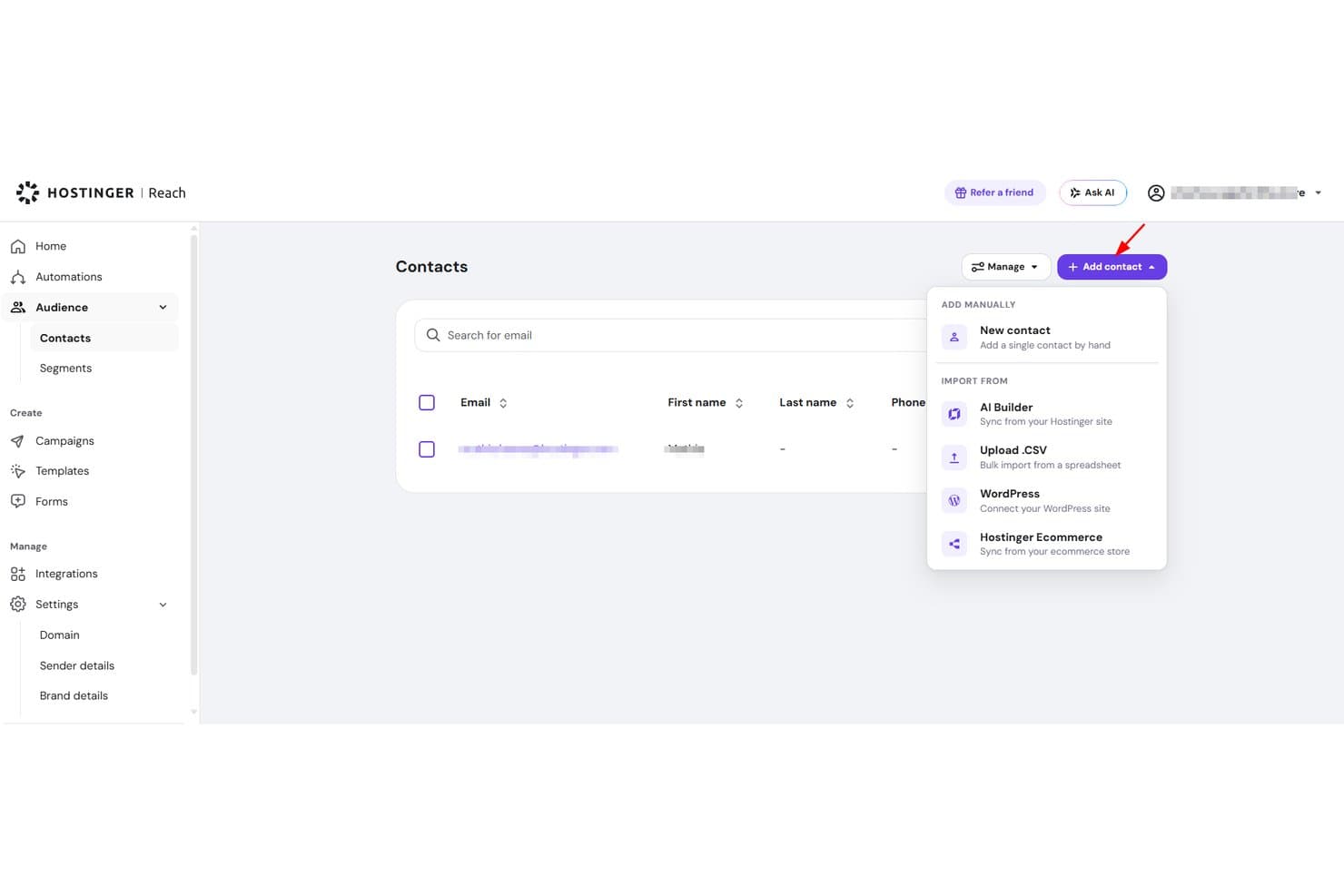
Hostinger Reach lets users import contacts via CSV, WordPress, or manually. Hostinger Reach is an AI-driven email marketing tool built into the Hostinger ecosystem, offering campaign creation, contact management, automation sequences, and basic performance analytics.
Who Is Hostinger Reach Best For?
Hostinger Reach is a natural fit for small business owners and solo marketers who already host their site with Hostinger and want email marketing without managing a separate tool.
Why I Picked Hostinger Reach
Hostinger Reach earns its spot on my shortlist because it's purpose-built for site owners already inside the Hostinger ecosystem. I love that it auto-syncs contacts from your WordPress site or Hostinger Website Builder, so you're not manually importing lists. The AI campaign builder turns a single prompt into a fully styled, on-brand email, and SPF, DKIM, and DMARC authentication are configured for you automatically.
Hostinger Reach Key Features
- AI subject line generator: Produces unlimited subject line options for any campaign so you can choose the strongest one before sending.
- Send-time optimization: Automatically identifies the best time to send each campaign based on recipient engagement data.
- Branded signup form builder: Lets you design and embed custom subscribe forms anywhere on your site without coding.
- Pre-built automation templates: Includes ready-to-use sequences for welcome emails, trust-building, and abandoned cart recovery.
Hostinger Reach Integrations
Hostinger Reach connects with Hostinger hosting, Hostinger Website Builder, and WordPress.
Pros and Cons
Pros:
- Unlimited contact storage
- Automatic sender authentication setup
- AI-generated campaigns from one prompt
Cons:
- Basic engagement reporting limits optimization
- Editor can scramble saved emails
Learn more about Hostinger Reach: Best for straightforward email automation
- Free plan available
- From $9/month (billed annually)
Visit WebsiteCustomer Rating:4.8/5
EmailOctopus’ campaign editor lets users customize email templates visually. EmailOctopus is an email marketing platform for small businesses that need a simple way to create, send, and track campaigns without extra marketing-suite complexity. It offers a drag-and-drop email builder, list management, segmentation, and automation workflows to help growing teams manage newsletters and subscriber engagement more efficiently.
Who Is EmailOctopus Best For?
EmailOctopus is a good fit for small business owners and early-stage startups who want an affordable, no-fuss email marketing tool without a steep learning curve.
Why I Picked EmailOctopus
I picked EmailOctopus because it gives small businesses a straightforward way to automate email follow-ups without adding unnecessary complexity. You can build automated sequences to welcome new subscribers, nurture leads, or re-engage contacts based on how they interact with your campaigns. I also like that its segmentation tools let you group contacts by custom fields, campaign activity, and signup form data, so your team can send more relevant emails. This makes EmailOctopus a good fit for small teams that want simple email automation, list management, and campaign tracking in one place.
EmailOctopus Key Features
Some other features in EmailOctopus help small businesses create, publish, and monitor email campaigns more easily:
- Drag-and-drop email editor: Build branded emails visually using customizable templates and content blocks.
- Signup forms and landing pages: Create embeddable forms, pop-ups, and hosted landing pages to capture new subscribers.
- Campaign scheduling: Schedule emails to send at a specific date and time.
- Reporting dashboard: Track campaign performance through metrics like opens, clicks, and unsubscribes.
EmailOctopus Integrations
Integrations include Zapier, WordPress, Little Stack, Leadpages, WooCommerce, Google Ads, Shopify, Memberful, Ticket Tailor, and Wix.
Pros and Cons
Pros:
- Built-in reports track campaign and automation email performance
- Segmentation targets subscribers by data, tags, and behavior
- Simple automation supports welcome, nurture, and birthday emails
Cons:
- Advanced automation options are limited for complex campaign workflows
- Template editing can feel restrictive for custom layouts
Learn more about EmailOctopus: Best for real-time data activation
- Free plan available
- From $20/month
Visit WebsiteCustomer Rating:4.6/5
Klaviyo customizes signup forms and flows using real-time data. Klaviyo offers a tailored email marketing solution for small businesses, focusing on enhancing customer engagement and driving growth. Designed for small to medium-sized enterprises, it integrates advanced marketing automation, AI-driven insights, and analytics to address the unique challenges of managing customer relationships and optimizing marketing strategies. By providing seamless data connectivity through numerous integrations, Klaviyo empowers businesses to personalize their marketing efforts and achieve measurable results.
Why I Picked Klaviyo
I picked Klaviyo for its unique ability to unify customer data and activate it in real-time, making it a standout choice for small businesses. The platform's marketing automation feature allows you to create personalized workflows that target customers based on their interactions with your brand. Additionally, Klaviyo's AI-driven insights provide actionable recommendations to refine your marketing campaigns. These features together ensure that your business can deliver tailored experiences that resonate with your audience and drive engagement.
Klaviyo Key Features
In addition to real-time data activation, Klaviyo offers:
- Advanced Analytics: Provides in-depth reporting tools to track campaign performance and customer behavior, helping you make data-driven decisions.
- Omnichannel Marketing: Supports communication across platforms such as email, SMS, and social media, ensuring consistent messaging.
- Segmentation: Allows you to categorize your audience based on specific criteria, enabling targeted and personalized marketing campaigns.
- Customizable Templates: Offers a wide range of mobile-optimized templates to create visually appealing emails aligned with your brand.
Klaviyo Integrations
Integrations include Shopify, BigCommerce, WooCommerce, Magento, Salesforce Commerce Cloud, Stripe, Facebook, Instagram, Google Ads, and Zendesk.
Pros and Cons
Pros:
- Real-time data activation enhances customer engagement
- Omnichannel capabilities support varied customer outreach
- Integration with numerous ecommerce platforms
Cons:
- Advanced tagging and organization less robust than some competitors
- Pricing may be high for growing businesses
Learn more about Klaviyo: Best for branded email templates
- Free plan + free trial available
- From $19/user/month (billed annually)
Visit WebsiteCustomer Rating:4.7/5
Flodesk helps create on-brand email campaigns with polished, visual templates. Flodesk is an email marketing solution built for small businesses that want consistent, on-brand emails without complexity. It stands out for its polished, branded email templates that make professional design accessible to both designers and non-designers. With built-in automation and subscriber segmentation, Flodesk helps small teams manage email campaigns efficiently while maintaining a strong visual identity.
Why I Picked Flodesk
I picked Flodesk for its strength in branded email templates, making it easy for small businesses to maintain a consistent visual identity. Its design-first approach, paired with Canva integration, lets you create polished, on-brand emails without design expertise. Flodesk also supports simple automations that handle subscriber journeys efficiently, helping you save time while keeping engagement high.
Flodesk Key Features
In addition to ibranded email templates, Flodesk offers:
- Custom Fonts: Allows you to use unique fonts that align with your brand's aesthetic, enhancing the personalization of your emails.
- Countdown Timers: Add urgency to your campaigns by embedding countdown timers in your emails, encouraging quicker customer action.
- Embedded Polls: Engage your audience by including interactive polls directly within your emails, gathering valuable customer feedback.
- Detailed Analytics: Provides insights into your email performance, helping you make informed decisions to optimize future campaigns.
Flodesk Integrations
Integrations include HoneyBook, BookFunnel, Canva, Shopify, Squarespace, ThriveCart, Wix, and Manychat.
Pros and Cons
Pros:
- Consistent branding across email campaigns with reusable template blocks
- Clean, distraction-free editor (less clutter, more focus on design)
- Fast setup for small or seasonal campaigns
Cons:
- Limited built-in CRM or contact-management functions
- Less control over code-level email customization
Learn more about Flodesk: Best for unlimited automation workflows
- Free plan available
- From $9/month
Visit WebsiteCustomer Rating:4.6/5
Sender’s automation dashboard lets users build and launch email workflows using ready-made templates and a visual editor. Sender is a versatile email marketing platform tailored for small businesses looking to enhance their marketing efforts without breaking the bank. It offers a user-friendly experience with its drag-and-drop email builder and a library of customizable templates, making it ideal for small business owners across industries like eCommerce, B2B, and nonprofits who need to connect with their audience effectively. By providing features like automation, segmentation, and SMS marketing, Sender addresses the challenge of reaching customers through multiple channels while maintaining high deliverability rates.
Why I Picked Sender
I picked Sender for its exceptional ability to cater to small business needs by offering unlimited automation workflows, which can significantly enhance your marketing efforts without requiring technical expertise. The platform's robust segmentation feature allows you to target specific customer groups with personalized content, ensuring your messages resonate with the right audience. Additionally, Sender's SMS marketing capability provides an extra channel to reach customers, making it a comprehensive tool for businesses looking to expand their reach and engagement.
Sender Key Features
In addition to its standout benefits, Sender offers other valuable features for small businesses:
- Real-Time Analytics: Offers detailed insights into campaign performance, helping you understand what works best for your audience.
- A/B Testing: Enables you to test different email variations to optimize open rates and conversions.
- Brand Auto-Styling: Automatically matches your email designs with your brand's style, ensuring consistency across all communications.
- GDPR Compliance: Ensures that your email marketing efforts adhere to data protection regulations, maintaining customer trust.
Sender Integrations
Integrations include WordPress, WooCommerce, Zapier, PrestaShop, Magento, OpenCart, Shopify, API for custom integrations, and more.
Pros and Cons
Pros:
- User-friendly drag-and-drop builder
- Built-in SMS marketing support
- Unlimited automation workflows included
Cons:
- No built-in landing page builder
- Subscriber limits on lower tiers
Learn more about Sender: Best for overall affordability
- 14-day free trial + free demo available
- From $10.80/month
Visit WebsiteCustomer Rating:4.7/5
MailerLite offers cost-effective email campaign management for resource-limited teams. MailerLite is an email marketing platform designed for small businesses seeking cost-effective solutions for their marketing needs. It's ideal for teams looking to manage email list campaigns without extensive resources.
Why I picked MailerLite: MailerLite is the go-to choice for businesses that prioritize affordability without compromising on essential email marketing features. It offers an intuitive drag-and-drop editor that simplifies email creation. The platform also provides automation tools to streamline digital marketing efforts all at a lower than average cost. Ultimately, the simplicity of MailerLite enables small teams to execute the best email marketing services efficiently while remaining budget conscious.
Standout features & integrations:
Features include an intuitive drag-and-drop editor that allows you to create emails quickly, automation tools to help manage your email sequences, and many templates to make your emails look professional.
Integrations include Shopify, WordPress, WooCommerce, Zapier, Stripe, Mailchimp, Squarespace, Facebook, and Slack.
Pros and Cons
Pros:
- Wide range of templates
- Suitable for small teams
- Simple email editor
Cons:
- Basic reporting tools
- Limited advanced features
 8Best for ecommerce processes
Kit
- 14-day free trial available
- From $33/month (billed annually)
Visit WebsiteCustomer Rating:4.5/5
Kit offers simple tools to create and manage email campaigns for brand growth. Kit is an email marketing tool designed for small businesses. It offers intuitive solutions for creating and managing email campaigns.
Why I picked Kit: Kit offers simplicity without sacrificing functionality. You can create and send visually appealing emails using pre-built templates that don’t require design skills, making it easy to get started quickly. The software’s automated features, like follow-up reminders, also ensure you stay connected with your audience at the right moments. Plus, it includes built-in performance tracking, giving insights into your emails' performance without complicated analytics.
Standout features & integrations:
Features include easy-to-use email templates that let you quickly build campaigns without design skills, automated follow-ups to keep your audience engaged, and detailed performance tracking that helps you understand how your emails are doing.
Integrations include Shopify, WooCommerce, BigCommerce, Mailchimp, Squarespace, Stripe, Facebook, Instagram, Google Analytics, and Klaviyo.
Pros and Cons
Pros:
- Scalable for growing businesses
- Allows direct HTML email editing
- Built-in content recommendations for growth
Cons:
- Basic A/B testing functionality
- Limited email template customization
Learn more about Kit:

Drip automates personalized emails to boost ecommerce customer engagement. Drip is a marketing automation platform for ecommerce businesses to enhance customer engagement and sales strategies. Ecommerce marketers use it to create personalized email campaigns and automate customer interactions.
Why I picked Drip: Drip’s focus on ecommerce makes it ideal for businesses aiming to connect with customers through personalized experiences. It offers advanced segmentation tools that enable you to target specific customer behaviors and preferences. The platform’s automation workflows also allow you to create complex sequences tailored to different purchase stages. Additionally, Drip provides insights into customer journeys, helping you optimize your marketing efforts and email deliverability rates.
Standout features & integrations:
Features include advanced segmentation tools that help you target customers based on their behavior, automation workflows for creating detailed customer journeys, and data insights into customer interactions, enabling you to refine your marketing strategies.
Integrations include Shopify, WooCommerce, Magento, BigCommerce, Facebook, Instagram, Zapier, Privy, Justuno, and Sumo.
Pros and Cons
Pros:
- Personalized customer interactions
- Supports complex workflows
- Detailed customer journey insights
Cons:
- Limited design flexibility
- Complexity for small teams
Learn more about Drip: 10Best for new email marketers
AWeber
- Free trial available
- From $12.50/month (billed annually)
Visit WebsiteCustomer Rating:4.3/5
AWeber helps entrepreneurs quickly manage and send email newsletters. AWeber is email marketing software for small businesses and entrepreneurs who want to manage their email campaigns easily. It's particularly beneficial for those new to email marketing, providing tools to create and send newsletters efficiently.
Why I picked AWeber: AWeber’s ideal for beginners thanks to its straightforward setup and intuitive interface. It offers easy-to-use templates and a drag-and-drop editor that simplifies the design process, while the autoresponder feature allows you to automate follow-up emails without hassle. Additionally, AWeber provides educational resources to help your team get the most out of the platform.
Standout features & integrations:
Features include an easy-to-use drag-and-drop email builder that helps you design emails quickly, autoresponders to automate your email sequences, and a range of templates to make your emails look professional with minimal effort.
Integrations include WordPress, Shopify, PayPal, Facebook, Etsy, WooCommerce, Zapier, Salesforce, Leadpages, and OptinMonster.
Pros and Cons
Pros:
- Straightforward email automation
- Helpful educational resources
- Simple setup process
Cons:
- Basic reporting tools
- Limited advanced features
Other Email Marketing Software for Small Businesses
Here are some additional email marketing software for small businesses that didn’t make it onto my shortlist but are still worth checking out:
- 11ActiveCampaignBest for email automation
- 12Benchmark EmailBest for global reach
- 13Campaign MonitorBest for design customization
- 14Elastic EmailBest for AI-powered email design
- 15Constant ContactBest for event promotion
- 16GetResponseBest for webinars
- 17MailchimpBest for small teams
- 18BrevoBest for transactional emails
- 19HubSpot Email MarketingBest for CRM integration
- 20SendGridBest for high-volume sending
How I Evaluate Email Marketing Software for Small Business
I look at two layers: whether a tool clears a baseline—drag-and-drop builders, list segmentation, automation—then what makes it the right fit for a small business specifically.
Core Functionality (Table Stakes For This List)
When I'm selecting tools for my list, I rank each one on a scale from 0 (does not offer the functionality) to 5 (excels in this area) for each core functionality listed below. Then, I calculate the tool's total score into a percentage. Each tool needs to achieve a minimum total score of 65% to be considered for inclusion.
- Email Campaign Builder: I evaluate whether the editor lets you drag in product blocks, adjust layouts for mobile, and preview before sending—without touching HTML.
- Contact List Management: Segmentation depth matters here. I look for the ability to tag contacts by purchase behavior, engagement level, or signup source.
- Marketing Automation: I check for multi-step workflow support—things like a post-purchase drip that branches based on whether a customer opened the first email.
- Performance Analytics: Beyond open and click rates, I look for revenue attribution and campaign comparisons that help you tie a specific send to actual sales.
- Deliverability & Compliance: SPF/DKIM authentication, double opt-in options, and built-in consent management for GDPR and CAN-SPAM are what I evaluate here.
- SMB-Friendly Pricing & Scale: I check whether entry-level tiers match realistic small business list sizes and whether pricing scales predictably as contacts grow.
Once I have a list of tools that meet the criteria, I consider what sets each platform apart.
Differentiating Factors (What Sets Vendors Apart)
Here's how I compare and contrast different vendors:
Standout Features
Prebuilt automation templates are a major differentiator. A solo marketer who can launch an abandoned cart or re-engagement series in minutes—rather than mapping it from scratch—gets real value fast. I also evaluate native ecommerce integrations with platforms like Shopify or WooCommerce, where product syncing and per-campaign revenue tracking can shape smarter sends. Built-in landing pages and signup forms matter too, since they let you grow your list without paying for a separate tool.
Beyond Features
Pricing transparency matters a lot for small businesses. I check whether a platform's tiers scale predictably with list growth or surprise you with overage fees after a big campaign. Tech stack compatibility is another key factor—if your store runs on WooCommerce and your CRM is HubSpot, I evaluate how well each platform connects without relying entirely on Zapier. Deliverability reputation rounds things out. A great campaign means nothing if it lands in spam, so I look at sender reputation tools and inbox placement track records.
How to Choose Email Marketing Software for Small Businesses
It’s easy to get bogged down in long feature lists and complex pricing structures. To help you stay focused as you work through your unique software selection process, here’s a checklist of factors to keep in mind:
| Factor | What to Consider |
| Scalability | Will the software grow with your business? |
| Integrations | Does it connect with your existing tools? |
| Customizability | Can you tailor it to fit your brand’s needs? |
| Ease of Use | Is it straightforward for your team to use? |
| Budget | Does it fit within your financial constraints? |
| Security Safeguards | Does it offer protection for your data and communications? |
| Analytics | Does it provide insights that help you make informed decisions? |
| Customer Support | Is there reliable support available when you need it? |
Trends In Email Marketing Software for Small Businesses
In my research, I sourced countless product updates, press releases, and release logs from different email marketing software for small business vendors. Here are some of the emerging trends I’m keeping an eye on:
- AI-Driven Personalization: AI is being used to create more personalized email experiences. It analyzes user behavior to suggest content and send times, making emails more relevant. Vendors like Mailchimp are using AI to offer customized product recommendations.
- Interactive Email Content: Emails are becoming more interactive with elements like polls, surveys, and carousels. These features keep recipients engaged and provide valuable insights. Moosend, for instance, allows users to embed surveys directly into emails.
- Advanced Analytics and Reporting: Businesses want more profound insights into email performance, and advanced analytics tools provide detailed reports on user engagement. Platforms like GetResponse offer features that track subscriber interactions and predict future behavior.
- Privacy and Data Protection: With increasing data regulations, email marketing tools focus on privacy features. As a result, GDPR compliance and data encryption are becoming standard.
- Voice-Activated Email Interactions: As smart speakers and voice assistants grow, voice-activated email interactions emerge. This trend allows users to manage emails through voice commands, enhancing accessibility. While still in the early stages, vendors are exploring integrations with devices like Amazon Alexa.
What Is Email Marketing Software for Small Businesses?
Email marketing software for small businesses helps growing companies create, send, and track email campaigns efficiently. Marketing professionals and small business owners use these tools to reach their audience and enhance customer engagement.
Features like email templates, automation, and analytics support targeted campaigns and improve engagement insights. These tools provide small businesses with an affordable way to connect with customers and grow their reach.
Features of Email Marketing Software for Small Businesses
When selecting email marketing software for small business, keep an eye out for the following key features:
- Email Templates: Pre-designed layouts that make it easy to create professional-looking emails quickly.
- Automation Tools: Set up drip marketing sequences, newsletter email and follow-ups without manual intervention, saving time and effort.
- Analytics and Reporting: Track and analyze email performance to understand engagement and improve future campaigns.
- Segmentation Options: Target specific groups within your audience to send personalized and relevant content.
- Personalization Capabilities: Customize emails with recipient-specific details to increase engagement.
- Multilingual Support: Reach a global audience by creating emails in multiple languages.
- Geolocation Tracking: Tailor content to specific regions, enhancing relevance and connection with audiences.
- A/B Testing: Experiment with different email elements to determine what resonates best with your audience.
- CRM Integration: Manage customer relationships alongside email campaigns to unify marketing and sales efforts.
Benefits of Email Marketing Software for Small Businesses
Implementing email marketing software for small businesses benefits your team and your business. Here are a few you can look forward to:
- Improved Engagement: Personalization capabilities and segmentation options help deliver relevant content to your audience, increasing interaction.
- Time Savings: Automation tools handle repetitive tasks like follow-ups and sequences, freeing up your team for other priorities.
- Better Insights: Analytics and reporting features offer in-depth information about campaign performance, helping you refine strategies.
- Global Reach: Multilingual support and geolocation tracking allow you to connect with audiences worldwide and tailor content to their language and location.
- Cost-Effective Marketing: Email marketing provides a budget-friendly way to reach a large audience compared to other channels.
- Enhanced targeting: A/B testing lets you refine email elements, ensuring your messages resonate with your audience.
- Integrated Customer Management: CRM integration allows seamless management of customer relationships, aligning marketing efforts with sales goals.
Costs and Pricing of Email Marketing Software for Small Businesses
Selecting email marketing software for small businesses requires understanding the various pricing models and paid plans available. Consider exploring open source alternatives which can significantly reduce costs while providing robust functionality. Costs vary based on features, team size, add-ons, and more. The table below summarizes standard plans, their average prices, and typical features included in email marketing software for small business solutions:
Plan Comparison Table for Email Marketing Software for Small Businesses
| Plan Type | Average Price | Common Features |
| Free Plan | $0 | Basic free email templates, limited automation, and basic reporting. |
| Personal Plan | $10-$25/user/month | Customizable templates, basic automation, and standard analytics. |
| Business Plan | $30-$75/user/month | Advanced automation, A/B testing, and enhanced analytics. |
| Enterprise Plan | $100-$200/user/month | Custom features, dedicated support, and full CRM integration. |
Email Marketing Software for Small Businesses FAQs
Here are some answers to common questions about email marketing software for small businesses:
Does email marketing work for small businesses?
Yes, email services are effective for small businesses. It helps you sell to prospects, boost referrals, and re-engage customers who have not purchased. Creating relevant and targeted email content increases the chances of the reader taking action, making email marketing a cost-effective strategy for growing your business. Tools like video email marketing software can enhance these efforts further, whether you’re sending welcome emails, transactional updates, or abandoned cart reminders, by adding a visual, engaging layer to your messaging.
How effective are email marketing campaigns?
Email marketing campaigns are highly effective, mainly when contact lists are segmented. Segmented emails can drive significantly more opens and click-throughs than unsegmented ones. Regularly sending emails as part of a drip campaign and personalizing content helps keep engagement high. Most marketers report increased engagement over the past year.
How do I set up email marketing for my small business?
Start by choosing an email marketing solution that fits your needs. Set up automated campaigns to save time and effort. Understand your subscribers and segment them for targeted messaging. Use email testing software to verify your contact list. Monitor analytics to track email performance and conduct A/B testing to optimize your subject line and content.
How do I measure the success of my email marketing campaigns?
Track key metrics like open rates, click-through rates, conversion rates, and unsubscribes. Use analytics tools provided by your email marketing company to monitor these metrics. Regularly review and adjust your strategy based on the insights you gather to ensure ongoing success.