

10 Best AI Marketing Tools Reviewed in 2026

Best AI Marketing Tools Shortlist


The best AI marketing tools help marketing teams build pipeline faster, personalize campaigns at scale, predict customer behavior, and automate repetitive tasks like reporting and content creation.
If you’re running marketing, you’re likely facing at least one of these problems right now:
- You’re under pressure to drive growth with fewer resources.
- Your team spends hours manually building segments, writing copy, or pulling performance reports.
- Your data is siloed across CRM, analytics, and ad platforms making personalization and attribution feel impossible.
That’s why choosing the right AI marketing software matters. I’ve spent over 300 hours testing AI marketing platforms firsthand, running real campaigns, feeding actual CRM data into predictive models, and benchmarking content tools against human writers. I've used my decade-long experience as a marketing leader to make sure these recommendations fit the needs of today's marketing teams.
This guide distills all of that into a list of the top AI marketing tools you should consider. These tools will help you improve outcomes like lowering CAC, improving lead quality, accelerating sales cycles, and scaling content production. Let's dive in.
Why Trust Our Software Reviews
We’ve been testing and reviewing marketing software since 2022. As marketing experts ourselves, we know how critical and difficult it is to make the right decision when selecting software.
We invest in deep research to help our audience make better software purchasing decisions. We’ve tested more than 2,000 tools for different marketing use cases and written over 1,000 comprehensive software reviews. Learn how we stay transparent & our software review methodology.
AI Marketing Tools Comparison Table
This comparison table summarizes pricing details for my top AI marketing software selections:
| Tool | Best For | Trial Info | Price | ||
|---|---|---|---|---|---|
| 1 | Best for customizable AI-powered workflows | 14-day free trial | From $9/user/month (billed annually) | Website | |
| 2 | Best for AI-driven audience segmentation | Free demo available | From $40/user/month (minimum of 5 users) | Website | |
| 3 | Best for analyzing competitor campaigns | Free plan + free demo available | From $23.2/month (billed annually) | Website | |
| 4 | Best for AI-powered project & marketing automation | 14-day free trial + free plan available | From $10/user/month (billed annually) | Website | |
| 5 | Best for AI-driven customer service | 7-day free trial + free plan available | From $24.17/month (billed annually) | Website | |
| 6 | Best with enterprise-grade security and privacy | 7-day free trial + free plan + free demo available | From $32/month (billed annually) | Website | |
| 7 | Best for influencer campaign management | 7-day free trial | From $49/month/brand | Website | |
| 8 | Best for chat-based data queries | Free plan available | From $16/month (billed annually) | Website | |
| 9 | Best for optimizing content strategy | Free plan available | Pricing upon request | Website | |
| 10 | Best for tracking content performance | Free trial available | From $199/month (billed annually) | Website |


Best AI Marketing Tools Reviews
Below are my detailed summaries of the best AI marketing tools that made it onto my shortlist. My reviews offer a detailed look at the key features, pros & cons, integrations, and ideal use cases of each tool to help you find the best one for you.

Best for customizable AI-powered workflows
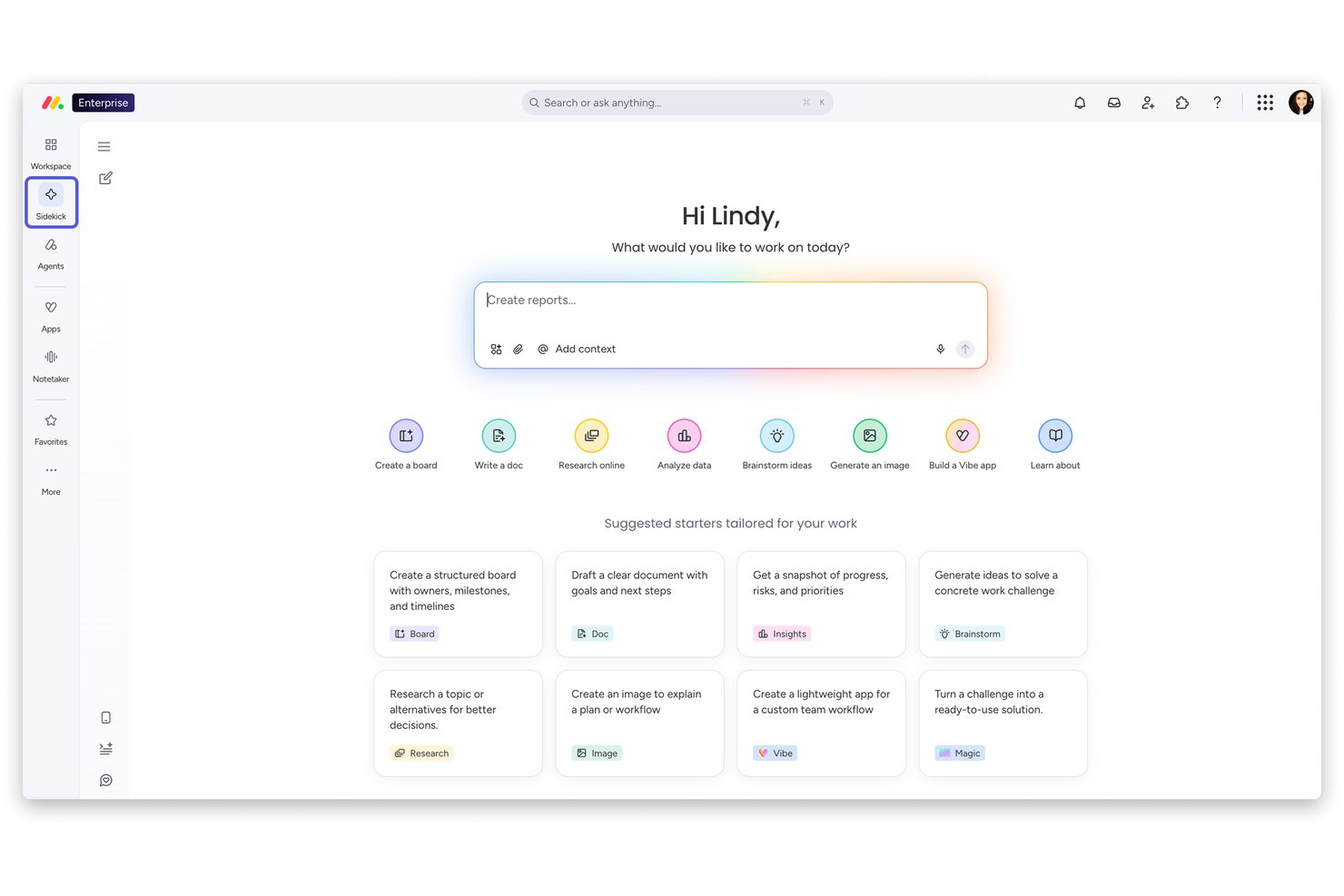
monday AI Workspace is an AI-powered work management platform that combines agentic AI automation, customizable workflow building, campaign planning, and CRM-connected email marketing tools in one connected workspace.
Who Is monday AI Workspace Best For?
It's a strong fit for mid-size to enterprise marketing and operations teams that need flexible, AI-driven workflows spanning multiple functions and departments.
Why I Picked monday AI Workspace
monday AI Workspace earns its spot on my shortlist because of how deeply customizable its AI layer is. The AI Workflow Builder lets my team map multi-step marketing workflows and hand them off to specialized AI agents for autonomous execution. I also like how monday campaigns uses CRM data to suggest audience segments and trigger personalized email sends directly from customer actions.
monday AI Workspace Key Features
- AI meeting notetaker: Instantly summarizes meetings and extracts action items for follow-up.
- Vibe app builder: Lets teams create and launch custom marketing apps in minutes using AI.
- AI columns: Embeds AI directly into boards to automate repetitive marketing tasks and text outputs.
- Advanced permission controls: Offers multi-level permissions to manage access across large, multi-team organizations.
monday AI Workspace Integrations
monday AI Workspace offers native integrations with Slack, Gmail, Google Drive, Trello, Zoom, GitHub, Excel, and Aircall. It also connects with Zapier and provides an API for custom integrations.
Pros and Cons
Pros:
- AI-powered campaign planning tied to CRM data
- Workflow builder supports unique marketing processes
- Custom AI agents for multistep workflow automation
Cons:
- Lacks advanced marketing attribution analytics
- No image, video, or social content generation
New Product Updates from monday AI Workspace
monday AI Workspace Adds Human Approval Routing
monday AI Workspace adds a human-in-the-loop approval block to AI Workflows, sending approval requests and routing workflow paths based on responses. For more information, visit monday AI Workspace's official site.
 .
.
Best for AI-driven audience segmentation

Creatio CRM is a marketing automation platform that combines AI-powered audience segmentation, campaign management, predictive analytics, and omnichannel marketing tools for marketing teams.
Who Is Creatio CRM Best For?
Creatio CRM is a strong fit for mid-size to enterprise marketing teams that need AI-driven segmentation and automation across complex, multi-channel campaigns.
Why I Picked Creatio CRM
I've included Creatio CRM in my top picks because of how its AI-driven audience segmentation works in practice. The platform autonomously builds and continuously updates audience segments based on behavior, intent, and lifecycle stage—without manual data work from your team. I like that this isn't a one-time segmentation exercise; the segments evolve as customer signals change. The Lead Scoring Agent captures and qualifies leads in real time, letting my team prioritize outreach based on who's ready to convert rather than guessing.
Creatio CRM Key Features
- Campaign Agent: An AI agent that autonomously builds, coordinates, and measures multi-channel campaigns across email, SMS, and digital ads in real time.
- Marketing Content Agent: Generates and personalizes content for each audience segment, channel, and journey stage, continuously adapting based on what resonates.
- Event management automation: AI agents handle invitations, registrations, reminders, and follow-ups for events to track attendee engagement and ROI.
- No-code workflow configuration: Build and modify marketing workflows, pages, and data models without writing code using Creatio's visual no-code designer.
Creatio CRM Integrations
Creatio CRM offers native integrations with Salesforce, Microsoft 365, Google Workspace, Mailchimp, Zendesk, DocuSign, Twilio, Facebook, LinkedIn, and Slack. An API is available for custom integrations.
Pros and Cons
Pros:
- A scalable solution for various business processes
- Extensive customization options
- No-code platform for non-technical users
Cons:
- Configuring the platform can be time-consuming
- Learning curve for new users
New Product Updates from Creatio CRM

Creatio CRM Expands AI Across Marketing and Collaboration
Creatio CRM introduces AI-assisted landing page generation, template-based email generation, RAG-enabled knowledge governance, a Microsoft Teams personal tab, and AI meeting summaries. These updates help teams create content faster and streamline AI-powered workflows. For more information, visit Creatio’s official site.
 .
.
CrafterQ
Best for analyzing competitor campaigns
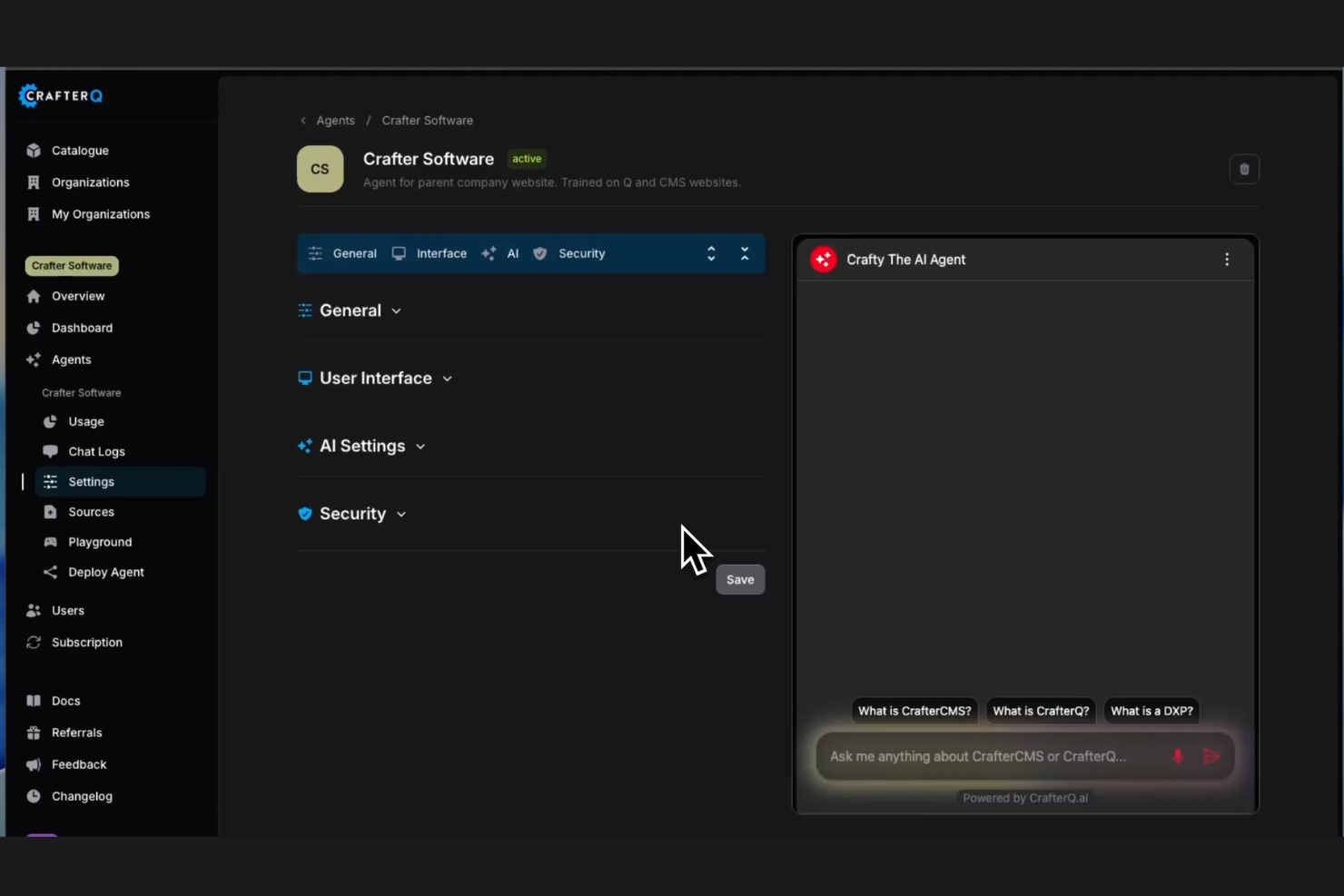
CrafterQ is an AI agent platform for websites that lets you deploy conversational agents trained on your own content to handle lead capture, sales conversations, and customer support.
Who Is CrafterQ Best For?
CrafterQ is a good fit for small to mid-sized businesses that want to add AI-powered chat agents to their website without writing any code.
Why I Picked CrafterQ
I've included CrafterQ in my top picks because its conversation analytics give me a clear window into how visitors engage with my site, which I use to identify gaps competitors may be missing in their own messaging. I like that every chat interaction is logged and reviewable, so I can spot recurring questions or objections that reveal what my market actually cares about. That kind of firsthand signal is hard to replicate with traditional campaign monitoring tools.
CrafterQ Key Features
- Custom AI agent training: Train your agent directly on your website content, help docs, or uploaded files so it responds with accurate, brand-specific answers.
- Lead capture forms: Embed lead capture prompts within chat conversations to collect visitor contact details without redirecting users to a separate form.
- No-code deployment: Add your AI agent to any website, including WordPress and Shopify, by pasting a single script tag.
- Multi-agent support: Create and manage multiple AI agents, each trained on different content sets, for different pages or use cases on your site.
CrafterQ Integrations
Integrations include Temenos, FIS, Salesforce, Microsoft Dynamics, HubSpot, Stripe, PayPal, QuickBooks, WordPress, and Zendesk.
Pros and Cons
Pros:
- No-code setup across major platforms
- Real-time visitor intent capture built in
- Agents train on your own content
Cons:
- No native offline desktop app
- Limited to website-based conversations only

Wrike
Best for AI-powered project & marketing automation

Wrike is a project and marketing management platform that combines AI-driven work intelligence, campaign planning, workflow automation, and collaboration tools for marketing teams.
Who Is Wrike Best For?
Wrike is a strong fit for mid-size to enterprise marketing teams that manage complex, multi-channel campaigns and need structured project oversight alongside automation.
Why I Picked Wrike
I picked Wrike as one of the best because of how deeply AI is embedded into the actual work—not just bolted on as a side feature. Wrike Copilot lets my team ask natural-language questions about project status, surface risks, and generate dashboard widgets without touching a single report manually. I also rely on Wrike's AI agents to handle intake triage: when a campaign brief comes in, agents parse the submission, populate custom fields, and score the request automatically. For marketing teams running high volumes of creative requests, automated intake alone saves hours every week.
Wrike Key Features
- Dynamic request forms: Build conditional intake forms that automatically route incoming campaign requests to the right team members based on responses.
- Proofing and approvals: Review and annotate creative assets directly in Wrike, then route them to internal or external approvers without leaving the platform.
- Gantt charts: Map out campaign timelines with interactive Gantt charts that show task dependencies and let you adjust schedules by dragging and dropping.
- Custom dashboards: Build real-time dashboards that pull live data from active projects, giving your team instant visibility into campaign status across multiple workstreams.
Wrike Integrations
Wrike offers hundreds of integrations through its marketplace and built-in connectors, including tools like Google Workspace, Microsoft 365, Salesforce, Slack, Adobe Creative Cloud, Box, Dropbox, Jira, GitHub, and Zoom. It also supports Zapier and provides an API for custom integrations.
Pros and Cons
Pros:
- Individuals and teams can track workloads
- Easily visualize workflow performance
- In-app chat to reduce switch cost for collaboration
Cons:
- Limited to 10 workflows per space
- Not suitable for small organizations
New Product Updates from Wrike

Wrike Inbox Adds Search and Notification Filters
Wrike Inbox adds search across Incoming, Sent, and Archive, along with filters for Approvals and @mentions. The update helps users find specific notifications faster and apply bulk actions only to matched results. For more information, visit Wrike’s official site.
 .
.
Tidio
Best for AI-driven customer service

Tidio is an AI marketing platform that combines live chat, AI-powered chatbots, and automation tools to help businesses manage customer conversations and capture leads across digital channels.
Who Is Tidio Best For?
Tidio is a strong fit for small to mid-sized ecommerce businesses that need AI-driven customer service tools to handle high volumes of visitor interactions without a large support team.
Why I Picked Tidio
Tidio earns its spot as one of the best on my shortlist because of how its Lyro AI Agent handles AI-driven customer service without the hallucination problem that plagues most AI tools. Lyro is trained exclusively on your own support content and powered by Claude (Anthropic AI), which means it only answers questions it actually knows the answer to—and escalates to a human when it doesn't. I also like Lyro Smart Actions, which lets the AI go beyond answering questions to completing tasks like order status lookups and lead qualification without any human involvement. Tidio's Flows builder gives you a no-code way to set up trigger-based automation paths that engage visitors at key moments in the customer journey, like cart abandonment or exit intent.
Tidio Key Features
- Multilanguage support: Lyro AI Agent detects and responds to customers in dozens of languages, including Spanish, French, Portuguese, and German, based on your existing support content.
- Live visitor list: See all active website visitors and the pages they're browsing in real time, so you can proactively start conversations based on their on-site behavior.
- Pre-chat survey: Collect visitor contact details before a chat begins, giving your team context before the conversation starts.
- Analytics dashboard: Track conversation metrics, operator performance, channel performance, and Flows results across your support and marketing activity.
Tidio Integrations
Tidio offers native integrations with Shopify, WordPress, Wix, BigCommerce, Mailchimp, HubSpot, Zendesk, Messenger, Instagram, and Google Analytics. It also connects with Zapier and provides an API for custom integrations.
Pros and Cons
Pros:
- Real-time visitor behavior tracking
- Easy chatbot and flow customization
- Multichannel communication in one place
Cons:
- Extra chat fees may add up
- AI tools limited on lower plans
New Product Updates from Tidio

Tidio Expands Lyro AI Across Email and Chat
Tidio expands Lyro AI to email ticketing and enhances its chatbot with Claude 3.0 integration. These updates improve automation across support channels and enhance AI-driven interactions. For more information, visit Tidio’s official site.
 .
.
Chatbase
Best with enterprise-grade security and privacy
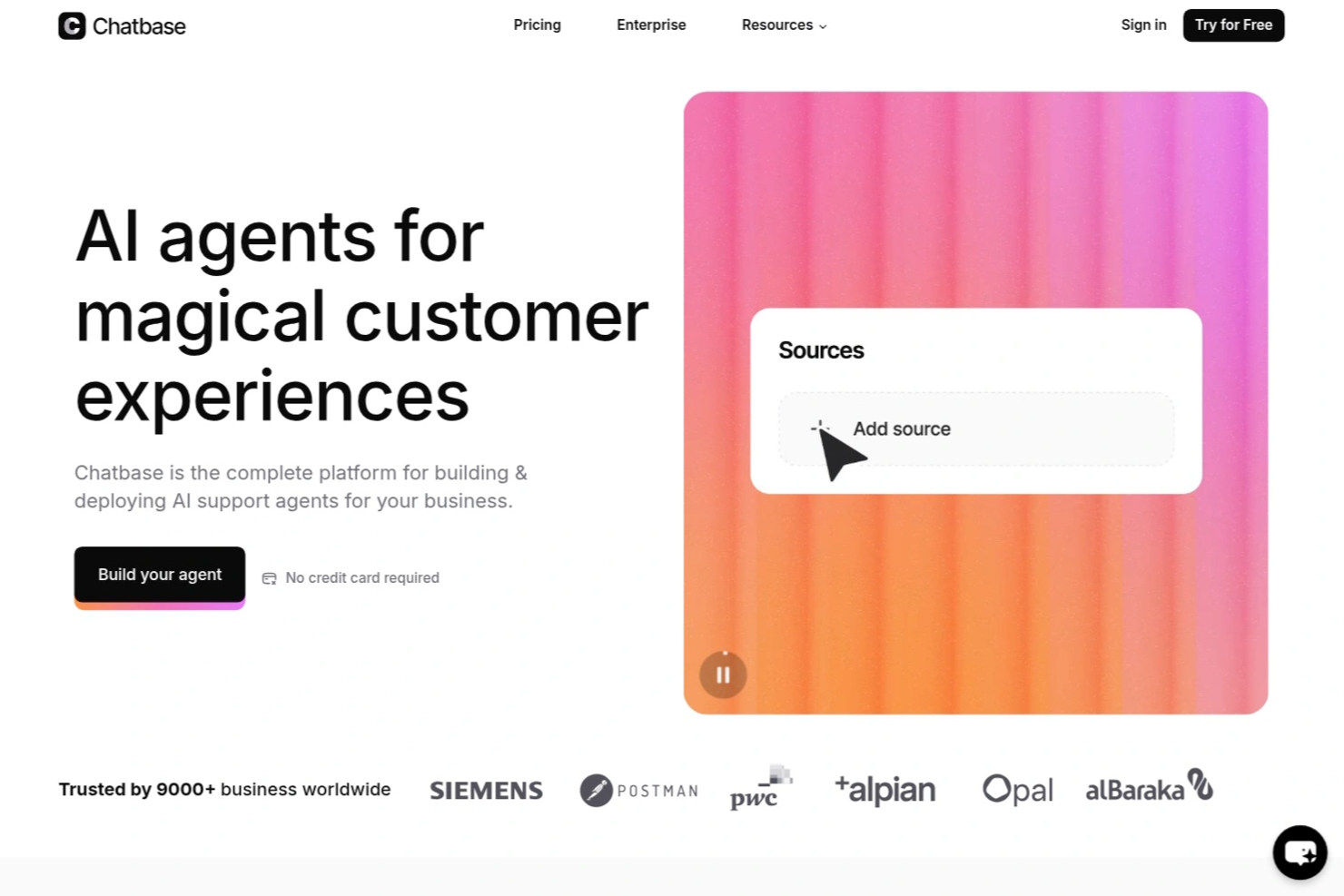
Chatbase is an AI chatbot platform for marketing teams that lets you build, deploy, and manage custom chatbots with natural language processing, multilingual support, and integration options for websites and business systems.
Who Is Chatbase Best For?
Chatbase is a good fit for marketing and customer support teams at mid-sized to large businesses looking to automate conversations across multiple channels.
Why I Picked Chatbase
I picked Chatbase as one of the best because I need enterprise-grade security and privacy for handling sensitive customer data in marketing campaigns. I like that Chatbase offers advanced data encryption and compliance features, including SOC 2 and GDPR support. My team is able to set granular access controls and audit logs, which helps us meet strict internal security requirements.
Chatbase Key Features
- AI chatbot builder: Build and customize chatbots using a visual interface and natural language processing.
- Multilingual support: Deploy chatbots that can interact with users in multiple languages.
- API and webhook integration: Connect chatbots to your business systems and automate workflows.
- Analytics dashboard: Track chatbot interactions, user engagement, and performance metrics in real time.
Chatbase Integrations
Chatbase offers native integrations with Zendesk, Notion, Slack, Stripe, Salesforce, Cal.com, Calendly, WhatsApp, and Messenger. It also connects with Make and Zapier, and provides an API for custom integrations.
Pros and Cons
Pros:
- Free-forever plan available with basic features
- Visual flow builder for chatbot design
- Offers custom API calls and webhooks
Cons:
- Lacks native integration with HubSpot
- No built-in A/B testing for chatbot flows
Meerkads
Best for influencer campaign management
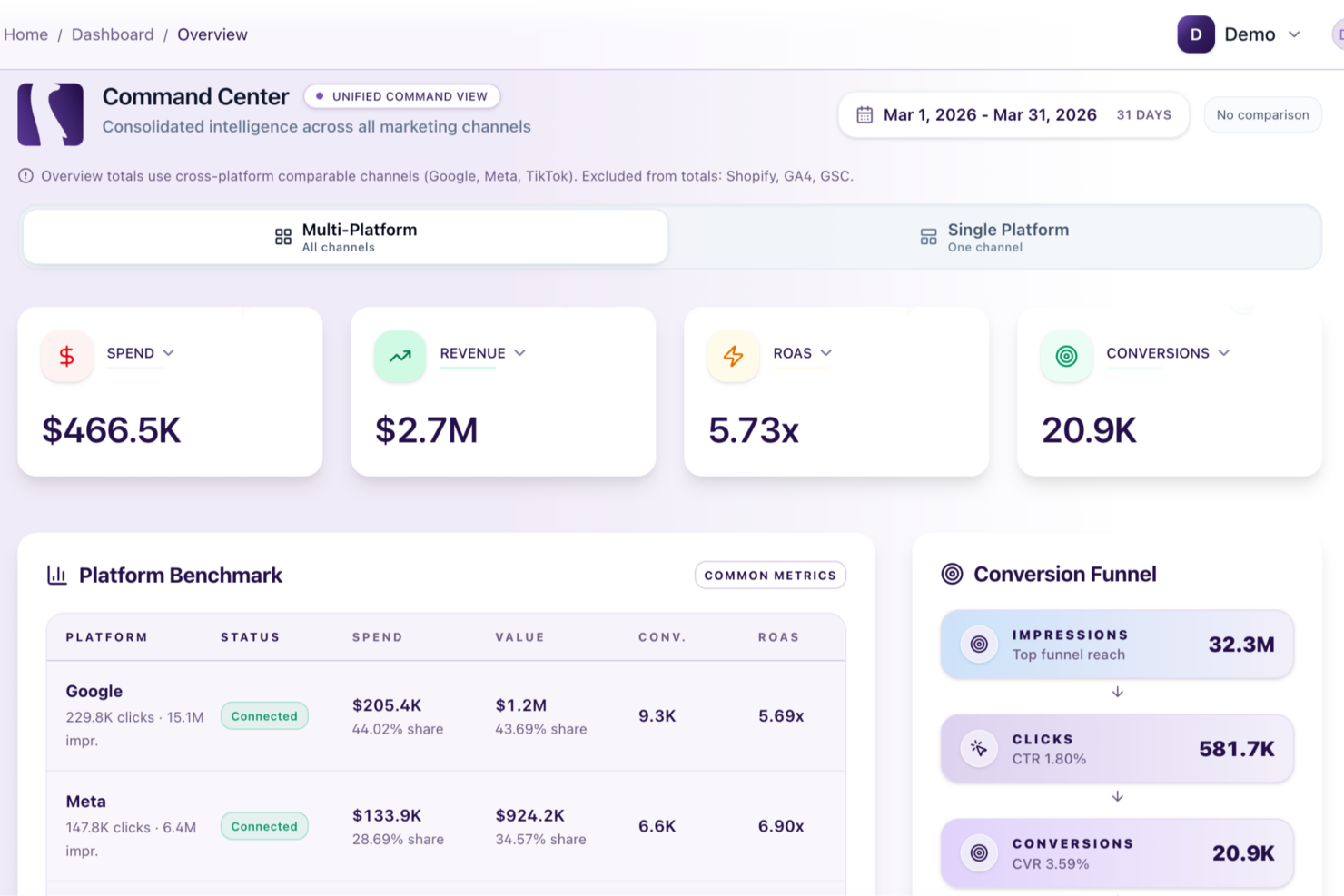
Meerkads is an AI-powered performance marketing platform that connects your Google Ads, Meta Ads, TikTok Ads, and ecommerce data to deliver cross-channel analysis, AI-driven optimization, creative generation, and automated budget recommendations.
Who Is Meerkads Best For?
Meerkads is a good fit for performance marketers and growth-focused teams running paid campaigns across multiple ad platforms who need AI-driven insights in one place.
Why I Picked Meerkads
I've included Meerkads in my top picks because its always-on campaign monitoring and AI-driven automation rules take a lot of the manual load off paid media management. The platform continuously watches your campaigns across Google, Meta, and TikTok, flags issues before they compound, and lets you set automation rules and alerts so your accounts stay optimized without constant check-ins. I also like the one-click AI ad strategy setup on the Hunter plan, which lets you get a full campaign configuration in place without building it manually from scratch.
Meerkads Key Features
- AI ad copy and image generation: Generate ad text and visuals directly within the platform using built-in AI creative tools.
- Creative fatigue detection: Identify underperforming creatives before they drain budget by tracking performance degradation over time.
- Product-level ROAS tracking: Connect your Shopify store to see return on ad spend broken down by individual products, not just campaigns.
- AI budget optimization recommendations: Receive data-driven suggestions for reallocating spend across channels based on performance signals.
Meerkads Integrations
Meerkads currently offers 6 native integrations, including Google Ads, Meta Ads, TikTok Ads, Google Analytics 4, Google Search Console, and Shopify. Additional integrations with Amazon, Pinterest Ads, Klaviyo, Omnisend, WooCommerce, and others are planned for later in 2026. Zapier support and a public API are not clearly documented.
Pros and Cons
Pros:
- Creative fatigue detection flags underperforming ads
- True ROAS accounts for returns
- AI-generated ad creatives save production time
Cons:
- Hunter plan features still under development
- Limited to paid ad channel data

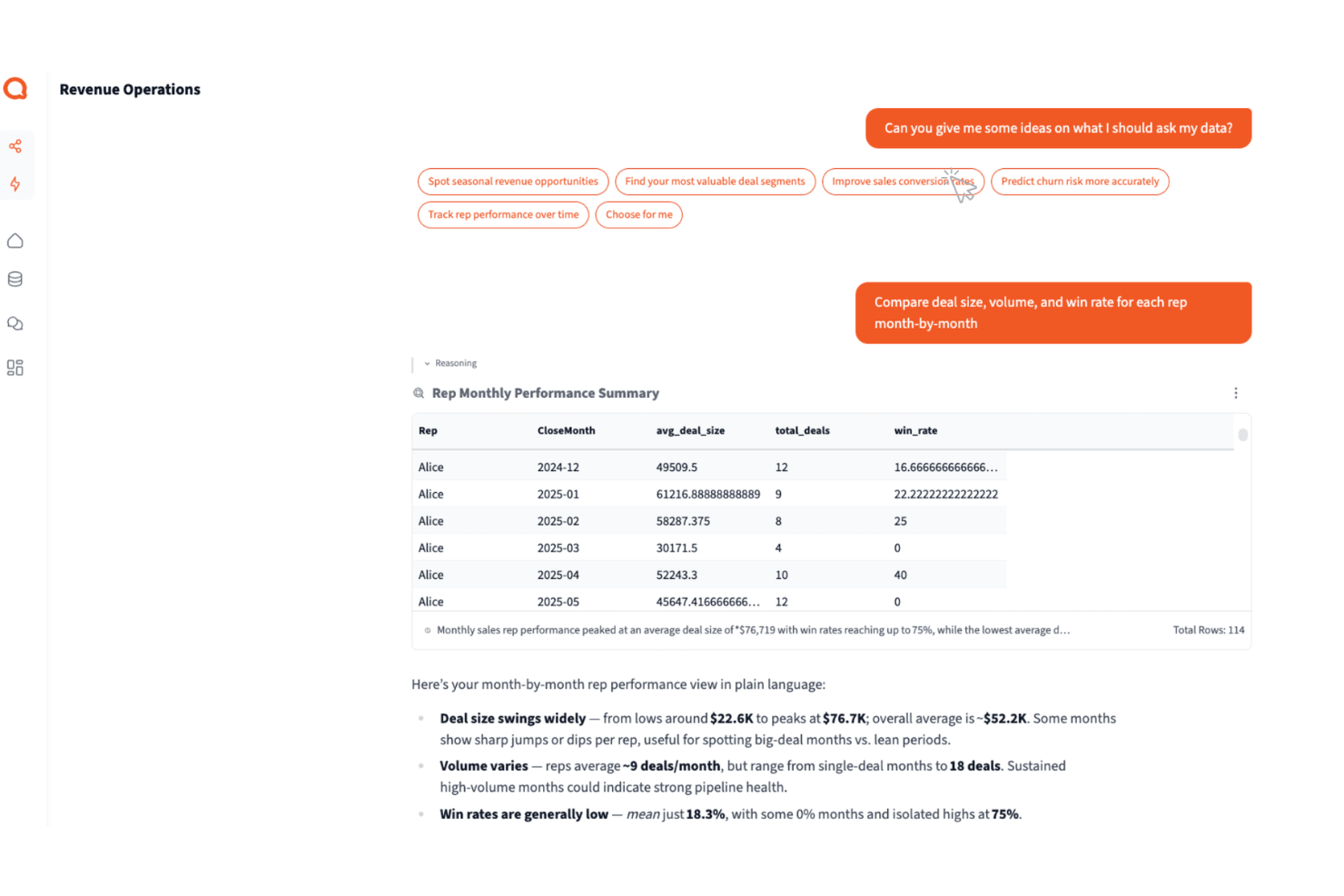
Querri is an AI-powered data query platform for marketing teams that need to access and analyze data using a conversational chat interface.
Who Is Querri Best For?
Querri is a good fit for marketing analysts and data-driven teams who need to query and explore data without relying on SQL or technical support.
Why I Picked Querri
Querri earns its spot on my shortlist because its chat-based query experience is genuinely built around how marketers actually think. I ask questions in plain English—like "which campaigns drove the most pipeline last quarter"—and Querri's agentic AI plans and executes the multi-step analysis. It derives new metrics on the fly, so I'm not limited to pre-defined measures set up in advance. It also maintains context across 30 conversation turns, which means I can dig deeper into a line of questioning without starting over.
Querri Key Features
- AI-suggested follow-up questions: As you explore your data in chat, Querri surfaces follow-up questions and deeper areas to investigate automatically.
- Drag-and-drop dashboard builder: Build interactive charts, tables, and rich text widgets from your chat analysis and arrange them with drag-and-drop in minutes.
- Automated dashboard refresh: Set dashboards to update on daily, weekly, monthly, or custom schedules so your team always works from current data.
- AI-powered data cleansing: Querri automatically cleans, deduplicates, and standardizes messy data as part of your natural language requests before analysis begins.
Querri Integrations
Querri offers native integrations with Google Sheets, PostgreSQL, MySQL, Snowflake, and BigQuery, and an API for custom integrations.
Pros and Cons
Pros:
- Ask questions in plain English instead of writing SQL queries
- Quickly retrieves insights from connected marketing and CRM data sources
- Chat-based queries make data exploration accessible for non-technical marketers
Cons:
- Query responses occasionally fail or return delayed results during analysis
- Limited number of native data source connectors for marketing platforms

Best for optimizing content strategy

MarketMuse is an AI-powered content research and optimization platform that helps marketing teams analyze topics, audit content, and generate detailed content briefs for SEO and strategy.
Who Is MarketMuse Best For?
MarketMuse is a good fit for content marketing teams and SEO professionals at mid-size to enterprise companies managing large-scale content programs.
Why I Picked MarketMuse
MarketMuse earns its spot as one of the best on my shortlist because of how it approaches content strategy with personalized, AI-driven data rather than generic keyword metrics. I particularly like the personalized difficulty scoring, which factors in your domain's existing topical authority to show which topics are actually worth pursuing. The automated content inventory is another feature I rely on—it continuously tracks your site's content performance, flags content decay, and surfaces quick wins without any manual crawling. Combined with the AI-generated content plans that map out what to create or update across full topic clusters, it's a genuinely data-driven way to build and maintain a content strategy.
MarketMuse Key Features
- Content briefs: Generate detailed, research-backed briefs that include related topics, questions to answer, linking suggestions, and structural guidance for writers.
- SERP heatmap: Visualize topic coverage across the top 20 ranking pages to quickly spot content gaps and identify must-have elements for competitive content.
- Content scoring: Get a real-time content score that measures topical depth and comprehensiveness as you write or review existing pages.
- Competitor cluster analysis: Examine how any website covers a topic cluster, not just individual SERP results, to find overlooked opportunities.
MarketMuse Integrations
Native integrations are not clearly documented.
Pros and Cons
Pros:
- Prioritizes high-impact topics
- Customizable content briefs
- Competitive content analysis
Cons:
- Limited third-party integrations
- Requires ongoing optimization

BuzzSumo
Best for tracking content performance

BuzzSumo is an AI-powered content research and analytics platform for marketers who want to analyze trends, monitor social engagement, and identify top-performing content across digital channels.
Who Is BuzzSumo Best For?
BuzzSumo is a strong fit for content marketers, SEO teams, and PR professionals who need data on what content resonates across social and search channels.
Why I Picked BuzzSumo
BuzzSumo earns its spot on my shortlist because of how well it handles content performance tracking at scale. I use the content research feature to scan five years of social engagement data across any topic or domain, which lets me see what's actually resonating with an audience instead of guessing. The competitive benchmarking tool lets me search by domain to surface a competitor's top-performing content by share count and backlinks. The real-time monitoring alerts flag new backlinks and brand mentions as they come in, so I'm never catching up after the fact.
BuzzSumo Key Features
- Content discovery by time period: Search for the most shared content within a custom time window, from the last 24 hours up to the past 12 months.
- Influencer identification: Filter millions of social accounts across Twitter, Instagram, and YouTube to find sharers and collaborators relevant to your niche.
- Keyword and brand monitoring alerts: Set up alerts for brand names, topics, competitors, or products to get notified when new mentions appear online.
- Journalist profiles database: Search a database of 500,000 journalist profiles, including their topic focus and contact details, for PR outreach.
BuzzSumo Integrations
Integrations include Buffer, Twitter, Slack, and RSS feeds. Additionally, BuzzSumo provides an API for custom integrations, enabling you to automate and enhance your marketing workflows.
Pros and Cons
Pros:
- Real-time data alerts
- Efficient influencer identification
- Advanced monitoring tools
Cons:
- No automated publishing feature
- Limited customization
Other AI Marketing Software
Here are some additional AI marketing tools options that didn’t make it onto my shortlist, but are still worth checking out:
- Adverity
For unified marketing data analysis
- Adobe Firefly
For generative AI content creation
- Optimizely
For feature experimentation and A/B testing
- Marketo
For lead management and email marketing
- AdRoll
For cross-channel marketing automation
- Maximizer
For customizable CRM solutions
- Campaigner
For personalized email campaigns
- Jasper
For AI-driven content generation
- Hootsuite Insights
For social media sentiment analysis
- GenStudio
For generating diverse content variations
- Emarsys
For omnichannel customer engagement
- Salesforce Pardot
For managing B2B marketing campaigns
- Parse.ly
For real-time content insights
- CrawlQ
For AI-driven market research
- Aicarma
For AI brand visibility tracking
- elvex
For brand‑aligned marketing content
- Omnibound
For B2B marketing context
- TikTok
For short-form video content discovery
- Trupeer
For AI video creation for enterprises
- Google Analytics
For website traffic insights
- Brand24
For real-time brand monitoring
- Drift
For conversational marketing bots
- Conversica
For AI-driven lead engagement
- Bloomreach
For personalized ecommerce experiences
- Birdeye
For customer feedback collection
- Surfly
For SEO optimization tools


How I Evaluate AI Marketing Tools
Every tool here needs to prove its AI adds real value—like auto-optimizing send times or generating on-brand copy at scale. I evaluate each option on the core functionality required to qualify and the differentiating factors that set one platform apart from another.
Core Functionality (Table Stakes For This List)
When I'm selecting tools for my list, I rank each one on a scale from 0 (does not offer the functionality) to 5 (excels in this area) for each core functionality listed below. Then, I calculate the tool's total score into a percentage. Each tool needs to achieve a minimum total score of 75% to be considered for inclusion.
- AI Content Generation: I look at how many content types the tool can produce—blog drafts, ad copy, email subject lines, social captions—and whether outputs respect brand voice settings.
- Personalization & Segmentation: Each tool should go beyond static lists, using ML to build dynamic audience segments and swap content based on behavior or attributes.
- Predictive Analytics & Insights: I evaluate whether the AI surfaces actionable recommendations, like forecasting campaign ROI or flagging underperforming channels before budget is wasted.
- Campaign Optimization: Tools like HubSpot and Jasper approach this differently, but I check for AI-driven adjustments to variables like send times, creative variants, or bid strategies.
- Workflow Automation: I look for AI-assisted automations that handle multi-step sequences—think triggered nurture journeys or automatic lead tagging based on engagement scores.
- Marketing Stack Integrations: The tool needs native connections to the platforms marketers already rely on, including CRMs, ad networks, CDPs, and analytics tools.
Once I have a list of tools that meet the criteria, I consider what sets each platform apart.
Differentiating Factors (What Sets Vendors Apart)
Here's how I compare and contrast different vendors:
Standout Features
Brand voice training is a major differentiator—I check whether a tool can learn from your existing content so every output sounds like your team wrote it. Agentic AI assistants take things further by planning and executing tasks independently, like building a full nurture sequence from scratch. I also look for built-in compliance guardrails that catch regulatory or brand-safety issues before content goes live, saving teams from costly mistakes.
Beyond Features
Data privacy matters here—I evaluate how transparent each vendor is about whether your prompts and customer data train their models, and whether they offer options like private instances. Pricing structure is another key factor, especially whether credit-based or usage-based billing stays predictable as your campaign volume scales. I also look at time-to-value: tools with pre-built marketing playbooks and guided data source connections help teams launch campaigns faster than platforms that require weeks of setup.
How to Choose AI Marketing Tools
It’s easy to get bogged down in long feature lists and complex pricing structures. To help you stay focused as you work through your unique software selection process, here’s a checklist of factors to keep in mind:
| Factor | What to Consider |
| Scalability | Will this tool grow with your business? |
| Integrations | Does it integrate with your existing systems? |
| Customizability | Can you tailor the tool to fit your specific needs? |
| Ease of Use | Is your team comfortable using this tool? |
| Budget | Does it fit within your financial constraints? |
| Security Safeguards | Are your data and privacy protected? |
Trends In AI Marketing Tools
In my research, I sourced countless product updates, press releases, and release logs from different AI marketing tool vendors. Here are some of the emerging trends I’m keeping an eye on:
- Generative AI: This technology is advancing rapidly, allowing marketers to create rich content such as videos, images, and text. Some tools already have introduced new features that make content creation more efficient and tailored to specific marketing needs such as social media marketing.
- Autonomous AI Agents: These agents, such as AutoGPT and Microsoft Jarvis, can perform tasks independently, automating complex processes without human intervention. This trend is expanding the capabilities of marketing automation, making it more adaptive and intelligent.
- Causal AI: By focusing on cause-and-effect relationships, Causal AI helps marketers understand the real impact of their spending. This technology provides deeper insights into what drives performance, enabling more effective decision-making.
- Conversational AI: Enhancing customer interactions with more natural and relevant communication, Conversational AI is moving beyond simple chatbots. Examples include tools that offer personalized responses and improve user engagement, such as advanced versions of ChatGPT.
- Predictive Analytics: This feature is becoming essential for customer segmentation, lead scoring, and campaign optimization. Predictive analytics tools help marketers anticipate trends and behaviors, allowing for more precise targeting and improved ROI.
By leveraging these AI trends, companies can enhance their marketing efforts with smarter, more efficient tools. This can lead to improved customer engagement, increased ROI, and a more data-driven marketing strategy.
What Are AI Marketing Tools?
AI marketing tools are software solutions that use artificial intelligence to assist with or optimize various marketing tasks. They help users by automating repetitive tasks, analyzing large sets of data, and providing insights that can enhance decision-making. Features like predictive analytics, customer segmentation, and personalized content recommendations help with targeting the right audience, optimizing campaigns, and increasing engagement. Overall, these tools save time and provide valuable insights that can lead to better marketing outcomes. These tools are typically used by marketers, digital marketing agencies, and business owners to improve the efficiency and effectiveness of their marketing strategies.
Features of AI Marketing Tools
When selecting AI marketing tools, keep an eye out for the following key features:
- Multi-channel integration: Easily connect and manage your campaigns across platforms like email, social media, and web—so you can reach your audience anywhere they are.
- Audience segmentation: Divide your contacts into targeted groups based on their behaviors, interests, or demographics. This lets you deliver messages that actually matter to each group.
- Campaign automation: Set up drip campaigns, triggered messages, or scheduled posts that run on autopilot, saving you time and ensuring you never miss a beat with your outreach.
- Analytics and reporting: Dive deep into performance metrics, like open rates, click rates, and conversions, so you can see what’s working—and what’s not—at a glance.
- Personalization tools: Tailor your messages, offers, and content for individual users based on their preferences or past actions, making every touchpoint feel just right.
- Integration with CRM and ecommerce: Sync up with customer databases and sales platforms so you always have up-to-date info and can seamlessly link marketing efforts to revenue.
- A/B testing: Run experiments with different subject lines, images, or calls to action and quickly find out which version your audience prefers.
- Compliance and privacy management: Easily manage opt-ins, data usage, and regional privacy standards to keep your marketing efforts compliant and your users’ trust intact.
- Content management: Organize, schedule, and repurpose assets like blogs, images, and videos so you always have fresh material for your campaigns.
Common AI Marketing Tool Features
Beyond the standard AI marketing tools features listed above, many of these solutions are incorporating additional layers of AI with features like:
- Sentiment analysis: Monitor customer feedback, reviews, or social mentions in real time to understand emotions and spot trends—so you can adapt your strategy before a problem goes viral.
- Predictive analytics: AI crunches historical and real-time data to forecast customer behaviors—like who’s about to buy or unsubscribe—helping you prioritize your audience.
- Natural language generation: Automatically create catchy headlines, ad copy, or product descriptions that sound like a real human wrote them and fit your brand’s tone.
- Automated content recommendations: AI serves up personalized content, products, or experiences to each user by analyzing their online journeys—think Netflix’s “Just for You” lists, but for your marketing.
- Chatbots with conversational AI: Provide instant, context-aware support or recommendations to website visitors 24/7, making your brand always-on without extra staff.
- Dynamic creative optimization: AI automatically assembles and serves up the best combo of images, text, and calls to action for each user, making every ad feel tailor-made.
Benefits of AI Marketing Tools
Implementing AI marketing tools provides several benefits for your team and your business. Here are a few you can look forward to:
- Improved ROI: AI-driven analytics help you make data-informed decisions, ensuring your marketing dollars are spent more effectively.
- Enhanced customer experience: Personalized content marketing and recommendations driven by AI algorithms and AI content writing tools can significantly improve customer satisfaction.
- Efficient data processing: AI machine learning tools can analyze vast amounts of data quickly, providing insights that would take humans much longer to uncover.
- Targeted advertising: AI enables more precise ad targeting based on customer demographics and behavior, leading to better engagement and conversion rates.
- Predictive analytics: AI technology can forecast trends and consumer behavior, allowing you to stay ahead of the curve and adjust your strategies proactively.
- Automated tasks: Routine marketing tasks, such as email campaigns and copywriting for social media posts or landing pages, can be automated with an AI writing assistant and other powerful tools, freeing up time for your team to focus on strategic activities.
- Accurate performance measurement: AI tools provide detailed analytics and KPIs, allowing for a more accurate assessment of your marketing efforts' effectiveness on your target audience.
Costs and Pricing of AI Marketing Tools
Selecting AI marketing tools requires an understanding of the various pricing models and plans available. Costs vary based on features, team size, add-ons, and more. The table below summarizes common plans, their average prices, and typical features included in AI marketing tools solutions:
Plan Comparison Table for AI Marketing Tools
| Plan Type | Average Price | Common Features |
| Free Plan | $0 | Basic automation, limited user access, essential analytics, and basic support. |
| Personal Plan | $10-$30/user/month | Advanced automation, personalized recommendations, detailed analytics, and email support. |
| Business Plan | $50-$150/user/month | Comprehensive automation, multi-user access, enhanced analytics, custom reports, and priority support. |
| Enterprise Plan | $200-$500+/user/month | Full automation suite, unlimited users, advanced AI features, dedicated account management, and 24/7 support. |
AI Marketing Tools FAQs
Here are some answers to common questions about AI marketing tools:
What limits does AI in marketing have?
AI in marketing can automate tasks and analyze data at scale, but it can’t fully replace human creativity or strategic oversight. You’ll need to watch for issues like data quality, contextual understanding, and limited ability to handle nuanced customer interactions. Make sure your team treats AI as a tool that augments, not replaces, good marketing judgment.
How do I measure the success of an AI-driven marketing campaign?
Measure success by tracking KPIs that matter to your business goals like conversion rates, customer acquisition cost, lift in engagement, and attributed revenue. Use A/B testing and segment reporting to compare AI-driven outcomes to prior campaigns. Consistently evaluate how well the AI aligns with your brand standards and improves efficiency.
What are some risks involved in using AI for marketing?
Risks include data privacy violations, biased algorithms, over-automation, and loss of brand voice. To manage these, set strict data governance policies, audit AI outputs for bias, keep humans in creative review loops, and prioritize brand-safe automation. Stay compliant with regulations to avoid legal headaches.
How can AI be integrated with my current marketing stack?
AI can be integrated through APIs and by using platforms that support AI functionalities. Start by auditing your current tools for AI compatibility, then select platforms with robust APIs or pre-built integrations. Work with IT to set up secure data sharing and automate workflows where possible. Pilot AI in one channel first, like email or ad targeting, to measure impact before broader roll-out.
How do I address data privacy concerns when using AI in marketing?
Make data privacy part of your AI strategy from the start. Choose vendors with strong compliance certifications, anonymize sensitive data, and create transparent data usage policies. Train your team on current regulations, such as GDPR and CCPA, to protect your brand and your audience.
How should I vet AI marketing tools for bias and ethical compliance?
Review vendor documentation on algorithm training and bias mitigation. Request transparency around datasets and outcomes. Run sample campaigns and audit results for skewed patterns or anomalies. Make ethical compliance a formal part of your procurement and ongoing performance review.
What AI marketing use cases deliver the best ROI for B2B organizations?
AI-driven lead scoring, personalized content recommendations, predictive analytics for sales funnel optimization, and automated campaign management tend to deliver the highest ROI for B2B teams. Use pilot projects to measure lift in MQLs, pipeline velocity, or deal value.
What team skills or roles do I need to maximize value from AI marketing platforms?
You’ll need data-literate marketers, someone responsible for analytics, and a tech-savvy project owner. Upskill existing team members or hire for roles like marketing technologist or AI product owner to bridge the gap between data science and marketing execution.

What’s Next?
Ready to grow? Subscribe to The CMO newsletter to stay on top of trends and get the latest tips, resources, and guides from our community of seasoned marketing leaders straight to your inbox.