

The best marketing software automates admin tasks like lead handoffs and campaign tagging, manages multi-channel campaigns, optimizes performance in real time, and helps marketing teams track ROI and attribution.
If you’re here, you’re probably juggling too many tools that don't talk to each other; spending too much time on tasks like like campaign set-up, asset management, and creative approvals, instead of focusing on strategy; or struggling to tie marketing efforts to revenue, leaving you vulnerable in the next budget meeting.
I get it because I’ve been there. I’ve led marketing teams for the last 10 years, and I’ve lived through the pain of tool overload, underutilized software, and defending spend to skeptical CFOs. To overcome these challenges, I’ve personally spent 300+ hours testing and comparing marketing platforms, reviewing feature sets, UX, and SaaS-specific workflows.
This guide cuts through the noise to highlight the best marketing software for marketing leaders. These tools will help you show results by streamlining content and asset management, automating follow-up workflows, and delivering personalized experiences across touchpoints.
Why Trust Our Software Recommendations
6,700+
Reviews
20
Industry experts
16+
Evaluation factors
14
Years
Our team has been testing and reviewing software since 2012. As marketing leaders ourselves, we know how difficult—and important—it is to choose the right software.
For this guide, we evaluated tools using hands-on testing and independent research, scoring tools using our selection criteria.
Our reviews reflect our human editorial judgment, not a sales pitch.
Expert reviewers:
 Gui DrusinaCreative Director
- Shriya GhateSenior Marketing Lead
 Amanda JacquesMarketing Ops Leader

Marketing Software Comparison Table
The table below compares pricing details for my top marketing software selections.
| Tool | Best For | Trial Info | Price | ||
|---|---|---|---|---|---|
| 1 | Best for marketing workflow planning | Free plan available; 14-day free trial | From $10/user/month (billed annually) | Website | |
| 2 | Best for custom marketing consent experiences | Free plan available | From $150/month (billed annually) | Website | |
| 3 | Best for fully branded webinar experiences | 14-day free trial + free demo available | From $85/presenter/month (billed annually) | Website | |
| 4 | Best for visually stunning email campaigns | Free plan + free trial available | From $19/user/month (billed annually) | Website | |
| 5 | Best B2B marketing automation tool | Free demo available | From $1250/month | Website | |
| 6 | Best for local business marketing | Free demo available | Pricing upon request | Website | |
| 7 | Best for AI-driven content creation | 14-day free trial | From $29/month | Website | |
| 8 | Best for automated lead routing | Free demo available | Pricing upon request | Website | |
| 9 | Best for driving organic engagement | Free demo available | Available upon request | Website | |
| 10 | Best for customer data integration | Free plan available | From $20/month | Website |


Best Marketing Software Reviews
These are my essential top 10 picks for the best marketing software, each with a detailed overview, key features, pros and cons, and pricing information. I’ll outline some additional picks at the bottom of the article in case you need more options.
 Best for marketing workflow planning
- Free plan available; 14-day free trial
- From $10/user/month (billed annually)
Visit WebsiteCustomer Rating:4.3/5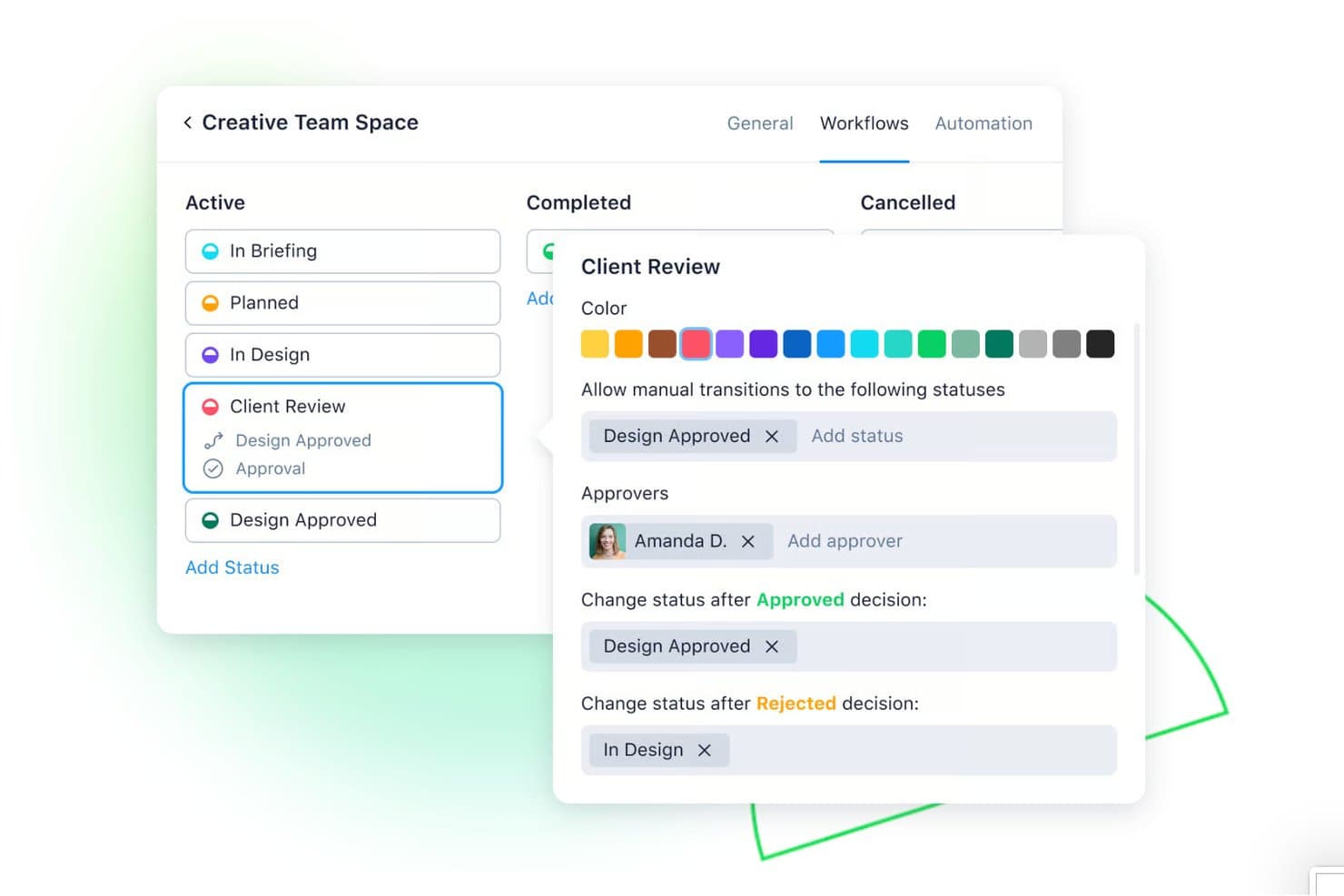
Wrike lets users configure approval workflows with custom statuses and approvers. Wrike is a marketing work management platform that centralizes campaign planning, creative production, intake workflows, proofing and approvals, and resource management for marketing teams.
Who Is Wrike Best For?
Wrike works best for marketing operations leaders and content teams managing high volumes of creative work, approvals, and campaign production across multiple stakeholders.
Why I Picked Wrike
I picked Wrike because it excels at structuring high-volume creative production and managing campaign workflows across internal and external stakeholders. Its automated campaign templates eliminate repetitive setup work for recurring product launches. What's more, external agencies and stakeholders can join specific projects with controlled guest access to mark up and sign off on creative assets without buying full software licenses.
Wrike Key Features
- AI content generation: Wrike AI drafts briefs, copy, and summaries tailored to your brand voice directly inside tasks.
- In-app proofing and approvals: Mark up and approve 30+ file types, including video and HTML, directly inside tasks.
- No-code automation builder: Plain-language prompts generate automation rules that handle handoffs, escalations, and approvals across your team's workflows.
- Real-time dashboards: Shareable dashboards surface live KPIs and connect to ad platforms like Google Ads and Facebook for campaign visibility.
Wrike Integrations
Wrike offers 400+ prebuilt integrations, including Salesforce, HubSpot, Marketo, Google Ads, Facebook, Adobe Creative Cloud, Tableau, Power BI, Microsoft Teams, and Slack.
Pros and Cons
Pros:
- Dashboards connect work progress to campaign KPIs
- Free guest access for external agency proofing
- Campaign templates accelerate repeatable marketing workflows
Cons:
- Lacks audience segmentation, lead scoring, or attribution features
- User interface can appear complex
 Best for custom marketing consent experiences
- Free plan available
- From $150/month (billed annually)
Visit WebsiteCustomer Rating:4.5/5
Ketch lets you connect consent signals to your data systems for compliance across platforms. For those in search of marketing software that balances user privacy with growth, Ketch offers a unique solution. It aids brands in collecting and managing data through features like consent management and data mapping. Ideal for marketers navigating data privacy regulations, Ketch ensures effective customer engagement without compromising compliance.
Why I Picked Ketch
I picked Ketch because it excels in offering custom marketing consent experiences, crucial for today's data-driven strategies. It provides customizable consent banners that integrate into your marketing activities, allowing you to tailor user experiences while ensuring compliance with regulations like GDPR and CCPA. The platform's AI-powered data mapping and automated data subject request management enhance its capability to manage user permissions, making it an excellent choice for marketers who prioritize privacy without compromising engagement. Ketch turns compliance into an opportunity for growth by enabling the collection of high-quality first-party data, boosting brand trust and personalizing customer journeys.
Ketch Key Features
In addition to its standout custom marketing consent experiences, Ketch offers a suite of features that cater to the diverse needs of marketing teams.
- Data Sharing Management: Maps data flows between your marketing systems and vendors, ensuring privacy choices are enforced under regulations like the CPRA.
- Unified Preferences: Synchronizes consent and preferences in real-time across multiple platforms, maintaining compliant customer profiles and consistent user experiences.
- Compliant Analytics: Guarantees that analytics tools process data only with valid consent, providing accurate performance insights and maintaining trust with your audience.
- Consented Data Activation: Transforms consented first-party data into actionable insights, supporting compliant audience targeting and enhancing marketing strategies.
Ketch Integrations
Integrations include Adobe Experience Platform, AdRoll, Airship, Alchemer, Amazon Redshift, Amplitude, Attentive, Autopilot, BigMarker, and Braze.
Pros and Cons
Pros:
- Integrates consent data with existing marketing systems
- Provides clear visibility into data practices
- Offers customizable privacy notices
Cons:
- May require ongoing adjustments to stay current with evolving regulations
- No broader marketing functions beyond privacy and compliance
Learn more about Ketch: Best for fully branded webinar experiences
- 14-day free trial + free demo available
- From $85/presenter/month (billed annually)
Visit WebsiteCustomer Rating:4.5/5
WebinarGeek interface showing a live webinar session with multiple presenters and participant controls accessible across devices. WebinarGeek gives marketing teams a way to host interactive webinars without requiring attendees to download extra software. The platform is designed for marketers who want to engage audiences, capture leads, and analyze attendee behavior in real time. If you need a webinar solution that supports branding, automation, and integration with your existing marketing stack, WebinarGeek is worth considering.
Who Is WebinarGeek Best For?
WebinarGeek is a strong choice for marketing teams and businesses that need to run interactive webinars for lead generation, product demos, or customer engagement.
Why I Picked WebinarGeek
I picked WebinarGeek because it gives marketing teams full control over the look and feel of their webinars, which is essential for brand consistency. The platform lets you customize registration pages, emails, and the webinar room itself with your own logos, colors, and visual identity. I appreciate that you can even remove WebinarGeek branding entirely, creating a white-label experience for your audience. This level of customization helps marketers deliver a polished, on-brand experience at every touchpoint.
WebinarGeek Key Features
Some other features that make WebinarGeek useful for marketing teams include:
- Live and automated webinars: Host live sessions or set up automated webinars to reach audiences at different times without manual intervention.
- Audience interaction tools: Use polls, quizzes, and live chat to engage attendees and collect feedback during webinars.
- Detailed analytics dashboard: Track attendee behavior, registration sources, and engagement metrics to measure webinar performance.
- Marketing automation integrations: Connect WebinarGeek with CRM and email marketing platforms to automate follow-ups and nurture leads.
WebinarGeek Integrations
Integrations include HubSpot, Salesforce, Pipedrive, Mailchimp, ActiveCampaign, ConvertKit, MailBlue, Enormail, Google Tag Manager, and Meta Pixel.
Pros and Cons
Pros:
- GDPR-compliant data collection and management
- Interactive features like polls, quizzes, and Q&A
- Native integrations with major CRM and email tools
Cons:
- Attendee limits may require higher-tier plans
- No built-in landing page A/B testing
Learn more about WebinarGeek: Best for visually stunning email campaigns
- Free plan + free trial available
- From $19/user/month (billed annually)
Visit WebsiteCustomer Rating:4.7/5
Flodesk creates visually stunning email campaigns for online marketing teams. Flodesk offers a visually driven email marketing solution for businesses seeking impactful, aesthetically pleasing campaigns. Whether you're a designer or a novice, Flodesk's intuitive interface and customization options allow you to craft emails that not only capture attention but also address common challenges like low engagement rates. With features such as automation and integration with popular platforms, Flodesk provides a comprehensive suite for those looking to improve their marketing efforts.
Why I Picked Flodesk
I picked Flodesk for its unique emphasis on design and deliverability in email marketing. Its patented layouts and custom fonts allow you to create visually stunning emails that stand out in crowded inboxes. Additionally, the automation tools, such as abandoned cart recovery and link-triggered actions, seamlessly enhance your marketing strategies, making it easier to engage with your audience. These features, combined with its high deliverability rate, make Flodesk an appealing choice for businesses seeking to improve email engagement and conversion rates.
Flodesk Key Features
In addition to its design-centric approach, Flodesk offers:
- Countdown Timers: Add urgency to your emails with built-in countdown timers to drive immediate action from your subscribers.
- Embedded Polls: Engage your audience directly within emails using polls to gather feedback and insights.
- Link-in-Bio Forms: Capture subscribers directly from social media by integrating link-in-bio forms, expanding your reach beyond traditional email lists.
- Sales Funnel Creation: Build comprehensive sales funnels for products, memberships, and services, boasting higher conversion rates.
Flodesk Integrations
Integrations include Shopify, Canva, Zapier, and an API for custom integrations.
Pros and Cons
Pros:
- Visually stunning email templates enhance brand presentation
- High deliverability rates ensure emails reach more recipients
- Audience segmentation enables targeted and personalized marketing
Cons:
- Limited integration options with niche applications
- Image-heavy design can lead to slower email loading times
Learn more about Flodesk: Best B2B marketing automation tool
- Free demo available
- From $1250/month

Salesforce Pardot-Marketing Software-screenshot Salesforce Pardot is a robust marketing automation platform designed to streamline and automate B2B marketing processes. It empowers businesses to create, deploy, and manage targeted marketing campaigns, nurture leads, and align sales and marketing teams for more effective customer engagement. Pardot offers features such as email marketing, lead scoring, lead nurturing, and ROI reporting, allowing marketers to track and analyze the effectiveness of their campaigns.
Why I Picked Salesforce Pardot: Salesforce Pardot stands out with its B2B Marketing Analytics Plus, which offers advanced analytics capabilities specifically tailored for B2B marketers. This tool allows users to connect their marketing and sales data, providing deep insights into campaign performance, lead generation, and customer engagement. What makes this feature unique is its ability to correlate marketing efforts directly with revenue, enabling businesses to understand the true impact of their marketing initiatives on the bottom line. By offering detailed revenue attribution models and predictive analytics, B2B Marketing Analytics Plus goes beyond basic reporting, helping businesses optimize their marketing strategies effectively.
Salesforce Pardot Standout Features & Integrations
Features include Pardot’s AI-powered lead scoring system stands out from competitors by leveraging machine learning algorithms to analyze lead behavior and engagement patterns. It goes beyond traditional demographic-based scoring, taking into account a prospect's online interactions, email engagement, and website behavior. This nuanced approach ensures that sales teams are focused on leads that are genuinely interested and more likely to convert, enhancing productivity and efficiency.
Pardot allows the creation of behavior-based triggers, where specific actions or patterns trigger automated responses. For instance, if a lead repeatedly engages with product-related content, Pardot can automatically trigger targeted follow-up emails or notify sales representatives, ensuring timely and relevant communication. This feature not only saves time but also increases the likelihood of converting leads into customers based on their actual interests and interactions.
Integrations include Mailchimp, LinkedIn Sales Navigator, Adobe Sign, Amazon Connect CTI, Zoom, Quickbooks, task-based specialty apps, and others.
Pros and Cons
Pros:
- AI-Powered lead scoring & behavior-based triggers
- Seamless integration with Salesforce CRM
- Comprehensive marketing automation
Cons:
- Landing page creation tool is feature-lite
- API capabilities could use improvement
Learn more about Salesforce Pardot: Best for local business marketing
- Free demo available
- Pricing upon request
Visit WebsiteCustomer Rating:4.8/5
Maintain an overview of your business's online reviews and where they come from through the reviews dashboard. Birdeye is a customer engagement and online reputation management platform. Local businesses can use it to monitor customer reviews, customer messages, and social media presence. This helps you to craft a more cohesive and positive bran image, ensuring a consistent experience for prospects and customers alike.
Why I Picked Birdeye: I chose this marketing software tool because of its specialized focus on review management and customer feedback collection. For local businesses that rely on word-of-mouth referrals and offering an exceptional customer experience, these are critical components of business growth.
Users can monitor their business's online reviews and customer feedback from over 150 different review sites, and request feedback from their existing customers. You're able to see where reviews are coming from and what they're saying. You can also compare yourself with competitors to see how your NPS holds up to theirs, and which areas of customer service you could work to improve.
Birdeye Standout Features & Integrations
Features include the ability to track trending topics related to your business on social media platforms. This is super helpful because you can then engage with the conversation, respond to customer inquiries, and create brand awareness for your company.
You can also create surveys through the software to capture real-time feedback and understand your customers better. Gathering this type of data can do wonders for not just your marketing tactics but your customer service approach, product and service offerings, and more.
Integrations include QuickBooks, Square, Zoho CRM, Zoho Books, Zoho Invoice, Pipedrive, Thryv, Keap, HubSpot, Lightspeed, and hundreds of other SaaS tools.
Pros and Cons
Pros:
- Has customer feedback management tools
- Tons of integrations available
- Automates surveys and reviews
Cons:
- No free plan or trial available
- Limited customer support
Learn more about Birdeye: 7Best for AI-driven content creation
Enji
- 14-day free trial
- From $29/month
Visit WebsiteCustomer Rating:4.9/5
KPI Dashboard Enji is a marketing software suite designed for small businesses that want to simplify their marketing efforts without needing a full-time marketing team. It combines planning, scheduling, and content creation tools into one customized marketing platform, using information from your website and onboarding questionnaire to tailor marketing plans and content to your business.
Why I Picked Enji: I chose Enji because of its marketing strategy generator, which gives you structured guidance to build a plan that aligns with your business goals. Instead of starting from scratch, you get ready-made frameworks and campaigns tailored to your business needs. This is especially useful if you’re not a marketer by trade but still need to keep your brand visible.
I also like Enji’s built-in AI copywriter. It helps you create captions, blog posts, and other content that fits your tone of voice, saving you hours of writing. Combined with its marketing calendar and social media scheduler, you can map out campaigns in advance and keep an active online presence without constant manual updates.
Enji Standout Features & Integrations
Features include a performance dashboard that shows how your campaigns are performing, a customer persona generator to better understand your target audience, and pre-designed marketing campaigns that you can launch quickly. Enji also provides analytics to track website activity and visitor interactions, giving you actionable insights into what’s working.
Integrations include Facebook, Instagram, LinkedIn, Pinterest, YouTube Shorts, Threads, TikTok, Google Analytics 4, Meta (Facebook), iCal, Canva, and Google Calendar.
Pros and Cons
Pros:
- Social media scheduler keeps posts consistent
- AI copywriting speeds up content creation
- Intuitive interface for beginners
Cons:
- Occasional bugs reported by users
- Limited customization for advanced marketers
Learn more about Enji: Best for automated lead routing
- Free demo available
- Pricing upon request
Visit WebsiteCustomer Rating:4.8/5
Default's lead management capabilities can assist marketing teams in tailoring their strategies to drive better conversions. Default is an all-in-one automation tool designed for fast-growing B2B teams to improve workflows, enhance lead conversion, and reduce manual tasks. It offers features such as forms, scheduling, and automated workflows to improve the efficiency of inbound lead qualification and routing.
Why I Picked Default: One of the standout features is automated lead routing, which leverages real-time routing logic based on CRM data and customer events. This ensures that leads are efficiently assigned to the appropriate sales representatives, reducing response times and increasing the likelihood of conversion.
Default’s automated workflows also enhance processes by integrating tasks such as enrichment and scheduling into a single platform, reducing manual workload and enhancing pipeline efficiency. The conversion-optimized forms are also designed to improve marketing efforts, lead capture, and conversion rates, providing a user-friendly interface that integrates seamlessly into websites.
Default Standout Features & Integrations
Features include automated workflows, emails, scheduling, customizable forms, data enrichment from various sources, real-time data, CRM insights, follow-up tools, customizable templates, and lead assignments.
Integrations include Salesforce, HubSpot, Salesloft, Outreach, Marketo, Customer.io, Google Calendar, Slack, Apollo, and Clearbit.
Pros and Cons
Pros:
- Robust workflow automation
- Good inbound scheduling and qualification
- Good lead routing capabilities
Cons:
- Learning curve for more advanced workflows
- Could offer more customization options for the emails sent from Default
Learn more about Default: Best for driving organic engagement
- Free demo available
- Available upon request
Visit WebsiteCustomer Rating:5/5
TikTok’s algorithm boosts organic reach for content tailored to your target audience. TikTok is a popular social media platform that allows users to create, share, and discover short-form videos. It's become a hub for viral trends, creative content, and social interaction, attracting millions of users worldwide. TikTok also offers various tools and features for businesses to engage with their audience, including advertising solutions, product showcases, and performance analytics.
Why I picked TikTok: TikTok excels at helping your team drive organic engagement through its viral content potential. You can create short, engaging videos that naturally connect with audiences. The platform offers built-in tools for video creation, which lets your team craft content tailored to your target audience. Its algorithm pushes relevant content to users who are most likely to engage with it, making it easier to grow your following.
TikTok Standout Features & Integrations
Features include video creation tools, real-time content discovery, and audience engagement insights. You can easily craft content and track its impact with built-in analytics. TikTok’s algorithm boosts organic visibility for engaging content.
Integrations include Shopify, WooCommerce, BigCommerce, Magento, and Square.
Pros and Cons
Pros:
- Simple video creation tools
- Encourages user interaction
- Boosts organic content reach
Cons:
- Short content lifespan
- Not ideal for cross-platform management
Learn more about TikTok: 10Best for customer data integration
Klaviyo
- Free plan available
- From $20/month
Visit WebsiteCustomer Rating:4.6/5
Klaviyo offers a visual flow builder for creating marketing automation workflows. Klaviyo is designed to meet the needs of businesses seeking to enhance their marketing strategies through data-driven insights. With its ability to unify customer data and activate it in real-time, Klaviyo appeals to businesses that want to deliver personalized experiences across various channels like email, SMS, and social media.
Why I Picked Klaviyo
I picked Klaviyo because of its strong focus on customer data integration and real-time activation. Its ability to integrate with over 350 applications allows you to unify your customer data seamlessly, providing a holistic view of your audience. The platform's AI-driven tools enhance marketing strategies by predicting customer behavior and personalizing interactions. This makes Klaviyo an excellent fit for businesses aiming to leverage data for more targeted and effective marketing campaigns.
Klaviyo Key Features
In addition to its data integration capabilities, Klaviyo offers several other features that enhance its utility as a marketing software:
- Omnichannel Marketing: Facilitates marketing automation across email, SMS, and social media.
- Advanced Segmentation: Allows you to create highly personalized customer experiences.
- AI-Powered Marketing Agents: Uses built-in AI tools to generate campaign content, suggest segments, and optimize strategies based on patterns in your own data.
- Proactive Performance Monitoring: Offers tools to monitor key metrics and set custom alerts, helping optimize marketing efforts in real-time.
Klaviyo Integrations
Integrations include Shopify, WooCommerce, BigCommerce, Magento, Salesforce, Stripe, Facebook, Zendesk, Eventbrite, and Amazon Marketplace.
Pros and Cons
Pros:
- Supports omnichannel marketing, including email, SMS, and social media.
- Provides AI-driven insights for personalized marketing strategies.
- Offers comprehensive data integration for unified customer profiles.
Cons:
- Pricing can escalate quickly as contact lists grow.
- Some users desire more customization options.
Learn more about Klaviyo:
Other Marketing Software
Here are the rest of my best marketing software picks, including a best use case for each.
- 11SnapchatBest for immersive ad formats
- 12Customer.ioBest for multi-channel automation
- 13Referral FactoryBest for referral marketing
- 14ClickUpBest for marketing collaboration
- 15TidioBest for AI-driven customer engagement
- 16Google AnalyticsBest for marketing analytics
- 17SemrushBest content marketing tools
- 18AdverityBest for managing large-scale data
- 19ActiveCampaignBest for marketing automation
- 20Sprout SocialBest for comprehensive social media management
- 21iContactbest for email marketing
- 22GenStudioBest for multilingual content generation
- 23MarketoBest for account-based marketing tools
- 24MaximizerBest for customizable industry-specific solutions
- 25MailchimpBest for AI-powered audience segmentation
- 26CampaignerBest for segmentation & personalization
- 27FreshworksBest for customer data analytics
- 28TofuBest for generative marketing
- 29monday AI WorkspaceBest for flexible marketing calendars
- 30Creatio CRMBest affiliate marketing software
- 31Brand24Best for real-time brand monitoring
- 32SurvicateBest survey tool for getting insights about your customers
- 33BrandfolderBest for digital asset management (DAM)
- 34TextmagicBest for two-way SMS marketing comms
- 35ImpactBest for partnership marketing
- 36Float.comBest for creative capacity planning
- 37TrellisBest for Amazon PPC marketing automation
- 38GetResponseBest landing page builder
- 39FunnelBest product marketing software
- 40TargetBayBest SaaS eCommerce personalization tool
Related Marketing Software
If you still haven't found what you're looking for here, check out these tools closely related to marketing software that we've tested and evaluated.
- Marketing Management Software
- Account Based Marketing Software
- Email Marketing Software
- Local Marketing Software
How I Evaluate Marketing Software
I evaluate marketing software in two layers: the baseline every tool must meet to qualify, and differentiators—like attribution modeling or ABM depth—that reveal who each platform truly serves.
Core Functionality (Table Stakes For This List)
When I'm selecting tools for my list, I rank each one on a scale from 0 (does not offer the functionality) to 5 (excels in this area) for each core functionality listed below. Then, I calculate the tool's total score into a percentage. Each tool needs to achieve a minimum total score of 75% to be considered for inclusion.
- Campaign Management: I check whether you can plan, build, and launch campaigns across email, social, and paid channels from one place rather than juggling separate tools.
- Marketing Automation: Workflow depth matters here—I look for behavioral triggers, branching logic, and drip sequences that go beyond simple autoresponders.
- Audience Segmentation: The ability to create dynamic segments based on engagement, lifecycle stage, or custom attributes tells me a platform can support real targeting.
- Lead Capture & Nurturing: I evaluate form builders, landing page editors, and lead scoring models to see how well a tool moves contacts from first touch to sales-ready.
- Analytics & Reporting: Dashboards should cover channel performance, funnel metrics, and attribution—not just vanity stats like open rates in isolation.
- CRM & Martech Integrations: I look at native connections with CRMs like Salesforce and HubSpot, plus API access and iPaaS support for syncing data across your stack.
Once I have a list of tools that meet this criteria, I consider what sets each platform apart.
Differentiating Factors (What Sets Vendors Apart)
Here's how I compare and contrast different vendors:
Standout Features
Multi-touch attribution is a major differentiator. I look for models that connect campaign touchpoints to real pipeline movement, not just last-click credit. Visual customer journey builders also set platforms apart, especially when they let you design cross-channel paths that adapt based on real-time behavior. For B2B teams, I evaluate whether a platform offers account-based marketing with intent signals and account-level engagement scoring, since that fundamentally changes how you target buyers and measure success.
Beyond Features
Pricing structure matters as much as feature depth. I evaluate how costs scale as your contact list and sending volume grow, since a platform that fits at 10,000 contacts can become prohibitive at 500,000. Deliverability infrastructure is another factor I weigh—sender reputation tools and dedicated IPs directly affect whether your campaigns reach inboxes. I also check for built-in compliance tooling like consent management and suppression lists, which every marketing team needs regardless of where they operate.
How to Choose Marketing Software
With so many different marketing software solutions available, it can be challenging to make decisions on what marketing software is going to be the best fit for your needs.
As you're shortlisting, trialing, and selecting marketing software, consider:
- What you want to use it to do - Start by identifying the marketing software feature gap you're trying to fill to clarify the features and functionality the marketing software needs to provide.
- Who will need to use it - To evaluate cost and requirements, consider who'll be using the software and how many licenses you'll need. You'll need to evaluate if it'll just be the marketing professionals, or the whole organization that will require access. When that's clear, it's worth considering if you're prioritizing ease of use for all, or advanced functionality for your marketing software power users.
- What other tools it needs to work with - Clarify what tools you're replacing, what tools are staying, and the tools you'll need to integrate with, such as accounting, CRM or HR software. You'll need to decide if the tools will need to integrate together, or alternatively, if you can replace multiple tools with one consolidated marketing software.
- What outcomes are important - Consider the result that the software needs to deliver to be considered a success. Consider what capability you want to gain, or what you want to improve, and how you will be measuring success. For example, an outcome could be the ability to get greater visibility into performance. You could compare marketing software features until you’re blue in the face but if you aren’t thinking about the outcomes you want to drive, you could be wasting a lot of valuable time.
- How it would work within your organization - Consider the software selection alongside your workflows and delivery methodology. Evaluate what's working well, and the areas that are causing issues that need to be addressed. Remember every business is different—don’t assume that because a tool is popular that it'll work in your organization.
Trends in Marketing Software for 2025
What marketing software you use and how you use it will largely depend on industry trends. Here are some trends that I thought you might find helpful as you design your ultimate MarTech stack:
- Integration of AI and Machine Learning: Tools like Marketo and HubSpot have enhanced their AI capabilities for predictive analytics and automated decision-making. These advancements allow for more personalized and efficient marketing campaigns, with AI-driven insights driving strategy and execution.
- Rise of Voice and Conversational Marketing: Platforms such as Drift and Intercom have introduced advanced voice recognition and natural language processing features. This trend signifies a shift towards more interactive and engaging customer experiences, leveraging voice technology for enhanced user engagement.
- Decline in Traditional Email Marketing Tools: A gradual shift away from standalone email marketing platforms, as seen in the reduced feature updates from providers like Mailchimp. This suggests a pivot towards more integrated, multi-channel approaches, as email becomes one component of a broader strategy.
- Growing Importance of Content Marketing Platforms: The expansion of features in platforms like Contently and CoSchedule, focusing on content creation, distribution, and analytics. Content remains king, with an increasing emphasis on strategic creation and distribution to drive engagement and ROI.
- User Experience (UX) Optimization: Adobe XD and Figma have introduced new features for creating more intuitive and user-friendly marketing interfaces. This highlights the critical role of UX in marketing, ensuring that campaigns are not only effective but also provide a seamless user experience.
What is Marketing Software?
Marketing software, also known as martech (marketing technology), is a category of tools that help businesses execute, manage, measure, and optimize their marketing campaigns and strategies.
Marketing software encompasses various functionalities such as email marketing, social media management, SMS marketing, customer relationship management (CRM), and analytics. More specialized categories include viral marketing software, which helps teams run referral, contest, and social-sharing campaigns designed to expand their reach. Marketing software streamlines the process of targeting and engaging with customers, automating repetitive tasks, and analyzing the effectiveness of marketing efforts.
Features
When selecting marketing software, keep an eye out for the following key features:
- Campaign management: Juggle multiple marketing campaigns from a single dashboard, making it easier to plan, schedule, launch, and track activities across all your channels.
- Email marketing automation: Set up automatic email workflows that reach your audience at just the right moments, so you never miss an opportunity to engage.
- Analytics and reporting: Get real-time insights into your campaign performance, helping you quickly understand what’s working and where you need to course-correct.
- Customer relationship management (CRM): Keep all your customer information, interactions, and history in one convenient place—perfect for personalizing messages and nurturing deeper relationships.
- Social media integration: Connect your accounts so you can publish, monitor, and respond to posts and messages without ever leaving your dashboard.
- Lead generation tools: Capture and convert leads directly within the platform using landing pages, forms, or pop-ups designed to boost your conversion rates.
- Segmentation capabilities: Easily break your audience into groups based on behavior, interests, or engagement, so every message feels tailored and relevant.
- Content management: Organize, store, and schedule marketing assets like images, blog posts, or videos—all in one spot—making collaboration smoother for your entire team.
Common Marketing Software AI Features
Beyond the standard marketing software features listed above, many of these solutions are incorporating AI with features like:
- Optimization recommendations: Receive tailored suggestions for improving send times, subject lines, or ad bids based on continuous AI analysis of your performance data.
- Predictive analytics: AI examines historical data to forecast future campaign performance, helping you allocate resources where they’ll have the biggest impact.
- Automated content generation: Let AI craft email subjects, social posts, or ad copy, saving you time and experimenting with new approaches.
- Smart audience segmentation: AI identifies hidden patterns within your data and creates hyper-targeted segments, ensuring your messages hit the mark every time.
- Personalization engines: AI powers unique content recommendations and customized user experiences across channels, so each customer feels like you truly get them.
Benefits
There are many benefits to using marketing software, including:
- Efficient Campaign Management: Marketing software streamlines the planning, execution, and monitoring of campaigns. This efficiency allows marketers to launch more campaigns in less time, significantly boosting productivity and campaign output.
- Data-Driven Insights: With advanced analytics, marketing software provides deep insights into customer behavior and campaign performance. This enables businesses to make informed decisions, tailoring their strategies to better meet customer needs and market demands.
- Enhanced Customer Engagement: Tools within marketing software facilitate personalized and targeted communication. This personalization leads to higher engagement rates, as messages resonate more effectively with the intended audience.
- Cost-Effective Marketing: By automating various marketing tasks, software reduces the need for extensive manual labor and resources. This automation translates into lower operational costs and a better allocation of the marketing budget.
- Scalability and Flexibility: Marketing software adapts to the changing needs of a business, supporting growth and expansion. This scalability ensures that digital marketing efforts can grow in tandem with the business, without the need for constant reinvestment in new tools.
Cost & Pricing
Marketing software providers offer a range of plans tailored to accommodate the unique requirements and financial constraints of various organizations. Each plan includes a specific set of features and pricing structures.
To help you make an informed decision, here's an overview of the common plan options available in the marketing software market, allowing you to compare the features offered at different price points and determine which plan best aligns with your organization's needs and budget.
Plan Comparison Table for Marketing Software
| Plan Type | Average Price | Common Features | Best For |
|---|---|---|---|
| Plan TypeBasic | Average Price$0 - $200/month | Common Features- Email Marketing - Basic Analytics - Social Media Integration - Limited Campaign Automation | Best ForSmall businesses/startups just beginning to explore marketing automation and looking for essential features at an affordable price. |
| Plan TypeStandard | Average Price$200 - $500/month | Common Features- Enhanced Automation - Lead Scoring - CRM Integration - Advanced Analytics - A/B Testing | Best ForGrowing businesses that need more advanced features like lead scoring, CRM integration, and better analytics to optimize their marketing efforts. |
| Plan TypeProfessional | Average Price$500 - $1,000/month | Common Features- Multi-Channel Campaigns - Advanced Reporting - Custom Integrations - Team Collaboration Tools - Advanced Lead Management | Best ForEstablished businesses with complex marketing needs that require multi-channel campaigns, advanced reporting, and custom integrations to streamline processes. |
| Plan TypeEnterprise | Average Price$1,000+/month | Common Features-Customizable Dashboards - AI-Powered Insights - 24/7 Support - Advanced Security Features - API Access | Best ForLarge enterprises with extensive marketing teams that need customizable dashboards, AI-powered insights, and advanced security features to support their scale. |
| Plan TypeFree | Average Price$0 | Common Features- Basic Email Marketing - Limited Analytics - Social Media Posting - Contact Management | Best ForSolopreneurs, freelancers, or very small businesses that are just starting out and need basic marketing tools without any financial investment. |
When considering which plan to choose, it's important to evaluate the specific needs of your business. Consider where you are now and start with the best plan for your current state. As your business grows and expands, you can upgrade your marketing software plan to suit those needs down the road.
New & Noteworthy Product Updates
Below you’ll find release notes and hot takes on the latest and greatest marketing software product updates. Discover what’s now possible through feature releases, improvements, and updates on web, desktop and mobile apps. Learn what’s new, if it’s hot—or not, and why it matters for managing campaigns.
April 2024: Marketing Software Updates
Here are some April update highlights.
Birdeye Update Notes
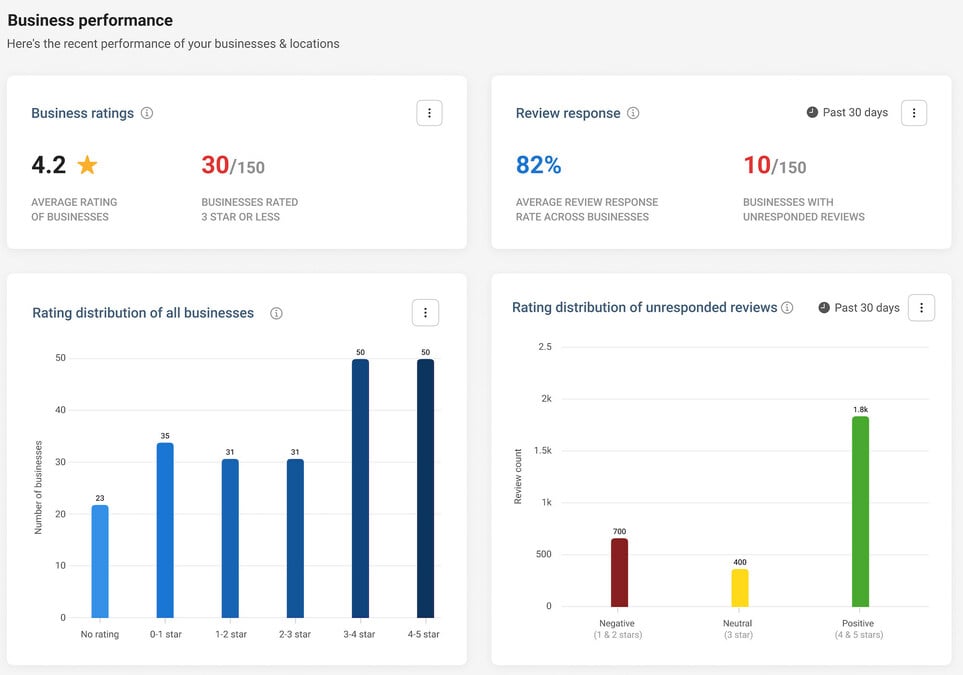
In April 2024, Birdeye introduced the Partner Command Center, a new analytics tool tailored for agency partners. This platform is designed to streamline operations and enhance service delivery by providing key analytics functionalities in one centralized location.
The Partner Command Center equips agencies with customizable dashboards, error alerts, churn reduction strategies, and upsell opportunities. These features enable agencies to monitor and optimize their performance efficiently, addressing potential issues promptly and capitalizing on growth opportunities through detailed insights.
The value of the Partner Command Center to users is clear. It empowers agencies with the tools needed to improve client retention and expand revenue streams. By integrating comprehensive analytics and operational tools, agencies can achieve better results, making the Partner Command Center an essential asset for enhancing their competitive edge.
Verdict: Hot! The value in becoming a Birdeye agency partner just skyrocketed.
Marketo Update Notes
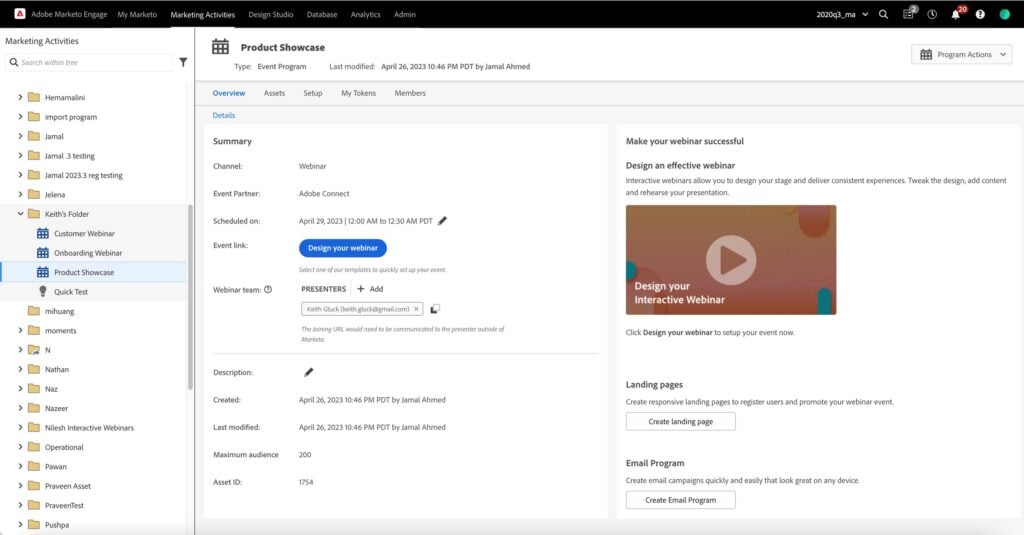
In April 2024, Adobe Marketo plans to release significant updates to its Interactive Webinars capabilities. These enhancements allow hosts and presenters to customize webinar titles and room names, and manually sync engagement data after events. The platform will also introduce templates for creating customized, branded webinar room layouts.
The ability to alter webinar titles and room settings enhances relevance for participants, while manual data syncing offers precise control over engagement analytics. The new templates ensure consistent, professional branding across webinar presentations.
The value of these enhancements lies in their ability to improve user experience and operational effectiveness during webinars. With greater customization options and better data handling, Marketo users can host more engaging and brand-cohesive webinars.
Verdict: Hot! Webinars are a great inbound marketing technique but it's hard to find the time/budget to manage them. Adobe Marketo users are now a step ahead!
March 2024: Marketing Software Updates
Here are some March update highlights.
ActiveCampaign Update Notes
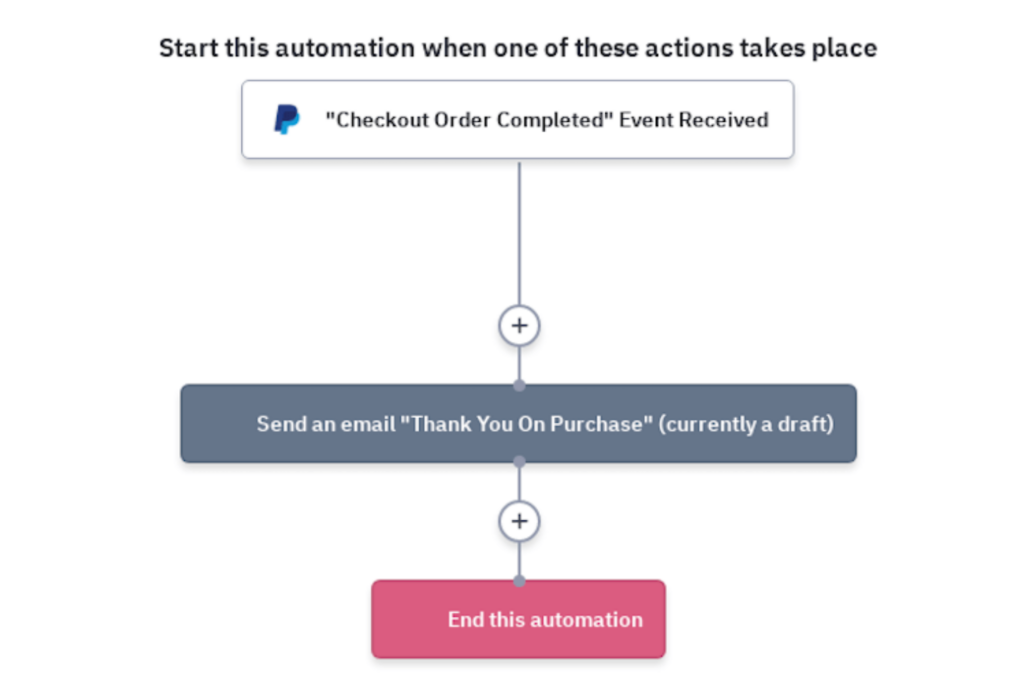
In March 2024, ActiveCampaign introduced a new feature that integrates recurring payments with WooCommerce and PayPal. This enhancement broadens the ecommerce capabilities of the platform, providing a streamlined solution for setting up and managing regular transactions.
This new functionality allows users to easily configure recurring payment options within their WooCommerce store, using PayPal as the payment processor. The integration facilitates automatic billing cycles and ensures seamless transaction processing, making it easier for businesses to offer subscriptions or other regular payment models to their customers.
The addition of recurring payments significantly enhances the value ActiveCampaign offers to ecommerce businesses. By enabling automatic and regular billing, companies can improve cash flow consistency and customer retention. This feature not only simplifies the payment process but also helps businesses stabilize revenue streams and build stronger, ongoing relationships with their customers.
Verdict: Not! This update is pretty niche, so the majority of active users probably won't be affected by it or even notice the change.
CreatioCRM Update Notes
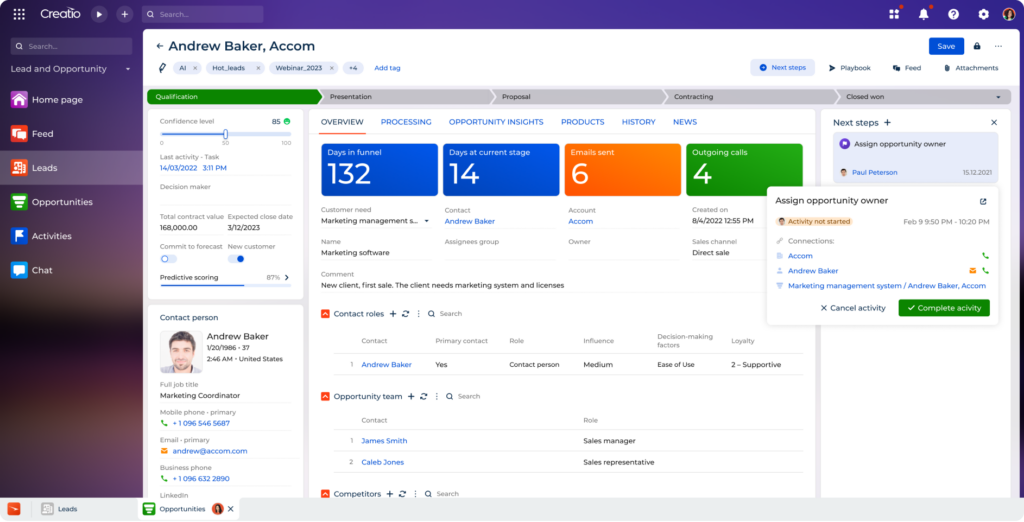
In March 2024, CRM Creatio introduced a significant enhancement to its platform with the launch of AI-driven analytics tools. These tools are engineered to harness the power of artificial intelligence to delve deeper into customer behavior and business operations.
The primary function of this update is to empower users with a more robust analytical toolset, enabling them to perform complex data analyses without the need for extensive technical expertise. The AI-driven tools analyze patterns and trends within the data, offering predictions and recommendations that help businesses anticipate customer needs.
The value of this update to users lies in its potential to significantly enhance decision-making processes. By providing deeper insights into customer behavior and business operations, CRM Creatio's AI tools help users make informed decisions that are predictive, rather than merely reactive.
Verdict: Hot! AI-driven reports are a must nowadays. It's great to see CRM Creatio go full tilt to empower users with the best predictive analytics.
Mailchimp Update Notes

Mailchimp has introduced a new AI Growth Assistant, a forward-thinking tool designed to enhance marketing campaigns through artificial intelligence. This feature is part of Mailchimp's ongoing efforts to incorporate advanced technologies into their platform, making sophisticated marketing tools more accessible to their users.
The AI Growth Assistant works by analyzing user data and previous campaign performance to offer tailored suggestions aimed at increasing engagement and efficiency. By leveraging AI, the tool can identify patterns and opportunities that may not be evident through traditional analysis, suggesting actionable improvements in real-time.
This update is highly valuable to users as it simplifies the process of campaign optimization. By automating the analysis and recommendation phases, Mailchimp users can focus more on creative and strategic aspects of marketing, rather than getting bogged down by data analysis.
Verdict: Hot! Newsletters are a key component of modern marketing but they take a lot of time. Having an AI outline to get you started is a great time-saver.
February 2024: Marketing Software Updates
Here are some February update highlights.
Salesforce Perdot Update Notes
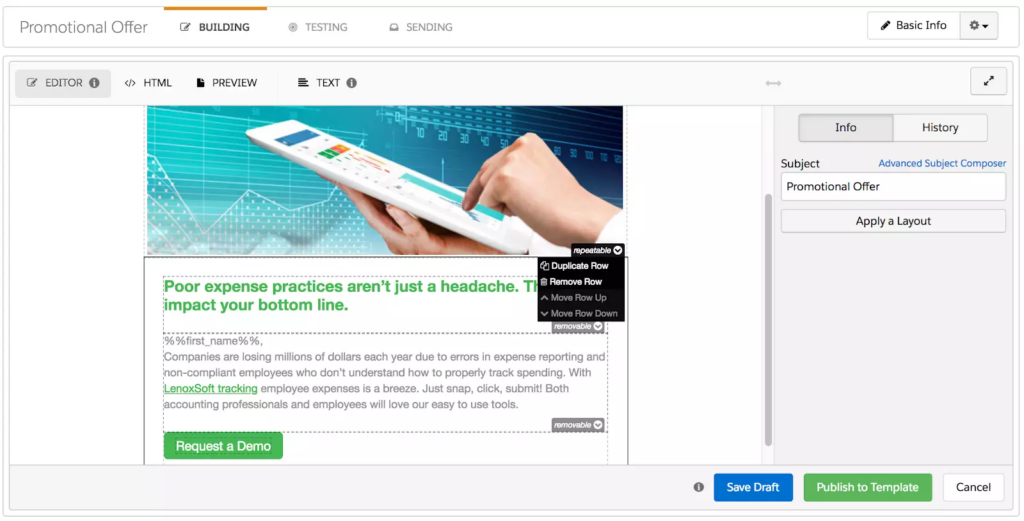
In February 2024, Salesforce Pardot will launch a new email builder. This tool offers a modular design, allowing users to switch between the current and a new, advanced editor. This flexibility enhances the email creation process.
The update brings a robust email builder that supports customizable modules, making it easier to align emails with campaign objectives. Users can choose between the straightforward existing editor or the enhanced capabilities of the new builder, enabling precise customization.
The upgrade provides significant benefits by allowing marketers to create more engaging, tailored emails. With editing options for all skill levels, it boosts the effectiveness of campaigns, enhances customer engagement, and drives better returns.
Verdict: Hot! I'm a big fan of making critical components of software easier to use. No brainer!
HubSpot Marketing Update Notes
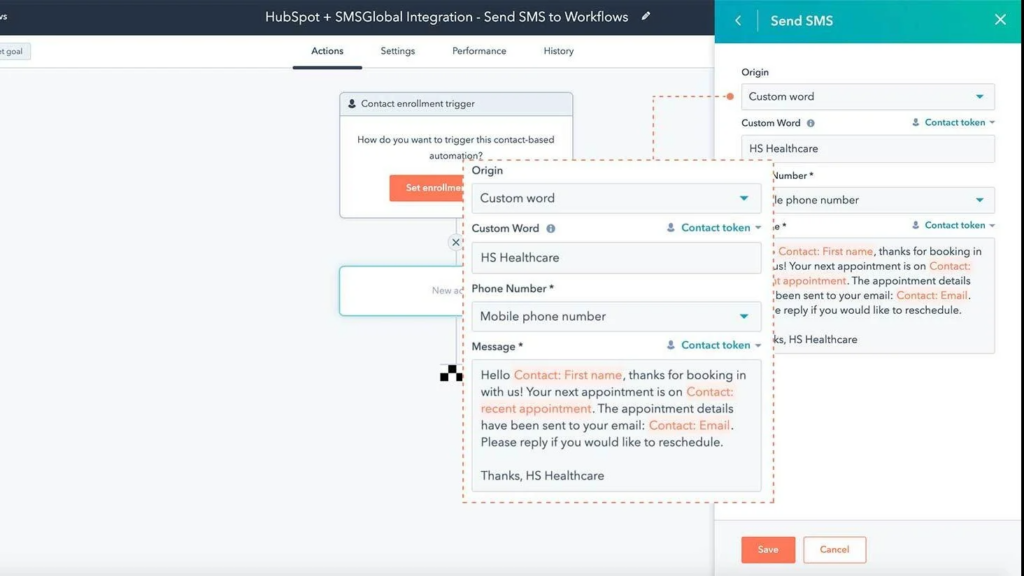
In February 2024, HubSpot Marketing enhanced its platform by integrating SMS capabilities through a partnership with Twilio. This update allows users to send timely and relevant SMS messages directly to customers without the need for a separate Twilio account.
The integration simplifies the process of setting up and deploying SMS campaigns by leveraging Twilio's robust messaging technology within the HubSpot environment. Users can now initiate SMS communications quickly, ensuring messages are both timely and aligned with customer interactions and needs.
The value of this update is significant for users seeking direct and immediate customer engagement. By incorporating SMS services, HubSpot enables more dynamic and responsive marketing strategies. This addition helps businesses increase customer touchpoints, improve communication efficiency, and enhance overall engagement metrics without complicating their existing workflows.
Verdict: Not! HubSpot is just borrowing Twilio tech and charging extra for it. You can probably find a better deal shopping around.
Campaigner Update Notes
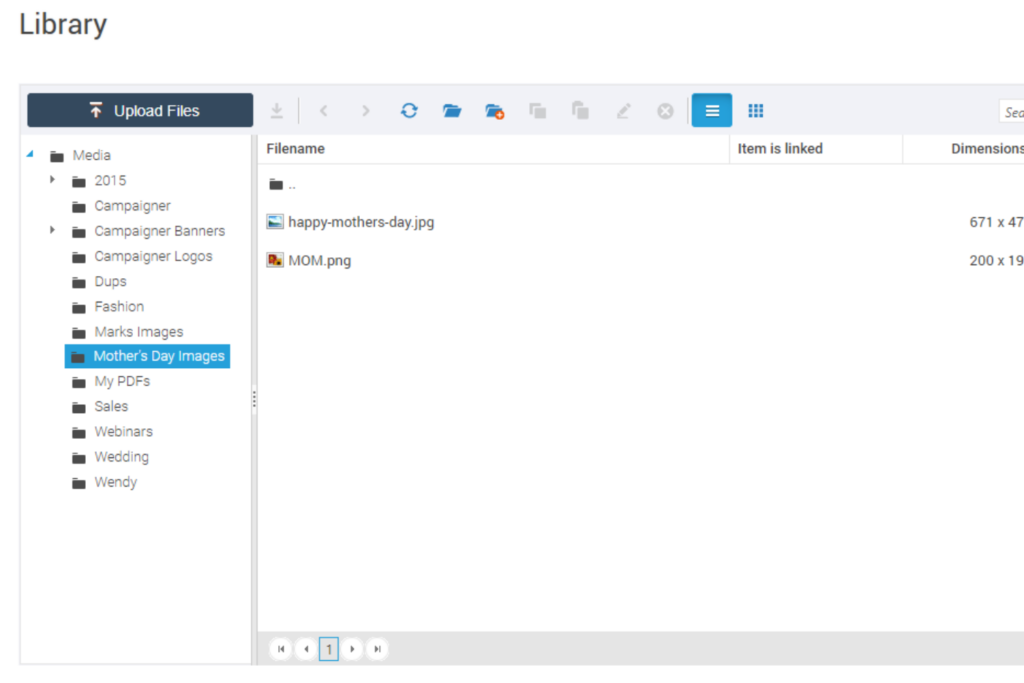
In the first quarter of 2024, Campaigner introduced significant enhancements to its platform, including a full email editor and a comprehensive media library. These new features streamline the creation and management of marketing materials directly within Campaigner, eliminating the need for third-party software.
The updated email editor supports HTML customization, allowing users to have full control over the design and layout of their email campaigns. Simultaneously, the new media library provides a centralized space where users can store, organize, and edit images and PDF files. This integration ensures that all marketing assets are easily accessible and editable in one place.
The enhancements bring substantial value to users by simplifying the marketing process. With advanced editing tools and a unified media library, users can enhance the visual appeal and effectiveness of their campaigns. These tools not only save time and resources but also empower marketers to execute more personalized and impactful email campaigns.
Verdict: Hot! A unified media library makes maintaining brand consistency across all channels much easier, including email blasts.
Google Analytics Update Notes
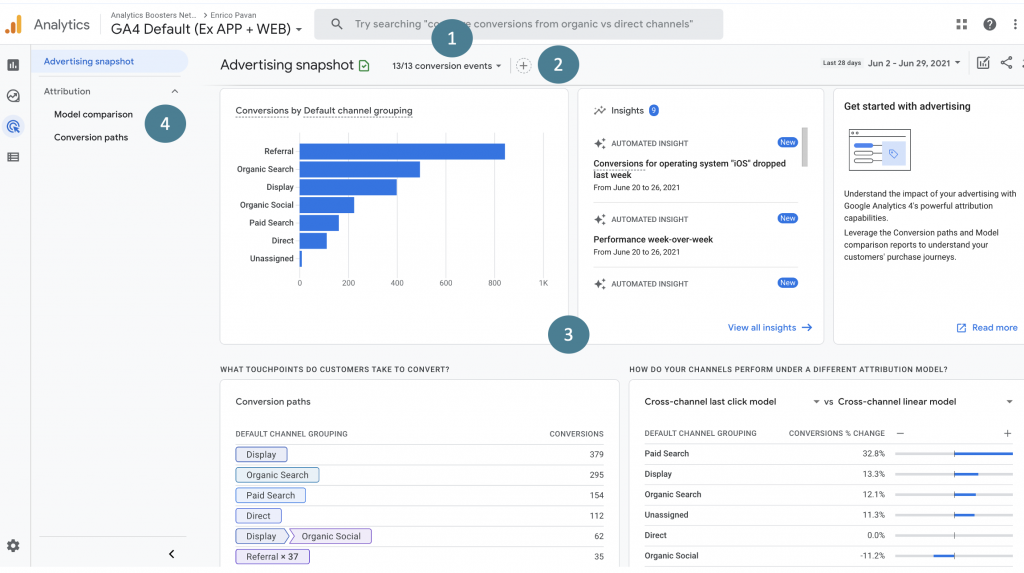
On February 22, 2024, Google Analytics 4 rolled out a significant update to its Advertising workspace. This enhancement introduced two distinct areas: one area is dedicated to marketers for tracking and analyzing their advertising campaigns, while the other focuses on gathering and interpreting behavioral insights.
The primary function of this update is to streamline the reporting process for users. By segmenting the workspace into two dedicated areas, it allows marketers to access specialized tools and reports tailored to either campaign management or behavioral analysis.
The update significantly benefits users by simplifying how they interact with complex data sets and improve their decision-making processes. For advertisers and publishers, this means quicker access to relevant data and a smoother workflow.
Verdict: Hot! These enhancements to G4A's Advertising workspace stand to make managing paid campaigns much more straightforward for marketers.
Freshworks Product Updates
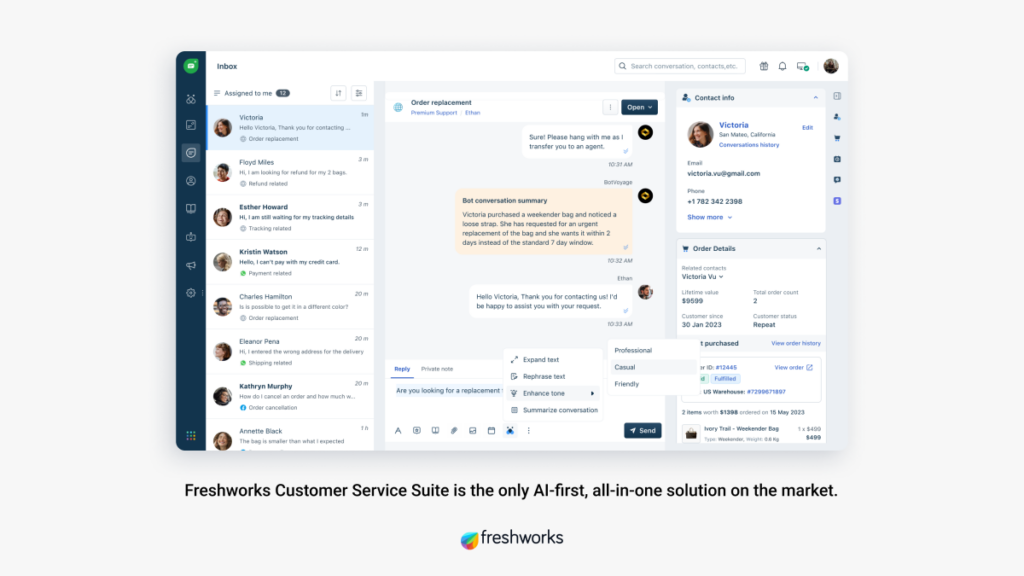
In February 2024, Freshworks launched the Freddy Copilot Add-on. This tool introduces AI features aimed at boosting agent productivity and enhancing response quality in support scenarios.
The add-on uses AI to suggest responses and automate tasks, freeing agents to focus on complex customer needs. It also sorts incoming requests to streamline workflow.
The update boosts efficiency in customer support, helping businesses improve response times and customer satisfaction, which is crucial for their success.
Verdict: Not! Freshworks has been AI-powered for a while now, so the "new" benefits may seem slim to existing users.
Frequently Asked Questions
Need more information about the best marketing software before making your pick? Here are the answers to a couple of questions you might have.
How do I get executive buy-in for marketing software?
Securing buy-in starts by linking the software’s benefits to your company’s goals, such as faster growth or better ROI. Show clear examples of efficiency gains or cost savings, and share data or customer stories from similar organizations. Build consensus by involving stakeholders early and providing a clear implementation plan.
Can marketing software help in improving customer retention?
Yes, marketing software can significantly enhance customer retention by automating engagement processes, such as sending personalized emails, reminders, and special offers based on customer behavior and preferences. Reporting tools also help you spot churn risks and measure engagement, so you can take action faster.
What metrics and KPIs can be tracked using marketing software?
Most platforms let you track campaign performance, lead generation, conversion rates, and pipeline value. Focus on metrics like cost per acquisition, customer lifetime value, marketing qualified leads, and multi-touch attribution to see how each channel contributes to revenue.
How can I ensure a smooth marketing software implementation for my team?
Start by picking a platform that matches your needs and tech skills. Engage your team early, set up training, and define clear steps for onboarding. Assign a project lead, use the vendor’s customer support, and create a feedback loop to spot problems quickly in the rollout.
What integrations should I prioritize in marketing software?
Prioritize integrations with your CRM, sales tools, analytics platforms, and existing ad or email systems. This keeps data unified and reduces manual work. Look for platforms offering open APIs, or direct connectors with major platforms like Salesforce, HubSpot, or Google Analytics.
How do I measure the impact of marketing software on campaign performance?
Assess impact by tracking changes in campaign metrics before and after using the software like lead volume, conversion rates, or engagement. Use built-in attribution and reporting features to link software actions to results. Regularly compare analytics with business targets for ongoing improvement.
What common mistakes should marketers avoid when selecting software?
Don’t choose tools based just on price or features. Make sure they fit your team’s workflow and existing stack. Avoid overlooking integrations and user adoption hurdles. Always test for scalability and vendor support before final decisions.
How often should I review or update our marketing software stack?
Optimization recommendations: Receive tailored suggestions for improving send times, subject lines, or ad bids based on continuous AI analysis of your performance data.
Predictive analytics: AI examines historical data to forecast future campaign performance, helping you allocate resources where they’ll have the biggest impact.
Automated content generation: Let AI craft email subjects, social posts, or ad copy, saving you time and experimenting with new approaches.
Smart audience segmentation: AI identifies hidden patterns within your data and creates hyper-targeted segments, ensuring your messages hit the mark every time.
Personalization engines: AI powers unique content recommendations and customized user experiences across channels, so each customer feels like you truly get them.
Review your marketing tech stack at least once a year, or when your strategy changes. Regular audits help you identify outdated software, gaps, or overlaps. Involve users from across the marketing team in reviewing needs, and consider market trends before adding new tools.
Additional Marketing Software Reviews
Marketing tends to require different platforms working in tandem. Here are some other software lists you might find useful:
- Marketing Workflow Software
- Marketing Calendar Software
- Marketing Collaboration Software
- Marketing Intelligence Software
- Marketing CRM Software
- Brand Management Software
- Affiliate Marketing Software
- Social Media Management Software
- Direct Mail Marketing Software
- Multi-Level Marketing Software
- Promotional Product Management Software
- Marketing Operations Software