

10 Best Competitor Analysis Tools Reviewed In 2026

Best Competitor Analysis Tools Shortlist


Competitor analysis tools are essential for any business, helping teams benchmark performance and spot market trends. However, finding the right tool can be challenging with so many options available
Using my experience with marketing software, I tested and compared several of the top competitor analysis tools available. From there, I compiled my results into detailed reviews to help you find the best software for your needs.
Why Trust Our Software Recommendations
Our team has been testing and reviewing software since 2012. As marketing leaders ourselves, we know how difficult—and important—it is to choose the right software.
For this guide, we evaluated tools using hands-on testing and independent research, scoring tools using our selection criteria.
Our reviews reflect our human editorial judgment, not a sales pitch.
Expert reviewers:
Best Competitor Analysis Tools Summary
This comparison chart summarizes pricing details for my top competitor analysis tools selections to help you find the best one for your budget and business needs.
| Tool | Best For | Trial Info | Price | ||
|---|---|---|---|---|---|
| 1 | Best for rank tracking | 14-day free trial + free demo available | From $103.20/month (billed annually) | Website | |
| 2 | Best for uncovering tech stacks of competitors | Free plan available | From $250/month | Website | |
| 3 | Best for PPC competitor data | Not available | From $39/month | Website | |
| 4 | Best for content performance | Free trial available | From $199/month (billed annually) | Website | |
| 5 | Best for in-depth social media benchmarking | 14-day free trial + free demo available | From $199/month (billed annually) | Website | |
| 6 | Best for backlink analysis | Free plan available | From $29/month | Website | |
| 7 | Best for market insights | Free trial available | From $125/month | Website | |
| 8 | Best for all-in-one digital visibility insights | 14-day free trial | From $139/month | Website | |
| 9 | Best for SEO insights | 7-day free trial | From $79/month (billed annually) | Website | |
| 10 | Best for AI-driven market intelligence research | Free demo available | Pricing upon request | Website |
Best Competitor Analysis Tools Reviews
Below are my detailed summaries of the best competitor analysis tools that made it onto my shortlist. My reviews offer a detailed look at the key features, pros & cons, integrations, and ideal use cases of each tool to help you find the best one for you.

Best for rank tracking
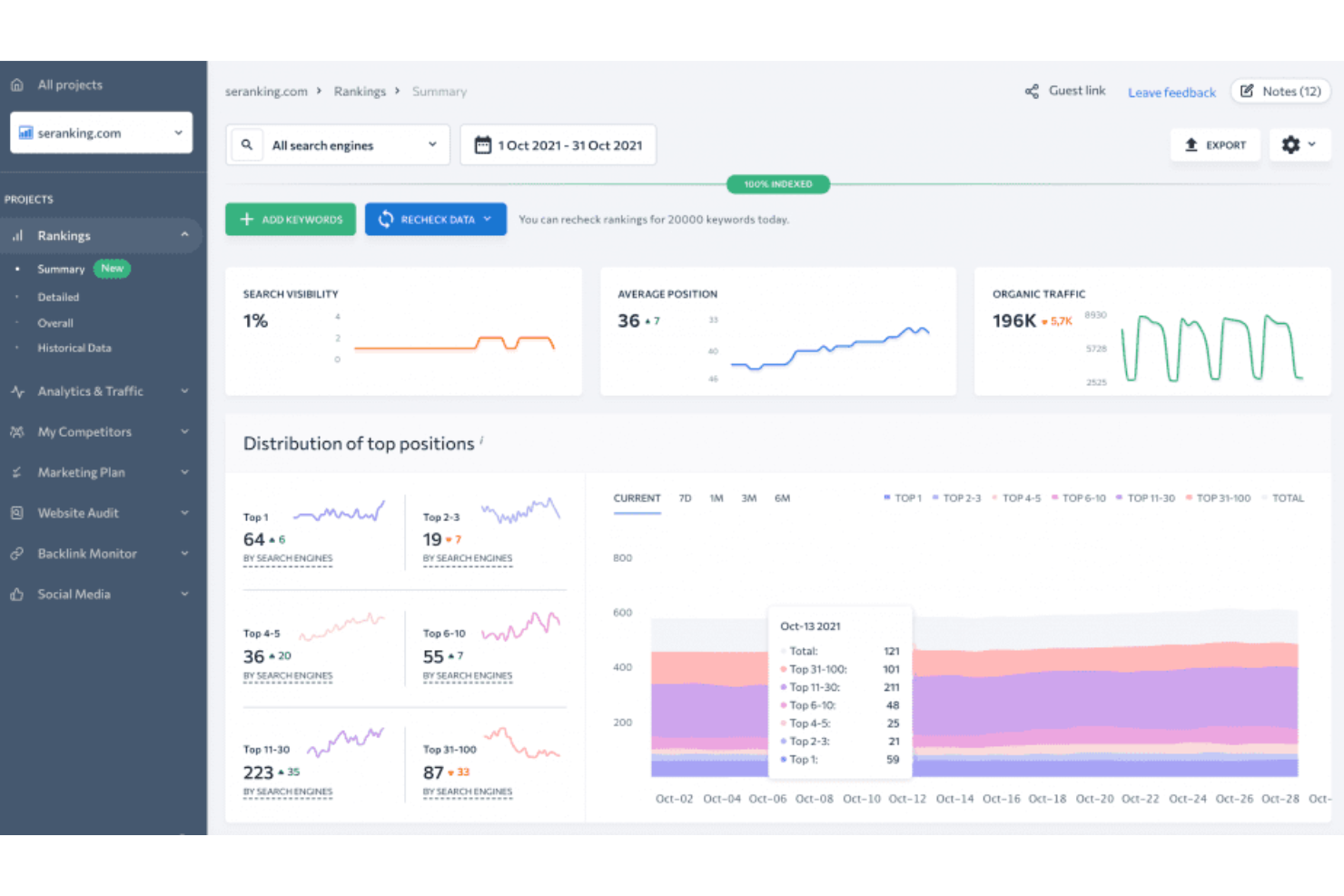
SE Ranking is an SEO platform designed for digital marketers and SEO specialists who need precise rank tracking and analysis. It provides tools for keyword research, site audits, and competitor analysis to enhance search engine performance.
Why I picked SE Ranking: SE Ranking helps your team keep track of search rankings, providing accurate insights to maintain visibility. You can monitor keyword positions, research competitors, and run website audits to understand your SEO performance. With its ability to track ranking changes, SE Ranking ensures your strategies stay effective. Its focus on rank tracking makes it a dependable tool for SEO efforts.
Standout features & integrations:
Features include keyword position tracking that provides daily updates on your rankings. Competitive research tools allow you to analyze your competitors' strategies. Website audit tools help your team identify and fix technical issues affecting your site's performance.
Integrations include Google Analytics, Google Search Console, Google Ads, Bing Webmaster Tools, Facebook, Twitter, LinkedIn, Zapier, HubSpot, and Trello.
Pros and Cons
Pros:
- Comprehensive keyword analysis
- Detailed site audits
- Accurate rank tracking
Cons:
- Basic reporting features
- May require some technical knowledge

Best for uncovering tech stacks of competitors
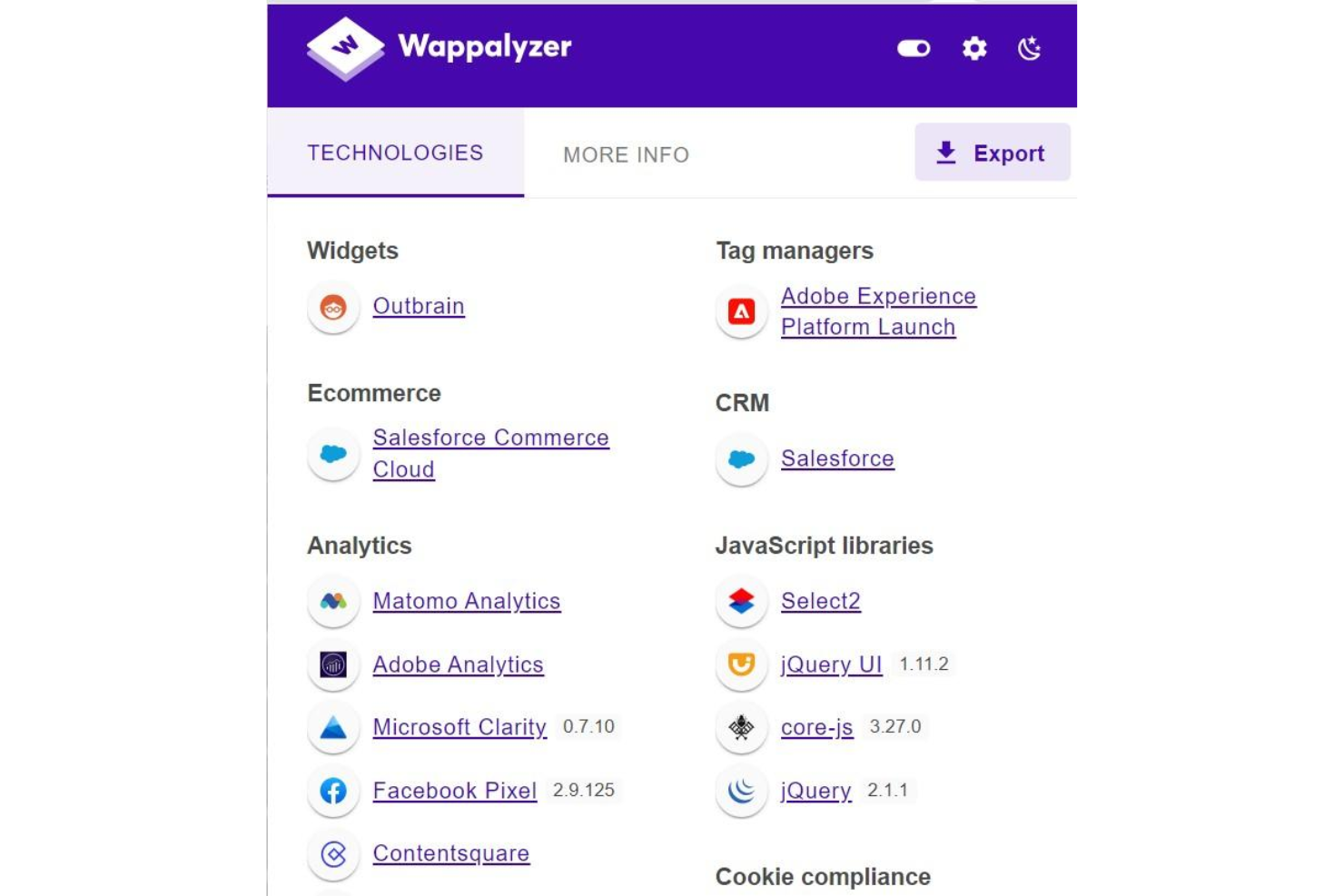
Wappalyzer is a technology intelligence tool that identifies the software, frameworks, and platforms running on any website, giving you a detailed breakdown of a competitor's tech stack from their front-end to their marketing infrastructure.
Who Is Wappalyzer Best For?
Wappalyzer is a natural fit for sales and marketing teams at B2B companies who prospect based on the technologies their target accounts are running.
Why I Picked Wappalyzer
Wappalyzer earns its spot on my shortlist because it's one of the few tools that can tell you exactly what technology a competitor is running, down to the specific CMS, marketing automation platform, and analytics stack. I use the Website Alerts feature to track when key competitors swap out a core tool, which is an early signal of a strategic shift worth monitoring. The Technology Lookup feature also lets me analyze bulk domain lists to quickly profile an entire competitive set at once.
Wappalyzer Key Features
- Browser extension: Instantly see the full tech stack of any website you're visiting, directly in your browser.
- Lead lists: Build targeted prospect lists by filtering companies based on the specific technologies they use.
- Market share reports: See which technologies dominate across industries, including usage trends and share shifts over time.
- API access: Pull tech stack data programmatically into your own tools, dashboards, or CRM workflows.
Wappalyzer Integrations
Wappalyzer offers native integrations with Salesforce, HubSpot, Pipedrive, and Gmail, along with automation platform connections through Zapier, Make, and Pabbly. An API is available for custom integrations, and browser extensions for Chrome, Firefox, Edge, and Safari let you access tech stack data directly as you browse competitor websites.
Pros and Cons
Pros:
- Detects CMS, frameworks, and analytics at once
- Builds lead lists filtered by technology
- Instant one-click tech stack identification
Cons:
- Free tier credits too limited to evaluate
- Tech detection data can be outdated

SpyFu
Best for PPC competitor data

SpyFu is a search analytics tool aimed at marketers and businesses looking to improve their pay-per-click (PPC) campaigns. It offers insights into competitors' PPC strategies and keyword performance.
Why I picked SpyFu: SpyFu specializes in providing detailed PPC competitor data, helping your team refine its ad strategy. You can do keyword research, track competitors, and review ad history to better understand and outperform them. Its focus on PPC data helps your team create more targeted and effective campaigns in a competitive environment.
Standout features & integrations:
Features include keyword research that reveals your competitors' most profitable keywords. Competitor tracking allows you to monitor and analyze their PPC strategies. Ad history lets you see how competitors' ads have performed over time, providing insights into their success.
Integrations include Google Ads, Google Analytics, Microsoft Excel, Moz, SEMrush, Ahrefs, HubSpot, Marketo, Salesforce, and Zoho CRM.
Pros and Cons
Pros:
- Historical ad data
- Extensive keyword database
- Detailed PPC insights
Cons:
- No real-time updates
- Slight learning curve

BuzzSumo
Best for content performance

BuzzSumo is a content research and analysis tool used primarily by content marketers and strategists. It helps users identify trending content and analyze its performance across various platforms.
Why I picked BuzzSumo: It provides excellent insights into content performance, helping your team understand what resonates with audiences. Features like content discovery, influencer identification, and performance analysis give you a complete view of what’s working in the content landscape. The tool's ability to track social shares adds depth to your content strategy. It stands out for its focus on understanding and improving content engagement.
Standout features & integrations:
Features include content discovery that lets you find trending topics in your industry. Influencer identification helps you connect with key figures who can amplify your content. Performance analysis offers insights into how content is shared and engaged across social media.
Integrations include Buffer, Hootsuite, Facebook, Twitter, LinkedIn, Pinterest, Slack, Trello, Zapier, and Google Analytics.
Pros and Cons
Pros:
- Social share tracking
- Influencer identification
- Content discovery tool
Cons:
- May require slight learning curve
- Limited data export options

Rival IQ
Best for in-depth social media benchmarking
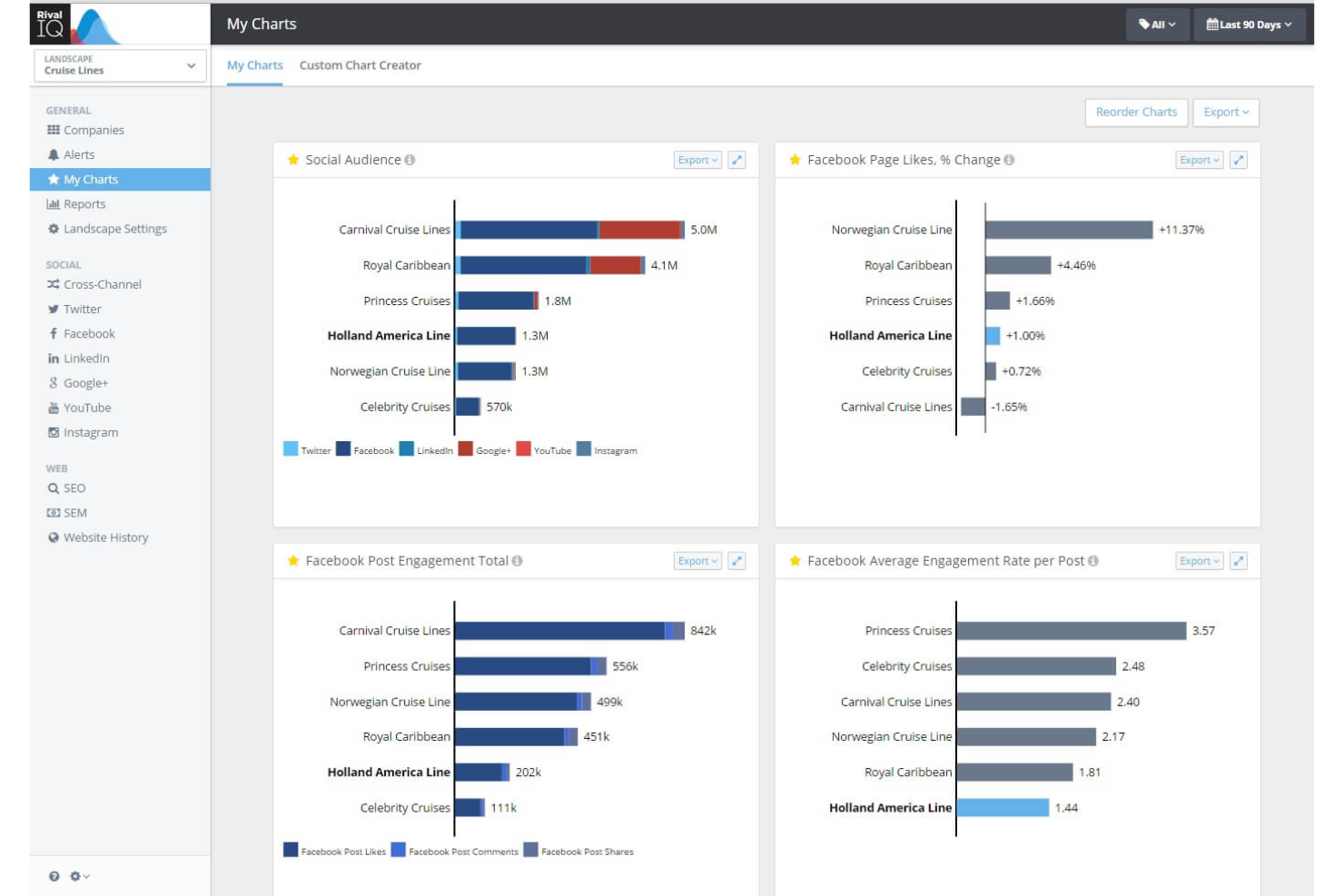
Rival IQ is a social media analytics platform focused on competitive analysis, social post performance tracking, social listening, and automated reporting across channels like Instagram, TikTok, Facebook, LinkedIn, and YouTube.
Who Is Rival IQ Best For?
Rival IQ is a natural fit for social media managers and digital marketing teams at agencies or mid-market brands who track performance across multiple competitor accounts.
Why I Picked Rival IQ
I've included Rival IQ in my top picks because no other tool in this space gives you the same depth of social benchmarking data across competing brands. I particularly like the Competitive Landscape feature, which lets me compare engagement rates, posting frequency, and follower growth across my entire competitor set at once. The Boosted Post Detection feature is also genuinely useful—it flags when a competitor's post was likely paid, so I'm benchmarking organic content against organic content, not inflated paid results.
Rival IQ Key Features
- Social listening: Monitor brand mentions, keywords, and hashtags across social channels to track competitor conversations in real time.
- Automated reporting: Schedule and send branded competitive reports on a recurring basis without manual exports.
- Hashtag analysis: See which hashtags competitors use most and how those hashtags perform by engagement rate.
- Top content discovery: Surface the highest-performing posts from any competitor account across any tracked time period.
Rival IQ Integrations
Rival IQ offers a native Looker Studio connector and an API that lets you pull competitive social data into tools like Google Analytics, Google Sheets, Tableau, and Slack. Zapier support is not clearly documented.
Pros and Cons
Pros:
- Side-by-side competitor engagement rate comparisons
- Covers TikTok alongside other major channels
- Breakout post alerts for competitor tracking
Cons:
- Focused only on social media data
- Limited video-specific analytics depth

Ahrefs
Best for backlink analysis
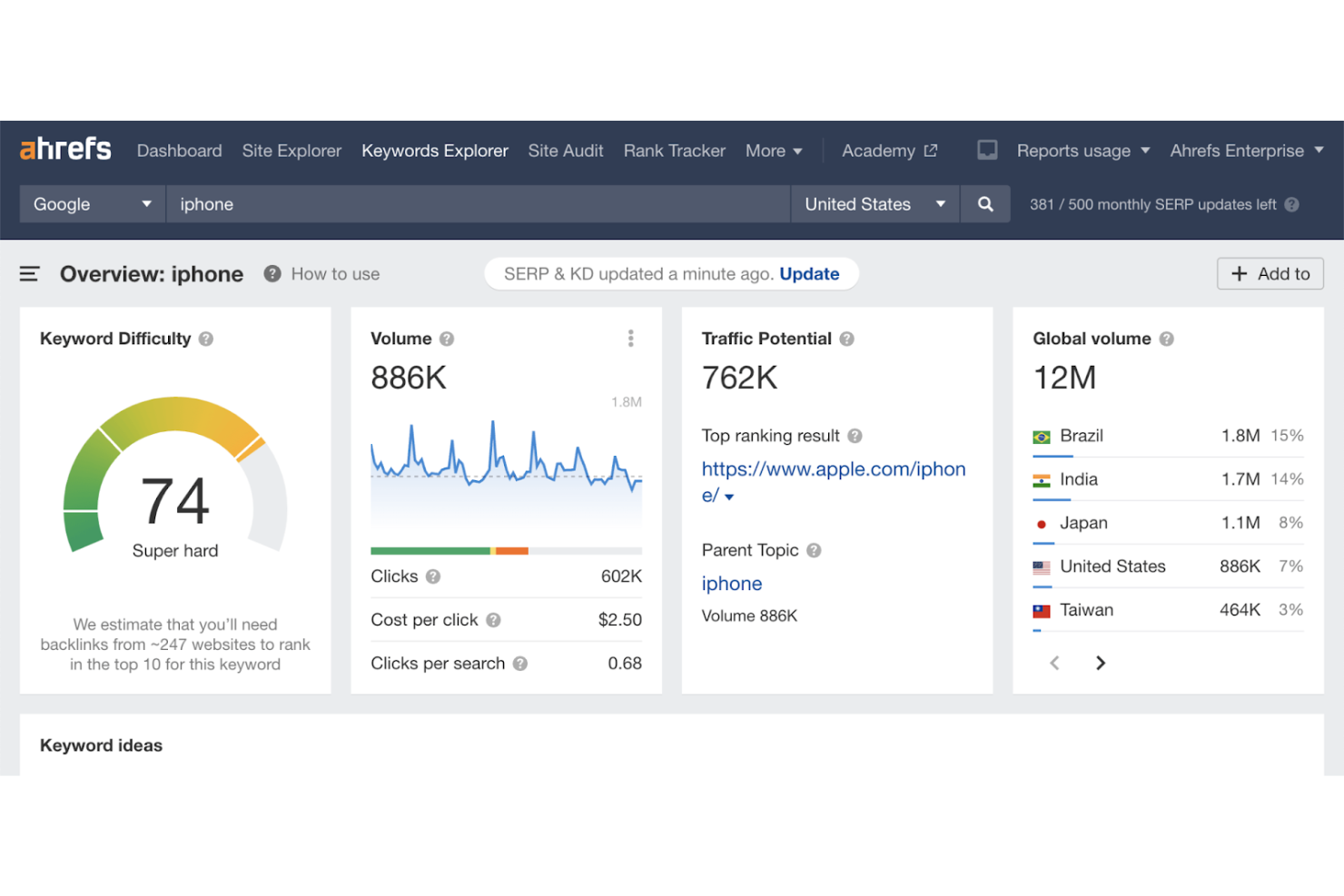
Ahrefs is an SEO toolset popular among digital marketers and SEO professionals who need to enhance their search engine performance. It offers comprehensive tools for backlink analysis, keyword research, and competitor monitoring to improve online presence.
Why I picked Ahrefs: Ahrefs helps your team analyze backlinks, offering detailed insights to improve your SEO strategy. You can use SEO tools like Site Explorer, Rank Tracker, Backlink Checker, and Keyword Explorer to optimize your site's authority. Focusing on backlink profiles, Ahrefs supports your link-building efforts, making it a valuable tool for SEO work.
Standout features & integrations:
Features include Site Explorer, which helps your team analyze your competitors' websites for backlinks and keywords. Backlink checker provides detailed information about your site's backlinks, helping you understand your link profile. Keyword Explorer allows you to find keywords that can improve your search rankings.
Integrations include Google Analytics, Google Search Console, Data Studio, WordPress, SEMrush, Moz, Majestic, HubSpot, Marketo, and Salesforce.
Pros and Cons
Pros:
- In-depth competitor insights
- Keyword research tools
- Comprehensive backlink analysis
Cons:
- Basic reporting features
- Steep learning curve

Best for market insights

SimilarWeb is a digital market intelligence tool designed for businesses looking to gain insights into their market position and competitors. Its primary users include marketers and analysts who need detailed data on web traffic and audience demographics.
Why I picked SimilarWeb: SimilarWeb helps you get detailed market insights, making it great for competitor analysis. You can track traffic, see audience demographics, and compare your business to industry benchmarks. These features help your team understand market trends and adjust strategies. Its focus on accurate, detailed data is what sets it apart when it comes to market insights.
Standout features & integrations:
Features include traffic and engagement metrics that help you understand where your competitors stand. Audience insights give you a deeper look into who is visiting your competitor's sites. Industry trend analysis allows your team to stay ahead by understanding shifts in your market.
Integrations include Google Analytics, Salesforce, HubSpot, Marketo, Microsoft Power BI, Tableau, Adobe Analytics, Slack, Zapier, and Shopify.
Pros and Cons
Pros:
- Extensive keyword research
- Reliable data accuracy
- Detailed audience insights
Cons:
- Can be expensive for small businesses
- Limited historical data

Semrush
Best for all-in-one digital visibility insights
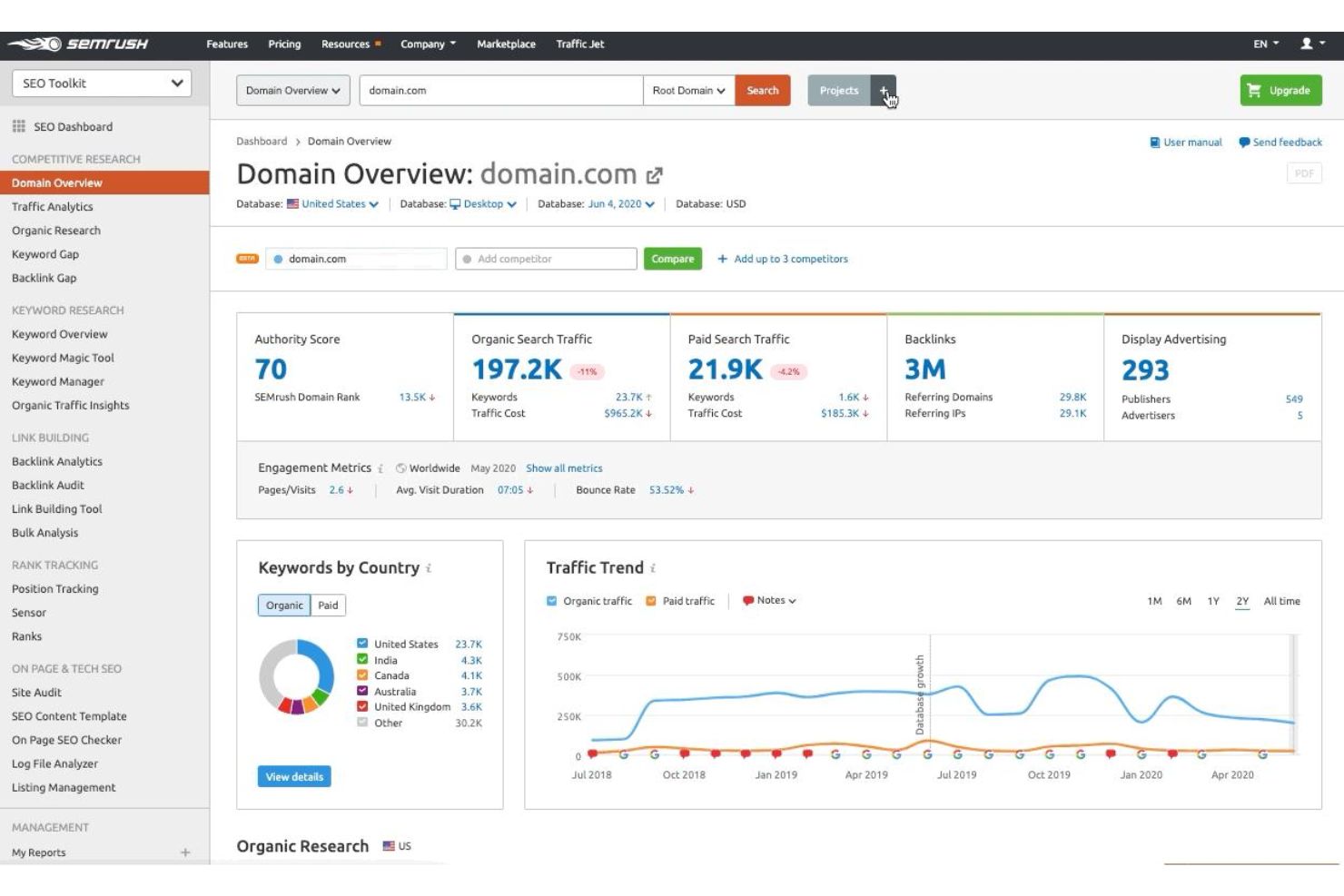
Semrush is an all-in-one digital marketing platform that covers SEO, PPC, content, and social media—with competitor analysis tools for tracking rival keywords, traffic sources, backlinks, and ad strategies across channels.
Who Is Semrush Best For?
Semrush is a strong fit for digital marketing teams and agencies that need a single platform to manage SEO, paid search, and competitive research across multiple clients or campaigns.
Why I Picked Semrush
Semrush earns its spot as one of the best on my shortlist because the breadth of competitor data it surfaces in one place is genuinely unmatched. I use the Traffic Analytics tool to break down a rival's traffic by channel, geography, and device—without needing a separate analytics platform. The Market Explorer feature maps out the competitive landscape visually, showing market share shifts across multiple players over time.
Semrush Key Features
- Keyword gap analysis: Compare your keyword portfolio against up to four competitors to identify keywords they rank for that you don't.
- Backlink gap analysis: Audit link-building opportunities by seeing which domains link to your competitors but not to your site.
- Advertising research: View competitors' active ad copies, landing pages, and paid keyword strategies across Google Search.
- Brand monitoring: Track competitor mentions across the web and social platforms in near real time.
Semrush Integrations
Semrush supports a variety of integrations with popular tools and services. Native integrations include Google Analytics, Google Search Console, Google Ads, Google Sheets, Looker Studio, Trello, WordPress, and social platforms like Facebook, LinkedIn, and Instagram. Partner integrations extend to tools like monday.com, Wix, and Zoho Analytics. It connects with Zapier, and an API is available for custom integrations.
Pros and Cons
Pros:
- One of the largest backlink databases available
- Traffic Analytics reveals competitor source-level data
- Historical competitor data goes back to 2012
Cons:
- Add-on upsells create unclear plan boundaries
- Can feel overwhelming for beginners

Moz
Best for SEO insights
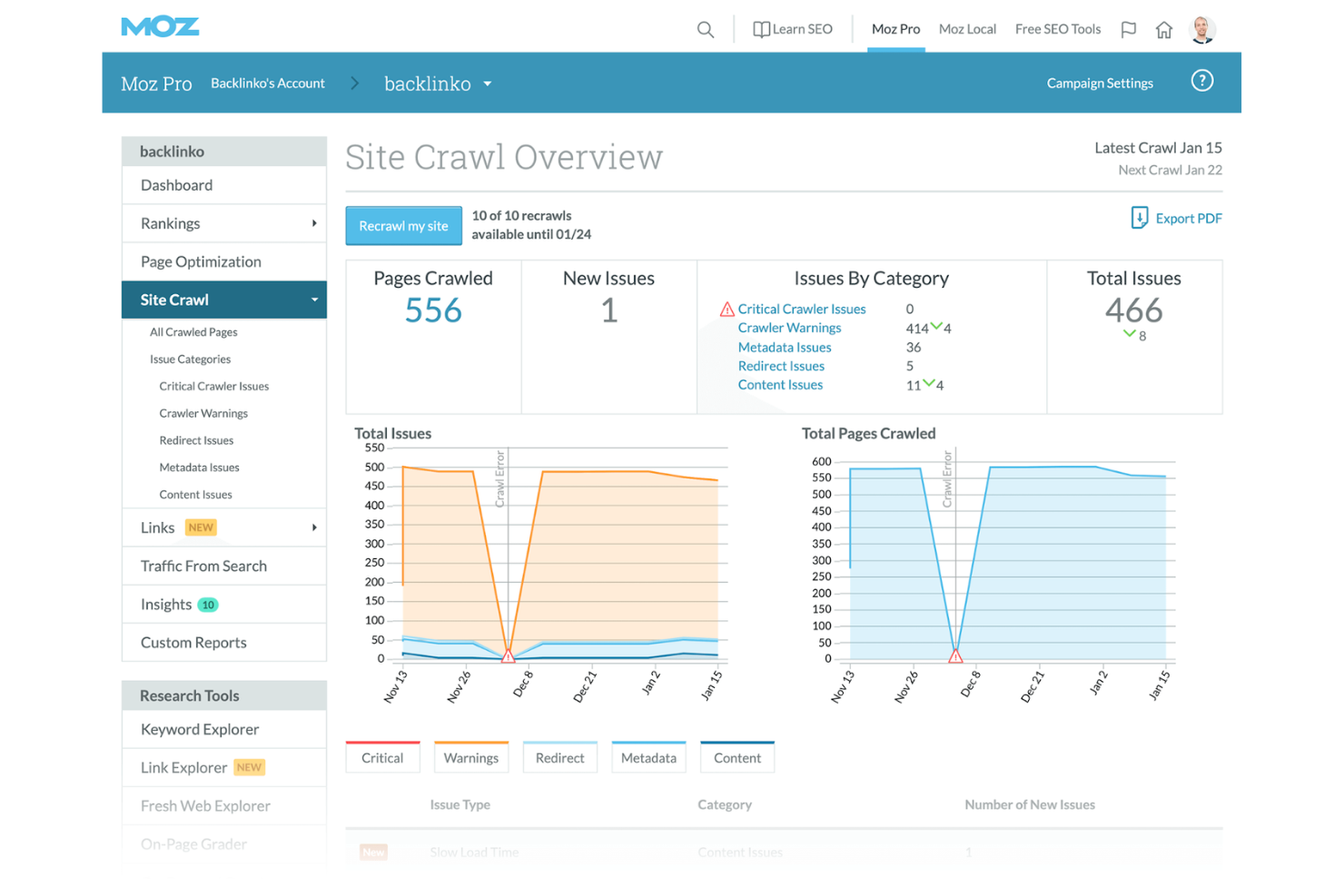
Moz is an SEO toolset aimed at digital marketers and SEO professionals looking to enhance their search engine visibility. It helps users with keyword research, site audits, and rank tracking, offering valuable insights to improve search engine optimization strategies.
Why I picked Moz: Moz gives your team essential SEO insights to boost your website's performance. You can explore keywords, analyze links, and run site audits to improve your SEO strategy. Tracking search rankings helps you stay competitive and adapt to changes. Moz's focus on SEO insights keeps your team on top of online visibility efforts.
Standout features & integrations:
Features include Keyword Explorer, which helps your team identify the best keywords for your strategy. Link analysis provides insights into your backlink profile and its impact on your ranking. Site audits identify technical issues that could affect your search engine performance, helping you optimize your site.
Integrations include Google Analytics, Google Data Studio, HubSpot, Salesforce, WordPress, SEMrush, Ahrefs, Majestic, Google Ads, and Trello.
Pros and Cons
Pros:
- In-depth SEO insights
- Effective link analysis
- Detailed keyword research
Cons:
- Basic customization features
- Limited data export options

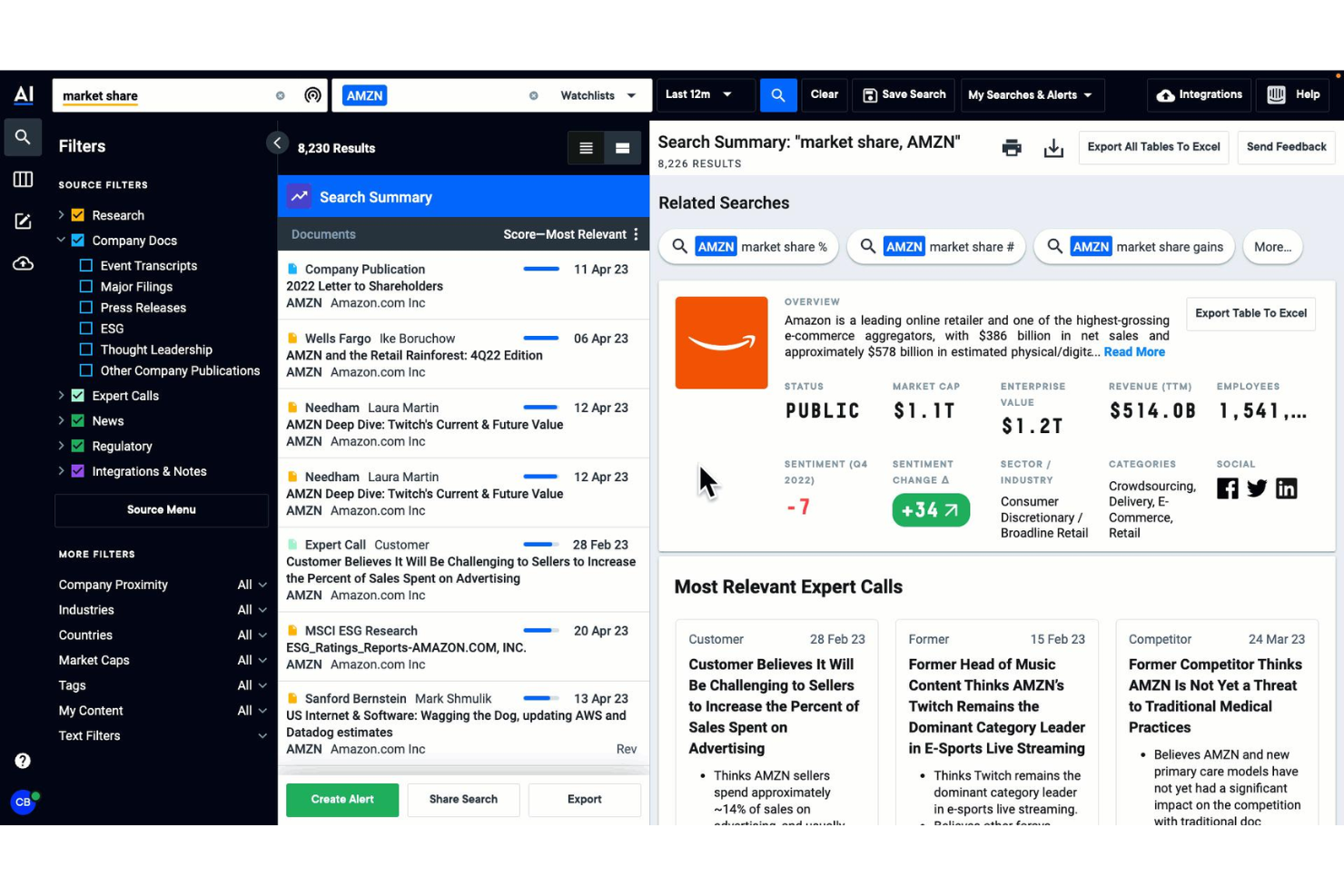
AlphaSense is an AI-powered market and competitive intelligence platform that lets you search and analyze millions of financial documents, expert transcripts, broker research, and company filings in one place.
Who Is AlphaSense Best For?
AlphaSense is a strong fit for corporate strategy, investment research, and competitive intelligence teams at enterprise companies and financial institutions.
Why I Picked AlphaSense
I've included AlphaSense in my top picks because its AI search cuts through millions of documents, including earnings transcripts, SEC filings, and broker reports, in seconds, surfacing competitor signals I'd otherwise miss. The Smart Synonyms engine finds conceptually related terms automatically, so I don't have to manually iterate on search queries. I also rely on its Sentiment Analysis feature to track how analyst and executive language around a competitor is shifting over time.
AlphaSense Key Features
- Expert transcript library: Access a curated library of primary source interviews with former executives, competitors, and industry specialists not available in public filings.
- Customized monitoring dashboards: Build dashboards that track specific competitors, industry trends, and macro topics across all your trusted sources in one view.
- Deep Research agent: An AI agent that autonomously generates research briefings and synthesizes insights across thousands of documents in minutes.
- Workflow agents: Schedule and deploy custom AI agents that automatically surface new competitive developments without manual searching.
AlphaSense Integrations
AlphaSense offers native connectors through its Integration Center, including SharePoint, Notion, Dropbox, OneDrive, Egnyte, Google Drive, Evernote, Box, and Amazon S3. It also integrates with Gong for syncing call transcripts and offers an Excel add-in for pulling financial data into models. An API suite is available for custom integrations, including Search and Ingestion APIs.
Pros and Cons
Pros:
- AI generates source-cited research reports automatically
- Larger document database than most competing services
- Expert transcript library is nearly unique among CI platforms
Cons:
- Search results can surface low-quality sources
- Private company data coverage is more limited
Other Competitor Analysis Tools
Here are some additional competitor analysis tools options that didn’t make it onto my shortlist, but are still worth checking out:
- Sprout Social
For social media analysis
- Majestic
For advanced backlink data analysis
- BuiltWith
For tech stack analysis
- GWI
For rich, global audience consumer insights
- iSpionage
For ad strategies
- BigSpy
For cross-platform ad creative monitoring
- Feedly
For trend tracking
- Serpstat
For website optimization
- DashThis
For dashboard creation


How I Evaluate Competitor Analysis Tools
I split my evaluation into two layers: the core capabilities a tool must have—like live competitor tracking and keyword gap analysis—and the differentiators that separate good tools from great ones.
Core Functionality (Table Stakes For This List)
When I'm selecting tools for my list, I rank each one on a scale from 0 (does not offer the functionality) to 5 (excels in this area) for each core functionality listed below. Then, I calculate the tool's total score into a percentage. Each tool needs to achieve a minimum total score of 75% to be considered for inclusion.
- Competitor Tracking & Monitoring: I check whether you can build a competitor list and get ongoing updates on their digital presence, rather than pulling data manually each time.
- Multi-Channel Data Collection: The best tools pull from SEO, paid ads, social, and content sources—I evaluate how many channels a tool covers and how fresh that data is.
- Benchmarking & Comparative Analytics: I look for side-by-side views that let you compare traffic trends, keyword overlap, or share of voice against two or three competitors at once.
- Change Detection & Alerts: When a competitor updates their pricing page or launches a new campaign, I want to know the tool flags it automatically and sends timely notifications.
- Keyword & SEO Gap Analysis: I evaluate whether a tool surfaces the keywords your competitors rank for that you don't, including volume and difficulty context to prioritize action.
- Reporting & Data Export: Sharing competitive insights with stakeholders matters, so I look for customizable dashboards, scheduled reports, and flexible export formats like PDF and CSV.
Once I have a list of tools that meet this criteria, I consider what sets each platform apart.
Differentiating Factors (What Sets Vendors Apart)
Here's how I compare and contrast different vendors:
Standout Features
An ad creative library is a big differentiator—I look for tools that archive competitor ads across Google, Meta, and display networks so you can spot messaging patterns over time. AI-powered insights also matter, especially when a tool surfaces strategy shifts or anomalies you'd otherwise miss in raw data. For product marketing teams, I check whether a platform can auto-generate battlecards that summarize competitor positioning and pricing for sales enablement.
Beyond Features
Data accuracy matters more than feature count in this category. I evaluate how transparent a vendor is about its data sources and refresh frequency—stale traffic estimates can lead to bad strategic calls. Integrations are another key factor; I check whether a tool connects to platforms like Google Analytics, HubSpot, or Tableau so insights reach the workflows where decisions happen. Pricing scalability also gets close attention, particularly whether adding more tracked competitors or users triggers steep cost jumps.
How to Choose Competitor Analysis Tools
It’s easy to get bogged down in long feature lists and complex pricing structures. To help you stay focused as you work through your unique software selection process, here’s a checklist of factors to keep in mind:
| Factor | What to Consider |
| Scalability | Will it grow with your team’s needs? |
| Integrations | Does it connect with your existing tools? |
| Customizability | Can you tailor it to fit your specific workflows? |
| Ease of Use | Is it straightforward for your team to learn? |
| Budget | Does it fit within your financial resources? |
| Security Safeguards | Does it protect your data effectively? |
| Support | Will you have access to timely customer support? |
| Features | Does it offer the features you need most? |
Trends in Competitor Analysis Tools
In my research, I sourced countless product updates, press releases, and release logs from different competitor analysis tool vendors. Here are some of the emerging trends I’m keeping an eye on:
- AI-driven insights: AI is being used to analyze competitor behaviour more deeply. This helps businesses predict future trends and adjust their strategies.
- Predictive analytics: More platforms are offering predictive capabilities that help forecast competitor moves and market shifts. This feature is becoming crucial for proactive strategy planning. Tools like SEMrush are incorporating predictive analytics.
- Customizable dashboards: Users want dashboards they can tailor to their specific needs. This trend allows teams to focus on the data that matters most to them.
- Real-time data access: Accessing up-to-the-minute data is becoming a priority. This trend is helping businesses react quicker to changes in the competitive landscape.
- Industry-specific solutions: Competitor analysis tools are increasingly offering industry-specific features. These cater to niche markets by providing tailored insights and metrics.
What are Competitor Analysis Tools?
Competitor analysis tools are software solutions that help businesses track and analyze competitors' strategies and performance. These tools are commonly used by marketing professionals, analysts, and business strategists to gather insights and make informed decisions.
With features like AI-driven insights, predictive analytics, and customizable dashboards, they help users understand market trends and optimize strategies. Ultimately, these tools provide the data needed to stay competitive and make strategic choices.
Features of Competitor Analysis Tools
When selecting competitor analysis tools, keep an eye out for the following key features:
- AI-driven insights: This feature uses artificial intelligence to analyze competitor data, helping predict future trends and strategies.
- Predictive analytics: It forecasts market shifts and competitor actions, allowing businesses to plan proactively.
- Customizable dashboards: This allows users to tailor their view to show the most relevant data for their needs.
- Real-time data access: It provides up-to-the-minute information, enabling quick reactions to changes in the competitive landscape.
- Industry-specific solutions: These are tailored features and insights that cater to niche markets, providing targeted data.
- Keyword research: This feature identifies the most effective keywords competitors are using, helping refine SEO strategies.
- Competitor tracking: It monitors competitor activities and strategies, offering insights into their market positioning.
- Link analysis: This feature evaluates the backlink profiles of competitors, aiding in the development of effective link-building strategies.
- Social listening: It tracks brand mentions and industry trends across social media, offering insights into public perception and engagement.
- Market trend analysis: This analyzes past and current market trends, helping businesses stay ahead of industry developments.
Benefits of Competitor Analysis Tools
Implementing competitor analysis tools provides several benefits for your team and your business. Here are a few you can look forward to:
- Informed decision-making: These tools provide data-driven insights, helping your team make strategic choices based on market trends.
- Improved market positioning: By analyzing competitors, your business can identify opportunities to differentiate and strengthen its position.
- Enhanced SEO strategies: Keyword research features help refine your SEO efforts by revealing effective competitor keywords.
- Proactive strategy planning: Predictive analytics allow your team to anticipate market shifts and plan accordingly.
- Optimized marketing efforts: Real-time data access ensures your campaigns are timely and relevant to current market conditions.
- Better resource allocation: By understanding competitor strategies, you can allocate resources more effectively to areas that will yield the best results.
Costs and Pricing of Competitor Analysis Tools
Selecting competitor analysis tools requires an understanding of the various pricing models and plans available. Costs vary based on features, team size, add-ons, and more. The table below summarizes common plans, their average prices, and typical features included in competitor analysis tools solutions:
Plan Comparison Table for Competitor Analysis Tools
| Plan Type | Average Price | Common Features |
| Free Plan | $0 | Basic keyword research, limited competitor tracking, and access to some reports. |
| Personal Plan | $5-$25/user/month | Advanced keyword research, basic analytics, and competitor tracking |
| Business Plan | $50-$100/ user/month | Comprehensive analytics, real-time data access, and customizable dashboards |
| Enterprise Plan | $150-$300/ user/month | Full feature access, predictive analytics, and dedicated account support |
Competitor Analysis Tools FAQs
Here are some answers to common questions about competitor analysis tools:
What are the obstacles to effective competitor analysis?
Effective competitor analysis can be challenging due to the difficulty in gathering accurate data and ensuring its relevance. Interpreting competitor strategies accurately without bias or assumptions is another obstacle. You need to focus on turning data into actionable insights for strategic decisions.
Which questions do we need to ask when we do competitor analysis?
When conducting competitor analysis, ask questions like what channels your competitors interact through or if they use franchises. Consider asking about their pricing strategies and promotions, and what factors influence customer decisions to leave or buy from them.
How do competitor analysis tools help in strategic planning?
These tools provide insights into competitor strategies, market trends, and customer behaviours. By understanding these elements, you can make informed decisions and anticipate market shifts. This information helps in crafting strategies that position your business competitively.
How can competitor analysis tools improve marketing efforts?
By analyzing competitors’ successful campaigns, you can identify trends and strategies that resonate with audiences. A competitive analysis tool can help track keywords, discover content gaps and topics through competitor research. It also allows you to compare overall content performance, identify SEO competitors and competitors domains, and analyze competitor’s traffic, allowing you to refine your marketing tactics.
What features should you look for in competitor analysis tools?
Look for features like real-time data access to information such as referral and organic traffic, tools for identifying keyword market share and competitive advantages, predictive analytics, and customizable dashboards. These features help in keeping your analysis timely and tailored to your specific needs. AI-driven insights, competitive intelligence such as SERP and website traffic, performance of competitors’ content, and analysis of competitors rank can also add significant value.
What’s Next?
Ready to grow? Subscribe to The CMO newsletter to stay on top of trends and get the latest tips, resources, and guides from our community of seasoned marketing leaders straight to your inbox.