
20 Best Sprinklr Alternatives in 2026

Sprinklr Alternatives Shortlist
Here’s my shortlist of the best Sprinklr alternatives:


The best Sprinklr alternatives offer digital marketing software that combines multi-channel social media management, analytics, and collaboration tools in one platform. If you’re searching for Sprinklr alternatives, you likely need a solution that matches your team’s workflow, integrates with your existing tools, and provides actionable insights without the complexity or cost of Sprinklr. This guide will help you quickly compare top options, understand their unique strengths, and find the right fit for your marketing goals in 2026.
What Is Sprinklr?
Sprinklr is a digital marketing software platform that helps businesses manage social media, customer engagement, and analytics across multiple channels. It centralizes publishing, monitoring, and reporting for marketing teams. Sprinklr is used by organizations to coordinate campaigns, track brand mentions, and analyze audience data. Teams choose Sprinklr for its ability to unify social media management and customer experience in one platform.
Best Sprinklr Alternatives Summary
This comparison chart summarizes pricing details for my top sprinklr alternative selections to help you find the best software for your budget and business needs.
| Tool | Best For | Trial Info | Price | ||
|---|---|---|---|---|---|
| 1 | Best for a unified social inbox with advanced automation | 14-day free trial + free demo available | From $69/user/month (billed annually) | Website | |
| 2 | Best for a content marketing platform with an expert talent network | Free demo available | Pricing upon request | Website | |
| 3 | Best for unified social inbox and reporting for teams | Free trial + free plan available | From $79/user/month (billed annually) | Website | |
| 4 | Best for simple, affordable social publishing and analytics | 14-day free trial + free plan available | From $5/channel/month (billed annually) | Website | |
| 5 | Best for a real-time collaborative content calendar for teams | Free plan + free demo available | From $33/workspace/month (billed annually) | Website | |
| 6 | Best for a unified inbox for managing all social conversations | 30-day free trial + free demo available | From $199/seat/month | Website | |
| 7 | Best for deep social listening and audience insights | Free demo available | Pricing upon request | Website | |
| 8 | Best for a unified social suite with advanced analytics | Free demo available | Pricing upon request | Website | |
| 9 | Best for a centralized dashboard for managing multiple social networks | 30-day free trial available | From $199/user/month (billed annually) | Website | |
| 10 | Best for global media monitoring and social listening platform | Free trial + free demo available | Pricing upon request | Website |
Why Trust Our Software Reviews
We’ve been testing and reviewing marketing software since 2022. As marketing experts ourselves, we know how critical and difficult it is to make the right decision when selecting software.
We invest in deep research to help our audience make better software purchasing decisions. We’ve tested more than 2,000 tools for different marketing use cases and written over 1,000 comprehensive software reviews. Learn how we stay transparent & our software review methodology.
-

Eloqua
Visit WebsiteThis is an aggregated rating for this tool including ratings from Crozdesk users and ratings from other sites.4.4 -
Optimizely
Visit WebsiteThis is an aggregated rating for this tool including ratings from Crozdesk users and ratings from other sites.4.2 -
Uberflip
Visit WebsiteThis is an aggregated rating for this tool including ratings from Crozdesk users and ratings from other sites.4.3




Sprinklr Alternatives Reviews
Below are my detailed summaries of the Sprinklr alternatives that made it onto my shortlist. My reviews offer a detailed look at the features, integrations, and best use cases of each platform to help you find the best one for you.

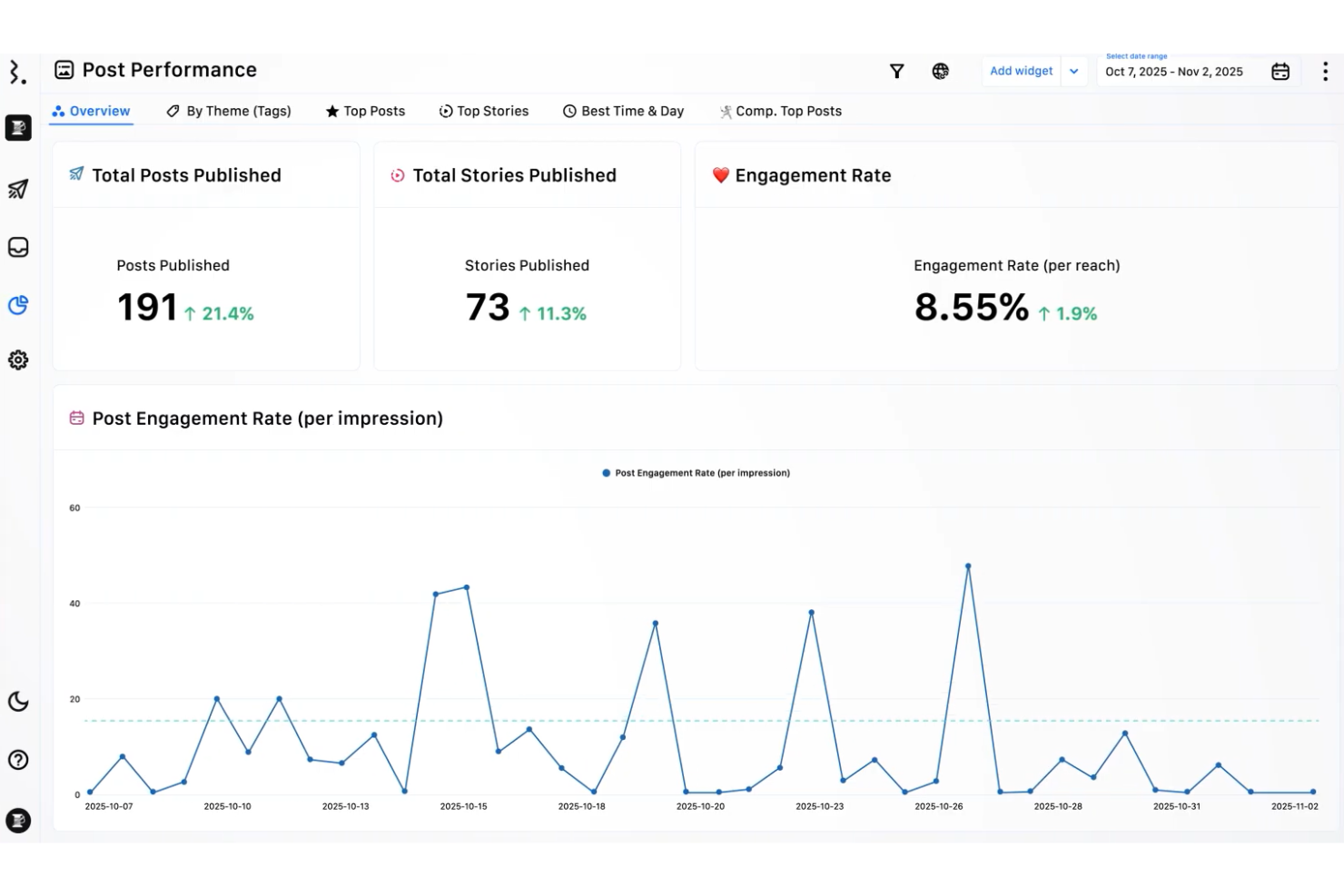
Statusbrew is a social media management platform designed for marketing teams and agencies that need to coordinate publishing, engagement, and reporting across multiple channels. It appeals to businesses seeking unified control over social conversations and streamlined collaboration.
Who Is Statusbrew Best For?
Agencies and mid-sized businesses managing high-volume social engagement across multiple brands or regions.
Why Statusbrew Is A Good Sprinklr Alternative
I picked Statusbrew specifically for its unified social inbox, which pulls together organic and paid interactions from 10+ social, messaging, and review channels into one view. What I find most useful is the Rule Engine—it lets my team automate comment moderation, message routing, and conversation labeling based on custom conditions, so high-priority messages like complaints or purchase intent never get buried. I also rely on the 25+ filtering options to segment conversations by sentiment, campaign, keyword, or contact type, which makes it easy to divide work across a multilingual or multi-brand team. For teams leaving Sprinklr's enterprise complexity behind, Statusbrew delivers the same inbox depth at a fraction of the overhead.
Statusbrew Key Features
- Shareable content calendars: Share scheduled posts with external collaborators, who can view, comment, and suggest edits without a Statusbrew account.
- Competitor analysis: Benchmarks your social performance against competitors across audience growth, engagement, and content metrics.
- Widget builder: Builds custom analytics reports using 230+ metrics covering likes, comments, clicks, messages, and more.
- Paid performance reporting: Tracks ad performance across 15+ metrics, including ad spend, CPC, CTR, and cost per conversion in one dashboard.
Statusbrew Integrations
Integrations include Facebook, Instagram, LinkedIn, X (formerly Twitter), YouTube, Slack, Microsoft Teams, HubSpot, Salesforce, and Dropbox.
Pros and Cons
Pros:
- Multi-brand and multilingual conversation management
- Advanced automation for comment moderation
- Unified inbox for organic and paid channels
Cons:
- No direct integration with paid social ad creation
- Limited support for TikTok and Pinterest

Best for a content marketing platform with an expert talent network
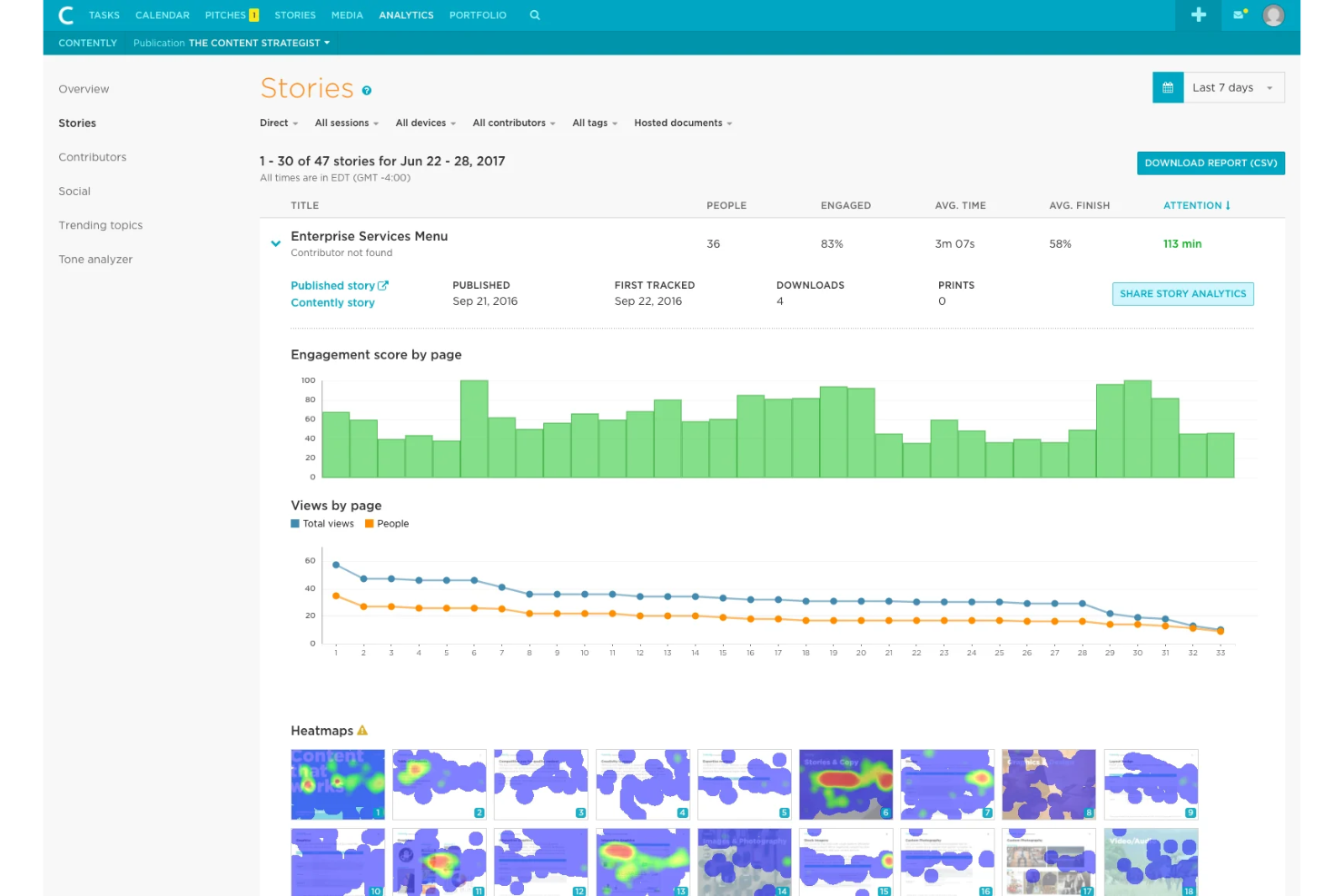
Contently is a content marketing platform built for brands and agencies that need to manage complex content operations at scale. It appeals to marketing teams looking for workflow automation, advanced analytics, and access to a vetted network of freelance creatives.
Who Is Contently Best For?
Enterprise marketing teams and agencies managing high-volume, multi-channel content programs.
Why Contently Is A Good Sprinklr Alternative
I picked Contently because it's one of the few platforms that combines a full content marketing workflow with direct access to a vetted network of over 165,000 freelance writers, editors, and designers. When my team needs to scale content production quickly, the talent matching algorithm surfaces contributors based on our existing content strategy and publishing history—not just a generic search. I also rely on the Tone Analyzer to keep brand voice consistent across contributors, which matters when multiple freelancers are writing for the same brand. For teams moving away from Sprinklr's broad social focus, Contently fills the gap with deep content operations tools built specifically for editorial-scale production.
Contently Key Features
- SEO story ideas: Algorithmically recommends story concepts based on your content strategy and likely search performance.
- Content calendar: A color-coded, cross-channel calendar for managing content production and one-click content repurposing.
- Docalytics: Tracks PDF engagement with heat maps and page-by-page analytics for white papers, case studies, and proposals.
- Production analytics: Measures workflow efficiency metrics like completion time, user workload, and bottlenecks across your team.
Contently Integrations
Integrations include WordPress, Drupal, HubSpot, Marketo, Salesforce, Adobe Experience Manager, Sitecore, Eloqua, LinkedIn, and Facebook.
Pros and Cons
Pros:
- Customizable approval and compliance workflows
- Advanced workflow automation for content teams
- Access to a large freelance talent network
Cons:
- Lacks real-time social listening or monitoring
- No unified social media management dashboard

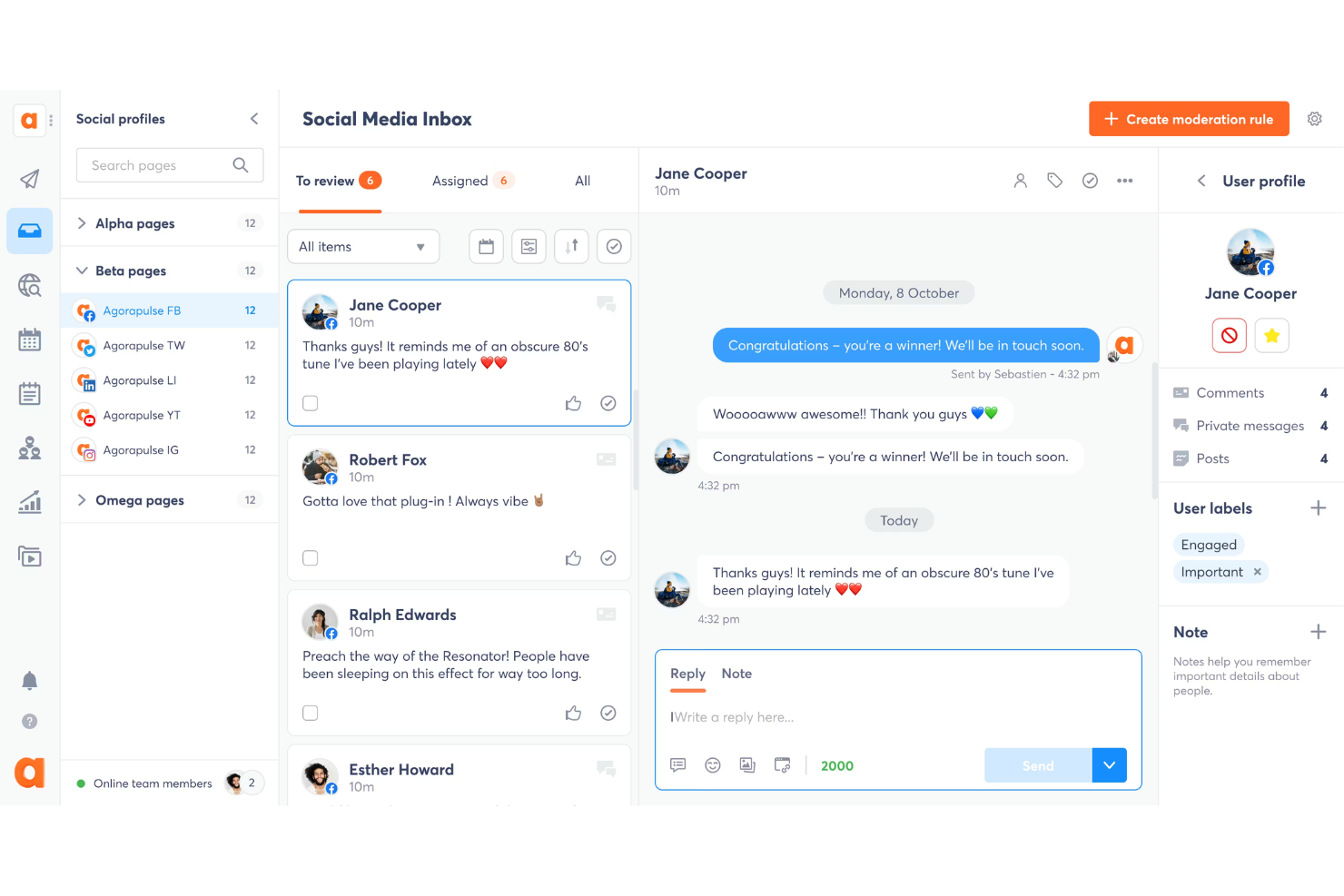
Agorapulse is a social media management platform designed for agencies and marketing teams that need to manage multiple profiles and client accounts. It helps you centralize social inboxes, schedule content, and generate detailed reports across all major networks.
Who Is Agorapulse Best For?
Agencies and marketing teams managing multiple brands or clients across social channels.
Why Agorapulse Is A Good Sprinklr Alternative
I picked Agorapulse because its unified social inbox genuinely changes how my team handles high-volume engagement. Every comment, mention, private message, and ad comment from Facebook, Instagram, LinkedIn, TikTok, and more lands in one place—including paid post comments, which most tools miss entirely. I also rely on its Power Reports feature, which lets me build custom cross-profile reports, schedule them to go out automatically, and export them in PDF, CSV, or PowerPoint for client presentations. In practice, that means my team spends less time compiling data and more time acting on it.
Agorapulse Key Features
- AI writing assistant: Generates and refines post copy directly in the composer, with filters to adjust tone and style for each platform.
- Social listening: Tracks brand mentions, hashtags, and keywords across social networks, news sites, and blogs, with up to 24 months of historical data.
- Queues and bulk publishing: Schedules up to 200 posts at once via CSV upload and automates recurring content queues across profiles.
- Social ROI tracking: Connects Google Analytics data to individual posts and profiles to show which content drives traffic, leads, and revenue.
Agorapulse Integrations
Integrations include Facebook, Instagram, LinkedIn, X (Twitter), TikTok, YouTube, Google Analytics, HubSpot, Salesforce, Slack, and Canva.
Pros and Cons
Pros:
- Social listening covers multiple languages
- Power Reports automate cross-channel reporting
- Unified inbox includes paid and organic comments
Cons:
- Workflow automation is limited for large teams
- No unified paid and organic campaign management

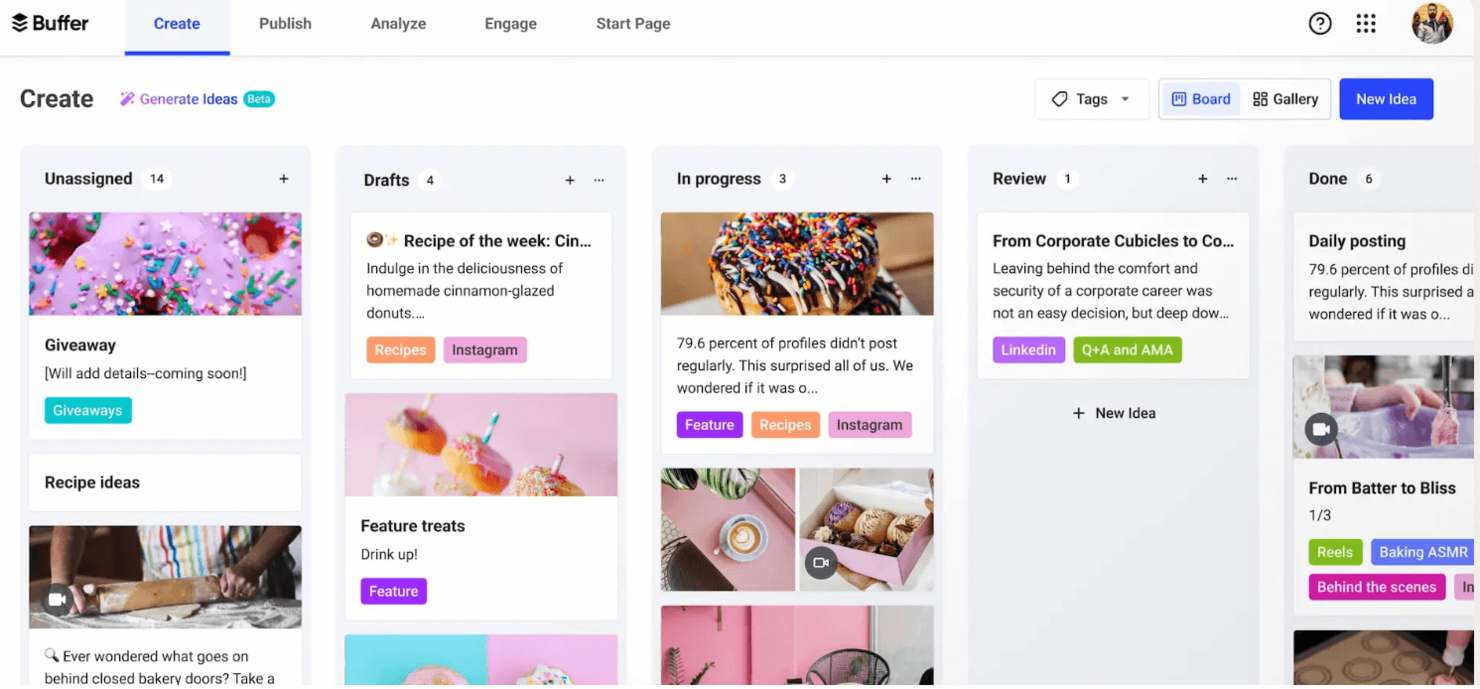
Buffer is a social media management platform designed for small businesses, creators, and marketing teams that want a straightforward way to schedule and analyze posts. It helps you plan content, track engagement, and manage multiple social accounts from one dashboard.
Who Is Buffer Best For?
Solo marketers, small businesses, and creators managing their social media strategy and multiple social channels with limited resources.
Why Buffer Is A Good Sprinklr Alternative
I picked Buffer because it strips social media management down to what most small teams actually need—a clean publishing queue and clear analytics without the enterprise overhead. I like how Buffer's Start Page lets my team build a link-in-bio landing page directly within the platform, keeping our content ecosystem in one place. The channel-specific post customization also means I can tailor the same piece of content for LinkedIn, Instagram, and X without duplicating effort. In practice, that means my team ships more content, improving scalability with fewer tools.
Buffer Key Features
- Content calendar view: Displays all scheduled posts in a visual calendar layout so you can see your full publishing plan at a glance.
- Cross-channel analytics dashboard: Tracks performance metrics across Instagram, Facebook, X, and LinkedIn from a single view, including organic vs. boosted post comparisons.
- Comment score tracking: Measures your response rate, speed, and consistency across social channels to help you maintain engagement habits.
- AI-assisted reply suggestions: Generates draft comment replies based on your writing style directly within the Community inbox.
Buffer Integrations
Integrations include Facebook, Instagram, LinkedIn, X, Pinterest, TikTok, YouTube, Google Business, Threads, and Mastodon.
Pros and Cons
Pros:
- Affordable plans for small teams and creators
- Link-in-bio landing page builder included
- Direct publishing to all major social platforms
Cons:
- Approval workflows only on higher-tier plans
- No unified inbox for customer conversations

Planable
Best for a real-time collaborative content calendar for teams
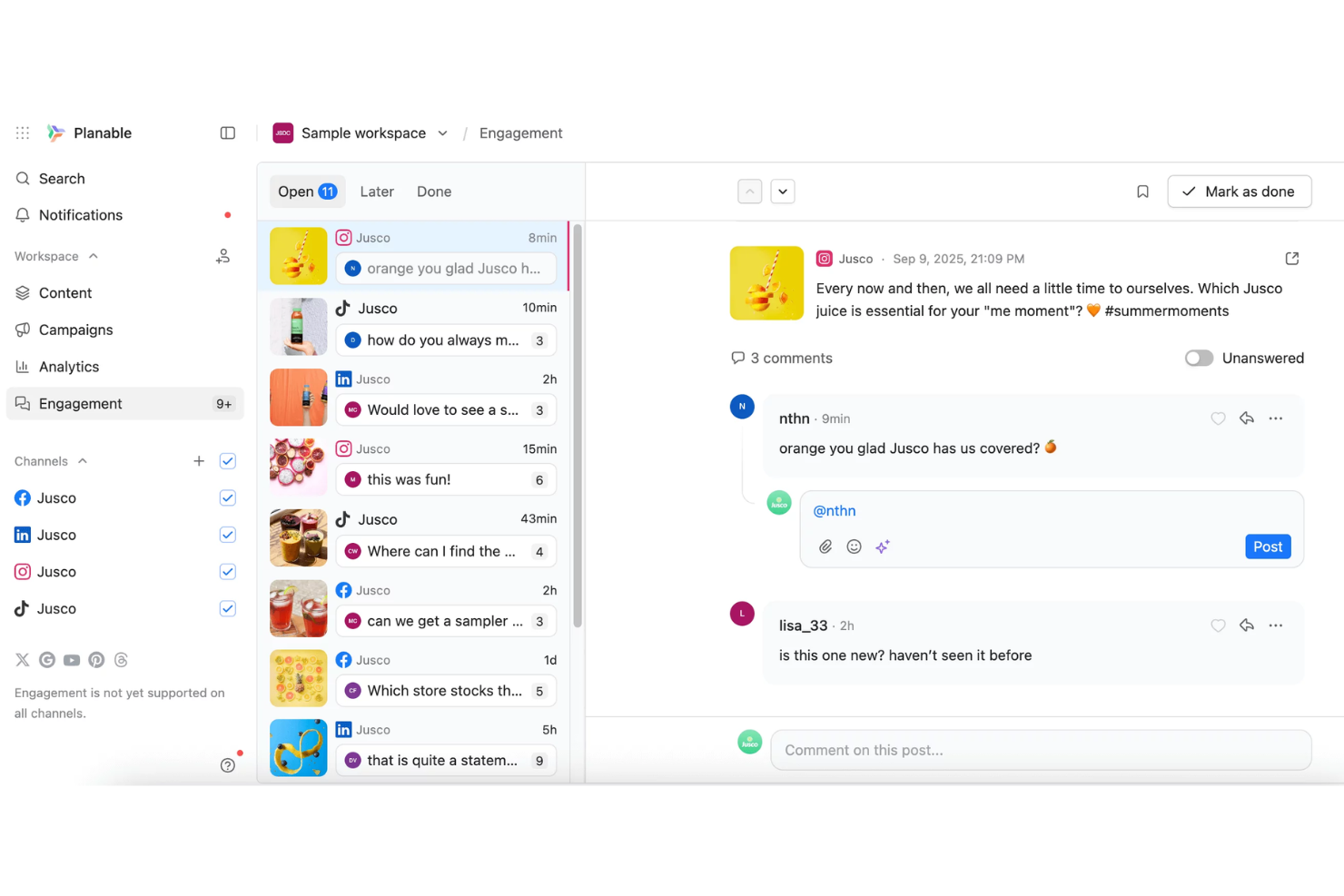
Planable is a collaborative content calendar platform designed for marketing teams and agencies that need to streamline social media planning and approvals. It appeals to teams looking for real-time feedback, visual post previews, and faster content review cycles.
Who Is Planable Best For?
Marketing agencies and in-house teams managing high-volume social content and approvals.
Why Planable Is A Good Sprinklr Alternative
I picked Planable because its real-time collaborative content calendar solves a specific problem: getting content approved without the back-and-forth of email threads and spreadsheets. When my team drafts a post, stakeholders can leave inline comments, text suggestions, and annotations directly on the content—not in a separate thread. I also appreciate the multi-step approval workflows, where posts move through defined stages and only publish once every required approver gives the green light. For teams that need client sign-off before anything goes live, that structured flow is something Sprinklr's enterprise setup doesn't offer at this price point or with this level of visual clarity.
Planable Key Features
- AI caption generation: Generates post captions from custom prompts, images, or videos directly in the post composer.
- Post labels and filters: Tag posts by campaign, content pillar, or team assignment, then filter the calendar view by those labels.
- Unified social inbox: Consolidates comments and replies from all connected social networks into a single inbox with open, reply later, and done status tags.
- Recurring post scheduling: Schedules evergreen content to repeat automatically across connected social platforms.
Planable Integrations
Integrations include Facebook, Instagram, LinkedIn, X (Twitter), YouTube, TikTok, Pinterest, Google Business Profile, Threads, and Canva.
Pros and Cons
Pros:
- Multi-level approval workflows for client sign-off
- Visual post previews for every supported network
- Real-time collaborative editing for social posts
Cons:
- Lacks unified analytics across all channels
- No social listening or monitoring features

Best for a unified inbox for managing all social conversations
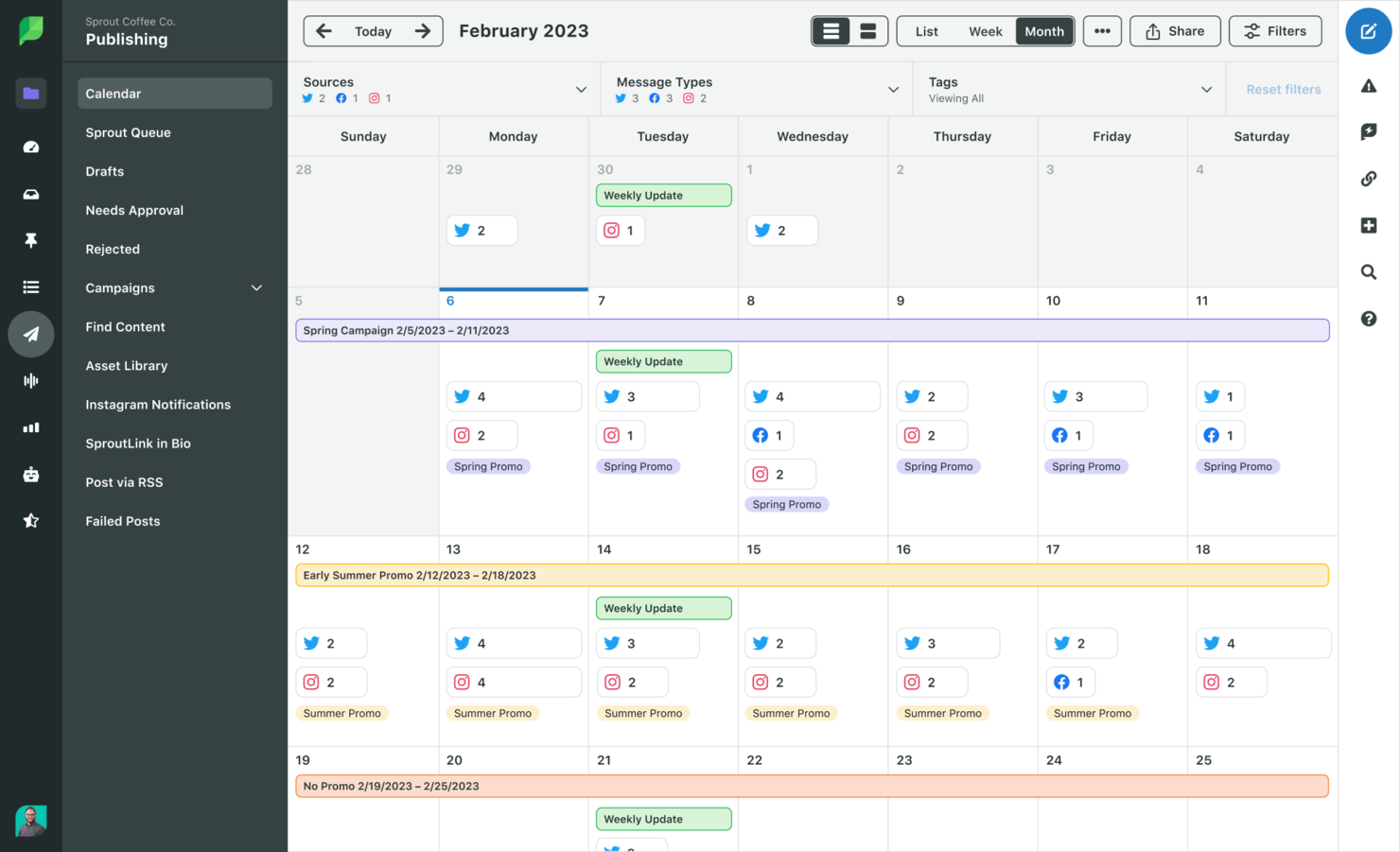
Sprout Social offers digital marketing teams a unified platform to manage, publish, and analyze content across multiple social channels. Its focus on collaboration and in-depth analytics makes it a strong fit for agencies and brands handling high volumes of social engagement.
Who Is Sprout Social Best For?
Social media teams at agencies or mid-sized brands managing high volumes of social conversations.
Why Sprout Social Is A Good Sprinklr Alternative
I picked Sprout because it makes community management easy with Smart Inbox features that pull every message, comment, and mention from all connected social profiles into a single feed. That means my team can respond to conversations without jumping between platforms. I especially like the collision detection feature, which shows real-time indicators when a teammate is already viewing or replying to a message—something Sprinklr's more complex interface makes harder to manage. In practice, that means my team avoids duplicate responses and handles high-volume engagement without coordination overhead.
Sprout Social Key Features
- ViralPost send time optimization: Analyzes your audience's engagement patterns to automatically schedule posts at the times most likely to drive reach.
- Instagram grid planning: Lets you preview and rearrange upcoming Instagram posts in a drag-and-drop grid before publishing.
- Competitor benchmarking reports: Tracks follower growth, engagement, and top posts for competitor profiles across Facebook, X, and Instagram.
- Message approval workflow: Routes drafted posts through a configurable review and approval process before they go live.
Sprout Social Integrations
Integrations include Facebook, Instagram, X (Twitter), LinkedIn, Pinterest, Google My Business, Shopify, WooCommerce, Salesforce, and Google Analytics.
Pros and Cons
Pros:
- Built-in approval workflows for team collaboration
- Instagram grid preview and planning
- Detailed competitor benchmarking reports
Cons:
- Fewer listening and sentiment analysis tools
- Limited automation compared to Sprinklr

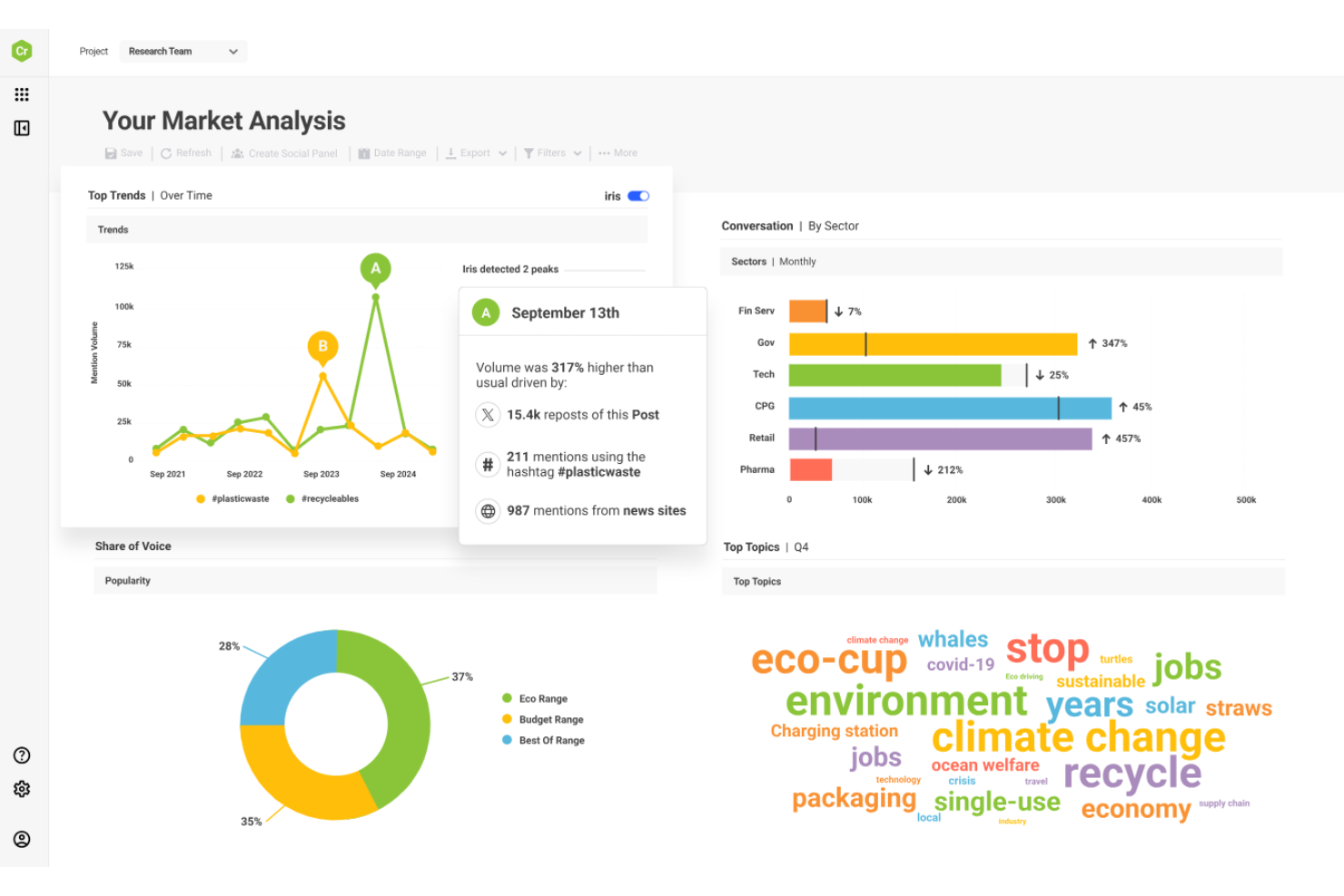
Brandwatch offers digital marketing teams advanced social listening and analytics to monitor brand reputation and uncover audience trends. It’s a strong fit for agencies and enterprises that need to track conversations, analyze sentiment, and inform campaign strategy across multiple channels.
Who Is Brandwatch Best For?
Enterprise marketing and insights teams monitoring brand reputation and audience sentiment at scale.
Why Brandwatch Is A Good Sprinklr Alternative
I picked Brandwatch because its social listening depth goes well beyond what most alternatives offer. The Consumer Research platform indexes over 1.2 trillion historical documents going back to 2008, which means my team can benchmark current brand sentiment against years of conversation data—not just recent trends. I also rely on its Signals feature, which automatically detects unusual spikes in mentions or sentiment shifts and alerts my team before a situation escalates. The demographic profiling layer is another standout: Brandwatch automatically surfaces the gender, interests, profession, and location of the authors behind the data, so I can build audience segments from real conversation patterns rather than assumptions.
Brandwatch Key Features
- Vizia live reporting: Sends live data dashboards to any screen across your organization and tracks how many people view and engage with each report.
- Automated ad campaign management: Creates and scales paid social campaigns across channels directly within the social media management suite.
- Competitor benchmarking: Compares your social performance against competitors and tracks share of voice across channels over up to seven years of data.
- Cross-channel social inbox: Consolidates messages, comments, and interactions from Facebook, Instagram, X, TikTok, LinkedIn, WhatsApp, and YouTube into one inbox.
Brandwatch Integrations
Integrations include HubSpot, ServiceNow, Dropbox, Bitly, Shopify, Box, OneDrive, Google Drive, Bynder, and Zendesk.
Pros and Cons
Pros:
- Provides customizable dashboards and live reporting
- Offers historical data back to 2008
- Tracks sentiment and trends across multiple languages
Cons:
- Limited workflow automation for large teams
- No unified paid and organic campaign management

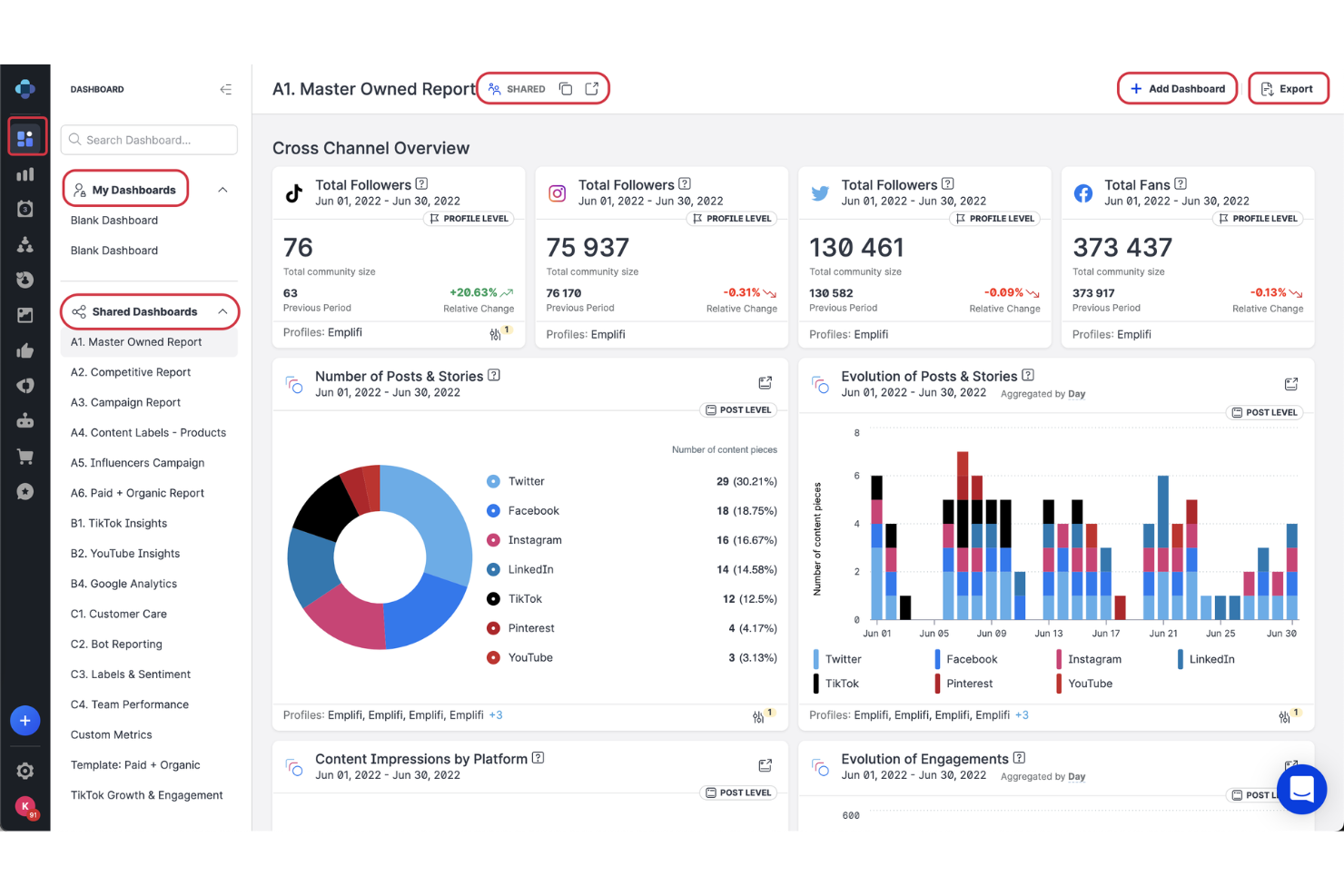
Emplifi offers a unified platform for brands and agencies that need to manage, analyze, and optimize social media and customer engagement at scale. Its suite appeals to marketing teams seeking advanced analytics, influencer management, and integrated social care.
Who Is Emplifi Best For?
Large enterprise marketing teams managing global social media and customer experience.
Why Emplifi Is A Good Sprinklr Alternative
I picked Emplifi because its Unified Analytics module pulls data from every channel—paid, owned, social care, and UGC—into a single modular dashboard, which means my team can benchmark content performance and care metrics side by side without switching tools. I also rely on its influencer management suite, which gives me access to a database of 30+ million profiles on Instagram and YouTube, with AI filters for interests, language, and hashtags to find the right creators fast. In practice, that means I can manage briefs, gifting, and campaign tracking all in one place, then measure ROI directly against conversions and revenue.
Emplifi Key Features
- PrimeTime scheduling: Analyzes your historical post performance to recommend the optimal times to publish on each connected network.
- Collision detection: Flags when multiple agents are responding to the same message simultaneously, preventing duplicate replies in the social inbox.
- AI composer: Generates and refines social post copy directly in the publishing interface, with tone and brand voice controls.
- Social care case management: Routes incoming social messages to agents based on preset rules, with SLA tracking, audit trails, and CRM escalation for open cases.
Emplifi Integrations
Integrations include Facebook, Instagram, X (Twitter), YouTube, LinkedIn, WhatsApp, Google Analytics, Shopify, Salesforce, and Microsoft Dynamics.
Pros and Cons
Pros:
- Social care case management with SLA tracking
- Influencer discovery with AI-powered filters
- Unified inbox for paid and organic comments
Cons:
- Workflow automations are limited for large teams
- No unified paid and organic campaign management

Best for a centralized dashboard for managing multiple social networks
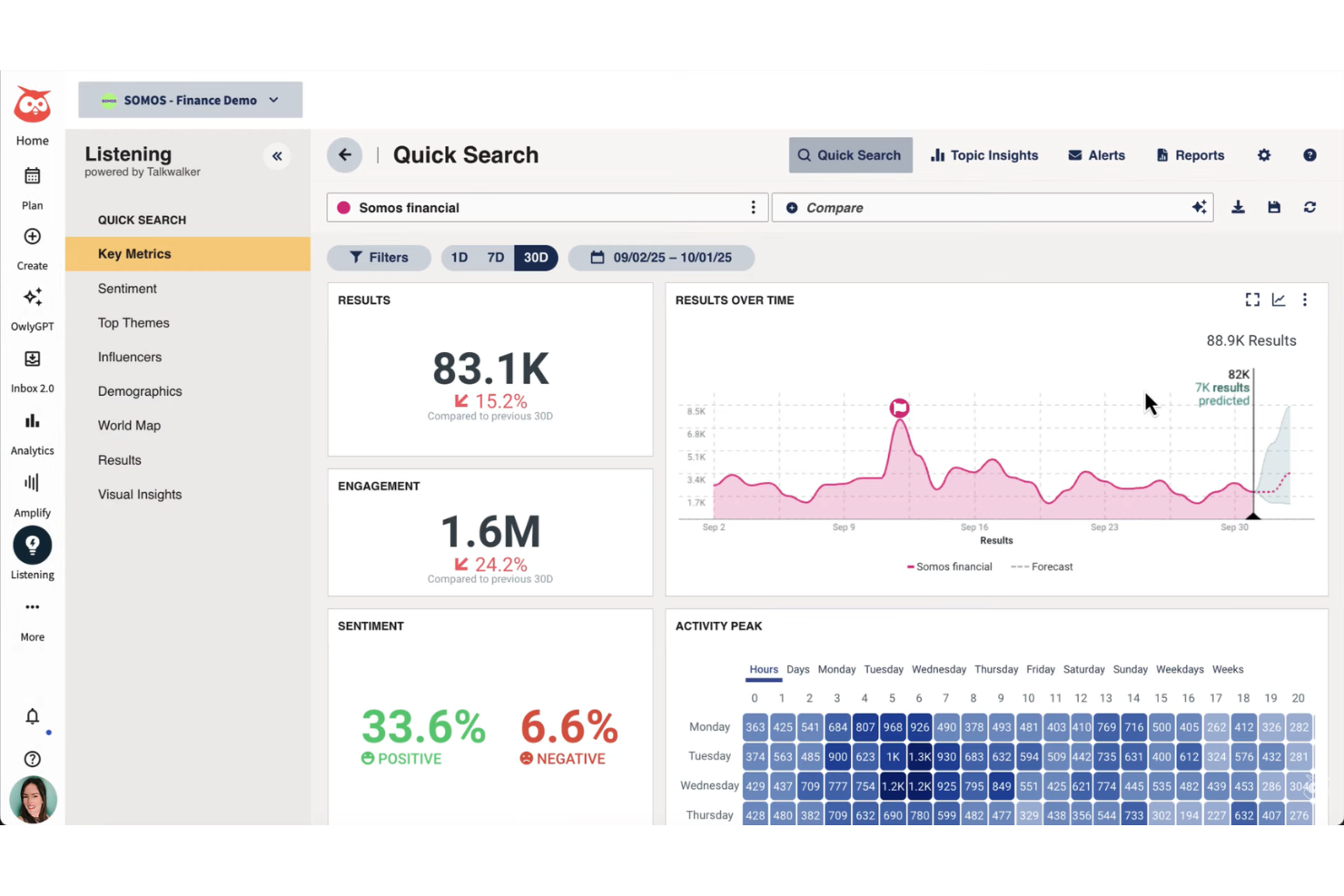
Hootsuite is designed for marketing teams and agencies that need to manage multiple social media accounts from one user-friendly interface. Its unified dashboard helps you schedule social media posts, monitor engagement among your social media channels, and track analytics across channels, making it a strong choice for businesses seeking centralized control.
Who Is Hootsuite Best For?
Social media managers at mid-sized to large organizations needing a centralized dashboard for multiple networks.
Why Hootsuite Is A Good Sprinklr Alternative
I picked Hootsuite for this list because its centralized dashboard lets my team manage multiple social networks without switching between platforms. I especially like the bulk scheduling feature, which lets us queue up hundreds of posts across channels in one session. Hootsuite's Streams feature also lets me monitor brand mentions, keywords, and competitor activity in real time from a single view. In practice, that means my team can stay on top of engagement across every channel without the complexity and steep learning curve Sprinklr often brings.
Hootsuite Key Features
- Analytics dashboard: View performance metrics across all connected social accounts in one report.
- Content library: Store and organize pre-approved brand assets for reuse across campaigns.
- Team collaboration tools: Assign posts for review, leave comments, and manage approval workflows.
- Social listening: Track hashtags, keywords, and audience sentiment across social platforms.
Hootsuite Integrations
Integrations include Facebook, Instagram, Twitter, LinkedIn, YouTube, Canva, HubSpot, Shopify, Slack, and Salesforce.
Pros and Cons
Pros:
- Real-time monitoring of brand mentions
- Bulk post scheduling across multiple platforms
- Centralized dashboard for all social channels
Cons:
- No unified inbox for all messages
- Limited advanced reporting compared to Sprinklr

Meltwater
Best for global media monitoring and social listening platform
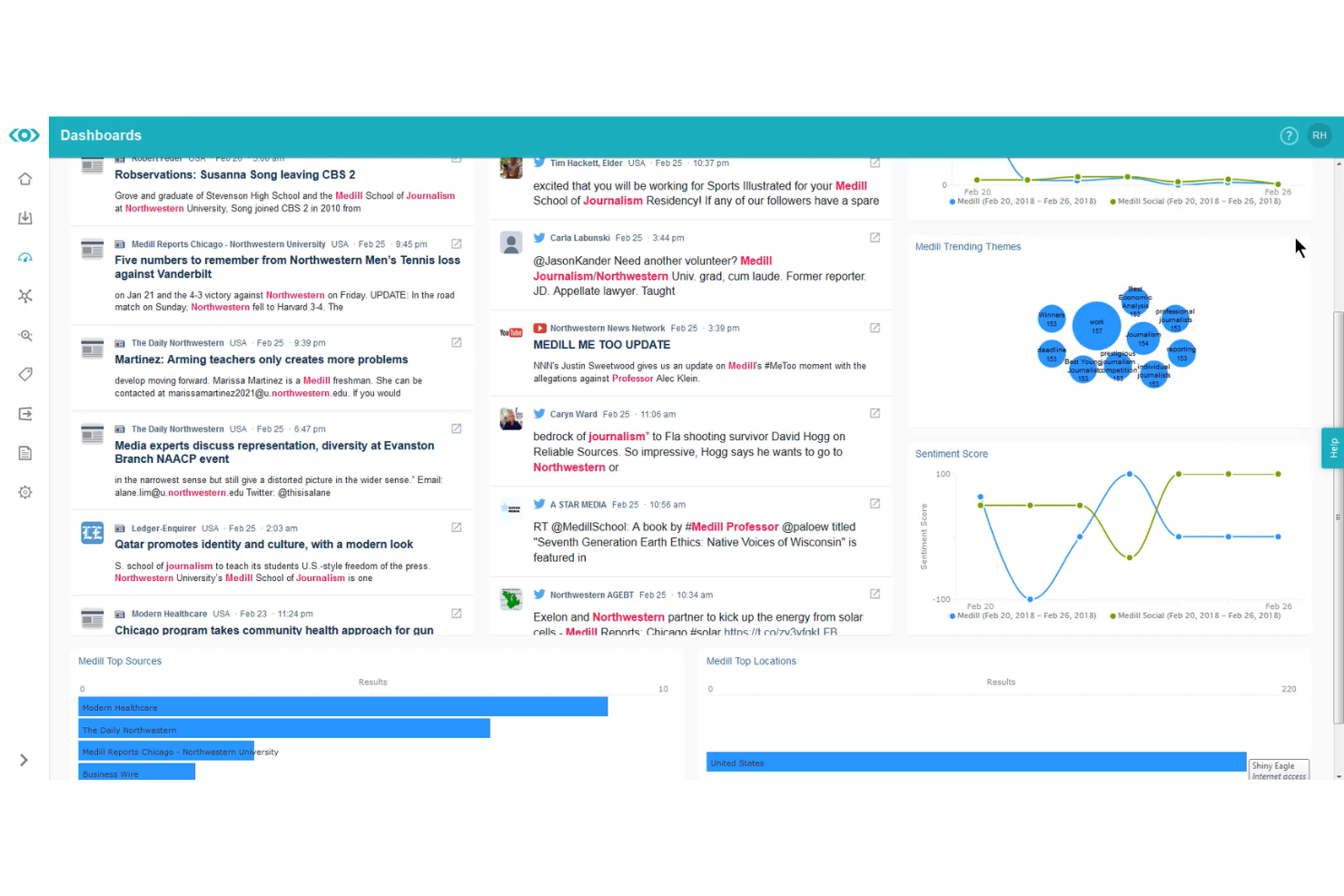
Meltwater gives marketing and communications teams a unified platform for tracking brand mentions, analyzing media coverage, and monitoring social conversations across channels. It’s a strong fit for organizations that need global media intelligence and real-time social listening to inform strategy and manage reputation.
Who Is Meltwater Best For?
Global communications and marketing teams monitoring media and social channels.
Why Meltwater Is A Good Sprinklr Alternative
I picked Meltwater because its media monitoring coverage is genuinely hard to match—it pulls from over 270,000 global news sources, 15+ social channels, 25,000 podcasts, and broadcast and print, all in one place. For teams managing brand reputation across regions, that breadth means I can track sentiment, share of voice, and trending topics without stitching together separate tools. I also rely on its Boolean search with unlimited keywords and no caps on result volumes, which lets my team run as many brand, competitor, and campaign queries as needed. In practice, that means I can benchmark coverage against competitors in real time and build shareable dashboards for stakeholders without hitting usage limits.
Meltwater Key Features
- Spike detection: Sends alerts when the mention volume for a tracked keyword exceeds your set baseline, flagging potential PR crises or trending topics.
- Comparative reports: Automatically benchmark your brand, regions, or products against each other with AI-generated insights.
- Content calendar: Schedules and formats posts across multiple social profiles, with an integrated asset library for images and video.
- Audience segmentation: Segments social audiences by behaviors, attitudes, and influence levels using AI-structured consumer data.
Meltwater Integrations
Integrations include Looker Studio, Power BI, and a native API for custom connections to business intelligence tools, data lakes, and external dashboards.
Pros and Cons
Pros:
- Real-time alerts for spikes and crises
- Boolean search with unlimited keywords
- Global media monitoring across news and social channels
Cons:
- Advanced analytics require manual configuration
- Social inbox can lag with high message volume
Other Sprinklr Alternatives
Here are some additional Sprinklr alternatives options that didn’t make it onto my shortlist, but are still worth checking out:
- HeyOrca
For social media calendar with unlimited users
- Zoho Social
For social media management with CRM integration
- MoEngage
For omnichannel marketing automation and analytics
- Sitecore
For digital experience and content management system
- Kapost
For content operations and workflow management
- Semrush
For SEO, content, and competitive research platform
- Oktopost
For social media management for B2B marketers
- CoSchedule
For marketing calendar and project management
- Optimizely
For digital experience optimization and experimentation
- Asana
For work management and campaign collaboration


Sprinklr Alternatives Selection Criteria
When selecting the best Sprinklr alternatives to include in this list, I considered common buyer needs and pain points related to digital marketing software products, like managing multi-channel campaigns and tracking real-time engagement. I also used the following framework to keep my evaluation structured and fair:
Core Functionality (25% of total score)
To be considered for inclusion in this list, each solution had to fulfill these common use cases:
- Schedule and publish content
- Manage social media engagement
- Track campaign performance
- Generate analytics and reports
- Collaborate with team members
Additional Standout Features (25% of total score)
To help further narrow down the competition, I also looked for unique features, such as:
- Unified inbox for paid and organic channels
- Automated moderation and workflow rules
- Custom analytics dashboard builder
- Multi-brand or multilingual management
- Shareable content calendars
Usability (10% of total score)
To get a sense of the usability of each system, I considered the following:
- Intuitive navigation and menu structure
- Clean and modern interface design
- Logical workflow for core tasks
- Minimal clicks to complete actions
- Responsive design across devices
Onboarding (10% of total score)
To evaluate the onboarding experience for each platform, I considered the following:
- Availability of training videos and tutorials
- Access to onboarding templates and guides
- Interactive product tours or walkthroughs
- In-app chatbots for onboarding support
- Live or recorded onboarding webinars
Customer Support (10% of total score)
To assess each software provider’s customer support services, I considered the following:
- 24/7 live chat or phone support
- Fast response times to inquiries
- Knowledgeable support staff
- Comprehensive help center or documentation
- Availability of dedicated account managers
Value For Money (10% of total score)
To evaluate the value for money of each platform, I considered the following:
- Transparent and flexible pricing plans
- Features included at each pricing tier
- No hidden fees or surprise charges
- Discounts for annual commitments
- Free trial or demo availability
Customer Reviews (10% of total score)
To get a sense of overall customer satisfaction, I considered the following when reading customer reviews:
- Consistent positive feedback on core features
- Reports of reliable platform performance
- Praise for customer support quality
- Noted ease of onboarding and adoption
- Constructive feedback on areas for improvement
Why Look for a Sprinklr Alternative?
While Sprinklr is a good choice of digital marketing software, there are a number of reasons why some users seek out alternative solutions. You might be looking for a Sprinklr alternative because…
- The platform feels too complex for your team’s needs
- Pricing is out of reach for smaller organizations
- You need more flexible or modular feature sets
- Support for certain social channels is limited
- Approval workflows are too rigid or enterprise-focused
- Onboarding and training resources are not sufficient
If any of these sound like you, you’ve come to the right place. My list contains several digital marketing software options that are better suited for teams facing these challenges with Sprinklr and looking for alternative solutions.
Sprinklr Key Features
Here are some of the key features of Sprinklr, to help you contrast and compare what alternative solutions offer:
- Unified customer experience platform: Centralizes social, messaging, email, and voice interactions in one dashboard, allowing teams to manage all customer touchpoints from a single interface.
- Social media publishing: Schedules, publishes, and manages content across multiple social channels, supporting campaign planning and real-time collaboration for marketing teams.
- Advanced listening and monitoring: Tracks brand mentions, sentiment, and trends across social, news, blogs, and forums, helping teams identify opportunities and manage reputation.
- AI-powered automation: Uses artificial intelligence to automate responses, route tickets, and analyze customer interactions for faster, more accurate engagement.
- Customizable reporting and analytics: Builds detailed reports on campaign performance, engagement, and customer sentiment, with customizable dashboards for different stakeholders.
- Governance and compliance controls: Provides granular user permissions, approval workflows, and audit trails to ensure brand consistency and regulatory compliance.
- Omnichannel customer care: Integrates support across social, chat, email, and voice, enabling agents to resolve issues and track cases from a unified workspace.
- Campaign management: Coordinates multi-channel marketing campaigns, tracks progress, and measures ROI with built-in planning and analytics tools.
- Collaboration tools: Offers shared calendars, task assignments, and internal chat to streamline teamwork and content approvals.
- Integration ecosystem: Connects with CRM, ad platforms, analytics tools, and other enterprise systems to unify data and workflows across the organization.