

The best review management software helps you protect your brand reputation, amplify positive customer feedback, and climb the local SEO rankings. Whether you're managing reviews for a SaaS product, monitoring your business profile for a multi-location company, or pulling in data to fuel remarketing campaigns, the right platform handles it all.
If you’re leading marketing at a SaaS company, running a PLG motion, or working in a business where online reviews drive conversions, this isn't optional. You need a system that monitors mentions across dozens of platforms, surfaces critical feedback fast, and integrates with your CRM or CX stack to close the loop.
That’s why I spent over 300 hours testing the leading review management platforms, digging into automation workflows, response tools, and reporting dashboards. I’ve personally run review programs for 10 years that improved local search visibility in competitive SaaS markets so this guide comes from hands-on experience, not surface-level research.
Below, you’ll find the top review management software options for reputation management that drives results.
Why Trust Our Software Recommendations
6,700+
Reviews
20
Industry experts
16+
Evaluation factors
14
Years
Our team has been testing and reviewing software since 2012. As marketing leaders ourselves, we know how difficult—and important—it is to choose the right software.
For this guide, we evaluated tools using hands-on testing and independent research, scoring tools using our selection criteria.
Our reviews reflect our human editorial judgment, not a sales pitch.
Expert reviewers:
 Gui DrusinaCreative Director
- Shriya GhateSenior Marketing Lead
 Amanda JacquesMarketing Ops Leader

Review Management Software Comparison Table
This comparison table summarizes pricing details for my top review management software selections.
| Tool | Best For | Trial Info | Price | ||
|---|---|---|---|---|---|
| 1 | Best for location-based reputation insights | Free demo available | From $79/month (billed annually) | Website | |
| 2 | Best for automated review management | Free trial + free demo available | From $63/location/month (billed monthly or annually) | Website | |
| 3 | Best for AI-powered review replies | Free trial available | From $10/location/month | Website | |
| 4 | Best for AI review analysis | Free 14-day trial available | From $45/location/month | Website | |
| 5 | Best for AI-powered review management | Free demo available | Pricing upon request | Website | |
| 6 | Best for Google-only review volume pricing | 24-hour free trial + free plan + free demo available | From $6.99/month | Website | |
| 7 | Best for AI-driven customer insights | Free demo available | Pricing upon request | Website | |
| 8 | Best for crisis control and compliance monitoring | Free demo available | Pricing upon request | Website | |
| 9 | Best for SMS-based review management | Free demo available | From $99/month (billed annually) | Website | |
| 10 | Best for gathering customer feedback | Free plan available | From $20/month | Website |


Best Review Management Software Reviews
Below are my detailed summaries of the best review management software that made it onto my shortlist. My reviews offer a detailed look at the key features, pros & cons, integrations, and ideal use cases of each tool to help you find the best one for you.
 Best for location-based reputation insights
- Free demo available
- From $79/month (billed annually)
Visit WebsiteCustomer Rating:4.4/5
Synup offers a centralized review management dashboard for all your locations. Synup is a reputation management platform that combines review monitoring, AI-powered response tools, listing management, and multi-location analytics across 20+ review sites.
Who Is Synup Best For?
Synup is a strong fit for multi-location businesses and marketing agencies that need to manage reviews and local listings across multiple brands or regions from one place.
Why I Picked Synup
Synup earns its spot on my shortlist because of how well it handles reputation data at the location level. I love that you can roll up review performance across an entire portfolio and then drill into a single location in two clicks, comparing rating trends, response rates, and review volume across locations, regions, or franchisees. The multi-location and multi-brand insights dashboard makes it genuinely easy to spot which locations are slipping before a client even notices. Pair that with real-time negative review alerts filtered by location, and your team can prioritize service recovery exactly where it's needed most.
Synup Key Features
- AI-powered review responses: Generate draft replies to reviews automatically using AI that factors in star rating, sentiment, and review content.
- Review request campaigns: Send automated review invitations to customers via email or SMS to build review volume across platforms like Google and Yelp.
- Centralized review inbox: Manage and respond to reviews from 20+ platforms, including Google, Facebook, and TripAdvisor, from a single dashboard.
- Sentiment analysis: Identify recurring themes, keywords, and emotional tone across your review data to surface patterns in customer feedback.
Synup Integrations
Synup offers a large library of integrations spanning directories, CRM tools, and social platforms, including Google Business Profile, Facebook, Google Maps, HubSpot, Salesforce, Slack, Mailchimp, Google Sheets, Zoho, and Pipedrive.
Pros and Cons
Pros:
- Offers review requests via email and SMS
- Generates personalized review responses
- Aggregates reviews from multiple sources
Cons:
- Limited customization options for reports
- Mobile app lacks key desktop features
Learn more about Synup: Best for automated review management
- Free trial + free demo available
- From $63/location/month (billed monthly or annually)
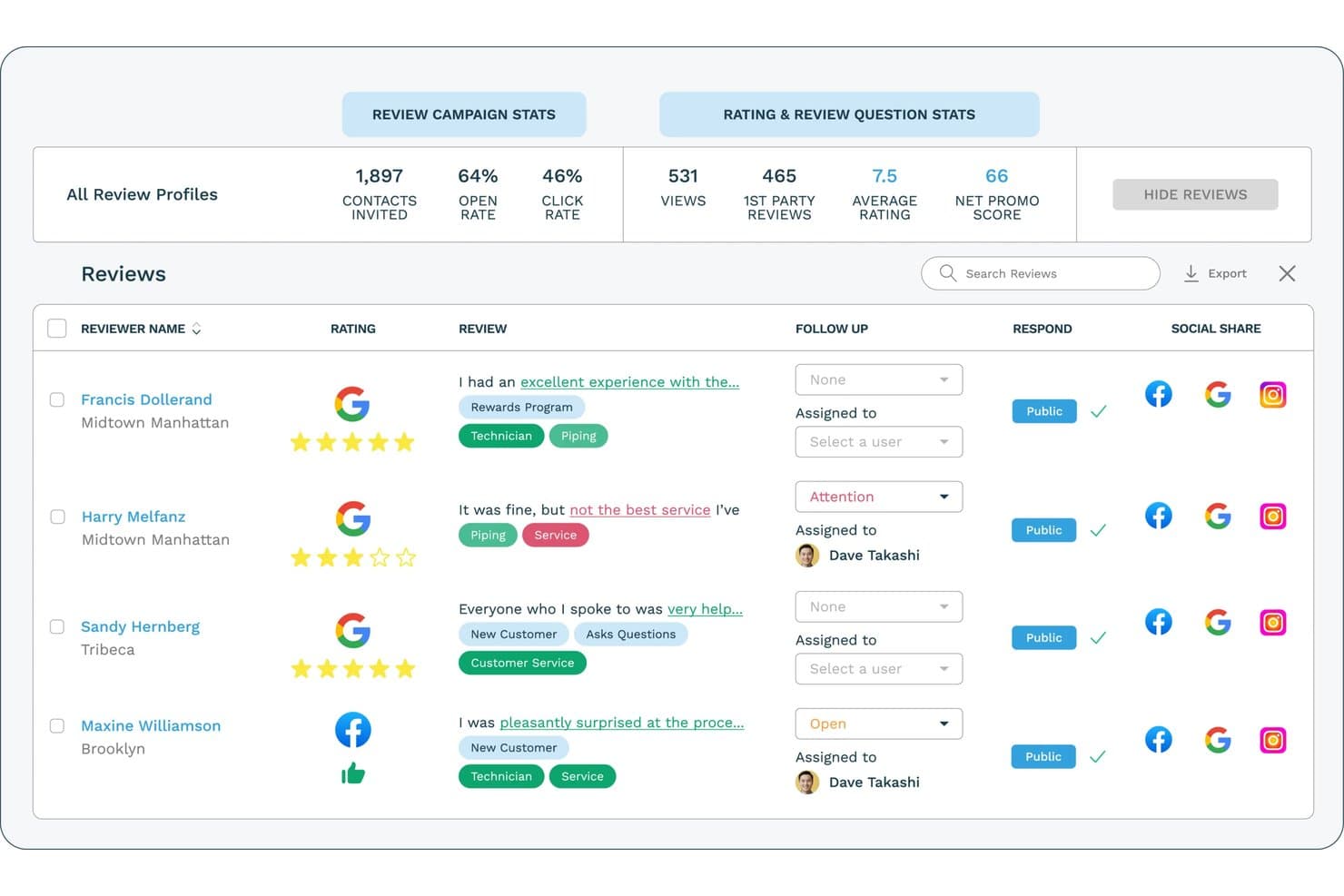
ReputationStacker lets users monitor and respond to reviews in one dashboard. ReputationStacker is a review management platform that aggregates reviews from 100+ sites, automates email and SMS review request campaigns with NPS survey funnels, and provides AI-driven sentiment analysis and response generation across multiple locations.
Who Is ReputationStacker Best For?
ReputationStacker is a strong fit for SMBs and multi-location businesses in healthcare, legal, and home services that need to turn customer feedback into a steady stream of public reviews.
Why I Picked ReputationStacker
I picked ReputationStacker because it makes review generation and management easy to scale, whether a business has one location or many. Automated email and SMS campaigns help businesses consistently generate new reviews, while centralized monitoring across 100+ review sites, AI-generated responses, sentiment insights, and location-level reporting make it especially strong for multi-location organizations.
ReputationStacker Key Features
- Multi-platform review aggregation: Pulls reviews from 100+ sites—including Google, BBB, Facebook, Healthgrades, and Avvo—into a single dashboard.
- AI review response generation: Automatically drafts on-brand, contextual replies to Google and Facebook reviews, available on Standard and Professional plans.
- Automated email and SMS review request campaigns: Sends review requests via email and SMS with follow-up reminders, triggerable through Zapier or API connections to your CRM, POS, or scheduling tools.
- Location-level sentiment analysis: Uses NLP to categorize feedback by customizable keywords and service categories, with cross-location comparison reporting available on the Professional plan.
ReputationStacker Integrations
ReputationStacker has integrations with Google Business Profile and Facebook, plus Zapier and an API for custom connections.
Pros and Cons
Pros:
- HIPAA-compliant for healthcare organizations
- Sentiment analysis and multi-location reporting
- Aggregates reviews from over 100 platforms
Cons:
- No competitor benchmarking or local SEO tools
- Can’t respond in-dashboard to all platforms
Learn more about ReputationStacker: Best for AI-powered review replies
- Free trial available
- From $10/location/month

RightResponse AI offers a comprehensive dashboard for managing customer reviews. For businesses keen on enhancing their online reputation and customer engagement, RightResponse AI offers a revolutionary approach to review management by leveraging advanced artificial intelligence. This software appeals to small business owners, corporate managers, and agencies by providing intelligent features such as personalized review responses and sentiment analysis, turning customer feedback into a powerful marketing tool. By focusing on authenticity and insights, RightResponse AI helps you connect meaningfully with your audience, improving your business operations and driving customer conversions.
Why I Picked RightResponse AI
I picked RightResponse AI because it excels in offering AI-powered review replies that transform how businesses interact with customer feedback. With its Intelligent Review Responder, you can generate fact-infused, personalized responses that highlight your business strengths and maintain a 100% response rate.
The platform's Review Sentiment Analysis offers deep insights into customer sentiments, allowing you to tailor your engagement strategies effectively. Additionally, its Hyper-Personalized Review Requests ensure that you connect meaningfully with your audience, enhancing customer engagement and conversion rates.
RightResponse AI Key Features
In addition to its AI-powered review replies, RightResponse AI offers several features that enhance your review management capabilities.
- Google Maps Rank Tracker: This feature allows you to monitor your business's ranking on Google Maps, providing insights into your visibility compared to competitors.
- Competitor Analysis: With this tool, you can analyze competitors' online strategies, helping you identify areas to improve your own business's online presence.
- Review Requester: Send personalized review requests to customers, which can increase engagement and the likelihood of receiving feedback.
- Fact-Powered Responses: Generate AI responses that incorporate facts and maintain a genuine connection with customers, ensuring your business's voice is authentically represented.
RightResponse AI Integrations
Native integrations are not currently listed on the RightResponse AI website.
Pros and Cons
Pros:
- Intelligent AI responses help to preserve authenticity in customer interactions
- Hyper-personalized review requests can increase customer engagement
- Sentiment analysis provides actionable insights for business improvements
Cons:
- Pricing details may vary based on usage, causing potential cost variability
- Requires ongoing monitoring to fully leverage sentiment insights
Learn more about RightResponse AI: Best for AI review analysis
- Free 14-day trial available
- From $45/location/month
Visit WebsiteCustomer Rating:4.9/5
The ReviewFlowz dashboard displays user-submitted reviews with filtering options and AI-assisted response tools. ReviewFlowz is a review management software tailored for businesses aiming to improve their online reputation through effective strategies for generating, monitoring, and responding to customer reviews.
Why I picked ReviewFlowz: IIts AI analytics help your team grasp customer sentiments and competitive positioning, which is crucial for spotting impactful review opportunities. The AI capabilities go beyond just analysis, ReviewFlowz also offers MCP integrations with ChatGPT and Claude AI for generating reply suggestions, enabling your team to communicate more efficiently with customers directly from Slack. The platform even has dynamic review widgets, letting you display relevant customer feedback in different languages on your website.
Standout Features & Integrations:
Features include review generation, review monitoring, MCP integration with ChatGPT and Claude AI, access to reviews in multiple languages, competitor review monitoring, built in reporting tools, and review link generators.
Integrations include Google My Business, Yelp, TripAdvisor, Trustpilot, Slack, Zendesk, Intercom, Microsoft Teams, and Google Sheets.
Pros and Cons
Pros:
- Provides tools for competitive analysis
- Features for monitoring and showcasing reviews
- Aggregates reviews from various platforms
Cons:
- Doesn't support social media
- Doesn't support listing management
Learn more about ReviewFlowz: Best for AI-powered review management
- Free demo available
- Pricing upon request
Visit WebsiteCustomer Rating:4.8/5
Birdeye helps businesses to efficiently generate, monitor, and respond to customer feedback. Birdeye is an AI-powered reputation and customer experience platform built for multi-location and enterprise businesses, helping them manage reviews, listings, social media, surveys, and customer interactions from one centralized system. It serves 200,000+ customers globally across industries such as dental, healthcare, automotive, retail, legal, and home services, where local reputation and online visibility directly impact revenue.
Why I Picked Birdeye
I picked Birdeye for its automated review management powered by BirdAI agents, which go far beyond basic review monitoring. These AI agents are always-on, trained on your brand voice and industry context, and designed to deliver outcomes at scale. They monitor and respond to customer reviews across 200+ platforms, draft on-brand replies, flag sensitive feedback for escalation, and help maintain a consistent reputation across every location.
What stood out most is how BirdAI connects review management with Search AI and Listings AI, actively optimizing local search presence to improve rankings on Google and AI-driven search results. This makes Birdeye especially strong for enterprises and multi-location brands that rely on local discovery, foot traffic, and inbound leads.
Birdeye Key Features
In addition to Birdeye’s core AI-driven review and search capabilities, the platform offers:
- Review Alerts: Provides instant notifications for new reviews, allowing your team to respond promptly from any device.
- Spam Detection: Identifies and flags fake reviews to protect your business's reputation and ensure authenticity.
- Insights and Analytics: Analyzes customer feedback to uncover trends and improve business strategies.
- Review Marketing: Facilitates showcasing and sharing of reviews across social media platforms to build customer trust.
Birdeye Integrations
Birdeye supports 3,000+ integrations, including Salesforce, HubSpot, QuickBooks, Facebook, Google My Business, Slack, Microsoft Teams, Zendesk, Shopify, and Mailchimp.
Pros and Cons
Pros:
- Unified dashboard simplifies multi-client monitoring.
- Error alerts enhance proactive client management.
- BirdAI agents automate review responses and reputation management.
Cons:
- Onboarding can take time for organizations managing many locations.
- Enterprise-focused feature set may feel robust for single-location businesses with simpler needs.
Learn more about Birdeye: Best for Google-only review volume pricing
- 24-hour free trial + free plan + free demo available
- From $6.99/month
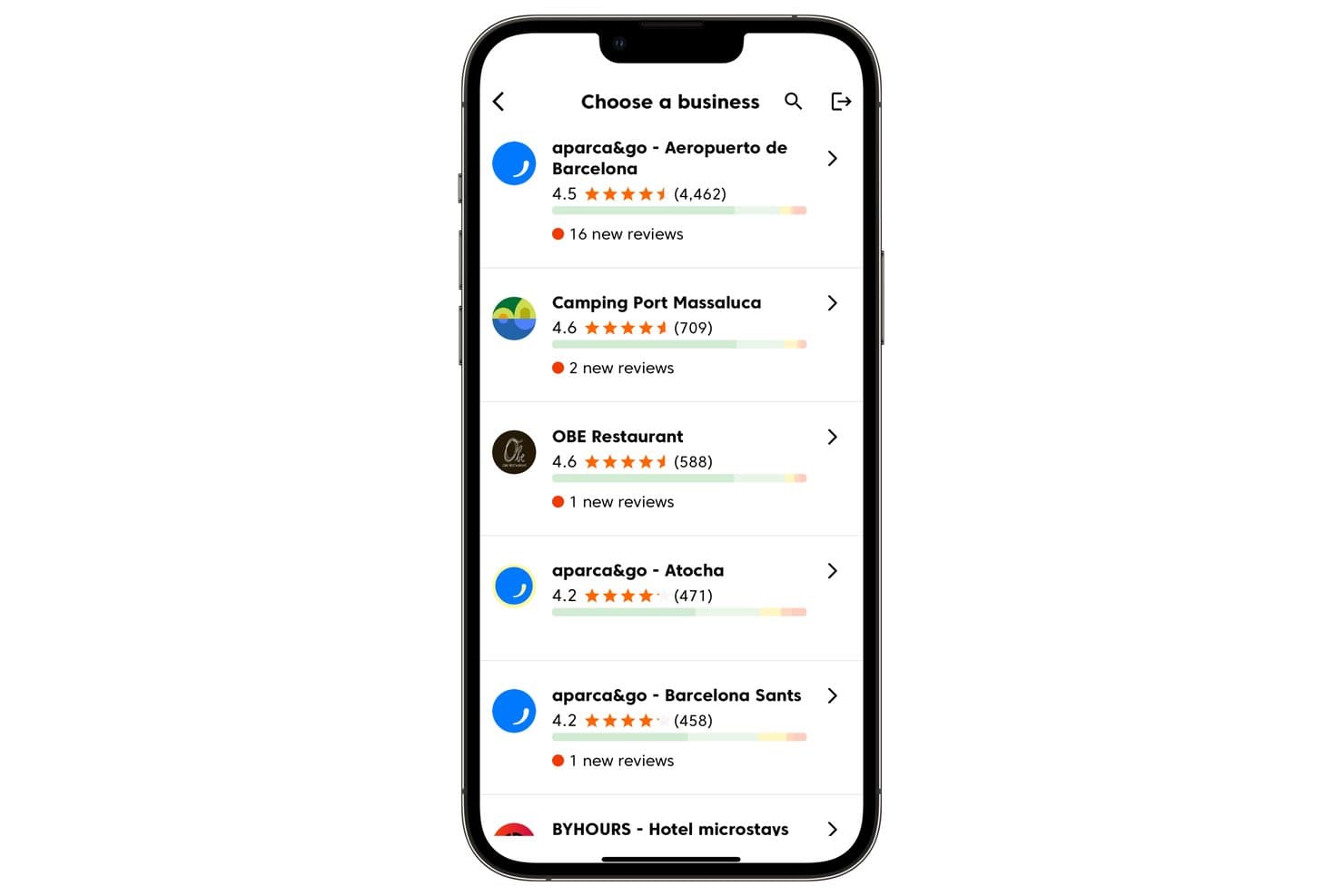
Cinquo lets users manage multiple business locations and track new reviews. Cinquo is a Google-exclusive review management tool that handles AI-automated review responses, review generation via QR codes and NFC cards, and monitoring of your Google Business Profile ratings across unlimited locations.
Who Is Cinquo Best For?
Cinquo is a strong fit for local SEO specialists and multi-location operators who run their entire reputation strategy through Google.
Why I Picked Cinquo
I've included Cinquo in my top picks because its review volume-based pricing model is genuinely rare in this space, making it one of the most cost-effective options for multi-location Google review management. I love that unlimited locations come standard on every plan, so scaling from five to fifty locations doesn't change your bill. Its CINTIA AI automatically publishes replies to positive reviews while escalating sensitive ones for human review, and the unrounded rating calculator shows exactly how many 5-star reviews stand between you and the next star tier.
Cinquo Key Features
- CINTIA AI escalation logic: Automatically flags sensitive or low-star reviews—such as those containing legal threats or personal mentions—and routes them for human approval instead of auto-publishing a reply.
- Physical NFC and QR review cards: Branded physical cards that staff can hand directly to customers at the point of experience, generating a direct link to the Google review form.
- Multilingual reply support: Drafts and publishes review responses in multiple languages, letting you serve customers across different regions without switching tools.
- Policy-violating review flagging: Identifies reviews that breach Google's content policies and enables you to flag them directly for removal from within the dashboard.
Cinquo Integrations
Cinquo has a native Google Business Profile integration and uses Gemini AI for review replies.
Pros and Cons
Pros:
- Shows unrounded real Google star rating
- AI auto-replies to positive Google reviews
- Handles unlimited Google locations on every plan
Cons:
- Lacks review widgets or website display tools
- No support for non-Google review platforms
Learn more about Cinquo: Best for AI-driven customer insights
- Free demo available
- Pricing upon request
Visit WebsiteCustomer Rating:4.7/5
InMoment uses AI to analyze feedback, improving customer experiences and decisions. InMoment is a customer experience (CX) solutions provider that utilizes AI to enhance customer feedback analysis. Their platform, XI, offers services such as feedback management, reputation management, and advanced analytics, enabling businesses to improve customer experiences.
Why I picked InMoment: It provides an extensive suite of tools for managing and analyzing customer feedback across multiple channels. The XI platform allows you to gather insights from structured and unstructured data, helping your team make informed decisions. Features like digital listening and conversational intelligence further enhance your ability to understand customer needs. With advanced analytics, you can pinpoint areas for improvement and drive better business outcomes.
Standout Features & Integrations:
Features include feedback management, digital listening, and advanced analytics. You can use these tools to gather and analyze customer feedback from various sources. Digital listening helps you monitor customer sentiments in real-time, while advanced analytics provide deep insights into customer behavior.
Integrations include Salesforce, Google Analytics, HubSpot, Adobe Experience Manager, Slack, Zendesk, Shopify, Marketo, Microsoft Dynamics, and SAP.
Pros and Cons
Pros:
- Advanced analytics
- Real-time sentiment analysis
- In-depth feedback tools
Cons:
- Limited customization options
- High dependency on data quality
Learn more about InMoment: Best for crisis control and compliance monitoring
- Free demo available
- Pricing upon request
Visit WebsiteCustomer Rating:4.7/5
ReviewTrackers helps businesses monitor reviews and improve local SEO effectively. ReviewTrackers is an online reputation management software designed for businesses to monitor and analyze customer reviews, improve local SEO, and enhance customer experiences. Its main user base includes enterprises and small to medium-sized businesses looking to manage their online reputation effectively.
Why I picked ReviewTrackers: ReviewTrackers helps you collect and analyze reviews from various platforms, giving you actionable insights into your customer experience. The software includes features like competitor analysis and social media monitoring, which allow your team to keep a close eye on your market presence. You can manage your local listings to ensure consistent and accurate business information online. Additionally, automated review requests and AI-generated responses streamline the process of engaging with your customers.
Standout Features & Integrations:
Features include review aggregation from multiple platforms, automated review requests, AI-generated responses, competitor analysis, and local listing management. These tools help you manage your online reputation and enhance customer satisfaction.
Integrations include Google, Facebook, TripAdvisor, Yelp, Apple Maps, Foursquare, Healthgrades, Vitals, Zocdoc, and Trustpilot.
Pros and Cons
Pros:
- Customizable reports
- Detailed analytics
- Multiple review platforms supported
Cons:
- Pricing transparency
- Limited customization
Learn more about ReviewTrackers: Best for SMS-based review management
- Free demo available
- From $99/month (billed annually)
Visit WebsiteCustomer Rating:4.6/5
Text Request enables businesses to text customers, enhancing communication and marketing. Text Request is a business text messaging service that allows companies to communicate with customers via text from their office phone numbers. Its main user base includes businesses of all sizes needing efficient communication methods, focusing on SMS marketing, appointment scheduling, and lead generation.
Why I picked Text Request: The platform offers features like SMS marketing for promotions and updates, appointment scheduling and reminders, and secure text-to-pay functionality. Text Request’s HIPAA-compliant texting ensures sensitive information is handled securely. Additionally, it provides API access for custom solutions, making it versatile for different business needs.
Standout Features & Integrations:
Features include SMS marketing for promotions, appointment scheduling and reminders, lead generation, text-to-pay functionality, and HIPAA-compliant texting. Your team can also benefit from the platform's API access for custom solutions.
Integrations include Salesforce, HubSpot, Zapier, Google Contacts, Microsoft Outlook, Slack, Mailchimp, Zendesk, Shopify, and QuickBooks.
Pros and Cons
Pros:
- No contracts
- HIPAA-compliant texting
- User-friendly interface
Cons:
- Overages can add costs
- Limited texts in lower-tier plans
Learn more about Text Request: 10Best for gathering customer feedback
Klaviyo
- Free plan available
- From $20/month
Visit WebsiteCustomer Rating:4.6/5
Klaviyo is a platform designed to enhance customer relationships and boost sales through its advanced marketing and review management tools. It integrates with various marketing channels, making it an ideal choice for businesses looking to leverage customer feedback and improve their offerings.
Why I Picked Klaviyo
I picked Klaviyo as a good review management software because it offers tools that let you gather and analyze customer reviews. This feature helps you understand customer sentiment and improve products and services. Klaviyo's support for omnichannel marketing means you can engage with your audience across different platforms, enhancing customer interaction.
Another reason Klaviyo stands out is its use of AI for personalized customer interactions. By leveraging artificial intelligence, Klaviyo ensures that your communications are tailored to individual customer preferences, increasing engagement and satisfaction. The platform's ability to integrate with over 350 apps further strengthens its position as a versatile tool for managing reviews and customer relationships.
Standout Features
Features include a dedicated review management tool that helps you collect and analyze customer feedback with ease. Klaviyo's support for omnichannel marketing ensures you can connect with your audience across various platforms. Additionally, the platform uses AI to personalize customer interactions, providing a tailored experience that resonates with individual preferences.
Integrations
Integrations include Shopify, Salesforce, BigCommerce, WooCommerce, Magento, Stripe, PayPal, Google Ads, Facebook Advertising, TikTok, Zapier, and Amazon.
Pros and Cons
Pros:
- extensive support documentation
- good integration with multiple e-commerce platforms
- facililitates easy customer engagment
Cons:
- frequent and unexpected price increases
- mixed reviews on customer support
When to Use Review Management Software
Review management software pulls all your customer reviews into one place, so you can monitor, respond, and generate feedback across platforms like Google, Yelp, G2, and Trustpilot without jumping between tabs. If your brand's reputation is being shaped by reviews you're barely keeping up with, it's time for a dedicated tool. Here's when it makes sense:
- You're managing reviews across multiple platforms manually: Say you're running a multi-location retail brand and your team is logging into Google, Yelp, and Facebook separately every day to check for new reviews. A review management platform centralizes everything into one dashboard, cutting response time from hours to minutes.
- Negative reviews are slipping through the cracks: If a 1-star review sat unanswered for two weeks before someone on your team spotted it, that's a brand risk and a lost recovery opportunity. Automated alerts flag new reviews instantly, so you can respond while the customer's experience is still fresh.
- Generate reviews consistently is a struggle: Say you have happy customers but your G2 or Google profile looks sparse compared to competitors with 500+ reviews. Review request automation sends follow-ups via email or SMS at the right moment, turning satisfied customers into active reviewers without manual chasing.
- You have no clear picture of sentiment trends over time: If you can't tell whether your product reviews are trending better or worse quarter over quarter, you're making brand decisions without real data. Sentiment analysis tools inside platforms like Birdeye or ReviewTrackers surface patterns across thousands of reviews so you can act on signal, not noise.
- You're about to scale into new markets or regions: Say you're expanding into Europe or Southeast Asia and your existing review presence is thin or non-existent in those markets. A review management platform helps you build local credibility fast by automating outreach in the right language, on the right local platforms.
Other Review Management Software
Here are some additional review management software options that didn’t make it onto my shortlist, but are still worth checking out:
- 11Reputation.comBest for multi-industry review management
- 12ReviewIncBest for real-time review monitoring
- 13PodiumBest for AI-driven lead management
- 14YextBest for enhancing local search rankings
- 15YotpoRequires ongoing management
- 16OkendoBest for ecommerce user-generated content
- 17NetReputationBest for scalable reputation management
- 18SOCiBest for AI-driven review monitoring
- 19Trustpilot BusinessBest for industry insights and trends
- 20BroadlyBest for review requests
- 21SwellBest for healthcare practice reviews
- 22ThryvBest for centralized review handling
- 23ICUCBest 24/7 review monitoring service
- 24Brand24Best for Real-Time Tracking
How I Evaluate Review Management Software
I look at review management tools in two layers: whether they can collect, surface, and respond to Google or Yelp reviews, then what sets them apart for multi-location teams or agencies.
Core Functionality (Table Stakes For This List)
When I'm selecting tools for my list, I rank each one on a scale from 0 (does not offer the functionality) to 5 (excels in this area) for each core functionality listed below. Then, I calculate the tool's total score into a percentage. Each tool needs to achieve a minimum total score of 75% to be considered for inclusion.
- Multi-Platform Review Aggregation: I check how many review sources a tool connects to, from major sites like Google and Yelp to vertical-specific platforms like Healthgrades or DealerRater.
- Review Generation Tools: Automated request campaigns via email, SMS, or QR codes matter here, and I evaluate whether requests can be triggered by real events like a completed purchase or appointment.
- Centralized Response Management: I look for the ability to reply to reviews across connected platforms from one dashboard, including template libraries and team assignment features for high-volume operations.
- Review Monitoring & Alerts: Real-time alerts that flag new reviews, especially negative ones, are what I evaluate here, along with routing options like Slack or email notifications for different team members.
- Sentiment Analysis & Reporting: Beyond star rating averages, I look for trend tracking, keyword extraction, and location-level breakdowns that help marketing teams spot patterns across hundreds of reviews.
- Review Marketing & Display: The ability to showcase top reviews on your website through widgets, push them to social channels, or apply schema markup for rich snippets in search results is what I evaluate here.
Once I have a list of tools that meet this criteria, I consider what sets each platform apart.
Differentiating Factors (What Sets Vendors Apart)
Here's how I compare and contrast different vendors:
Standout Features
AI-generated review responses are a big differentiator for teams managing hundreds of reviews monthly. I evaluate whether the AI can match your brand voice and adapt tone based on review sentiment. Competitor benchmarking is another feature I value, since tracking rival ratings and review volume gives marketing teams real data for positioning. For franchise or multi-location brands, I also look at hierarchical dashboards and role-based permissions that let regional managers own their locations while corporate retains oversight.
Beyond Features
Integrations matter a lot here. I check whether a platform connects to your CRM and POS system so review requests fire automatically after a transaction or appointment. Pricing structure is another factor I weigh carefully, since per-location pricing can balloon fast for multi-location brands compared to flat-rate or per-user models. I also evaluate compliance posture, particularly around review solicitation policies for Google and Yelp, plus GDPR and TCPA adherence for SMS-based request campaigns.
How to Choose Review Management Software
It’s easy to get bogged down in long feature lists and complex pricing structures. To help you stay focused as you work through your unique software selection process, here’s a checklist of factors to keep in mind:
| Factor | What to Consider |
| Scalability | Can the software grow with your business? |
| Integrations | Does it integrate with your existing tools? |
| Customizability | Can you tailor the software to meet your needs? |
| Ease of Use | Is it user-friendly for your team? |
| Budget | Does it fit within your financial plan? |
| Security Safeguards | How does the software protect your data? |
Use this checklist to keep your software selection process organized and focused.
Trends In Review Management Software
In my research, I sourced countless product updates, press releases, and release logs from different review management software vendors. Here are some of the emerging trends I’m keeping an eye on:
- AI-Driven Sentiment Analysis: Platforms are increasingly using AI to analyze customer sentiment in reviews. This helps businesses understand customer emotions and trends without manually going through each review. For instance, ReviewTrackers uses AI to categorize and quantify sentiments from customer feedback.
- Enhanced Privacy Features: With growing concerns around data privacy, review management tools are adopting advanced security measures. Some platforms now offer full data encryption and double-encrypted passwords to ensure sensitive information is protected.
- Visual Review Integration: Some tools are incorporating visual content like images and videos into reviews. This feature allows users to provide more context and detail in their feedback. Platforms like Yotpo enable customers to upload photos and videos along with their reviews.
- Localized Review Management: Businesses are focusing on managing reviews specific to different geographical locations. Some small business reputation management software now allow companies to filter and respond to reviews based on location, which is particularly useful for franchises and businesses operating in multiple regions.
- Predictive Analytics: Emerging platforms are leveraging predictive analytics to forecast customer behavior and potential review trends. This helps businesses take proactive measures to improve customer satisfaction. For example, Trustpilot has started integrating predictive analytics to help businesses anticipate and react to potential negative reviews.
What Is Review Management Software?
Review management software enables businesses to track, handle, and reply to customer feedback across multiple online platforms from a single centralized hub. Automated review monitoring, response management, and sentiment analysis features help with keeping track of reviews, engaging with customers, and managing brand reputation. These tools save time and improve customer satisfaction by ensuring timely and appropriate responses to customer reviews.
Professionals like marketing managers, customer service teams, and business owners generally use these tools to maintain a positive online reputation and gather valuable customer feedback.
Features of Review Management Software
When selecting review management software, keep an eye out for the following key features:
- Multi-platform integration: This allows you to connect and manage reviews from various platforms—like Google, Yelp, and Facebook—from one dashboard. You save time and can keep a closer eye on your reputation without bouncing between tabs.
- Automated notifications: With this feature, you get instant alerts when a new review lands. No more missing important feedback; you can respond quickly to both praise and criticism.
- Response management tools: These tools make it easy for you to reply to reviews straight from the software. Many even include templates or suggested replies, so you never feel stuck on what to say next.
- Review aggregation and analytics: This lets you see all your reviews in one view and break down trends over time. You can spot patterns like rising customer satisfaction or persistent complaints without crunching the numbers yourself.
- Sentiment analysis: This feature analyzes the language in your reviews to gauge whether the feedback is positive, negative, or neutral. It helps you quickly understand the overall mood without reading every single comment.
- Customizable reports: You can generate and tailor reports on your review performance. Whether you need a quick summary for a meeting or a deep dive for strategy, you get the data in a format that fits your needs.
- Review solicitation tools: These let you reach out to customers and encourage them to leave reviews, often through email or SMS. This can boost your overall ratings and help you get a fuller picture of your customer experience.
- User access controls: With this, you decide who on your team can view, respond to, or manage reviews. It helps you stay organized and keeps sensitive responses in trusted hands.
Common Review Management Software AI Features
Beyond the standard review management software features listed above, many of these solutions are incorporating AI with features like:
- Reputation risk alerts: AI monitors all review activity in real-time for sudden dips or spikes, flagging anything that could signal a potential PR crisis so you can act fast.
- AI-powered sentiment analysis: This takes the guesswork out of figuring out what a review really means by using AI to deeply interpret the tone and intent behind each comment—helping you prioritize what needs your attention.
- Automated review response: AI crafts and suggests personalized replies for you, so you can keep up with review responses even during your busiest days, all while maintaining a human touch.
- Review trend prediction: AI analyzes your historical data and predicts the direction of your reviews over time. You get ahead of issues by seeing problems before they become widespread.
- Smart tagging and categorization: The AI organizes reviews by themes or topics, which helps you quickly spot product issues, service strengths, or trending customer requests.
Benefits of Review Management Software
Implementing review management software provides several benefits for your team and your business. Here are a few you can look forward to:
- Improved customer trust: By quickly responding to reviews you are providing prospective customers with social proof that you care about customer concerns whilst showing existing customers that their feedback and testimonials are valued, which ultimately builds trust.
- Enhanced brand visibility: Regular interactions with reviews can boost your online presence, making your brand more visible in search results.
- Valuable insights: Analytics and reports from review management software provide insights into customer sentiments and areas for improvement.
- Increased customer retention: Addressing customer feedback promptly can lead to better customer satisfaction and loyalty.
- Time savings: Automated review collection and response features help reduce the time spent managing reviews manually.
- Better reputation management: Centralized platforms allow you to monitor and manage your brand's reputation across multiple review sites.
- SEO benefits: Positive reviews can improve your website's search engine rankings, making it easier for potential customers to find you.
Costs and Pricing of Review Management Software
Selecting review management software requires an understanding of the various pricing models and plans available. Costs vary based on features, team size, add-ons, and more. The table below summarizes common plans, their average prices, and typical features included in review management software solutions:
Plan Comparison Table for Review Management Software
| Plan Type | Average Price | Common Features |
| Free Plan | $0 | Basic review monitoring, limited review requests, and basic reporting. |
| Personal Plan | $5 - $30/ user/month | Enhanced review monitoring, unlimited review requests, basic reporting, and limited integrations. |
| Business Plan | $50-$150/ user/month | Advanced review monitoring, unlimited review requests, detailed reporting, multi-location support, and third-party integrations. |
| Enterprise Plan | $200-$500/ user/month | Customizable review monitoring, unlimited review requests, advanced reporting, multi-location support, third-party integrations, and dedicated account management. |
A breakdown of review management software plan types and their costs and features.
Review Management Software FAQs
Here are some answers to common questions about review management software:
Can review management software integrate with other tools?
Yes, most review management software integrates with CRM platforms, social media, email marketing tools, and help desk systems. This lets you centralize feedback, automate review requests, and link insights to customer journeys. Integration makes scaling and reporting easier for marketing and CX teams.
Does review management software offer automated review requests?
Yes, these platforms usually let you automate review requests via email, SMS, or in-app prompts. You can schedule campaigns or trigger requests after a purchase or support ticket closes. Automating requests increases review volume and saves time for your team.
What kind of analytics can I get from review management software?
Review management software provides analytics on review volume, response rates, ratings trends, sentiment analysis, and top feedback topics. Advanced tools let you filter by location, product, or employee, supporting detailed team and performance reporting.
Is it possible to respond to reviews directly from review management software?
Yes, many platforms let you reply to customer reviews from one dashboard across sites like Google, Facebook, and Yelp. This centralization makes it easier to keep up with feedback and ensure quick, consistent replies.
How does AI improve review management and customer feedback analysis?
AI helps you identify review trends, prioritize urgent feedback, and summarize key issues using natural language processing. Some platforms use AI to suggest personalized, on-brand replies or flag reviews that need escalation. This speeds up your workflow and ensures smarter decision-making.
Can review management software help with local SEO for multi-location businesses?
Yes, most tools support local SEO by encouraging more positive reviews, helping you update profiles on Google and other directories, and monitoring location-based search rankings. This is critical for marketing directors managing multiple sites.
How do I measure the ROI of review management software?
To measure ROI, track metrics like increased review volume, improved average ratings, faster response times, and growth in search visibility. Connect your review software’s analytics with lead tracking or sales data to see impact on customer acquisition and retention.
How can I encourage more customers to leave reviews?
Send timely review requests via email or SMS after positive experiences, offer simple links or QR codes, and thank customers for feedback regardless of sentiment. Make reviewing easy and train your staff to prompt happy customers. Incentives (where allowed) can also boost participation.