

The best reputation management software helps you control your brand’s online narrative by tracking reviews, flagging urgent feedback, automating review requests, and keeping your business listings consistent across 50+ sites.
But many platforms fall short. They’ll monitor reviews yet leave you replying by hand, or manage listings while skipping the directories that actually convert. As a SaaS marketing leader who has managed 5,000+ customer reviews and multiple Google Business Profiles over the past decade, I know firsthand how painful the process becomes without the right tools.
That’s why I spent 100+ hours testing the top tools, comparing sentiment analysis accuracy, workflow automation, and reporting depth, so you can find the right fit.
This guide cuts through the noise to help you pick software that matches your growth stage and reputation strategy.
Why Trust Our Software Recommendations
6,700+
Reviews
20
Industry experts
16+
Evaluation factors
14
Years
Our team has been testing and reviewing software since 2012. As marketing leaders ourselves, we know how difficult—and important—it is to choose the right software.
For this guide, we evaluated tools using hands-on testing and independent research, scoring tools using our selection criteria.
Our reviews reflect our human editorial judgment, not a sales pitch.
Expert reviewers:
 Gui DrusinaCreative Director
- Shriya GhateSenior Marketing Lead
 Amanda JacquesMarketing Ops Leader

Reputation Management Software Comparison Table
The table below compares pricing details for my top reputation management software selections.
| Tool | Best For | Trial Info | Price | ||
|---|---|---|---|---|---|
| 1 | Best for SEO-driven content removal | Free consult available | Pricing upon request | Website | |
| 2 | Best for automated multi-location reputation management | Free trial + free demo available | From $63/location/month (billed monthly or annually) | Website | |
| 3 | Best with multilingual social mention tracking | 14-day free trial | From $199/month (billed annually) | Website | |
| 4 | Best for automating review responses | Free demo available | Pricing upon request | Website | |
| 5 | Best for AI review replies | Free trial available | From $10/location/month | Website | |
| 6 | Best for negative content suppression | No free trial available | From $3,000/month | Website | |
| 7 | Best for review management across digital listings | Free demo available | From $79/month (billed annually) | Website | |
| 8 | Best for sector-specific services | Not available | Pricing upon request | Website | |
| 9 | Best for advanced AI review analytics | Free 14-day trial available | From $45/location/month | Website | |
| 10 | Best for customer review monitoring | 14-day free trial + free demo | From $31/month (billed annually) | Website |


Best Reputation Management Software Reviews
Below are my detailed summaries of the best reputation management software that made it onto my shortlist. My reviews offer a detailed look at the key features, pros & cons, integrations, and ideal use cases of each tool to help you find the best one for you.
 Best for SEO-driven content removal
- Free consult available
- Pricing upon request
Visit WebsiteCustomer Rating:5/5
Homepage of TheBestReputation showcasing custom online reputation management services with a call-to-action and introductory video. TheBestReputation is a managed reputation management service that combines SEO suppression, content removal, and PR to shape how your brand appears across search engines, review platforms, and AI-powered search tools.
Who Is TheBestReputation Best For?
TheBestReputation is a strong fit for executives, public figures, and businesses dealing with damaging search results that need a managed, hands-on removal and suppression strategy.
Why I Picked TheBestReputation
I picked TheBestReputation as one of the best because its SEO-driven content removal approach goes further than most tools I've seen. When a damaging article or defamatory review surfaces, their team pursues full takedowns and then de-indexes the removed content, so it doesn't linger in search caches. They also create and rank positive content using Exact Match Domains and high-authority placements to push negatives off page one entirely.
TheBestReputation Key Features
- Client portal: A shared workspace where you can review content, approve tasks, and monitor campaign reports in one place.
- AI Overview monitoring: A diagnostic tool that tracks how AI-powered search engines like ChatGPT and Google Gemini describe your brand.
- Bi-weekly briefings and monthly progress reports: Scheduled reporting delivered by senior strategists covering search movement, review trends, and media visibility.
- White-label ORM services: A done-for-you reputation management offering that agencies and law firms can resell under their own brand.
TheBestReputation Integrations
Native integrations are not clearly documented, as TheBestReputation operates as a managed service rather than a self-serve platform. The tool doesn't publish Zapier support or a public API for custom integrations.
Pros and Cons
Pros:
- Combines PR and SEO strengths
- Deep ORM tool integrations
- Offers crisis response planning support
Cons:
- No fixed pricing structure
- Campaign timelines may vary
Learn more about TheBestReputation: Best for automated multi-location reputation management
- Free trial + free demo available
- From $63/location/month (billed monthly or annually)
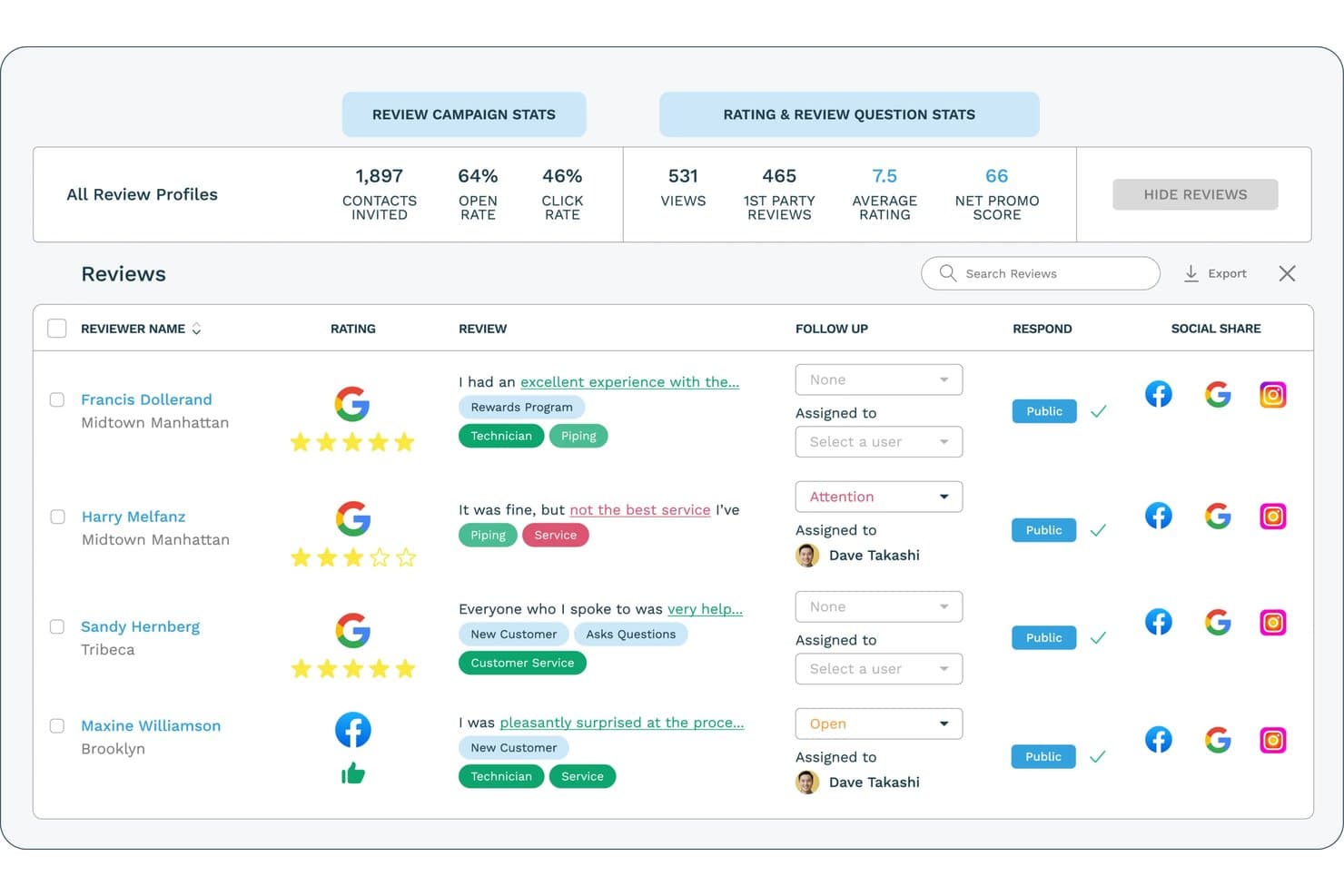
ReputationStacker lets users monitor and respond to reviews across platforms. ReputationStacker is a reputation management platform that automates review request campaigns, aggregates feedback from 100+ review sites, and combines AI-powered review responses, sentiment analysis, NPS surveys, and multi-location reporting.
Who Is ReputationStacker Best For?
ReputationStacker is a strong fit for SMBs and multi-location businesses, especially in healthcare, home services, and professional services such as legal, accounting, and real estate, that want to generate more reviews and manage their online reputation without heavy manual effort.
Why I Picked ReputationStacker
I picked ReputationStacker because it makes review generation and reputation management easy to scale, whether a business has one location or many. Automated email and SMS campaigns help generate a steady stream of reviews, while centralized monitoring across 100+ review sites, AI-generated responses, sentiment insights, and location-level reporting make it especially strong for multi-location businesses.
ReputationStacker Key Features
- Multi-platform review aggregation: Pulls together reviews from 100+ sites—including niche platforms like Healthgrades, Avvo, and TripAdvisor—into a single unified dashboard.
- Automated email and SMS review requests: Sends customers review request messages via email and text, with automatic follow-up reminders to maximize response rates.
- Sentiment analysis: Uses NLP to categorize review feedback by customizable keywords and service-specific topics, tracking sentiment trends over time as new reviews come in.
- Multi-location reporting: Consolidates review performance data across all your locations so you can compare sites, spot outliers, and identify which teams or services drive feedback.
ReputationStacker Integrations
ReputationStacker has integrations with Google Business Profile and Facebook, plus Zapier and an API for custom connections.
Pros and Cons
Pros:
- Aggregates feedback from 100+ review platforms
- AI generates on-brand responses automatically
- Multi-location reporting, sentiment analysis, and AI insights
Cons:
- No local business listing management
- No social or web mention monitoring
Learn more about ReputationStacker: Best with multilingual social mention tracking
- 14-day free trial
- From $199/month (billed annually)
Visit WebsiteCustomer Rating:4.7/5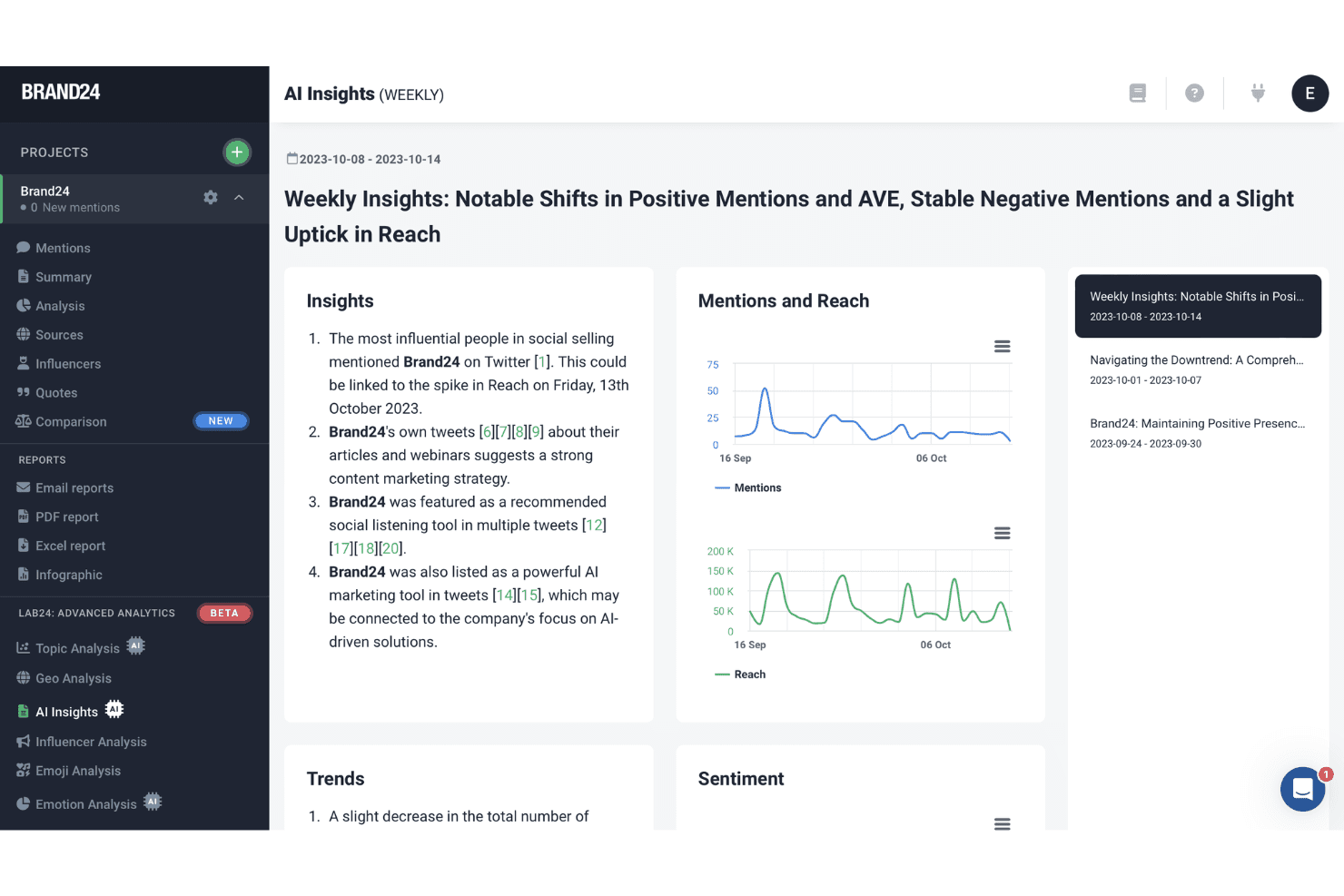
Brand24 offers an AI Insights dashboard that displays weekly summaries of brand mentions, reach trends, and sentiment analysis with cited sources. Brand24 is a social listening and brand monitoring platform that tracks real-time mentions across social media, news, blogs, forums, podcasts, and review sites, with AI-powered sentiment analysis across 108 languages.
Who Is Brand24 Best For?
Brand24 is a strong fit for marketing teams and agencies managing brand reputation across global markets or multiple languages.
Why I Picked Brand24
Brand24 earns its spot on my shortlist because its AI-powered language detection spans 108 languages across 25M+ sources in real time. When I'm tracking a brand across European and Latin American markets simultaneously, that level of multilingual coverage is something most monitoring tools can't match. I also rely on its AI Events Detection, which flags unusual spikes in mention volume before a conversation turns into a full-blown reputation crisis.
Brand24 Key Features
- Multi-channel source monitoring: Tracks mentions from news sites, blogs, forums, podcasts, YouTube, and niche review sources.
- AI sentiment analysis: Automatically classifies mentions as positive, negative, or neutral using natural language processing.
- Influencer identification: Highlights influential profiles discussing your brand and ranking them by reach and authority.
- Customizable alerts and reports: Lets users set daily, weekly, or storm alerts and export reports in PDF, Excel, or PowerPoint formats.
Brand24 Integrations
Native integrations are not clearly documented. An API is available for custom integrations.
Pros and Cons
Pros:
- Monitors podcasts, news, and niche forums
- AI Events Detection flags reputation crises early
- Tracks mentions across 108 languages simultaneously
Cons:
- No native review generation or response tools
- Mention caps limit large agency workflows
Learn more about Brand24: Best for automating review responses
- Free demo available
- Pricing upon request
Visit WebsiteCustomer Rating:4.8/5
Birdeye offers a range of alerts, including for reviews that were left with no response, for better reputation monitoring and management. Birdeye is an AI-powered reputation and customer experience platform built for multi-location and enterprise businesses, helping them manage reviews, listings, social media, surveys, and customer interactions from one centralized system. It serves 200,000+ customers globally across industries such as dental, healthcare, automotive, retail, legal, and home services, where local reputation and visibility directly drive growth.
Why I Picked Birdeye
I picked Birdeye for its automated review responses through BirdAI agents. These AI agents go beyond traditional automation and are always-on, purpose-built to deliver outcomes, and trained on both your brand voice and industry context. BirdAI agents monitor, analyze, and respond to customer reviews across 200+ platforms, draft on-brand responses, escalate sensitive feedback, and continuously optimize local visibility. I also liked that Birdeye’s Listings AI and Search AI actively optimize local search presence to help brands rank higher on Google and AI-driven search results, increasing foot traffic and inbound leads. For proactive customer listening, Surveys AI and Insights AI make it easy to capture feedback, analyze sentiment, and take action before issues impact reputation.
Birdeye Key Features
In addition to Birdeye's core AI features, the platform offers:
- Messaging AI & Unified Inbox: Birdeye centralizes SMS, web chat, social messages, and inbox communications into a single dashboard. AI assists with routing, suggested replies, and faster follow-ups, helping teams respond to leads and customers without switching tools.
- Referrals & Google Seller Ratings: Built-in referral tools make it easy to turn satisfied customers into advocates, while Google Seller Ratings help qualified businesses display trust badges in paid search results to improve click-through rates.
- Payments & Text-to-Pay: Birdeye enables businesses to send payment requests via text or messaging channels, reducing friction for customers and helping service-based businesses close the loop faster after engagement.
- Reports AI & Location-Level Analytics: Prebuilt and customizable reports allow enterprises to track performance by location, region, or brand. Leaders can quickly identify top-performing locations and spot operational issues before they impact customer experience.
Birdeye Integrations
Birdeye supports 3,000+ integrations, making it easy to connect with existing CRM, marketing, financial, and healthcare systems. These include QuickBooks, Salesforce, HubSpot, Mailchimp, Shopify, Xero, AppFolio, AthenaHealth, Cerner, MINDBODY, Clio Manage, and Timely.
Pros and Cons
Pros:
- Unified dashboard simplifies multi-client monitoring
- Bulk social publishing features
- Error alerts enhance proactive client management
Cons:
- Enterprise-grade depth can feel complex for single-location teams
- Limited customization in some features
Learn more about Birdeye:

RightResponse AI offers a comprehensive dashboard for managing customer reviews. RightResponse AI is designed to elevate your brand's reputation through AI-driven, personalized review management. For businesses seeking to enhance customer engagement, this platform offers a unique solution by turning reviews into meaningful interactions that resonate with your audience. Whether you're a small business owner or a corporate manager, RightResponse AI helps you craft authentic communications that drive customer conversions and improve your online presence.
Why I Picked RightResponse AI
I picked RightResponse AI for its standout feature in AI-powered review replies, which is crucial for businesses looking to manage their reputation effectively. The software excels in providing fact-based, personalized responses that enhance authenticity and connection with customers. Additionally, its sentiment analysis feature helps you understand customer feedback better, allowing for more targeted improvements. These capabilities are essential for businesses aiming to transform customer reviews from a mere chore into a strategic growth opportunity.
RightResponse AI Key Features
In addition to its AI-powered review replies, I also found several other features that enhance its reputation management capabilities:
- Review Requester: This feature uses advanced AI to craft hyper-personalized review requests, increasing the likelihood of customer engagement.
- Maps Rank Tracker: It provides insights into your business's performance on Google Maps, helping you track and improve your local search visibility.
- Competitor Analysis Tools: These tools offer valuable insights into your competitors' strategies, enabling you to adjust your approach and stay ahead.
- Sentiment Analysis: This feature analyzes customer feedback to identify trends and areas for improvement, ensuring your business meets customer expectations.
RightResponse AI Integrations
Native integrations are not currently listed by RightResponse AI.
Pros and Cons
Pros:
- Personalized, fact-based AI responses
- Location-based sentiment breakdown
- Competitor benchmarking tools
Cons:
- No public integrations listed
- Some learning curve for setup
Learn more about RightResponse AI: Best for negative content suppression
- No free trial available
- From $3,000/month
Visit WebsiteCustomer Rating:5/5
Reputation Pros displays its multi-step process for enhancing and protecting online reputation for businesses and individuals. Reputation Pros specializes in helping businesses and individuals maintain a pristine online presence by suppressing negative content and enhancing visibility. This tool is particularly appealing to companies and professionals who need to control their digital narrative, ensuring that search results reflect their desired image. By addressing issues such as unwanted search results and negative media, Reputation Pros helps you secure your brand's integrity and trustworthiness in the digital landscape.
Why I Picked Reputation Pros
I picked Reputation Pros because it excels at negative content suppression, a critical feature for anyone looking to manage their online reputation. Their proprietary technology effectively pushes down harmful search results and replaces them with high-authority content that you control. Additionally, their 24/7 proactive monitoring ensures that any negative mentions are addressed swiftly before they escalate. This combination of content suppression and active monitoring makes Reputation Pros a top choice for reputation management.
Reputation Pros Key Features
In addition to negative content suppression, Reputation Pros offers several other features that enhance its reputation management capabilities.
- Crisis Management: Provides immediate response strategies for reputation emergencies and negative media exposure.
- SEO Optimization: Focuses on optimizing positive content to outrank negative articles, ensuring a clean first page on Google.
- Personal and Business Management: Offers tailored solutions for personal branding and corporate reputation, enhancing trust and credibility.
- White-Label Services: Allows agencies to provide ORM services under their brand, expanding their service offerings without additional overhead.
Reputation Pros Integrations
Native integrations are not currently listed by Reputation Pros.
Pros and Cons
Pros:
- Integrated SEO and PR management
- Continuous 24/7 reputation monitoring system
- Comprehensive negative content suppression tools
Cons:
- Limited transparency on integration functionality
- Pricing is only upon request
Learn more about Reputation Pros: Best for review management across digital listings
- Free demo available
- From $79/month (billed annually)
Visit WebsiteCustomer Rating:4.4/5
Synup’s review dashboard highlights ratings, sentiment, and review trends. Synup helps agencies and multi-location businesses manage reviews, listings, and customer feedback from one white-label platform. It reduces the manual work of tracking reviews across directories by combining review monitoring, AI-powered responses, automated review requests, sentiment analysis, and local listing management.
Who Is Synup Best For?
Synup is a strong fit for marketing agencies and multi-location brands that need to manage reviews and listings across multiple clients or locations from a single dashboard.
Why I Picked Synup
I picked Synup because it helps your team manage reviews across digital listings without switching between each review site. It brings reviews from sources like Google Business Profile, Facebook, TripAdvisor, Trustpilot, and industry-specific directories into one dashboard, which makes it easier to track feedback across locations. I also like that you can filter reviews by star rating, sentiment, keyword, and location, so your team can prioritize negative feedback before it affects your reputation. For agencies and multi-location businesses, Synup’s white-label setup and custom scraper support make it useful when clients need coverage beyond standard review networks.
Synup Key Features
Some other features in Synup support review response, reputation growth, and client-facing reporting needs:
- AI review response generator: Drafts review replies based on context, sentiment, and brand tone, with customization options before publishing.
- Automated review request campaigns: Sends branded review requests by email or SMS after customer interactions to help increase review volume.
- Sentiment analysis dashboard: Highlights recurring themes in customer feedback so your team can spot common praise, complaints, and service gaps.
- Embeddable review widgets: Displays live customer reviews on your website to help build trust with visitors.
Synup Integrations
Integrations include Google Business Profile, Google Maps, Facebook, Instagram, LinkedIn, X, Salesforce CRM, HubSpot’s Sales Hub, Zoho, and Square.
Pros and Cons
Pros:
- Built as an agency-first platform with white-labeling
- Aggregates reviews from Google, Yelp, Facebook, and TripAdvisor
- Syncs listings across 150+ directories automatically
Cons:
- Slow technical support response for complex requests
- Fewer directory listings than some competitors
Learn more about Synup:

Erase.com’s dashboard showcasing Google review management and customer feedback on successful review removals. Erase.com is a reputation management service focused on removing negative online content, managing damaging search results, and repairing reputations across industries. Unlike many tools that monitor and respond to reviews, Erase.com actively engages in content removal from platforms like Google, Facebook, Reddit, and news articles to protect your online presence.
Why I picked Erase.com:
I picked Erase.com because it specializes in permanent content removal, which is critical when harmful content can’t just be suppressed—it needs to be eliminated. This makes it stand out from most review management tools that focus only on response strategies. Erase.com also offers customized crisis management solutions and sector-specific services, helping businesses like law firms, healthcare providers, and real estate agencies recover from reputational damage. Their pay-for-success model and strong customer reviews emphasize trust and accountability, which adds confidence to their offering.
Standout features & integrations:
Features include permanent removal of negative search results, personal information from data broker sites, and harmful news articles. Erase.com also provides tailored online reputation management (ORM) strategies and supports crisis management for businesses experiencing viral negative incidents.
Integrations include Glassdoor, Google, Yelp, and other search engines.
Pros and Cons
Pros:
- Offers personalized ORM strategies
- Delivers ongoing customer support and account management
- Specializes in permanent review and content removal
Cons:
- Lack of transparency about expectations
- No transparent or fixed pricing; all quotes are custom
Learn more about Erase.com: Best for advanced AI review analytics
- Free 14-day trial available
- From $45/location/month
Visit WebsiteCustomer Rating:4.9/5
ReviewFlowz dashboard showing review velocity, average rating, and new review trends Reviewflowz is a review management software solution designed to help businesses automate review collection, replies, and analysis. It combines monitoring, AI-assisted replies, feedback campaigns, and customizable review widgets so you can showcase social proof where it matters most.
Why I picked ReviewFlowz:
I picked ReviewFlowz because it embeds review management directly into the tools teams already use. You can respond to reviews, set up alerts, and analyze trends—right from Slack. I also like its AI-driven analytics that give you an advanced understanding of what customers are actually saying across all your review sources. Instead of leaving you to skim endless comments, its AI categorizes themes, surfaces sentiment patterns, and highlights shifts in customer feedback so your team can act on trends sooner.
Standout features & integrations:
Features include AI-powered review replies, multi-lingual social proof widgets, sentiment and competitor analytics.
Integrations include Slack, Zendesk, Chat GPT & Claude AI.
Pros and Cons
Pros:
- Aggregates reviews from multiple platforms into one place
- Helps businesses respond to feedback promptly, improving customer trust
- Allows businesses to showcase testimonials on their websites
Cons:
- Some users desire more flexibility in widget design
- AI Chat Assistant (Lenny) is limited to higher plans
Learn more about ReviewFlowz: Best for customer review monitoring
- 14-day free trial + free demo
- From $31/month (billed annually)
Visit WebsiteCustomer Rating:4.7/5
BrightLocal is a local SEO software that offers reputation management features to help businesses maintain a strong online presence. With tools for citation building, local search optimization, and customer review monitoring, it helps companies manage and improve their online reputation.
Why I Picked BrightLocal
One reason I picked BrightLocal is its customer review monitoring feature, which lets you keep track of reviews across multiple platforms. This is crucial for maintaining a positive online reputation, as it allows you to respond promptly to customer feedback. Another useful tool is its citation building feature, which ensures your business information is consistent across various directories. This consistency helps improve your local search visibility, making it easier for potential customers to find you.
BrightLocal also offers local search optimization, which enhances your business’s visibility in local search results. This feature is beneficial for targeting local customers who are more likely to visit your physical location. Additionally, the platform provides location auditing, which analyzes numerous data points to identify areas for improvement. This helps you optimize your local search and citations, giving you a competitive edge in your local market.
Standout Features
Features include rank tracking, which monitors specific keywords in targeted locations to give you insights on your competitive positioning. The report generation tool creates easy-to-understand, white-label reports that showcase the impact of your SEO efforts, making it easier to communicate results with your team or clients. Lastly, listings management streamlines the process of managing citations and listings across multiple locations, saving you time and effort.
Integrations
Integrations include Cloudflare, Google, HubSpot, LinkedIn, Twitter, Vimeo, YouTube, TikTok, Zendesk, and Streamyard.
Learn more about BrightLocal:
When to Use Reputation Management Software
Reputation management software monitors what's being said about your brand across the web, from review sites and social media to news outlets and forums, and gives you the tools to respond, report, and protect your brand at scale. Here's when it makes sense:
- PR issues surface too late: Say a negative news story or viral social post about your brand has been circulating for 48 hours before anyone on your team flags it. Reputation management tools like Brandwatch or Mention send real-time alerts so you can get ahead of a story before it becomes a crisis.
- You're a multi-location brand with no consistent presence: If you have 50+ locations and each one has its own Google profile, Yelp page, and review history that nobody's actively managing, your brand looks inconsistent and neglected to customers searching locally. Centralized reputation software lets you manage every location's presence from one place, with consistent response templates and oversight.
- You're preparing for a major brand moment: Launching a product, rebranding, or entering a market? Reputation tools provide a sentiment snapshot so you can time launches and adjust messaging before going public.
- Outdated or negative content is hurting your pipeline: If prospects are Googling your company and finding outdated negative press or a thin, unimpressive review profile before they ever talk to sales, that's a pipeline problem. Reputation software helps you build a stronger, more accurate digital footprint that reflects who you actually are today.
- You have no idea how your brand stacks up against competitors: If your CMO asks how your brand sentiment compares to a key competitor and you can't answer with data, that's a gap that will catch up with you. Reputation platforms track competitor mentions and sentiment alongside your own, giving you the context to make smarter positioning decisions.
Other Reputation Management Software
Here are some additional reputation management software options that didn’t make it onto my shortlist, but are still worth checking out:
- 11InMomentBest for large enterprises
- 12ReviewTrackersBest for customer feedback tracking
- 13Text RequestBest for review collection via text messaging
- 14Reputation.comBest for multi-location companies
- 15ReviewIncBest for managing multilingual reviews
- 16PodiumBest for local businesses
- 17YextBest for optimizing search engine visibility
- 18YotpoBest for gathering customer reviews
- 19WeaveBest for communication-driven reputation management
- 20BrandwatchBest for consumer sentiment analysis
- 21NetReputationBest for scalable reputation management
- 22BroadlyBest for reputation growth for small businesses
- 23GatherUpBest for managing customer testimonials
- 24SwellBest for healthcare professionals
- 25Reputation X Best for removing negative search results
- 26Doctor ConnectBest for automated patient feedback
- 27AicarmaBest for AI visibility tracking
- 28JobberBest for home services reputation management
- 29SurveySparrowBest for AI-driven review analytics
- 30Rio SEOBest for multi-location businesses
How I Evaluate Reputation Management Software
I split my evaluation into baseline criteria—like multi-platform review aggregation and response workflows—and differentiators that separate the tools worth using from the rest.
Core Functionality (Table Stakes For This List)
When I'm selecting tools for my list, I rank each one on a scale from 0 (does not offer the functionality) to 5 (excels in this area) for each core functionality listed below. Then, I calculate the tool's total score into a percentage. Each tool needs to achieve a minimum total score of 75% to be considered for inclusion.
- Review Monitoring & Aggregation: I check how many review sources a tool pulls from and whether it syncs in real time—covering Google, Yelp, Facebook, and industry-specific sites matters for full visibility.
- Review Response Management: The ability to reply directly from one dashboard is key, so I evaluate whether a tool offers templates, team assignment workflows, and AI-assisted drafts.
- Review Generation Campaigns: I look for multi-channel outreach options like email, SMS, and QR code-based requests that let you trigger review asks after a customer interaction.
- Brand & Social Mention Monitoring: Beyond review sites, I evaluate whether a platform tracks brand mentions across social channels, news outlets, blogs, and forums to catch conversations early.
- Sentiment Analysis & Reporting: Good reporting goes past star ratings, so I look for AI-driven sentiment tagging, trend analysis, and dashboards that help you spot patterns over time.
- Multi-Location & Listing Management: For teams managing more than a handful of locations, I evaluate whether the tool supports bulk listing updates, directory sync, and role-based access across profiles.
Once I have a list of tools that meet this criteria, I consider what sets each platform apart.
Differentiating Factors (What Sets Vendors Apart)
Here's how I compare and contrast different vendors:
Standout Features
Competitor benchmarking is something I pay close attention to—knowing how your star ratings and review volume compare against rivals gives real strategic value when reporting to leadership. I also evaluate local SEO tools like Google Business Profile optimization and local rank tracking, since reputation and search visibility are tightly linked. Customer feedback surveys are another differentiator; tools with built-in NPS or CSAT surveys let you catch dissatisfied customers before they leave a public review.
Beyond Features
Integrations matter a lot here—I check whether a platform connects with CRM and helpdesk tools like Salesforce or Zendesk, since review request triggers often depend on post-transaction data flowing between systems. Industry specialization is another factor I weigh, particularly whether a vendor covers niche review sites relevant to verticals like healthcare or hospitality. For teams managing dozens or hundreds of locations, I also evaluate scalability, including white-label options for agencies and hierarchical reporting for franchise structures.
How to Choose Reputation Management Software
It’s easy to get bogged down in long feature lists and complex pricing structures. To help you stay focused as you work through your unique software selection process, here’s a checklist of factors to keep in mind:
| Factor | What to Consider |
| Scalability | Will this tool grow with your business? |
| Integrations | Does it connect with the tools your team uses? |
| Customizability | Can you tailor it to fit your specific needs? |
| Ease of Use | How quickly can your team start using the software? |
| Budget | Does it fit within your financial constraints? |
| Security Safeguards | Does it protect your customer data adequately? |
| Customer Support | How responsive is the provider’s support team? |
| Analytics | Does it offer the insights you need to improve? |
Use this checklist to keep your software selection process organized and focused.
Trends in Reputation Management Software
In my research, I sourced countless product updates, press releases, and release logs from different reputation management software vendors. Here are some of the emerging trends I’m keeping an eye on:
- AI-driven sentiment analysis: AI tools are getting better at understanding customer sentiment across reviews, helping businesses prioritize which feedback to address. Vendors like Reputation are using AI to provide deeper insights into how customers feel.
- Video review collection: Some small business reputation management software are adding the ability to collect and manage video reviews, which gives customers a more engaging way to share their experiences. This trend is growing as users look for more personal and authentic feedback.
- Review response automation with customization: While automated responses have been around for a while, more tools are allowing businesses to personalize these automated messages, making interactions feel less robotic. This helps maintain consistency while adding a human touch.
- Multilingual review management: As businesses expand globally, the ability to track and manage reviews in multiple languages is becoming crucial. Tools like ReviewInc are leading in this area by supporting reviews across various languages, allowing businesses to manage international feedback better.
- Reputation risk alerts: Advanced social media monitoring software and media monitoring software are being introduced that alert businesses to potential reputation risks in real-time. This trend helps companies address issues before they escalate, providing proactive damage control.
What is Reputation Management Software?
Reputation management software is a tool that helps businesses monitor, manage, and improve their online presence by tracking customer reviews and feedback. These tools are typically used by marketing teams, customer service departments, and small business owners who want to protect their brand's image and respond to customer feedback efficiently. Review monitoring, sentiment analysis, and automated response features help businesses maintain a positive reputation and address concerns quickly. Overall, these tools provide users with the ability to manage their brand's online image effectively.
Features of Reputation Management Software
When selecting reputation management software, keep an eye out for these key features:
- Review monitoring: Track what people are saying about your business across major review sites. This feature helps you spot trends, respond quickly, and understand your reputation as it changes in real time.
- Automated alerts: Get instant notifications when new reviews, ratings, or mentions appear. You’ll stay in the loop and can act fast before a minor complaint snowballs.
- Response management: Manage and respond to reviews from one dashboard, instead of jumping between countless platforms. This makes it much easier to maintain a consistent, thoughtful voice in every reply.
- Sentiment analysis: Analyze the tone and emotion behind reviews and social mentions. You can start to see how your business is trending, whether it's positive or negative, without sifting through everything manually.
- Review generation: Send review requests to customers via email or SMS, making it easy for satisfied clients to leave feedback. Recent reviews can help you showcase a reliable, trustworthy reputation over time.
- Social media monitoring: Keep tabs on mentions, comments, and tags across social platforms. You’ll be able to catch conversations that aren’t traditional “reviews” but still impact your brand.
- Reporting and analytics: Break down your reputation data into reports, charts, and trends. Use these insights to spot what’s working, what needs help, and where to focus your energy.
- Listing management: Update your business information across various sites and directories from one place. This ensures customers always get accurate details, wherever they find you.
- Competitor benchmarking: Compare your online reputation metrics to competitors, using real data to see where you stand and which areas are your strongest.
- Workflow and team collaboration: Assign review responses or tasks to team members, track progress, and ensure nothing slips through the cracks.
Common Reputation Management Software AI Features
Beyond the standard reputation management software features listed above, many of these solutions are incorporating AI with features like:
- Natural language understanding: AI parses the nuances in customer feedback, extracting key topics and themes so you know exactly what’s on your customers’ minds.
- AI-powered sentiment analysis: Automatically detect the sentiment behind reviews and mentions with greater accuracy, giving you real-time, actionable insights.
- Auto-response generation: Use AI to suggest personalized and appropriate review responses, saving time and helping maintain a positive relationship with customers.
- Review spam detection: Spot and flag suspicious or fake reviews using AI algorithms that analyze patterns and wording, preserving the integrity of your reputation.
- Predictive analytics: Leverage AI to forecast potential dips or boosts in reputation based on trending conversations, so you can proactively address issues.
Benefits of Reputation Management Software
Implementing reputation management software provides several benefits for your team and your business. Here are a few you can look forward to:
- Improved customer trust: Regularly responding to reviews shows customers you value their feedback and care about their experience.
- Increased visibility: Managing reviews and improving ratings can boost your presence on search engines, making your business easier to find.
- Faster issue resolution: Real-time alerts help you address negative reviews quickly, preventing small issues from becoming bigger problems.
- Data-driven insights: Analytics tools allow you to track trends and adjust your strategies based on customer sentiment and performance data.
- Better review management: Aggregating reviews in one place saves time and effort, allowing your team to focus on responding and improving customer experiences.
- Stronger brand reputation: By consistently managing and improving your online image, you build a positive reputation that attracts new customers.
- Enhanced customer engagement: Automated review requests and responses keep the conversation going, fostering ongoing interaction with your customers.
Costs and Pricing of Reputation Management Software
Selecting reputation management software requires an understanding of the various pricing models and plans available. Costs vary based on features, team size, add-ons, and more. The table below summarizes common plans, their average prices, and typical features included in reputation management software solutions:
Plan Comparison Table for Reputation Management Software
| Plan Type | Average Price | Common Features |
| Free Plan | $0/user/ month | Basic review monitoring, limited review requests, and basic reporting. |
| Personal Plan | $5-$25/ user/month | Review monitoring, automated review requests, response management, and basic analytics. |
| Business Plan | $30-$100/ user/month | Advanced review monitoring, sentiment analysis, customizable templates, and detailed analytics. |
| Enterprise Plan | $150+/user/month | Multilingual support, competitor comparison, AI-powered insights, and extensive reporting. |
A breakdown of reputation management software plan types and their costs and features.
Reputation Management Software FAQs
Here are some answers to common questions about reputation management software:
How can I measure the ROI of reputation management software?
Measure ROI by tracking changes in review scores, volume, and customer sentiment, as well as lead generation and retention rates. Quality platforms show you how reputation trends influence website visits or conversions. Match analytics from the tool to your marketing goals for clear insights into value.
Can reputation management tools support multi-location or franchise businesses?
Yes, most reputation management tools offer features specifically for multi-location and franchise businesses. You can oversee all locations from a unified dashboard, compare performance, automate responses, and delegate tasks to local managers. This helps you maintain consistency and respond quickly across distributed teams.
Is reputation management software scalable for growing businesses?
Yes, most reputation management software is built to scale with your business. You can add new users, integrate more locations, and manage higher review volumes as your company grows. Look for solutions with flexible user permissions and multi-location support if you expect expansion.
Do reputation management tools integrate with other business software?
Yes, leading platforms commonly integrate with CRMs, marketing automation tools, and customer support software. This allows you to sync customer data, streamline workflows, and generate deeper insights. Always check each tool’s integration list to see if it matches your marketing stack.
How long does it take to see results from reputation management software?
You can expect to see results in a few weeks to a few months, depending on how actively your team uses the software. Promptly responding to reviews and encouraging customers to leave feedback are key to improving your online reputation. Consistency is crucial, so make sure you’re regularly engaging with reviews.
What kind of analytics do reputation management tools offer?
Most platforms provide analytics on review volume, sentiment trends, response rates, and star ratings over time. Some tools also connect these metrics to business results, like increased website visits or lead inquiries. Custom reports can help you focus on KPIs that matter most to your team.
What's the difference between reputation management and brand monitoring?
Reputation management centres on collecting, responding to, and improving customer reviews across platforms. Brand monitoring tracks mentions of your company, products, or competitors across digital channels. While brand monitoring gives you broad visibility, reputation management is more about direct customer engagement and proactive reputation building.