

Managing your company's online reputation can feel overwhelming. As a marketing manager, you know how crucial customer reviews are to your brand's image. Negative reviews can hurt, while positive ones can boost your credibility and build trust.
Google review management software can help you track, respond, and analyze customer feedback efficiently. In my experience, having the right tools can make this task less daunting and more effective.
I've independently tested and reviewed various options to bring you an unbiased look at the best software solutions available. You can expect a well-researched guide to help your team choose the right tool for your needs.
Why Trust Our Software Recommendations
6,700+
Reviews
20
Industry experts
16+
Evaluation factors
14
Years
Our team has been testing and reviewing software since 2012. As marketing leaders ourselves, we know how difficult—and important—it is to choose the right software.
For this guide, we evaluated tools using hands-on testing and independent research, scoring tools using our selection criteria.
Our reviews reflect our human editorial judgment, not a sales pitch.
Expert reviewers:
 Gui DrusinaCreative Director
- Shriya GhateSenior Marketing Lead
 Amanda JacquesMarketing Ops Leader

Google Review Management Software Comparison Table
This comparison table summarizes pricing details for my top Google review management software selections:
| Tool | Best For | Trial Info | Price | ||
|---|---|---|---|---|---|
| 1 | Best for HIPAA-compliant multi-location reviews | Free trial + free demo available | From $63/location/month (billed monthly or annually) | Website | |
| 2 | Best for analyzing Google review sentiment | Free trial available | From $10/location/month | Website | |
| 3 | Best for AI-powered review replies | Free demo available | Pricing upon request | Website | |
| 4 | Best for review management automation | Free 14-day trial available | From $45/location/month | Website | |
| 5 | Best for Google-only multi-location monitoring | 24-hour free trial + free plan + free demo available | From $6.99/month | Website | |
| 6 | Best for social media teams | 14-day free trial available | From $64/month (billed annually) | Website | |
| 7 | Best for multi-channel support | Free demo available | Pricing upon request | Website | |
| 8 | Best for easy widget integration | 7-day free trial | From $29/month | Website | |
| 9 | Best for small businesses | 14-day free trial | From $25/month (billed annually) | Website | |
| 10 | Best for Zoho users | Free plan available | From $8.33/month (billed annually) | Website |


Best Google Review Management Software Review
Below are my detailed summaries of the best Google review management software on my shortlist. My reviews look at each tool’s key features, pros & cons, integrations, and ideal use cases to help you find the best one.
 Best for HIPAA-compliant multi-location reviews
- Free trial + free demo available
- From $63/location/month (billed monthly or annually)
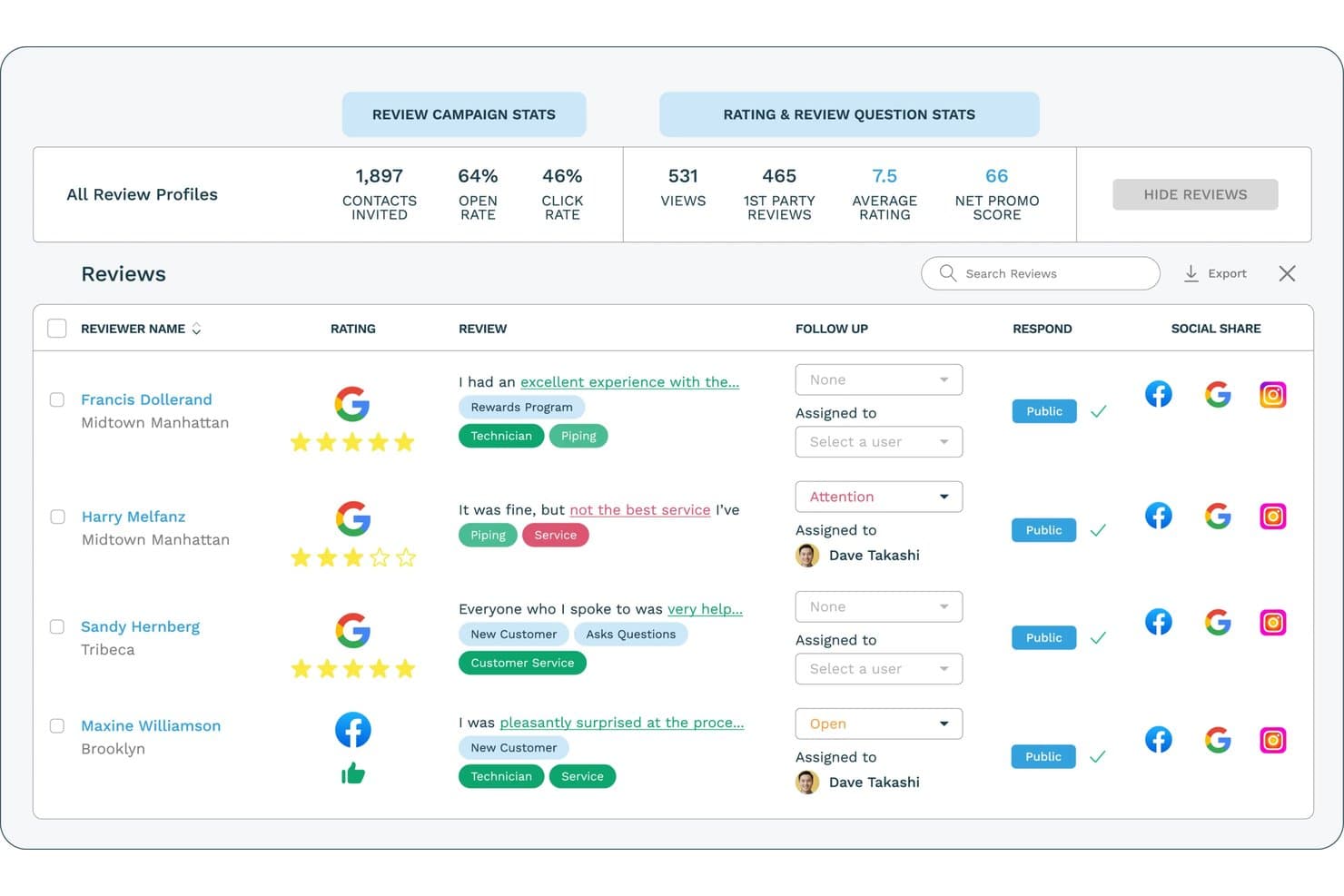
ReputationStacker lets users monitor and respond to Google reviews in one dashboard. ReputationStacker is a review management platform that automates review request campaigns via email and SMS, monitors reviews across 100+ platforms, and centralizes response management, sentiment analysis, and multi-location reporting in one dashboard.
Who Is ReputationStacker Best For?
ReputationStacker is a strong fit for multi-location businesses and healthcare organizations that need HIPAA-compliant review generation across many locations from one dashboard.
Why I Picked ReputationStacker
I've included ReputationStacker in my top picks because it's one of the few platforms that pairs HIPAA-compliant review generation with true multi-location management, making it a strong fit for healthcare groups and multi-location businesses alike. I like how automated email and SMS request campaigns can be triggered through connected systems, so a dental group with 30+ locations can collect reviews without any manual follow-up. The sentiment analysis also stands out to me, using NLP to surface recurring themes like wait times or front-desk feedback across every location in one view.
ReputationStacker Key Features
- AI review replies: Generates on-brand responses that can be auto-posted or reviewed and edited before going live.
- Review widgets: Embeddable carousels, cards, and badges that refresh automatically with new reviews to display on your website.
- Auto-social sharing: Automatically shares new reviews to Facebook, Instagram, and Google Business Profile based on configurable rules.
- Review monitoring: Pulls reviews from 100+ platforms into one dashboard with filters for platform, location, and team assignment.
ReputationStacker Integrations
ReputationStacker offers three documented native integrations: Google Business Profile, Facebook, and Instagram. It also supports integrations via Zapier and an API for custom connections.
Pros and Cons
Pros:
- HIPAA-compliant workflows suit healthcare groups
- Location comparisons surface recurring customer issues
- Automated requests can boost review volume
Cons:
- No local business listing management
- No local rank tracking
Learn more about ReputationStacker: Best for analyzing Google review sentiment
- Free trial available
- From $10/location/month

RightResponse AI offers a comprehensive dashboard for managing customer reviews. RightResponse AI helps you break down Google reviews into the topics and phrases that actually matter to your business, not just keywords or star ratings. You get a clearer read on what customers are saying, how sentiment shifts across locations, and where competitors may be gaining ground — all while using AI-generated replies that reflect your own business facts and voice.
Why I Picked RightResponse AI: I picked RightResponse AI because of how it analyzes customer sentiment on Google reviews at a business-specific level. Instead of only tagging reviews as “positive” or “negative,” it maps phrases into categories that you care about, giving you a clearer sense of why customers are leaving certain ratings. This makes it easier to identify service gaps, coaching opportunities, and recurring issues across multiple locations.
Standout Features & Integrations:
Features include competitor tracking that compares your average ratings and review volume trends against others, Google Map rank tracking with insights into category-level competition, AI-generated replies that factor in reviewer details, and configurable filters that exclude certain reviews from reply automation. You also get phrase-level sentiment drilldowns that allow you to compare feedback across locations or time periods. An AI-powered review requester (in rollout) is also available for personalized outreach.
Integrations include WhatsApp, Gmail, Outlook, Google Maps, and additional apps via Zapier.
Pros and Cons
Pros:
- Personalized, fact-based AI responses
- Location-based sentiment breakdown
- Competitor benchmarking tools
Cons:
- No public integrations listed
- Some learning curve for setup
Learn more about RightResponse AI: Best for AI-powered review replies
- Free demo available
- Pricing upon request
Visit WebsiteCustomer Rating:4.8/5
Birdeye offers a range of alerts, including for reviews that were left with no response, for better reputation monitoring and management. Birdeye is an AI-powered reputation and customer experience platform built for multi-location and enterprise businesses, helping them manage reviews, listings, social media, surveys, and customer interactions from one centralized system. It serves 200,000+ customers globally across industries such as dental, healthcare, automotive, retail, legal, and home services, where local visibility and online reputation directly influence growth.
Why I Picked Birdeye
I picked Birdeye for its BirdAI agents, which automate review generation, monitoring, and responses across 200+ platforms while staying aligned with your brand voice and industry context. These always-on AI agents reduce manual work and help enterprises manage reputation consistently at scale. Birdeye also stands out for its Search AI and Listings AI, which actively optimize local visibility and improve rankings on Google and AI-driven search results. Combined with Insights AI, the platform makes it easy to track customer sentiment across locations, identify trends, and address issues before they impact brand perception.
Birdeye Key Features
In addition to Birdeye’s core AI-driven review and search capabilities, the platform offers:
- Social AI: Manage and schedule social media content across multiple locations from a single dashboard, with AI-assisted posting to maintain brand consistency.
- Surveys AI: Collect customer and patient feedback, measure satisfaction, and identify churn risks through automated, customizable surveys.
- Messaging AI & Unified Inbox" Centralizes SMS, website chat, and social messages into one inbox, helping teams respond efficiently across channels.
- Reports AI & Location-Level Analytics: Provides enterprise-grade reporting to track performance by location, region, or brand.
Birdeye Integrations
Birdeye supports 3,000+ integrations, including Salesforce, HubSpot, QuickBooks, Facebook, Google My Business, Slack, Microsoft Teams, Zendesk, Shopify, and Mailchimp.
Pros and Cons
Pros:
- BirdAI agents automate reputation management across 200+ review platforms.
- Robust analytics and location-level reporting for tracking performance at scale.
- Unified dashboard simplifies multi-client monitoring.
Cons:
- Enterprise-focused feature set may feel excessive for single-location or very small businesses.
- Onboarding can take time for organizations managing many locations.
Learn more about Birdeye: Best for review management automation
- Free 14-day trial available
- From $45/location/month
Visit WebsiteCustomer Rating:4.9/5
Reviewflowz alerts teams instantly to reviews for quick, smart replies. Reviewflowz sends real time review alerts to tools like Slack, Teams, and email, helping teams respond quickly to customer feedback. This automation keeps businesses aware of new reviews, supports fast replies, and can improve customer satisfaction.
Why I picked Reviewflowz: I picked Reviewflowz because its AI powered reply system helps you stay on top of reviews without adding extra manual work. You can tune AI Reply Agents to match your brand voice, include a signature, and add contact details. These agents can automatically respond to reviews based on rules you set, such as star rating, keywords, platform, or timing. It also sends customizable alerts so you are notified immediately and can reply right away.
Standout features & integrations:
Features include a centralized dashboard that gathers reviews from multiple platforms, customizable notifications to alert your team to new activity, and sentiment analysis that helps you gauge the tone of customer feedback.
Integrations include Google My Business, Yelp, TripAdvisor, Trustpilot, Zendesk, Intercom, Slack, Google Sheets, ChatGPT, Claude, and Microsoft Teams.
Pros and Cons
Pros:
- Magic link review requests
- Dynamic review widgets
- Competitor review tracking
Cons:
- AI Chat Assistant (Lenny) is limited to higher plans
- Doesn't support listing management
Learn more about ReviewFlowz: Best for Google-only multi-location monitoring
- 24-hour free trial + free plan + free demo available
- From $6.99/month
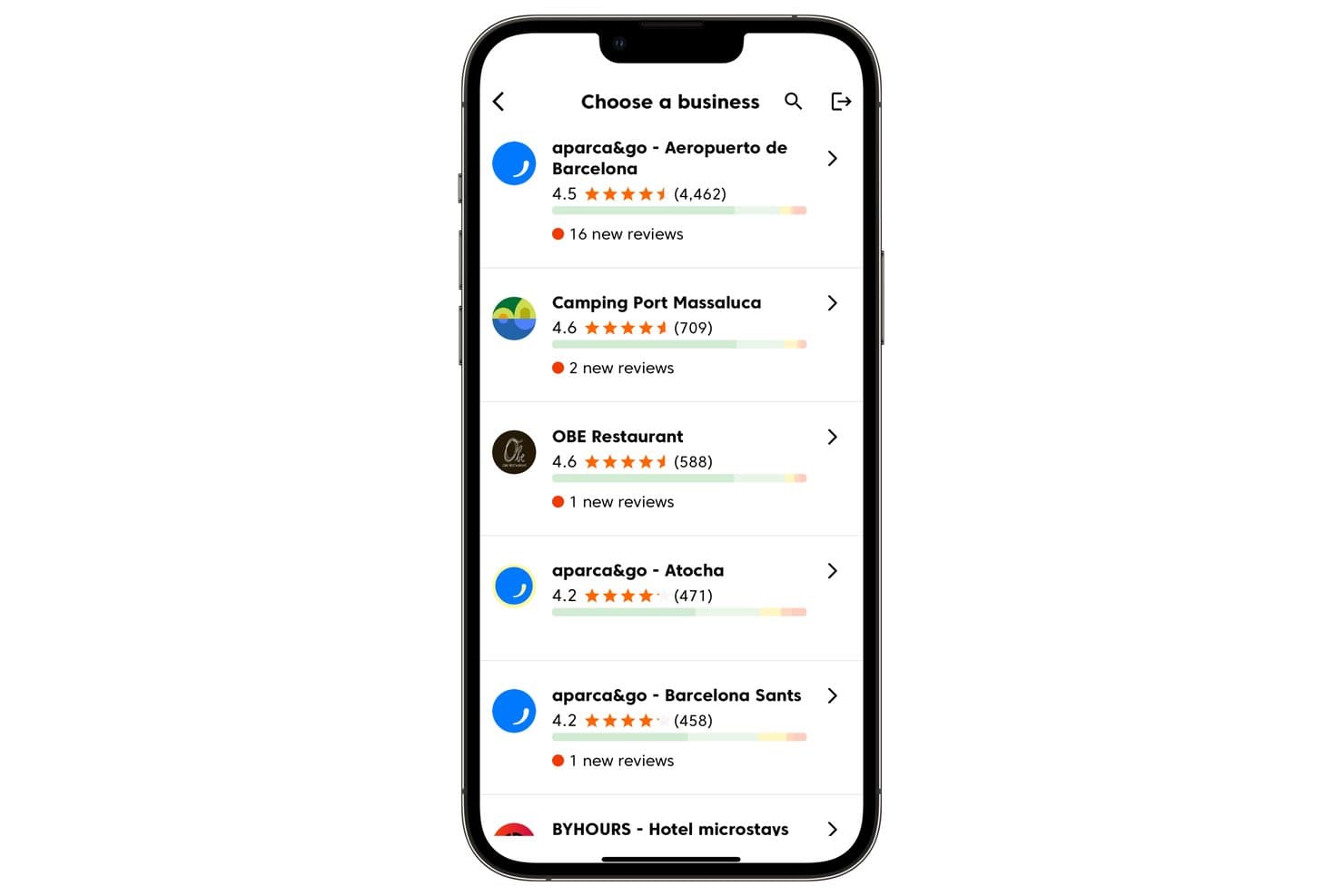
Cinquo lets users manage multiple business locations and track new reviews. Cinquo is a Google-only review management tool that centralizes multi-location monitoring, AI-powered reply automation via its CINTIA agent, trackable QR code–based review requests, and operational rating analytics across a unified mobile and desktop dashboard.
Who Is Cinquo Best For?
Cinquo is a strong fit for multi-location businesses and local SEO specialists who want deep Google-specific review insights without paying per-location fees.
Why I Picked Cinquo
Cinquo earns its spot on my shortlist because it goes deeper on Google-specific data than any multi-platform tool I've seen. I love that it calculates your true, unrounded star rating (think 4.41 vs. 4.49) and tells you exactly how many 5-star reviews you need to hit the next milestone. Add in CINTIA's per-location AI reply automation and real-time push alerts, and you've got a purpose-built monitoring setup that multi-location teams will find hard to replicate elsewhere at this price.
Cinquo Key Features
- Delegated Gmail-based user access: Team members log in with their own Gmail accounts to access Cinquo without being added as Google Business Profile managers.
- Removable review detector: Flags reviews that may violate Google's policies and surfaces them for potential removal request submission.
- Per-star-rating reply automation controls: CINTIA can be configured to auto-publish replies for specific star ratings while holding others for manual review.
- Employee-attributed QR codes: Each staff member gets a unique, trackable QR code that attributes resulting reviews to that individual in the dashboard.
Cinquo Integrations
Cinquo has a native Google Business Profile integration for real-time review, rating, and location syncing.
Pros and Cons
Pros:
- Trackable employee and location QR codes
- Delegated Gmail access keeps GBP roles secure
- Calculates unrounded Google star ratings
Cons:
- No multi-platform review monitoring
- No sentiment analysis or competitor metrics
Learn more about Cinquo: Best for social media teams
- 14-day free trial available
- From $64/month (billed annually)
Visit WebsiteCustomer Rating:4.9/5
Vista Social unifies reviews & social media to streamline team workflows. Vista Social centralizes review management and monitoring from major platforms, including Google My Business, Facebook, and TrustPilot. Its integration with various social media channels streamlines workflows to maintain positive customer relationships. You can easily follow-up on any bad reviews, helping to convert naysayers to happy customers.
Why I picked Vista Social: Vista Social brings reviews from platforms like Google, Yelp, and Facebook into one place, making it easy for businesses to track and respond quickly. Along with review management, it includes tools for publishing, analytics, engagement, and social listening, giving you a full suite for managing their online presence. Its user-friendly interface lets users sort, filter, and customize how they view reviews, helping them build more targeted and effective strategies.
Standout features & integrations:
Features include sentiment analysis that helps identify the tone of reviews, a review history tracker for past interactions, and a competitor monitoring tool to see how your brand compares. You can also set up alerts for new reviews to stay updated.
Integrations include Facebook, Twitter, Instagram, LinkedIn, Google My Business, YouTube, Pinterest, TikTok, Reddit, and Slack.
Pros and Cons
Pros:
- Competitor review benchmarking
- Cross-platform review monitoring
- AI-generated review responses
Cons:
- Delayed review notifications
- Limited non-Google integrations
Learn more about Vista Social: Best for multi-channel support
- Free demo available
- Pricing upon request
Visit WebsiteCustomer Rating:4.3/5
Simplify360 unifies customer chats across social, messaging, and reviews. Simplify360 has multi-channel support, allowing businesses to connect with customers on social media, messaging apps, and review sites in one place. It consolidates interactions, streamlines workflows, improves response times, and ensures consistent communication.
Why I picked Simplify360: Simplify360 integrates with over 20 communication channels, allowing you to streamline customer engagement and support processes in one platform. Its AI-driven tools automate up to 90% of review responses, and it offers autoresponders and email escalations for high-priority reviews to help maintain a positive brand reputation. Its in-depth analytics and reporting features provide insights into customer sentiment and support performance.
Standout features & integrations:
Features include a customizable dashboard that allows you to prioritize important reviews. The platform also offers automated alerts for new reviews, ensuring timely responses. Detailed reporting tools help track performance and identify trends in customer feedback.
Integrations include Facebook, Twitter, Instagram, LinkedIn, YouTube, Google My Business, WhatsApp, Pinterest, TripAdvisor, and Trustpilot.
Pros and Cons
Pros:
- Real-time review notifications
- Automated review categorization
- AI-powered review responses
Cons:
- No auto-flagging negatives
- Basic sentiment analysis tools
Learn more about Simplify360:

EmbedSocial offers 80+ customizable widgets that are easy to embed on any site. EmbedSocial offers over 80 pre-built, customizable, and mobile-responsive review widgets that can be embedded into any website with simple JavaScript code. It is compatible with various web builders and CMS platforms, allowing businesses to showcase customer feedback and enhance credibility using real social proof.
Why I picked EmbedSocial: EmbedSocial’s AI tools, like the review summarizer and AI Reply Assistant, help businesses quickly understand feedback and respond with personalized messages. Its widgets are fully responsive, support custom CSS, and work on any platform that supports JavaScript. This makes it easy to match the look and feel of any website. Plus, its combo widgets can pull reviews from multiple sources, giving a well-rounded view of customer sentiment.
Standout features & integrations:
Features include AI review summaries that help potential customers quickly grasp feedback, a Google Posts scheduler to automate updates, and the ability to generate review reports across multiple profiles. Your team will also appreciate the wide compatibility with most web builders and eCommerce platforms.
Integrations include Google, Facebook, Instagram, Twitter, LinkedIn, Shopify, WooCommerce, Wix, Squarespace, and WordPress.
Pros and Cons
Pros:
- Customizable review widgets
- Automated response templates
- AI-powered review summaries
Cons:
- Limited review sentiment analysis
- Customization requires CSS knowledge
Learn more about EmbedSocial: Best for small businesses
- 14-day free trial
- From $25/month (billed annually)
Visit WebsiteCustomer Rating:4.9/5
Freshreview helps small businesses collect and showcase reviews easily. Freshreview is an online reputation management system that streamlines the collection, monitoring, and showcasing of customer feedback across 16 review sites. With minimal setup and no complex learning curve, it empowers small businesses to build credibility and grow their reputation.
Why I picked Freshreview: Freshreview’s user-friendly interface and cost-effective pricing plans allow you to automate multi-channel review requests via WhatsApp, SMS, and email for a steady flow of customer reviews. The platform also provides customizable QR codes so in-store customers can leave immediate feedback. Its AI-driven sentiment analysis offers businesses actionable insights by monitoring and responding to reviews from a centralized dashboard.
Standout features & integrations:
Features include the ability to monitor reviews across multiple platforms, automated review requests to engage customers, and analytics to track performance over time. Your team can also customize review displays to match your branding.
Integrations include Google, Facebook, Yelp, HubSpot, Salesforce, Mailchimp, Shopify, WooCommerce, Squarespace, and WordPress.
Pros and Cons
Pros:
- SEO-friendly response templates
- Multi-channel review campaigns
- AI-optimized review responses
Cons:
- No sentiment analysis tools
- No video testimonial support
Learn more about Freshreview:

Zoho Publish boosts workflows with seamless Zoho app integration. Zoho Publish integrates natively with other Zoho applications, creating a solid data flow that enhances customer engagement, lead tracking, and support workflows. This reduces platform switching and boosts team productivity.
Why I picked Zoho Publish: Zoho Publish syncs business listings across directories like Google Maps, ensuring that accurate information is available for customers, as well as monitoring and responding to customer reviews in real time. This closed-loop feedback system allows you to react to customer experiences and proactively optimize your presence across directories. Its integration with other Zoho tools enables you to link reviews to leads or tickets in Zoho CRM or review ratings and sentiments in Zoho Analytics.
Standout features & integrations:
Features include review monitoring to track customer feedback across platforms, automated response capabilities to save time, and sentiment analysis to prioritize reviews. The platform also provides detailed analytics to help improve your business strategies.
Integrations include Zoho CRM, Zoho Desk, Google My Business, Facebook, Yelp, TripAdvisor, Twitter, LinkedIn, Instagram, and Slack.
Pros and Cons
Pros:
- Automated response workflows
- Real-time review notifications
- Multi-platform review integration
Cons:
- No competitor review tracking
- No keyword-based filtering
Learn more about Zoho Publish:
Other Google Review Management Software
Here are some additional Google review management software options that didn’t make it onto my shortlist but are still worth checking out:
- 11Social PilotBest for social media scheduling
- 12SynupBest for local SEO management
- 13LocaloBest for local SEO boost
- 14Local VikingBest for geo-grid tracking
- 15MerchyntBest for local review growth
- 16GomingaBest for large enterprises
- 17SprinklrBest for enterprise-level insights
- 18PodiumBest for text-based interactions
- 19Local RankingBest for small business SEO
- 20RevyooBest for review generation campaigns
How I Evaluate Google Review Management Software
I look at two things: does a tool handle the basics—live GBP syncing, centralized response management, and automated review requests—and does it offer what separates good picks from great ones.
Core Functionality (Table Stakes For This List)
When I'm selecting tools for my list, I rank each one on a scale from 0 (does not offer the functionality) to 5 (excels in this area) for each core functionality listed below. Then, I calculate the tool's total score into a percentage. Each tool needs to achieve a minimum total score of 65% to be considered for inclusion.
- Google Business Profile Connection: I check whether each tool syncs with GBP via API for real-time review and rating updates, or relies on slower scraping and manual imports.
- Review Monitoring & Alerts: Real-time notifications matter when a one-star review hits your busiest location on a Friday night, so I evaluate alert speed, channel options, and filtering.
- Review Response Tools: I look for the ability to reply directly from the dashboard using templates, AI-suggested drafts, or bulk actions—especially for teams managing dozens of locations.
- Review Request Automation: Whether it's a post-purchase SMS drip or a QR code on a receipt, the platform should automate outreach across email and SMS to drive review volume.
- Multi-Location Support: Franchise groups and agencies need location hierarchies, role-based permissions, and grouped dashboards—I evaluate how cleanly a tool handles scaling past a handful of sites.
- Review Analytics & Reporting: I look at whether the platform offers sentiment breakdowns, rating trend tracking, and keyword surfacing that help you tie review data back to campaign or operational decisions.
Once I have a list of tools that meet the criteria, I consider what sets each platform apart.
Differentiating Factors (What Sets Vendors Apart)
Here's how I compare and contrast different vendors:
Standout Features
Competitor benchmarking is a big differentiator—I want to see how a client's ratings and review velocity stack up against nearby rivals. Review widgets that embed Google reviews with schema markup on landing pages can boost both conversions and local SEO. I also evaluate whether a platform bundles local rank tracking and GBP post scheduling, since those features save teams from juggling separate tools. AI-powered review summarization is worth noting too, especially for brands with hundreds of locations where reading every review isn't realistic.
Beyond Features
Pricing structure matters a lot here. Per-location pricing can balloon fast for franchise groups, so I evaluate whether the model scales reasonably as you add sites. Compliance is another area I look at closely—tools that send SMS review requests need to respect opt-in regulations, and platforms should follow Google's own policies against review gating. I also consider how well each tool connects to CRMs and POS systems, since triggering a review request right after a transaction is one of the highest-converting workflows you can set up.
How to Choose Google Review Management Software
It’s easy to get bogged down in long feature lists and complex pricing structures. To help you stay focused as you work through your unique software selection process, here’s a checklist of factors to keep in mind:
| Factor | What to Consider |
| Scalability | Ensure the software can grow with your business. Look for tools that can handle increasing reviews and expand functionalities as needed. |
| Integrations | Check if it integrates with platforms you use, like CRM systems or social media channels, to streamline your workflow. |
| Customizability | Choose a tool that lets you tailor dashboards and reports to your needs, giving you control over how you view and manage reviews. |
| Ease of Use | Opt for software with an intuitive interface to minimize training time for your team and avoid frustration. |
| Budget | Consider your budget and look for a solution that offers good value, balancing features with cost-effectiveness. |
| Security Safeguards | Verify that the tool complies with data protection regulations and offers strong security measures to protect customer data. |
| Support | Look for vendors offering robust customer support through multiple channels, ensuring help is available when needed. |
| Analytics | Ensure the software provides insightful analytics to help you make data-driven decisions and improve your review management strategies. |
Trends in Google Review Management Software
In my research, I sourced countless product updates, press releases, and release logs from different Google review management software vendors. Here are some of the emerging trends I’m keeping an eye on:
- AI-Driven Insights: AI is being used to analyze customer sentiment and predict trends. This helps businesses understand feedback at a deeper level. Some vendors are offering AI-powered dashboards that highlight key insights and suggest actions.
- Video Reviews: Video content is becoming more popular, and some platforms now allow customers to upload video reviews. This adds a personal touch and can enhance trust. Businesses can leverage these for more engaging marketing content.
- Real-Time Feedback: Instant feedback collection is gaining traction, allowing businesses to address issues as they arise. This feature helps improve customer satisfaction and retention. Vendors are developing tools that notify businesses immediately when a review is posted.
- Custom Review Widgets: More tools are offering customizable review widgets that match a brand's aesthetics. This makes it easier for businesses to display reviews on their websites in a way that aligns with their branding.
- Sentiment Tracking Over Time: Vendors are focusing on tools that track sentiment changes over time, helping businesses see how their reputation evolves. This trend allows for long-term strategic planning based on customer feedback patterns.
What Is Google Review Management Software?
Google review management software helps businesses monitor, respond to, and analyze customer reviews on Google. It is used by marketing professionals, customer service teams, and business owners to enhance online reputation and customer satisfaction.
Its features include sentiment analysis, real-time feedback collection, and customizable review widgets to help understand customer sentiment, address issues promptly, and maintain brand consistency. Overall, these tools provide businesses with valuable insights to improve service and build customer trust.
Features of Google Review Management Software
When selecting Google review management software, keep an eye out for the following key features:
- Sentiment analysis: This feature helps you understand the tone of customer feedback to make informed decisions based on customer sentiment.
- Real-time feedback collection: Allows you to receive and respond to reviews as they come in, improving customer satisfaction and engagement.
- Customizable review widgets: Lets you display reviews on your website in a way that aligns with your brand's look to enhance trust and credibility.
- Automated review alerts: Notifies your team immediately when new reviews are posted, ensuring timely responses and proactive reputation management.
- Centralized dashboard: Provides a comprehensive view of all platform reviews for managing and tracking customer feedback.
- Local ranking tracking: Monitors your business's position in local search results to help you optimize your local SEO strategy.
- AI-driven insights: Uses artificial intelligence to highlight key trends and insights from customer reviews, guiding strategic decisions.
- Video review support: Allows customers to submit video reviews, adding a personal touch to feedback and enhancing marketing efforts.
- Custom notification settings: Enables you to tailor alerts and notifications to fit your workflow so your team stays informed without being overwhelmed.
Benefits of Google Review Management Software
Implementing Google review management software provides several benefits for your team and your business. Here are a few you can look forward to:
- Improved customer satisfaction: Real-time feedback collection and automated alerts help you address issues swiftly and enhance customer satisfaction.
- Enhanced brand reputation: Sentiment analysis and centralized dashboards allow you to monitor and improve your online reputation effectively.
- Increased local visibility: Local ranking tracking aids in optimizing your local SEO efforts and boosts your business’s visibility in local searches.
- Efficient review management: Customizable widgets and centralized dashboards make managing and displaying reviews more efficient.
- Data-driven decisions: AI-driven insights provide valuable trends and analytics, guiding your strategic business decisions.
- Engaging marketing content: Video review support enables customers to share personal experiences, enriches your marketing content, and builds trust.
- Tailored user experience: Custom notification settings ensure your team receives relevant alerts, keeping them informed and focused on what matters.
Costs and Pricing of Google Review Management Software
Selecting Google review management software requires understanding the various pricing models and plans available. Costs vary based on features, team size, add-ons, and more. The table below summarizes common plans, their average prices, and typical features included in Google review management software solutions:
Plan Comparison Table for Google Review Management Software
| Plan Type | Average Price | Common Features |
| Free Plan | $0/user/ month | Basic review monitoring, limited feedback response, and essential reporting. |
| Personal Plan | $5-$25/ user/month | Review monitoring, automated alerts, sentiment analysis, and basic reporting and analytics. |
| Business Plan | $30-$75/ user/month | Multi-location support, customizable dashboards, advanced analytics, and automated review requests. |
| Enterprise Plan | $100-$200/user/month | Comprehensive reporting, AI-driven insights, dedicated support, and full integration capabilities. |
Google Review Management Software FAQs
Here are some answers to common questions about Google review management software:
How does the Google review system work?
Google reviews allow customers to rate businesses using a star system and provide written feedback about their experience. These reviews appear on Google Search and Google Maps, visible to anyone searching for the business. They help inform potential customers and influence business reputation.
What violates Google review policy?
Google doesn’t allow deceptive or inaccurate reviews. Users can’t mislead others or falsely attribute reviews to unauthorized individuals or organizations. Violating these guidelines can result in review removals, affecting your business’s credibility and online presence.
How can I respond to negative reviews effectively?
Respond promptly and professionally to negative reviews. Acknowledge the customer’s experience and offer to resolve the issue privately. This shows potential customers you care about feedback and are committed to improving their experience, which can enhance your reputation.
Can I automate review responses?
Yes, many review management tools offer automated response features. These tools allow you to set up templates for common feedback scenarios, saving time and ensuring consistent communication. However, personalized responses may still be necessary for more complex issues.
How do I integrate review management software with existing systems?
Most review management software solutions offer integrations with CRM platforms and social media channels. This allows you to streamline workflows, keep customer data organized, and manage reviews from a single interface, enhancing efficiency and collaboration.
Can I automate responses to Google reviews?
Yes, many Google review management tools offer automation features for responding to reviews. You can set up templates for common responses, saving time while maintaining a personal touch. However, it’s important to customize replies when addressing specific concerns to show genuine customer engagement.