
28 Best Marketing Strategy Software: Reviewed For 2026

10 Best Marketing Strategy Software Shortlist
Here's my pick of the 10 best software from the 28 tools reviewed.


With so many different marketing strategy software solutions available, figuring out which is right for you is tough. You know you want tools for market analysis, campaign planning, budget management, and performance tracking—but now need to figure out which solution is best. I've got you! In this post, I'll help make your choice easy, sharing my personal experiences using dozens of different marketing strategy tools with brands of all sizes, with my picks of the best marketing strategy software overall.
Why Trust Our Software Reviews
Best Marketing Strategy Software Summary
This comparison chart summarizes pricing details for my top marketing strategy software selections to help you find the best one for your budget and business needs.
| Tool | Best For | Trial Info | Price | ||
|---|---|---|---|---|---|
| 1 | Best for creating customized marketing strategies | 14-day free trial | From $29/month | Website | |
| 2 | Best for data-driven strategies | Free demo available | Pricing upon request | Website | |
| 3 | Best for customizable request forms | Free plan + free demo + 14-day free trial available | From $10/user/month (billed annually) | Website | |
| 4 | Best for campaign project management | Free trial + free demo available | From $9/member/month (billed annually) | Website | |
| 5 | Best for real-time social insights | 14-day free trial available | From $199/month (billed annually) | Website | |
| 6 | Best with a built in customer data platform | Free plan + free demo available | From $20/month | Website | |
| 7 | Best for marketing strategy tracking | Free plan available | Pricing upon request | Website | |
| 8 | Best for scheduling social media content | 14-day free trial + free plan available | From $5/channel/month (billed annually) | Website | |
| 9 | Best all-in-one social media strategy tool | 30-day free trial + free demo available | From $199/seat/month (billed annually) | Website | |
| 10 | Best for content intelligence | Free demo | From $895/month | Website |


Best Marketing Strategy Software Review
Below are my detailed summaries of the best marketing strategy software that made it onto my shortlist. My reviews offer a detailed look at the key features, pros & cons, integrations, and ideal use cases of each tool to help you find the best one for you.


Enji is a marketing strategy software built for small businesses to plan, execute, and track their marketing efforts in one place. With features like a strategy generator, AI copywriter, and scheduling tools, it helps business owners develop and manage marketing campaigns without needing advanced expertise.
Why I picked Enji: I picked Enji for its marketing strategy generator, which creates actionable plans tailored to your business. This saves time on research and makes it easier to focus on execution. I also like that it includes an AI copywriter for generating posts and blogs, plus a performance dashboard that turns campaign data into clear insights. Together, these features give small businesses practical ways to organize and improve their marketing.
Enji Standout Features and Integrations
Features include a social media scheduler to automate posting, a marketing calendar and project management tools to keep campaigns organized, and prebuilt plug-and-play campaigns that can be launched quickly. Enji also offers in-app coaching and support for added guidance.
Integrations include Facebook, Instagram, LinkedIn, Pinterest, YouTube Shorts, Threads, TikTok, Google Analytics 4, Google Calendar, iCal, and Canva.
Pros and Cons
Pros:
- Strong analytics and dashboard
- AI tools for content generation
- Easy marketing plan creation
Cons:
- Occasional software interface glitches
- Limited customization in templates


Adverity is a data platform designed to help marketing teams manage and analyze their data. It enables users to collect, transform, and share data across various channels.
Why I picked Adverity: I picked Adverity because it offers features that are especially useful for building data-driven marketing strategies. Its data transformation tools let you clean, organize, and prep large datasets for analysis, helping ensure your insights are based on accurate, structured data. The AI-powered analytics surface trends and patterns that might otherwise go unnoticed, giving your team a deeper understanding of campaign performance and customer behavior. These insights can guide everything from budget allocation to content targeting. Altogether, Adverity helps marketing teams move from raw data to actionable strategy faster and with more clarity.
Adverity Standout Features and Integrations
Features include data monitoring tools that help ensure the accuracy and readiness of data for analysis. The platform's data sharing capabilities allow users to distribute data to various destinations as needed. Additionally, Adverity provides a range of data connectors, facilitating the collection of data from multiple sources.
Integrations include Google, Meta, TikTok, Google BigQuery, Looker Studio, Facebook Ads, Amazon Advertising, Hubspot, Salesforce, Amazon S3, Snowflake, and Microsoft Azure.
Pros and Cons
Pros:
- Can harmonize data from various sources
- Ability to create personalized dashboards
- Scalable for businesses of various sizes
Cons:
- Certain configurations may require technical knowledge
- The initial setup can be time-consuming
New Product Updates from Adverity
Adverity Introduces Brandwatch and Kakao Connectors
Adverity introduces the Brandwatch Measure and Kakao Moment connectors. These updates expand data integration capabilities, enabling more comprehensive social media and regional marketing analysis. For more information, visit Adverity’s official site.
 .
.

Wrike is a project management tool designed to help teams collaborate more effectively and manage their projects with ease. It offers features such as task management, time tracking, and reporting tools to streamline workflows and improve productivity. Teams can also benefit from customizable dashboards and real-time updates to stay on top of their tasks and deadlines.
Why I picked Wrike: Wrike is a project management platform that enhances team collaboration and productivity through automation and customizable tools. A standout feature is its customizable request forms, which automate work requests to simplify the intake process. This not only reduces the need for manual entry, but also eliminates bottlenecks and ensures that all necessary project information is captured from the start. Additionally, Wrike's adjustable Gantt charts and resource management tools are essential for visualizing project timelines, efficiently allocating resources, and keeping marketing campaigns on track.
Wrike Standout Features and Integrations
Features include collaboration tools, multiple work views, mobile access, reporting and analytics, end-to-end work management, request management and automation, budget tracking and reporting, and PMO, which provides project managers with tools to align strategy with execution.
Integrations include Salesforce, Power BI, Tableau, Google Drive, Microsoft SharePoint, OneDrive, Microsoft Teams, Zoom, and Adobe Creative Cloud.
Pros and Cons
Pros:
- Simplifies task assignment
- Offers an interactive Gantt chart
- Provides a powerful proofing tool
Cons:
- No build-in chat feature
- Limited filtering options
New Product Updates from Wrike

Streamlining Workspaces with New Updates
Wrike announces custom space templates, AI Agents in Wrike Labs, and a new Guage widget to improve project management. For more information, visit Wrike's official site.


Smartsheet is a work management tool that has tailored features to help marketing teams manage every angle of their projects, including strategy planning. The platform also offers tools for resource management, digital asset management, and reporting.
Why I picked Smartsheet: Every strategy requires certain tasks, assignments, and resources to achieve its overall goals. As a marketing strategy software, Smartsheet stands out for its ability to manage these aspects of campaign project management. It allows users to plan and schedule resources with various visual views, such as Gantt charts, card views, grids, and calendars. It also offers a digital asset management feature with Brandfolder so that users can keep all their materials in one place, aligning teams more effectively.
Smartsheet Standout Features and Integrations
Features include proofing tools for collaboration, including approval workflows, on-asset annotations, and version control. It also provides time tracking, resource management features, and reports such as budget reports, expense reports, time and fee reports, and utilization reports. Other features include secure request forms and an AI assistant.
Integrations include DocuSign, Tableau, Salesforce, ServiceNow, Google Workspace, Jira, Microsoft Office 365, Box, Dropbox, Adobe Creative Cloud, Slack, OneDrive, Evernote, GitHub, and Zapier.
Pros and Cons
Pros:
- Automated workflows for routine tasks
- Strong collaboration features on digital assets
- Customizable templates
Cons:
- Mobile app could be improved
- Visual asset proofing features are only available on higher-tier plans
New Product Updates from Smartsheet

Smartsheet Adds Direct Data Import to Existing Sheets
Smartsheet introduces direct data import to existing sheets in table view. This update lets you import CSV, XLS, and XLSX files directly into sheets, reducing manual work and speeding up data setup. For more information, visit Smartsheet's official site.

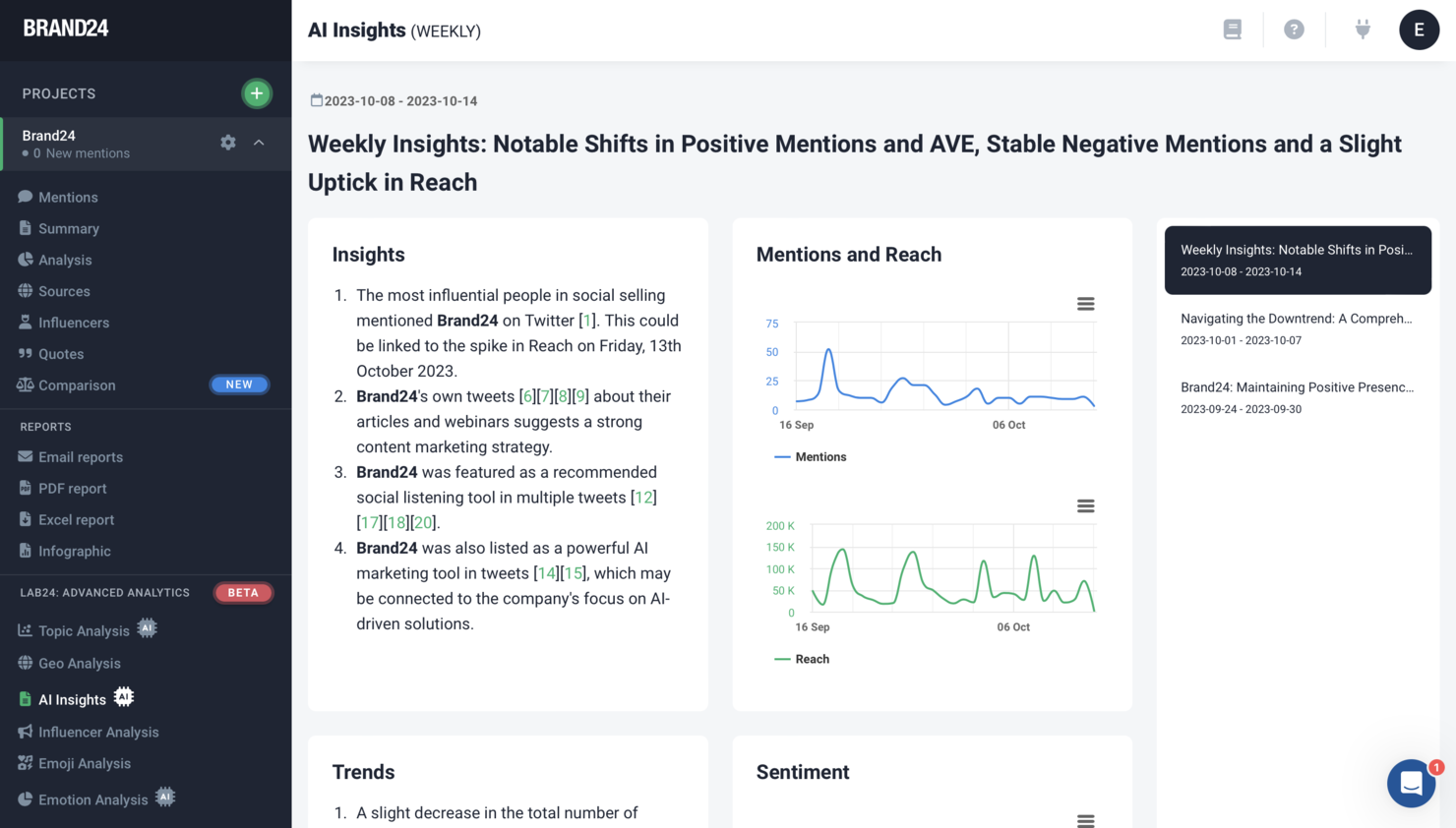
Brand24 is a marketing strategy software that equips businesses with the tools to monitor, analyze, and respond to online mentions, aiding in the development and refinement of effective marketing strategies. The ability to monitor and analyze online conversations about a brand, its competitors, and industry-related topics allows companies to make informed decisions, tailor their messaging to meet audience needs, and ultimately, drive better marketing outcomes.
Why I picked Brand24: Brand24 serves as an invaluable marketing strategy software by offering businesses a comprehensive overview of their online presence and public perception, crucial for shaping effective marketing strategies. By tracking real-time mentions across social media, blogs, forums, and news sites, Brand24 provides insights into customer sentiment, emerging trends, and competitive landscape, enabling businesses to identify opportunities for engagement and areas for improvement.
Brand24 Standout Features and Integrations
Features include tools for monitoring online brand presence, including a Mentions Feed that aggregates real-time data from various online sources, and a Discussion Volume Chart to track conversation trends. The platform also provides sentiment analysis to gauge public perception, influencer scores to identify key influencers, and customizable alerts to stay informed about brand mentions.
Integrations include Slack and SEMrush.
Pros and Cons
Pros:
- Strong competitor analysis
- Real-time alerts let you respond to mentions quickly
- Real-time alerts let you respond to mentions quickly
Cons:
- Only supports a limited number of languages
- Could use more integrations
New Product Updates from Brand24

Brand24 Enhances AVE Accuracy With Geo-Based Weighting
Brand24 has refined its AVE calculation to incorporate stronger geo-based weighting, providing more precise regional values. For more information, visit Brand24's official site.
 .
.
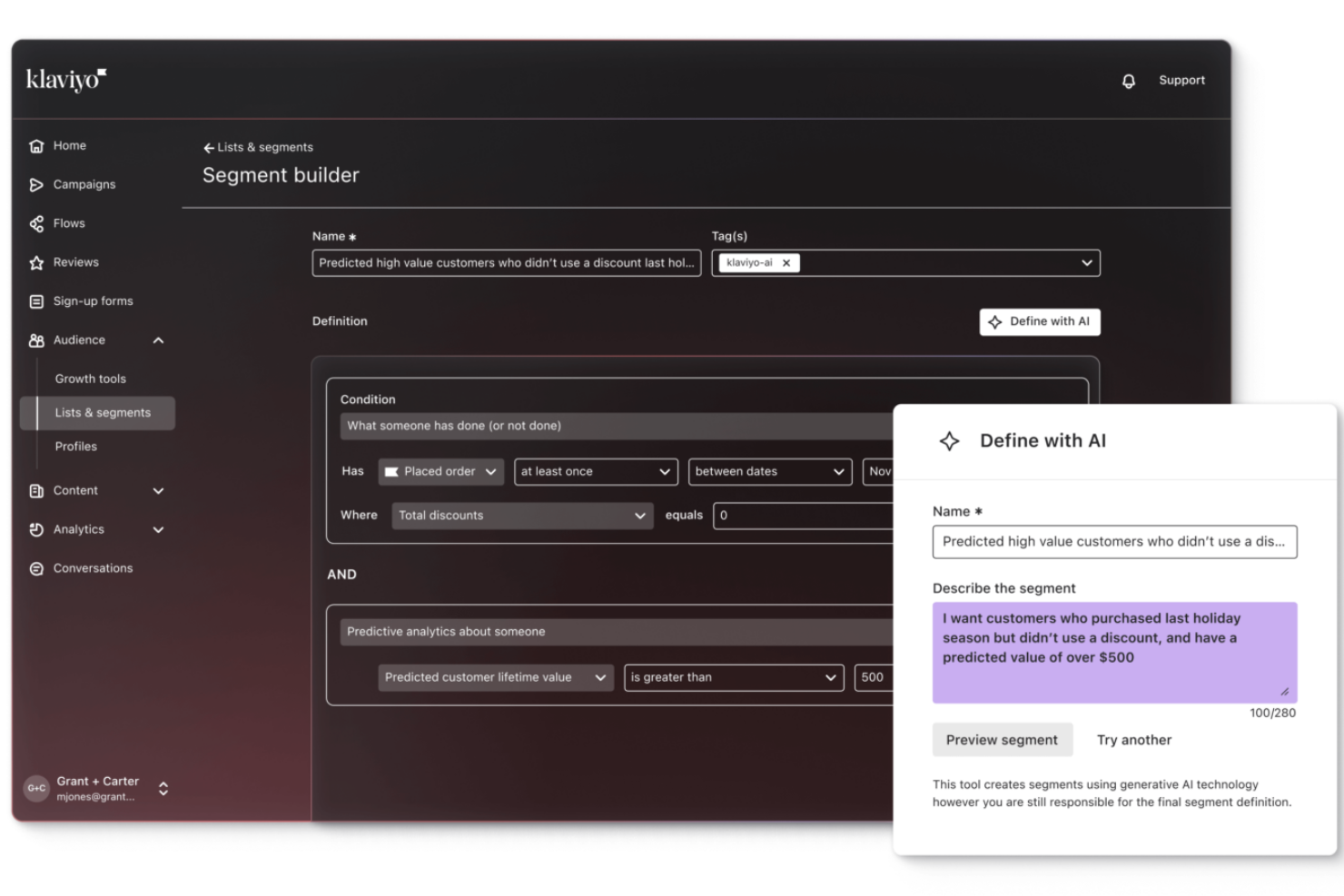
Klaviyo helps B2C brands use their own customer data to power email, SMS, and other channel-based marketing so you can send the right messages at the right time and nurture your audience through automated journeys tailored to behaviour and purchase history. It’s built to appeal to marketing teams, ecommerce owners, and growth professionals who need customer-centric campaign automation that turns engagement into measurable outcomes.
Why I Picked Klaviyo
I picked Klaviyo because its integrated customer data platform (CDP) elevates strategy beyond basic campaign tools by letting you segment and act on real-time customer behaviour across channels. You’ll benefit from advanced automation that triggers workflows based on specific behaviours like cart abandonment and repeat purchases, giving your team more context for every message.
Its predictive analytics and AI-assisted marketing features help you tailor your campaigns with data-driven insights instead of guesswork. These capabilities make Klaviyo a strong choice if you need automation that grows with your business.
Klaviyo Key Features
In addition to its data unification capabilities, Klaviyo offers several other features that enhance its utility as a marketing strategy tool.
- Omnichannel Marketing: Supports engagement with customers through email, SMS, and social media, ensuring consistent communication across platforms.
- AI-Powered Marketing Agents: Uses built-in AI tools to generate campaign content, suggest segments, and optimize strategies based on patterns in your own data.
- Customer Profiles: Provides unified profiles with comprehensive customer data, enabling better understanding and prediction of customer needs.
- Proactive Performance Monitoring: Offers tools to monitor key metrics and set custom alerts, helping optimize marketing efforts in real-time.
Klaviyo Integrations
Integrations include Shopify, Salesforce, Adobe Commerce, BigCommerce, WooCommerce, Magento, Stripe, Zendesk, HubSpot, and Mailchimp.
Pros and Cons
Pros:
- Supports omnichannel marketing, including email, SMS, and social media.
- Provides AI-driven insights for personalized marketing strategies.
- Offers comprehensive data integration for unified customer profiles.
Cons:
- Some users desire more customization options.
- Not ideal for B2B marketing needs.

Google Analytics helps marketing teams discover how their strategies are performing and what people do when visiting their websites. The platform can track details such as page visits and visitor behavior to help organizations understand which marketing strategy best resonates with target audiences.
Why I picked Google Analytics: The reason why I added Google Analytics to this list is because of its ability to track the effectiveness of your marketing strategies. Google Analytics is a powerful platform that will help you understand how your marketing strategies are performing and how visitors interact with your brand. After adding a quick code to the back end of your website, you can get detailed reports that will enable you to make informed decisions about your marketing campaigns and where you need to make improvements.
Google Analytics Standout Features and Integrations
Features include predictive capabilities that use machine learning models to analyze your data and predict actions visitors might make in the future, such as making a purchase. Google Analytics also allows you to ask questions in the dashboard’s search bar to quickly find the insights, metrics, or reports you need.
Integrations include over 1,600 third-party systems that will help you simplify marketing campaigns by using the tools marketers use most. These include connections with systems such as Domo, GetResponse, HoneyBook, Improvado, Jotform, Odoo, Outgrow, Rambox, Salesforce, Smartlook, and other software options.
Pros and Cons
Pros:
- Easy to use
- Quickly exports data
- Captures all website details
Cons:
- System updates require extensive training
- Sometimes the reporting glitches


Buffer allows businesses to schedule and share social media content across the most popular networks. It will help marketing teams automate recurring tasks and ensure all social media content is timely and relevant.
Why I picked Buffer: I wanted to add Buffer to this list because it’s considered to be one of the top social media content platforms. Buffer will help you compose, schedule, and publish social media content across some of the most popular networks, including Instagram, Facebook, Pinterest, Twitter, and other high-traffic networks. The platform provides comprehensive social media content marketing capabilities, from planning to post analytics and custom reports.
Buffer Standout Features and Integrations
Features include engagement tools that enable you to navigate comments under your social media posts and interact with your audience; you can discover all unanswered comments and highlight the most important ones to keep you aware of important conversations. Buffer also provides an analytics dashboard that will help you track your posts’ performance and understand whether they’re performing well with audiences; you’ll also receive recommendations to help increase reach and engagement.
Integrations include multiple third-party tools that will help your team manage social media accounts and content efficiently, such as Canva, Cronycle, Crowdriff, Dropbox, Feedly, Giphy, Google Drive, Make, Pocket, SocialBee, and other software options. If you have a paid Zapier account, you can make custom connections with over 400 systems.
Pros and Cons
Pros:
- Excellent customer support
- User-friendly interface
- Easily manages multiple social accounts
Cons:
- Slows down when uploading multiple images
- No email notifications


Sprout Social is an all-in-one social media strategy tool that provides a control center for marketing teams to turn social presence into real results.
Why I picked Sprout Social: In my opinion, many marketing teams should take Sprout Social into consideration because it’s an all-in-one social media management platform that will help you organize your content calendar and assets. Sprout Social can help you schedule and publish content across multiple social media networks. It can perfectly time when you should post content based on when your audience is most active.
Sprout Social Standout Features and Integrations
Features include a smart inbox that provides an overview of all social messages, allowing you to respond in a timely manner. Sprout Social’s analytics tool can help you optimize your content’s performance by identifying which is performing best, uncovering trends, and discovering engagement opportunities.
Integrations include third-party applications that can get access to all the content and data they need to help you best serve your audience. These include Canva, Dropbox, Feedly, Google Analytics, HubSpot, Marketo, Microsoft Dynamics 365, Salesforce Sales Cloud, Slack, Tableau, and other software options.
Pros and Cons
Pros:
- Easy to use
- Maintains branding
- Clear reports
Cons:
- High priced
- Slow onboarding process
New Product Updates from Sprout Social

Sprout Social's New Design to Draft Integration
Sprout Social now allows designs from Canva and Adobe Express to be sent directly as draft posts. This update offers a more efficient way of integrating design tools with your social media management processes. For more information, visit Sprout Social's official site.
 .
.
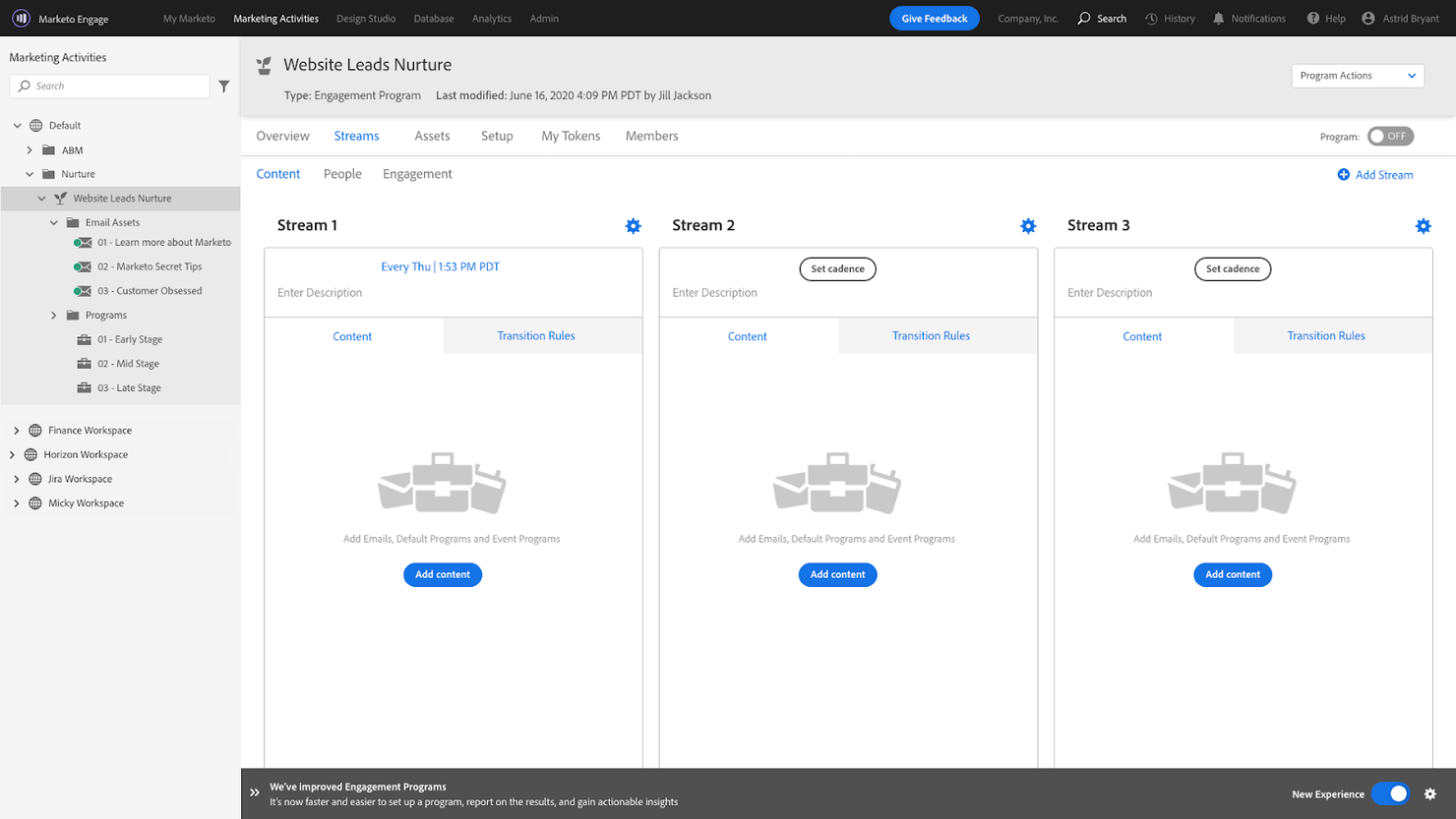
Marketo helps businesses show they understand audiences by providing personalized content that’s delivered on time. Marketing teams creating new strategies can use Marketo’s real-time behavioral and demographic data as well as artificial intelligence to personalize audience experiences.
Why I picked Marketo: I wanted to add Marketo to this list for your consideration because of its content intelligence capabilities. Marketo helps you manage, deliver, and optimize content that feels relevant to your target audience. It uses artificial intelligence to learn which content works best and automatically optimizes it to increase conversions.
Marketo Standout Features and Integrations
Features include digital marketing tools that help you target the right audiences with personalized ads. You can also use Marketo’s marketing analytics feature to understand how your strategies are performing.
Integrations include third-party applications that help increase productivity and enhance engagement with audiences throughout your marketing strategy. These include over 600 options, such as Bynder, Domo, Improvado, Outgrow, Pipedrive, Rambox, Salesforce, Slack, Wrike, Zoho CRM, and other software options.
Pros and Cons
Pros:
- Simple folder and file arrangement
- Complete marketing operations platform
- Excellent marketing automation
Cons:
- Generating reports is complex
- Steep learning curve
Other Marketing Strategy Software
Here are some additional marketing strategy software options that didn’t make it onto my shortlist, but are still worth checking out:
- Adobe Campaign
For omnichannel marketing strategies
- ActiveCampaign
For automating engagement strategies
- Tofu
For personalized B2B campaigns
- Salesforce Marketing Cloud
Customer journey builder
- Semrush
For search engine optimization strategies
- Mailchimp
For email marketing strategies
- Optimizely
For testing marketing strategies
- Asana
For managing and coordinating marketing strategies
- Crazy Egg
For website visitor recordings
- Canva
Online graphic design platform
- Ahrefs
For tracking competitors
- CoSchedule
For scheduling marketing strategies
- monday.com
For building custom strategy workflows
- Trello
For task management
- ClickUp
For collaborating on strategies
- BuzzSumo
For content influencer strategies
- Mention
For monitoring social media
- Moz
All-in-one SEO toolset


Marketing Strategy Software Selection Criteria
When selecting the best marketing strategy software to include in this list, I considered common buyer needs and pain points like integration with existing tools and ease of use. I also used the following framework to keep my evaluation structured and fair:
Core Functionality (25% of total score)
To be considered for inclusion in this list, each solution had to fulfill these common use cases:
- Campaign planning
- Performance tracking
- Data analysis
- Collaboration tools
- Budget management
Additional Standout Features (25% of total score)
To help further narrow down the competition, I also looked for unique features, such as:
- AI-driven insights
- Customizable dashboards
- Multi-channel integration
- Predictive analytics
- Automated reporting
Usability (10% of total score)
To get a sense of the usability of each system, I considered the following:
- Intuitive interface
- Customization options
- User-friendly navigation
- Speed and responsiveness
- Mobile accessibility
Onboarding (10% of total score)
To evaluate the onboarding experience for each platform, I considered the following:
- Availability of training videos
- Interactive product tours
- Access to templates
- Webinars and live demos
- Supportive chatbots
Customer Support (10% of total score)
To assess each software provider’s customer support services, I considered the following:
- 24/7 availability
- Response time
- Quality of assistance
- Access to a knowledge base
- Availability of live chat
Value For Money (10% of total score)
To evaluate the value for money of each platform, I considered the following:
- Competitive pricing
- Features included in basic plans
- Discounts for annual billing
- Free trial availability
- Cost-effectiveness compared to competitors
Customer Reviews (10% of total score)
To get a sense of overall customer satisfaction, I considered the following when reading customer reviews:
- User satisfaction
- Common complaints
- Praise for specific features
- Overall rating trends
- Feedback on updates and improvements
How to Choose Marketing Strategy Software
It’s easy to get bogged down in long feature lists and complex pricing structures. To help you stay focused as you work through your unique software selection process, here’s a checklist of factors to keep in mind:
| Factor | What to Consider |
|---|---|
| Scalability | Can the software grow with your business? Consider future needs and whether the tool can handle increased data, users, and complexity as your team expands. |
| Integrations | Does it connect with your existing tools? Ensure seamless data flow by checking compatibility with CRM, email, and analytics platforms you already use. |
| Customizability | Can you tailor it to fit your workflows? Look for flexible settings that let you adapt the software to specific marketing processes and team preferences. |
| Ease of use | Is the interface intuitive for your team? Avoid steep learning curves by choosing software with a straightforward, user-friendly design. |
| Implementation and onboarding | How quickly can your team get started? Evaluate the ease of setup and the availability of resources like tutorials and support during the initial phase. |
| Cost | Does the pricing fit your budget? Compare the value offered by different plans, considering features included and any hidden costs like add-ons or upgrades. |
| Security safeguards | Are your data and privacy protected? Check for encryption, compliance with data regulations, and the vendor's track record with security breaches. |
What Is Marketing Strategy Software
Marketing strategy software is a digital tool designed to aid businesses in planning, executing, and monitoring their marketing strategies. It encompasses features for market research, campaign planning, budget allocation, and performance analysis. The purpose is to help in identifying target audiences, setting measurable goals, and tracking the effectiveness of marketing campaigns.
Features of Marketing Strategy Software
When selecting marketing strategy software, keep an eye out for the following key features:
- Campaign planning tools: Create, organize, and schedule multi-channel marketing campaigns so you never miss an important milestone or deadline.
- Collaboration features: Allow your team to work together in real time, share feedback, and keep everyone on the same page throughout each project.
- Performance analytics: Track, measure, and visualize how your strategies are performing, so you can quickly spot trends, what’s working, and what needs tweaking.
- Budget management: Keep a firm grip on spending with built-in tools that help you allocate, monitor, and adjust your marketing budgets as projects evolve.
- Content calendar: Map out every piece of your marketing content—including blogs, social posts, and emails—to see the bigger picture and avoid last-minute scrambles.
- Integration capabilities: Connect seamlessly with your favorite CRM, email, and analytics platforms to create a smoother workflow and minimize manual updates.
- Reporting tools: Generate customizable reports that make it easy to share results with stakeholders and celebrate your wins (or spot any red flags).
- Goal tracking: Set and monitor marketing objectives so you know if you’re moving in the right direction and can course-correct if needed.
- Resource allocation: Easily assign tasks, deadlines, and responsibilities, so everyone knows what to do and when to do it.
Common Marketing Strategy Software AI Features
Beyond the standard marketing strategy software features listed above, many of these solutions are incorporating AI with features like:
- Sentiment analysis: Quickly understand customer moods and reactions to your campaigns, helping you fine-tune your messaging for better results.
- Automated campaign optimization: Let AI analyze your data and make real-time adjustments to campaigns for better performance without you breaking a sweat.
- Predictive analytics: Get forecasts on future trends and campaign results, helping you stay one step ahead and make smarter strategy decisions.
- Content suggestions: Receive AI-driven ideas for emails, blogs, and social posts that resonate with your target audience and keep your messaging fresh.
- Audience segmentation: AI can slice and dice your audience data, revealing hidden segments so you can personalize your marketing and boost engagement.
Benefits
Implementing marketing strategy software provides several benefits for your team and your business. Here are a few you can look forward to:
- Improved decision-making: Data analysis features offer insights that help you make informed choices.
- Enhanced collaboration: Collaboration tools enable better communication and coordination among team members.
- Cost efficiency: Budget management helps track spending and ensures resources are used wisely.
- Increased productivity: Campaign planning and scheduling streamline workflows and save time.
- Adaptability: Customizable dashboards allow you to focus on metrics that matter most to your strategy.
- Predictive insights: AI-driven features provide forecasts to guide future marketing efforts.
Costs & Pricing
Selecting marketing strategy software requires an understanding of the various pricing models and plans available. Costs vary based on features, team size, add-ons, and more. The table below summarizes common plans, their average prices, and typical features included in marketing strategy software solutions:
Plan Comparison Table for Marketing Strategy Software
| Plan Type | Average Price | Common Features |
|---|---|---|
| Free Plan | $0 | Basic campaign tracking, limited data analysis, and collaboration tools. |
| Personal Plan | $5-$25/user/month | Enhanced data analysis, customizable dashboards, and basic integration capabilities. |
| Business Plan | $30-$100/user/month | Advanced campaign planning, full integration capabilities, and budget management features. |
| Enterprise Plan | $100+/user/month | AI-driven insights, advanced security safeguards, and comprehensive support and customization options. |
Marketing Strategy Software FAQs
Here are some answers to common questions about marketing strategy software:
What are the different types of marketing strategy software?
Marketing strategy software comes in all shapes and sizes, and understanding what’s available can help you narrow down your choices for consideration. Here are some of the different types of marketing strategy software you’ll find during your search.
- Email Marketing Strategies: Manually creating, scheduling, and delivering emails is a time-consuming process, and email marketing strategy tools allow you to automatically segment target audiences and plan for emails to get to their inboxes.
- Content Marketing Strategies: Creating informative content makes it possible to interact with audiences across various channels, and if you don’t create the right content, your campaigns won’t be effective; content marketing strategies will vary depending on their size and scope, but content marketing strategy software will help accelerate these processes.
- Branding Marketing Strategies: These strategies will help you increase brand awareness and brand value, and branding marketing strategy platforms will help you save space in your audience’s mind through successful branding campaigns.
- Social Media Marketing Strategies: Social media has quickly become a crucial marketing strategy for all brands; social media marketing strategy software will easily organize campaigns to help your business increase website traffic and revenue and rapidly improve brand engagement.
Can marketing strategy software integrate with other tools?
Yes, most marketing strategy software integrates with other tools like CRM systems, email marketing platforms, and analytics software. This integration helps streamline data flow and improves efficiency. Check the software’s compatibility with tools you already use to ensure seamless operation across platforms.
Is training required to use marketing strategy software?
Yes, some training is often beneficial. While many tools are designed to be user-friendly, understanding all features and maximizing their potential may require training sessions or tutorials. Look for software that offers comprehensive onboarding resources like videos, webinars, or live support to get your team up to speed quickly.
How do I evaluate the security of marketing strategy software?
Evaluate the software’s security by checking for data encryption, compliance with regulations like GDPR, and the vendor’s history with breaches. It’s important to ensure the software has robust security measures in place to protect sensitive marketing data. You can also ask vendors about their security protocols and any certifications they hold.
What’s Next:
If you're in the process of researching marketing strategy software, connect with a SoftwareSelect advisor for free recommendations.
You fill out a form and have a quick chat where they get into the specifics of your needs. Then you'll get a shortlist of software to review. They'll even support you through the entire buying process, including price negotiations.