

Navigating the marketing landscape can be tough. You need tools that help your team generate leads, engage customers, and analyze data. That's where B2B marketing platforms come in.
I've tested and reviewed these tools, focusing on what truly works for marketing managers like you. My goal is to offer you an unbiased, well-researched list of the best options available.
In this article, you'll find insights into top platforms that can make your job easier. You'll learn about features that align with your needs and how they can tackle your team's challenges.
Why Trust Our Software Recommendations
6,700+
Reviews
20
Industry experts
16+
Evaluation factors
14
Years
Our team has been testing and reviewing software since 2012. As marketing leaders ourselves, we know how difficult—and important—it is to choose the right software.
For this guide, we evaluated tools using hands-on testing and independent research, scoring tools using our selection criteria.
Our reviews reflect our human editorial judgment, not a sales pitch.
Expert reviewers:
 Gui DrusinaCreative Director
- Shriya GhateSenior Marketing Lead
 Amanda JacquesMarketing Ops Leader

B2B Marketing Platform Comparison Table
| Tool | Best For | Trial Info | Price | ||
|---|---|---|---|---|---|
| 1 | Best with real-time verified B2B contact data | Free plan + 14-day free trial + free demo available | From $49/user/month (billed annually) | Website | |
| 2 | Best for customizable branded webinars | 14-day free trial + free demo available | From $85/presenter/month (billed annually) | Website | |
| 3 | Best for small business marketing planning | 14-day free trial | From $29/month | Website | |
| 4 | Best for behavioral audience targeting | 14-day free trial + free demo available | From $100/month | Website | |
| 5 | Best for B2B SEO | Free plan available | From $29/month | Website | |
| 6 | Best for push messages | 14-day free trial | From $29/user/month (billed annually) | Website | |
| 7 | Best for conversion tracking | Free demo available | Pricing upon request | Website | |
| 8 | Best for customizability | Free demo available | From $800/month | Website | |
| 9 | Best for marketing automation | Free demo available | Pricing upon request | Website | |
| 10 | Best for multiple integrated tools | Free demo available | Pricing upon request | Website |


Best B2B Marketing Platform Reviews
Below are my comprehensive reviews of the 12 best B2B marketing platforms to help you manage your marketing campaigns and measure their results.
 Best with real-time verified B2B contact data
- Free plan + 14-day free trial + free demo available
- From $49/user/month (billed annually)
Visit WebsiteCustomer Rating:4.5/5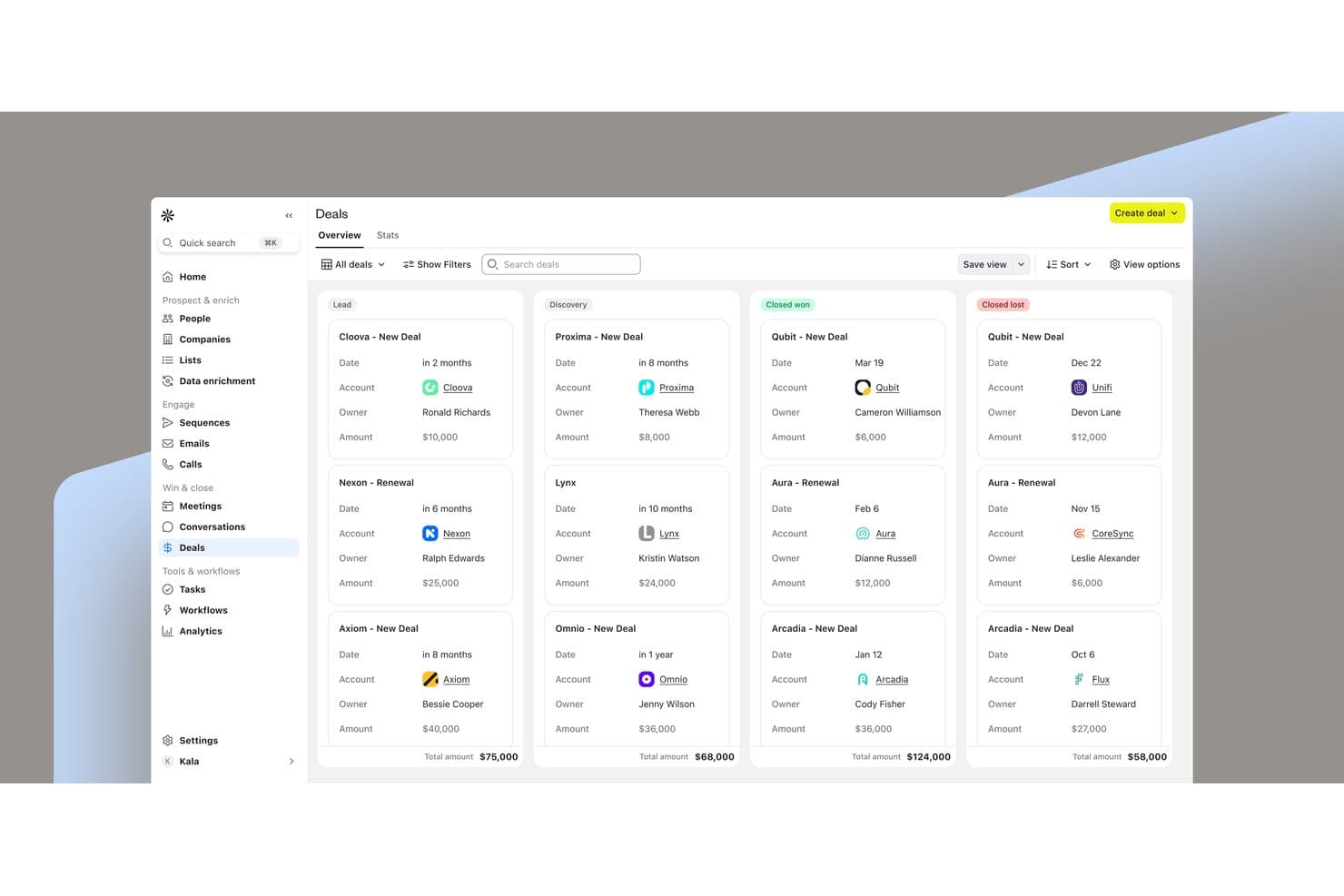
Apollo.io organizes B2B sales deals across pipeline stages in one view. Apollo.io is an AI-powered GTM platform that combines a 240M+ contact database with lead scoring, multi-channel outreach sequencing, ABM tools, and CRM integrations to connect sales and marketing workflows.
Who Is Apollo.io Best For?
Apollo.io suits B2B sales and marketing teams that need verified contact data and outbound sequencing in one place, especially those running tight alignment between SDRs and demand generation.
Why I Picked Apollo.io
Apollo.io earns its spot on my shortlist because its contact database backs every outreach decision with verified, real-time data at a scale few platforms match. I'm particularly impressed by Waterfall Enrichment, which layers multiple data sources to fill gaps in contact records automatically, and the AI Auto-Score models that use your CRM history to surface the highest-converting prospects. When my team targets a buying committee, Apollo's 65+ filters, including funding signals and job changes, make it easy to pinpoint the right contacts before a single email is sent.
Apollo.io Key Features
- Bi-directional CRM sync: Connects Salesforce, HubSpot, and Pipedrive with scheduled data updates.
- Multi-channel sequences: Automates coordinated email, call, and social outreach.
- Smart forms: Captures and enriches leads before routing them to sales reps.
- Custom analytics: Reports on activity, team performance, messaging, and ROI.
Apollo.io Integrations
Apollo.io supports 200+ integrations, including native integrations with Salesforce, HubSpot, Pipedrive, Outreach, Salesloft, SendGrid, LinkedIn, and Gmail. It also provides a REST API and MCP for custom integrations with AI tools.
Pros and Cons
Pros:
- 65+ filters target buying committees with precision
- AI scoring surfaces high-converting prospects from CRM history
- Waterfall Enrichment fills contact record gaps automatically
Cons:
- International contact data thinner than US coverage
- Always-on nurture campaigns not yet available
Learn more about Apollo.io: Best for customizable branded webinars
- 14-day free trial + free demo available
- From $85/presenter/month (billed annually)
Visit WebsiteCustomer Rating:4.5/5
WebinarGeek’s live interface shows presenters, content, controls, and chat. WebinarGeek helps B2B marketing teams run branded live and automated webinars that engage prospects and capture lead data. It solves the challenge of creating webinars that feel fully on-brand while still supporting lead generation, audience engagement, and follow-up marketing in one platform.
Who Is WebinarGeek Best For?
WebinarGeek is a strong choice for marketing teams at B2B companies that need to run branded, interactive webinars to engage prospects and collect leads.
Why I Picked WebinarGeek
I picked WebinarGeek because it gives B2B marketers strong control over the look and feel of their webinars, helping them maintain brand consistency across registration pages, emails, and the webinar room itself. The platform lets you customize these touchpoints with your company’s colors, logos, and visual identity, and even remove WebinarGeek branding entirely for a white-label experience. I like that this makes it easier to deliver a professional event experience that feels fully aligned with your brand.
WebinarGeek Key Features
Some other features that make WebinarGeek useful include:
- Automated webinars: Schedule and run pre-recorded webinars that simulate live events for lead generation and training.
- Audience interaction tools: Use polls, Q&A, and chat to engage attendees and gather feedback during sessions.
- Detailed analytics dashboard: Track attendee behavior, engagement metrics, and conversion data for every webinar.
- On-demand webinar hosting: Allow prospects to access recorded webinars at their convenience, expanding your reach beyond live events.
- Live captions: Add real-time captions to support accessibility and help global audiences follow along.
WebinarGeek Integrations
Integrations include HubSpot, Salesforce, Pipedrive, Mailchimp, ActiveCampaign, ConvertKit, MailBlue, Enormail, Google Tag Manager, and Stripe. WebinarGeek also offers a REST API for custom integrations.
Pros and Cons
Pros:
- Custom branding across registration pages, emails, and webinar rooms
- Supports automated, live, and on-demand webinars for flexible campaigns
- Fully browser-based for hosts and attendees, with no app downloads
Cons:
- Advanced analytics are less robust than some larger competitors
- No built-in breakout rooms for smaller group discussions
Learn more about WebinarGeek: 3Best for small business marketing planning
Enji
- 14-day free trial
- From $29/month
Visit WebsiteCustomer Rating:4.9/5
Marketing Calendar Enji is designed to help businesses organize and manage their marketing activities from a single platform. It is especially useful for very small businesses looking for a structured way to plan campaigns, manage marketing tasks, create content, and track performance in one workspace. By combining marketing project management with execution tools like AI-assisted content creation, content planning, and social media scheduling, Enji helps users keep their marketing organized and consistent.
Why I Picked Enji
I picked Enji for its focus on small business marketing planning and project management, helping users organize campaigns, tasks, and marketing strategies in one place. The platform includes a marketing strategy generator that helps create structured plans tailored to your business needs, along with AI-assisted content tools that generate content aligned with your brand voice. Combined with its social media scheduler and marketing calendar, Enji supports both planning and day-to-day marketing execution from a single system.
Enji Key Features
In addition to small business marketing planning, Enji offers:
- Marketing Calendar: Helps plan and organize marketing activities while keeping campaigns and content schedules in one place.
- Plug-and-Play Campaigns: Ready-to-use campaigns simplify marketing efforts and save time.
- AI Copywriter: Helps create content tailored to your brand voice, reducing the burden of content creation.
- Performance Tracking: Enables users to monitor marketing performance with centralized analytics and reporting tools to support informed decisions.
Enji Integrations
Integrations include Facebook, Instagram, LinkedIn, Pinterest, TikTok, YouTube, Google Analytics 4, Google Calendar, iCal, and Canva.
Pros and Cons
Pros:
- Central dashboard organizes marketing tasks, calendar, and content planning
- Built for non-marketers with simple tools and guided marketing workflows
- Marketing calendar organizes campaigns, tasks, and content scheduling in one place
Cons:
- Feature set may feel basic for experienced marketing professionals
- Focus primarily on small businesses rather than larger marketing teams
Learn more about Enji: Best for behavioral audience targeting
- 14-day free trial + free demo available
- From $100/month
Visit WebsiteCustomer Rating:4.2/5
Customer.io offers a campaigns dashboard where users can monitor personalized email campaigns with metrics like delivered, opened, clicked, and converted rates. Customer.io is a messaging automation platform that combines real-time behavioral segmentation, visual campaign workflow building, and cross-channel message delivery across email, SMS, push notifications, in-app, and webhooks.
Who Is Customer.io Best For?
Customer.io is a strong fit for growth and lifecycle marketing teams at mid-market SaaS companies that run data-driven, multi-channel messaging campaigns.
Why I Picked Customer.io
Customer.io earns its spot on my shortlist because of how far its behavioral segmentation goes compared to most B2B marketing platforms. I can build segments using unlimited behavioral conditions—product actions, page views, event history, custom attributes—and those segments update in real time. I also use the ad audience sync feature to push those segments directly to Google and Meta, so my paid and owned channels stay coordinated without manual CSV exports.
Customer.io Key Features
- Visual campaign workflow builder: Design multi-step automated campaign journeys using a drag-and-drop interface with branching logic and conditional triggers.
- Cross-channel message delivery: Send messages across email, SMS, push notifications, in-app, and webhooks from a single campaign workflow.
- A/B and multivariate testing: Test message variants, timing, and branching paths directly within workflows to identify top-performing campaign logic.
- Custom objects: Model account-level or company-level data to support B2B use cases where messaging needs to reflect organizational relationships.
Customer.io Integrations
Customer.io offers a large integration directory spanning data-in and data-out connections, including Salesforce, HubSpot, Segment, Snowflake, Google BigQuery, Amplitude, Mixpanel, Slack, Twilio, and Google Ads. It also connects with Zapier and provides multiple APIs for custom integrations, including the Pipelines API, Track API, and App API.
Pros and Cons
Pros:
- Multi-channel orchestration across five channels
- Ad audience sync with Google and Facebook
- Event-based segmentation from real product data
- No global reusable content blocks yet
- Ad audience sync with Google and Facebook
- Event-based segmentation triggers from product data
Cons:
- Reporting requires export for deeper analysis
- No native landing page or form builder
- Reporting requires export for deeper analysis
- No native landing page or form builder
Learn more about Customer.io:

Find keywords competitors rank for and analyze data insights to learn their SEO strategies. Marketing Miner is an in-depth B2B SEO marketing tool for marketing teams to improve search engine rankings and increase traffic.
Why I picked Marketing Miner: The platform is a B2B SEO marketing tool that empowers businesses to collect marketing data to help rank websites on search engines. Marketing Miner enables you to get valuable SEO insights and keyword and website overviews, analyze this information, and add it to in-depth reports. You can also use Marketing Miner to track and manage all aspects of online visibility, including rank tracking and brand mentions.
Marketing Miner Standout Features and Integrations
Standout features include SEO audits that help you discover technical challenges that are impacting your website’s ranking on search engines. Marketing Miner also offers link-building opportunities to enhance your website’s backlink profile.
Integrations include connections with various third-party applications, such as Ahrefs, Google Analytics, Google Data Studio, Google Search Console, Google Sheets, and Majestic. You can also create custom integrations through the platform’s API.
Pros and Cons
Pros:
- Helps rank websites on search engines
- Affordable pricing
- Wide range of SEO features
Cons:
- No backlink checker functionality
- User interface needs work
Learn more about Marketing Miner: Best for push messages
- 14-day free trial
- From $29/user/month (billed annually)
Visit WebsiteCustomer Rating:4.4/5
Scale conversations with potential leads through a next-generation message inbox. Intercom is a conversational marketing tool that uses push messages to connect with potential customers at the best times.
Why I picked Intercom: The platform is a top B2B marketing platform that helps your business capture leads and convert them through push messaging capabilities. Intercom’s capabilities allow you to engage leads through in-app messages and provide support through live chat and AI bots. When customers reach out to your marketing team, you can route them and their accounts directly to the right person in real-time.
Intercom Standout Features and Integrations
Standout features include tools to help you onboard, engage, and activate new customers and convert more site visitors into paying clients. Intercom also offers a centralized location that enables you to get all data and reporting working together.
Integrations include connections with over 300 third-party applications to increase team efficiency and productivity, such as CloudTalk, Freshdesk, Google Analytics, Hevo, Hubspot, Outreach, Pipedrive, Salesforce, Trello, Zoho Desk, and other software options. You can also use a paid Zapier account and the platform’s API to create custom integrations between Intercom and your current toolset.
Pros and Cons
Pros:
- Organizes customer details
- Delivers accurate information
- User-friendly platform
Cons:
- Has some latency issues
- Not suitable for small businesses
Learn more about Intercom: Best for conversion tracking
- Free demo available
- Pricing upon request
Visit WebsiteCustomer Rating:4.4/5
Get an overview of costs, revenue, and ROAS according to marketing channels. LeadsRX provides a comprehensive conversion tracking solution that provides the insights, technology, and confidence needed to enhance marketing performance.
Why I picked LeadsRX: The platform helps B2B marketing teams collect essential, impartial, cross-channel conversion tracking tools. LeadsRX will help your teams understand why conversions are at the levels they are now. You can use the solution to see which lead touchpoints, or a combination of them, that result in the most efficient acquisition costs and higher return on ad spend.
LeadsRX Standout Features and Integrations
Standout features include tools to help you build customer journeys across multiple marketing channels and programs, allowing you to identify how customers are developing relationships with your brand. LeadsRX also provides a privacy studio feature that helps your brand protect data and control how it's stored in your business.
Integrations include connections with popular marketing tools such as Act-On, AdRoll, CallRail, Google Analytics, Hubspot Marketing Hub, Mailchimp, Marketo, Optimizely, Salesforce, WordPress, and other software options.
Pros and Cons
Pros:
- Easy for teams to use
- Provides extensive conversion data
- Allows for comprehensive marketing plan creation
Cons:
- Takes time to sync reports
- Data visualizations can be confusing
Learn more about LeadsRx:

Create visually stunning emails with various content blocks, all with no coding experience required. emfluence Marketing Platform offers a highly customizable B2B marketing solution that enables users to get the exact tool they need for their business.
Why I picked emfluence Marketing Platform: I decided to add emfluence Marketing Platform to this article because the vendor can help you customize the solution to meet your needs. The vendor’s development team can build new functionality and features in the tool based on your requirements and budget. The emfluence Marketing Platform’s team is always available to help you make the most of your B2B marketing campaigns, whether you need mid-campaign help or guidance for the next steps.
emfluence Marketing Platform Standout Features and Integrations
Standout features include marketing automation tools that allow you to create automated campaigns through visual capabilities in a drag-and-drop dashboard. The platform also provides web tracking capabilities that collect actionable data regarding how visitors engage with your website.
Integrations include flexible connections with other technologies that are the best in the industry, such as Email on Acid, Microsoft Dynamics 365, Nifty Images, ReturnPath, Salesforce, TapClicks, WordPress, and Yext. You can also create custom integrations through a paid Zapier account or the platform’s API.
Pros and Cons
Pros:
- Offers marketing agency services
- Helpful support team
- Provides fast ROI
Cons:
- Pricing isn’t suitable for smaller businesses
- Some features aren’t updated
Learn more about emfluence Marketing Platform: Best for marketing automation
- Free demo available
- Pricing upon request
Visit WebsiteCustomer Rating:4.1/5
Get access to all platform areas in one convenient location. Adobe Marketo Engage is a comprehensive B2B marketing platform that provides extensive automation capabilities to help B2B businesses engage with the right audiences.
Why I picked Adobe Marketo Engage: The platform delivers high-quality automation capabilities that will help your business identify, engage, and convert the right audiences. With Adobe Marketo Engage, you can automate everything from lead management and email marketing to ABM campaigns and attribution. Adobe Marketo Engage has everything you need to drive more revenue into your B2B organization.
Adobe Marketo Engage Standout Features and Integrations
Standout features include lead nurturing capabilities that allow you to nurture leads throughout every stage of the customer journey and deliver relevant customer experiences. The platform also offers reporting and analytics tools that cover extensive information about B2B buyers’ journeys.
Integrations include connections with beneficial business tools such as Crossbeam, Oktopost, ON24, Outgrow, PathFactory, RainFocus, Skilljar, streamGo, Survicate, ZoomInfo, and other software options. You can also use the platform's API or a paid Zapier account for custom integrations.
Pros and Cons
Pros:
- Real-time personalization
- Excellent workflow management
- Complete marketing automation capabilities
Cons:
- Steep learning curve
- Outdated interface
Learn more about Adobe Marketo Engage: Best for multiple integrated tools
- Free demo available
- Pricing upon request

Use the Google Analytics tool to identify where visitors are dropping off and enhance results. Google Marketing Platform provides multiple integrated Google tools to offer a unified advertising and analytics solution for more innovative B2B marketing.
Why I picked Google Marketing Platform: Through the Google Marketing Platform, your B2B marketing team will get access to multiple integrated tools, helping you reach your marketing targets. With these tools, you can collect valuable information, gain new insights into which campaigns are working, and develop more robust customer relationships. Google Marketing Platform also provides tools that help you optimize content, understand how your site is performing on search engines, and track social networking sites.
Google Marketing Platform Standout Features and Integrations
Standout features include the Google Data Studio, which collects and organizes data and converts it to customizable reports. You can also use the platform’s Campaign Manager 360 tool to get comprehensive overviews of all digital media campaigns.
Integrations include connections with tools outside of the Google product line, such as Business Warrior, BySide, Calltracks, Commission Factory, Fone Dynamics, Ketch, MSIGHTS, Sightly, Signal AI, Telaria, and other software options.
Pros and Cons
Pros:
- Consists of multiple Google tools
- Seamless integration with Google products
- One-stop shop for marketing tools
Cons:
- Not many integrations with systems outside of Google
- Not suitable for small businesses
Learn more about Google Marketing Platform :
Other B2B Marketing Software
As a bonus, I’m giving you another brief list of other B2B marketing platforms that every B2B marketer should consider to enhance their campaigns to their fullest potential.
- 11Salesforce Marketing Cloud IntelligenceBest for large enterprises
- 12LeadfeederBest for lead identification
- 13Marketing OptimizerBest for generating sales-ready leads
- 14TofuBest for generative marketing
- 15Mailchimp Best for email marketing
- 16Zoho CRMBest for relationship management
- 17UnbounceBest for conversion intelligence
- 18BufferBest for social media campaigns
- 19AhrefsBest all-in-one SEO tool
- 20StackAdaptBest for multichannel marketing
How I Evaluate B2B Marketing Platforms
My evaluation splits into two layers: the baseline any B2B platform must hit—lead scoring, CRM sync, ABM targeting—and the differentiators that separate strong options from mediocre ones.
Core Functionality (Table Stakes For This List)
When I'm selecting tools for my list, I rank each one on a scale from 0 (does not offer the functionality) to 5 (excels in this area) for each core functionality listed below. Then, I calculate the tool's total score into a percentage. Each tool needs to achieve a minimum total score of 65% to be considered for inclusion.
- Lead Management & Scoring: I evaluate how each platform captures, scores, and routes leads—looking at whether scoring models can blend behavioral signals like content downloads with firmographic data.
- Multi-Channel Campaign Automation: Each tool should orchestrate campaigns across email, social, paid, and web with branching workflows, not just batch-and-blast email sends.
- Account-Based Marketing (ABM): I check whether the platform supports account-level targeting and buying committee engagement, such as serving personalized content to multiple stakeholders at the same company.
- CRM & Sales Integration: Bi-directional sync with major CRMs like Salesforce, HubSpot CRM, or Microsoft Dynamics matters here, including custom object mapping and real-time data updates.
- B2B Analytics & Attribution: I look for multi-touch attribution and pipeline reporting that ties marketing activity to revenue, not just vanity metrics like open rates or impressions.
- Segmentation & Personalization: The platform should combine firmographic, behavioral, and technographic data to build dynamic segments—like targeting SaaS companies with over 500 employees who visited your pricing page.
Once I have a list of tools that meet this criteria, I consider what sets each platform apart.
Differentiating Factors (What Sets Vendors Apart)
Here's how I compare and contrast different vendors:
Standout Features
Intent data integration is a big differentiator. Platforms that ingest signals from providers like Bombora or G2 help your team prioritize accounts already researching your category. I also evaluate whether a platform triggers real-time sales alerts when target accounts cross engagement thresholds, since that handoff speed directly impacts conversion. Dynamic landing pages matter too, especially for ABM plays where you want to serve personalized content by industry or company size without pulling in a developer.
Beyond Features
Pricing structure matters a lot in this category. Some platforms charge by contact volume while others price by features or active accounts, and that difference can dramatically shift your total cost as your database grows. I also evaluate implementation support, since configuring lead scoring models and CRM field mapping on a platform like Marketo or HubSpot can take weeks without proper onboarding resources. Data privacy controls are worth checking too, particularly consent management and audit logging for teams running campaigns across regions with different regulations.
How to Choose B2B Marketing Platform
It’s easy to get bogged down in long feature lists and complex pricing structures. To help you stay focused as you work through your unique software selection process, here’s a checklist of factors to keep in mind:
| Factor | What to Consider |
|---|---|
| FactorScalability | What to ConsiderCan the platform grow with your business? Consider future growth and if the tool can handle increased data and users without performance issues. |
| FactorIntegrations | What to ConsiderDoes it connect with your existing tools? Check for compatibility with CRM, analytics, and other marketing tools you use. Look for seamless data flow between platforms. |
| FactorCustomizability | What to ConsiderCan you tailor it to fit your workflows? Look for options to customize dashboards, reports, and user permissions to match your team’s needs. |
| FactorEase of use | What to ConsiderIs the interface intuitive? Ensure your team can navigate it without extensive training. Look for simple, user-friendly designs that don't require a steep learning curve. |
| FactorImplementation and onboarding | What to ConsiderHow long to get it up and running? Consider the time and resources needed for setup. Check if there are guides, tutorials, or support to help your team start quickly. |
| FactorCost | What to ConsiderDoes it fit your budget? Analyze pricing structures, hidden fees, and available discounts. Consider if the value justifies the cost over time. |
| FactorSecurity safeguards | What to ConsiderHow secure is your data? Ensure the platform offers encryption, regular security updates, and compliance with data protection regulations like GDPR. |
| FactorSupport availability | What to ConsiderIs help available when needed? Check for 24/7 support, response times, and access to resources like FAQs or community forums. Ensure there's adequate support for your team. |
What Is B2B Marketing Platform?
B2B marketing platform is software that helps businesses manage and execute marketing campaigns aimed at other businesses. Marketing managers and sales teams generally use these tools to enhance lead generation, customer engagement, and data analysis. Features like lead management, campaign automation, and analytics support efficient marketing operations and decision-making. Overall, these tools provide valuable insights and streamline marketing efforts for better business outcomes.
Features
When selecting B2B marketing platform, keep an eye out for the following key features:
- Lead management: Helps track and nurture leads through the sales funnel, ensuring no potential customer is overlooked.
- Campaign automation: Automates repetitive tasks, allowing teams to focus on strategy and creativity.
- Analytics and reporting: Provides insights into campaign performance, enabling data-driven decisions and adjustments.
- Customer segmentation: Allows for targeted marketing by dividing audiences into specific groups based on characteristics or behavior.
- Email marketing: Facilitates personalized email campaigns to engage and convert leads effectively.
- Integration capabilities: Ensures smooth data flow and collaboration by connecting with other tools in your tech stack.
- Customizable dashboards: Offers tailored views of data and metrics, helping teams focus on what's most important.
- AI-driven insights: Utilizes artificial intelligence to predict trends and optimize marketing strategies.
- Security safeguards: Protects sensitive data with encryption and compliance with regulations like GDPR.
- Training resources: Provides access to tutorials, webinars, and support to help users maximize the tool's potential.
Benefits
Implementing B2B marketing platform provides several benefits for your team and your business. Here are a few you can look forward to:
- Improved lead generation: With lead management features, you can capture and nurture more leads efficiently.
- Time savings: Campaign automation reduces manual tasks, freeing up time for strategic planning.
- Data-driven decisions: Analytics and reporting offer insights that help you make informed marketing choices.
- Targeted marketing: Customer segmentation allows you to tailor campaigns to specific audience groups, increasing relevance and engagement.
- Enhanced collaboration: Integration capabilities ensure that all your tools work together, promoting teamwork and data consistency.
- Personalized communication: Email marketing enables you to send targeted messages that resonate with your audience.
- Security assurance: Security safeguards protect your data, ensuring compliance with regulations and peace of mind.
Costs & Pricing
Selecting B2B marketing platform requires an understanding of the various pricing models and plans available. Costs vary based on features, team size, add-ons, and more. The table below summarizes common plans, their average prices, and typical features included in B2B marketing platform solutions:
Plan Comparison Table for B2B Marketing Platform
| Plan Type | Average Price | Common Features |
|---|---|---|
| Plan TypeFree Plan | Average Price$0 | Common FeaturesBasic lead management, limited email marketing, and customer segmentation. |
| Plan TypePersonal Plan | Average Price$10-$30/user/month | Common FeaturesEnhanced analytics, campaign automation, and basic integrations. |
| Plan TypeBusiness Plan | Average Price$50-$150/user/month | Common FeaturesAdvanced personalization, multi-channel integration, and customizable dashboards. |
| Plan TypeEnterprise Plan | Average Price$200+/user/month | Common FeaturesAI-driven insights, priority support, and full security safeguards. |
Frequently Asked Questions
To help, I answered some of the most frequently asked questions to help you during your search for new B2B marketing tools.
Can a B2B marketing platform integrate with my existing CRM?
Yes, most B2B marketing platforms offer integrations with popular CRMs. Check the platform’s integration capabilities to ensure it connects with your current systems. This integration allows seamless data flow between marketing and sales, improving collaboration and efficiency.
Is it difficult to switch from one B2B marketing platform to another?
Switching platforms can be challenging, but planning helps. Consider data migration, training, and how the new platform aligns with your goals. Look for platforms that offer onboarding support to ease the transition and minimize disruptions during the switch.
How do I evaluate the security of a B2B marketing platform?
Check for encryption, compliance with data regulations like GDPR, and regular security updates. Ask vendors about their security measures and any past breaches. Ensuring your data is protected is crucial, especially if you handle sensitive customer information.