

Mass email sender software helps marketing teams reach large audiences efficiently, whether you’re sending newsletters, product updates, or customer announcements. As a marketing manager, I’ve tested and reviewed top platforms to help you find tools that save time, support deliverability, and fit cleanly into your existing workflow.
In this guide, I’ll share my top picks, based on features, usability, and overall value so you can choose the right solution for your team and goals.
Why Trust Our Software Recommendations
6,700+
Reviews
20
Industry experts
16+
Evaluation factors
14
Years
Our team has been testing and reviewing software since 2012. As marketing leaders ourselves, we know how difficult—and important—it is to choose the right software.
For this guide, we evaluated tools using hands-on testing and independent research, scoring tools using our selection criteria.
Our reviews reflect our human editorial judgment, not a sales pitch.
Expert reviewers:
 Gui DrusinaCreative Director
- Shriya GhateSenior Marketing Lead
 Amanda JacquesMarketing Ops Leader

Mass Email Sender Software Comparison Table
Use the table below to compare pricing details for my top mass email sender software selections.
| Tool | Best For | Trial Info | Price | ||
|---|---|---|---|---|---|
| 1 | Best for creative layout options | Free plan available | From $13/month | Website | |
| 2 | Best for B2B cold outreach at scale | Free plan + 14-day free trial + free demo available | From $49/user/month (billed annually) | Website | |
| 3 | Best for ecommerce email and SMS campaigns | Free plan + free demo available | From $11.20/month | Website | |
| 4 | Best for visual storytelling in emails | Free plan + free trial available | From $19/user/month (billed annually) | Website | |
| 5 | Best for personalized email campaigns | Free plan available | From $20/month | Website | |
| 6 | Best feature-rich free plan | Free plan available | From $9/month | Website | |
| 7 | Best for automation and personalization | 14-day free trial + free demo available | From $100/month | Website | |
| 8 | Best for drag-and-drop editing | 14-day free trial + free demo available | From $10.80/month | Website | |
| 9 | Best for user privacy | 14-day free trial + free plan + free demo available | From $4/month (billed annually) | Website | |
| 10 | Best for multilingual campaigns | Free plan available | From $37/month | Website |


Best Mass Email Sender Software Review
Below are my detailed summaries of the best mass email sender software that made it onto my shortlist. My reviews offer a detailed look at the key features, pros & cons, integrations, and ideal use cases of each tool to help you find the best one for you.


Mailchimp helps teams automate, send, and track large email campaigns. Mailchimp is a mass email sender software designed to help businesses create, send, and optimize large-scale email campaigns. It enables teams to manage subscriber lists, automate email flows, and track campaign performance from one unified platform.
Why I picked Mailchimp: You get a flexible layout editor that gives your team control over the look and feel of each message. The drag-and-drop builder includes content blocks, layout presets, and style tools. It also supports dynamic content and product recommendations. You can customize designs for different customer groups without needing design skills.
Standout features & integrations:
Features include basic automation for sending welcome emails or re-engagement messages. You can also run A/B tests to compare email content. The platform tracks open rates, clicks, and other metrics so your team can improve each campaign.
Integrations include Shopify, Canva, Squarespace, Salesforce, Eventbrite, Stripe, QuickBooks, WooCommerce, WordPress, and Zendesk
Pros and Cons
Pros:
- Can preview emails across device types
- Can build landing pages in the editor
- Clean layout tools with custom blocks
Cons:
- Design features vary by plan level
- Takes time to learn email logic rules
Learn more about Mailchimp : Best for B2B cold outreach at scale
- Free plan + 14-day free trial + free demo available
- From $49/user/month (billed annually)
Visit WebsiteCustomer Rating:4.5/5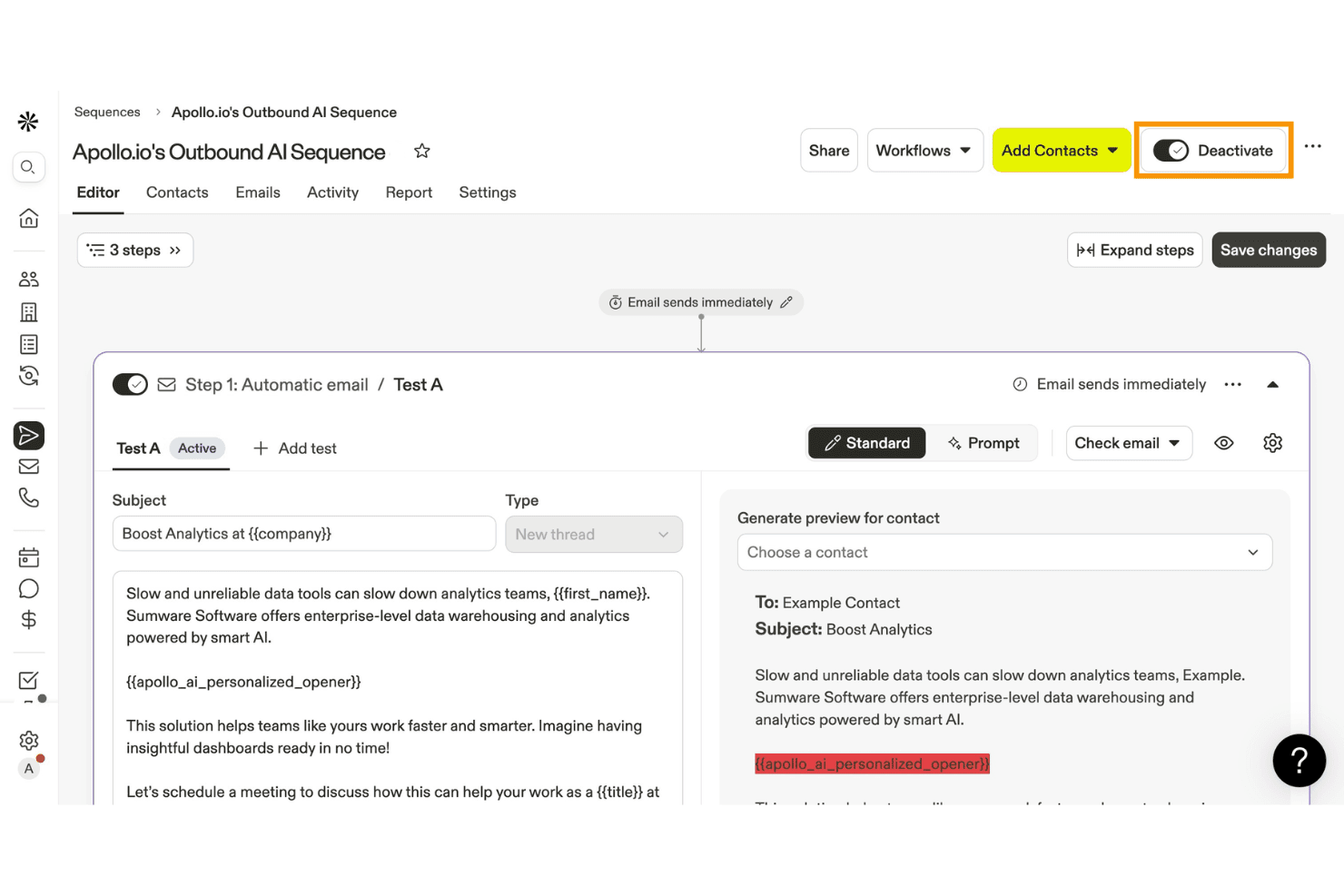
Apollo.io lets users build and automate outbound email sequences with AI. Apollo.io is a B2B sales engagement and intelligence platform that combines a 275M+ contact database with cold email sequencing, AI-powered personalization, and deliverability tooling.
Who Is Apollo.io Best For?
Apollo.io is built for B2B sales and demand generation teams that need to run cold outreach at scale, combining prospecting and sequencing in one platform.
Why I Picked Apollo.io
I picked Apollo.io as one of the best because it's purpose-built for B2B cold outreach at scale, combining a 275M+ contact database with AI Research that injects prospect-specific insights, like recent company news or LinkedIn activity, directly into email copy. I also love the conditional sequence logic, which lets me branch outreach paths based on whether a prospect opened, clicked, or ignored a previous step.
Apollo.io Key Features
- Contact database search: Access a 275M+ contact database with 65+ filter attributes to build and export targeted prospect lists directly within the platform.
- Bounce guard: A configurable monitoring feature that tracks bounce rates per sequence and automatically pauses sending when thresholds hit warning or critical levels.
- A/B testing on email steps: Test multiple email variants within a sequence step to identify which copy drives higher open and reply rates.
- CRM bi-directional sync: Native two-way sync with HubSpot, Salesforce, and Pipedrive keeps contact and sequence data aligned across your sales stack in real time.
Apollo.io Integrations
Apollo.io offers 50+ integrations, including HubSpot, Salesforce, Pipedrive, Gmail, Microsoft Outlook, SendGrid, and Mailgun. Organization plans include API access for custom integrations, and Apollo.io also supports Zapier.
Pros and Cons
Pros:
- Strong deliverability and sequence diagnostics tools
- AI-powered personalization for each recipient
- Huge B2B database for targeted outreach
Cons:
- No visual email builder or newsletter tools
- No true bulk send capability
Learn more about Apollo.io: Best for ecommerce email and SMS campaigns
- Free plan + free demo available
- From $11.20/month
Visit WebsiteCustomer Rating:4.6/5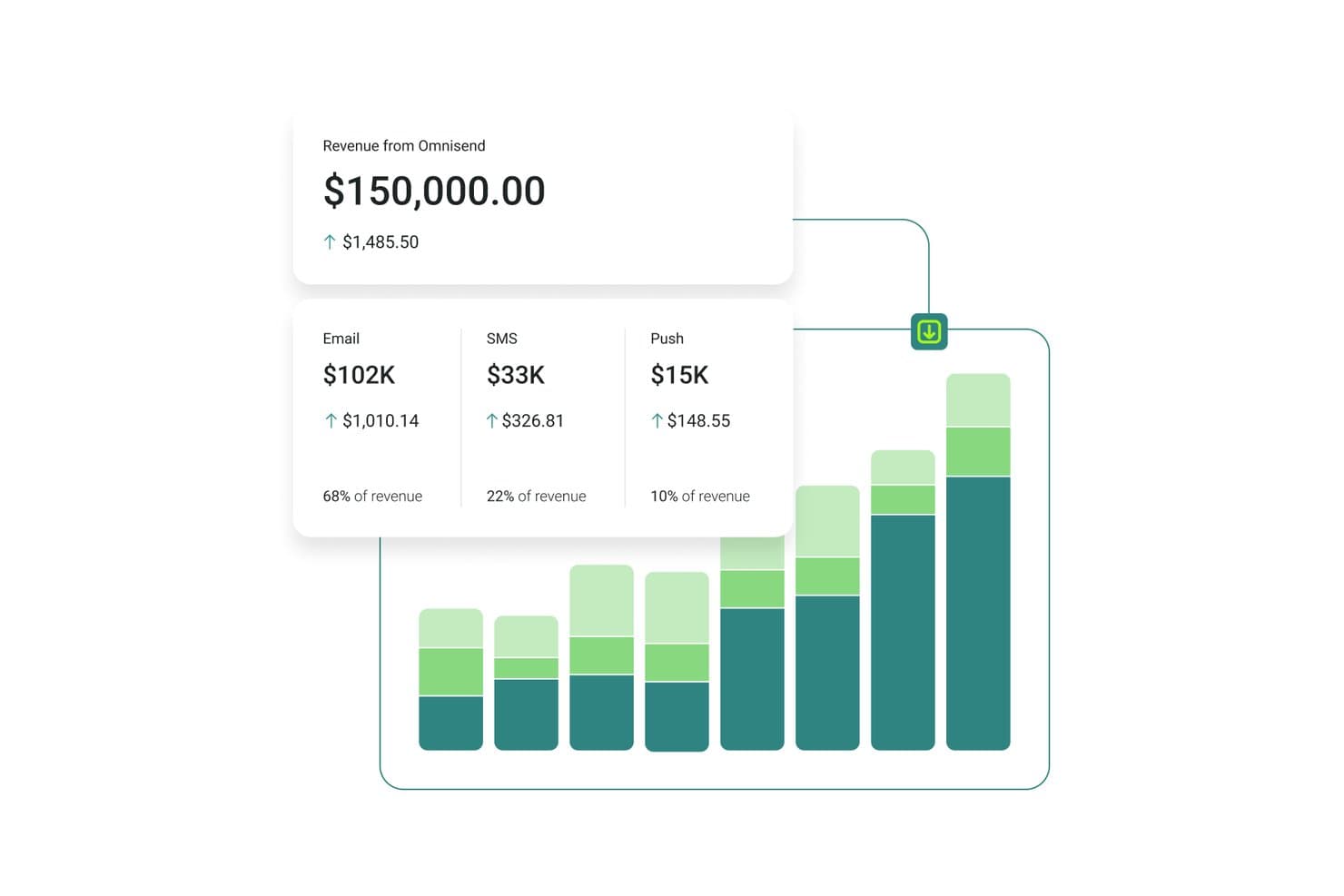
Omnisend tracks email, SMS, and push revenue in one dashboard. Omnisend is an email and SMS marketing platform built for ecommerce brands, combining bulk campaign sending, automation workflows, audience segmentation, and multichannel messaging across email, SMS, and web push.
Who Is Omnisend Best For?
Omnisend is a strong fit for ecommerce brands—especially Shopify, WooCommerce, and BigCommerce merchants—that want email, SMS, and push notifications managed in one place.
Why I Picked Omnisend
Omnisend earns its spot on my shortlist because it's the only platform here that syncs live product catalog data directly into emails, so I can drop real prices, images, and links into a campaign without ever leaving the builder. I also rely on its Customer Lifecycle Map to segment sends by stage, from first-time buyers to lapsed customers, without manually building filters every time. The Campaign Booster auto-resend to non-openers is a feature I use regularly to recover reach on big promotional sends.
Omnisend Key Features
- AI Segment Builder: Lets you describe a target audience in plain language and automatically generates the filters and segment for you.
- Campaign Booster: Automatically resends a campaign to contacts who didn't open the first send, with a new subject line.
- Conditional content blocks: Shows or hides specific email sections for individual recipients based on tags, purchase history, or signup source.
- A/B testing for automations: Tests subject lines, content, and send times within live automation workflows, not just one-off campaigns.
Omnisend Integrations
Omnisend offers 280+ tested integrations, including Shopify, WooCommerce, BigCommerce, Wix, Facebook Lead Ads, Google Ads, Canva, and Gorgias. It also supports API, webhooks, and Zapier connections for custom integrations.
Pros and Cons
Pros:
- Customer lifecycle mapping for dynamic segmentation
- Syncs live product data directly into emails
- Automates cart, browse, and post-purchase sequences
Cons:
- No native enterprise CRM integrations available
- Built primarily for ecommerce-focused businesses
Learn more about Omnisend: Best for visual storytelling in emails
- Free plan + free trial available
- From $19/user/month (billed annually)
Visit WebsiteCustomer Rating:4.7/5
Flodesk enables visual storytelling with drag-and-drop email designs. Flodesk is a mass email sender software built for visual storytelling in emails. It caters to small businesses and creative entrepreneurs who value both aesthetics and functionality in their email marketing efforts. With its user-friendly design interface and unlimited email sending capabilities, Flodesk addresses the need for visually appealing communication without the complexity typically associated with email marketing tools.
Why I Picked Flodesk
I picked Flodesk for its unique ability to blend design flexibility with marketing functionality, particularly for those who prioritize visual storytelling in their email campaigns. The platform's drag-and-drop email builder allows users to create beautiful, responsive emails without any coding knowledge. Additionally, Flodesk's automation features enable users to set up workflows that nurture leads and engage subscribers based on their interactions, providing a seamless way to maintain customer relationships. With these features and unlimited emails, Flodesk helps businesses improve their email marketing.
Flodesk Key Features
In addition to its design and automation capabilities, Flodesk offers:
- Customizable Templates: Users can choose from a variety of templates and customize them to fit their brand's aesthetics.
- Form Building: Create and integrate forms directly into your website to capture leads seamlessly.
- Subscriber Management: Easily manage and segment your email list to target specific audiences effectively.
- Email Analytics: Gain insights into email performance with detailed analytics, helping you refine your strategy over time.
Flodesk Integrations
Integrations include HoneyBook, BookFunnel, Canva, Shopify, Squarespace, ThriveCart, Wix, and Manychat. These integrations enhance productivity and streamline marketing efforts, allowing users to connect Flodesk with various platforms for a comprehensive marketing approach.
Pros and Cons
Pros:
- Intuitive drag-and-drop editor simplifies email creation
- Customizable branding options with no coding required
- Strong support for small and creative business needs
Cons:
- Occasional slow loading times reported by users
- Few integration options beyond major platforms
Learn more about Flodesk: Best for personalized email campaigns
- Free plan available
- From $20/month
Visit WebsiteCustomer Rating:4.6/5
Klaviyo sends mass campaigns with personalized product content. Klaviyo supports businesses that want to send more relevant email campaigns using customer data. Built for companies of different sizes, it combines customer information with email marketing tools so you can create targeted campaigns based on real behavior. Whether your goal is to improve engagement or increase sales, Klaviyo helps unify and activate customer data in real time to guide your messaging decisions.
Why I Picked Klaviyo
I chose Klaviyo for its ability to use customer data to create personalized mass email campaigns. Its segmentation tools let you define specific customer groups based on behavior, purchase history, and engagement, so messages feel more relevant. The platform also supports automated flows and scheduled campaigns, making it easier to send timely emails without manual effort. Together, these features make Klaviyo a practical option for businesses that want more control over their mass email strategy.
Klaviyo Key Features
In addition to personalized email campaigns, Klaviyo offers:
- Omnichannel Marketing: Engage your audience across email, SMS, and social media for a cohesive customer experience.
- AI-Driven Insights: Utilize artificial intelligence to gain insights into customer behavior and optimize your email marketing strategies.
- Customizable Templates: Quickly create visually appealing emails with over 160 customizable templates and a drag-and-drop editor.
- Real-Time Data Integration: Seamlessly integrate with over 350 applications to unify and activate customer data across your marketing efforts.
Klaviyo Integrations
Integrations include Shopify, BigCommerce, WooCommerce, Magento, Salesforce Commerce Cloud, Stripe, Facebook, Instagram, Google Ads, and Zendesk.
Pros and Cons
Pros:
- Omnichannel marketing including SMS and social media
- Comprehensive automation features for personalized marketing
- Advanced segmentation for targeted email campaigns
Cons:
- Higher pricing structure may deter small businesses
- Higher pricing structure may deter small businesses
Learn more about Klaviyo:

Sender lets you build email templates to help with mass email sending. Sender helps your team send and automate large-scale email campaigns with tools for building newsletters, segmenting audiences, and managing SMS follow-ups that fit your outreach goals. You’ll find it useful if you’re running email efforts for a small business, ecommerce store, or growing audience and want control over automation and tracking without jumping between tools. engaging content while ensuring your messages reach their intended audience.
Why I Picked Sender
I picked Sender because its feature-rich free plan gives you real mass email sending tools for up to 2,500 subscribers and 15,000 emails/month. This includes automation, segmentation, and a drag-and-drop builder. You’ll find the automation workflows let you trigger sequences based on subscriber behavior and schedule follow-ups, helping you keep your audience engaged without juggling multiple tools. I also like that you can segment lists to tailor messages to different groups and mix in transactional emails as part of your campaigns. These capabilities make it a solid fit for teams focused on growing email outreach on a budget.
Sender Key Features
In addition to its main features, other notable features include:
- A/B Testing: This feature allows you to test different versions of your emails to see which performs better, helping you optimize your campaigns for better results.
- Analytics Dashboard: Track opens, clicks, and delivery metrics to measure engagement.
- Transactional Emails: Sender enables you to automate the sending of transactional emails, ensuring timely communication with your subscribers.
- Lead Capture Tools: The platform provides tools to capture leads directly from your website, helping you grow your email list effectively.
Sender Integrations
Integrations include WordPress, WooCommerce, and Zapier. An API is available for custom integrations.
Pros and Cons
Pros:
- Generous free plan supports up to 2,500 subscribers.
- User-friendly interface simplifies email campaign creation.
- Offers responsive templates for mobile-friendly emails.
Cons:
- Free plan includes Sender branding which may affect professionalism.
- Limited advanced features in comparison to competitors.
Learn more about Sender: Best for automation and personalization
- 14-day free trial + free demo available
- From $100/month
Visit WebsiteCustomer Rating:4.2/5
Customer.io automates mass email workflows using event-based triggers and user data. When you want more control over your email marketing, Customer.io provides a platform built for sending targeted, automated messages based on customer behavior. It works well for teams that need to manage campaigns across growing user bases without relying on manual workflows. Using first-party data helps you send relevant messages to the right users at the right time.
Why I Picked Customer.io
I picked Customer.io because it makes it easier to run large email campaigns using automation and user-based targeting. The Visual Workflow Builder lets you set up email flows with drag-and-drop steps, so you can build multi-step campaigns without heavy technical setup. Event triggers enable teams to send messages based on real customer actions, helping them deliver timely, relevant emails that support ongoing customer communication.
Customer.io Key Features
In addition to its automation and personalization strengths, Customer.io offers:
- Omnichannel Support: Deliver a consistent customer experience across email, SMS, and in-app messaging.
- Design Studio: Collaboratively craft high-quality messages with a user-friendly editor.
- A/B Testing: Experiment with different content and messaging strategies to optimize engagement.
- Ad Audience Sync: Automatically update audience segments across major ad networks for cohesive marketing strategies.
Customer.io Integrations
Integrations include Salesforce, Google Analytics, Segment, Slack, Twilio, Stripe, Shopify, WordPress, Zendesk, and HubSpot.
Pros and Cons
Pros:
- Flexible visual workflow builder aids non-technical users
- Behavioral tracking provides insights into customer preferences
- Multichannel messaging supports email, SMS, and push notifications
Cons:
- Some users may find the platform's complexity overwhelming initially
- Reporting features are less comprehensive than competitors
Learn more about Customer.io: Best for drag-and-drop editing
- 14-day free trial + free demo available
- From $10.80/month
Visit WebsiteCustomer Rating:4.7/5
MailerLite lets businesses design, automate, and track email campaigns. MailerLite is an email marketing tool built for businesses that want to create, send, and manage campaigns in one place. It supports teams by offering design tools, automation features, and performance tracking to help manage email communication and engagement.
Why I picked MailerLite: MailerLite gives your team a clean drag-and-drop editor that makes email creation simple, even if no one’s a designer. You can build campaigns from scratch or start with ready-made templates and tweak them to fit your brand. The editor includes blocks for images, buttons, videos, and countdowns, so your team can get creative without touching code. You can also reuse layouts across campaigns to keep things consistent.
Standout features & integrations:
Features include an automation builder that lets you set up custom workflows. You can run interest-based segmentation using click and open data. Surveys and quizzes can be added right inside your emails to collect feedback or qualify leads.
Integrations include Shopify, WordPress, Zapier, Stripe, WooCommerce, PayPal, Squarespace, Typeform, Facebook, and Google Sheets.
Pros and Cons
Pros:
- No-code email elements work well
- Allows reusable block layouts
- Fast setup for first-time users
Cons:
- Mobile previews lack full accuracy
- Automation editor can feel slow
 Best for user privacy
- 14-day free trial + free plan + free demo available
- From $4/month (billed annually)
Visit WebsiteCustomer Rating:4.3/5
Zoho Campaigns helps businesses run privacy-focused email campaigns. Zoho Campaigns is an email marketing tool designed for businesses looking to enhance their email outreach while prioritizing privacy. It's particularly useful for marketing teams aiming to manage campaigns effectively without relying on third-party tracking.
Why I picked Zoho Campaigns: Zoho Campaigns sets itself apart by focusing on user privacy, using its own tracking tools. Features include customizable email templates and automation workflows that help you create and manage campaigns efficiently. You can conduct A/B testing to optimize your emails and gain insights with detailed analytics. Its integration with e-commerce platforms like Shopify supports targeted marketing efforts.
Standout features & integrations:
Features include email send-time optimization, which ensures your messages are delivered at the best times, and domain authentication to improve deliverability. You can manage both email and SMS campaigns from a single interface, and use customizable templates to create engaging content.
Integrations include Zoho CRM, Shopify, WooCommerce, Eventbrite, SurveyMonkey, LinkedIn, Facebook, Twitter, Google Analytics, and Slack.
Pros and Cons
Pros:
- Effective A/B testing
- Comprehensive analytics
- Easy automation workflows
Cons:
- Occasional integration issues
- Basic design templates
Learn more about Zoho Campaigns:

Benchmark Email helps teams design, automate, and track branded emails. Benchmark Email is a marketing platform built to help teams create and send branded emails at scale. It supports businesses of all sizes looking to manage their email content and audience communications from one place. It offers tools for designing emails, automating follow-ups, and tracking engagement.
Why I picked Benchmark Email: Benchmark Email helps your team run campaigns in multiple languages without extra hassle. You can create emails in different languages using its editor, and choose templates that support special characters and right-to-left text. Language settings are easy to adjust in the account dashboard, and you can segment contacts by language. It also lets you preview emails in different languages before sending.
Standout features & integrations:
Features include email templates that you can drag and drop, making it fast to create branded campaigns. Your team can run A/B tests to compare subject lines or layouts. You also get real-time reports that show opens, clicks, and bounces.
Integrations include Shopify, Google Sheets, Zapier, WordPress, Facebook, Slack, Typeform, Eventbrite, PayPal, and Stripe.
Pros and Cons
Pros:
- Great for regional marketing teams
- Easy to toggle between language versions
- Translates templates with little setup
Cons:
- Fewer native CRM features
- Not ideal for transactional emails
Learn more about Benchmark Email:
Other Mass Email Sender Software
Here are some additional mass email sender software options that didn’t make it onto my shortlist, but are still worth checking out:
- 11SendGridBest for API-based email sending
- 12Elastic EmailBest for AI-powered email design
- 13Constant ContactBest for email and SMS combos
- 14CampaignerBest for advanced automation
- 15SMTP.comBest for high-volume enterprise deliverability
- 16BrevoBest for comprehensive engagement
- 17Vertical ResponseBest for small businesses
- 18Click DimensionsBest for Microsoft Dynamics integration
- 19GMassBest for Gmail integration
- 20EmailOctopusBest for email list growth
How I Evaluate Mass Email Sender Software
I look at two layers: the baseline table stakes—sending 100k contacts reliably, landing in inboxes, segmenting a list—and the differentiators that separate platforms worth recommending.
Core Functionality (Table Stakes For This List)
When I'm selecting tools for my list, I rank each one on a scale from 0 (does not offer the functionality) to 5 (excels in this area) for each core functionality listed below. Then, I calculate the tool's total score into a percentage. Each tool needs to achieve a minimum total score of 75% to be considered for inclusion.
- Bulk Email Sending: I check whether a platform can handle high-volume campaigns with send scheduling, time-zone delivery, and throttling to avoid provider blocks.
- Contact List Management: Importing a CSV of 50k subscribers should be painless. I look for custom fields, tagging, suppression lists, and dynamic list updates.
- Email Builder & Templates: I evaluate drag-and-drop editors for responsive design output, reusable content blocks, and template variety across industries.
- Deliverability Infrastructure: SPF, DKIM, and DMARC setup should be straightforward. Dedicated IP options and warm-up tools matter for teams sending at scale.
- Personalization & Segmentation: Merge tags are baseline. I look for conditional content blocks and behavioral segments like "opened last 3 campaigns."
- Campaign Analytics & Reporting: Every tool tracks opens and clicks. I evaluate whether dashboards surface bounce rates, deliverability trends, and A/B test results.
Once I have a list of tools that meet this criteria, I consider what sets each platform apart.
Differentiating Factors (What Sets Vendors Apart)
Here's how I compare and contrast different vendors:
Standout Features
Visual automation workflows separate basic senders from platforms that can run a full lifecycle program—welcome series, re-engagement flows, and post-purchase sequences triggered by real behavior. A/B testing is another factor I weigh. I look for tools that let you split-test subject lines, content, and send times within a single campaign. For e-commerce teams, revenue attribution tied to specific sends makes it much easier to prove ROI on every campaign.
Beyond Features
Pricing structure matters a lot here. Some platforms charge per subscriber while others bill by emails sent—a team with a large but low-frequency list pays very differently under each model. I also evaluate how well a tool connects to your existing stack, especially CRMs and e-commerce platforms where contact data lives. Compliance tooling is another differentiator I check. Built-in consent management, double opt-in flows, and unsubscribe handling should cover GDPR, CAN-SPAM, and CASL requirements without manual workarounds.
How to Choose Mass Email Sender Software
It’s easy to get bogged down in long feature lists and complex pricing structures. To help you stay focused as you work through your unique software selection process, here’s a checklist of factors to keep in mind:
| Factor | What to Consider |
| Scalability | Can the software grow with your business? Consider future needs and whether the tool can handle increased email volumes without extra cost. |
| Integrations | Does it work with your existing tools? Check for compatibility with CRM systems, analytics platforms, and other marketing tools you use. |
| Customizability | How flexible is the software? Look for tools that let you tailor workflows and templates to fit your brand and marketing strategy. |
| Ease of use | Is the interface intuitive? Ensure your team can navigate it easily without extensive training or a steep learning curve. |
| Implementation and onboarding | How quickly can you get started? Evaluate the availability of tutorials, support, and resources to help your team begin using the software effectively. |
| Cost | Does the pricing align with your budget? Look beyond the initial cost and consider long-term expenses, including upgrades and additional features. |
| Security safeguards | How secure is your data? Ensure the software complies with regulations and offers encryption and other security measures to protect customer information. |
| Compliance requirements | Does the software meet industry standards? Consider any specific compliance needs, like GDPR, and whether the tool can support them. |
What Is Mass Email Sender Software?
Mass email sender software is a tool that allows businesses to send large volumes of emails to customers and prospects. Marketing professionals and small business owners typically use these tools to engage audiences and promote products or services. Automation, segmentation, and analytics features help with targeting, managing campaigns, and measuring success. These tools provide value by enhancing communication efficiency and improving customer engagement.
Features of Mass Email Sender Software
When selecting mass email sender software, keep an eye out for the following key features:
- Email automation: Automates sending messages at specified times, helping maintain consistent communication with your audience.
- Segmentation: Allows you to divide your email list into targeted groups, improving engagement by sending relevant content.
- Analytics and reporting: Provides insights into email performance, helping you track open rates, clicks, and conversions.
- Customizable templates: Offers pre-designed email layouts that you can tailor to fit your brand, saving time on design work.
- A/B testing: Enables you to test different email versions to see which performs better, optimizing your campaigns.
- List management: Helps you organize and maintain subscriber lists, ensuring data accuracy and compliance with regulations.
- Integration capabilities: Connects with other tools like CRM systems and social media platforms, enhancing your marketing efforts.
- Mobile responsiveness: Ensures emails display correctly on all devices, improving user experience and engagement.
- Security features: Protects sensitive data with encryption and compliance with industry standards, safeguarding customer information.
- Real-time updates: Provides immediate access to campaign data, allowing you to make informed decisions quickly.
Benefits of Mass Email Sender Software
Implementing mass email sender software provides several benefits for your team and your business. Here are a few you can look forward to:
- Improved engagement: By using segmentation and personalization, you send more relevant content, leading to higher open and click rates.
- Time efficiency: Automation features let you schedule emails and manage campaigns without manual intervention, saving your team time.
- Data-driven decisions: Analytics and reporting tools offer insights into campaign performance, helping you make informed marketing choices.
- Consistent branding: Customizable templates ensure your emails match your brand's look and feel, maintaining consistency across communications.
- Enhanced reach: Integration with CRM and social media platforms expands your marketing efforts, reaching a broader audience.
- Cost savings: By targeting the right audience with effective emails, you maximize the return on investment from your marketing budget.
- Regulatory compliance: List management and security features help you maintain data accuracy and comply with industry regulations.
Costs and Pricing of Mass Email Sender Software
Selecting mass email sender software requires an understanding of the various pricing models and plans available. Costs vary based on features, team size, add-ons, and more. The table below summarizes common plans, their average prices, and typical features included in mass email sender software solutions:
Plan Comparison Table for Mass Email Sender Software
| Plan Type | Average Price | Common Features |
| Free Plan | $0 | Basic email templates, limited automation, and basic analytics. |
| Personal Plan | $10-$30 /user /month | Customizable templates, basic segmentation, and email scheduling. |
| Business Plan | $50-$100 /user /month | Advanced automation, detailed analytics, and A/B testing capabilities. |
| Enterprise Plan | $150-$300 /user /month | Dedicated support, advanced integrations, and enhanced security features. |
Mass Email Sender Software FAQs
Here are some answers to common questions about mass email sender software:
What is the difference between bulk email and mass email?
Bulk email and mass email are often used interchangeably, both referring to sending a single message to many recipients. The key is ensuring your emails are relevant and personalized to avoid being marked as spam. Tools that offer segmentation and personalization features can help enhance your strategy.
What are the new rules for bulk email senders from Google and Yahoo?
As of February 2024, Google and Yahoo enforce stricter guidelines for bulk email senders, focusing on authentication, spam rates, and easy unsubscribe options. Ensure your emails comply by implementing proper authentication and offering a clear unsubscribe process. This helps maintain deliverability and engagement.
Is it legal to send mass emails?
Yes, sending mass emails is legal, but you must comply with regulations like CAN-SPAM in the US or GDPR in Europe. These laws require clear consent from recipients, accurate sender information, and easy opt-out options. Ensuring compliance helps protect your brand reputation and avoid penalties.
How can I send mass emails without them going to spam?
To avoid spam folders, focus on list hygiene, using double opt-in processes and regularly cleaning your email list. Personalize your content and avoid spammy language. Authentication protocols like SPF, DKIM, and DMARC also help improve deliverability and build trust with email providers.
How often should I send mass emails?
The ideal frequency depends on your audience and content. Regular engagement is crucial, but too many emails can lead to unsubscribes. Test different frequencies to find what works best for your audience, ensuring each email provides value and aligns with your marketing goals.