
15 Best Email Marketing Automation Software Of 2026

10 Best Email Marketing Automation Software Shortlist
Here's my pick of the 10 best software from the 15 tools reviewed.


With so many different email marketing automation software solutions available, figuring out which is right for you is tough. You know you want to automate repetitive tasks such as sending welcome emails to new subscribers, follow-up messages to customers, or promotional emails based on specific user actions—but now need to figure out which platform is best. I've got you! In this post, I'll help make your choice easy, sharing my personal experiences using dozens of different email marketing automation tools with brands of all sizes, with my picks of the best email marketing automation software overall.
Why Trust Our Software Reviews
We’ve been testing and reviewing marketing software since 2022. As marketing experts ourselves, we know how critical and difficult it is to make the right decision when selecting software.
We invest in deep research to help our audience make better software purchasing decisions. We’ve tested more than 2,000 tools for different marketing use cases and written over 1,000 comprehensive software reviews. Learn how we stay transparent & our software review methodology.
The Best Email Marketing Automation Software Summary
| Tool | Best For | Trial Info | Price | ||
|---|---|---|---|---|---|
| 1 | Best for dynamic subscriber segmentation and behavioral triggers | Free plan available | From $16/month | Website | |
| 2 | Best for automating transactional messaging | Free plan available | From $19/month | Website | |
| 3 | Best for tailored customer journeys | Free demo + free plan available | From $45/month | Website | |
| 4 | Best for visually guided automation creation | Free plan available | From $19/user/month (billed annually) | Website | |
| 5 | Best for AI-driven personalization | Free demo available | Pricing upon request | Website | |
| 6 | Best for setting up behavioral triggers | Free plan available | From $7/month (billed annually) | Website | |
| 7 | Best email marketing automation software for beginners | Free plan available | From $9/month (billed annually) | Website | |
| 8 | Best for automated cart abandonment emails and product recommendations | 30-day free trial available | From $9/month | Website | |
| 9 | Best automatic contact prioritization | Free plan available | From $12.74/user/month (billed biennially) | Website | |
| 10 | Best for automated ecommerce communications | 14-day free trial + free demo available | From $39/month | Website |
-

Demandbase
Visit WebsiteThis is an aggregated rating for this tool including ratings from Crozdesk users and ratings from other sites.4.4 -
6sense
Visit WebsiteThis is an aggregated rating for this tool including ratings from Crozdesk users and ratings from other sites.4.3 -
AnswerThePublic
Visit Website


Best Email Marketing Automation Software Reviews
Below, you’ll discover an overview of top-notch email marketing automation software that offers essential features like automation and segmentation.

Omnisend
Best for dynamic subscriber segmentation and behavioral triggers

Omnisend is an omnichannel marketing automation platform with a focus on e-commerce businesses. It allows users to create and manage personalized email campaigns, SMS messages, push notifications, and more, all from a single platform.
Why I picked Omnisend: I chose Omnisend because of its strong customer segmentation capabilities. Since the platform is designed for ecommerce businesses, segmentation options are tailored to include demographics, purchase history, engagement levels, and a variety of filters based on transactional events and purchase patterns. Furthermore, Omnisend offers dynamic segmentation which assigns customers to a lifecycle stage based on behavior triggers. It then collects data into a lifecycle state roadmap so you can make your retention strategies more targeted.
Omnisend Standout Features and Integrations:
Features include a drag-and-drop email builder, templates, and personalization options such as dynamic content blocks and personalized product recommendations. These capabilities help deliver tailored content to different customer segments, enhancing engagement and conversion rates.
Integrations include both pre-built and native connectors like Shopify, Prestashop, WooCommerce, BigCommerce, Facebook Custom Audiences, SMSBump, ReCharge, Google Customer Match, Magento, and more. You can connect to more third-party platforms with Zapier. Omnisend also supports a RESTful API.
Pros and Cons
Pros:
- Multi-channel capabilities
- Comprehensive reporting and analytics
- Advanced automation and segmentation options
Cons:
- Limited social media integrations
- Limited CRM functionality
New Product Updates from Omnisend

Omnisend Enhances Cross-Store Segment Management
Omnisend introduces Copy Segments Across Stores that lets you duplicate and transfer audience segments between stores, helping teams manage multiple stores more efficiently and maintain consistent targeting. For more information, visit Omnisend's official site.
 .
.
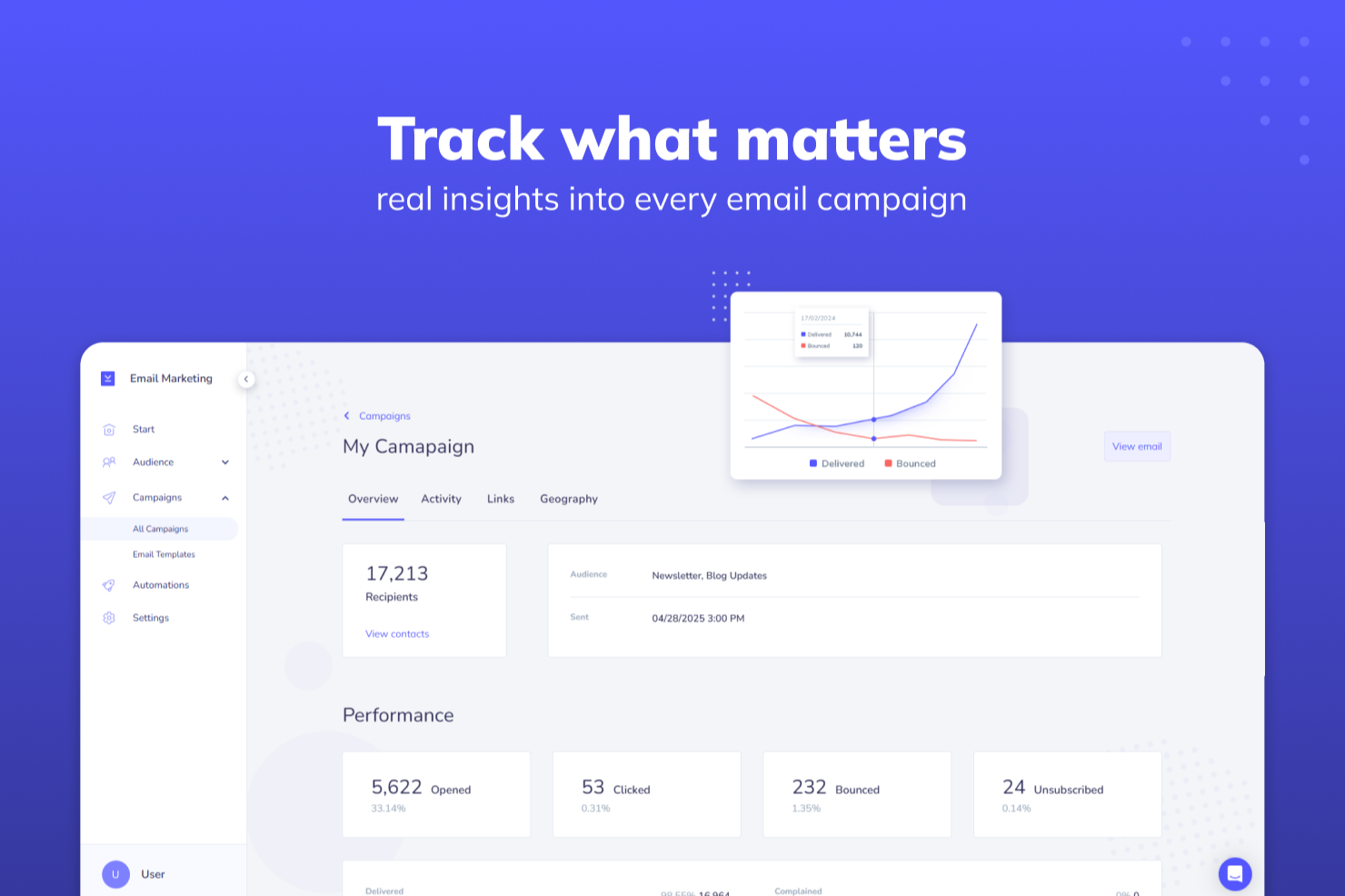
For businesses aiming to elevate their email communication strategies, Elastic Email emerges as a compelling choice. Designed with growing businesses in mind, it provides a platform that integrates marketing campaigns with transactional emails and team communication. By addressing the need for streamlined communication and effective audience engagement, Elastic Email helps your team automate marketing processes, making it an ideal solution for those seeking to scale operations without extensive resources.
Why I Picked Elastic Email
I picked Elastic Email for its unique ability to blend marketing automation with transactional messaging, a feature that resonates well with businesses looking to unify their communication strategy. The platform’s AI-driven template design ensures that your emails are not only visually appealing but also optimized for engagement. Additionally, its subscriber management tools allow you to maintain an organized and targeted audience, crucial for any successful email marketing campaign. These features make Elastic Email a strong contender in the realm of email marketing automation.
Elastic Email Key Features
In addition to its core offerings, I also found several other features that enhance its utility for email marketing automation:
- Automated Email Flows: This feature allows you to set up complex email sequences that trigger based on user behavior, ensuring timely and relevant communication.
- Landing Page Builder: Create custom landing pages directly from the platform to complement your email campaigns and capture leads effectively.
- Signup Forms: Easily design and integrate signup forms to grow your subscriber list and segment your audience for more personalized communication.
- Team Chat: Facilitate internal communication with a built-in chat feature that keeps your team connected and informed.
Elastic Email Integrations
Integrations include Shopify, WordPress, Magento, Google Analytics, WooCommerce, PrestaShop, Zapier, and an API for custom integrations.
Pros and Cons
Pros:
- AI template designer speeds up campaign creation
- Built-in landing pages and signup forms
- Developer-friendly email API for custom integrations
Cons:
- Lacks advanced analytics and predictive insights
- Fewer native integrations available

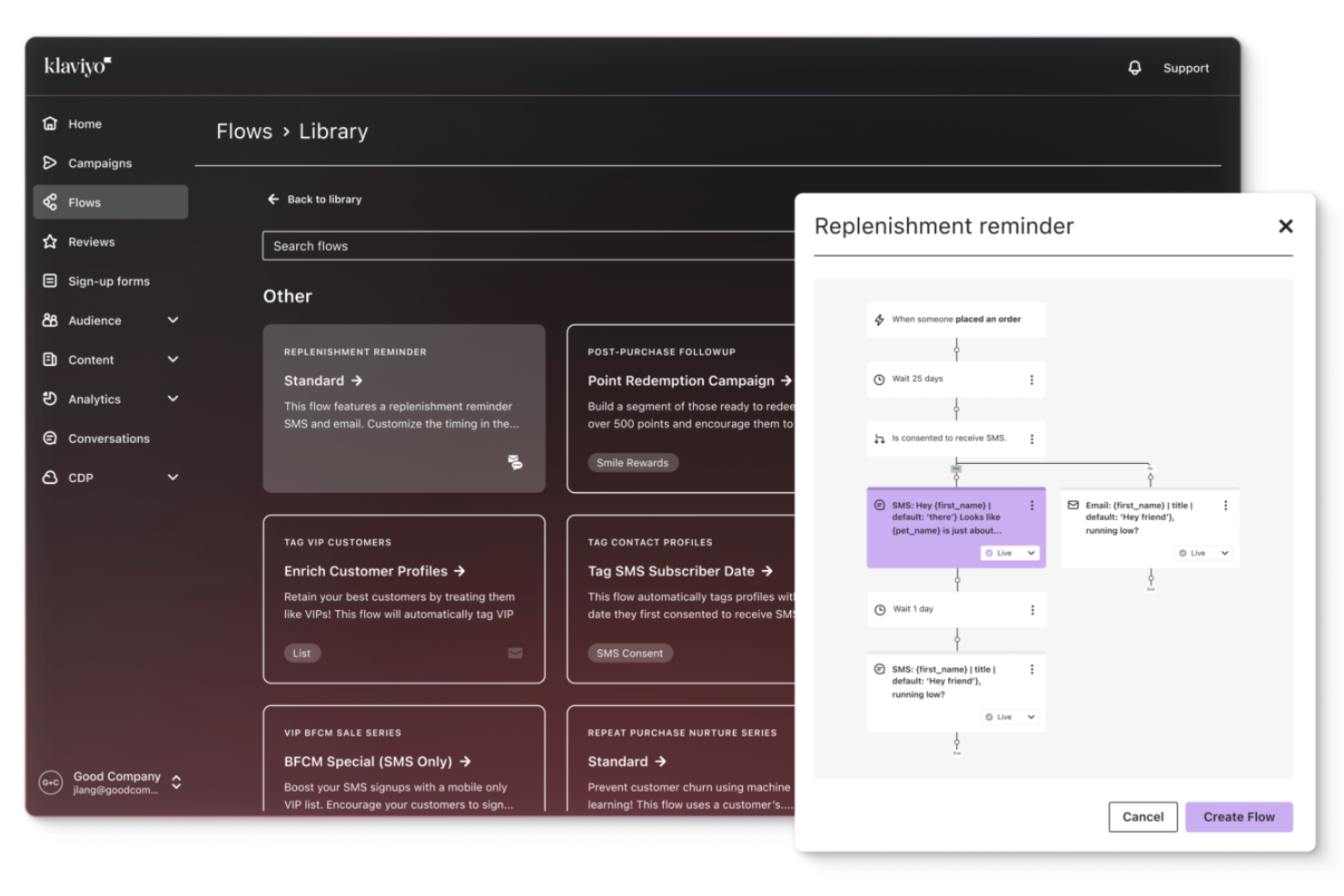
Klaviyo brings data-driven email marketing automation into reach for B2C teams who want smarter, personalized customer communication that works across email, SMS, WhatsApp, and other channels. It helps you use your customer behavior and purchase data to tailor campaigns that fit real buyer journeys.
Why I Picked Klaviyo
I picked Klaviyo because it lets you build highly tailored automation workflows that respond to real customer behavior rather than just scheduled sends. Its behavior-based triggers and flow editor help your team set up welcome series, abandoned cart journeys, and lifecycle campaigns that pivot based on actions like browsing or purchase history, helping you keep messages relevant without constant oversight. Klaviyo’s advanced segmentation tools also let you slice your audience by detailed criteria so you reach the right people at the right time.
Klaviyo Key Features
In addition to its advanced segmentation and AI-driven tools, Klaviyo offers several other features that enhance its email marketing automation capabilities:
- Omnichannel Marketing: Connect with your audience through SMS, social media, and email, providing a cohesive customer experience.
- AI Subject Line Generator: Create engaging subject lines with AI assistance to improve open rates and engagement.
- A/B Testing with AI Selection: Optimize your campaigns by testing different variables and allowing AI to select the most effective option.
- Dynamic Product Recommendations: Personalize emails with product suggestions based on customer behavior and preferences.
Klaviyo Integrations
Integrations include Shopify, Salesforce, WooCommerce, Magento, BigCommerce, Zapier, Stripe, Facebook, Google Ads, and Instagram.
Pros and Cons
Pros:
- Supports omnichannel marketing, including email, SMS, and social media.
- Provides AI-driven insights for personalized marketing strategies.
- Offers comprehensive data integration for unified customer profiles.
Cons:
- Pricing can escalate quickly as contact lists grow.
- Some users desire more customization options.


Flodesk is an intuitive email marketing platform designed for entrepreneurs and small business owners who value aesthetics and functionality. With its visually guided automation creation, you can build workflows that feel simple and intuitive while maintaining strong brand consistency. Its polished templates and user-friendly tools help you craft emails that capture attention and strengthen your brand identity, making it a solid choice for teams that want streamlined yet visually engaging automated communication.
Why I Picked Flodesk
I picked Flodesk for its visually guided automation creation, which makes building automated email journeys feel intuitive and design-forward. Its automation tools cover the full subscriber lifecycle—from welcome sequences to abandoned cart follow-ups—ensuring your audience receives timely, relevant messaging. With seamless Canva integration, you can import and customize branded visuals effortlessly, making Flodesk a strong fit for businesses that want automation power without sacrificing creativity.
Flodesk Key Features
In addition to visually guided automation creation, Flodesk offers:
- Customizable Templates: Flodesk provides a range of pre-designed templates that can be tailored to fit your brand's aesthetic, making it easy to create professional-looking emails.
- Subscriber Segmentation: This feature allows you to organize your audience based on specific criteria, ensuring that your messages are targeted and relevant.
- Analytics Dashboard: Flodesk's analytics tools provide insights into email performance, helping you track open rates, click-through rates, and subscriber engagement.
- Opt-in Forms: You can create visually appealing opt-in forms to grow your email list directly from your website or social media platforms.
Flodesk Integrations
Integrations include Shopify, Instagram, Canva, Stripe, and Zapier. Flodesk also supports custom integrations through its open API.
Pros and Cons
Pros:
- Intuitive, design-led automation builder
- Automation feels approachable for non-technical users
- Strong brand consistency across automated emails
Cons:
- Fewer native integrations for full marketing stacks
- Limited A/B testing for automation optimization

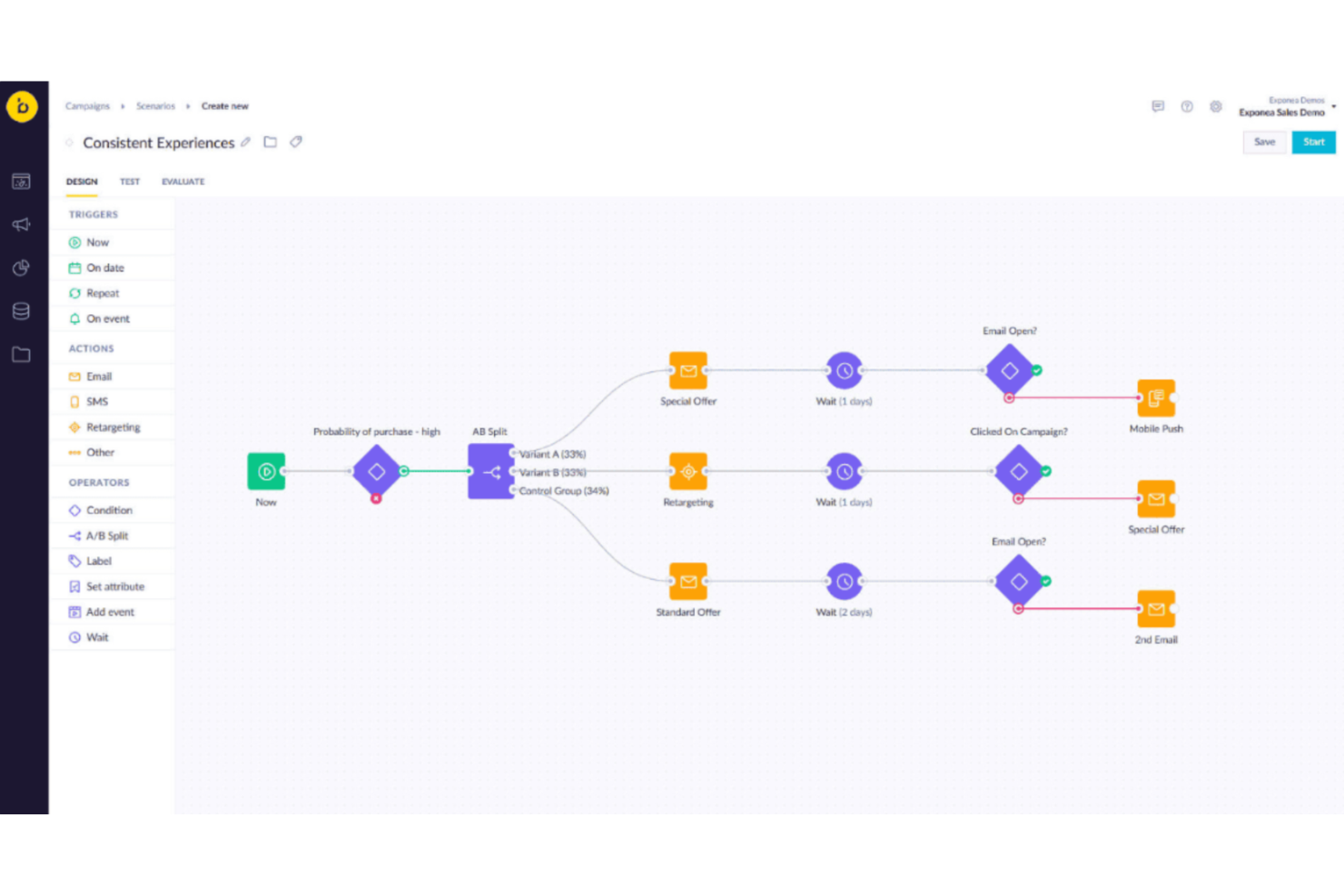
For businesses seeking an email marketing automation solution, Bloomreach offers tools to create and manage automated email campaigns. It helps companies use customer data to personalize messages and build targeted campaigns. Bloomreach also supports real-time data integration, allowing marketing teams to send timely emails and manage campaigns more effectively.
Why I Picked Bloomreach
I picked Bloomreach because of its unique ability to leverage AI-driven personalization in email marketing automation. The platform's real-time data integration ensures that your campaigns are always relevant and timely, while the advanced A/B testing capabilities allow you to continuously optimize for better results. Additionally, Bloomreach's drag-and-drop builder simplifies the creation of tailored email campaigns, making it a strong contender for businesses focused on personalized customer interactions.
Bloomreach Key Features
In addition to its AI personalization capabilities, Bloomreach offers:
- Campaign Agents: Automate the creation and optimization of email campaigns, allowing your team to focus on strategy rather than execution.
- Real-Time Data Integration: Seamlessly integrates with your existing data sources to provide a unified view of customer behavior.
- User-Friendly Interface: The drag-and-drop email builder enables quick and easy campaign creation without the need for technical expertise.
- Advanced A/B Testing: Offers robust testing capabilities to help you refine your email strategies and improve engagement rates.
Bloomreach Integrations
Integrations include Shopify, Magento, Salesforce Commerce Cloud, BigCommerce, Snowflake, Google BigQuery, Databricks, and other marketing and data platforms.
Pros and Cons
Pros:
- Flexible audience targeting tools improve personalized customer communication
- Reliable campaign automation helps teams manage complex marketing workflows
- Centralized zero-party customer data simplifies segmentation, reporting, and CRM syncing
Cons:
- Some advanced features feel limited for highly customized marketing workflows
- Certain features require manual adjustments for deeper campaign optimization

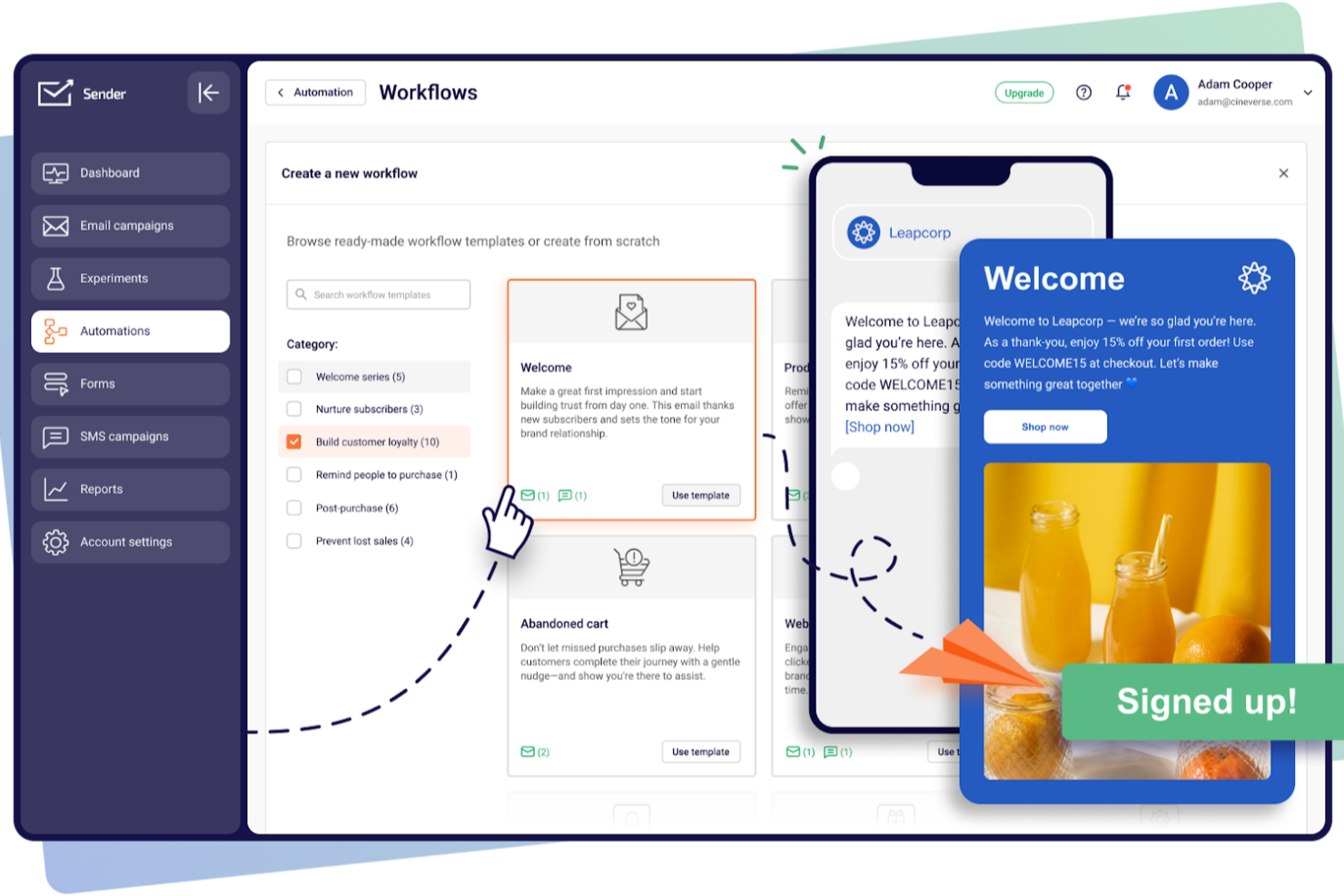
For businesses seeking an accessible and efficient way to enhance their email marketing efforts, Sender offers a compelling solution tailored to small and medium-sized enterprises. This platform is designed to simplify the process of creating, automating, and delivering engaging email campaigns without the complexities or high costs often associated with such tools. By focusing on ease of use and robust functionality, Sender addresses common challenges like audience segmentation and real-time performance tracking, making it an attractive choice for businesses aiming to grow their audience and sales through effective email marketing.
Why I Picked Sender
I picked Sender for its exceptional focus on automating email marketing processes, which is crucial for businesses looking to maintain consistent communication with their audience. The platform's unlimited automation capabilities allow you to set up behavioral triggers and premade workflows, ensuring that your emails reach the right people at the right time. Additionally, the drag-and-drop email builder and extensive library of over 1,600 customizable templates make it effortless to create visually appealing and personalized emails. These features not only enhance engagement but also help maintain brand consistency without requiring extensive technical expertise.
Sender Key Features
In addition to its automation capabilities, I also found that Sender offers several other valuable features:
- A/B Testing: This feature allows you to test different versions of your emails to determine which performs best, optimizing your campaigns for better results.
- Lead Capture Tools: These tools help you grow your subscriber list by capturing leads directly from your website.
- SMS Marketing: Extend your marketing reach by incorporating SMS campaigns alongside your email efforts, providing a multi-channel approach.
- Transactional Emails: Ensure timely and relevant communication with customers through automated transactional emails, enhancing the overall user experience.
Sender Integrations
Integrations include WordPress, WooCommerce, Magento, PrestaShop, Shopify, API for custom integrations, and Zapier.
Pros and Cons
Pros:
- Drag-and-drop email builder
- Large template library included
- Unlimited automation workflows supported
Cons:
- Strict anti-spam compliance policies
- Advanced analytics somewhat limited
New Product Updates from Sender

Sender Enhances Shopify Sync and Expands Ecommerce Reports
Sender enhances its Shopify integration and expands ecommerce reporting to all paid users. These updates improve data accuracy and help teams better track performance and revenue. For more information, visit Sender’s official site.
 .
.
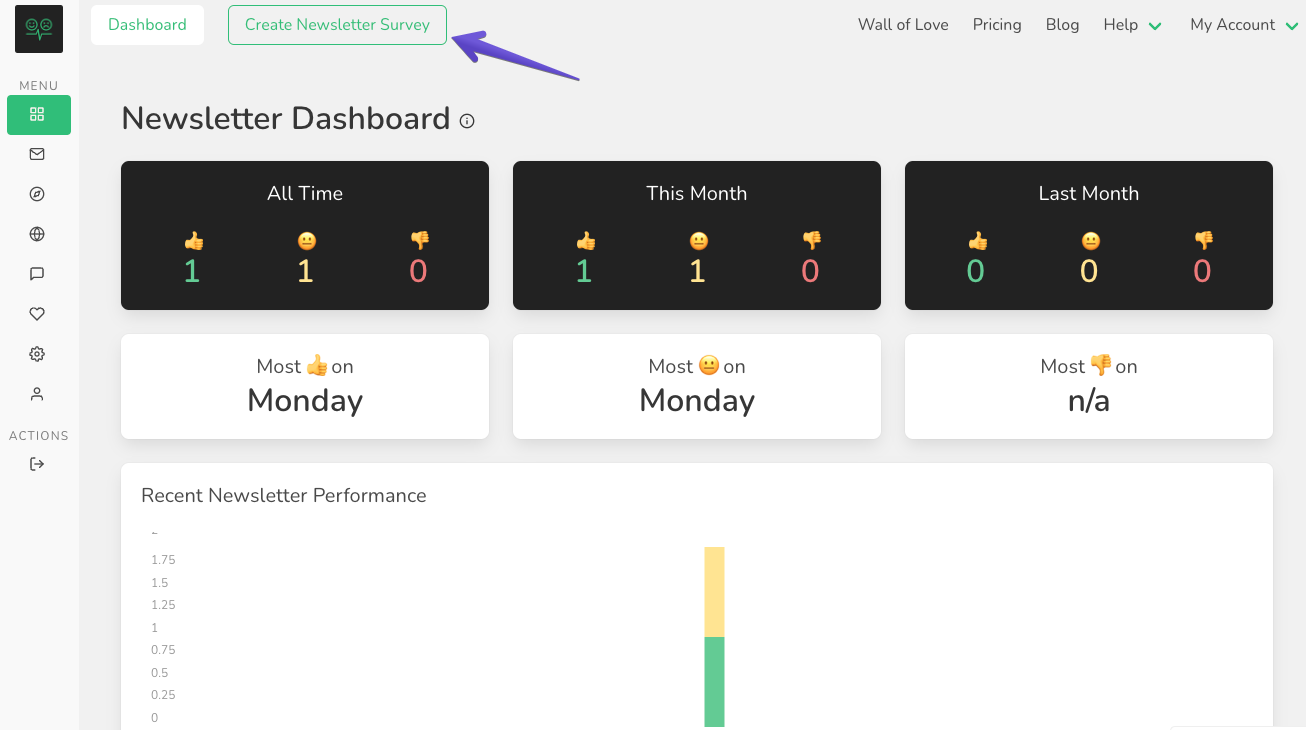
EmailOctopus is a cost-effective and user-friendly email marketing platform designed for small to medium-sized businesses. Known for its simplicity and affordability. With a focus on delivering reliable and straightforward email marketing solutions, EmailOctopus is an accessible choice for businesses looking to engage with their audience through targeted and well-crafted email communications.
Why I picked EmailOctopus: I picked EmailOctopus because it is considered a user-friendly email marketing automation software that's suitable for beginners. EmailOctopus offers a variety of beginner-oriented features such as drag-and-drop editors and basic integrations with popular CRM and ecommerce tools.
EmailOctopus Standout Features and Integrations:
Features include a user-friendly interface, subscriber management, automation workflows, pre-designed email templates, and reporting and analytics. While these features may not be as extensive as some of the other tools on this list, they are easy-to-use and require little training to pick up on quickly.
Integrations include both pre-built and native connectors like Salesforce, Shopify, Eventbrite, WooCommerce, Squarespace, Stripe, Pipedream, GrowSurf, Google Sheets, and more. Connect even more third party platforms with Zapier. EmailOctopus also supports a RESTful API.
Pros and Cons
Pros:
- Deliverability and compliance
- Cost-effective
- Easy-to-use
Cons:
- Customization limitations
- Limited advanced features

Moosend
Best for automated cart abandonment emails and product recommendations
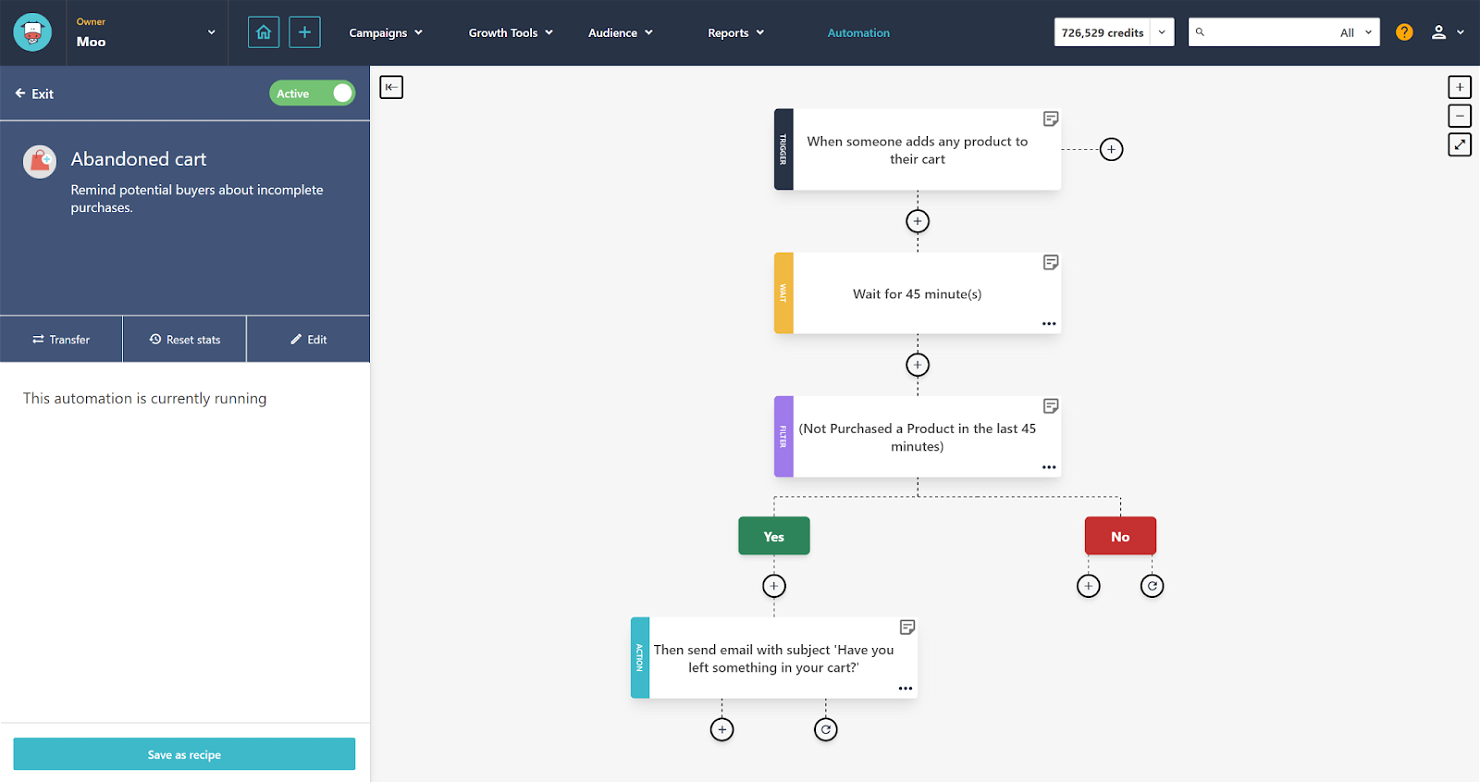
Moosend is an email marketing and marketing automation platform designed to assist businesses in creating, managing, and optimizing their email campaigns. Known for its user-friendly interface and drag-and-drop editor, It aims to simplify the email marketing process while providing powerful tools for personalization and engagement, making it suitable for businesses of various sizes.
Why I picked Moosend: I picked Moosend because it offers a user-friendly interface, making it accessible and easy to use. This is especially beneficial for entrepreneurs with limited resources and technical expertise. Moosend's drag-and-drop email editor simplifies the process of creating appealing email templates, and its affordability is another crucial factor for entrepreneurs. It's a cost-effective solution that fits within the budget constraints of early-stage businesses.
Moosend Standout Features and Integrations:
Features include advanced automation capabilities, assisting entrepreneurs with marketing processes, and nurturing leads. Automation features enable personalized customer journeys, helping tailor content and engage audiences. Moosend stood out to me because of their focus on features like cart abandonment emails and product recommendations. These features also make it particularly suitable for ecommerce.
Integrations include both pre-built and native connectors like WooCommerce, Shopify, Ecwid, Magento, Salesforce, Zoho CRM, HubSpot, Pipedrive, WordPress, Blogger, and more. Moosend also supports a RESTful API.
Pros and Cons
Pros:
- Excellent customer support
- Drag-and-drop email editor
- Advanced automation capabilities
Cons:
- Limited A/B testing
- Limited CRM functionality


EngageBay is an all-in-one marketing automation platform that integrates various tools such as email marketing, CRM, and social media automation. Aimed at small to medium-sized businesses, EngageBay enables users to streamline their marketing efforts through features like email campaigns, lead nurturing, and customer relationship management. With its comprehensive suite of tools, EngageBay facilitates a centralized approach to marketing, helping businesses effectively manage their customer interactions and campaigns in a unified platform.
Why I picked EngageBay: I picked EngageBay because it is known as an all-in-one email marketing automation software that combines various marketing and CRM functionalities. EngageBay sets itself apart due to its versatility and ability to work well for a variety of different industries, from customer service to enterprise sales.
EngageBay Standout Features and Integrations:
Features include contact management, email marketing automation, landing page customization, CRM pipeline management, live chat and helpdesk, social media management, marketing analytics, SMS marketing, web analytics, and more.
Integrations include both pre-built and native connectors like Gmail, Outlook, Facebook, Twitter, LinkedIn, Instagram, PayPal, Stripe, and more. Connect even more third party platforms with Zapier. EngageBay also supports a RESTful API.
Pros and Cons
Pros:
- CRM functionality
- Easy-to-use
- All-in-one solution
Cons:
- Language limitations
- No dedicated mobile app


Drip is a sophisticated email marketing automation platform catering to e-commerce businesses, providing tools for creating personalized customer journeys and automating targeted campaigns. With robust segmentation capabilities and automation workflows, Drip allows users to deliver highly tailored messages to different customer segments. The platform also integrates with e-commerce systems, providing insights into customer behavior and enabling businesses to optimize their marketing strategies based on real-time data.
Why I picked Drip: I chose Drip because it is recognized as a powerful email marketing automation software for ecommerce businesses. It has a range of features that help ecommerce businesses segment their customer bases, analyze data, and create personalized and dynamic content.
Drip Standout Features and Integrations:
Features include advanced segmentation, automation workflows, abandoned cart recovery, product recommendations, analytics and insights, customer support, and a scalable infrastructure.
Integrations include both pre-built and native connectors like Shopify, WooCommerce, BigCommerce, Salesforce, WordPress, Unbounce, Facebook Custom Audiences, Magento, and more. Connect even more third party platforms with Zapier. Drip also supports a RESTful API.
Pros and Cons
Pros:
- Scalability for growing ecommerce businesses
- Advanced segmentation and automation capabilities
- E-commerce-focused features and integrations
Cons:
- Steep learning curve for complex automation workflows
- Limited template customization options
Other Email Marketing Automation Software
Here are some valuable choices that weren’t included in the list, but are still worth looking in to:
- Zoho Campaigns
Email marketing automation software for Zoho users
- iContact
For AI-powered content suggestions
- GetResponse
For multichannel engagement
- Campaigner
For complex automation workflows
- Mailchimp
For pre-built automation templates


Related Marketing Tool Reviews
If you still haven't found what you're looking for here, check out these tools closely related to digital marketing strategy that we've tested and evaluated.
- Marketing Software
- Marketing Management Software
- Account Based Marketing Software
- Social Media Management Software
- Email Marketing Software
Selection Criteria for Email Marketing Automation Software
Selecting the right email marketing automation software involves a careful evaluation of what they have to offer. Through extensive personal trials and research, I've developed criteria to guide software buyers towards making an informed decision.
How to Choose Email Marketing Automation Software
It’s easy to get bogged down in long feature lists and complex pricing structures. To help you stay focused as you work through your unique software selection process, here’s a checklist of factors to keep in mind:
Factor | What to Consider |
Scalability | Will the tool grow with your business? Consider user limits, email send capacity, and future business needs. |
Integrations | Does it connect with your existing tools? Check compatibility with your CRM, e-commerce platforms, and other software. |
Customizability | Can you tailor it to your workflows? Look for flexibility in automation rules, templates, and user roles. |
Ease of use | Is the interface intuitive? Test the user experience with demos to see if your team can navigate easily. |
Implementation and onboarding | How long will setup take? Consider training resources, support during onboarding, and the complexity of initial setup. |
| Cost | What's your budget? Compare pricing models, hidden fees, and value for money in relation to features you’ll actually use. |
Security safeguards | Are data protection measures robust? Look for encryption standards, data backup, and compliance with privacy regulations. |
Trends in Email Marketing Automation Software
Here are some trends I’ve noticed for email marketing automation technology, plus what they might mean for the future of the marketing industry. I sourced countless product updates, press releases, and release logs to tease out the most important insights.
Integration with AI and Machine Learning
- Trend: The use of AI and machine learning algorithms to personalize email content and optimize send times.
- Evidence: Many leading platforms have introduced features where AI analyzes subscriber behavior to predict the best times to send emails, ensuring higher open rates and engagement.
Advanced Personalization and Segmentation
- Trend: Moving beyond basic personalization, software now offers deeper segmentation and dynamic content customization.
- Evidence: Tools are evolving to allow for segmentation based on real-time activities and detailed subscriber profiles, enabling highly targeted and relevant email campaigns.
Emphasis on Privacy and Compliance
- Trend: With increasing global data protection regulations, email marketing tools are enhancing privacy features.
- Evidence: Updates frequently include improved consent management tools and features that help businesses comply with regulations like GDPR and CCPA, demonstrating a commitment to user privacy and data protection.
Interactive Email Content
- Trend: The incorporation of interactive elements within emails, such as polls, surveys, and sliders.
- Evidence: Some of the most novel updates include the ability to embed interactive content directly in emails, engaging subscribers directly from their inbox and providing immediate feedback to marketers.
These trends point towards a future where email marketing automation becomes more intelligent, personalized, and integrated into the broader digital marketing ecosystem, with AI email marketing tools leading this transformation.
What is Email Marketing Automation Software?
Email marketing automation software is a tool that enables businesses to send out emails automatically, based on predefined triggers and schedules. This software allows for the segmentation of email lists, personalized content delivery, and the scheduling of emails to be sent at optimal times. The purpose is to streamline the process of engaging with customers and prospects through email, making it more efficient and effective.
Features of Email Marketing Automation Software
Below are essential features that play a vital role in email marketing automation software:
- Email Campaign Management: Create, design, and send targeted email campaigns. Use customizable templates, drag-and-drop editors, and HTML editing.
- Contact Management: Manage subscriber lists or contact databases and import contacts. Segment them based on criteria such as demographics, behavior, or engagement levels.
- Automated Email Workflows: Design and automate sequences of transactional emails triggered by events/actions.
- Personalization and Segmentation: Deliver personalized content, email newsletters, offers, or recommendations based on subscriber preferences. Segment contacts for targeted messaging.
- Tracking and Analytics: The ability to track email performance metrics such as open rates, click-through rates, and conversions. Analyze campaign effectiveness with reporting and analytics features.
- A/B Testing: Conduct A/B testing by creating different versions of an email. Use them to test different elements like subject lines, content, or CTAs to improve campaign performance.
- Drip Campaigns: Set up automated series of emails sent at specific intervals. Use drip marketing to nurture leads, onboard new customers, or re-engage inactive subscribers.
- Workflow Automation: Automate actions and tasks based on triggers or events. Integrate with other systems and platforms like CRM, ecommerce, or social media.
- Landing Page Creation: Build customized landing pages for specific campaigns or purposes.
- Autoresponders: Send automated responses or follow-up emails based on specific triggers or events. Examples include welcome emails or order confirmations.
Benefits of Email Marketing Automation Software
Email marketing automation software has become a pivotal tool for businesses looking to optimize their digital marketing strategies efficiently. Here are five primary benefits that highlight the value of email marketing automation for users and organizations:
- Increased Efficiency and Time Savings: Automation software drastically reduces the time spent on repetitive tasks. By setting up automated email campaigns, businesses can ensure consistent communication with their audience without manual intervention, freeing up valuable time for strategy and creative efforts.
- Enhanced Personalization and Segmentation: With B2B email marketing services, businesses can deliver highly personalized content to specific segments of their audience. This level of personalization improves the relevance of the communications, leading to higher engagement rates and a more personalized customer experience.
- Improved Conversion Rates: By automating the email marketing process, organizations can more effectively nurture leads through the sales funnel. Targeted messages sent at optimal times based on user behavior can significantly increase the likelihood of conversion.
- Advanced Analytics and Reporting: Email marketing automation platforms offer in-depth analytics and reporting features. These insights allow businesses to measure the success of their campaigns, understand customer behavior, and make data-driven decisions to optimize future marketing efforts.
- Scalability: As businesses grow, their marketing strategies need to scale accordingly. Automation software supports this growth by enabling users to efficiently manage large volumes of emails and complex segmentation strategies without compromising the quality or personal touch of each communication.
Email marketing automation stands out as a transformative tool for businesses aiming to enhance their marketing strategies. By embracing these benefits, organizations can foster stronger relationships with their audience, drive conversions, and achieve substantial growth in their digital marketing endeavors.
Cost & Pricing for Email Marketing Automation Software
Choosing the right email marketing automation software can be a daunting task, especially for those new to digital marketing tools. Understanding the specifics of each plan will help you select the one that best fits your business needs and budget.
| Plan Type | Average Price | Common Features Included |
|---|---|---|
| Basic | $10 - $25 per month | - Email campaigns - Basic automation features - Basic analytics - Limited templates |
| Standard | $25 - $100 per month | - Advanced automation workflows - Enhanced analytics - A/B testing - Custom templates |
| Professional | $100 - $500 per month | - Comprehensive automation options - Detailed analytics and reporting - Multi-channel marketing campaigns - Integration with CRM and other tools |
| Enterprise | $500+ per month | - Customized automation capabilities - Dedicated support - Advanced integration options - Unlimited email sends |
| Free Option | $0 | - Basic email sending capabilities - Limited number of contacts - Basic templates - Basic analytics |
When selecting a plan, consider both your immediate needs and potential future growth. Starting with a basic or free plan can be a cost-effective way to get acquainted with email marketing automation, while standard or higher plans offer more advanced features for scaling your marketing efforts. Open source email software and self-hosted email are also a route you could explore as a cost effective option.
Frequently Asked Questions
The following are answers to commonly asked questions regarding subjects related to email marketing.
What is the difference between an email marketing tool and a marketing automation tool?
How do I build my email list?
Additional Email Software Reviews
Marketing software comes in all shapes and sizes, from social media platform management to website and product reporting. You'll probably need several tools to cover the whole gambit of needs. Here are some other software review lists that I recommend checking out:
- Email Marketing Analytics Tools
- Personalized Email Marketing Software
- Video Email Marketing Software
- White Label Email Marketing Software
- Email Signature Software
- Email Marketing Companies
Conclusion
If you're in the process of researching email marketing automations, connect with a SoftwareSelect advisor for free recommendations.
You fill out a form and have a quick chat where they get into the specifics of your needs. Then you'll get a shortlist of software to review. They'll even support you through the entire buying process, including price negotiations