

Lead management software helps you capture, organize, and track leads so you never miss a sales opportunity or let valuable prospects slip through the cracks. If you’re searching for the best tools to boost team focus, improve follow-up, and turn more leads into deals, you’re not alone—tight budgets and crowded markets make getting lead management right a high-stakes priority.
In this guide, you’ll get a clear-eyed comparison of the most effective lead management systems in 2026, focusing on the features and real-world advantages that matter most to high-performing marketing and sales teams.
Why Trust Our Software Recommendations
6,700+
Reviews
20
Industry experts
16+
Evaluation factors
14
Years
Our team has been testing and reviewing software since 2012. As marketing leaders ourselves, we know how difficult—and important—it is to choose the right software.
For this guide, we evaluated tools using hands-on testing and independent research, scoring tools using our selection criteria.
Our reviews reflect our human editorial judgment, not a sales pitch.
Expert reviewers:
 Gui DrusinaCreative Director
- Shriya GhateSenior Marketing Lead
 Amanda JacquesMarketing Ops Leader

Best Lead Management Software Summary
This comparison chart summarizes pricing details for my top lead management software selections to help you find the best one for your budget and business needs.
| Tool | Best For | Trial Info | Price | ||
|---|---|---|---|---|---|
| 1 | Best for B2B intent data and lead enrichment | Free plan + 14-day free trial + free demo available | From $49/user/month (billed annually) | Website | |
| 2 | Best for drag-and-drop interface configuration | 14-day free trial | From $40/user/month (billed annually) | Website | |
| 3 | Best for shared marketing and sales timelines | Free plan available | From $20/user/month | Website | |
| 4 | Best for journey-based audience segmentation | 14-day free trial | From $199/month | Website | |
| 5 | Best for automated lead routing and matching | Free demo available | Pricing upon request | Website | |
| 6 | Best for high-velocity lead capture workflows | Free demo available | From $60/user/month (billed annually) | Website | |
| 7 | Best for predictive analytics and account insights | Free plan available | Pricing upon request | Website | |
| 8 | Best for automated customer milestone tracking | 14-day free trial + free demo available | From $15/month (billed annually) | Website | |
| 9 | Best for native sales intelligence dashboards | Free demo available | Pricing upon request | Website | |
| 10 | Best for enterprise-grade campaign orchestration | Free demo available | Pricing upon request | Website |


Best Lead Management Software Reviews
Below are my detailed summaries of the best lead management software on my shortlist. My reviews offer a detailed look at the features, best use cases, and integrations of each platform to help you find the best one for you.
 Best for B2B intent data and lead enrichment
- Free plan + 14-day free trial + free demo available
- From $49/user/month (billed annually)
Visit WebsiteCustomer Rating:4.5/5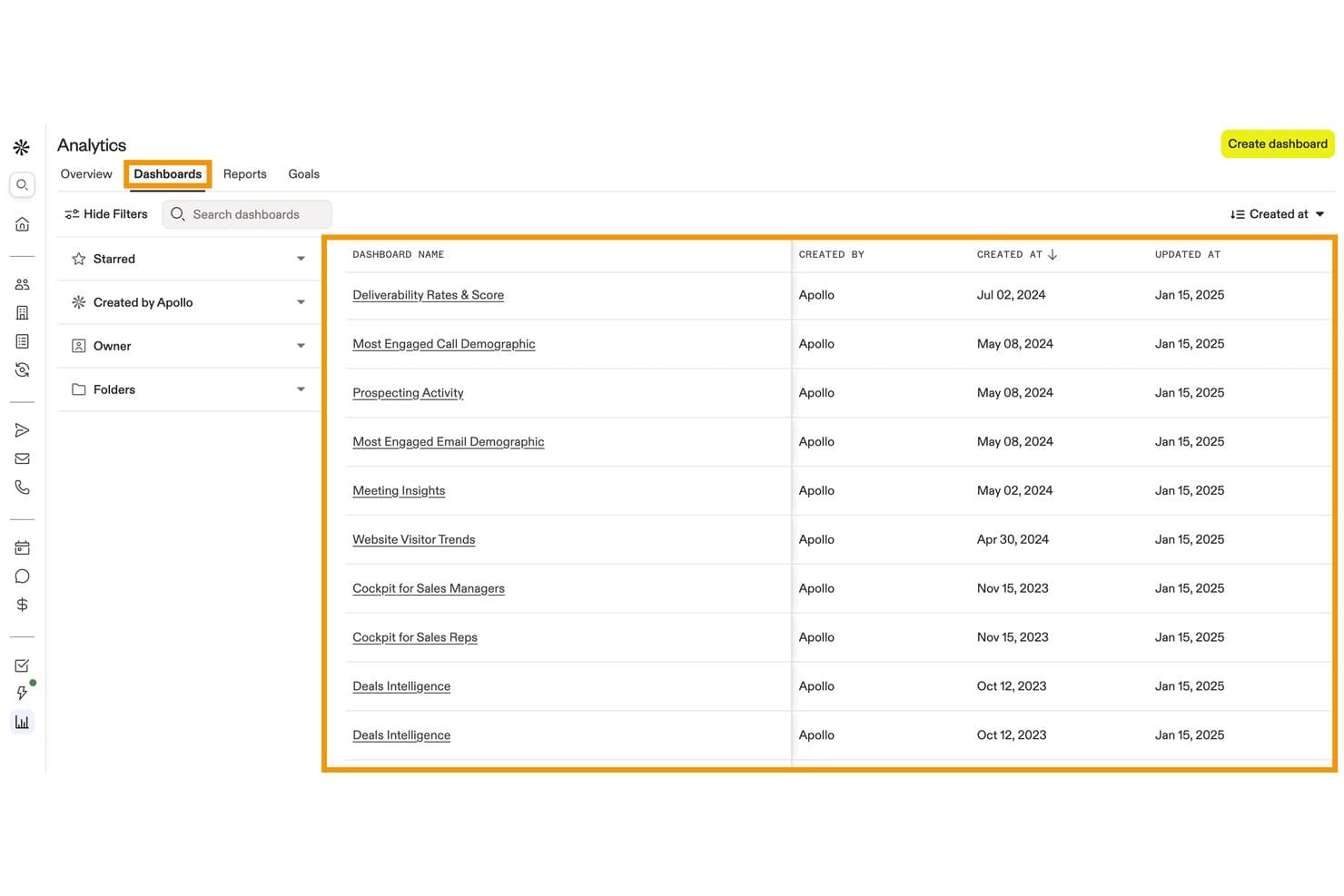
Apollo.io centralizes pre-built analytics dashboards for tracking sales activity. Apollo.io (Apollo) is a B2B sales and lead management platform that combines a 240M+ contact database, form enrichment, website visitor identification, lead scoring, inbound routing, and workflow automation.
Who Is Apollo.io Best For?
Apollo.io is a strong fit for B2B sales and marketing teams that need to enrich, score, and route inbound leads using a large contact database without stitching together multiple data tools.
Why I Picked Apollo.io
Apollo.io earns its spot on my shortlist because its B2B intent data, powered by Bombora, surfaces accounts actively researching your category across 15,000+ topics before they ever hit a form. I love how form enrichment pairs with that signal: a prospect submits just their email, and Apollo auto-fills company size, industry, and phone number from its 240M-contact database, so your routing rules fire on complete data from the start. That combination of intent scoring and enriched inbound capture is where Apollo pulls ahead for B2B lead qualification.
Apollo.io Key Features
- Inbound router: Routes incoming leads to the right rep or meeting type based on intake form answers, ICP fit, or existing account ownership, including round-robin distribution.
- Waterfall enrichment: Pulls missing contact data from multiple providers in sequence, filling gaps in email, phone, and firmographic fields across your saved records.
- Website visitor identification: Surfaces the companies and contacts browsing your site—including the specific pages they viewed—before they ever submit a form.
- Custom scoring models: Lets you build separate scoring models for people and companies using 65+ filters, with tiered outputs and a score breakdown view for each prospect.
Apollo.io Integrations
Apollo.io offers native integrations with Salesforce, HubSpot, Zoho, Microsoft Dynamics, Pipedrive, Marketo, Klaviyo, Mailchimp, Snowflake, and Slack. It also supports a public API for custom integrations and Zapier.
Pros and Cons
Pros:
- Granular inbound routing improves sales handoff
- Form enrichment reduces form friction
- B2B intent signals identify active research
Cons:
- Attribution lacks multi-touch revenue reporting
- Marketing nurture remains incomplete
Learn more about Apollo.io: Best for drag-and-drop interface configuration
- 14-day free trial
- From $40/user/month (billed annually)
Visit WebsiteCustomer Rating:4.7/5
Creatio offers a management dashboard with campaign analytics and AI insights. Creatio is a no-code marketing automation and CRM platform that covers lead capture, scoring, nurturing, and pipeline management across the full lead lifecycle.
Who Is Creatio Best For?
Creatio is a strong fit for mid-market and enterprise marketing teams that want to configure their own workflows without relying on developers.
Why I Picked Creatio
I've included Creatio in my top picks because its drag-and-drop interface configuration goes well beyond email templates. The visual Campaign Designer lets you build multi-step, multi-channel lead nurturing flows with branching logic, all without writing a line of code. The drag-and-drop Landing Page Designer is another standout, letting you build and connect lead capture pages directly in the platform so new leads flow straight into your pipeline.
Creatio Key Features
- Lead predictive scoring: An AI model that rates each lead from 1 to 100 based on customer needs, engagement data, and service history.
- Campaign Designer: A visual, no-code tool for building multi-channel campaign flows with branching logic based on customer behaviour.
- Landing Page Designer: A drag-and-drop builder that creates landing pages integrated directly with Creatio, automatically registering new leads when a form is submitted.
- Web analytics tracking: Imports Google Analytics or Matomo data into contact profiles, showing lead source, channel, and full session-level website activity.
Creatio Integrations
Creatio offers native integrations with Microsoft Exchange, Microsoft 365, Google Calendar, Google Ads, and Facebook Ads, along with a marketplace that includes connectors for SharePoint, DocuSign, Salesforce, Jotform, and Microsoft Teams Phone. It also connects with Zapier and supports OData 3/4 protocols plus a REST API for custom integrations.
Pros and Cons
Pros:
- Built-in lead scoring and sales forecasting
- Supports no-code layout configuration
- Captures leads from multiple channel sources
Cons:
- Modular pricing structure is hard to estimate
- Steep learning for advanced builds
Learn more about Creatio: Best for shared marketing and sales timelines
- Free plan available
- From $20/user/month
Visit WebsiteCustomer Rating:4.4/5
HubSpot offers a dashboard with contact activity and prospect tracking. HubSpot is a CRM platform with built-in lead management tools that combine contact tracking, lead capture, pipeline management, and marketing-to-sales handoff workflows in one system.
Who Is HubSpot Best For?
I'd recommend HubSpot for small to mid-size marketing and sales teams that manage leads across both functions and need a single shared system.
Why I Picked HubSpot
I've included HubSpot in my top picks because of how well its contact timeline unifies marketing and sales activity in one view. When a lead opens an email, visits a pricing page, or fills out a form, that activity sits right alongside call notes and meeting logs from sales. That shared context means sales reps know exactly what marketing content a lead engaged with before the first outreach, which cuts down on redundant follow-up.
HubSpot Key Features
- Lead scoring: Assigns point values to leads based on demographic data and engagement activity to help prioritize outreach.
- Pipeline management: Organizes leads into deal stages with drag-and-drop controls so reps can track progress at a glance.
- Meeting scheduling: Let leads book time directly on a rep's calendar through a shareable link.
- Smart lists: Automatically segments leads based on criteria like lifecycle stage, industry, or behaviour.
HubSpot Integrations
HubSpot has 1,500+ apps in its App Marketplace, including Salesforce, Slack, Google Workspace, Mailchimp, Shopify, LinkedIn Sales Navigator, Microsoft Teams, Zoom, Stripe, and WordPress. It's available on Zapier and has an API for custom integrations.
Pros and Cons
Pros:
- Automated lead nurturing email sequences included
- Shared contact timeline across all teams
- Built-in forms capture leads automatically
Cons:
- Custom lead routing rules can be complex
- Advanced reporting is restricted to enterprise
 Best for journey-based audience segmentation
- 14-day free trial
- From $199/month
Visit WebsiteCustomer Rating:4.5/5
Ortto offers a dashboard with customer insights and audience segmentation. Ortto is a marketing automation platform that combines a built-in customer data platform with journey-based campaign tools, lead scoring, multi-channel messaging, and audience segmentation.
Who Is Ortto Best For?
Ortto works well for marketing teams that own both campaign execution and audience data, without depending on a separate data or engineering team.
Why I Picked Ortto
Ortto earns its spot on my shortlist because of how its journey builder connects audience segmentation directly to campaign triggers. I use Ortto's built-in CDP to build segments based on behavioural data, like page visits or product actions, and those segments feed directly into automated journeys. What I like is the ability to split journeys by audience attributes mid-flow, so leads receive different messaging based on where they are in the funnel.
Ortto Key Features
- Custom lead scoring: Build scores from demographic, firmographic, and behavioural data, with automatic score degradation over time for accuracy
- Funnel analysis reports: Monitor multi-step conversion rates across the full lead lifecycle using built-in funnel report templates
- Popup and form builder: Capture leads directly with embeddable forms, popups, and surveys tied to your CDP contact data
- Round-robin lead assignment: Automatically assign leads to sales reps via journey-triggered round-robin rules when score thresholds are met
Ortto Integrations
Ortto offers 25+ native integrations, including Salesforce, HubSpot, Pipedrive, Shopify, Stripe, Chargebee, Recurly, Zendesk, Intercom, and Google Ads. It also connects with Zapier and provides an API for custom integrations.
Pros and Cons
Pros:
- Multi-channel lead nurturing across email and SMS
- Visual journey builder supports team collaboration
- Built-in CDP unifies lead data automatically
Cons:
- Contact-based pricing scales up quickly
- No built-in CRM for pipeline management
Learn more about Ortto: Best for automated lead routing and matching
- Free demo available
- Pricing upon request
Visit WebsiteCustomer Rating:4.6/5
LeanData offers a lead routing builder with matching, assignment, and workflows. LeanData is a Salesforce-native lead management platform built around automated lead-to-account matching, territory-based routing, and buying group orchestration for B2B revenue teams.
Who Is LeanData Best For?
LeanData is a strong fit for enterprise B2B revenue operations teams managing high lead volumes across complex, multi-territory Salesforce environments.
Why I Picked LeanData
I picked LeanData as one of the best because its lead-to-account matching goes well beyond email matching. It uses six fields plus custom tiebreakers, so leads actually land on the right account record in Salesforce. I also like how its visual routing flowchart lets my team build territory-based assignment rules without writing code. On top of that, BookIt scheduling lets reps book meetings directly inside Salesforce the moment a lead qualifies.
LeanData Key Features
- Audit trails: Logs every routing decision so your team can trace exactly why a lead was assigned a certain way and fix errors fast.
- Buying group orchestration: Groups related contacts from the same account into a coordinated opportunity, so sales aren't working the same deal in silos.
- Round-robin lead distribution: Automatically cycles lead assignments across reps to balance workload and prevent leads from piling up with one person.
- SLA tracking: Monitors lead response time against set thresholds so ops teams can flag and escalate leads that go too long without a follow-up.
LeanData Integrations
LeanData is a Salesforce-native platform with 17+ integrations, including Salesforce Sales Engagement, 6sense, Clearbit, Cognism, Cloudingo, Crossbeam, Outreach, Salesloft, Gong, and Slack. It also connects with Microsoft Teams, Kronologic, Sendoso, UserGems, Qualified, G2, and Groove. An API is available for custom integrations.
Pros and Cons
Pros:
- Duplicate detection prevents CRM data decay
- Manages complex global territory assignments
- Visual drag-and-drop routing flow builder
Cons:
- No standalone mobile app
- Contact routing sold separately from leads
Learn more about LeanData: Best for high-velocity lead capture workflows
- Free demo available
- From $60/user/month (billed annually)
Visit WebsiteCustomer Rating:4.4/5
LeadSquared offers a lead management dashboard with scoring and assignments. LeadSquared is a sales execution and lead management platform built for high-volume sales teams, combining lead capture, automated distribution, pipeline tracking, and field sales management in one system.
Who Is LeadSquared Best For?
LeadSquared is a strong fit for inside sales and field sales teams in industries like education, financial services, and healthcare that manage large volumes of inbound leads daily.
Why I Picked LeadSquared
I picked LeadSquared as one of the best because its lead capture engine pulls in leads from more entry points than almost any other platform I've seen. It captures across Google Ads, Facebook, Instagram, IVR phone calls, chat tools, and third-party marketplaces simultaneously, all without manual imports. What I really like is the lead distribution automation: rules fire the moment a lead enters the system and route it to the right rep by territory, product, or load-balanced quota. For teams processing thousands of inbound leads daily, that instant routing prevents the drop-off that kills conversion rates.
LeadSquared Key Features
- AI-powered conversion predictor: Uses machine learning to assign each lead a conversion probability score based on historical data and lead attributes.
- Field force automation: Let field sales reps plan beat routes, log calls, upload documents, and update lead records directly from the mobile app.
- Lead scoring and engagement scoring: Scores leads automatically based on activity, profile data, and behaviour to help reps prioritize follow-up.
- Sales performance management: Tracks rep-level and team-level quota attainment, territory assignments, and pipeline progress in one dashboard.
LeadSquared Integrations
LeadSquared offers native connectors for lead capture and communication tools, including Google Ads, Google Forms, Facebook Lead Ads, WhatsApp, Zoom, Zendesk Chat, and Salesforce. The LeadSquared Zapier integration allows you to connect with 500+ third-party web services, and a REST API is available for custom integrations.
Pros and Cons
Pros:
- Mobile app supports full field sales tracking
- Aggregates multi-source inbound lead data
- Automated lead distribution by territory and quota
Cons:
- Limited native reporting dashboard customization
- Portal slows down under heavy workflow loads
Learn more about LeadSquared: Best for predictive analytics and account insights
- Free plan available
- Pricing upon request
Visit WebsiteCustomer Rating:4.3/5
6sense offers a lead dashboard with analytics, lead scoring, and insights. 6sense is an AI-driven account engagement platform that surfaces anonymous buyer intent data, predicts which accounts are in-market, and helps sales and marketing teams prioritize outreach based on buying signals.
Who Is 6sense Best For?
6sense suits enterprise B2B revenue operations teams that run account-based marketing programs and need data to align sales and marketing around the same target accounts.
Why I Picked 6sense
I picked 6sense as one of the best because of how it handles the dark funnel. Most lead management tools wait for a prospect to fill out a form. 6sense goes further by combining anonymous behavioural signals, technographic data, and firmographic intelligence to deliver a complete view of the buyer journey, even before a lead self-identifies. I particularly like the predictive scoring model: it uses machine learning to weigh dozens of signals, including firmographic fit, technographic profile, behavioural patterns, and intent data, based on what has actually correlated with conversion in historical data. All of that data is then analyzed against historic conversion patterns by 6sense's AI predictive model to predict each account's buying stage, and the platform provides a 360-degree profile view of each account.
6sense Key Features
- Dynamic audience segments: Build and update account segments automatically based on intent signals, firmographics, and technographics without manual list management.
- Sales intelligence alerts: Notify sales reps in real time when a target account spikes in research activity or changes buying stage.
- Conversational email: Send AI-generated, personalized email sequences to prospects based on their account profile and buying stage.
- Contact data enrichment: Surface-verified contact details, including direct dials and emails, for key decision-makers within target accounts.
6sense Integrations
6sense offers native integrations across CRM, marketing automation, sales engagement, advertising, and intent data categories, including Salesforce, Microsoft Dynamics, HubSpot, Marketo, Eloqua, Outreach, Salesloft, Gong, LinkedIn Advertising, and Google Ads. It also integrates with Slack for messaging and supports data warehouse and AWS S3 connections. An API is available for custom integrations, and Zapier support is not clearly documented.
Pros and Cons
Pros:
- Tracks keyword-level intent across the web
- AI predicts the account buying stage timing
- Detects anonymous buyer intent signals
Cons:
- Requires a dedicated admin to maintain properly
- Limited long-term reporting
Learn more about 6sense: Best for automated customer milestone tracking
- 14-day free trial + free demo available
- From $15/month (billed annually)
Visit WebsiteCustomer Rating:4.4/5
ActiveCampaign offers a dashboard with lead details and activity tracking. ActiveCampaign is a marketing automation and CRM platform that combines email marketing, contact scoring, pipeline management, and behaviour-based automation across the full customer lifecycle.
Who Is ActiveCampaign Best For?
ActiveCampaign is a strong fit for small to mid-sized B2C and B2B businesses that run high-volume email and automation campaigns across long or multi-touch customer journeys.
Why I Picked ActiveCampaign
I picked ActiveCampaign as one of the best because its goal-based automation is genuinely built around tracking where a contact is in their lifecycle. I like that you can set milestone goals directly inside automation workflows, and contacts automatically skip ahead or branch when they hit that goal. Pair that with date-based triggers and contact scoring thresholds, and your team can react to real lead behaviour, not just scheduled follow-ups.
ActiveCampaign Key Features
- Deal pipeline management: Track leads through a visual CRM pipeline with drag-and-drop stage updates and automated task creation.
- Site and event tracking: Logs contact activity on your website and fires automation triggers based on pages visited or actions taken.
- Dynamic segmentation: Builds contact lists automatically using tags, custom fields, and behavioural data that update in real time.
- Lead capture forms: Embeddable forms that push submissions directly into contact records and trigger automation workflows instantly.
ActiveCampaign Integrations
ActiveCampaign offers 1,000+ apps and integrations, including native integrations with Salesforce, Shopify, WooCommerce, WordPress, Facebook, Google Ads, Calendly, Slack, Zendesk, and Microsoft Dynamics 365. It also connects with Zapier and provides an API for custom integrations.
Pros and Cons
Pros:
- Dynamic content tailors email delivery
- Built-in lead scoring updates automatically
- Granular automation branching for lead workflows
Cons:
- Lacks advanced pipeline visualization tools
- CRM features locked behind higher tiers
Learn more about ActiveCampaign: Best for native sales intelligence dashboards
- Free demo available
- Pricing upon request
Visit WebsiteCustomer Rating:4.1/5
Adobe Marketo Engage offers a dashboard with event workflows and automation. Adobe Marketo Engage is a B2B marketing automation platform with lead scoring, audience segmentation, multi-channel nurturing, and native sales intelligence tools built for enterprise marketing and sales teams.
Who Is Adobe Marketo Engage Best For?
Adobe Marketo Engage is a strong fit for enterprise B2B marketing teams that run complex, multi-touch campaigns and need deep alignment with sales.
Why I Picked Adobe Marketo Engage
Adobe Marketo Engage earns its spot on my shortlist because of Sales Insight, a native dashboard that surfaces lead score, engagement history, and "interesting moments" directly inside Salesforce or Microsoft Dynamics. My team uses it to see exactly which leads are spiking in activity so reps can prioritize outreach without switching tools. I also like the Revenue Attribution dashboard, which maps which campaigns influenced closed deals at each pipeline stage.
Adobe Marketo Engage Key Features
- Engagement programs: Builds multi-step nurture tracks that automatically advance leads based on their responses and engagement cadence.
- Progressive profiling: Replaces already-known form fields with new questions each time a lead converts, building richer profiles over time.
- Smart campaigns: Triggers automated actions like emails or lead score changes based on specific lead behaviours or data changes.
- Anonymous lead tracking: Tracks web activity from unknown visitors and retroactively links it to a lead record once they fill out a form.
Adobe Marketo Engage Integrations
Integrations include Salesforce, Microsoft Dynamics, Veeva, Clearbit, ZoomInfo, Google, Facebook, LinkedIn, Zoom, and ON24.
Pros and Cons
Pros:
- Deep Salesforce sync for lead lifecycle tracking
- Tracks multi-touch revenue attribution
- Custom behaviour-based lead scoring
Cons:
- Requires dedicated ops resource to manage
- Lacks modern drag-and-drop design tools
Learn more about Adobe Marketo Engage: Best for enterprise-grade campaign orchestration
- Free demo available
- Pricing upon request

Oracle Eloqua offers a workflow builder with drag-and-drop lead nurturing. Oracle Eloqua is an enterprise B2B marketing automation platform built for managing multi-channel lead nurturing, advanced lead scoring, and campaign orchestration across complex buyer journeys.
Who Is Oracle Eloqua Best For?
Oracle Eloqua is a natural fit for large B2B enterprises with dedicated marketing operations teams running complex, multi-touch demand generation programs.
Why I Picked Oracle Eloqua
Oracle Eloqua earns its spot on my shortlist because its Campaign Canvas gives marketing operations teams precise control over multi-step, multi-channel campaigns at a scale that most tools can't match. I particularly like the Program Canvas for automating lead management workflows, where event listeners fire in real time based on lead score changes or new contact creation. Pair that with concurrent lead scoring models across multiple business units, and Eloqua handles the complexity that smaller platforms simply weren't built for.
Oracle Eloqua Key Features
- Dynamic content blocks: Swap email or landing page content automatically based on a contact's profile data or segment membership.
- Website visitor tracking: Identifies known contacts visiting your site and logs page-level activity directly to their contact record.
- Insight reporting: Pre-built and custom reports that surface campaign performance, email engagement, and lead funnel metrics.
- Contact washing machine: Automates data normalization and field standardization as contacts enter or move through your database.
Oracle Eloqua Integrations
Oracle Eloqua offers 500+ prebuilt integrations through its Marketing AppCloud marketplace, including CRM integrations with Salesforce, Oracle CX Sales, and Microsoft Dynamics, along with apps for tools like LinkedIn, 6sense, Webex, and Cvent. Eloqua is also natively integrated with the broader Oracle CX suite, and an API is available for custom integrations.
Pros and Cons
Pros:
- Unifies online and offline data
- Behavioural lead scoring across business units
- Visual canvas simplifies campaign orchestration
Cons:
- No native SMS or WhatsApp channels
- Built-in analytics require manual report building
Learn more about Oracle Eloqua:
Other Lead Management Software
Here are some additional lead management software options that didn’t make it onto my shortlist, but are still worth checking out:
- 11Salesforce Sales CloudBest for forecasting revenue trends
- 12Mailchimp Best for built-in email campaign launches
- 13SalesflareBest for automated meeting logging
- 14Zoho CRMBest for customizable workflow automations
- 15Capsule Best for small business client management
- 16FreshsalesBest for integrated email and calling tools
- 17CognismBest for AI-powered B2B prospecting and lead enrichment
- 18Pipedrive Best for visual sales pipeline tracking
- 19Sugar MarketBest for campaign ROI tracking
- 20monday CRMBest for team collaboration on deals
How I Evaluate Lead Management Software
I evaluate tools in two layers: the baseline—lead capture, scoring, and sales routing—and the differentiators, like ABM support or attribution depth, that actually set platforms apart.
Core Functionality (Table Stakes For This List)
When I'm selecting tools for my list, I rank each one on a scale from 0 (does not offer the functionality) to 5 (excels in this area) for each core functionality listed below. Then, I calculate the tool's total score into a percentage. Each tool needs to achieve a minimum total score of 65% to be considered for inclusion.
- Lead Capture Across Channels: I check whether the platform pulls in leads from forms, landing pages, chat widgets, and ad platforms rather than relying on manual entry or a single source.
- Lead Scoring & Qualification: Each tool should let you build scoring models that weigh both profile fit and behavioral signals, like page visits or email engagement, to surface sales-ready leads.
- Segmentation & Database Management: I look for dynamic list-building, custom fields, and deduplication—things that matter when you're running campaigns across multiple audiences simultaneously.
- Lead Nurturing Automation: The platform should support multi-step, trigger-based workflows that go beyond basic email drips, such as branching paths based on a lead's content engagement or form submissions.
- Lead Routing & Distribution: I evaluate whether the tool offers rules-based assignment by criteria like territory, lead source, or deal size so reps get the right leads without manual intervention.
- Tracking & Attribution Reporting: Dashboards should connect lead sources and touchpoints to pipeline outcomes, giving marketing teams a clear view of which channels and campaigns drive conversions.
Once I have a list of tools that meet this criteria, I consider what sets each platform apart.
Differentiating Factors (What Sets Vendors Apart)
Here's how I compare and contrast different vendors:
Standout Features
AI-powered lead insights are a major differentiator—I look for platforms that surface buying signals and recommend next-best actions rather than just assign a static score. Intent data and enrichment capabilities also matter, especially when your team needs firmographic or technographic context to prioritize outreach. I evaluate how well a platform bridges marketing and sales through shared workflows, lead handoff notifications, and SLA tracking that keep both teams aligned on pipeline goals.
Beyond Features
CRM integration depth is one of the first things I check—a lead management tool that doesn't sync bi-directionally with your CRM creates data gaps that erode trust between marketing and sales. Pricing structure also matters here, particularly how vendors scale costs as your contact database grows. I look for transparent tier breakdowns tied to volume or seats. Compliance is another area I evaluate closely, especially consent management and audit trail features that help teams stay aligned with GDPR and CCPA requirements across regions.
How to Choose Lead Management Software
It’s easy to get bogged down in long feature lists and complex pricing structures. To help you stay focused as you work through your unique software selection process, here’s a checklist of factors to keep in mind:
| Factor | What to Consider |
|---|---|
| FactorScalability | What to ConsiderWill the system handle growth in leads, users, and data as your business expands? Look for flexible plans and architecture that support additional pipelines or users. |
| FactorIntegrations | What to ConsiderDoes it connect natively to your existing CRM, email, marketing automation, or analytics tools? Double-check that critical integrations are verified and not third-party only. |
| FactorCustomizability | What to ConsiderCan you adjust pipelines, fields, and workflows to fit your sales process or unique business rules? Avoid rigid, one-size-fits-all approaches that limit flexibility. |
| FactorEase of use | What to ConsiderAre the interface and setup intuitive for non-technical staff? Test with a few users who match your team’s skill level before making a decision. |
| FactorImplementation and onboarding | What to ConsiderWhat’s required to migrate, set up pipelines, and train the team? Assess how much time your team can realistically invest and whether the vendor offers migration support or onboarding services. |
| FactorCost | What to ConsiderHow does the total monthly price fit your budget, including required users, contacts, and add-ons? Be cautious of hidden costs for extra forms, integrations, or advanced reporting. |
| FactorSecurity safeguards | What to ConsiderAre encryption, access controls, and compliance with regulations like GDPR in place? Confirm if you need single sign-on, audit logs, or data residency options. |
| FactorSupport availability | What to ConsiderIs live support available during your working hours or in your language? Check for options like chat, phone, or regional support teams to avoid delays if issues arise. |
What Are Lead Management Software?
Lead management software is a digital tool that helps businesses capture, track, organize, and qualify leads throughout the sales process. These platforms centralize contact data, automate follow-ups, and support team collaboration, making it easier to manage leads from initial interest through to handoff or conversion.
Features of Lead Management Software
When selecting lead management software, keep an eye out for the following key features:
- Lead capture forms: Collect new leads directly from your website, landing pages, or social media campaigns and add them to your database automatically.
- Pipeline management: Visualize, organize, and move leads through customizable stages, so teams always know the current status and next steps for every contact.
- Automated follow-ups: Set up timed or trigger-based emails, texts, or tasks to nurture leads and ensure no one slips through the cracks.
- Contact database: Store and manage detailed contact profiles and interaction histories, so your team has a 360-degree view of every lead.
- Lead scoring: Assign values based on demographics, behaviour, or engagement to help prioritize the most sales-ready leads.
- Task assignment: Delegate follow-ups, calls, or next actions to team members directly within the platform for better accountability.
- Reporting and analytics: Track lead sources, pipeline performance, and conversion rates with customizable dashboards and exportable reports.
- Sales activity logging: Automatically record calls, emails, and meeting notes to maintain a reliable timeline of team interactions with each lead.
- Role-based access control: Set permissions to control who can view or edit sensitive lead and pipeline information based on job roles.
- Calendar integration: Sync meetings and follow-up reminders with users’ calendars to keep everyone on schedule and prevent missed connections.
Common Lead Management Software AI Features
Beyond the standard lead management software features listed above, many of these solutions are incorporating AI with features like:
- Predictive lead scoring: Uses AI algorithms to analyze historical data and predict which leads are most likely to convert, allowing teams to focus on high-value prospects with greater accuracy.
- Automated data enrichment: AI automatically fills in missing information about leads by cross-referencing public sources and databases, keeping contact records up to date with minimal manual input.
- Smart lead routing: Analyzes lead attributes and sales team strengths to route new leads to the best-suited rep, improving conversion rates and speeding response times.
- AI-driven sentiment analysis: Evaluates conversations, emails, and notes for customer intent and sentiment to highlight urgent or high-potential leads that need immediate action.
- Intelligent follow-up suggestions: Provides reps with automated, personalized recommendations for next-best actions based on each lead’s previous behaviours and engagement patterns.
Benefits of Lead Management Software
Implementing lead management software provides several benefits for your team and your business. Here are a few you can look forward to:
- Centralized lead organization: Keep all lead information, interactions, and status updates in one place, reducing manual tracking and missed opportunities.
- Faster response times: Automated lead assignment, alerts, and follow-ups ensure your team acts quickly on new inquiries.
- Better pipeline visibility: Customizable dashboards, stages, and activity logs help leaders accurately monitor deal flow and forecast sales.
- Higher lead conversion: Lead scoring, nurturing, and smart routing features help teams focus on and win the most promising deals.
- Data-driven decision making: Reporting and analytics features give you insights into rep activity, lead sources, and campaign performance.
- Improved team collaboration: Task assignments and communication tools keep everyone aligned on next steps and roles throughout the sales process.
- Improved onboarding: Built-in training tools, guided setup, and intuitive design help new hires ramp up efficiently.
Costs and Pricing of Lead Management Software
Selecting lead management software requires an understanding of the various pricing models and plans available. Costs vary based on features, team size, add-ons, and more. The table below summarizes common plans, their average prices, and typical features included in lead management software solutions:
Plan Comparison Table for Lead Management Software
| Plan Type | Average Price | Common Features |
|---|---|---|
| Plan TypeFree Plan | Average Price$0-$20/user/month | Common FeaturesBasic lead capture and storage, single pipeline, limited users, and essential reporting features. |
| Plan TypePersonal Plan | Average Price$15-$35/user/month | Common FeaturesExpanded contact management, limited automations, email integrations, and standard support. |
| Plan TypeBusiness Plan | Average Price$40-$80/user/month | Common FeaturesMulti-pipeline support, workflow automation, advanced reporting, team collaboration tools, and API integrations. |
| Plan TypeEnterprise Plan | Average Price$90-$150/user/month | Common FeaturesCustom roles and permissions, unlimited pipelines, advanced security, onboarding assistance, and priority support. |
Lead Management Software FAQs
Here are some answers to common questions about lead management software:
How do I know if my business needs lead management software?
If your team struggles to track leads, misses follow-ups, or juggles spreadsheets, it’s a good sign that dedicated lead management software could help. These tools are especially useful as sales leads and potential customers grow, or your sales funnel becomes more complex, helping teams optimize their lead management process.
Can lead management software integrate with my existing CRM?
Yes, most lead management software can integrate with major CRM software, email, and marketing tools. Many also connect with customer relationship management platforms to support marketing campaigns and keep contact information up to date. Always check integration lists and test for compatibility with your existing stack before making a purchase.
How is lead management software different from a full CRM?
Lead management software focuses on capturing, qualifying, and tracking leads through the early sales process, while a CRM covers all customer interactions post-sale and ongoing customer management. A sales CRM is often designed to help salespeople manage prospects and support lead generation activities across the customer lifecycle.
What should I look for in onboarding support?
Look for platforms with guided setup, migration help, training resources, and responsive support. User-friendly interfaces, clear documentation, and onboarding tailored for startups and growing teams can speed up your team’s adoption and help you start seeing value faster.
Are there any security risks with cloud-based lead management software?
Cloud-based tools should come with encryption, user permissions, compliance certifications, and notification settings for account activity. Always verify security safeguards, especially if you handle sensitive customer data or operate in regulated industries.
Can I customize workflows and pipelines in lead management software?
Yes, almost all lead management platforms offer customization options for pipelines, fields, and stages so you can tailor the process to your business needs. Some are more flexible than others, so review these options closely.