

monday.com Review: Pros, Cons, Features and Pricing Explained 2026
I’ve put monday.com to the test as a marketing planning powerhouse—here’s what actually boosts campaigns, where it falls short, and how its tools stack up for real teams in 2026.

We review tools independently, and commissions help fund our testing. See our transparency policy, our methodology, or suggest a tool.
monday AI Workspace is a marketing planning software that combines project boards, campaign tracking, and AI-assisted workflow management in one place. It's a strong fit for marketing teams coordinating across multiple campaigns and channels who need AI built directly into their planning workspace. I'd consider it over Asana if you want more customizable board structures and AI features woven into how you plan and execute work—rather than added on top of standard task management.
monday AI Workspace Evaluation Summary
4.6/5
- From $9/user/month (billed annually)
- Free plan + 14-day free trial available
Why Trust Our Software Recommendations
6,700+
Reviews
20
Industry experts
16+
Evaluation factors
14
Years
Our team has been testing and reviewing software since 2012. As marketing leaders ourselves, we know how difficult—and important—it is to choose the right software.
For this guide, we evaluated tools using hands-on testing and independent research, scoring tools using our selection criteria.
Our reviews reflect our human editorial judgment, not a sales pitch.
Expert reviewers:
 Gui DrusinaCreative Director
- Shriya GhateSenior Marketing Lead
 Amanda JacquesMarketing Ops Leader

monday AI Workspace Overview
In my experience, monday.com stands out for its flexible boards, visual workflows, and unbeatable ease of onboarding—especially for teams with mixed technical skills. The pricing feels fair for what you get, though some advanced automation and integrations can add up. I find its interface cleaner and more user-friendly than many alternatives, and customer support is responsive. If you’re judging options for a fast-paced marketing team that juggles campaigns, assets, and approvals, monday.com is one of the easiest to recommend. I’d choose it for organizations that value visibility, customization, and quick ramp-up over deep niche marketing features.
Pros
- Visual campaign timelines simplify deadline tracking for teams
- Multiple board views make team progress transparent at a glance
- Built-in automations reduce repetitive campaign coordination tasks
Cons
- Advanced reporting features require higher-tier subscriptions
- Campaign budget management tools are limited for marketing teams
- Task dependencies can be confusing and need clearer documentation
Is monday AI Workspace Right For Your Needs?
Who Would be a Good Fit for monday AI Workspace?
monday.com really shines for marketing teams, agencies, and project-driven companies that want a highly visual, collaborative way to plan, track, and adjust campaigns or projects. Its feature set works best for organizations that rely on creative handoffs, require big-picture timelines, and need frequent task updates, all without heavy IT lift or custom development.
- Marketing AgenciesYou get campaign dashboards, automated client updates, and file sharing that streamline client collaboration.
- In-House Marketing TeamsEasy campaign calendars, approval tracking, and shared assets make it simple to run multi-channel campaigns.
- Creative TeamsVisual timelines and clear review cycles help manage content, design projects, and feedback loops.
- Event PlannersHandle task assignments, venue logistics, and vendor communication with customizable templates and automations.
- Small to Medium BusinessesYou benefit from fast setup, intuitive workflows, and the ability to scale processes as you grow.
- Project ManagersGantt charts, resource planning, and workload views support simultaneous campaign management and clear reporting.
Who Would be a Bad Fit for monday AI Workspace?
monday.com isn’t built for compliance-heavy industries, complex corporate hierarchies, or teams in need of deep financial and budget controls baked into their workflow. If you require classic project management methodologies or work in regulated fields, you’ll probably find its focus on flexibility and marketing-style collaboration lacking.
- Highly Regulated IndustriesLacks advanced compliance tracking and validation features required for sectors like healthcare or finance.
- Enterprises With Legacy SystemsLimited support for deep, custom integrations with old on-premise business software.
- Finance DepartmentsBudget tracking and fiscal reporting tools aren’t robust enough for teams needing granular control.
- Construction CompaniesDoesn’t offer built-in resource scheduling, blueprint management, or field data collection specifics.
- Heavy ManufacturingNo modules for inventory management, shop floor automation, or supply chain logistics.
- Legal PracticesMissing advanced document management, case tracking, and confidentiality controls specific to law firms.
How We Test & Score Tools
We’ve spent years building, refining, and improving our software testing and scoring system. The rubric is designed to capture the nuances of software selection and what makes a tool effective, focusing on critical aspects of the decision-making process.
Below, you can see exactly how our testing and scoring works across seven criteria. It allows us to provide an unbiased evaluation of the software based on core functionality, standout features, ease of use, onboarding, customer support, integrations, customer reviews, and value for money.
Core Functionality (25% of final scoring)
The starting point of our evaluation is always the core functionality of the tool. Does it have the basic features and functions that a user would expect to see? Are any of those core features locked to higher-tiered pricing plans? At its core, we expect a tool to stand up against the baseline capabilities of its competitors.
Standout Features (25% of final scoring)
Next, we evaluate uncommon standout features that go above and beyond the core functionality typically found in tools of its kind. A high score reflects specialized or unique features that make the product faster, more efficient, or offer additional value to the user.
We also evaluate how easy it is to integrate with other tools typically found in the tech stack to expand the functionality and utility of the software. Tools offering plentiful native integrations, 3rd party connections, and API access to build custom integrations score best.
Ease of Use (10% of final scoring)
We consider how quick and easy it is to execute the tasks defined in the core functionality using the tool. High scoring software is well designed, intuitive to use, offers mobile apps, provides templates, and makes relatively complex tasks seem simple.
Onboarding (10% of final scoring)
We know how important rapid team adoption is for a new platform, so we evaluate how easy it is to learn and use a tool with minimal training. We evaluate how quickly a team member can get set up and start using the tool with no experience. High scoring solutions indicate little or no support is required.
Customer Support (10% of final scoring)
We review how quick and easy it is to get unstuck and find help by phone, live chat, or knowledge base. Tools and companies that provide real-time support score best, while chatbots score worst.
Customer Reviews (10% of final scoring)
Beyond our own testing and evaluation, we consider the net promoter score from current and past customers. We review their likelihood, given the option, to choose the tool again for the core functionality. A high scoring software reflects a high net promoter score from current or past customers.
Value for Money (10% of final scoring)
Lastly, in consideration of all the other criteria, we review the average price of entry level plans against the core features and consider the value of the other evaluation criteria. Software that delivers more, for less, will score higher.
Core Features
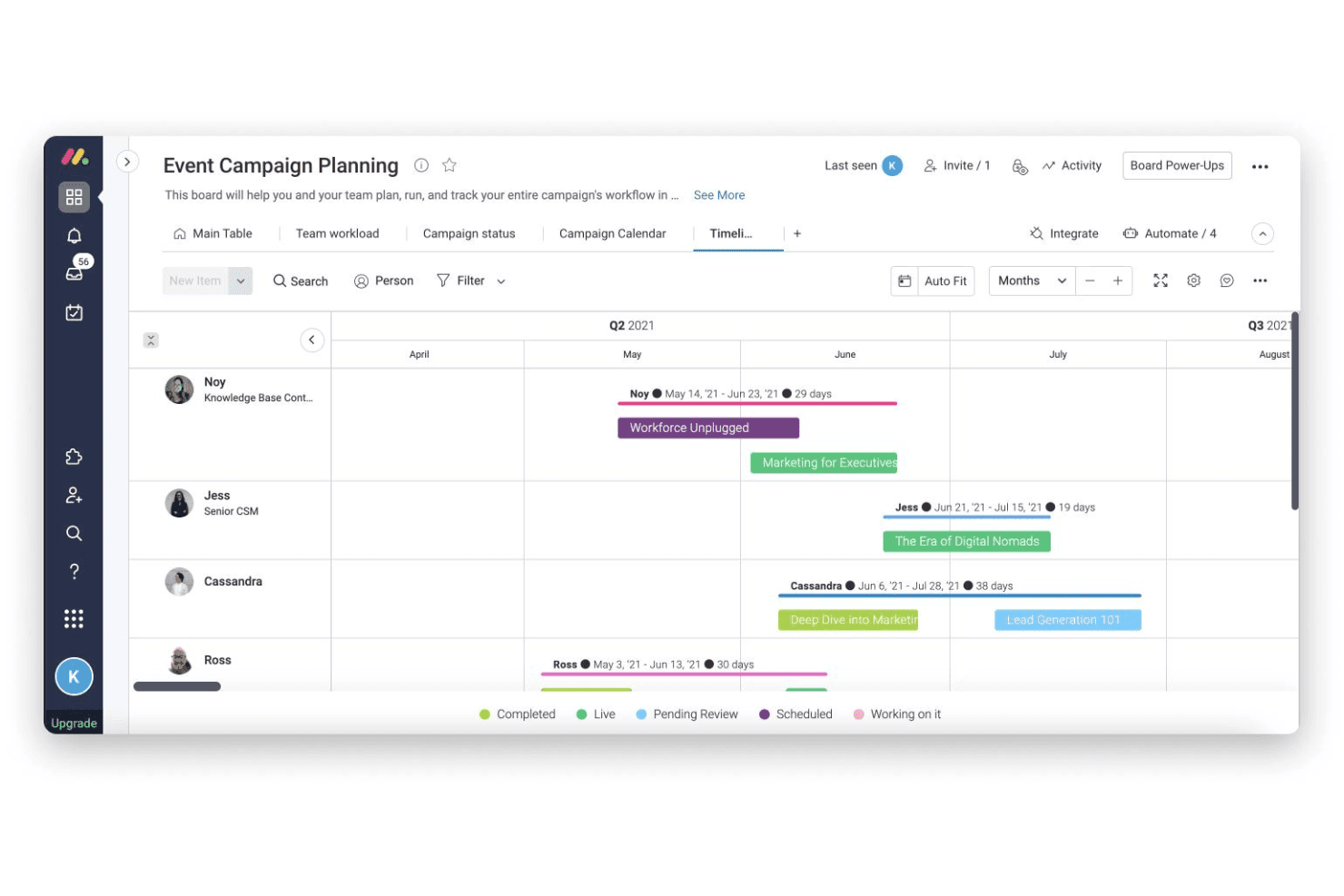
Campaign Timeline Views
Plan, view, and adjust campaign schedules using Gantt or calendar views. Easily spot dependencies and shift deadlines for multiple campaigns.
Automated Workflows
Set up trigger-based automations to assign tasks and send updates. This cuts down manual follow-ups and keeps campaigns moving.
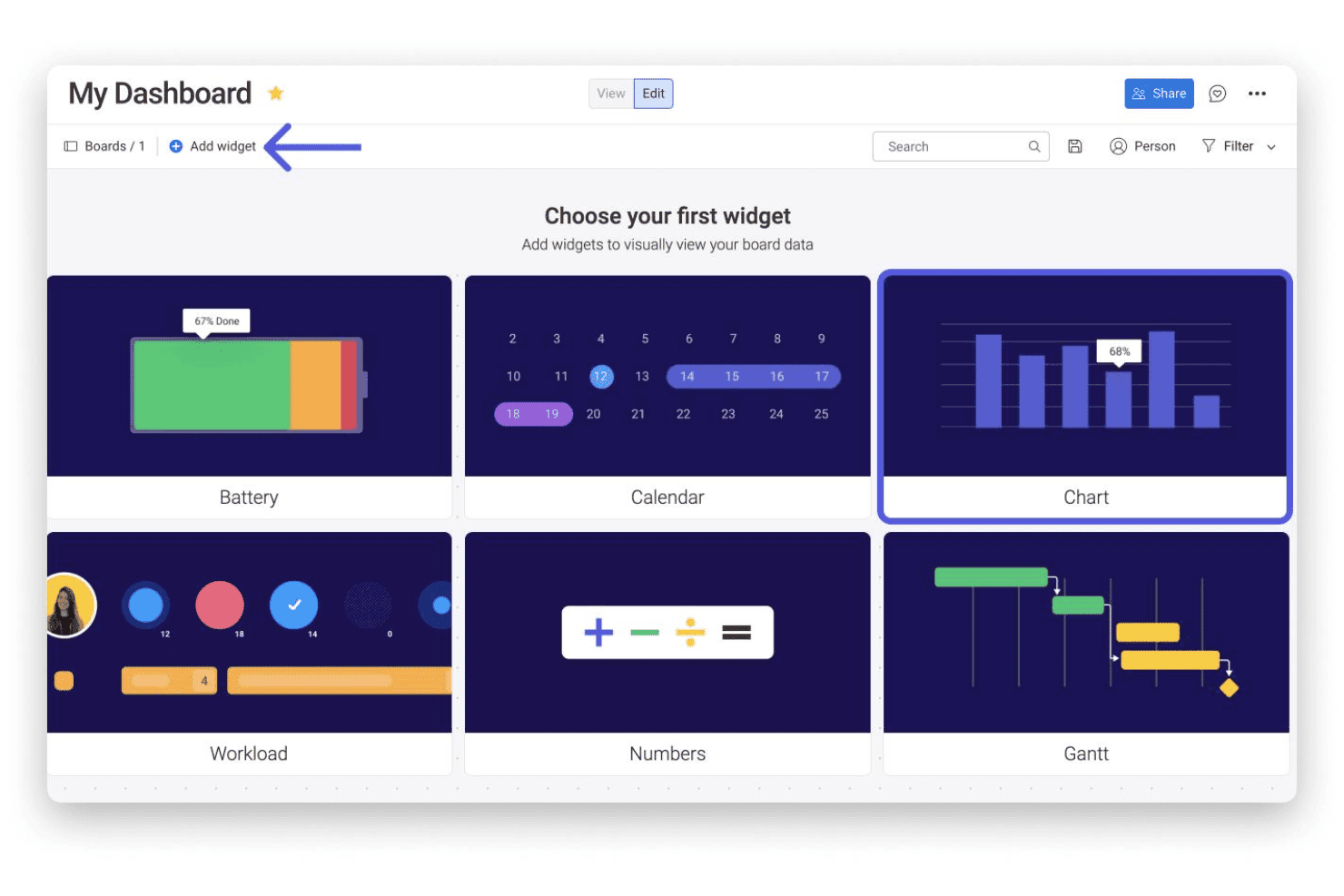
Custom Dashboards
Build dashboards to track campaign KPIs, leads, and spend. Drag-and-drop widgets let you visualize results for fast reporting.
Shared Content Libraries
Store and share campaign assets, graphics, and files in one place. Collaborators can access and update materials without leaving their workflow.
Approval Tracking
Manage requests for creative or budget sign-offs directly in task boards. See what’s pending and nudge reviewers with one click.
Form-Based Intake
Capture project briefs and content requests through customizable intake forms. Submissions land on your board ready to be prioritized and assigned.
Standout Features
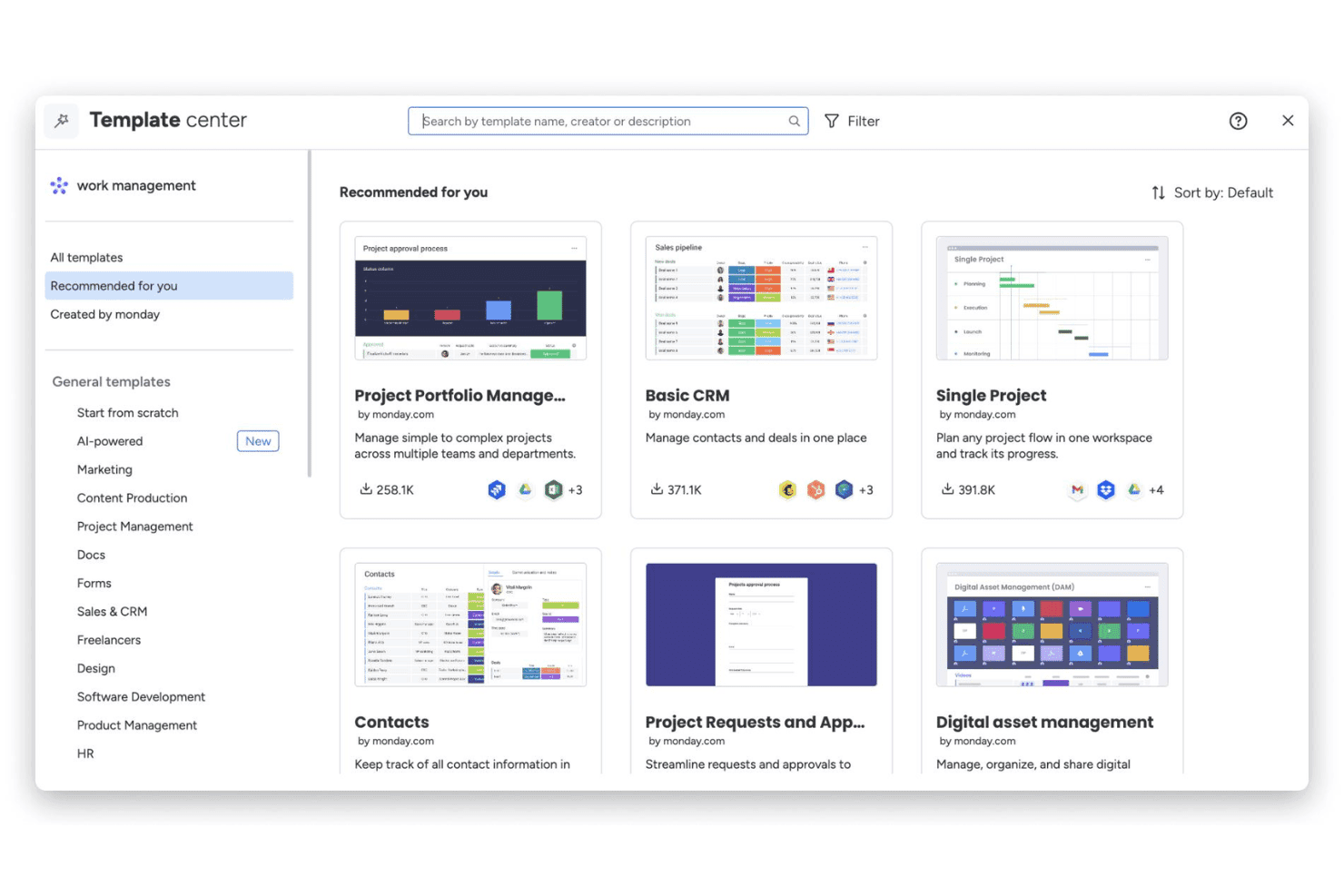
Customizable Board Templates
Choose from dozens of marketing-specific board templates built for launches, events, and content calendars. Teams can launch new projects in minutes, not hours.
Workload Management and Resource View
Monitor team bandwidth and see who’s overloaded across all campaigns. Easily reassign tasks to balance workloads for better project delivery.
Ease of Use
monday.com’s drag-and-drop boards, intuitive navigation, and quick-start templates make it one of the easiest marketing planning tools to set up and use. I see users call out how quickly non-technical team members adapt, and I find campaign tracking, updates, and approvals feel genuinely simple—no extra training or complicated workflows needed.
Onboarding
monday.com’s onboarding stands out for its step-by-step in-app guides, marketing-focused templates, and instant access to a help center full of video tutorials. I’ve seen users mention getting a project up and running within an hour, and the live chat and quick email support add even more confidence for new teams looking to get value right away.
Customer Support
monday.com offers responsive live chat, email support, and a well-populated online knowledge base, which I think puts it ahead for customer care. Users frequently mention fast ticket responses and clear, helpful troubleshooting from the support team—even on lower-tier plans—which helps keep marketing projects on track.
Integrations
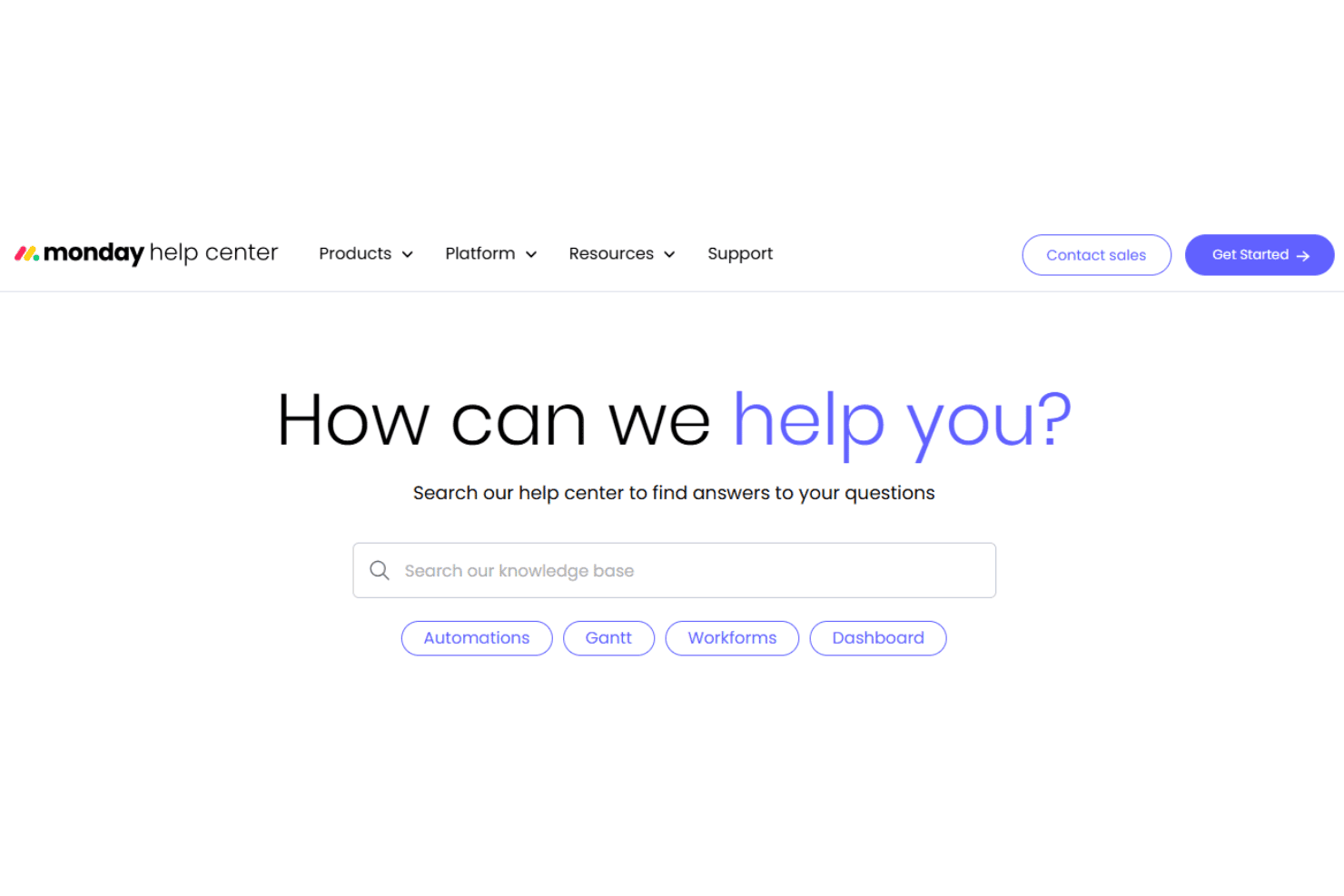
monday.com natively integrates with Slack, QuickBooks, Salesforce, Asana, GitHub, Outlook, Zoom, and Dropbox, among others.
monday.com also offers an open API and connects with third-party integration tools like Zapier and Make.
Value for Money
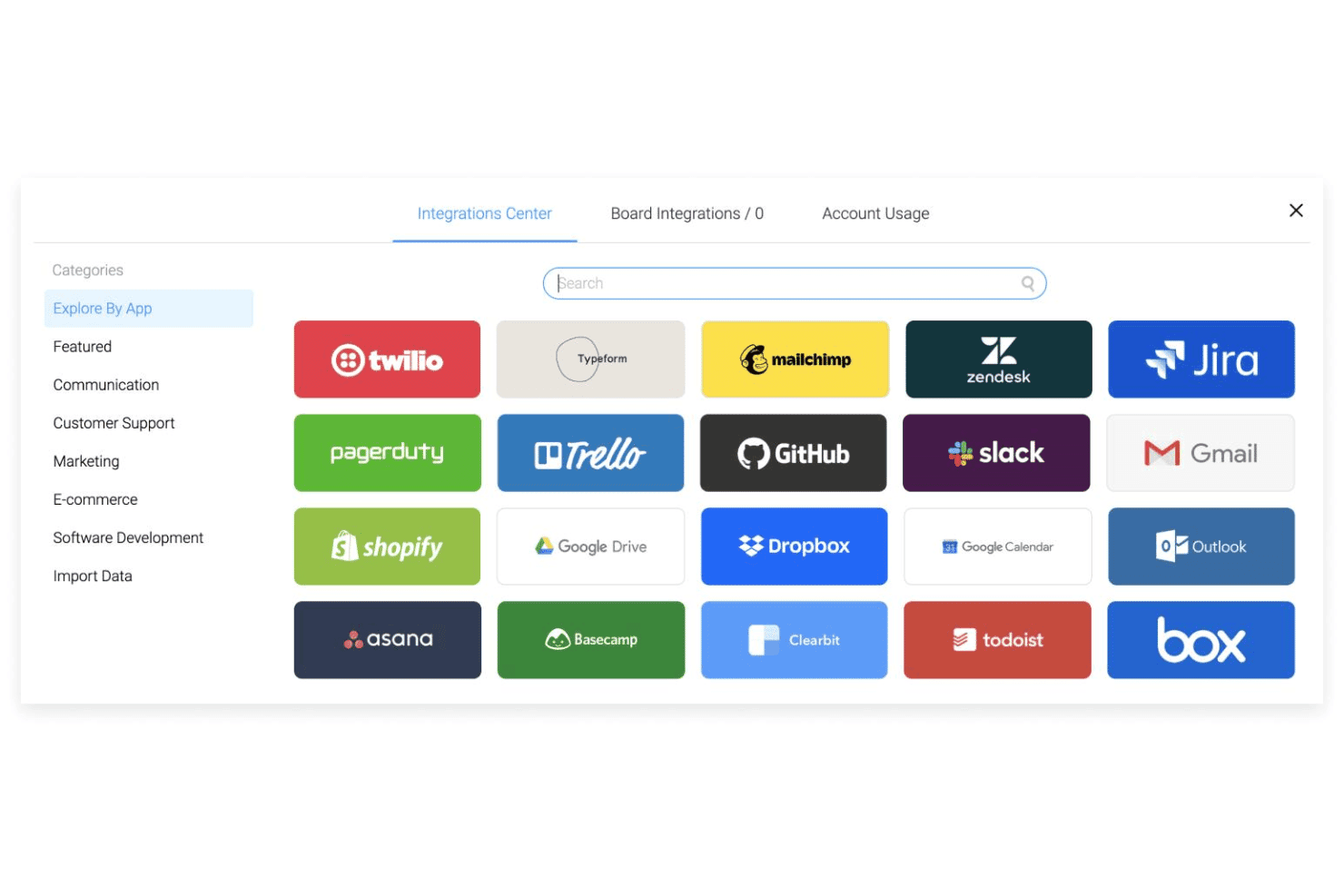
monday.com’s pricing feels fair for the depth of features, and most users say they see real value, especially when managing large teams or projects. The free and basic plans suit small teams, while premium tiers unlock workflow automation, reporting, and advanced permissioning.
- Free: Includes up to two seats, three boards, three docs, over 200 templates, and eight column types.
- Basic: Adds unlimited seats, unlimited boards & items, and 5 GB of file storage.
- Standard: Provides timeline, calendar, and map views, 20 GB of file storage, and Zoom integration.
- Pro: Includes time tracking, formula column, dependency column, and board administrators.
- Enterprise: Offers resource planner, capacity maanger, portfolio management, and AI risk insights.
monday AI Workspace Specs
- API: Yes
- Batch Permissions & Access: Yes
- Budgeting: No
- Calendar Management: Yes
- Collaboration Support: Yes
- Contact Management: No
- Contact Sharing: No
- Customer Management: No
- Dashboard: Yes
- Dashboards: Yes
- Data Export: Yes
- Data Import: Yes
- Data Visualization: Yes
- Dependency Tracking: Yes
- Document Sharing: Yes
- Expense Tracking: No
- External Integrations: Yes
- File Sharing: Yes
- Gantt Charts: Yes
- Kanban Boards: Yes
- Multi-User: Yes
- Notifications: Yes
- Project Management: Yes
- Resource Management: Yes
- Scheduling: Yes
- Task Scheduling/Tracking: Yes
- Third-Party Plugins/Add-Ons: Yes
- Time Management: Yes
- Travel Management: No
- Workflow Management: Yes
monday AI Workspace FAQs
monday AI Workspace Company Overview & History
monday.com is a work management platform headquartered in Tel Aviv, Israel, with offices in New York, London, and other major cities. Founded in 2012 by Roy Mann and Eran Zinman, monday.com employs over 1,700 people worldwide. The company went public on the NASDAQ in 2021 under the ticker MNDY. monday.com is used by teams at Coca-Cola, Hulu, Universal, and numerous other global brands.
monday.com Major Milestones
- 2012: Company founded in Tel Aviv, Israel
- 2014: Core platform launched to the public
- 2019: Reaches unicorn status after $150M Series D, valued at $1.9 billion
- 2021: IPO on the NASDAQ under ticker symbol MNDY
- 2022: Surpasses $400 million in annual recurring revenue
- 2023: Expands product offering with monday sales CRM and monday dev