
16 Best Free Email Marketing Software Reviewed in 2026

Best Free Email Marketing Software Shortlist
Here’s my shortlist of the best free email marketing software:


Free email marketing software can be a smart way to launch campaigns, grow your list, and stay connected with customers without stretching your budget. If you’re building your program from the ground up or looking to test new tools before committing, there are solid free plans that still deliver on the essentials.
I’ve tested and reviewed the several options to help you find platforms that balance usability, features, and long-term value. In this guide, you’ll find my top picks and what each one does best so you can choose the best fit for your team.
Why Trust Our Software Reviews
Best Free Email Marketing Software Summary
While all of the email marketing software in my list have free offerings, they also have paid plans should you wish to upgrade. Here are the base costs for each of the tools that made it onto my shortlist:
| Tool | Best For | Trial Info | Price | ||
|---|---|---|---|---|---|
| 1 | Best for beginners | 30-day free trial + free plan + free demo available | From $10/month | Website | |
| 2 | Best for time-based urgency emails | Free plan available | From $19/user/month (billed annually) | Website | |
| 3 | Best for robust integrations options | Free plan + free demo available | From $7/month (billed annually) | Website | |
| 4 | Best for paired content and deliverability tools | Free trial available | From $10/month | Website | |
| 5 | Best for testing emails | A free version specifically for a single inbox and up to 500 email tests per month. | From $14.99/ month for 1 user and up to 5 inboxes | Website | |
| 6 | Best for user-friendly interface | 14-day free trial + free plan + free demo available | From $9/month (billed annually) | Website | |
| 7 | Best for automation features | Free plan + free demo available | From $11.20/month | Website | |
| 8 | Best for high deliverability | Free plan available | From $9/month (billed annually) | Website | |
| 9 | Best for simple email templates | Free plan available | From $37/month | Website | |
| 10 | Best for Canadian businesses | Free plan available | From CAD $22.04/month | Website |
-

Demandbase
Visit WebsiteThis is an aggregated rating for this tool including ratings from Crozdesk users and ratings from other sites.4.4 -
6sense
Visit WebsiteThis is an aggregated rating for this tool including ratings from Crozdesk users and ratings from other sites.4.3 -
AnswerThePublic
Visit Website


Best Free Email Marketing Software Review
Below are my detailed summaries of the best free email marketing software that made it onto my shortlist. My reviews offer a detailed look at the key features, pros & cons, integrations, and ideal use cases of each tool to help you find the best one for you. While some of these tools offer a completely free version, others offer a free trial period. I’ve added a note about what’s free in each of my reviews.


Mailchimp is a versatile email marketing platform aimed at small businesses and startups. It provides tools for creating, sending, and analyzing email campaigns, helping teams engage with their audience effectively.
Why I picked Mailchimp: Mailchimp's free plan includes access to basic email marketing tools, making it an excellent choice for beginners. You can create and send emails with an easy-to-use drag-and-drop editor. The platform offers audience segmentation and basic reporting features, which are ideal for those new to email marketing. Its intuitive interface helps teams get started without needing extensive training.
Standout features & integrations:
Features include a drag-and-drop email editor that simplifies the creation process. Audience segmentation tools help you target specific groups effectively. Mailchimp also provides basic reporting to track the success of your campaigns and make informed decisions.
Integrations include Shopify, WooCommerce, WordPress, Zapier, Salesforce, Eventbrite, Slack, Stripe, QuickBooks, and Facebook.
What's free? Mailchimp offers a free-forever plan with limitations on the number of contacts and emails you can send monthly.
Pros and Cons
Pros:
- No credit card required
- Basic reporting included
- Suitable for small businesses
Cons:
- Limited customer support in free plan
- Basic features only in free version

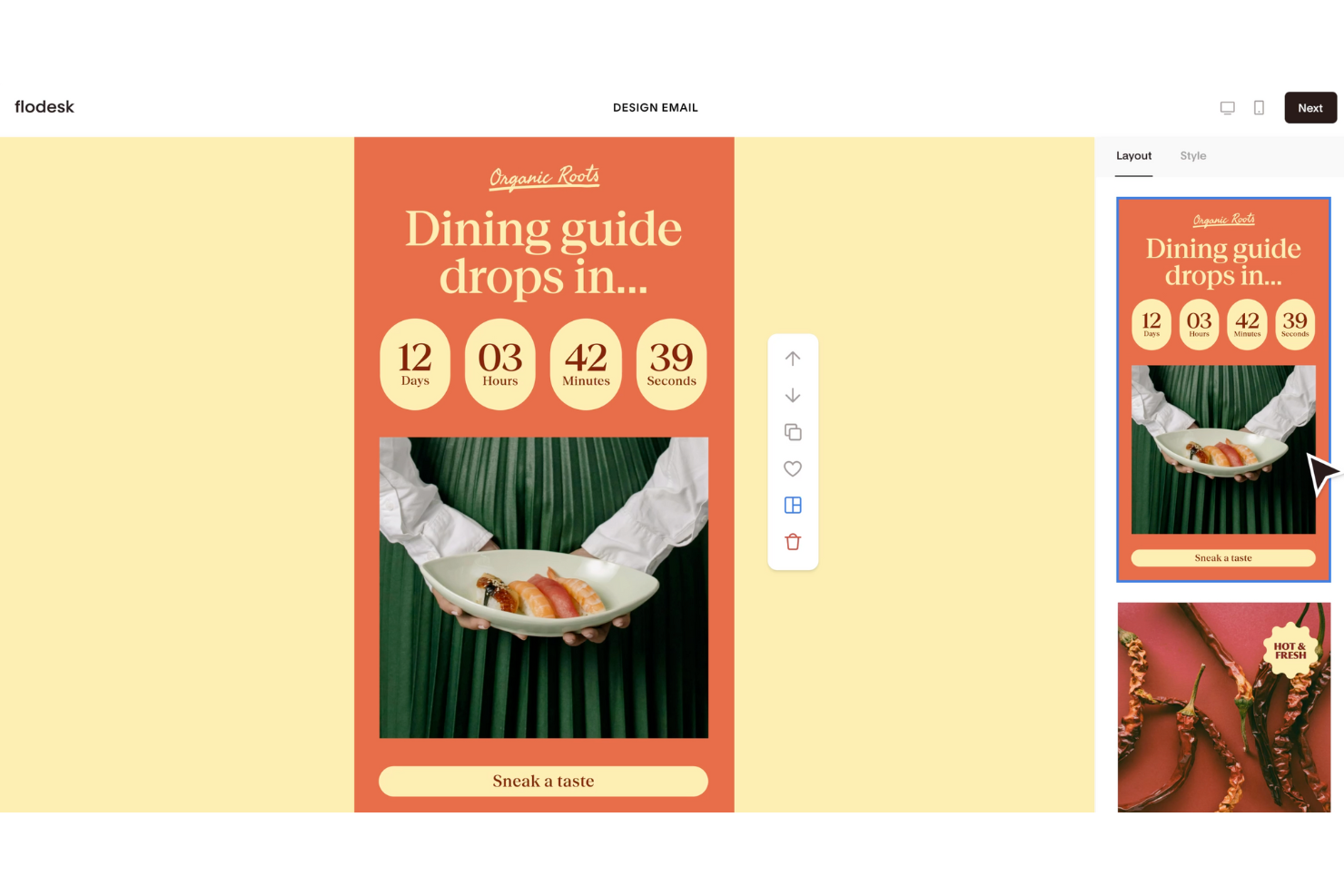
Flodesk is a free email marketing platform designed for users who want simple, visually appealing email creation without the technical hassle. Known for its clean design tools, it’s especially useful for small businesses and creatives looking to send polished campaigns effortlessly. With time-based urgency email features, Flodesk makes it easy to create engaging messages and automate workflows, helping you maintain consistent communication with your audience.
Why I Picked Flodesk
I picked Flodesk for its strength in creating time-based urgency emails that drive action through countdown timers and deadline-focused campaigns. This makes it easy to prompt subscribers to act quickly without overcomplicating setup. Combined with customizable templates and simple automations, Flodesk supports engaging campaigns while keeping email creation straightforward.
Flodesk Key Features
In addition to time-based urgency emails, Flodesk offers:
- Customizable Templates: Allows you to craft emails that reflect your brand's unique style with ease.
- Subscriber Management: Provides tools to manage your email list effectively, including segmentation and personalization.
- Performance Analytics: Offers insights into email performance, helping you make data-driven decisions.
Flodesk Integrations
Integrations include Shopify, Instagram, Canva, Zapier, and WordPress.
What's Free?
Flodesk offers a free plan that lets you use forms, landing pages, and list-building tools — but it doesn’t allow email sending under the “free” tier. However, it offers a 14-day free trial that gives full access to its email marketing features.
Pros and Cons
Pros:
- Segmentation tools enhance targeted email marketing campaigns
- Automation features for subscriber journeys (welcome series, triggers, etc.)
- Unified interface simplifies campaign creation and management
Cons:
- Limited integrations compared to larger email-marketing platforms
- Not ideal for very large or complex mailing needs

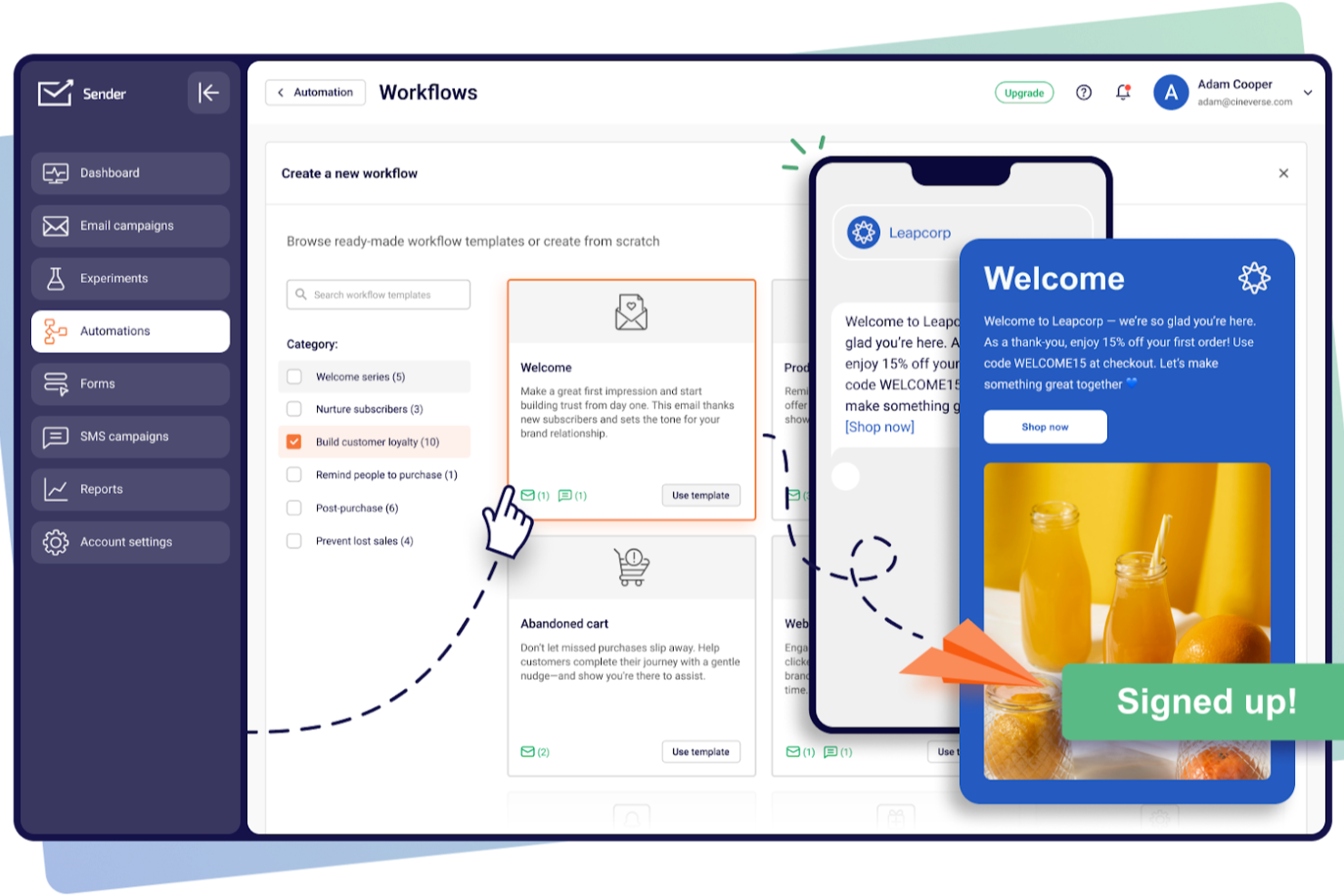
Designed for businesses seeking cost-effective email marketing solutions, Sender offers a robust platform to create, automate, and manage email campaigns without the complexity or expense often associated with such tools. It is particularly appealing to small businesses and startups looking to enhance their marketing efforts through a user-friendly interface and a generous free plan. By addressing the need for efficient communication with up to 2,500 subscribers and providing up to 15,000 emails per month at no cost, Sender effectively alleviates the challenge of managing customer engagement on a budget.
Why I Picked Sender
I picked Sender for its unique approach to offering a "Free Forever" plan that caters to small businesses and startups needing to manage up to 2,500 subscribers. This plan allows for sending 15,000 emails monthly, providing an excellent opportunity to engage with your audience without financial constraints. Additionally, Sender’s focus on high deliverability through monitored IP reputation ensures that your emails reach the intended recipients, which is crucial for maintaining customer engagement. The inclusion of dynamic content and A/B testing further allows you to personalize and optimize your campaigns, enhancing the effectiveness of your marketing efforts.
Sender Key Features
In addition to its standout free plan, I also found several features that enhance its appeal:
- Email Automation: Create and manage automated email sequences to streamline your marketing efforts.
- Template Library: Access over 1,600 customizable templates to design professional emails tailored to your brand.
- Analytics Dashboard: Monitor campaign performance with detailed insights and reports to make informed decisions.
- Integration Options: Seamlessly integrate with platforms like WordPress and WooCommerce to expand your marketing reach.
Sender Integrations
Integrations include WordPress, WooCommerce, Magento, PrestaShop, OpenCart, Joomla, Zapier, API for custom integrations, and Shopify.
Pros and Cons
Pros:
- User-friendly drag-and-drop builder
- Built-in SMS marketing support
- Unlimited automation workflows included
Cons:
- No built-in landing page builder
- Subscriber limits on lower tiers

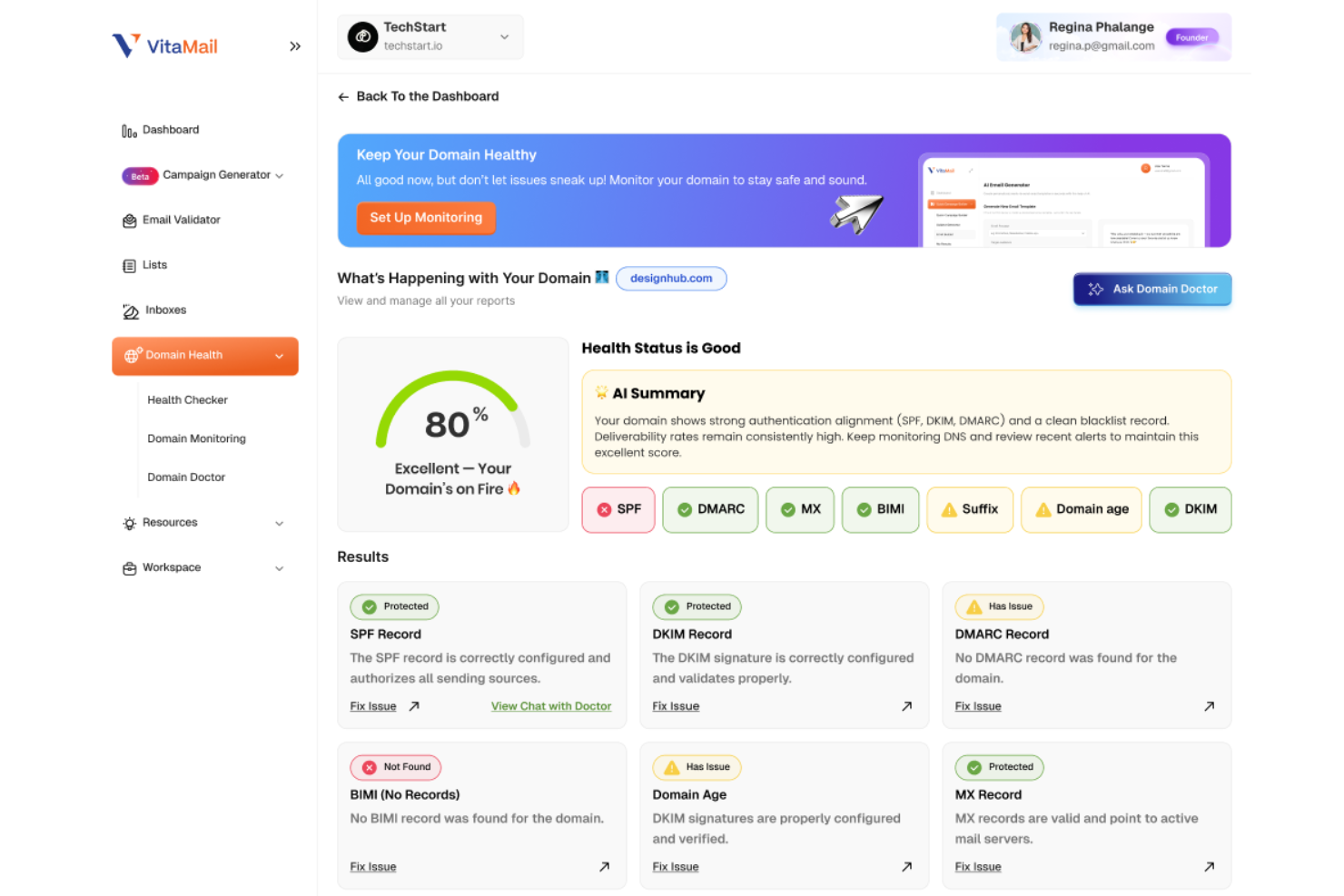
VitaMail helps you move from idea to ready-to-send email campaigns without juggling multiple tools, giving you AI writing support and list-quality safeguards in the same workspace. If you’re building newsletters, promotions, cold outreach, or transactional sequences, you’ll appreciate how it reduces the manual work of drafting emails while also protecting your deliverability.
Why I Picked VitaMail
I picked VitaMail because it blends creative email generation with deep deliverability protection—something many email marketing software tools still treat as separate. You can generate full campaign drafts and subject lines from a single prompt, which helps your team produce on-brand messages without staring at a blank page. Its built-in email validator then removes invalid and risky contacts, so your campaigns reach real inboxes instead of hard-bouncing. Paired with domain authentication checks (SPF, DKIM, DMARC), it gives you the creative tools to write better emails and the technical safeguards to ensure they arrive.
VitaMail Key Features
In addition to its core functionalities, VitaMail offers several other features that can benefit your email marketing efforts:
- Bulk Email List Upload: Allows CSV or XLSX file list imports so you can clean large contact lists quickly.
- Domain Health Checker: Audits sending domains for authentication records and monitors for blocklist issues, ensuring your emails reach inboxes.
- User-Friendly Dashboard: Provides an intuitive interface for managing and optimizing email marketing campaigns.
- Quick Campaign Scheduling: Lets you create quick, high-converting campaigns in five steps.
VitaMail Integrations
Native integrations are not currently listed by VitaMail; however, the platform does offer an API for custom connections.
What's Free?
VitaMail offers a free one-month trial. For those who need more flexibility, they also offer pay-per-use pricing.
Pros and Cons
Pros:
- Domain health dashboard flags SPF, DKIM, and DMARC issues
- AI subject line generation speeds up copy creation
- Full campaign drafts reduce marketing prep time
Cons:
- Analytics features do not track long-term performance trends
- Lack of native integrations limits automated campaign workflows


Mailtrap is a tool designed for developers and QA teams to test email sending and deliverability. It allows users to capture, inspect, and debug emails in a safe environment, preventing real recipients from receiving test emails.
Why I picked Mailtrap: Mailtrap's free plan provides a safe sandbox environment for testing emails, which is perfect for developers needing to ensure their emails are correctly formatted and delivered. You can inspect and debug emails without them reaching real inboxes. The platform supports email testing with HTML support and spam score checks. These features make it an ideal choice for teams focused on email testing.
Standout features & integrations:
Features include email inspection tools that let you debug and analyze emails in detail. The spam score checker helps you improve deliverability by identifying potential issues. Mailtrap also provides a user-friendly interface for managing your email testing environment.
Integrations include GitHub, GitLab, Bitbucket, Heroku, Jenkins, Travis CI, CircleCI, Zapier, Slack, and PagerDuty.
What's free? Mailtrap offers a free-forever plan with limitations on the number of emails you can test monthly and the number of inboxes available.
Pros and Cons
Pros:
- Ideal for developers and QA teams
- HTML support for emails
- Spam score checker included
Cons:
- Advanced features require upgrade
- Limited inboxes in free plan


MailerLite is an email marketing platform catering to small businesses and freelancers. It offers tools for creating, managing, and analyzing email campaigns, focusing on simplicity and ease of use to enhance user experience.
Why I picked MailerLite: MailerLite's free plan provides a straightforward interface, making it perfect for users who prioritize ease of navigation. You can send up to 12,000 emails per month to a maximum of 1,000 subscribers. The platform includes simple drag-and-drop editors and basic automation features. This makes it a great choice for teams looking to manage email marketing without hassle.
Standout features & integrations:
Features include a drag-and-drop editor that allows you to design emails effortlessly. MailerLite offers automation tools to streamline sending emails based on user actions. You can also access landing page creation tools to support your marketing campaigns.
Integrations include Shopify, WooCommerce, WordPress, Zapier, Stripe, Facebook, Squarespace, Mailchimp, Google Sheets, and PayPal.
What's free? MailerLite offers a free-forever plan with limitations on the number of subscribers and emails you can send each month.
Pros and Cons
Pros:
- No credit card required
- Supports up to 1,000 subscribers
- Landing page creation tools
Cons:
- No phone support in free plan
- Basic reporting tools only

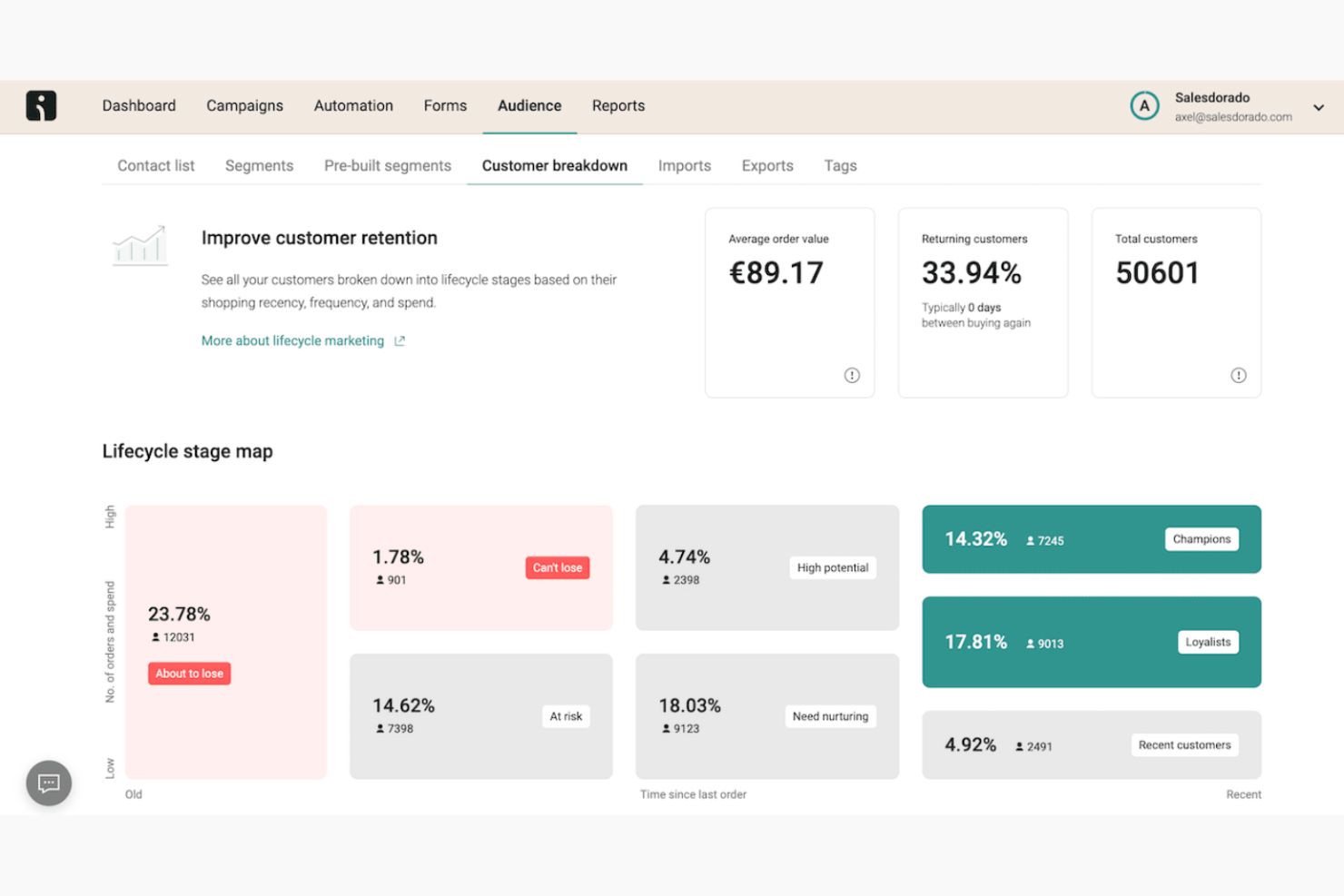
Omnisend is a marketing platform tailored for ecommerce businesses, providing email and SMS marketing solutions. It automates marketing tasks, enabling businesses to create personalized campaigns and reach customers more effectively.
Why I picked Omnisend: Omnisend's free plan includes access to automation workflows, making it ideal for businesses that want to streamline their marketing efforts. You can create email and SMS campaigns with ease. The platform supports segmentation and personalized messaging, aligning with its focus on automation features. It's perfect for teams looking to enhance customer communication.
Standout features & integrations:
Features include advanced automation that lets you set up automated workflows quickly. The drag-and-drop editor simplifies the creation of email and SMS campaigns. Omnisend also provides detailed reporting to help you analyze the performance of your marketing efforts.
Integrations include Shopify, WooCommerce, BigCommerce, Magento, Wix, PrestaShop, OpenCart, Zapier, Stripe, and Facebook.
What's free? Omnisend offers a free-forever plan with limitations on the number of emails and SMS messages you can send each month.
Pros and Cons
Pros:
- Detailed performance reporting
- Drag-and-drop campaign editor
- Easy automation setup
Cons:
- No phone support
- Basic reporting in free version
New Product Updates from Omnisend

Omnisend Enhances Cross-Store Segment Management
Omnisend introduces Copy Segments Across Stores that lets you duplicate and transfer audience segments between stores, helping teams manage multiple stores more efficiently and maintain consistent targeting. For more information, visit Omnisend's official site.
 .
.

EmailOctopus is an email marketing platform primarily aimed at small businesses and startups. It facilitates the creation and management of email campaigns, focusing on deliverability and ease of use to reach target audiences effectively.
Why I picked EmailOctopus: EmailOctopus's free plan offers high deliverability rates, which is essential for ensuring your emails reach recipients' inboxes. You can send up to 2,500 emails per month to a maximum of 500 subscribers. The platform includes basic email templates and campaign reporting features. These elements make it a strong choice for teams focused on maximizing email engagement.
Standout features & integrations:
Features include a user-friendly email editor that simplifies campaign creation. EmailOctopus provides basic reporting tools to help you understand campaign performance. The platform also offers customizable email templates to maintain brand consistency.
Integrations include Zapier, WordPress, Shopify, Squarespace, WooCommerce, Mailchimp, Stripe, Google Sheets, Typeform, and Eventbrite.
What's free? EmailOctopus offers a free-forever plan with limitations on the number of subscribers and emails you can send each month.
Pros and Cons
Pros:
- No credit card required
- Supports up to 500 subscribers
- High email deliverability rates
Cons:
- Limited automation options in free plan
- Limited monthly sends in free plan


Benchmark Email is an email marketing platform aimed at small to medium-sized businesses. It provides tools for creating and managing email campaigns, with a focus on user-friendly design and automation.
Why I picked Benchmark Email: Benchmark Email's free plan includes an email builder and customizable templates, which are perfect for creating simple and effective email campaigns. You can access automation features and reporting tools without needing a credit card. It's ideal for teams that want straightforward email templates without complexity. The free version also supports list building and campaign optimization, aligning with its simple email template USP.
Standout features & integrations:
Features include an easy-to-use email builder, customizable templates, and automation tools. You can also access landing pages and reporting features to track your campaigns. These elements make it easier for your team to manage and optimize email marketing efforts.
Integrations include Shopify, Zapier, WordPress, Google Analytics, PayPal, Salesforce, HubSpot, Facebook, Twitter, and LinkedIn.
What's free? Benchmark Email offers a free-forever plan with limitations on the number of emails you can send per month and access to certain features.
Pros and Cons
Pros:
- Suitable for small businesses
- Customizable email templates
- No credit card required for free plan
Cons:
- Basic reporting features
- Limited monthly email sends


Cyberimpact is an email marketing platform tailored for small to medium-sized enterprises and non-profit organizations in Canada. It focuses on marketing automation, landing page creation, and performance analysis to enhance customer engagement.
Why I picked Cyberimpact: Cyberimpact's free plan offers access to customizable email templates and automated email scenarios. This makes it ideal for businesses looking for simple solutions to manage their email marketing. The platform provides high-conversion landing pages and real-time performance tracking, aligning with its USP of being best for Canadian businesses. Its bilingual support and compliance with Canada's Anti-Spam Law are key differentiators.
Standout features & integrations:
Features include marketing automation that helps you schedule and send emails automatically. The email editor is intuitive, allowing you to design emails without hassle. Performance analysis tools let you track and improve your campaign results effortlessly.
Integrations include Shopify, Google Analytics, Facebook, PayPal, WordPress, Salesforce, LinkedIn, Twitter, Zapier, and HubSpot.
What's free? Cyberimpact offers a free-forever plan with limitations on the number of emails you can send monthly and access to certain advanced features.
Pros and Cons
Pros:
- Real-time performance tracking
- Compliance with CASL regulations
- Bilingual support available
Cons:
- Restricted integration options in free plan
- No 24/7 customer support
Other Free Email Marketing Software
Here are some additional email marketing software options that also offer free plans or trials. While these tools didn’t make it onto my shortlist, they’re still worth checking out:


Free Email Marketing Software Selection Criteria
When selecting the best free email marketing software to include in this list, I considered common buyer needs and pain points like budget constraints and limited technical resources. I also used the following framework to keep my evaluation structured and fair:
Core Functionality (25% of total score)
To be considered for inclusion in this list, each solution had to fulfill these common use cases:
- Create and send email campaigns
- Manage contact lists
- Provide basic analytics
- Offer email templates
- Support automation features
Additional Standout Features (25% of total score)
To help further narrow down the competition, I also looked for unique features, such as:
- Advanced segmentation capabilities
- Multichannel marketing options
- Customizable landing pages
- AI-driven insights
- Multilingual support
Usability (10% of total score)
To get a sense of the usability of each system, I considered the following:
- Intuitive interface design
- Easy navigation
- Minimal learning curve
- Availability of drag-and-drop editors
- Clear and concise instructions
Onboarding (10% of total score)
To evaluate the onboarding experience for each platform, I considered the following:
- Availability of training videos
- Access to interactive product tours
- Use of templates for quick setup
- Support through chatbots and live chat
- Offering of webinars for guidance
Customer Support (10% of total score)
To assess each software provider’s customer support services, I considered the following:
- Availability of 24/7 support
- Presence of a knowledge base
- Access to community forums
- Responsiveness of support team
- Availability of multiple support channels
Value For Money (10% of total score)
To evaluate the value for money of each platform, I considered the following:
- Competitive pricing structure
- Availability of free plan
- Range of features in free version
- Upgrade options for scaling
- Cost-effectiveness compared to competitors
Customer Reviews (10% of total score)
To get a sense of overall customer satisfaction, I considered the following when reading customer reviews:
- Consistency of positive feedback
- Commonly mentioned pain points
- Satisfaction with key features
- Feedback on customer support
- Overall recommendation rate
How to Choose Free Email Marketing Software
Complex feature lists and pricing structures can make it hard to figure out what you’re really getting from a free email marketing software. To help you stay focused as you work through your software selection process, here are some factors to keep in mind:
| Factor | What to Consider |
| Free Offer Scope | Check what’s included in the free plan. Look for limits on emails sent, contacts, and features available without upgrading. |
| Scalability | Consider whether the software can grow with your needs. Look for options to upgrade as your email list and campaign complexity increase. |
| Integrations | Ensure the software connects with tools your team already uses, like CRM systems, ecommerce platforms, and analytics tools. |
| Ease of Use | Evaluate the interface and setup process. Choose software that your team can navigate easily without extensive training or a steep learning curve. |
| Customer Support | Look for available support channels, like live chat or a help center, to assist you when issues arise. |
| Analytics | Examine the level of detail in reporting features. You’ll want insights into open rates, click-through rates, and other metrics to measure your success. |
| Automation | Determine the complexity of automation features. Ensure you can set up workflows for automated emails to save time and improve engagement. |
| Customization | Check how customizable email templates and campaigns are. You’ll want to maintain brand consistency without needing extensive design skills. |
If you want a deeper dive, check out our full guide on how to choose the right email marketing platform.
What Is Free Email Marketing Software?
Email marketing software is a tool that helps businesses send marketing emails, manage contact lists, and analyze campaign performance. These tools typically offer free plans with limited features or usage, such as a cap on the number of emails sent or contacts managed.
Marketing professionals, small business owners, and startups generally use these tools to engage with their audience without incurring high costs. Features like automation, analytics, and customizable templates help users efficiently manage campaigns, understand audience engagement, and maintain brand consistency.
Features of Free Email Marketing Software
Let’s go over the features commonly found in email marketing software, and which ones are usually included in free vs. paid plans.
Typically Free Email Marketing Software Features
- Email templates: Pre-designed layouts allow you to quickly create professional-looking emails, saving time and effort.
- Basic analytics: Provides insights into open rates and click-through rates, helping you measure campaign success.
- Contact management: Enables you to organize and segment your email lists for targeted messaging.
- Automation: Allows you to set up simple workflows for sending emails automatically based on triggers.
- Drag-and-drop editor: Simplifies the email creation process, making it easy to design emails without coding skills.
- Daily send limits: Imposes a cap on the number of emails you can send per day, helping manage resources in free plans.
- Sign-up forms: Lets you collect subscriber information directly from your website, growing your email list.
- Basic segmentation: Enables you to divide your audience into groups for more personalized communication.
Typically Paid Email Marketing Software Features
- Advanced segmentation: Offers detailed audience targeting, allowing for more personalized and effective campaigns.
- A/B testing: Lets you test different email versions to optimize content and improve engagement rates.
- Advanced analytics: Provides deeper insights into customer behavior and campaign performance for better decision-making.
- Customizable landing pages: Allows you to create unique pages that align with your email campaigns and drive conversions.
- Multichannel marketing: Integrates email with SMS, social media, and other channels for a cohesive marketing strategy.
- Unlimited sends: Removes restrictions on the number of emails you can send, supporting larger campaigns.
- Priority support: Offers faster response times and dedicated assistance, ensuring efficient troubleshooting.
- Advanced automation: AI powered email marketing tools supports complex workflows and triggers, enhancing the efficiency of your marketing efforts.
Benefits of Free Email Marketing Software
Implementing free email marketing software provides several benefits for your team and your business. Here are a few you can look forward to:
- Cost-effective solution: Free plans allow you to manage email marketing without impacting your budget, making it ideal for startups and small businesses.
- Ease of use: User-friendly interfaces and drag-and-drop editors make it simple for anyone on your team to create and send emails.
- Basic automation: Automating simple tasks saves time and ensures consistent communication with your audience.
- Audience growth: Sign-up forms and contact management help you build and organize your email list efficiently.
- Performance insights: Basic analytics provide valuable data on email engagement, helping you understand what works.
- Customization: Email templates let you maintain brand consistency without needing design skills.
- Scalability: Free plans offer a foundation to start with, allowing you to upgrade as your business and email needs grow.
Costs and Pricing of Free Email Marketing Software
I realize you came to this article looking for the best email marketing software options that are available for free. However, since free plans only offer limited features, there's a good chance you'll need to scale your plan up in the future.
The table below summarizes common plans, their average prices, and typical features included in email marketing software solutions:
Plan Comparison Table for Email Marketing Software
| Plan Type | Average Price | Common Features |
| Free Plan | $0 | Basic email templates, contact management, basic analytics, daily send limits, and simple automation. |
| Personal Plan | $5-$25/ user/month | Advanced templates, increased send limits, A/B testing, and customer support. |
| Business Plan | $30-$100/ user/month | Advanced automation, detailed analytics, landing page creation, and multichannel marketing. |
| Enterprise Plan | $100+/ user/month | Custom integrations, priority support, unlimited sends, and advanced segmentation. |
Free Email Marketing Software FAQs
Here are some answers to common questions about free email marketing software:
Can email marketing be done for free?
Yes, many tools offer free plans that cover essential features like sending emails, managing contacts, and basic analytics. These free versions are ideal for small businesses or startups looking to engage with their audience without incurring costs.
What are the limitations of free email marketing software?
Free email marketing software usually comes with limits on the number of emails sent per month and the number of contacts you can manage. Advanced features like A/B testing or detailed analytics may also be restricted to paid plans, so consider your needs carefully.
Are there any hidden costs in free email marketing software?
While the software itself may be free, watch for costs related to exceeding email or contact limits. Some providers may charge for additional features or premium support. Always review the terms of the free plan to avoid unexpected expenses.if you want a deeper dive, check out our full guide on how to choose the right email marketing platform.
What's Next?
If you're in the process of researching email marketing softwares, connect with a SoftwareSelect advisor for free recommendations.
You fill out a form and have a quick chat where they get into the specifics of your needs. Then you'll get a shortlist of software to review. They'll even support you through the entire buying process, including price negotiations.