
35 Best Digital Marketing Platforms: Reviewed For 2026

20 Best Digital Marketing Platforms Shortlist
Here’s my pick of the best digital marketing platforms along with what each does best:


Navigating the digital marketing world can be tricky. You're faced with countless options, each promising to be the best fit for your needs. As someone who's spent years testing and reviewing software independently, I get it. Your team needs a platform that fits your unique challenges without the hassle.
In this article, I'll share my top picks for digital marketing platforms, backed by thorough research and real-world testing. You'll find solutions that boost your marketing efforts and address your pain points. Together, we'll explore features, user benefits, and what makes each option stand out. Let's find the right fit for you.
Why Trust Our Software Reviews
We’ve been testing and reviewing marketing software since 2022. As marketing experts ourselves, we know how critical and difficult it is to make the right decision when selecting software.
We invest in deep research to help our audience make better software purchasing decisions. We’ve tested more than 2,000 tools for different marketing use cases and written over 1,000 comprehensive software reviews. Learn how we stay transparent & our software review methodology.
Best Digital Marketing Platforms Summary
| Tool | Best For | Trial Info | Price | ||
|---|---|---|---|---|---|
| 1 | Best for AI-powered on-brand content creation | Free demo available | Pricing upon request | Website | |
| 2 | Best for automated webinars | 14-day free trial | From $65/month (billed annually) | Website | |
| 3 | Best for referral marketing | Free trial available | From $76/month (when billed annually) | Website | |
| 4 | Best for multi-source data | Free demo available | Pricing upon request | Website | |
| 5 | Best for planning digital marketing campaigns | Free plan + free demo + 14-day free trial available | From $10/user/month (billed annually) | Website | |
| 6 | Best for automated report generation | Free trial + free demo available | From $42/month (billed annually) | Website | |
| 7 | Best for digital marketing asset management | Free trial + free demo available | From $9/member/month (billed annually) | Website | |
| 8 | Best for real-time customer data activation | Free plan + free demo available | From $20/month | Website | |
| 9 | Best for native video campaign management | Free demo available | Available upon request | Website | |
| 10 | Best for AI-driven customer engagement | 7-day free trial available | From $24.17/month (billed annually) | Website | |
| 11 | Best for social media marketing | 14-day free trial available | From $199/month (billed annually) | Website | |
| 12 | Best for website analysis | Free plan available | Free | Website | |
| 13 | Best for ecommerce digital marketing | Free plan available | From $16/month | Website | |
| 14 | Best for driving social media engagement | 30-day free trial +free demo available | From $199/seat/month | Website | |
| 15 | Best for advanced automation workflows | 14-day free trial + free demo available | From $15.58/month (billed annually) | Website | |
| 16 | Best for SEO | 7-day free trial + free demo available | From $39/month (billed annually) | Website | |
| 17 | Best for collecting marketing data | 14-day free trial | From $39/month; the price depends on where you’re sending your data | Website | |
| 18 | Best for monitoring digital marketing data | Free trial available | Pricing upon request | Website | |
| 19 | Best omnichannel digital marketing platform | Free demo available | From $114k/year | Website | |
| 20 | Best for influencer marketing | Free demo available | Pricing upon request | Website |


Best Digital Marketing Platforms Reviews
Here are my top 20 picks for the best digital marketing platforms, including key features, pros/cons, and best use cases. I’ll add additional platform options at the bottom of this article, so keep reading if you haven’t found what you need yet!
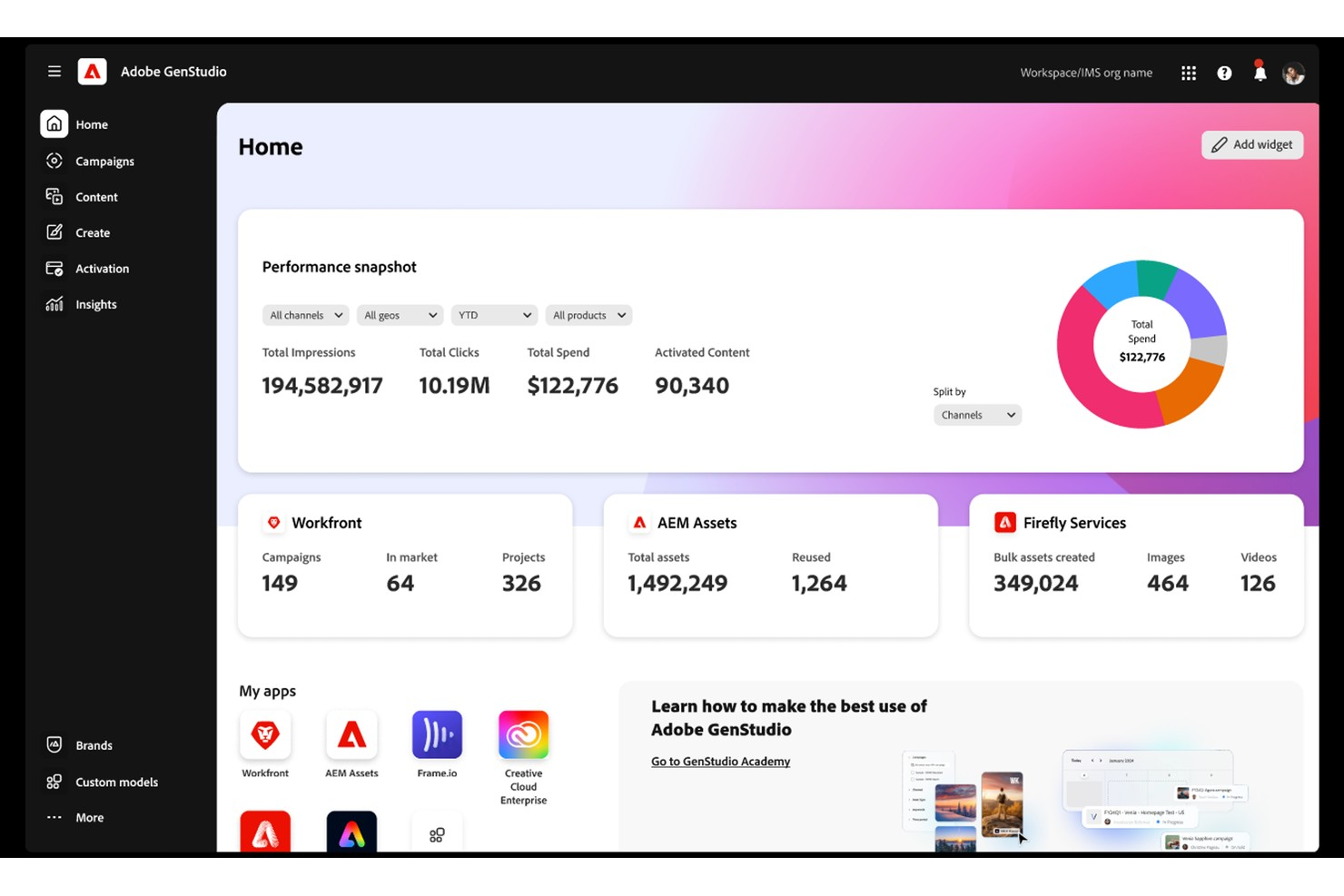
Adobe GenStudio for Performance Marketing is a generative AI-first enterprise platform designed to accelerate the content supply chain for digital marketing teams. It unifies the creative and marketing functions, allowing large organizations to plan, create, and manage on-brand campaign assets across paid media, email, and social channels from a single interface. If your business relies on rapid content production and tight integration with creative workflows, GenStudio addresses those needs with automation and centralized asset management.
Who Is Adobe GenStudio for Performance Marketing Best For?
Adobe GenStudio for Performance Marketing is a strong choice for enterprise marketing teams and agencies that need to manage high-volume, multi-channel campaigns while maintaining strict brand consistency.
Why I Picked Adobe GenStudio for Performance Marketing
When I need a digital marketing platform that prioritizes brand consistency and creative quality, Adobe GenStudio stands out for its AI-powered on-brand content creation. The platform uses generative AI to help teams produce campaign assets that align with established brand guidelines, reducing the risk of off-brand messaging. I appreciate how GenStudio automates content generation while still allowing for creative input and review, which is essential for marketing teams managing multiple campaigns. Its built-in brand guardrails and approval workflows make it easier to maintain a unified brand voice across all digital channels.
Adobe GenStudio for Performance Marketing Key Features
Some other features in Adobe GenStudio that digital marketing teams may find useful include:
- Asset versioning: Track changes and maintain a history of all creative assets for easy reference and compliance.
- Collaborative editing: Multiple team members can work together on campaign assets in real time within the platform.
- Automated campaign workflows: Set up and manage multi-step approval processes to keep campaigns moving efficiently.
- Performance analytics dashboard: Monitor asset usage and campaign performance with built-in reporting tools.
Adobe GenStudio for Performance Marketing Integrations
Integrations include Adobe Workfront, Adobe Experience Manager, Adobe Express, Meta Ads, LinkedIn Ads, TikTok Ads, Amazon Ads, and more.
Pros and Cons
Pros:
- Commercially safe AI image generation
- Deep integration with Adobe tools
- Native persona-based personalization
Cons:
- Can be complex for smaller marketing teams
- Requires Adobe ecosystem for full functionality

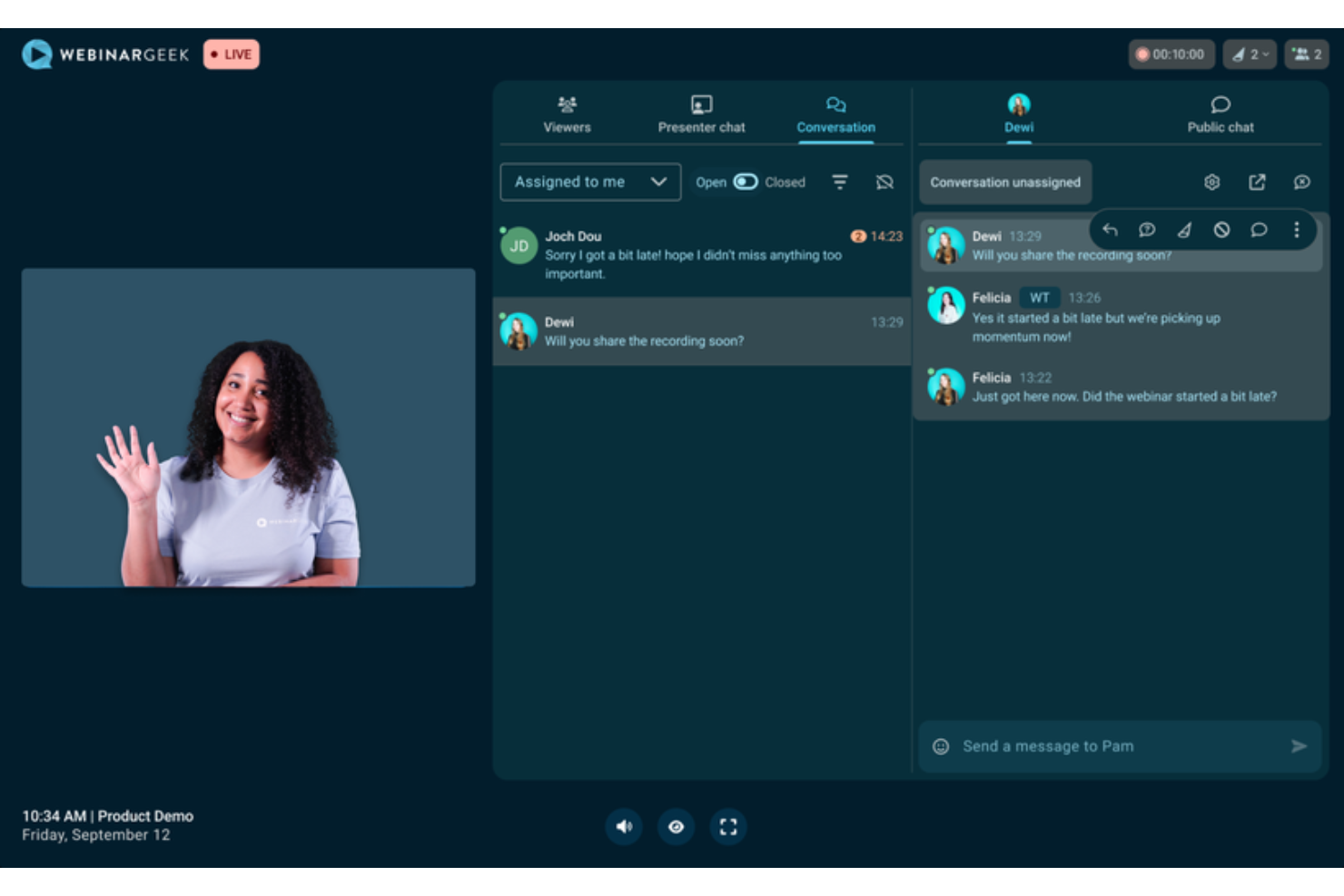
WebinarGeek gives digital marketers a way to create interactive webinars that drive audience engagement and lead generation. The platform is designed for teams that want to manage live or automated webinars without technical barriers or complex setup. If you need a solution that combines marketing automation, analytics, and audience interaction in one place, WebinarGeek is worth considering.
Who Is WebinarGeek Best For?
WebinarGeek suits marketing teams and small to midsize businesses that need a dedicated platform for hosting, managing, and analyzing webinars as part of their digital marketing strategy.
Why I Picked WebinarGeek
I picked WebinarGeek because of its specialized focus on evergreen content and automated scheduling. It allows users to convert recordings into automated sessions that maintain interactive elements like polls and CTAs. Additionally, WebinarGeek stands out with its advanced customization options. The platform lets you fully tailor the look and feel of your webinars, from custom registration pages to branded email invitations and in-webinar visuals. The ability to use your own colors, logos, and backgrounds ensures every touchpoint aligns with your brand identity. This level of control is especially valuable when you need to reinforce brand recognition and professionalism throughout your digital marketing campaigns.
WebinarGeek Key Features
Some other features that make WebinarGeek useful for digital marketing teams include:
- Live webinars: Host real-time sessions or set up pre-recorded webinars that run automatically for ongoing lead generation.
- Interactive audience tools: Use polls, quizzes, and Q&A to engage viewers and collect feedback during your webinars.
- Email marketing automation: Set up automated email reminders, follow-ups, and confirmations to nurture registrants and attendees.
- Detailed analytics dashboard: Access real-time and post-event data on attendance, engagement, and viewer behavior to inform your marketing strategy.
WebinarGeek Integrations
Integrations include HubSpot, Salesforce, Pipedrive, Mailchimp, ActiveCampaign, Google Tag Manager, Stripe, and more.
Pros and Cons
Pros:
- Customizable branding for registration and emails
- GDPR-compliant analytics and consent management
- Fully browser-based attendee experience for webinars
Cons:
- No built-in landing page A/B testing
- Limited advanced marketing automation features


Referral Factory is a referral marketing platform that enables businesses to create, launch, and manage customized referral programs without needing technical expertise. It helps companies drive customer acquisition through personalized campaigns, automated tracking, and flexible reward structures—all designed to fuel word-of-mouth growth.
Why I Picked Referral Factory: I picked Referral Factory for its intuitive no-code drag-and-drop builder, which allows marketing teams to quickly deploy branded referral programs without relying on developers. For businesses wanting more control, the platform also supports HTML uploads for fully customized designs.
In addition to easy program creation, Referral Factory stands out for its built-in promotional tools—such as pop-ups, widgets, email templates, and QR codes—that help maximize campaign visibility across multiple channels. Its support for over 20 languages and the ability to offer rewards in multiple currencies (including cash, discounts, and vouchers) make it an ideal solution for businesses targeting diverse and global audiences.
Referral Factory Standout Features & Integrations:
Features include automated referral tracking and analytics to monitor program performance, access to customizable referral templates designed for different industries, flexible reward management supporting multiple currencies, affiliate marketplace access to expand reach, and fraud prevention features like ReCaptcha verification and system alerts.
Integrations include HubSpot, Salesforce, Stripe, Zoho, Intercom, Pipedrive, ServiceTitan, Monday.com, Zapier, API, and Webhook connections.
Pros and Cons
Pros:
- Strong multi-language, multi-currency support
- Highly customizable referral pages
- Easy no-code program builder
Cons:
- Teammate access only available on higher-paid tiers
- Limited native CRM features

Adverity is a data platform designed for marketing teams to connect, manage, and analyze their data in one place. It helps you collect data from various sources, prepare it for analysis, and share insights across your organization.
Why I Picked Adverity: I picked Adverity because it helps marketing teams manage and analyze data from many sources in one place. Its data transformation feature lets you clean and reformat extracted data so it’s consistent and ready for analysis, which is essential when tracking digital campaigns across multiple platforms. You can also automatically load this data into your preferred storage location, like a data warehouse, which keeps everything organized and accessible. For marketers, this means faster insights and fewer manual data handling tasks.
Adverity Standout Features & Integrations
Features multichannel tracking, which collects marketing campaign performance data across multiple channels, providing a holistic view of your marketing efforts. The platform also offers campaign insights, analyzing historical and current marketing campaigns to inform future strategy, and report for enhanced data analysis capabilities.
Integrations include Google, Meta, TikTok, Google BigQuery, Looker Studio, Facebook Ads, Amazon Advertising, Hubspot, Salesforce, Amazon S3, Snowflake, and Microsoft Azure.
Pros and Cons
Pros:
- Scalable for businesses of various sizes
- Ability to create personalized dashboards
- Can harmonize data from various sources
Cons:
- The initial setup can be time-consuming
- Certain configurations may require technical knowledge
New Product Updates from Adverity
Adverity Adds Real-Time Authorization Status for API Connections
Adverity has introduced an
is_authorized
flag in the Management API that provides more accurate, real-time visibility into connection authorization status. For more information, visit Adverity's official site.
 .
.

Wrike provides digital campaign management tools that can help you create high-performing assets and make necessary adjustments when necessary.
Why I picked Wrike: When working with a marketing team, Wrike will help synchronize your team’s marketing efforts to plan and complete campaigns faster. You can use the platform to launch new campaigns immediately and fill out request forms that automatically create and assign marketing tasks to the right person. Wrike provides marketing campaign templates to help break down your new campaign into manageable phases.
Wrike is suitable for mid-sized and large enterprises looking for tools to help teams collaborate efficiently, especially if their teams are remote. You can integrate marketing data from various channels, such as Google Ads or Amazon Ads, and get the insights you need to make effective decisions. Also, Wrike provides a visual dashboard showing your campaigns on one centralized screen where you can track performance and make adjustments.
Wrike Standout Features and Integrations
Features include workspaces, dynamic request forms, campaign templates, AI analysis, calendar view, Kanban-style board, Gantt charts, budget management, job roles, effort management, and proofing capabilities.
Integrations include GoTo Webinar, Pipedrive, Orange Logic, Bynder, Widen Collective, Jotform, DoorLoop, Office Timeline, Hubstaff, HoneyBook, Basecamp, and Resource Guru.
Pros and Cons
Pros:
- Easy to set up projects
- Agile communication tools
- Individual and team dashboards
Cons:
- Mobile version has limited functionality
- Some automation is poor
New Product Updates from Wrike

Streamlining Workspaces with New Updates
Wrike announces custom space templates, AI Agents in Wrike Labs, and a new Guage widget to improve project management. For more information, visit Wrike's official site.


DashThis is an automated marketing reporting tool designed to create comprehensive and visually appealing reports for digital marketers.
Why I Picked DashThis: I like its ability to generate automated reports using preset templates and widgets. This feature lets you spend less time on manual data entry and more time analyzing and strategizing. With templates tailored specifically for PPC, SEO, social media, and ecommerce, you can create reports that are tailored to each of your marketing channels. This means you can quickly identify which campaigns are performing well and which ones need improvement, allowing you to make data-driven decisions. The automated nature of these reports also ensures you're always working with the most up-to-date information.
DashThis Standout Features & Integrations
Features include customizable dashboards for efficient data presentation and white-label options that make it possible to tailor reports to match your brand's identity, enhancing professionalism.
Integrations include Google Analytics 4, Google Ads, Facebook Ads, Instagram Ads, LinkedIn Ads, TikTok Ads, YouTube, HubSpot, Mailchimp, SEMrush, Moz, and Shopify.
Pros and Cons
Pros:
- Pre-built reporting templates
- Integrates with multiple marketing tools
- Customizable dashboards
Cons:
- Lacks broader digital marketing features, like planning
- May take time to customize your dashboard for your specific needs
New Product Updates from DashThis

DashThis Introduces AI Insights Pro for Smarter Marketing Analysis
DashThis introduces AI Insights Pro with Chat Mode and Dashboard Context to deliver more personalized and interactive marketing analysis. For more information, visit DashThis's official site.
 .
.

Smartsheet is a project and work management platform that offers tailored solutions for digital marketers to manage their operations. Some of these features include reports and dashboards, scheduling, resource management, and approval workflows.
Why I Picked Smartsheet: Smartsheet helps digital marketers with its digital asset management feature, Brandfolder. This is a space where you can store all your assets and even view how they're performing. Furthermore, I like that the platform offers a centralized place to collaborate on these assets, with approval workflows allowing for on-asset annotation, version control, and reviews and approvals. This ensures that all comments and notes are consolidated in one place for anyone to access at any time, contributing to more transparency across digital marketing projects.
Smartsheet Standout Features & Integrations
Features include multiple project views, like cards, Gantt charts, calendars, resource management tools, no-code automated workflows, and an AI assistant to help users create graphs or access general guidance.
Integrations include Box, DocuSign, Jira, Microsoft Office 365, Tableau, Salesforce, ServiceNow, Dropbox, OneDrive, Evernote, Slack, Google Workspace, Adobe Creative Cloud, GitHub, Zapier, and more.
Pros and Cons
Pros:
- Capacity and resource allocation features
- Strong collaboration features on digital assets
- Automated workflows for repetitive tasks
Cons:
- Proofing of visual assets are only available on higher-tier plans
- Mobile app could be improved
New Product Updates from Smartsheet

Smartsheet Adds Direct Data Import to Existing Sheets
Smartsheet introduces direct data import to existing sheets in table view. This update lets you import CSV, XLS, and XLSX files directly into sheets, reducing manual work and speeding up data setup. For more information, visit Smartsheet's official site.
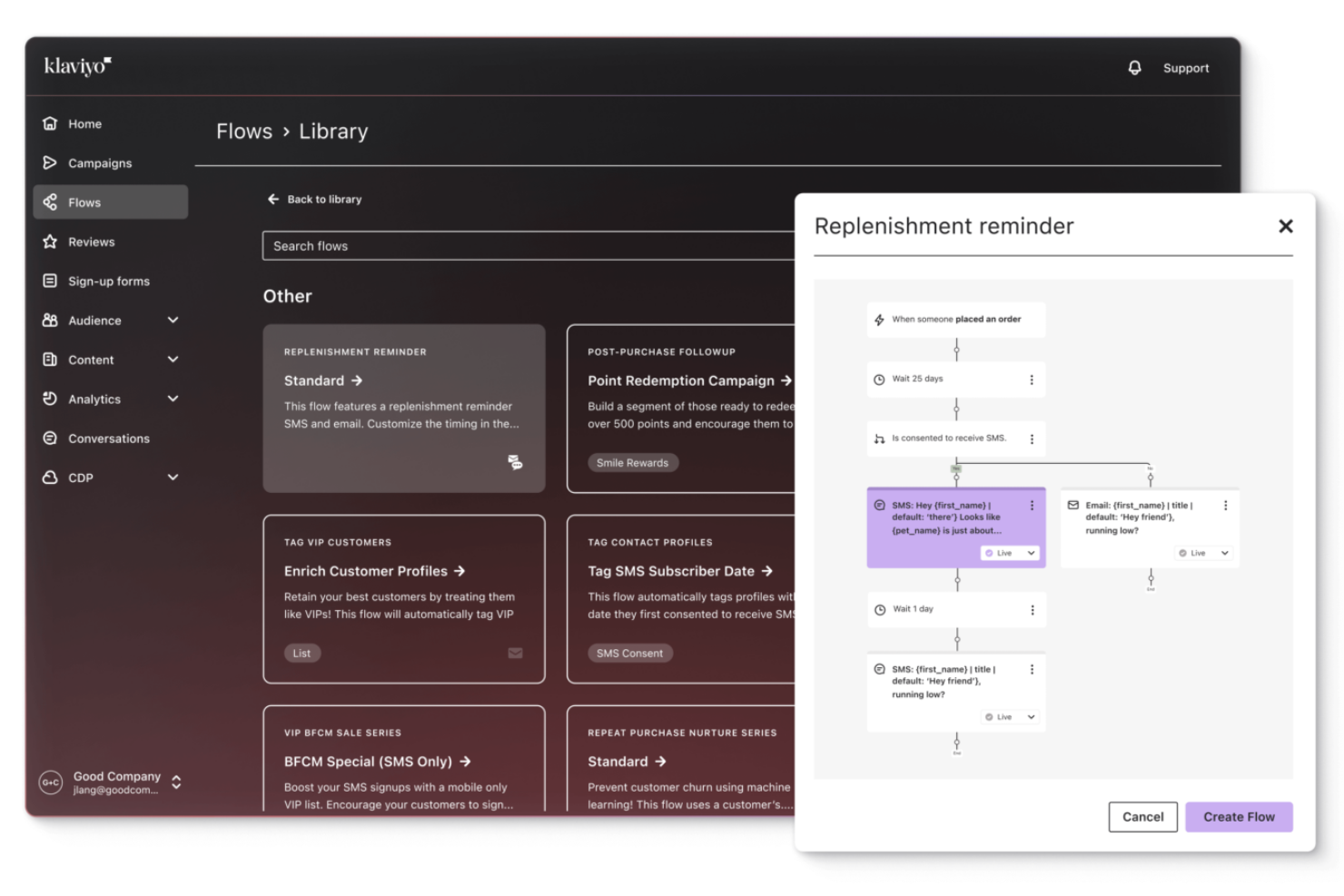
Klaviyo offers a personalized approach to digital marketing, making it a valuable choice for businesses looking to enhance customer engagement and streamline their marketing efforts. With its robust customer data platform, Klaviyo is particularly appealing to B2C businesses and marketing professionals seeking to unify customer data and activate it in real-time.
Why I Picked Klaviyo
I picked Klaviyo for its unique ability to unify customer data and activate it in real-time, a critical need for digital marketing platforms. The platform’s AI-driven insights allow you to forecast customer behavior and personalize marketing efforts across channels like email and SMS.
Additionally, Klaviyo's integration with over 350 applications ensures that your marketing team can access and utilize data from various sources, enhancing your ability to deliver targeted and effective marketing campaigns.
Klaviyo Key Features
In addition to its data unification and activation capabilities, Klaviyo offers several key features that make it a standout choice for digital marketing platforms.
- Omnichannel Marketing: Supports marketing efforts across various channels, including email, SMS, and social media, ensuring consistent customer engagement.
- Customer Segmentation: Provides tools for creating hyper-specific customer segments, allowing for personalized marketing strategies.
- Marketing Automation: The platform offers tools to automate repetitive marketing tasks, freeing up time for strategic planning.
- AI-Powered Marketing Agents: Uses built-in AI tools to generate campaign content, suggest segments, and optimize strategies based on patterns in your own data.
Klaviyo Integrations
Integrations include Shopify, Salesforce, Adobe Commerce, WooCommerce, Magento, BigCommerce, Stripe, Wix, Squarespace, and Zendesk.
Pros and Cons
Pros:
- Offers comprehensive data integration for unified customer profiles.
- Provides AI-driven insights for personalized marketing strategies.
- Supports omnichannel marketing, including email, SMS, and social media.
Cons:
- Some users desire more customization options.
- Pricing can escalate quickly as contact lists grow.


TikTok is a social media platform that allows users to create, share, and discover short-form videos. It's known for its engaging and entertaining content that spans various genres, including dance, comedy, education, and more. The platform's unique algorithm curates personalized content for each user, making it a highly addictive and interactive platform.
Why I picked TikTok: TikTok offers a full suite of native tools for managing video campaigns from start to finish. Your team can create, schedule, and track the performance of video content all within the platform. TikTok’s algorithm optimizes content delivery to the right audience, making it easier for you to reach new customers. You can also use the in-app analytics to see how well your campaigns are performing in real time.
TikTok Standout Features & Integrations
Features include video creation tools, real-time analytics, and audience targeting. You can manage video campaigns and track their success using TikTok’s built-in analytics. TikTok’s algorithm helps you reach relevant audiences quickly.
Integrations include Shopify, WooCommerce, BigCommerce, Magento, and Square.
Pros and Cons
Pros:
- Built-in video management tools
- Real-time campaign performance tracking
- Simple to manage native campaigns
Cons:
- Hard to predict viral success
- Short content lifecycle


Tidio is a digital marketing platform designed to help businesses enhance customer interactions through AI chatbots, automation workflows, and real-time communication tools. By combining live chat with AI-driven support, Tidio enables marketing and customer service teams to engage visitors across multiple channels and convert leads more effectively.
Why I Picked Tidio: I picked Tidio for its ability to blend automation with authentic engagement. Its Lyro AI Agent can handle repetitive customer queries instantly, freeing your team to focus on strategic marketing tasks that drive conversions. You can also automate lead qualification and follow-ups, ensuring your campaigns continue engaging prospects even when your team is offline.
For marketers managing multiple touchpoints, Tidio offers unified inbox management, analytics, and personalization options that help you deliver consistent messaging across all channels.
Tidio Standout Features and Integrations
Features include AI-powered chatbots for automated customer interactions, multichannel live chat support for platforms like WhatsApp and Instagram, performance analytics dashboards for tracking engagement metrics, user consent management for compliance, and automated workflows for lead nurturing.
Integrations include Google, HubSpot, Typeform, YouTube, Shopify, WordPress, WhatsApp, Instagram, Messenger, Mailchimp, Zendesk, and Zapier.
Pros and Cons
Pros:
- Affordable pricing for SMBs
- Unified inbox for all channels
- Easy-to-use AI chatbot builder
Cons:
- Some integrations need refinement
- Limited chatbot customization options
New Product Updates from Tidio

Tidio Expands Lyro AI Across Email and Chat
Tidio expands Lyro AI to email ticketing and enhances its chatbot with Claude 3.0 integration. These updates improve automation across support channels and enhance AI-driven interactions. For more information, visit Tidio’s official site.
 .
.
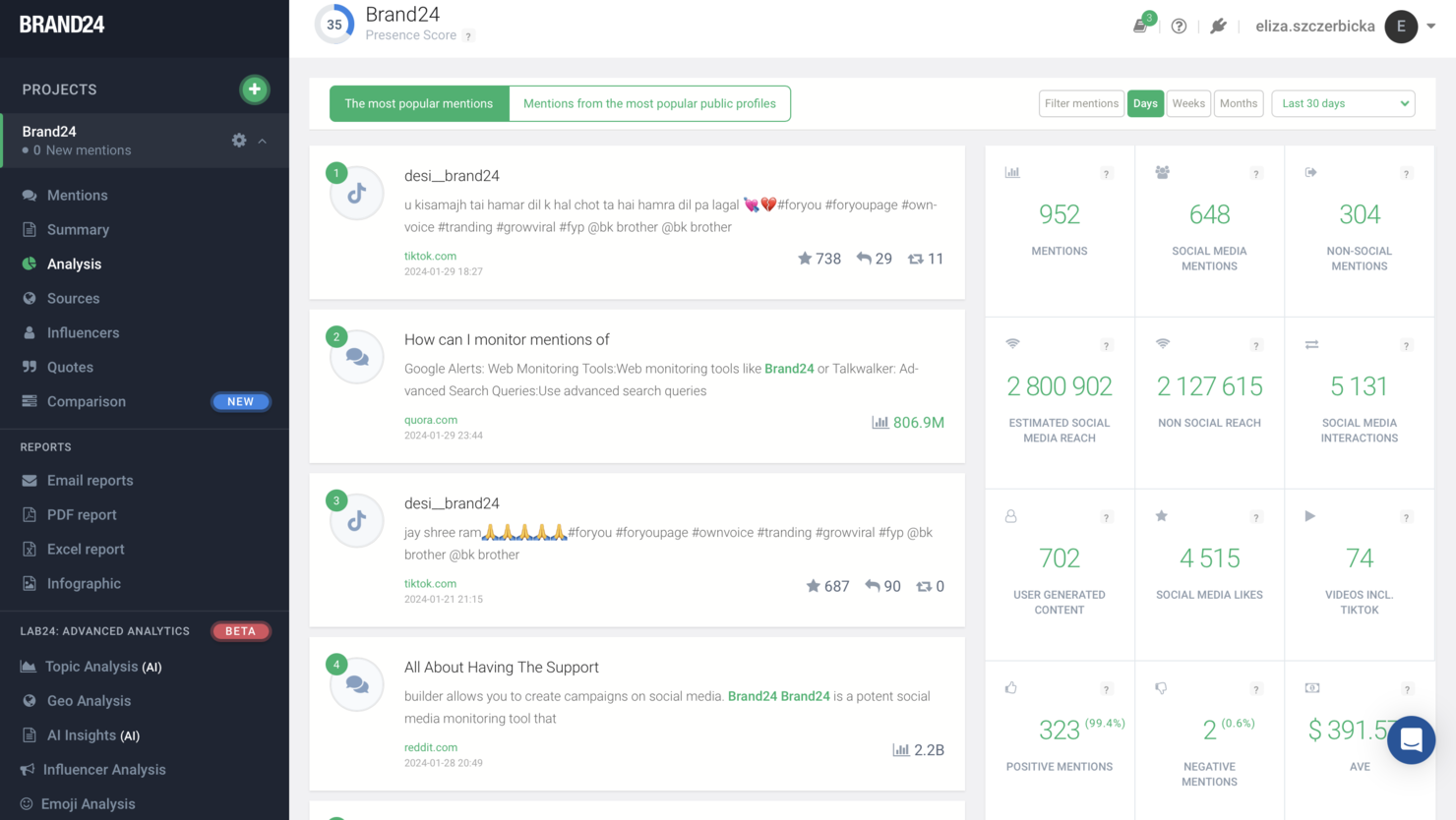
Brand24 is a digital marketing platform that offers businesses advanced tools for monitoring, analyzing, and engaging with online mentions and conversations to enhance their digital marketing strategies. With features like sentiment analysis, influencer identification, and customizable alerts, Brand24 helps marketers to proactively manage their brand's reputation, engage with their audience more effectively, and adjust their digital marketing strategies based on actionable data.
Why I picked Brand24: Brand24 functions effectively as a digital marketing platform by providing businesses with a comprehensive suite of tools to monitor their online presence and audience engagement across various digital channels. It enables companies to track real-time mentions of their brand, products, and competitors across social media, blogs, forums, and news sites, offering insights into customer sentiment, market trends, and the effectiveness of marketing campaigns.
Brand24 Standout Features and Integrations
Features include a unique discussion volume chart that visualizes the number of mentions over time, providing a clear overview of how brand visibility is trending. What makes this feature particularly useful for brand management is the ability to set alert thresholds, so businesses can be notified of significant changes in mention volume. This could indicate a surge in interest, a potential PR crisis, or an opportunity to engage with the audience, allowing companies to react swiftly and strategically to maintain a positive brand image.
Integrations include Slack and SEMrush.
Pros and Cons
Pros:
- Strong competitor analysis
- Affordable pricing makes for businesses of all sizes
- Real-time alerts let you respond to mentions quickly
Cons:
- Only supports a limited number of languages
- Could use more integrations

Google Analytics helps businesses conduct in-depth website analysis to determine who’s visiting their website.
Why I picked Google Analytics: At first, the platform might appear to be advanced, but when using it to its fullest, your organization will get a lot of insight into how visitors engage with your website. At its most basic level, Google Analytics will show you who’s coming to your site, from where, and where they spend most of their time. Its more advanced features will help you set up goals to track conversions and monitor events to learn more about visitor engagement.
Google Analytics works best for all types of businesses and teams who need ways to understand what’s working for their company and how they can achieve their goals. The platform’s analytics reports can include audience, acquisition, advertising, behavior, and other vital data you might require. Google Analytics doesn’t require significant expertise because all you need to do to get started is add the analytics code to your website.
Google Analytics Standout Features and Integrations
Features include dashboards, custom reports, custom alerts, real-time reporting, active user analysis, conversion analysis, behavior tracking, and on-site time tracking.
Integrations include Freshdesk, Freshservice, Accelevents, Domo, Triple Whale, SendGrid, Yodify, Visual Visitor, Improvado, QuestionPro, Odoo, Smartlook, Jotform, and Ticketsauce.
Google Analytics is free to use.
Pros and Cons
Pros:
- Creates custom reports and dashboards
- Simple to navigate
- Provides a wealth of data
Cons:
- It can be overwhelming
- Not much customer support


Omnisend is a marketing automation platform that integrates email marketing, SMS, web push notifications, and various other channels into a single interface. It's ideal for ecommerce businesses looking to centralize their marketing efforts.
Why I Picked Omnisend: I like that Omnisend offers comprehensive automation capabilities, allowing users to create personalized email and SMS campaigns. Its seamless integration with major ecommerce platforms like Shopify and WooCommerce enables efficient data synchronization and customer segmentation. Additionally, Omnisend's pre-built automation workflows, customizable templates, and real-time performance tracking help businesses enhance customer engagement, boost conversions, and organize their marketing efforts effectively.
Omnisend Standout Features & Integrations
Features include pop-ups and forms, a sales dashboard, email templates, drag-and-drop builders, dynamic discount codes, and omnichannel capabilities. It also offers message engagement and segmentation data for customer lifecycle stages.
Integrations include Shopify, WordPress, BigCommerce, WooCommerce, Wix, ShipStation, Smile, Opencart, 29next, Facebook Lead Ads, Google Ads, MailChimp, Intercom, and Gatsby. You can also connect to hundreds more through the Zapier connector.
Pros and Cons
Pros:
- Good reporting capabilities
- Automation and segmentation tailored for ecommerce
- Many integrations available
Cons:
- Slight learning curve for new users
- Limited social media integrations


Sprout Social is a social media management tool designed to help businesses manage their social media presence across various platforms. It offers comprehensive solutions for engagement, publishing, analytics, social listening, and influencer marketing.
Why I Picked Sprout Social: I like the platform's features tailored for social media engagement. These features include advanced social media scheduling, publishing, and monitoring, to help maintain a consistent and active presence across multiple social channels. Sprout Social’s robust analytics and reporting capabilities also provide insights into audience behavior and content performance, enabling marketers to refine their strategies for maximum impact. Additionally, the platform’s social listening tools allow businesses to stay attuned to conversations around their brand and industry, fostering more meaningful interactions with their audience.
Sprout Social Standout Features & Integrations
Features include automated message prioritization, crisis notifications, AI-assisted social media responses, review management, in-platform collaboration and approvals, an asset library, content suggestions, and a wide range of report types.
Integrations include Facebook, Instagram, LinkedIn, X (Formerly Twitter), Salesforce, Tableau, Hubspot, Marketo, Shopify, and Zendesk.
Pros and Cons
Pros:
- Various reporting options
- Social media listening features
- Robust social media publishing features
Cons:
- Standard plan is limited to 5 social profiles
- Can be pricey for smaller businesses


GetResponse is an all-in-one digital marketing platform that helps businesses grow their audience, promote products, and monetize content. It offers tools for email marketing, automation, landing pages, and e-commerce integrations.
Why I Picked GetResponse: One reason I chose GetResponse is its advanced marketing automation capabilities. You can create custom workflows that trigger actions based on user behavior, such as email opens or link clicks. This allows for personalized communication with your audience, enhancing engagement and conversion rates. The platform also supports SMS marketing and web push notifications, enabling you to reach your audience through multiple channels.
GetResponse Standout Features & Integrations
Features include a conversion funnel builder that guides you through creating sales funnels with landing pages, emails, and payment integrations. The platform also offers a course creator, allowing you to design and sell online courses directly through GetResponse.
Integrations include Shopify, WebinarJam, Onvocado, FuseWP, Shoper, Claspo, Paved, TOPOL, Group Leads, Groupboss, Plum, and LearnWorlds.
Pros and Cons
Pros:
- Landing page builder
- Advanced automation options
- Integrated webinar features
Cons:
- Basic reporting capabilities
- Limited design flexibility


Moz is an SEO platform that offers a suite of tools designed to enhance your website's visibility in search engine results. It provides resources for keyword research, link building, site audits, and rank tracking, all aimed at improving your digital marketing efforts.
Why I Picked Moz: I chose Moz for its comprehensive keyword research capabilities. With its Keyword Explorer tool, you can discover high-impact keywords relevant to your industry, assess their search volume, and evaluate their ranking difficulty. This information is crucial for developing an effective content strategy that targets the right audience and drives organic traffic to your site. Another reason for selecting Moz is its robust link analysis features. The platform's Link Explorer allows you to examine your site's backlink profile, identify high-quality linking domains, and uncover new link-building opportunities.
Moz Standout Features & Integrations
Features include an on-page grader, spam score analysis, custom reports, competitor analysis, keyword lists, link tracking lists, brand authority metrics, domain authority metrics, page authority metrics, SERP feature tracking, site crawl diagnostics, and anchor text analysis.
Integrations include Klipfolio, SeoTools for Excel, Linkody, SEOGadget's Link Extension, Moz API Extension for Google Docs, SEOmoz for Google Docs, Found SEO Tool, and eXdomain.
Pros and Cons
Pros:
- Effective site audit capabilities
- Comprehensive keyword research tools
- Detailed backlink analysis
Cons:
- The interface can be complex for beginners
- Occasional keyword data inaccuracies


Why I picked Supermetrics: The platform can collect your marketing data from over 100 tools and transforms it, so it’s ready for viewing. Supermetrics quickly brings any marketing data metrics from your preferred platforms to your current systems of choice, where you can organize and filter them immediately. If you’re already using a data dashboard or reporting tool, Supermetrics will automatically feed your data to it and eliminate the time you would spend uploading it manually.
Supermetrics works for any sized business that needs to connect its data to its current reporting tools. The platform will help you and your teams better understand which campaigns, customer segments, and channels perform best. Supermetrics will adapt to your changing data analytics needs as your company grows.
Supermetrics Standout Features and Integrations
Features include report export, automated reporting, data source connectors, forecasting, marketing reports, and customizable dashboards.
Integrations include Google Ad Manager, Piwik PRO, Perdoo, VK, Looker Studio, monday.com, Google Sheets, Snowflake, Azure Synapse, and an API to help you create custom integrations.
Pros and Cons
Pros:
- Excellent customer service
- Builds automated reports
- Easily schedules data storage
Cons:
- Pricing is confusing
- Hard to find some documentation

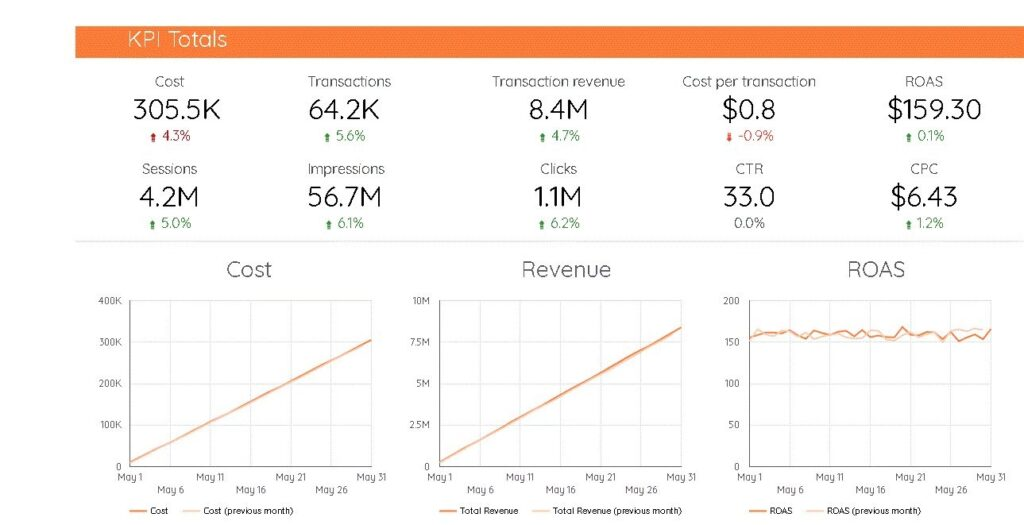
Funnel helps businesses gather all marketing data from multiple platforms to help them monitor and analyze their performance.
Why I picked Funnel: This platform will help your business understand how your digital marketing campaigns are performing by providing clean, accurate, and up-to-date data. Funnel makes collecting data from each step of your customer’s journey easy. This tool allows you to easily create reports on your marketing performance and filter the data to identify new, relevant insights.
Funnel works well with any sized business that needs to improve how they analyze digital marketing spend and report on their ROI. The platform offers a centralized data warehouse for all your information that meets the toughest governance, control, and security standards. Funnel ensures your data will be up-to-date, accurate, and ready for you to report and analyze.
Funnel Standout Features and Integrations
Features include a data dashboard, performance metrics, budgeting and forecasting, ad hoc reports, visual analytics, trend indicators, predictive analytics, conversion tracking, and campaign management.
Pros and Cons
Pros:
- Very user-friendly
- Excellent onboarding and training
- Ensures custom metrics are correct
Cons:
- Expensive for smaller businesses
- Time-consuming to set up

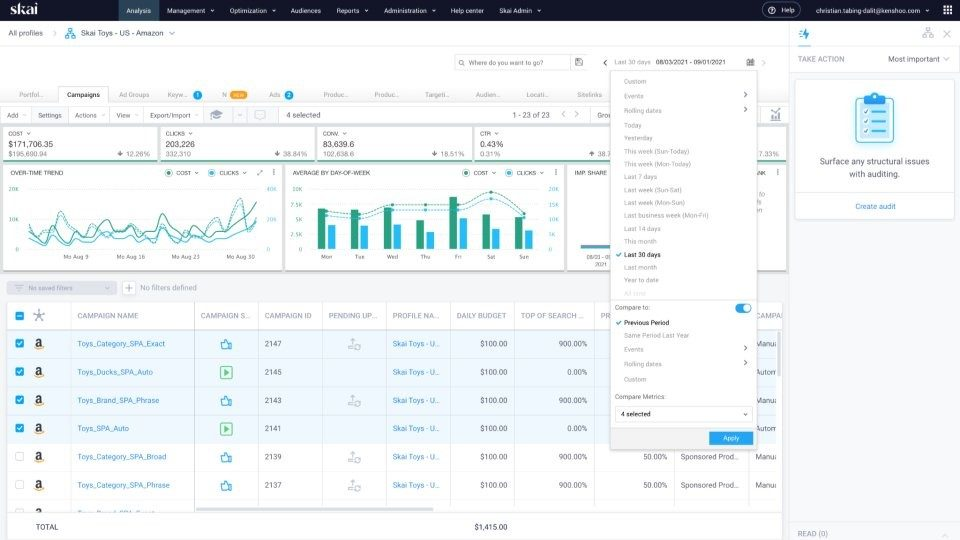
Skai empowers organizations to manage their omnichannel digital marketing campaigns.
Why I picked Skai: The platform will help your business maximize every marketing touchpoint by providing broad reach across all critical digital marketing channels. Skai delivers advanced automation, optimization, and reporting tools to help your company get the most from your digital advertising budget. You can use the platform to explore solutions such as paid search, paid social, and application marketing.
Skai is a better option for larger organizations that need actionable intelligence regarding customer sentiment, competition, market trends, and other vital insights. The platform provides a marketing measurement solution that allows you to run tests to help you identify results in a few weeks. Skai’s experts will also be available to provide support and advice to help you get started.
Skai Standout Features and Integrations
Features include search term analysis, automated actions, budget navigator, brand insights, negative keyword management, creative optimizations, customizable reports and dashboards, custom metrics, and algorithmic bidding.
Integrations include Salesforce, Google Analytics, Tableau, Adobe Analytics, Singular, Marchex, Delacon, Adjust, ChannelMix, AppsFlyer, Invoca, LiveRamp, and Signal AI.
Pros and Cons
Pros:
- Excellent customer support
- Increases efficiency
- Simplifies workflows
Cons:
- API sometimes experiences problems
- Large learning curve


Pixlee helps businesses start working with content creators to establish new influencer marketing campaigns.
Why I picked Pixlee: If you’re looking for new ways to establish yourself as a popular, relatable brand, Pixlee will help you create influencer marketing campaigns that will enhance your social content. The platform will help you discover new influencers that can build brand awareness with your target audience. By using Pixlee, you can manage your influencer marketing campaigns, including all influencer interactions, in one central location.
Pixlee is an excellent choice for ecommerce brands of any size with products they want to promote across impactful marketing channels. The influencers you choose to work with can create user-generated content with your product that will allow their audience to see your product and encourage them to buy from your business. Also, Pixlee can help you collect customer reviews and star ratings that will help you establish your business’s online reputation.
Pixlee Standout Features and Integrations
Features include brand management, multi-channel publishing, social media management, publish schedules, conversion tracking, campaign management, customer relationship management, influencer discovery, and response management.
Integrations include Salesforce, Shopify, Klaviyo, Magento, Emarsys, and Movable Ink.
Pros and Cons
Pros:
- Easy to use features
- Provides regular optimization feedback
- Excellent customer support team
Cons:
- Sharing data can be complex
- Not many third-party integrations
Other Digital Marketing Platforms
Here are the remainder of my best digital marketing platform picks. They didn’t get a full write-up but they are still worthy of consideration. I’ve listed them each with a best use case so that you can find exactly what you need.
- Vulse
For LinkedIn engagement
- Tofu
For personalized B2B campaigns
- Tracknow
For affiliate marketing
- Semrush
For keyword research
- monday.com
For campaign visualizations
- Impact.com
For partnership marketing
- Social Status
For automated social media reports
- Mailchimp
For email marketing
- Enji
For creating structured marketing plans
- Supermetrics
For integrating data from 150+ platforms
- Asana
Project and work management platform
- Canva
For creating professional online designs
- Kantata
All-in-one operational performance optimization tool
- Resource Guru
Resource management tool
- AdRoll
For display and social advertising


Selection Criteria for Digital Marketing Platform
When selecting the best digital marketing platform to include in this list, I considered common buyer needs and pain points like integration with existing tools and ease of use. I also used the following framework to keep my evaluation structured and fair:
Core Functionality (25% of total score)
To be considered for inclusion in this list, each solution had to fulfill these common use cases:
- Campaign management
- Analytics and reporting
- Audience targeting
- Social media integration
- Email marketing
Additional Standout Features (25% of total score)
To help further narrow down the competition, I also looked for unique features, such as:
- AI-driven insights
- Customizable dashboards
- Multi-channel automation
- Advanced segmentation
- Real-time collaboration
Usability (10% of total score)
To get a sense of the usability of each system, I considered the following:
- Intuitive interface
- Simple navigation
- Minimal learning curve
- Customizable workflows
- Responsive design
Onboarding (10% of total score)
To evaluate the onboarding experience for each platform, I considered the following:
- Availability of training videos
- Interactive product tours
- Webinars and tutorials
- Onboarding templates
- Chatbot assistance
Customer Support (10% of total score)
To assess each software provider’s customer support services, I considered the following:
- 24/7 support availability
- Multiple support channels
- Response time
- Help center resources
- Personalized assistance
Value For Money (10% of total score)
To evaluate the value for money of each platform, I considered the following:
- Competitive pricing
- Feature set relative to cost
- Flexible pricing plans
- Free trial availability
- Discounts for long-term contracts
Customer Reviews (10% of total score)
To get a sense of overall customer satisfaction, I considered the following when reading customer reviews:
- User feedback on functionality
- Reports on ease of use
- Praise for customer support
- Comments on pricing fairness
- Overall satisfaction ratings
How to Choose Digital Marketing Platform
It’s easy to get bogged down in long feature lists and complex pricing structures. To help you stay focused as you work through your unique software selection process, here’s a checklist of factors to keep in mind:
| Factor | What to Consider |
|---|---|
| Scalability | Will the platform grow with your business? Consider future needs and if the tool can handle increased data or users without extra costs or performance issues. |
| Integrations | Does it connect with your current tools? Check if it supports APIs and popular software like CRM systems to ensure smooth data flow and avoid data silos. |
| Customizability | Can you tailor it to your needs? Look for platforms that allow changes in dashboards, workflows, and settings to match your specific processes and preferences. |
| Ease of use | Is it user-friendly for your team? Evaluate the learning curve and look for intuitive interfaces that require minimal training for efficient daily use. |
| Implementation and onboarding | How long to get started? Consider the setup time, support available, and resources needed for a smooth transition. Look for platforms with guided onboarding. |
| Cost | Does it fit your budget? Compare pricing plans, hidden fees, and long-term costs. Check for free trials or demos to test value before committing. |
| Security safeguards | Are your data protected? Review encryption standards, data backup options, and compliance with regulations like GDPR to ensure your sensitive information is safe. |
| Support availability | Will help be there when needed? Check for 24/7 support, response times, and available support channels to ensure timely assistance for any issues. |
What Is a Digital Marketing Platform?
A digital marketing platform is a tool that helps businesses manage and execute their online marketing efforts across various channels. Marketing professionals, social media managers, and content creators generally use these tools to enhance their reach and engagement with audiences.
Campaign management, audience targeting, and analytics features help with efficient marketing operations and informed decision-making. Overall, these tools provide businesses with the means to effectively connect with their target audience and measure the success of their marketing strategies.
Features
When selecting digital marketing platform, keep an eye out for the following key features:
- Campaign management: Allows you to create, execute, and track marketing campaigns across multiple channels, ensuring consistent messaging and performance monitoring.
- Audience targeting: Helps you reach the right audience by segmenting users based on demographics, behavior, and interests for more personalized marketing efforts.
- Analytics and reporting: Provides insights into campaign performance and user engagement, enabling data-driven decisions and strategy adjustments.
- Social media integration: Connects your marketing efforts with social media platforms for streamlined content sharing and audience interaction.
- Email marketing: Facilitates the creation and distribution of targeted email campaigns, improving communication with prospects and customers.
- Customizable dashboards: Allows you to tailor the user interface to display relevant data and metrics, enhancing usability and efficiency.
- Multi-channel automation: Enables automated marketing actions across various platforms, saving time and ensuring cohesive marketing strategies.
- AI-driven insights: Offers predictive analytics and recommendations for optimizing campaigns and improving marketing outcomes.
- Integration capabilities: Ensures compatibility with existing tools and software, promoting seamless data flow and reducing manual work.
- Security safeguards: Protects sensitive data through encryption and compliance with regulations, ensuring the safety of your marketing information.
Benefits
Implementing digital marketing platform provides several benefits for your team and your business. Here are a few you can look forward to:
- Improved targeting: Audience segmentation features allow you to reach the right customers, increasing engagement and conversion rates.
- Data-driven decisions: Analytics and reporting provide insights into campaign performance, helping you make informed adjustments to your strategy.
- Time efficiency: Multi-channel automation reduces manual tasks, freeing up your team to focus on creative and strategic work.
- Enhanced communication: Email marketing tools improve customer interaction, fostering stronger relationships and customer loyalty.
- Consistent branding: Campaign management ensures your messaging is uniform across all platforms, reinforcing brand identity.
- Cost-effectiveness: Integration capabilities reduce the need for multiple tools, saving money and simplifying your tech stack.
- Security assurance: Security safeguards protect sensitive data, ensuring compliance and trust with your audience.
Costs & Pricing
Selecting digital marketing platform requires an understanding of the various pricing models and plans available. Costs vary based on features, team size, add-ons, and more. The table below summarizes common plans, their average prices, and typical features included in digital marketing platform solutions:
Plan Comparison Table for Digital Marketing Platform
| Plan Type | Average Price | Common Features |
|---|---|---|
| Free Plan | $0 | Basic analytics, limited email marketing, and social media integration. |
| Personal Plan | $10-$30/user/month | Advanced analytics, audience targeting, and customizable dashboards. |
| Business Plan | $50-$150/user/month | Multi-channel automation, AI-driven insights, and enhanced support. |
| Enterprise Plan | $200-$500/user/month | Full integration capabilities, dedicated account management, and top-tier security safeguards. |
Digital Marketing Platform FAQs
Here are some answers to common questions about digital marketing platform:
Do digital marketing platforms support multiple languages?
Yes, many digital marketing platforms support multiple languages. This feature is especially important if your business operates internationally. Before choosing a platform, check the language options available to ensure it aligns with your target markets and customer communication needs.
How do I measure the success of my digital marketing campaigns using the platform?
You can measure success by setting clear KPIs and using the platform’s analytics tools. Track metrics like conversion rates, click-through rates, and return on investment. Use these insights to adjust strategies and improve future campaigns, ensuring they align with your business goals.
How customizable are campaign workflows within these platforms?
Workflow customization often depends on how the platform handles automation logic and campaign triggers. Some offer visual editors with branching paths, while others use rule-based systems or custom scripting. The level of control varies based on the platform’s intended user base—marketers vs. developers.
What’s Next:
If you're in the process of researching digital marketing platform, connect with a SoftwareSelect advisor for free recommendations.
You fill out a form and have a quick chat where they get into the specifics of your needs. Then you'll get a shortlist of software to review. They'll even support you through the entire buying process, including price negotiations.