

The best content marketing platforms help marketing teams manage editorial calendars, organize digital assets, streamline team collaboration, and measure campaign performance so content creation and operations can scale without sacrificing quality or speed. If you’re here, you’re probably wondering whether your current system is holding back your content velocity, limiting your SEO performance, or making it harder to prove content’s impact on pipeline.
With over 10 years leading content and demand generation teams, and more than 200 hours spent testing content marketing platforms, I’ve seen the common traps firsthand: rigid templates, disconnected publishing workflows, poor analytics, and content governance headaches that frustrate marketers and stakeholders alike. That’s why I evaluated platforms based on real-world needs. This guide highlights the best content marketing platforms that actually deliver and will grow your content engine.
Why Trust Our Software Recommendations
6,700+
Reviews
20
Industry experts
16+
Evaluation factors
14
Years
Our team has been testing and reviewing software since 2012. As marketing leaders ourselves, we know how difficult—and important—it is to choose the right software.
For this guide, we evaluated tools using hands-on testing and independent research, scoring tools using our selection criteria.
Our reviews reflect our human editorial judgment, not a sales pitch.
Expert reviewers:
 Gui DrusinaCreative Director
- Shriya GhateSenior Marketing Lead
 Amanda JacquesMarketing Ops Leader

Content Marketing Platforms Comparison Table
| Tool | Best For | Trial Info | Price | ||
|---|---|---|---|---|---|
| 1 | Best for content performance reports | Free plan available | From $29/month | Website | |
| 2 | Best all-in-one content marketing platform | Free demo available | Pricing upon request | Website | |
| 3 | Best for multi-channel content marketing | Free plan available | From $22/month (billed annually) | Website | |
| 4 | Best for discovering content ideas | 14-day free trial | From $139/month | Website | |
| 5 | Best for finding content influencers | Free trial available | From $199/month (billed annually) | Website | |
| 6 | Best for social media content publishing | Free plan available | From $5/month per channel (billed annually) | Website | |
| 7 | Best for creating engaging content | 7-day free trial available | From $19/month (billed annually) | Website | |
| 8 | Best for coordinating content projects | Free plan + free demo available | From $19/user/month (billed annually) | Website | |
| 9 | Best for personalized content | Free demo available | Pricing upon request | Website | |
| 10 | Best for creating optimized content for keywords | Offers a free version of the plugin | From $99/year | Website |


Best Content Marketing Platform Reviews
If you’re overwhelmed juggling content planning, production, and performance, I’ve been there—and I know the right content marketing platforms can feel like a lifeline. They simplify your workflow, support your core tasks, and make your content marketing campaigns actually move the needle (and impress your boss). The hard part? Sifting through all the noise to find content marketing tools that are genuinely worth your budget. Especially with every vendor hyping their latest AI twist! That’s why I used our proven software review system to handpick the best tools out there, so you can get back to doing what matters: creating content marketing campaigns that drive revenue.You can use the simple overviews of each tool below to understand how each tool stands out from other content marketing platforms.
 Best for content performance reports
- Free plan available
- From $29/month
Visit WebsiteCustomer Rating:4.6/5
Discover relevant keyword ideas supported by accurate data metrics. Ahrefs is on my shortlist because nothing else gives me such a straightforward read on which content is actually returning value. I turn to Ahrefs as soon as teams want hard numbers showing which pages, topics, and formats are actually ranking, getting clicks, and earning backlinks.
What I really appreciate about Ahrefs is the level of detail in its content performance reports—organic traffic, keyword movement, and top-performing URLs are all surfaced for you in minutes. When I’m reviewing a brand’s content strategy, these insights make it instantly clear what’s working and what’s not.
Ahrefs’s Best For
- Content and SEO teams who need granular reporting on page-level performance
- Marketers focused on optimizing web content based on real search and backlink data
Ahrefs’s Not Great For
- Teams seeking collaboration features or full editorial workflow management
- Marketers who need robust content creation, drafting, or publishing tools in one platform
What Sets Ahrefs Apart
What really sets Ahrefs apart is its “data-first” approach to content marketing. Everything starts with real performance data—organic traffic, backlinks, historical rankings—rather than editorial assignments or campaign planning. Unlike all-in-one suites like Semrush, Ahrefs keeps its focus squarely on surfacing the raw numbers that matter most for content impact.
Instead of building out workflow tools or publishing modules, Ahrefs assumes teams will use its insights to steer strategy and measure what their content actually accomplishes. When I compare it to more process-driven platforms, it doesn’t try to tie content work to calendars or approvals. It expects you to come for the data, then decide what work needs doing.
Tradeoffs with Ahrefs
Ahrefs puts all of its energy into visibility and insight, so anything outside of analysis—like planning, editorial, or task management—gets ignored. Teams that need a full content ops platform end up stitching together other tools just to manage the lifecycle.
Pros and Cons
Pros:
- It’s an all-in-one SEO solution.
- Extensive content research tools.
- Understandable dashboard and interface.
Cons:
- Expensive subscription tiers.
- No free trial.
 Best all-in-one content marketing platform
- Free demo available
- Pricing upon request
Visit WebsiteCustomer Rating:4.6/5
Quickly access your content analytics to discover its performance and make necessary improvements throughout its lifecycle. Contently makes my list because it’s the first place I look when teams tell me they need one platform to manage strategy, creation, and analytics for content marketing. I think it’s the right move when you’re ready to bring freelancers, approvals, planning, and reporting into a single workflow that can scale.
What stands out about Contently for me is its all-in-one editorial calendar tied directly to creative assignment and brand guidelines, plus the integrated analytics that show true content ROI. Whenever we use it on a large campaign, I appreciate how it centralizes cross-team collaboration and keeps everything visible in one place.
Contently's Best For
- Large marketing teams needing unified management of content strategy, production, and analytics
- Brands working with multiple freelancers and strict editorial oversight
Contently's Not Great For
- Teams with lightweight content needs or ad hoc publishing schedules
- Marketers who want simple blogging tools without workflow or reporting requirements
What Sets Contently Apart
I think Contently approaches content marketing by treating the entire process—strategy, production, distribution, and analytics—as a single system built to support brand publishing at scale. Where platforms like HubSpot or WordPress focus on publishing or automation, Contently assumes creative work starts with vetted freelance talent, detailed workflows, and editorial oversight tightly linked to ROI measurement.
Instead of being an open playground for quick blogging, it’s designed around bringing structure, governance, and accountability to every piece of content. This is especially different from tools that let you just push out posts or campaigns on the fly.
Tradeoffs with Contently
In optimizing for large-scale, tightly-managed content operations, Contently introduces layers of complexity and workflow that can feel heavy for teams just looking to publish quickly or experiment often. Teams who don’t need strict approval paths or cross-functional coordination can find it slows them down instead of speeding things up.
Pros and Cons
Pros:
- Great for content collaboration.
- User-friendly and adaptable.
- Exceptional account success team.
Cons:
- The initial setup is complex.
- Managing the calendar can be complex.
Learn more about Contently: Best for multi-channel content marketing
- Free plan available
- From $22/month (billed annually)
Visit WebsiteCustomer Rating:4.7/5
Get an all-in-one content platform that enables businesses to run content campaigns from one dashboard. StoryChief makes my shortlist because it’s built for the complexity of publishing to many channels at once, instead of just managing a blog or single feed. I pick it whenever a team’s content strategy reaches the point where publishing workflows have outgrown simple scheduling tools.
Where StoryChief shines is publishing and tracking articles, social posts, and newsletters from a single dashboard—my team is able to push approved content out and monitor channel-by-channel performance in real time. I appreciate how it manages multi-channel campaigns, specifically letting me set up collaborative review flows and see campaign analytics across every platform without switching tabs.
StoryChief’s Best For
- Marketing teams managing multi-channel content distribution and performance from one place
- Content-focused organizations that need centralized collaboration, approval flows, and analytics across channels
StoryChief’s Not Great For
- Teams focused solely on long-form content or a single owned channel
- Organizations that require deep SEO automation or technical content customization
What Sets StoryChief Apart
StoryChief takes a multi-channel-first approach, building content workflows around publishing everywhere at once instead of treating social, blogs, and newsletters as separate silos. What I find unique is how it expects teams to plan, review, and launch content campaigns centrally, then distribute them, measure impact, and collaborate from a single spot. Unlike tools like HubSpot, which often focus just on owned content and inbound, StoryChief bakes distribution and channel analytics directly into the planning and approval process.
Tradeoffs with StoryChief
StoryChief optimizes for visibility and synchronized distribution, but that means its interface can get busy fast as campaign volume grows or if you want to dive into the details of one channel. What usually happens is teams with very niche reporting or channel-specific needs end up stretching the tool past where it’s comfortable.
Pros and Cons
Pros:
- Easy-to-use content workflow.
- One-click content distribution.
- Built-in SEO guidance.
Cons:
- Analytics is underdeveloped.
- Custom fields need improvement.
Learn more about StoryChief: Best for discovering content ideas
- 14-day free trial
- From $139/month
Visit WebsiteCustomer Rating:4.5/5
Identify new, relevant keywords for your content and see how it might perform. I picked Semrush for this list because it consistently uncovers content gaps and fresh ideas that other platforms miss. When I’m helping content teams break through creative block or zero in on new keyword opportunities, Semrush’s Topic Research and Keyword Magic tools quickly highlight what audiences are actually searching for.
One thing I really appreciate about Semrush is how fast I can pivot from high-level ideation to building a content calendar that’s data-driven. It shines when you need not just original topics, but also search intent analysis and competitive content mapping—all in one place.
Semrush’s Best For
- Content managers and strategists who want data-backed content ideas and competitive insights
- Marketing teams that rely on keyword research to drive editorial planning and ranking strategies
Semrush’s Not Great For
- Teams that need integrated writing, editing, or content management capabilities in one platform
- Small agencies or writers looking for basic topic suggestions without in-depth SEO or competitive data
What Sets Semrush Apart
Semrush approaches content marketing with a research-first mindset, weaving SEO, competitor analysis, and topic discovery into a single workflow. Unlike tools like BuzzSumo or editorial platforms built for planning and publishing, Semrush expects you to start with what your audience is searching for and build content around those insights.
What I like is that everything in Semrush is geared toward helping teams work from real search data and winning strategies—there’s a sense that you’re always building content portfolios with an end goal of visibility and competitive edge.
Tradeoffs with Semrush
Semrush optimizes for detailed research and strategic planning, but that depth comes at the expense of practical content production or collaboration features—teams usually end up using it alongside other tools to manage editorial calendars or actually write.
Pros and Cons
Pros:
- The platform has regular updates.
- User-friendly and intuitive.
- Excellent keyword research capabilities.
Cons:
- Costly for some businesses.
- Difficult to learn at first.
 Best for finding content influencers
- Free trial available
- From $199/month (billed annually)
Visit WebsiteCustomer Rating:4.5/5
Identify what topics are trending and see where other content marketers are sharing their work. I include BuzzSumo because it’s the first tool I think of when teams want to pinpoint who’s moving the needle in their space. When I’m working with businesses that need a reliable way to find content influencers who actually shape conversations, BuzzSumo just delivers the right data every time.
What stands out for me are the influencer search filters and audience insights—letting my team search by niche, platform, engagement, and real influence. I appreciate how quickly I can spot rising voices or identify proven experts, which is where campaigns actually see impact.
BuzzSumo’s Best For
- Marketers who need to identify and connect with high-impact content influencers
- Teams tracking competitive content and looking for top-shared topics or authors
BuzzSumo’s Not Great For
- Businesses who require built-in publishing tools or content creation features
- Teams focused on managing long-term editorial calendars and production workflows
What Sets BuzzSumo Apart
What I notice with BuzzSumo is how tightly it centers on surfacing influence and content reach, instead of workflow or production. Its design is all about mapping the landscape—finding who’s getting traction, who’s driving conversations, and where the audience is paying attention. Unlike all-in-one content suites like HubSpot, BuzzSumo skips the content creation layer entirely and doubles down on analytics, influencer discovery, and monitoring. I see teams using it as their go-to for pinpointing who actually matters before they worry about what to publish.
Tradeoffs with BuzzSumo
BuzzSumo optimizes for content research and influencer insight, not multi-stage publishing or asset management. That means teams lose out on any workflow or campaign coordination features, which forces them to plug those gaps with other tools if they want end-to-end support.
Pros and Cons
Pros:
- Excellent content selection tools.
- Conducts in-depth keyword research.
- Useful content analyzer.
Cons:
- Complex setup process.
- Pricey for some users.
 Best for social media content publishing
- Free plan available
- From $5/month per channel (billed annually)
Visit WebsiteCustomer Rating:4.4/5
Buffer’s insights dashboard helps your team optimize your social media content. Buffer earns its place on my shortlist because it’s built for fast-moving teams that need precise control over social media content publishing. I recommend Buffer when you need to manage multiple channels, queue posts, and keep publishing on track without extra noise or distractions.
What I appreciate most is how Buffer handles scheduling—setting up campaigns across Twitter, LinkedIn, Instagram, and Facebook in one clean dashboard just works. The calendar view is especially useful when my team’s juggling overlapping content, and the ability to draft, edit, and collaborate streamlines the whole process.
Buffer’s Best For
- Marketing teams focused on consistent, multi-channel social media publishing
- Content managers who need a simple interface for scheduling, queuing, and collaborating on posts
Buffer’s Not Great For
- Teams that need in-depth content analytics or advanced reporting linked to business outcomes
- Organizations looking for end-to-end content planning, approval flows, or blog content management
What Sets Buffer Apart
What jumps out to me about Buffer is how single-minded it is about making social publishing straightforward and fuss-free. Unlike something like Sprout Social that wraps publishing with heavy analytics and monitoring, Buffer strips things back—just your schedule, a calendar, and all your posts lined up.
It’s not trying to orchestrate complex multi-step content operations like HubSpot or push you into full campaign planning. Buffer expects teams to work in bite-sized bursts—drafting, queuing, and adjusting individual posts without getting bogged down by approvals or deep workflows.
Tradeoffs with Buffer
Buffer optimizes everything for rapid, no-frills posting and scheduling, but that minimalism means you lose richer planning, approval, and analytics features. When teams try to scale their content ops or tie social activity to bigger picture content strategies, the platform just doesn’t keep up.
Pros and Cons
Pros:
- Automated publishing tools.
- Increases social media visibility.
- Top-notch analytics.
Cons:
- Doesn’t support some hashtags.
- Slow when uploading multiple images.
 Best for creating engaging content
- 7-day free trial available
- From $19/month (billed annually)
Visit WebsiteCustomer Rating:4.6/5
Connect and manage multiple social media accounts to start adding new content. ContentStudio makes my shortlist because I see marketing teams get real results quickly when they need content that resonates and stands out across channels. Whenever I’m working with brands that want to stay ahead in both planning and real-time content, ContentStudio’s deep social insights and discovery features save hours and spark new ideas.
I appreciate how the topic research and AI-powered content suggestions actually push me toward more engaging angles and formats. What impresses me most is how I can surface trends, schedule posts, and optimize content performance, all in one place—especially when driving multi-platform campaigns that can’t afford to feel stale.
ContentStudio’s Best For
- Marketers and agencies focused on creating, curating, and publishing highly engaging content across multiple social channels
- Teams that want built-in content discovery, social listening, and AI-powered inspiration to keep feeds fresh
ContentStudio’s Not Great For
- Companies that need deep long-form content production or advanced editorial workflow management
- Teams looking for granular permissions or complex approval chains for large, distributed content teams
What Sets ContentStudio Apart
What stands out to me about ContentStudio is how it treats content creation and distribution as a continuous cycle powered by real-time trends. Unlike platforms like CoSchedule, which focus more on editorial calendars and post scheduling, ContentStudio pushes you to discover, curate, and repurpose trending topics as you work, not just plan ahead.
Where legacy content tools operate as static planners, ContentStudio expects teams to stay plugged into what's happening online and adapt quickly. That built-in blend of social listening, topic discovery, and cross-platform publishing shifts the workflow from pure scheduling to content agility.
Tradeoffs with ContentStudio
ContentStudio optimizes for rapid ideation and engagement around current trends, which means strategic, long-term campaign planning or highly detailed editorial processes can feel limited or secondary. Teams that crave deep content analytics or need extensive workflow control tend to find these areas less developed.
Pros and Cons
Pros:
- Robust content planning and publishing.
- Simplifies content creation processes.
- Excellent user interface.
Cons:
- Not a lot of integrations.
- The mobile app needs work.
Learn more about ContentStudio: Best for coordinating content projects
- Free plan + free demo available
- From $19/user/month (billed annually)
Visit WebsiteCustomer Rating:4.4/5
Visualize every project on a unified calendar in real-time to keep everyone on the same page. CoSchedule lands on my shortlist because it’s rare to find a content marketing platform that makes project coordination this structured and visible. When teams outgrow the capabilities of basic editorial calendars and need a system to track every moving piece—deadlines, tasks, assets—this is where I point them.
What I appreciate most about CoSchedule is how it brings content calendars, collaborative task assignments, and status updates into one place you always know where work stands. I’ve found it especially strong for teams managing ongoing campaigns or high-output content schedules, where missing handoffs or due dates isn’t an option.
CoSchedule’s Best For
- Content marketing teams juggling high-volume campaigns or multi-channel editorial calendars
- Managers who need coordinated task tracking and clear progress for every piece of content
CoSchedule’s Not Great For
- Teams that mainly create one-off content or handle simple project lists
- Organizations needing advanced reporting, analytics, or deep content performance insights
What Sets CoSchedule Apart
What’s unique about CoSchedule is how deeply it centers the workflow on the content calendar itself. Instead of splitting planning, coordination, and execution across different modules like you’d see in Wrike or Asana, everything here orbits around moving work through a shared, highly visual schedule. The tool expects teams to think in terms of campaigns and deadlines, so coordination flows from centralizing timelines, not from customizing tasks or workflow stages. I’ve found that this calendar-first approach naturally aligns everyone working on high-volume content schedules—there’s always one place to see what’s in motion.
Tradeoffs with CoSchedule
Because CoSchedule optimizes for coordination and editorial visibility, you lose depth around custom workflow automation or granular performance analytics. What usually happens is that teams looking for more sophisticated reporting or complex workflow logic find themselves limited compared to tools like ClickUp or Airtable.
Pros and Cons
Pros:
- Perfect for managing multiple social channels.
- Drag-and-drop calendar tool.
- Effective content schedule recommendations.
Cons:
- Has a slow load time.
- No alerts if a social account is unlinked.
Learn more about CoSchedule: Best for personalized content
- Free demo available
- Pricing upon request
Visit WebsiteCustomer Rating:4.3/5
Get content scores that provide a deeper insight into content engagement and performance. Uberflip makes my shortlist because it’s tailored for marketers who need to craft personalized content experiences at scale. I reach for Uberflip when teams are ready to move beyond standard content libraries and start building dynamic journeys that adapt to specific audiences or accounts.
What I like is how Uberflip brings together content hubs, robust targeting, and analytics in one place, so I can see how each visitor’s experience is actually performing. Teams tend to see the most value when they want to map content directly to buyer stages and create agile content tracks that drive real engagement.
Uberflip’s Best For
- Marketing teams building personalized content hubs for ABM or segmented journeys
- Organizations focused on measuring and optimizing content experiences for specific audience segments
Uberflip’s Not Great For
- Teams looking for basic content storage or simple asset libraries
- Groups that don’t need personalized content journeys or advanced targeting
What Sets Uberflip Apart
Uberflip approaches content marketing as a series of curated experiences, not just simple distribution. Unlike traditional platforms like Kapost or generic CMS tools, Uberflip encourages you to build dynamic tracks and nurture streams tailored to specific audiences or accounts. This means the tool expects marketing teams to think in terms of audience journeys—constantly adapting and targeting content rather than relying on static libraries. In testing, I see it stand out when personalization is the starting point, not just an added feature.
Tradeoffs with Uberflip
Uberflip optimizes for delivering tailored content experiences at scale, but you give up flexibility for one-off content needs or random asset storage. What usually happens is that teams focused on highly bespoke or ad hoc content feel constrained by how Uberflip organizes and serves content.
Pros and Cons
Pros:
- Excellent reporting and analytics.
- Customizable content journeys.
- Easy to navigate interface.
Cons:
- Difficult to manage multi-language content.
- Steep learning curve.
Learn more about Uberflip: 10Best for creating optimized content for keywords
Yoast
- Offers a free version of the plugin
- From $99/year

Optimize your content’s on-page SEO to help it rank in search engines. Yoast tends to be my pick when the focus is getting real SEO traction from content marketing without needing separate tools for analysis and optimization. What stands out for me is how Yoast puts on-page SEO checks right in the content creation process—keyword density, readability, and snippet previews, all as you write.
I like how practical it is for teams working in WordPress who want to consistently hit keyword targets and avoid SEO mistakes. When I’m advising teams ramping up content at scale, I see Yoast helping them quickly dial in for the right keywords before anything gets published.
Yoast’s Best For
- Content and SEO teams publishing on WordPress who want in-line optimization
- Marketers who need actionable keyword, readability, and snippet guidance while writing
Yoast’s Not Great For
- Teams managing content outside WordPress or requiring multi-platform workflows
- Marketers needing advanced editorial planning or long-form collaboration tools
What Sets Yoast Apart
Yoast approaches content marketing by putting SEO front and center, directly within the content creation flow. Unlike a suite tool like HubSpot, which pulls writers into dashboards and planning modules, Yoast expects teams to focus on optimizing pieces as they draft them—right in WordPress. Instead of managing campaigns or multiple channels, it assumes most of the impact comes from tightly optimized, keyword-targeted pages published consistently. That design choice means you get SEO best practices front-loaded, which changes how teams think about content from the start.
Tradeoffs with Yoast
Since Yoast optimizes for quick, in-line SEO feedback on individual WordPress posts, broader campaign coordination gets left out. What I see happen is that teams gain SEO rigor per article, but lose the higher-level editorial planning and cross-channel context that you’ll get with true content operations platforms.
Pros and Cons
Pros:
- Shows Google search previews.
- Offers real-time content analysis.
- Easy to use and understand.
Cons:
- Sometimes reads content wrong.
- Recommendations need improvement.
Learn more about Yoast:
Other Content Marketing Platforms
Here are some additional solutions that didn;t make the top list but are still worthy of consideration.
- 11PathFactoryBest for real-time content consumption data
- 12DivvyHQBest for content automation and AI
- 13TofuBest for personalized B2B campaigns
- 14EnjiBest for centralized content management
- 15monday AI WorkspaceBest for content project collaboration
- 16CerosBest for creating interactive content experiences
- 17MentionBest for understanding audience perception
- 18CurataBest for content curation
- 19HubSpot Marketing HubBest for creating quality blog content
- 20UplandBest for aligning content strategies with customer journeys
- 21AcrolinxBest for keeping content on-brand with AI
- 22Hemingway EditorBest content editor app
- 23SparkToroBest for audience research
- 24PercolateBest end-to-end content marketing platform
- 25Meet EdgarBest for managing social media content
How I Evaluate Content Marketing Platforms
I split my evaluation into two layers: the core functionality a tool must have—like editorial calendars and approval workflows—and the differentiators that separate good from great.
Core Functionality (Table Stakes For This List)
When I'm selecting tools for my list, I rank each one on a scale from 0 (does not offer the functionality) to 5 (excels in this area) for each core functionality listed below. Then, I calculate the tool's total score into a percentage. Each tool needs to achieve a minimum total score of 75% to be considered for inclusion.
- Editorial Calendar & Planning: I check whether teams can plan by campaign, channel, and contributor—not just drop posts on a date grid with no structure.
- Content Creation & Collaboration: Real-time co-editing, commenting, and version history matter here, especially for teams juggling multiple reviewers per asset.
- Workflow & Approval Management: I look for configurable stages that mirror how marketing teams actually move content from brief to publish, with clear role-based approvals.
- Multi-Channel Publishing & Distribution: The tool should push content natively to blogs, social, and email—platforms like CoSchedule and Contently handle this differently, so I evaluate breadth and depth.
- Content Asset Management: A centralized library with tagging and search is what I evaluate here, so teams can find and repurpose existing assets instead of recreating them.
- Analytics & Performance Reporting: I look for cross-channel metrics that tie content back to engagement, traffic, or conversions—not just vanity counts on individual posts.
Once I have a list of tools that meet this criteria, I consider what sets each platform apart.
Differentiating Factors (What Sets Vendors Apart)
Here's how I compare and contrast different vendors:
Standout Features
Built-in SEO tools are a major differentiator—I evaluate whether a platform offers keyword research and content scoring so writers can optimize during creation, not after. AI content assistance is another factor I weigh, since tools like Semrush and HubSpot approach generative AI in very different ways. Content attribution also separates contenders. I look for platforms that trace a blog post or gated asset back to pipeline and revenue, giving demand gen teams the proof they need.
Beyond Features
Integrations matter a lot in this category. I evaluate whether a platform connects natively to CRM and marketing automation tools like Salesforce and Marketo, since content teams need performance data flowing both ways. Scalability is another factor—a three-person team and a 50-person content operation have very different needs around permissions, multi-brand workspaces, and asset volume. I also check pricing transparency, looking for clear tiering by seats or channels so buyers can forecast costs as their team grows.
How to Choose Content Marketing Platforms
As you're shortlisting, trialing, and selecting content marketing platforms, you should consider the following:
- What content marketing problem are you trying to solve - Start by identifying the workflow problem you expect the content marketing platform to solve for you. For instance, do you need a solution that supports collaboration with a distributed content team? Or are you looking for a tool that simplifies content distribution and performance reporting for executives? By understanding your primary goal, you'll be able to focus on features and functionalities that are critical to solving your problem.
- Who will need to use it - Consider the size and structure of your team. Are you a solo content creator, or do you manage a team of writers, editors, and designers? Will external partners or other departments, such as sales or product marketing, need access? Knowing your team size and user needs will help you choose a platform that accommodates the right number of seats, collaboration tools, and permissions while staying within budget.
- What other tools it needs to work with - Review your current tech stack and determine how the platform needs to fit in. For example, does it need to integrate with your CRM, email marketing platform, or social media scheduling tools? Can it replace or consolidate existing tools to reduce overall costs and complexity? Selecting a platform that works seamlessly with your current setup will save time and ensure a smoother adoption process.
- What outcomes are important - Identify the specific goals you want to achieve, such as improving content strategy efficiency, increasing audience engagement, or simplifying reporting workflows. For example, if you aim to measure ROI from your content efforts, prioritize platforms with robust analytics and reporting capabilities. Instead of getting overwhelmed by feature comparisons, ensure the platform supports the strategic outcomes that matter most to your organization.
- How it would work within your organization - Ensure the platform integrates smoothly with your team’s existing processes. Pinpoint where your current workflows succeed and where bottlenecks occur. Prioritize features that address these gaps, such as content calendar visualization, version control, or automated content publishing. Remember, the right platform should enhance productivity, not disrupt it. Choose a solution that supports your unique needs rather than being swayed by hype or trends.
Trends in Content Marketing Platforms for 2025
Here are some trends I’ve noticed for content marketing technology, plus what they might mean for the future of the marketing industry. I sourced countless product updates, press releases, and release logs to tease out the most important insights so you can feel better prepared.
- Enhanced Personalization and Targeting: There's a significant push towards more sophisticated personalization, using data analytics to tailor content to individual preferences, behaviors, and historical interactions.
- Automated Content Creation and Management: Automation tools are evolving to help marketers plan, create, manage, and distribute content more efficiently, reducing manual tasks and freeing up time for strategic thinking.
- AI-driven Content Generation: Tools that assist in creating draft content or suggesting improvements to existing content are becoming more advanced, helping marketers produce content at scale.
- Predictive Analytics for Content Success: Some platforms are introducing predictive analytics to forecast content performance before publication, helping marketers allocate resources more effectively.
Marketers looking to stay ahead in 2025 will benefit from choosing platforms that offer these evolving features, aligning with the shift towards more data-driven, efficient, and personalized content marketing strategies.
What is a Content Marketing Platform?
A content marketing platform is a specialized software tool designed to help marketing teams efficiently create, manage, distribute, and analyze content across multiple channels. Its primary purpose is to streamline the content creation process, organize content scheduling, and ensure consistent messaging across various channels.
This platform typically offers features for collaboration, content curation, and editorial planning, as well as analytics to track content performance and audience engagement.
Features of Content Marketing Platforms
When selecting content marketing platforms, keep an eye out for the following key features:
- Content planning and calendaring: A built-in calendar helps you schedule, plan, and organize your content across campaigns and channels, so you never miss an important deadline (or National Puppy Day).
- Collaboration tools: Facilitate teamwork with tools for commenting, editing, and assigning tasks, making group projects actually feel truly collaborative.
- Workflow automation: Take repetitive steps off your to-do list. Automated workflows guide content from ideation to publication, reducing bottlenecks and freeing up time to focus on creative tasks.
- Multi-channel publishing: Distribute content across websites, blogs, social media, and email in just a few clicks, so you reach your audience wherever they happen to be scrolling.
- Content asset management: Easily organize, store, and retrieve all your content files, drafts, and assets, so you can quit digging through mysterious folder names like “final-FINAL_v3.docx.”
- Analytics and reporting: Measure content performance with visual reports, dashboards, and actionable insights. Hone in on what’s working, so you can adjust your efforts to net better results.
- SEO optimization tools: Tweak your content using built-in SEO recommendations, keyword suggestions, and readability checks, helping your hard work rise to the top of search engine rankings.
- Approval processes: You can customize approval workflows, ensuring the right eyes see your content before it goes live—no more accidental typo-filled launches.
Common Content Marketing Platforms AI Features
Beyond the standard content marketing platform features listed above, many of these solutions are incorporating AI with features like:
- Personalization engines: AI dynamically adjusts content to match individual viewer profiles, making every interaction feel tailor-made and boosting engagement with surprisingly little effort.
- AI content recommendations: AI analyzes audience behavior and can suggest topics or formats based on emerging trends, giving you an edge with your competitors and helping you stay relevant.
- Automated content generation: Let AI draft articles, social posts, or email copy, using algorithms to tailor messaging for your audience while you focus on strategic work.
- Predictive performance analytics: AI predicts which types of content will perform best, drawing from historical data and trends, so you can confidently prioritize your content investment.
- Intelligent distribution optimization: AI determines the best time and channel to share your content for maximum impact, increasing your reach without making you obsess over posting schedules.
These features combine to create a powerful toolset for marketers, enabling them to efficiently manage their content marketing efforts, tailor their strategies to meet audience needs, and measure the impact of their campaigns on overall business goals.
Benefits of Content Marketing Platforms
Content marketing platforms offer a suite of tools designed to optimize the content lifecycle, ensuring that marketing efforts are both efficient and effective. Here are five primary benefits of utilizing content marketing platforms:
- Streamlined Content Creation Process: Simplifies the production of content across various formats. By providing templates, editorial tools, and AI content writing within one platform, it reduces the time and effort needed to create engaging content, thereby increasing productivity.
- Centralized Content Management: Offers a single repository for all content assets. This centralization makes it easier for teams to store, organize, and access content, enhancing collaboration and consistency across marketing campaigns.
- Enhanced Distribution and Reach: Facilitates multi-channel content distribution. Content marketing platforms enable users to publish and promote content across different digital channels directly, ensuring broader audience reach and engagement.
- Data-Driven Insights and Analytics: Provides analytics on content performance. With built-in analytics tools, marketers can track the effectiveness of their content, gain insights into audience behavior, and make data-informed decisions to optimize future content strategies.
- Improved SEO and Visibility: Integrates SEO tools to enhance content discoverability. By optimizing content for search engines, these platforms help increase organic traffic, improving overall online visibility and attracting more potential customers.
For organizations looking to elevate their content marketing strategy, investing in a comprehensive platform can be a game-changer, driving better engagement, enhanced visibility, and ultimately, higher conversion rates.
Cost & Pricing for Content Marketing Platforms
Content marketing platforms come in various pricing and plan options designed to cater to different business sizes, needs, and budgets. While all of my teams were relatively small (think less than ten), below is a simplified overview of typical plans you may encounter when selecting a content marketing platform.
Plan Comparison Table for Content Marketing Platforms
| Plan Type | Average Price | Common Features Included | Best For |
|---|---|---|---|
| Plan TypeBasic | Average Price$0-99/mo | Common Features Included- Limited content creation tools - Basic analytics - Access to standard templates - Community support | Best ForSolopreneurs or small businesses just starting with content marketing |
| Plan TypeProfessional | Average Price$100-800/mo | Common Features Included- Advanced content creation and editing tools - Enhanced analytics and reporting - Multi-channel distribution - Email and chat support | Best ForGrowing businesses and established content teams looking to scale their efforts |
| Plan TypeEnterprise | Average Price$800+/mo | Common Features Included- Customizable templates and workflows - Comprehensive analytics and SEO tools - Integration capabilities with other software - Dedicated account manager and 24/7 support | Best ForLarge organizations with complex content needs and multiple teams |
| Plan TypeFree Option | Average Price$0 | Common Features Included- Access to basic content creation tools - Basic analytics - Limited templates | Best ForIndividuals or startups testing the waters of content marketing with no initial budget |
When considering which plan to choose, think about your organization's content marketing goals, the size of your team, and the level of support you might need. Always look for a plan that balances cost with the features and support your business needs to succeed.
New & Noteworthy Product Updates
Below, you’ll find our release notes and take on the latest and greatest content marketing platforms product updates. Discover what’s now possible through feature releases, improvements, and updates on web, desktop and mobile apps. Learn what’s new, if it’s hot—or not, and why it matters for digital marketers.
April 2024 Updates
Here are some April update highlights.
ContentStudio Update Notes

In April 2024, ContentStudio released a significant update to its Social Media Post Composer. This enhancement has simplified the process for users to schedule Instagram posts, reels, and stories directly from the platform's dashboard. The update introduces the capability for users to add videos directly within the composer and select their preferred method of publishing, streamlining the content creation workflow.
The update greatly improves user efficiency by integrating more functions directly into the ContentStudio dashboard. Now, users can manage video content and their publication settings without toggling between different tools or platforms. This means less time spent on the mechanical aspects of content scheduling and more on creative processes.
The value of this update lies in its ability to save time and reduce complexity for marketers and social media managers. By centralizing critical features and allowing direct video uploads, ContentStudio users can achieve a more cohesive social media strategy and maintain a consistent presence online with less effort. This can lead to better engagement rates and a stronger brand presence across social platforms.
Verdict: Hot! Scheduling video content through third-party platforms can be challenging, so it's great to see ContentStudio smoothing out the process, especially as short-form videos like Reels are increasingly popular with younger audiences.
DivvyHQ Update Notes
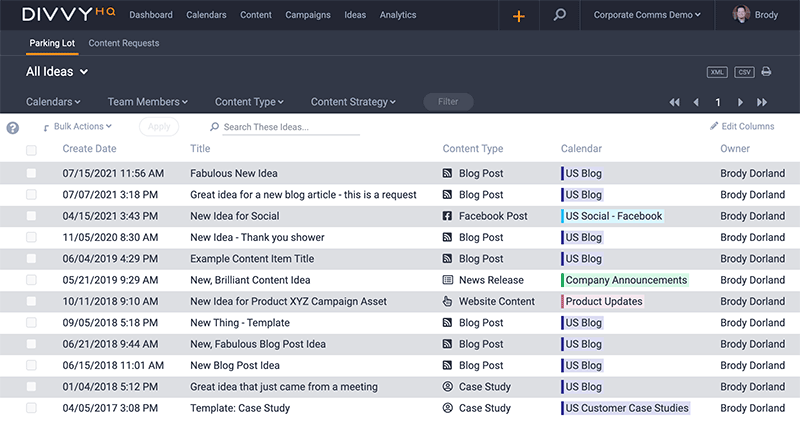
In April 2024, DivvyHQ released significant enhancements to their platform, focusing on two crucial aspects: content library organization features and a comprehensive content quality assurance guide.
These updates are designed to streamline the management and production of digital content, addressing the complex needs of modern marketing teams. By centralizing these assets in a well-structured repository, DivvyHQ has made it easier for teams to access and manage their marketing materials efficiently.
This feature not only simplifies the search and retrieval of assets but also enhances collaboration by allowing team members to share materials effortlessly and make updates to existing assets. Plus, the content quality assurance guide provides a roadmap for creating high-quality, impactful content that resonates with target audiences.
Verdict: Hot! The one-two punch of digital tools and best practices resources makes this an update worth checking out ASAP.
Uberflip Update Notes

Uberflip has announced that it will be retiring its Image Migrator app in 2024. The decision to phase out this application comes as part of Uberflip's efforts to streamline its services and focus on more integrated solutions.
The Image Migrator app, which was designed to assist users in transferring images between various parts of the Uberflip platform efficiently, will see its functionality absorbed into other areas of the Uberflip suite, promising a more seamless content management experience.
Users of the Image Migrator app are encouraged to transition to the newer tools provided by Uberflip that offer enhanced capabilities and better support for modern content needs. This update aligns with Uberflip's ongoing commitment to improving user experience and maintaining up-to-date technology infrastructure.
Verdict: Mixed! While losing a feature you are already familiar with always hurts a bit, Uberflip's new image management system seems to be more organized and streamlined. Time will tell if it can live up to its predecessor!
March 2024 Updates
Here are some March update highlights.
Ahrefs Update Notes

Ahrefs launched a significant update to their platform on March 6, 2024, introducing Pages 2.0. This new feature is designed to enhance the visibility and tracking of SEO performance by displaying all URLs that are ranking for tracked keywords within a user's project.
The primary function of Pages 2.0 is to provide a more detailed and structured view of keyword ranking performance across different URLs. By integrating metrics like traffic value and historical performance data, this update allows users to see not just which keywords are ranking but also how these rankings translate into potential economic value.
The value of Pages 2.0 to Ahrefs users lies in its ability to deliver a granular, real-time snapshot of SEO performance. This update is particularly valuable for SEO professionals and marketers looking to maximize the ROI of their digital campaigns by targeting high-performing keywords and optimizing content that contribute the most to their business goals.
Verdict: Hot! Between these tracking/performance updates and their deeper Google Search Console integration, Ahrefs is making content marketing much easier from a technical SEO side of things.
BuzzSumo Update Notes

In March 2024, BuzzSumo rolled out a significant update to their platform with the introduction of enhanced tools specifically designed for analyzing Facebook Pages. This update is tailored to provide users with the capability to delve deeper into the analytics of individual and multiple Facebook pages simultaneously, enabling the comparison of up to 10 different pages at one time.
The core functionality of the BuzzSumo Facebook Tools update revolves around its sophisticated analysis features. Users can now examine page-level engagement metrics in much finer detail. This includes the ability to track and compare the performance of various content types across different pages, measure engagement trends over time, and assess the overall effectiveness of Facebook posts.
This is especially beneficial for marketers, social media managers, and brands looking to maximize their impact on one of the world's largest social platforms, ensuring their content not only reaches but also resonates with their target demographic.
Verdict: Hot! Competitor research on social platforms is essential to crafting content that produces real results.
Buffer Update Notes

In April 2024, Buffer released valuable insights into LinkedIn's newly updated algorithm, which has been engineered to prioritize content based on its relevance, expertise, and engagement. This update was part of Buffer’s ongoing efforts to provide users with the latest strategies and tools for effective social media management.
The update provided by Buffer includes specific advice on how to tailor content to meet LinkedIn's algorithm criteria effectively. Key points include the importance of crafting content that is not only relevant to the intended audience but also demonstrates the author's expertise and ability to engage viewers.
By aligning their content creation strategies with the intricacies of LinkedIn's algorithm, Buffer's users can significantly improve their engagement rates and expand their professional networks. This strategic insight into LinkedIn's ranking mechanisms empowers users to create more effective social media campaigns that are optimized for visibility and interaction.
Verdict: Not! This was, unfortunately, the most "exciting" update from Buffer so far this year and it's very niche, to say the least. LinkedIn is booming, but I don't know if anyone was waiting with bated breath for this enhancement.
PathFactory Update Notes

PathFactory introduced significant updates to its Templated Experiences on March 12, 2024, aimed at providing users with enhanced customization and configuration options. The updates included new settings for font type and color in Cookie Consents and Access Protection, alongside advanced configuration capabilities for Landing Pages and Content Pages.
These enhancements allow users to tailor the appearance and functionality of their content more precisely, aligning with their brand identity and operational needs. This level of customization extends to various elements of the platform, enhancing the overall flexibility and utility of the PathFactory suite.
The ability to precisely customize and configure elements within Templated Experiences not only elevates the visual appeal and coherence of content but also improves the effectiveness of digital marketing campaigns.
Verdict: Not! I love customizability enhancements but this one seems very narrow in scope and may only benefit a niche user group.
February 2024 Updates
Here are some February update highlights.
CoSchedule Update Notes

On February 12, 2024, CoSchedule expanded its toolkit by launching over 20 free AI Writing Tools. By integrating these tools into their platform, CoSchedule aims to support users in various facets of content creation, from SEO and content marketing to social media management.
The new AI Writing Tools offer functionalities that simplify the initial stages of content creation, allowing users to generate first drafts quickly. These tools are equipped to handle a range of content types, including blog posts, social media updates, and marketing emails, providing tailored suggestions that align with SEO best practices.
The introduction of these tools holds substantial value for CoSchedule users by significantly reducing the time and effort involved in content creation. By streamlining the process from ideation to execution, these tools help marketers and content creators maintain a consistent and effective online presence.
Verdict: Hot! Having AI templates/pre-programmed prompts at your finger tips for a variety of content types is super valuable (and time saving).
Frequently Asked Questions
Here are a few popular questions answered for your convenience.
How do content marketing platforms integrate with existing martech stacks?
Most leading content marketing platforms integrate with martech stacks through native connectors, APIs, and workflow integrations. You can sync with CRMs, CMSs, marketing automation tools, social media platforms, and analytics suites. Look for platforms that provide robust integration directories or marketplaces and let you automate reporting or content publishing across channels. This helps your team reduce manual work and keep all campaign data unified.
What metrics and dashboards do leading content marketing platforms provide for ROI tracking?
Content marketing platforms typically offer dashboards to track engagement, conversions, content performance, and attribution. You get detailed views of traffic, lead generation, SEO impact, and social sharing. Many tools let you build custom reports, set campaign targets, and visualize trends over time so you can show your exec team what’s working and where to optimize your content plan.
Can content marketing platforms support multilingual content creation and management?
Yes, most advanced platforms offer multilingual support, letting you create, manage, and localize content for different languages and regions within one workspace. Look for workflows that help you assign translation tasks, reuse assets across locales, and ensure brand consistency at scale. Integrated translation tools or third-party plugin support can further streamline your global content strategy.
Do content marketing platforms offer dedicated support for video content?
Yes, many platforms feature built-in video management, distribution, and analytics. You can schedule video content across channels, collaborate with your team on edits, and track engagement metrics like views and retention. Some platforms partner with major video hosts or provide native video libraries, making it easier to keep all assets and reports in one place.
How do content marketing platforms facilitate team collaboration and workflow management?
Content marketing platforms typically offer editorial calendars, role-based permissions, task assignments, and comment threads. They help you map out deadlines, track approvals, and automate reminders, so your team always knows what’s next. This improves transparency, speeds up production, and ensures nothing falls through the cracks as your campaigns grow.
What is the difference between a CMS and a CMP?
A CMS (Content Management System) is designed to create, publish, and manage website content, like articles or pages. A CMP (Content Marketing Platform) offers broader features for planning, collaborating, distributing, and measuring all content marketing efforts and campaigns, not just web publishing. CMPs help with workflows, asset management, strategy alignment, and integrated analytics, making them more suitable for managing large-scale, multi-channel content programs.