

The best Smartsheet alternatives give your marketing operations team flexible project management software, real-time collaboration, and integrations that fit your workflow. If you’re searching for the best alternatives, you likely need a project management solution that can track projects, support kanban boards, and handle complex projects with ease. Many tools offer advanced features, add-ons, and integrations within a broader ecosystem, while focusing on a user-friendly experience with an intuitive user interface and low learning curve. Some also provide a free version and options tailored for professional services teams. Use this list to compare features and find the right fit for your marketing operations needs in 2026.
What Is Smartsheet?
Smartsheet is a cloud-based project management and collaboration platform designed to help teams plan, track, and automate work. It combines a flexible interface with workflow automation, file sharing, and real-time updates. Marketing teams use it to manage campaigns and reporting, though some look for alternatives to improve usability, expand features, or better fit their existing tools.
Smartsheet Alternatives Comparison Table
This comparison table summarizes pricing details for my top Smartsheet alternative selections:
| Tool | Best For | Trial Info | Price | ||
|---|---|---|---|---|---|
| 1 | Best for creative ops and campaign approvals | Free demo available | Pricing upon request | Website | |
| 2 | Best for flexible database-style projects | Free plan available; 14-day free trial | From $20/user/month (billed annually) | Website | |
| 3 | Best for open-source team databases | Free plan available | From $10/user/month (billed annually) | Website | |
| 4 | Best for centralized team project tracking | 2-week free trial; free demo available | From $8/user/month (billed annually) | Website | |
| 5 | Best for client-focused project management | Free plan available; 14-day free trial | From $9.99/user/month (billed annually) | Website | |
| 6 | Best for enterprise project planning | Free demo available | Pricing upon request | Website | |
| 7 | Best for simple team collaboration | 30-day free trial + free demo available | From $25/month (billed annually) | Website | |
| 8 | Best for all-in-one work management | Free plan available | From $7/user/month (billed annually) | Website | |
| 9 | Best for task and timeline management | Free plan + free demo available | From $10.99/user/month (billed annually) | Website | |
| 10 | Best for Gantt-based project scheduling | 14-day free trial | From $7/user/month (billed annually) | Website |


Why Trust Our Software Recommendations
6,700+
Reviews
20
Industry experts
16+
Evaluation factors
14
Years
Our team has been testing and reviewing software since 2012. As marketing leaders ourselves, we know how difficult—and important—it is to choose the right software.
For this guide, we evaluated tools using hands-on testing and independent research, scoring tools using our selection criteria.
Our reviews reflect our human editorial judgment, not a sales pitch.
Expert reviewers:
 Gui DrusinaCreative Director
- Shriya GhateSenior Marketing Lead
 Amanda JacquesMarketing Ops Leader

Smartsheet Alternatives Reviews
Below are my detailed summaries of the best Smartsheet alternatives that made it onto my shortlist. My reviews offer a detailed look at the features, integrations, and best use cases of each platform to help you find the best one for you.
 Best for creative ops and campaign approvals
- Free demo available
- Pricing upon request
Visit WebsiteCustomer Rating:4.6/5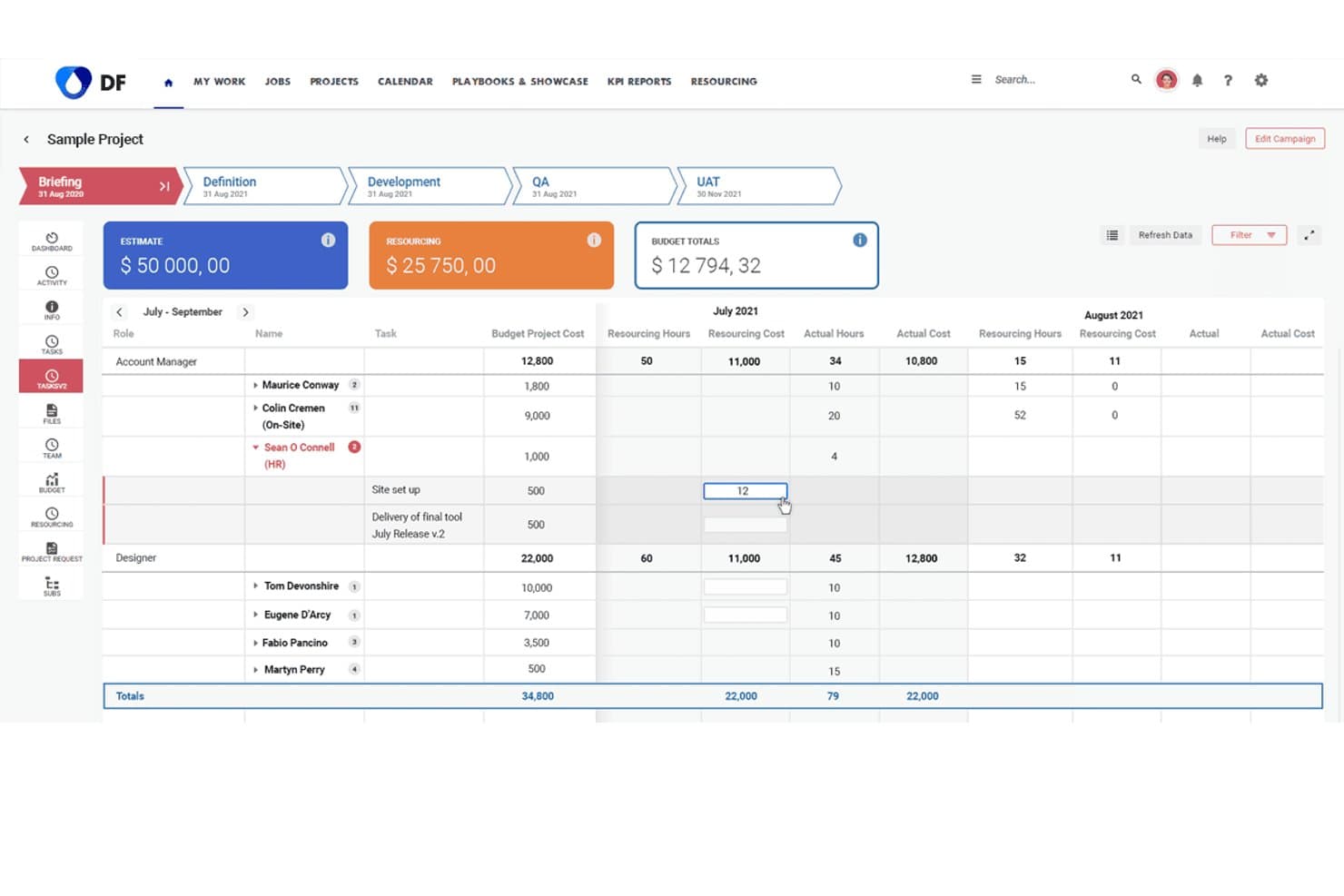
Screendragon tracks resourcing costs and hours across project roles. Screendragon helps marketing and creative teams streamline workflow management, centralize approvals, and improve visibility into campaigns, making it a strong fit for agencies and in-house teams managing complex projects.
Who Is Screendragon Best For?
Screendragon suits agencies and in-house marketing teams managing complex creative workflows and high-volume campaign approvals.
Why Screendragon Is a Good Smartsheet Alternative
I picked Screendragon as one of the best because it nails creative ops and campaign approvals in a way that suits agencies and busy marketing teams. I use its visual workflow builder to centralize feedback, accelerate creative sign-offs, and track campaign stages across multiple departments. That means quicker go-lives and fewer bottlenecks when juggling complex creative projects.
Screendragon Key Features
- Budget tracking: Track project budgets and control costs within the same platform as your workflows.
- Resource management: Allocate team members to projects based on availability and skill sets.
- Version control: Manage creative file versions with timestamped uploads and clear audit trails.
- Custom reporting: Build tailored reports to monitor project status, workload, and productivity metrics.
Screendragon Integrations
Native integrations are not clearly documented. Screendragon offers an API for custom integrations.
Pros and Cons
Pros:
- Offers tailored reporting for creative project metrics
- Includes built-in version control for assets
- Centralizes creative approvals and campaign feedback
Cons:
- Can feel complex for simple task management
- Native integrations are limited and undocumented
Learn more about Screendragon: Best for flexible database-style projects
- Free plan available; 14-day free trial
- From $20/user/month (billed annually)
Visit WebsiteCustomer Rating:4.6/5
Airtable offers a Gantt timeline with task grouping and dependencies. Airtable is a no-code database platform that lets marketing teams design custom workflows, manage campaign assets, and automate repetitive tasks. If you need a flexible system to organize projects and data beyond spreadsheets, Airtable is worth a look.
Who Is Airtable Best For?
Marketing teams at mid-sized companies who want to automate and customize campaign management.
Why Airtable Is a Good Smartsheet Alternative
I picked Airtable because its automation builder lets my team trigger multi-step workflows—like routing a completed brief to the right reviewer or updating campaign status across linked tables—without writing a single line of code. I also use the AI features to generate creative briefs and surface insights from campaign data directly inside the platform. In practice, that means my team spends less time on manual handoffs and more time on actual campaign work. For marketing teams managing multiple channels or regions, Airtable's linked records keep everything connected in one place.
Airtable Key Features
- Interface designer: Build custom, drag-and-drop dashboards and app views directly from your existing Airtable data.
- Multiple views: Switch between grid, calendar, Kanban, and gallery views to visualize the same data in different ways.
- Data syncing: Pull live data from external sources into Airtable so records stay current across every connected workflow.
- Governance and security controls: Manage permissions, authentication, and data access at scale from a centralized admin panel.
Airtable Integrations
Integrations include Google Drive, Box, Dropbox, Salesforce, Slack, Jira, Tableau, WordPress, ChatGPT, and more.
Pros and Cons
Pros:
- Interface designer for custom dashboards
- Built-in REST API for workflow automation
- Unlimited rows on paid plans
Cons:
- Mobile app lacks some desktop features
- Permissions are less granular than Smartsheet
Learn more about Airtable: Best for open-source team databases
- Free plan available
- From $10/user/month (billed annually)
Visit WebsiteCustomer Rating:4.7/5
Baserow offers a spreadsheet tracker with filters, sorting, and teamwork. If you want a no-code database that your marketing team can fully customize, Baserow gives you flexible building blocks for campaign tracking, asset management, and reporting. It’s a strong fit for teams that need to design their own workflows without developer support.
Who Is Baserow Best For?
Marketing teams at startups and agencies who want to build custom campaign databases without coding.
Why Baserow Is a Good Smartsheet Alternative
I picked Baserow because its open-source database structure lets my team build exactly the tables, views, and fields we need—without waiting on a developer. I use the custom field types, like file attachments, URLs, and formulas, to track campaign assets and performance data in one place. The gallery and Kanban views mean I can switch how I look at the same data depending on whether I'm reviewing creative assets or managing content stages. In practice, that means my team isn't forced into a rigid spreadsheet format the way Smartsheet can feel.
Baserow Key Features
- Row comments: Add threaded comments directly on individual records to keep feedback tied to specific data.
- Role-based permissions: Control who can view, edit, or manage each database with user-level access settings.
- API-first architecture: Every Baserow database automatically generates a REST API for connecting to external tools.
- Real-time collaboration: Multiple team members can edit and update the same database simultaneously without conflicts.
Baserow Integrations
Integrations include n8n, Zapier, Make, GitHub Issues, GitLab Issues, Jira Issues, Google Cloud Storage, Posthog, and more.
Pros and Cons
Pros:
- Custom field types for marketing data
- Unlimited rows on all paid plans
- Open-source platform with self-hosting option
Cons:
- No built-in reporting or dashboard features
- No built-in Gantt or timeline view
Learn more about Baserow: Best for centralized team project tracking
- 2-week free trial; free demo available
- From $8/user/month (billed annually)
Visit WebsiteCustomer Rating:4.7/5
Workzone project list with progress tracking, tasks, and team assignments. Workzone is a project management platform built for marketing teams who need to manage complex campaigns with multiple stakeholders. If you want detailed task tracking, cross-project visibility, and granular user permissions, Workzone is worth a look.
Who Is Workzone Best For?
Mid-sized marketing teams managing multiple projects and needing strict control over user access.
Why Workzone Is a Good Smartsheet Alternative
I picked Workzone because its permission controls let me decide exactly what each stakeholder can see and do—down to the individual project or task level. That matters when I'm running campaigns with external agencies or clients who shouldn't have access to every project in my workspace. I also rely on its cross-project dashboard to track progress across multiple campaigns at once, without jumping between separate views. For marketing teams managing several concurrent projects with mixed internal and external contributors, Workzone keeps access clean and visibility sharp.
Workzone Key Features
- Gantt chart view: Visualize task dependencies and project timelines in an interactive drag-and-drop chart.
- Image and video proofing: Mark up creative assets—images, documents, and videos—directly in the platform for feedback and sign-off.
- Pre-built project templates: Launch repeatable campaigns from 1,000+ industry and department templates with a single click.
- Time tracking: Log actual hours against tasks and compare them to budgeted hours across projects.
Workzone Integrations
Integrations include Box, Dropbox, Everhour, Google Drive, HubSpot, Jira, Microsoft Teams, OneDrive, Slack, and more.
Pros and Cons
Pros:
- Pre-built templates for marketing workflows
- Project request forms standardize campaign intake
- Built-in creative proofing for marketing assets
Cons:
- No built-in resource management
- Limited custom reporting options
Learn more about Workzone: Best for client-focused project management
- Free plan available; 14-day free trial
- From $9.99/user/month (billed annually)
Visit WebsiteCustomer Rating:4.4/5
Teamwork offers a weekly timesheet with task tracking and daily logs. If you need a project management platform that combines client collaboration, time tracking, and billing, Teamwork.com is worth a look. Agencies and marketing teams use it to manage client projects, track billable hours, and keep all communications in one place.
Who Is Teamwork.com Best For?
Agencies and client-facing marketing teams managing billable projects.
Why Teamwork.com Is a Good Smartsheet Alternative
I picked Teamwork.com because it handles the full client project lifecycle in one place—from task management to time tracking to invoicing. I use the built-in time logging to track billable hours against specific tasks and projects, then pull that data directly into client invoices without switching tools. I also appreciate the client portal, which lets me give clients visibility into project progress and share deliverables without exposing my team's internal workspace. For agency marketing teams juggling multiple client accounts, that separation between internal and client-facing views is hard to find elsewhere.
Teamwork.com Key Features
- Gantt chart view: Visualize task dependencies and project timelines with a drag-and-drop interface.
- Workload management: See team capacity across all projects and reassign tasks to balance work.
- Project templates: Build repeatable project structures for recurring campaign types or client onboarding.
- Budget tracking: Set project budgets, monitor spend in real time, and flag when projects go over.
Teamwork.com Integrations
Integrations include Slack, Microsoft Office, Harvest, HubSpot, Xero, BugHerd, ChatGPT, Skyvia, Stripe, and more.
Pros and Cons
Pros:
- Creative proofing tools for marketing assets
- Portfolio dashboards for multi-project visibility
- Project templates for repeatable marketing workflows
Cons:
- No built-in resource forecasting
- No spreadsheet-style grid for data editing
Learn more about Teamwork.com: Best for enterprise project planning
- Free demo available
- Pricing upon request
Visit WebsiteCustomer Rating:4.3/5
Adobe Workfront campaign dashboard with records, filters, and an AI assistant. Adobe Workfront is a project management platform built for large marketing teams and agencies that need to manage complex workflows and approvals. I think you'll find it especially useful if your team juggles high-volume campaigns and needs advanced collaboration across departments.
Who Is Adobe Workfront Best For?
Enterprise marketing teams managing complex, multi-channel campaigns across departments.
Why Adobe Workfront Is a Good Smartsheet Alternative
I picked Adobe Workfront because it connects directly with Adobe Creative Cloud, meaning my team can send assets from Photoshop or InDesign straight into a review-and-approval workflow without switching platforms. I appreciate how the structured request intake system lets stakeholders submit campaign briefs through custom forms, which then automatically route to the right team. In practice, that means fewer emails and no dropped requests. For enterprise teams running high-volume creative production, that level of workflow control is hard to match.
Adobe Workfront Key Features
- Workfront Planning module: Manage campaign timelines and execution records in a dedicated planning space with calendar and timeline views.
- Resource management: View team capacity, allocate work across individuals, and balance workloads using skill-based scheduling tools.
- AI-powered brief generation: Automatically convert source documents like PowerPoint or Word files into structured, actionable project briefs.
- Reporting dashboards: Build custom dashboards with report widgets that pull live project data for real-time visibility into campaign progress.
Adobe Workfront Integrations
Integrations include Adobe Creative Cloud, Adobe Experience Manager, Frame.io, Adobe Express, GenStudio, and an API for custom integrations.
Pros and Cons
Pros:
- Customizable request forms for campaign intake
- Automated approval workflows for creative assets
- Deep integration with Adobe Creative Cloud tools
Cons:
- Requires separate licenses for some Adobe integrations
- Complex setup process for new users
Learn more about Adobe Workfront: Best for simple team collaboration
- 30-day free trial + free demo available
- From $25/month (billed annually)
Visit WebsiteCustomer Rating:4.2/5
Basecamp schedule view with event setup, calendar, and team notifications. Basecamp is a project management platform that brings together tasks, messages, files, and schedules in one place. Marketing teams that want a simple, centralized hub for project communication and collaboration often turn to Basecamp to keep everyone aligned.
Who Is Basecamp Best For?
Small to midsize marketing teams seeking a unified workspace for projects and communication.
Why Basecamp Is a Good Smartsheet Alternative
I picked Basecamp because it replaces the scattered mix of emails, spreadsheets, and chat threads that slow marketing teams down. Every project gets its own space with a message board, to-do lists, a shared schedule, and file storage all in one place. I especially like the Campfire chat feature, which keeps project conversations contextual and separate from general team chatter. For marketing teams who don't need complex data grids but do need a clear, organized home for every campaign, Basecamp delivers that without the overhead.
Basecamp Key Features
- Card Table: Organize tasks and workflows on a kanban-style board within any project.
- Hill Charts: Track the progress of to-do lists visually, showing what's still being figured out vs. what's in execution.
- Doors: Link external tools like Google Docs, Figma, or Dropbox directly inside a Basecamp project.
- Hey! menu: Aggregate all notifications across every project into a single, consolidated inbox.
Basecamp Integrations
Integrations include Slack, Google Hangouts, Jira, Trello, Asana, GitHub, Dropbox, Harvest, Everhour, and more.
Pros and Cons
Pros:
- Card Table offers kanban-style task management
- Hill Charts visualize project progress uniquely
- Built-in message boards for project discussions
Cons:
- Limited automation for recurring tasks
- No spreadsheet or grid-style data views
 Best for all-in-one work management
- Free plan available
- From $7/user/month (billed annually)

ClickUp task dashboard with priorities, assignees, and project hierarchy. ClickUp is a flexible project management platform that helps marketing teams centralize tasks, docs, and campaign planning in one place. I think you'll find it especially useful if your team juggles multiple workflows and needs granular control over project organization.
Who Is ClickUp Best For?
Marketing teams at fast-growing companies who need customizable workspaces and detailed workflow control.
Why ClickUp Is a Good Smartsheet Alternative
I picked ClickUp because its custom views—List, Board, Gantt, and Calendar—let my team switch between formats depending on the type of work we're managing. I like how ClickUp Docs sits directly inside the workspace, so my team can link briefs, campaign plans, and SOPs to tasks without jumping between tools. In practice, that means we can build nested task hierarchies that mirror how our marketing projects actually break down—by campaign, channel, and deliverable. For teams that find Smartsheet too rigid, ClickUp's flexibility across views and structure is a real advantage.
ClickUp Key Features
- Custom fields: Add dropdown menus, date pickers, or text fields to any task to capture campaign-specific data.
- Automations: Set trigger-based rules to move tasks, assign owners, or update statuses without manual input.
- Goals: Track progress toward marketing OKRs by linking tasks and milestones directly to measurable targets.
- Time tracking: Log hours directly within tasks to monitor how time is spent across campaigns and projects.
ClickUp Integrations
Integrations include Slack, GitHub, HubSpot, Google Drive, Outlook, Figma, Zoom, Microsoft Teams, Dropbox, and more.
Pros and Cons
Pros:
- Cross-tagging tasks for multi-team visibility
- Resource management tools for balancing team workloads
- Custom dashboards for campaign and project tracking
Cons:
- Custom item types only on higher tiers
- Occasional lag with large project data sets
Learn more about ClickUp : Best for task and timeline management
- Free plan + free demo available
- From $10.99/user/month (billed annually)

Asana task list view with due dates, projects, and collaborator tracking. Asana is a project management platform built for teams who need to coordinate complex marketing campaigns and track deliverables across multiple channels. If you want to visualize workflows, assign tasks, and automate approvals in one place, Asana is a strong choice.
Who Is Asana Best For?
Marketing teams at growing companies who need to coordinate projects and automate workflows across multiple departments.
Why Asana Is a Good Smartsheet Alternative
I picked Asana because its workflow automation lets my team build rule-based triggers—like automatically assigning a task when a campaign brief is approved or notifying stakeholders when a deadline shifts. I also rely on its timeline view to map out campaign dependencies and spot scheduling conflicts before they become problems. In practice, that means my team spends less time chasing status updates and more time executing. For marketing teams juggling multiple projects across regions or channels, Asana keeps everyone aligned without constant check-ins.
Asana Key Features
- Custom fields: Add custom data labels to tasks—like campaign stage or budget—then sort, filter, and report on them across projects.
- Portfolios: Monitor multiple projects from a single dashboard to track progress and surface blockers across campaigns.
- Reporting dashboards: Build real-time charts that visualize task status, workload, and project health across your team.
- Forms: Create standardized intake forms that feed directly into Asana projects, so every request arrives with the right context.
Asana Integrations
Integrations include Slack, Google Drive, Microsoft Teams, Salesforce, Jira, Dropbox, Zoom, HubSpot, Zendesk, and more.
Pros and Cons
Pros:
- Portfolio dashboards for multi-project oversight
- Task automation with custom rule triggers
- Timeline view for visual campaign planning
Cons:
- Gantt chart features require paid plans
- No native spreadsheet-style grid editing
Learn more about Asana: 10Best for Gantt-based project scheduling
GanttPRO
- 14-day free trial
- From $7/user/month (billed annually)
Visit WebsiteCustomer Rating:4.8/5
GanttPRO offers a Gantt chart with task tracking and team assignments. GanttPRO is a project management platform built around interactive Gantt charts, making it a strong fit for marketing teams that need visual planning and timeline control. If you’re managing campaigns with lots of dependencies or shifting deadlines, you’ll appreciate how easy it is to map out, adjust, and share project schedules.
Who Is GanttPRO Best For?
Marketing project managers at small to midsize businesses who need clear visual timelines and task dependencies.
Why GanttPRO Is a Good Smartsheet Alternative
I picked GanttPRO because its Gantt chart interface makes campaign planning feel genuinely visual in a way Smartsheet's grid layout doesn't. I use the drag-and-drop timeline to shift deadlines across dependent tasks instantly—when a content deliverable slips, every downstream task adjusts automatically. I also appreciate the baseline tracking feature, which lets my team compare the original project plan against actual progress, so we can spot where campaigns are drifting before they go off the rails. In practice, that means fewer missed launches and clearer accountability across the team.
GanttPRO Key Features
- Critical path highlighting: Automatically identifies the tasks that directly impact your project's completion date.
- Board view: Switch between Gantt chart and Kanban-style board views to manage tasks in the format that suits your workflow.
- Workload management: View and rebalance team member task loads across projects to avoid over- or under-allocation.
- Time logs: Track and record actual time spent on tasks and milestones, with options to add comments and export reports.
GanttPRO Integrations
Integrations include Slack, Google Drive, Jira Cloud, OneDrive, Microsoft Project, Microsoft Teams, and Microsoft Excel, and an open API for custom integrations.
Pros and Cons
Pros:
- Board view supports agile marketing workflows
- Task dependencies update automatically with changes
- Gantt chart editing is fast and interactive
Cons:
- No native CRM or email integrations
- No built-in forms for intake requests
Learn more about GanttPRO:
Other Smartsheet Alternatives
Here are some additional Smartsheet alternatives that didn’t make it onto my shortlist, but are still worth checking out:
- 11monday AI WorkspaceBest for visual project tracking
- 12WrikeBest for customizable workflows and dashboards
- 13PlanviewBest for portfolio and strategic planning
- 14ProofHubBest for centralized team collaboration
- 15TrelloBest for kanban task organization
- 16ActiveCollabBest for projects with time and billing
- 17GoodDayBest for workflow automation and tracking
- 18SmartSuiteBest for customizable work management
- 19CodaBest for docs with database features
- 20NotionBest for flexible docs and project management
How I Evaluate Smartsheet Alternatives
I look at these tools in two layers: core functionality—campaign timelines, task dependencies, approvals—every contender needs, and the differentiators that make one a better fit for marketing teams.
Core Functionality (Table Stakes For This List)
When I'm selecting tools for my list, I rank each one on a scale from 0 (does not offer the functionality) to 5 (excels in this area) for each core functionality listed below. Then, I calculate the tool's total score into a percentage. Each tool needs to achieve a minimum total score of 65% to be considered for inclusion.
- Flexible Project Views: I check whether a tool offers grid, Kanban, Gantt, and calendar views so marketing teams can switch between a campaign timeline and a sprint-style board.
- Task & Workflow Management: Every tool needs solid task assignments, dependencies, subtasks, and status tracking to support multi-step campaigns from brief to launch.
- Collaboration & Proofing: I look for real-time comments, @mentions, file sharing, and ideally annotation or approval workflows for reviewing creative assets before they go live.
- Automations & Templates: Reusable campaign templates and rule-based automations matter here—things like auto-assigning a designer when a task moves to "Ready for Design."
- Reporting & Dashboards: Marketing leads need to show progress to stakeholders, so I evaluate whether each tool offers customizable dashboards, workload views, and exportable reports.
- Integrations Ecosystem: The tool should connect to the martech stack your team already uses—CRMs like Salesforce or HubSpot, creative tools, Slack or Teams, and file storage platforms.
Once I have a list of tools that meet this criteria, I consider what sets each platform apart.
Differentiating Factors (What Sets Vendors Apart)
Here's how I compare and contrast different vendors:
Standout Features
Resource and capacity planning is a big one—I want to see workload views that show which designers or writers are overloaded before I assign another campaign brief. Intake forms also make a real difference when your team fields requests from sales or product; the best tools route those briefs into the right workflow automatically. I also evaluate whether a platform offers AI features like auto-generated status summaries, which save time when reporting up to leadership.
Beyond Features
Martech stack compatibility matters a lot here. I check whether a tool connects natively to the CRM, ad platforms, and creative apps your team already runs—because a workaround-heavy setup kills adoption fast. Pricing transparency is another factor I weigh; I look at how costs scale as you add users or move between tiers, especially for growing teams that start small. I also evaluate time-to-value by reviewing available marketing templates and onboarding resources that help teams get productive within days, not months.
Why Look for a Smartsheet Alternative?
While Smartsheet is a good choice of marketing operations software, there are a number of reasons why some users seek out alternative solutions. You might be looking for a Smartsheet alternative because…
- You need built-in chat or messaging tools
- You want more visual project tracking options
- You require deeper marketing tool integrations
- You prefer a simpler, less spreadsheet-like interface
- You need more flexible automation features
- You want better support for creative workflows
If any of these sound like you, you’ve come to the right place. My list contains several marketing operations software options that are better suited for teams facing these challenges with Smartsheet and looking for alternative solutions.
Smartsheet Key Features
Here are some of the key features of Smartsheet, to help you contrast and compare what alternative solutions offer:
- Grid view: Organize, edit, and manage project data in a familiar spreadsheet-style layout that supports sorting, filtering, and inline editing.
- Gantt charts: Visualize project timelines, dependencies, and milestones with interactive Gantt chart views for better scheduling and planning.
- Automation workflows: Set up rules to automate repetitive tasks, notifications, and approvals, reducing manual work and keeping projects on track.
- Dashboards: Build customizable dashboards to display real-time project metrics, charts, and KPIs for quick insights and reporting.
- Resource management: Allocate, track, and balance team workloads across projects to avoid bottlenecks and optimize productivity.
- Forms: Create custom forms to collect structured data from stakeholders or clients directly into your project sheets.
- Collaboration tools: Comment on rows, tag teammates, and attach files directly within sheets to keep all project communication in context.
- Calendar view: See tasks and deadlines in a calendar format, making it easier to manage schedules and spot conflicts.
- Cell linking: Connect data between sheets to maintain consistency and create dynamic, cross-project reporting.
- Integration library: Connect Smartsheet with tools like Microsoft Teams, Slack, Google Workspace, and Salesforce to streamline workflows and data sharing.