

Airtable Review: Pros, Cons, Features and Pricing
Airtable excels with its user-friendly interface and flexible customization, making it a standout choice for teams seeking versatile data management.

We review tools independently, and commissions help fund our testing. See our transparency policy, our methodology, or suggest a tool.
Airtable is an account data management software built for teams that need a flexible, structured way to organize and act on account data across campaigns, pipelines, and go-to-market workflows. I'd mainly consider it if you want more relational database structure than Notion provides, but without the rigidity and overhead of configuring a full CRM. It's a strong fit for marketing teams that need to build custom views, link records across tables, and keep account data in sync with the rest of their tech stack.
Airtable Evaluation Summary
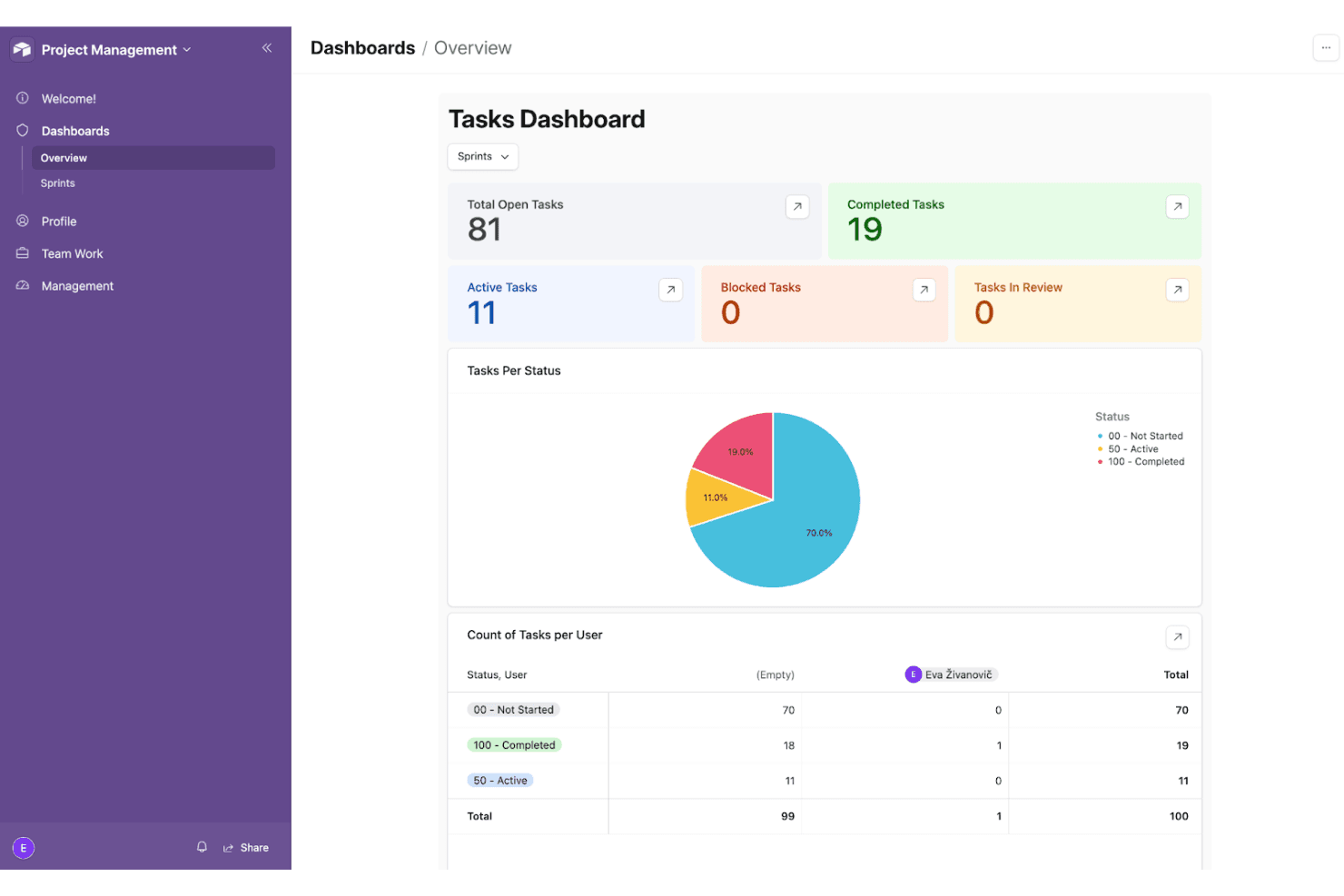
4.6/5
- From $20/user/month (billed annually)
- Free plan available; 14-day free trial
Why Trust Our Software Recommendations
6,700+
Reviews
20
Industry experts
16+
Evaluation factors
14
Years
Our team has been testing and reviewing software since 2012. As marketing leaders ourselves, we know how difficult—and important—it is to choose the right software.
For this guide, we evaluated tools using hands-on testing and independent research, scoring tools using our selection criteria.
Our reviews reflect our human editorial judgment, not a sales pitch.
Expert reviewers:
 Gui DrusinaCreative Director
- Shriya GhateSenior Marketing Lead
 Amanda JacquesMarketing Ops Leader

Airtable Overview
In my opinion, Airtable is a solid choice for teams that value customization and ease of use. Its flexible interface and integration capabilities make it a good fit for creative teams and project managers who need adaptable workflows. However, it can be pricey, and the onboarding process might be a bit challenging for new users. Compared to other tools, Airtable's standout features are its real-time collaboration and custom views, though its support options might leave some users wanting more. If you're looking for a customizable and user-friendly platform, Airtable is worth considering.
Pros
- You can customize workflows to fit your team's specific needs.
- The user interface is intuitive and customizable, making it easy for everyone to use.
- Real-time collaboration keeps your team on the same page.
Cons
- It can be a bit overwhelming for new users to learn.
- Customer support options might not meet all your expectations.
- Advanced features might require a learning curve for your team.
Is Airtable Right For Your Needs?
Who Would be a Good Fit for Airtable?
Airtable is great for creative teams and project managers who need flexible, customizable workflows. If your team relies on real-time updates and collaborative environments, Airtable's user-friendly interface and customization options can help you manage projects efficiently. Marketing departments can use it for campaign tracking, while startups might find its adaptability perfect for evolving business needs.
- Creative AgenciesAirtable helps you track projects and resources with customizable views and real-time collaboration.
- Marketing TeamsYou can organize campaigns and analyze data with Airtable's flexible structure and easy-to-use interface.
- StartupsAirtable lets your team adapt quickly with customizable workflows as your business grows.
- Project ManagersYou can track milestones, dependencies, and deadlines using Airtable’s timeline and Gantt chart–style views, making it easier to plan and adjust complex projects.
- Event PlannersAirtable helps manage logistics and schedules with ease, thanks to its real-time updates and collaboration tools.
- NonprofitsYour organization can track donors and manage events using Airtable's adaptable and user-friendly platform.
Who Would be a Bad Fit for Airtable?
Airtable might not suit large enterprises needing advanced features and extensive data analytics. If your team requires complex reporting or handles massive datasets, Airtable's capabilities might fall short. Financial departments or industries with strict compliance standards may find its features lacking in depth and security. The onboarding process can also be daunting for users unfamiliar with flexible and customizable tools.
- Large EnterprisesYour enterprise might require more advanced data analytics and reporting features than Airtable offers.
- Financial DepartmentsAirtable's features might not meet the stringent compliance and security standards your department needs.
- Data-Heavy IndustriesIf your industry handles massive datasets, Airtable might not provide the depth of data analysis you require.
- IT DepartmentsYour team might need more robust security and integration features than Airtable can deliver.
- Healthcare ProvidersAirtable might not meet the high compliance and security standards necessary for handling sensitive patient data.
- Legal FirmsYour firm may need more specialized document management and compliance features than Airtable offers.
How We Test & Score Tools
We’ve spent years building, refining, and improving our software testing and scoring system. The rubric is designed to capture the nuances of software selection and what makes a tool effective, focusing on critical aspects of the decision-making process.
Below, you can see exactly how our testing and scoring works across seven criteria. It allows us to provide an unbiased evaluation of the software based on core functionality, standout features, ease of use, onboarding, customer support, integrations, customer reviews, and value for money.
Core Functionality (25% of final scoring)
The starting point of our evaluation is always the core functionality of the tool. Does it have the basic features and functions that a user would expect to see? Are any of those core features locked to higher-tiered pricing plans? At its core, we expect a tool to stand up against the baseline capabilities of its competitors.
Standout Features (25% of final scoring)
Next, we evaluate uncommon standout features that go above and beyond the core functionality typically found in tools of its kind. A high score reflects specialized or unique features that make the product faster, more efficient, or offer additional value to the user.
We also evaluate how easy it is to integrate with other tools typically found in the tech stack to expand the functionality and utility of the software. Tools offering plentiful native integrations, 3rd party connections, and API access to build custom integrations score best.
Ease of Use (10% of final scoring)
We consider how quick and easy it is to execute the tasks defined in the core functionality using the tool. High scoring software is well designed, intuitive to use, offers mobile apps, provides templates, and makes relatively complex tasks seem simple.
Onboarding (10% of final scoring)
We know how important rapid team adoption is for a new platform, so we evaluate how easy it is to learn and use a tool with minimal training. We evaluate how quickly a team member can get set up and start using the tool with no experience. High scoring solutions indicate little or no support is required.
Customer Support (10% of final scoring)
We review how quick and easy it is to get unstuck and find help by phone, live chat, or knowledge base. Tools and companies that provide real-time support score best, while chatbots score worst.
Customer Reviews (10% of final scoring)
Beyond our own testing and evaluation, we consider the net promoter score from current and past customers. We review their likelihood, given the option, to choose the tool again for the core functionality. A high scoring software reflects a high net promoter score from current or past customers.
Value for Money (10% of final scoring)
Lastly, in consideration of all the other criteria, we review the average price of entry level plans against the core features and consider the value of the other evaluation criteria. Software that delivers more, for less, will score higher.
Core Features
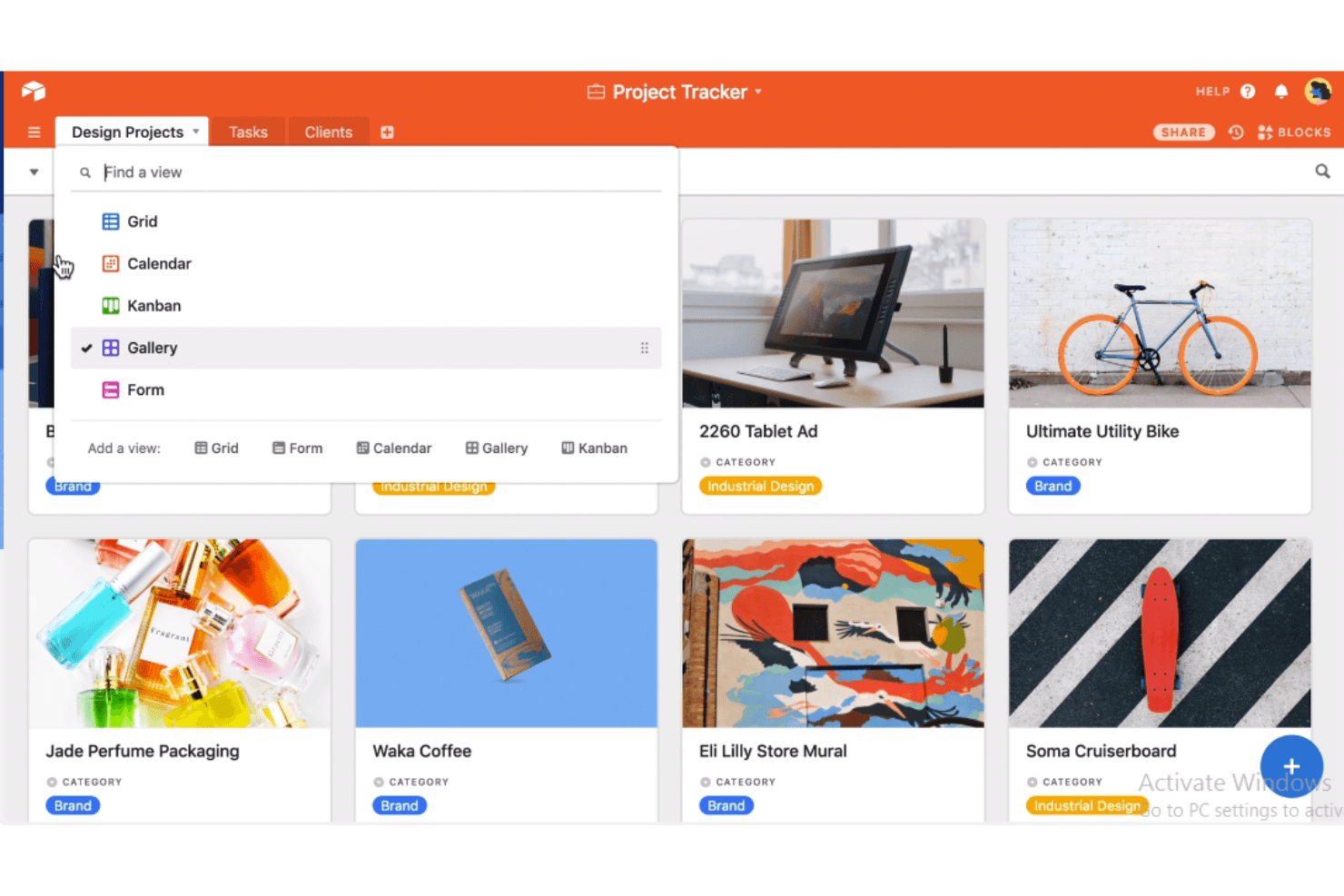
Customizable Views: You can create grid, calendar, kanban, or gallery views to suit your team's workflow. This flexibility lets you visualize data in the way that best supports your projects.
Real-Time Collaboration: Your team can work together seamlessly with instant updates and changes. This feature ensures everyone stays on the same page, reducing miscommunication.
Data Linking: Connect related data across tables to create a more cohesive information system. This feature helps you track relationships and dependencies within your projects.
File Attachments: You can attach files directly to records, keeping all your relevant documents in one place. This is handy for teams needing quick access to documents and media.
Role-Based Permissions: Control who sees and edits what by setting permissions for different team members. This keeps your data secure and ensures that only the right people have access.
Ease of Use
Airtable's user-friendly interface makes it a strong contender for teams looking to manage data without hassle. The intuitive design allows you to set up projects quickly using drag and drop interactions, while customizable views make data management straightforward. Real-time collaboration ensures your team stays connected, but new users might find the variety of features a bit overwhelming at first. Overall, Airtable offers a balance of simplicity and functionality that can suit many teams' needs.
Integrations
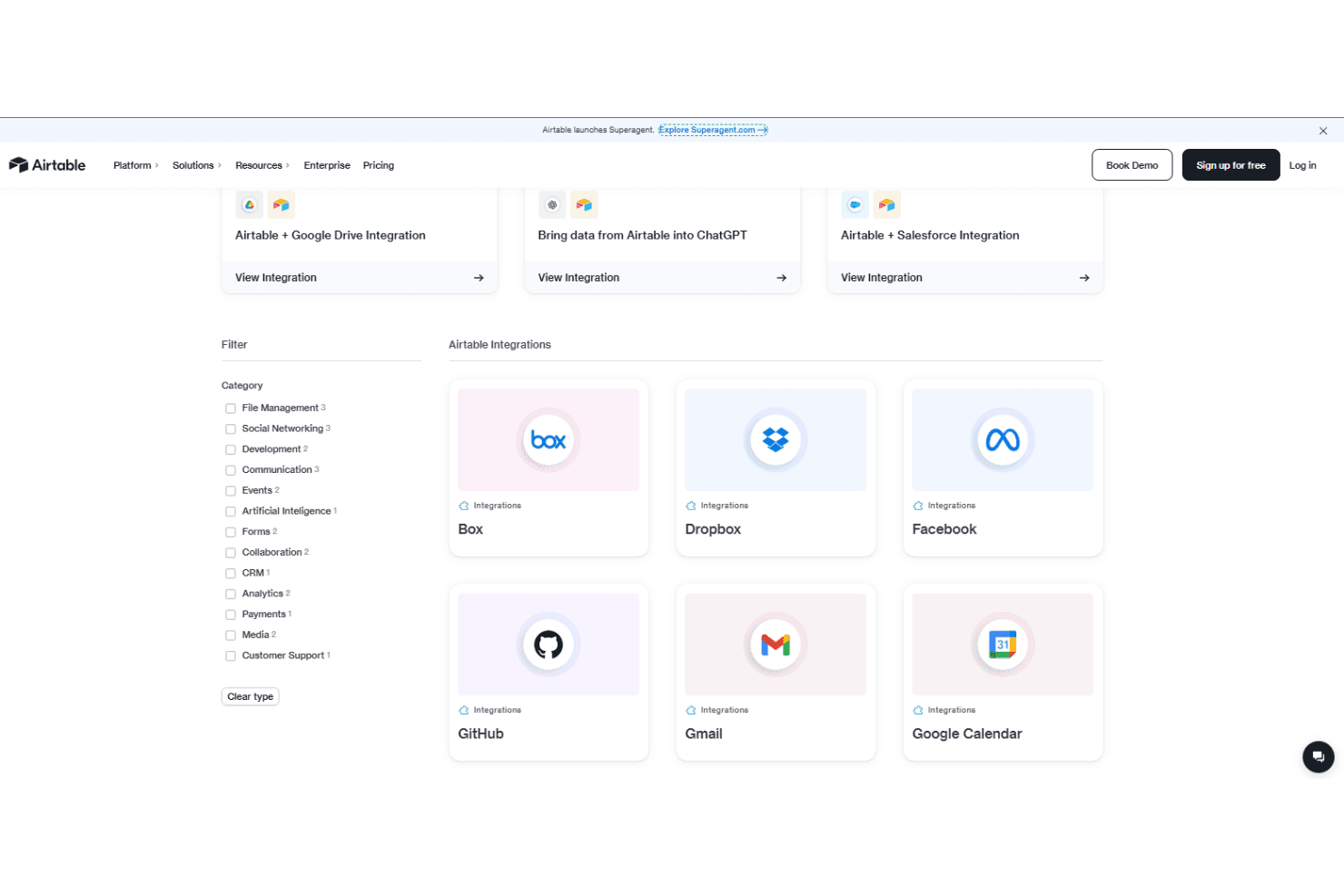
Airtable integrates with tools such as Google Drive, Google Sheets, Salesforce, Slack, Jira, Box, Dropbox, Gmail, Outlook, and Twilio through its native apps and automation features. These integrations help teams connect data, automate workflows, and manage files across platforms.
Airtable also offers a powerful API and supports third-party integration tools like Zapier, enabling custom connections and extended functionality.
Airtable Specs
- 2-Factor Authentication: Yes
- API: Yes
- Batch Permissions & Access: Yes
- Budgeting: Yes
- Calendar Management: Yes
- Contact Management: Yes
- Contact Sharing: Yes
- Customer Management: Yes
- Dashboard: Yes
- Data Export: Yes
- Data Import: Yes
- Data Visualization: Yes
- Email Integration: Yes
- Expense Tracking: Yes
- External Integrations: Yes
- Gantt Charts: Yes
- Google Apps Integration: Yes
- Multi-User: Yes
- Notifications: Yes
- Project Management: Yes
- Resource Management: Yes
- Scheduling: Yes
- Task Scheduling/Tracking: Yes
- Third-Party Plugins/Add-Ons: Yes
- Travel Management: Yes


