

24 Video Hosting Platforms for 2026

Video Hosting Platforms Shortlist


Video hosting platforms are online services that let you upload videos, manage, and share video content with your audience. If you’re searching for the best video hosting services, you’re likely comparing options to support marketing campaigns, training, or branded content delivery—while balancing analytics, privacy, and integration needs. Many platforms support multiple video formats, customizable thumbnails, and built-in video editing tools, making it easier to publish and manage content from a single video hosting solution.
With options ranging from free video hosting tools to advanced enterprise platforms, choosing the right video sharing platform can directly impact your reach, engagement, and results. This list breaks down the top solutions for 2026 so you can quickly evaluate which platform fits your goals, workflow, and audience.
Why Trust Our Software Reviews
We’ve been testing and reviewing marketing software since 2022. As marketing experts ourselves, we know how critical and difficult it is to make the right decision when selecting software.
We invest in deep research to help our audience make better software purchasing decisions. We’ve tested more than 2,000 tools for different marketing use cases and written over 1,000 comprehensive software reviews. Learn how we stay transparent & our software review methodology.
Best Video Hosting Platforms Summary
This comparison chart summarizes pricing details for my top video hosting platform selections to help you find the best one for your budget and business needs.
| Tool | Best For | Trial Info | Price | ||
|---|---|---|---|---|---|
| 1 | Best for in-depth audience analytics | Free plan available | From $79/month (billed annually) | Website | |
| 2 | Best for customizable player branding | Free trial + free plan available | From $12/month (billed annually) | Website | |
| 3 | Best for multi-device content delivery | Free demo available | Pricing upon request | Website | |
| 4 | Best for large-scale enterprise streaming | Free demo available | Pricing upon request | Website | |
| 5 | Best for sales team video integrations | Free plan + free trial + free demo available | From $59/user/month (billed annually) | Website | |
| 6 | Best for advanced interactive video features | Free trial + free demo available | Pricing upon request | Website | |
| 7 | Best for paywall and monetization options | Free trial + free demo available | From $39/month (billed annually) | Website | |
| 8 | Best for privacy and access controls | 30-day free trial available | From $10/month | Website | |
| 9 | Best for lead capture form integration | 14-day free trial available | From $13/month (billed annually) | Website | |
| 10 | Best for secure internal communications | Free trial available | From $99/month (billed annually) | Website |
Video Hosting Platforms Reviews
Below are my detailed summaries of the video hosting platforms that made it onto my shortlist. My reviews offer a detailed look at the features, best use cases, and integrations of each platform to help you find the best one for you.

Wistia
Best for in-depth audience analytics

If you need to understand exactly how viewers interact with your videos, Wistia is built for you. The platform is especially useful for marketers, content teams, and educators who want to dig into audience behavior and optimize video strategy. Wistia’s analytics tools help you track engagement, identify drop-off points, and measure the impact of your video content.
Why I Picked Wistia
What sets Wistia apart for me is its focus on delivering detailed audience analytics that go beyond basic view counts. You can see heatmaps for individual viewers, track engagement at every second, and identify exactly where people drop off or rewatch. Wistia also offers tools for segmenting audiences and measuring the performance of calls to action within your videos. If you want to make data-driven decisions about your video content, Wistia’s analytics give you the depth and clarity you need.
Wistia Key Features
In addition to its analytics capabilities, I also found these features valuable for teams managing video content:
- Customizable Video Player: Adjust player colors, add your logo, and control playback options to match your brand.
- Lead Capture Forms: Embed email collection forms directly into your videos to generate leads.
- Channel Pages: Create branded video galleries or collections for campaigns, product launches, or resource hubs.
- Integrations With Marketing Tools: Connect Wistia to platforms like HubSpot, Marketo, and Pardot for automated workflows.
Wistia Integrations
Integrations include HubSpot, Marketo, Pardot, Active Campaign, Drip, Keap, Intercom, LinkedIn, Meta Ads, Trello, Zoom, Zendesk, and more.
Pros and Cons
Pros:
- Channel pages organize videos into branded collections
- Lead capture forms embed directly in videos
- Heatmaps reveal viewer engagement and drop-off points
Cons:
- No built-in pay-per-view or subscription monetization
- Storage limits restrict video libraries on lower plans

Vimeo
Best for customizable player branding
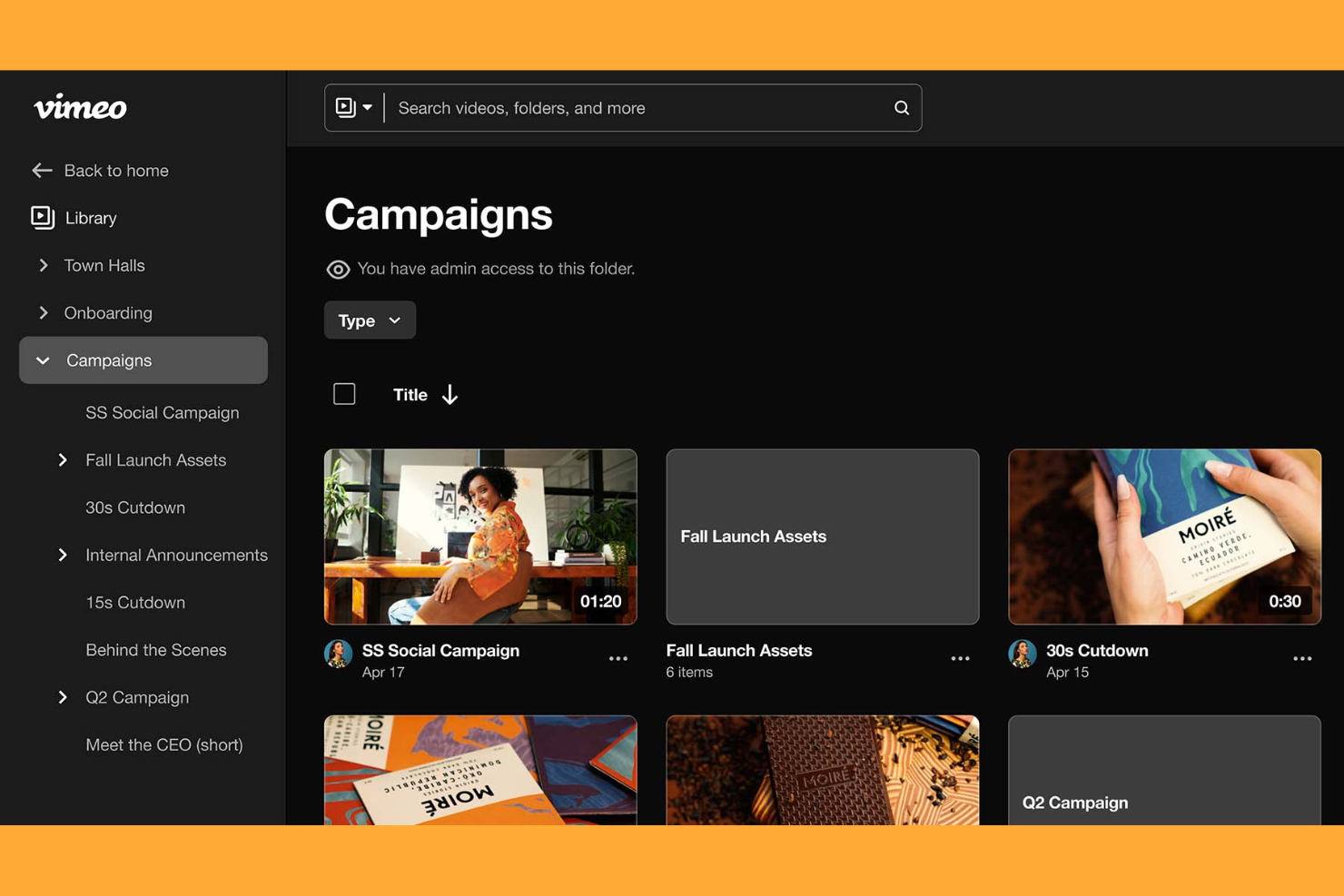
Vimeo offers a video hosting platform designed for teams and creators who want full control over their video player’s look and feel. It’s a strong fit for marketers, agencies, and brands that need to match video experiences to their visual identity. If you’re looking to customize player colors, add logos, and manage how your content appears across channels, Vimeo gives you those options.
Why I Picked Vimeo
Vimeo stands out for its advanced player customization options, which is why I picked it for this shortlist. You can adjust player colors, add your own logo, and even control which buttons and features appear, making it easy to align videos with your brand guidelines. The platform also lets you create custom end screens and interactive elements, so you can guide viewers to take specific actions. For anyone who needs their video content to look and feel like an extension of their brand, Vimeo offers the most flexible player branding tools in the space.
Vimeo Key Features
Some other features that make Vimeo a strong choice for video hosting include:
- Video Privacy Controls: Set passwords, domain restrictions, or private links to control who can view your videos.
- Collaboration Tools: Invite team members to review, comment, and approve videos directly within the platform.
- Video Analytics: Access detailed insights on viewer engagement, play rates, and geographic data.
- Live Streaming: Broadcast live events with real-time chat and audience interaction options.
Vimeo Integrations
Integrations include HubSpot CRM, Dropbox, GoDaddy, Kapwing, Adobe Express, Asana, Bandicut, Canva, Box, Constant Contact, and more.
Pros and Cons
Pros:
- Video analytics track engagement and audience behavior
- Privacy controls enable password and domain restrictions
- Custom player branding supports visual customization
Cons:
- Video SEO tools are less advanced than competitors
- Storage limits restrict large video libraries on lower plans

VPlayed
Best for multi-device content delivery

VPlayed is built for organizations that need to deliver video content across a wide range of devices and platforms. It’s a strong fit for media companies, broadcasters, and educational institutions looking to reach audiences on smart TVs, mobile apps, and web browsers. VPlayed helps you manage, monetize, and distribute video content with full control over branding and user experience.
Why I Picked VPlayed
Delivering content smoothly across multiple devices is a challenge for many organizations, and that’s where VPlayed excels. The platform supports native apps for smart TVs, mobile devices, and web browsers, making it possible to reach viewers wherever they are. I like that VPlayed also offers adaptive streaming, which automatically adjusts video quality based on the user’s device and connection. This focus on multi-device compatibility makes it a strong choice for anyone prioritizing broad content accessibility in a video hosting platform.
VPlayed Key Features
Some other features that make VPlayed a flexible option for video hosting platforms include:
- Monetization Models: Choose from subscription, pay-per-view, or ad-based revenue options for your video content.
- DRM and Content Protection: Secure your videos with digital rights management and watermarking tools.
- Analytics Dashboard: Track viewer engagement, device usage, and content performance in real time.
- Customizable Player: Adjust the video player’s appearance and controls to match your brand and user needs.
VPlayed Integrations
Native integrations are not currently listed. However, VPlayed offers an API for custom integrations.
Pros and Cons
Pros:
- Real-time analytics track engagement and device usage
- Customizable player supports branded viewing experiences
- DRM and watermarking protect premium video content
Cons:
- Feature roadmap is not transparent
- Public documentation is limited

Best for large-scale enterprise streaming
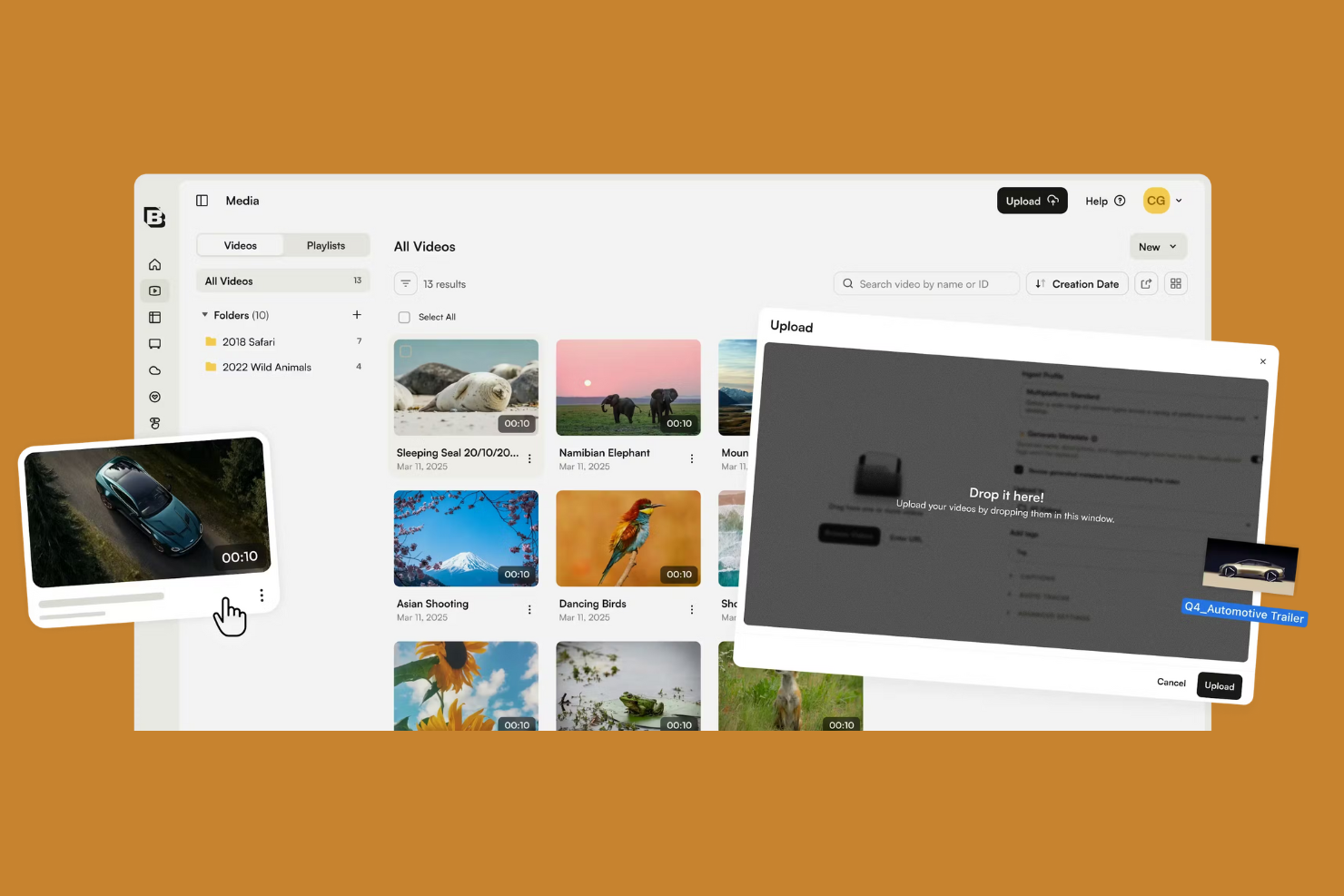
Brightcove is built for organizations that need to deliver high-quality video at scale, especially across global audiences. Large enterprises, broadcasters, and media companies use Brightcove to manage, distribute, and monetize live and on-demand video content. Its platform addresses challenges like secure streaming, advanced analytics, and complex content workflows for teams with demanding video needs.
Why I Picked Brightcove
When I need a platform that can handle large-scale, enterprise-grade streaming, Brightcove stands out for its broadcast-level reliability and scalability. The platform supports high-volume live streaming and on-demand video delivery, making it a strong fit for organizations with global audiences and complex distribution needs. Brightcove’s advanced security controls and monetization options help enterprises protect and generate revenue from their content. I picked Brightcove because it’s purpose-built for teams that can’t compromise on video quality or uptime.
Brightcove Key Features
Some other features that make Brightcove valuable for enterprise video hosting include:
- Video Content Management System: Organize, search, and manage large video libraries with advanced metadata and tagging.
- Customizable Video Portals: Build branded video portals for internal or external audiences without custom development.
- Marketing Automation Integrations: Connect video data to platforms like Marketo, Eloqua, and HubSpot for lead tracking.
- Multi-language Support: Deliver video content with subtitles and audio tracks in multiple languages for global reach.
Brightcove Integrations
Integrations include Adobe Analytics, Google Analytics, Marketo, Salesforce, Eloqua, HubSpot, IBM Watson Media, Ooyala, Kaltura, Wistia, and more.
Pros and Cons
Pros:
- Analytics track engagement and performance
- Monetization supports ads and pay-per-view
- DRM and access controls improve video security
Cons:
- Platform updates may disrupt workflows
- Customer support response times can be slow

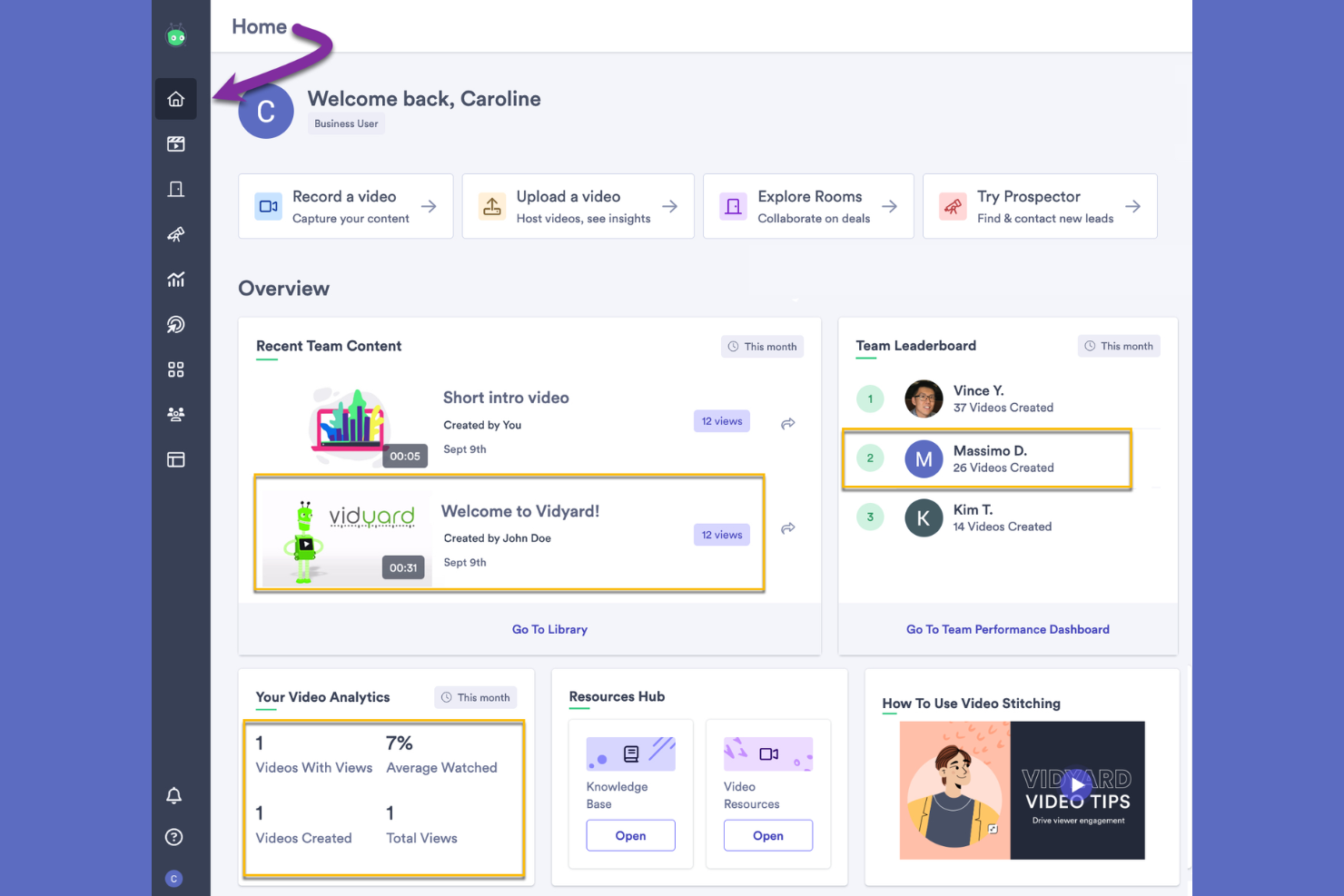
Vidyard stands out for sales teams that want to use video as part of their outreach and customer engagement. The platform is designed for sales professionals, business development reps, and account managers who need to record, host, and share personalized videos directly within their sales workflows. Vidyard’s integrations with CRM and sales tools help teams track viewer engagement and connect video performance to pipeline activity.
Why I Picked Vidyard
For sales teams that want to bring video directly into their outreach, Vidyard offers features built specifically for sales workflows. You can record and send personalized video messages from within your email or CRM, making it easy to add a human touch to prospecting and follow-ups. Vidyard also tracks who watches your videos and how long they engage, so you can prioritize leads and tailor your follow-up. I picked Vidyard because it connects video content directly to sales activity, helping teams measure the impact of their efforts.
Vidyard Key Features
Some other features that make Vidyard useful for business video hosting include:
- Video Hubs: Organize and showcase collections of videos in branded, searchable galleries.
- Customizable Video Player: Adjust player colors, add your logo, and control playback settings to match your brand.
- Interactive CTAs: Add clickable calls to action directly within your videos to drive next steps.
- Security Controls: Set password protection, domain restrictions, and viewer permissions for sensitive content.
Vidyard Integrations
Integrations include Salesforce, HubSpot, Marketo, Microsoft Dynamics 365, Outreach, Slack, Zoom, Google Workspace, Drift, LinkedIn Sales Navigator, and more.
Pros and Cons
Pros:
- Interactive CTAs embed directly in videos
- Video hubs organize content for different audiences
- Viewer analytics track watch time and engagement
Cons:
- Bulk video management tools are limited
- Video playback quality can be inconsistent

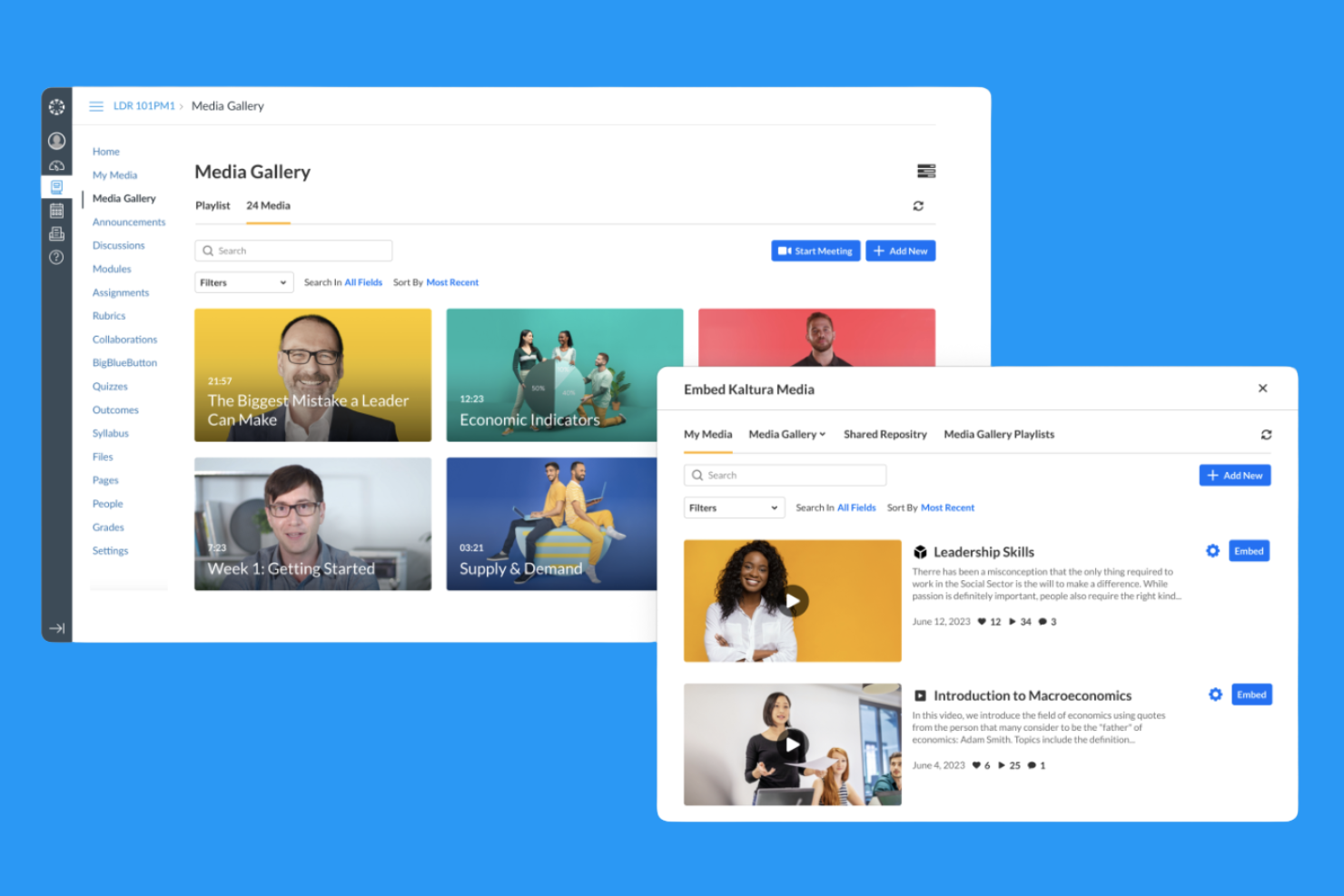
Kaltura stands out for organizations that need interactive and customizable video experiences. It’s a strong fit for higher education, enterprise training, and media teams that want to add quizzes, polls, and branching paths to their video content. Kaltura helps you create engaging, two-way video that goes beyond simple streaming or hosting.
Why I Picked Kaltura
What drew me to Kaltura is its focus on interactive video features that go far beyond basic hosting. You can embed quizzes, polls, and calls-to-action directly into your videos, which is especially valuable for training, education, and audience engagement. Kaltura also supports branching video paths, letting viewers choose their own journey through the content. I picked Kaltura because it gives teams the tools to create dynamic, participatory video experiences that drive deeper engagement.
Kaltura Key Features
Some other features that make Kaltura appealing for video hosting teams include:
- Cloud-Based Video Management: Organize, store, and manage your entire video library in a secure cloud environment.
- Live Streaming Capabilities: Broadcast live events with support for high-quality, scalable streaming.
- Accessibility Tools: Add captions, transcripts, and screen reader support to meet accessibility standards.
- Granular User Permissions: Control who can view, edit, or publish content with detailed permission settings.
Kaltura Integrations
Integrations include Marketo, Salesforce, HubSpot, and more.
Pros and Cons
Pros:
- Granular permissions manage large teams
- Accessibility tools include captions and transcripts
- Supports both live and on-demand streaming
Cons:
- Analytics lacks some real-time reporting
- Advanced features may require technical setup

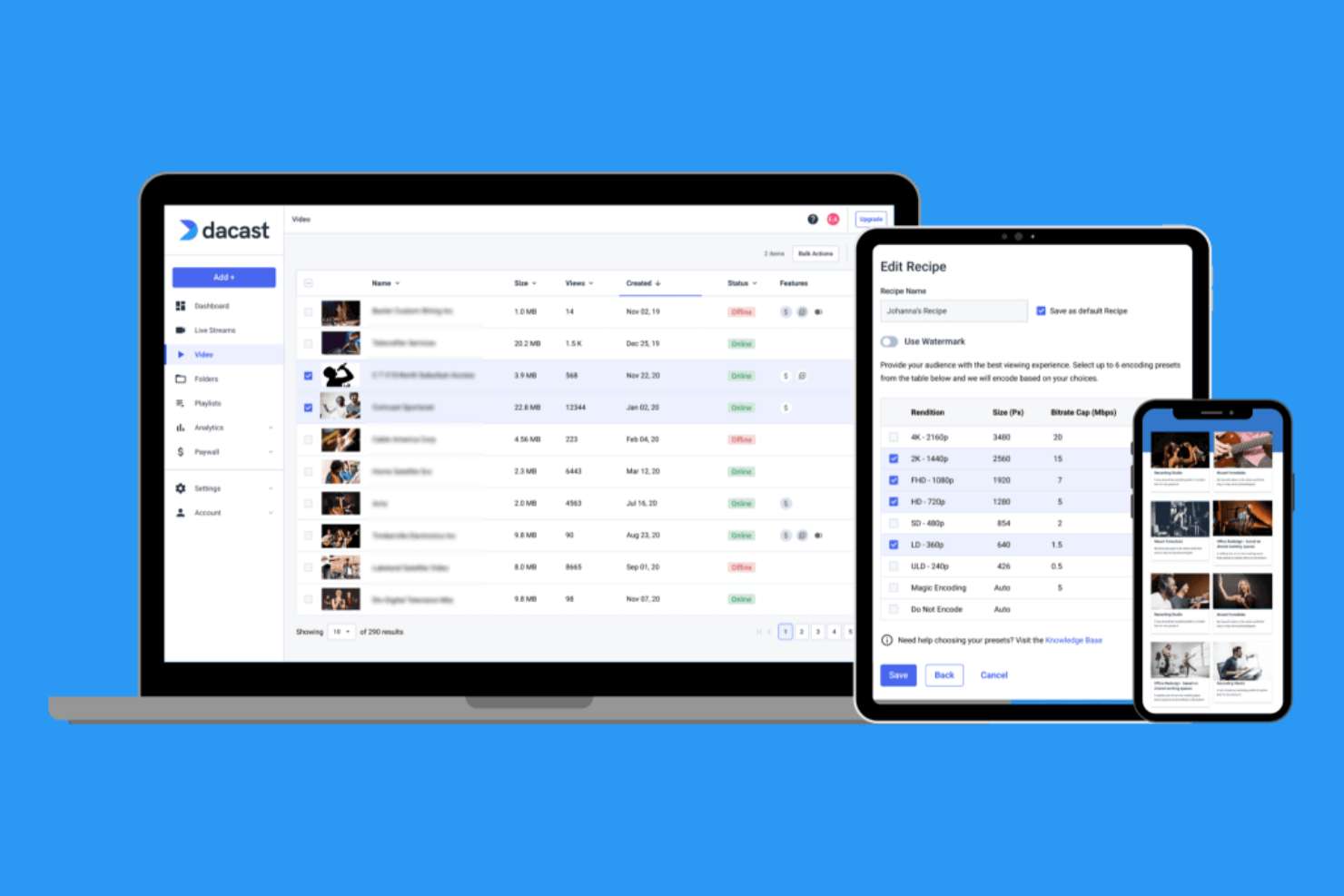
If you need a video hosting platform with flexible monetization options, Dacast is worth a close look. It’s designed for media companies, event organizers, and educators who want to put paywalls, subscriptions, or ad-supported models on their video content. Dacast helps teams turn live and on-demand video into a direct revenue stream without relying on third-party platforms.
Why I Picked Dacast
For teams focused on monetizing their video content, Dacast offers a range of built-in paywalls and revenue options that set it apart from other platforms. You can set up pay-per-view, subscriptions, or ad-supported models directly within the platform, giving you control over how you generate income from both live and on-demand video. Dacast also supports secure payment processing and customizable access restrictions, which are essential for protecting premium content. I picked Dacast because it’s purpose-built for organizations that want to turn video hosting into a direct revenue channel.
Dacast Key Features
In addition to its monetization tools, I also found these features useful for teams managing video content:
- White-Label Player: Customize the video player with your own branding and colors.
- Geo-Restriction Controls: Limit where your video content can be viewed based on geographic location.
- Real-Time Analytics: Track viewer engagement and performance metrics as they happen.
- Multi-CDN Delivery: Distribute video streams across multiple content delivery networks for improved reliability.
Dacast Integrations
Native integrations are not currently listed. However, Dacast offers an API for custom integrations.
Pros and Cons
Pros:
- Multi-CDN delivery improves global streaming reliability
- Real-time analytics track viewer engagement
- White-label player enables full branding control
Cons:
- API documentation is limited
- Buffering can occur during high-traffic events
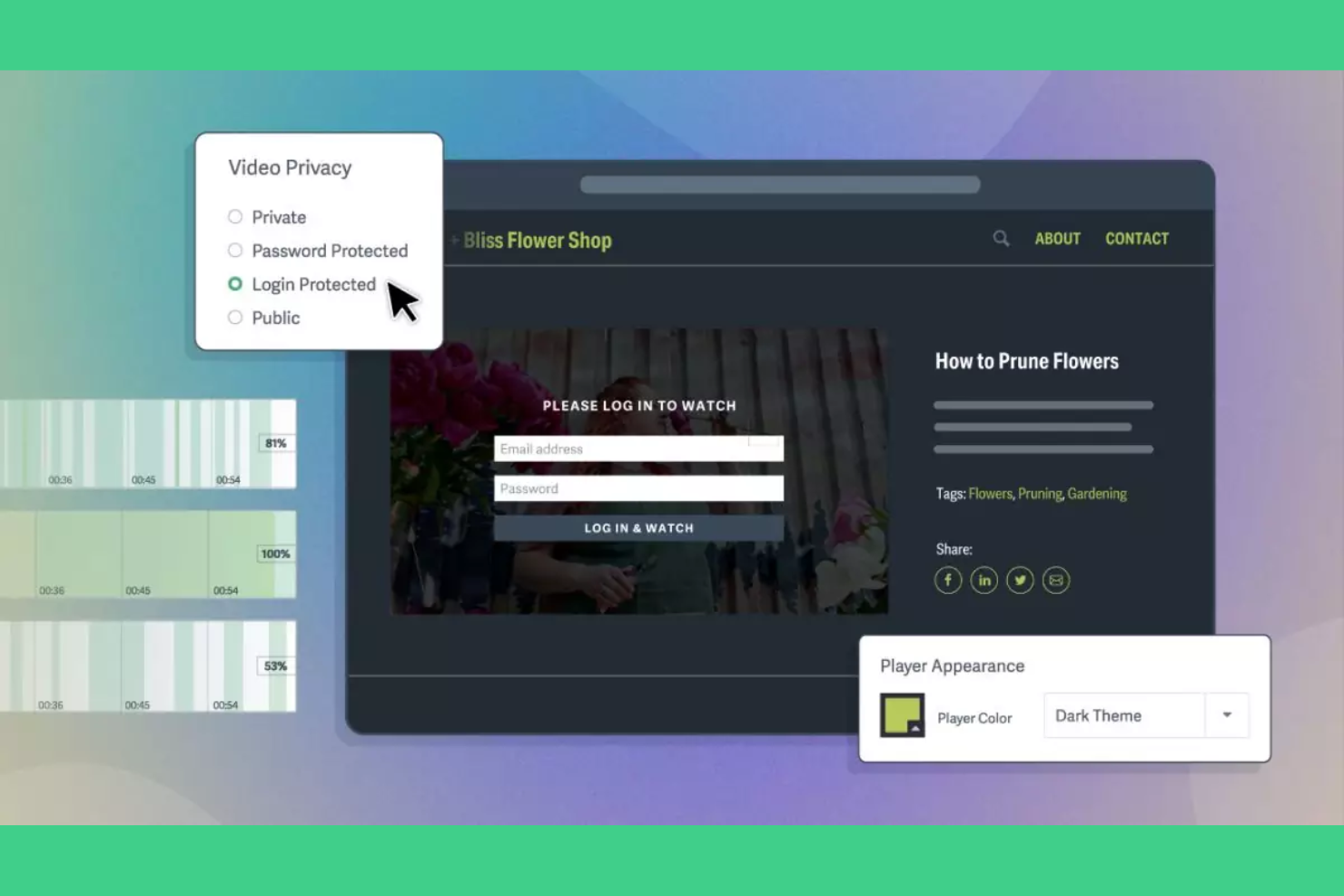
If you need strict control over who can view your videos, SproutVideo is built for you. It’s especially useful for businesses, agencies, and educators who handle sensitive or internal content. SproutVideo gives you advanced privacy settings and access controls that help protect your video assets from unauthorized viewers.
Why I Picked SproutVideo
What sets SproutVideo apart for me is its focus on privacy and access controls, which is a top concern for many organizations sharing sensitive content. You can set up password protection, IP address restrictions, and login requirements for each video or playlist. I appreciate that SproutVideo also lets you control video embedding and domain-level access, so you decide exactly where your content appears. These features make it a strong choice if you need to tightly manage who can view your videos and how they’re distributed.
SproutVideo Key Features
Some other features that make SproutVideo useful for video hosting include:
- Customizable Video Player: Adjust the player’s appearance to match your brand’s colors and logo.
- Video Analytics Dashboard: Track viewer engagement, play rates, and geographic data for each video.
- Lead Capture Forms: Add forms to your videos to collect viewer information before or during playback.
- Automated Video Workflows: Set up rules for encoding, publishing, and notifications to simplify video management.
SproutVideo Integrations
Native integrations are not currently listed. However, SproutVideo offers an API for custom integrations.
Pros and Cons
Pros:
- Lead capture forms embed directly in videos
- Analytics track engagement and viewer locations
- Customizable player supports full branding control
Cons:
- Upload limits may restrict large libraries
- No built-in live streaming support

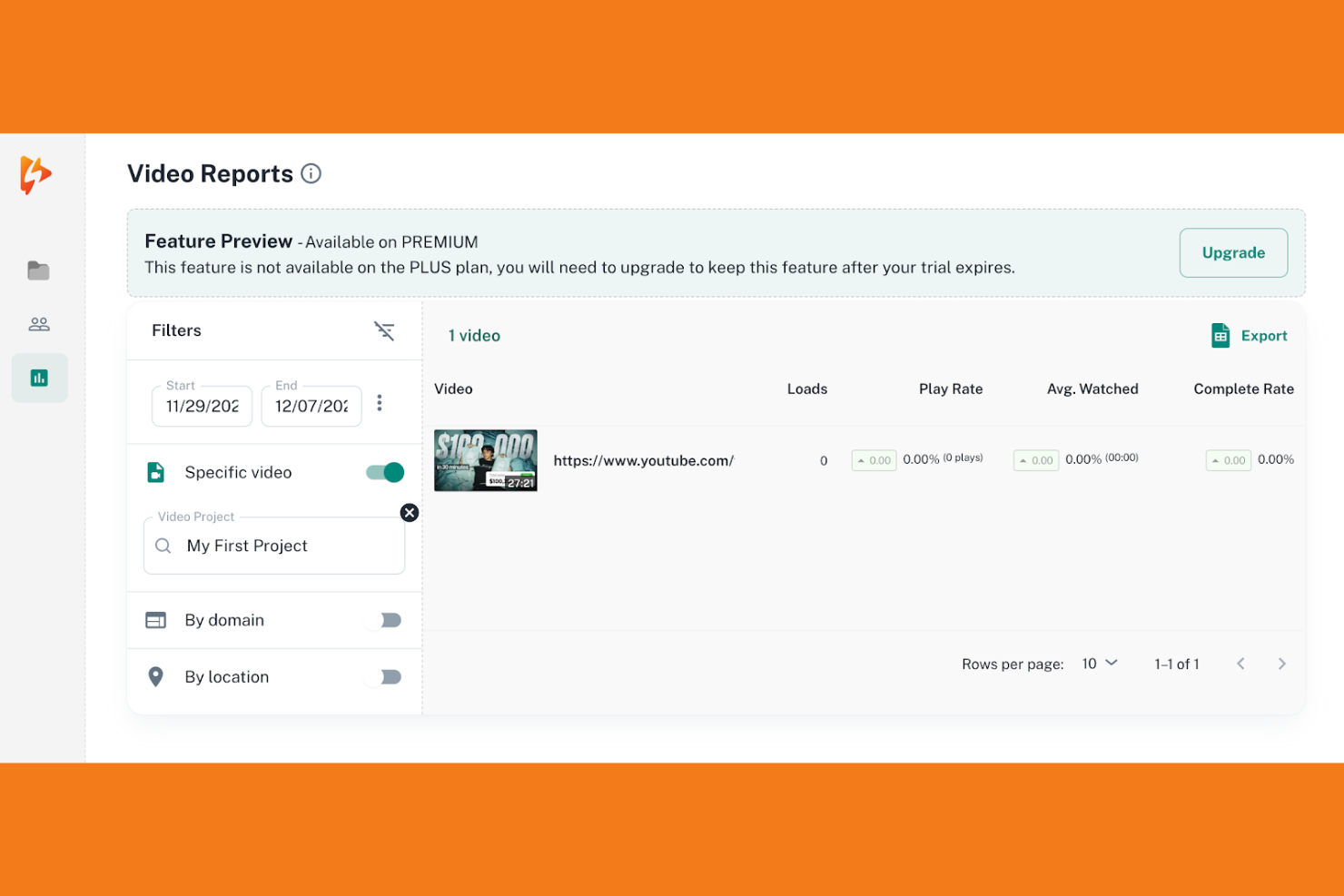
Spotlightr stands out if you want to turn video viewers into leads right from your player. It’s a strong fit for marketers, course creators, and sales teams who need to capture contact information or qualify prospects during video playback. Spotlightr’s built-in lead capture form integration helps you collect data and drive conversions without sending viewers elsewhere.
Why I Picked Spotlightr
For teams focused on capturing leads directly from their video content, Spotlightr offers some of the most flexible lead capture form options I’ve seen. You can embed forms at any point in your video, whether before playback, mid-roll, or at the end, which gives you control over when and how you collect viewer information. I like that Spotlightr supports custom fields and integrates with popular email marketing tools, so you can tailor forms to your campaign needs. These features make it a strong choice if your main goal is to turn video engagement into actionable leads.
Spotlightr Key Features
In addition to its lead capture capabilities, Spotlightr offers several other features worth noting:
- White Label Player: Remove Spotlightr branding and customize the player to match your brand.
- Video Analytics: Access detailed reports on viewer engagement, drop-off points, and play rates.
- Interactive Elements: Add quizzes, polls, and clickable calls-to-action directly within your videos.
- Video Security Options: Restrict access with password protection, domain locking, and IP filtering.
Spotlightr Integrations
Integrations include WordPress, LearnDash, Stripe, and more.
Pros and Cons
Pros:
- White-label player removes platform branding
- Quizzes and polls increase viewer engagement
- Lead capture forms embed directly in videos
Cons:
- Upload and bandwidth limits on lower plans
- No built-in live streaming for events

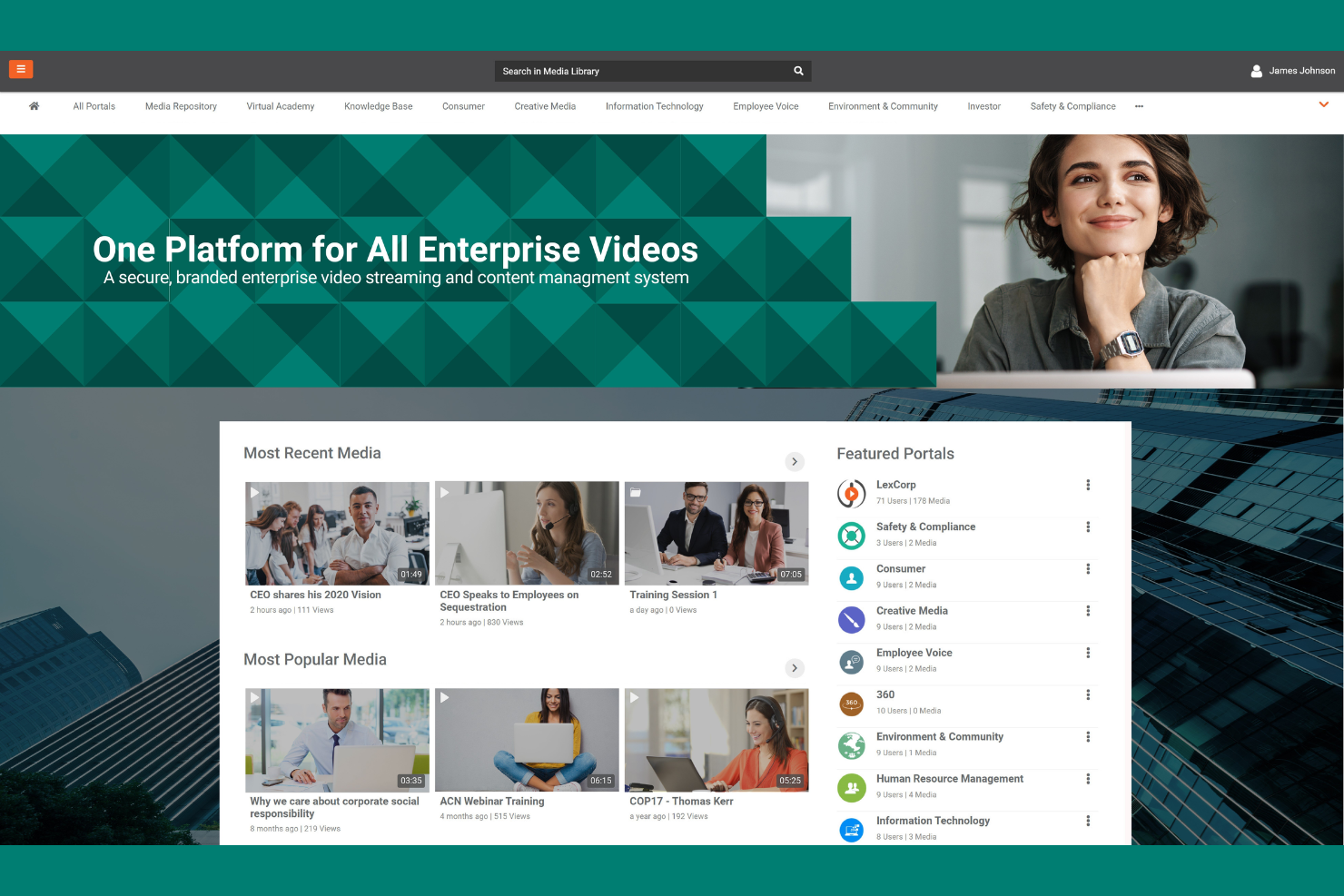
If your organization needs to share sensitive video content securely, VIDIZMO is built for you. It’s designed for enterprises, government agencies, and regulated industries that require strict access controls and compliance features for internal communications. VIDIZMO helps you manage, distribute, and protect video assets while meeting privacy and security standards.
Why I Picked VIDIZMO
Security and compliance are top priorities for many organizations sharing internal video content, which is why VIDIZMO stands out in this space. The platform offers granular access controls, so you can restrict video viewing to specific users, groups, or departments. I appreciate that VIDIZMO supports encryption both at rest and in transit, helping you meet strict data protection requirements. Its audit trails and detailed user activity logs also make it a strong fit for teams that need to monitor and document internal communications.
VIDIZMO Key Features
In addition to its security and compliance strengths, VIDIZMO offers several other features that support internal video management:
- AI-Powered Search: Quickly locate specific content within videos using speech-to-text and facial recognition.
- Live Streaming: Broadcast live events securely to internal audiences with real-time access controls.
- Custom Branding: Tailor the video portal’s look and feel to match your organization’s identity.
- Multi-Language Support: Provide video content and interfaces in multiple languages for global teams.
VIDIZMO Integrations
Native integrations are not currently listed. However, VIDIZMO offers an API for custom integrations.
Pros and Cons
Pros:
- Supports live streaming for secure internal broadcasts and events.
- AI-powered search enables fast discovery of video content.
- Granular access controls support strict internal content distribution.
Cons:
- Limited public-facing video sharing options for external audiences.
- Native integrations with third-party tools are not clearly listed.
Other Video Hosting Platforms
Here are some additional video hosting platforms options that didn’t make it onto my shortlist, but are still worth checking out:
- Streamable
For quick and simple uploads
- Dailymotion
For global audience reach
- Uscreen
For launching subscription channels
- JWX
For AI-powered content recommendations
- Jetpack VideoPress
For WordPress site integration
- EnterpriseTube
For corporate knowledge sharing
- YouTube
For creator monetization tools
- Odysee
For blockchain-based publishing
- Rumble
For alternative content discovery
- PeerTube
For decentralized hosting control
- Nebula
For exclusive educational content
- Bitchute
For independent content distribution
- Twitch.tv
For live audience engagement


How I Evaluate Video Hosting Platforms
I split my evaluation into baseline criteria—think ad-free embeds, in-video lead capture, and MarTech integrations—and the differentiators that set the best platforms apart for marketing teams.
Core Functionality (Table Stakes For This List)
When I'm selecting tools for my list, I rank each one on a scale from 0 (does not offer the functionality) to 5 (excels in this area) for each core functionality listed below. Then, I calculate the tool's total score into a percentage. Each tool needs to achieve a minimum total score of 65% to be considered for inclusion.
- Ad-Free Custom Hosting: I check whether the player is free of third-party ads and supports branding like custom colors, logos, and controls so your videos look native to your site.
- Embedding & Distribution: Responsive embed codes, domain restrictions, and multiple player formats matter here—especially for teams publishing across landing pages and CMS properties.
- Video Analytics: I look for viewer-level engagement data like heatmaps, drop-off points, and watch time rather than just aggregate view counts that tell you very little.
- Lead Capture & MarTech Integrations: The platform should support in-video forms, email gates, and CTAs that sync leads directly into tools like HubSpot, Marketo, or Salesforce.
- Video Management Library: Organizing hundreds of campaign videos, product demos, and webinar recordings requires folders, tags, search, and bulk actions—not just a flat upload list.
- Security & Access Controls: Password protection, domain allowlisting, and role-based permissions are what I evaluate, particularly for teams sharing gated content or pre-launch assets.
Once I have a list of tools that meet this criteria, I consider what sets each platform apart.
Differentiating Factors (What Sets Vendors Apart)
Here's how I compare and contrast different vendors:
Standout Features
Interactive elements like clickable CTAs, branching paths, and in-video quizzes can turn a product demo into a guided buying experience. I also evaluate video SEO tools—schema markup and sitemap generation help your hosted content rank organically instead of driving traffic to YouTube. For ABM-focused teams, personalization features that dynamically insert a prospect's name or company logo into videos add a layer of relevance that generic content can't match.
Beyond Features
Content delivery performance matters more than most buyers realize—a slow-loading player on a campaign landing page can tank your conversion rates and Core Web Vitals scores. I also evaluate pricing models closely, since bandwidth-based billing can create surprises when a product launch video goes viral. For teams running campaigns across multiple regions, I check whether the platform offers GDPR and CCPA compliance controls, data residency options, and consent management baked into the player.
How to Choose Video Hosting Platforms
It’s easy to get bogged down in long feature lists and complex pricing structures. To help you stay focused as you work through your unique software selection process, here’s a checklist of factors to keep in mind:
| Factor | What to Consider |
|---|---|
| Scalability | Will the platform handle your current and projected video volume, audience size, and bandwidth needs as you grow? |
| Integrations | Does the platform connect natively with your CMS, analytics, marketing automation, or DAM systems? Check for gaps. |
| Customizability | Can you tailor the video player, branding, and user experience to match your organization’s requirements? |
| Ease of use | How quickly can your team upload, organize, and publish videos without extensive training or technical support? |
| Implementation and onboarding | What resources, training, or migration support does the vendor provide to help you get started and realize value quickly? |
| Cost | Are pricing tiers clear and predictable as usage grows? Watch for overage fees, storage limits, or required add-ons. |
| Security safeguards | Does the platform offer encryption, access controls, and compliance with your industry’s data protection standards? |
| Support availability | What support channels and response times are guaranteed, especially during live events or critical campaigns? |
What Are Video Hosting Platforms?
Video hosting platforms are online services that let you upload, store, manage, and deliver video content to viewers across the web. These platforms handle video encoding, streaming, and playback, making it easy to share videos on websites, social media, or internal portals. They also provide tools for privacy controls, analytics, and sometimes monetization, helping organizations distribute and track video content efficiently.
Features of Video Hosting Platforms
When selecting video hosting platforms, keep an eye out for the following key features:
- Video upload and storage: Securely upload and store video files of various formats and sizes, making them accessible for on-demand or live streaming.
- Customizable video player: Adjust the appearance, controls, and branding of the video player to match your website or company identity.
- Embed options: Generate embed codes to easily place videos on websites, blogs, or landing pages without complex coding.
- Privacy and access controls: Set permissions, password protection, or domain restrictions to control who can view your videos.
- Analytics and reporting: Track viewer engagement, watch time, and geographic data to measure video performance and audience reach.
- Live streaming support: Broadcast live events or webinars directly to your audience with real-time interaction features.
- Content management system: Organize, categorize, and search your video library with folders, tags, and metadata tools.
- Monetization tools: Enable ad insertion, pay-per-view, or subscription models to generate revenue from your video content.
- Content protection and DRM: Safeguard your videos from unauthorized access or distribution with encryption and digital rights management.
- Multi-device compatibility: Ensure videos play smoothly across desktops, tablets, and smartphones, adapting to different screen sizes and bandwidths.
Common Video Hosting Platforms AI Features
Beyond the standard video hosting platforms' features listed above, many of these solutions are incorporating AI with features like:
- Automated video transcription: AI generates accurate, searchable transcripts for videos, making content more accessible and improving SEO without manual effort.
- Smart content recommendations: AI analyzes viewer behavior and preferences to suggest relevant videos, increasing engagement and watch time.
- Automated highlight reels: AI detects key moments or scenes in videos and creates highlight clips, saving time for editors and enhancing viewer experience.
- AI-powered video tagging: AI identifies objects, people, and topics within videos, automatically generating metadata and improving content organization and discoverability.
- Real-time language translation: AI translates spoken content and captions into multiple languages on the fly, expanding reach to global audiences.
Benefits of Video Hosting Platforms
Implementing video hosting platforms provides several benefits for your team and your business. Here are a few you can look forward to:
- Centralized video management: Store, organize, and access all your video content from a single, secure platform with advanced content management tools.
- Consistent global delivery: Reach audiences worldwide with reliable streaming, multi-device compatibility, and localization features.
- Improved viewer engagement: Use customizable players, live streaming, and AI-powered recommendations to keep viewers interested and returning.
- Actionable analytics: Track detailed viewer behavior and performance metrics to inform your content strategy and marketing decisions.
- Flexible monetization options: Generate revenue through built-in ad support, subscriptions, or pay-per-view models tailored to your business needs.
- Improved content security: Protect your videos with privacy controls, encryption, and digital rights management to prevent unauthorized access or distribution.
- Simplified integration: Connect your video platform with existing marketing, analytics, and content management systems for efficient workflows.
Costs and Pricing of Video Hosting Platforms
Selecting video hosting platforms requires an understanding of the various pricing models and plans available. Costs vary based on features, team size, add-ons, and more. The table below summarizes common plans, their average prices, and typical features included in video hosting platform solutions:
Plan Comparison Table for Video Hosting Platforms
| Plan Type | Average Price | Common Features |
|---|---|---|
| Free Plan | $0 | Basic video upload and storage, limited bandwidth, standard player, and basic analytics. |
| Personal Plan | $5–$25/month | Higher storage limits, customizable player, privacy controls, basic support, and simple embedding. |
| Business Plan | $30–$100/month | Advanced analytics, live streaming, team collaboration, monetization tools, and integrations. |
| Enterprise Plan | $200–$1000+/month | Unlimited storage, custom branding, advanced security, dedicated support, API access, and SLAs. |
Video Hosting Platforms FAQs
Here are some answers to common questions about video hosting platforms:
How do video hosting platforms differ from general file storage services?
Video hosting platforms are built specifically for video delivery, offering encoding, streaming, analytics, and playback controls, while general file storage services focus on storing and sharing files without video-specific features or optimized streaming.
Can I monetize my videos on most video hosting platforms?
Yes, many video hosting platforms offer monetization options such as ad insertion, pay-per-view, or subscription models. Review each platform’s policies and available tools to ensure they align with your revenue goals.
What security measures should I look for in a video hosting platform?
Look for features like encryption, password protection, domain restrictions, and digital rights management. These help prevent unauthorized access, sharing, or downloading of your video content.
How do integrations impact my choice of video hosting platform?
Integrations let you connect your video platform with marketing, analytics, or content management tools. This simplifies workflows, automates reporting, and ensures your video data is accessible across your tech stack.
Is it possible to migrate my existing video library to a new platform?
Yes, most video hosting platforms support bulk uploads or migration tools. Check for import options, supported file formats, and whether the vendor offers migration assistance to minimize downtime and data loss.