
17 Enterprise Content Management Systems Picked for 2026

Enterprise Content Management System Shortlist
Here’s my shortlist of enterprise content management systems:


An enterprise content management system (ECMS) is software that helps your business organize, store, and control access to digital documents and content at scale. If you’re searching for the best enterprise content management system, you’re likely facing challenges with scattered files, compliance requirements, or collaboration across teams and departments. Choosing the right ECM software can help you centralize information, automate workflows, and keep sensitive data secure. In this guide, you’ll find expert-vetted options for 2026, with clear details on what each system does best—so you can confidently match ECM solutions to your business needs.
Why Trust Our Software Reviews
Best Enterprise Content Management Systems Summary
This comparison chart summarizes pricing details for my top enterprise content management software selections to help you find the best one for your budget and business needs.
| Tool | Best For | Trial Info | Price | ||
|---|---|---|---|---|---|
| 1 | Best for process automation in organizations | Free demo available | Pricing upon request | Website | |
| 2 | Best for automated document workflows | Free demo available | Pricing upon request | Website | |
| 3 | Best for large-scale compliance management | Free trial + free demo available | Pricing upon request | Website | |
| 4 | Best for metadata-driven document organization | Free demo + 30-day free trial available | Pricing upon request | Website | |
| 5 | Best with advanced file sharing controls | 14-day free trial + free demo available | From $17.30/user/month (billed annually) | Website | |
| 6 | Best for team collaboration on documentation | Free plan available | From $5.42/user/month | Website | |
| 7 | Best for structured content across channels | Free plan + free demo available | From $10/month | Website | |
| 8 | Best for case management solutions | Free demo available | Pricing upon request | Website | |
| 9 | Best with AI-powered content classification | Free demo available | Pricing upon request | Website | |
| 10 | Best for multi-language content support | Free demo available | Pricing upon request | Website |
-

Demandbase
Visit WebsiteThis is an aggregated rating for this tool including ratings from Crozdesk users and ratings from other sites.4.4 -
6sense
Visit WebsiteThis is an aggregated rating for this tool including ratings from Crozdesk users and ratings from other sites.4.3 -
AnswerThePublic
Visit Website


Enterprise Content Management System Reviews
Below are my detailed summaries of the enterprise content management systems that made it onto my shortlist. My reviews offer a detailed look at the features, best use cases, and integrations of each system to help you find the best one for your business.

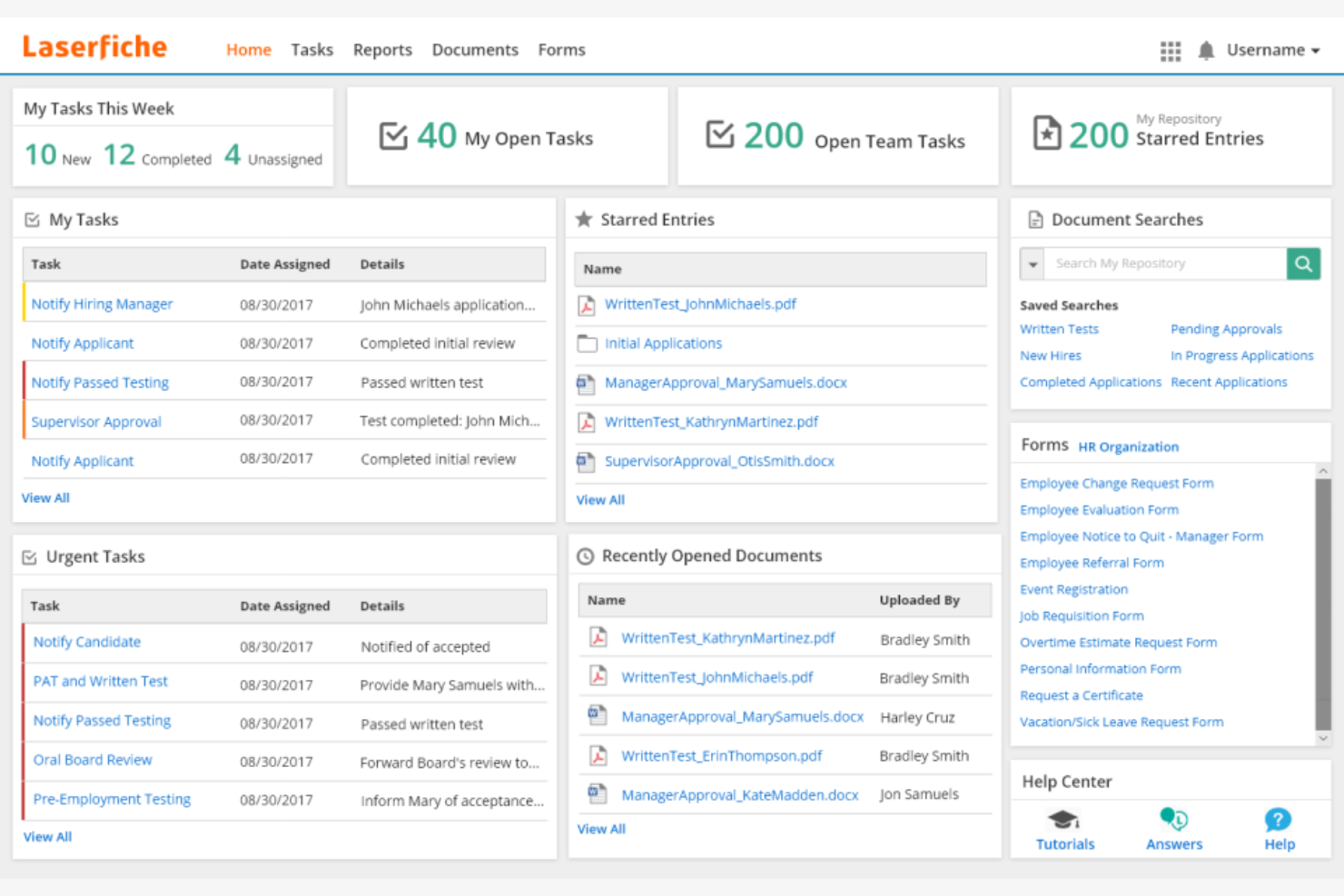
Laserfiche stands out for organizations that want to automate complex business processes alongside managing documents. It’s a strong fit for teams in government, education, and financial services that need to digitize workflows, enforce compliance, and reduce manual paperwork. With its process automation tools, Laserfiche helps you design, monitor, and optimize content-driven operations at scale.
Why I Picked Laserfiche
For organizations that need more than just document storage, Laserfiche offers process automation tools that set it apart in the enterprise content management system space. The platform lets you build custom workflows using a visual designer, so you can automate document routing, approvals, and notifications without coding. I appreciate how Laserfiche includes built-in analytics to help you monitor process performance and identify bottlenecks. These features make it a strong choice for teams looking to digitize and optimize their business processes alongside managing content.
Laserfiche Key Features
In addition to its process automation capabilities, Laserfiche offers several other features that support enterprise content management:
- Document Capture and Scanning: Import paper documents and digital files directly into the system for centralized management.
- Records Management: Apply retention schedules and automate compliance with regulatory requirements.
- Granular Permission Controls: Set detailed access rights for users, groups, and roles across repositories.
- Mobile App Access: View, upload, and manage documents from iOS and Android devices.
Laserfiche Integrations
Integrations include Microsoft Dynamics CRM, Salesforce, Laserfiche API, DocuSign, and Workday.
Pros and Cons
Pros:
- Highly scalable platform
- Strong user community
- Easy audit compliance
Cons:
- Initial setup takes time
- Add-ons get expensive

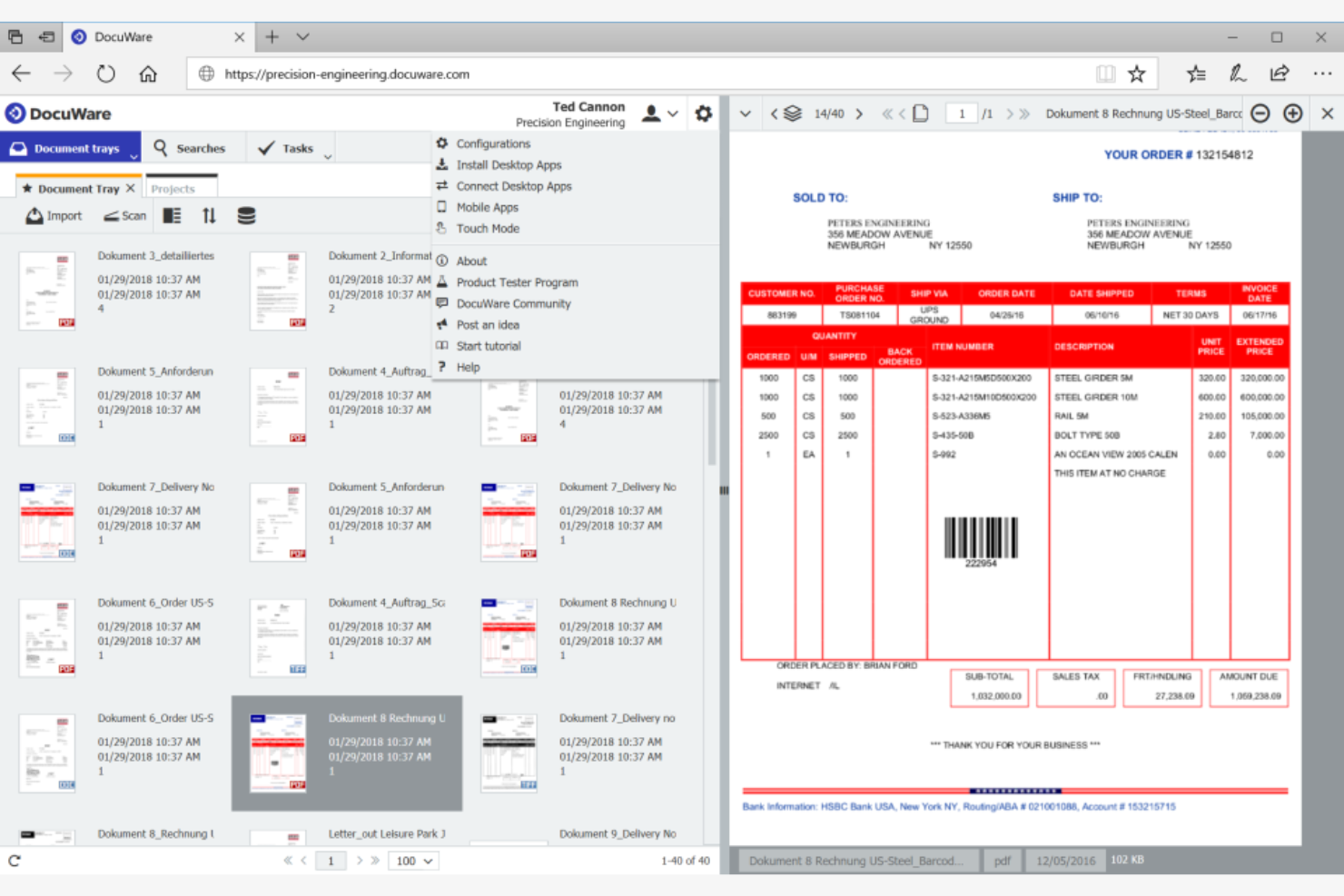
DocuWare is a document management system that is designed for organizations that need to automate document-driven processes and reduce manual paperwork. It’s a strong fit for finance, HR, and operations teams that handle high volumes of forms, invoices, or approvals. DocuWare helps you digitize, route, and secure documents, so your workflows move faster and compliance is easier to manage.
Why I Picked DocuWare
Automating document workflows is a top priority for many enterprise content management system buyers, which is why DocuWare caught my attention. The platform’s workflow designer lets you build custom, rule-based automations for routing, reviewing, and approving documents. I like that DocuWare includes intelligent indexing, so documents are automatically categorized and searchable as soon as they’re uploaded. Its electronic forms feature also helps teams capture and process information digitally, reducing manual data entry and speeding up approvals.
DocuWare Key Features
Some other features in DocuWare that are valuable for enterprise content management include:
- Document Version Control: Track changes and maintain a full history of document edits and updates.
- Role-Based Access Control: Assign permissions to the right people based on user roles to protect sensitive information.
- Mobile App: Capture, access, and approve documents from smartphones or tablets.
- Audit Trail: Monitor all document activity with detailed logs for compliance and security.
DocuWare Integrations
Integrations include Microsoft Outlook, SAP, Oracle, Sage, QuickBooks, and OneDrive.
Pros and Cons
Pros:
- Built-in compliance
- Intuitive interface
- Strong security controls
Cons:
- High cost for small teams
- Mobile app is basic

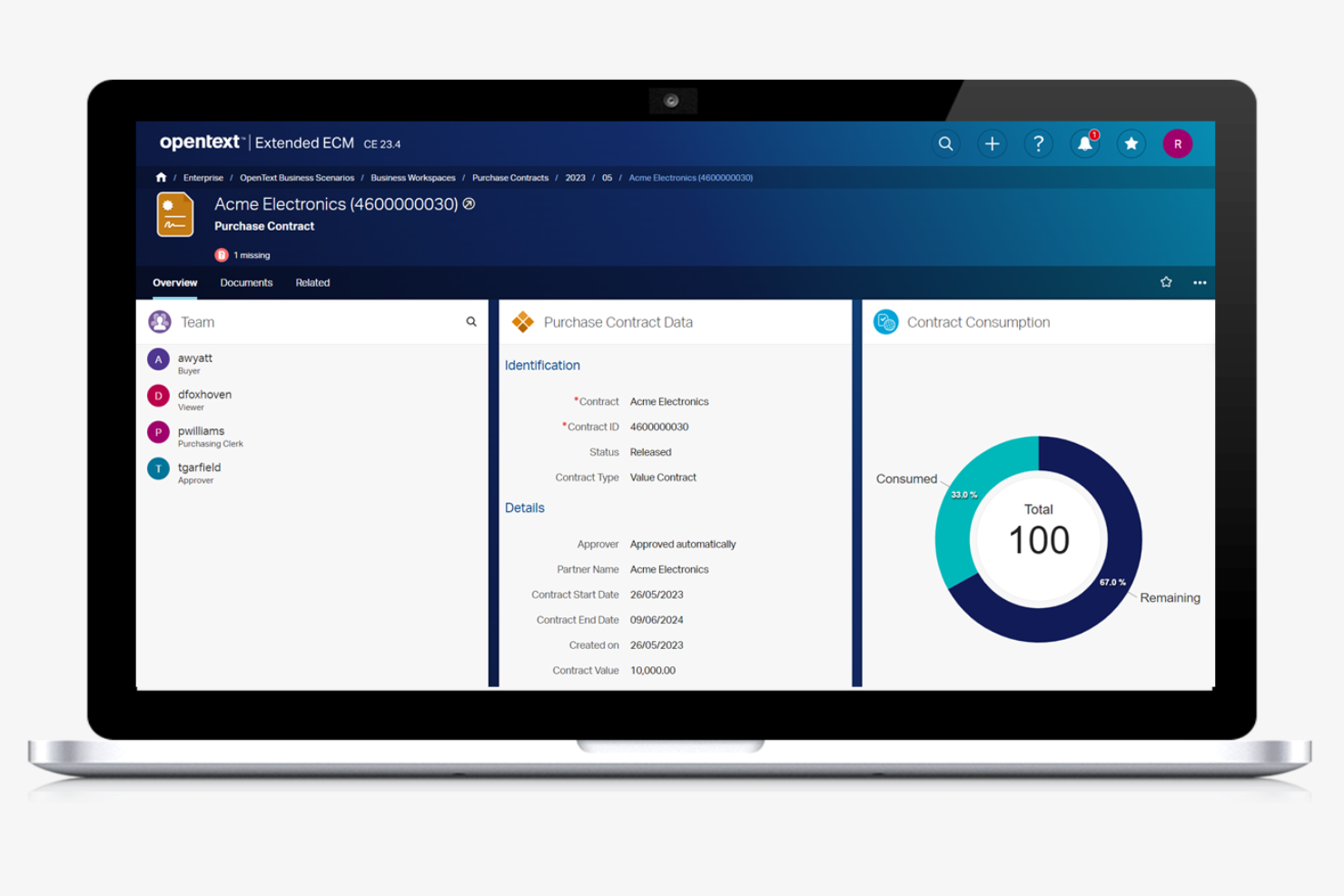
OpenText is designed for enterprises that need to manage complex compliance requirements across large volumes of content. It’s a strong fit for regulated industries like healthcare, energy, and financial services, where strict governance and audit trails are essential. With OpenText, you can centralize records, automate retention policies, and support detailed regulatory reporting.
Why I Picked OpenText
When large-scale compliance management is a top priority, OpenText offers capabilities that are hard to match. The platform supports advanced records management, letting you automate retention schedules and enforce legal holds across millions of documents. I appreciate that OpenText includes detailed audit trails and reporting tools, which help organizations demonstrate compliance with industry regulations. Its policy-driven content classification also makes it easier to manage sensitive information according to strict governance standards.
OpenText Key Features
Some other features in OpenText that are valuable for enterprise content management include:
- Document Capture and Imaging: Digitize paper documents and automatically extract metadata for easier indexing.
- Collaboration Workspaces: Create secure, project-based spaces for teams to share and manage content.
- Advanced Search and Discovery: Use metadata, full-text, and faceted search to quickly locate documents.
- Mobile Content Management: Access, review, and approve documents securely from mobile devices.
OpenText Integrations
Integrations include SAP, Oracle, Salesforce, Salesforce, and Microsoft SharePoint.
Pros and Cons
Pros:
- Advanced AI capabilities
- Deep SAP integrations
- Robust security features
Cons:
- Needs heavy IT support
- Lengthy implementation

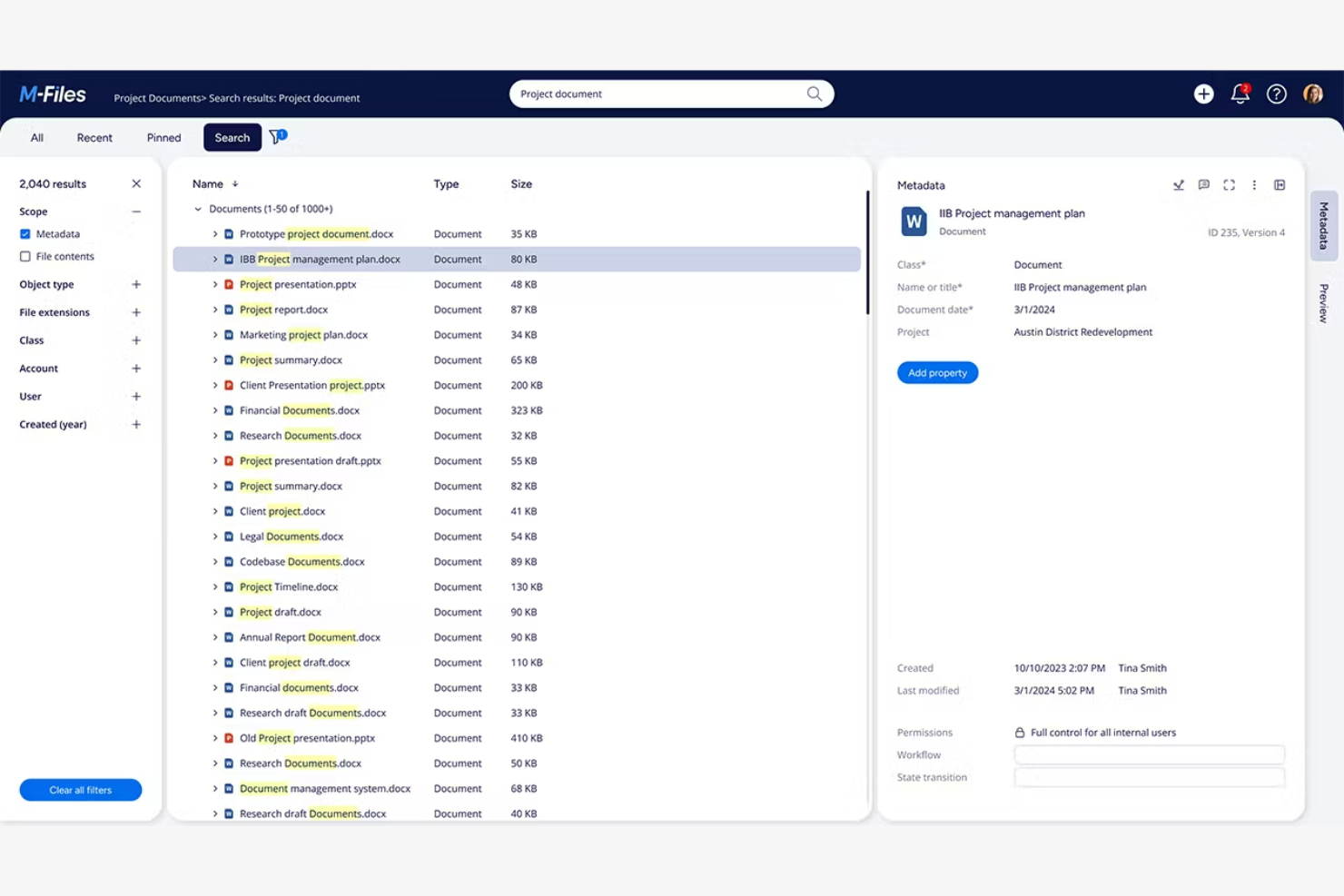
M-Files takes a unique approach to enterprise content management by organizing documents based on metadata rather than traditional folder structures. This system is especially useful for organizations with complex information management needs, such as legal, engineering, or professional services firms. If your team struggles to find, classify, or control documents across multiple repositories, M-Files offers a way to make content instantly searchable and context-aware.
Why I Picked M-Files
Unlike traditional enterprise content management systems that rely on folders, M-Files organizes documents using metadata, which makes it much easier to locate and manage information across your organization. This metadata-driven approach means you can search for documents by project, client, document type, or any custom tag you define. I appreciate how M-Files automatically applies metadata and version control, reducing manual work and the risk of misfiling. For teams that need to manage large volumes of documents with complex relationships, this system offers a more dynamic and scalable way to keep content organized and accessible.
M-Files Key Features
Some other features that make M-Files valuable for enterprise content management include:
- Automated Workflow Engine: Design and manage document approval and review processes with customizable workflows.
- Offline Access: Work with documents and metadata even when you’re not connected to the internet.
- Audit Trail: Track every action taken on a document for compliance and security purposes.
- Microsoft 365 Integration: Access, edit, and manage documents directly from familiar Microsoft 365 applications.
M-files Integrations
Integrations include Microsoft SharePoint, Salesforce, Google Drive, HubSpot, Microsoft Network Folders, and Autodesk.
Pros and Cons
Pros:
- Integrates with Windows
- Good offline access
- Strong version control
Cons:
- Setup is labor-intensive
- Slows on huge queries

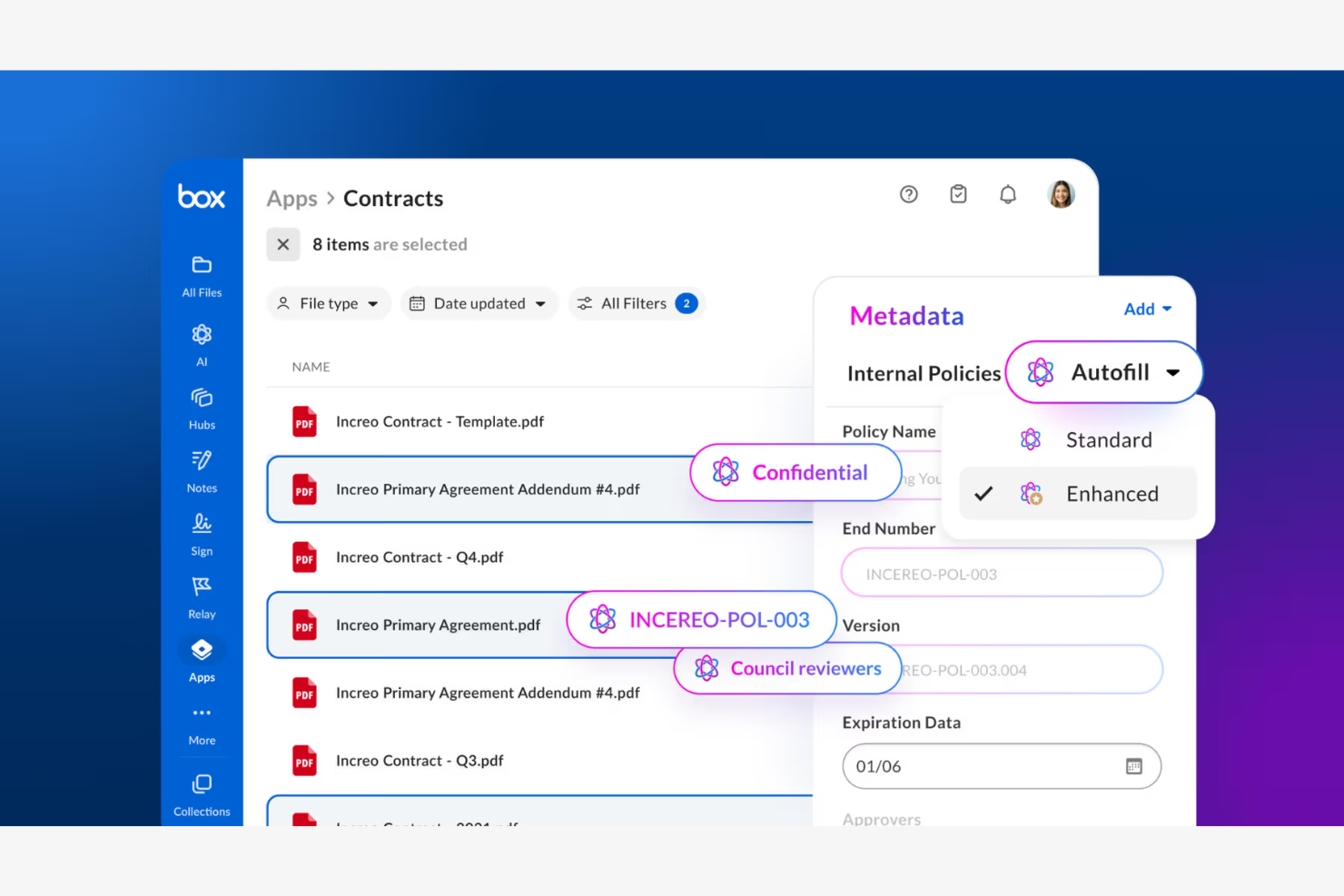
Box is an enterprise content management solution that stands out for organizations that need strict control over file sharing and document access. It’s especially useful for legal, finance, and IT teams that manage sensitive content and require detailed permission settings. With Box, you can set granular sharing policies and monitor document activity to help meet compliance and security requirements.
Why I Picked Box
Advanced file sharing controls are a must for many enterprise content management system buyers, and Box delivers on this front. The platform lets you set detailed permissions at the file, folder, and user level, so you can control exactly who can view, edit, or share certain types of content. I appreciate that Box includes features like expiring links and watermarking, which help protect sensitive documents even after they’re shared. Its activity tracking also gives you a clear audit trail of who accessed or changed files, which is important for compliance-focused teams.
Box Key Features
Some other features in Box that are valuable for enterprise content management include:
- Document Collaboration Tools: Multiple users can comment, annotate, and edit documents in real time.
- Automated Workflow Management: Set up custom workflows to automate document review and approval processes.
- Full-Text Search: Search across all stored documents using keywords, phrases, or metadata.
- Mobile Access: Access, upload, and manage files securely from iOS and Android devices.
Box Integrations
Integrations includeSalesforce, Google Workspace, Microsoft Office 365, Slack, Adobe Sign, and ServiceNow.
Pros and Cons
Pros:
- Massive app integration
- Enterprise-grade security
- Superb external sharing
Cons:
- Basic workflow tools
- Gets pricey at scale

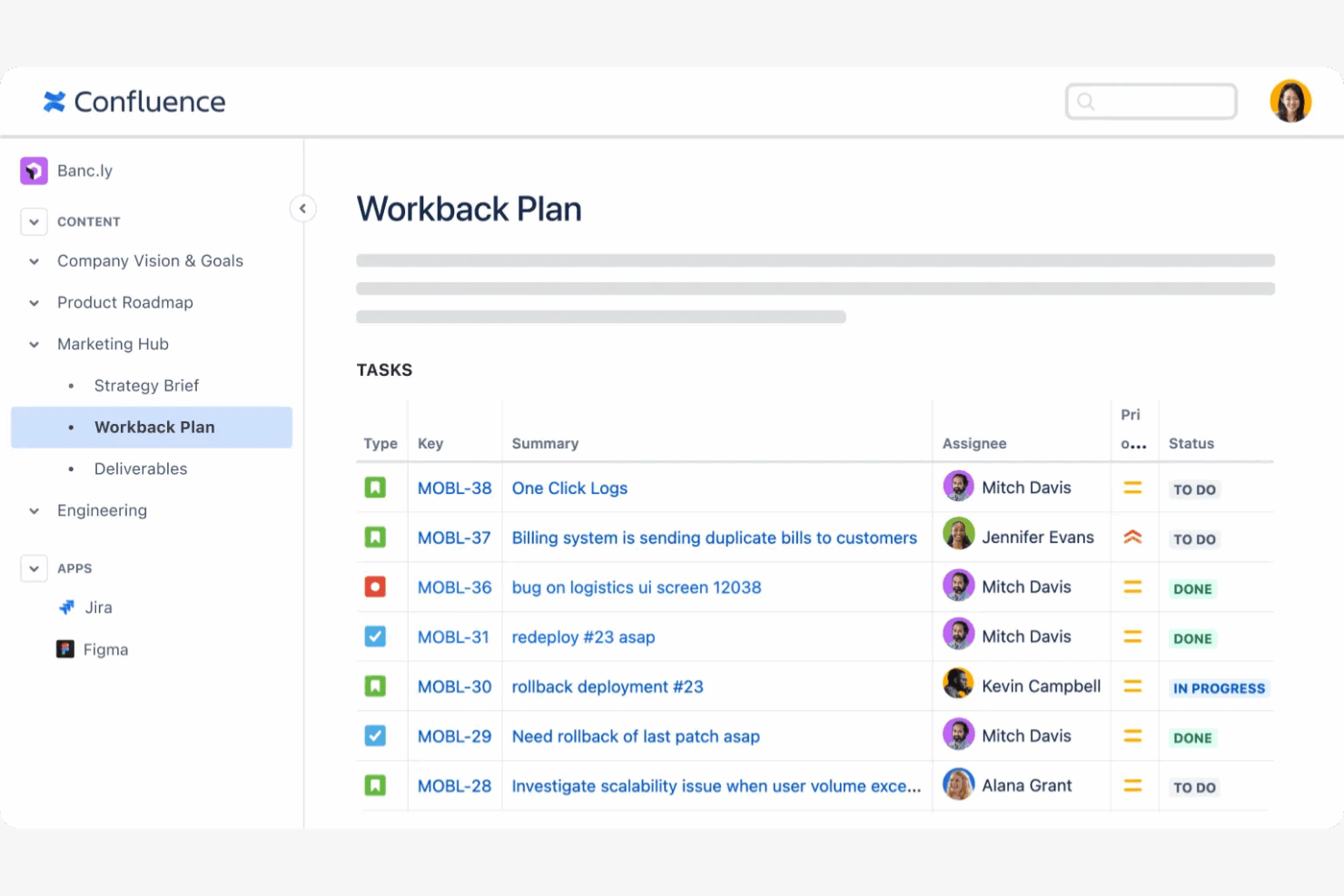
Confluence offers a centralized workspace for teams that need to collaborate on documentation, knowledge bases, and project materials. It’s especially useful for organizations with distributed teams or those managing complex projects that require clear, accessible documentation. Confluence helps you organize, share, and update content in real time, making it easier to keep everyone aligned and informed.
Why I Picked Confluence
When I look for a solution that supports team collaboration on documentation, Confluence stands out for its structured approach to content creation and sharing. The platform’s page hierarchy and space organization features make it easy for large teams to manage and locate documentation across departments or projects. I appreciate how Confluence supports real-time editing and commenting, which helps teams work together on documents without confusion or version conflicts. Its built-in templates also help standardize documentation, so your organization can maintain consistency as content grows.
Confluence Key Features
Some other features in Confluence that are valuable for enterprise content management include:
- Advanced Search: Quickly locate pages, attachments, or keywords across all spaces using powerful search filters.
- Permissions Management: Control access to spaces and pages with detailed user and group permissions.
- Page Analytics: Track page views and engagement metrics to monitor content usage and relevance.
- Macros Library: Enhance pages with dynamic content like task lists, calendars, and embedded media using built-in macros.
Confluence Integrations
Integrations include Jira, Slack, Trello, Google Drive, and Microsoft Teams.
Pros and Cons
Pros:
- Excellent text search
- Strong version control
- Very user-friendly
Cons:
- Lacks advanced workflows
- Formatting can break


Sanity is a content management platform designed for teams that need to manage structured content across multiple digital channels. It’s a strong fit for organizations with complex content models, such as media companies, ecommerce brands, or enterprises with omnichannel publishing needs. Sanity helps you centralize, structure, and deliver content consistently, even as your channels and requirements evolve.
Why I Picked Sanity
Sanity stands out for its ability to handle structured content across a wide range of digital channels, which is a core challenge for many enterprise content management system users. I picked Sanity because its content modeling tools let you define custom schemas and formats, so your team can manage everything from product data to editorial content in a single platform. The real-time collaboration features help distributed teams work together on content updates without versioning headaches. Sanity’s API-first approach also makes it easy to deliver content to websites, apps, and other endpoints, keeping everything consistent as your channels grow.
Sanity Key Features
Some other features in Sanity that are useful for enterprise content management include:
- Content Versioning: Track changes and revert to previous versions of any content item as needed.
- Role-Based Access Control: Assign granular permissions to users and teams to manage who can view or edit specific content.
- Custom Workflows: Set up approval processes and publishing workflows tailored to your organization’s needs.
- Asset Management: Organize, store, and retrieve images, videos, and other media files within the same platform.
Sanity Integrations
Integrations include Mux, Vercel, Netlify, Algolia, and Shopify.
Pros and Cons
Pros:
- Structured content focus
- Highly customizable
- Real-time collaboration
Cons:
- Confusing for non-techs
- Setup can be complex

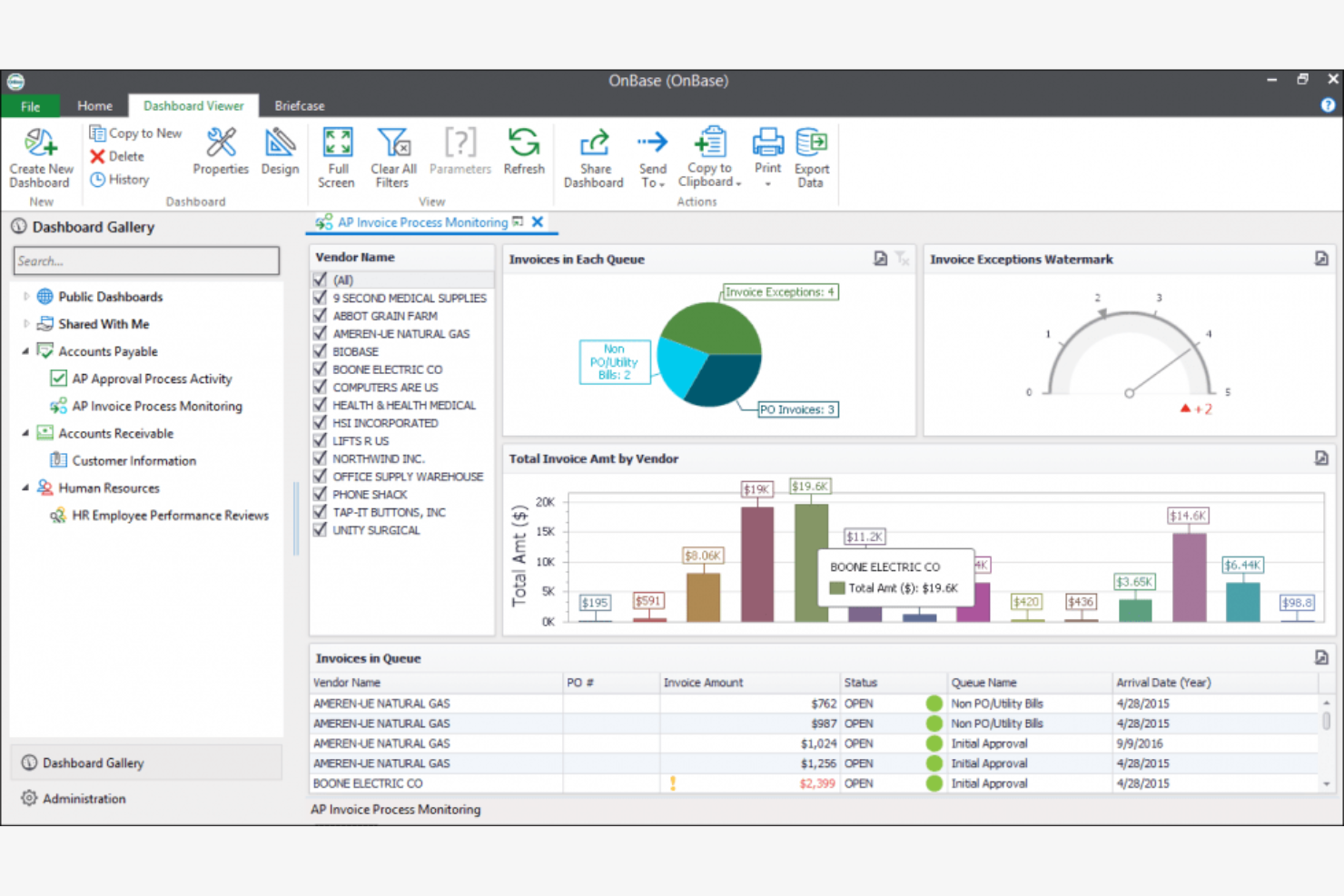
When your organization needs to manage complex, document-heavy processes, Hyland OnBase offers a unified ECM platform built for case management. It’s a strong fit for industries like government, healthcare, and financial services that require secure, auditable workflows and detailed records tracking. OnBase helps teams centralize documents, automate case routing, and maintain compliance across every stage of a case lifecycle.
Why I Picked Hyland OnBase
What sets Hyland OnBase apart for enterprise content management is its focus on case management solutions. The platform lets you build custom case workflows, so you can automate document routing, approvals, and escalations based on your organization’s rules. I appreciate how OnBase links related documents, emails, and notes to each case, giving teams a complete view of every process. Its audit trails and granular permissions also help organizations meet strict compliance and security requirements, which is essential for regulated industries.
Hyland OnBase Key Features
Some other features in Hyland OnBase that are valuable for enterprise content management include:
- Document Capture and Imaging: Convert paper documents into digital files for secure storage and retrieval.
- Records Management: Apply retention policies and automate document lifecycle management.
- Integration with Core Business Systems: Connect OnBase with ERP, CRM, and other enterprise platforms.
- Mobile Access: View and manage content from smartphones and tablets using dedicated mobile apps.
Hyland Onbase Integrations
Integrations include Epic, Cerner, Microsoft Outlook, SAP, and Lawson.
Pros and Cons
Pros:
- Robust custom workflows
- Strong healthcare focus
- Flexible module licensing
Cons:
- Upgrades take too long
- Expensive add-on modules
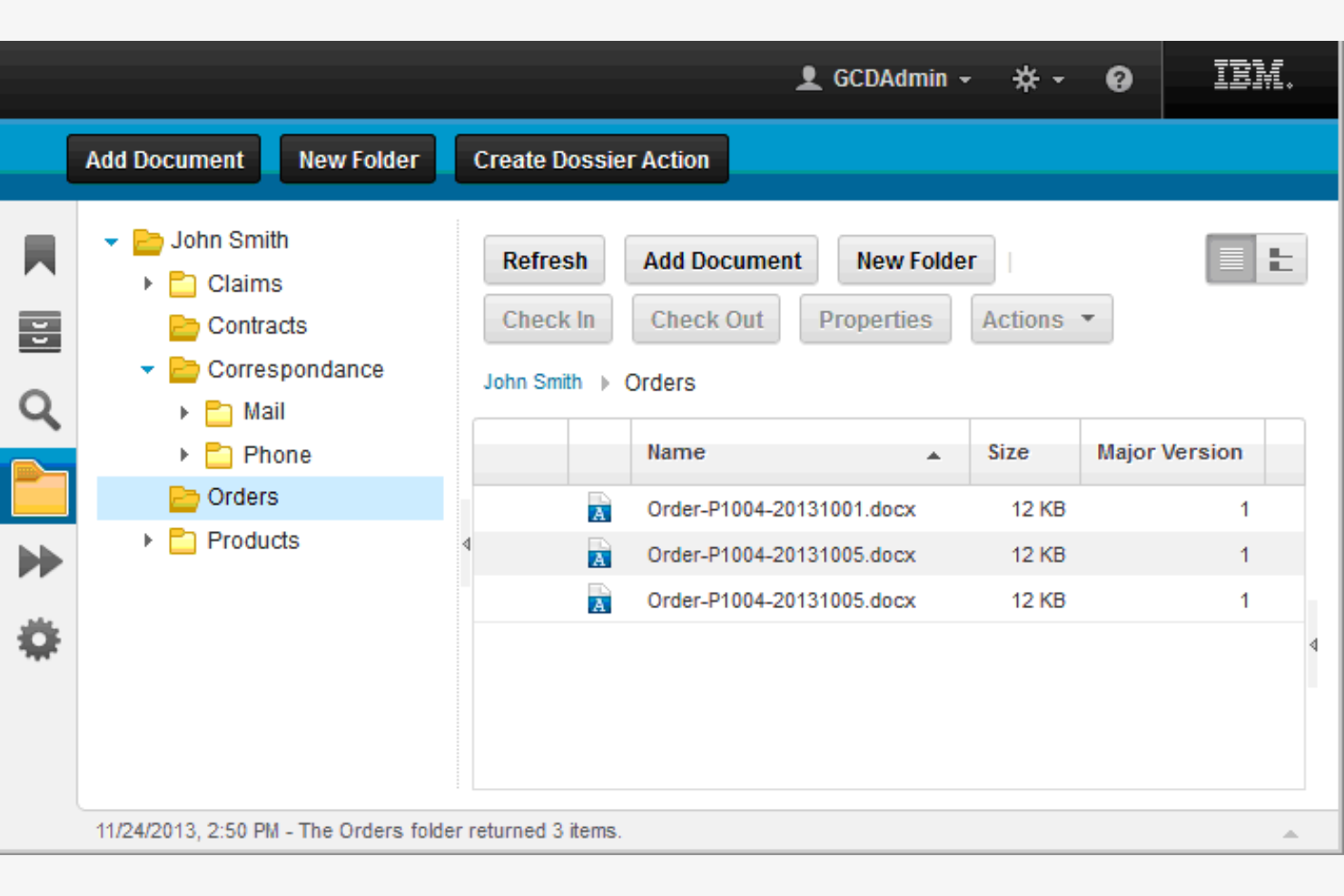
If your organization needs to manage massive volumes of unstructured content, IBM FileNet Content Manager brings advanced AI-powered classification to the table. It’s especially useful for enterprises in regulated industries that need to automate document tagging, extraction, and compliance tasks at scale. FileNet helps teams surface relevant information quickly and reduce manual effort by using machine learning to organize and secure content.
Why I Picked IBM FileNet Content Manager
What drew me to IBM FileNet Content Manager for enterprise content management is its use of AI-powered content classification. The platform uses machine learning to automatically tag, categorize, and extract data from documents, which helps organizations manage large volumes of unstructured content with less manual intervention. I appreciate how FileNet’s intelligent content services can identify sensitive information and enforce compliance policies in real time. These capabilities make it a strong choice for teams that need to automate document handling and maintain strict regulatory standards.
IBM FileNet Content Manager Key Features
Some other features in IBM FileNet Content Manager that are valuable for enterprise content management include:
- Document Version Control: Track changes and maintain a full history of document revisions.
- Workflow Automation Designer: Build and customize automated workflows for document routing and approvals.
- Granular Access Controls: Set detailed permissions for users, groups, and roles across content repositories.
- Cloud and Hybrid Deployment Options: Deploy FileNet on-premises, in the cloud, or as a hybrid solution to fit your IT strategy.
IBM FileNet Content Manager Integrations
Integrations include SAP, Microsoft Office, Salesforce, IBM Cloud Pak for Business Automation, and ServiceNow.
Pros and Cons
Pros:
- Complex workflow logic
- Highly secure platform
- Handles high volume well
Cons:
- Feels like legacy software
- Very high enterprise cost


If your organization manages documents in multiple languages, Dokmee offers a content management system designed to support global teams. It’s especially useful for companies with international operations or diverse client bases that need to store, search, and collaborate on documents in various languages. With features that address multilingual indexing and retrieval, Dokmee helps teams avoid language barriers when organizing and accessing critical business content.
Why I Picked Dokmee
For organizations that need to manage documents in several languages, Dokmee stands out with its multi-language content support. The platform allows users to index, search, and retrieve documents in a wide range of languages, which is essential for global teams or companies with multilingual clients. I like that Dokmee includes optical character recognition (OCR) with multi-language capabilities, making it possible to digitize and organize documents regardless of their original language. This focus on language flexibility makes Dokmee a strong fit for enterprise content management where cross-border collaboration is a priority.
Dokmee Key Features
Some other features that make Dokmee useful for enterprise content management include:
- Document Version Control: Track changes and maintain a full history of document edits.
- Role-Based Permissions: Assign user access levels to control who can view or edit specific documents.
- Automated Document Retention: Set rules for archiving or deleting documents based on compliance requirements.
- Electronic Signature Support: Collect and manage digital signatures directly within the platform.
Dokmee Integrations
Integrations include Microsoft Office, QuickBooks, SAP, Sage, Windows Active Directory, and Salesforce.
Pros and Cons
Pros:
- Easy user interface
- Strong access security
- Affordable pricing model
Cons:
- Smaller user community
- Weak mobile experience
Other Enterprise Content Management System
Here are some additional enterprise content management system options that didn’t make it onto my shortlist, but are still worth checking out:
- Adobe Experience Manager
For digital asset management integration
- Wrike
For project-based document collaboration
- dotCMS
With hybrid headless architecture
- Square 9
With intelligent data capture tools
- Contentful
For API-first content delivery
- Storyblok
For visual content editing workflows
- Builder.io
For no-code content customization


Enterprise Content Management System Selection Criteria
When selecting the best enterprise content management system to include in this list, I considered common buyer needs and pain points like managing large volumes of documents and ensuring secure access control. I also used the following framework to keep my evaluation structured and fair:
Core Functionality (25% of total score)
To be considered for inclusion in this list, each solution had to fulfill these common use cases:
- Store and organize digital documents
- Search and retrieve files quickly
- Set user permissions and access controls
- Track document versions and history
- Automate document workflows
Additional Standout Features (25% of total score)
To help further narrow down the competition, I also looked for unique features, such as:
- Multi-language content support
- Built-in electronic signature tools
- AI-powered document classification
- Advanced compliance and audit tracking
- Integration with industry-specific software
Usability (10% of total score)
To get a sense of the usability of each system, I considered the following:
- Intuitive navigation and menu structure
- Clean and modern interface design
- Customizable dashboards and views
- Responsive performance with large file sets
- Accessibility for users with different needs
Onboarding (10% of total score)
To evaluate the onboarding experience for each platform, I considered the following:
- Availability of step-by-step training videos
- Access to pre-built templates and sample workflows
- Interactive product tours and guided setup
- In-app chatbots for onboarding support
- Live or recorded webinars for new users
Customer Support (10% of total score)
To assess each software provider’s customer support services, I considered the following:
- 24/7 support availability
- Multiple support channels like chat, email, and phone
- Access to a searchable knowledge base
- Fast response times for support tickets
- Availability of dedicated account managers
Value For Money (10% of total score)
To evaluate the value for money of each platform, I considered the following:
- Transparent and flexible pricing plans
- Features included at each pricing tier
- Discounts for annual or volume commitments
- No hidden fees or surprise charges
- Free trial or demo options
Customer Reviews (10% of total score)
To get a sense of overall customer satisfaction, I considered the following when reading customer reviews:
- Consistent positive feedback on reliability
- Reports of responsive customer support
- User comments on feature usefulness
- Feedback on integration experiences
- Trends in recent updates and improvements
How to Choose an Enterprise Content Management System
It’s easy to get bogged down in long feature lists and complex pricing structures. To help you stay focused as you work through your unique software selection process, here’s a checklist of factors to keep in mind:
| Factor | What to Consider |
|---|---|
| Scalability | Will the system handle your document volume as your business grows? Ask about storage limits, user caps, and upgrade paths. |
| Integrations | Does the platform connect natively with your existing tools (CRM, ERP, email, file storage)? Check for direct integrations, not just API access. |
| Customizability | Can you tailor workflows, metadata, and permissions to your team’s needs? Consider if you’ll need to adapt the system for different departments. |
| Ease of use | Will your team adopt the system quickly? Look for intuitive navigation, clear labeling, and minimal training requirements. Test with a demo if possible. |
| Implementation and onboarding | How long will it take to get up and running? Ask about migration support, onboarding resources, and whether you’ll need IT involvement. |
| Cost | What’s included in the pricing? Watch for extra charges for storage, users, or advanced modules. Compare total cost of ownership over 1-3 years. |
| Security safeguards | Does the system meet your data protection standards? Look for encryption, access controls, audit logs, and compliance certifications relevant to your industry. |
| Compliance requirements | Will the system help you meet regulatory obligations (GDPR, HIPAA, SOX)? Check for built-in compliance features and audit support. |
What Is an Enterprise Content Management System?
An enterprise content management system is a software platform that helps organizations store, organize, manage, and secure large volumes of digital documents and content. These systems support document versioning, access controls, workflow automation, and compliance with regulatory requirements. Enterprise content management systems are designed to centralize information, making it easier for teams to collaborate, retrieve files, and maintain control over sensitive business content across departments.
Features
When selecting enterprise content management system, keep an eye out for the following key features:
- Document storage: Centralizes digital files in a secure, searchable repository, making it easy to organize and retrieve documents as needed.
- Version control: Tracks changes to documents over time, allowing users to view, restore, or compare previous versions and maintain a clear audit trail.
- Access permissions: Lets administrators set user roles and control who can view, edit, or delete specific documents, supporting data security and compliance.
- Workflow automation: Automates document routing, approvals, and notifications, helping teams manage processes like contract reviews or invoice approvals efficiently.
- Metadata management: Allows users to tag documents with custom fields and categories, improving searchability and supporting advanced filtering.
- Audit trails: Records all user actions and document changes, providing transparency and supporting regulatory compliance and internal audits.
- Document retention policies: Enables organizations to set rules for archiving or deleting documents based on legal or business requirements.
- Electronic signature support: Facilitates the collection and management of legally binding digital signatures directly within the system.
- Integration capabilities: Connects with other business tools such as email, CRM, or file storage platforms to streamline workflows and reduce manual work.
Benefits
Implementing an enterprise content management system provides several benefits for your team and your business. Here are a few you can look forward to:
- Centralized information access: Teams can quickly find and retrieve documents from a single, organized repository, reducing time spent searching for files.
- Improved security and compliance: Access controls, audit trails, and retention policies help protect sensitive data and support regulatory requirements.
- Streamlined workflows: Automated routing and approval processes reduce manual tasks and keep projects moving efficiently across departments.
- Enhanced collaboration: Version control and permission settings enable multiple users to work on documents without confusion or data loss.
- Reduced risk of data loss: Document storage and backup features safeguard business-critical information against accidental deletion or hardware failure.
- Faster onboarding and training: Intuitive interfaces and onboarding resources help new users become productive with minimal ramp-up time.
- Scalability for growth: The system can handle increasing document volumes and user counts as your organization expands.
Costs & Pricing
Selecting an enterprise content management system requires an understanding of the various pricing models and plans available. Costs vary based on features, team size, add-ons, and more. The table below summarizes common plans, their average prices, and typical features included in enterprise content management system solutions:
Plan Comparison Table for Enterprise Content Management System
| Plan Type | Average Price | Common Features |
|---|---|---|
| Free Plan | $0 | Basic document storage, limited users, simple search, and basic access controls. |
| Personal Plan | $5–$40/user/month | Individual document management, version control, basic workflow automation, and limited integrations. |
| Business Plan | $15–$100/user/month | Team collaboration, advanced permissions, workflow automation, audit trails, and integration options. |
| Enterprise Plan | $1500+/month | Custom workflows, compliance tools, advanced security, API access, dedicated support, and scalability. |
Enterprise Content Management System FAQs
Here are some answers to common questions about enterprise content management system:
How does an enterprise content management system differ from basic document storage?
An enterprise content management system goes beyond simple file storage by offering version control, workflow automation, access permissions, and compliance tools. These features help organizations manage, track, and secure documents at scale, supporting collaboration and regulatory requirements.
Can enterprise content management systems integrate with existing business tools?
Yes, most enterprise content management systems offer integrations with tools like CRM, ERP, email, and file storage platforms. This allows teams to connect document workflows with other business processes and reduce manual data entry or duplication.
What security measures should I look for in an enterprise content management system?
Look for encryption, granular access controls, audit trails, and compliance certifications such as ISO 27001 or SOC 2. These safeguards help protect sensitive information and support your organization’s data protection policies.
How long does it take to implement an enterprise content management system?
Implementation timelines vary based on system complexity and data migration needs. Small teams may be up and running in a few days, while large organizations with complex workflows and legacy data may need several weeks or months.
Do enterprise content management systems support regulatory compliance?
Yes, many systems include features for document retention, audit logging, and access controls to help organizations meet requirements like GDPR, HIPAA, or SOX. Always confirm that the system aligns with your specific industry regulations.