

Choosing the right content experience platform can be challenging with so many options out there. You want to create, manage, and optimize content effectively, but need to figure out which tool is the best fit. I've got you! In this post, I leverage my extensive experience working with various content management systems and platforms to bring you my top picks for content experience platforms.
These tools help you deliver personalized, engaging content across multiple channels. They solve major pain points like content fragmentation, inconsistent user experiences, and inefficient workflows. Let me guide you to the best options, simplifying your decision-making process.
Why Trust Our Software Recommendations
6,700+
Reviews
20
Industry experts
16+
Evaluation factors
14
Years
Our team has been testing and reviewing software since 2012. As marketing leaders ourselves, we know how difficult—and important—it is to choose the right software.
For this guide, we evaluated tools using hands-on testing and independent research, scoring tools using our selection criteria.
Our reviews reflect our human editorial judgment, not a sales pitch.
Expert reviewers:
 Gui DrusinaCreative Director
- Shriya GhateSenior Marketing Lead
 Amanda JacquesMarketing Ops Leader

Best Content Experience Platforms Summary
This comparison chart summarizes pricing details for my selection of the top content experience platforms to help your business find the best software for your budget and startup needs.
| Tool | Best For | Trial Info | Price | ||
|---|---|---|---|---|---|
| 1 | Best for no-code interactive content and deal rooms | 15-day free trial | From $30/user/month | Website | |
| 2 | Best for experimentation-led content personalization | Free demo available | Pricing upon request | Website | |
| 3 | Best for account-based content hub experiences | Free demo available | Pricing upon request | Website | |
| 4 | Best for flexible multi-site content management | Free demo available | Pricing upon request | Website | |
| 5 | Best for Adobe ecosystem content operations | Not available | Pricing upon request | Website | |
| 6 | Best for data-driven multisite personalization at scale | Free demo available | Pricing upon request | Website | |
| 7 | Best for seller-led buyer content experiences | Free demo available | Pricing upon request | Website | |
| 8 | Best for value-selling content and revenue proof | Free demo available | From $30/user/month | Website | |
| 9 | Best for AI-guided content binge experiences | Free demo available | From $30,000/year (billed annually) | Website | |
| 10 | Best for turning static docs into interactive hubs | Free demo available | $750/month (billed annually) | Website |


Best Content Experience Platforms Reviews
This section provides an in-depth analysis and overview of each content experience platform. We will walk through the pros and cons of each tool, their features, and their best use cases.
 Best for no-code interactive content and deal rooms
- 15-day free trial
- From $30/user/month
Visit WebsiteCustomer Rating:4.8/5This rating combines scores from multiple user review sites to reflect overall customer sentiment about the product.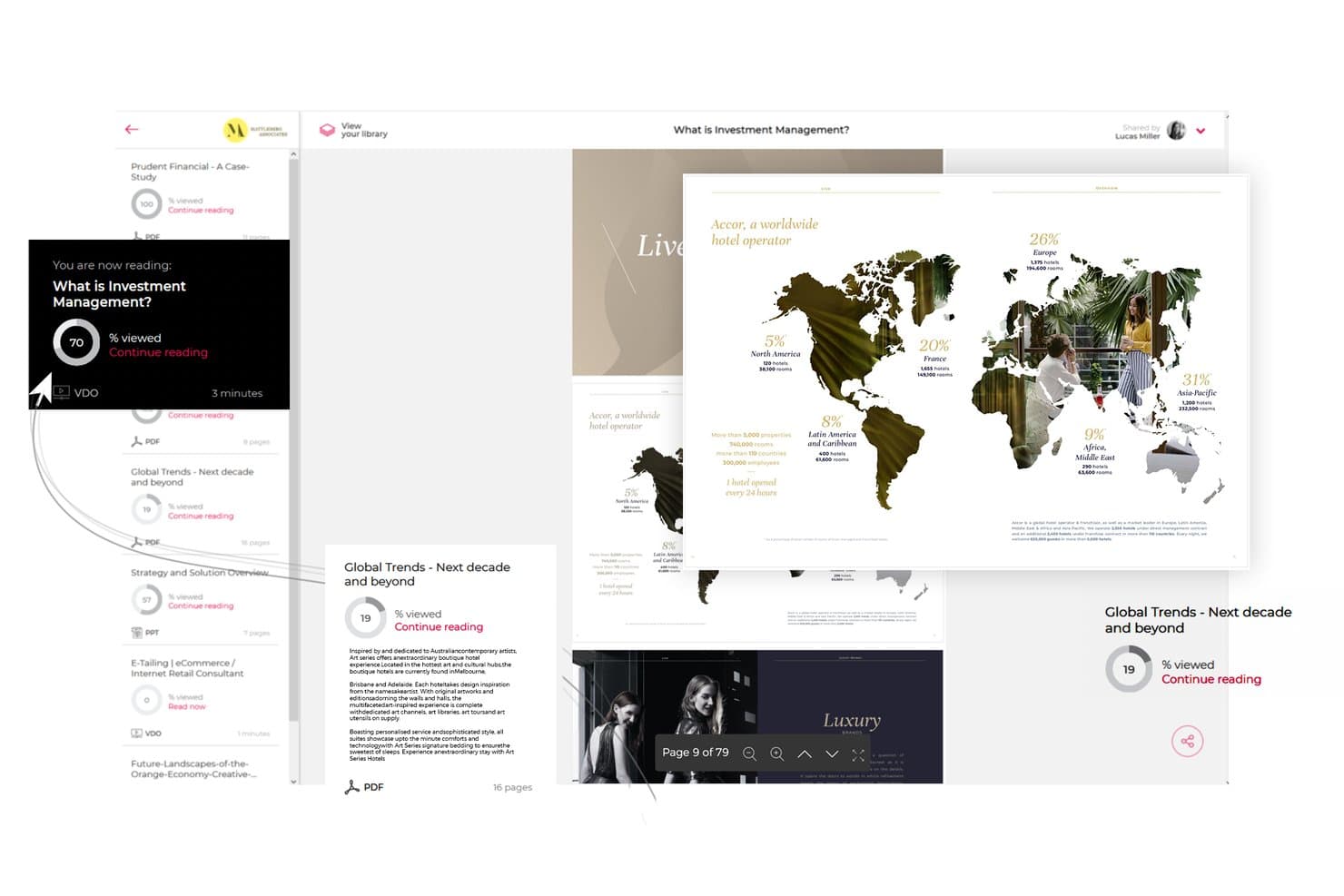
Paperflite lets users track content engagement progress across shared documents. Paperflite is a content experience platform that centralizes marketing and sales assets into branded hubs, personalized microsites, and interactive experiences, with AI-powered search, engagement analytics, and digital deal rooms built in.
Who Is Paperflite Best For?
Paperflite is a strong fit for B2B marketing and sales teams that need to create interactive content experiences and buyer-facing deal rooms without relying on designers or developers.
Why I Picked Paperflite
Paperflite earns its spot on my shortlist because of Cleverstory, its no-code interactive content builder that lets marketers create quizzes, calculators, and clickable infographics without touching a line of code. I also love the Digital Deal Rooms, which give buyers and sellers a shared, trackable workspace where every stakeholder's engagement is logged from the first click. Paired with SEEK, an AI search layer trained on your content library, finding and sharing the right asset at the right deal stage becomes much faster.
Paperflite Key Features
- Content hub streams: Organize and distribute marketing and sales assets into curated, permission-controlled streams that teams can subscribe to with one click.
- Real-time engagement alerts: Get instant notifications when a prospect opens shared content, including section-level data on time spent and scroll depth.
- CRM and email integrations: Sync engagement data directly with Salesforce, HubSpot, Pipedrive, Freshsales, and Microsoft Dynamics, plus Gmail and Outlook.
- Personalized microsites: Build branded, multi-asset portals for individual accounts or prospects using FliteView, shareable as a single trackable link.
Paperflite Integrations
Paperflite offers native integrations with Salesforce, HubSpot, Microsoft Dynamics, Pipedrive, Freshsales, Oracle Eloqua, Gmail, and Outlook. It also connects with SharePoint, Google Drive, Dropbox, Box, and OneDrive, while Enterprise plans support custom API access.
Pros and Cons
Pros:
- Branded deal rooms for buyer collaboration
- Real-time content engagement alerts for reps
- Interactive experiences built with no code
Cons:
- Full interactive features need separate subscription
- Advanced personalization requires higher-tier plan
Learn more about Paperflite: Best for experimentation-led content personalization
- Free demo available
- Pricing upon request
Visit WebsiteCustomer Rating:4.2/5This rating combines scores from multiple user review sites to reflect overall customer sentiment about the product.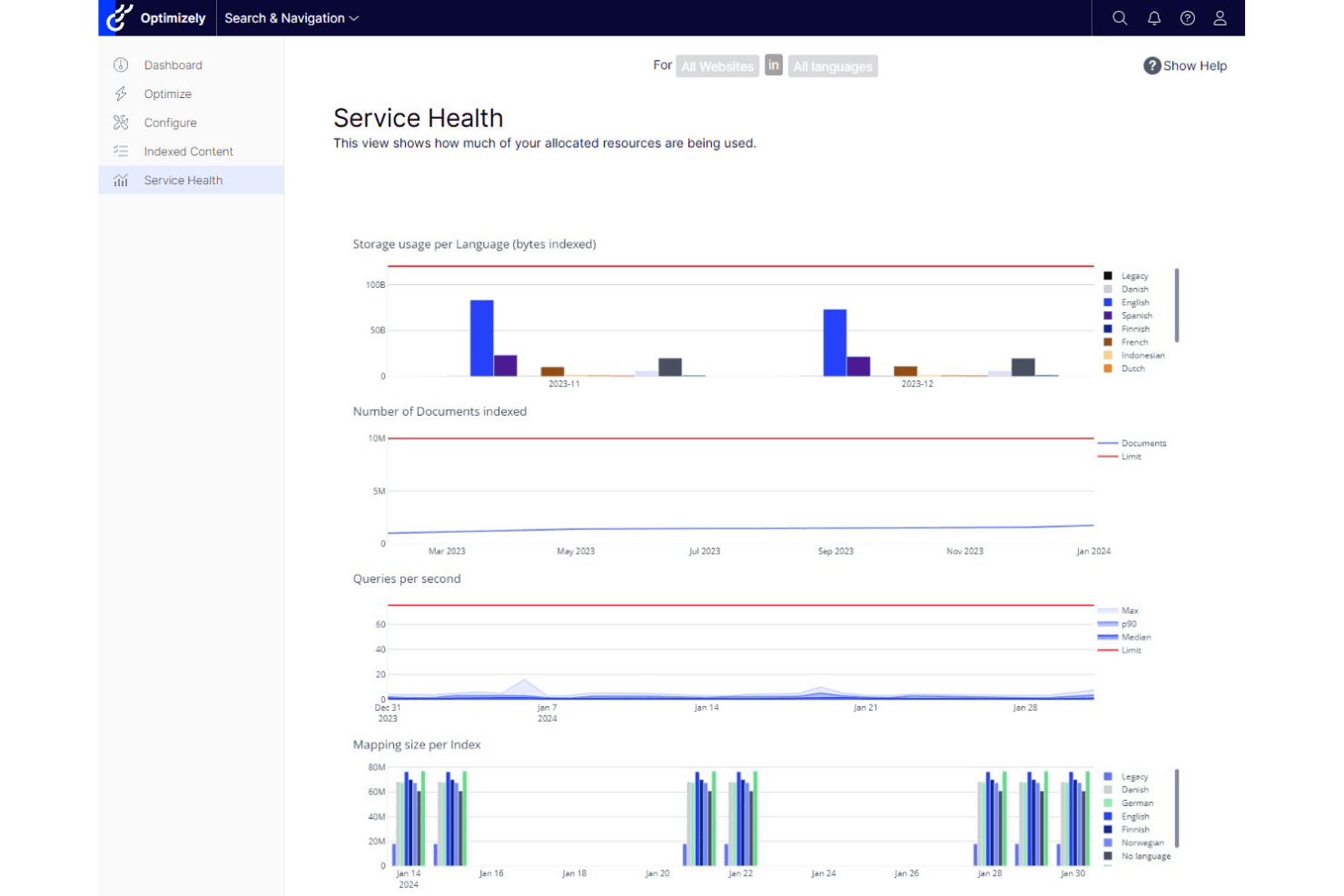
Optimizely is distinguished by its robust web experimentation and tailored content delivery. Optimizely is a digital experience platform that combines an agentic CMS, DAM, content marketing tools, AI-driven personalization, and built-in experimentation into a single suite.
Who Is Optimizely Best For?
Optimizely is a strong fit for enterprise marketing teams that want to run content experiments and personalization from the same platform, without stitching together separate tools.
Why I Picked Optimizely
Optimizely earns its spot on my shortlist because no other platform pairs content personalization with built-in experimentation as tightly. I particularly like the Stats Engine, which brings statistical rigor to A/B and multivariate tests run directly against content variations. Pair that with the NLP-powered Content Recommendations product, which builds real-time visitor interest profiles and swaps content to match, and you get a feedback loop where experiments inform personalization and vice versa.
Optimizely Key Features
- Agentic CMS: A no-code visual editor with multi-site publishing, reusable templates, and front-end edge delivery for managing content across channels from one place.
- Embedded DAM: A built-in digital asset management system with AI-powered auto-tagging and semantic search to organize and retrieve brand assets quickly.
- Warehouse-native analytics: Direct connections to Snowflake, BigQuery, and Redshift let you analyze content performance without duplicating data or writing SQL.
- Optimizely Forms with gated content workflows: Native form builder that captures leads, triggers confirmation emails, and automatically exports submissions to Salesforce and connected MAPs.
Optimizely Integrations
Optimizely offers native integrations with Salesforce, Salesforce Marketing Cloud, Pardot, HubSpot, Marketo, Oracle Eloqua, Delivra, Google Analytics, Figma, Jira, and Bynder. Its API-first architecture and webhooks support custom integrations and event-driven data pipelines.
Pros and Cons
Pros:
- Salesforce-triggered 1:1 personalization at scale
- Advanced AI-powered content recommendations system
- Combines CMS, personalization, and experimentation
Cons:
- Interactive assets need third-party or custom builds
- Requires sales conversation for pricing details
 Best for account-based content hub experiences
- Free demo available
- Pricing upon request
Visit WebsiteCustomer Rating:4.3/5This rating combines scores from multiple user review sites to reflect overall customer sentiment about the product.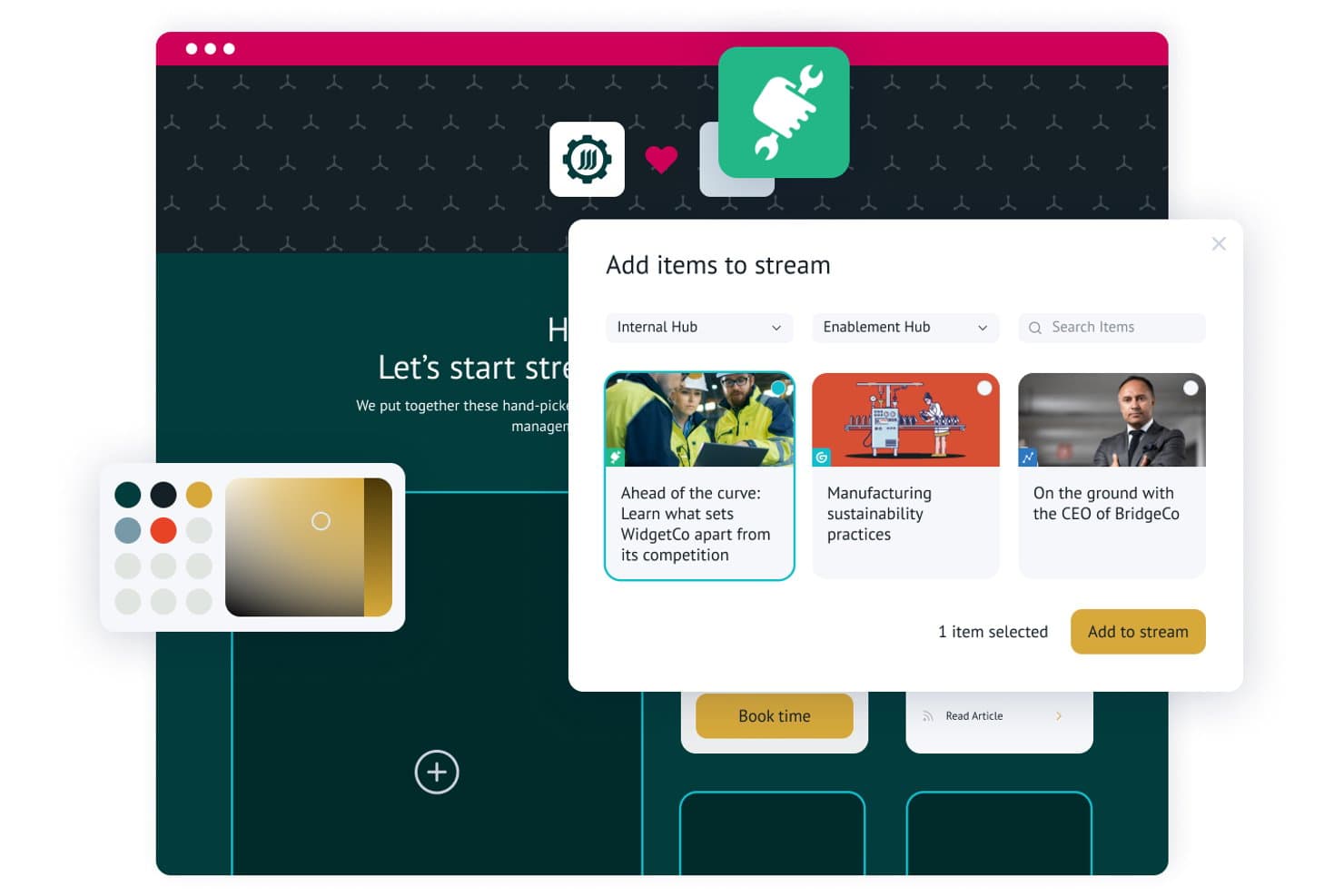
Uberflip lets users add and curate content items into personalized streams. Uberflip is a content experience platform that lets marketing teams build centralized content hubs, organize assets into curated streams, personalize experiences for target accounts, and capture leads through native form integrations across MAP and CRM systems.
Who Is Uberflip Best For?
Uberflip is a strong fit for B2B marketing teams running account-based programs who need to build personalized content destinations for named accounts at scale.
Why I Picked Uberflip
Uberflip earns its spot on my shortlist because it's genuinely built around account-based content hub experiences in a way most platforms aren't. I love that you can spin up a fully personalized content destination for a named account, complete with that account's logo and a curated stream of relevant assets, without touching a line of code. The AI-powered Smart Tags automatically organize your library at scale, and the Site Engager widget surfaces recommendations across existing web pages to keep buyers in your content ecosystem longer.
Uberflip Key Features
- Gated form CTAs: Embed native lead capture forms directly within content streams, replacing standalone gated landing pages.
- Flipbook conversion: Automatically transforms uploaded PDFs into interactive HTML5 Flipbooks with page-level engagement tracking.
- Digital sales rooms: Lets sales reps build personalized, marketing-approved content destinations for individual prospects without developer support.
- Explore custom reporting: A built-in reporting tool that lets you compare content KPIs and build custom performance views across hubs and streams.
Uberflip Integrations
Uberflip offers native integrations with Marketo, HubSpot, Salesforce Pardot, Oracle Eloqua, Salesforce, Demandbase, and Bombora. It also connects with 6sense, Clearbit, RollWorks, Google Analytics, YouTube, Vidyard, Wistia, Vimeo, and Brightcove, with API documentation available for custom integrations.
Pros and Cons
Pros:
- Digital sales rooms for sales collaboration
- AI-driven content recommendations for web visitors
- ABM features enable deep account personalization
Cons:
- Advanced analytics require MAP or CRM integration
- Uncertain product roadmap post-acquisition
Learn more about Uberflip: Best for flexible multi-site content management
- Free demo available
- Pricing upon request
Visit WebsiteCustomer Rating:4.5/5This rating combines scores from multiple user review sites to reflect overall customer sentiment about the product.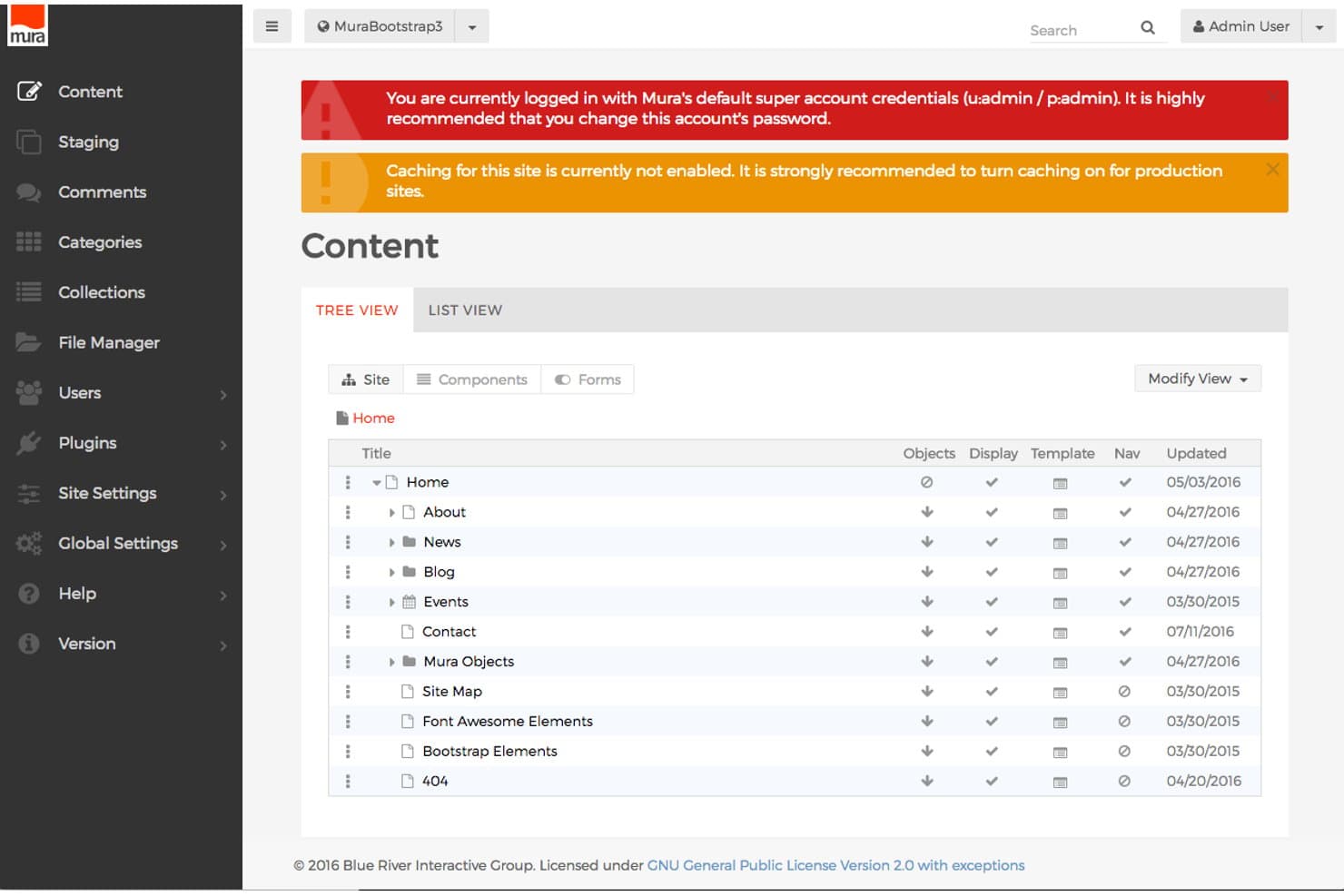
Mura CMS organizes site content in a clear tree view hierarchy. Mura CMS is a digital experience platform that combines multi-site content management, persona-based personalization, content scoring, and MAP/CRM integration to deliver targeted web experiences across multiple owned channels.
Who Is Mura CMS Best For?
Mura CMS is a strong fit for enterprise marketing teams managing multiple branded sites or regional microsites from a single platform.
Why I Picked Mura CMS
I picked Mura CMS as one of the best because its multi-site architecture lets you manage unlimited branded sites and microsites from a single install, which is genuinely rare at this level. I love how the DXP layer maps content to specific personas and buyer stages, then uses Change Sets to dynamically swap page components based on triggered experiences. Content scoring tracks cumulative engagement per visitor and fires those personalized experiences automatically, without manual intervention.
Mura CMS Key Features
- Content scoring: Assigns weighted point values to individual content assets per persona, then automatically triggers personalized experiences once a visitor crosses a defined engagement threshold.
- Experience Matrix tool: A dashboard that displays visitor counts across every persona and buyer stage combination, with associated ROI data including opportunities, wins, and close time.
- Progressive profiling forms: Persona-driven forms that collect visitor data incrementally across multiple interactions rather than in a single submission.
- Content campaign management: Groups related content assets into trackable campaigns and compares performance across updated content versions to measure acquisition impact.
Mura CMS Integrations
Mura CMS has documented integrations with Marketo, HubSpot, Eloqua, Pardot, Salesforce, Microsoft Dynamics, DemandBase, Google Analytics 360, and Adobe Analytics. Its open REST API supports custom integrations.
Pros and Cons
Pros:
- Tracks content influence on pipeline and revenue
- Persona-based content personalization across buyer stages
- Manages unlimited branded sites and microsites
Cons:
- Smaller developer community limits plugin options
- No native interactive content builder
Learn more about Mura CMS: Best for Adobe ecosystem content operations
- Not available
- Pricing upon request
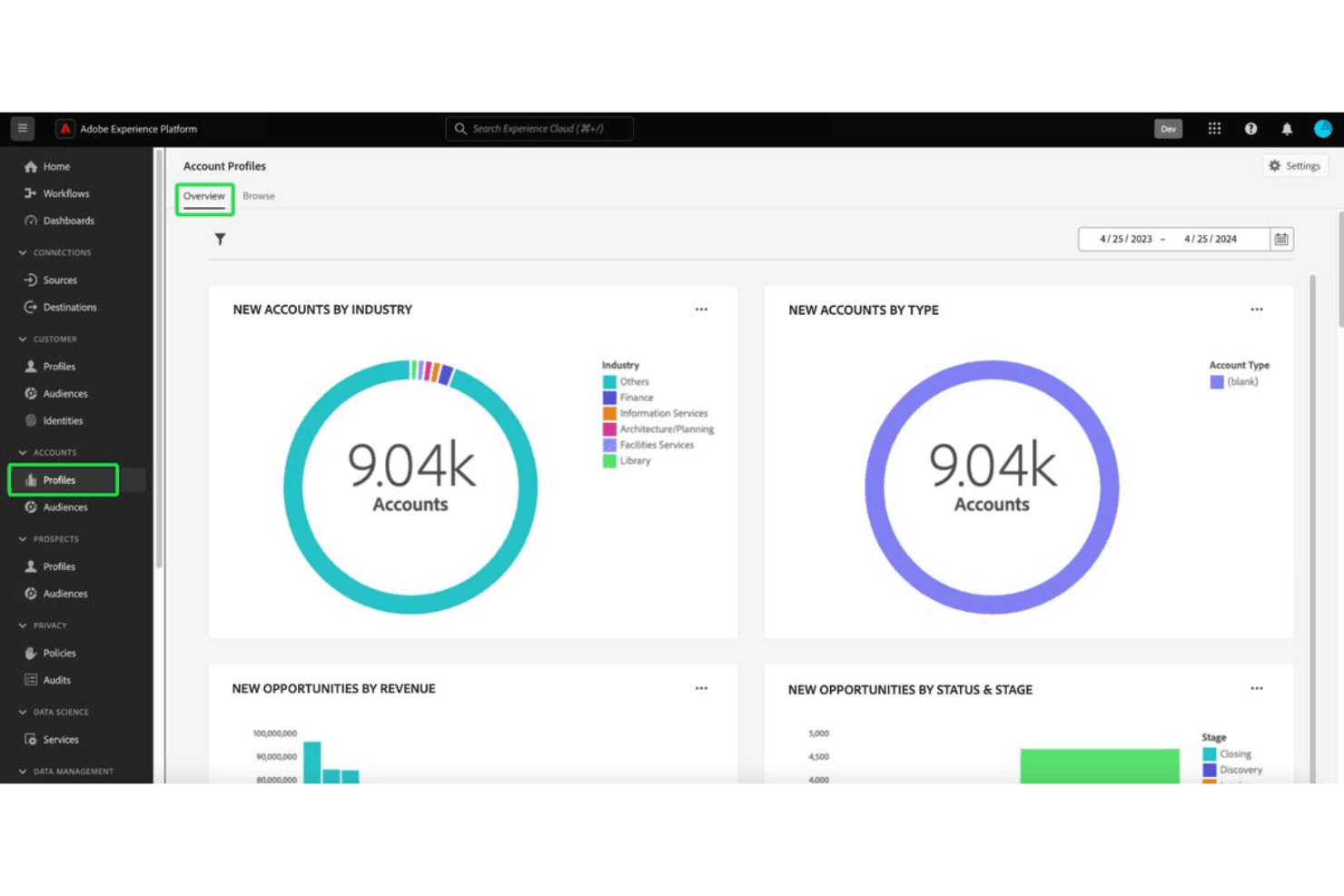
Adobe Experience Manager excels in enterprise-level digital content and comprehensive marketing management. Adobe Experience Manager is an enterprise CMS and digital asset management platform that combines multi-site content creation, asset storage and delivery, adaptive forms, and personalization capabilities powered by integrations across the Adobe Experience Cloud.
Who Is Adobe Experience Manager Best For?
AEM is built for large enterprises running complex, multi-brand content operations that are already invested in the Adobe Experience Cloud stack.
Why I Picked Adobe Experience Manager
I've included Adobe Experience Manager in my top picks because it's the strongest option on this list for teams already running on Adobe Experience Cloud. I love how AEM Assets Content Hub creates a purpose-built, branded asset portal where internal teams and external partners can find, filter, and share approved assets without chasing down a creative. The multi-site manager with Live Copy is also genuinely impressive for managing content across dozens of brands or regions from one place, keeping everything consistent at scale.
Adobe Experience Manager Key Features
- Adaptive forms builder: AEM Forms lets you create responsive, conditional forms with drag-and-drop authoring, dynamic logic, and e-signature support for content gating and lead capture.
- Headless content delivery: AEM Sites delivers content via GraphQL API, enabling you to publish structured content across web, mobile, and app channels from a single repository.
- Adobe Firefly generative AI: Non-creative users can generate and remix brand-compliant asset variations directly inside Content Hub without leaving the platform.
- Rule-based audience targeting: AEM Sites includes built-in client context targeting that lets you define audience segments and serve dynamic content variations based on user data.
Adobe Experience Manager Integrations
Adobe Experience Manager has documented native integrations across the Adobe ecosystem, including Adobe Analytics, Adobe Target, Marketo Engage, Real-Time CDP, Journey Optimizer, Commerce, Creative Cloud, and Adobe Sign. It supports GraphQL, events, webhooks, and Adobe Developer App Builder for custom integrations.
Pros and Cons
Pros:
- Enterprise-grade security and compliance certifications
- Deep Adobe ecosystem integration for content ops
- Best-in-class branded content hub capabilities
Cons:
- Not purpose-built for sales enablement
- No native interactive content builder
Learn more about Adobe Experience Manager: Best for data-driven multisite personalization at scale
- Free demo available
- Pricing upon request
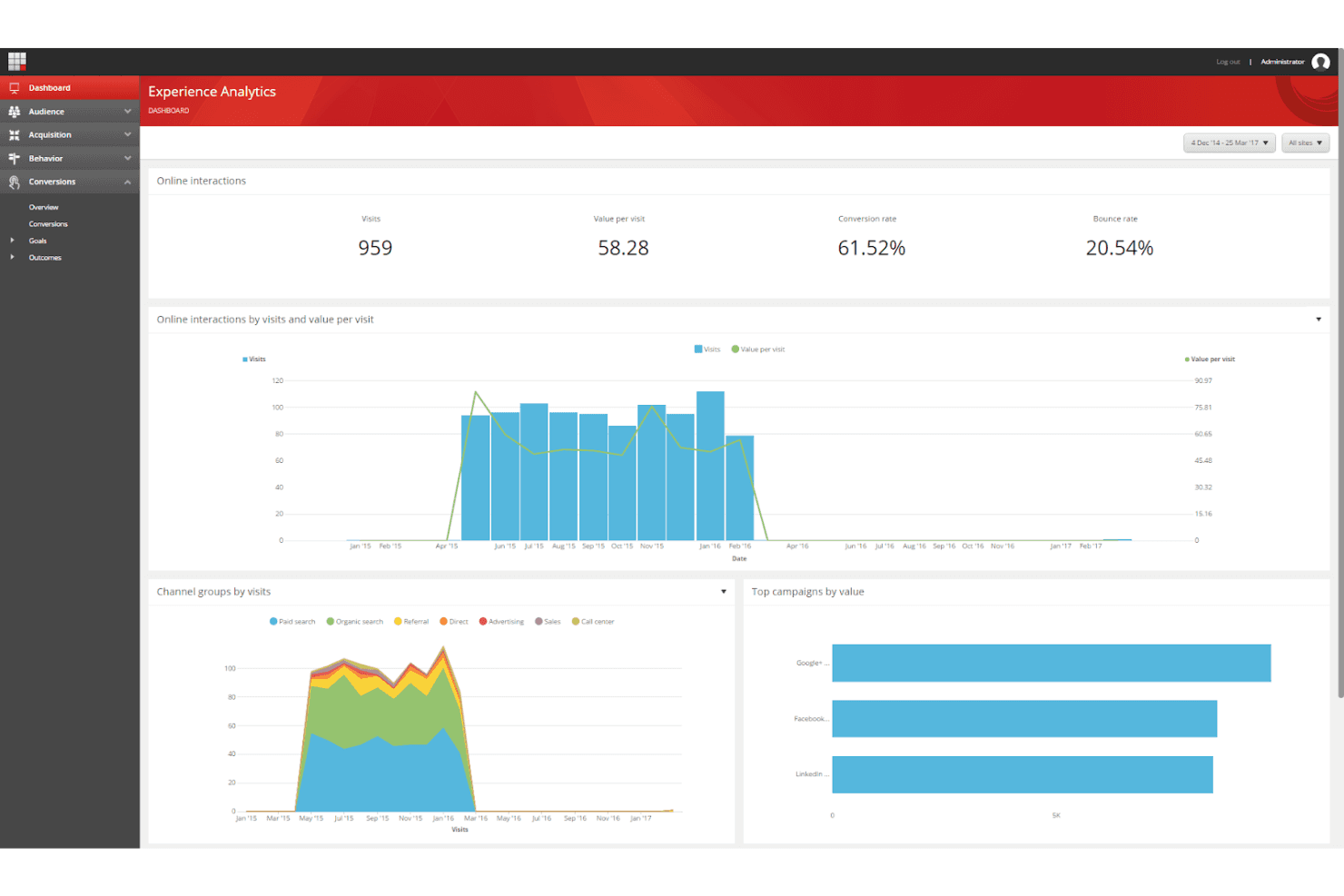
Sitecore Experience Platform offers advanced tools for creating data-driven, personalized customer journeys. Sitecore Experience Platform is an enterprise digital experience platform (DXP) that combines multisite content management, a digital asset management (DAM) layer, CDP-driven personalization, A/B testing, and marketing automation integrations.
Who Is Sitecore Experience Platform Best For?
Sitecore Experience Platform is a strong fit for enterprise marketing teams managing multiple brands, regions, or sites that need CDP-driven personalization at scale.
Why I Picked Sitecore Experience Platform
I picked Sitecore Experience Platform because no other tool on this list matches its depth of CDP-driven personalization across multiple sites and brands simultaneously. Its Site Collections feature lets you spin up and manage unlimited branded sites from one interface, while the integrated CDP builds real-time visitor profiles that power dynamic content swapping at the segment, account, and behavior level. I'm also impressed by how SitecoreAI Stream automates A/B testing and serves winning variants without manual intervention.
Sitecore Experience Platform Key Features
- Sitecore Connect integrations: A built-in iPaaS layer with 1,000+ pre-built connectors links Sitecore XP to tools like Marketo, HubSpot, Salesforce, and Microsoft Dynamics for bi-directional data sync.
- Engagement value scoring: The platform assigns numerical engagement scores to visitor interactions, giving you a real-time measure of how meaningfully each user engages with your content.
- Content Hub DAM: A centralized digital asset management layer handles the full content lifecycle—planning, production, metadata tagging, and omnichannel publishing—from one interface.
- Agentic Studio: A no-code visual builder lets you create custom generative AI agents that enforce brand guardrails across content creation and delivery workflows.
Sitecore Experience Platform Integrations
Sitecore Connect offers 1,000+ pre-built connectors, including Salesforce, Microsoft Dynamics, Marketo, HubSpot, and Eloqua. It also supports REST APIs, webhooks, and custom data pipelines.
Pros and Cons
Pros:
- Advanced engagement analytics with goal tracking
- Real-time AI-driven content personalization
- Supports unlimited branded content hubs and microsites
Cons:
- Experience Editor can be slow for marketers
- Requires developer support for site changes
Learn more about Sitecore Experience Platform: Best for seller-led buyer content experiences
- Free demo available
- Pricing upon request
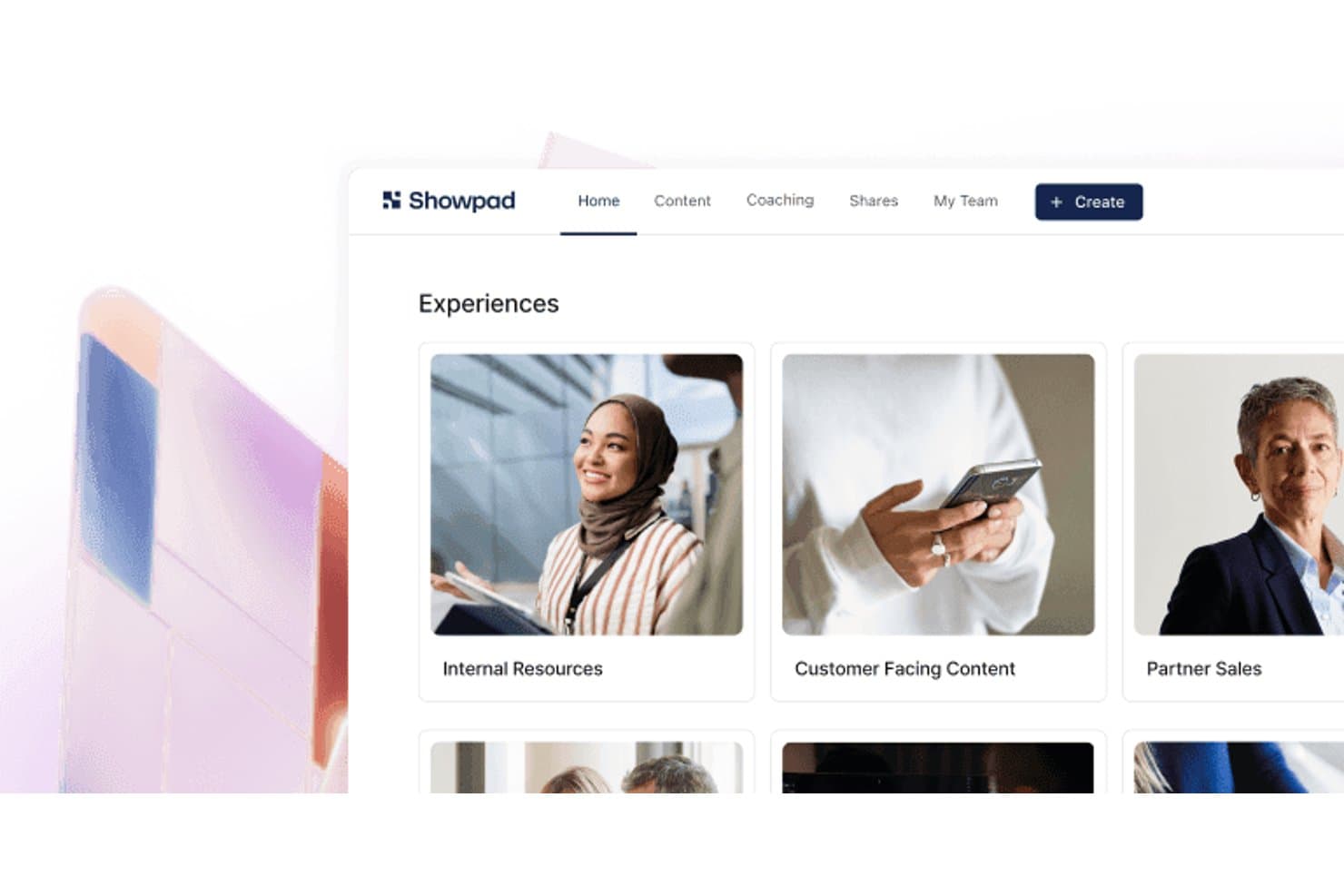
Showpad organizes sales content into browsable experience collections. Showpad is a sales enablement and content experience platform that combines a centralized content library, interactive buyer-facing deal rooms, AI-driven content recommendations, and deep engagement analytics.
Who Is Showpad Best For?
Showpad is a strong fit for enterprise sales and marketing teams that need seller-led content experiences, buyer engagement tracking, and revenue attribution across complex, multi-stakeholder deals.
Why I Picked Showpad
I picked Showpad as one of the best because it's built specifically for seller-led buyer content experiences, which is a distinct motion that pure-play content experience platforms don't serve as well. Shared Spaces let sellers build co-branded, deal-specific destinations where buying committees can view curated content, track mutual action plans, and signal engagement. I especially like that every interaction inside a Shared Space feeds directly into CRM records, so you can connect specific content to pipeline progress and closed-won revenue without any manual attribution work.
Showpad Key Features
- AI-powered content recommendations: Showpad Genie surfaces deal-specific asset suggestions directly within CRM workflows based on deal stage and account data.
- Multi-format asset support: The platform hosts PDFs, videos, 3D models, 360° showrooms, AR assets, and interactive apps within a single content library.
- Revenue attribution reporting: Content engagement data syncs with CRM records to connect specific assets to pipeline progress and closed-won revenue.
- Marketo integration: Showpad pushes buyer engagement signals into Marketo to enrich lead scoring and trigger automated marketing campaigns.
Showpad Integrations
Showpad offers 75+ pre-built integrations, including Marketo, Salesforce, HubSpot, Microsoft Dynamics, SharePoint, Google Drive, Box, Dropbox, Salesloft, and Outreach. Its REST API, webhooks, Reporting API, and SDK support custom integrations and BI pipelines.
Pros and Cons
Pros:
- Broad support for 3D and AR content
- Shared Spaces create seller-led deal rooms
- Best-in-class buyer engagement analytics
Cons:
- Lacks anonymous visitor personalization features
- No native gated content or lead capture
Learn more about Showpad: Best for value-selling content and revenue proof
- Free demo available
- From $30/user/month
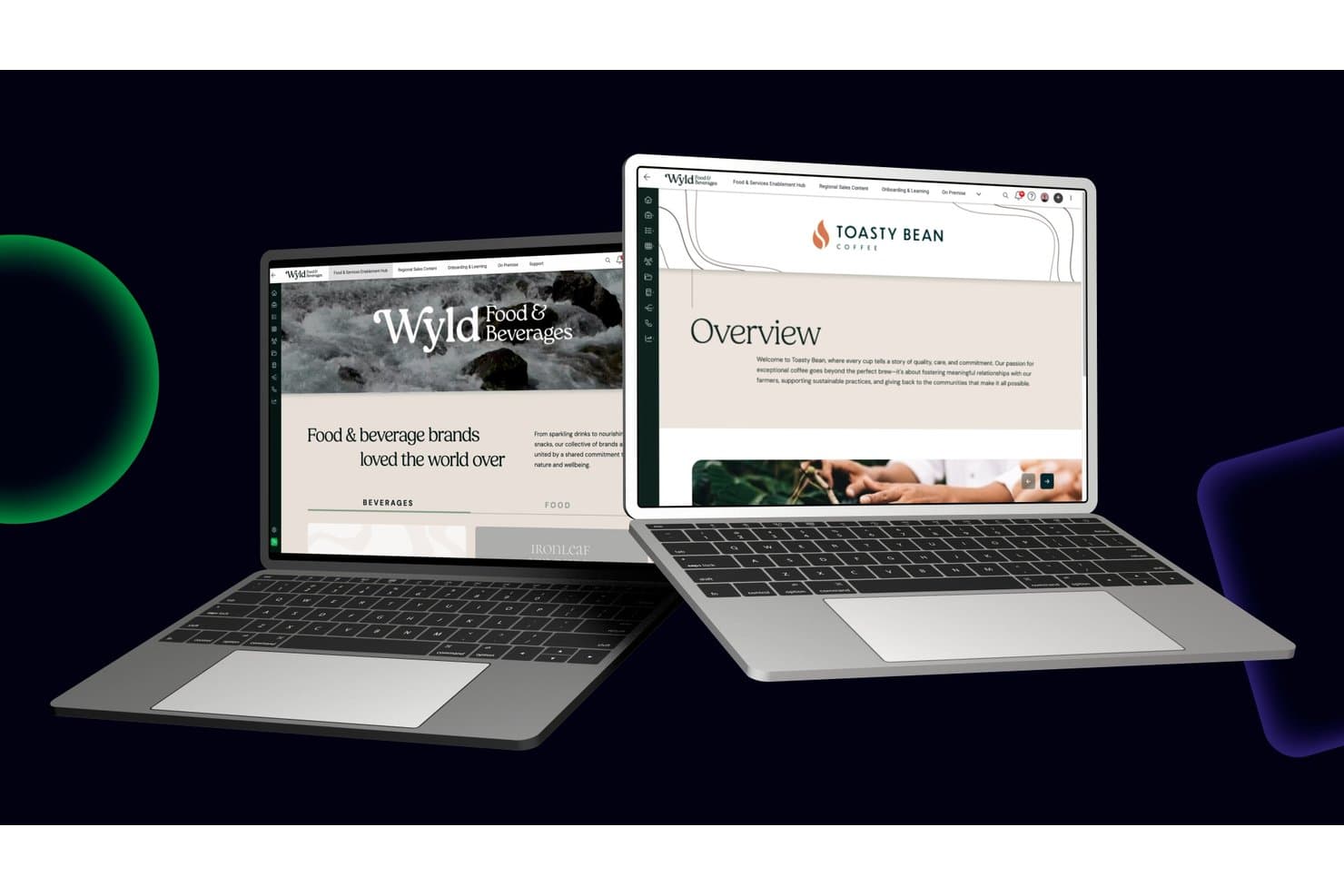
Mediafly organizes brand content into structured, browsable sales portals. Mediafly is a revenue enablement platform that combines branded content workspaces, digital sales rooms, interactive content creation, AI-driven content recommendations, and value selling tools like ROI calculators and business value assessments.
Who Is Mediafly Best For?
Mediafly is a strong fit for enterprise sales and marketing teams that need to prove the revenue impact of their content through ROI tools, value assessments, and closed-deal attribution.
Why I Picked Mediafly
Mediafly earns its spot on my shortlist because no other content experience platform ties content directly to revenue proof the way it does. The Value Suite lets you build ROI calculators and business value assessments without developer support, so your team can quantify deal impact at every stage of the customer lifecycle. Paired with the Advanced Insights module's closed-deal attribution, I can see exactly which content assets influenced pipeline and won revenue inside Salesforce.
Mediafly Key Features
- Digital sales rooms: Build personalized, branded microsites for individual accounts that house multiple content assets in a single shared space.
- AI content tagging: Automatically applies metadata, content summaries, and tags to assets to improve discoverability across the content library.
- StoryGuide: An AI-powered tool that guides sellers to assemble on-brand presentations by recommending relevant slides and assets based on the selling scenario.
- Offline access: Lets sellers download and present content without an internet connection, supporting field sales and in-person meetings.
Mediafly Integrations
Mediafly offers documented integrations with Salesforce, SAP Sales Cloud, Microsoft Dynamics 365, HubSpot, Marketo, Pardot, SharePoint, Bynder, and Adobe Experience Manager. OAuth and API connectors support custom integrations.
Pros and Cons
Pros:
- Revenue attribution connects content to pipeline
- Account-level content personalization features included
- Value selling tools for revenue proof
Cons:
- Quote-based pricing increases upfront friction
- Lacks native SEO controls for content hubs
Learn more about Mediafly: Best for AI-guided content binge experiences
- Free demo available
- From $30,000/year (billed annually)
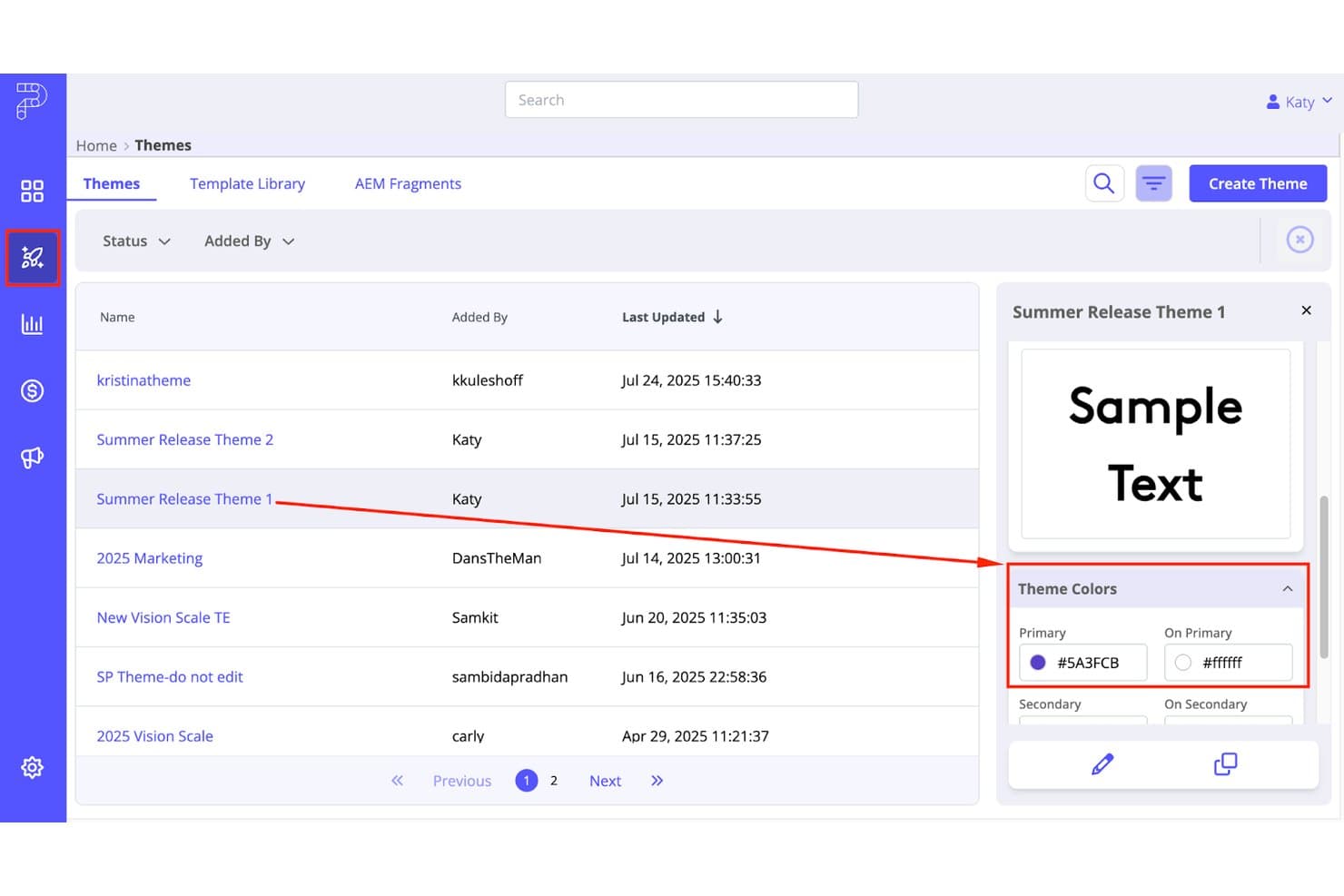
PathFactory lets users preview and manage branded content themes. PathFactory is a content experience platform that lets you build AI-guided content hubs, personalized account-based destinations, and binge-style content playlists with deep MAP, CRM, and intent data integrations.
Who Is PathFactory Best For?
PathFactory is a strong fit for mid-market and enterprise marketing teams running ABM or demand generation programs who need to connect content engagement directly to pipeline.
Why I Picked PathFactory
PathFactory earns its spot on my shortlist because its AI recommendation engine is purpose-built to turn single-asset visits into multi-asset binge sessions. I love how Content Playlists sequence PDFs, videos, case studies, and webinars into a guided journey that adapts in real time to each visitor's behavior. The Content Intelligence Center then analyzes your entire asset library to surface what's actually driving engagement, so I'm never guessing which content to sequence next.
PathFactory Key Features
- Intelligent gating: Automatically shows forms to unknown visitors while giving known accounts frictionless access to content without filling out a form.
- ChatFactory AI buying agent: A GenAI-powered conversational agent that answers buyer questions, recommends assets, and generates personalized microsites from each interaction.
- PathFactory for Revenue Intelligence (PFRI): A revenue attribution dashboard that maps content engagement data directly to pipeline and open opportunities in Salesforce.
- AI content tagging: Automatically analyzes and tags your entire asset library by topic, benchmarks content against your strategy, and flags gaps in your content coverage.
PathFactory Integrations
PathFactory offers 17 native integrations, including Salesforce, Marketo, HubSpot, Eloqua, Pardot, 6sense, Demandbase, ZoomInfo, Adobe Experience Manager, and Snowflake. Its public API and webhooks support custom data pipelines and real-time CRM workflows.
Pros and Cons
Pros:
- Dynamic personalization for ABM and industry segments
- AI-powered playlists drive higher content consumption
- Connects content engagement directly to pipeline
Cons:
- Chatbot lacks handoff to live agents
- No interactive content builders like quizzes
Learn more about PathFactory: 10Best for turning static docs into interactive hubs
RELAYTO
- Free demo available
- $750/month (billed annually)

RELAYTO tracks buyer intent signals like time spent and visit frequency. RELAYTO is a content experience platform that lets you transform static documents—PDFs, presentations, and more—into interactive microsites, content hubs, and digital sales rooms using a no-code editor and AI-powered tools.
Who Is RELAYTO Best For?
RELAYTO is a strong fit for content and demand gen teams that regularly work with PDFs and presentations and want to turn those assets into trackable, branded experiences without leaning on developers.
Why I Picked RELAYTO
I picked RELAYTO as one of the best because its AI Experience Builder can take a static PDF or PowerPoint and turn it into a fully interactive microsite in minutes, complete with hotspots, video narration, and animated elements. I also love the AI Content Chat, which lets visitors search across an entire content hub using natural language, so even large asset libraries stay navigable. The no-code Interactivity Studio means my team can add gated forms, clickable CTAs, and embedded third-party tools without touching a single line of code.
RELAYTO Key Features
- Engagement analytics: Tracks visitor journeys, interaction-level events like hotspot and CTA clicks, referral sources, and device types across your content experiences.
- Lead capture forms: Supports native forms and embedded Marketo forms to gate content and capture leads directly within an experience.
- Audience access controls: Restricts or grants content access by email domain whitelisting, blacklisting, and corporate email rules to target specific account segments.
- Sales enablement digital sales rooms: Lets sales teams create personalized, password-protected microsites for individual prospects with real-time engagement notifications.
RELAYTO Integrations
RELAYTO offers native integrations with Salesforce, HubSpot, Marketo, Google Analytics, and Google Tag Manager. It also connects with Google Drive, OneDrive, and Box, while Business and Enterprise plans support custom integrations through its API.
Pros and Cons
Pros:
- Visitor journeys reveal hotspot and CTA engagement
- Content hubs organize multi-format asset libraries
- AI converts PDFs into interactive microsites
Cons:
- Behavior-based recommendations remain limited
- Advanced interactivity takes practice to master
Learn more about RELAYTO:
Other Content Experience Platforms
Below is a list of additional content experience platforms that we shortlisted, but did not make it to the top list. While they didn’t make the top 10, they’re still valuable and worth further research.
- 11FollozeBest for account-based content personalization at scale
- 12HushlyBest for AI-driven account microsite creation
- 13AcquiaBest for Drupal-optimized digital experiences
- 14ON24Best for webinar-to-hub content repurposing
- 15HighspotBest for sales-to-buyer content engagement tracking
- 16WordPress VIPBest for enterprise content hubs
- 17FoleonBest for brand-governed interactive content creation
- 18TurtlBest for ABM-driven content personalization at scale
- 19IonBest for rules-based interactive lead experiences
How I Evaluate Content Experience Platforms
I split my evaluation into three parts. Core functionality—pulling varied content into a unified hub and personalizing it per visitor—carries the most weight, with standout features like AI content recommendations coming next. Finally, I consider onboarding support and martech ecosystem fit.
Core Functionality (Table Stakes For This List)
When I'm selecting tools for my list, I score each one on a scale from 0 (does not offer the functionality) to 5 (excels in this area) for each core functionality listed below. I then convert the total into a percentage to help assess each tool's overall fit, with extra weight on any functionalities I've deemed essential.
- Content Aggregation (Essential): I check whether the platform can pull blogs, videos, PDFs, and third-party assets into a single hub with flexible tagging and organization.
- Audience Personalization (Essential): Each tool gets evaluated on how it tailors content by visitor attributes like industry, persona, behavior, or intent signals.
- Engagement Analytics: I look for content-level metrics—time spent, scroll depth, asset completion—that go beyond basic page views and tie back to individual accounts.
- Experience Building: The drag-and-drop editor matters here. I evaluate how quickly you can spin up branded microsites or resource hubs without pulling in a developer.
- Lead Capture & CRM Integration: Syncing engagement data to platforms like HubSpot or Salesforce is what I'm checking, including whether the connection is bidirectional and near real time.
- Journey Orchestration: I evaluate how the tool sequences content—whether it can recommend a next asset based on what a visitor already consumed or where they sit in the funnel.
Once I have a list of tools that meet the criteria, I consider what sets each platform apart.
Differentiating Factors (What Sets Vendors Apart)
Here's how I compare and contrast different vendors:
Standout Features
Content scoring and attribution is where I start. I look for platforms that assign weighted engagement scores to individual assets, so you can trace which white paper or video actually influenced a deal rather than guessing. Sales-shareable playlists also matter. When reps can assemble personalized micro-hubs for a prospect directly from their workflow, content gets used instead of buried. I evaluate AI content recommendations too, checking whether the engine adapts in real time to serve a next-best asset based on behavior, not just static rules.
Beyond Features
I evaluate how quickly a non-technical marketer can go from zero to a live content hub. Vendors that offer pre-built templates and migration support for existing libraries cut weeks off launch timelines. I also check martech ecosystem fit—specifically whether CRM and MAP integrations are bidirectional and near real time, since one-way syncs leave sales teams working with stale engagement data. For enterprise buyers, I confirm privacy compliance and security certifications like SOC 2, especially when gated content captures visitor data across regions.
How to Choose a Content Experience Platform
It’s easy to get bogged down in long feature lists and complex pricing structures. To help you stay focused as you work through your unique software selection process, here’s a checklist of factors to keep in mind:
| Factor | What to Consider |
|---|---|
| FactorScalability | What to ConsiderCan the platform grow with your business? Consider future needs and whether the tool can handle increased content and user demands as you expand. |
| FactorIntegrations | What to ConsiderDoes it work with your existing tools? Check if it connects with your CRM, marketing automation, and analytics platforms to simplify workflows. |
| FactorCustomizability | What to ConsiderCan you tailor it to your needs? Look for options to adjust layouts, branding, and user paths to match your unique processes and brand identity. |
| FactorEase of use | What to ConsiderIs it user-friendly for your team? Seek intuitive interfaces and straightforward navigation to minimize training and support needs. |
| FactorImplementation and onboarding | What to ConsiderHow quickly can you get started? Assess the time and resources needed for setup, and whether the vendor offers support during onboarding. |
| FactorCost | What to ConsiderDoes it fit your budget? Compare pricing models, hidden fees, and value provided at each tier to ensure it aligns with your financial plans. |
| FactorSecurity safeguards | What to ConsiderIs your data protected? Evaluate encryption, data storage, and compliance with industry standards to keep your information secure. |
| FactorSupport availability | What to ConsiderCan you get help when needed? Consider the availability of customer support, including response times and access to live support channels. |
Trends for Content Experience Platforms
Content experience platforms are evolving rapidly. Here are the top trends shaping the industry this year.
- AI-Driven Personalization: AI-driven personalization is becoming more prevalent, allowing for highly tailored content experiences. This technology leverages data to predict and deliver content that resonates with individual users. It's important because it significantly improves user engagement and satisfaction.
- Headless CMS Adoption: Headless CMS adoption is on the rise, offering more flexibility for developers. This trend allows content to be managed and delivered across multiple channels without being tied to a specific front-end. It is crucial for creating a consistent user experience across devices.
- Enhanced Analytics and Reporting: Enhanced analytics and reporting tools are providing deeper insights into content performance. These tools help organizations make data-driven decisions to optimize their content strategies. This trend is vital for maximizing ROI and understanding audience behavior.
- Integration with Marketing Automation: Integration with marketing automation tools is becoming standard. This enables efficient content marketing strategies. It is important because it simplifies operations and enhances the effectiveness of marketing campaigns.
- Focus on User Experience (UX): There is a growing focus on improving user experience through better interface design and user-friendly features. Platforms are investing in intuitive design to reduce the learning curve and increase productivity. This trend is significant as it directly impacts user satisfaction and platform adoption.
As content experience platforms evolve, the fusion of AI-driven personalization, headless CMS, enhanced analytics, and marketing automation is not just a technological upgrade but a strategic shift towards more adaptive and user-centric environments. This evolution highlights a future where content is anticipatory and highly tailored, meeting users' needs in real-time.
What Is a Content Experience Platform?
A content experience platform is a tool that allows businesses to create, manage, and optimize digital content across various channels. Common users include marketing teams, content creators, and digital strategists who need to deliver personalized and engaging content to their audience.
The primary purpose of a content experience platform is to enhance the customer journey by providing relevant and consistent content experiences. It helps users simplify content workflows, measure content performance, and improve engagement through advanced analytics and personalization features.
Features
When evaluating content experience platforms, I look for key features that enhance content creation, management, and delivery. These features help ensure the platform meets the needs of marketing teams and content creators, providing an efficient user experience.
- Content Creation Tools: Enable users to easily create and edit digital content.
- Digital Asset Management: Allows for the organization and retrieval of digital assets.
- Personalization: Delivers tailored content to different audience segments.
- Multichannel Distribution: Distributes content across various channels and platforms.
- Analytics and Reporting: Provides insights into content performance and user engagement.
- SEO Tools: Helps optimize content for search engines to improve visibility.
- Integration Capabilities: Connects with other marketing and CRM tools for simplified workflows.
- Collaboration Features: Facilitates team collaboration on content projects.
- Workflow Automation: Automates repetitive tasks to save time and improve efficiency.
- Real-Time Updates: Ensures content is updated in real-time across all platforms.
These features are essential for creating a comprehensive and effective content strategy, ensuring that content is engaging, personalized, and easily manageable.
Benefits
Content experience platforms provide numerous advantages for businesses aiming to enhance their digital presence and engagement. Here are five primary benefits these platforms offer to users and organizations.
- Improved Content Personalization: Delivering tailored content to specific audience segments increases engagement and conversion rates.
- Enhanced Efficiency: Simplifying content creation and management processes saves time and reduces operational costs.
- Better Data Insights: Advanced analytics and reporting tools provide valuable insights into content performance and user behavior.
- Easy Multi-Channel Delivery: Distributing content across multiple channels ensures a consistent user experience.
- Increased Collaboration: Collaboration features enable teams to work together more effectively, improving productivity and output quality.
These benefits make content experience platforms an essential tool for businesses looking to optimize their digital content strategy and achieve better results. Adopting these platforms can lead to more effective marketing efforts and a stronger connection with the target audience.
Costs & Pricing
Understanding the costs and pricing of content experience platforms is crucial for businesses to make an informed decision. These platforms typically offer a range of plans tailored to different needs and budgets. Below, I've outlined common plan types, their average prices, and features to help software buyers navigate their options.
Plan Comparison Table for Content Experience Platforms
| Plan Type | Average Price | Common Features |
|---|---|---|
| Plan TypeFree | Average Price$0 | Common FeaturesBasic content creation tools, limited storage, basic analytics |
| Plan TypeBasic | Average Price$25/user/month | Common FeaturesContent creation and editing, basic personalization, standard support |
| Plan TypeProfessional | Average Price$75/user/month | Common FeaturesAdvanced personalization, multichannel distribution, enhanced analytics |
| Plan TypeEnterprise | Average PricePricing upon request | Common FeaturesCustom integrations, AI-driven insights, dedicated account manager, 24/7 support |
Content Experience Platform FAQs
How does a content experience platform differ from a content management system?
While a content management system (CMS) focuses on creating and managing digital content, a content experience platform goes a step further by personalizing and optimizing the delivery of that content. A CXP provides tools for content personalization, analytics, and multichannel distribution, ensuring a more engaging and relevant experience for users.
Can a content experience platform integrate with other marketing tools?
Yes, most content experience platforms are designed to integrate easily with other marketing tools such as customer relationship management (CRM) systems, email marketing software, and social media management tools. This integration allows for a more cohesive and efficient marketing strategy.
How does a content experience platform improve customer engagement?
A content experience platform improves customer engagement by delivering personalized and relevant content to users based on their preferences and behaviors. By providing a tailored content experience, businesses can capture the attention of their audience, increase interaction, and build stronger relationships
Is a content experience platform suitable for all types of businesses?
Yes, a content experience platform can be beneficial for businesses of all sizes and industries. Whether you are a small business looking to enhance your content strategy or a large enterprise aiming to deliver personalized experiences at scale, a CXP can help you achieve your goals.
How do I choose the best content experience platform for my business?
To choose the best content experience platform for your business, start by identifying your specific needs and goals. Research different platforms, compare their features, and read user reviews. Consider factors such as ease of use, integration capabilities, customer support, and pricing. Conducting a thorough evaluation will help you select a platform that aligns with your business objectives.