

Market research software is a valuable asset for any company. With the right software, teams can gain deep insights into customer behavior and make data-driven decisions. However, finding the right market research software can be challenging, especially with so many available options.
Using my extensive experience with marketing software, I tested and compared several of the top market research software available. From there, I compiled my results into in-depth reviews to help you find the best software for your unique needs. I’m confident you’ll discover your next market research software in the list below.
Why Trust Our Software Recommendations
6,700+
Reviews
20
Industry experts
16+
Evaluation factors
14
Years
Our team has been testing and reviewing software since 2012. As marketing leaders ourselves, we know how difficult—and important—it is to choose the right software.
For this guide, we evaluated tools using hands-on testing and independent research, scoring tools using our selection criteria.
Our reviews reflect our human editorial judgment, not a sales pitch.
Expert reviewers:
 Gui DrusinaCreative Director
- Shriya GhateSenior Marketing Lead
 Amanda JacquesMarketing Ops Leader

Market Research Software Comparison Table
We’ve investigated the pricing and availability of free trials and demo versions.
| Tool | Best For | Trial Info | Price | ||
|---|---|---|---|---|---|
| 1 | Best for multilingual social listening coverage | 14-day free trial | From $199/month (billed annually) | Website | |
| 2 | Best for competitive digital audience analysis | 14-day free trial | From $139/month | Website | |
| 3 | Best for effortless team collaboration on surveys | Free plan available | Free plan available; from $7/user/month (billed annually) for Google Workspace | Website | |
| 4 | Best for extensive templates | Free plan available | From $7.42/month (billed annually) | Website | |
| 5 | Best for qualitative data analysis | Free trial available | From $30/month | Website | |
| 6 | Best for rapid audience targeting at scale | Free plan available | From $30/user/month (billed annually) | Website | |
| 7 | Best for engaging surveys | Free plan available | From $28/month (billed annually) | Website | |
| 8 | Best for content insights | Free trial available | From $199/month (billed annually) | Website | |
| 9 | Best for multi-channel experience data integration | Free demo available | Pricing upon request | Website | |
| 10 | Best for quick-turn consumer insight validation | Free demo available | From $150/month | Website |


Best Market Research Software Reviews
We’ve investigated the pricing and availability of free trials and demo versions so you can make a much simpler side-by-side comparison.
 Best for multilingual social listening coverage
- 14-day free trial
- From $199/month (billed annually)
Visit WebsiteCustomer Rating:4.7/5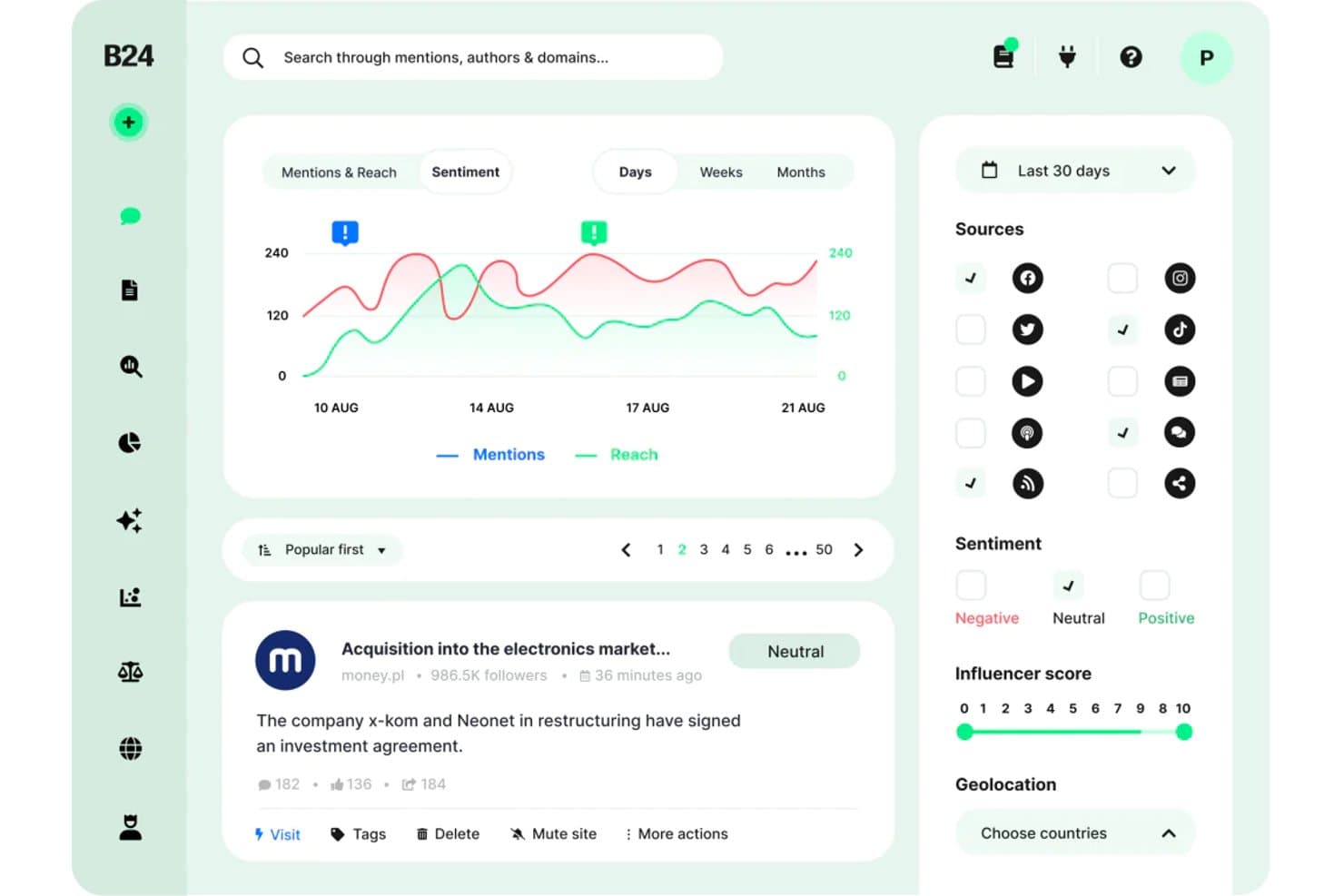
Brand24 offers a sentiment analysis dashboard with mention tracking, reach charts, source filtering, and influencer scoring for market research. Brand24 is an AI-powered social listening and media monitoring platform that tracks brand mentions, consumer sentiment, and online conversations across social media, news sites, blogs, forums, podcasts, and review platforms in real time.
Who Is Brand24 Best For?
Brand and insights managers at companies operating across international or multilingual markets will get the most from Brand24's cross-language monitoring capabilities.
Why I Picked Brand24
Brand24 earns its spot on my shortlist because its multilingual social listening coverage is genuinely unmatched. I particularly like that sentiment analysis runs across 108 languages at a 95% accuracy rate, so tracking consumer perception in Arabic, Spanish, or Polish produces reliable data rather than noise. The AI Brand Assistant 2.0 lets me ask natural-language questions directly against that multilingual dataset, surfacing themes I'd otherwise have to dig for manually.
Brand24 Key Features
- Presence score: Aggregates brand visibility into a single metric updated in real time for easy monitoring.
- Influencer identification: Surfaces top authors and channels driving key conversations about your brand or competitors.
- Storm alerts: Instantly notifies you of unusual spikes in brand discussion volume to aid crisis detection.
- White-labeled reports: Lets you export data in branded PDF, Excel, or PowerPoint formats for custom sharing and presentations.
Brand24 Integrations
Brand24 offers native integrations with Slack and Microsoft Teams. An API is available for custom integrations.
Pros and Cons
Pros:
- AI Brand Assistant answers research queries
- Covers social, news, podcasts, and reviews
- Tracks mentions across 108 languages simultaneously
Cons:
- Stories and Reels metrics not fully supported
- No survey or primary research capabilities
Learn more about Brand24: Best for competitive digital audience analysis
- 14-day free trial
- From $139/month
Visit WebsiteCustomer Rating:4.5/5
Semrush Traffic Analytics shows competitor and audience insight reporting. Semrush is a digital intelligence platform that combines keyword research, competitor traffic analysis, backlink auditing, and audience behavior data across search, social, and paid channels.
Who Is Semrush Best For?
Semrush is a strong fit for digital marketers and SEO strategists at mid-size to enterprise companies who need deep visibility into competitor online presence.
Why I Picked Semrush
I picked Semrush as one of the best because its Traffic Analytics tool gives me a detailed breakdown of any competitor's audience, including traffic sources, engagement metrics, and geographic reach, all without needing access to their internal data. The Keyword Gap tool lets me line up to five competitors side by side to spot exactly which search terms they're capturing that I'm not. I also lean on the Backlink Gap tool to find link-building opportunities my competitors have already validated.
Semrush Key Features
- Market explorer: Maps the competitive landscape of any industry, showing market share, audience demographics, and top players in one view.
- Topic research: Surfaces trending subtopics, headlines, and questions tied to any seed keyword to guide content and research planning.
- Brand monitoring: Tracks online mentions of any brand across news, blogs, and social platforms in near real time.
- Advertising research: Reveals competitors' paid search ad copy, landing pages, and keyword spend history.
Semrush Integrations
Semrush supports a variety of integrations with popular tools and services. Native integrations include Google Analytics, Google Search Console, Google Ads, Google Sheets, Google Docs, Looker Studio, Trello, WordPress, Facebook, LinkedIn, Instagram, Pinterest, YouTube, monday.com, Wix, and Zoho Analytics. It connects with Zapier, and an API is available for custom integrations.
Pros and Cons
Pros:
- Side-by-side competitor gap analysis for keywords
- Tracks brand visibility in AI search results
- Extensive keyword database across numerous countries
Cons:
- Key competitive intelligence tools require paid add-ons
- Thin data on niche or localized competitors
 Best for effortless team collaboration on surveys
- Free plan available
- Free plan available; from $7/user/month (billed annually) for Google Workspace

Google Forms sharing settings show collaborative quiz access management. Google Forms is a free survey builder from Google that lets teams create, distribute, and analyze questionnaires with automatic response collection and live data summaries in Google Sheets.
Who Is Google Forms Best For?
Google Forms is a natural fit for small teams and individual marketers already working inside Google Workspace who need a no-cost way to collect survey responses quickly.
Why I Picked Google Forms
Google Forms earns its spot on my shortlist because multi-editor access is baked in by default. My whole team can open the same form simultaneously, edit questions, and leave comments without any version conflicts. I also like that conditional logic lets us branch respondents into different question paths based on earlier answers, which makes a single form do the work of several. Response data flows automatically into Google Sheets in real time, so my team can slice and filter results together the moment submissions come in.
Google Forms Key Features
- Multiple question types: Choose from multiple choice, checkboxes, dropdown menus, linear scales, and open-text fields to match each question to the right response format.
- Response validation: Set rules that require respondents to enter specific formats, number ranges, or text patterns before submitting.
- Pre-built survey templates: Start from a library of ready-made survey formats rather than building every form from a blank page.
- Automatic summary charts: View auto-generated bar charts, pie charts, and response tallies directly inside Google Forms without exporting your data.
Google Forms Integrations
Google Forms connects natively with other Google Workspace apps, including Google Sheets, Google Drive, Google Docs, and Google Calendar. Thousands of additional apps are available through the Google Workspace Marketplace, and it connects with Zapier. A RESTful API is also available for custom integrations.
Pros and Cons
Pros:
- Gemini AI generates draft forms from prompts
- Easy to use form designs
- Unlimited responses on every survey
Cons:
- Built-in analytics are basic without Sheets export
- Templates lack depth in layout customization
Learn more about Google Forms: Best for extensive templates
- Free plan available
- From $7.42/month (billed annually)

Zoho Survey helps users create, distribute, and analyze surveys easily. Zoho Survey is an online survey and questionnaire tool for individuals and businesses to collect feedback and insights from their target audience. It primarily serves marketers, researchers, and HR teams by facilitating survey creation, distribution, and analysis.
Why I picked Zoho Survey: It offers an intuitive drag-and-drop interface that makes survey creation easy for your team. With real-time reporting, you can quickly analyze responses and gain insights. Customizable templates help you build surveys that fit your specific needs. Additionally, advanced features like skip logic and piping ensure that your surveys are dynamic and engaging.
Standout features & integrations:
Features include customizable templates, real-time reporting, and advanced survey logic like skip logic and piping. You can easily create and distribute surveys with its drag-and-drop interface. The platform also supports multiple languages, making it versatile for global teams.
Integrations include Asana, Dropbox, Google Drive, Google Sheets, Mailchimp, Microsoft Teams, Salesforce, Slack, Trello, and Zoho Projects.
Pros and Cons
Pros:
- Easy drag-and-drop interface
- Multiple language support
- Advanced survey logic
Cons:
- Requires internet connection
- Limited customer support
Learn more about Zoho Survey:

Dovetail centralizes and analyzes customer insights for data-driven decisions. Dovetail is a customer insights platform to help product managers, designers, researchers, sales teams, and customer success professionals centralize and analyze customer knowledge. It quickly transforms user feedback, calls, and documents into actionable insights, enabling data-driven decision-making.
Why I picked Dovetail: The platform offers features that help you organize and analyze customer insights efficiently. Its AI-powered insights can convert vast amounts of feedback into meaningful data. Dovetail also provides data privacy protection and integration with other tools, ensuring your insights are secure. Its ability to standardize research processes across teams makes it a valuable asset for fostering a customer-centric culture in your organization.
Standout features & integrations:
Features include AI-driven insights, fast analysis of customer data, and data privacy protection. Your team can also benefit from tools for organizing insights and integrating with other platforms. These features help centralize the process of transforming feedback into actionable insights.
Integrations include Workday, SAP SuccessFactors, ADP, Oracle HCM, BambooHR, Microsoft Dynamics 365, Salesforce, ServiceNow, Google Workspace, and Slack.
Pros and Cons
Pros:
- Standardizes research processes
- AI-powered insights
- Fast data analysis
Cons:
- Initial setup complexity
- Limited offline access
Learn more about Dovetail: Best for rapid audience targeting at scale
- Free plan available
- From $30/user/month (billed annually)
Visit WebsiteCustomer Rating:4.6/5
SurveyMonkey shows audience targeting options for survey response collection. SurveyMonkey is a survey and market research platform that combines customizable survey building, a built-in audience panel, and response analytics tools in one place.
Who Is SurveyMonkey Best For?
SurveyMonkey is a strong fit for marketing and insights teams at mid-size to enterprise companies who need fast access to targeted survey respondents.
Why I Picked SurveyMonkey
I've included SurveyMonkey in my top picks because its built-in Audience panel gives you direct access to 335M+ respondents across 130+ countries without ever leaving the platform. I like that you can layer over 200 targeting options with custom screening questions to zero in on niche segments, like reaching only female CPG buyers aged 25-34 in the Midwest. In practice, my team can go from survey launch to real-time results in as little as an hour, which makes it genuinely useful when you need fast data to support a campaign decision or product pitch.
SurveyMonkey Key Features
- Sentiment analysis: Automatically categorizes open-ended responses as positive, neutral, or negative so you can gauge emotion across large response sets.
- Thematic analysis: Uses AI to group open-ended responses into key themes, so you don't have to manually sort through hundreds of written answers.
- Message and claims testing: Measures the effectiveness of marketing slogans, taglines, and value propositions with your target audience before launch.
- Crosstabs: Lets you compare answers across multiple survey questions to surface segment-level insights, like product interest broken down by gender and income.
SurveyMonkey Integrations
SurveyMonkey offers 200+ integrations through its App Directory and built-in Connect hub, including Salesforce, Microsoft Power BI, Tableau, Marketo, and Zoom, as well as Microsoft Teams, Google Drive, Microsoft OneDrive, HubSpot, and Mailchimp. It also connects with Zapier and has an API for custom integrations.
Pros and Cons
Pros:
- Multilingual surveys consolidated into one dataset
- Templates for building surveys quickly
- Access to respondents across multiple countries
Cons:
- Reporting and visualization gated to higher tiers
- Limited support for complex survey logic
Learn more about SurveyMonkey: Best for engaging surveys
- Free plan available
- From $28/month (billed annually)
Visit WebsiteCustomer Rating:4.7/5
Typeform helps create engaging forms for lead generation and feedback. Typeform is a platform for creating forms, surveys, and quizzes that enhance customer engagement and data collection. Its primary users include marketers, HR professionals, and customer success teams, who use it for lead generation, feedback collection, and research.
Why I picked Typeform: Typeform offers customizable form designs and multimedia embedding, making your surveys more interactive. Follow-up questions help you gather deeper insights from your respondents. Additionally, it supports over 300 integrations, ensuring it fits smoothly into your existing workflows. Your team can create unlimited forms with access to thousands of templates, even on the free plan.
Standout features & integrations:
Features include customizable designs, embedded multimedia content, and follow-up questions for deeper insights. You can gather more data easily, with 96% of users reporting a better brand experience. The free plan allows unlimited form creation and access to over 3,000 templates.
Integrations include Slack, Mailchimp, Google Calendar, Zapier, HubSpot, Salesforce, Airtable, Trello, Asana, and WordPress.
Pros and Cons
Pros:
- Follow-up questions available
- Multimedia embedding
- Customizable designs
Cons:
- Template limitations
- Limited analytics
Learn more about Typeform: Best for content insights
- Free trial available
- From $199/month (billed annually)
Visit WebsiteCustomer Rating:4.5/5
BuzzSumo helps users find trending content, influencers, and track mentions. BuzzSumo is a content research and media monitoring tool for marketers, PR professionals, and content creators. It helps users discover trending content, identify key influencers, and monitor online mentions.
Why I picked BuzzSumo: It offers content discovery tools that scan billions of articles and social posts, helping you find relevant and high-performing content ideas. You can track real-time trends and set up alerts for your brand mentions. Its influencer identification feature allows your team to connect with industry leaders. Additionally, the comprehensive media monitoring tools ensure you stay informed about competitor activities and industry updates.
Standout features & integrations:
Features include content analysis, trending feeds, question analysis, and custom alerts. You can also leverage its Chrome extension for on-the-go research and the API for automation.
Integrations include Slack, Zapier, Twitter, YouTube, Facebook, and TikTok.
Pros and Cons
Pros:
- Influencer identification
- Real-time trend analysis
- Extensive content database
Cons:
- No direct customer support for basic plans
- Steep learning curve
 Best for multi-channel experience data integration
- Free demo available
- Pricing upon request
Visit WebsiteCustomer Rating:4.3/5
Qualtrics dashboard tracks customer experience metrics across channels. Qualtrics is an experience management platform that unifies survey data, contact center signals, digital feedback, and behavioral data into a single research and analytics system.
Who Is Qualtrics Best For?
Qualtrics is a strong fit for enterprise research and CX teams that need to pull insights from multiple listening channels into one place.
Why I Picked Qualtrics
Qualtrics earns its spot on my shortlist because it's one of the few tools that genuinely connects survey responses with contact center transcripts, digital behavior, and social signals in one system. I find the Experience ID feature particularly useful—it builds a unified profile for each respondent across every touchpoint. That means my team can analyze how a customer's survey sentiment compares to their support call history without any manual data stitching.
Qualtrics Key Features
- Conjoint analysis: Lets you run discrete choice and MaxDiff studies to measure how respondents prioritize product features or price points.
- Text iQ: Applies AI-driven text analysis to open-ended responses, automatically tagging sentiment and topics across large datasets.
- Stats iQ: A built-in statistical analysis tool that runs regression, correlation, and significance testing directly on your survey data.
- Survey flow logic: Supports advanced branching, embedded data, and randomization blocks to build complex, adaptive survey experiences.
Qualtrics Integrations
Qualtrics offers native integrations through its extensions framework, including Salesforce, HubSpot, Slack, Microsoft Teams, Tableau, Jira, Zendesk, Adobe Analytics, Marketo, and ServiceNow. It also connects with Zapier and provides an API for custom integrations.
Pros and Cons
Pros:
- Unifies survey, digital, and call data
- AI-powered open-ended response analysis
- Built-in conjoint and MaxDiff study types
Cons:
- Support quality varies by contract tier
- Weak offline and mobile data collection
Learn more about Qualtrics:

Suzy survey workflow shows rapid consumer insight project launch tools. Suzy is a consumer intelligence platform that combines market trend monitoring, survey-based research, and AI-powered insight synthesis to help brand, marketing, and product teams validate decisions quickly.
Who Is Suzy Best For?
Suzy is a strong fit for brand, marketing, and insights teams at consumer-focused companies that need to validate ideas, concepts, or creative quickly without waiting on a traditional research agency.
Why I Picked Suzy
I've included Suzy in my top picks because it's one of the few research tools where I can spot a trend signal in the morning and have consumer validation data by the afternoon. Suzy's Signals feed monitors 10,000+ media sources and social platforms, then scores each trend for intensity and brand relevance. From there, I can launch a survey, MaxDiff, or monadic test against Suzy's verified consumer panels without ever leaving the platform.
Suzy Key Features
- Signal Intelligence Score: Evaluates every trend across intensity, industry relevance, role relevance, and potency, so your team knows which signals to prioritize before acting
- AI-moderated interviews: Runs qualitative in-depth interviews and focus groups with live or AI moderation, without coordinating a separate research agency
- TURF analysis: Identifies the combination of product features or messages that reaches the widest distinct audience across your target consumer segments
- On-brand report generation: Pulls your research data, strategy docs, and competitive intel into stakeholder-ready decks formatted in your brand's colors and fonts automatically
Suzy Integrations
Native integrations are not clearly documented on Suzy's website. The platform is designed as a self-contained research ecosystem, so you upload external data like CRM lists, strategy documents, and third-party reports directly into the platform rather than connecting through named integrations. Zapier and API support are not clearly available.
Pros and Cons
Pros:
- Proprietary panel with AI bot detection
- Quant and qual methods in one workflow
- Survey results return in hours, not weeks
Cons:
- Focus group theme labeling tools lag competitors
- Limited panel coverage outside English-speaking markets
Learn more about Suzy:
Other Market Research Software
Here are some additional market research software options that didn’t make it onto my shortlist, but are still worth checking out.
- 11AttestBest for continuous insights
- 12BrandMentionsBest for real-time brand monitoring
- 13SurveySparrowBest for conversational feedback collection
- 14MeltwaterBest AI-driven media intelligence
- 15NVivoBest for AI-assisted qualitative data analysis
- 16AlchemerBest for omnichannel feedback automation
- 17KlueBest for automated competitive deal insights
- 18Loop11Best data-driven UX testing
- 19BrandwatchBest for global social data analytics
- 20Google TrendsBest real-time search data insights
How I Evaluate Market Research Software
I split my evaluation into two layers: the baseline every qualifying tool must offer—like panel access, survey logic, and analysis—and the differentiators that separate the best from the rest.
Core Functionality (Table Stakes For This List)
When I'm selecting tools for my list, I rank each one on a scale from 0 (does not offer the functionality) to 5 (excels in this area) for each core functionality listed below. Then, I calculate the tool's total score into a percentage. Each tool needs to achieve a minimum total score of 75% to be considered for inclusion.
- Survey & Questionnaire Design: I evaluate the range of question types, skip logic, and advanced methodologies available—things like Conjoint or MaxDiff studies that research teams actually need to run pricing and feature-preference projects.
- Panel & Audience Access: Whether the platform provides native respondent panels or strong third-party integrations matters, especially for teams fielding studies against niche B2B segments or low-incidence consumer audiences.
- Quantitative Data Analysis: I look for built-in cross-tabulation, weighting, and significance testing so analysts can move from raw survey data to segmented insights without exporting everything into a separate stats tool.
- Qualitative Research Capabilities: Open-end coding, sentiment tagging, and video response analysis are what I check here—features that let you pull structured themes from interviews, focus groups, or free-text answers at scale.
- Reporting & Data Visualization: Stakeholders need polished outputs, so I evaluate whether a platform offers interactive dashboards, exportable charts, and presentation-ready reports that a brand manager can share directly with leadership.
- Market & Competitive Intelligence: Secondary research features like competitor benchmarking, trend tracking, or access to syndicated category data round out a platform's usefulness beyond primary survey research.
Once I have a list of tools that meet this criteria, I consider what sets each platform apart.
Differentiating Factors (What Sets Vendors Apart)
Here's how I compare and contrast different vendors:
Standout Features
Concept and ad testing templates with normative benchmarks save teams weeks of study design—I check whether a platform offers pre-built frameworks for messaging, packaging, or creative evaluation. AI-powered insight detection also matters, especially for teams processing thousands of open-ended responses where manual coding isn't practical. For brand teams running quarterly awareness or perception studies, longitudinal tracking with automated wave management keeps data consistent without rebuilding projects from scratch.
Beyond Features
Panel quality is one of the first things I evaluate—fraud detection, attention checks, and respondent verification directly affect whether your data is trustworthy. I also look at how well a platform fits into your existing stack, particularly CRM and BI tool integrations that let insights teams push findings into Salesforce or Tableau without manual exports. Pricing structure matters too, since per-response models suit ad-hoc projects while subscription plans make more sense for teams running continuous research programs.
How To Choose Market Research Software
It’s easy to get bogged down in long feature lists and complex pricing structures. To help you stay focused as you work through your unique software selection process, here’s a checklist of factors to keep in mind.
| Factor | What to Consider |
| Scalability | Can the software grow with your business? |
| Integrations | Does it integrate with the tools your team uses? |
| Customizability | Can you tailor the software to fit your needs? |
| Ease of Use | Is it user-friendly for your team? |
| Budget | Does it fit within your financial constraints? |
| Security Safeguards | Does it offer advanced security features? |
| Support | Is customer support readily available when needed? |
| Data Analysis | Does it provide extensive data analysis tools? |
Use this checklist to keep your software selection process organized and focused.
Trends In Market Research Software
In my research, I sourced countless product updates, press releases, and release logs from different market research software vendors. Here are some of the emerging trends I’m keeping an eye on.
- Artificial Intelligence: AI is becoming integral in market research tools, offering advanced data analysis, predictive analytics, and automation of routine tasks. Companies incorporate AI to provide deeper insights and more accurate forecasting.
- Social Listening: Platforms are increasingly integrating social listening to capture real-time consumer sentiments from social media. This helps businesses stay ahead of trends and respond swiftly to market changes.
- Video Feedback: Collecting video responses is gaining popularity, as it provides richer, more nuanced data than traditional surveys. Vendors utilize this method to offer more in-depth consumer insights.
- Personalization: Tailored user experiences are becoming the norm, with software offering more customizable surveys and reports. This trend is driven by the need for more relevant and actionable insights.
- Enhanced Data Quality: There’s a growing focus on improving data validity and reliability through sophisticated validation techniques and better respondent vetting processes.
What Is Market Research Software?
Market research software is a tool used to collect, analyze, and interpret data about markets, competitors, and consumers. Marketing professionals, business analysts, and product managers use these tools to gain insights and make informed decisions.
Features like data collection, survey creation, and analytical reporting help gather valuable market insights, understand consumer behavior, and identify market trends. These tools help users make data-driven decisions that can improve business strategies.
Features Of Market Research Software
When selecting market research software, keep an eye out for the following key features.
- Data collection and aggregation: Gathers and consolidates data from various sources, allowing for comprehensive analysis.
- Survey creation and distribution: Facilitates the design and deployment of surveys to capture customer insights and feedback efficiently.
- Data analysis tools: Provides analytical tools to interpret and visualize data and to identify trends and patterns.
- Reporting and dashboards: Generates detailed reports and interactive dashboards to present findings in an easily digestible format.
- Integration capabilities: Connects with other software tools to enhance functionality and streamline workflows.
- Mobile accessibility: Ensures that users can access the software and its features from mobile devices, providing flexibility and convenience.
- Customer segmentation: Allows categorization of customers into distinct groups based on various criteria, aiding targeted marketing efforts.
- Real-time data updates: Offers real-time updates to ensure that the data being analyzed is current and relevant.
- Collaboration features: Enables team members to work together within the platform, enhancing productivity and communication.
- Customizable templates: Provides pre-built templates that can be tailored to specific research needs, saving time and effort in setup.
Benefits Of Market Research Software
Implementing market research software, including competitive analysis tools, provides several positives for your team and your business. Here are a few benefits you can look forward to.
- Improved data accuracy: Automated data collection ensures more accurate and reliable data, reducing human error and bias.
- Faster insights: Advanced analytics tools allow quicker data processing, giving you timely insights to make informed decisions.
- Enhanced customer understanding: Gain deeper insights into customer preferences and behaviors, helping tailor your products and marketing strategies.
- Cost efficiency: Streamline research processes and reduce the need for external research agencies, lowering overall costs.
- Better strategic planning: Access to comprehensive data enables more effective strategic planning and forecasting.
- Risk reduction: Identify potential market risks and opportunities early, allowing for proactive measures.
- Competitive advantage: Stay ahead of competitors with up-to-date market trends and consumer insights.
Costs And Pricing Of Market Research Software
Selecting market research software requires understanding the various pricing models and plans available. Costs vary based on features, team size, add-ons, and more. The table below summarizes common plans, their average prices, and typical features included in market research software solutions.
Plan Comparison Table for Market Research Software
| Plan Type | Average Price | Common Features |
| Free Plan | $0 | Basic surveys, limited responses, basic data export, and community support. |
| Personal Plan | $10-$30/user/month | Advanced surveys, more responses, data analysis tools, email support, and templates. |
| Business Plan | $50-$150/user/month | Customizable surveys, enhanced data analytics, integrations, priority support, and team collaboration tools. |
| Enterprise Plan | $200-$500+/user/month | Full customization, advanced reporting, dedicated account manager, API access, and advanced security features. |
A breakdown of market research software plan types and their costs and features.
Market Research Software FAQs
Here are some answers to common questions about market research software:
How do you go about conducting SaaS research with market research software?
To conduct market research for SaaS, start by setting your research objectives. Identify a pain point that needs a better solution and pinpoint your potential customers. Analyze your niche, market size, and competitors. Finally, speak directly to potential customers to gather insights.
What are three common mistakes made when using market research software?
Common mistakes in market research include not knowing what you’re looking for, using poor reference materials, and researching the wrong group. It’s also a mistake to rely on one data set and choose a subjective focus group. Avoid these by being clear about your objectives and using diverse, reliable data sources.
How do you ensure the accuracy of your market research software data?
To ensure accuracy, use multiple data sources and cross-verify the information. Employ both qualitative and quantitative research methods. Regularly update your data and use reputable tools for data collection and analysis. This reduces the risk of biases and errors.
Can market research software integrate with other business tools?
Yes, many market research software solutions offer integrations with other business tools. These can include CRM systems, data visualization tools, project management software, and even brand intelligence software for a more comprehensive view of market perception. Integration helps streamline data flow and enhances the efficiency of your research processes. Always check the compatibility with your existing tools before choosing software.