
13 Best Backlink Analysis Tools for 2026

Backlink Analysis Tool Shortlist
Here’s my shortlist of backlink analysis tools:


A backlink analysis tool is software that helps you identify, evaluate, and monitor the links pointing to your website and your competitors’ sites. If you’re searching for the best backlink analysis tool, you’re likely focused on improving your SEO, tracking link-building efforts, and understanding your site’s authority in a crowded digital landscape. With so many options available, it’s tough to know which platform offers the data, features, and usability your team needs.
This list breaks down the top tools for 2026, so you can compare their strengths and make a confident, informed choice for your link analysis strategy.
Why Trust Our Software Reviews
Best Backlink Analysis Tool Summary
This comparison chart summarizes pricing details for my top backlink analysis tools selections to help you find the best one for your budget and business needs.
| Tool | Best For | Trial Info | Price | ||
|---|---|---|---|---|---|
| 1 | Best for tracking link changes over time | 14-day free trial available | From $103.20/month (billed annually) | Website | |
| 2 | Best for a simple link monitoring setup | 14-day free trial available | From $29/month | Website | |
| 3 | Best for complete link profile data | Free tools available | From $129/month | Website | |
| 4 | Best for automated link quality audits | 14-day free trial available | From $50/month | Website | |
| 5 | Best for user-friendly link reports | 7-day free trial available | From $29/month | Website | |
| 6 | Best for domain authority scoring | 30-day free trial | From $49/month | Website | |
| 7 | Best for daily link monitoring alerts | 30-day free trial | From $11.20/month (billed annually) | Website | |
| 8 | Best for detailed trust and citation metrics | Free trial available | From $41.67/month (billed annually) | Website | |
| 9 | Best for quick, free link checks | Free to use | Free | Website | |
| 10 | Best for real estate industry link insights | Free demo available | From $84/month (billed annually) | Website |
-

Demandbase
Visit WebsiteThis is an aggregated rating for this tool including ratings from Crozdesk users and ratings from other sites.4.4 -
6sense
Visit WebsiteThis is an aggregated rating for this tool including ratings from Crozdesk users and ratings from other sites.4.3 -
AnswerThePublic
Visit Website


Backlink Analysis Tool Reviews
Below are my detailed summaries of the backlink analysis tools that made it onto my shortlist. My reviews offer a detailed look at the features, best use cases, and pricing of each tool to help you find the best one for your needs.


SE Ranking is designed for any webmaster or SEO professional who needs to monitor backlink profiles and track link changes over time. The platform’s link monitoring features help you spot lost, gained, or changed backlinks, making it easier to manage ongoing SEO campaigns. If you’re looking for a tool that highlights link dynamics and historical changes, SE Ranking offers detailed tracking that goes beyond basic backlink snapshots.
Why I Picked SE Ranking
What sets SE Ranking apart is its focus on helping you build a backlink strategy by tracking link changes over time. The platform’s backlink monitoring tool automatically detects when links are gained, lost, or modified, so you always have an up-to-date view of your link profile. I like that you can review historical data and see trends in your backlink acquisition or loss, which is especially useful for long-term SEO planning. This makes SE Ranking a strong choice if you need more than just a static snapshot of your backlinks.
SE Ranking Key Features
Some other features that make SE Ranking valuable for backlink analysis include:
- Backlink Gap Analyzer: Compare your backlink profile with competitors to identify new link opportunities.
- Anchor Text Analysis: Review the anchor texts used in your backlinks to monitor for over-optimization or spam signals.
- Toxic Link Detection: Flag potentially harmful backlinks that could negatively impact your site’s SEO.
- Backlink Report Export: Download detailed backlink reports in multiple formats for further analysis or sharing.
SE Ranking Integrations
Integrations include Google Looker Studio, Zapier, Bitrix24, Reportz, and an API is available for custom integrations.
Pros and Cons
Pros:
- Offers competitor backlink comparison
- Detailed anchor tax distribution charts
- Automated lost link notifications
Cons:
- Database updates can lag
- Limited technical SEO features

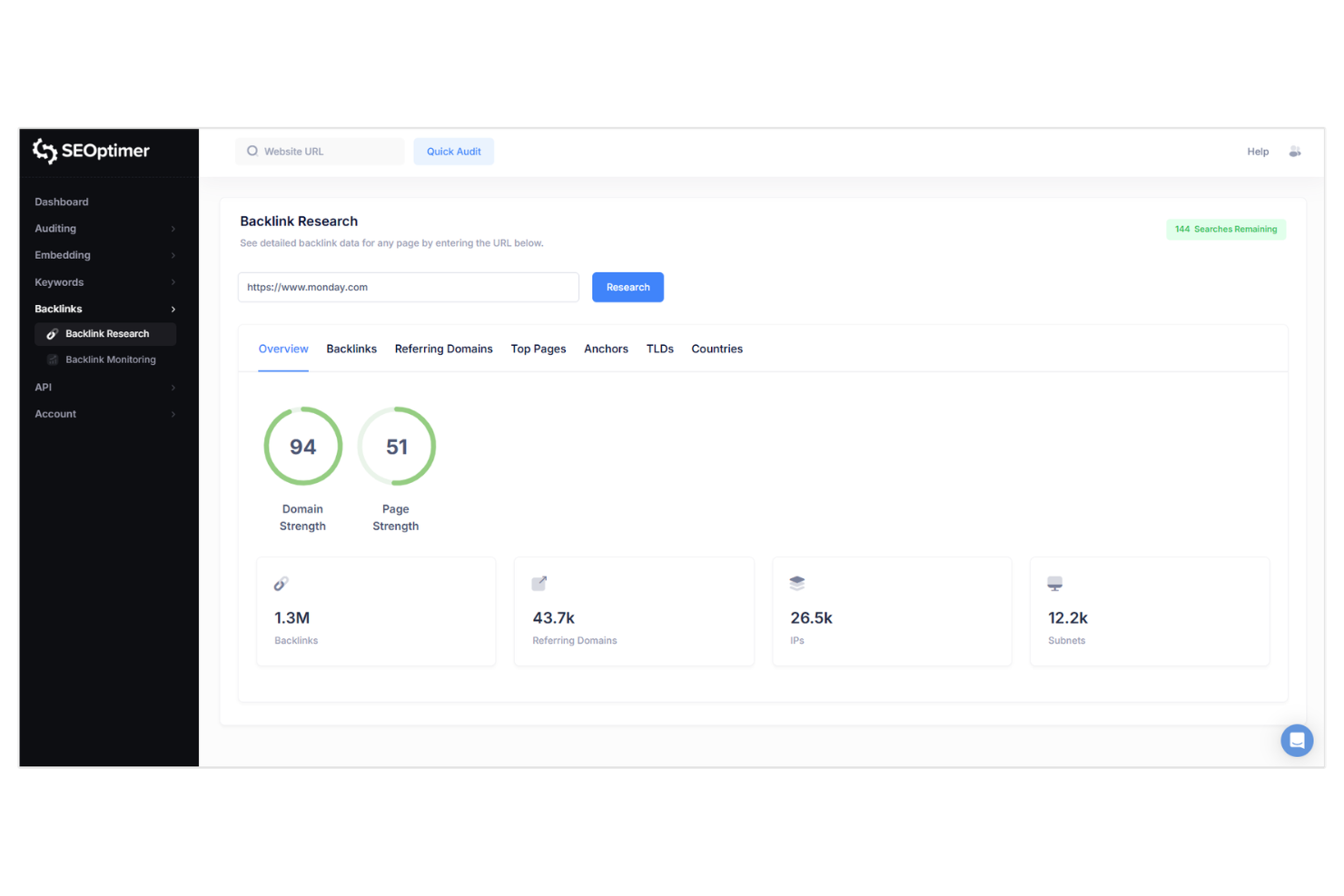
SEOptimer offers a straightforward way to monitor backlinks without a complicated setup process. It’s a good fit for small businesses, agencies, or marketers who want to keep tabs on their link profile with minimal effort. SEOptimer focuses on making link monitoring accessible, so you can quickly spot new or lost links and respond as needed.
Why I Picked SEOptimer
For anyone who wants to get started with link monitoring quickly, SEOptimer stands out for its simple setup process. I picked SEOptimer because it lets you add domains and start tracking backlinks with just a few clicks, without needing to configure complex settings.
The tool sends automatic email alerts when links are gained or lost, so you can stay updated without manual checks. This straightforward approach makes SEOptimer a strong choice for marketers and small teams who want reliable link monitoring without extra hassle.
SEOptimer Key Features
In addition to its quick setup and automated alerts, SEOptimer offers several other features worth noting:
- Backlink Status Tracking: Monitor whether your backlinks are active, lost, or broken over time.
- Link Source Details: View referring page URLs, anchor text, and link type for each backlink.
- Competitor Link Monitoring: Track and compare backlink profiles of competitor domains.
- Scheduled PDF Reporting: Generate and receive regular PDF reports summarizing your backlink data.
SEOptimer Integrations
Integrations are available via Zapier.
Pros and Cons
Pros:
- Actionable DIY SEO checklists
- Beautifully designed white-label reports
- Fast one-click domain audits
Cons:
- Limited deep-link exploration
- Surface-level backlink data

Ahrefs gives marketing teams and SEO professionals access to one of the largest databases to track a website’s backlinks frequently. The platform is especially useful for agencies and in-house teams that need deep insights into link profiles, historical link data, and competitor link strategies. If you’re looking to audit your site’s authority or uncover new link-building opportunities, Ahrefs offers the detailed data and reporting you need.
Why I Picked Ahrefs
For backlink analysis, I picked Ahrefs because this backlink checker tool provides link profile data that is both extensive and highly detailed. The platform’s Site Explorer tool lets you see every backlink pointing to your site, along with metrics like referring domains, anchor text, and link growth over time. I also appreciate the historical index, which helps you track lost and new links for any domain. These features make Ahrefs a strong choice for anyone who needs to dig deep into link data and benchmark against competitors.
Ahrefs Key Features
Some other features in Ahrefs that are useful for backlink analysis include:
- Batch Analysis: Analyze up to 200 URLs at once to compare backlink metrics across multiple domains or pages.
- Broken Link Checker: Identify broken inbound and outbound links on any website to spot link reclamation opportunities.
- Disavow File Export: Create and export disavow files directly from your backlink audit to help manage toxic links.
- Alerts: Set up automated email notifications for new or lost backlinks so you can monitor changes in your link profile in real time.
Ahrefs Integrations
Integrations include Screamingfrog SEO Spider, Google Search Console, Looker Studio, and an API for custom integrations.
Pros and Cons
Pros:
- Historical backlink data for trend analysis
- Provides detailed link metrics
- Large backlink database for global coverage
Cons:
- No free permanent plan
- No white-label reporting for agencies

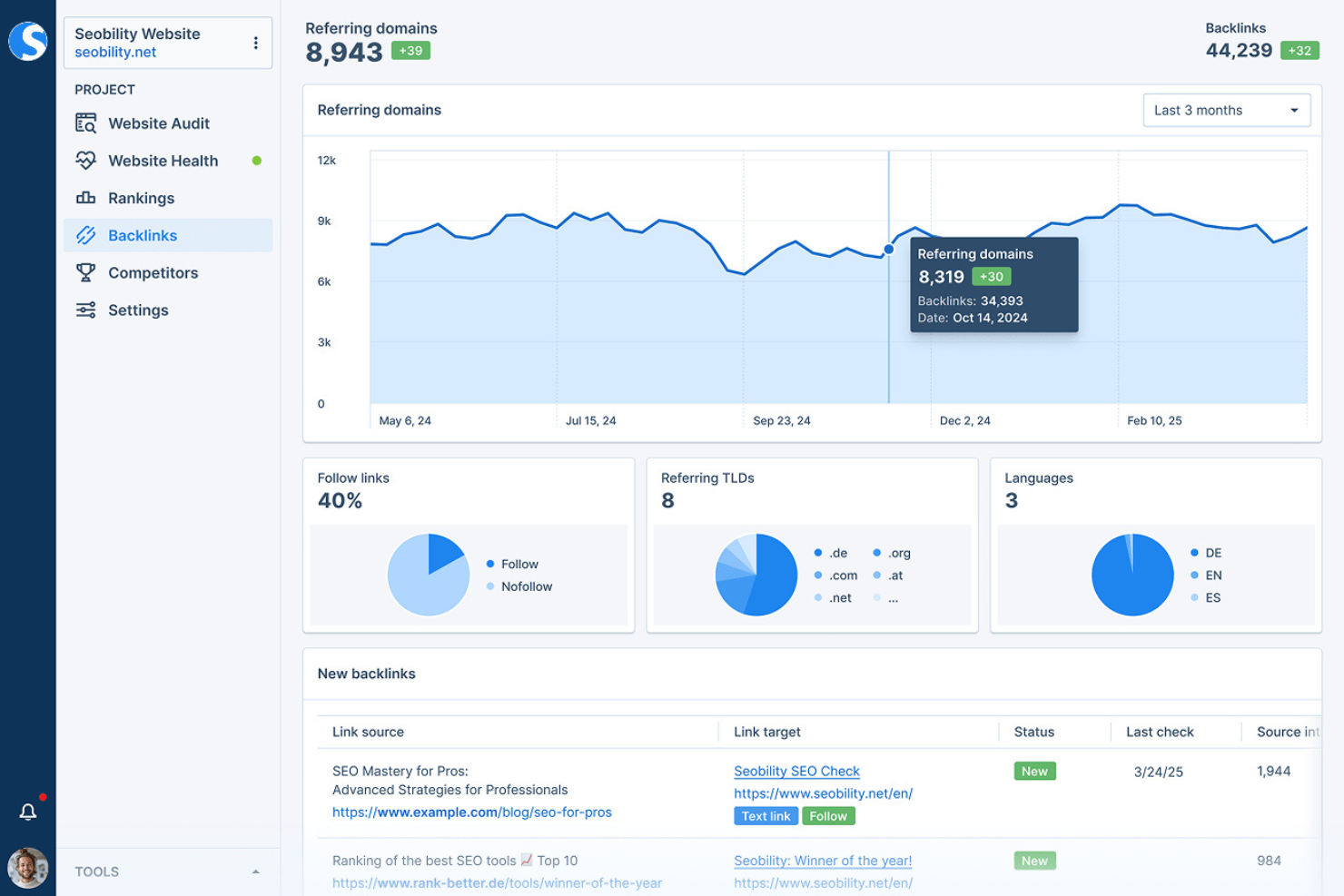
Seobility is built for marketers who want to automate the process of checking key metrics related to link quality. Its automated link audits help you quickly spot toxic or low-quality backlinks that could harm your site’s rankings. This makes it especially useful for agencies and businesses managing multiple domains or large backlink profiles.
Why I Picked Seobility
What sets Seobility apart is its focus on automated link quality audits and keyword research integration for anyone managing complex profiles. The tool automatically scans your backlinks for harmful or suspicious links and flags them for review, helping you protect your site from potential penalties. I like that Seobility provides detailed link risk assessments and clear recommendations for disavowing toxic links. For teams that need to keep a close eye on link health without manual effort, this automation is a major advantage.
Seobility Key Features
Some other features that make Seobility useful for backlink analysis include:
- Backlink Source Overview: See a detailed list of all referring domains and linking pages.
- Anchor Text Analysis: Review the anchor texts used in your backlink profile to spot patterns or issues.
- Competitor Link Comparison: Compare your backlink profile directly with selected competitors.
- Link Status Monitoring: Track whether backlinks are still active or have been removed over time.
Seobility Integrations
Native integrations are not currently listed by Seobility.
Pros and Cons
Pros:
- User-friendly for non-technical owners
- Weekly link profile PDF reports
- Automatic toxic link identification
Cons:
- Manual crawl triggers required
- Limited basic backlink filtering options

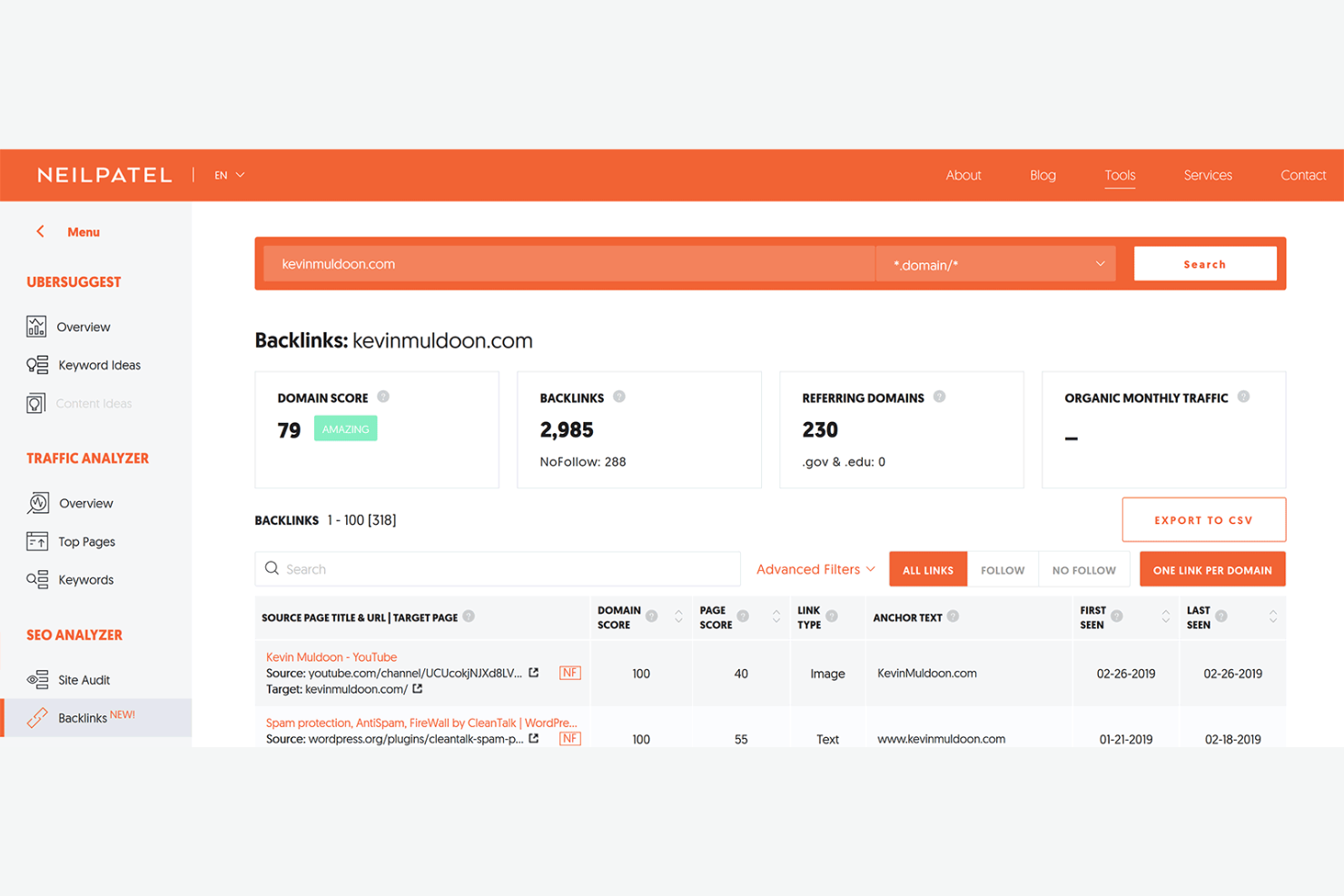
If you want a backlink analysis tool that’s easy for beginners to navigate, Ubersuggest is worth a look. It’s designed for marketers, small business owners, and agencies who need clear, actionable link data without a steep learning curve. The platform stands out for the user-friendly reports that make it simple to review, filter, and understand your backlink profile.
Why I Picked Ubersuggest
Ubersuggest stands out for making competitive analysis data accessible and easy to interpret. The platform generates clear, visually organized reports that highlight referring domains, anchor text, and link types in a way that’s simple to scan and understand. I appreciate how you can quickly filter and sort backlinks to zero in on the most relevant data for your site. If you want straightforward link analysis without the clutter, this tool is built for clarity and quick insights.
Ubersuggest Key Features
Some other features that make Ubersuggest useful for backlink analysis include:
- New and Lost Backlinks Tracking: Monitor which backlinks have been gained or lost over time.
- Domain Authority Metrics: View domain authority scores for each referring domain in your link profile.
- Competitor Backlink Comparison: Compare your backlink profile directly with competitors to spot gaps and opportunities.
- CSV Export: Export backlink data to CSV for further analysis or reporting.
Ubersuggest Integrations
Native integrations are not currently listed by Neil Patel.
Pros and Cons
Pros:
- Easy-to-understand link health scores
- Low-cost lifetime pricing option
- Simplified data visualizations
Cons:
- No outreach or link management features
- Smaller index than premium competitors

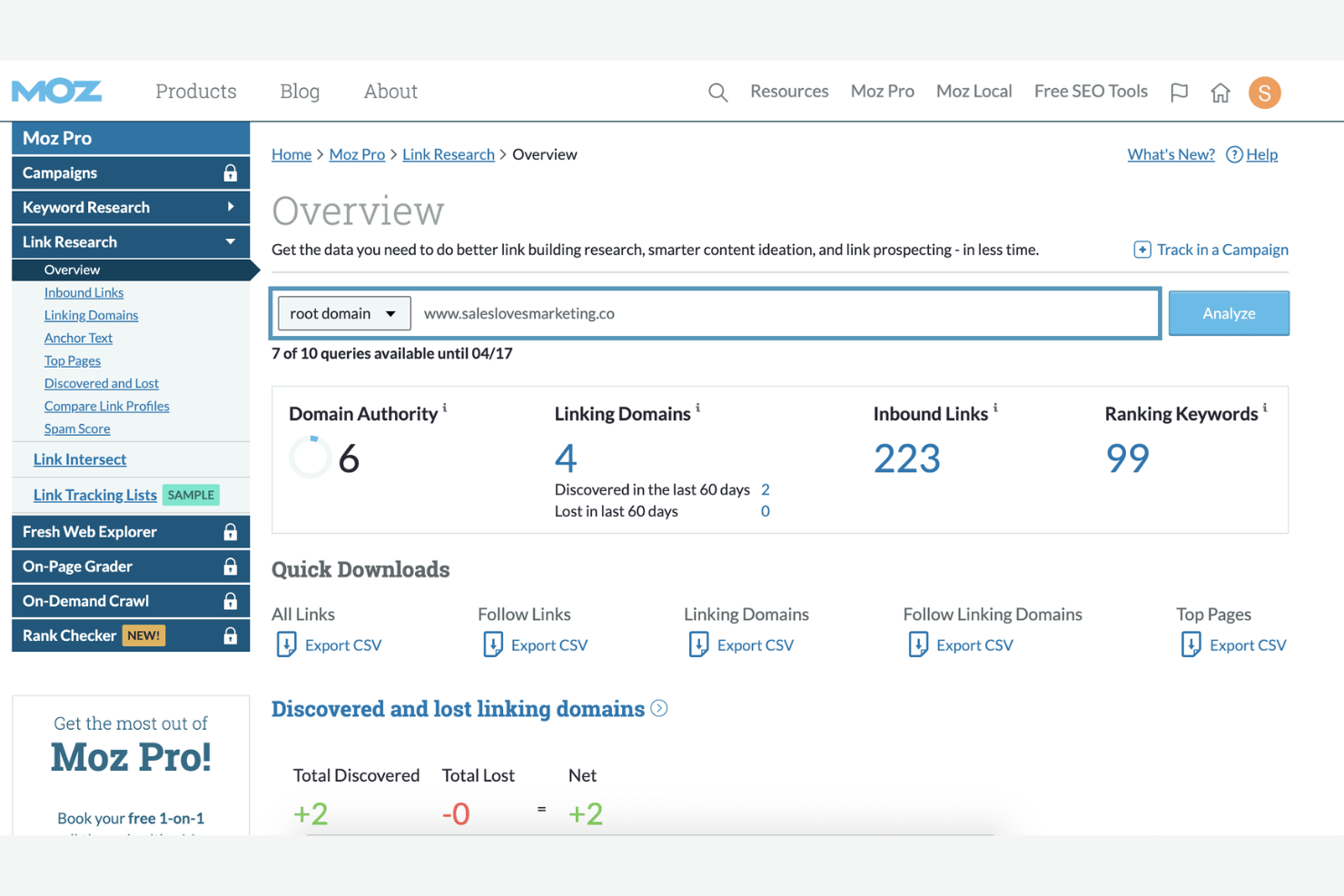
Moz is a go-to choice for marketers and SEO teams who want reliable domain authority scoring as part of their backlink analysis. It’s useful for agencies and businesses focused on evaluating link quality and prioritizing outreach targets.
Why I Picked Moz
When you need to see the total number of backlinks and evaluate their quality, Moz’s domain authority scoring stands out. The Domain Authority metric gives you a quick snapshot of a site’s overall link strength, which is especially helpful for prioritizing outreach and competitor analysis. I also like that Moz includes a Spam Score, so you can spot potentially risky links before they become a problem. For anyone focused on building a trustworthy backlink profile, these scoring features make Moz a reliable choice.
Moz Key Features
Some other features that make Moz valuable for backlink analysis include:
- Link Intersect Tool: Compare your backlink profile with competitors to find new link opportunities.
- Fresh Link Explorer: Monitor newly discovered and lost backlinks in near real-time.
- Anchor Text Analysis: Review the anchor text distribution across your backlink profile.
- Top Pages Report: Identify which pages on your site attract the most backlinks.
Moz Integrations
Integrations include MozBar for Chrome, Moz API for custom integrations, and STAT.
Pros and Cons
Pros:
- Excellent educational resources
- Reliable spam score indicators
- Industry-standard Domain Authority metric
Cons:
- Slower link index updates
- Limited third-party ntegrations


If you need to keep a close eye on your backlink profile, Linkody offers daily link monitoring and instant alerts for changes. This tool is a strong fit for SEO specialists, agencies, and in-house marketers who want to react quickly to lost or gained links. Linkody’s focus on real-time notifications helps you stay on top of your link-building efforts and protect your site’s authority.
Why I Picked Linkody
What sets Linkody apart is its commitment to daily link monitoring and instant alerts, which is essential for anyone managing a dynamic backlink profile. I picked Linkody because it automatically checks your backlinks every 24 hours and notifies you right away if a link is lost or gained. This real-time alert system helps you respond quickly to negative SEO or sudden changes in your link landscape. For marketers and SEO professionals who need to act fast, Linkody’s monitoring features are a clear advantage.
Linkody Key Features
In addition to its daily monitoring and alert system, I also found these features worth noting:
- Disavow Tool: Create and manage disavow files directly within the platform for submission to Google.
- Moz Metrics Integration: View domain authority and spam score data alongside your backlink reports.
- Competitor Link Analysis: Track and compare your competitors’ backlink profiles to identify new opportunities.
- White-Label Reporting: Generate customizable reports that can be branded for clients or internal stakeholders.
Linkody Integrations
Integrations include Ahrefs and an API for custom integrations.
Pros and Cons
Pros:
- Simple disavow file generator
- Competitor link strategy tracking
- Real-time email status alerts
Cons:
- Requires manual site setup
- No thorough keyword data

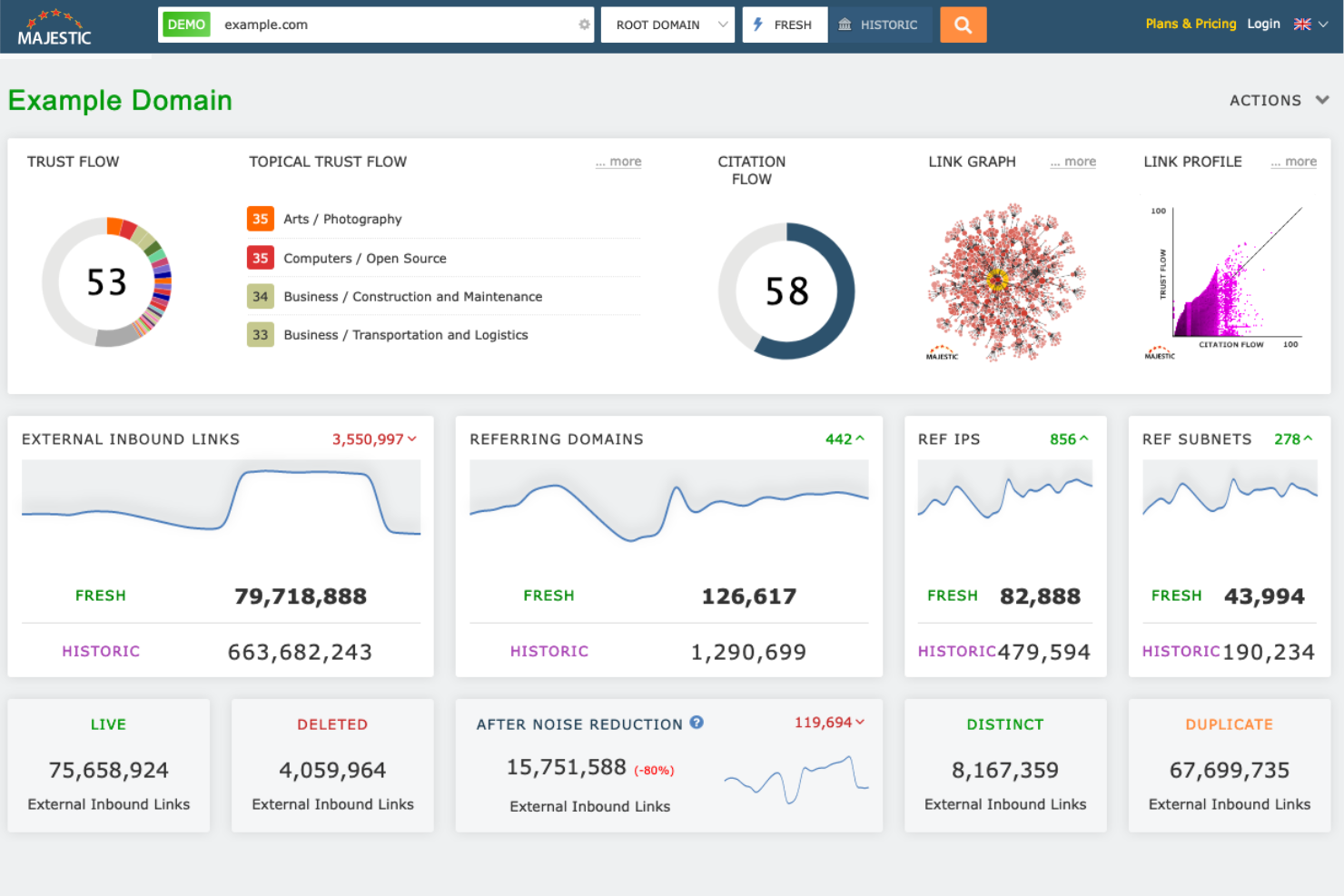
Majestic stands out for marketers who need to track the number of links alongside in-depth trust and citation metrics. It’s a strong choice for agencies and professionals focused on assessing link authority and identifying valuable link-building opportunities.
Why I Picked Majestic
Majestic’s unique focus on trust and citation metrics makes it a standout choice for backlink analysis. Its Trust Flow and Citation Flow scores give you a clear way to assess the authority and influence of any site’s backlinks, which is especially useful for evaluating link quality at scale. I appreciate how Majestic’s granular link profile breakdowns let you dig into referring domains, link neighborhoods, and topical trust flows. For anyone who needs to prioritize high-quality links and avoid risky ones, these metrics offer a level of detail that’s hard to match.
Majestic Key Features
Some other features that make Majestic useful for backlink analysis include:
- Historic Index: Access a large historical database of backlinks for long-term analysis.
- Clique Hunter: Identify domains that link to multiple competitors but not to your site.
- Bulk Backlink Checker: Analyze backlink data for up to 400 URLs at once.
- Link Context: See the placement and surrounding content of each backlink on the source page.
Majestic Integrations
Integrations include Google Sheets, browser plugins for Chrome and Firefox, and an API for custom integrations.
Pros and Cons
Pros:
- Visual topical link maps
- Deep historical link archive
- Proprietary Trust Flow metrics
Cons:
- Dated user interface
- Focused strictly on links


If you need a fast, no-cost way to check backlinks, SEO Review Tools offers a powerful free tool for marketers and small business owners. The platform is especially useful for quick audits, spot checks, and on-the-fly competitor research without requiring sign-up or payment. For anyone who wants instant backlink data without committing to a paid platform, SEO Review Tools stands out for its accessibility and speed.
Why I Picked SEO Review Tools
For anyone who needs to monitor organic traffic and quick, no-fuss backlink checks, SEO Review Tools is hard to beat. The platform lets you run instant backlink reports and competitor link comparisons without creating an account or paying a fee. I appreciate that you can access tools like the Backlink Checker and Bulk Backlink Analysis right from the homepage. This makes it a practical choice for marketers who want immediate answers or need to validate links on the fly.
SEO Review Tools Key Features
Some other features that make SEO Review Tools useful for backlink analysis include:
- Domain Authority Checker: Check the authority score of any domain to assess link quality.
- Link Analyzer Tool: Identify internal and external links on any webpage for quick audits.
- Bulk URL Checker: Analyze multiple URLs at once for backlink data and status.
- Export to CSV: Download backlink and link analysis results for further review or reporting.
SEO Review Tools Integrations
Native integrations are not currently listed by SEO Review Tools.
Pros and Cons
Pros:
- Instant top-level link metrics
- Supports bulk URL checker
- Completely free web-based access
Cons:
- Lacks automated alerts for new or lost links
- Limited filtering and sorting options

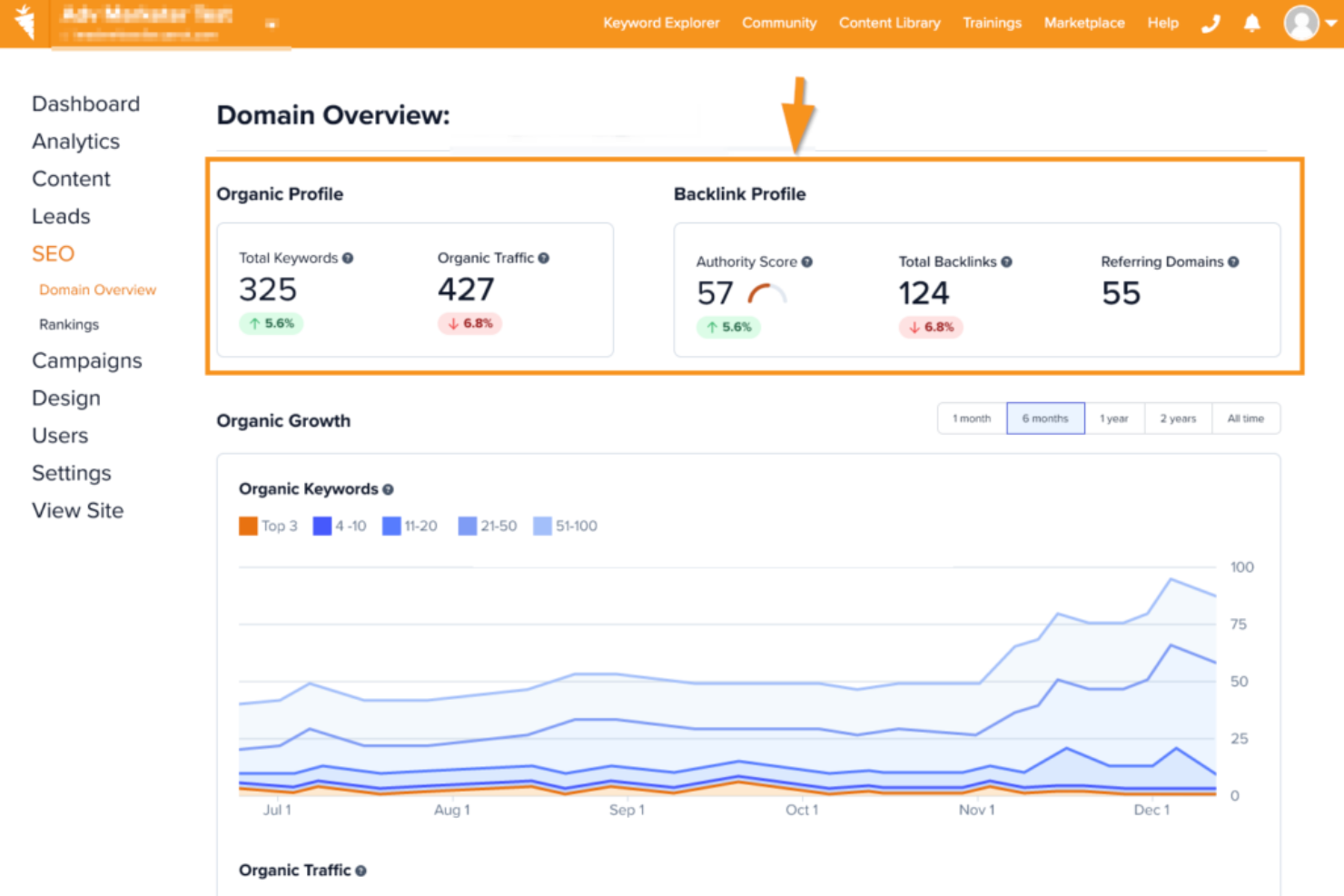
Carrot is designed for real estate professionals who want deeper insights into their website authority and industry-specific SEO performance. It offers backlink analysis tailored to the unique needs of real estate investors, agents, and agencies. If you’re looking to understand how your site stacks up against local competitors or want to uncover link-building opportunities in the real estate space, Carrot provides focused tools for the job.
Why I Picked Carrot
Unlike most backlink analysis tools, Carrot focuses specifically on the real estate industry, which makes it a strong fit for agents and investors who need niche insights. I picked Carrot because it offers link tracking and competitor benchmarking tailored to real estate websites, helping you see how your site compares within your local market. The platform also highlights industry-specific link-building opportunities, so you can target sources that matter most in real estate. For anyone looking to grow authority and visibility in this space, Carrot’s specialized approach stands out.
Carrot Key Features
In addition to its real estate-focused link insights, Carrot offers several other features for backlink analysis:
- SEO Performance Dashboard: Track your website’s search rankings, traffic, and link metrics in one place.
- Content Marketing Tools: Access resources and templates designed to help you create content that attracts quality backlinks.
- Automated Site Audits: Run regular checks for technical SEO issues that could impact your link profile.
- Lead Tracking Integration: Connect backlink performance with lead generation data to see which links drive the most valuable traffic.
Carrot Integrations
Integrations include Google Analytics, Google Search Console, Carrot CRM, Zoho, Mailchimp, Facebook, Get Response, and more.
Pros and Cons
Pros:
- Built-in real estate SEO tools
- Optimized for lead generation
- Niche-specific link-building advice
Cons:
- Limited to real estate sector
- Not a dedicated link analyzer
Other Backlink Analysis Tool
Here are some additional backlink analysis tool options that didn’t make it onto my shortlist, but are still worth checking out:
- Semrush
For competitor link gap analysis
- WebCEO
For multi-language link data analysis
- Raven Tools
For customizable link reporting dashboards


Backlink Analysis Tool Selection Criteria
When selecting the best backlink analysis tool to include in this list, I considered common buyer needs and pain points like tracking lost or new backlinks and comparing competitor link profiles. I also used the following framework to keep my evaluation structured and fair:
Core Functionality (25% of total score)
To be considered for inclusion in this list, each solution had to fulfill these common use cases:
- Monitor new and lost backlinks
- Analyze SEO metrics to determine backlink quality and authority
- Identify referring domains and anchor text
- Track competitor backlink profiles
- Export backlink data for reporting
Additional Standout Features (25% of total score)
To help further narrow down the competition, I also looked for unique features, such as:
- Real-time backlink alerts via email or dashboard
- Historical backlink data and trend analysis
- Integration with Google Analytics or Google Search Console
- Bulk domain or URL analysis
- Scheduled automated reporting
Usability (10% of total score)
To get a sense of the usability of each system, I considered the following:
- Simple and intuitive dashboard navigation
- Clear data visualization and reporting tools
- Fast loading times for large datasets
- Customizable filters and search options
- Mobile-friendly interface
Onboarding (10% of total score)
To evaluate the onboarding experience for each platform, I considered the following:
- Step-by-step setup guides or product tours
- Availability of training videos and documentation
- Access to onboarding webinars or live demos
- Pre-built templates for common workflows
- Responsive in-app chat or helpdesk support
Customer Support (10% of total score)
To assess each software provider’s customer support services, I considered the following:
- Availability of live chat or phone support
- Fast response times to support tickets
- Access to a searchable knowledge base
- Helpful and knowledgeable support staff
- Community forums or user groups
Value For Money (10% of total score)
To evaluate the value for money of each platform, I considered the following:
- Transparent and flexible pricing plans
- Features included at each pricing tier
- Free trial or free plan availability
- No hidden fees or long-term contracts
- Discounts for annual billing or multiple users
Customer Reviews (10% of total score)
To get a sense of overall customer satisfaction, I considered the following when reading customer reviews:
- Positive feedback on core backlink features
- Reports of reliable and accurate data
- Comments on ease of use and onboarding
- Experiences with customer support quality
- Value for price compared to alternatives
How to Choose a Backlink Analysis Tool
It’s easy to get bogged down in long feature lists and complex pricing structures. To help you stay focused as you work through your unique software selection process, here’s a checklist of factors to keep in mind:
| Factor | What to Consider |
|---|---|
| Scalability | Will the tool handle your current and future backlink volumes? Consider growth plans and data limits. |
| Integrations | Does it connect natively to your SEO, analytics, or reporting tools? Check for Google Search Console, Google Analytics, or Slack. |
| Customizability | Can you tailor reports, alerts, or dashboards to your team’s needs? Avoid tools with rigid workflows if you need flexibility. |
| Ease of use | How quickly can your team learn and use the tool? Look for clear navigation and minimal training requirements. |
| Implementation and onboarding | What resources, such as social media training groups or support, are available for setup? Assess if you’ll need technical help or if self-serve onboarding is enough. |
| Cost | Are pricing tiers aligned with your usage and team size? Watch for hidden fees, overage charges, or required add-ons. |
| Security safeguards | How does the tool protect your backlink and domain data? Look for encryption, access controls, and compliance with your company’s standards. |
| Support availability | What support channels are offered and during what hours? Consider if you need 24/7 help or dedicated account management. |
What Is a Backlink Analysis Tool?
A backlink analysis tool is software that helps you identify, monitor, and evaluate the links pointing to your website from other domains. These tools provide data on link sources, anchor text, link quality, and changes over time.
Marketers and SEO professionals use backlink analysis tools to track link-building efforts, assess competitor strategies, and maintain a healthy link profile for better search engine visibility.
Features
When selecting a backlink analysis tool, keep an eye out for the following key features:
- Backlink discovery: Identifies the number of links pointing to your website, helping you track link-building progress and spot opportunities.
- Link status monitoring: Tracks whether backlinks are active, lost, or broken, so you can address issues that may impact your SEO.
- Anchor text analysis: Shows the exact text used in backlinks, allowing you to evaluate keyword targeting and link diversity.
- Referring domain analysis: Provides details about the domains linking to your site, including authority, relevance, and geographic location.
- Competitor backlink tracking: Lets you monitor and compare competitor link profiles to inform your own link-building strategies.
- Spam or toxic link detection: Flags potentially harmful or low-quality backlinks that could negatively affect your search rankings.
- Export and reporting tools: Enable you to generate, customize, and share backlink reports in formats like PDF or CSV for team collaboration or client updates.
- Scheduled alerts and notifications: Sends updates when new links are gained or lost, helping you respond quickly to changes in your backlink profile.
- Historical data access: Allows you to review changes in your backlink profile over time, supporting long-term SEO analysis and planning.
Benefits
Implementing a backlink analysis tool provides several benefits for your team and your business. Here are a few you can look forward to:
- Improved search visibility: By tracking and managing your backlink profile, you can address harmful links and strengthen your site’s authority in search engine rankings.
- Faster response to link changes: Automated alerts and link status monitoring help you quickly identify and address lost or broken backlinks before they impact your SEO.
- Competitive insights: Competitor backlink tracking reveals new link-building opportunities and helps you benchmark your performance against others in your industry.
- Data-driven link-building: Access to anchor text, referring domains, and historical data enables you to refine your outreach and link acquisition strategies with confidence.
- Risk reduction: Monitoring the quality of backlinks allows you to proactively disavow harmful links and protect your site.
- Better reporting: Export and reporting tools make it easy to share backlink data with stakeholders, clients, or team members for better collaboration and transparency.
- Long-term SEO planning: Historical data access supports ongoing analysis, helping you measure the impact of your link-building efforts over time.
Costs and Pricing
Selecting a backlink analysis tool requires an understanding of the various pricing models and plans available. Costs vary based on features, team size, add-ons, and more. The table below summarizes common plans, their average prices, and typical features included in backlink analysis tool solutions:
Plan Comparison Table for Backlink Analysis Tool
| Plan Type | Average Price | Common Features |
|---|---|---|
| Free Plan | $0 | Basic backlink discovery, limited link monitoring, restricted export options, and single-user access. |
| Personal Plan | $10-$30/month | Full backlink analysis, anchor text reporting, basic competitor tracking, and email alerts for one user. |
| Business Plan | $40-$120/month | Multi-user access, advanced reporting, historical data, competitor analysis, and scheduled PDF or CSV exports. |
| Enterprise Plan | $150-$500/month | Custom integrations, API access, dedicated support, unlimited projects, and advanced security controls. |
Backlink Analysis Tool FAQs
Here are some answers to common questions about a backlink analysis tool:
How often should I check my backlink profile?
Check your backlink profile using professional SEO tools at least once a month to catch lost or broken links, spot new opportunities, and monitor for spammy or toxic links. If you’re running active link-building campaigns or in a competitive industry, consider weekly checks.
Can backlink analysis tools detect harmful or toxic links?
Yes, most backlink analysis tools flag potentially harmful or toxic links by analyzing link quality, domain authority, and spam signals. Use these insights to disavow risky links and protect your site from search engine penalties.
Do I need technical expertise to use a backlink analysis tool?
No, most backlink analysis tools are designed for marketers and SEO professionals without technical backgrounds. Look for tools with intuitive dashboards, clear reporting, and onboarding resources to help you get started quickly.
What data sources do backlink analysis tools use?
Backlink analysis tools typically use their own web crawlers, third-party data partnerships, or integrations with platforms like Google Search Console. The size and freshness of their backlink database can vary, so compare options if data coverage is a priority.
Can I track competitor backlinks with these tools?
Yes, most backlink analysis tools let you enter competitor domains to view and analyze their backlink profiles. This helps you benchmark your own link-building efforts and identify new outreach opportunities.
What’s Next:
If you're in the process of researching backlink analysis tools, connect with a SoftwareSelect advisor for free recommendations.
You fill out a form and have a quick chat where they get into the specifics of your needs. Then you'll get a shortlist of software to review. They'll even support you through the entire buying process, including price negotiations.