

Leads slipping through the cracks? Campaigns taking too long to launch? B2B email marketing can feel like a mess of clunky workflows, scattered templates, and inconsistent follow-ups. The right B2B email marketing software streamlines it all so you can build smarter email marketing campaigns, stay on message, increase lead generation, and nurture your existing leads down the sales funnel. After 10+ years in the trenches, I’ve tested and ranked the top B2B email marketing tools to help you cut through the noise and pick the one that fits.
Why Trust Our Software Recommendations
6,700+
Reviews
20
Industry experts
16+
Evaluation factors
14
Years
Our team has been testing and reviewing software since 2012. As marketing leaders ourselves, we know how difficult—and important—it is to choose the right software.
For this guide, we evaluated tools using hands-on testing and independent research, scoring tools using our selection criteria.
Our reviews reflect our human editorial judgment, not a sales pitch.
Expert reviewers:
 Gui DrusinaCreative Director
- Shriya GhateSenior Marketing Lead
 Amanda JacquesMarketing Ops Leader

Comparison Table: B2B Email Marketing Software
This comparison table summarizes pricing details for my top B2B email marketing software selections.
| Tool | Best For | Trial Info | Price | ||
|---|---|---|---|---|---|
| 1 | Best for outbound ABM and intent-triggered email | Free plan + 14-day free trial + free demo available | From $49/user/month (billed annually) | Website | |
| 2 | Best for built-in CRM and audience tools | Free plan available | From $13/month | Website | |
| 3 | Best for data-driven campaign insights | Free plan available | From $20/month | Website | |
| 4 | Best for flexible brand personalization | Free plan + free trial available | From $19/user/month (billed annually) | Website | |
| 5 | Best for automation and deliverability | Free plan available | From $9/month | Website | |
| 6 | Best for drag-and-drop email builders | 14-day free trial + free demo available | From $10.80/month | Website | |
| 7 | Best for AI-driven automation workflows | 14-day free trial + free demo available | From $9.99/month (billed annually) | Website | |
| 8 | Best for AI-powered cross-channel communication | Free demo available | Pricing upon request | Website | |
| 9 | Best for marketing automation | 14-day free trial + free demo available | From $15.58/month (billed annually) | Website | |
| 10 | Best for AI-driven template design | Free plan available | From $19/month | Website |


Best B2B Email Marketing Software Review
Below are my detailed summaries of the best B2B email marketing software that made it onto my shortlist. My reviews offer a detailed look at the key features, pros & cons, integrations, and ideal use cases of each tool to help you find the best one for you.
 Best for outbound ABM and intent-triggered email
- Free plan + 14-day free trial + free demo available
- From $49/user/month (billed annually)
Visit WebsiteCustomer Rating:4.5/5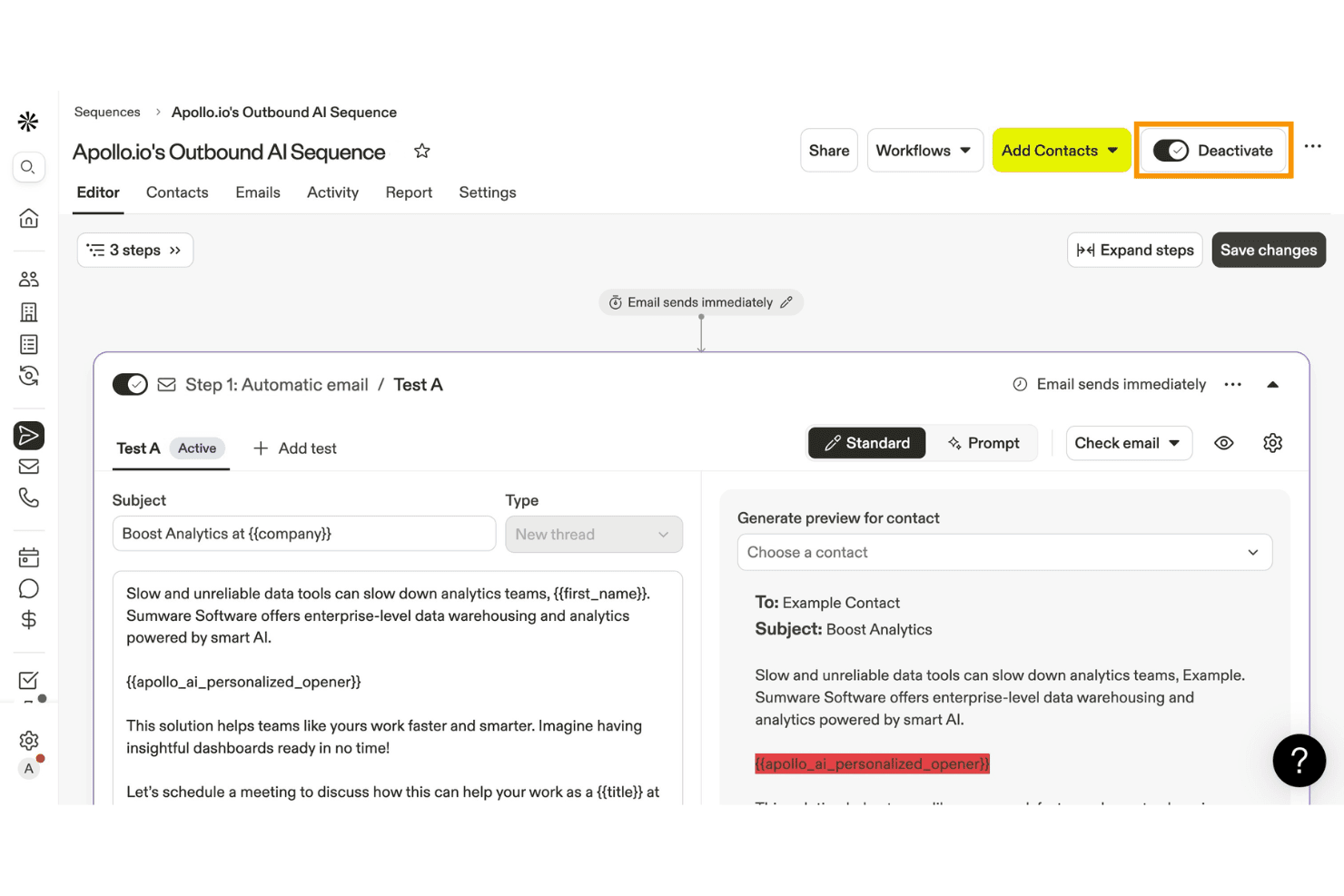
Apollo.io lets users build and activate AI-personalized email sequences. Apollo.io is a B2B sales intelligence and outbound engagement platform that combines a 275M+ contact database with email sequencing, AI-powered lead scoring, intent data, and multi-channel campaign automation.
Who Is Apollo.io Best For?
Apollo.io is a strong fit for B2B sales and marketing teams running outbound-led growth motions, especially those targeting named accounts with intent-triggered email campaigns.
Why I Picked Apollo.io
Apollo.io earns its spot on my shortlist because it combines a 275M+ contact database with native Bombora intent data, letting you trigger email sequences the moment a target account shows in-market buying signals across 15,000+ topics. I picked it specifically for outbound ABM because you can target entire buying committees within named accounts, coordinating email, LinkedIn, and phone touchpoints at the account level rather than the contact level. The AI Research feature also generates contact-level personalization at scale, which means sequences don't read like mass blasts.
Apollo.io Key Features
- Multi-step sequence builder: Create automated email cadences with conditional branching logic, behavioral triggers, and A/B testing built directly into the sequence editor.
- Waterfall enrichment: Apollo checks its own database plus 18 third-party data providers in sequence to maximize verified contact coverage and reduce bounce rates.
- AI lead scoring: Prioritize contacts automatically using a customizable scoring model that factors in ICP fit, engagement signals, and Bombora intent data.
- Inbound lead qualification: Identify website visitors, enrich form submissions, and route inbound leads to the right rep via automated meeting scheduling.
Apollo.io Integrations
Apollo.io offers native integrations with HubSpot, Salesforce, Marketo, Outreach, SalesLoft, SendGrid, and Google Sheets. It also supports Zapier, while API access for custom integrations is available on Custom plans.
Pros and Cons
Pros:
- AI generates personalized, contact-level copy
- Multi-channel ABM targeting by buying committee
- Triggers email sequences from Bombora intent data
Cons:
- Email warmup tool discontinued, reputation risk
- No native visual email or landing page builder
Learn more about Apollo.io: Best for built-in CRM and audience tools
- Free plan available
- From $13/month
Visit WebsiteCustomer Rating:4.5/5
Mailchimp helps teams manage email campaigns and automate journeys Mailchimp is a marketing platform that helps businesses create, send, and analyze email campaigns and automated customer journeys. It’s used by teams that want to build branded communications and manage contact lists from one place.
Why I picked Mailchimp: You can set up custom-coded automations using Mailchimp’s developer tools and APIs, which gives your team flexibility beyond standard templates. It includes a journey builder where you can add branching logic, time delays, and actions triggered by behavior or tags. There’s support for transactional emails and webhooks, so you can respond to specific customer actions. If your team includes a developer, you’ll have the tools to go deeper into customization.
Standout features & integrations:
Features include send time optimization, content optimizer reports, and campaign benchmarking. Your team can also use dynamic content blocks to personalize emails. There’s a tool for managing customer tags and predictive segmentation.
Integrations include Shopify, WooCommerce, Squarespace, Zapier, Stripe, QuickBooks, Salesforce, Canva, WordPress, and Eventbrite.
Pros and Cons
Pros:
- Webhooks support live event automation
- Developer API allows deep customization
- Supports advanced conditional email triggers
Cons:
- Automation takes time to test fully
- Interface can feel clunky when customizing
Learn more about Mailchimp : Best for data-driven campaign insights
- Free plan available
- From $20/month
Visit WebsiteCustomer Rating:4.6/5
Klaviyo turns real-time performance data into actionable insights. Klaviyo supports businesses that want to strengthen their B2B email marketing efforts. Its customer data platform brings contact and behavioral data into one place, making it easier to build targeted campaigns based on real activity and engagement. This is useful for companies that rely on data to guide outreach and maintain consistent communication with their audience.
Why I Picked Klaviyo
I picked Klaviyo for its ability to convert customer data into actionable insights, a crucial element for B2B email marketing. Its advanced segmentation allows you to craft personalized messages for specific audiences, addressing the need for targeted communication. The platform's AI-driven tools predict customer behavior and optimize campaign timing, ensuring your messages resonate with your audience at the right time. These features are particularly beneficial for businesses aiming to enhance their marketing effectiveness.
Klaviyo Key Features
In addition to its data-driven insights and segmentation capabilities, Klaviyo offers:
- Omnichannel Marketing: Klaviyo supports marketing across email, SMS, and social media, providing a cohesive customer experience.
- Integration with 350+ Applications: Seamlessly connect your existing tech stack with Klaviyo's extensive integration options.
- Real-Time Analytics: Gain insights into customer interactions and campaign performance to inform your marketing decisions.
- Developer-Friendly Tools: Access resources to create custom apps and integrations, enhancing the platform's flexibility.
Klaviyo Integrations
Integrations include Shopify, Salesforce Commerce Cloud, BigCommerce, WooCommerce, Magento, Stripe, Facebook, Google Ads, and Zapier
Pros and Cons
Pros:
- Integration with numerous ecommerce platforms
- Omnichannel capabilities support varied customer outreach
- Advanced segmentation for personalized marketing strategies
Cons:
- Advanced tagging and organization less robust than some competitors
- High cost as contact lists grow, impacting budget
Learn more about Klaviyo: Best for flexible brand personalization
- Free plan + free trial available
- From $19/user/month (billed annually)
Visit WebsiteCustomer Rating:4.7/5
Flodesk creates polished, on-brand B2B emails that stand out to clients. Flodesk caters to businesses that prioritize flexible brand personalization, making it an appealing choice for B2B teams that rely on strong visual identity to communicate with clients. If your team thrives on creativity and brand aesthetics to capture attention, Flodesk offers a platform that simplifies design while enhancing email visibility. Its user-friendly interface and high deliverability rate help your business stand out in crowded inboxes, blending polished design with B2B-ready functionality.
Why I Picked Flodesk
I picked Flodesk for its strength in flexible brand personalization, which is especially valuable for B2B teams that rely on polished, on-brand communication. Its intuitive builder lets you customize fonts, colors, and layouts so every email reflects your brand identity consistently. Flodesk’s automations, including follow-up sequences and engagement workflows, also help reduce manual effort while keeping client communication active. Although it isn’t the most data-heavy platform, its design-centric approach can make B2B emails more memorable and engaging.
Flodesk Key Features
In addition to flexible brand personalization, Flodesk offers:
- Countdown Timers: This feature helps create urgency in your campaigns, encouraging quicker responses from your recipients.
- Embedded Polls: Engage your audience directly within emails, gathering valuable feedback and insights without the need for external surveys.
- Comprehensive Analytics Suite: Gain insights into your campaign performance to make informed decisions, even though the focus remains more on aesthetics than data.
Flodesk Integrations
Integrations include Shopify, Zapier, Instagram, Facebook, Squarespace, WordPress, Google Sheets, Slack, Stripe, and Typeform.
Pros and Cons
Pros:
- Clean, professional templates suited for client-facing communication
- Visual design focus improves engagement with decision-makers
- High deliverability helps important messages reach clients
Cons:
- Fewer integrations for complex B2B tech stacks
- Not ideal for large, multi-step B2B funnels
Learn more about Flodesk: Best for automation and deliverability
- Free plan available
- From $9/month
Visit WebsiteCustomer Rating:4.6/5
Sender’s workflow builder lets you create automated email journeys using premade templates. Sender offers a tailored solution for businesses looking to elevate their email marketing strategies. With its user-friendly platform, businesses across various industries can easily design and automate their email campaigns. Sender addresses challenges like low engagement rates and high costs by providing features such as customizable templates and a free plan for up to 2,500 subscribers, making it an attractive choice for those seeking to enhance their marketing efforts.
Why I Picked Sender
I picked Sender because of its strong focus on automation and deliverability, which are crucial for B2B email marketing. The platform provides unlimited automation, allowing you to set up complex workflows that can nurture leads and maintain customer engagement. Additionally, Sender's commitment to ensuring high email deliverability rates means your messages are more likely to reach the intended inboxes, addressing common issues of emails landing in spam folders. These features collectively make Sender a reliable choice for businesses aiming to optimize their email marketing campaigns.
Sender Key Features
In addition to its automation capabilities and deliverability, I also found several other features beneficial for B2B email marketing:
- Drag-and-Drop Email Builder: This feature allows you to create professional emails without needing any coding skills, making it accessible for all skill levels.
- A/B Testing: You can test different versions of your emails to see which performs better, helping you refine your marketing strategies.
- Real-Time Analytics: This feature provides insights into your campaign performance, allowing you to make data-driven decisions.
- Marketing Automation: Beyond email, this includes SMS marketing, giving you a broader reach to engage with your audience.
Sender Integrations
Integrations include WordPress, WooCommerce, and Zapier.
Pros and Cons
Pros:
- Drag-and-drop email builder
- Large template library included
- Unlimited automation workflows supported
Cons:
- Strict anti-spam compliance policies
- Advanced analytics somewhat limited
Learn more about Sender: Best for drag-and-drop email builders
- 14-day free trial + free demo available
- From $10.80/month
Visit WebsiteCustomer Rating:4.7/5
MailerLite lets small teams design, send, and track email campaigns MailerLite is a digital marketing platform built to help teams design and send emails, manage subscribers, and track campaign performance. It’s designed for small businesses, creators, and marketers who want more control over how their emails look and behave.
Why I picked MailerLite: The drag-and-drop editor gives you total control over email layout without writing any code. You can easily move elements like images, text blocks, and buttons around to match your brand’s style. There are content blocks for videos, social links, and product features that your team can plug in with one click. You’ll also find ready-made templates that are easy to tweak if you need a faster option.
Standout features & integrations:
Features include a built-in AI writing assistant, email campaign approval flows, and a brand kit for saving logos and colors. There’s also a landing page builder with heatmap tracking. Your team can use auto resend to send follow-up emails to people who didn’t open the first time.
Integrations include Shopify, WooCommerce, WordPress, Stripe, Zapier, Squarespace, Facebook, PayPal, PrestaShop, and Magento.
Pros and Cons
Pros:
- AI helps write content quickly
- Brand kit keeps styling consistent
- Easy to design multi-column layouts
Cons:
- Email signup forms can feel rigid
- A/B testing has basic setup options
 Best for AI-driven automation workflows
- 14-day free trial + free demo available
- From $9.99/month (billed annually)
Visit WebsiteCustomer Rating:4.6/5
SendX helps SMBs automate emails and grow their audience SendX is an email marketing software designed for businesses seeking effective campaign automation and audience growth. It serves small to medium-sized enterprises with tools for automating email sequences and growing email lists.
Why I picked SendX: Its AI-driven automation workflows set it apart, offering advanced tools for creating personalized email outreach. The proprietary deliverability engine ensures your emails reach the inbox, enhancing engagement rates. With features like smart popups and interactive emails, SendX focuses on audience growth and high deliverability. These capabilities make it a reliable choice for businesses looking to improve their email marketing efforts.
Standout features & integrations:
Features include advanced segmentation that allows you to target specific audience groups effectively. The platform's WYSIWYG email editor makes designing emails straightforward and intuitive. Additionally, SendX provides detailed analytics to help you track campaign performance and make informed decisions.
Integrations include Zapier, Shopify, WordPress, Stripe, WooCommerce, PayPal, Salesforce, HubSpot, Google Analytics, and Slack.
Pros and Cons
Pros:
- Responsive customer support
- Interactive email features
- AI-driven automation workflows
Cons:
- Learning curve for beginners
- No phone support
Learn more about SendX: Best for AI-powered cross-channel communication
- Free demo available
- Pricing upon request
Visit WebsiteCustomer Rating:4.4/5
Iterable powers customer-focused, scalable messaging across industries Iterable is an email marketing software designed for businesses that require customer-centric messaging and enhanced privacy. It caters to various industries by providing scalable solutions for effective communication and engagement.
Why I picked Iterable: Its AI-powered cross-channel communication is crucial for brands looking to create personalized customer experiences. Features like advanced audience segmentation and flexible data integration ensure that your messages are tailored and impactful. Iterable Insights offers customizable reporting, allowing you to easily track and optimize campaign performance. Its emphasis on privacy and compliance makes it suitable for enterprise-level deployment.
Standout features & integrations:
Features include a drag-and-drop campaign builder that simplifies lifecycle marketing. Advanced audience segmentation allows you to target your messages precisely. Iterable Insights provides customizable reporting tools to visualize and analyze your campaign performance.
Integrations include Shopify, Salesforce, Marketo, Segment, Google Analytics, Slack, Twilio, Zendesk, Facebook, and Snowflake.
Pros and Cons
Pros:
- Suitable for enterprise-level deployment
- Emphasis on privacy and compliance
- AI-powered cross-channel communication
Cons:
- Limited design customization
- High starting price
Learn more about Iterable : Best for marketing automation
- 14-day free trial + free demo available
- From $15.58/month (billed annually)
Visit WebsiteCustomer Rating:4.2/5
GetResponse offers email, landing page, and automation tools for businesses GetResponse is a B2B email marketing software that supports businesses in growing their audience and automating marketing efforts. It serves various industries by providing tools for email campaigns, landing page creation, and content monetization.
Why I picked GetResponse: It's tailored for teams needing robust email marketing automation. Features like email marketing, automation workflows, and eCommerce integrations align with its automation focus. The platform's ability to create personalized newsletters and advanced workflows helps enhance customer engagement. Additionally, content monetization tools such as online courses and premium newsletters add value for users.
Standout features & integrations:
Features include landing page builders that simplify creating engaging pages. The email marketing tools allow you to design personalized newsletters for your audience. Advanced automation workflows help you target and engage your customers effectively.
Integrations include Shopify, WordPress, PayPal, Stripe, WooCommerce, Salesforce, HubSpot, Zapier, Magento, and Pipedrive.
Pros and Cons
Pros:
- Includes landing page builders
- Offers advanced automation workflows
- Supports content monetization
Cons:
- Limited design customization
- Can be overwhelming for beginners
Learn more about GetResponse: Best for AI-driven template design
- Free plan available
- From $19/month
Visit WebsiteCustomer Rating:4.2/5
Elastic Email helps B2B teams create emails quickly with AI-driven templates. Elastic Email offers a dynamic solution for businesses seeking to improve their B2B email marketing strategies. This platform is designed to meet the needs of growing businesses, providing tools to streamline email marketing, transactional messaging, and team collaboration. Whether you're in tech, retail, or any industry that requires targeted communication, Elastic Email addresses the challenge of creating engaging email campaigns without the complexity often associated with such tasks.
Why I Picked Elastic Email
I picked Elastic Email for its unique AI Template Designer and automation capabilities, which are crucial for B2B email marketing. The AI Template Designer simplifies the creation of visually appealing emails, allowing your team to focus on strategic content rather than design complexities. Additionally, the platform's automation tools enable the creation of sophisticated email workflows, ensuring timely, relevant communication with your audience. These features, combined with a robust API, enable seamless integration with existing systems, addressing the need for efficient, scalable email marketing solutions.
Elastic Email Key Features
In addition to AI-driven template design, Elastic Email offers:
- Transactional Messaging: Provides reliable delivery of essential transactional emails, such as order confirmations and password resets, ensuring critical communications reach your customers.
- Team Collaboration Tools: Facilitates internal communication and project coordination through integrated chat and help desk functionalities, improving team efficiency.
- High Deliverability Rates: Ensures your emails land in your recipients' inboxes rather than their spam folders, a crucial aspect for maintaining trust and engagement in B2B relationships.
- Data Security and Compliance: Offers robust security measures and regulatory compliance, protecting sensitive business information and ensuring compliance with industry regulations.
Elastic Email Integrations
Integrations include HubSpot, PayPal, Shopify, WooCommerce, Magento, WordPress, PrestaShop, Zapier, Slack, and Salesforce. An API is also available for custom integrations.
Pros and Cons
Pros:
- Built-in email automation enhances campaign management efficiency
- Real-time analytics provide insights into email performance metrics
- Comprehensive API integration supports developers' customization needs
Cons:
- Some users are not satisfied with the reporting options
- Mixed reviews on the speed and effectiveness of customer service
Learn more about Elastic Email:
Other B2B Email Marketing Software
Here are some additional B2B email marketing software options that didn’t make it onto my shortlist, but are still worth checking out:
- 11Constant ContactBest for small business email lists
- 12Braze Best for AI-powered optimization
- 13GMassBest for breaking Gmail's limits
- 14BigMailerBest for managing multiple brands
- 15EmailOctopusBest for budget-friendly email marketing
- 16Customer.ioBest for developer-friendly automation
- 17DripBest for ecommerce drip campaigns
- 18AWeberBest for basic newsletter tools
- 19DoveHeroBest for B2B LinkedIn email syncing
How I Evaluate B2B Email Marketing Software
I split my evaluation into two layers: the baseline every B2B email tool must have—like CRM sync and deliverability controls—and the differentiators that set the best apart.
Core Functionality (Table Stakes For This List)
When I'm selecting tools for my list, I rank each one on a scale from 0 (does not offer the functionality) to 5 (excels in this area) for each core functionality listed below. Then, I calculate the tool's total score into a percentage. Each tool needs to achieve a minimum total score of 65% to be considered for inclusion.
- Automated Drip Campaigns: I evaluate whether the platform supports multi-step, trigger-based sequences—like re-engagement workflows after a webinar or post-demo nurture tracks with branching logic.
- CRM Integration: A tool should sync bi-directionally with major B2B CRMs like Salesforce, HubSpot, or Microsoft Dynamics, mapping custom fields and keeping lead data current across systems.
- Segmentation & Personalization: I look for the ability to slice audiences by firmographic and behavioral data—such as targeting VP-level contacts at SaaS companies who opened a pricing page.
- Lead Scoring & Qualification: Each tool's scoring model matters. I check whether it can weight email engagement alongside web activity and trigger automated handoffs to sales at defined thresholds.
- Deliverability & Compliance Controls: SPF, DKIM, and DMARC authentication support is a starting point. I also look for consent management workflows that handle GDPR, CAN-SPAM, and CASL requirements.
- Campaign Analytics & Attribution: Reporting should go beyond opens and clicks. I evaluate whether the platform ties email engagement to pipeline stages and revenue so marketing can show real contribution.
Once I have a list of tools that meet the criteria, I consider what sets each platform apart.
Differentiating Factors (What Sets Vendors Apart)
Here's how I compare and contrast different vendors:
Standout Features
Intent data integration is a major differentiator. I look for platforms that ingest signals from providers like Bombora or G2 to trigger sequences when target accounts show buying behavior. ABM orchestration matters too, especially the ability to coordinate email touches across a full buying committee rather than just individual leads. I also evaluate how cleanly a platform hands scored leads to sales tools like Outreach or Salesloft with engagement history intact.
Beyond Features
Pricing model is one of the first things I check. Whether a platform charges by contacts, sends, or seats changes total cost dramatically as your database scales. I also evaluate target customer fit—a tool built for enterprise ABM programs won't serve a mid-market demand gen team well, and vice versa. Implementation support matters too, especially migration paths from platforms like Marketo or Pardot where rebuilding workflows from scratch can delay time-to-value by months.
How to Choose B2B Email Marketing Software
It’s easy to get bogged down in long feature lists and complex pricing structures. To help you stay focused as you work through your unique software selection process, here’s a checklist of factors to keep in mind:
| Factor | What to Consider |
| Scalability | Ensure the software grows with your business. Look for platforms that handle increased email volumes and user accounts without performance issues. |
| Integrations | Check if it connects with your CRM, eCommerce, and other tools your team uses daily. Seamless data flow is crucial for efficient operations. |
| Customizability | Evaluate the level of customization in email templates and workflows. Tailor solutions to fit your brand's unique needs and enhance engagement. |
| Ease of Use | Consider the user interface and learning curve. A tool that's user-friendly for your team to adopt will save time and increase productivity. |
| Budget | Review pricing plans to ensure they fit your budget. Consider both upfront costs and long-term value, including any hidden fees or discounts for annual billing. |
| Security Safeguards | Ensure the software complies with data protection regulations like GDPR. Look for encryption and secure data storage to protect customer information. |
| Analytics | Look for detailed reporting features that provide insights into campaign performance. This helps you make data-driven decisions for your marketing strategy. |
| Customer Support | Check the availability and quality of support. Responsive customer service can be vital when you encounter issues or need assistance. |
Trends in B2B Email Marketing Software
In my research, I sourced countless product updates, press releases, and release logs from different B2B email marketing software vendors. Here are some of the emerging trends I’m keeping an eye on:
- AI-driven personalization: AI is being used to tailor email content based on user behavior and preferences. This trend helps increase engagement and conversion rates by delivering relevant content. Vendors like Mailchimp are incorporating AI to enhance personalization.
- Interactive emails: Emails with interactive elements like surveys, polls, and forms allow users to engage directly within the message. This feature reduces the need for external links and improves user experience.
- Omnichannel marketing: Integrating email with other digital channels like SMS and social media provides a unified customer experience. This trend helps businesses reach audiences across multiple platforms, enhancing overall engagement.
- Advanced analytics: Real-time analytics and insights are becoming essential for optimizing campaigns. Tools now offer detailed reports on open rates, click-throughs, and conversions to help marketers make informed decisions.
- Focus on data privacy: With increasing regulations, vendors are prioritizing data security and compliance. Features like GDPR compliance and encryption are becoming standard to protect user data and build trust.
What Is B2B Email Marketing Software?
B2B email marketing software is a tool designed to help businesses communicate and engage with other businesses through email campaigns.
These tools are generally used by marketing professionals, sales teams, and business development managers to nurture leads and maintain customer relationships. Whether executing a drip campaign or managing more complex workflows, features like automation, personalization, and analytics support efficient campaign management. They also offer valuable insights into customer behavior. Overall, these tools help businesses increase their reach, improve engagement, and drive conversions.
Features of B2B Email Marketing Software
When selecting B2B email marketing software, keep an eye out for the following key features:
- Automation: Automates repetitive tasks like sending follow-up emails or transactional emails, saving time and ensuring timely communication.
- Personalization: AI email marketing tools customize email content based on recipient data, increasing engagement by making emails more relevant.
- Analytics: Provides insights into campaign performance with metrics like open rates and click-throughs, helping refine strategies.
- Segmentation: Allows targeting specific groups within an audience, ensuring messages are relevant to each segment.
- A/B testing: Tests different email versions to see which performs better, optimizing content and strategy.
- Drag-and-drop editor: Simplifies email design, making it easy to create visually appealing email newsletters and promotional emails without coding skills.
- Data privacy compliance: Ensures adherence to regulations like GDPR, protecting customer data and building trust.
- Real-time reporting: Offers immediate insights into campaign performance, enabling quick adjustments to improve results.
- Multi-channel integration: Connects with other digital platforms like social media, providing a cohesive marketing strategy.
- Dynamic content: Adjusts email content in real-time based on user interactions, enhancing personalization and engagement.
Benefits of B2B Email Marketing Software
Implementing B2B email marketing software provides several benefits for your team and your business. Here are a few you can look forward to:
- Improved engagement: Personalized emails increase relevance and capture attention, leading to higher engagement rates.
- Time efficiency: Automation of tasks like follow-ups and scheduling saves time, allowing your team to focus on strategy.
- Data-driven decisions: Analytics provide insights into campaign performance, helping you make informed decisions to optimize outcomes.
- Targeted communication: Segmentation features ensure messages reach the right audience, enhancing the effectiveness of your campaigns.
- Enhanced design flexibility: Drag-and-drop email builders allow for easy creation of visually appealing emails without needing technical skills.
- Regulatory compliance: Data privacy features help you adhere to regulations, protecting customer information and building trust.
- Consistent branding: Multi-channel integration ensures your branding is consistent across platforms, strengthening your overall marketing strategy.
Costs and Pricing of B2B Email Marketing Software
Selecting B2B email marketing software requires an understanding of the various pricing models and plans available. Costs vary based on features, team size, add-ons, and whether you opt or open source email marketing software that you can self-host and customize. The table below summarizes common plans, their average prices, and typical features included in B2B email marketing software solutions:
Plan Comparison Table for B2B Email Marketing Software
| Plan Type | Average Price | Common Features |
| Free Plan | $0 | Basic email sending, limited templates, and basic analytics. |
| Personal Plan | $5-$25/ user/month | Email automation, custom templates, and basic segmentation. |
| Business Plan | $30-$75/ user/month | Advanced segmentation, A/B testing, and enhanced analytics. |
| Enterprise Plan | $100+/ user/month | Custom integrations, dedicated support, and advanced personalization capabilities. |
B2B Email Marketing Software FAQs
Here are some answers to common questions about B2B email marketing software:
How does email marketing work for B2B?
Email marketing in B2B is all about connecting with professionals directly through their inboxes. You’re not selling to just anyone; in B2B, you build relationships, share valuable info, and show the people who work for the businesses you’re selling to how your product or service can help them do their jobs better.
What is the 80/20 rule in email marketing?
The 80/20 rule suggests that a large portion of your results come from a small portion of your effort. In email marketing, this might mean focusing on the 20% of campaigns that drive 80% of your engagement. It’s about prioritizing strategies that yield the best results.
How often should you send B2B marketing emails?
Most email subscribers prefer to receive weekly emails. However, it’s important to consider your audience’s preferences and experiment to find the right frequency. Monitoring open rates and engagement can help you adjust your strategy for better results.
How long should a B2B marketing email be?
The ideal length for a B2B SaaS marketing email is typically between 50 and 125 words. This keeps your message concise and ensures that your audience can quickly grasp the key points without losing interest.
What are the best practices for B2B email segmentation?
Effective segmentation involves grouping your email list based on criteria like industry, job role, or past interactions. This helps you deliver more relevant content, increasing engagement and conversion rates. Use data insights to refine your segments over time and send targeted emails.
How can I improve my B2B email deliverability?
Improving email deliverability involves maintaining a clean email list, using verified domains, and creating engaging content that avoids spam triggers. Regularly monitor your email metrics to identify and address any issues that might affect deliverability.
Related Marketing Software Reviews
If you’re looking to sharpen your workflows, it’s worth exploring marketing automation tools built specifically for each channel or function. The right-fit platform can eliminate manual work, boost efficiency, and help your marketing team move faster with less guesswork:
Best Marketing Automation Software