

GetResponse Review: Pros, Cons, Features and Pricing
GetResponse stands out with its user-friendly interface and robust features, making it a top choice for small to medium-sized businesses and ecommerce.

We review tools independently, and commissions help fund our testing. See our transparency policy, our methodology, or suggest a tool.
GetResponse is an email marketing software for marketers who need more than a basic newsletter tool. It combines email campaigns, marketing automation, landing pages, and webinars in a single platform. I'd mainly consider it if you're outgrowing Mailchimp's automation capabilities and want a platform that covers more of your funnel without piecing together separate tools.
GetResponse Evaluation Summary
4.2/5
- From $15.58/month (billed annually)
- 14-day free trial + free demo available
Why Trust Our Software Recommendations
6,700+
Reviews
20
Industry experts
16+
Evaluation factors
14
Years
Our team has been testing and reviewing software since 2012. As marketing leaders ourselves, we know how difficult—and important—it is to choose the right software.
For this guide, we evaluated tools using hands-on testing and independent research, scoring tools using our selection criteria.
Our reviews reflect our human editorial judgment, not a sales pitch.
Expert reviewers:
 Gui DrusinaCreative Director
- Shriya GhateSenior Marketing Lead
 Amanda JacquesMarketing Ops Leader

GetResponse Overview
In my opinion, GetResponse is a solid choice for small to mid-sized businesses and e-commerce teams looking for reliable email marketing software. Its automation capabilities and intuitive interface make it a standout, though its pricing can be a bit steep for startups. Compared to other tools, it excels in ease of use and onboarding, making it suitable for teams without dedicated IT support. However, it may not offer the advanced analytics larger enterprises need. If you're seeking a user-friendly platform with strong customer support and diverse features, GetResponse is worth considering.
Pros
- The automation tools are powerful and easy to use, saving your team time.
- The intuitive interface makes it simple for anyone to manage campaigns.
- Customer support is responsive and helpful, ensuring you get the answers you need quickly.
Cons
- The analytics features may not meet the needs of larger enterprises.
- Some users find the email template designs limited in variety.
- The learning curve for advanced features can be steep for beginners.
Is GetResponse Right For Your Needs?
Who Would be a Good Fit for GetResponse?
GetResponse is a great fit for small to mid-sized businesses, e-commerce teams, and marketing departments that need user-friendly automation. Its intuitive interface and responsive customer support make it ideal for teams without dedicated IT staff. If you’re in a growing business that values strong email marketing capabilities with easy-to-use tools, GetResponse can help streamline your campaigns and boost engagement.
- E-commerce TeamsGetResponse's automation and analytics tools help you tailor campaigns to boost your online sales.
- Small BusinessesThe platform’s ease of use and customer support make it perfect for teams managing their own marketing.
- Marketing DepartmentsGetResponse supports complex campaigns with its advanced automation features, ideal for driving engagement.
- NonprofitsUse GetResponse to manage donor communications with its efficient email tools and contact management.
- FreelancersGetResponse’s templates and automation let you easily manage and grow your client base.
- Educational InstitutionsSchools can use GetResponse to engage with students and parents through targeted email campaigns.
Who Would be a Bad Fit for GetResponse?
GetResponse may not suit large enterprises needing advanced analytics and integrations with numerous systems. Its analytics, while sufficient for smaller teams, might not provide the in-depth insights big corporations need. If your team relies heavily on custom reporting and complex data analysis, GetResponse's offerings might fall short. Additionally, tech-heavy industries needing extensive API integrations may find GetResponse limiting.
- Large EnterprisesThe analytics tools might not meet your need for comprehensive data insights and custom reporting.
- Tech CompaniesYou might find GetResponse's integration options limited if you rely on extensive API connections.
- Financial ServicesIf your work requires advanced security features and compliance tools, GetResponse might not be the best fit.
- Healthcare ProvidersGetResponse may lack the specialized integrations and compliance features you need for patient communications.
- Data-Driven TeamsIf you need robust data analysis, GetResponse's reporting might not offer the depth you're looking for.
- Custom Software DevelopersGetResponse’s limited customization options may not meet the needs of teams creating unique client solutions.
How We Test & Score Tools
We’ve spent years building, refining, and improving our software testing and scoring system. The rubric is designed to capture the nuances of software selection and what makes a tool effective, focusing on critical aspects of the decision-making process.
Below, you can see exactly how our testing and scoring works across seven criteria. It allows us to provide an unbiased evaluation of the software based on core functionality, standout features, ease of use, onboarding, customer support, integrations, customer reviews, and value for money.
Core Functionality (25% of final scoring)
The starting point of our evaluation is always the core functionality of the tool. Does it have the basic features and functions that a user would expect to see? Are any of those core features locked to higher-tiered pricing plans? At its core, we expect a tool to stand up against the baseline capabilities of its competitors.
Standout Features (25% of final scoring)
Next, we evaluate uncommon standout features that go above and beyond the core functionality typically found in tools of its kind. A high score reflects specialized or unique features that make the product faster, more efficient, or offer additional value to the user.
We also evaluate how easy it is to integrate with other tools typically found in the tech stack to expand the functionality and utility of the software. Tools offering plentiful native integrations, 3rd party connections, and API access to build custom integrations score best.
Ease of Use (10% of final scoring)
We consider how quick and easy it is to execute the tasks defined in the core functionality using the tool. High scoring software is well designed, intuitive to use, offers mobile apps, provides templates, and makes relatively complex tasks seem simple.
Onboarding (10% of final scoring)
We know how important rapid team adoption is for a new platform, so we evaluate how easy it is to learn and use a tool with minimal training. We evaluate how quickly a team member can get set up and start using the tool with no experience. High scoring solutions indicate little or no support is required.
Customer Support (10% of final scoring)
We review how quick and easy it is to get unstuck and find help by phone, live chat, or knowledge base. Tools and companies that provide real-time support score best, while chatbots score worst.
Customer Reviews (10% of final scoring)
Beyond our own testing and evaluation, we consider the net promoter score from current and past customers. We review their likelihood, given the option, to choose the tool again for the core functionality. A high scoring software reflects a high net promoter score from current or past customers.
Value for Money (10% of final scoring)
Lastly, in consideration of all the other criteria, we review the average price of entry level plans against the core features and consider the value of the other evaluation criteria. Software that delivers more, for less, will score higher.
Core Features
Email marketing
Create and send professional newsletters to your email list using pre-designed templates and built-in A/B testing tools. This helps you improve engagement and get better results from your campaigns.
AI Email Writing tools
Use an AI email generator and AI-powered writing assistant to create content quickly. This helps you save time and produce high-quality emails with less effort.
Autoresponders
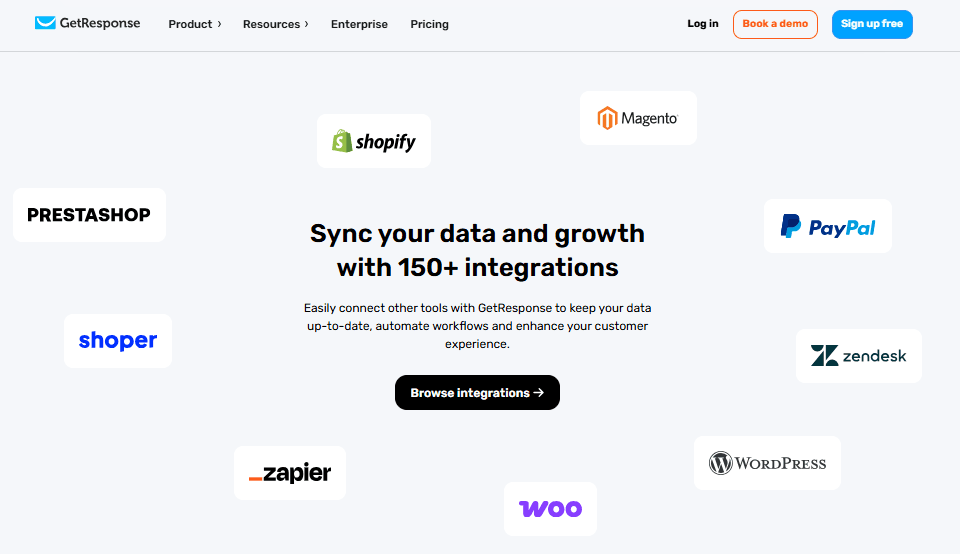
Set up automated email sequences for welcome messages, follow-ups, and drip campaigns. This allows you to nurture leads consistently without having to send emails manually.
Landing Page Builder
Build landing pages directly inside the platform without needing separate tools or HTML knowledge. This helps you launch campaigns faster and keep everything in one place.
Signup Forms & Popups
Create embedded signup forms and popups to capture leads on your website. This helps you grow your contact list and turn visitors into subscribers.
List Building
Organize your contacts using tags, segments, and engagement scoring as part of your marketing automation strategy. This helps you target the right audience with more personalized and effective email or SMS campaigns.
Ease of Use
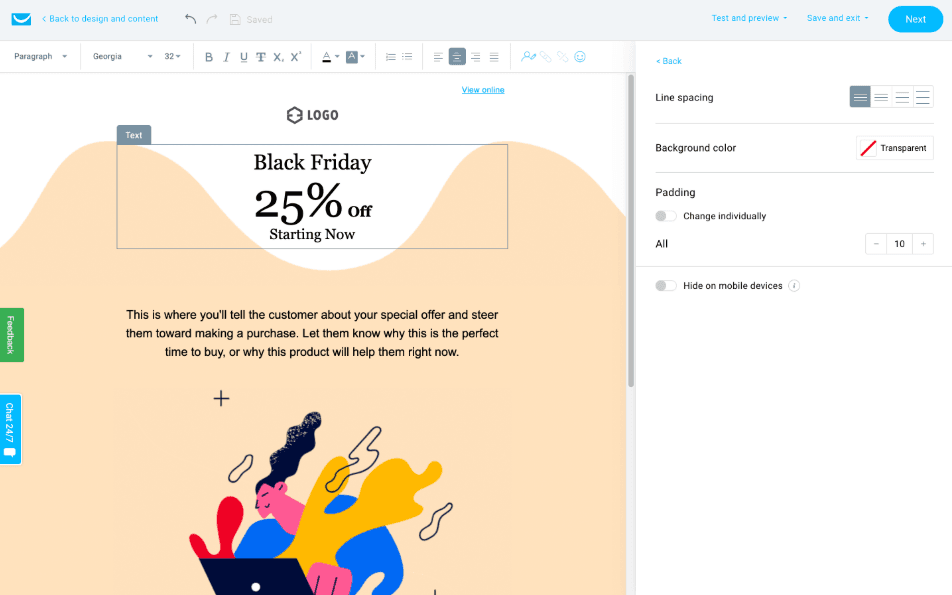
GetResponse is known for its intuitive interface that makes it easy for you to manage email campaigns without a steep learning curve. The drag-and-drop editor and pre-built templates simplify creating emails, while the automation builder is straightforward for setting up workflows. Users appreciate how quickly they can get up and running, especially if they’re new to email marketing. Compared to many other tools, GetResponse's design ensures that even non-tech-savvy team members can handle campaigns efficiently.
Integrations
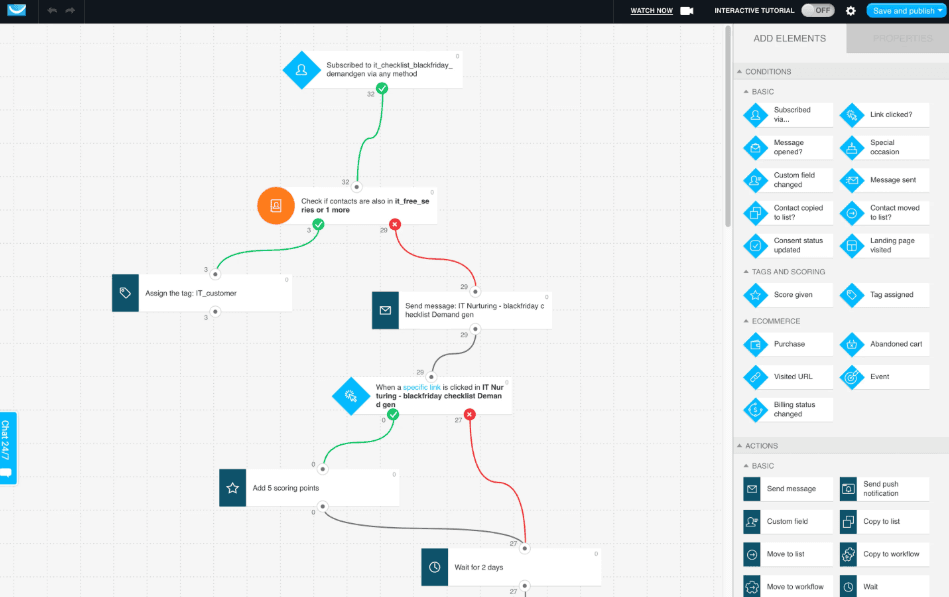
GetResponse has a dedicated integrations directory with plug-and-play connections across key categories like ecommerce, payment processing, CRM, ads/conversions, and productivity so you can sync contacts, sales data, and campaign activity without doing everything manually.
For online selling and payments, it supports popular platforms like Shopify, WooCommerce, PayPal, and Stripe. It also connects with CRM/analytics tools such as Salesforce and Google Analytics.
If you need more flexibility, you can connect GetResponse through integration platforms like Zapier or Make, and developers can build custom connections using the GetResponse API.
GetResponse Specs
- A/B Testing: Yes
- API: Yes
- Audience Targeting: Yes
- Brand Management: No
- Calendar Management: Yes
- Campaign Management: Yes
- Compliance Tracking: No
- Contact Management: Yes
- Contact Sharing: Yes
- Conversion Tracking: Yes
- CRM Integration: Yes
- Customer Management: Yes
- Dashboard: Yes
- Data Export: Yes
- Data Import: Yes
- Data Visualization: No
- Email Integration: Yes
- External Integrations: Yes
- Google Apps Integration: No
- Lead Management: Yes
- Lead Scoring: Yes
- Link Tracking: No
- Marketing Automation: Yes
- Multi-User: Yes
- Notifications: Yes
- Scheduling: Yes
- Social-Media Integration: Yes
- Third-Party Plugins/Add-Ons: Yes


