
19 Best SEO Competitive Analysis Tools for 2026

Best SEO Competitive Analysis Tools Shortlist
Here's my pick of the 10 best software from the 19 tools reviewed.


SEO competitive analysis tools help you compare your website’s search performance, keywords, and backlinks against your competitors. If you’re looking to outpace rivals, spot new keyword opportunities, or understand why others rank higher, these tools give you the data and insights you need.
With so many options available, it’s tough to know which platform fits your goals, budget, and workflow. This list breaks down the top solutions for 2026, so you can confidently choose the right tool to track competitors, refine your strategy, and drive measurable results.
Why Trust Our Software Reviews
Best SEO Competitive Analysis Tools Summary
This comparison chart summarizes pricing details for my top SEO competitive analysis tool selections to help you find the best one for your budget and business needs.
| Tool | Best For | Trial Info | Price | ||
|---|---|---|---|---|---|
| 1 | Best for customizable competitor tracking | 14-day free trial available | From $103.20/month (billed annually) | Website | |
| 2 | Best for instant website analysis | 14-day free trial available | From $29/month | Website | |
| 3 | Best for unlimited project management | Free plan available | From $29.10/month (billed annually) | Website | |
| 4 | Best for historical competitor keyword data | 30-day money-back guarantee | From $39/month | Website | |
| 5 | Best for backlink profile analysis | Free tools available | From $129/month | Website | |
| 6 | Best for website traffic benchmarking | Free trial available | From $125/month (billed annually) | Website | |
| 7 | Best for technical site audits | 14-day free trial available | From $50/month | Website | |
| 8 | Best for beginner-friendly reporting | 7-day free trial available | From $29/month | Website | |
| 9 | Best for paid search competitor mapping | Free demo available | Pricing upon request | Website | |
| 10 | Best for content optimization recommendations | Free trial available | From $49/month (billed annually) | Website |
-

Demandbase
Visit WebsiteThis is an aggregated rating for this tool including ratings from Crozdesk users and ratings from other sites.4.4 -
6sense
Visit WebsiteThis is an aggregated rating for this tool including ratings from Crozdesk users and ratings from other sites.4.3 -
AnswerThePublic
Visit Website


Best SEO Competitive Analysis Tools Reviews
Below are my detailed summaries of the SEO competitive analysis tools that made it onto my shortlist. My reviews offer a detailed look at the features, best use cases, and pricing of each platform to help you find the best one for you.

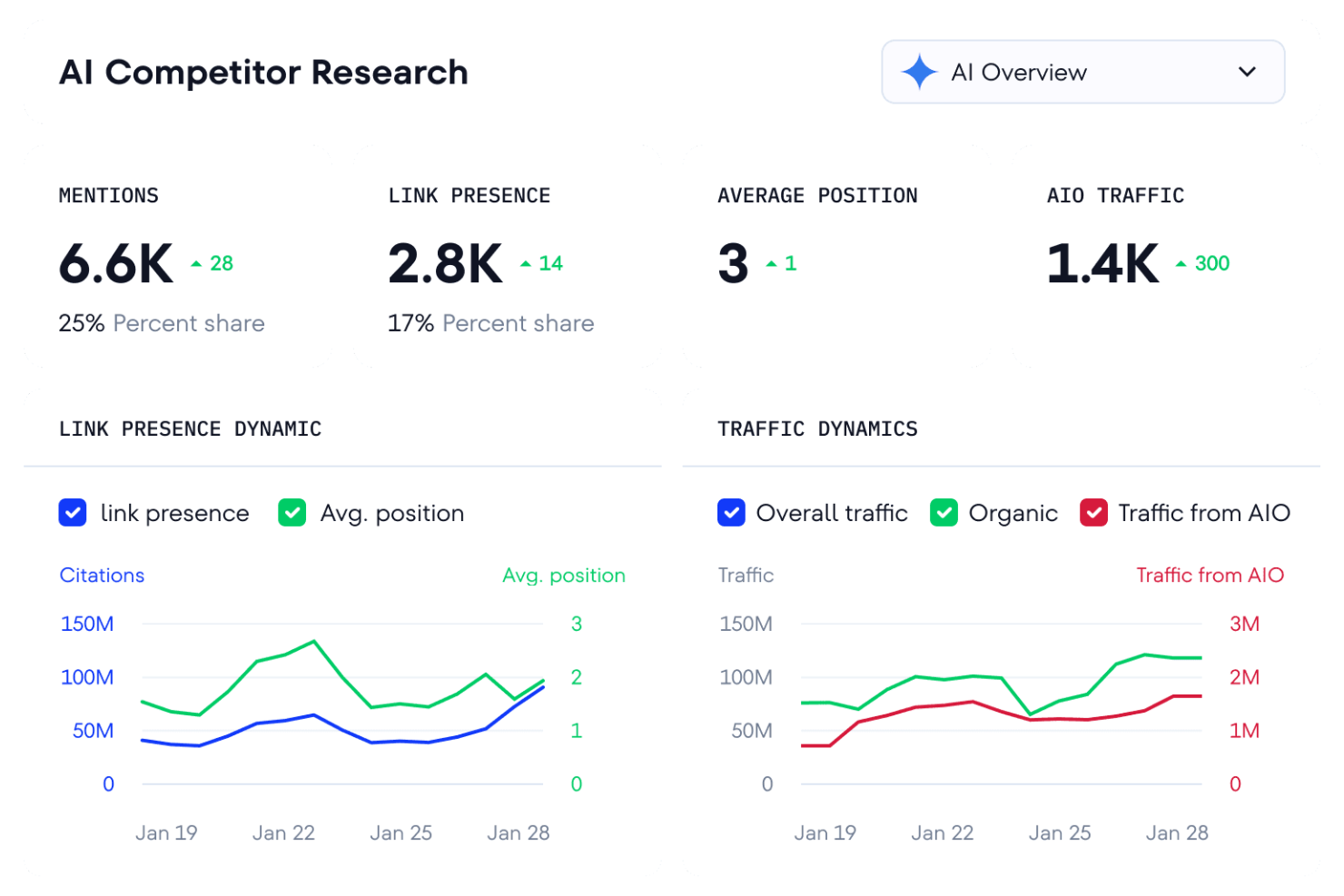
SE Ranking gives marketing teams and agencies a way to tailor competitor tracking to their specific needs. The platform lets you set up custom monitoring for any domain, keyword, or region, making it useful for businesses with unique market segments or multi-location strategies. If you need to track competitors on your own terms and dig into granular SEO data, SE Ranking offers the flexibility to do it.
Why I Picked SE Ranking
What sets SE Ranking apart for SEO competitive analysis is its high level of customization in tracking competitors. I picked SE Ranking because it lets you define exactly which domains, keywords, and regions you want to monitor, so you can tailor your analysis to your business’s unique landscape. The Competitor Comparison tool allows you to benchmark your site against any set of rivals, not just pre-selected ones. This flexibility is especially useful if you’re working in a niche market or need to track multiple competitors across different locations.
SE Ranking Key Features
In addition to customizable competitor tracking, SE Ranking offers several other features for SEO research and analysis:
- Keyword Rank Tracker: Monitor keyword positions across multiple search engines and locations.
- Backlink Monitoring Tool: Track new and lost backlinks for your site and competitors.
- Website Audit Module: Scan your website for technical SEO issues and receive prioritized recommendations.
- Marketing Plan Checklist: Access a built-in checklist to guide your SEO strategy and campaign execution.
SE Ranking Integrations
Native integrations are not currently listed.
Pros and Cons
Pros:
- Built-in marketing plan checklist for campaigns
- White-label reporting for client-facing projects
- Custom competitor tracking for any domain
Cons:
- Site audit speed can be slow on large sites
- Limited local SEO features for multi-location brands

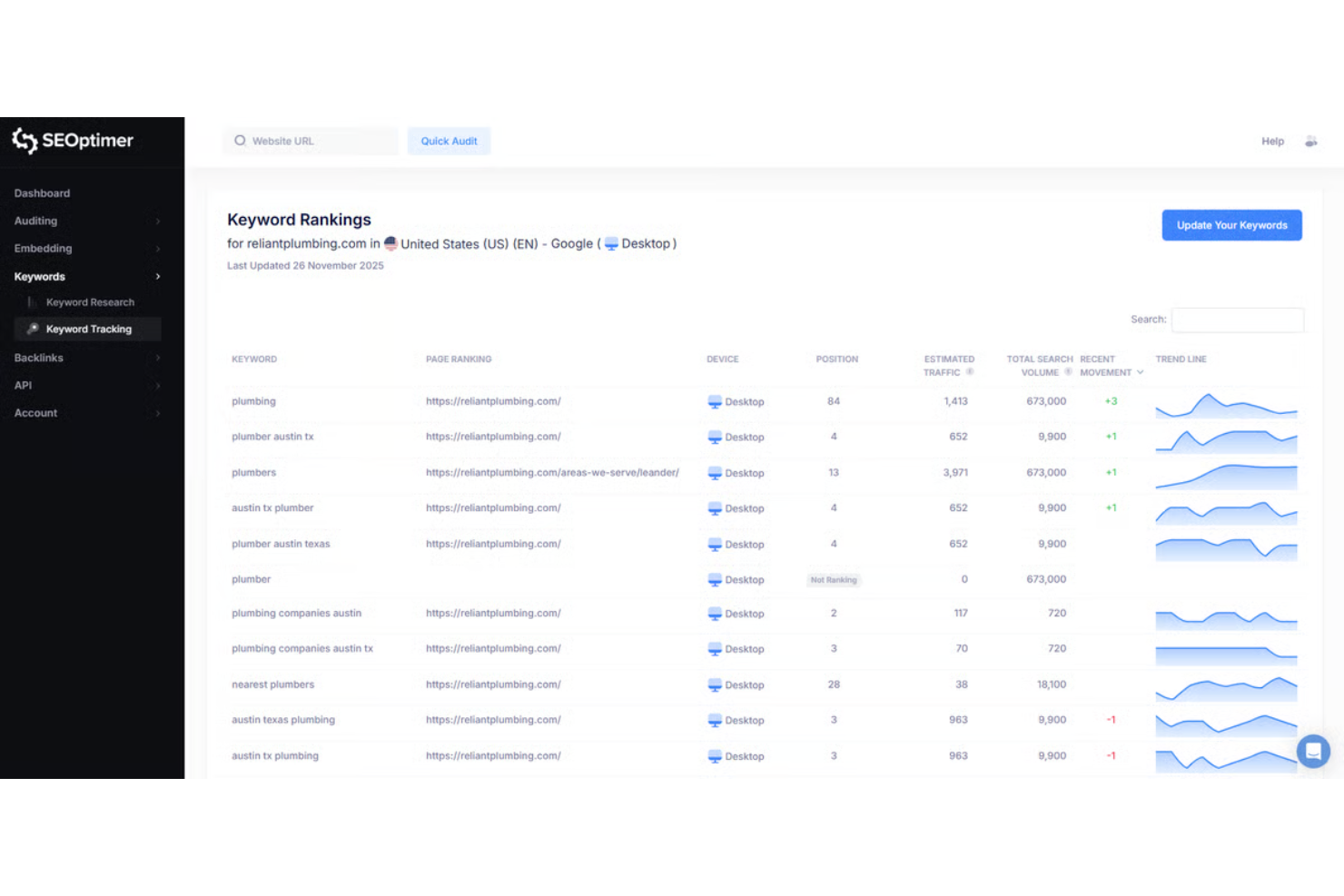
SEOptimer delivers instant website analysis, making it a practical choice for agencies, consultants, and small businesses that need quick, actionable SEO insights. The tool generates detailed audit reports in seconds, highlighting technical, on-page, and usability issues. If you want to rapidly assess and compare multiple sites, SEOptimer’s speed and clear reporting set it apart.
Why I Picked SEOptimer
When you need fast, actionable insights, SEOptimer stands out for its instant website analysis capabilities. I picked SEOptimer because it generates detailed audit reports within seconds, allowing you to quickly identify technical, on-page, and usability issues across multiple sites. The tool’s automated reporting highlights SEO errors and provides prioritized recommendations, making it easy to spot what needs attention right away. For anyone comparing several websites or needing to deliver quick audits to clients, SEOptimer’s speed and clarity make it a strong fit.
SEOptimer Key Features
I also found several other features that support deeper SEO analysis and reporting:
- White Label Reporting: Generate branded SEO audit reports for clients or stakeholders.
- Embeddable Audit Tool: Add a website audit widget directly to your own site to capture leads.
- Keyword Tracking: Monitor keyword rankings over time for multiple domains.
- Backlink Analysis: Review and assess the backlink profile of any website.
SEOptimer Integrations
Integrations include Mailchimp, ActiveCampaign, Salesforce, and an API for custom integrations.
Pros and Cons
Pros:
- Backlink analysis with downloadable reports
- Keyword tracking across multiple domains
- Embeddable audit tool for lead generation
Cons:
- Lacks site crawl scheduling automation
- No competitor keyword gap analysis

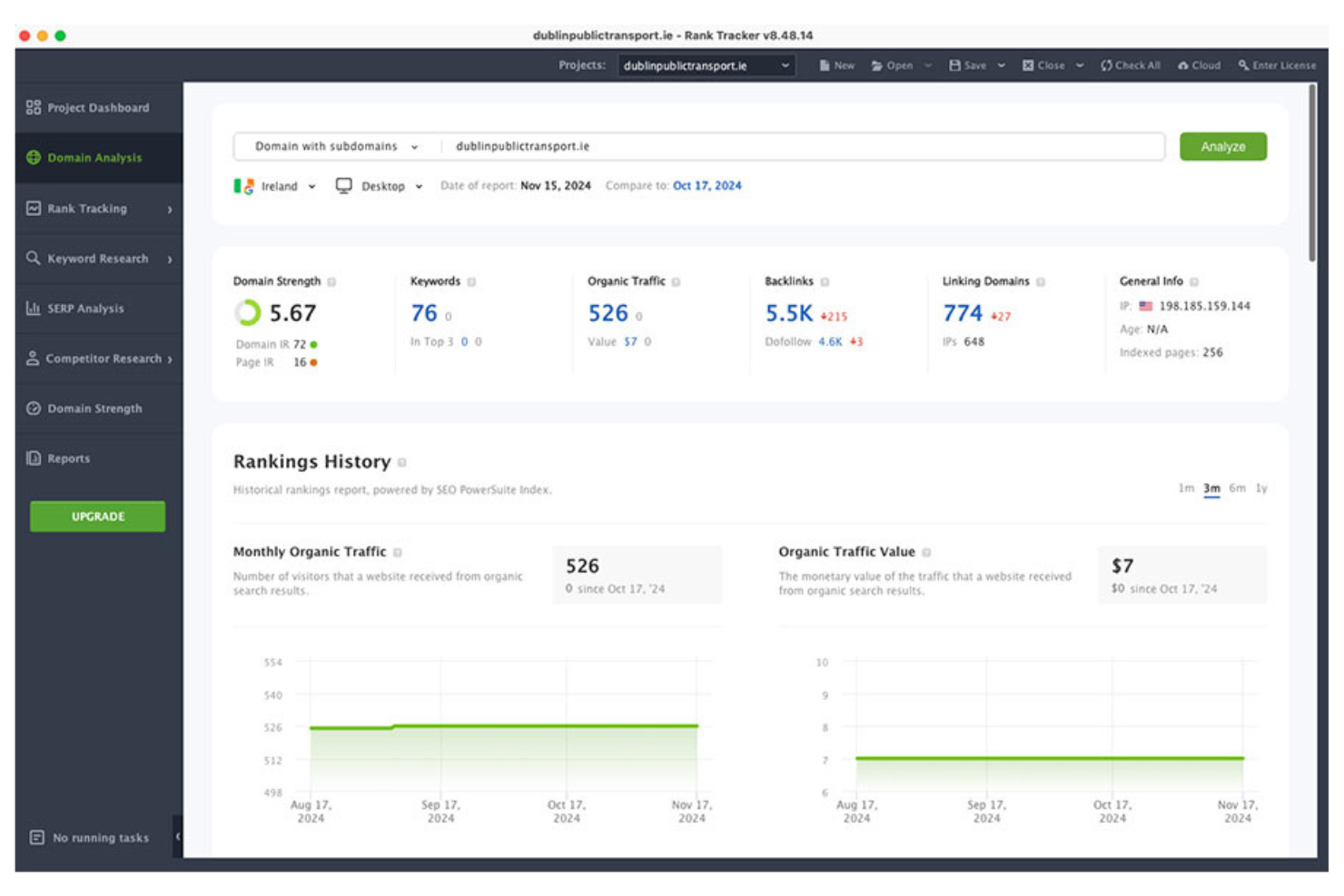
SEO PowerSuite stands out for teams that need to manage unlimited SEO projects without extra per-project costs. The desktop-based toolkit is a fit for agencies, consultants, or in-house marketers handling multiple clients or websites at once. If you’re looking for a solution that removes project caps and gives you full control over your SEO data, SEO PowerSuite is built for that.
Why I Picked SEO PowerSuite
Unlike most cloud-based SEO tools, SEO PowerSuite lets you manage an unlimited number of projects without extra fees or restrictions. I picked SEO PowerSuite because it’s built for agencies and consultants who need to track, audit, and report on dozens or even hundreds of websites at once. The platform’s project management structure means you can organize and switch between client sites, campaigns, and competitive research without worrying about hitting a cap. This makes it especially useful if your workflow depends on handling high volumes of SEO data across multiple domains.
SEO PowerSuite Key Features
Some other features that make SEO PowerSuite useful for competitive analysis include:
- Rank Tracker Module: Track keyword rankings for your site and competitors across hundreds of search engines.
- SEO SpyGlass Tool: Analyze competitor backlink profiles and identify new link-building opportunities.
- Website Auditor: Audit on-page SEO factors and compare technical site health with competitor domains.
- Reporting Suite: Generate customizable, white-label reports for clients or internal stakeholders.
SEO PowerSuite Integrations
Integrations include Google Search Console, Google Analytics, Google Keyword Planner, and Google Ads.
Pros and Cons
Pros:
- Detailed competitor backlink gap analysis
- Desktop software for full data ownership
- Unlimited projects with no extra cost
Cons:
- Limited integrations beyond Google services
- No cloud-based access or collaboration

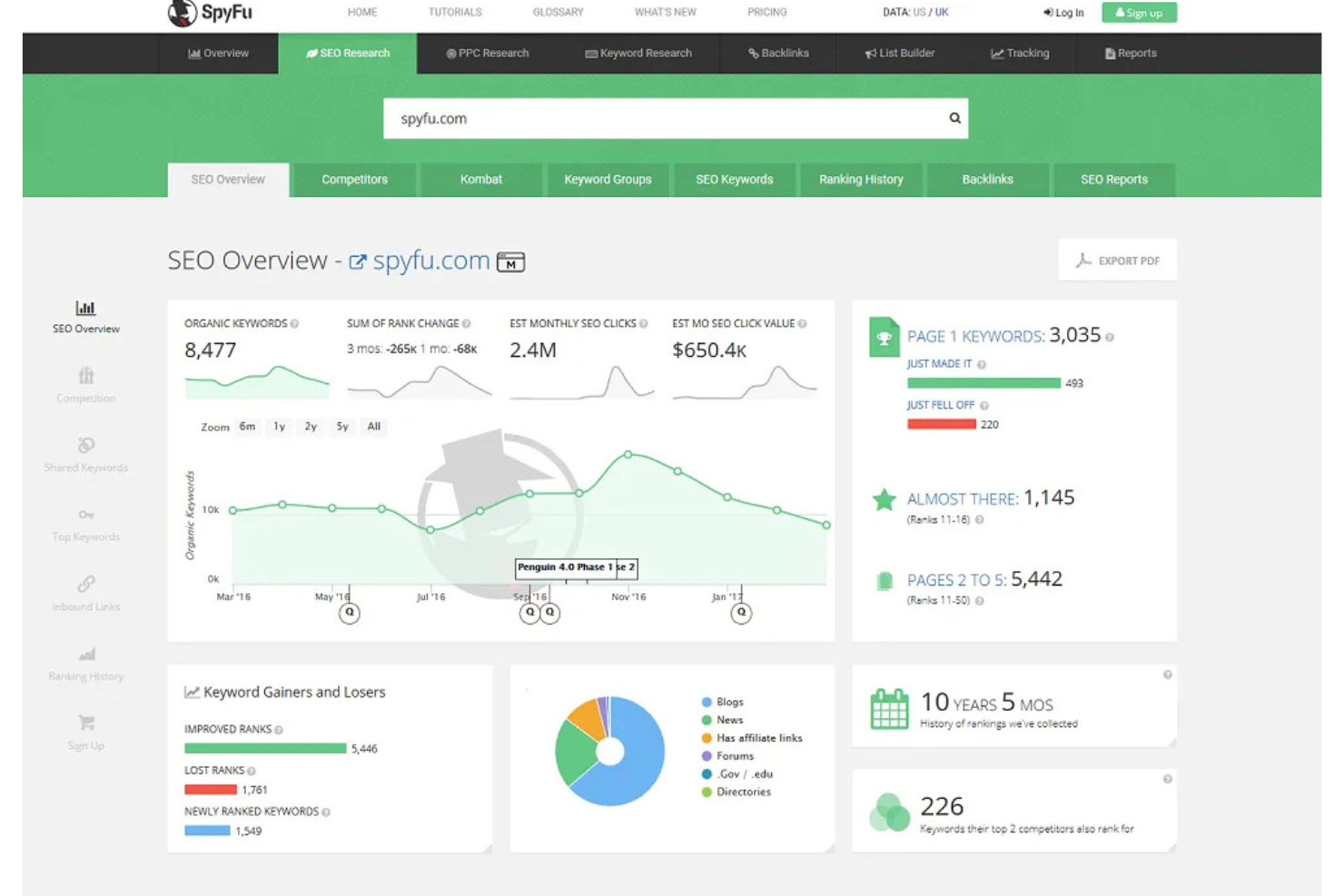
SpyFu gives marketing teams and SEO professionals access to years of historical competitor keyword data. If you need to uncover which keywords your rivals have targeted over time or analyze shifts in their paid and organic strategies, this platform stands out. It’s especially useful for agencies and businesses that want to track long-term trends and outmaneuver established competitors.
Why I Picked SpyFu
I chose SpyFu because its historical competitor keyword data is unmatched for long-term SEO analysis. The platform lets you view years of organic and paid keyword history for any domain, so you can spot patterns and shifts in your competitors’ strategies. I find the keyword overlap and ranking history features especially useful for identifying which terms have driven results over time. This makes SpyFu a strong choice if you want to understand not just where your competitors are now, but how they got there.
SpyFu Key Features
Some other features in SpyFu help you dig deeper into competitor research and keyword analysis:
- Ad History Reports: See which paid ads competitors have run over time and how their messaging has changed.
- Domain Comparison Tool: Compare multiple domains side by side to evaluate keyword overlap and gaps.
- SERP Analysis: Review historical search engine results pages for specific keywords to track ranking changes.
- Backlink Builder: Identify backlink opportunities by analyzing competitor link profiles and sources.
SpyFu Integrations
Integrations are not publicly available.
Pros and Cons
Pros:
- Unlimited domain and keyword searches
- Detailed competitor PPC and SEO insights
- Access to years of historical keyword data
Cons:
- No site audit or technical SEO tools
- Data accuracy can vary for smaller sites

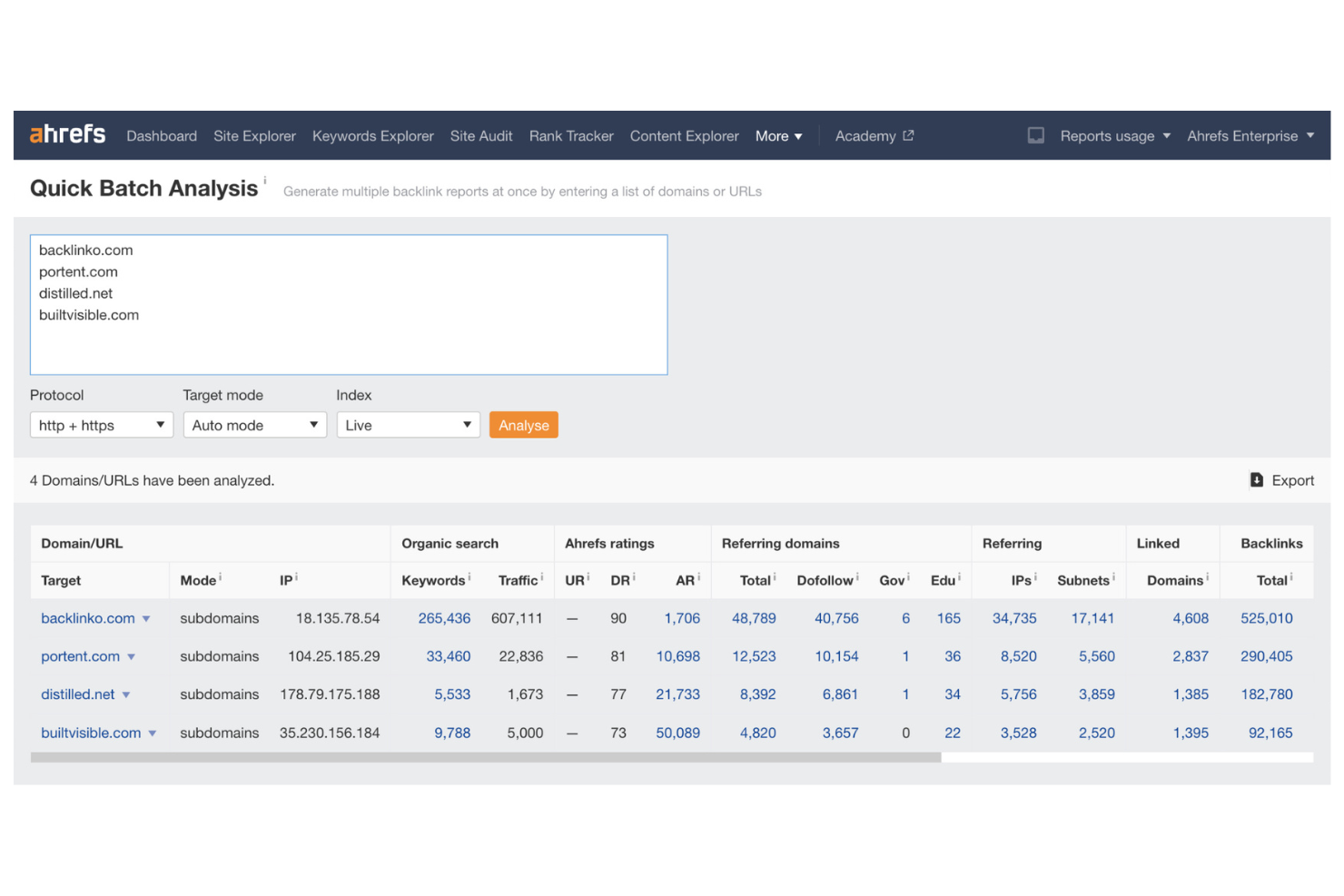
If you need to dig deep into backlink profiles for SEO strategy, Ahrefs is a top choice. The platform appeals to SEO specialists, agencies, and digital marketers who want to analyze link-building opportunities and monitor competitor backlinks. Its extensive link database and detailed reporting help you uncover new referring domains and track changes in your site’s authority over time.
Why I Picked Ahrefs
For anyone focused on backlink profile analysis, Ahrefs offers some of the most detailed link data in the industry. The platform’s Site Explorer tool lets you see every backlink pointing to your site or a competitor’s, along with metrics like domain rating and anchor text distribution. I like that you can track new and lost backlinks over time, which helps you spot trends and react quickly to changes in your link profile. These features make Ahrefs a strong fit for SEO professionals who need to monitor, compare, and improve their site’s authority through link-building.
Ahrefs Key Features
Some other features in Ahrefs help you expand your SEO research beyond backlink analysis:
- Site Audit Tool: Scan your website for technical SEO issues and get prioritized recommendations.
- Content Explorer: Search a massive database of web content to find top-performing articles and trending topics.
- Rank Tracker: Monitor your keyword rankings across multiple search engines and locations.
- Keyword Explorer: Analyze keyword difficulty, search volume, and click metrics for thousands of keywords.
Ahrefs Integrations
Integrations include Google Looker Studio, Google Search Console, and a public API is available for custom integrations.
Pros and Cons
Pros:
- Competitor content gap identification
- Detailed anchor text and referring page analysis
- Largest live backlink index in the industry
Cons:
- Site audit crawl limits on lower plans
- No PPC or paid search data

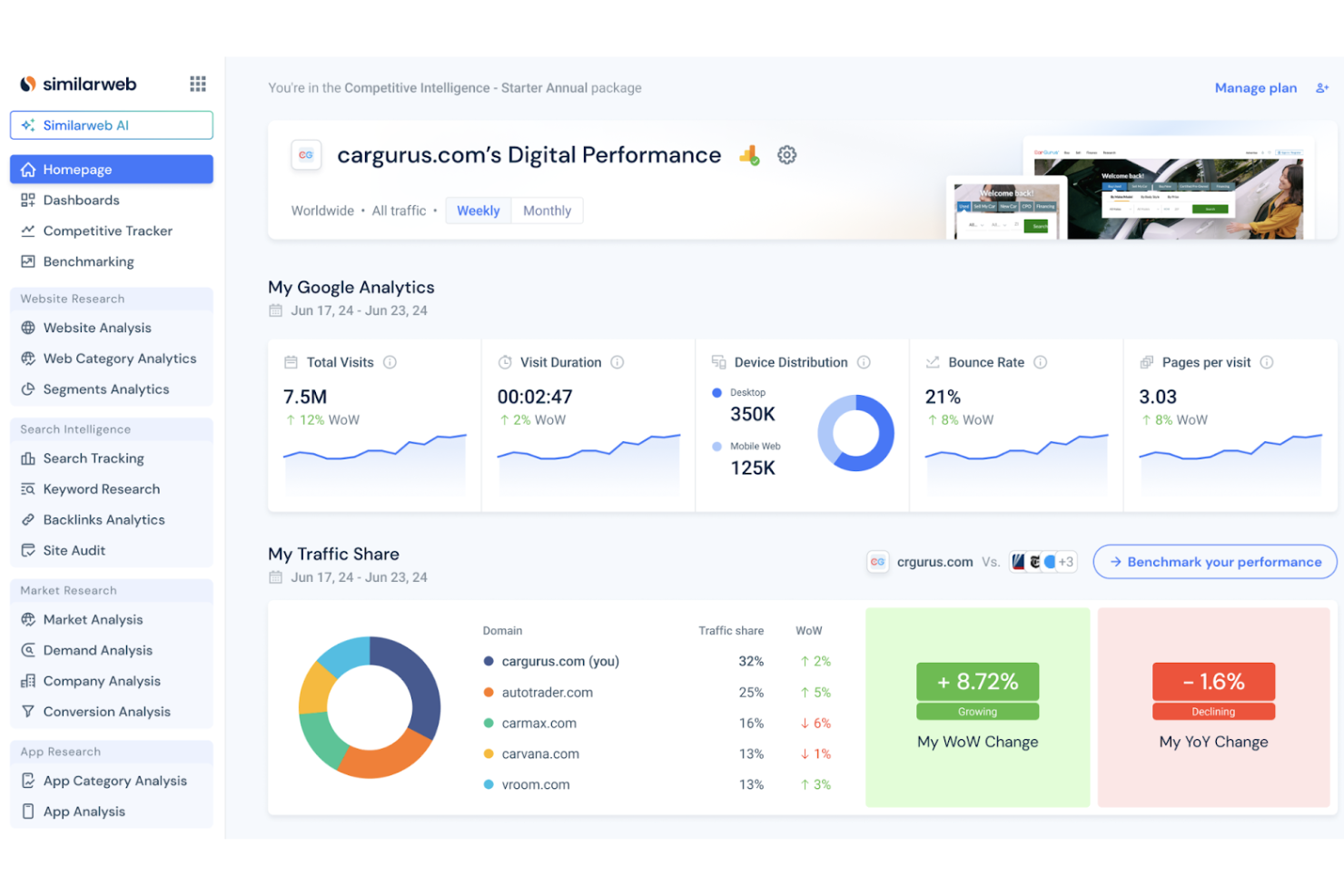
Similarweb stands out for marketing teams and analysts who need to benchmark website traffic against competitors. The platform provides detailed insights into traffic sources, audience behavior by demographics, and engagement metrics across any site. It’s especially useful if you want to compare your digital presence to others in your industry and identify new growth opportunities.
Why I Picked Similarweb
When benchmarking website traffic is a top priority, Similarweb offers some of the most granular and actionable data available. The platform lets you analyze total visits, traffic sources, and engagement metrics for any site, making it easy to see how your web presence stacks up against competitors. I appreciate how you can break down traffic by channel—such as direct, referral, search, and social—to pinpoint where competitors are gaining traction. This level of detail is especially valuable for marketing teams that want to set realistic goals and track progress against industry leaders.
Similarweb Key Features
Some other features in Similarweb help you dig deeper into competitive intelligence:
- Industry Analysis Reports: Access market-level data to benchmark performance across entire industries or verticals.
- Audience Overlap Tool: Identify shared audiences between your site and competitors to inform targeting strategies.
- Keyword Gap Analysis: Compare keyword portfolios to find terms your competitors rank for that you don’t.
- App Analysis: Track mobile app performance, downloads, and user engagement for competitor apps.
Similarweb Integrations
Integrations include Google Looker Studio, Microsoft Excel, Google Sheets, Salesforce, and more.
Pros and Cons
Pros:
- Mobile app performance tracking included
- Audience overlap analysis across competitors
- Website traffic estimates for any domain
Cons:
- Limited organic traffic ranking details
- No backlink or link profile data

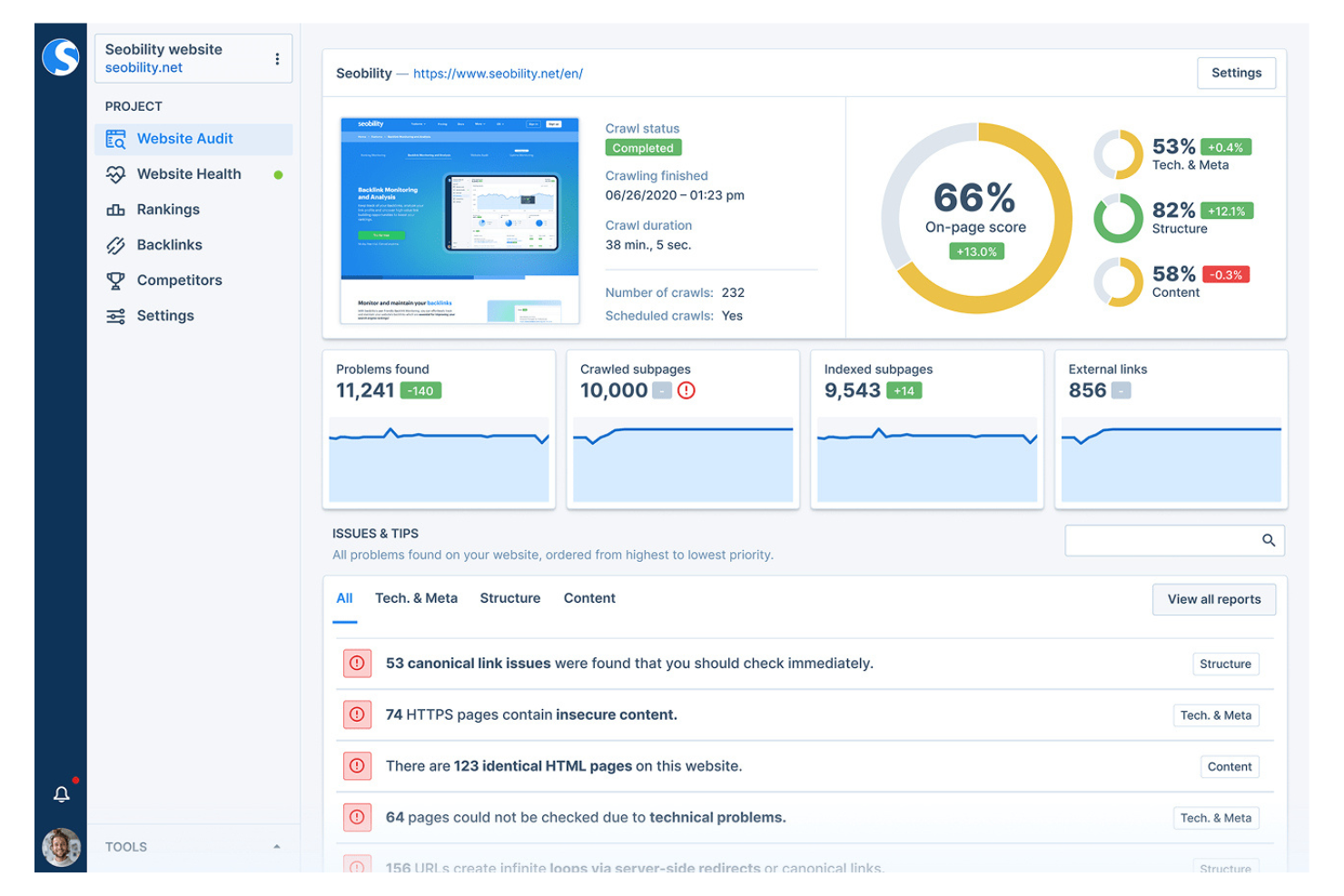
Seobility is designed for marketers and SEO specialists who need deep technical site audits alongside competitive insights. The platform’s automated crawling and error detection help you uncover technical SEO issues that can impact your rankings. If you’re focused on identifying and fixing site health problems while benchmarking against competitors, Seobility brings those capabilities together in one place.
Why I Picked Seobility
For teams that need a technical edge in their SEO competitive analysis, Seobility offers a focused approach to site audits. I picked Seobility because its crawler scans entire websites for technical errors, duplicate content, and on-page SEO issues that can impact your search visibility. The platform also provides competitor comparison tools, so you can benchmark your site’s technical health against others in your industry. This combination of deep technical auditing and competitive context makes Seobility a strong choice for marketers who want to address site health as part of their SEO strategy.
Seobility Key Features
In addition to its technical audit strengths, Seobility offers several other features for SEO analysis:
- Keyword Ranking Monitoring: Track your keyword positions across multiple search engines and devices.
- Backlink Analysis Tool: Review your backlink profile and identify new link-building opportunities.
- On-Page SEO Checker: Analyze individual pages for optimization issues and receive actionable recommendations.
- Competitor Keyword Comparison: Compare your keyword rankings directly against selected competitors.
Seobility Integrations
Native integrations are not currently listed.
Pros and Cons
Pros:
- Scheduled site crawling with email notifications
- On-page SEO checker for individual URLs
- Backlink analysis includes toxic link detection
Cons:
- No automated competitor monitoring alerts
- Limited historical data for keyword rankings

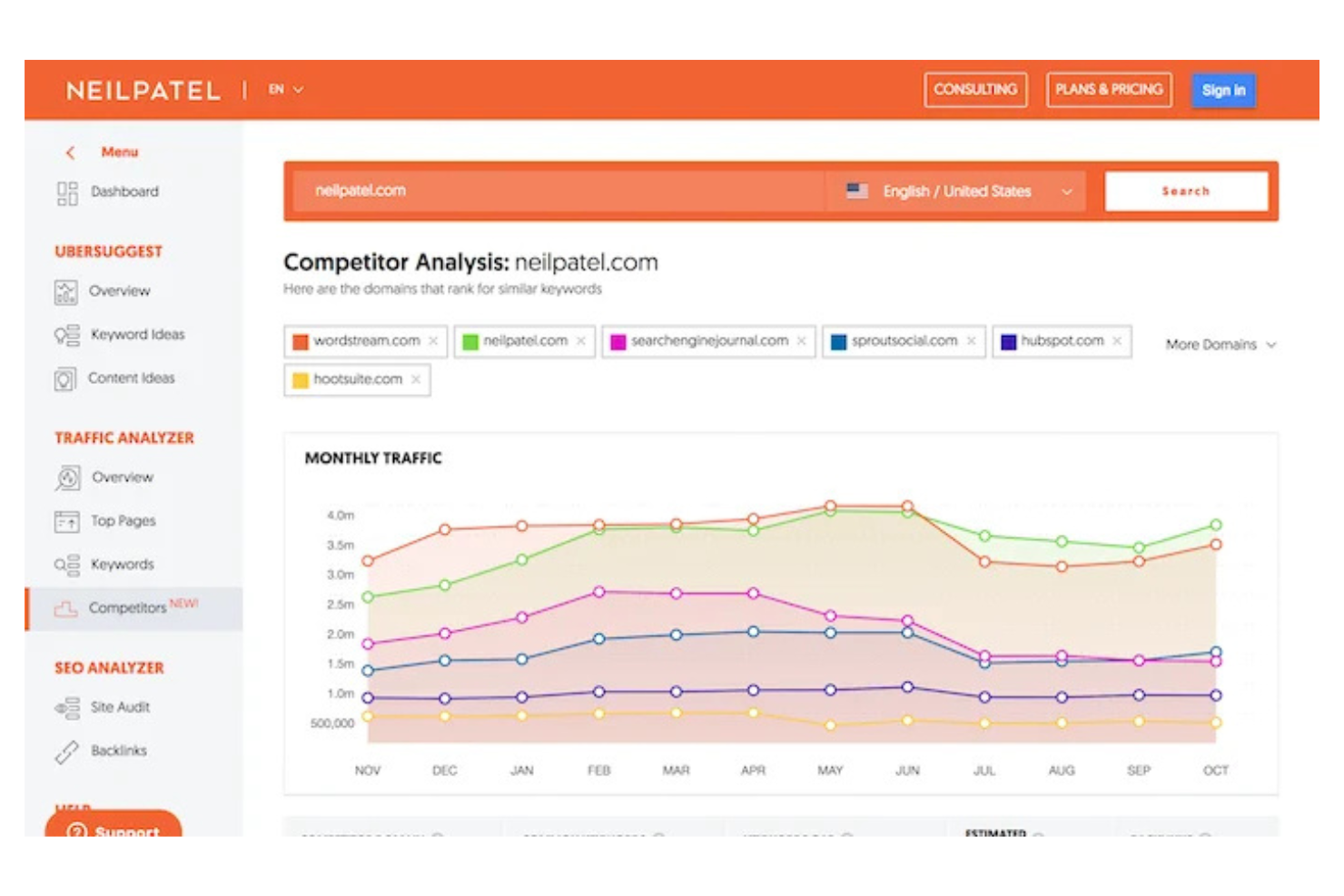
If you’re looking for an SEO tool that’s easy to pick up, Ubersuggest keeps things simple without sacrificing core features. It’s a good fit for small businesses, solo marketers, and anyone new to SEO who wants clear, actionable reporting. The platform’s guided recommendations and visual dashboards help you understand competitor strategies and keyword opportunities without a steep learning curve.
Why I Picked Ubersuggest
For marketers who want to get started with SEO competitive analysis without feeling overwhelmed, Ubersuggest stands out for its beginner-friendly reporting. I picked Ubersuggest because its dashboard breaks down competitor keyword rankings, backlink profiles, and site audit results into clear, visual summaries. The tool’s SEO Analyzer and Traffic Overview features make it easy to see where your competitors are getting their traffic and which keywords drive their visibility. This straightforward approach helps new users quickly identify actionable insights without needing advanced SEO experience.
Ubersuggest Key Features
Some other features in Ubersuggest help you expand your SEO research and planning:
- Keyword Suggestions Tool: Discover new keyword ideas based on your seed terms and see related search volume data.
- Content Ideas Generator: Find top-performing content in your niche by analyzing what’s already ranking for your target keywords.
- Site Audit Scheduler: Set up recurring technical SEO audits to monitor your website’s health over time.
- Backlink Opportunity Report: Identify potential backlink sources by analyzing competitor link profiles.
Ubersuggest Integrations
Native integrations are not currently listed.
Pros and Cons
Pros:
- Site audit includes prioritized SEO recommendations
- Content ideas tool highlights top-performing pages
- Visual keyword difficulty scores for quick analysis
Cons:
- Lacks automated competitor monitoring alerts
- Daily search limits on lower-tier plans
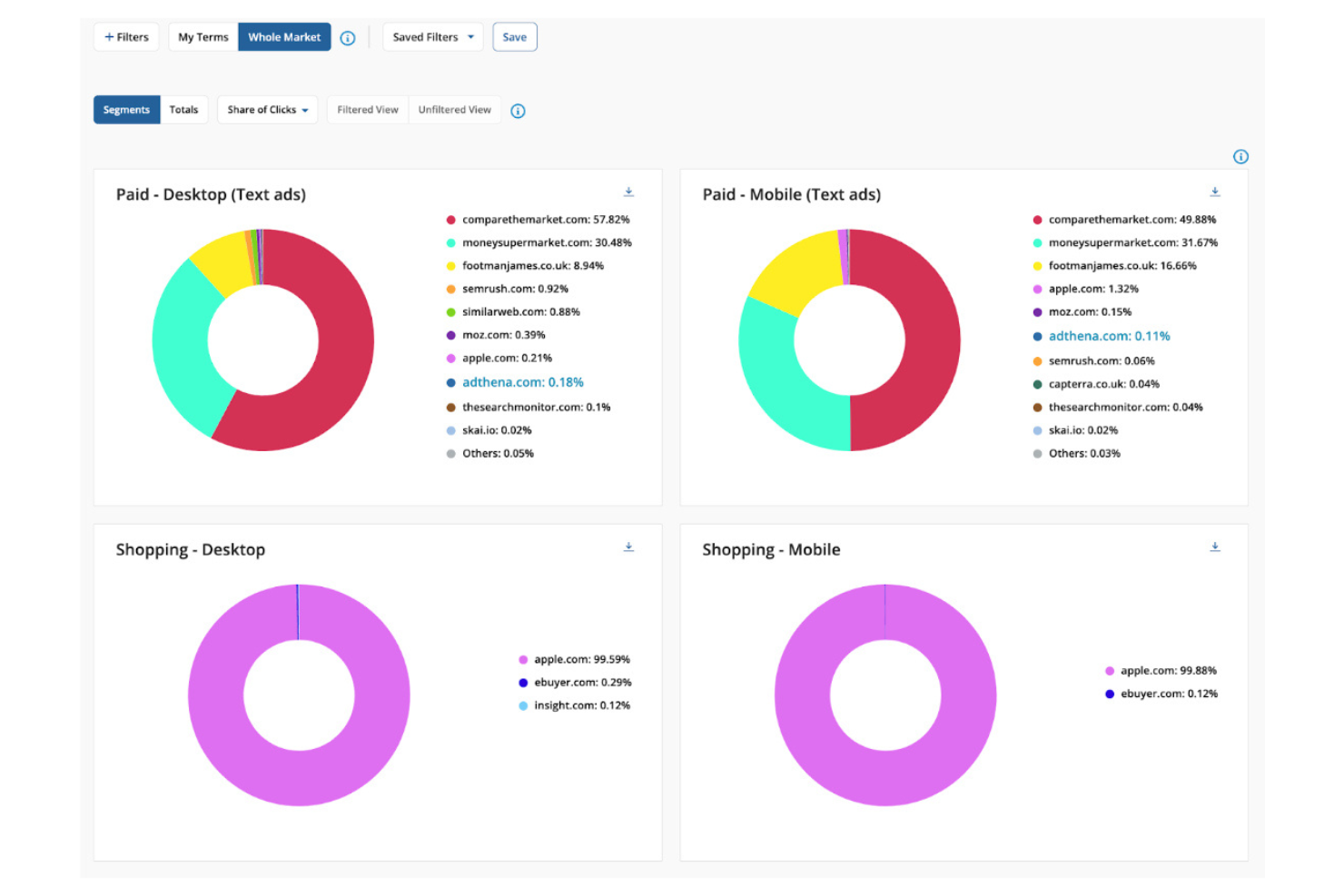
Adthena gives paid search marketers a clear view of their competitive landscape with AI-driven mapping and analysis. The platform is built for digital marketing teams and agencies that need to monitor, benchmark, and respond to competitors’ paid search strategies. If you’re looking to uncover gaps, protect your brand, or optimize spend in paid channels, Adthena’s unique focus on search intelligence sets it apart.
Why I Picked Adthena
When I need to map out the paid search landscape, Adthena stands out for its specialized competitor analysis capabilities. The platform’s AI-driven search intelligence reveals which competitors are bidding on your keywords, how much they’re spending, and what ad copy they’re using. I appreciate that Adthena provides a clear view of market shifts and emerging threats in paid search, which is essential for adjusting strategy quickly. For marketers focused on paid channels, these features make Adthena a strong fit for competitive analysis.
Adthena Key Features
Some other features that make Adthena useful for competitive search analysis include:
- Market Share Visualization: View graphical representations of your paid search market share compared to competitors.
- Brand Protection Monitoring: Detect when competitors bid on your branded keywords in real time.
- Customizable Reporting Dashboards: Build and export tailored reports for different stakeholders or campaigns.
- Search Term Intelligence: Analyze the actual search terms triggering ads across your competitive set.
Adthena Integrations
Integrations include Google Looker Studio, Microsoft Power BI, Amazon S3, Google Cloud Storage, Azure Blob Storage, and more.
Pros and Cons
Pros:
- Search term intelligence across competitor ads
- Real-time alerts for brand bidding activity
- AI-driven mapping of paid search competitors
Cons:
- Data granularity can vary by region
- No organic SEO competitor tracking features

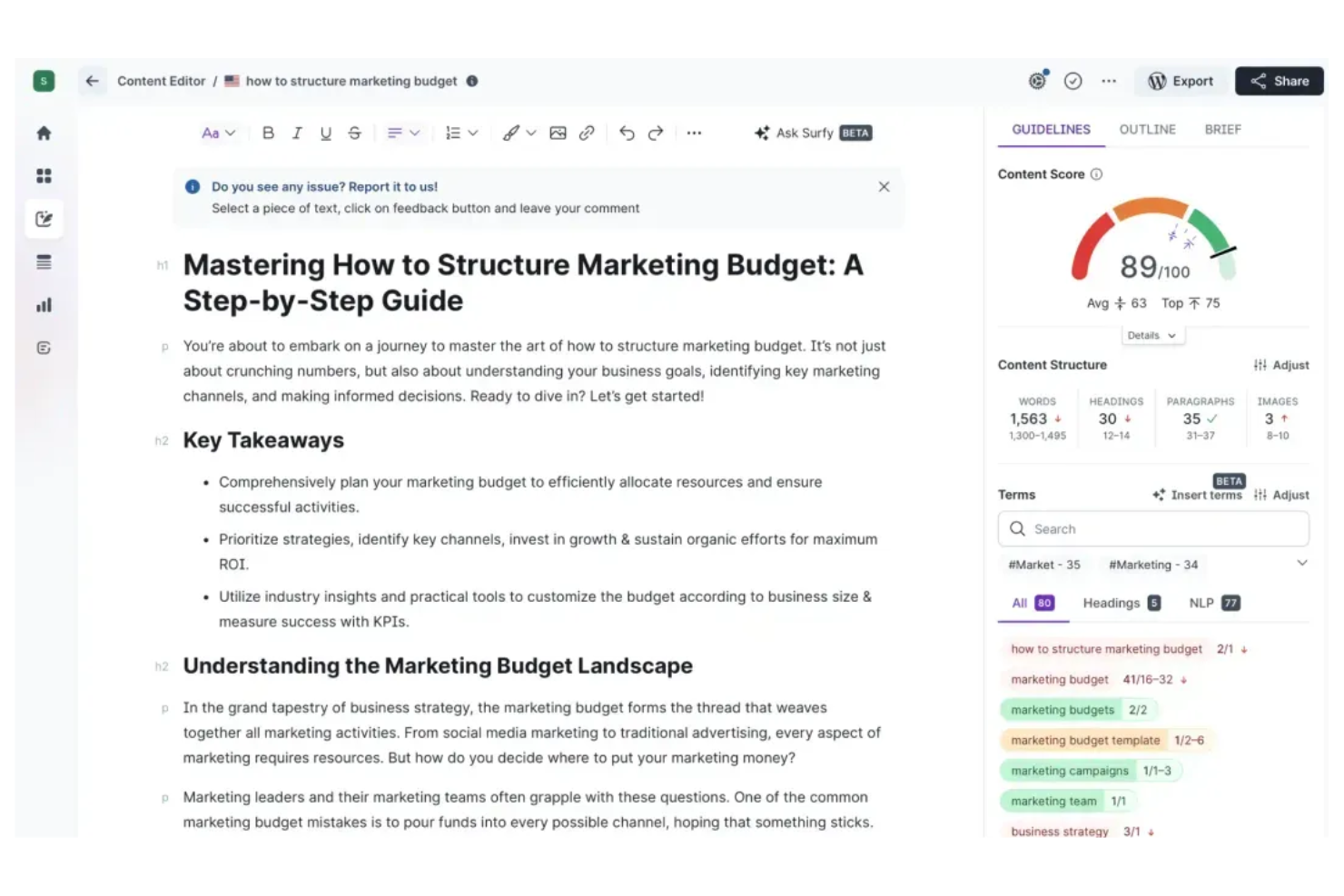
Surfer takes a data-driven approach to content optimization, making it a strong fit for content marketers and SEO specialists who want to outrank competitors in organic search. The platform analyzes top-ranking pages and provides actionable recommendations for keyword usage, structure, and on-page elements. If you need to fine-tune your content to match what’s working in your niche, Surfer’s granular, SERP-based guidance stands out.
Why I Picked Surfer
Unlike many SEO tools that focus on broad site audits, Surfer zeroes in on content optimization recommendations driven by real SERP data. I picked Surfer because it analyzes the top-ranking pages for your target keywords and translates those insights into specific, actionable guidelines for your own content. The Content Editor feature stands out for its ability to suggest keyword usage, headings, and structural improvements based on what’s actually working in your niche. For marketers who want to close the gap between their content and the competition, Surfer’s targeted recommendations make it a strong choice.
Surfer Key Features
Some other features that make Surfer valuable for competitive analysis include:
- SERP Analyzer: Compare your page against top-ranking competitors using over 500 on-page signals.
- Audit Tool: Identify optimization gaps and technical issues on existing pages.
- Keyword Research Tool: Discover keyword opportunities and analyze their difficulty and relevance.
- Content Planner: Generate topic clusters and content ideas based on competitive SERP data.
Surfer Integrations
Integrations include Google Docs, WordPress, ChatGPT, Contentful, and Zapier.
Pros and Cons
Pros:
- Supports collaborative content editing
- Tool highlights on-page optimization gaps
- Compares over 500 ranking factors Audit
Cons:
- No competitor traffic or share-of-voice metrics
- No backlink analysis or link audit features
Other SEO Competitive Analysis Tools
Here are some additional SEO competitive analysis tools options that didn’t make it onto my shortlist, but are still worth checking out:
- Conductor
For enterprise workflow integration
- Semrush
For multi-channel competitor insights
- Serpstat
For regional keyword tracking
- Marketing Miner
For bulk competitor data exports
- BuzzSumo
For content performance comparison
- Moz
For domain authority scoring
- Screaming Frog
For in-depth site crawling
- Search Atlas
For AI-driven competitor insights
- TrueRanker
For real-time SERP position monitoring


SEO Competitive Analysis Tools Selection Criteria
When selecting the best SEO competitive analysis tools to include in this list, I considered common buyer needs and pain points like tracking competitor keyword rankings and identifying content gaps. I also used the following framework to keep my evaluation structured and fair:
Core Functionality (25% of total score)
To be considered for inclusion in this list, each solution had to fulfill these common use cases:
- Track competitor keyword rankings
- Analyze competitor backlink profiles
- Identify content gaps and opportunities
- Monitor SERP feature presence
- Generate competitor performance reports
Additional Standout Features (25% of total score)
To help further narrow down the competition, I also looked for unique features, such as:
- AI-driven competitor insights
- Real-time SERP position monitoring
- Bulk competitor data exports
- Integration with project management tools
- Automated technical SEO audits
Usability (10% of total score)
To get a sense of the usability of each system, I considered the following:
- Simple and intuitive dashboard navigation
- Customizable reporting and data views
- Clear data visualizations and charts
- Fast access to core features
- Logical workflow for competitive analysis tasks
Onboarding (10% of total score)
To evaluate the onboarding experience for each platform, I considered the following:
- Availability of training videos and tutorials
- Access to onboarding webinars or live demos
- Step-by-step product tours for new users
- Pre-built templates for common analysis tasks
- Responsive chatbots or help centers for setup questions
Customer Support (10% of total score)
To assess each software provider’s customer support services, I considered the following:
- Multiple support channels, including chat and email
- Fast response times to inquiries
- Access to a searchable knowledge base
- Availability of dedicated account managers
- Community forums or user groups for peer support
Value For Money (10% of total score)
To evaluate the value for money of each platform, I considered the following:
- Transparent and flexible pricing tiers
- Features included at each pricing level
- Free trial or demo availability
- No hidden fees or surprise charges
- Scalability for growing teams or businesses
Customer Reviews (10% of total score)
To get a sense of overall customer satisfaction, I considered the following when reading customer reviews:
- Consistent positive feedback on core features
- Reports of reliable and accurate data
- User comments on integration quality
- Feedback on customer support experiences
- Noted limitations or frustrations with the tool
How to Choose SEO Competitive Analysis Tools
It’s easy to get bogged down in long feature lists and complex pricing structures when finding an SEO competitor analysis tool. To help you stay focused as you work through your unique software selection process, here’s a checklist of factors to keep in mind:
| Factor | What to Consider |
| Scalability | Will the tool handle your current and future website portfolio, data volume, and team size? |
| Integrations | Does the tool connect natively with your analytics, reporting, and project management platforms? |
| Customizability | Can you tailor dashboards, reports, and alerts to your team’s workflows and KPIs? |
| Ease of use | How quickly can new users learn the tool and complete core analysis tasks without extra training? |
| Implementation and onboarding | What resources, training, or support does the vendor provide to help you get up and running? |
| Cost | Are pricing tiers clear, and do they align with your usage needs and expected ROI? |
| Security safeguards | Does the tool offer data encryption, user permissions, and compliance with your organization’s standards? |
| Support availability | Is live support available during your business hours, and what channels (chat, phone, email) are offered? |
What Are SEO Competitive Analysis Tools?
SEO competitive analysis tools are software platforms that help you research, monitor, and compare your website’s search performance against competitors. These tools provide data on keyword rankings, backlink profiles, content gaps, and SERP features. Marketing teams use them to identify opportunities, track shifts in the competitive landscape, and inform SEO strategy with actionable insights.
Features of SEO Competitive Analysis Tools
When selecting SEO competitive analysis tools, keep an eye out for the following key features:
- Competitor keyword tracking: Monitor how your competitors rank for target keywords and track changes over time to spot shifts in strategy or new threats.
- Backlink analysis: Review the sources and quality of backlinks pointing to competitor sites to identify potential link-building opportunities and gaps.
- Content gap analysis: Compare your content coverage to competitors to uncover topics, formats, or keywords you may be missing.
- SERP feature monitoring: Track which competitors appear in featured snippets, local packs, or other SERP features to inform your optimization efforts.
- Site audit tools: Scan competitor websites for technical SEO issues, such as broken links or slow page speed, to benchmark your own site’s health.
- Custom reporting: Build and export tailored reports that highlight competitor performance, trends, and actionable insights for stakeholders.
- Historical data access: Access past ranking, backlink, and content data to analyze long-term trends and competitor movements.
- Multi-domain comparison: Evaluate multiple competitor domains side by side to get a holistic view of the competitive landscape.
- Automated alerts: Receive notifications about significant changes in competitor rankings, backlinks, or content updates so you can respond quickly.
Benefits of SEO Competitive Analysis Tools
Implementing the best competitor analysis tool provides several benefits for your team and your business. Here are a few you can look forward to:
- Informed strategy development: Access to competitor keyword and content data helps you make smarter decisions about where to focus your SEO efforts.
- Faster identification of opportunities: Content gap and backlink analysis reveal new topics and link sources you can target before competitors do.
- Proactive response to market changes: Automated alerts and SERP monitoring let you react quickly to shifts in competitor rankings or search trends.
- Improved reporting and communication: Custom reporting features make it easier to share actionable insights with stakeholders and align teams.
- Benchmarking against industry leaders: Multi-domain comparison and historical data access allow you to measure your performance against top competitors over time.
- Efficient workflow integration: Native integrations with analytics and project management tools help your team incorporate competitive insights into daily processes.
- Better resource allocation: Technical site audits and prioritized issue lists help you focus your team’s efforts where they’ll have the most impact.
Costs and Pricing of SEO Competitive Analysis Tools
Selecting SEO competitive analysis tools requires an understanding of the various pricing models and plans available. Costs vary based on features, team size, add-ons, and more. The table below summarizes common plans, their average prices, and typical features included in SEO competitive analysis tools solutions:
Plan Comparison Table for SEO Competitive Analysis Tools
| Plan Type | Average Price | Common Features |
| Free Plan | $0 | Limited keyword tracking, basic competitor analysis, restricted backlink data, and minimal reporting. |
| Personal Plan | $25-$75/user/month | Expanded keyword and backlink tracking, basic site audits, simple reporting, and limited integrations. |
| Business Plan | $100-$300/ user/month | Multi-domain tracking, advanced reporting, content gap analysis, API access, and priority support. |
| Enterprise Plan | $500-$2000+/month | Custom integrations, unlimited projects, advanced security, dedicated account management, and onboarding support. |
SEO Competitive Analysis Tools FAQs
Here are some answers to common questions about SEO competitive analysis tools:
How often should you run a competitive SEO analysis?
You should run a competitive SEO analysis at least quarterly, but monthly reviews are ideal for fast-moving industries. Regular analysis helps you spot shifts in competitor strategies, new keyword opportunities, and changes in SERP features before they impact your rankings.
Can SEO competitive analysis tools track international competitors?
Yes, most SEO competitive analysis tools support tracking competitors across multiple countries and languages. This is important if your business targets global markets or if your competitors operate internationally, as search trends and rankings can vary by region.
What data sources do these tools use for competitor analysis?
SEO competitive analysis tools typically use their own web crawlers, third-party data providers, and integrations with platforms like Google Search Console. This allows them to gather keyword rankings, backlink profiles, and SERP data for both your site and your competitors.
Are there privacy concerns when analyzing competitor websites?
No, analyzing competitor websites with these tools does not violate privacy laws, as the data collected is publicly available. However, always ensure your use of the tool complies with your organization’s data policies and any relevant regulations.
Do these tools require technical expertise to use?
No, most modern SEO competitive analysis tools are designed for marketers and do not require advanced technical skills. Many offer guided onboarding, tutorials, and user-friendly dashboards to help you get started quickly.
What’s Next:
If you're in the process of researching SEO competitive analysis tools, connect with a SoftwareSelect advisor for free recommendations.
You fill out a form and have a quick chat where they get into the specifics of your needs. Then you'll get a shortlist of software to review. They'll even support you through the entire buying process, including price negotiations.