

Direct mail marketing software automates the design, distribution, and management of physical mail campaigns, making it easy for you to personalize outreach, stand out from digital clutter, and save tons of manual effort.
With my experience in marketing operations and detailed hands-on reviews, I’ll walk you through the top direct mail marketing software options—so you can pick the best fit for your business and deliver memorable campaigns without the usual stress.
Why Trust Our Software Recommendations
6,700+
Reviews
20
Industry experts
16+
Evaluation factors
14
Years
Our team has been testing and reviewing software since 2012. As marketing leaders ourselves, we know how difficult—and important—it is to choose the right software.
For this guide, we evaluated tools using hands-on testing and independent research, scoring tools using our selection criteria.
Our reviews reflect our human editorial judgment, not a sales pitch.
Expert reviewers:
 Gui DrusinaCreative Director
- Shriya GhateSenior Marketing Lead
 Amanda JacquesMarketing Ops Leader

Comparison Table: Direct Mail Marketing Software
This comparison table summarizes pricing details for my top direct mail marketing software selections.
| Tool | Best For | Trial Info | Price | ||
|---|---|---|---|---|---|
| 1 | Best for automated handwritten-style mails | Not available | From $49/month | Website | |
| 2 | Best for a broad range of mail pieces and gifts | Free demo available | Pricing upon request | Website | |
| 3 | Best for building custom gift shops | Free pay-as-you-go plan | Available upon request | Website | |
| 4 | Best direct mail software for marketing agencies | Free plan available | From $199/month | Website | |
| 5 | Best for integrated direct mail and email marketing | 14-day free trial + free demo available | From $20/month | Website | |
| 6 | Best direct mail marketing software for sustainability | Free plan + free demo available | From $260/month | Website | |
| 7 | Best to connect with your tech stack via REST API | Free demo and discovery call offered | From $20/month | Website | |
| 8 | Best for handwritten looking cards and gifts | Free demo available | From $374/month (billed annually) | Website | |
| 9 | Best to inform direct mail marketing with digital insights | Expert consultation available | Pricing upon request | Website | |
| 10 | Best with dedicated project management services | Free demo available | Pricing upon request | Website |


Best Direct Mail Marketing Software Reviews
Below are my detailed summaries of the best direct mail marketing software that made it onto my shortlist. My reviews offer a detailed look at the key features, pros & cons, integrations, and ideal use cases of each tool to help you find the best one for you.

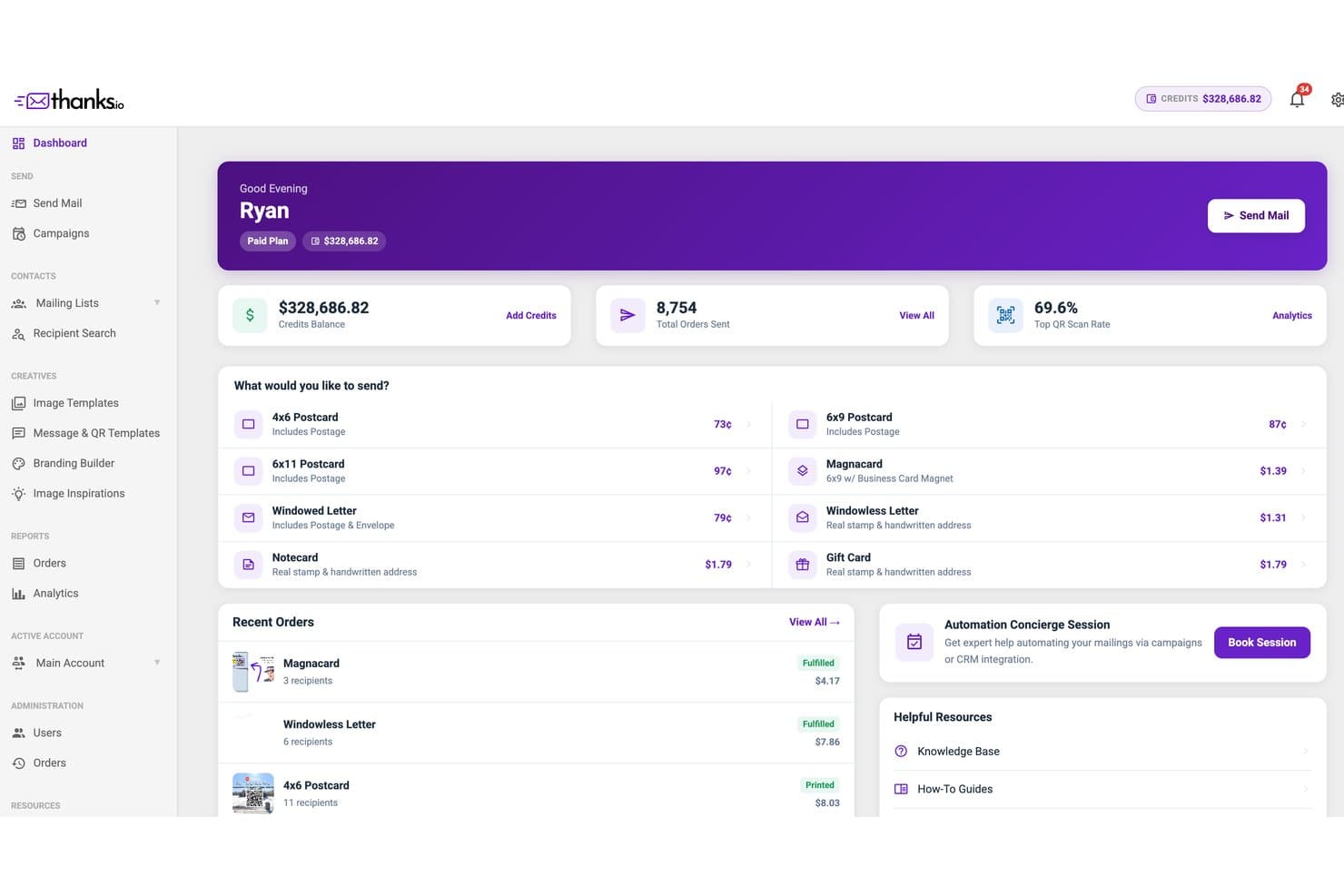
Thanks.io offers a dashboard displaying credit balance, total orders sent, QR scan rate, and direct mail product options with pricing. Thanks.io is a direct mail automation platform that sends handwritten-style postcards, letters, notecards, gift cards, and MagnaCards, with built-in personalization, CRM integrations, triggered campaign workflows, and QR code tracking.
Who Is Thanks.io Best For?
Thanks.io is a strong fit for marketers in real estate, e-commerce, and agencies who need to automate personalized physical mail without a dedicated print operations team.
Why I Picked Thanks.io
Thanks.io earns its spot on my shortlist because its handwriting engine is unlike anything else I've seen in direct mail platforms. The Realism Mode adds authentic cross-outs and natural spacing to each piece, so recipients genuinely believe someone wrote it by hand. I also like that per-recipient AI generates unique messaging for every address in a campaign, which means I can send a thousand pieces and each one reads like it was drafted individually.
Thanks.io Key Features
- NCOA address verification: Every mailing automatically runs recipient addresses against the National Change of Address database for deliverability.
- Multi-format mailers: Send postcards, folded notecards, letters, branded gift cards, and MagnaCards from a single platform.
- 500+ integrations: Connects natively to HubSpot, Salesforce, Shopify, ActiveCampaign, and thousands of apps through Zapier.
- Per-campaign QR code tracking: Each recipient can receive a unique QR code with real-time scan notifications.
Thanks.io Integrations
Thanks.io offers integrations with HubSpot, Salesforce, Shopify, Pipedrive, ActiveCampaign, Zoho CRM, WooCommerce, BigCommerce, and HighLevel, and connects with Zapier. An API is available for custom integrations.
Pros and Cons
Pros:
- Free plan supports low-volume testing
- AI generates unique copy per recipient
- Handwriting engine produces convincing letters
Cons:
- No multi-touch revenue attribution reporting
- Mail delivery limited to the US
Learn more about Thanks.io: Best for a broad range of mail pieces and gifts
- Free demo available
- Pricing upon request
Visit WebsiteCustomer Rating:4.6/5
Select from eGifts, items from Amazon, unique experiences, and more to send out. Sendoso is a direct mail marketing software that helps businesses send direct mail, personalized gifts and experiences, branded swag, and handwritten notes to customers.
Why I picked Sendeso: I decided to add this software to my list because of its wide array of options for corporate gifting and direct mail. You can select from tons of items from their marketplace, create handwritten notes to send out, and even choose unique experiences to give, like wine tastings and yoga classes. This makes for memorable gifts that go beyond traditional direct mail marketing assets.
In addition to managing your direct mail campaigns, you can also set up a swag store through the platform. The company will handle order fulfillment on your behalf, alleviating the complexity of launching your own online shop. Worldwide inventory management and fulfillment mean you don’t need to be restricted by your location—or your customer’s.
Sendoso Standout Features and Integrations
One key standout feature of this software is that a free plan is available. You can sign up for the freemium version directly through the website, and start sending gifts in no time. Sends are unlimited, you just need to pay for the gifts you’re sending out. The free plan includes end-to-end tracking, custom brand shop, and unlimited integrations. It’s a cost-effective option for companies doing a limited amount of direct mail marketing, small businesses, or individuals.
Integrations include Marketo, Salesforce, HubSpot, Eloqua, Microsoft Dynamic 365, Outreach, SalesLoft, Chili Piper, Calendly, Magento, and monday.com, among others. A Zapier integration is also available to unlock additional integrations with a paid plan.
Pros and Cons
Pros:
- Team of global experts for customer support
- Campaign services included in paid plans
- Free, pay-per-gift account available
Cons:
- Marketplace items can be expensive
- Navigation is a bit complex
Learn more about Sendoso: Best for building custom gift shops
- Free pay-as-you-go plan
- Available upon request
Visit WebsiteCustomer Rating:4.8/5
Set up customized gift shops, then send out points to recipients to redeem on a gift of their choice. Stadium is a global direct mail marketing and gifting platform that allows you to send gifts in bulk or individually. You can select gifts from the company’s multiple brands.
Why I picked Stadium: Not only does this platform offer gifts from 6 different brands, it also has a clear and user-friendly workflow. I added it to my list because of how simple it is to set up a customized gift shop that can then be accessed by individuals or groups. You simply select a site template, choose a points value, and send points out to your recipients, who can then select a gift from the site. The shops cover plenty of gift types like snacks, swag, meal kits, drinks, and team building experiences.
Stadium Standout Features and Integrations
Standout features include the user-friendly web store builder and the freemium plan. There are tons of ready-made templates specifically designed for use cases like employee incentives and rewards, celebrations and milestones, client and prospect gifting, and even company perks. It’s quick and easy to get your gifting site up and running.
As for the free plan, you can create unlimited shops and even add custom branding without committing to a paid plan. You can even create branded merch! The only cost is the 15% platform fee, which covers fulfillment, operations, and shipping costs.
Integrations include Salesforce, HubSpot, Marketo, Zendesk, monday.com, Workday, Pipedrive, Justworks, ADP, Outreach, Groove, and Saleseloft, among others. A paid Zapier account will also unlock additional integrations.
Pros and Cons
Pros:
- Flexible pay-as-you-go model
- Ability to add custom branding to your gifting shops
- Large template library for easy gift shop creation
Cons:
- Takes time to learn the platform
- No option to send customized paper assets
Learn more about Stadium Software: Best direct mail software for marketing agencies
- Free plan available
- From $199/month
Visit WebsiteCustomer Rating:4.3/5
Easily create digital and print assets to send out in multi-channel campaigns for your clients. Postalytics is a direct mail automation platform designed to streamline and enhance marketing for in-house marketing teams and marketing agencies.
Why I picked Postalytics: This platform offers tools and features to create, send, and track direct mail campaigns. I chose to include it on my list because of how it caters specifically to the needs of marketing agencies. It provides fully white–labeled assets that you can customize to the needs of your clients, and integrates with your CRM. Connecting the platform with your CRM helps you manage and automate hybrid digital and offline marketing campaigns in one place, and keep client communications organized and accessible.
Postalytics Standout Features and Integrations
Standout features that stood out to me about this software were its drag-and-drop asset builder and its advanced tracking capabilities. You can create and proof mail pieces easily and quickly with the user-friendly builder, without needing to be a graphic designer. And the intelligent mail barcodes included on mail pieces allow for delivery tracking and confirmation.
Integrations include Hubspot, Salesforce, ActiveCampaign, Zoho, Marketo, HighLevel, Klavyo, Pipedrive, Freshsales, and Nimble, among others. A paid Zapier account will unlock additional integrations, and an API is available to build custom integrations.
Pros and Cons
Pros:
- Integrates direct mail with your CRM, email, and digital campaigns
- User-friendly drag-and-drop builder for mail pieces
- White-labeled assets are easy to customize for clients
Cons:
- Some design knowledge is needed to create assets
- Available only for USA and Canada
Learn more about Postalytics: Best for integrated direct mail and email marketing
- 14-day free trial + free demo available
- From $20/month
Visit WebsiteCustomer Rating:4.3/5
You can design your own branded postcards and Mailchimp will print, stamp, and deliver them to your target audience. Mailchimp is a comprehensive marketing platform designed to help businesses of all sizes grow and connect with their audiences.
Why I picked Mailchimp: I chose Mailchimp because it integrates direct mail with email marketing, creating a seamless experience for users. One of its standout features is the "Postcards" tool, which allows businesses to design, target, and send physical postcards to their customers. This feature is incredibly user-friendly, with drag-and-drop design capabilities and a straightforward process for uploading mailing lists. Furthermore, Mailchimp's ability to synchronize your direct mail campaigns with your email marketing ensures a consistent message across channels, enhancing the overall effectiveness of your marketing strategy.
Mailchimp Standout Features and Integrations
Standout features include advanced segmentation options that allow businesses to target specific customer groups with personalized messages. Its automation tools enable users to set up triggered emails and direct mail pieces for events and sales. Mailchimp also provides detailed analytics and reporting, including ROI for direct mail.
Integrations include Shopify, WooCommerce, BigCommerce, Magento, WordPress, Salesforce, HubSpot, Zendesk, Stripe, QuickBooks, Slack, Google Analytics, and hundreds of others.
Pros and Cons
Pros:
- Good automation capabilities
- Synchronized direct mail and other digital campaigns
- Tracking of postcard delivery
Cons:
- Postcards are the only direct mail format available
- Can get expensive with larger mailing lists
Learn more about Mailchimp: 6Best direct mail marketing software for sustainability
Lob
- Free plan + free demo available
- From $260/month

Track direct mail performance metrics and ensure you’re maximizing your ROI. Lob is a direct mail marketing software that focuses on taking a sustainable approach to direct mail marketing, and leveraging digital technologies to manage direct mail campaigns.
Why I picked Lob: This platform made it onto my list because of its impressive automation capabilities but also because of its efforts towards sustainability. You can automate virtually every step of your direct mail campaign management with the software. It facilitates audience segmentation, connects you with a national printing and delivery network, and helps you measure your campaign performance and optimize your tactics for improved results.
When it comes to sustainability, this software provider is a leader in the domain. The mail you send through the platform is carbon neutral, from material sourcing through to disposal. Meanwhile, the company ensures that unavoidable emissions are offset, and the product is certified through Climate Impact Partners.
Lob Standout Features and Integrations
Some standout features I noted in this platform were its personalization capabilities. You can send out custom offers and tap into a customer’s purchase history to send them targeted, relevant direct mail. Another thing worth mentioning is the company’s dedication to security. The platform is SOC 2 Type 2 and HIPAA compliant, and goes through third-party audits to verify that compliance.
Integrations include Shopify, Salesforce, Marketo, JotForm, EasyPost, Simon Data, ActionIQ, Optimove, Braze, and Customer.io, among others. A paid Zapier account can also unlock additional integrations.
Pros and Cons
Pros:
- Useful and robust self-serve help center
- Address verification helps reduce costs and improve delivery rates
- API-based platform allows for integration with existing tech sack
Cons:
- Analytics dashboard locked to enterprise plan Visit WebsiteOpens new window
- Set up may require technical expertise
Learn more about Lob: Best to connect with your tech stack via REST API
- Free demo and discovery call offered
- From $20/month

You can clean, standardize, and verify your addresses in bulk using the software. PostGrid is an offline communications software that provides both print and mail as well as address verification tools, facilitated through an API.
Why I picked PostGrid: This tool works by connecting with your other software platforms via API—but native integrations are also available. I chose it because it expands the capabilities of your CRM, helping to facilitate your offline communications. Physical mail pieces like letters, postcards, or cheques can be sent out using your existing SaaS tools.
Meanwhile, the software’s AI-powered address verification helps you ensure your mail pieces are delivered to the right recipients. You can standardize the addresses you have on file, clean up your records, and verify addresses in bulk. This function is also enabled via API, bringing all the software’s capabilities into your existing tools.
PostGrid Standout Features and Integrations
One standout feature is the 2-day SLA offered by the software provider. You can be sure that your mail pieces will be processed within two business days, ensuring a speedy delivery. The software also routes orders to a vendor close to the destination, helping to speed up time to delivery as well.
Integrations include HubSpot, Salesforce, Marketo, Zoho, NetSuite, SAP, Microsoft Dynamics 365, Eloqua, and Pipedrive, among others. A paid Zapier account will give users access to additional integrations.
Pros and Cons
Pros:
- Templates to speed up asset creation
- Free plan for print and mail capabilities
- Integrates with the tools you already use
Cons:
- Comes with a learning curve
- Additional cost per mail piece
Learn more about PostGrid: Best for handwritten looking cards and gifts
- Free demo available
- From $374/month (billed annually)

Type a message or use the AI copywriting assistant and select a handwriting style for your note. Handwrytten is a direct mail gifting platform that specializes in sending notes and cards that appear to be written by hand.
Why I picked Handwrytten: This software offers a unique value by providing notes that are seemingly handwritten—but are in fact written by the company’s team of robots. You can select from various handwriting styles, and include gift cards for popular brands like Starbucks, Target, GrubHub, and more. Either choose a card from their bank of templates or design your own, and submit your message for their robots to write and send out on your behalf. The pricing is flexible, and you can either pay per card or get discounted rates when you send cards in higher quantities.
Handwrytten Standout Features and Integrations
The main standout feature of this platform is the ability to set up a personalized handwriting style based on your own handwriting. That’s right, for a one-time fee of $1000 the company will emulate your handwriting to create a more authentic product. And if that’s a bit too steep for you, you can have them recreate just your signature for $250.
Integrations include Salesforce, HubSpot, Shopify, CDK Global, and Make. Additional integrations can be configured via Zapier, Integrately, SyncSpider, or the platform’s API.
Pros and Cons
Pros:
- Branding-free options available
- Tutorials and webinars available
- Free plan with pay-per-card model
Cons:
- Gift cards come with an additional fee
- Limited to handwritten cards and gift cards
Learn more about Handwrytten: Best to inform direct mail marketing with digital insights
- Expert consultation available
- Pricing upon request

Craft direct mail campaigns for prospects and customers alike using intent data. PebblePost is a programmatic direct mail marketing platform that helps brands execute and manage both acquisition and retention campaigns.
Why I picked PebblePost: I decided to add this platform to my list because of how it leverages digital insights to inform your direct mail strategies. The software uses online intent signals to segment prospects and existing customers that you can then target with timely, relevant direct mail marketing campaigns. You can also craft unique, personalized paper assets in the platform, and run A/B tests on marketing collateral to improve performance.
PebblePost Standout Features and Integrations
Standout features that set this platform apart are its dedicated tools to support both acquisition and retention campaigns. You can both pinpoint high-intent prospects as well as at-risk existing customers to target with direct mail. The software connects intent data from your website with customer data in your CRM, helping you better target your existing customers to re-engage them.
Integrations are not listed by the provider.
Pros and Cons
Pros:
- Ability to create highly targeted campaigns
- Useful for both acquisition and retention
- Leverage intent data towards direct mail strategies
Cons:
- Pricing information is not transparent
- Can be complex to navigate
Learn more about PebblePost: Best with dedicated project management services
- Free demo available
- Pricing upon request

Keep track of your gifting and direct mail marketing efforts, and get expert services. ReachDesk offers a comprehensive corporate gifting platform as well as project management and strategy services to support your direct mail marketing efforts.
Why I picked ReachDesk: In addition to the software’s global marketplace, audience targeting tools, and analytics capabilities, you’ll also be assigned a dedicated project manager when you sign up. The company’s experts can support your strategy and campaign development, gifting fulfillment, and sourcing and storing of assets. For companies with limited internal resources to manage their direct mail marketing efforts, this can be a great option to get both a software platform and an expert partner.
ReachDesk Standout Features and Integrations
Standout features include the software’s global marketplace, which offers local gifts from across the world. You can ship items to over 160 countries, and select localized options for a more personalized gifting experience. In addition to physical gifts, you can send out eGifts and virtual experiences. These include things like gift cards, thank you notes, workshops, and team building activities.
Integrations include Overview, Salesforce, Marketo, HubSpot, Salesloft, Outreach, Influitive, BambooHR, Workday, and HiBob, among others. A paid Zapier account will also unlock additional integrations.
Pros and Cons
Pros:
- Fulfillment and storage services provided
- Plenty of self-serve help content
- Ability to send localized gifts
Cons:
- Reporting is somewhat limited
- Pricing information is not transparent
Learn more about Reachdesk:
Other Direct Mail Marketing Software
Here are some additional direct mail marketing software options that didn’t make it onto my shortlist, but are still worth checking out:
- 11PostalBest for creating custom-branded swag
- 12AlyceBest for managing outbound B2B gifting
- 13PostieBest for a friendly experience for digital marketers
- 14Bluebird.cxBest to set up automated corporate gifting programs
- 15Contact PigeonBest for multi-channel marketing campaign management
- 16PFLBest to set up event-triggered direct mail sends
- 17SwitchBest direct mail software with a high level of security
- 18RevSendBest for a simple and straightforward user experience
How I Evaluate Direct Mail Marketing Software
I split my evaluation into two layers: baseline capabilities a tool must have—like triggered sends and end-to-end fulfillment—and differentiators that set the best options apart.
Core Functionality (Table Stakes For This List)
When I'm selecting tools for my list, I rank each one on a scale from 0 (does not offer the functionality) to 5 (excels in this area) for each core functionality listed below. Then, I calculate the tool's total score into a percentage. Each tool needs to achieve a minimum total score of 65% to be considered for inclusion.
- Mail Piece Design & Creation: I look for built-in editors or template libraries that support variable data fields, so you can personalize a postcard with a recipient's name, company logo, or a unique offer code without touching external design tools.
- Print & Fulfillment Services: End-to-end handling of printing, postage, and delivery matters here. I check whether the platform manages production in-house or through certified partners, and whether it supports multiple formats like postcards, letters, and dimensional mailers.
- Address & List Management: Accurate delivery starts with clean data. I evaluate whether a tool offers address validation, deduplication, and NCOA-level hygiene rather than just accepting a raw CSV upload.
- CRM & MarTech Integrations: Platforms like Lob, Sendoso, and Reachdesk each connect to CRMs and marketing automation tools differently. I look at native integration depth with systems like Salesforce and HubSpot, including whether they support triggered workflows and bi-directional data sync.
- Campaign Automation & Triggers: I evaluate whether you can set up event-based sends, like mailing a welcome kit when a deal closes or dropping a re-engagement postcard after 90 days of inactivity, without manual intervention.
- Tracking & Attribution: Knowing a piece was delivered is one thing. I look for response tracking through PURLs, QR codes, or unique promo codes, plus the ability to write engagement data back into your CRM for closed-loop reporting.
Once I have a list of tools that meet the criteria, I consider what sets each platform apart.
Differentiating Factors (What Sets Vendors Apart)
Here's how I compare and contrast different vendors:
Standout Features
For ABM-heavy teams, I check whether a platform supports gifting and dimensional mail—sending branded swag or custom kits alongside standard postcards opens up high-touch plays that flat formats can't replicate. Intent data triggers also matter. Tools that connect to providers like 6sense or Bombora let you automatically fire a mailer when a target account shows buying signals. Handwritten notes are another differentiator worth evaluating, since robotic pen technology tends to lift response rates on high-value 1:1 sends.
Beyond Features
Pricing transparency is a big one—I look at whether per-piece costs include print, postage, and platform fees or if those are billed separately, since hidden costs add up fast on high-volume campaigns. Fulfillment speed also varies widely. Some platforms deliver within days of a trigger event, while others take weeks, which matters when you're running time-sensitive re-engagement plays. I also evaluate scalability: a tool that handles 1:1 ABM sends well should also support bulk seasonal campaigns without a completely different workflow.
How to Choose Direct Mail Marketing Software
It’s easy to get bogged down in long feature lists and complex pricing structures. To help you stay focused as you work through your unique software selection process, here’s a checklist of factors to keep in mind:
| Factor | What to Consider |
|---|---|
| FactorScalability | What to ConsiderCan the software grow with your business? Consider future needs and whether the tool can handle increased volume without a hitch. |
| FactorIntegrations | What to ConsiderDoes it integrate with your current tech stack? Check for compatibility with your CRM, marketing platforms, and other essential tools. |
| FactorCustomizability | What to ConsiderHow much can you tailor the tool to fit your brand? Look for options to personalize mailings and campaigns to align with your company's identity. |
| FactorEase of use | What to ConsiderIs the interface intuitive for your team? A user-friendly design reduces the learning curve and speeds up adoption. |
| FactorImplementation and onboarding | What to ConsiderHow fast can you get up and running? Assess the time and resources required for a smooth transition, and look for support like training or tutorials. |
| FactorCost | What to ConsiderDoes the price fit your budget? Compare pricing plans and consider any hidden fees. Look for value in terms of features offered for the price. |
| FactorSecurity safeguards | What to ConsiderHow does the tool protect your data? Evaluate encryption standards, data compliance, and the vendor's security protocols to ensure your information stays safe. |
| FactorSupport availability | What to ConsiderWill you have access to help when needed? Check for 24/7 support options and the responsiveness of customer service to handle any issues quickly. |
Trends in Direct Mail Marketing Software for 2024
Here are some trends I’ve noticed for direct mail marketing technology, plus what they might mean for the future of the marketing industry. I sourced countless product updates, press releases, and release logs to tease out the most important insights.
- Automation and Integration: A significant trend is the enhanced automation of direct mail processes, tightly integrated with digital marketing platforms. Tools are now offering more sophisticated triggers based on customer behavior across digital channels, ensuring a seamless omnichannel experience. This shift underscores the need for a unified marketing approach, blending digital precision with the tangible impact of physical mail.
- Personalization at Scale: Rapid advancements in variable data printing (VDP) technology allow for unparalleled customization. Marketing professionals can now craft highly personalized mail pieces at scale, responding to the demand for more tailored customer experiences. This feature is evolving quickly, reflecting the growing expectation for personalization in all marketing communications.
- Eco-friendly Options: The introduction of eco-friendly printing options and materials represents both a novel and increasingly demanded feature. As environmental concerns become more pressing, marketers are looking for ways to minimize their ecological footprint while still reaching their audience effectively.
- Augmented Reality (AR): Perhaps the most unusual yet captivating feature is the integration of AR with direct mail. By bringing a static mail piece to life through digital overlays, marketers can create an immersive experience, bridging the gap between physical and digital realms. This novel functionality hints at the future of interactive marketing campaigns.
- Focus on Quality over Quantity: There's a noticeable shift towards prioritizing high-quality, impactful mail pieces over mass mailings. This reflects a deeper understanding of direct mail's role in building brand value and forging lasting customer relationships, rather than just a tool for broad outreach.
By embracing these advancements, marketing professionals can better navigate the challenges of reaching and engaging their audience in meaningful ways, ensuring that each campaign delivers both on innovation and impact.
What Is Direct Mail Marketing Software?
Direct mail marketing software is a tool that helps you design, send, and track physical marketing materials like postcards, catalogs, or brochures. Marketers and business owners use it to build mailing lists, target the right people, personalize content, and see how well their mail campaigns work. It saves time on organizing addresses and makes running print campaigns a lot less of a headache.
Features
When selecting direct mail marketing software, keep an eye out for the following key features:
- Personalization: Tailors messages and designs to individual recipients, enhancing engagement and relevance.
- Delivery tracking: Monitors the status of mailings in real-time, ensuring timely delivery and allowing for adjustments if needed.
- Integration capabilities: Connects with CRM and other marketing tools to streamline workflows and data management.
- Analytics and insights: Provides detailed reporting on campaign performance, helping you measure success and make informed decisions.
- Automation: Simplifies repetitive tasks like sending and scheduling, saving time and reducing manual effort.
- Customizable templates: Offers pre-designed layouts that can be tailored to fit your brand and campaign needs.
- Budget management: Keeps track of spending and helps allocate resources efficiently across campaigns.
- Global reach: Supports international shipping and compliance, expanding your campaign's geographical impact.
- Scheduling options: Allows you to plan and execute campaigns in advance, ensuring timely and strategic mail delivery.
- Security safeguards: Protects sensitive data through encryption and compliance with data protection regulations.
Benefits
Implementing direct mail marketing software provides several benefits for your team and your business. Here are a few you can look forward to:
- Enhanced engagement: Personalization features tailor messages to recipients, making your campaigns more relevant and engaging.
- Efficient tracking: Delivery tracking provides real-time updates, allowing you to ensure timely delivery and make necessary adjustments.
- Integrated workflows: Integration capabilities connect with other tools, streamlining your marketing processes and data handling.
- Informed decisions: Analytics and insights offer detailed reports on campaign performance, helping you refine strategies based on data.
- Time savings: Automation reduces manual tasks like sending and scheduling, freeing up time for your team to focus on creative efforts.
- Cost control: Budget management features help you monitor and allocate resources effectively, preventing overspending.
- Global reach: International support allows you to expand your campaign's impact beyond local boundaries, reaching a wider audience.
Costs & Pricing
Selecting direct mail marketing software requires an understanding of the various pricing models and plans available. Costs vary based on features, team size, add-ons, and more. The table below summarizes common plans, their average prices, and typical features included in direct mail marketing software solutions:
Plan Comparison Table for Direct Mail Marketing Software
| Plan Type | Average Price | Common Features |
|---|---|---|
| Plan TypeFree Plan | Average Price$0 | Common FeaturesBasic personalization, limited analytics, and basic templates. |
| Plan TypePersonal Plan | Average Price$10-$30/user/month | Common FeaturesAdvanced personalization, delivery tracking, and email support. |
| Plan TypeBusiness Plan | Average Price$50-$100/user/month | Common FeaturesIntegration capabilities, automation tools, and enhanced analytics. |
| Plan TypeEnterprise Plan | Average Price$150-$300/user/month | Common FeaturesCustomizable solutions, dedicated support, and comprehensive reporting. |
Direct Mail Marketing Software FAQs
Here are some answers to common questions about direct mail marketing software:
How does seasonality affect direct mail marketing campaigns?
Seasonality plays a significant role in direct mail marketing, influencing both the timing and content of campaigns. During peak seasons like holidays, consumers are more receptive to promotional offers, making it an ideal time to send out direct mail with special deals or exclusive coupons. Conversely, understanding off-peak seasons can help in planning content that keeps the audience engaged, such as newsletters or brand updates. Tailoring your direct mail strategy to leverage seasonal opportunities can significantly boost engagement and conversions.
What are the environmental impacts of direct mail marketing?
The environmental impact of direct mail marketing primarily revolves around paper use, energy consumption, and waste generation. However, many organizations are seeking to minimize these impacts by adopting eco-friendly practices, such as using recycled paper, optimizing mailing lists to reduce waste, and employing sustainable printing techniques. Additionally, digital printing technologies have evolved to reduce energy consumption and chemical use. Marketers are increasingly aware of these impacts and are taking steps to ensure their direct mail campaigns are as environmentally friendly as possible.
How can direct mail marketing be personalized without invading privacy?
Personalizing direct mail marketing without invading privacy involves balancing targeted content with respect for consumer data protection. Begin by using data responsibly; obtain consent and employ data minimization principles, using only what’s necessary to craft relevant messages. Leveraging segmentation and predictive analytics can help tailor content without needing overly personal details. Moreover, transparency about data use and offering easy opt-out options build trust. Personalization should enhance the customer experience by making them feel valued and understood, not watched.
How do you measure the effectiveness of direct mail marketing software?
You can track key metrics like response rate, conversion rate, and delivery confirmations. Many tools provide analytics dashboards showing which campaigns performed best. Focus on measurable outcomes—like redeemed offers or website visits from QR codes—to gauge impact over time.
How long does it typically take to launch a campaign using direct mail marketing software?
For simple campaigns, you can design and schedule mailings within a few hours. Larger or highly personalized projects might take several days, especially if approvals or data uploads are involved. Once templates and workflows are set up, subsequent campaigns move much faster.