
13 Best Keyword Research Tools for 2026

Best Keyword Research Tools Shortlist
Here's my pick of the 10 best software from the 13 tools reviewed.


Keyword research tools help you discover, analyze, and prioritize the search terms your audience uses so you can target the right keywords in your SEO and content strategies. If you’re searching for the best keyword research tools, you’re likely aiming to improve your rankings, outpace competitors, and make smarter decisions about where to focus your marketing efforts.
With so many options and features to consider, it’s easy to feel overwhelmed or unsure which tool will actually deliver the insights you need. This list breaks down the top solutions for 2026, so you can quickly compare your options and find the right fit for your goals.
Why Trust Our Software Reviews
Best Keyword Research Tools Summary
This comparison chart summarizes pricing details for my top SEO keyword research tool selections to help you find the best one for your budget and business needs.
| Tool | Best For | Trial Info | Price | ||
|---|---|---|---|---|---|
| 1 | Best for uncovering competitor keyword strategies | 30-day money-back guarantee | From $39/month | Website | |
| 2 | Best for backlink-driven keyword opportunities | Free tools available | From $129/month | Website | |
| 3 | Best for integrating with Google Ads campaigns | Free to use | Free for Google Ads accounts | Website | |
| 4 | Best for Microsoft search data integration | Not available | Free forever | Website | |
| 5 | Best for local search volume accuracy | Free plan available | From $37.70/month (billed annually) | Website | |
| 6 | Best for keyword difficulty scoring | Free trial available | From $24/month | Website | |
| 7 | Best for PPC keyword suggestions | Free keyword tool available | Pricing upon request | Website | |
| 8 | Best for generating long-tail keyword ideas | Free plan available | From $69/month (billed annually) | Website | |
| 9 | Best for real-time search trend insights | Not available | From $17/month (billed annually) | Website | |
| 10 | Best for browser-based keyword metrics | Free browser extension available | From $7/month (billed annually) | Website |
-

Demandbase
Visit WebsiteThis is an aggregated rating for this tool including ratings from Crozdesk users and ratings from other sites.4.4 -
6sense
Visit WebsiteThis is an aggregated rating for this tool including ratings from Crozdesk users and ratings from other sites.4.3 -
AnswerThePublic
Visit Website


Best Keyword Research Tools Reviews
Below are my detailed summaries of the keyword research tools that made it onto my shortlist. My reviews offer a detailed look at the features, best use cases, and pricing of each tool to help you find the best one for you.

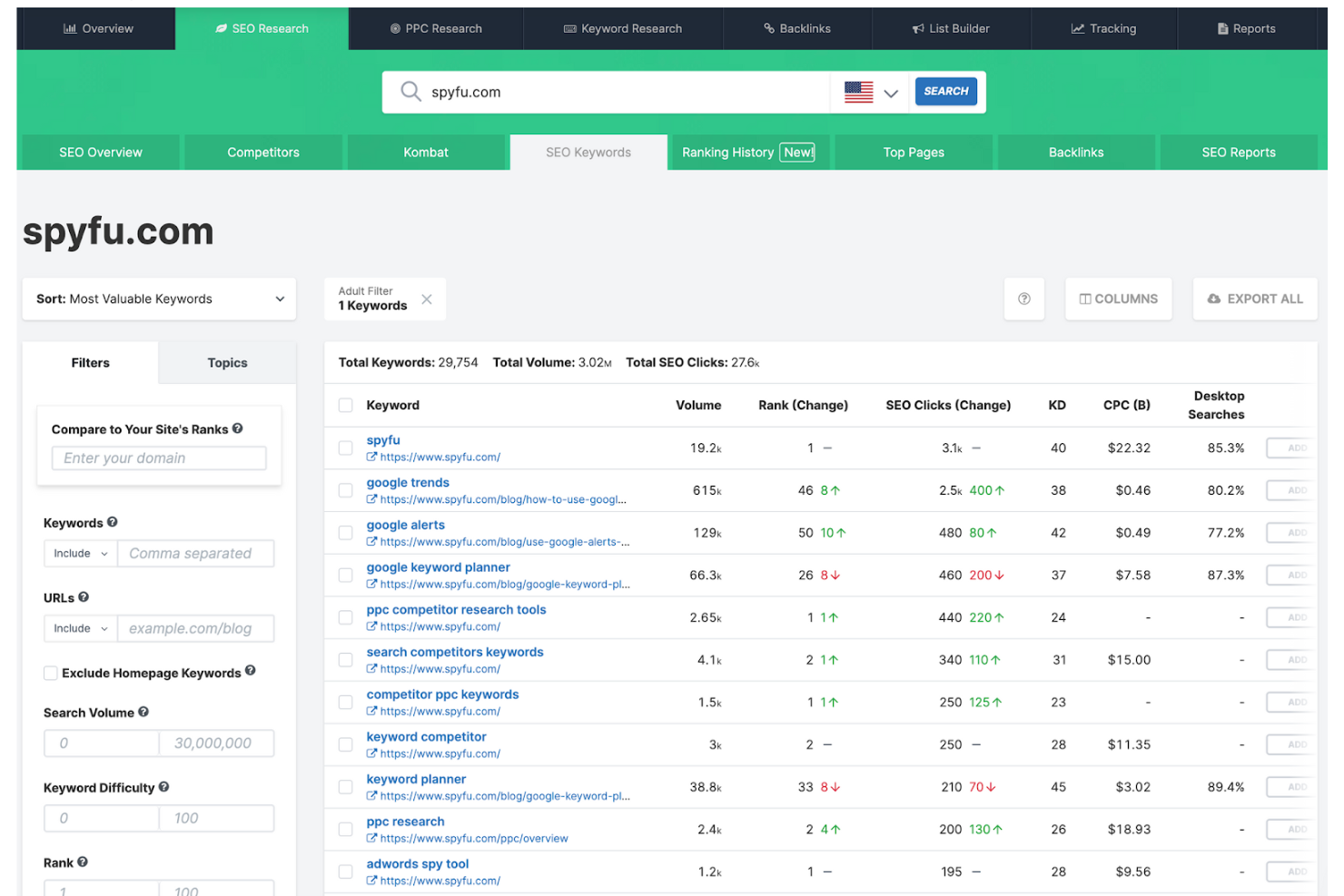
SpyFu is built for marketers and agencies who want to dig into competitor keyword strategies for both paid and organic search. The platform helps you uncover which keywords your competitors are targeting, how much they’re spending, and what’s driving their traffic. If you need to reverse-engineer a competitor’s search approach or identify gaps in your own campaigns, SpyFu gives you the data to do it.
Why I Picked SpyFu
When you need to analyze competitor keyword strategies in detail, SpyFu offers a focused set of tools for the job. I picked it because it lets you see every keyword your competitors buy on Google Ads and every keyword they rank for organically. The platform also reveals historical ad spend, ad copy, and ranking trends, so you can spot patterns and shifts in their approach. For marketers who want to benchmark against competitors or find new keyword opportunities, SpyFu’s competitive intelligence stands out.
SpyFu Key Features
Some other features that make SpyFu valuable for keyword research include:
- Keyword Grouping: Organize keywords into logical groups for easier campaign planning and analysis.
- SERP Analysis: View detailed search engine results pages for any keyword to assess competition and ranking opportunities.
- Backlink Research: Analyze competitor backlink profiles to identify potential link-building targets.
- Domain Comparison: Compare multiple domains side by side to evaluate keyword overlap and gaps.
SpyFu Integrations
Integrations are not publicly available.
Pros and Cons
Pros:
- Includes keyword grouping for campaign planning
- Provides downloadable competitor ad copy examples
- Shows historical Google Ads spend data
Cons:
- No real-time keyword ranking updates
- No keyword intent or SERP feature data

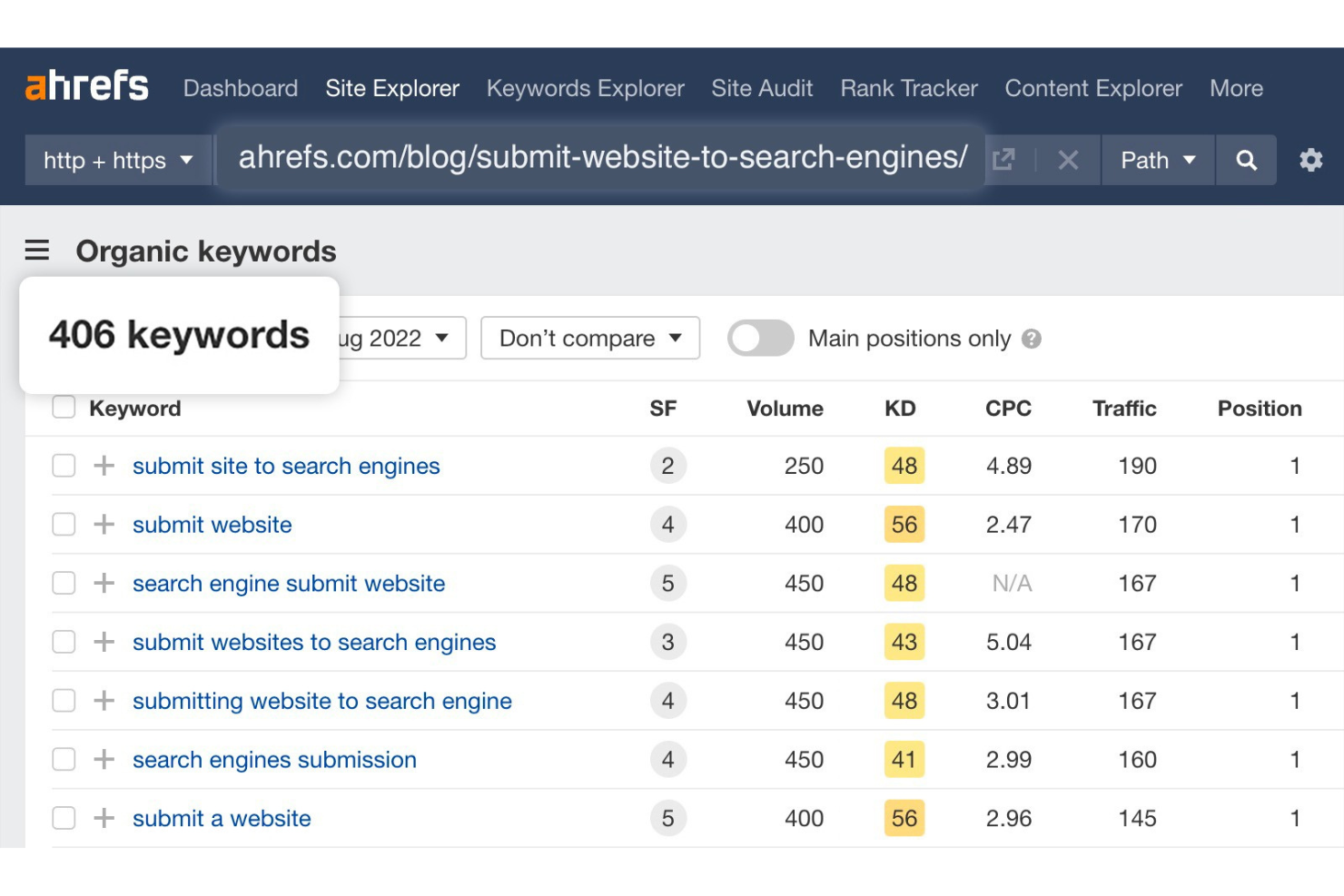
Ahrefs stands out for marketers and SEO professionals who want to uncover keyword opportunities through deep backlink analysis. The platform is especially useful for agencies, content strategists, and growth teams focused on building authority and tracking competitors’ link profiles. Its unique approach helps you identify keywords that drive traffic to sites with strong backlink profiles, making it easier to target high-impact opportunities.
Why I Picked Ahrefs
When I want to find keyword opportunities that are backed by strong backlink profiles, Ahrefs is my go-to choice. Its Site Explorer feature lets you analyze which keywords drive traffic to competitors and see the backlink sources supporting those rankings. I appreciate how the Keywords Explorer tool connects keyword data with backlink metrics, so you can prioritize keywords that are more likely to help you build authority. This focus on backlink-driven keyword research makes Ahrefs especially valuable for marketers who want to target keywords with proven ranking potential.
Ahrefs Key Features
Some other features that make Ahrefs useful for keyword research include:
- Content Gap Analysis: Identify keywords your competitors rank for that your site does not.
- SERP Overview: View real-time search engine results pages for any keyword, including ranking URLs and key metrics.
- Keyword Difficulty Score: Assess how challenging it may be to rank for a specific keyword based on current top-ranking pages.
- Click Metrics: See estimated clicks for keywords, not just search volume, to better gauge traffic potential.
Ahrefs Integrations
Integrations include Google Search Console, Looker Studio, and an API for custom integrations.
Pros and Cons
Pros:
- Click metrics show actual traffic potential
- Largest backlink database among keyword tools
- SERP overview includes historical ranking data
Cons:
- Pricing may be high for small businesses
- Limited project management features
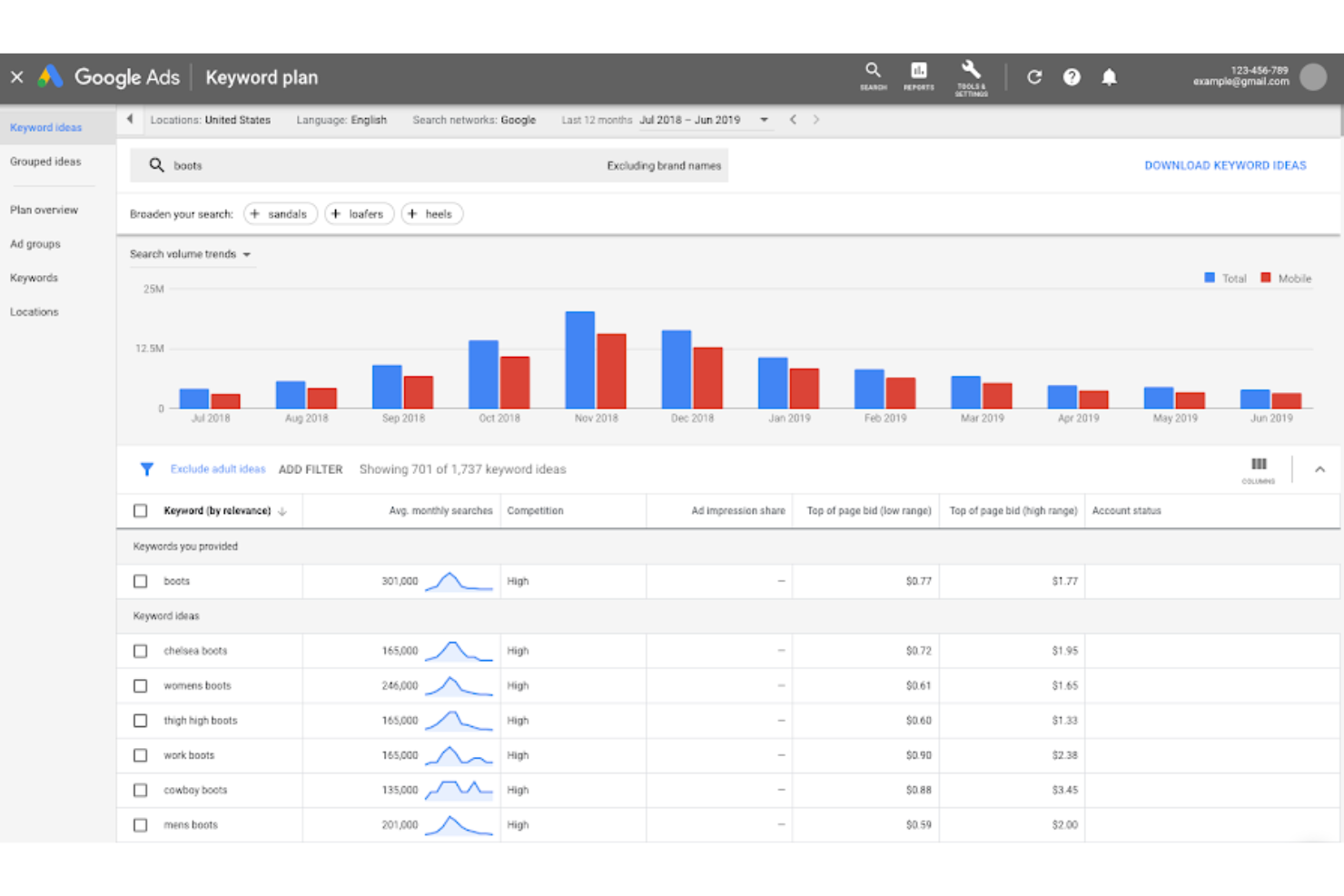
Google Keyword Planner is designed for marketers who want to align keyword research directly with their Google Ads campaigns. It’s especially useful for businesses focused on paid search and those who need relevant keyword data tied to real ad performance. The tool helps you discover new keyword ideas, see search volume, and estimate the cost-per-click, all within the Google Ads ecosystem.
Why I Picked Google Keyword Planner
I chose Google Keyword Planner because it connects keyword research directly to Google Ads campaign planning, which is essential for marketers focused on paid search. The tool lets you discover new keywords and see estimated search volumes and bid ranges, so you can prioritize terms that fit your advertising goals. I like that you can forecast keyword performance based on real Google Ads data, making it easier to plan budgets and set expectations. This level of integration with Google Ads sets it apart from other keyword research tools.
Google Keyword Planner Key Features
Some other features make Google Keyword Planner a versatile choice for keyword research:
- Location Targeting: Filter keyword data by specific geographic regions to tailor your research to local or global markets.
- Historical Statistics: Access historical search volume trends to identify seasonal patterns and long-term keyword viability.
- Keyword Grouping: Organize keyword ideas into ad groups for more structured campaign planning.
- Negative Keyword Suggestions: Identify and add negative keywords to help refine your campaigns and avoid irrelevant traffic.
Google Keyword Planner Integrations
Integrations include Google Ads, Google Analytics, Google Business Profile, Reach Planner, Performance Max, YouTube Ads, and more.
Pros and Cons
Pros:
- Useful for planning paid search campaigns
- Free to use with a Google Ads account
- Direct access to Google search data
Cons:
- Requires an active Google Ads account for full data
- Search volume data is often shown in broad ranges
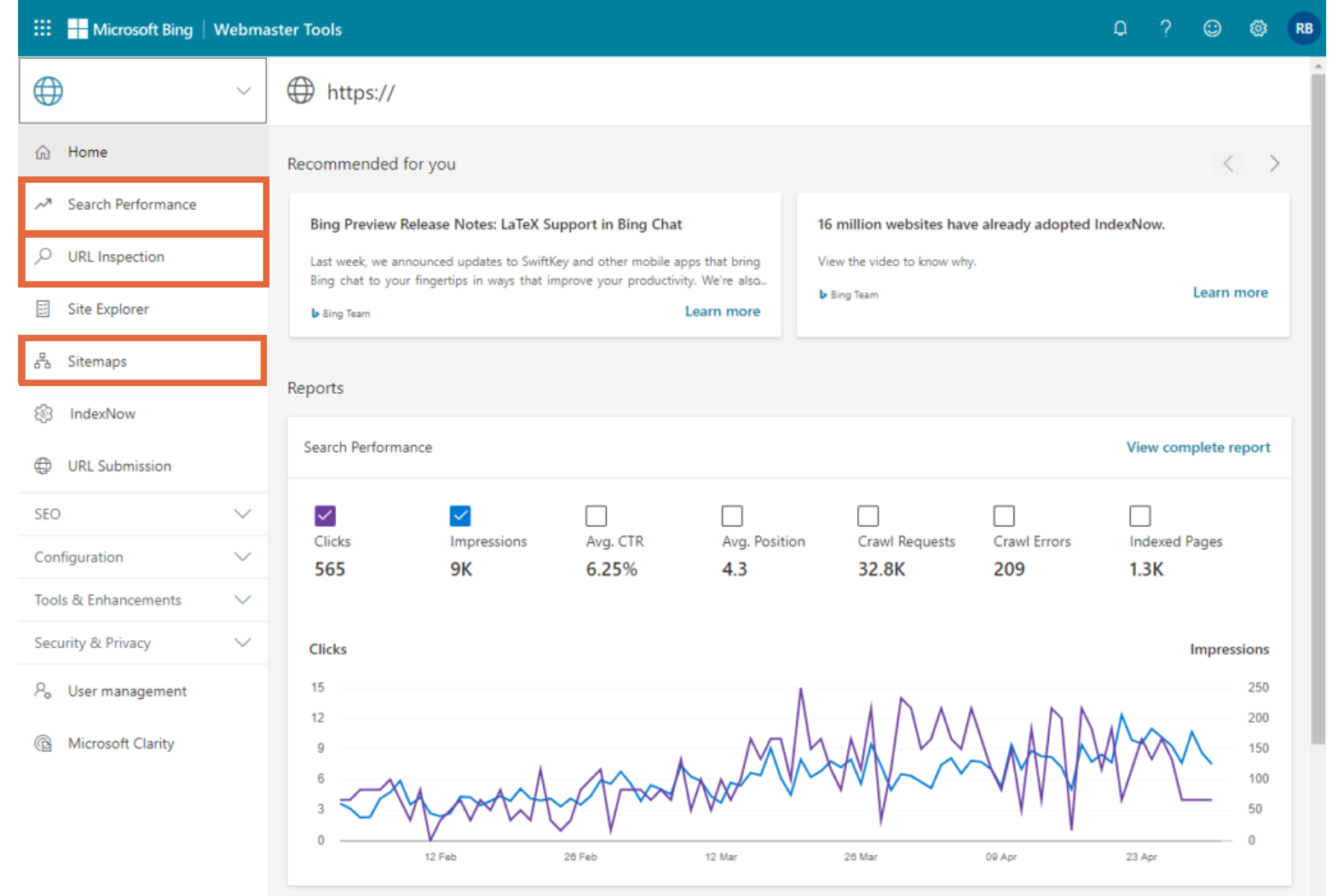
If you want direct access to Microsoft search data, Bing Webmaster Tools gives you unique insights you won’t find in other keyword research platforms. This tool is especially useful for marketers and SEO professionals who want to optimize for Bing and Microsoft-powered search engines. It helps you uncover keyword opportunities and performance trends specific to the Microsoft ecosystem.
Why I Picked Bing Webmaster Tools
Unlike most keyword research tools, Bing Webmaster Tools gives you direct access to Microsoft search data, which is essential if you want to optimize for Bing or Microsoft-powered platforms. I picked this tool because it provides keyword performance metrics and search analytics straight from the Bing index, letting you see exactly how your site performs in this ecosystem. The Search Performance report and keyword research tool both focus on real Bing user queries, so you can uncover opportunities that might be missed by Google-centric platforms. For marketers targeting audiences who use Microsoft products, these features make Bing Webmaster Tools a valuable addition to your keyword research stack.
Bing Webmaster Tools Key Features
Some other features that make Bing Webmaster Tools useful for keyword research include:
- URL Inspection Tool: Check indexing status and crawl issues for specific URLs.
- Backlink Report: View inbound link data to understand your site’s link profile.
- SEO Analyzer: Run on-page site audits and receive actionable recommendations.
- Sitemap Submission: Submit and manage XML sitemaps directly within the platform.
Bing Webmaster Tools Integrations
Integrations include Microsoft Clarity and Microsoft Excel.
Pros and Cons
Pros:
- Backlink data includes referring domains and pages
- Provides on-page optimization suggestions
- Direct access to Microsoft search data
Cons:
- No integration with third-party SEO platform
- No Google search data available

If you need precise local search volume data for your SEO campaigns, KWFinder is designed for that purpose. It’s a strong fit for agencies, consultants, and businesses targeting specific regions or cities. The tool helps you uncover accurate keyword opportunities at the local level, making it easier to plan location-focused strategies.
Why I Picked KWFinder
KWFinder stands out for its ability to deliver highly accurate local search volume data, which is essential for anyone running region-specific SEO campaigns. I picked it because it lets you drill down to city or state-level keyword metrics, so you can target audiences with precision. The tool also provides location-based keyword suggestions, helping you uncover terms that matter most in your chosen area. For marketers and businesses focused on local visibility, KWFinder’s granular data makes it a strong choice.
KWFinder Key Features
Some other features that make KWFinder useful for keyword research include:
- Keyword Difficulty Score: Evaluate how challenging it is to rank for specific keywords using a built-in scoring system.
- SERP Analysis: Review the top-ranking pages for any keyword to assess competition and content gaps.
- Historical Search Volume Data: Access past search trends to understand keyword seasonality and long-term interest.
- Bulk Keyword Import: Upload and analyze large lists of keywords at once for faster research.
KWFinder Integrations
Integrations are not publicly available.
Pros and Cons
Pros:
- Bulk keyword import for large campaigns
- SERP analysis includes live ranking data
- Accurate local search volume for keywords
Cons:
- Only supports Google search engine data
- Lacks backlink analysis feature

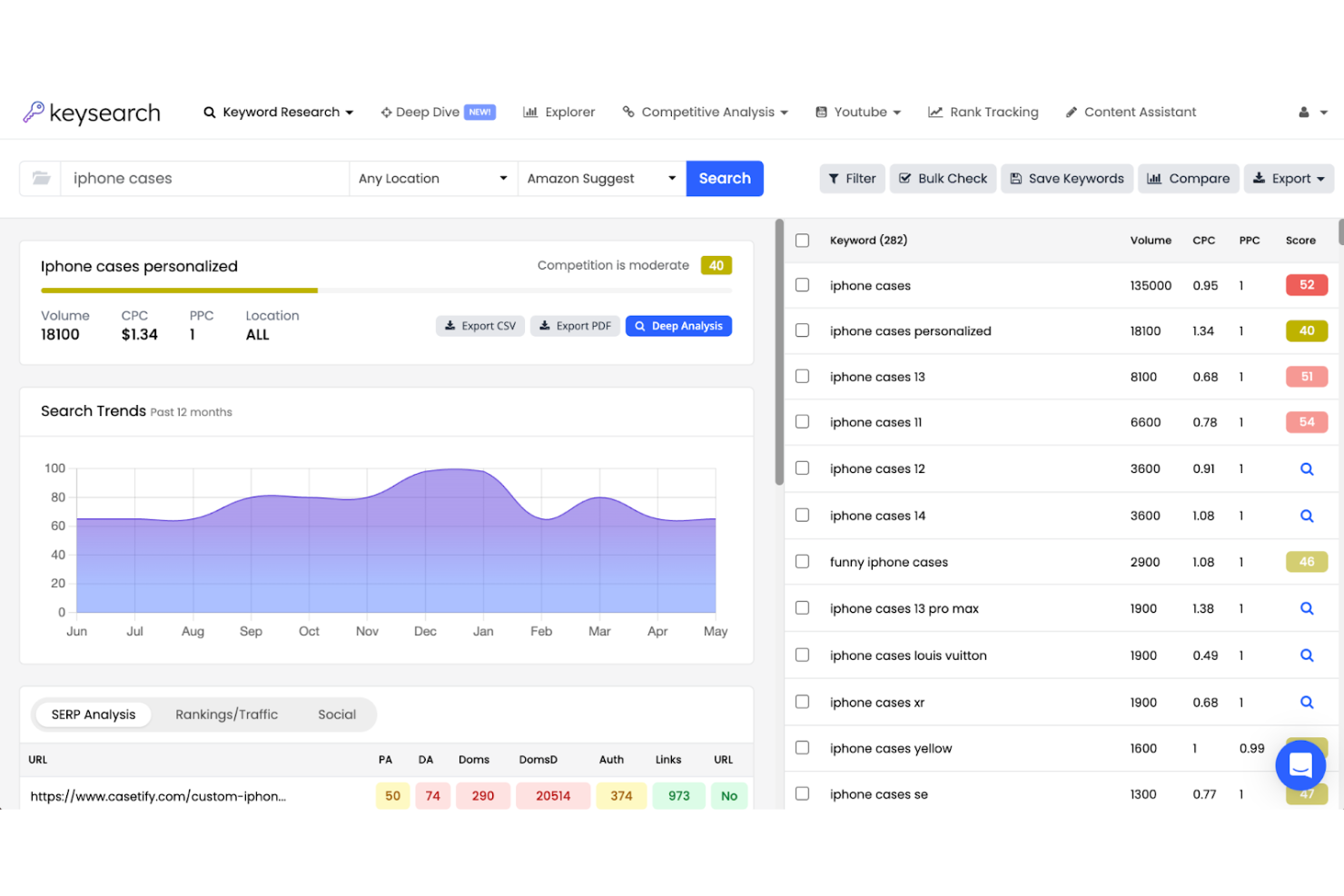
KeySearch is designed for marketers and small business owners who want clear, actionable keyword difficulty scores. The platform appeals to those who need to quickly assess ranking potential and prioritize keywords based on real competition data. Its focus on transparent scoring helps you make informed decisions without sifting through complex metrics.
Why I Picked KeySearch
For anyone who wants to prioritize keywords based on real competition, KeySearch stands out for its detailed keyword difficulty scoring. The tool calculates a clear difficulty score for each keyword, factoring in metrics like domain strength and page authority of top-ranking sites. I like that you can instantly see which keywords are realistic targets for your site, without needing to interpret multiple data points. This focus on transparent, actionable scoring makes KeySearch a strong fit for marketers who want to make quick, informed decisions.
KeySearch Key Features
In addition to its keyword difficulty scoring, KeySearch offers several other features for keyword research:
- Competitor Analysis: Compare your site’s keyword rankings with those of your competitors to spot new opportunities.
- YouTube Research Tool: Find keyword ideas and ranking data specifically for YouTube search.
- Content Assistant: Get on-page optimization suggestions based on top-ranking content for your target keyword.
- Rank Tracking: Monitor your keyword positions over time with daily updates and historical data.
KeySearch Integrations
Integrations are not publicly available.
Pros and Cons
Pros:
- Rank tracking updates daily with historical data
- Suggests on-page optimizations
- YouTube keyword research tool included
Cons:
- SERP analysis lacks advanced filtering options
- Limited backlink data compared to top tools
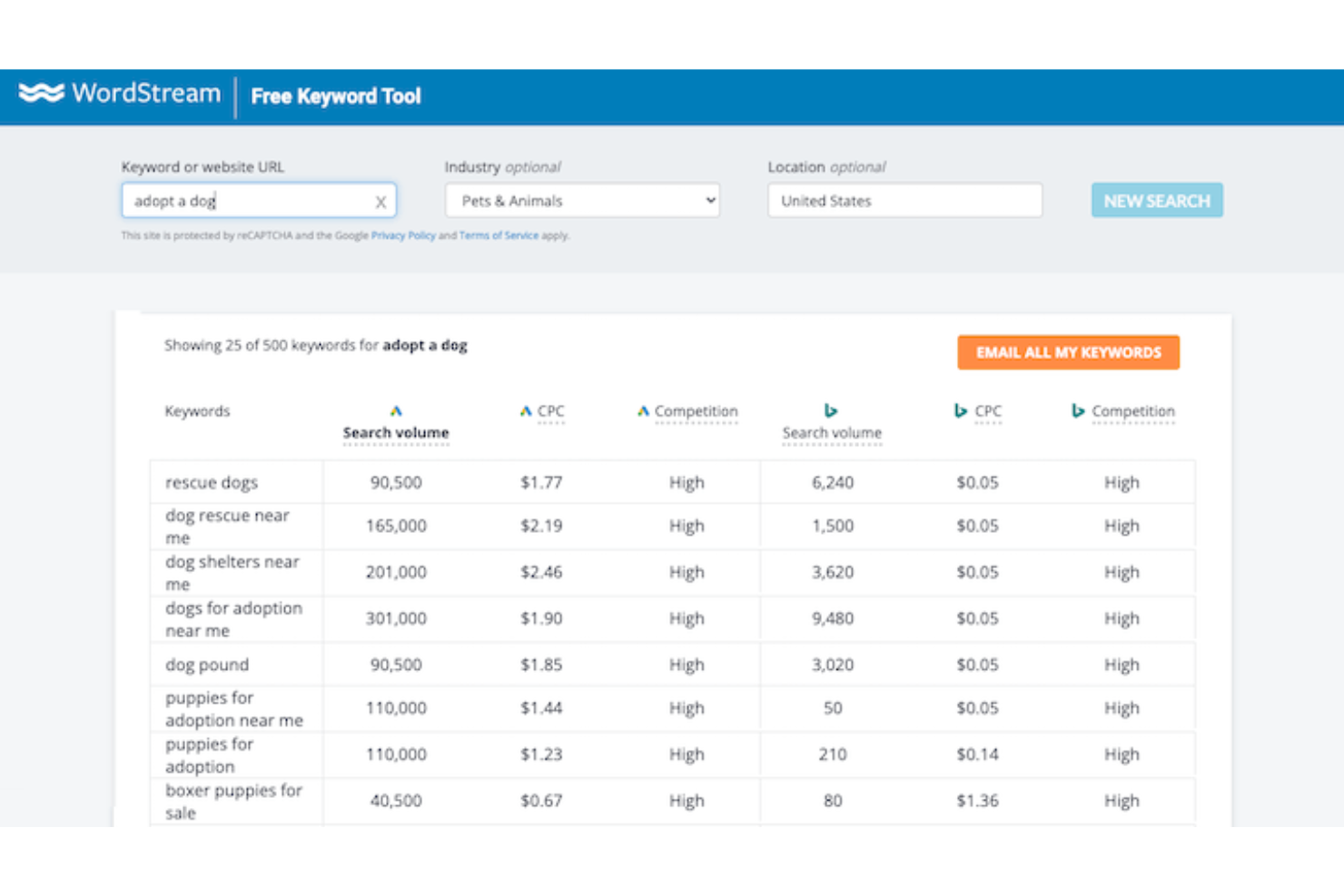
If you’re focused on pay-per-click campaigns, WordStream’s keyword tool is designed with your needs in mind. It’s especially useful for marketers and small businesses looking to uncover high-performing PPC keyword suggestions quickly. The tool stands out for surfacing actionable keyword ideas tailored for Google Ads and Bing Ads, helping you optimize ad spend and reach.
Why I Picked WordStream
For marketers who want to focus on PPC keyword discovery, WordStream by LocaliQ offers a targeted approach that’s hard to match. I picked it because its keyword tool generates suggestions specifically optimized for Google Ads and Bing Ads, making it easy to find terms that drive paid search performance. The tool also provides search volume and competition data for each keyword, so you can prioritize which terms to target in your campaigns. If you’re looking for actionable PPC keyword ideas without extra complexity, WordStream is a strong fit.
WordStream Key Features
Some other features that make WordStream useful for keyword research include:
- Negative Keyword Suggestions: Identify keywords to exclude from your campaigns to avoid irrelevant clicks.
- Geotargeting Filters: Filter keyword suggestions by specific locations to refine your PPC targeting.
- Industry-Based Keyword Grouping: Organize keyword ideas by industry categories for more relevant suggestions.
- Export to CSV: Download keyword lists directly for use in campaign planning or reporting.
WordStream Integrations
Native integrations are not currently listed.
Pros and Cons
Pros:
- Provides unlimited searches in the free version
- Groups keywords by industry categories
- Offers negative keyword recommendations
Cons:
- No keyword difficulty or competition scoring
- Does not show historical keyword trend data
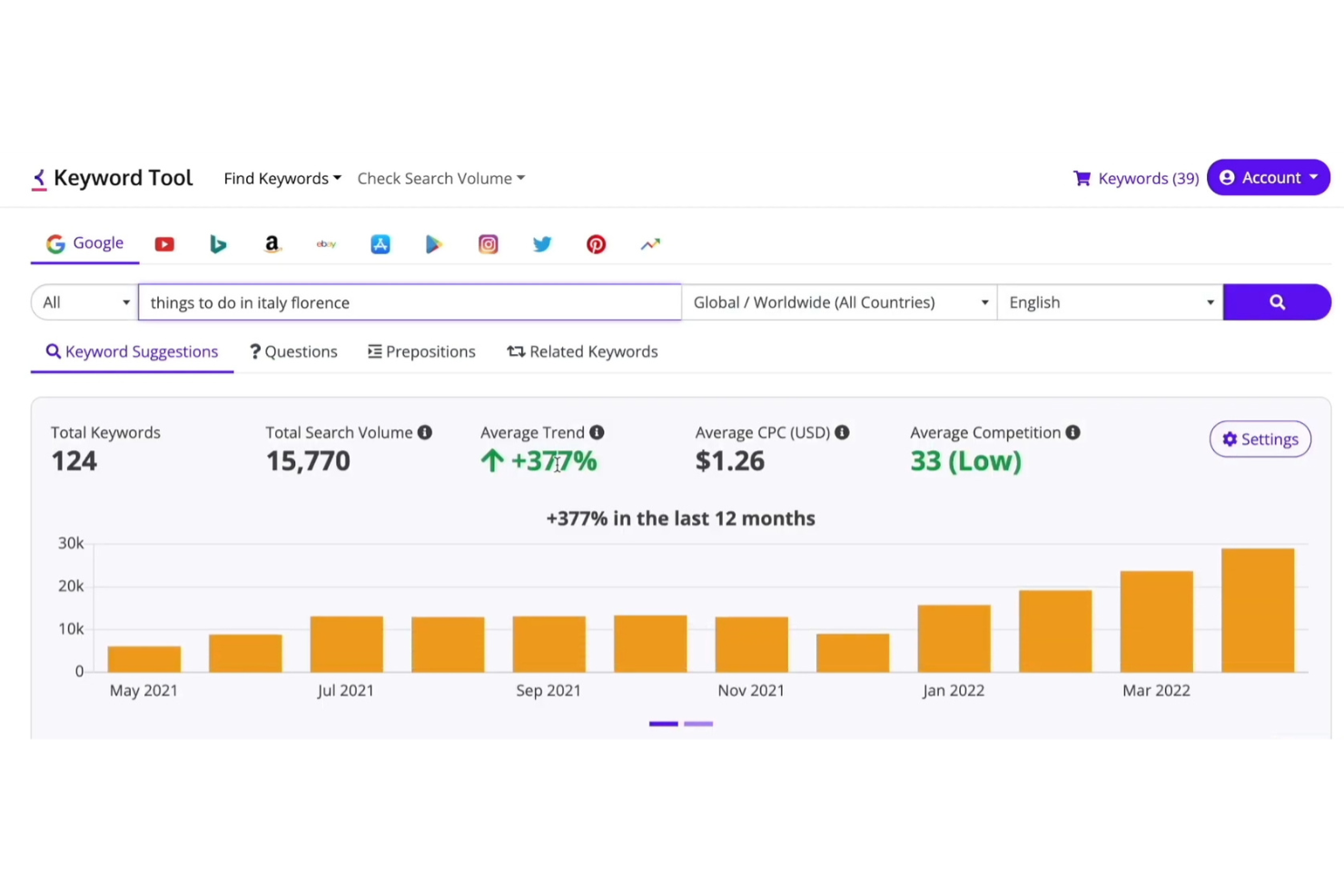
If you’re looking to uncover long-tail keyword ideas across multiple platforms, Keyword Tool is designed for that purpose. It’s especially useful for content marketers, SEO specialists, and PPC managers who want to expand their keyword lists beyond what most tools provide. By pulling suggestions from Google, YouTube, Amazon, and more, it helps you find untapped phrases your audience is actually searching for.
Why I Picked Keyword Tool
Unlike many keyword research tools that focus on short, high-competition terms, Keyword Tool specializes in surfacing long-tail keyword ideas from real user queries. I picked it because it pulls keyword suggestions from Google Autocomplete, YouTube, Amazon, Bing, and other major platforms, giving you access to a wide range of search intent data. The tool also lets you filter results by language and location, so you can tailor your research to specific markets. For anyone who needs to build out content or ad campaigns with highly targeted, less competitive keywords, Keyword Tool offers a unique advantage.
Keyword Tool Key Features
Some other features that make Keyword Tool useful for keyword research include:
- Bulk Keyword Search: Enter multiple seed keywords at once to generate a large list of suggestions quickly.
- Negative Keyword Filtering: Exclude unwanted terms from your results to refine your keyword lists.
- Export to CSV: Download your keyword data for further analysis or sharing with your team.
- Search Volume Data: View estimated monthly search volumes for each keyword suggestion.
Keyword Tool Integrations
API is available for custom integrations.
Pros and Cons
Pros:
- Supports export of keyword lists to CSV
- Offers bulk keyword search functionality
- Generates keyword ideas for multiple platforms
Cons:
- Lacks backlink or domain authority metric
- No competitor keyword analysis features

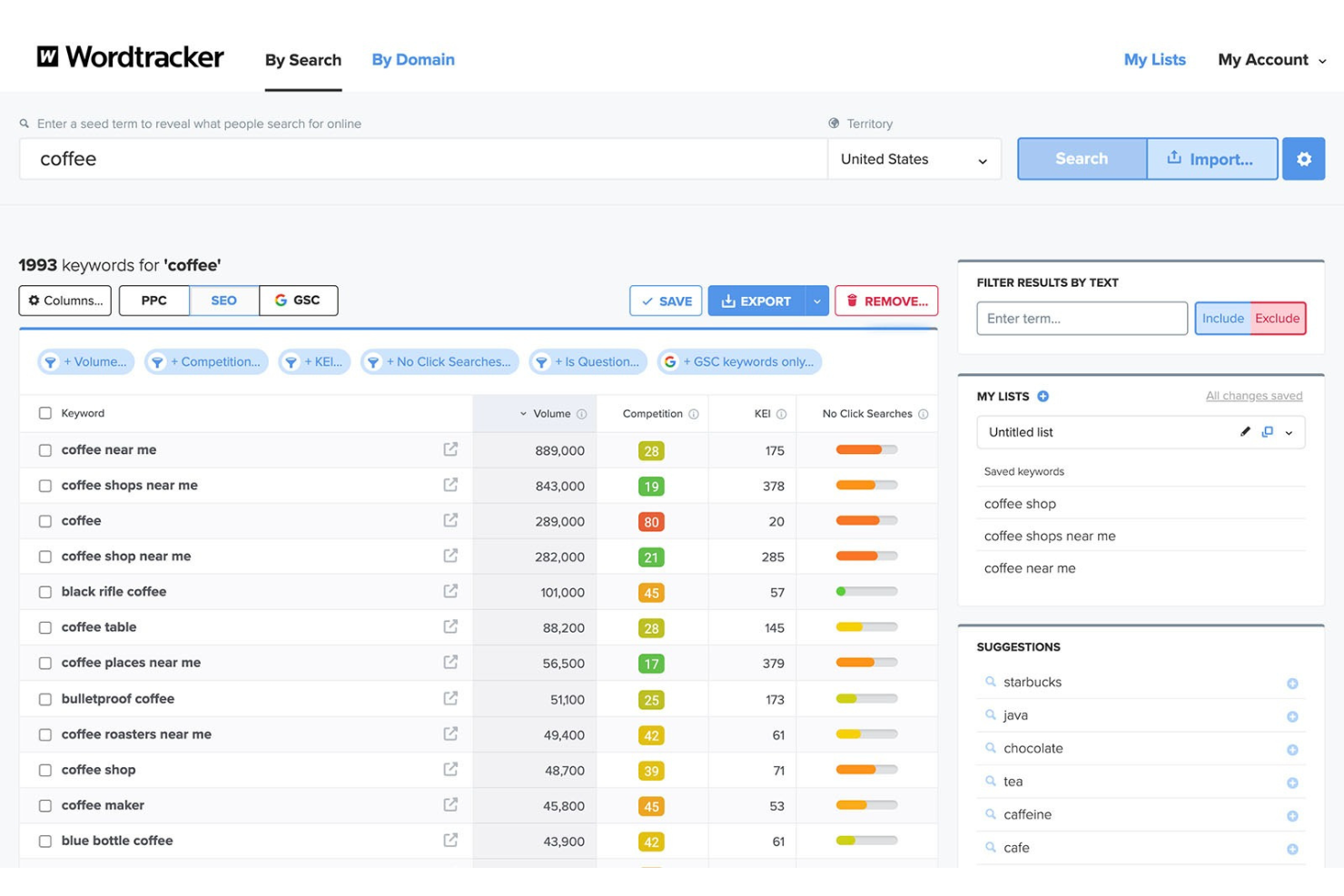
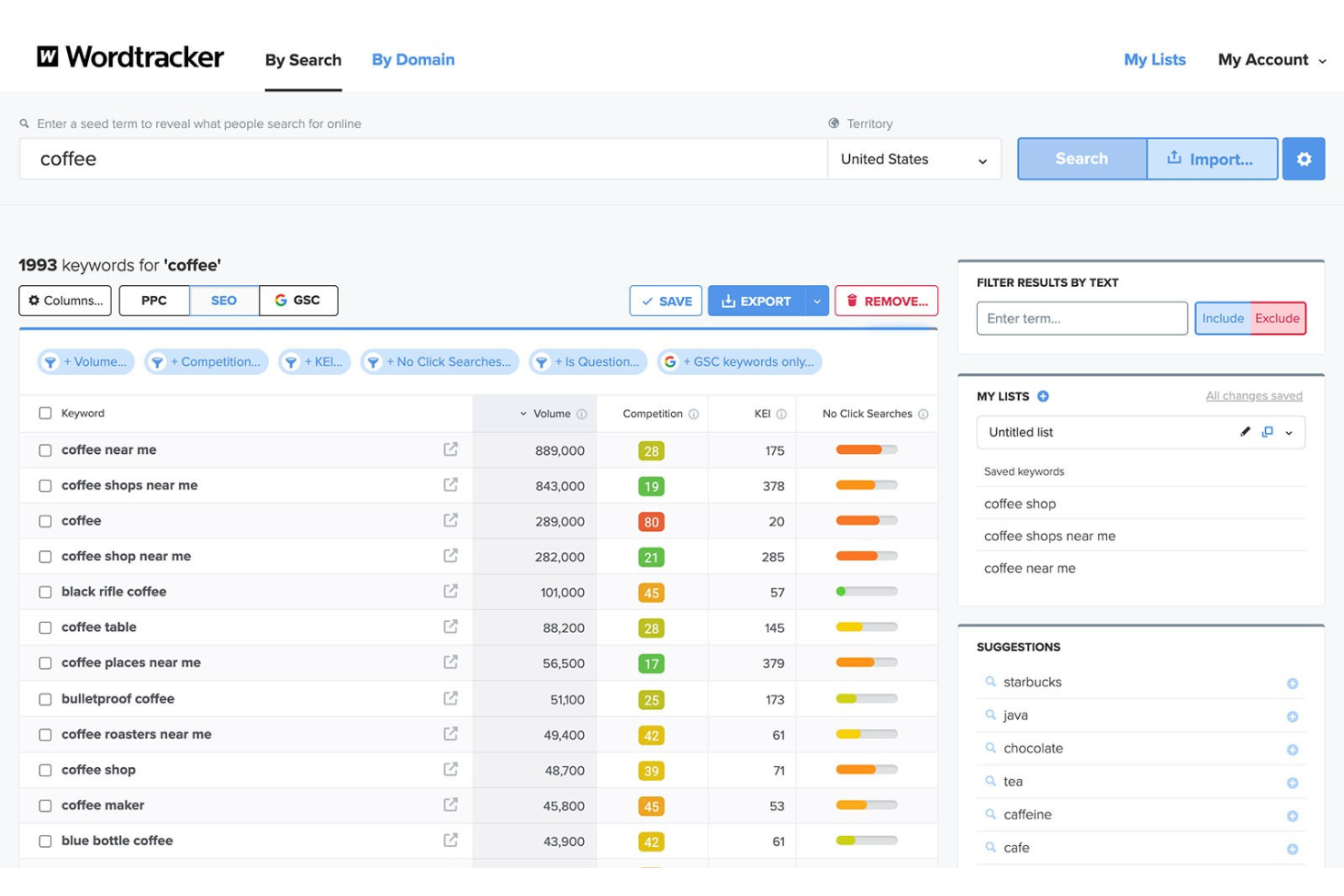
Wordtracker is built for marketers and SEO professionals who need up-to-the-minute insights into search trends. It’s especially useful if you want to spot emerging keywords and adapt your content strategy quickly. With real-time data and trend tracking, you can respond to shifts in search behavior as they happen.
Why I Picked Wordtracker
What sets Wordtracker apart is its focus on delivering real-time search trend insights, which is essential for anyone who wants to stay ahead of shifting search behaviors. I picked it because it updates keyword data continuously, so you can spot trending topics and new opportunities as they emerge. The tool also provides a dedicated trends feature that highlights rising and falling keywords, helping you adjust your strategy quickly. For marketers and SEO professionals who need to react fast to changes in search demand, Wordtracker offers a clear advantage.
Wordtracker Key Features
Some other features that make Wordtracker valuable for keyword research include:
- Competitor Keyword Analysis: Uncover the keywords your competitors are ranking for to inform your own strategy.
- SERP Preview Tool: See how your keywords appear in live search results with a built-in SERP preview.
- Keyword Niche Finder: Identify keyword clusters and niches to target for more focused campaigns.
- CSV Export: Download your keyword lists and research data for further analysis or sharing.
Wordtracker Integrations
Integrations are not publicly listed.
Pros and Cons
Pros:
- Has a niche keyword finder for campaign focus
- Provides competitor keyword discovery
- Supports real-time keyword trend tracking
Cons:
- No automated keyword rank tracking
- Lacks keyword difficulty scoring feature

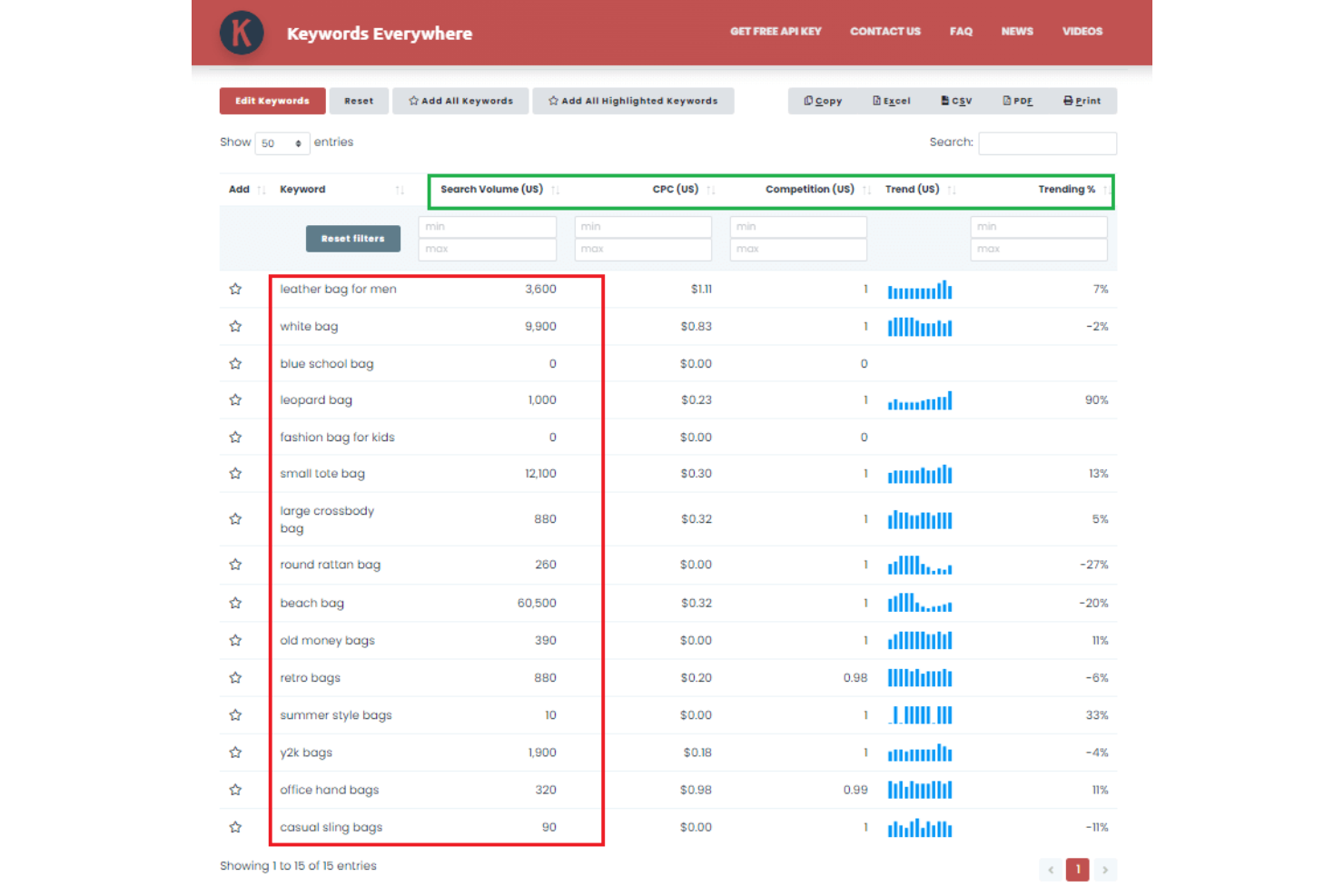
Keywords Everywhere brings keyword metrics directly into your browser as you search, making it a practical choice for marketers and content creators who want real-time data without switching tabs. It’s especially useful for freelancers, agencies, and small businesses looking to analyze what people search for on the fly, including volume and CPC. The tool helps you spot keyword opportunities instantly while browsing Google, YouTube, Amazon, and other major platforms.
Why I Picked Keywords Everywhere
Unlike most keyword research tools, Keywords Everywhere delivers keyword metrics right inside your browser as you search, which is why I picked it for browser-based keyword metrics. The tool overlays search volume, CPC, and competition data directly onto Google, YouTube, Amazon, and other major platforms, so you can evaluate keywords in real time without leaving your workflow. I appreciate how it highlights related keywords and “people also search for” suggestions alongside your search results. This approach makes it easy to spot opportunities and analyze trends as you browse, which is especially useful for marketers who want instant, context-aware insights.
Keywords Everywhere Key Features
Some other features that make Keywords Everywhere valuable for keyword research include:
- Bulk Keyword Upload: Import large lists of keywords to analyze search metrics in one go.
- Trend Data Visualization: View historical trend charts for keywords directly in your browser.
- On-Page SEO Audit: Run quick audits of any page to see keyword density and on-page elements.
- Export Options: Download keyword data in CSV, Excel, or PDF formats for further analysis.
Keywords Everywhere Integrations
Integrations include Google Search, Google Search Console, Google Analytics, Google Trends, Google Keyword Planner, Bing, YouTube, Amazon, eBay, and more.
Pros and Cons
Pros:
- Shows keyword metrics on YouTube and Amazon
- Credits-based pricing for flexible usage
- Browser extension overlays data on search pages
Cons:
- No project or campaign organization features
- No in-depth competitor keyword analysis


Keyword Research Tools Selection Criteria
When selecting the best keyword research tools to include in this list, I considered common buyer needs and pain points like finding accurate search volume data and uncovering new keyword opportunities. I also used the following framework to keep my evaluation structured and fair:
Core Functionality (25% of total score)
To be considered for inclusion in this list, each solution had to fulfill these common use cases:
- Discover new keyword ideas
- Analyze keyword search volume
- Assess keyword competition
- Track keyword rankings over time
- Export keyword data for reporting
Additional Standout Features (25% of total score)
To help further narrow down the competition, I also looked for unique features, such as:
- Visual keyword mapping or clustering
- SERP feature tracking and analysis
- Integration with content optimization tools
- Historical keyword trend data
- Automated keyword grouping
Usability (10% of total score)
To get a sense of the usability of each system, I considered the following:
- Clean and intuitive interface design
- Logical workflow for keyword research tasks
- Customizable dashboards or reports
- Fast data loading and navigation
- Accessibility across devices
Onboarding (10% of total score)
To evaluate the onboarding experience for each platform, I considered the following:
- Step-by-step product tours or walkthroughs
- Availability of training videos and tutorials
- Pre-built templates for keyword research
- Access to live webinars or onboarding sessions
- In-app chatbots or help widgets
Customer Support (10% of total score)
To assess each software provider’s customer support services, I considered the following:
- Live chat or real-time support options
- Email and ticketing system responsiveness
- Availability of a searchable help center
- Access to community forums or user groups
- Quality of documentation and FAQs
Value For Money (10% of total score)
To evaluate the value for money of each platform, I considered the following:
- Transparent and flexible pricing plans
- Features included at each pricing tier
- Free trial or free plan availability
- Cost compared to similar tools
- Scalability for growing teams
Customer Reviews (10% of total score)
To get a sense of overall customer satisfaction, I considered the following when reading customer reviews:
- Reported accuracy of keyword data
- Satisfaction with feature set
- Feedback on customer support experiences
- Comments on ease of use
- Value for price paid
How to Choose Keyword Research Tools
It’s easy to get bogged down in long feature lists and complex pricing structures. To help you stay focused as you work through your unique software selection process, here’s a checklist of factors to keep in mind:
| Factor | What to Consider |
| Scalability | Will the tool handle your growing keyword lists, multiple projects, or additional users as your team expands? |
| Integrations | Does the tool connect natively with your analytics, reporting, or content platforms (like Google Analytics or WordPress)? |
| Customizability | Can you tailor reports, dashboards, or keyword groupings to match your workflow and reporting needs? |
| Ease of use | Is the interface intuitive for your team’s skill level, or will it require significant training or adjustment? |
| Implementation and onboarding | How quickly can your team get up and running? Are there onboarding resources, migration support, or guided tours? |
| Cost | Does the pricing fit your budget, and are there hidden costs for data limits, users, or advanced features? |
| Security safeguards | Does the tool offer data encryption, user permissions, and compliance with your organization’s security standards? |
| Support availability | What support channels are available (chat, email, phone), and are response times fast enough for your needs? |
What Are Keyword Research Tools?
Keyword research tools are software platforms that help you discover, analyze, and organize keywords for search engine optimization and content planning. These tools provide data on search volume, competition, and related queries, allowing marketers to identify valuable keywords and understand user intent. By using keyword research tools, you can prioritize topics, optimize content, and improve your visibility in search engine and social media results.
Features of Keyword Research Tools
When selecting keyword research tools, keep an eye out for the following key features:
- Keyword discovery: Uncovers new keyword ideas and low-competition keywords based on seed terms to expand your content strategy.
- Search volume analysis: Provides monthly search volume estimates for keywords, helping you gauge potential traffic and prioritize targets.
- Keyword difficulty scoring: Assesses how challenging it is to rank for a keyword by analyzing competition and authority in search results.
- SERP analysis: Shows the current top-ranking pages for a keyword, including featured snippets, ads, and other SERP features.
- Competitor keyword analysis: Identifies which keywords your competitors rank for, revealing gaps and opportunities in your own strategy.
- Keyword grouping: Organizes keywords into clusters or themes, making it easier to plan content and track performance by topic.
- Trend tracking: Monitors changes in keyword popularity over time, helping you spot seasonal shifts or emerging topics.
- Export and reporting: Allows you to download keyword lists and generate reports for sharing insights with your team or stakeholders.
- Geographic and language targeting: Filters keyword data by country or language, supporting localized SEO and international campaigns.
Benefits of Keyword Research Tools
Implementing keyword research tools provides several benefits for your digital marketing team and your business. Here are a few you can look forward to:
- Improved content planning: Access to keyword discovery and grouping features helps you build content calendars around topics your audience is searching for.
- Higher search visibility: Search volume and difficulty analysis enable you to target keywords with the best potential for ranking and search traffic.
- Competitive insights: Competitor keyword analysis reveals gaps and opportunities, allowing you to refine your strategy based on real market data.
- Data-driven decision making: Reliable metrics and trend tracking support more informed choices about which keywords to prioritize and when to update content.
- Efficient reporting: Export and reporting features make it easy to share keyword research findings with stakeholders and track progress over time.
- Localized SEO strategies: Geographic and language targeting ensure your keyword research aligns with specific markets and audience segments.
- Faster workflow: Bulk search and export capabilities save time on research and allow your team to focus on execution.
Costs and Pricing of Keyword Research Tools
Selecting keyword research tools requires an understanding of the various pricing models and plans available. Costs vary based on features, team size, add-ons, and more. The table below summarizes common plans, their average prices, and typical features included in keyword research tools solutions:
Plan Comparison Table for Keyword Research Tools
| Plan Type | Average Price | Common Features |
| Free Plan | $0 | Limited keyword searches, basic keyword metrics, restricted export options, and single-user access. |
| Personal Plan | $15-$40/ user/month | Full keyword discovery, search volume data, basic competitor analysis, and standard reporting tools. |
| Business Plan | $50-$120/ user/month | Advanced keyword metrics, bulk search, team collaboration, priority support, and enhanced exports. |
| Enterprise Plan | $150-$500+/month | Custom integrations, API access, unlimited users, dedicated account management, and advanced security controls. |
Keyword Research Tools FAQs
Here are some answers to common questions about keyword research tools:
How accurate is the search volume data in keyword research tools?
Search volume data is an estimate based on aggregated search engine data and third-party sources. While it gives a useful benchmark for keyword popularity, actual numbers may vary. Use these figures for comparison and trend analysis rather than as exact counts.
Can keyword research tools help with local SEO?
Yes, most keyword research tools offer geographic and language filters. This lets you find keywords relevant to specific regions or languages, which is essential for targeting local audiences and optimizing for local search intent.
What’s the difference between keyword difficulty and competition?
Keyword difficulty measures how hard it is to rank for a keyword based on current top-ranking pages and their authority. Competition usually refers to how many advertisers are bidding on a keyword in paid search. Both metrics help you prioritize which keywords to target.
Do I need technical skills to use keyword research tools?
No, most keyword research tools are designed for marketers and content creators without technical backgrounds. Look for tools with beginner-friendly interfaces, guided onboarding, and clear documentation to help you get started quickly.
How often should I update my keyword research?
Update your keyword research at least quarterly or whenever you launch new campaigns, products, or enter new markets. Search trends and competition can shift, especially with the rise of AI tools like ChatGPT, so regular updates help you stay aligned with audience interests.
What’s Next:
If you're in the process of researching keyword research tools, connect with a SoftwareSelect advisor for free recommendations.
You fill out a form and have a quick chat where they get into the specifics of your needs. Then you'll get a shortlist of software to review. They'll even support you through the entire buying process, including price negotiations.