
14 Best White Label SEO Tools for 2026

Best White Label SEO Tools Shortlist
Here’s my shortlist of white label SEO tools:


White label SEO tools are software platforms that let your agency deliver SEO services and reports under your own brand, without revealing third-party providers. If you’re searching for the best white label SEO tools, you’re likely focused on scaling your client offerings, automating reporting, and maintaining a consistent brand experience.
With so many options available, it’s tough to know which platforms actually deliver the features, integrations, and flexibility your agency needs. This list breaks down the top solutions, so you can confidently choose tools that fit your workflow, impress clients, and help you grow your business.
Why Trust Our Software Reviews
Best White Label SEO Tools Summary
This comparison chart summarizes pricing details for my top White Label SEO tools selections to help you find the best one for your budget and business needs.
| Tool | Best For | Trial Info | Price | ||
|---|---|---|---|---|---|
| 1 | Best for customizable client reporting | 14-day free trial available | From $103.20/month (billed annually) | Website | |
| 2 | Best for instant website audits | 14-day free trial available | From $29/month | Website | |
| 3 | Best for local citation management | 14-day free trial + free demo available | From $29/month (billed annually) | Website | |
| 4 | Best for integrated sales enablement | Free demo available | From $79/month (billed annually) | Website | |
| 5 | Best for PPC and SEO report templates | 14-day free trial | From $75/month | Website | |
| 6 | Best for multi-user team collaboration | 14-day free trial | From $99/month (billed annually) | Website | |
| 7 | Best for automated performance reports | 14-day free trial available | From $69/month | Website | |
| 8 | Best for lead generation tools | 15-day free trial available | From $9/month | Website | |
| 9 | Best for scalable fulfillment services | Free demo available | From $499/month | Website | |
| 10 | Best for branded analytics dashboards | 7-day free trial available | From $99/month | Website |
-

Demandbase
Visit WebsiteThis is an aggregated rating for this tool including ratings from Crozdesk users and ratings from other sites.4.4 -
6sense
Visit WebsiteThis is an aggregated rating for this tool including ratings from Crozdesk users and ratings from other sites.4.3 -
AnswerThePublic
Visit Website


Best White Label SEO Tools Reviews
Below are my detailed summaries of the white label SEO tools that made it onto my shortlist. My reviews offer a detailed look at the features, best use cases, and integrations of each platform to help you find the best one for your agency.

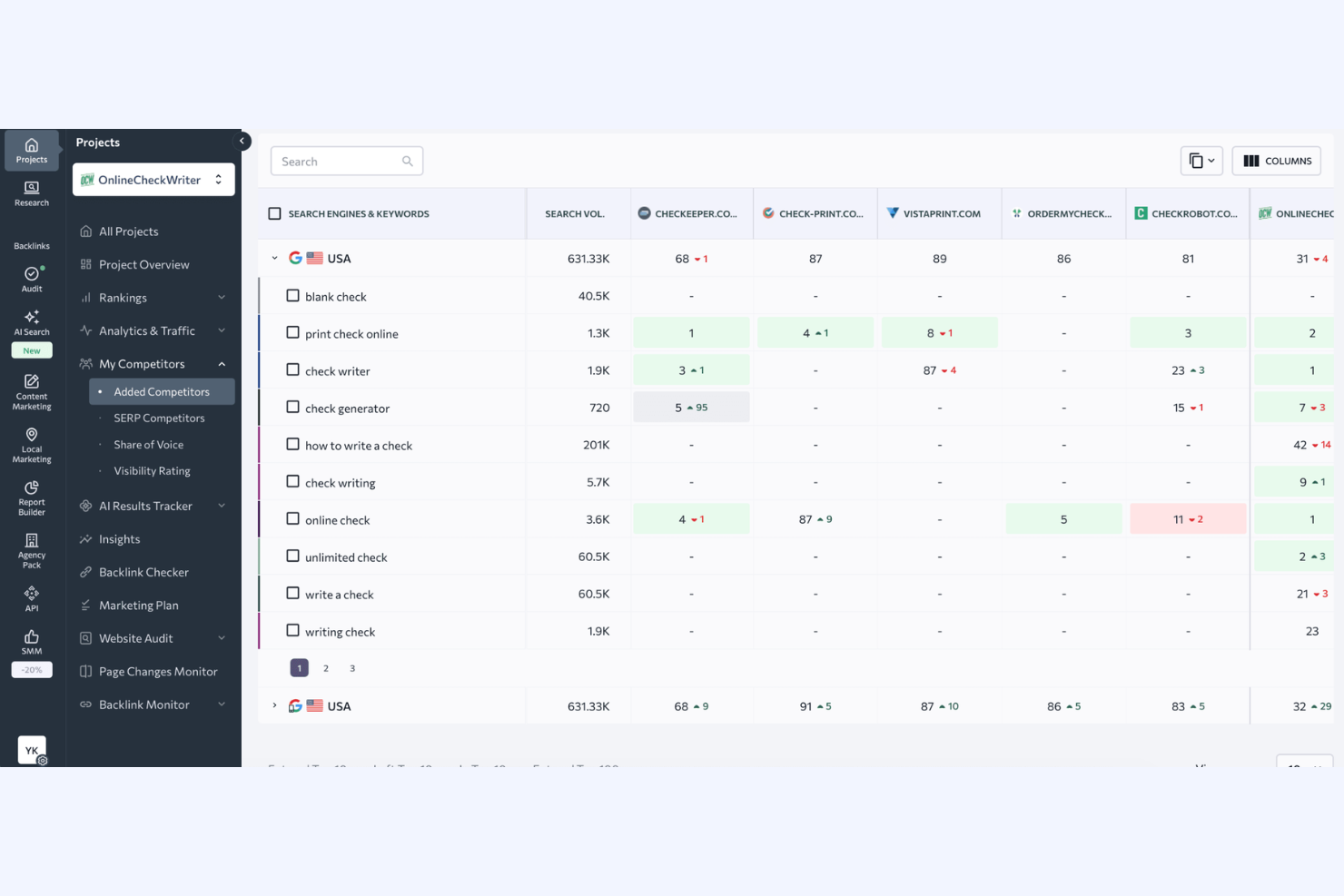
SE Ranking gives agencies and consultants a flexible platform for delivering branded SEO reports to clients. Its white labeling features let you customize dashboards, automate reporting, and manage multiple projects under your own brand. If you need to present professional, client-ready insights without revealing your tech stack, SE Ranking is built for you.
Why I Picked SE Ranking
For agencies that need to deliver fully branded, client-facing SEO reports, SE Ranking stands out for its customizable reporting options. I picked SE Ranking because it lets you tailor every aspect of your reports and dashboards, from adding your logo and brand colors to using a custom white label domain. The platform also supports automated report scheduling, so clients receive updates directly from your agency without any third-party branding. This level of control over client communications is essential for agencies that want to reinforce their brand at every touchpoint.
SE Ranking Key Features
Some other features in SE Ranking make it a versatile choice for agencies managing multiple SEO projects:
- Keyword Rank Tracker: Monitor keyword positions across SERPs and locations for all your client projects.
- Website Audit Tool: Scan client sites for technical SEO issues and generate actionable audit reports.
- Backlink Monitoring: Track new and lost backlinks, and analyze the quality of referring domains.
- Competitor Analysis: Compare your clients’ SEO performance with competitors to identify new opportunities and threats.
SE Ranking Integrations
Integrations include Google Analytics, Google Search Console, Looker Studio, Make, and a native API for custom integrations.
Pros and Cons
Pros:
- Automated report scheduling for multiple clients
- Dashboard with custom domain support
- Fully customizable client-facing SEO reports
Cons:
- Limited branding options for email notifications
- No client portal mobile app

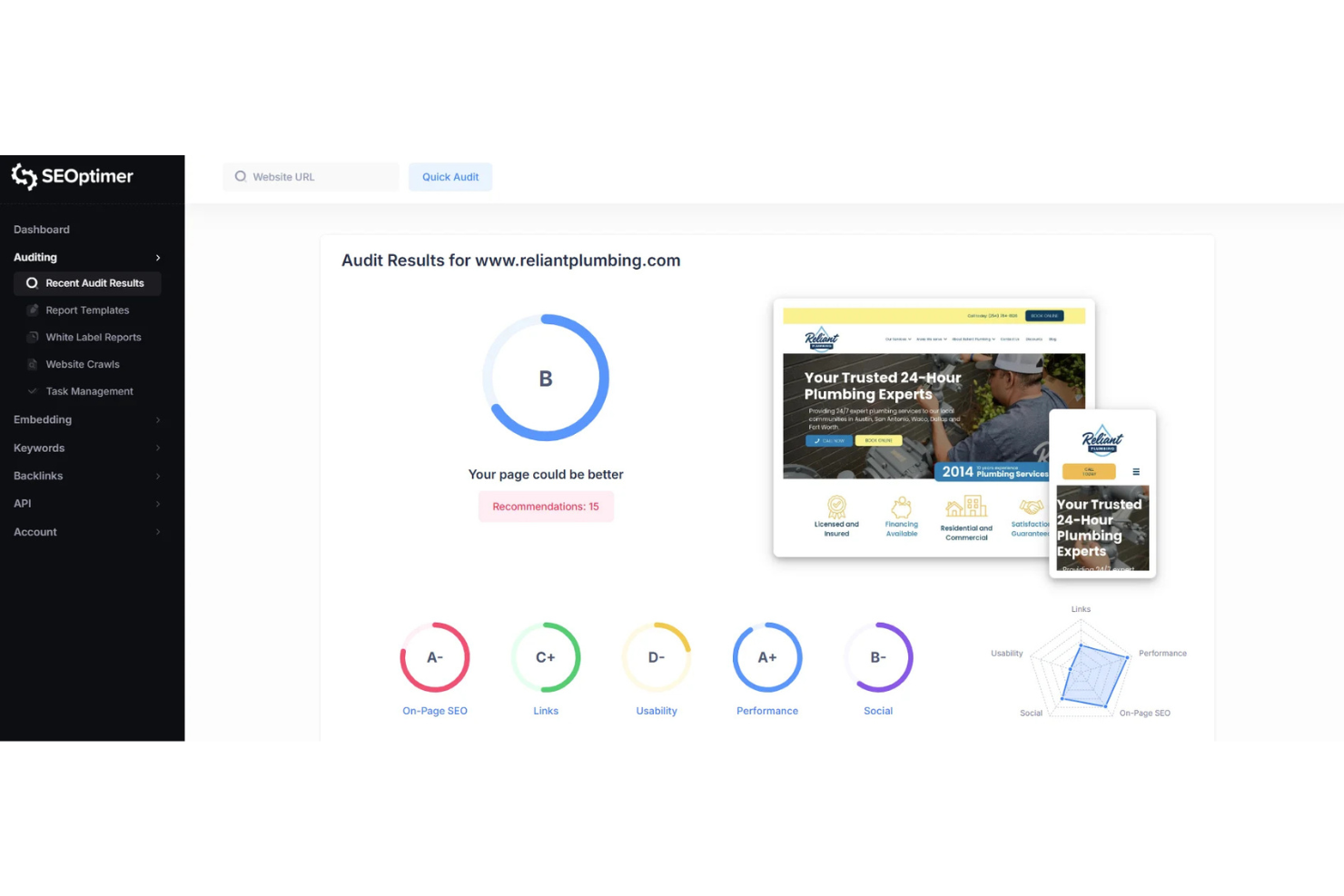
If you need to deliver instant, branded website audits to prospects or clients, SEOptimer is built for that task. Agencies and consultants can use its white label audit tool to generate detailed, client-ready reports in seconds. For anyone looking to add lead generation or quick SEO assessments to their service offering, SEOptimer makes it easy to present professional results under your own brand.
Why I Picked SEOptimer
When you need to provide immediate SEO insights to clients or prospects, SEOptimer stands out for its instant website audit capabilities. I picked SEOptimer because it lets you generate detailed, white label audit reports in seconds, making it ideal for agencies that want to impress leads or deliver quick value. The platform’s audit tool covers on-page SEO, technical issues, and usability, all packaged in a customizable, branded format. For anyone focused on rapid assessments and lead generation, SEOptimer’s instant audit and white label reporting features are a strong fit.
SEOptimer Key Features
Some other features that make SEOptimer useful for agencies and consultants include:
- Embeddable Audit Form: Add a customizable audit form to your website to capture leads directly.
- White Label PDF Reports: Download audit results as branded PDFs for client presentations.
- Multi-Language Support: Generate audit reports in over 20 different languages.
- SEO Crawler: Scan entire websites for SEO issues beyond just the homepage.
SEOptimer Integrations
Integrations include Mailchimp, ActiveCampaign, Salesforce, and an API is available for custom integrations.
Pros and Cons
Pros:
- Branded PDF downloads for client presentations
- Multi-language report support for global clients
- Embeddable audit form for lead capture
Cons:
- No automated recurring audit scheduling
- Audit reports lack competitor research

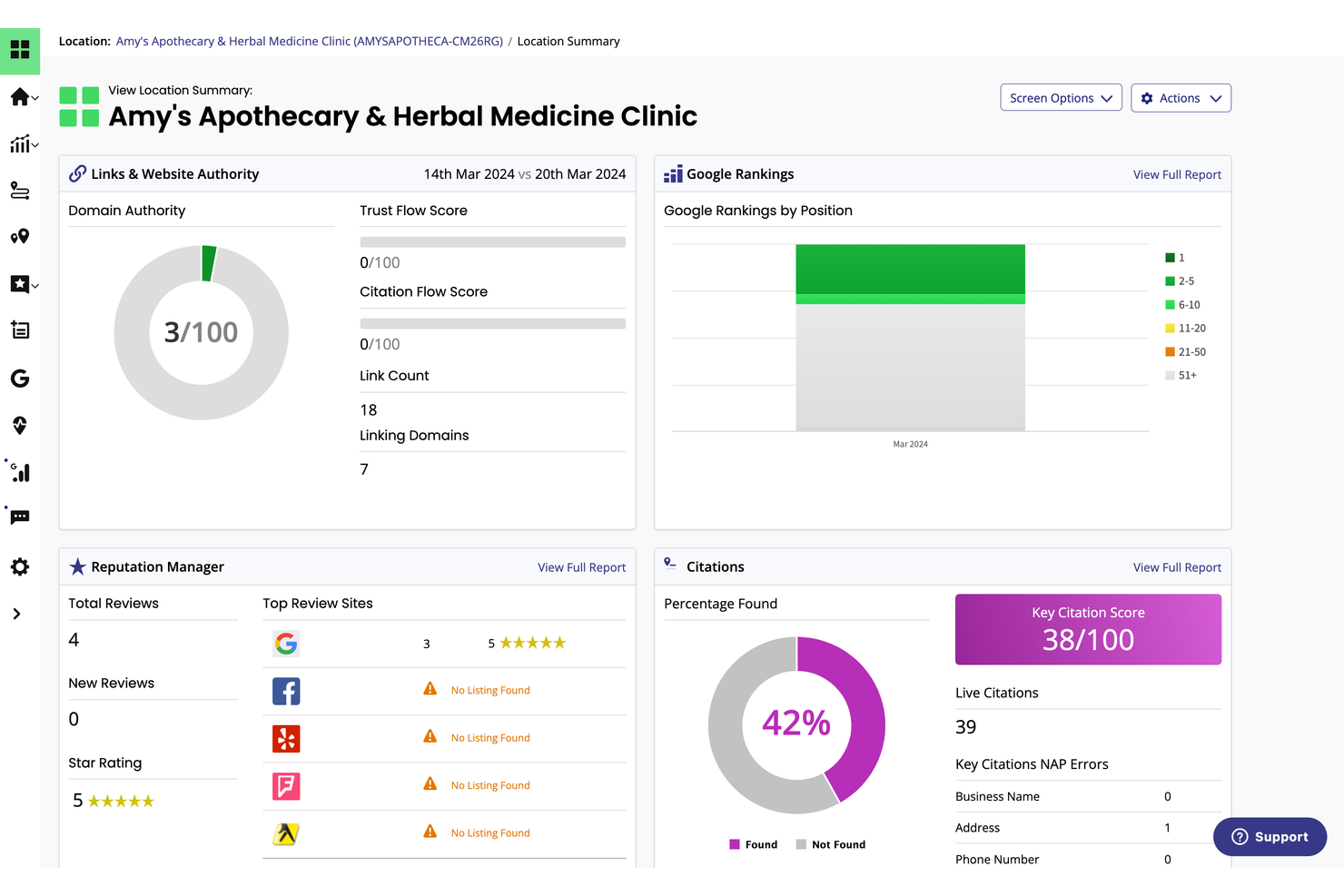
BrightLocal is purpose-built for agencies and consultants who manage local SEO for multiple clients. Its white label features let you deliver branded citation tracking, reputation management, and local search audit reports under your own agency’s name. If you need to handle local listings and reputation at scale while keeping your brand front and center, BrightLocal is designed for that job.
Why I Picked BrightLocal
Managing local citations across dozens of directories can be a challenge for agencies handling multiple client locations. I picked BrightLocal because it specializes in local citation management and gives you white label tools to track, update, and audit listings at scale. The platform lets you generate branded reports on citation accuracy and local search performance, so your name stays front and center with clients, promoting agency growth. For anyone focused on local SEO, BrightLocal’s citation tracking and reporting features are purpose-built for agency workflows.
BrightLocal Key Features
In addition to its citation management strengths, BrightLocal offers several other features for agencies working with local SEO clients:
- Reputation Manager: Collect and monitor client reviews from multiple platforms in one dashboard.
- Google Business Profile Audit: Analyze and report on Google Business Profile optimization for each client.
- Local Search Rank Tracker: Track keyword rankings for specific locations and map packs.
- White Label Client Portal: Give clients access to a branded portal for viewing their SEO reports and progress.
BrightLocal Integrations
Integrations include Google Business Profile, Facebook, and Trustpilot.
Pros and Cons
Pros:
- Bulk citation submission and audit features
- Local rank tracking for multiple locations
- Branded local SEO reports for multiple clients
Cons:
- Citation updates can take several weeks
- Limited integrations with third-party platforms

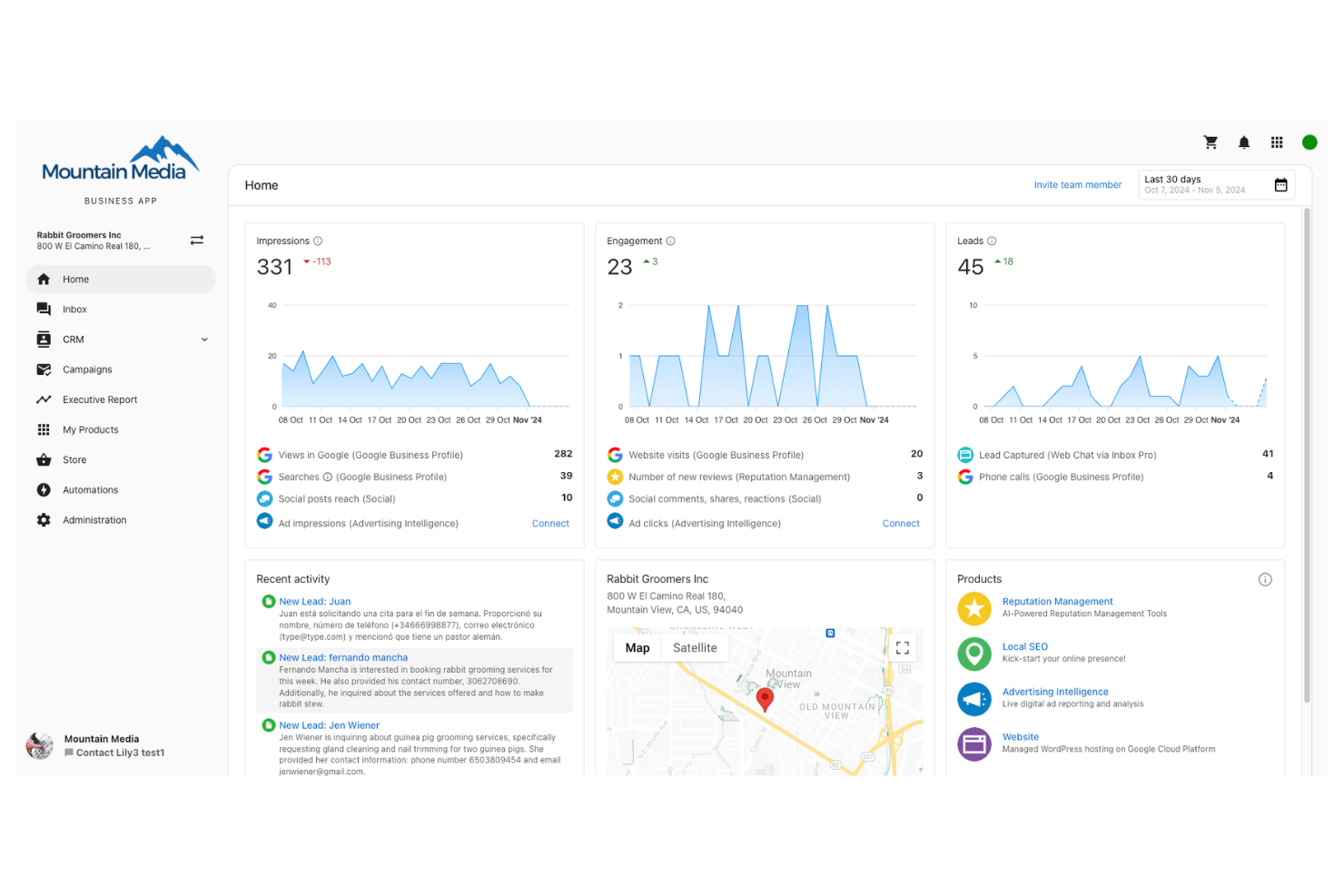
If you’re searching for a white label SEO platform that also supports sales enablement, Vendasta brings both together in one place. Agencies and resellers can use Vendasta to deliver white label SEO services while managing sales pipelines, proposals, and client onboarding from a single dashboard. This integrated approach helps teams close deals and launch SEO campaigns without switching between multiple tools.
Why I Picked Vendasta
What sets Vendasta apart for white label SEO is its built-in sales enablement tools that go beyond standard SEO platforms. I picked Vendasta because it lets agencies manage the entire sales process—from prospecting and quoting to onboarding—alongside their SEO service delivery. The platform’s proposal builder and CRM features help teams move leads through the funnel while keeping everything branded for the agency. If you want to offer SEO services and manage sales workflows without juggling separate systems, Vendasta brings these functions together in one place.
Vendasta Key Features
Some other features that make Vendasta useful for agencies include:
- White Label Client Portal: Give clients access to a branded dashboard for tracking SEO progress and deliverables.
- Marketplace of Resellable Services: Access a catalog of digital marketing and SEO services to resell under your own brand.
- Automated SEO Reporting: Generate and send scheduled, branded SEO reports directly to clients.
- Reputation Management Tools: Monitor and respond to client reviews and manage local listings from one place.
Vendasta Integrations
Integrations include Google Analytics, Google Business Profile, Yesware, MatchCraft, WordPress, QuickBooks, Stripe, and more.
Pros and Cons
Pros:
- Client portal supports agency branding
- Marketplace with resellable SEO products
- Built-in proposal builder for SEO services
Cons:
- Marketplace services vary in quality and scope
- SEO features depend on third-party providers

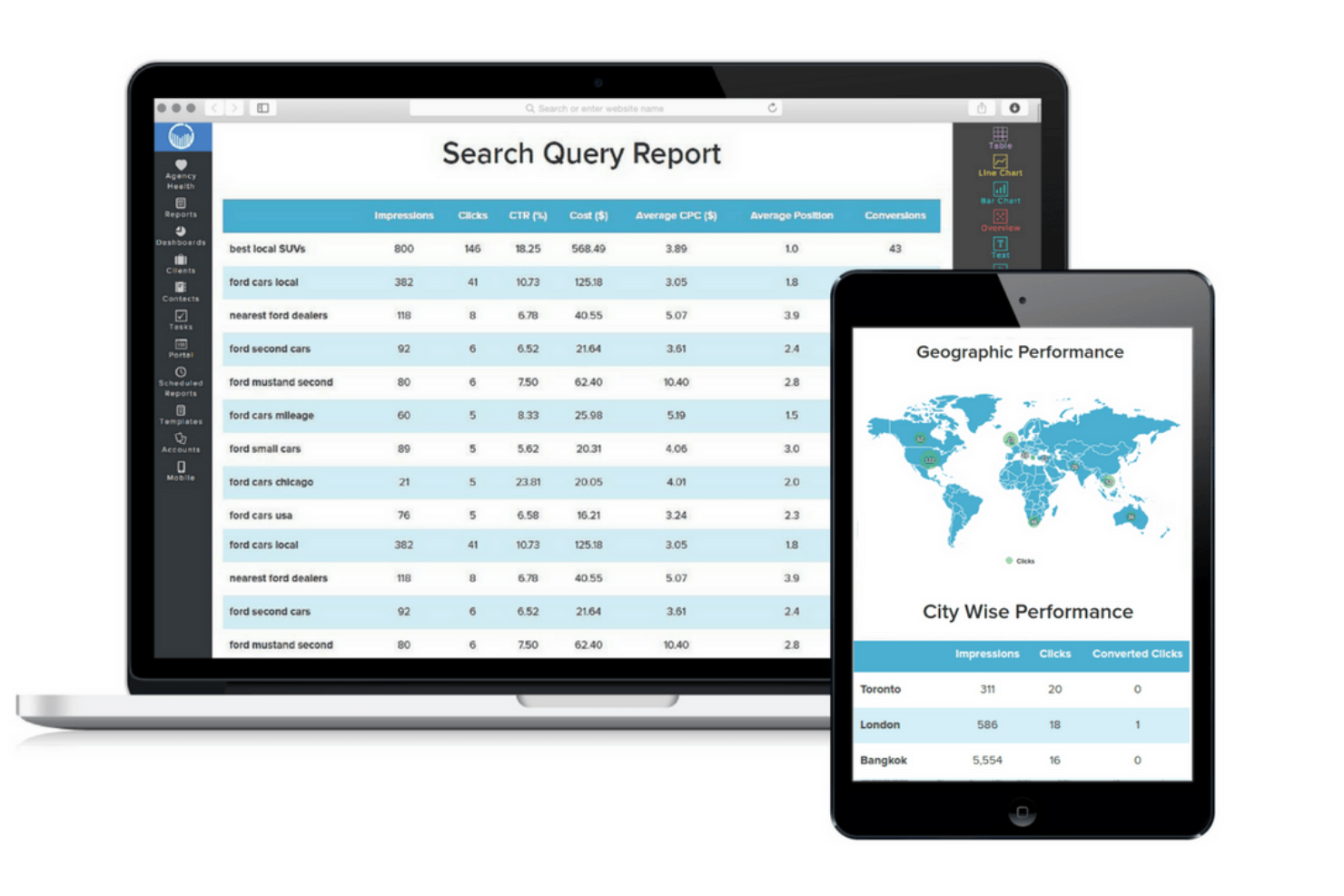
If you need ready-made templates for PPC and SEO reporting, ReportGarden is built for agencies and marketing teams managing multiple client accounts. The platform specializes in customizable, white label reports that cover Google Ads, Bing Ads, and SEO metrics in detail. For those who want to automate recurring client reports with minimal setup, ReportGarden offers a focused solution.
Why I Picked ReportGarden
For agencies that want to deliver polished PPC and SEO reports without building templates from scratch, ReportGarden stands out for its extensive library of pre-built report templates. I picked this tool because it lets you quickly generate white label reports for Google Ads, Bing Ads, and organic SEO performance, all with customizable branding. The drag-and-drop report builder makes it easy to tailor each report to client needs while maintaining a consistent, professional look. If your team values speed and consistency in client reporting, ReportGarden’s template-driven approach is a strong fit.
ReportGarden Key Features
In addition to its core PPC and SEO report templates, ReportGarden offers several other useful features for digital marketers and agencies:
- Custom Dashboard Creation: Allows users to build personalized dashboards to monitor key metrics in one place.
- Automated Report Scheduling: Enables automatic delivery of reports to clients or team members on a set schedule.
- Multi-Account Management: Supports managing multiple client accounts from a single interface for centralized workflow.
- Budget Tracking: Provides tools to track and manage advertising budgets across campaigns efficiently.
ReportGarden Integrations
Integrations include Google Ads, Google Analytics, LinkedIn Ads, Twitter Ads, Instagram Ads, CallRail, AdRoll, and more.
Pros and Cons
Pros:
- Budget tracking across multiple ad platforms
- White label client portal for direct access
- Pre-built templates for PPC and SEO reports
Cons:
- Limited support for custom data sources
- Occasional delays in pulling ad platform data

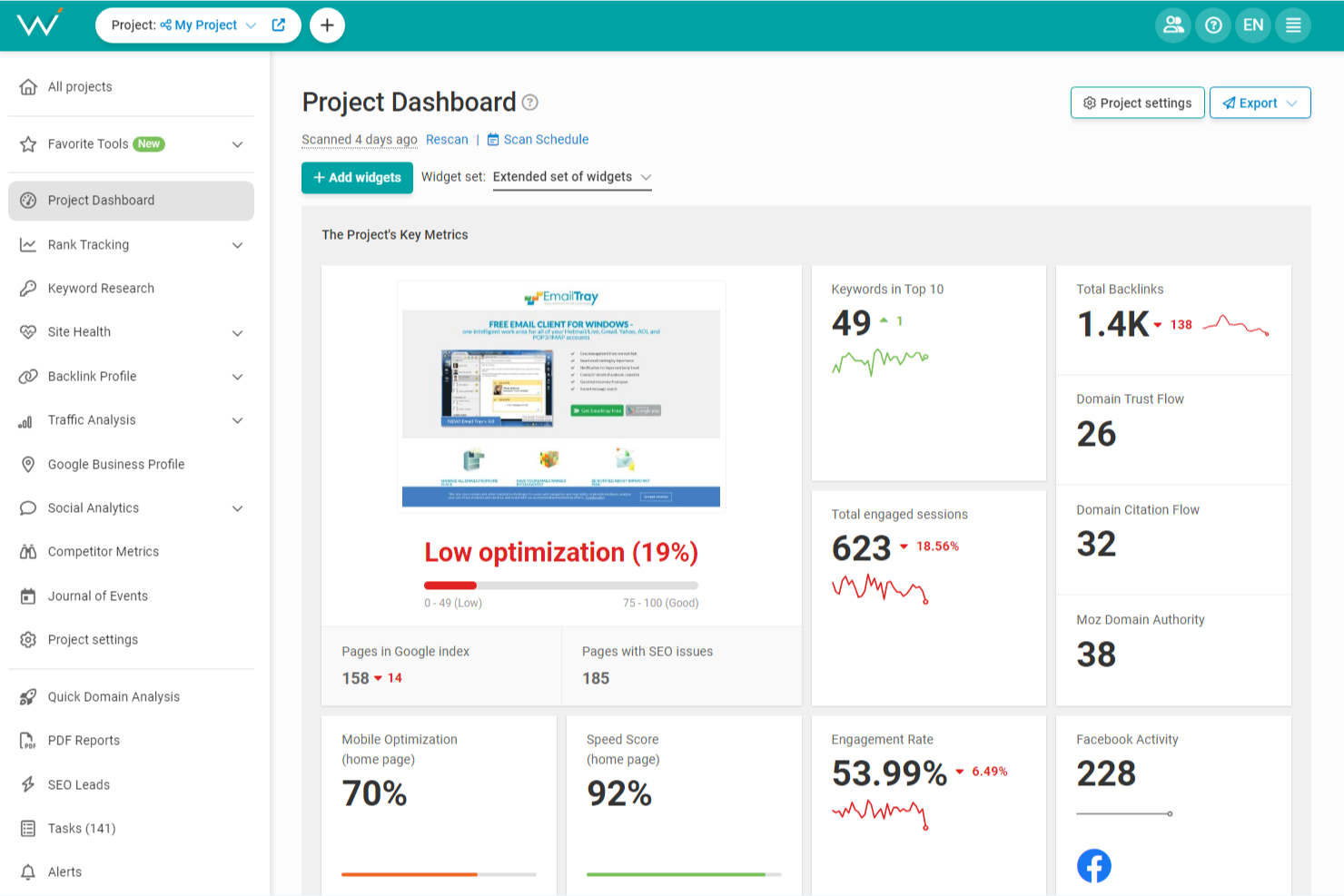
WebCEO is designed for agencies and marketing teams that need to manage SEO projects collaboratively across multiple users. Its white label dashboard and granular user permissions help teams coordinate tasks, share branded reports, and control client access. If you’re looking to centralize SEO work for clients while maintaining a professional, branded experience, WebCEO offers a flexible solution for multi-user environments.
Why I Picked WebCEO
For agencies that need to coordinate SEO work across multiple team members, WebCEO offers a true multi-user environment with white label capabilities. I picked WebCEO because it lets you assign granular user roles and permissions, so you can control who accesses specific projects or client data. The platform’s white label dashboard allows you to present a fully branded interface to clients, supporting agency branding at every touchpoint. If your team needs to collaborate on SEO tasks while maintaining a professional, client-facing experience, WebCEO is built for that level of coordination.
WebCEO Key Features
Some other features that make WebCEO valuable for agencies and teams include:
- Automated SEO Reporting: Schedule and send branded SEO reports to clients automatically.
- Competitor Tracking: Monitor competitor rankings and backlink profiles within your dashboard.
- SEO Audit Tool: Scan websites for technical SEO issues and optimization opportunities.
- Lead Generation Widget: Add a customizable audit widget to your website to capture new leads.
WebCEO Integrations
Integrations include Google Analytics, Google Search Console, Google Ads, Google Business Profile, Pinterest, and more.
Pros and Cons
Pros:
- Competitor tracking included in core platform
- Lead generation widget for agency websites
- Multi-user access with granular permission controls
Cons:
- No built-in content optimization recommendations
- Backlink data can lag behind competitors
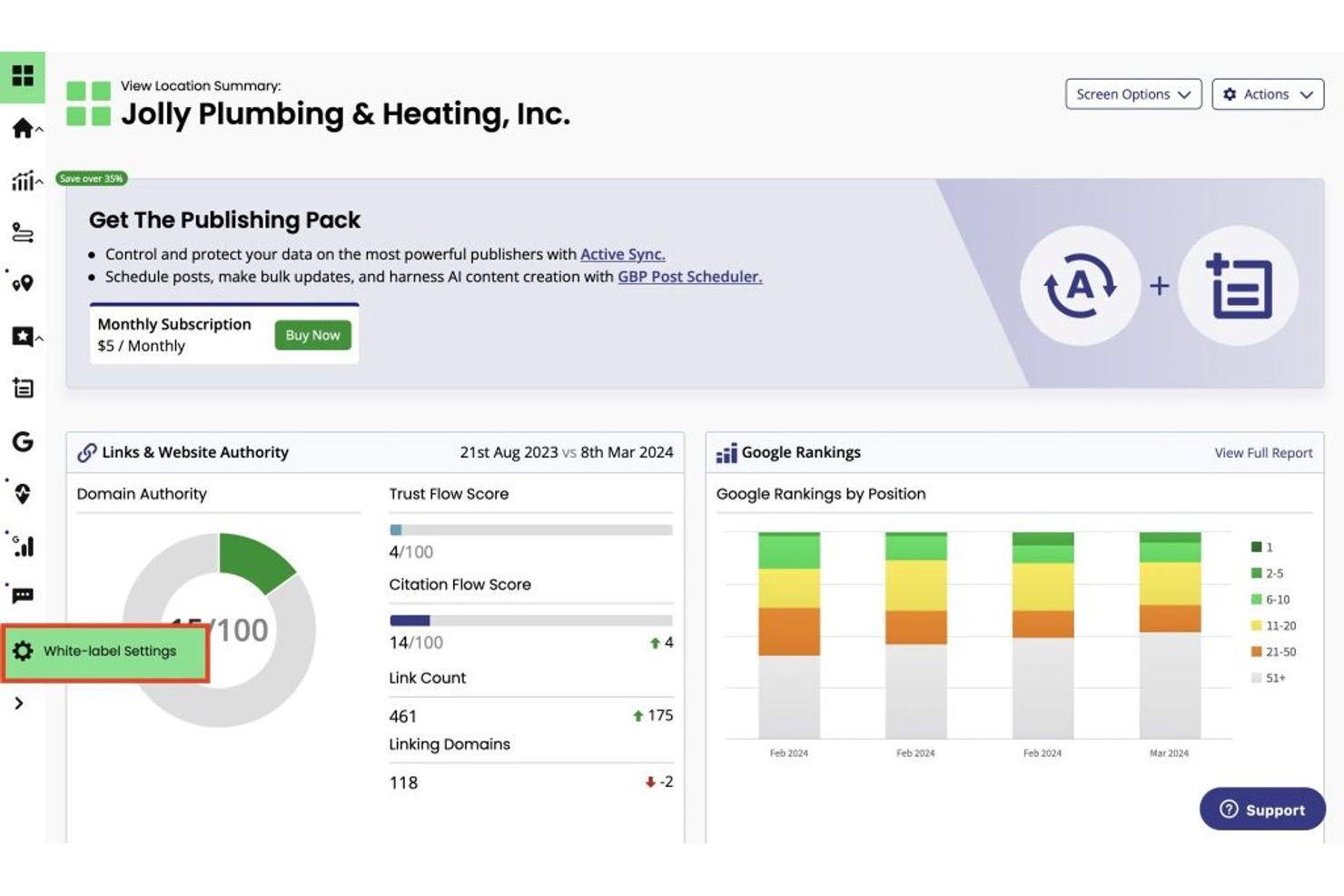
Swydo is built for agencies and marketers who need to automate client-facing performance reports across SEO, PPC, and analytics channels. The platform’s white label features let you deliver scheduled, branded reports that pull in data from multiple sources. If you’re looking to reduce manual reporting and keep clients updated with consistent, professional insights, Swydo is designed for that workflow.
Why I Picked Swydo
When you need to automate recurring performance reports for clients, Swydo offers a focused solution that stands out in the white label SEO software space. I picked Swydo because it lets you schedule and send branded reports that automatically pull in data from SEO, PPC, and analytics platforms. The platform’s template system makes it easy to standardize reporting across multiple clients while still allowing for customization where needed. This approach helps agencies maintain consistency and professionalism in their client communications without spending hours on manual report creation.
Swydo Key Features
I also found several other features that make Swydo valuable for agencies managing SEO reporting:
- Custom Branding Options: Apply your agency’s logo, colors, and contact details to every report.
- Client Portal: Give clients access to a secure portal where they can view their reports on demand.
- KPI Monitoring: Set and track custom KPIs for each client or campaign.
- Automated Alerts: Receive notifications when metrics hit predefined thresholds.
Swydo Integrations
Integrations include Google Ads, Meta Ads, Google Analytics, Instagram Ads, Semrush, and more.
Pros and Cons
Pros:
- Multi-channel data sources in one report
- KPI widgets allow tailored client dashboards
- Supports multiple agency identities
Cons:
- Limited report design flexibility
- No built-in SEO site audit tools


AgencyPlatform offers a suite of white label SEO tools with a strong focus on lead generation features for digital marketing agencies. It’s built for teams that want to capture, nurture, and convert leads directly from their branded dashboards. If you’re looking to combine SEO reporting with built-in lead capture and sales tools, AgencyPlatform brings those capabilities together in one place.
Why I Picked AgencyPlatform
What sets AgencyPlatform apart for me is its focus on lead generation tools built directly into its white label SEO platform. I picked AgencyPlatform because it lets agencies add branded lead capture widgets to their websites and landing pages, turning site visitors into prospects right from the start. The platform also includes a built-in CRM for tracking and managing leads, so you can follow up and nurture them without leaving your dashboard. This combination of SEO reporting and lead management makes it a strong fit for agencies that want to grow their client base while delivering SEO services.
AgencyPlatform Key Features
In addition to its lead generation focus, AgencyPlatform offers several other features worth noting:
- White Label SEO Audit Reports: Generate branded SEO audit reports for prospects and clients.
- Automated Client Reporting: Schedule and send recurring SEO performance reports under your agency’s branding.
- Reputation Management Module: Monitor and respond to client reviews from a single dashboard.
- Social Media Management Tools: Schedule posts and track engagement across multiple social platforms.
AgencyPlatform Integrations
Integrations include Meta, X, LinkedIn, Semrush, Moz, Google Search Console, Ahrefs, Google Analytics, CallRail, and more.
Pros and Cons
Pros:
- Includes reputation management for client reviews
- Social media scheduling included in dashboard
- Built-in lead capture widgets for agencies
Cons:
- Limited local SEO citation management tools
- No white label PPC reporting features

SEOReseller is designed for agencies and consultants who want to scale their SEO services without building an in-house fulfillment team. The platform offers a full suite of white label SEO deliverables, including link building, content, and technical audits, all managed under your brand. If you need a partner to handle high-volume SEO campaigns while you focus on client relationships, SEOReseller addresses that gap.
Why I Picked SEOReseller
For agencies that need to deliver SEO at scale, SEOReseller stands out because it offers a complete fulfillment service under your own brand. I picked SEOReseller for its ability to handle everything from keyword research and on-page optimization to link building and monthly reporting, all managed by their in-house team. The platform’s project dashboard lets you track deliverables and campaign progress without revealing the backend provider to your clients. This setup is especially useful if you want to grow your client base without hiring or training additional SEO staff.
SEOReseller Key Features
Some other features worth noting for agencies considering SEOReseller include:
- White Label Sales Proposals: Generate branded sales proposals to help you pitch SEO services to prospects.
- Client Dashboard: Give clients access to a portal where they can view campaign progress and reports.
- Reputation Management Tools: Monitor and manage client reviews and online reputation from a single interface.
- Local SEO Citation Building: Submit and manage business listings across multiple directories for local SEO campaigns.
SEOReseller Integrations
Native integrations are not currently listed.
Pros and Cons
Pros:
- Local SEO citation building included in packages
- Fulfillment covers content, links, and audits
- Dedicated account managers for campaign oversight
Cons:
- No built-in keyword tracking dashboard
- No native integrations with analytics platforms

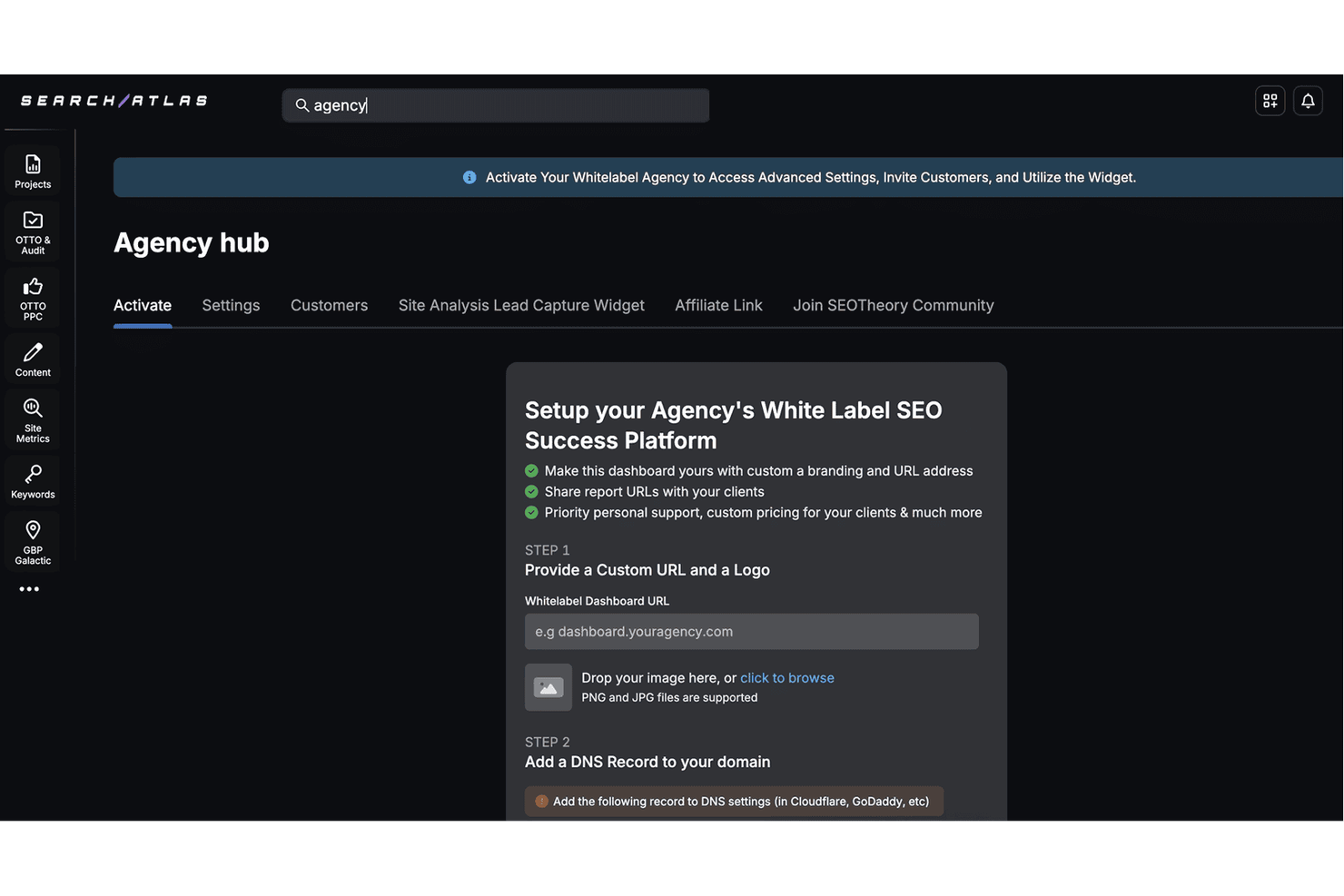
Search Atlas gives agencies and consultants a way to deliver branded SEO analytics dashboards to their clients. The platform is designed for teams that want to present real-time SEO data and campaign results under their own brand. With customizable dashboards and white label reporting tools, Search Atlas helps you keep clients informed while reinforcing your agency’s identity.
Why I Picked Search Atlas
For SEO agencies that want to deliver a fully branded analytics experience, Search Atlas stands out with its customizable dashboards and reporting. I picked Search Atlas because it lets you present SEO performance data under your own logo and color scheme, making every client touchpoint feel like an extension of your agency. The platform’s dashboard builder allows you to tailor which metrics and visualizations clients see, so you can highlight what matters most to each account. This focus on branded analytics helps agencies reinforce their value and professionalism with every report.
Search Atlas Key Features
Some other features that make Search Atlas useful for agencies include:
- Keyword Rank Tracking: Monitor keyword positions across multiple search engines and locations.
- Backlink Monitoring: Track new and lost backlinks for client domains.
- Competitor Analysis Tools: Compare client SEO performance against selected competitors.
- Automated Site Audits: Scan websites for technical SEO issues and generate actionable reports.
Search Atlas Integrations
Integrations include Shopify, WordPress, Google Business Profile, Google Ads, BrightLocal, AgencyAnalytics, DashThis, Zoho, and more.
Pros and Cons
Pros:
- Keyword tracking supports multiple search engines
- Competitor tracking included in all plans
- Supports agency logo and colors
Cons:
- Lacks PPC or paid media reporting features
- No built-in client communication tools
Other White Label SEO Tools
Here are some additional white label SEO tools options that didn’t make it onto my shortlist, but are still worth checking out:
- DashThis
For cross-channel data aggregation
- Semrush
For all-in-one SEO toolkit
- Whatagraph
For multi-source marketing reports
- Raven Tools
For historical SEO data tracking


White Label SEO Tools Selection Criteria
When selecting the best SEO tools for white labeling to include in this list, I considered common buyer needs and pain points like delivering branded reports to clients and automating recurring SEO tasks. I also used the following framework to keep my evaluation structured and fair:
Core Functionality (25% of total score)
To be considered for inclusion in this list, each solution had to fulfill these common use cases:
- Generate white label SEO reports
- Track keyword rankings
- Monitor backlink profiles
- Analyze website audits
- Integrate with major ad and analytics platforms
Additional Standout Features (25% of total score)
To help further narrow down the competition, I also looked for unique features, such as:
- Customizable client portals
- Automated report scheduling
- Multi-channel campaign tracking
- AI-driven keyword clustering
- Proprietary SEO scoring metrics
Usability (10% of total score)
To get a sense of the usability of each system, I considered the following:
- Simple and intuitive dashboard layout
- Clear navigation between modules
- Fast report generation process
- Minimal manual data entry required
- Responsive design for different devices
Onboarding (10% of total score)
To evaluate the onboarding experience for each platform, I considered the following:
- Availability of step-by-step setup guides
- Access to training videos and tutorials
- Pre-built report templates for quick start
- Interactive product tours or walkthroughs
- Live chat or onboarding webinars
Customer Support (10% of total score)
To assess each software provider’s customer support services, I considered the following:
- Availability of live chat or phone support
- Response time to support inquiries
- Access to a searchable help center
- Quality of troubleshooting documentation
- Community forums or user groups
Value For Money (10% of total score)
To evaluate the value for money of each platform, I considered the following:
- Transparent and flexible pricing plans
- Features included at each pricing tier
- No hidden fees or surprise charges
- Free trial or demo availability
- Discounts for annual billing
Customer Reviews (10% of total score)
To get a sense of overall customer satisfaction, I considered the following when reading customer reviews:
- Consistency of positive feedback
- Frequency of reported technical issues
- Quality of support experiences
- Ease of achieving desired outcomes
- Willingness to recommend to others
How to Choose White Label SEO Tools
It’s easy to get bogged down in long feature lists and complex pricing structures. To help you stay focused as you work through your unique software selection process, here’s a checklist of factors to keep in mind:
| Factor | What to Consider |
|---|---|
| Scalability | Will the tool support your client base as it grows? Check for user limits, report caps, and pricing jumps as you add more accounts. |
| Integrations | Does the tool connect natively with your existing ad, analytics, and CRM platforms? Confirm compatibility with your current stack. |
| Customizability | Can you fully brand reports and portals to match your agency’s identity? Look for flexible templates and white label options. |
| Ease of use | How quickly can your team and clients learn the system? Test for intuitive navigation and minimal training requirements. |
| Implementation and onboarding | What resources are needed to get started? Assess the availability of setup guides, migration support, and onboarding help. |
| Cost | Are pricing tiers clear and predictable as you scale? Watch for hidden fees, minimum contract terms, or extra charges for key features. |
| Security safeguards | How does the tool protect client data? Look for encryption, access controls, and compliance with relevant privacy standards. |
| Support availability | When and how can you reach support? Consider time zones, live chat, and response times, especially if you serve clients globally. |
What Are White Label SEO Tools?
White label SEO tools are software platforms that let agencies and consultants deliver SEO services and reports under their own branding, rather than the software provider’s. These tools typically include features for keyword tracking, site audits, backlink analysis, and automated reporting.
By using white label solutions, agencies can present a unified, professional experience to clients while managing SEO tasks and data behind the scenes.
Features
When selecting white label SEO tools, keep an eye out for the following key features:
- Custom branding: Add your own logo, colors, and company details to reports and dashboards so clients see your brand, not the software provider’s.
- Automated reporting: Schedule and generate SEO performance reports automatically, reducing manual work and ensuring clients receive regular updates.
- Client portal access: Provide clients with a secure, branded portal where they can view their SEO data, reports, and project status in real time.
- Keyword tracking: Monitor keyword rankings across search engines, track changes over time, and analyze performance for targeted terms.
- Backlink analysis: Evaluate backlink profiles, identify new and lost links, and assess link quality to inform link-building strategies.
- Site audit tools: Scan websites for technical SEO issues, such as broken links, missing metadata, or crawl errors, and generate actionable recommendations.
- Competitor analysis: Compare your clients’ SEO performance with competitors, uncovering gaps and opportunities for improvement.
- White label proposal templates: Use customizable templates to create branded SEO proposals for pitching new clients or upselling services.
- Multi-client management: Organize and manage multiple client accounts from a single dashboard, making it easier to switch between projects and maintain oversight.
- Integration with analytics platforms: Connect with tools like Google Analytics and Google Search Console to centralize data and enhance reporting accuracy.
Benefits
Implementing white label SEO tools provides several benefits for your team and your business. Here are a few you can look forward to:
- Consistent client branding: Deliver reports and dashboards that reflect your agency’s identity, helping reinforce your brand with every client interaction.
- Time savings: Automate recurring tasks like report generation and data collection, freeing up your team to focus on SEO strategy and execution.
- Scalable service delivery: Manage multiple client accounts and campaigns efficiently as your agency grows, without adding manual workload.
- Centralized performance insights: Integrate data from various marketing channels to give clients a unified view of their SEO and digital marketing results.
- Improved client transparency: Provide clients with real-time access to their SEO data and progress through custom portals and scheduled reports.
- Enhanced data security: Control user access and protect sensitive client information with built-in permissions and privacy safeguards.
- Faster onboarding: Use templates, guided setup, and training resources to quickly bring new clients and team members up to speed.
Costs and Pricing
Selecting white label SEO tools requires an understanding of the various pricing models and plans available. Costs vary based on features, team size, add-ons, and more. The table below summarizes common plans, their average prices, and typical features included in white label SEO tools solutions:
Plan Comparison Table for White Label SEO Tools
| Plan Type | Average Price | Common Features |
|---|---|---|
| Free Plan | $0 | Basic reporting, limited keyword tracking, single-user access, and minimal integrations. |
| Personal Plan | $25-$75/month | White label reports, moderate keyword and backlink limits, basic site audits, and email support. |
| Business Plan | $100-$300/month | Multi-client management, custom branding, automated scheduling, advanced integrations, and team roles. |
| Enterprise Plan | $400-$1,500/month | Unlimited client accounts, API access, advanced security, dedicated support, and custom onboarding. |
White Label SEO Tools FAQs
Here are some answers to common questions about white label SEO tools:
Can I fully customize reports and dashboards with white label SEO tools?
Yes, most white label SEO tools let you add your agency’s branding, colors, and logo to reports and client dashboards. Some platforms also allow you to edit templates, remove vendor references, and tailor the layout to match your brand guidelines.
Do white label SEO tools support integration with other marketing platforms?
Yes, many white label SEO tools integrate with platforms like Google Analytics, Google Ads, and social media channels. Always check which integrations are available and whether they cover the data sources your agency relies on for client reporting.
How do white label SEO tools handle client data security?
White label SEO tools typically offer user access controls, encrypted data storage, and compliance with privacy standards. When evaluating options, review their security documentation and ask about data handling practices to ensure they meet your agency’s requirements.
What should I consider when switching to a new white label SEO tool?
Plan for data migration, onboarding time, and training for your team. Look for platforms with import tools, setup guides, and responsive support to help you transition smoothly without disrupting client services.
Are there extra costs for adding more clients or users?
Yes, most platforms charge based on the number of client accounts, users, or tracked keywords. Review pricing tiers and contract terms to understand how costs will scale as your agency grows.