
21 Push Notification Services for 2026

10 Push Notification Service Shortlist
Here's my pick of the 10 best software from the 21 tools reviewed.


A push notification service is a platform that lets you send real-time alerts and messages to users on their devices or browsers. If you’re searching for the best push notification service, you’re likely looking to boost engagement, automate messaging, or deliver timely updates across web and mobile devices.
With so many options and each offering different integrations, targeting features, and analytics, it’s tough to know which tool fits your needs. This guide breaks down the top platforms for 2026, so you can compare their strengths and confidently choose the right solution for your business.
Why Trust Our Software Reviews
We’ve been testing and reviewing marketing software since 2022. As marketing experts ourselves, we know how critical and difficult it is to make the right decision when selecting software.
We invest in deep research to help our audience make better software purchasing decisions. We’ve tested more than 2,000 tools for different marketing use cases and written over 1,000 comprehensive software reviews. Learn how we stay transparent & our software review methodology.
Push Notification Service Summary
This comparison chart summarizes pricing details for my top web analytics tools selections to help you find the best software for your budget and business needs.
| Tool | Best For | Trial Info | Price | ||
|---|---|---|---|---|---|
| 1 | Best for e-commerce automation workflows | Free plan available | From $8/month (billed annually) | Website | |
| 2 | Best for behavioral analytics integration | 30-day free trial available | From $75/month | Website | |
| 3 | Best for journey-based user engagement | Free demo available | Pricing upon request | Website | |
| 4 | Best for cross-platform audience segmentation | Free plan available | From $13/1,000 MAU | Website | |
| 5 | Best for enterprise-level message personalization | Free demo available | Pricing upon request | Website | |
| 6 | Best with private device communication support | Free plan available | From $15/month + active device fee | Website | |
| 7 | Best for multichannel campaign orchestration | Free plan available | From $19/month | Website | |
| 8 | Best with native Android and iOS integration | Free to use | Free to use | Website | |
| 9 | Best for simple team notification needs | 30-day free trial available | From $5/user/month | Website | |
| 10 | Best for open-source self-hosted deployments | Free plan available | From $5/month | Website |
-

Demandbase
Visit WebsiteThis is an aggregated rating for this tool including ratings from Crozdesk users and ratings from other sites.4.4 -
6sense
Visit WebsiteThis is an aggregated rating for this tool including ratings from Crozdesk users and ratings from other sites.4.3 -
AnswerThePublic
Visit Website


Push Notification Service Reviews
Below are my detailed summaries of the push notification services that made it onto my shortlist. My reviews offer a detailed look at the features, integrations, and best use cases of each platform to help you find the best one for you.

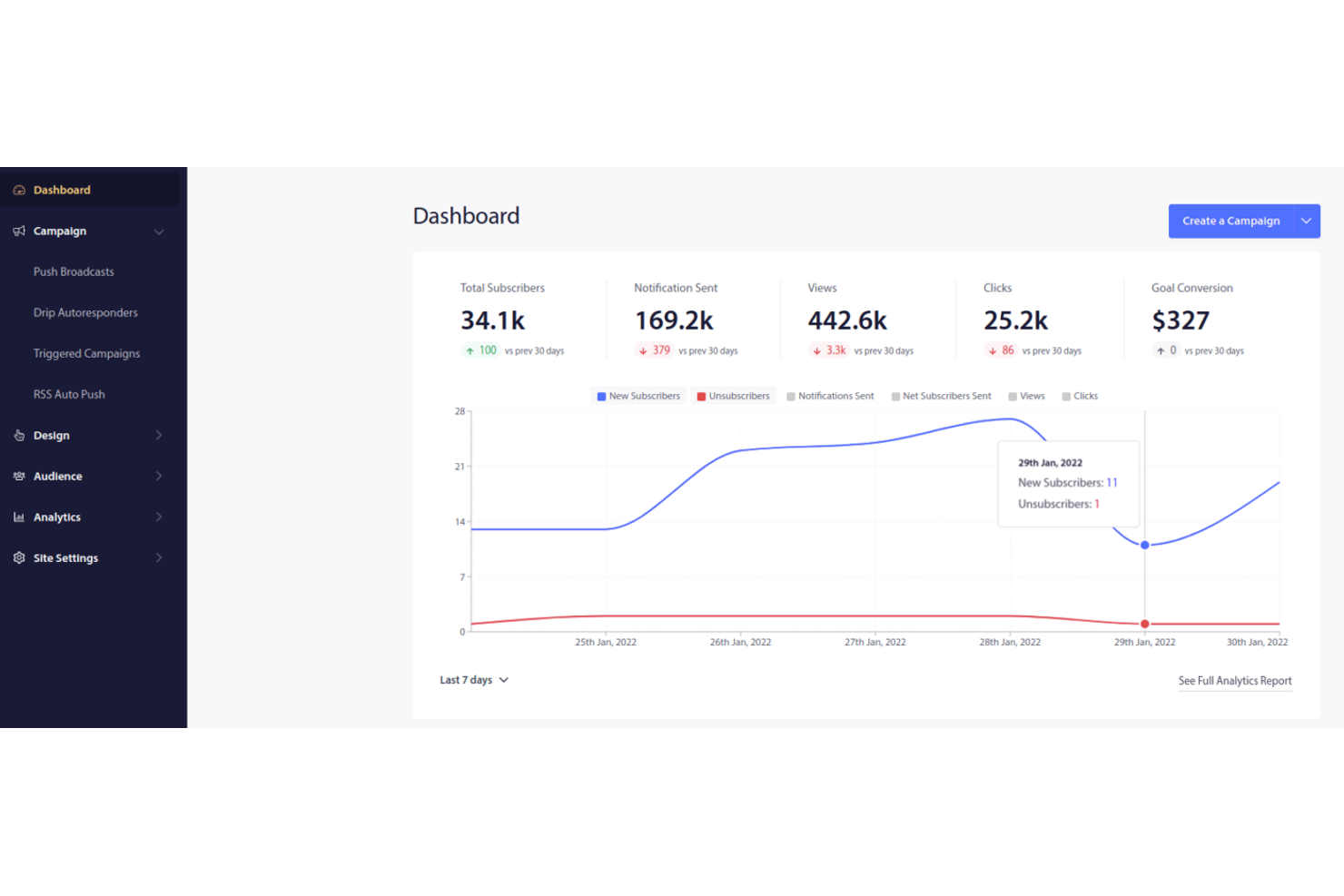
PushEngage is designed for e-commerce teams that want to automate personalized push notification campaigns based on shopper behavior. With its focus on e-commerce automation workflows, it helps online retailers recover abandoned carts, trigger product recommendations, and drive repeat purchases. If you need a push notification service that supports targeted, event-driven messaging for online stores, PushEngage is built for that purpose.
Why I Picked PushEngage
What sets PushEngage apart is its deep focus on ecommerce automation workflows, which is something I don’t see in most push notification services. The platform lets you set up automated campaigns for abandoned cart recovery, price drop alerts, and personalized product recommendations triggered by user actions. I appreciate how you can build multi-step drip campaigns that respond to real-time shopper behavior, helping you nurture leads and drive conversions. For e-commerce teams looking to automate and personalize their push messaging, PushEngage offers a toolkit built specifically for those needs.
PushEngage Key Features
Some other features that make PushEngage useful for ecommerce teams include:
- A/B Testing: Test different notification messages to see which versions perform best with your audience.
- Custom Triggered Campaigns: Set up notifications based on specific user actions or events beyond standard e-commerce triggers.
- Audience Segmentation: Group subscribers by behavior, location, or device for more targeted messaging.
- Detailed Analytics Dashboard: Track delivery rates, click-throughs, and subscriber growth in real time.
PushEngage Integrations
Integrations include Shopify, WooCommerce, HubSpot, WordPress, BigCommerce, Wix, OpenCart, and more.
Pros and Cons
Pros:
- Multi-browser support, including Safari Desktop
- Goal tracking for conversion attribution
- Automated abandoned cart recovery triggers
Cons:
- Free plan limited to 200 subscribers
- Limited design options

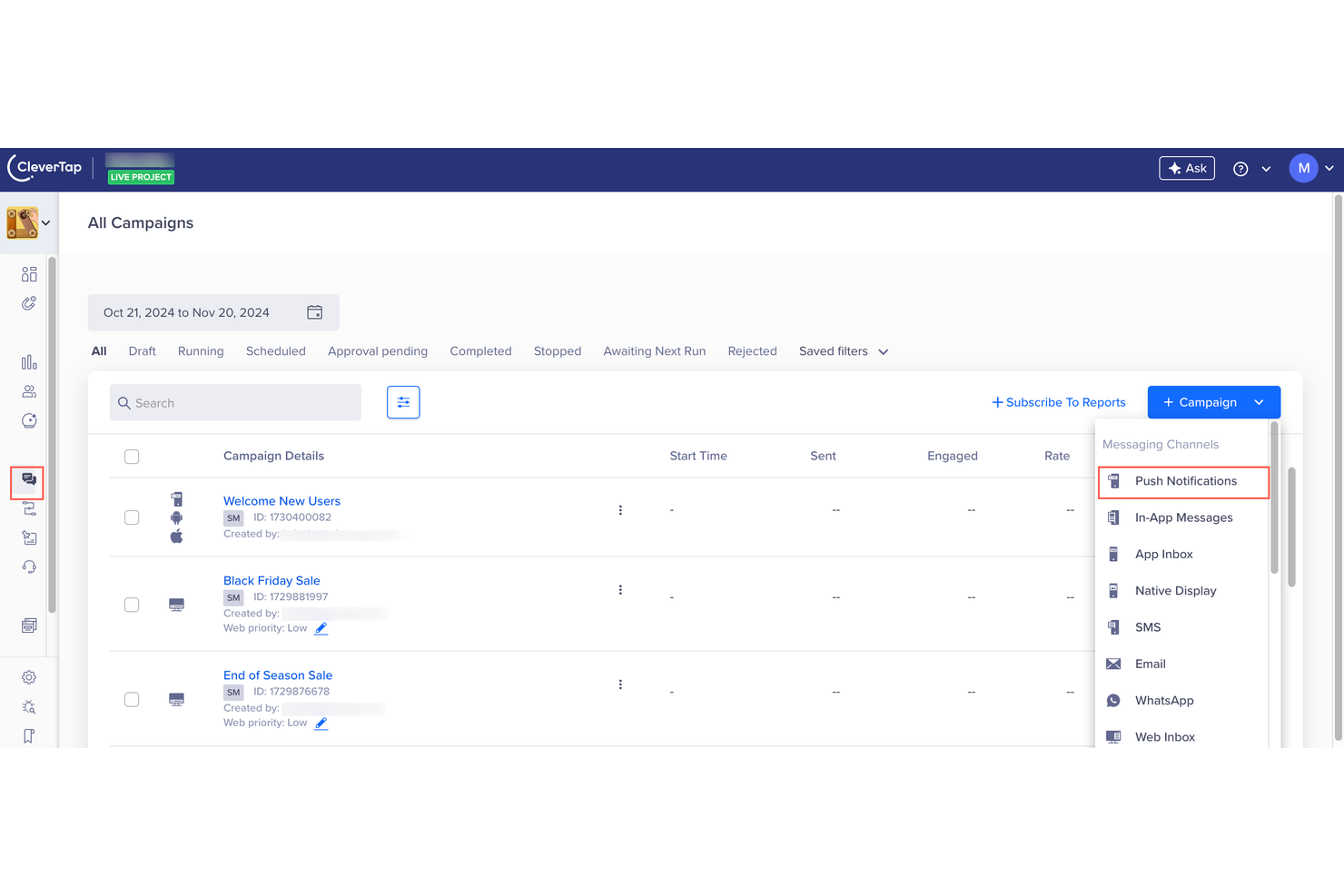
CleverTap stands out for teams that want to connect push notifications with deep behavioral analytics. It’s built for marketers and product managers who need to analyze user actions and trigger messaging based on real-time behavior patterns. If you’re looking to personalize outreach and optimize engagement using data-driven insights, CleverTap’s analytics-driven approach gives you the tools to do it.
Why I Picked CleverTap
CleverTap’s behavioral analytics integration is what makes it a strong choice for a push notification service. The platform lets you track granular user actions and segment audiences based on real-time behaviors, so you can trigger notifications that match exactly where users are in their journey. I like that you can set up automated push campaigns that respond to specific events, such as app installs, purchases, or inactivity. For teams that want to connect messaging with actionable analytics, CleverTap offers the depth and flexibility to make that possible.
CleverTap Key Features
Some other features that stood out to me include:
- Rich Media Push Notifications: Send notifications with images, videos, and interactive buttons to increase engagement.
- A/B Testing: Experiment with different notification content and timing to see what resonates best with your audience.
- Geofencing: Trigger notifications based on a user’s real-time location or when they enter or exit specific areas.
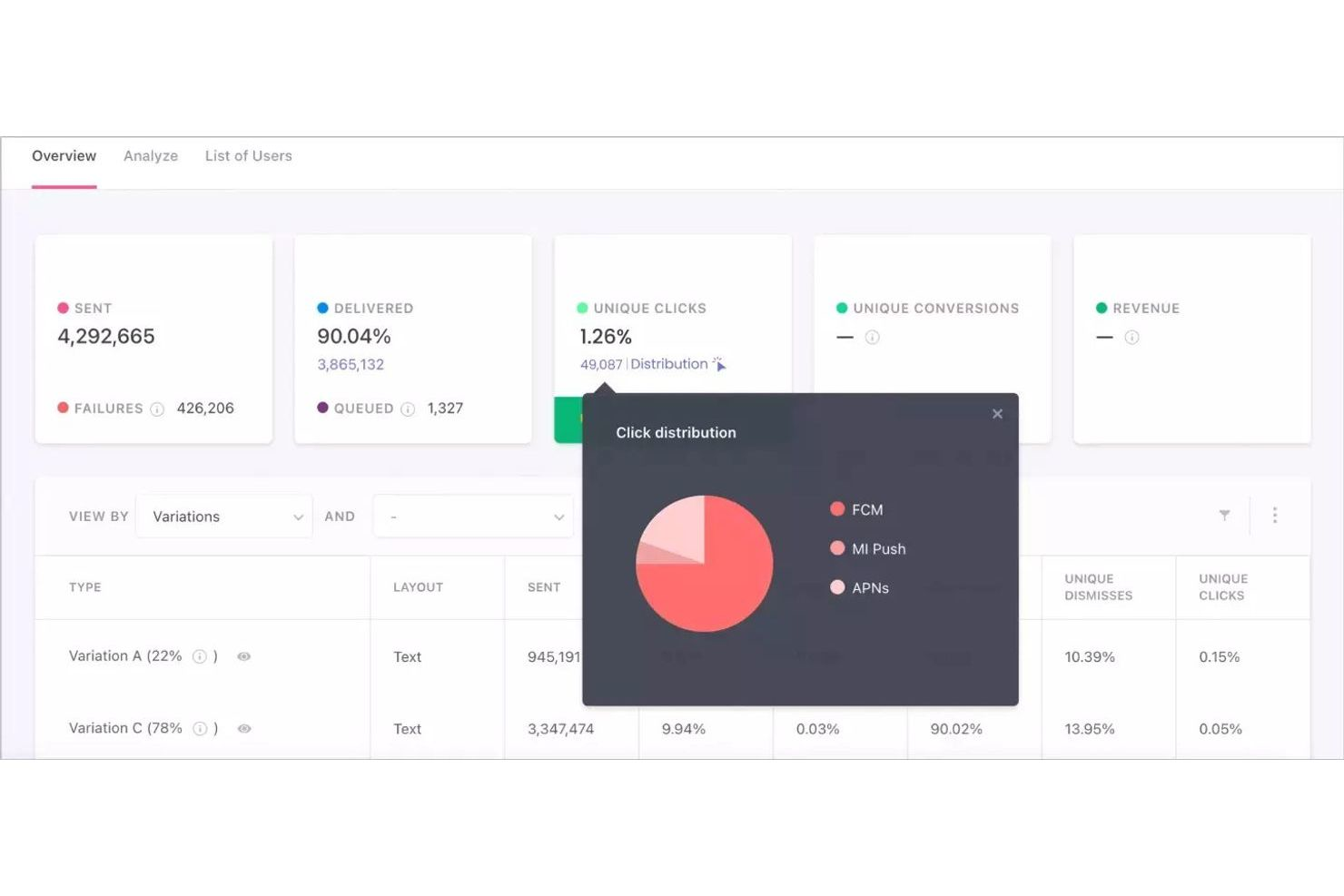
- Campaign Performance Dashboards: Access visual dashboards that track open rates, conversions, and other key metrics for each campaign.
CleverTap Integrations
Integrations include Mixpanel, Branch, Adjust, AppsFlyer, MoEngage, Salesforce, Zendesk, Shopify, and more.
Pros and Cons
Pros:
- AI-driven predictive churn modeling
- Real-time behavioral event tracking
- Built-in campaign automation
Cons:
- Limited template library for notification design
- No free-forever pricing tier

WebEngage stands out for teams looking to design complex, automated user journeys across multiple channels, including push notifications. It’s built for marketers and product managers who want to orchestrate personalized engagement based on real-time user behavior. With its journey builder and granular targeting, WebEngage helps businesses deliver timely, relevant messages that match each stage of the customer lifecycle.
Why I Picked WebEngage
What sets WebEngage apart is its focus on journey-based user engagement, which is especially valuable for teams that want to automate and personalize push notifications at every stage of the customer lifecycle. I picked WebEngage because its visual journey builder lets you map out complex, multi-step campaigns that trigger notifications based on real-time user actions and attributes. The platform also supports advanced segmentation, so you can target users with highly relevant messages as they move through different funnels. For marketers who need to coordinate push notifications with other channels as part of a broader engagement strategy, WebEngage offers a flexible and powerful solution.
WebEngage Key Features
In addition to its journey builder and advanced segmentation, I also found these features worth noting:
- A/B Testing for Notifications: Run experiments on push notification content and timing to optimize engagement.
- Rich Media Support: Include images, GIFs, and action buttons in push notifications for more interactive messaging.
- Real-Time Analytics Dashboard: Monitor delivery, open rates, and user interactions with push notifications as they happen.
- User Profile Enrichment: Collect and update user attributes automatically to improve targeting and personalization.
WebEngage Integrations
Integrations include Salesforce, HubSpot, Shopify, Amplitude, RudderStack, Firebase, Appmaker, and more.
Pros and Cons
Pros:
- Automated scheduling based on user behavior
- Real-time analytics for notification performance
- Supports rich media in push notifications
Cons:
- No built-in SMS fallback for push failures
- Requires SDK integration for mobile apps
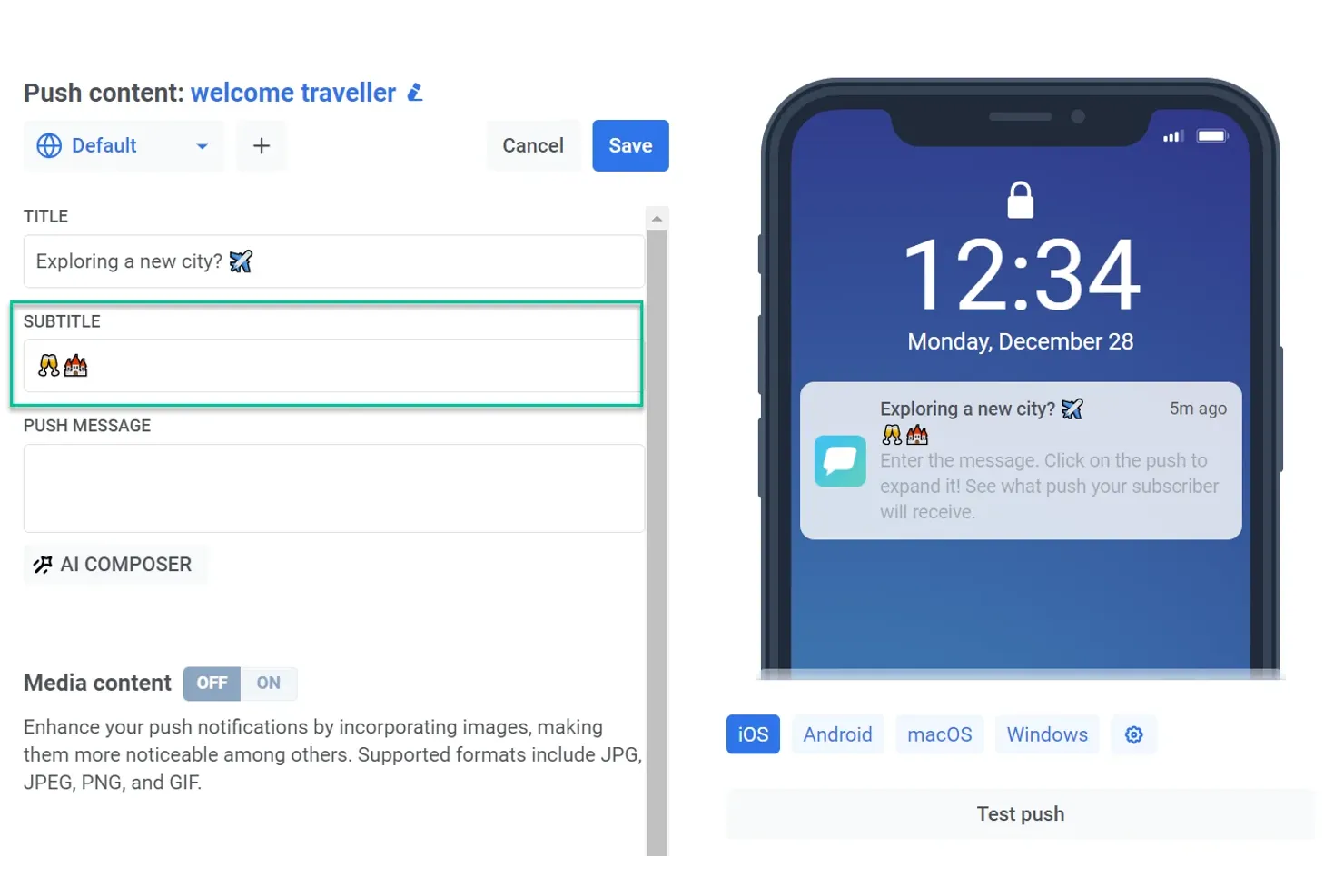
Pushwoosh is designed for marketers and product teams who need to segment and engage audiences across multiple platforms. Its cross-platform segmentation tools help you deliver targeted push notifications to users on mobile, web, and desktop from a single dashboard. If you’re looking to coordinate messaging strategies and personalize outreach based on user behavior, Pushwoosh offers advanced segmentation and automation features built for that purpose.
Why I Picked Pushwoosh
What sets Pushwoosh apart is its focus on cross-platform audience segmentation, which is essential for businesses reaching users on multiple devices. The platform lets you create detailed user segments based on behavior, location, and custom attributes, then target those segments with personalized push notifications across mobile, web, and desktop. I appreciate that Pushwoosh supports real-time segmentation updates, so your campaigns always reflect the latest user activity. For teams that need to coordinate messaging across channels and tailor outreach to specific audience groups, Pushwoosh offers the segmentation tools to make that possible.
Pushwoosh Key Features
In addition to its segmentation capabilities, Pushwoosh offers several other features worth noting:
- Automated Messaging Workflows: Set up multi-step campaigns that trigger notifications based on user actions or events.
- Rich Media Notifications: Include images, buttons, and interactive elements in your push messages.
- A/B Testing: Test different notification content and timing to optimize re-engagement.
- Geozones: Trigger notifications when users enter or exit specific geographic areas.
Pushwoosh Integrations
Integrations include Adjust, Amplitude, Crashlytics, AppsFlyer, Google Analytics, HubSpot, Mixpanel, mParticle, and more.
Pros and Cons
Pros:
- Supports advanced audience segmentation
- High-speed delivery for massive broadcasts
- Native support for Chinese OEMs
Cons:
- Geozone feature not available on all plans
- Analytics data expires after 30 days

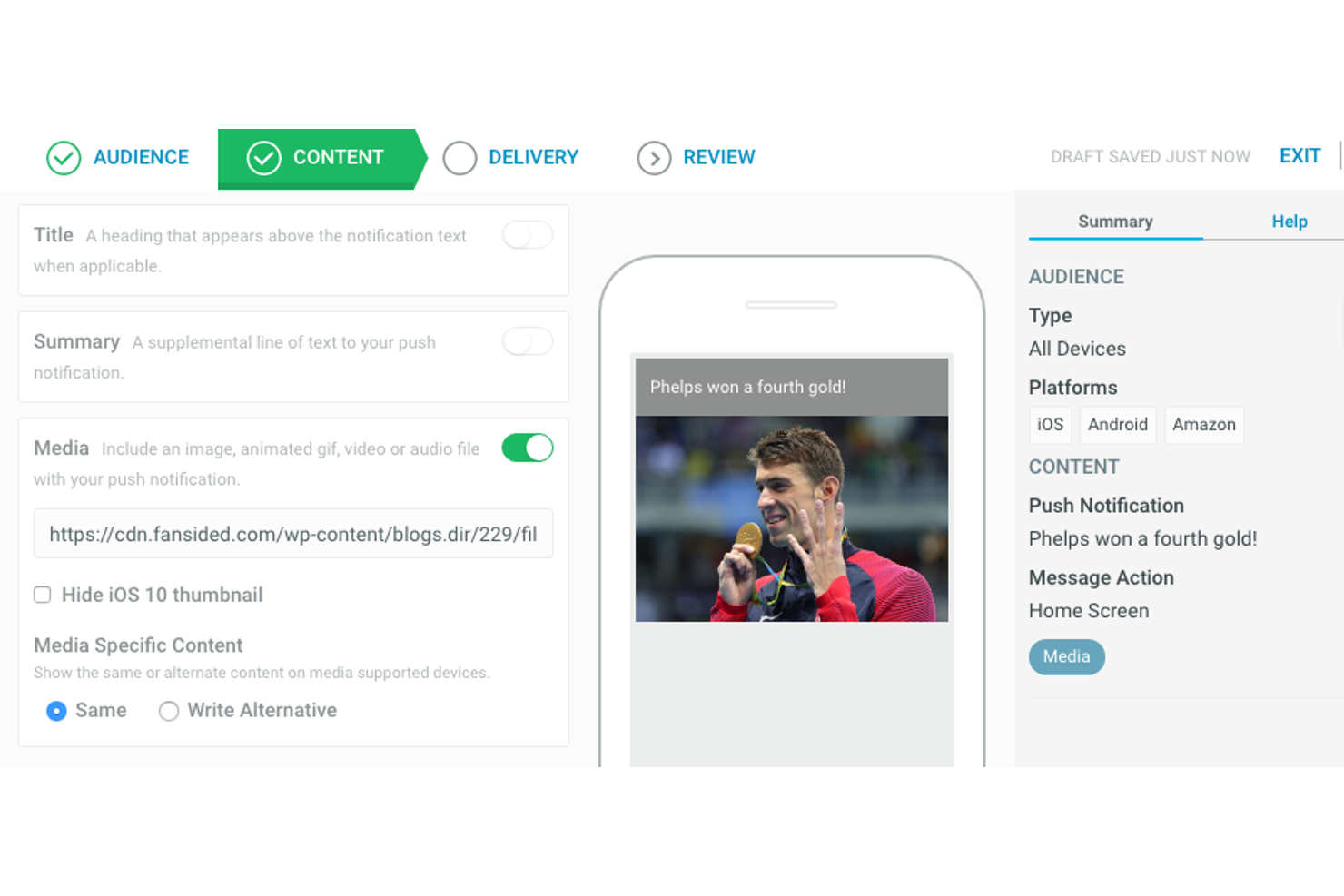
If your team needs to deliver highly personalized push notifications at scale, Airship is built for that challenge. The platform is designed for enterprise marketers and digital product teams who want to tailor messaging based on user attributes, behaviors, and preferences across multiple channels. Airship helps you orchestrate complex campaigns that require advanced targeting and real-time personalization.
Why I Picked Airship
What sets Airship apart is its focus on enterprise-level message personalization for push notifications. The platform lets you build highly targeted campaigns using advanced audience segmentation and real-time user data, so you can deliver messages that feel relevant to each recipient. I appreciate that Airship supports dynamic content insertion, allowing you to personalize notifications with user-specific details at scale. For teams that need to coordinate messaging across multiple channels and devices, Airship’s orchestration tools make it possible to maintain consistency and relevance throughout the customer journey.
Airship Key Features
Some other features that stood out to me include:
- Automation Workflows: Set up automated notification sequences triggered by user actions or lifecycle events.
- A/B/N Testing: Test multiple notification variants simultaneously to optimize message performance.
- In-App Messaging: Deliver targeted messages directly within your app to engage users beyond push notifications.
- Real-Time Analytics: Monitor notification delivery, open rates, and user engagement with up-to-the-minute reporting.
Airship Integrations
Integrations include Salesforce Marketing Cloud, Movable Ink, Adobe Experience Cloud, Mixpanel, Snowflake, and more.
Pros and Cons
Pros:
- Dynamic content insertion options
- Real-time priority delivery for news
- Specialized location-based geofencing triggers
Cons:
- Interface navigation is often non-intuitive
- Pricing details are not publicly available

If your team needs secure, direct device-to-device push notifications, Pushy is designed for that use case. It’s a strong fit for organizations in healthcare, finance, or any industry where privacy and control over device communication are essential. Pushy’s focus on private device communication and end-to-end encryption helps businesses keep sensitive notifications protected from third-party access.
Why I Picked Pushy
For teams that need to keep device communication private, Pushy offers a unique approach to push notifications. I picked it because it delivers notifications directly to devices without relying on third-party services like Firebase or Apple Push Notification Service. Pushy uses end-to-end encryption to protect message content, which is especially important for industries with strict privacy requirements. This focus on secure, private device communication makes Pushy a strong choice for organizations that can’t compromise on data confidentiality.
Pushy Key Features
Some other features that stand out include:
- Offline Message Queuing: Messages are queued and delivered once the device comes back online.
- Cross-Platform SDKs: Offers SDKs for Android, iOS, web, and desktop platforms.
- Custom Notification Payloads: Supports sending custom data with each notification for flexible app handling.
- Device Token Management: Provides tools for managing device tokens and subscriptions within your application.
Pushy Integrations
Integrations are available via API.
Pros and Cons
Pros:
- Supports offline message queuing
- End-to-end encryption for all messages
- Direct device-to-device notification delivery
Cons:
- Requires manual device token management
- Lacks built-in visual template editors
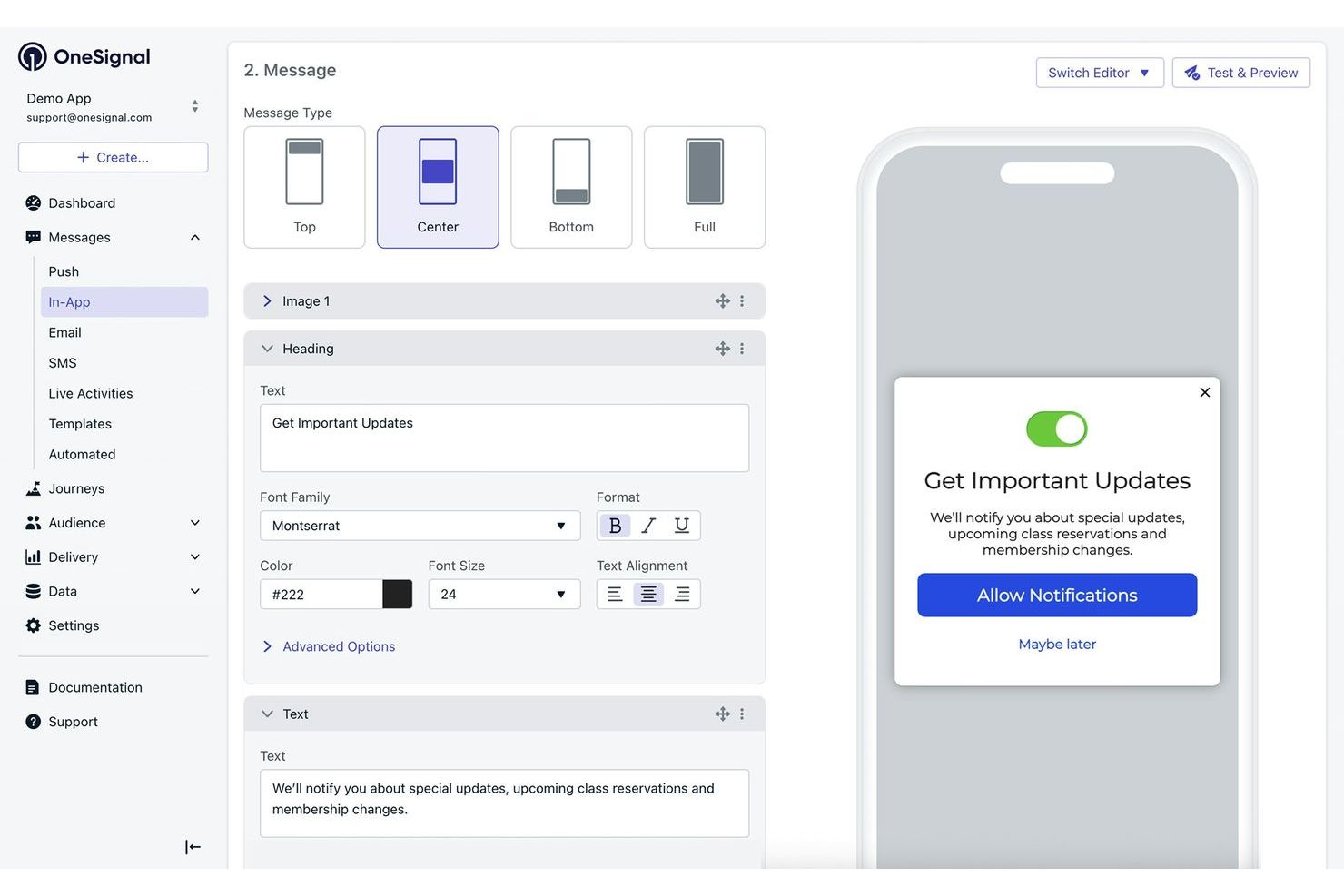
If you need to coordinate push notifications across multiple channels, OneSignal offers a unified customer engagement platform for web, mobile, email, and in-app messaging. This tool is a strong fit for marketing teams who need to manage user permissions and campaigns from a single dashboard. OneSignal helps you reach users wherever they are, making it easier to orchestrate complex messaging strategies.
Why I Picked OneSignal
I chose OneSignal because it brings together multiple messaging channels—push, email, SMS, and in-app—under one platform, which is rare among push notification services. This multichannel orchestration lets you create coordinated campaigns that reach users on their preferred devices and channels. I like that you can set up automated messaging workflows and segment audiences based on real-time behavior, making it easier to deliver relevant content at the right moment. These features make OneSignal a strong choice for teams that need to manage complex, cross-channel notification strategies.
OneSignal Key Features
Some other features that make OneSignal stand out for push notification service include:
- A/B Testing: Run experiments on message content and timing to optimize notification performance.
- Localization Support: Send notifications in multiple languages to reach global audiences with tailored messaging.
- User Tagging: Assign custom tags to users for more granular targeting and personalized messaging.
- Delivery Scheduling: Set specific times for notifications to be sent, ensuring messages reach users at the most relevant moments.
OneSignal Integrations
Integrations include HubSpot, Mixpanel, Amplitude, Google Analytics, Mailchimp, SendGrid, ActiveCampaign, and more.
Pros and Cons
Pros:
- Includes native multi-channel journey builder
- Fastest setup for WordPress sites
- Free tier includes 10,000 subscribers
Cons:
- GDPR compliance locked behind a paywall
- Occasional 503 service interruption errors

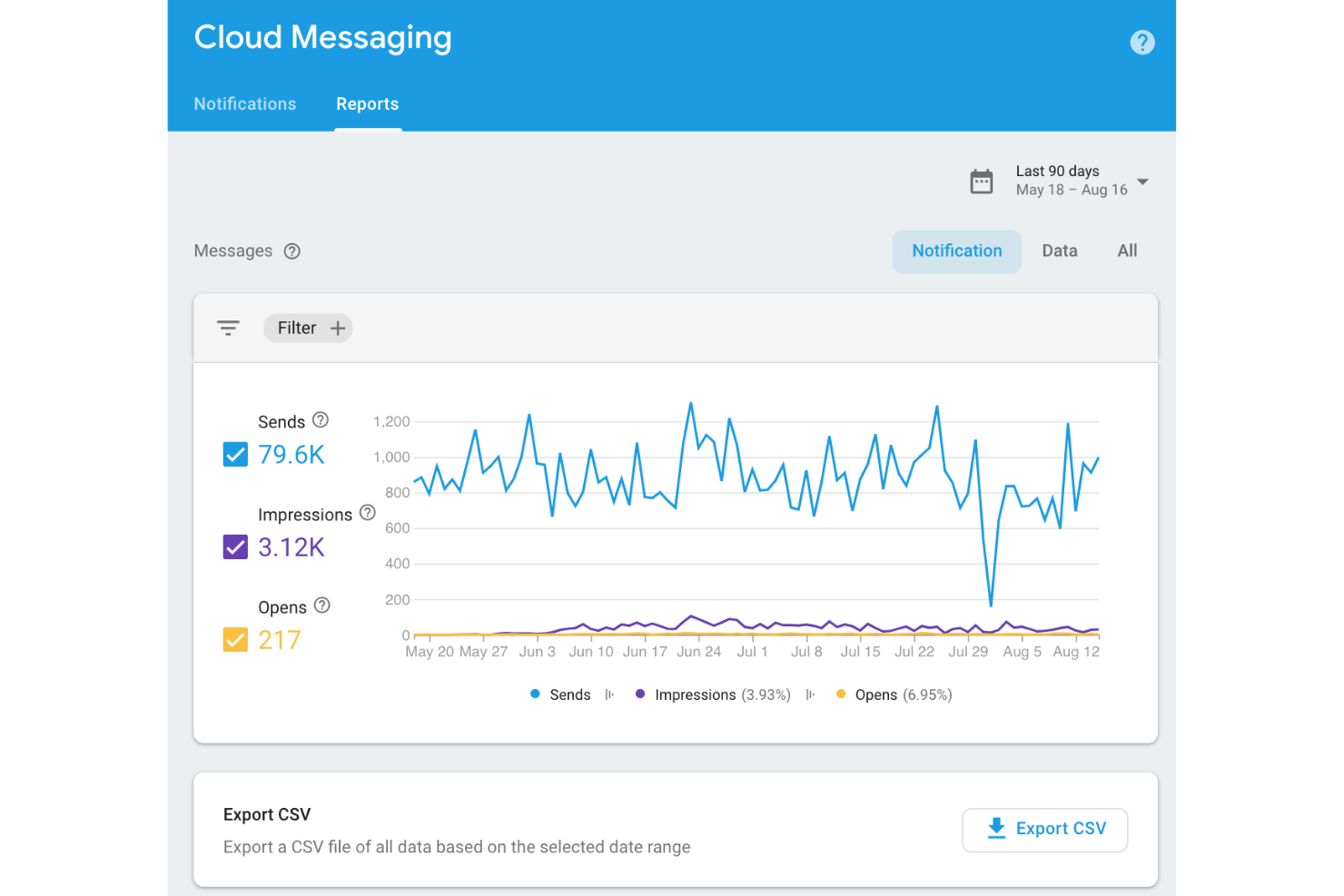
Firebase Cloud Messaging (FCM) is built for mobile app developers who need direct, reliable push notification delivery on Android and iOS. It offers native integration with both platforms, making it a strong fit for teams that want to manage notifications within their existing app infrastructure. If you’re looking for a solution that supports high-volume, programmatic messaging with deep mobile operating system support, Firebase Cloud Messaging is purpose-built for that need.
Why I Picked Firebase Cloud Messaging
Native integration with Android and iOS is what makes Firebase Cloud Messaging a standout choice for a mobile push notification service. The platform lets you send notifications directly to devices using the same infrastructure that powers Google and Apple’s own messaging systems. I like that you can target specific app instances or user segments with high reliability and minimal latency. For teams building mobile apps that need deep OS-level support and control, Firebase Cloud Messaging offers the technical foundation to deliver notifications at scale.
Firebase Cloud Messaging Key Features
Some other features that make Firebase Cloud Messaging useful for mobile teams include:
- Topic Messaging: Send notifications to multiple devices subscribed to a specific topic.
- Device Group Messaging: Target notifications to defined groups of devices, such as all devices owned by a single user.
- Message Scheduling: Schedule notifications to be delivered at a specific time.
- Data Payload Support: Send custom key-value pairs along with notifications for advanced app handling.
Firebase Cloud Messaging Integrations
Integrations include Google Analytics, Firestore, Firebase ML, and more.
Pros and Cons
Pros:
- Supports both notification and data payloads
- Direct integration with Android and iOS SDKs
- Completely free at any volume
Cons:
- Requires engineering resources to maintain
- No marketing-facing user dashboard

For teams that want a straightforward way to send notifications, Pushover offers a no-frills solution. It’s a fit for small businesses, startups, IT teams, and operations groups that need to alert users or groups quickly without complex setup. Pushover stands out for its simple API, cross-platform support, and focus on reliable message delivery.
Why I Picked Pushover
When you need a push notification service that just works for simple team alerts, Pushover is hard to overlook. I picked it because it’s built for straightforward, reliable notifications without the overhead of enterprise features. Pushover lets you send messages to individuals or groups using a simple API, and it supports delivery across iOS, Android, and desktop devices. For teams that want to get up and running quickly with minimal configuration, Pushover’s focus on simplicity and direct message delivery makes it a practical choice.
Pushover Key Features
Some other features worth noting include:
- Priority Messaging: Assign different priority levels to notifications for urgent or non-urgent alerts.
- Delivery Receipts: Track when messages are delivered and acknowledged by recipients.
- Custom Sounds: Choose from a variety of notification sounds to help users distinguish message types.
- Unlimited Message History: Access a complete log of all sent and received notifications within the app.
Pushover Integrations
Integrations include GitHub, IFTTT, Uptime Robot, Zabbix, StatusCake, Sentry, WordPress, and more.
Pros and Cons
Pros:
- Offers delivery receipts for every message
- Supports priority and emergency notifications
- Native support for custom alert sounds
Cons:
- Lacks audience segmentation tools
- No built-in analytics or reporting tools
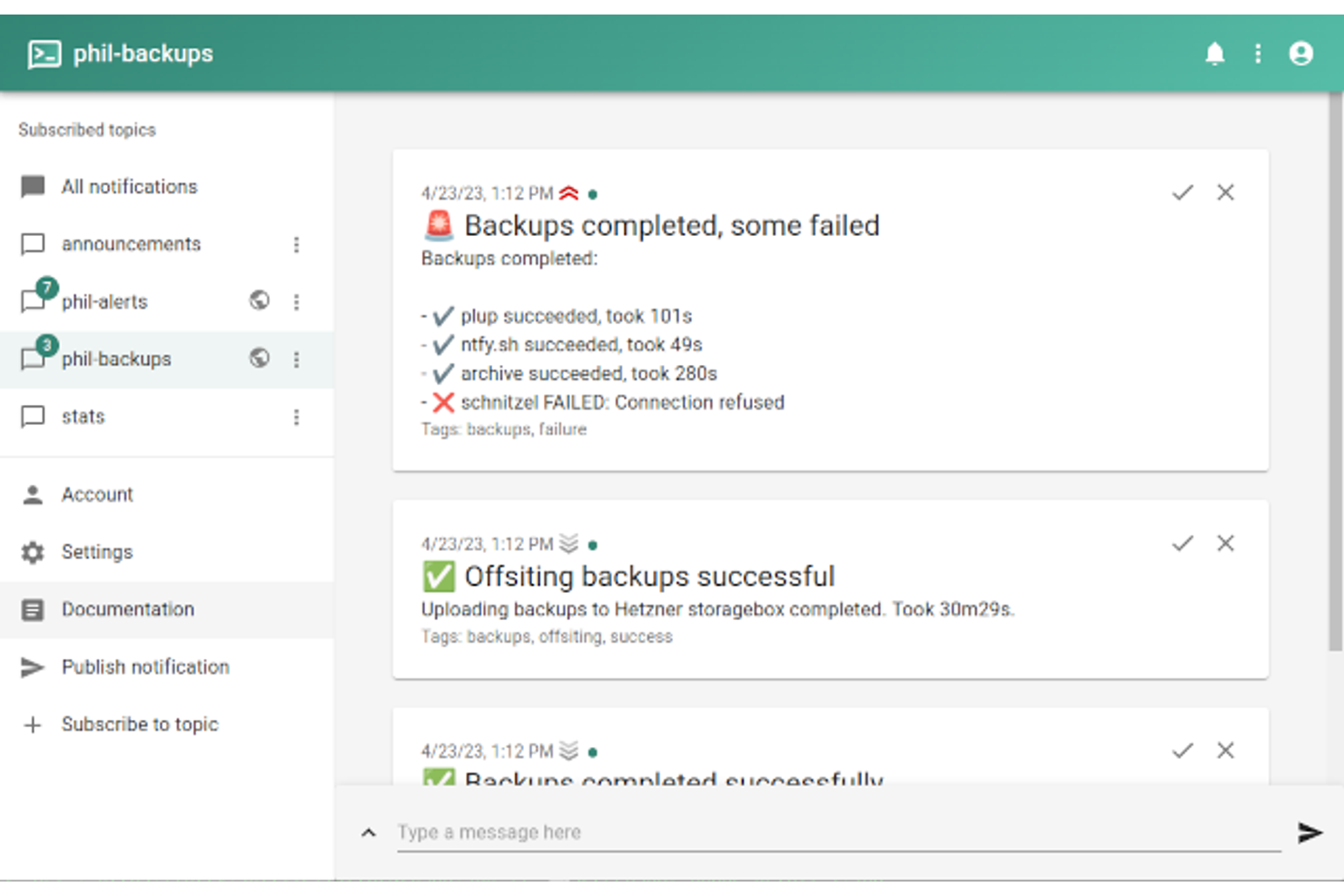
If you’re looking for a push notification service that you can fully control and host yourself, ntfy is built for that need. It’s especially appealing to developers, IT teams, and privacy-focused organizations that want open-source flexibility and data ownership. With ntfy, you can deploy notifications on your own infrastructure and customize how messages are sent, stored, and secured.
Why I Picked ntfy
What sets ntfy apart is its open-source, self-hosted approach to push notifications. I picked it because it gives you full control over your notification infrastructure, which is ideal for teams with strict data privacy or compliance requirements. ntfy lets you run your own server, customize message retention, and manage user access without relying on any third-party cloud provider. This level of flexibility and transparency is hard to find in other push notification services.
ntfy Key Features
Some other features that make ntfy stand out include:
- Topic-Based Messaging: Organize notifications by topics to target specific audiences or use cases.
- Mobile and Desktop Apps: Send and receive notifications through native apps for Android, iOS, Windows, macOS, and Linux.
- Webhook Support: Trigger notifications from external systems using simple HTTP requests.
- Attachment Support: Send files and images as part of your notifications.
ntfy Integrations
Integrations include GitHub Actions, Rundeck, Ansible, Node-RED, Radarr, Sonarr, Uptime Kuma, and more.
Pros and Cons
Pros:
- Webhook and CLI support for automation
- Supports both cloud and self-hosted options
- Fully open-source with permissive license
Cons:
- Requires manual setup for rich media
- No native analytics or tracking
Other Push Notification Service
Here are some additional push notification service options that didn’t make it onto my shortlist, but are still worth checking out:
- Expo
With React Native app compatibility
- Apple Push Notification Service
For direct iOS device delivery
- Brevo
For integrated email and SMS alerts
- iZooto
For publisher monetization tools
- CM.com
For global mobile carrier connectivity
- PubNub
With real-time data streaming
- Webpushr
For unlimited subscriber support
- PushOwl
For Shopify store integration
- SashiDo
With Parse backend compatibility
- MagicBell
For in-app notification inboxes
- Knock
For workflow-based notification logic


Push Notification Service Selection Criteria
When selecting the best push notification service to include in this list, I considered common buyer needs and pain points like delivering timely, targeted notifications and ensuring reliable message delivery across devices. I also used the following framework to keep my evaluation structured and fair:
Core Functionality (25% of total score)
To be considered for inclusion in this list, each solution had to fulfill these common use cases:
- Send push notifications to web and mobile
- Schedule notifications for future delivery
- Segment users for targeted messaging
- Track delivery and open rates
- Support rich media in notifications
Additional Standout Features (25% of total score)
To help further narrow down the competition, I also looked for unique features, such as:
- Visual journey or workflow builders
- Automated notification triggers based on user behavior
- Multichannel messaging from a single platform
- Advanced personalization using dynamic content
- Built-in A/B testing for notification campaigns
Usability (10% of total score)
To get a sense of the usability of each system, I considered the following:
- Simple and intuitive dashboard navigation
- Clear notification creation and editing process
- Easy access to analytics and reports
- Logical organization of user segments and campaigns
- Responsive design for use on different devices
Onboarding (10% of total score)
To evaluate the onboarding experience for each platform, I considered the following:
- Availability of step-by-step setup guides
- Access to training videos and documentation
- Interactive product tours or walkthroughs
- Pre-built templates for common notification types
- Live chat or chatbot support during onboarding
Customer Support (10% of total score)
To assess each software provider’s customer support services, I considered the following:
- Multiple support channels, such as chat, email, and phone
- Fast response times to support requests
- Access to a searchable knowledge base
- Availability of onboarding or technical specialists
- Community forums or user groups for peer support
Value For Money (10% of total score)
To evaluate the value for money of each platform, I considered the following:
- Transparent and flexible pricing plans
- Features included at each pricing tier
- Free trial or demo availability
- No hidden fees or surprise charges
- Scalability of pricing as usage grows
Customer Reviews (10% of total score)
To get a sense of overall customer satisfaction, I considered the following when reading customer reviews:
- Consistent positive feedback on reliability
- Praise for customer support quality
- Reports of ease or difficulty in setup
- Comments on notification deliverability rates
- User sentiment about feature updates and improvements
How to Choose a Push Notification Service
It’s easy to get bogged down in long feature lists and complex pricing structures. To help you stay focused as you work through your unique software selection process, here’s a checklist of factors to keep in mind:
| Factor | What to Consider |
| Scalability | Will the service handle your current and projected notification volume as your audience grows? Ask about limits, pricing jumps, and performance at scale. |
| Integrations | Does the tool connect natively with your CRM, analytics, or marketing automation platforms? Check for direct integrations, not just API access. |
| Customizability | Can you tailor notification templates, triggers, and user segments to fit your workflows? Consider how much flexibility you need for targeting and branding. |
| Ease of use | Is the interface intuitive for your team’s skill level? Test the workflow for creating, scheduling, and analyzing notifications before committing. |
| Implementation and onboarding | How long will setup take, and what resources are required? Look for clear documentation, migration support, and onboarding help if you’re moving from another tool. |
| Cost | Are pricing tiers transparent and predictable as usage grows? Watch for hidden fees, overage charges, or required add-ons that could impact your budget. |
| Security safeguards | Does the provider offer encryption, user access controls, and compliance with data privacy standards? Ask about certifications and incident response processes. |
| Support availability | What support channels are offered, and during what hours? Consider if you need 24/7 help, dedicated account management, or self-service resources. |
What Is Push Notification Service?
A push notification service is a software platform that enables businesses to send real-time alerts and messages directly to users’ devices, such as smartphones, tablets, or web browsers. These services help marketers and product teams deliver timely updates, reminders, or promotional content, often triggered by user behavior or predefined events, to increase engagement and retention.
Features of Push Notification Service
When selecting a push notification service, keep an eye out for the following key features:
- User segmentation: Group users based on behavior, demographics, or preferences to send targeted notifications that are more likely to drive engagement.
- Scheduling and automation: Set notifications to be sent at specific times or triggered by user actions, ensuring timely and relevant communication.
- Rich media support: Include images, videos, or action buttons in notifications to make messages more interactive and visually appealing.
- Analytics and reporting: Track delivery rates, open rates, and user interactions to measure campaign performance and refine future messaging strategies.
- Multi-platform delivery: Send notifications across web, iOS, and Android devices from a single platform, maintaining consistency and reach.
- Personalization: Customize notification content with user-specific details, such as names or recent activity, to increase relevance and response rates.
- Opt-in and opt-out management: Provide users with clear options to subscribe or unsubscribe from notifications, supporting compliance and user trust.
- A/B testing: Experiment with different notification content, timing, or formats to identify what resonates best with your audience.
- Localization: Deliver notifications in multiple languages or time zones to reach global audiences with contextually appropriate messages.
Common Push Notification Service AI Features
Beyond the standard push notification service features listed above, many of these solutions are incorporating AI with features like:
- Send time optimization: Uses AI to analyze user behavior and automatically deliver notifications at the time each recipient is most likely to engage.
- Predictive segmentation: Leverages machine learning to identify and group users based on their likelihood to convert, churn, or perform specific actions.
- Content recommendation: Suggests personalized notification content for each user by analyzing past interactions, preferences, and engagement patterns.
- Automated frequency capping: Dynamically adjusts how often notifications are sent to each user, reducing fatigue and optimizing engagement using AI-driven insights.
- Anomaly detection: Monitors campaign performance and flags unusual patterns or drops in engagement, helping teams quickly identify and address issues.
Benefits of Push Notification Service
Implementing a push notification service provides several benefits for your team and your business. Here are a few you can look forward to:
- Increased user engagement: Timely, targeted notifications keep users informed and encourage them to interact with your app or website.
- Higher retention rates: Automated and personalized messaging helps bring users back, reducing churn and supporting long-term loyalty.
- Real-time communication: Instantly deliver important updates, alerts, or promotions to users across devices, ensuring your message is seen when it matters.
- Improved campaign performance tracking: Built-in analytics and reporting features let you measure delivery, open rates, and user actions to refine your messaging strategy.
- Personalized user experiences: Segmentation, personalization, and AI-driven recommendations allow you to tailor content for each user, increasing relevance and response rates.
- Efficient workflow automation: Scheduling, automation, and AI-powered optimization reduce manual effort and help your team manage campaigns at scale.
- Global audience reach: Multi-platform and localization features enable you to connect with users worldwide in their preferred language and on their chosen device.
Costs and Pricing of Push Notification Service
Selecting a push notification service requires an understanding of the various pricing models and plans available. Costs vary based on features, team size, add-ons, and more. The table below summarizes common plans, their average prices, and typical features included in push notification service solutions:
Plan Comparison Table for Push Notification Service
| Plan Type | Average Price | Common Features |
| Free Plan | $0–$20/month | Supports a limited number of subscribers, basic notification sending, simple analytics, and email support. |
| Personal Plan | $20–$50/month | Includes higher subscriber limits, scheduling, basic segmentation, richer analytics, and priority email support. |
| Business Plan | $50–$200/month | Offers advanced segmentation, automation, A/B testing, multi-platform support, and chat support. |
| Enterprise Plan | $200–$1,000+/month | Provides custom integrations, dedicated account management, advanced security, SLA guarantees, and onboarding assistance. |
Push Notification Service FAQs
Here are some answers to common questions about push notification service:
How do push notification services handle user privacy and consent?
Push notification services require users to opt in before receiving messages. Most platforms provide tools for managing user consent, allowing you to collect, track, and honor user preferences in line with privacy regulations like GDPR or CCPA.
Can I send notifications to both web and mobile users from one platform?
Yes, many push notification services support cross-platform delivery. You can create and manage campaigns for web browsers, iOS, and Android devices from a single dashboard, making it easier to reach your audience wherever they are.
What happens if a user is offline when a notification is sent?
Most services queue notifications for delivery when the user comes back online. Some platforms let you set expiration times for messages, so users only receive relevant notifications, even if there’s a delay in delivery.
How do I measure the effectiveness of my push notification campaigns?
You can track metrics like delivery rates, open rates, click-through rates, and conversions. Most platforms offer built-in analytics dashboards to help you analyze performance and optimize future campaigns based on real user behavior.
Are there limits to how many notifications I can send?
Yes, most plans have limits based on the number of subscribers or messages sent per month. Review your provider’s pricing and terms to understand thresholds, overage charges, and how scaling up may affect your costs.