
17 Best AI Community Management Software in 2026

AI Community Management Software Shortlist
Here’s my shortlist of the best AI community management software:


AI community management software uses artificial intelligence to automate moderation, analyze member activity, and support engagement across online communities. If you’re searching for ways to manage growing member bases, reduce manual moderation, or gain deeper insights into your community’s health, these tools can help you keep pace. This list will help you quickly compare leading AI community management platforms, so you can find the right fit for your team’s needs and confidently scale your online community.
Why Trust Our Software Reviews
We’ve been testing and reviewing marketing software since 2022. As marketing experts ourselves, we know how critical and difficult it is to make the right decision when selecting software.
We invest in deep research to help our audience make better software purchasing decisions. We’ve tested more than 2,000 tools for different marketing use cases and written over 1,000 comprehensive software reviews. Learn how we stay transparent & our software review methodology.
Best AI Community Management Software Summary
This comparison chart summarizes pricing details for my top AI community management software selections to help you find the best one for your budget and business needs.
| Tool | Best For | Trial Info | Price | ||
|---|---|---|---|---|---|
| 1 | Best for social media moderation tool | 30-day free trial + free demo available | From $79/user/month (billed annually) | Website | |
| 2 | Best for audience segmentation insights | Free trial available | Pricing upon request | Website | |
| 3 | Best for community knowledge sharing | Free demo available | Pricing upon request | Website | |
| 4 | Best for social engagement and reporting | 30-day free trial +free demo available | From $199/seat/month | Website | |
| 5 | Best for customizable community platforms | Free demo available | Pricing upon request | Website | |
| 6 | Best for AI-powered community engagement | Free demo available | Pricing upon request | Website | |
| 7 | Best for all-in-one community management | Free demo available | From $1000/year | Website | |
| 8 | Best for automated community support | 14-day free trial + free demo available | From $19/month | Website | |
| 9 | Best for event-driven community management | Free demo available | Pricing upon request | Website | |
| 10 | Best for flexible community spaces | 14-day free trial + free demo available | From $89/month | Website |
-

Eloqua
Visit WebsiteThis is an aggregated rating for this tool including ratings from Crozdesk users and ratings from other sites.4.4 -
Optimizely
Visit WebsiteThis is an aggregated rating for this tool including ratings from Crozdesk users and ratings from other sites.4.2 -
Uberflip
Visit WebsiteThis is an aggregated rating for this tool including ratings from Crozdesk users and ratings from other sites.4.3




AI Community Management Software Shortlist
Here’s my shortlist of the best AI community management software:


Agorapulse offers social media and community management teams a centralized platform to manage conversations and engagement across multiple channels. It’s especially useful for businesses that need to organize, moderate, and analyze high volumes of social interactions. If you’re looking for a tool that brings structure and clarity to community management workflows, Agorapulse is designed to help you stay on top of every message and mention.
Who Is Agorapulse Best For?
Agorapulse is a strong choice for social media and community managers at mid-sized businesses and agencies handling multiple brand accounts.
Why I Picked Agorapulse
What stands out about Agorapulse for AI community management is its unified inbox and AI-powered moderation, which help teams manage high message volumes without missing important interactions. The unified inbox brings together messages, comments, and mentions from all connected social channels, so you can review and respond in one place. I also appreciate the AI moderation tools that automatically flag, categorize, or hide inappropriate or spammy content, making it easier to maintain a positive community environment. These features make Agorapulse a practical choice for teams that need to keep conversations organized and ensure brand safety at scale.
Agorapulse Key Features
Some other features that make Agorapulse useful for AI community management include:
- Social listening and monitoring: Track keywords, hashtags, and brand mentions across multiple platforms to stay informed about relevant conversations.
- Publishing calendar: Plan, schedule, and organize posts for all connected social accounts in a single visual calendar.
- Team collaboration tools: Assign messages, comments, or tasks to specific team members and track progress within the platform.
- Analytics and reporting: Access detailed performance metrics and export customizable reports to measure engagement and community growth.
Agorapulse Integrations
Integrations include Facebook, Instagram, LinkedIn, X (Twitter), Pinterest, TikTok, YouTube, Google Business Profile, Reddit, and more.
Pros and Cons
Pros:
- Social listening tracks keywords and hashtags
- AI moderation flags spam and toxic content
- Unified inbox for all social channels
Cons:
- Bulk actions for messages are restricted
- No built-in community forum support

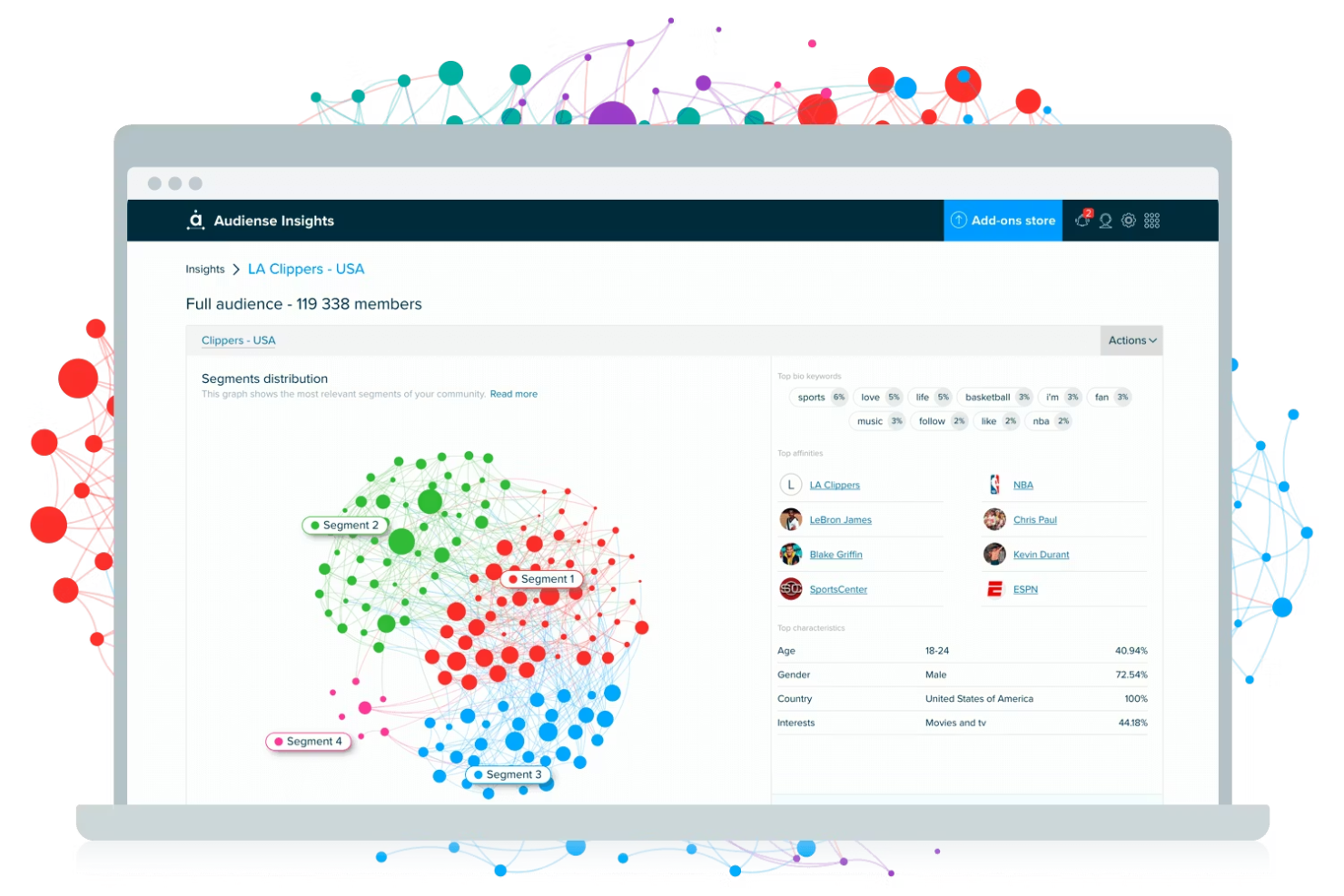
If you need to deeply understand and segment your online audience, Audiense offers a specialized approach. The platform is designed for marketers and community managers who want to uncover detailed audience insights and patterns across social channels. Audiense helps you identify, analyze, and engage distinct community segments that matter most to your brand.
Who Is Audiense Best For?
Audiense is a strong fit for marketing and insights teams at brands or agencies that need advanced audience segmentation and social data analysis.
Why I Picked Audiense
What stands out to me about Audiense is its advanced audience segmentation and AI-powered insights, which are especially valuable for community management at scale. The platform uses AI to analyze social data and automatically group audiences based on shared interests, behaviors, and demographics. I find its ability to surface granular audience segments and provide actionable insights particularly useful for tailoring engagement strategies and identifying new community opportunities. These features make Audiense a strong choice for teams that need to go beyond surface-level analytics and truly understand the makeup of their online communities.
Audiense Key Features
Some other features that make Audiense useful for AI community management include:
- Influencer identification tools: Find and analyze influential profiles within your target audience for outreach or partnership opportunities.
- Custom audience exports: Export segmented audience lists for use in ad platforms or other marketing tools.
- Conversation tracking: Monitor and analyze conversations around specific topics, hashtags, or keywords in real time.
- Automated reporting: Generate scheduled or on-demand reports with detailed audience and engagement analytics.
Audiense Integrations
Integrations include X (Twitter) and Meta, and an API is available for custom integrations.
Pros and Cons
Pros:
- Influencer mapping highlights key community voices
- Social listening covers multiple languages
- Audience segmentation uses advanced AI models
Cons:
- Insights rely heavily on X (Twitter) data
- No built-in publishing or scheduling tools

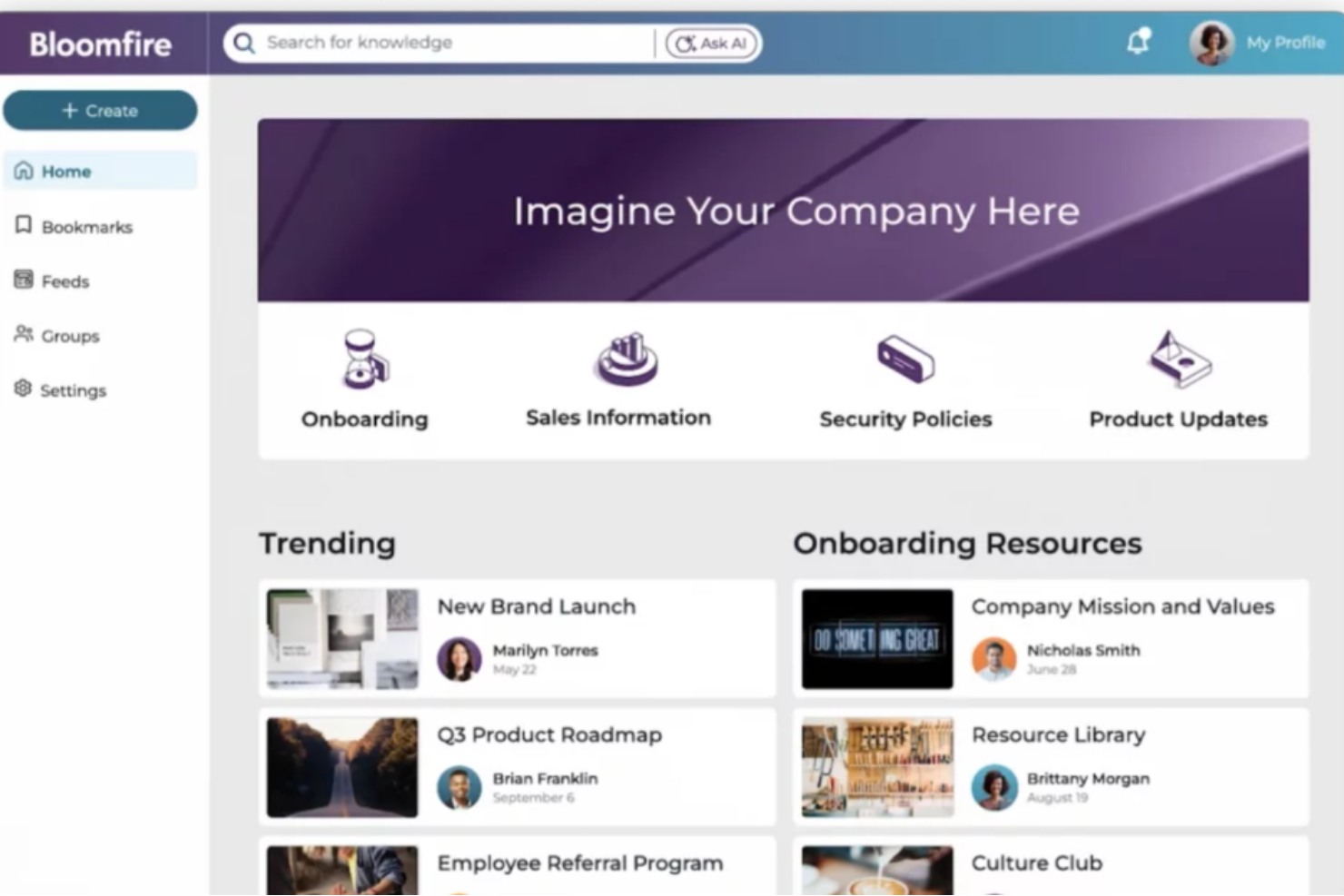
If your team needs a centralized hub for sharing knowledge and answering questions, Bloomfire is worth a look. The platform is designed for organizations that want to capture, organize, and surface expertise across departments or communities. It helps reduce repetitive questions and makes it easier for members to find trusted answers quickly.
Who Is Bloomfire Best For?
Bloomfire is a strong fit for knowledge managers and support teams at mid-sized to large organizations that need a searchable, AI-powered knowledge base for internal or external communities.
Why I Picked Bloomfire
What drew me to Bloomfire is its focus on AI-powered knowledge sharing and community Q&A, which directly addresses the challenge of capturing and surfacing expertise in large groups. The platform uses AI to automatically tag, categorize, and recommend content, making it easier for community members to find relevant answers and resources. I also appreciate the built-in Q&A functionality, which lets users ask questions and crowdsource answers from across the organization or community. These features help reduce duplicate questions and ensure that valuable knowledge is accessible to everyone who needs it.
Bloomfire Key Features
Some other features that make Bloomfire useful for AI community management include:
- Content moderation tools: Admins can review, approve, or flag posts to maintain quality and relevance.
- Rich media support: Users can upload and share videos, images, and documents directly within the platform.
- Advanced search with filters: Members can quickly find information using keyword search, filters, and AI-driven suggestions.
- Analytics dashboard: Track engagement, content usage, and participation trends across your community.
Bloomfire Integrations
Integrations include SharePoint, Google Drive, Microsoft Teams, Slack, Salesforce, Zendesk, Okta, and more. An open API is also available for custom integrations.
Pros and Cons
Pros:
- Supports multimedia content in discussions
- Q&A threads organize community knowledge
- AI search surfaces relevant answers quickly
Cons:
- Limited gamification for community engagement
- No built-in event or webinar tools

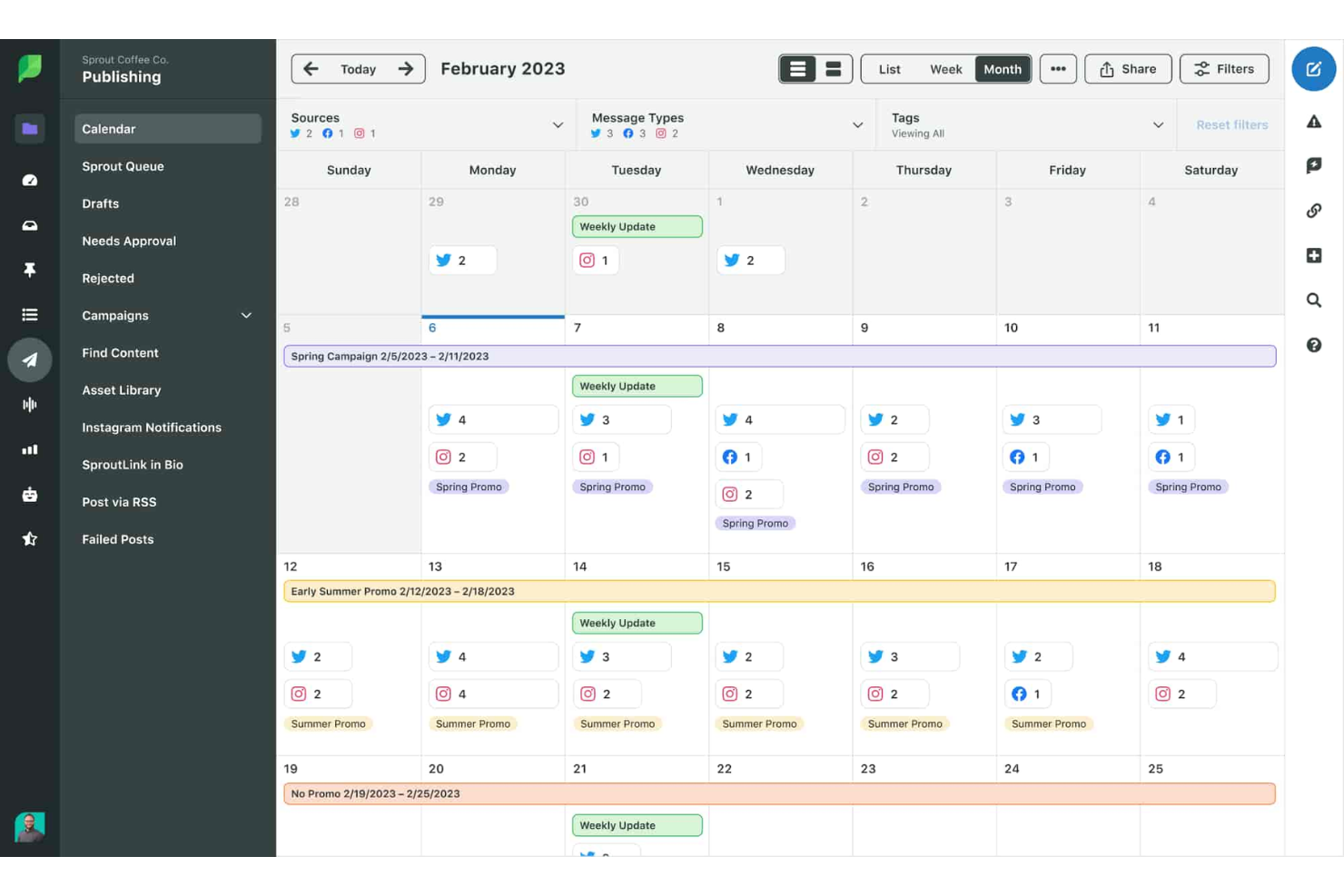
Sprout Social gives marketing and community teams a centralized platform to manage conversations, monitor brand sentiment, and engage audiences across social channels. It’s especially useful for organizations that need to coordinate responses, track trends, and analyze engagement at scale. If you’re looking for a solution that brings structure and intelligence to social community management, Sprout Social is built to help you stay proactive and organized.
Who Is Sprout Social Best For?
Sprout Social suits marketing and communications teams at mid-sized to large organizations that need advanced social listening and engagement tools.
Why I Picked Sprout Social
What drew me to Sprout Social for AI community management is its advanced AI-driven social listening and engagement automation. The platform uses AI to surface trending topics, analyze sentiment, and identify key conversations across multiple social networks, which helps teams stay ahead of issues and opportunities. I also like that Sprout Social automates message routing and prioritization, so high-priority interactions never get lost in the shuffle. These features make it a strong choice for organizations that need to monitor, analyze, and respond to large volumes of community activity with speed and accuracy.
Sprout Social Key Features
Some other features that make Sprout Social useful for AI community management include:
- Unified smart inbox: Collects and organizes messages from all connected social profiles in one place for efficient response management.
- Role-based permissions: Lets you assign specific access levels and responsibilities to different team members for secure collaboration.
- Automated publishing workflows: Allows you to schedule, queue, and approve posts across multiple channels with built-in content calendar tools.
- Custom reporting builder: Enables you to create tailored analytics reports using a wide range of social and engagement metrics.
Sprout Social Integrations
Integrations include Facebook, Instagram, LinkedIn, X (Twitter), Pinterest, TikTok, YouTube, Salesforce, HubSpot, and more.
Pros and Cons
Pros:
- Visual publishing calendar for post planning
- Team roles and assignments for collaboration
- Social listening tracks keywords and hashtags
Cons:
- Limited by social network API restrictions
- Per-user pricing scales quickly with team size
New Product Updates from Sprout Social

Sprout Social's New Design to Draft Integration
Sprout Social now allows designs from Canva and Adobe Express to be sent directly as draft posts. This update offers a more efficient way of integrating design tools with your social media management processes. For more information, visit Sprout Social's official site.
 .
.

If you’re looking for a community management platform that offers deep customization and control, Hivebrite is worth considering. It’s designed for organizations and associations that want to build branded, private communities with advanced member management features. Hivebrite helps teams centralize engagement, events, and communications in one place, making it easier to foster meaningful connections and manage complex membership needs.
Who Is Hivebrite Best For?
Hivebrite suits associations, universities, and nonprofits that need a customizable platform to manage private, branded communities.
Why I Picked Hivebrite
I picked Hivebrite because its customizable community platform stands out for organizations that need advanced member management. The platform lets you tailor member directories, profiles, and permissions to fit unique community structures, which is especially valuable for associations or alumni networks. I also appreciate the granular control over group segmentation and event management, making it easier to foster engagement within specific subgroups. These features make Hivebrite a strong choice for teams that want to build branded, private communities with detailed oversight of member activity and access.
Hivebrite Key Features
Some other features that make Hivebrite useful for AI community management include:
- Automated content moderation: AI-driven tools help flag inappropriate posts and comments before they reach the wider community.
- Event management suite: Organize, promote, and track both virtual and in-person events directly within the platform.
- Customizable email campaigns: Build and send targeted email communications to specific member segments using built-in templates and scheduling.
- Analytics dashboard: Access real-time insights on member engagement, content performance, and community growth trends.
Hivebrite Integrations
Integrations include Salesforce, HubSpot, Slack, SugarCRM, Stripe, Braintree, Google Analytics, Zoho, Blackbaud, and more.
Pros and Cons
Pros:
- AI-powered moderation for posts and comments
- Built-in event management with ticketing options
- Advanced member segmentation for targeted engagement
Cons:
- Custom feature requests may require long lead times
- No transparent pricing or self-serve signup


Sprinklr is an AI-driven community management platform designed for organizations managing large-scale online engagement across multiple channels. It’s a strong fit for enterprise teams that need to coordinate social media, customer support, and community moderation from a single interface. If your business faces challenges with high message volumes or complex workflows, Sprinklr offers tools to centralize and automate your community management efforts.
Who Is Sprinklr Best For?
Sprinklr suits enterprise organizations and large teams that need to manage community engagement and customer interactions across multiple digital channels.
Why I Picked Sprinklr
I chose Sprinklr because it brings together AI-powered engagement and moderation in a single, unified platform. Its automated moderation tools help teams quickly identify and address inappropriate content or spam across multiple channels, which is essential for large communities. I also appreciate the real-time analytics that let you monitor sentiment and engagement trends, so you can respond proactively to community needs. These features make Sprinklr a strong option for organizations that need to manage complex, high-volume community interactions with AI support.
Sprinklr Key Features
Some other features that make Sprinklr useful for community management include:
- Omnichannel messaging: Manage conversations across social media, forums, messaging apps, and review sites from a single dashboard.
- AI-powered response suggestions: Get automated reply recommendations to help community managers respond quickly and consistently.
- Role-based access controls: Assign permissions and roles to team members to maintain oversight and security within your community management workflows.
- Custom workflow automation: Build automated processes for routing, escalation, and approval to simplify complex community management tasks.
Sprinklr Integrations
Integrations include Salesforce, Zendesk, HubSpot, Microsoft Teams, Slack, Google Analytics, Tableau, ServiceNow, WordPress, and more.
Pros and Cons
Pros:
- Role-based permissions for large team management
- Real-time sentiment analysis for community feedback
- AI moderation flags spam and toxic content fast
Cons:
- Occasional delays in syncing social channel data
- Reporting needs a manual dashboard setup

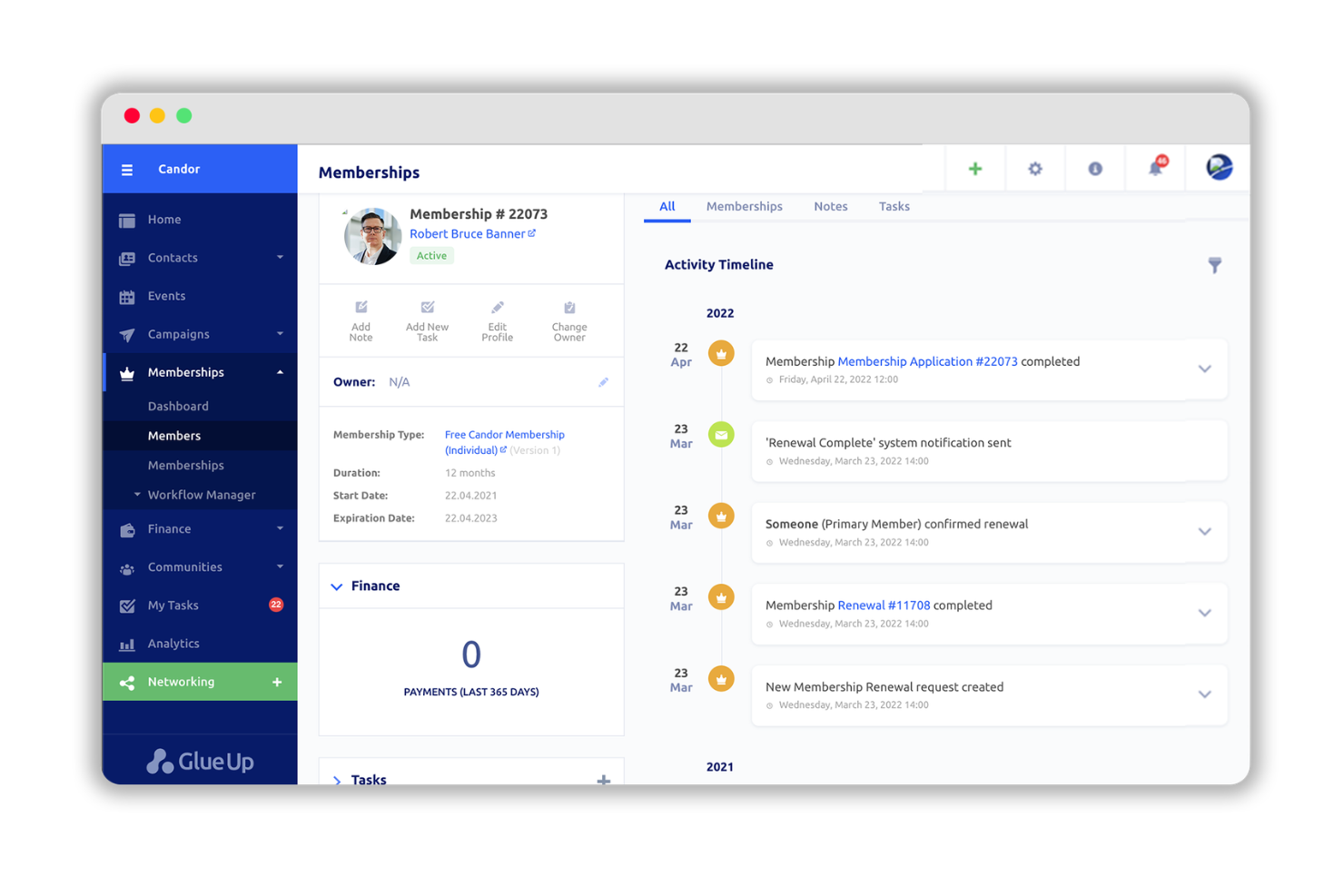
Glue Up brings together event management, community engagement, and membership tools in one platform. It’s designed for associations, chambers, and organizations that want to centralize their member communications and activities. If you need to manage events, memberships, and networking in a single place, Glue Up offers a unified solution.
Who Is Glue Up Best For?
Glue Up is a strong choice for associations, chambers of commerce, and professional networks that need to manage events, memberships, and community engagement in one platform.
Why I Picked Glue Up
I picked Glue Up because it brings together community engagement and event management in a single platform, which is rare among AI community management tools. The platform lets you manage events, memberships, and communications from one dashboard, making it easier to keep members active and informed. I also like that Glue Up includes built-in networking features, such as member directories and discussion forums, which help foster ongoing engagement. These capabilities make it a strong fit for organizations that want to centralize both their events and community activities.
Glue Up Key Features
Some other features that make Glue Up useful for AI community management include:
- Automated email campaigns: Schedule and send targeted communications to members based on activity or segmentation.
- Mobile app for members: Provides members with access to events, networking, and resources on the go.
- Surveys and feedback collection: Create and distribute surveys to gather insights and measure member satisfaction.
- Payment processing tools: Manage membership dues, event ticketing, and other payments directly within the platform.
Glue Up Integrations
Integrations include QuickBooks, Xero, Zoom, Outlook, Sage, Cvent, and more.
Pros and Cons
Pros:
- Supports payment processing for dues and events
- Automated workflows for member onboarding
- Combines event, membership, and community tools
Cons:
- Email and communication tools lack granular targeting
- Payment and invoicing flows are tightly coupled


If you’re looking for AI-driven support to manage and grow your online community, Swarm is worth considering. The platform is designed for community managers and moderators who want to automate engagement, moderation, and insights. Swarm helps reduce manual workload while keeping conversations active and on-topic.
Who Is Swarm Best For?
Swarm suits community managers and moderators at startups and growing online communities who want to automate engagement and moderation tasks.
Why I Picked Swarm
What stands out about Swarm is its focus on being an AI-powered co-pilot for community engagement and moderation. I picked Swarm because it uses AI to automatically detect and flag inappropriate content, reducing the manual burden on moderators. The platform also suggests conversation prompts and engagement tactics, helping keep discussions lively and relevant. These features make Swarm a strong fit for teams that want to maintain a healthy, active community without constant hands-on oversight.
Swarm Key Features
Some other features that make Swarm useful for AI community management include:
- Automated onboarding workflows: Guide new members through community guidelines and resources with AI-driven onboarding sequences.
- Sentiment analysis dashboard: Monitor the overall mood and tone of community conversations in real time.
- Customizable moderation rules: Set specific triggers and actions for different types of content or user behavior.
- Scheduled content posting: Plan and automate posts or announcements to keep your community engaged at optimal times.
Swarm Integrations
Native integrations are not currently listed. An API is available for custom integrations.
Pros and Cons
Pros:
- Scheduled content posting for consistent engagement
- Customizable moderation rules for different groups
- AI-driven moderation reduces manual review workload
Cons:
- Notification settings can be overwhelming for large groups
- No multilingual support for global communities

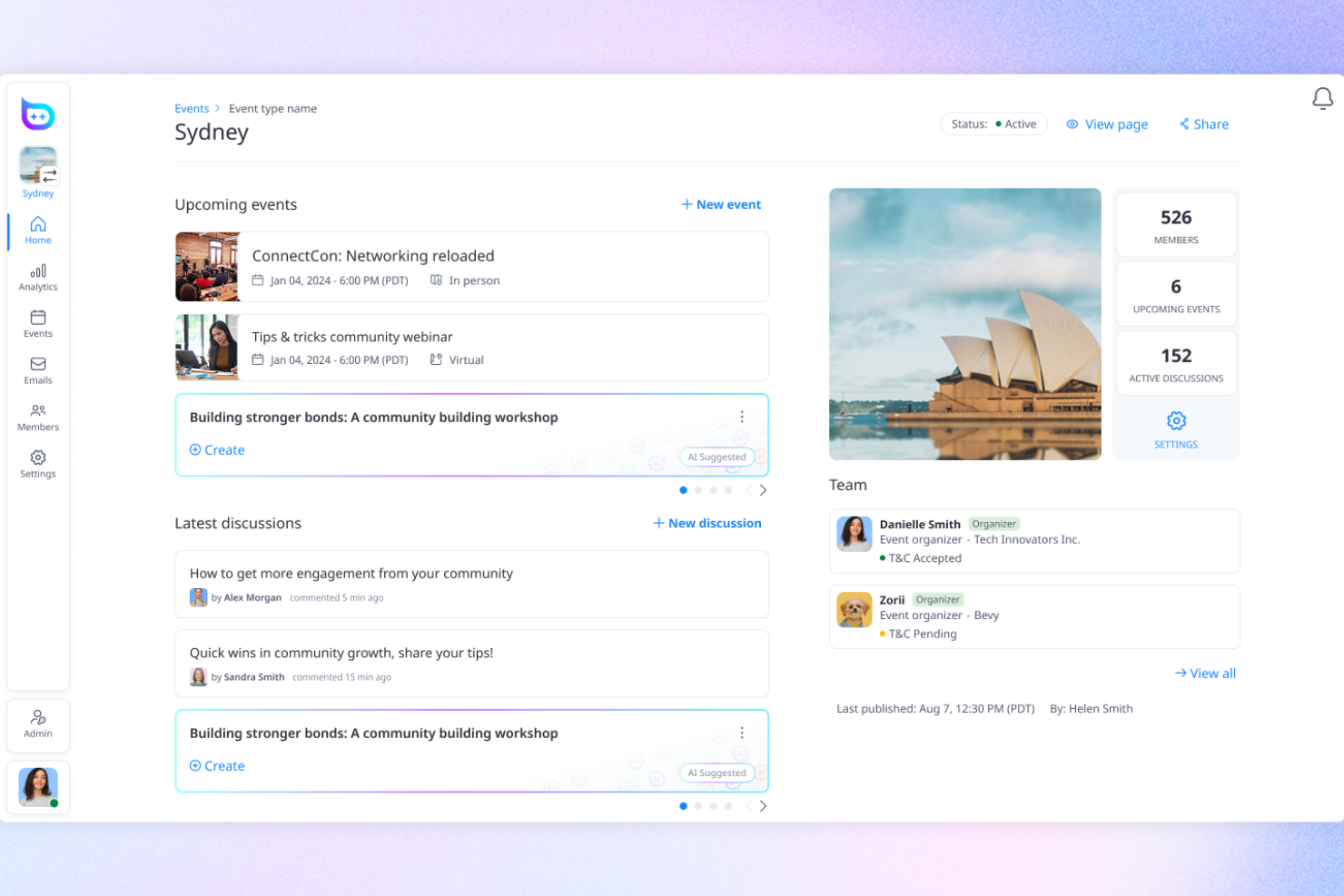
If you’re managing a large-scale or distributed community, Bevy offers a platform built for enterprise needs. It’s designed for organizations that want to empower local leaders, host virtual and in-person events, and centralize community operations. Bevy helps teams coordinate complex event programs and measure engagement across chapters or regions.
Who Is Bevy Best For?
Bevy is a strong fit for enterprise organizations and associations that need to manage distributed, multi-chapter communities and large-scale event programs.
Why I Picked Bevy
I picked Bevy because its enterprise-grade event and community management capabilities are purpose-built for organizations running large, distributed programs. The platform lets you create and manage multiple chapters or sub-communities, each with its own events, permissions, and analytics. I also appreciate how Bevy supports both virtual and in-person events at scale, with tools for branded registration, agenda management, and attendee engagement. These features make Bevy a strong choice for teams that need centralized oversight while empowering local leaders to drive their own community initiatives.
Bevy Key Features
Some other features that make Bevy useful for the AI community management include:
- Automated email campaigns: Schedule and send targeted communications to specific community segments directly from the platform.
- Sponsor and partner management: Track sponsor involvement and manage partner relationships within your event and community ecosystem.
- Resource library: Store and share documents, presentations, and media files for easy access by community members.
- Custom roles and permissions: Assign granular access levels to different users, such as organizers, moderators, and chapter leads.
Bevy Integrations
Native integrations are not currently listed.
Pros and Cons
Pros:
- AI-powered moderation for posts and comments
- Built-in event ticketing and registration tools
- Supports multi-chapter and distributed communities
Cons:
- Event analytics lack deep segmentation
- Limited communication features

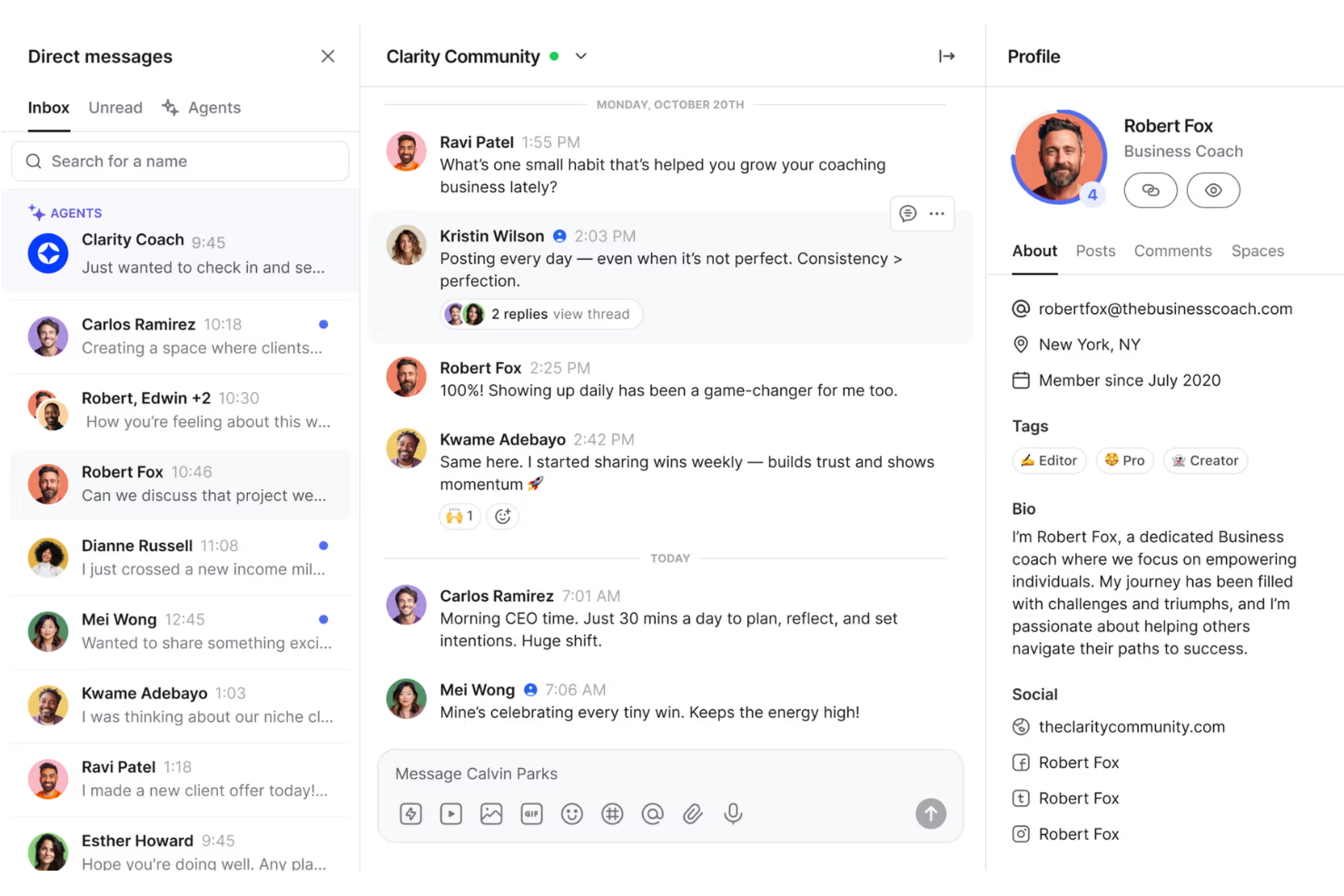
Circle offers a dedicated platform for building branded, interactive online communities. It’s a strong fit for creators, coaches, and businesses that want to centralize discussions, events, and resources in one place. If you’re looking to foster engagement and automate moderation with AI, Circle brings these capabilities together in a single solution.
Who Is Circle Best For?
Circle is well-suited for creators, coaches, and small to midsize businesses that want to build engaged online communities around their brand or expertise.
Why I Picked Circle
I picked Circle because it brings together community discussions, live events, and resource sharing in a single, branded space—while layering in AI-powered engagement tools. The platform’s AI features help automate moderation, suggest relevant content, and surface trending topics, which is especially valuable for teams managing active or growing communities. I also like that Circle supports a variety of content formats, from posts and courses to live video, making it easy to keep members engaged. These capabilities make Circle a strong choice for anyone looking to build a dynamic, interactive community with AI-driven support.
Circle Key Features
Some other features that make Circle useful for AI community management include:
- Spaces and subspaces: Organize discussions, resources, and events into dedicated areas for different topics or member groups.
- Member directory: Allow members to browse, search, and connect with others in the community.
- Event hosting: Schedule and run live events, webinars, and workshops directly within the platform.
- Custom branding: Tailor the look and feel of your community to match your organization’s identity.
Circle Integrations
Integrations include Airtable, Thrivecart, Google Sheets, Meta Pixel, Memberstack, Google Analytics, Active Campaign, and more.
Pros and Cons
Pros:
- Detailed analytics on member engagement and growth
- Built-in event ticketing and registration tools
- Supports multi-chapter and distributed communities
Cons:
- Search struggles with large communities
- Automation rules are basic
Other AI Community Management Software
Here are some additional AI community management software options that didn’t make it onto my shortlist, but are still worth checking out:
- Orbiit
For AI-powered member networking
- Brand24
For real-time social listening
- Lately
For AI social content and scheduling
- Mighty Networks
For community insights and engagement
- Community Swarm
For automated community engagement
- Intros AI
For AI-driven member introductions


Related Reviews
AI Community Management Software Selection Criteria
When selecting the best AI community management software to include in this list, I considered common buyer needs and pain points like automating moderation tasks and increasing member engagement. I also used the following framework to keep my evaluation structured and fair:
Core Functionality (25% of total score)
To be considered for inclusion in this list, each solution had to fulfill these common use cases:
- Moderate user-generated content automatically
- Provide analytics and reporting on community activity
- Enable scheduled or automated content posting
- Support onboarding of new community members
- Allow customization of moderation rules
Additional Standout Features (25% of total score)
To help further narrow down the competition, I also looked for unique features, such as:
- AI-driven sentiment analysis
- Automated member introductions or networking
- Gamification tools for member motivation
- Multilingual support for global communities
- Real-time alerts for trending topics or issues
Usability (10% of total score)
To get a sense of the usability of each system, I considered the following:
- Simple and intuitive interface design
- Clear navigation between community management tools
- Minimal steps to complete core tasks
- Responsive design for mobile and desktop
- Customizable dashboards or views
Onboarding (10% of total score)
To evaluate the onboarding experience for each platform, I considered the following:
- Availability of training videos and tutorials
- Access to onboarding templates or checklists
- Interactive product tours for new users
- In-app chatbots or guided help
- Live or recorded onboarding webinars
Customer Support (10% of total score)
To assess each software provider’s customer support services, I considered the following:
- Availability of live chat or phone support
- Response time to support inquiries
- Access to a searchable help center
- Community forums or user groups
- Proactive outreach from customer success teams
Value For Money (10% of total score)
To evaluate the value for money of each platform, I considered the following:
- Transparent and flexible pricing plans
- Features included at each pricing tier
- Free trial or demo availability
- No hidden fees or surprise charges
- Discounts for annual or volume commitments
Customer Reviews (10% of total score)
To get a sense of overall customer satisfaction, I considered the following when reading customer reviews:
- Positive feedback on AI moderation accuracy
- Reports of increased community engagement
- Comments on ease of setup and use
- Critiques of missing or buggy features
- Experiences with customer support responsiveness
How to Choose AI Community Management Software
It’s easy to get bogged down in long feature lists and complex pricing structures. To help you stay focused as you work through your unique software selection process, here’s a checklist of factors to keep in mind:
| Factor | What to Consider |
|---|---|
| Scalability | Will the software handle your current and projected community size without performance issues or extra costs? |
| Integrations | Does the tool connect natively with your existing platforms (e.g., Slack, Discord, CRM, analytics tools)? |
| Customizability | Can you tailor moderation rules, workflows, and branding to fit your community’s unique needs? |
| Ease of use | Will your team and community members be able to navigate and use the platform with minimal training? |
| Implementation and onboarding | How long will it take to set up, migrate data, and onboard moderators and members? Are resources or support available? |
| Cost | Are pricing tiers transparent, and do they align with your budget and feature requirements as your community grows? |
| Security safeguards | Does the software offer data encryption, access controls, and compliance with privacy regulations relevant to your industry? |
| Support availability | What support channels are offered (chat, email, phone), and are they available during your business hours or in your region? |
What Is AI Community Management Software?
AI community management software is a digital platform that uses artificial intelligence to automate and enhance tasks like moderation, engagement, and analytics within online communities. These AI tools help community managers monitor conversations, enforce guidelines, onboard new members, and analyze trends, all while using AI to reduce manual work. With features like an AI assistant, AI-generated responses, and integrations with social media management tools, these platforms help teams improve customer experience and user experience across customer communities. They also support stronger retention by helping teams build a more vibrant, thriving community through consistent, data-driven engagement. Designed to be user-friendly, these tools enable moderators and administrators to maintain active, safe, and scalable communities with less effort.
Features of AI Community Management Software
When selecting AI community management software, keep an eye out for the following key features:
- AI-powered moderation: Uses machine learning to automatically detect, flag, or remove inappropriate content, spam, and harmful behavior in real time.
- Sentiment analysis: Analyzes the tone and mood of community conversations to help managers understand member engagement and identify potential issues early.
- Automated onboarding: Guides new members through welcome messages, community guidelines, and initial setup steps without manual intervention.
- Customizable moderation rules: Allows teams to set specific triggers, filters, and actions based on their unique community standards and needs.
- Scheduled content posting: Enables managers to plan and automate announcements, discussions, or events for consistent community engagement.
- Analytics and reporting: Provides dashboards and reports on member activity, engagement trends, and moderation actions to inform strategy and measure success.
- Member segmentation: Groups members based on behavior, interests, or activity levels to tailor communication and engagement strategies.
- Integration capabilities: Connects with other platforms like chat apps, CRMs, or analytics tools to centralize workflows and data.
- Real-time alerts: Notifies moderators instantly about urgent issues, trending topics, or rule violations so they can respond quickly.
- Multilingual support: Supports moderation and engagement in multiple languages, making it easier to manage global communities.
Benefits of AI Community Management Software
Implementing AI community management software provides several benefits for your team and your business. Here are a few you can look forward to:
- Reduced manual moderation: AI-powered moderation tools automatically flag or remove inappropriate content, saving time and reducing repetitive tasks for your team.
- Improved member engagement: Automated onboarding, scheduled content, and real-time alerts help keep members active and involved in community discussions.
- Faster response to issues: Real-time notifications and sentiment analysis enable moderators to quickly address conflicts, negative trends, or urgent problems.
- Data-driven decision making: Built-in analytics and reporting features provide actionable insights into member behavior and community health.
- Consistent enforcement of guidelines: Customizable moderation rules ensure that community standards are applied fairly and uniformly across all interactions.
- Scalability for growing communities: Automation and integration capabilities make it easier to manage larger or more complex communities without increasing headcount.
- Enhanced global reach: Multilingual support and member segmentation features help teams effectively manage and engage diverse, international audiences.
Costs and Pricing of AI Community Management Software
Selecting AI community management software requires an understanding of the various pricing models and plans available. Costs vary based on features, team size, add-ons, and more. The table below summarizes common plans, their average prices, and typical features included in AI community management software solutions:
Plan Comparison Table for AI Community Management Software
| Plan Type | Average Price | Common Features |
|---|---|---|
| Free Plan | $0 | Basic moderation, limited analytics, basic onboarding, and community size limits. |
| Personal Plan | $5-$25/user/month | Core moderation tools, sentiment analysis, scheduled posting, and basic integrations. |
| Business Plan | $30-$75/user/month | Advanced analytics, customizable rules, member segmentation, integration with external platforms, and priority support. |
| Enterprise Plan | $100-$200+/user/month | Custom integrations, multilingual support, advanced security, dedicated account management, and SLA-backed support. |
AI Community Management Software FAQs
Here are some answers to common questions about AI community management software:
How does AI moderation work in community management software?
AI moderation uses machine learning algorithms to scan posts, comments, and messages for spam, offensive language, or rule violations. The system can automatically flag, hide, or remove content, reducing the need for manual review and helping teams maintain a safe, welcoming environment.
Can AI community management software integrate with my existing platforms?
Yes, most solutions offer integrations with popular platforms like Slack, Discord, CRM systems, and analytics tools. Always check the integration options to ensure the software fits into your current workflows and data ecosystem.
Is AI community management software suitable for small communities?
Yes, many tools offer free or low-cost plans designed for small teams or niche communities. These plans typically include core moderation and engagement features, making them accessible for groups of any size.
What data privacy and security measures should I look for?
Look for software that provides data encryption, access controls, and compliance with privacy regulations such as GDPR. Security safeguards are essential to protect member information and maintain trust within your community.
How long does it take to implement AI community management software?
Implementation time varies by platform and community size. Many tools offer onboarding resources like tutorials, templates, and product tours to help teams get started quickly—often within a few days to a couple of weeks.