
16 Affordable Email Marketing Tools for Startups in 2026

Best Affordable Email Marketing Software for Startups Shortlist
Here’s my shortlist of the best affordable email marketing software for startups:


The best affordable email marketing software helps you automate campaigns, segment your audience, and track performance without blowing your budget.
If you’re running a lean team, tools with steep learning curves, complex pricing tiers, or limited automation can stall your growth. You need software that’s easy to launch, integrates seamlessly with your stack, and supports personalization at every stage of the funnel, including lead nurturing, offer promotion, or re-engaging churned users.
After 12+ years in marketing and over 1,000 hours spent testing email platforms across startups and enterprise clients, I’ve narrowed down the top budget-friendly tools that deliver serious ROI without sacrificing usability or impact.
Why Trust Our Software Reviews
Best Affordable Email Marketing Software for Startups Summary
This comparison chart summarizes pricing details for my top affordable email marketing software for startups selections to help you find the best one for your budget and business needs.
| Tool | Best For | Trial Info | Price | ||
|---|---|---|---|---|---|
| 1 | Best for AI-powered email design | Free plan available | From $19/month | Website | |
| 2 | Best for visually stunning emails | Free plan available | From $19/user/month (billed annually) | Website | |
| 3 | Best for a value-packed free plan | Free plan + free demo available | From $7/month (billed annually) | Website | |
| 4 | Best for data-driven campaigns | Free plan + free demo available | From $20/month | Website | |
| 5 | Best for AI-driven lead generation | 7-day free trial + free demo available | From $39/month (billed annually) | Website | |
| 6 | Best for small business automation | 30-day free trial available | From $9/month | Website | |
| 7 | Best for e-commerce brands | Free demo available | From $251/month (billed annually) | Website | |
| 8 | Best for webinar integration | 14-day free trial + free demo available | From $19/month (billed annually) | Website | |
| 9 | Best for event marketing | 30-day free trial + free demo available | From $12/month | Website | |
| 10 | Best for transactional emails | Free plan + free demo available | From $8.08/month (billed annually) | Website |
-

Demandbase
Visit WebsiteThis is an aggregated rating for this tool including ratings from Crozdesk users and ratings from other sites.4.4 -
6sense
Visit WebsiteThis is an aggregated rating for this tool including ratings from Crozdesk users and ratings from other sites.4.3 -
AnswerThePublic
Visit Website


Best Affordable Email Marketing Software for Startups Review
Below are my detailed summaries of the best affordable email marketing software for startups that made it onto my shortlist. My reviews offer a detailed look at the key features, pros & cons, integrations, and ideal use cases of each tool to help you find the best one for you.


Elastic Email offers a flexible solution for startups seeking cost-effective email marketing. Designed to meet the needs of growing businesses, it offers a suite of features that streamline communication and marketing. With tools for managing subscribers, designing newsletters—including AI-powered email design—and automating email flows, Elastic Email addresses the challenges of efficient email marketing and transactional messaging, making it a practical choice for startups aiming to enhance their outreach without breaking the bank.
Why I Picked Elastic Email
I picked Elastic Email as a top choice for affordable email marketing for startups due to its AI Template Designer, which simplifies the creation of visually appealing emails. This feature is crucial for startups needing to make a strong impression without extensive design resources. Additionally, its pricing model is accessible for startups with limited budgets. The inclusion of automation capabilities supports efficient campaign management, allowing startups to focus on growth rather than manual processes.
Elastic Email Key Features
In addition to its AI Template Designer, Elastic Email offers:
- Landing Pages: Create customized landing pages to capture leads and drive conversions with ease.
- Signup Forms: Utilize unlimited signup forms to grow your subscriber base effortlessly.
- Campaign Management: Manage and track your email campaigns in real-time to optimize performance.
- Developer-Friendly API: Integrate and scale your email marketing efforts with Elastic Email’s robust API.
Elastic Email Integrations
Integrations include WordPress, Zapier, Shopify, Magento, WooCommerce, PrestaShop, Mailchimp, Google Analytics, Salesforce, and HubSpot. Additionally, Elastic Email offers an API for custom integrations.
Pros and Cons
Pros:
- Unlimited signup forms facilitate subscriber growth
- Real-time tracking optimizes email performance
- AI-powered template designer aids in email creation
Cons:
- Occasional deliverability complaints from users
- Reporting and analytics feel limited

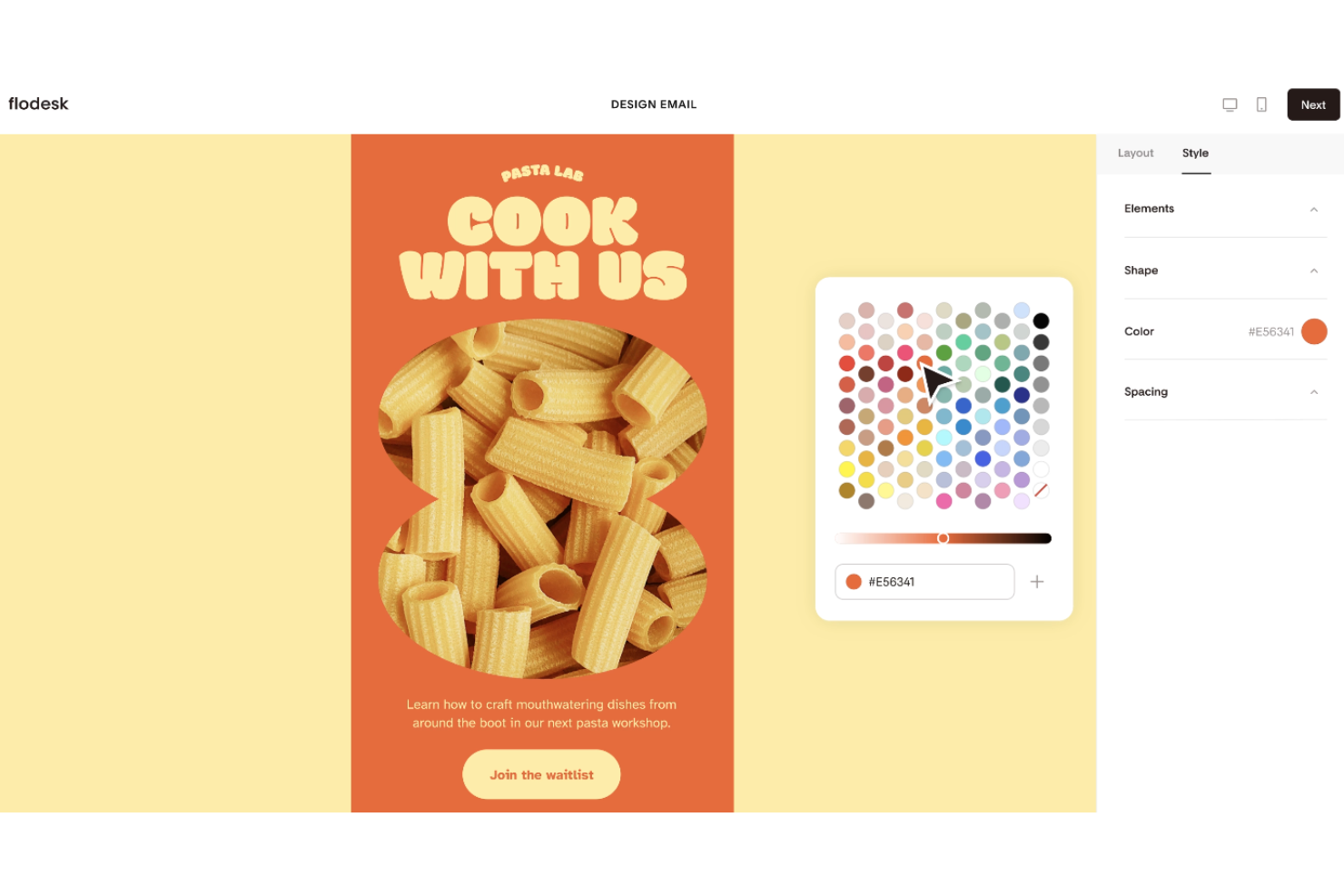
Flodesk is ideal for startups that want beautiful, engaging campaigns without high costs. It helps small teams design emails and automate workflows while keeping things simple and budget-friendly.
Why I picked Flodesk: Its affordable pricing and design-focused templates make it ideal for startups that want professional-looking emails without hiring a designer. The drag-and-drop editor is easy to use, so even small teams can create campaigns quickly. You can also build automation workflows to save time and keep your outreach consistent. By combining affordability with design elegance, Flodesk gives startups a stylish way to grow their brand through email.
Standout features & integrations:
Features include an intuitive email builder that allows for easy customization of templates. You’ll find workflow automation to help manage your email sequences effortlessly. Flodesk also offers analytics to track the performance of your campaigns and make informed decisions.
Integrations include Shopify, Instagram, Facebook, WordPress, Squarespace, Zapier, Google Sheets, Slack, Mailchimp, and Canva.
Pros and Cons
Pros:
- Strong focus on aesthetics
- Easy workflow automation
- Intuitive drag-and-drop editor
Cons:
- Lack of in-depth analytics
- Limited advanced features

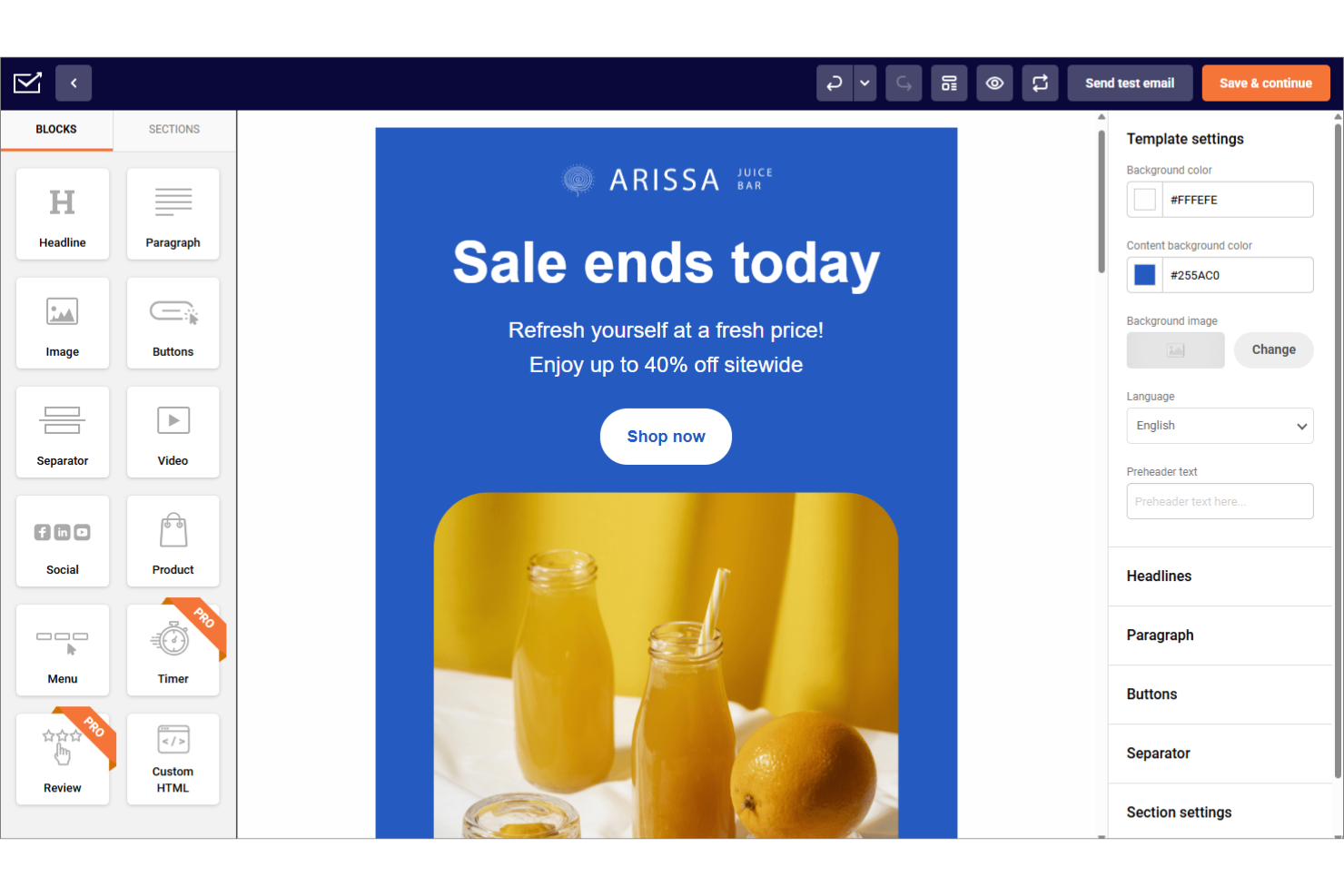
For startups seeking an affordable email marketing solution, Sender offers a compelling blend of functionality and accessibility. Tailored for businesses that need to maximize their marketing efforts without breaking the bank, it provides robust tools for creating and managing email campaigns with ease. Whether you're looking to engage your audience with personalized content or streamline your marketing processes, Sender addresses these needs with its intuitive design and comprehensive feature set.
Why I Picked Sender
I picked Sender for its exceptional capability to offer value-packed email marketing features at an accessible price point for startups. The platform's free plan, allowing up to 2,500 subscribers and 15,000 emails per month, is particularly appealing for new businesses looking to scale their marketing efforts without financial strain.
Additionally, Sender's drag-and-drop email builder and extensive template library facilitate the creation of professional-looking emails quickly and easily. These features, combined with its automation tools, empower your team to engage effectively with your audience and grow your business.
Sender Key Features
In addition to its affordability and user-friendly design, Sender offers several key features that enhance its appeal to startups:
- A/B Testing: Allows you to test different versions of your emails to determine which one resonates best with your audience, optimizing engagement and conversion rates.
- Responsive Email Templates: Provides a library of over 1,600 mobile-responsive templates, ensuring your emails look great on any device and save your team time on design.
- High Deliverability: Ensures a 99.98% deliverability rate, helping your emails reach your subscribers' inboxes reliably, which is critical for maintaining effective communication.
- Marketing Automation: Includes tools for setting up automated email sequences, allowing you to nurture leads and maintain customer engagement effortlessly.
Sender Integrations
Integrations include WordPress, Shopify, WooCommerce, PrestaShop, Magento, API for custom integrations, and more.
Pros and Cons
Pros:
- Offers responsive templates for mobile-friendly emails.
- User-friendly interface simplifies email campaign creation.
- Generous free plan supports up to 2,500 subscribers.
Cons:
- Limited advanced features in comparison to competitors.
- Free plan includes branding which may affect professionalism.

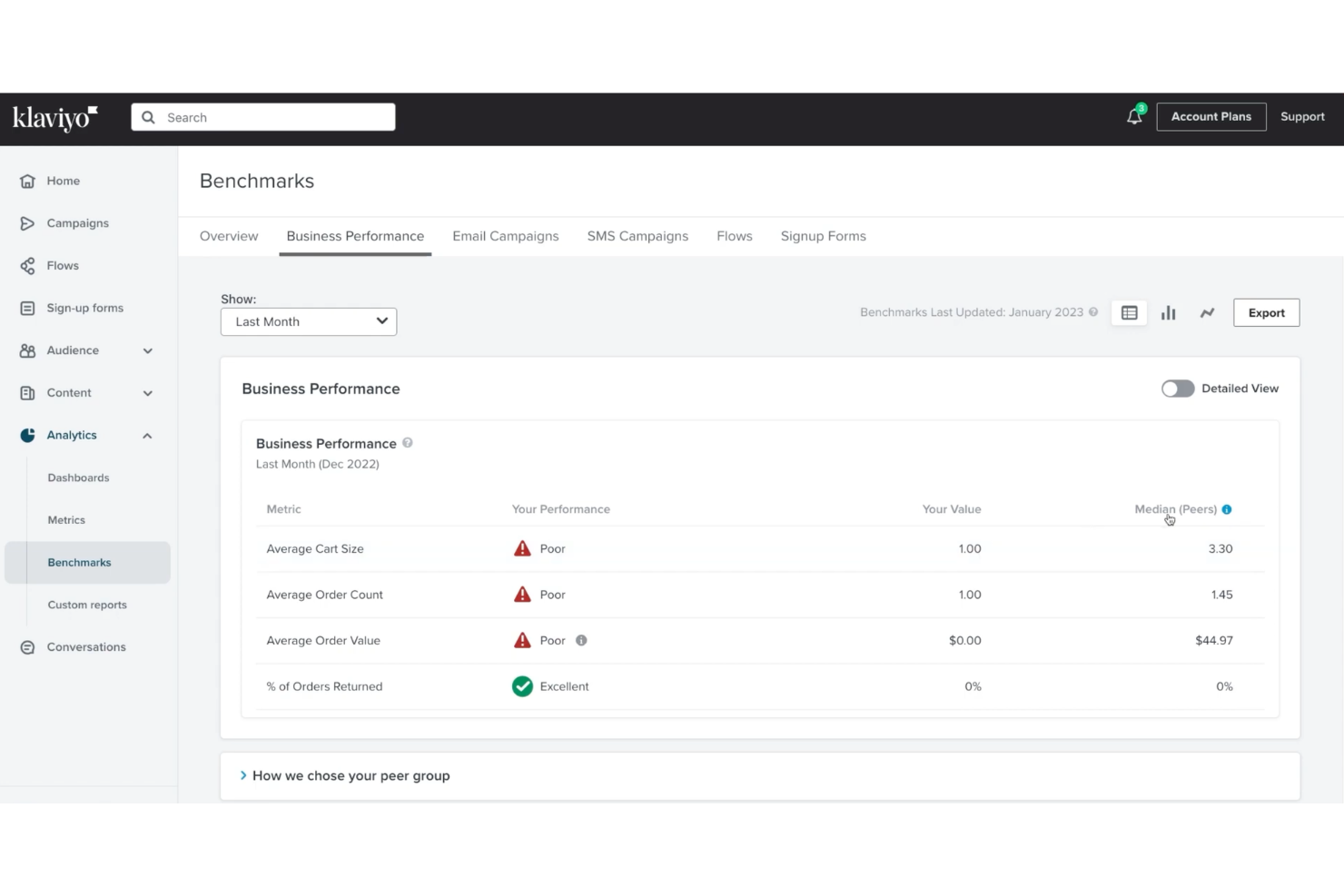
Klaviyo provides an email marketing platform suited for startups seeking affordable, data-driven solutions. With its focus on customer data and performance tracking, it allows you to build campaigns based on real behavior and engagement. The platform supports startups aiming to strengthen customer relationships and grow their marketing efforts while staying within budget. By connecting email with other channels, Klaviyo helps address the challenge of reaching customers in a structured and measurable way.
Why I Picked Klaviyo
I picked Klaviyo for its support of data-driven campaigns. It uses customer behavior, purchase history, and engagement data to guide how campaigns are built and targeted. The platform includes real-time segmentation and predictive metrics, helping startups adjust messaging based on actual trends rather than assumptions. With support for both email and SMS, it allows teams to coordinate outreach across channels while keeping decisions grounded in performance data.
Klaviyo Key Features
In addition to data-driven campaigns, Klaviyo offers:
- Integration with Over 350 Applications: This feature ensures you can seamlessly connect Klaviyo to your existing technology stack, streamlining data management.
- AI-driven Insights: Klaviyo's AI tools provide valuable insights into customer behavior, helping you optimize your marketing strategies.
- Omnichannel Marketing: With support for email, SMS, and social media, you can engage your audience across multiple platforms.
- Extensive Resources and Support: Klaviyo offers a help center, community forums, and educational materials to assist you in optimizing your marketing strategies.
Klaviyo Integrations
Integrations include Shopify, WooCommerce, Magento, BigCommerce, Salesforce Commerce Cloud, Stripe, Facebook (Meta), Instagram (via Meta), Google Ads, and Zendesk, with some connections supported through API or partner integrations.
Pros and Cons
Pros:
- Integration with numerous ecommerce platforms
- Advanced segmentation allows targeted email campaigns
- AI-driven insights improve customer engagement strategies
Cons:
- Users report issues with slow customer service response
- Pricing can be high for growing subscriber lists


Success.ai is designed for startups that want affordable email marketing software. It provides access to a large B2B database and tools that make it easier to run targeted campaigns.
Why I picked Success.ai: This platform uses AI to give startups valuable insights into buyer intent so they can reach the right people at the right time. Features like AI-powered email personalization and intent data analysis help small teams create campaigns that convert without wasting resources. It also includes a built-in CRM and unified inbox, so you can manage deals and conversations in one place. By focusing on affordability and AI-driven efficiency, Success.ai makes email marketing practical and effective for startups with limited budgets.
Standout features & integrations:
Features include data enrichment to cleanse and enhance your existing data. You’ll have access to a kanban-style CRM to manage your sales pipeline effectively. Success.ai also offers unlimited email sending with a warmup feature to prevent emails from landing in spam.
Integrations include Zapier, Salesforce, HubSpot, LinkedIn, Mailchimp, Google Analytics, Slack, Microsoft Dynamics, Pipedrive, and Zoho CRM.
Pros and Cons
Pros:
- Unified inbox for communications
- Buyer intent data insights
- AI-driven email personalization
Cons:
- Learning curve for new users
- Limited CRM features


Moosend is an affordable email marketing software built for startups that want to grow without overspending. It provides tools to design email campaigns, automate workflows, and manage audiences effectively, helping small teams scale their marketing with ease.
Why I picked Moosend: The platform stands out as affordable email marketing software for startups that need simple yet effective automation. Its automation tools, like email sequences and behavior-based triggers, let you run campaigns without requiring a large team. The intuitive interface makes it easy for founders or small teams to set up and manage workflows quickly. Moosend also offers advanced segmentation, ensuring startups can target the right audience while keeping costs low.
Standout features & integrations:
Features include a drag-and-drop editor that lets you create emails effortlessly. You’ll find advanced reporting tools to track your campaign performance. Moosend also offers A/B testing to optimize your email content.
Integrations include WordPress, WooCommerce, Shopify, Zapier, Salesforce, HubSpot, Magento, PrestaShop, Google Analytics, and Mailchimp.
Pros and Cons
Pros:
- Responsive customer support
- Intuitive drag-and-drop editor
- Advanced audience segmentation
Cons:
- Basic analytics in lower tiers
- Limited customization options


Maropost is built for startups that want to grow their customer base. It provides email marketing, engagement tools, and analytics so small teams can run effective campaigns without overspending.
Why I picked Maropost: Its perfect for startups that need powerful features to compete with bigger players. You can use tools like personalized recommendations and automated follow-ups to boost conversions on a budget. Advanced segmentation ensures you reach the right audience at the right time, helping startups maximize every campaign. By combining cost efficiency with strong marketing features, Maropost gives early-stage businesses a way to scale smarter.
Standout features & integrations:
Features include a drag-and-drop email builder that simplifies the creation of visually appealing campaigns. You’ll find detailed analytics to track customer behavior and measure campaign success. Maropost also offers automation workflows to manage customer journeys efficiently.
Integrations include Shopify, Magento, Salesforce, WooCommerce, BigCommerce, Google Analytics, Facebook, Zapier, Amazon, and Netsuite.
Pros and Cons
Pros:
- Abandoned cart recovery
- Advanced customer segmentation
- Tailored for e-commerce needs
Cons:
- Basic reporting in lower plans
- Steeper learning curve


GetResponse is great for startups that need to integrate webinars in their outreach. It also offers landing pages and automation tools to help small teams grow efficiently.
Why I picked GetResponse: It's a practical choice for startups that want professional tools without high costs. Features like automation workflows and landing page creation let small teams run campaigns with minimal effort. You also get access to webinar hosting, so you can engage your audience in real time and build stronger connections. By combining email, automation, and webinars in one place, GetResponse gives startups a cost-effective way to scale their marketing.
Standout features & integrations:
Features include an intuitive landing page builder that helps you capture leads effectively. You’ll find marketing automation tools to create complex customer journeys with ease. GetResponse also offers conversion funnels to guide your leads from awareness to purchase.
Integrations include Shopify, PayPal, Stripe, WooCommerce, WordPress, Google Analytics, Salesforce, HubSpot, Magento, and Zapier.
Pros and Cons
Pros:
- Comprehensive automation workflows
- Effective conversion funnels
- Integrated webinar hosting
Cons:
- Limited CRM capabilities
- Basic reporting in lower plans


Constant Contact is a good choice for startups that want to grow their reach. It combines email campaigns, event promotion, and social media tools in one platform to keep marketing simple and cost-effective.
Why I picked Constant Contact: Its event marketing tools make it especially useful for startups that want to engage audiences both online and offline. You can create and promote events with built-in registration and management features. Constant Contact also offers customizable templates for invitations and follow-ups, helping startups look professional without extra costs. By combining email, events, and social media, it gives early-stage teams an efficient way to market on a budget.
Standout features & integrations:
Features include a social media management tool to extend your reach across platforms. You’ll find a survey and poll function to gather feedback from your audience. Constant Contact also offers customizable email templates to match your brand's style.
Integrations include Shopify, WooCommerce, WordPress, QuickBooks, Salesforce, Eventbrite, Google Analytics, Facebook, Instagram, and Zapier.
Pros and Cons
Pros:
- Comprehensive contact management
- Customizable email templates
- Event management features
Cons:
- Limited A/B testing capabilities
- Basic reporting features


Brevo is an affordable email marketing software designed for startups that need both marketing and transactional email tools. It combines campaigns, SMS marketing, and automation in one platform to keep communication effective and budget-friendly.
Why I picked Brevo: Brevo’s affordability and transactional email features make it a strong fit for startups that need reliable confirmations and notifications. You can set up automated workflows to handle key messages like order updates without extra effort. Brevo also provides analytics to track engagement, giving startups clear insight into their performance. By combining cost efficiency with automation, Brevo helps early-stage businesses manage both marketing and essential communications.
Standout features & integrations:
Features include an intuitive email editor that allows you to design emails with ease. You’ll find SMS marketing capabilities to reach your audience beyond email. Brevo also provides automation tools to streamline your marketing and transactional processes.
Integrations include Shopify, WordPress, Magento, WooCommerce, Salesforce, HubSpot, PrestaShop, Google Analytics, Facebook, and Zapier.
Pros and Cons
Pros:
- Intuitive design editor
- Detailed email performance analytics
- Reliable transactional email service
Cons:
- Limited customization for transactional emails
- Learning curve for new users
Other Affordable Email Marketing Software for Startups
Here are some additional affordable email marketing software for startups options that didn’t make it onto my shortlist, but are still worth checking out:
- Braze
For personalized messaging
- Instantly
For quick campaign setup
- Maildoso
For cold email outreach
- Mailchimp
For creative templates
- SendPulse
For multi-channel communication
- MailerLite
For simple campaign management
- Levitate.ai
For relationship-based marketing


Affordable Email Marketing Platforms for Startups Selection Criteria
When selecting the best affordable email marketing software for startups to include in this list, I considered common buyer needs and pain points like budget constraints and ease of use. I also used the following framework to keep my evaluation structured and fair:
Core Functionality (25% of total score)
To be considered for inclusion in this list, each solution had to fulfill these common use cases:
- Create and send email campaigns
- Automate email sequences
- Set up autoresponders
- List management options
- Track email performance metrics
- Provide email templates
Additional Standout Features (25% of total score)
To help further narrow down the competition, I also looked for unique features, such as:
- Advanced segmentation capabilities
- Advanced automation workflows
- Integration with e-commerce platforms
- AI-driven personalization
- Multi-channel communication options
- Customizable landing pages
Usability (10% of total score)
To get a sense of the usability of each system, I considered the following:
- Intuitive user interface
- Simple navigation
- Learning curve for new users
- Customization options
- Consistency of design elements
Onboarding (10% of total score)
To evaluate the onboarding experience for each platform, I considered the following:
- Availability of training videos
- Access to templates and sign up forms for quick start
- Interactive product tours
- Support through webinars
- Onboarding chatbots
Customer Support (10% of total score)
To assess each software provider’s customer support services, I considered the following:
- Availability of live chat support
- Response time to inquiries
- Access to a knowledge base
- Availability of email support
- Quality of phone support
Value For Money (10% of total score)
To evaluate the value for money of each platform, I considered the following:
- Pricing compared to competitors
- Features included in basic plans
- Flexibility of pricing tiers
- Availability of discounts
- Return on investment potential
Customer Reviews (10% of total score)
To get a sense of overall customer satisfaction, I considered the following when reading customer reviews:
- Overall rating scores
- Commonly praised features
- Reported issues or bugs
- Feedback on customer support
- User recommendations
How to Choose Affordable Email Marketing Software for Startups
It’s easy to get bogged down in long feature lists and complex pricing structures. To help you stay focused as you work through your unique software selection process, here’s a checklist of factors to keep in mind:
| Factor | What to Consider |
|---|---|
| Scalability | Consider how the software will grow with your business. Will it handle increased email volume and a growing number of subscribers? Look for tools that offer scalable plans or pricing tiers that match your expected growth without significant cost increases. |
| Integrations | Check if integrations support API connections or SMTP for smooth data flow and if the software integrates with your existing tools like CRM, e-commerce platforms, or social media. Seamless integration can save time and reduce manual data entry. Make sure it supports the key systems you use daily. |
| Customizability | Evaluate how much you can tailor the software to fit your brand and workflows. Can you customize templates, dashboards, and reports? Look for flexibility that allows you to create a unique experience for your audience. |
| Ease of use | Assess the user interface and navigation. Is it beginner friendly, intuitive and straightforward? A tool that's easy to use will save your team time and reduce the learning curve, which is especially important for small teams with limited resources. |
| Implementation and onboarding | Look at the setup process and available support during onboarding. Does the vendor offer training, tutorials, or customer support to help you get started? A smooth onboarding experience can speed up time to value and reduce frustration for your team. |
| Cost | Compare the low-cost email marketing solution to more advanced ones before choosing. Consider not just the upfront cost but also the long-term value. Are there hidden fees? Ensure the cost aligns with the features and benefits you need. |
| Security safeguards | Ensure the software has robust security measures to protect your data and your customers’ information. Look for encryption, compliance with data protection regulations, and regular security updates. |
| Support availability | Check the level of support provided. Is there 24/7 support, and what channels are available (chat, email, phone)? Quick and reliable support can help solve issues faster and keep your operations running smoothly. |
What Is Affordable Email Marketing Software for Startups?
Affordable email marketing software for startups includes tools that are designed to help new businesses create and manage email campaigns without breaking the bank. Marketing managers, small business owners, and startup teams generally use these tools to connect with customers, build brand awareness, and drive sales. Automated email sequences, customizable templates, and analytics capabilities support efficient marketing efforts and informed decision-making. Overall, these tools provide startups with a cost-effective way to engage their audience and grow their business.
Features of Affordable Email Marketing Software for Startups
When selecting affordable email marketing software for startups, keep an eye out for the following key features:
- Automated email sequences: Streamline your email campaigns by setting up emails to send automatically based on triggers, saving time and ensuring consistent communication.
- Customizable templates: Create professional-looking emails that match your brand’s style without needing design skills, making it easy to engage your audience.
- Personalization: Customizable templates support advanced email personalization.
- Analytics capabilities: Track the performance of your campaigns to understand what works and make data-driven decisions to improve future efforts.
- Segmentation tools: Target specific groups within your contact list with tailored messages, increasing the relevance and effectiveness of your campaigns.
- Drag-and-drop or HTML editor: Easily build and edit emails with a user-friendly interface, allowing quick adjustments and creative designs.
- Integration options: Connect with other tools you use, like CRM systems or e-commerce platforms, to ensure seamless data flow and enhance productivity.
- A/B testing: Test different email variations to see which performs better, helping you optimize your content for maximum engagement.
- Transactional email support: Ensure reliable delivery of order confirmations and notifications, maintaining customer satisfaction and trust.
- Multi-channel communication: Reach your audience through various channels, such as email and SMS, to ensure comprehensive engagement.
- Predictive analytics: Use data insights to forecast customer behavior and tailor your marketing strategies accordingly, enhancing personalization and results.
Benefits of Affordable Email Marketing Software for Startups
Implementing affordable email marketing software for startups provides several benefits for your team and your business. Here are a few you can look forward to:
- Cost efficiency: Save money while accessing powerful marketing tools that help grow your business without straining your budget.
- Time savings: Automated email sequences and drag-and-drop editors reduce the time spent on campaign creation and management, allowing your team to focus on other tasks.
- Improved targeting: Segmentation tools and predictive analytics enable precise audience targeting, increasing the effectiveness of your email marketing efforts.
- Better decision-making: Analytics capabilities provide insights into campaign performance, helping you make informed choices to enhance future strategies.
- Increased engagement: Multi-channel communication options allow you to reach your audience through various platforms, boosting interaction and brand awareness.
- Enhanced personalization: Customizable templates and predictive analytics offer personalized experiences for your customers, fostering stronger connections.
- Reliable communication: Transactional email support ensures timely delivery of important notifications, maintaining customer trust and satisfaction.
Costs and Pricing of Affordable Email Marketing Software for Startups
Selecting affordable email marketing software for startups requires an understanding of the various pricing models and paid plans available. Costs vary based on features, team size, add-ons, and more. The table below summarizes common plans, their average prices, and typical features included in affordable email marketing software for startups solutions:
Plan Comparison Table for Affordable Email Marketing Software for Startups
| Plan Type | Average Price | Common Features |
| Free Plan | $0 | Basic email templates, limited automation, and essential analytics. |
| Personal Plan | $10-$30/user/month | Advanced templates, basic segmentation, A/B testing, and standard support. |
| Business Plan | $30-$70/user/month | Full automation, advanced segmentation, multi-channel communication, and priority support. |
| Enterprise Plan | $70+/user/month | Customizable solutions, dedicated account manager, advanced analytics, and premium support. |
Affordable Email Marketing Software for Startups FAQs
Here are some answers to common questions about affordable email marketing software for startups:
How can I ensure my emails don't end up in spam?
To keep your emails out of spam folders and improve deliverability rates, make sure to use a verified domain and follow email authentication protocols like DKIM and SPF. Avoid using spammy language and ensure you have permission from your recipients. Regularly clean your email list to remove inactive subscribers.
What are some cost-effective ways to grow my email list?
Offer valuable lead magnets like eBooks or discounts to encourage sign-ups. Promote your newsletter on social media and your website. Use pop-up forms and landing pages to capture emails. Collaborate with partners for co-marketing opportunities to reach a wider audience.
How do I measure the success of my email campaigns?
Track key metrics like open rates, click-through rates, and conversion rates as a part of your email marketing strategy. Use A/B testing to see which subject lines or content perform better. Monitor engagement over time to understand trends and adjust your strategy accordingly. Look for tools that offer detailed analytics to help with this.
How do I personalize emails without advanced tools?
Use basic personalization tactics like addressing recipients by their first name and segmenting your list based on interests or behaviors. Craft content that resonates with each segment. Even simple personalization can significantly improve engagement and make your emails feel more relevant.
What should I look for in an email marketing tool's support?
Check if the tool offers multiple support channels like chat, email, or phone. Look for resources like tutorials, webinars, and a knowledge base. Responsive support can help you quickly resolve issues and make the most of the tool’s features.
What’s Next:
If you're in the process of researching affordable email marketing software for startups, connect with a SoftwareSelect advisor for free recommendations.
You fill out a form and have a quick chat where they get into the specifics of your needs. Then you'll get a shortlist of software to review. They'll even support you through the entire buying process, including price negotiations.