

El software de marketing por correo electrónico para pequeñas empresas es un recurso valioso para las empresas nuevas y en crecimiento. Con el software adecuado, los equipos pueden mejorar la interacción con los clientes e impulsar las ventas. Sin embargo, encontrar el software de marketing por correo electrónico adecuado para pequeñas empresas puede ser complicado, especialmente con tantas opciones disponibles.
Basándome en mi experiencia con el software de marketing, probé y comparé varias de las principales soluciones de software de marketing por correo electrónico para pequeñas empresas. A partir de ahí, recopilé mis resultados en reseñas detalladas para ayudarte a encontrar el mejor software para tus necesidades.
Por qué confiar en nuestras recomendaciones de software
6,700+
Reviews
20
Industry experts
16+
Evaluation factors
14
Years
Nuestro equipo lleva probando y evaluando software desde 2012. Como líderes de marketing, sabemos lo difícil —y lo importante— que es elegir el software adecuado.
Para esta guía, evaluamos las herramientas mediante pruebas prácticas e investigación independiente, puntuando las herramientas según nuestros criterios de selección.
Nuestras reseñas reflejan nuestro criterio editorial humano, no un discurso de ventas.
Revisores expertos:
 Gui DrusinaDirector creativo
- Shriya GhateSenior Marketing Lead
 Amanda JacquesLíder de Marketing Ops

Tabla comparativa de software de marketing por correo electrónico para pequeñas empresas
Compara los detalles de precios de mis principales soluciones de software de marketing por correo electrónico para pequeñas empresas en la siguiente tabla.
| Tool | Best For | Trial Info | Price | ||
|---|---|---|---|---|---|
| 1 | Ideal para segmentación de emails impulsada por IA | Prueba gratuita de 30 días + plan gratuito + demostración gratuita disponible | Desde $13/mes | Website | |
| 2 | Ideal para propietarios de sitios alojados en Hostinger | Plan gratuito disponible | Desde $5.99/mes | Website | |
| 3 | Mejor para automatización de correos directa | Plan gratuito disponible | Desde $9/mes (facturado anualmente) | Website | |
| 4 | Ideal para la activación de datos en tiempo real | Demostración gratuita + plan gratuito disponible | Desde $45/mes | Website | |
| 5 | Ideal para plantillas de correo electrónico con marca | Plan gratuito + prueba gratuita disponible | Desde $19/usuario/mes (facturado anualmente) | Website | |
| 6 | Mejor para flujos de trabajo de automatización ilimitados | Plan gratuito + demo gratis disponible | Desde $7/mes (pagado anualmente) | Website | |
| 7 | Ideal por su asequibilidad general | Plan gratuito disponible | Desde $12/mes | Website | |
| 8 | Ideal para procesos de comercio electrónico | Prueba gratuita de 14 días disponible | Desde $33/mes (facturado anualmente) | Website | |
| 9 | La mejor para especialistas en marketing de ecommerce | Prueba gratuita de 14 días + demo gratis disponible | Desde $39/mes | Website | |
| 10 | Mejor para quienes inician en el marketing por correo electrónico | Prueba gratuita disponible | Desde $12.50/mes (facturado anualmente) | Website |


Reseñas del mejor software de marketing por correo electrónico para pequeñas empresas
A continuación se muestran mis resúmenes detallados de las mejores soluciones de software de marketing por correo electrónico para pequeñas empresas que llegaron a mi selección. En mis reseñas analizo las funciones principales, ventajas & desventajas, integraciones y casos de uso ideales de cada herramienta para ayudarte a encontrar la mejor opción.
 Ideal para segmentación de emails impulsada por IA
- Prueba gratuita de 30 días + plan gratuito + demostración gratuita disponible
- Desde $13/mes
Visit WebsiteCustomer Rating:4.5/5
Mailchimp presenta análisis de campañas que muestran la actividad de los suscriptores, tasas de apertura y clics, y tendencias generales de rendimiento de los correos. Mailchimp ayuda a tu pequeña empresa a crear y enviar campañas de correo electrónico segmentadas con herramientas que te permiten diseñar mensajes, automatizar recorridos de audiencia y monitorear el rendimiento desde una sola plataforma, todo sin necesidad de conocimientos técnicos. Está diseñado para emprendedores, especialistas en marketing y propietarios de pequeños equipos que buscan fortalecer las relaciones con sus clientes mediante boletines, seguimientos automatizados y análisis sobre el compromiso de los clientes, integrando estos esfuerzos con sitios web, formularios y anuncios.
Por qué elegí Mailchimp
Elegí Mailchimp por su capacidad única de integrar herramientas impulsadas por IA con el marketing por correo electrónico, lo que lo convierte en una excelente opción para pequeñas empresas. Su función de segmentación predictiva te permite dirigirte a los grupos de clientes clave de manera más eficaz, potenciando tus campañas de marketing. Además, las capacidades de automatización de marketing de la plataforma te permiten crear flujos de trabajo automáticos que ahorran tiempo y aseguran una comunicación constante con tu audiencia. Estas funciones se alinean con las necesidades de las pequeñas empresas que buscan optimizar sus estrategias de marketing sin agotar sus recursos.
Funciones clave de Mailchimp
Además de sus herramientas basadas en IA y automatización, también encontré varias otras funciones beneficiosas para pequeñas empresas:
- Herramientas de creación de contenido: Diseña con facilidad campañas de correo atractivas gracias a plantillas personalizables y un editor intuitivo de arrastrar y soltar.
- Análisis e informes: Obtén información sobre el rendimiento de tus campañas mediante análisis detallados que te ayudan a entender qué resuena con tu audiencia.
- Marketing por SMS: Amplía tu alcance con herramientas de marketing por SMS que complementan tus campañas de correo y mantienen a los clientes comprometidos en múltiples plataformas.
- Generador de formularios: Te permite captar clientes potenciales y hacer crecer tus listas de contactos a través de formularios personalizados y páginas alojadas.
Integraciones de Mailchimp
Las integraciones incluyen Shopify, WooCommerce, Salesforce, QuickBooks, Squarespace, Google Analytics, Eventbrite, Slack, Stripe y Zapier.
Pros and Cons
Pros:
- Recomendaciones impulsadas por IA ayudan a las pequeñas empresas a mejorar la segmentación de audiencia.
- Interfaz intuitiva con editor de arrastrar y soltar.
- Ofrece herramientas detalladas de análisis e informes.
Cons:
- Las funciones avanzadas de automatización requieren planes pagos de mayor nivel.
- Las funciones de SMS no están disponibles en todas las regiones o planes.
Learn more about Mailchimp : Ideal para propietarios de sitios alojados en Hostinger
- Plan gratuito disponible
- Desde $5.99/mes
Visit WebsiteCustomer Rating:4.4/5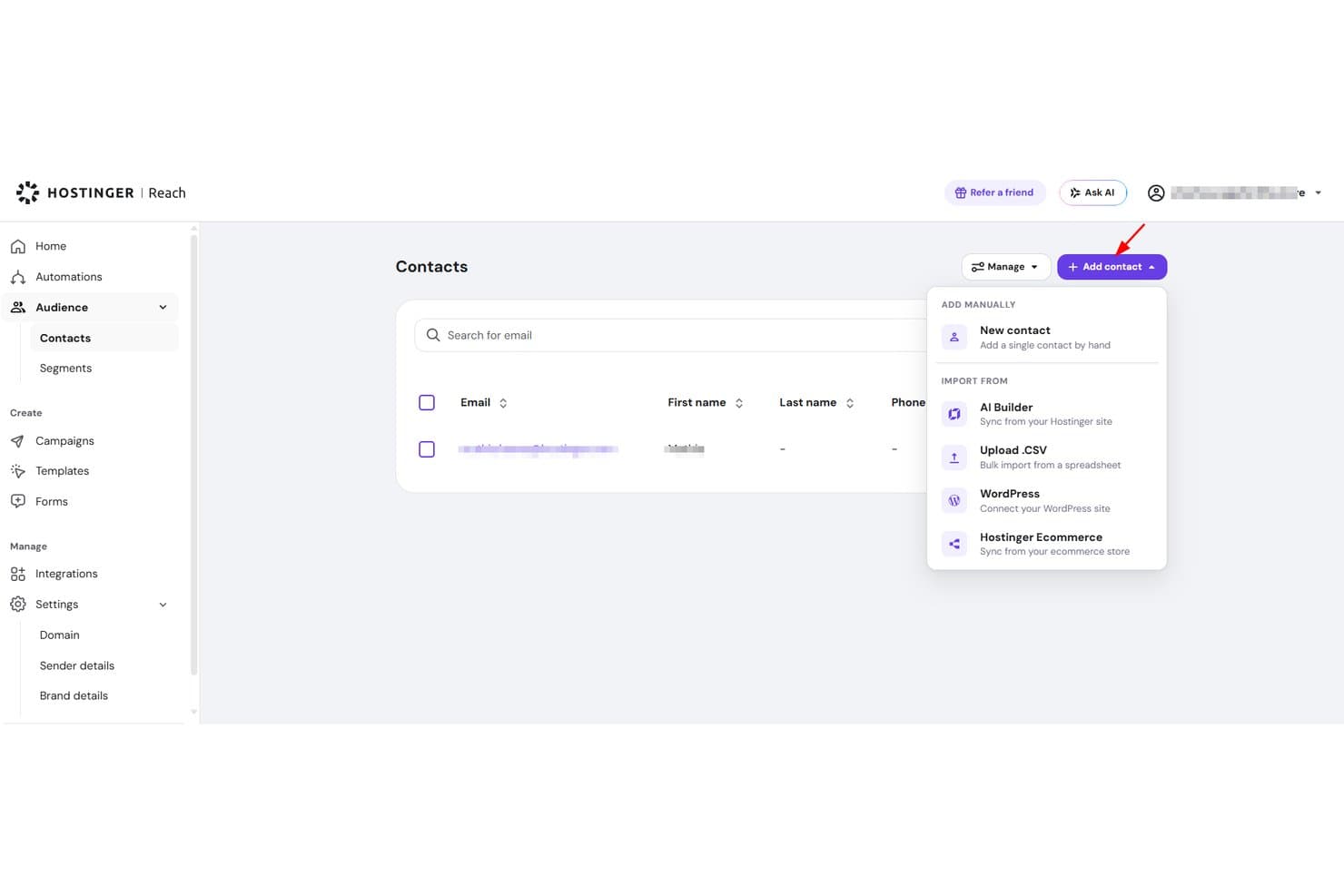
Hostinger Reach permite a los usuarios importar contactos mediante CSV, WordPress o manualmente. Hostinger Reach es una herramienta de marketing por correo electrónico basada en IA integrada en el ecosistema de Hostinger, que ofrece creación de campañas, gestión de contactos, secuencias de automatización y análisis básicos del rendimiento.
¿Para quién es más adecuado Hostinger Reach?
Hostinger Reach es una opción natural para propietarios de pequeñas empresas y profesionales del marketing que trabajan por su cuenta, que ya alojan su sitio con Hostinger y quieren hacer marketing por correo electrónico sin gestionar una herramienta independiente.
Por qué elegí Hostinger Reach
Hostinger Reach merece estar en mi lista de opciones principales porque está diseñado específicamente para propietarios de sitios que ya forman parte del ecosistema de Hostinger. Me encanta que sincronice automáticamente los contactos de tu sitio de WordPress o de Hostinger Website Builder, para que no tengas que importar listas manualmente. El creador de campañas con IA convierte una sola indicación en un correo electrónico completamente diseñado y acorde con tu marca, y la autenticación SPF, DKIM y DMARC se configura automáticamente.
Funciones principales de Hostinger Reach
- Generador de líneas de asunto con IA: Produce opciones ilimitadas de líneas de asunto para cualquier campaña, para que puedas elegir la más eficaz antes de enviarla.
- Optimización de la hora de envío: Identifica automáticamente el mejor momento para enviar cada campaña según los datos de interacción de los destinatarios.
- Creador de formularios de registro con marca: Te permite diseñar e insertar formularios de suscripción personalizados en cualquier parte de tu sitio sin programar.
- Plantillas de automatización prediseñadas: Incluye secuencias listas para usar para correos electrónicos de bienvenida, generación de confianza y recuperación de carritos abandonados.
Integraciones de Hostinger Reach
Hostinger Reach se conecta con el alojamiento de Hostinger, Hostinger Website Builder y WordPress.
Pros and Cons
Pros:
- Campañas generadas por IA a partir de una sola indicación
- Configuración automática de la autenticación del remitente
- Almacenamiento ilimitado de contactos
Cons:
- El editor puede alterar los correos electrónicos guardados
- Los informes básicos de interacción limitan la optimización
Learn more about Hostinger Reach: Mejor para automatización de correos directa
- Plan gratuito disponible
- Desde $9/mes (facturado anualmente)
Visit WebsiteCustomer Rating:4.8/5
El editor de campañas de EmailOctopus permite a los usuarios personalizar plantillas de correo de manera visual. EmailOctopus es una plataforma de marketing por correo electrónico diseñada para pequeñas empresas que necesitan una forma sencilla de crear, enviar y rastrear campañas sin la complejidad extra de una suite de marketing. Ofrece un editor de correos electrónicos con función de arrastrar y soltar, gestión de listas, segmentación y flujos de trabajo de automatización para ayudar a los equipos en crecimiento a gestionar boletines e interactuar con los suscriptores de manera más eficiente.
¿Para quién es mejor EmailOctopus?
EmailOctopus es ideal para propietarios de pequeñas empresas y startups en etapa inicial que buscan una herramienta de email marketing asequible y sin complicaciones, sin una curva de aprendizaje pronunciada.
Por qué elegí EmailOctopus
Elegí EmailOctopus porque brinda a las pequeñas empresas una manera sencilla de automatizar los seguimientos por correo electrónico sin agregar complejidad innecesaria. Se pueden crear secuencias automatizadas para dar la bienvenida a nuevos suscriptores, nutrir prospectos o volver a atraer contactos según la interacción con tus campañas. También me gusta que sus herramientas de segmentación permiten agrupar contactos por campos personalizados, actividad en campañas y datos de formularios de registro, lo que permite enviar correos electrónicos más relevantes. Esto hace que EmailOctopus sea adecuado para equipos pequeños que desean una automatización de correos simple, gestión de listas y seguimiento de campañas en un solo lugar.
Características principales de EmailOctopus
Otras funciones de EmailOctopus ayudan a las pequeñas empresas a crear, publicar y monitorear campañas de correo electrónico más fácilmente:
- Editor de correos electrónicos con arrastrar y soltar: Crea correos electrónicos personalizados visualmente usando plantillas modificables y bloques de contenido.
- Formularios de registro y páginas de aterrizaje: Genera formularios incrustables, ventanas emergentes y páginas de aterrizaje alojadas para captar nuevos suscriptores.
- Programación de campañas: Programa correos electrónicos para enviar en una fecha y hora específica.
- Panel de informes: Supervisa el rendimiento de las campañas con métricas como aperturas, clics y bajas.
Integraciones de EmailOctopus
Las integraciones incluyen Zapier, WordPress, Little Stack, Leadpages, WooCommerce, Google Ads, Shopify, Memberful, Ticket Tailor y Wix.
Pros and Cons
Pros:
- La automatización sencilla permite correos de bienvenida, nutrición y cumpleaños
- La segmentación dirige los correos por datos, etiquetas y comportamiento
- Los informes integrados rastrean el rendimiento de campañas y correos automatizados
Cons:
- La edición de plantillas puede resultar restrictiva para diseños personalizados
- Las opciones avanzadas de automatización son limitadas para flujos de campaña complejos
Learn more about EmailOctopus: Ideal para la activación de datos en tiempo real
- Demostración gratuita + plan gratuito disponible
- Desde $45/mes
Visit WebsiteCustomer Rating:4.6/5
Klaviyo personaliza formularios de registro y flujos utilizando datos en tiempo real. Klaviyo ofrece una solución de marketing por correo electrónico adaptada para pequeñas empresas, enfocada en mejorar el compromiso del cliente y fomentar el crecimiento. Diseñado para pequeñas y medianas empresas, integra automatización de marketing avanzada, conocimientos impulsados por IA y análisis para abordar los desafíos únicos de gestionar relaciones con clientes y optimizar estrategias de marketing. Al proporcionar una conectividad de datos sin interrupciones mediante numerosas integraciones, Klaviyo permite a las empresas personalizar sus esfuerzos de marketing y lograr resultados medibles.
Por qué elegí Klaviyo
Elegí Klaviyo por su capacidad única de unificar los datos de los clientes y activarlos en tiempo real, lo que lo convierte en una opción destacada para pequeñas empresas. La función de automatización de marketing de la plataforma te permite crear flujos de trabajo personalizados que dirigen campañas a los clientes en función de sus interacciones con tu marca. Además, los conocimientos impulsados por IA de Klaviyo proporcionan recomendaciones prácticas para mejorar tus campañas de marketing. Estas características, en conjunto, aseguran que tu negocio pueda ofrecer experiencias personalizadas que conecten con tu audiencia y fomenten el compromiso.
Características clave de Klaviyo
Además de la activación de datos en tiempo real, Klaviyo ofrece:
- Análisis avanzados: Proporciona herramientas de informes detalladas para rastrear el rendimiento de las campañas y el comportamiento del cliente, ayudándote a tomar decisiones basadas en datos.
- Marketing omnicanal: Soporta la comunicación a través de plataformas como correo electrónico, SMS y redes sociales, asegurando un mensaje coherente.
- Segmentación: Permite categorizar a tu audiencia según criterios específicos, facilitando campañas de marketing dirigidas y personalizadas.
- Plantillas personalizables: Ofrece una amplia gama de plantillas optimizadas para dispositivos móviles para crear correos electrónicos visualmente atractivos y alineados con tu marca.
Integraciones de Klaviyo
Las integraciones incluyen Shopify, BigCommerce, WooCommerce, Magento, Salesforce Commerce Cloud, Stripe, Facebook, Instagram, Google Ads y Zendesk.
Pros and Cons
Pros:
- Integración con numerosas plataformas de comercio electrónico
- Las capacidades omnicanal permiten alcanzar clientes por múltiples vías
- La activación de datos en tiempo real mejora el compromiso del cliente
Cons:
- El precio puede ser elevado para empresas en crecimiento
- El etiquetado y la organización avanzados son menos robustos que en algunos competidores
Learn more about Klaviyo: Ideal para plantillas de correo electrónico con marca
- Plan gratuito + prueba gratuita disponible
- Desde $19/usuario/mes (facturado anualmente)
Visit WebsiteCustomer Rating:4.7/5
Flodesk te ayuda a crear campañas de correo electrónico alineadas con tu marca y plantillas visuales profesionales. Flodesk es una solución de marketing por correo electrónico diseñada para pequeñas empresas que desean correos consistentes y alineados con su marca sin complicaciones. Destaca por sus pulidas plantillas de correo electrónico con marca, que hacen que el diseño profesional sea accesible tanto para diseñadores como para quienes no lo son. Con automatizaciones integradas y segmentación de suscriptores, Flodesk ayuda a los pequeños equipos a gestionar campañas de correo electrónico de manera eficiente mientras mantienen una fuerte identidad visual.
Por qué elegí Flodesk
Elegí Flodesk por su fortaleza en plantillas de correo electrónico con marca, lo que facilita a las pequeñas empresas mantener una identidad visual consistente. Su enfoque centrado en el diseño, junto con la integración de Canva, permite crear correos electrónicos pulidos y de marca sin necesidad de ser experto en diseño. Flodesk también ofrece automatizaciones simples que gestionan eficientemente los recorridos de los suscriptores, ayudando a ahorrar tiempo y mantener un alto nivel de interacción.
Características clave de Flodesk
Además de las plantillas de correo electrónico con marca, Flodesk ofrece:
- Fuentes personalizadas: Permite usar tipografías únicas que se alinean con la estética de tu marca, mejorando la personalización de tus correos.
- Temporizadores de cuenta regresiva: Agrega urgencia a tus campañas insertando temporizadores de cuenta regresiva en tus correos, alentando a los clientes a actuar más rápido.
- Encuestas integradas: Involucra a tu audiencia incluyendo encuestas interactivas directamente en tus correos, recopilando valiosos comentarios de los clientes.
- Análisis detallados: Ofrece información sobre el desempeño de tus correos, ayudándote a tomar decisiones informadas para optimizar futuras campañas.
Integraciones de Flodesk
Las integraciones incluyen HoneyBook, BookFunnel, Canva, Shopify, Squarespace, ThriveCart, Wix y Manychat.
Pros and Cons
Pros:
- Configuración rápida para campañas pequeñas o estacionales
- Editor limpio y sin distracciones (menos desorden, más enfoque en el diseño)
- Marca consistente en las campañas con bloques de plantillas reutilizables
Cons:
- Menos control sobre la personalización de correos a nivel de código
- Funciones limitadas de CRM o gestión de contactos integradas
Learn more about Flodesk: Mejor para flujos de trabajo de automatización ilimitados
- Plan gratuito + demo gratis disponible
- Desde $7/mes (pagado anualmente)
Visit WebsiteCustomer Rating:4.6/5
El panel de automatización de Sender permite a los usuarios crear y lanzar flujos de correos electrónicos usando plantillas prediseñadas y un editor visual. Sender es una plataforma versátil de marketing por correo electrónico diseñada para pequeñas empresas que buscan mejorar sus esfuerzos de marketing sin gastar demasiado. Ofrece una experiencia fácil de usar gracias a su creador de correos electrónicos de arrastrar y soltar y una biblioteca de plantillas personalizables, lo que la hace ideal para propietarios de pequeñas empresas en sectores como comercio electrónico, B2B y organizaciones sin fines de lucro que necesitan conectar eficazmente con su audiencia. Al proporcionar funciones como automatización, segmentación y marketing por SMS, Sender aborda el desafío de alcanzar a los clientes a través de múltiples canales mientras mantiene altas tasas de entrega.
Por qué elegí Sender
Elegí Sender por su extraordinaria capacidad para cubrir las necesidades de las pequeñas empresas, ofreciendo flujos de trabajo de automatización ilimitados, lo que puede mejorar significativamente tus campañas de marketing sin requerir conocimientos técnicos. La sólida función de segmentación de la plataforma te permite dirigirte a grupos de clientes específicos con contenido personalizado, asegurando que tus mensajes resuenen con la audiencia adecuada. Además, la opción de marketing por SMS de Sender te aporta otro canal para llegar a los clientes, convirtiéndose en una herramienta integral para las empresas que desean expandir su alcance y su interacción.
Funciones clave de Sender
Además de sus ventajas destacadas, Sender ofrece otras características valiosas para pequeñas empresas:
- Análisis en tiempo real: Proporciona información detallada sobre el rendimiento de las campañas, ayudándote a comprender qué funciona mejor con tu audiencia.
- Pruebas A/B: Te permite probar diferentes variaciones de correos electrónicos para optimizar las tasas de apertura y conversiones.
- Autoestilizado de marca: Ajusta automáticamente el diseño de tus correos electrónicos al estilo de tu marca, asegurando coherencia en todas las comunicaciones.
- Cumplimiento con GDPR: Garantiza que tus esfuerzos de marketing por correo electrónico se adhieran a las normativas de protección de datos, manteniendo la confianza del cliente.
Integraciones de Sender
Las integraciones incluyen WordPress, WooCommerce, Zapier, PrestaShop, Magento, OpenCart, Shopify, API para integraciones personalizadas y más.
Pros and Cons
Pros:
- Incluye flujos de automatización ilimitados
- Soporte integrado para marketing por SMS
- Creador intuitivo de arrastrar y soltar
Cons:
- Límites en la cantidad de suscriptores en los planes inferiores
- No incluye creador de páginas de destino
Learn more about Sender: Ideal por su asequibilidad general
- Plan gratuito disponible
- Desde $12/mes
Visit WebsiteCustomer Rating:4.7/5
MailerLite ofrece una gestión rentable de campañas de correo electrónico para equipos con recursos limitados. MailerLite es una plataforma de marketing por correo electrónico diseñada para pequeñas empresas que buscan soluciones rentables para sus necesidades de marketing. Es ideal para equipos que desean gestionar campañas de listas de correo electrónico sin contar con amplios recursos.
Por qué elegí MailerLite: MailerLite es la opción preferida para las empresas que priorizan la asequibilidad sin renunciar a las funciones esenciales de marketing por correo electrónico. Ofrece un editor intuitivo de arrastrar y soltar que simplifica la creación de correos electrónicos. La plataforma también proporciona herramientas de automatización para agilizar los esfuerzos de marketing digital, todo a un costo inferior al promedio. En definitiva, la simplicidad de MailerLite permite a los equipos pequeños ejecutar los mejores servicios de marketing por correo electrónico de manera eficiente y manteniéndose conscientes del presupuesto.
Características destacadas e integraciones:
Características incluyen un editor intuitivo de arrastrar y soltar que te permite crear correos electrónicos rápidamente, herramientas de automatización para ayudar a gestionar tus secuencias de correos electrónicos y muchas plantillas para darle un aspecto profesional a tus mensajes.
Integraciones incluyen Shopify, WordPress, WooCommerce, Zapier, Stripe, Mailchimp, Squarespace, Facebook y Slack.
Pros and Cons
Pros:
- Editor de correos sencillo
- Adecuado para equipos pequeños
- Amplia variedad de plantillas
Cons:
- Funcionalidades avanzadas limitadas
- Herramientas de informes básicas
 8Ideal para procesos de comercio electrónico
Kit
- Prueba gratuita de 14 días disponible
- Desde $33/mes (facturado anualmente)
Visit WebsiteCustomer Rating:4.5/5
Kit ofrece herramientas sencillas para crear y gestionar campañas de correo electrónico para el crecimiento de la marca. Kit es una herramienta de marketing por correo electrónico diseñada para pequeñas empresas. Ofrece soluciones intuitivas para crear y gestionar campañas de correo electrónico.
Por qué elegí Kit: Kit ofrece simplicidad sin sacrificar funcionalidad. Puedes crear y enviar correos electrónicos visualmente atractivos utilizando plantillas prediseñadas que no requieren habilidades de diseño, lo que facilita comenzar rápidamente. Las funciones automatizadas del software, como los recordatorios de seguimiento, también garantizan que permanezcas conectado con tu audiencia en los momentos adecuados. Además, incluye seguimiento de rendimiento integrado, que brinda información sobre el desempeño de tus correos sin análisis complicados.
Funciones y integraciones destacadas:
Funciones incluyen plantillas de correo electrónico fáciles de usar que te permiten crear campañas rápidamente sin habilidades de diseño, seguimientos automatizados para mantener a tu audiencia comprometida, y un seguimiento detallado del rendimiento que te ayuda a entender cómo están funcionando tus correos electrónicos.
Las integraciones incluyen Shopify, WooCommerce, BigCommerce, Mailchimp, Squarespace, Stripe, Facebook, Instagram, Google Analytics y Klaviyo.
Pros and Cons
Pros:
- Recomendaciones de contenido integradas para el crecimiento
- Permite la edición directa de correos HTML
- Escalable para negocios en crecimiento
Cons:
- Personalización limitada de plantillas de correo electrónico
- Funcionalidad básica de pruebas A/B
Learn more about Kit: 9La mejor para especialistas en marketing de ecommerce
Drip
- Prueba gratuita de 14 días + demo gratis disponible
- Desde $39/mes
Visit WebsiteCustomer Rating:4.4/5
Drip automatiza correos electrónicos personalizados para incrementar la interacción de clientes en ecommerce. Drip es una plataforma de automatización de marketing para negocios de comercio electrónico que potencia la interacción con los clientes y las estrategias de ventas. Los especialistas en marketing para ecommerce la utilizan para crear campañas de correo electrónico personalizadas y automatizar las interacciones con los clientes.
Por qué elegí Drip: El enfoque de Drip en el comercio electrónico lo hace ideal para empresas que buscan conectar con los clientes a través de experiencias personalizadas. Ofrece herramientas avanzadas de segmentación que te permiten dirigir tus campañas según comportamientos y preferencias específicas de los clientes. Los flujos de trabajo de automatización de la plataforma también permiten crear secuencias complejas adaptadas a diferentes etapas de compra. Además, Drip proporciona información detallada sobre el recorrido del cliente, ayudándote a optimizar tus esfuerzos de marketing y las tasas de entregabilidad del correo electrónico.
Funciones y conectores destacados:
Funciones incluyen herramientas avanzadas de segmentación que te ayudan a dirigirte a los clientes en función de su comportamiento, flujos de trabajo automáticos para crear recorridos de cliente detallados y análisis de datos sobre las interacciones de los clientes, lo que te permite perfeccionar tus estrategias de marketing.
Conectores incluyen Shopify, WooCommerce, Magento, BigCommerce, Facebook, Instagram, Zapier, Privy, Justuno y Sumo.
Pros and Cons
Pros:
- Información detallada del recorrido del cliente
- Admite flujos de trabajo complejos
- Interacciones personalizadas con los clientes
Cons:
- Complejo para equipos pequeños
- Flexibilidad de diseño limitada
Learn more about Drip: 10Mejor para quienes inician en el marketing por correo electrónico
AWeber
- Prueba gratuita disponible
- Desde $12.50/mes (facturado anualmente)
Visit WebsiteCustomer Rating:4.3/5
AWeber ayuda a los emprendedores a gestionar y enviar boletines informativos por correo electrónico rápidamente. AWeber es un software de marketing por correo electrónico para pequeñas empresas y emprendedores que desean gestionar fácilmente sus campañas de correo. Es especialmente útil para quienes son nuevos en el marketing por correo electrónico, ya que proporciona herramientas para crear y enviar boletines informativos de manera eficiente.
Por qué elegí AWeber: AWeber es ideal para principiantes gracias a su configuración sencilla y su interfaz intuitiva. Ofrece plantillas fáciles de usar y un editor de arrastrar y soltar que simplifica el diseño, mientras que la función de autorespuesta permite automatizar los correos de seguimiento sin complicaciones. Además, AWeber proporciona recursos educativos para ayudar a tu equipo a aprovechar al máximo la plataforma.
Funciones y integraciones destacadas:
Funciones incluyen un creador de correos electrónicos de arrastrar y soltar fácil de usar que te ayuda a diseñar correos rápidamente, respuestas automáticas para automatizar tus secuencias de correo y una variedad de plantillas para que tus correos luzcan profesionales con un esfuerzo mínimo.
Integraciones incluyen WordPress, Shopify, PayPal, Facebook, Etsy, WooCommerce, Zapier, Salesforce, Leadpages y OptinMonster.
Pros and Cons
Pros:
- Proceso de configuración simple
- Recursos educativos útiles
- Automatización sencilla de correos electrónicos
Cons:
- Funcionalidades avanzadas limitadas
- Herramientas básicas de informes
Otro software de marketing por correo electrónico para pequeñas empresas
Aquí tienes algunas soluciones adicionales de software de marketing por correo electrónico para pequeñas empresas que no llegaron a mi selección, pero que aún merece la pena consultar:
- 11ActiveCampaignMejor para la automatización de correos electrónicos
- 12Benchmark EmailMejor para alcance global
- 13Campaign MonitorIdeal para la personalización de diseño
- 14Elastic EmailIdeal para el diseño de correos electrónicos con IA
- 15Constant ContactMejor para la promoción de eventos
- 16GetResponseMejor para seminarios web
- 17MailchimpIdeal para equipos pequeños
- 18BrevoIdeal para correos electrónicos transaccionales
- 19HubSpot Email MarketingLa mejor para integración con CRM
Cómo evalúo el software de marketing por correo electrónico para pequeñas empresas
Analizo dos niveles: si una herramienta cumple con lo básico—editores drag-and-drop, segmentación de listas, automatización—y luego, qué la hace especialmente adecuada para una pequeña empresa.
Funcionalidad principal (Condiciones mínimas para esta lista)
Cuando selecciono herramientas para mi lista, califico cada una en una escala del 0 (no ofrece la funcionalidad) al 5 (destaca en esta área) por cada una de las funcionalidades principales que se muestran a continuación. Luego, calculo el puntaje total de la herramienta en porcentaje. Cada herramienta necesita alcanzar un puntaje total mínimo del 65% para ser considerada.
- Constructor de campañas de correo electrónico: Evalúo si el editor permite arrastrar bloques de productos, ajustar los diseños para móviles y previsualizar antes de enviar—sin necesidad de tocar HTML.
- Gestión de listas de contactos: Aquí importa la profundidad de la segmentación. Busco la capacidad para etiquetar contactos por comportamiento de compra, nivel de interacción o fuente de suscripción.
- Automatización de marketing: Verifico si soporta flujos de trabajo de varios pasos—como una secuencia después de la compra que ramifique según si el cliente abrió el primer correo.
- Análisis de desempeño: Más allá de tasas de apertura y clics, busco atribución de ingresos y comparaciones de campañas que te ayuden a vincular un envío específico con ventas reales.
- Entregabilidad y cumplimiento: Evalúo la autenticación SPF/DKIM, opciones de doble suscripción y gestión de consentimiento integrada para cumplir con GDPR y CAN-SPAM.
- Precios y escalabilidad amigables para PYMES: Verifico si los planes de entrada se ajustan a tamaños realistas de listas de pequeñas empresas y si los precios escalan de manera predecible a medida que crecen los contactos.
Una vez tengo una lista de herramientas que cumplen con los criterios, considero qué distingue a cada plataforma.
Factores diferenciadores (Qué distingue a los proveedores)
Así es como comparo y contrasto a los diferentes proveedores:
Funciones destacadas
Las plantillas de automatización preconstruidas son un diferenciador clave. Un comercializador individual que puede lanzar una serie de carrito abandonado o reactivación en minutos—en vez de tener que diseñarla desde cero—obtiene valor real rápidamente. También evalúo integraciones nativas con plataformas de comercio electrónico como Shopify o WooCommerce, donde la sincronización de productos y la atribución de ingresos por campaña pueden contribuir a envíos más inteligentes. Las páginas de destino y formularios de suscripción integrados también importan, porque te permiten hacer crecer tu lista sin pagar por una herramienta aparte.
Más allá de las funciones
La transparencia en los precios es fundamental para las pequeñas empresas. Verifico si los niveles de la plataforma escalan de forma predecible con el crecimiento de la lista o si te sorprenden con cargos extra tras una gran campaña. La compatibilidad con el stack tecnológico es otro factor clave—si tu tienda opera sobre WooCommerce y tu CRM es HubSpot, evalúo qué tan bien se conecta cada plataforma sin depender completamente de Zapier. La reputación de entregabilidad completa el panorama. Una gran campaña no sirve de nada si termina en spam, por lo que reviso las herramientas de reputación del remitente y los antecedentes de llegada a la bandeja de entrada.
Cómo elegir software de marketing por correo electrónico para pequeñas empresas
Es fácil perderse entre largas listas de funciones y complejas estructuras de precios. Para ayudarte a mantener la concentración mientras avanzas en tu proceso particular de selección de software, aquí tienes una lista de factores que debes tener en cuenta:
| Factor | Qué tener en cuenta |
| Escalabilidad | ¿Crecerá el software junto con tu empresa? |
| Integraciones | ¿Se conecta con tus herramientas actuales? |
| Personalización | ¿Puedes adaptarlo a las necesidades de tu marca? |
| Facilidad de uso | ¿Es sencillo de utilizar para tu equipo? |
| Presupuesto | ¿Se ajusta a tus limitaciones económicas? |
| Medidas de seguridad | ¿Ofrece protección para tus datos y comunicaciones? |
| Análisis | ¿Proporciona información que te ayude a tomar decisiones fundamentadas? |
| Atención al cliente | ¿Hay asistencia fiable disponible cuando la necesitas? |
Tendencias del software de marketing por correo electrónico para pequeñas empresas
Durante mi investigación, recopilé innumerables actualizaciones de productos, comunicados de prensa y registros de versiones de distintos proveedores de software de marketing por correo electrónico para pequeñas empresas. Estas son algunas de las tendencias emergentes que estoy siguiendo:
- Personalización impulsada por IA: La IA se utiliza para crear experiencias de correo electrónico más personalizadas. Analiza el comportamiento de los usuarios para sugerir contenido y horarios de envío, haciendo que los correos electrónicos sean más relevantes. Proveedores como Mailchimp utilizan la IA para ofrecer recomendaciones de productos personalizadas.
- Contenido interactivo en los correos electrónicos: Los correos electrónicos son cada vez más interactivos, con elementos como encuestas, cuestionarios y carruseles. Estas funciones mantienen el interés de los destinatarios y proporcionan información valiosa. Moosend, por ejemplo, permite a los usuarios insertar encuestas directamente en los correos electrónicos.
- Análisis e informes avanzados: Las empresas quieren obtener información más profunda sobre el rendimiento de los correos electrónicos, y las herramientas de análisis avanzadas proporcionan informes detallados sobre la interacción de los usuarios. Plataformas como GetResponse ofrecen funciones que supervisan las interacciones de los suscriptores y predicen su comportamiento futuro.
- Privacidad y protección de datos: Con el aumento de las normativas sobre datos, las herramientas de marketing por correo electrónico se centran en las funciones de privacidad. Como resultado, el cumplimiento del RGPD y el cifrado de datos se están convirtiendo en estándares.
- Interacciones por correo electrónico activadas por voz: A medida que crece el uso de los altavoces inteligentes y los asistentes de voz, surgen las interacciones por correo electrónico activadas por voz. Esta tendencia permite a los usuarios gestionar sus correos electrónicos mediante comandos de voz, mejorando la accesibilidad. Aunque todavía se encuentra en sus primeras etapas, los proveedores están explorando integraciones con dispositivos como Amazon Alexa.
¿Qué es el software de marketing por correo electrónico para pequeñas empresas?
El software de marketing por correo electrónico para pequeñas empresas ayuda a las empresas en crecimiento a crear, enviar y supervisar campañas de correo electrónico de forma eficiente. Los profesionales del marketing y los propietarios de pequeñas empresas utilizan estas herramientas para llegar a su audiencia y mejorar la interacción con los clientes.
Funciones como las plantillas de correo electrónico, la automatización y los análisis respaldan las campañas segmentadas y mejoran la información sobre la interacción. Estas herramientas ofrecen a las pequeñas empresas una forma asequible de conectar con los clientes y ampliar su alcance.
Funciones del software de marketing por correo electrónico para pequeñas empresas
Al seleccionar un software de marketing por correo electrónico para pequeñas empresas, presta atención a las siguientes funciones clave:
- Plantillas de correo electrónico: Diseños prediseñados que facilitan la creación rápida de correos electrónicos de aspecto profesional.
- Herramientas de automatización: Configura secuencias de marketing por goteo, boletines por correo electrónico y seguimientos sin intervención manual, ahorrando tiempo y esfuerzo.
- Análisis e informes: Supervisa y analiza el rendimiento de los correos electrónicos para comprender la interacción y mejorar las campañas futuras.
- Opciones de segmentación: Dirígete a grupos específicos de tu audiencia para enviar contenido personalizado y relevante.
- Funciones de personalización: Personaliza los correos electrónicos con detalles específicos de cada destinatario para aumentar la interacción.
- Compatibilidad con varios idiomas: Llega a una audiencia global creando correos electrónicos en varios idiomas.
- Seguimiento de la geolocalización: Adapta el contenido a regiones específicas para mejorar su relevancia y conexión con las audiencias.
- Pruebas A/B: Experimenta con distintos elementos del correo electrónico para determinar cuáles conectan mejor con tu audiencia.
- Integración con CRM: Gestiona las relaciones con los clientes junto con las campañas de correo electrónico para unificar los esfuerzos de marketing y ventas.
Ventajas del software de marketing por correo electrónico para pequeñas empresas
La implementación de un software de marketing por correo electrónico para pequeñas empresas beneficia a tu equipo y a tu negocio. Estas son algunas de las ventajas que puedes esperar:
- Mayor interacción: Las funciones de personalización y las opciones de segmentación ayudan a ofrecer contenido relevante a tu audiencia, aumentando la interacción.
- Ahorro de tiempo: Las herramientas de automatización se encargan de tareas repetitivas como los seguimientos y las secuencias, liberando a tu equipo para otras prioridades.
- Mejor información: Las funciones de análisis e informes ofrecen información detallada sobre el rendimiento de las campañas, ayudándote a perfeccionar tus estrategias.
- Alcance global: La compatibilidad con varios idiomas y el seguimiento de la geolocalización te permiten conectar con audiencias de todo el mundo y adaptar el contenido a su idioma y ubicación.
- Marketing rentable: El marketing por correo electrónico ofrece una forma económica de llegar a una audiencia amplia en comparación con otros canales.
- Segmentación mejorada: Las pruebas A/B te permiten perfeccionar los elementos del correo electrónico para garantizar que tus mensajes conecten con tu audiencia.
- Gestión integrada de clientes: La integración con CRM permite gestionar las relaciones con los clientes sin interrupciones, alineando los esfuerzos de marketing con los objetivos de ventas.
Costes y precios del software de marketing por correo electrónico para pequeñas empresas
Seleccionar software de marketing por correo electrónico para pequeñas empresas requiere comprender los diversos modelos de precios y planes de pago disponibles. Considera explorar alternativas de código abierto que pueden reducir significativamente los costes y, al mismo tiempo, ofrecer una funcionalidad sólida. Los costes varían según las funciones, el tamaño del equipo, los complementos y otros factores. La tabla siguiente resume los planes estándar, sus precios medios y las funciones habituales incluidas en las soluciones de software de marketing por correo electrónico para pequeñas empresas:
Tabla comparativa de planes de software de marketing por correo electrónico para pequeñas empresas
| Tipo de plan | Precio medio | Funciones habituales |
| Plan gratuito | $0 | Plantillas básicas de correo electrónico gratuitas, automatización limitada e informes básicos. |
| Plan personal | $10-$25/usuario/mes | Plantillas personalizables, automatización básica y análisis estándar. |
| Plan empresarial | $30-$75/usuario/mes | Automatización avanzada, pruebas A/B y análisis mejorados. |
| Plan para empresas | $100-$200/usuario/mes | Funciones personalizadas, asistencia exclusiva e integración completa con CRM. |
Preguntas frecuentes sobre el software de marketing por correo electrónico para pequeñas empresas
Estas son algunas respuestas a preguntas habituales sobre el software de marketing por correo electrónico para pequeñas empresas:
¿Funciona el marketing por correo electrónico para las pequeñas empresas?
Sí, los servicios de correo electrónico son eficaces para las pequeñas empresas. Te ayudan a vender a clientes potenciales, aumentar las recomendaciones y volver a captar a clientes que no han comprado. Crear contenido de correo electrónico relevante y dirigido aumenta las probabilidades de que el lector realice una acción, lo que convierte al marketing por correo electrónico en una estrategia rentable para hacer crecer tu negocio. Herramientas como software de marketing por correo electrónico con vídeo pueden mejorar aún más estos esfuerzos, ya sea que envíes correos electrónicos de bienvenida, actualizaciones transaccionales o recordatorios de carritos abandonados, al añadir una capa visual y atractiva a tus mensajes.
¿Qué eficacia tienen las campañas de marketing por correo electrónico?
Las campañas de marketing por correo electrónico son muy eficaces, especialmente cuando las listas de contactos están segmentadas. Los correos electrónicos segmentados pueden generar muchas más aperturas y clics que los no segmentados. Enviar correos electrónicos con regularidad como parte de una campaña de goteo y personalizar el contenido ayuda a mantener un alto nivel de interacción. La mayoría de los profesionales del marketing afirma haber observado un aumento de la interacción durante el último año.
¿Cómo configuro el marketing por correo electrónico para mi pequeña empresa?
Empieza por elegir una solución de marketing por correo electrónico que se adapte a tus necesidades. Configura campañas automatizadas para ahorrar tiempo y esfuerzo. Conoce a tus suscriptores y segméntalos para enviar mensajes dirigidos. Utiliza software de prueba de correo electrónico para verificar tu lista de contactos. Supervisa los análisis para seguir el rendimiento del correo electrónico y realiza pruebas A/B para optimizar el asunto y el contenido.
¿Cómo mido el éxito de mis campañas de marketing por correo electrónico?
Controla métricas clave como las tasas de apertura, las tasas de clics, las tasas de conversión y las cancelaciones de suscripción. Utiliza las herramientas de análisis proporcionadas por tu empresa de marketing por correo electrónico para supervisar estas métricas. Revisa y ajusta periódicamente tu estrategia en función de la información recopilada para garantizar un éxito continuo.