

Te ocupas de una docena de prioridades: captar el interés de los clientes potenciales, animar a los usuarios a registrarse, mantener la interacción de los clientes y, de algún modo, conseguir que todo parezca personal. He pasado por lo mismo. Con más de una década de experiencia como especialista en marketing digital, he probado innumerables herramientas de software de marketing por goteo para descubrir cuáles ofrecen resultados reales. Mediante nuestro método de análisis probado, me centré en plataformas todo en uno que ejecutan discretamente campañas de marketing por goteo de alto rendimiento, para que puedas centrarte en la estrategia y no en el envío de correos electrónicos. Esto es lo que merece tu tiempo y lo que no.
Por qué confiar en nuestras recomendaciones de software
6,700+
Reviews
20
Industry experts
16+
Evaluation factors
14
Years
Nuestro equipo lleva probando y evaluando software desde 2012. Como líderes de marketing, sabemos lo difícil —y lo importante— que es elegir el software adecuado.
Para esta guía, evaluamos las herramientas mediante pruebas prácticas e investigación independiente, puntuando las herramientas según nuestros criterios de selección.
Nuestras reseñas reflejan nuestro criterio editorial humano, no un discurso de ventas.
Revisores expertos:
 Gui DrusinaDirector creativo
- Shriya GhateSenior Marketing Lead
 Amanda JacquesLíder de Marketing Ops

Tabla comparativa: software de marketing por goteo
Esta tabla comparativa resume los detalles de precios de mis principales selecciones de software de marketing por goteo.
| Tool | Best For | Trial Info | Price | ||
|---|---|---|---|---|---|
| 1 | La mejor opción para secuencias de goteo B2B salientes | Plan gratuito disponible | Desde $49/usuario/mes (facturado anualmente) | Website | |
| 2 | Ideal por su diseño fácil de usar | Plan gratuito disponible | Desde $12/mes | Website | |
| 3 | Ideal para campañas impulsadas por datos | Plan gratuito + demo gratis disponible | Desde $20/mes | Website | |
| 4 | Mejor para la automatización de correos electrónicos | Prueba gratuita de 21 días + demo gratuita disponible | Desde $39/mes (facturado anualmente) | Website | |
| 5 | Ideal para integración con CRM | Prueba gratuita de 14 días + demo gratuita disponible | Desde $15/mes (facturado anualmente) | Website | |
| 6 | Mejor para pequeños negocios | Prueba gratuita de 14 días disponible | Desde $33/mes (facturado anualmente) | Website | |
| 7 | Ideal para marketing de comercio electrónico | Prueba gratuita de 14 días + demo gratis disponible | Desde $39/mes | Website | |
| 8 | Ideal para correos electrónicos transaccionales | Plan gratuito + demo gratis disponible | Desde $8.08/mes (facturado anualmente) | Website | |
| 9 | Mejor para soluciones para agencias | Prueba gratuita de 14 días | Desde $97/mes | Website | |
| 10 | Mejor para la interacción móvil | Prueba gratuita de 14 días + demo gratuita disponible | Precio a consultar | Website |


Análisis del mejor software de marketing por goteo
A continuación encontrarás mis resúmenes detallados del mejor software de marketing por goteo que llegó a mi selección. Mis análisis ofrecen una visión detallada de las funciones principales, ventajas e inconvenientes, integraciones y casos de uso ideales de cada herramienta para ayudarte a encontrar la mejor opción para ti.
 La mejor opción para secuencias de goteo B2B salientes
- Plan gratuito disponible
- Desde $49/usuario/mes (facturado anualmente)
Visit WebsiteCustomer Rating:4.5/5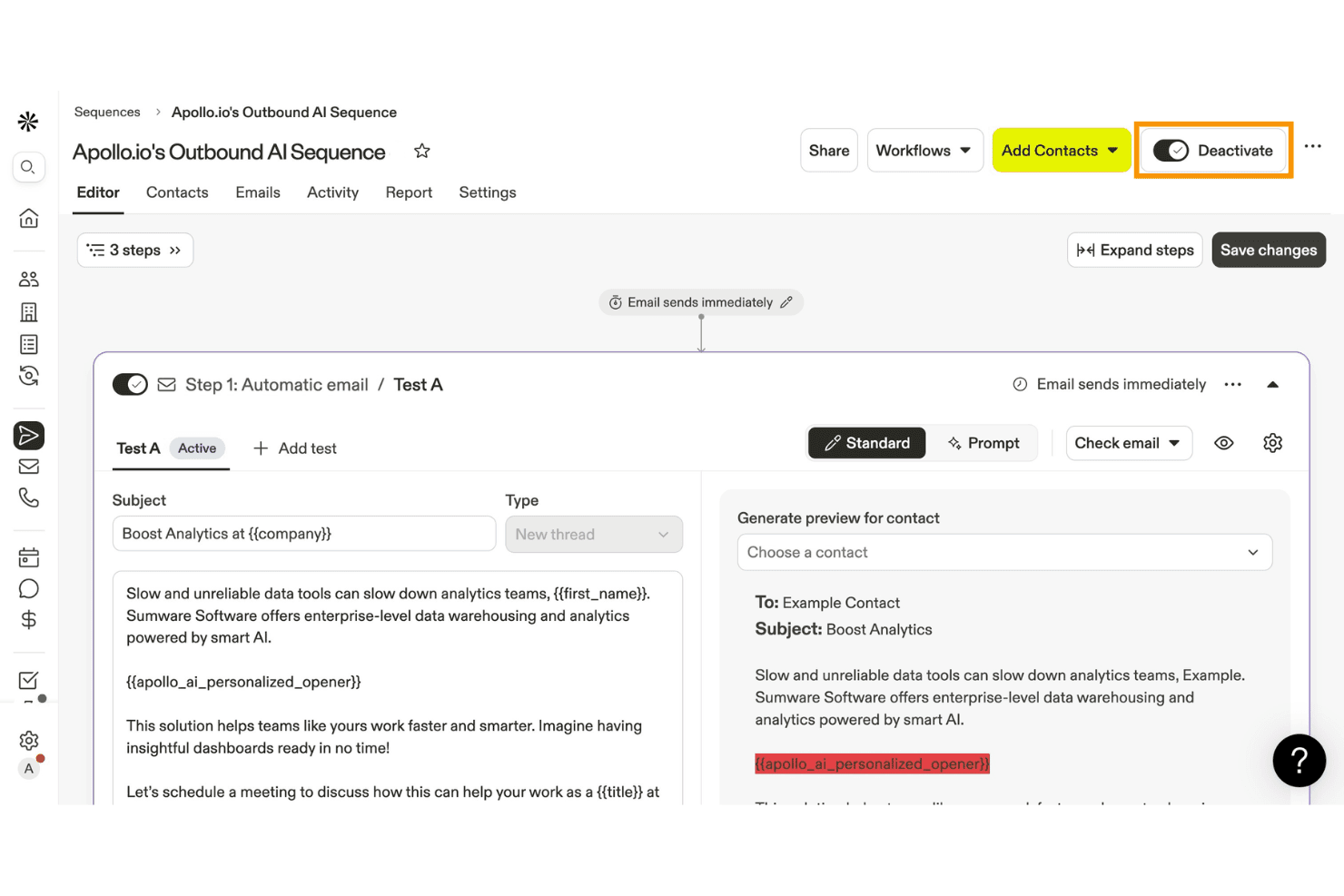
Apollo.io permite a los usuarios crear y activar secuencias de correo electrónico saliente impulsadas por IA. Apollo.io es una plataforma de interacción de ventas B2B que combina una base de datos de más de 275 millones de contactos con secuencias de contacto multicanal, personalización de correos electrónicos asistida por IA, automatización de flujos de trabajo y herramientas integradas de entregabilidad.
¿Para quién es más adecuado Apollo.io?
Apollo.io es una opción excelente para equipos de ventas y crecimiento B2B que realizan campañas de prospección saliente y necesitan secuencias de correo electrónico, datos de contactos y sincronización con el CRM en un solo lugar.
Por qué elegí Apollo.io
Apollo.io ocupa un lugar en mi lista de opciones porque su función Secuencias está diseñada específicamente para campañas de goteo B2B salientes y combina pasos multicanal (correo electrónico, teléfono y LinkedIn) en un único flujo de trabajo automatizado. Me gusta especialmente la función integrada de pruebas A/B para las líneas de asunto y el contenido de los correos electrónicos, que permite optimizar los mensajes sin necesidad de otra herramienta. El Asistente de IA también redacta mensajes de contacto personalizados utilizando más de 240 millones de datos de contactos, por lo que las secuencias parecen adaptadas y no genéricas.
Características principales de Apollo.io
- Suite integrada de entregabilidad de correo electrónico: Apollo incluye calentamiento del dominio, configuración de SPF/DKIM/DMARC, puntuación de entregabilidad y supervisión de la colocación en la bandeja de entrada para proteger la reputación del remitente.
- Motor visual de flujos de trabajo: Un lienzo de arrastrar y soltar con lógica condicional de múltiples ramas permite crear y gestionar flujos de trabajo automatizados de contacto entre equipos.
- Integración de datos de intención de Bombora: Disponible en los planes Professional y superiores, esta función muestra las cuentas con alta intención para que puedas priorizar los contactos que muestran señales activas de compra.
- Pruebas A/B de secuencias: Prueba las líneas de asunto y el contenido de los correos electrónicos directamente dentro de las secuencias y utiliza los datos de rendimiento a nivel de cada paso para perfeccionar tus contactos.
Integraciones de Apollo.io
Apollo.io ofrece integraciones nativas con Salesforce, HubSpot, Pipedrive, Microsoft Dynamics 365, Zoho CRM, Gmail, Outlook, Slack y Google Calendar. También es compatible con Zapier y Make, mientras que el acceso a la API y a los webhooks está disponible en el plan Organization.
Pros and Cons
Pros:
- Las secuencias multicanal incluyen correos electrónicos, LinkedIn y llamadas
- El asistente de IA redacta campañas de ventas personalizadas
- Suite integrada de entregabilidad con calentamiento del dominio
Cons:
- Las tasas de rebote de los correos electrónicos suelen superar el 15 por ciento
- Carece de funciones de goteo para comercio electrónico y suscripción voluntaria
Learn more about Apollo.io: Ideal por su diseño fácil de usar
- Plan gratuito disponible
- Desde $12/mes
Visit WebsiteCustomer Rating:4.7/5
MailerLite ayuda a las pymes a diseñar correos, automatizar flujos de trabajo y crecer fácilmente MailerLite es un software de automatización de correo electrónico diseñado para pequeñas y medianas empresas que buscan crear campañas de correo electrónico atractivas. Ofrece herramientas para diseñar correos, automatizar flujos de trabajo y crear páginas de destino, centrándose en la facilidad de uso y accesibilidad.
Por qué elegí MailerLite: El diseño intuitivo de MailerLite lo hace accesible para equipos sin experiencia técnica. El editor de correos electrónicos de arrastrar y soltar permite crear mensajes atractivos sin esfuerzo. Las funciones de automatización te ayudan a establecer flujos de trabajo para mantener el compromiso con tu audiencia de manera constante. Además, las herramientas de creación de páginas de destino fortalecen aún más tu estrategia de marketing al captar clientes potenciales de manera eficaz.
Funciones destacadas e integraciones:
Funciones incluyen un editor de arrastrar y soltar que simplifica la creación de correos electrónicos, permitiéndote enfocarte en el contenido en lugar de en los detalles técnicos. La plataforma también ofrece herramientas de automatización que te ayudan a configurar secuencias, asegurando una comunicación oportuna con tu audiencia. Los análisis de desempeño proporcionan información sobre el éxito de las campañas, ayudándote a tomar decisiones informadas.
Integraciones incluyen Shopify, WordPress, Stripe, WooCommerce, Zapier, Squarespace, Facebook, Slack, Mailchimp y Google Analytics.
Pros and Cons
Pros:
- Editor intuitivo de arrastrar y soltar
- Excelente soporte al cliente
- Herramientas de automatización eficaces
Cons:
- Funciones avanzadas limitadas
- Opciones de informes limitadas
 Ideal para campañas impulsadas por datos
- Plan gratuito + demo gratis disponible
- Desde $20/mes
Visit WebsiteCustomer Rating:4.6/5
Klaviyo ayuda a marcas de ecommerce a enviar campañas de correo electrónico y SMS basadas en datos Klaviyo es una plataforma de automatización de marketing diseñada para empresas de comercio electrónico que buscan aprovechar los datos para una interacción personalizada con los clientes. Permite a los usuarios crear campañas dirigidas de correo electrónico y SMS basadas en el comportamiento y las preferencias del cliente.
Por qué elegí Klaviyo: Klaviyo destaca en la creación de campañas impulsadas por datos, lo que lo convierte en una excelente opción para negocios que quieren aprovechar los conocimientos de sus clientes. Funciones como la segmentación avanzada de tu lista de correos y la analítica predictiva te ayudan a personalizar tus mensajes de manera efectiva. Puedes automatizar flujos personalizados de correo electrónico y SMS, asegurando comunicaciones relevantes y oportunas. Las sólidas herramientas de generación de informes de Klaviyo ofrecen información detallada sobre el rendimiento de tus campañas, ayudándote a perfeccionar tu estrategia de email marketing.
Funciones y integraciones destacadas:
Funciones incluyen analítica predictiva que ayuda a anticipar el comportamiento del cliente y mejorar el enfoque de tus campañas. La plataforma ofrece pruebas A/B para optimizar los elementos de las campañas y lograr mayor interacción. El seguimiento y los informes en tiempo real te brindan información instantánea sobre la efectividad de tus campañas.
Integraciones incluyen Shopify, WooCommerce, Magento, BigCommerce, Facebook, Instagram, Stripe, PayPal, Salesforce y Zapier.
Pros and Cons
Pros:
- Información profunda sobre los clientes
- Capacidades de analítica predictiva
- Seguimiento e informes en tiempo real
Cons:
- Puede resultar abrumador al principio
- Requiere conocimientos técnicos
 Mejor para la automatización de correos electrónicos
- Prueba gratuita de 21 días + demo gratuita disponible
- Desde $39/mes (facturado anualmente)
Visit WebsiteCustomer Rating:4.6/5
Mailmodo aumenta el compromiso con campañas de correo electrónico interactivas y automatizadas Mailmodo es una plataforma interactiva de marketing por correo electrónico dirigida a empresas que buscan aumentar la participación y las tasas de conversión mediante campañas automatizadas de email drip. Su principal público son los equipos de marketing enfocados en crear campañas de correo electrónico interactivas y automatizadas.
Por qué elegí Mailmodo: Esta herramienta destaca en la automatización de correos electrónicos, ofreciendo funciones como correos electrónicos AMP interactivos y capacidades impulsadas por IA que simplifican la gestión de campañas. Puedes utilizar el editor de correos electrónicos de arrastrar y soltar para diseñar correos interactivos sin necesidad de conocimientos técnicos. Los recorridos automatizados de correo ayudan a mantener una comunicación constante con tu audiencia. Además, la función de segmentación inteligente garantiza que tus mensajes lleguen eficazmente al público adecuado.
Características e integraciones destacadas:
Las características incluyen un editor de correos electrónicos de arrastrar y soltar, lo que hace que el diseño de emails sea intuitivo. Los correos AMP interactivos permiten a los destinatarios interactuar directamente desde su bandeja de entrada, aumentando así las tasas de interacción. Los recorridos automatizados de correo ayudan a mantener una comunicación constante con tu audiencia objetivo.
Las integraciones incluyen HubSpot, Salesforce, Shopify, Google Analytics, Zapier, Slack, WordPress, Mailchimp, Pabbly y Webhooks.
Pros and Cons
Pros:
- Diseños de correos interactivos
- Capacidades impulsadas por IA
- Segmentación inteligente
Cons:
- Curva de aprendizaje para principiantes
- Complejidad en la configuración de integraciones
Learn more about Mailmodo: Ideal para integración con CRM
- Prueba gratuita de 14 días + demo gratuita disponible
- Desde $15/mes (facturado anualmente)
Visit WebsiteCustomer Rating:4.4/5
ActiveCampaign potencia las relaciones con los clientes mediante la automatización de correo electrónico y CRM ActiveCampaign es una plataforma de automatización de marketing dirigida a empresas que buscan mejorar las relaciones con sus clientes a través del email marketing y la integración con CRM. Ayuda a los usuarios a automatizar campañas de correo electrónico y gestionar de forma eficaz los datos de los clientes.
Por qué elegí ActiveCampaign: ActiveCampaign sobresale en la integración con CRM, proporcionando herramientas que te ayudan a gestionar las interacciones y los datos de los clientes sin complicaciones. Las funciones de automatización de la plataforma te permiten crear recorridos de correo electrónico personalizados para tu audiencia. Puedes utilizar sus capacidades de CRM para rastrear el comportamiento del cliente y mejorar la interacción. En mi experiencia, la flexibilidad de las herramientas de automatización de ActiveCampaign la convierte en un recurso valioso para empresas que buscan optimizar sus esfuerzos de marketing.
Características y integraciones destacadas:
Entre las características se incluye un editor de correos electrónicos con función de arrastrar y soltar que simplifica la creación de campañas, permitiéndote centrarte en confeccionar mensajes atractivos. La plataforma ofrece segmentación avanzada para dirigirse a grupos específicos de clientes según su comportamiento y preferencias. Las analíticas en tiempo real proporcionan información sobre el rendimiento de las campañas, ayudando a tomar decisiones basadas en datos.
Las integraciones incluyen Shopify, Salesforce, WordPress, Zendesk, Facebook, Zapier, WooCommerce, Slack, Microsoft Dynamics y Google Analytics.
Pros and Cons
Pros:
- Integración sólida con CRM
- Flujos de trabajo de automatización flexibles
- Segmentación avanzada de clientes
Cons:
- Curva de aprendizaje pronunciada
- Soporte al cliente con horario limitado
Learn more about ActiveCampaign: 6Mejor para pequeños negocios
Kit
- Prueba gratuita de 14 días disponible
- Desde $33/mes (facturado anualmente)
Visit WebsiteCustomer Rating:4.5/5
Kit ayuda a los creadores a automatizar campañas de correo y aumentar las ventas en línea Kit es una plataforma de email marketing diseñada para ayudarte a gestionar tu audiencia mediante campañas automatizadas y contenido personalizado. Ofrece herramientas para crear páginas de aterrizaje, organizar suscriptores y vender productos digitales. La plataforma está pensada para creadores y emprendedores que desean hacer crecer su presencia en línea.
Por qué elegí Kit: Kit mantiene las cosas simples, lo cual es ideal si no eres muy técnico. Puedes crear secuencias de correos automatizados según la interacción de tus suscriptores con tu contenido. También te permite crear formularios y páginas de aterrizaje para ayudarte a hacer crecer tu lista. Si vendes productos digitales o suscripciones, puedes hacerlo directamente desde tu cuenta. Todo esto lo convierte en una opción sólida para pequeños equipos o creadores individuales.
Características e integraciones destacadas:
Las características incluyen creadores de páginas de aterrizaje y formularios con plantillas editables, herramientas para vender productos digitales y suscripciones, así como analíticas para ver el rendimiento de tus correos. También puedes usar etiquetas para organizar tu audiencia y enviar mensajes más relevantes. Estas funciones te ayudan a mantener tu marketing enfocado y manejable.
Las integraciones incluyen Podia, Teachable, Squarespace, Zapier, Patreon, Mighty Networks, Leadpages e Instapage.
Pros and Cons
Pros:
- El creador visual de automatizaciones es ideal para principiantes
- El sistema de etiquetas ayuda a organizar los contactos
- Creación fácil de páginas de aterrizaje
Cons:
- Las herramientas de reporte son bastante limitadas
- No es ideal para flujos de trabajo complejos
Learn more about Kit: 7Ideal para marketing de comercio electrónico
Drip
- Prueba gratuita de 14 días + demo gratis disponible
- Desde $39/mes
Visit WebsiteCustomer Rating:4.4/5
Drip potencia el comercio electrónico con correos electrónicos personalizados y flujos de trabajo automatizados Drip es una plataforma de automatización de marketing diseñada para negocios de comercio electrónico que buscan mejorar la interacción con los clientes e incrementar las ventas. Ofrece herramientas para email marketing personalizado, segmentación de clientes y flujos de trabajo automatizados.
Por qué elegí Drip: Drip ofrece soluciones adaptadas específicamente para el marketing de comercio electrónico, permitiéndote crear experiencias personalizadas para tus clientes. Funcionalidades como la segmentación de clientes y el seguimiento de comportamientos te ayudan a dirigirte a la persona adecuada en el momento oportuno con mensajes relevantes. Los flujos de trabajo automatizados te ahorran tiempo al encargarse de tareas repetitivas, asegurando una comunicación constante. La analítica de Drip te brinda información sobre tus campañas, ayudándote a optimizar tu estrategia basada en datos reales.
Características destacadas e integraciones:
Las características incluyen segmentación avanzada que te permite dirigirte a grupos de clientes específicos según su comportamiento y preferencias. La plataforma ofrece flujos de trabajo personalizables para automatizar tareas repetitivas y aumentar la eficiencia. Analíticas detalladas proporcionan información sobre el rendimiento de las campañas, ayudándote a perfeccionar tus estrategias de marketing.
Las integraciones incluyen Shopify, WooCommerce, Magento, BigCommerce, Facebook, Instagram, Stripe, PayPal, Zapier y Google Analytics.
Pros and Cons
Pros:
- Diseñado para negocios de comercio electrónico
- Segmentación avanzada de clientes
- Flujos de trabajo de automatización personalizables
Cons:
- Curva de aprendizaje más pronunciada
- Variedad limitada de plantillas
Learn more about Drip: Ideal para correos electrónicos transaccionales
- Plan gratuito + demo gratis disponible
- Desde $8.08/mes (facturado anualmente)

Brevo garantiza una comunicación oportuna con tus clientes gracias a correos electrónicos transaccionales fiables Brevo es una plataforma de marketing diseñada para empresas que necesitan servicios de correo electrónico transaccional fiables. Sirve a compañías que requieren una entrega eficiente de correos electrónicos para notificaciones, confirmaciones y alertas, garantizando una comunicación oportuna con los clientes.
Por qué elegí Brevo: Brevo destaca en la entrega de correos electrónicos transaccionales, lo que la hace ideal para empresas que dependen de una comunicación de correo confiable. La plataforma ofrece altas tasas de entregabilidad, asegurando que tus correos electrónicos lleguen a su destino puntualmente. Puedes configurar flujos de trabajo automatizados para gestionar tareas repetitivas, ahorrando tiempo a tu equipo. En mi experiencia, la interfaz intuitiva de Brevo simplifica la gestión de campañas de correo electrónico, incluso para quienes tienen habilidades técnicas limitadas.
Características e integraciones destacadas:
Las características incluyen herramientas de automatización avanzadas que ayudan a optimizar los procesos de correo electrónico. Brevo ofrece análisis detallados, brindando información sobre el rendimiento y la interacción de los correos electrónicos. La plataforma también soporta marketing por SMS, lo que te permite llegar a tu audiencia a través de múltiples canales.
Las integraciones incluyen Shopify, WooCommerce, Magento, PrestaShop, WordPress, Zapier, Salesforce, Microsoft Dynamics, Pipedrive y Google Analytics.
Pros and Cons
Pros:
- Altas tasas de entregabilidad
- Gestión eficaz de correos electrónicos transaccionales
- Admite múltiples canales de comunicación
Cons:
- Opciones de personalización de plantillas limitadas
- Desafíos ocasionales en la configuración
Learn more about Brevo: Mejor para soluciones para agencias
- Prueba gratuita de 14 días
- Desde $97/mes

HighLevel ayuda a las agencias a automatizar el marketing y gestionar las interacciones con los clientes HighLevel es una plataforma integral diseñada para agencias de marketing que buscan gestionar interacciones con los clientes y automatizar esfuerzos de marketing. Ofrece herramientas para CRM, marketing por correo electrónico y automatización de SMS, satisfaciendo las necesidades únicas de las agencias.
Por qué elegí HighLevel: HighLevel ofrece una solución personalizada para agencias, permitiéndote gestionar múltiples cuentas de clientes de manera eficiente. Las funciones de CRM de la plataforma te ayudan a rastrear interacciones con los clientes y mantener relaciones sólidas. Sus capacidades de automatización optimizan las campañas de correo electrónico y SMS, ahorrando tiempo y esfuerzo. Las opciones de marca blanca de HighLevel permiten que marques la plataforma como propia, agregando valor a tu oferta de servicios.
Características destacadas e integraciones:
Características incluyen un panel totalmente personalizable que te permite organizar los datos de tus clientes y las tareas de manera eficiente. La plataforma ofrece herramientas para la programación de citas para gestionar reservas sin problemas. HighLevel también proporciona funciones de gestión de embudos de ventas para rastrear los procesos de ventas y mejorar las tasas de conversión.
Integraciones incluyen Stripe, QuickBooks, Google My Business, Facebook, Instagram, Shopify, WordPress, Zapier, Twilio y Mailchimp.
Pros and Cons
Pros:
- Capacidades de marca blanca
- Funciones de CRM completas
- Escalable para el crecimiento de agencias
Cons:
- Horario de soporte limitado
- Curva de aprendizaje para nuevos usuarios
Learn more about GoHighLevel: 10Mejor para la interacción móvil
Braze
- Prueba gratuita de 14 días + demo gratuita disponible
- Precio a consultar

Braze potencia la mensajería personalizada para aumentar la participación móvil y digital Braze es una plataforma de interacción con clientes centrada en ofrecer mensajes personalizados en dispositivos móviles y otros canales digitales. Está dirigida a empresas que buscan mejorar sus estrategias de marketing móvil y aumentar la participación de los usuarios.
Por qué elegí Braze: Braze destaca en la interacción móvil, ofreciendo herramientas que te ayudan a conectar con los clientes a través de mensajes personalizados dentro de la aplicación y notificaciones push. Las capacidades de datos en tiempo real de la plataforma permiten ajustar las campañas sobre la marcha. Puedes crear recorridos de cliente segmentados que garantizan una comunicación relevante en cada punto de contacto. En mi experiencia, la interfaz intuitiva de Braze facilita que los equipos implementen y gestionen estrategias de marketing complejas de manera efectiva.
Funciones destacadas e integraciones:
Funciones como la segmentación avanzada permiten orientar a los usuarios según su comportamiento y preferencias, asegurando que tus mensajes lleguen al público adecuado. Braze ofrece análisis en tiempo real que proporcionan información sobre el rendimiento de las campañas y las interacciones de los clientes. La plataforma también admite mensajería multicanal, lo que te permite interactuar con los clientes mediante correo electrónico, SMS y notificaciones dentro de la aplicación.
Integraciones incluyen Salesforce, Segment, Amplitude, Adjust, AppsFlyer, Mixpanel, mParticle, Branch, Google Ads y Facebook.
Pros and Cons
Pros:
- Potentes capacidades de interacción móvil
- Procesamiento de datos en tiempo real
- Soporte para mensajería multicanal
Cons:
- Ocasionales problemas de sincronización de datos
- Soporte limitado disponible
Learn more about Braze :
Otro software de marketing por goteo
Estas son algunas opciones adicionales de software de marketing por goteo que no llegaron a mi selección, pero que merece la pena consultar:
- 11ChetuIdeal para integraciones personalizadas
- 12OmnisendMejor para marketing omnicanal
- 13FlodeskMejor para profesionales creativos
- 14BenchmarkONEMejor para marketing de pequeñas empresas
Wie ich Drip-Marketing-Software bewerte
Ich denke bei Drip-Tools an zwei Ebenen: Zum einen die Grundfunktionen, die jede Option bieten muss – automatisierte Sequenzen, verhaltensbasierte Auslöser, Segmentierung – und zum anderen die Unterscheidungsmerkmale, die die besten Tools von den übrigen abheben.
Kernfunktionen (Grundvoraussetzungen für diese Liste)
Bei der Auswahl bewerte ich jedes Tool auf einer Skala von 0 (bietet diese Funktion nicht) bis 5 (hervorragend in diesem Bereich) für jede der nachfolgenden Kernfunktionen. Dann berechne ich die Gesamtbewertung jedes Tools als Prozentsatz. Jedes Tool muss mindestens eine Gesamtwertung von 65% erreichen, um für die Aufnahme berücksichtigt zu werden.
- Automatisierte Drip-Sequenzen: Ich prüfe, ob ein Tool mehrstufige Sequenzen mit anpassbaren Verzögerungen handhaben kann – zum Beispiel das zeitliche Aufteilen einer fünfteiligen Onboarding-Serie über zwei Wochen mit unterschiedlichen Wartezeiten zwischen den Schritten.
- Auslöser-basierte Workflows: Jedes Tool sollte ermöglichen, dass eine Drip-Sequenz durch reale Nutzeraktionen losgetreten oder fortgeführt wird, etwa durch eine Anmeldung, einen Besuch einer Produktseite oder einen abgebrochenen Warenkorb.
- Kontaktsegmentierung: Ich schaue mir an, wie fein granuliert man die Zielgruppe vor Beginn eines Drips filtern kann – etwa nach Interaktionshistorie, Kaufverhalten oder Lebenszyklusphase.
- Visueller Kampagnen-Builder: Eine Drag-and-Drop-Oberfläche zum Abbilden der Drip-Logik ist hier wichtig. Ich prüfe, ob Sie Bedingungen und Verzweigungen einfügen können, beispielsweise um einen Pfad abzuspalten, je nachdem, ob ein Abonnent einen Link angeklickt hat.
- Personalisierung & dynamische Inhalte: Über grundlegende Platzhalter hinaus bewerte ich, ob das Tool bedingte Inhaltsblöcke unterstützt – also ob verschiedene Angebote an unterschiedliche Segmente innerhalb derselben Drip-E-Mail ausgespielt werden können.
- Drip-Performance-Analysen: Das Reporting sollte die Kennzahlen pro Schritt einer Sequenz ausweisen, sodass Sie genau nachvollziehen können, wo Abonnenten abspringen oder konvertieren, um Timing oder Ansprache gezielt anzupassen.
Wenn ich so eine Auswahl an Tools habe, prüfe ich, wodurch sich jede Plattform besonders abhebt.
Unterscheidungsmerkmale (Was Anbieter voneinander abhebt)
So vergleiche und bewerte ich unterschiedliche Anbieter:
Herausragende Funktionen
Multi-Channel-Drip-Fähigkeiten sind hier sehr wichtig. Ein Tool, das SMS oder Push-Benachrichtigungen in eine E-Mail-Sequenz integrieren kann – etwa eine SMS-Erinnerung nach einer nicht geöffneten Reaktivierungs-E-Mail – bietet zusätzliche Kontaktpunkte, ohne separate Kampagnen aufsetzen zu müssen. Auch die Integration mit Lead-Scoring-Systemen bewerte ich, da sie eine automatische Weiterleitung qualifizierter Interessenten an den Vertrieb bei ausreichender Drip-Interaktion ermöglicht. Tools für Zustellbarkeit runden das Bild ab: Integrierte Spam-Tests und Domain-Authentifizierung helfen dabei, den Absender-Ruf bei wachsendem Volumen zu schützen.
Mehr als nur Features
Integration mit CRM-Systemen und anderen Bestandteilen des Tech-Stacks sind entscheidend. Ich prüfe, ob ein Tool nativ mit Ihrem CRM und Ihrer E-Commerce-Plattform verbunden werden kann, sodass Drip-Auslöser auch durch echte Verkaufs- oder Kaufvorgänge und nicht nur durch Formularübermittlungen ausgelöst werden. Die Preisstruktur ist ebenfalls wichtig – insbesondere, wie die Kosten mit wachsender Kontaktliste steigen. Ein Tarif, der bei 5.000 Kontakten funktioniert, kann bei 50.000 schnell zu teuer werden, wenn das Preismodell Wachstum bestraft. Zudem schaue ich auf Compliance-Tools wie Einwilligungserfassung und Präferenzzentren, da beim Versand von Drip-Kampagnen in verschiedene Regionen Vorgaben wie DSGVO, CAN-SPAM und CASL zu berücksichtigen sind.
Cómo elegir software de marketing por goteo
Es fácil perderse entre largas listas de funciones y complejas estructuras de precios. Para ayudarte a mantener la atención mientras avanzas en tu proceso particular de selección de software, aquí tienes una lista de factores que conviene tener en cuenta:
| Factor | Qué tener en cuenta |
| Escalabilidad | Asegúrate de que el software pueda crecer junto con tu empresa. Busca soluciones capaces de gestionar un mayor volumen de correos electrónicos y funciones adicionales a medida que evolucionen tus necesidades. |
| Integraciones | Comprueba si el software se integra con tus herramientas actuales, como sistemas CRM, plataformas de comercio electrónico y herramientas de análisis, para optimizar tu flujo de trabajo. |
| Personalización | Evalúa la posibilidad de personalizar las plantillas de correo electrónico, las reglas de automatización y las interfaces de usuario para adaptarlas a los requisitos específicos de tu marca. |
| Facilidad de uso | Elige una interfaz fácil de usar que tu equipo pueda manejar sin dificultad, reduciendo al mínimo el tiempo de formación y maximizando la productividad desde el primer día. |
| Presupuesto | Ten en cuenta el coste total, incluidos la configuración, las tarifas mensuales y cualquier cargo adicional, para asegurarte de que se ajusta a tu plan financiero. |
| Medidas de seguridad | Busca funciones como el cifrado de datos, la autenticación de usuarios y el cumplimiento de normativas como el GDPR para proteger la información de tus clientes. |
| Asistencia | Evalúa la disponibilidad y la calidad de la atención al cliente, incluido el chat en directo, la asistencia telefónica y una base de conocimientos completa. |
| Análisis | Asegúrate de que la plataforma ofrezca análisis detallados para realizar un seguimiento del rendimiento de los correos electrónicos, las tasas de apertura y las conversiones, y así orientar tus estrategias de marketing. |
¿Qué es el software de marketing por goteo?
El software de marketing por goteo es una herramienta que automatiza el envío de correos electrónicos segmentados para captar clientes potenciales y mantener las relaciones con los clientes a lo largo del tiempo.
Los profesionales del marketing, los equipos de ventas y los propietarios de empresas suelen utilizar estas herramientas para mejorar la interacción e impulsar las conversiones. Las funciones de automatización, segmentación y análisis ayudan a gestionar las campañas de forma eficaz, personalizar los mensajes y realizar un seguimiento del rendimiento. En general, estas herramientas aportan valor al ahorrar tiempo y mejorar las estrategias de comunicación.
Funciones del software de marketing por goteo
Al seleccionar un software de marketing por goteo, presta atención a las siguientes funciones principales:
- Automatización: Automatiza el envío de correos electrónicos en función del comportamiento de los usuarios para mantener su interacción sin intervención manual.
- Segmentación: Permite categorizar a tu audiencia en grupos específicos para enviar mensajes más personalizados.
- Análisis: Proporciona información sobre el rendimiento de las campañas, lo que te ayuda a realizar un seguimiento eficaz de las tasas de apertura y las conversiones.
- Plantillas personalizables: Ofrece plantillas de correo electrónico prediseñadas que pueden adaptarse al estilo único de tu marca.
- Capacidades de integración: Se conecta con herramientas existentes, como sistemas CRM y plataformas de comercio electrónico, para crear un flujo de trabajo cohesionado.
- Compatibilidad multicanal: Permite comunicarse a través de diversos canales, como el correo electrónico, los SMS y las redes sociales.
- Personalización: Ayuda a adaptar los mensajes a cada destinatario, haciendo que las comunicaciones sean más relevantes y eficaces.
- Interfaz fácil de usar: Garantiza la facilidad de uso para que tu equipo pueda navegar por el software y utilizarlo rápidamente.
- Funciones de seguridad: Protege los datos de los clientes mediante el cifrado y el cumplimiento de normativas como el RGPD.
- Seguimiento en tiempo real: Supervisa el progreso de las campañas y las interacciones de los usuarios a medida que se producen, lo que permite realizar ajustes oportunos.
Beneficios del software de marketing por goteo
La implementación de un software de marketing por goteo ofrece varios beneficios para tu equipo y tu empresa. Estos son algunos de los que puedes esperar:
- Mayor interacción: Al automatizar los mensajes personalizados, mantienes el interés y la conexión de tu audiencia sin un esfuerzo manual constante.
- Ahorro de tiempo: Las funciones de automatización se encargan de las tareas repetitivas, lo que permite a tu equipo centrarse en actividades más estratégicas.
- Mejor segmentación: La segmentación te permite enviar contenido relevante a grupos de audiencia específicos, aumentando las posibilidades de conversión.
- Decisiones basadas en datos: Los análisis ofrecen información sobre lo que funciona y lo que no, ayudándote a perfeccionar tus estrategias de marketing.
- Comunicación constante: Los flujos de trabajo automatizados garantizan que tus mensajes lleguen a la audiencia en el momento adecuado, manteniendo un flujo de comunicación constante.
- Personalización mejorada: Las funciones de personalización te permiten adaptar los mensajes a cada destinatario, haciendo que las interacciones sean más significativas.
- Mayor eficiencia: Las capacidades de integración optimizan tus procesos al conectarse con las herramientas existentes, reduciendo la necesidad de introducir datos manualmente.
Costes y precios del software de marketing por goteo
La selección de un software de marketing por goteo requiere comprender los distintos modelos de precios y planes disponibles. Los costes varían en función de las funciones, el tamaño del equipo, los complementos y otros factores. La tabla siguiente resume los planes habituales, sus precios medios y las funciones que suelen incluir las soluciones de software de marketing por goteo:
Tabla comparativa de planes de software de marketing por goteo
| Tipo de plan | Precio medio | Funciones habituales |
| Plan gratuito | $0 | Automatización básica del correo electrónico, plantillas limitadas y análisis básicos. |
| Plan personal | $10-$30/ usuario/mes | Plantillas avanzadas, segmentación básica, programación de correos electrónicos y acceso al servicio de asistencia. |
| Plan empresarial | $30-$60/ usuario/mes | Flujos de trabajo de automatización completos, segmentación avanzada, integraciones y análisis. |
| Plan para empresas | $60-$150/ usuario/mes | Funciones personalizables, asistencia especializada, informes avanzados y acceso a la API. |
Preguntas frecuentes sobre el software de marketing por goteo
Aquí tienes algunas respuestas a preguntas frecuentes sobre el software de marketing por goteo:
¿Qué eficacia tienen las campañas de marketing por goteo?
Las campañas de marketing por goteo son eficaces porque están muy segmentadas y personalizadas. Al enviar mensajes basados en acciones específicas de los usuarios, suelen lograr tasas de rebote más bajas y una mayor interacción. Cuando llegas a tu audiencia en el momento adecuado con contenido relevante, aumentan las probabilidades de conversión.
¿Cuánto cuesta el marketing por correo electrónico por goteo?
El coste del marketing por correo electrónico por goteo varía, pero normalmente oscila entre $39 y $699 al mes, dependiendo del número de suscriptores y de las funciones incluidas. Es importante evaluar tus necesidades y comparar los planes para encontrar la opción que mejor se ajuste a tu presupuesto y objetivos.
¿Qué sectores se benefician más del marketing por goteo?
Sectores como el comercio electrónico, el SaaS y el sector inmobiliario se benefician considerablemente del marketing por goteo. Estos sectores dependen de una comunicación constante para nutrir clientes potenciales, convertir prospectos y fidelizar clientes, por lo que las campañas de marketing por goteo son una solución ideal para mantener la interacción.
¿Puede el marketing por goteo mejorar la retención de clientes?
El marketing por goteo puede mejorar la retención de clientes al mantener un contacto regular con tu audiencia. Al ofrecer contenido y recordatorios personalizados, mantienes tu marca presente, fomentas las compras recurrentes y construyes relaciones a largo plazo con tus clientes.
¿Qué tipos de correos electrónicos debería enviar durante el ciclo de vida del cliente?
Empieza con un correo electrónico de bienvenida para presentar tu marca y guiar a los nuevos usuarios hacia su primer logro. Si alguien navega, pero no compra, un correo electrónico sobre el carrito abandonado puede animarle a volver mediante un recordatorio o un incentivo. Más adelante, un seguimiento enviado en el momento adecuado (después de una demostración, una prueba o una compra) ayuda a mantener el impulso, responder a las objeciones y fortalecer la relación. Automatizar estos mensajes con un software de marketing por goteo garantiza que lleguen en el momento perfecto sin añadir tareas a tu lista de pendientes.
Análisis relacionados de software de marketing
¿Buscas un software que aumente las tasas de clics, reduzca las cancelaciones de suscripción y genere clientes potenciales de verdad? Aquí tienes una lista seleccionada para empezar: