

In today's fast-paced marketing field, reaching your audience at the right time and place is a big challenge. Proximity marketing software can help you connect with your customers when they're nearby, making your marketing efforts more effective.
As someone who's independently tested and reviewed these tools, I've seen firsthand how they can transform your team's approach to engaging with customers. You'll find that these solutions can address common pain points like targeting and personalization.
I'll share my top picks for proximity marketing software in this article, providing an unbiased and well-researched review. You'll get insights into what each tool offers, helping you make the best choice for your team.
Why Trust Our Software Recommendations
6,700+
Reviews
20
Industry experts
16+
Evaluation factors
14
Years
Our team has been testing and reviewing software since 2012. As marketing leaders ourselves, we know how difficult—and important—it is to choose the right software.
For this guide, we evaluated tools using hands-on testing and independent research, scoring tools using our selection criteria.
Our reviews reflect our human editorial judgment, not a sales pitch.
Expert reviewers:
 Gui DrusinaCreative Director
- Shriya GhateSenior Marketing Lead
 Amanda JacquesMarketing Ops Leader

Proximity Marketing Software Comparison Table
This comparison table summarizes pricing details for my top proximity marketing software selections:
| Tool | Best For | Trial Info | Price | ||
|---|---|---|---|---|---|
| 1 | Best for omnichannel proximity-triggered journeys | 14-day free trial | Pricing upon request | Website | |
| 2 | Best for AI-driven proximity personalization | 30-day free trial | From $85/month | Website | |
| 3 | Best for omnichannel mobile wallet proximity triggers | Free demo available | Pricing upon request | Website | |
| 4 | Best for omnichannel proximity engagement | Free demo available | Pricing upon request | Website | |
| 5 | Best for retail analytics | Free demo available | Pricing upon request | Website | |
| 6 | Best for sensor-fusion geofencing at scale | Free demo available | From $0.02/user/month | Website | |
| 7 | Best for curbside pickup proximity triggers | Free demo available | Pricing upon request | Website | |
| 8 | Best for omnichannel foot traffic attribution | Free demo available | Pricing upon request | Website | |
| 9 | Best for hardware-free indoor geofencing | Free demo available | Pricing upon request | Website | |
| 10 | Best for WiFi-driven venue visit analytics | Free demo available | Pricing upon request | Website |


Best Proximity Marketing Software Reviews
Below are my detailed summaries of the best proximity marketing software on my shortlist. My reviews detail each tool’s key features, pros & cons, integrations, and ideal use cases to help you find the best one.
 Best for omnichannel proximity-triggered journeys
- 14-day free trial
- Pricing upon request
Visit WebsiteCustomer Rating:4.6/5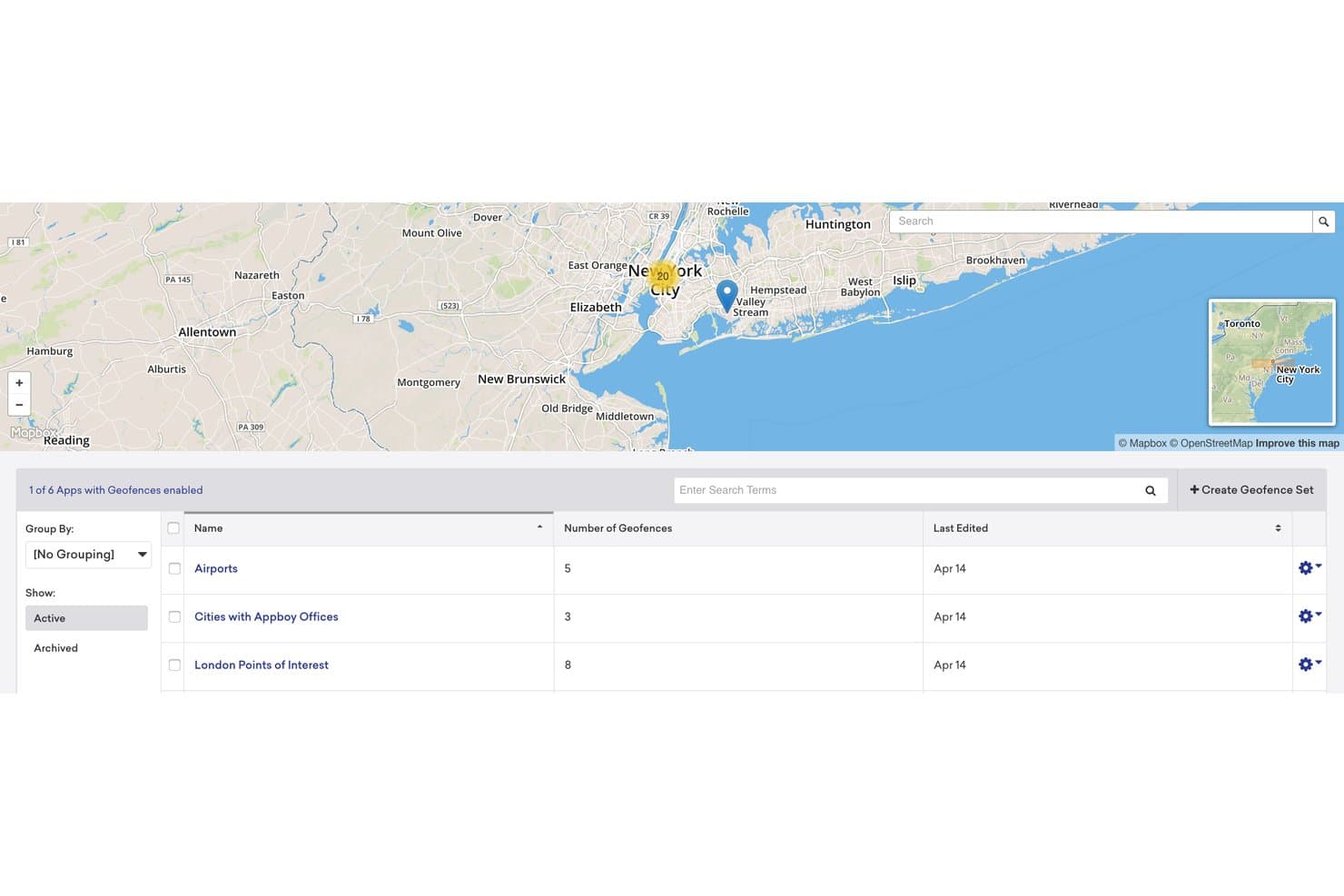
Braze lets users manage geofence sets for location-based targeting. My Evaluation Score
- Beacon/BLE Support
- Minimal
- Geofencing Capabilities
- Strong
- Push Notification Engine
- Excels
- Campaign Management Console
- Excels
- Proximity Analytics & Reporting
- Adequate
- Audience Segmentation & Targeting
- Excels
Braze is a customer engagement platform that combines native geofencing, cross-channel messaging, AI-driven segmentation, and a location partner ecosystem to power proximity-triggered mobile campaigns across push, in-app, SMS, email, and more.
Who Is Braze Best For?
Braze is a strong fit for mid-market and enterprise mobile-first brands that want to connect location triggers to multi-channel messaging campaigns across push, SMS, email, and in-app.
Why I Picked Braze
Braze earns its spot on my shortlist because it connects proximity triggers to a full omnichannel messaging engine in a way most location tools simply can't match. I love how Canvas Flow lets you wire a geofence entry event directly into a multi-step journey, so a shopper walking past your store gets a push, then an in-app message, then a wallet coupon via PassKit, all sequenced automatically. BrazeAI layers on top to personalize which message variant each user sees based on their behaviour and purchase history.
Braze Key Features
- Geofence sets: Define up to 10,000 circle-based geofences per set, with entry and exit events that trigger real-time campaign delivery across channels.
- Location partner ecosystem: Certified integrations with Radar, Infillion, Bluedot, and Flybuy let you pipe beacon and advanced geofence data directly into Braze campaigns.
- Predictive AI targeting: BrazeAI scores users by predicted likelihood to purchase or churn, so you can prioritize proximity-triggered messages for the highest-value segments.
- PassKit wallet pass distribution: Send Apple Wallet and Google Pay passes—loyalty cards, coupons, event tickets—directly from Braze campaigns triggered by location events.
Braze Integrations
Braze has documented integrations with Radar, Infillion, Bluedot, Flybuy, Foursquare, loplat, AccuWeather, Shopify, and PassKit. Its REST API and SDKs support custom proximity integrations, including beacon and geofence event ingestion.
Pros and Cons
Pros:
- Visual journey builder for location events
- Advanced AI personalization for proximity messaging
- Real-time geofence triggers for campaigns
Cons:
- Limited reporting for footfall and dwell analytics
- No native beacon device management
Learn more about Braze: Best for AI-driven proximity personalization
- 30-day free trial
- From $85/month
Visit WebsiteCustomer Rating:4.5/5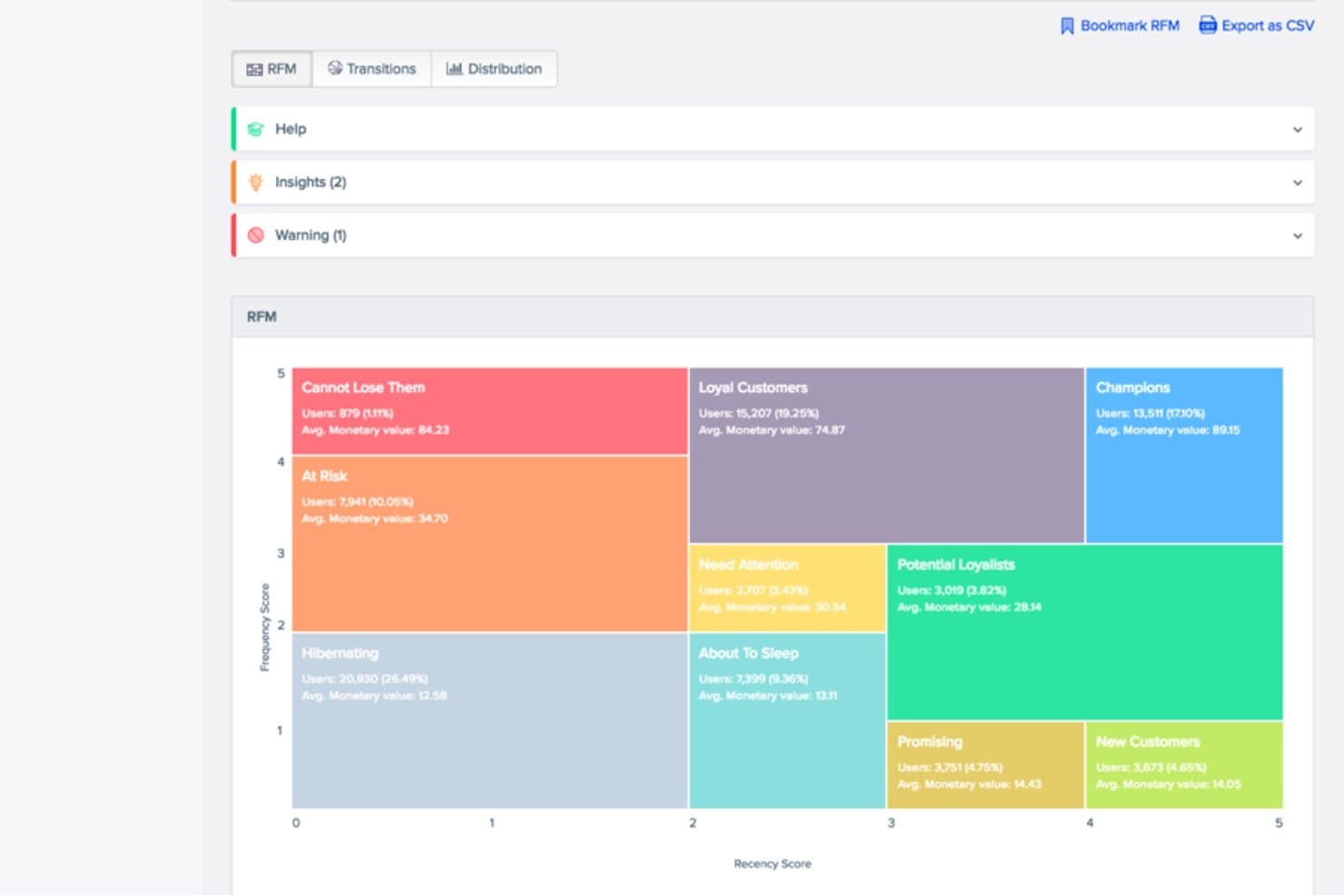
CleverTap segments customers using RFM scoring for targeted engagement. My Evaluation Score
- Beacon/BLE Support
- Adequate
- Geofencing Capabilities
- Strong
- Push Notification Engine
- Excels
- Campaign Management Console
- Excels
- Proximity Analytics & Reporting
- Adequate
- Audience Segmentation & Targeting
- Excels
CleverTap is a mobile-first customer engagement platform that combines geofencing, BLE beacon triggers, AI-driven segmentation, omnichannel messaging, and built-in loyalty management for proximity-based marketing.
Who Is CleverTap Best For?
CleverTap is a strong fit for mobile-first brands and enterprise retail teams that want to connect location triggers to AI-personalized, omnichannel campaigns from a single platform.
Why I Picked CleverTap
CleverTap earns its spot on my shortlist because its CleverAI Predictions Agent does something most proximity tools can't: it layers predictive intent scoring on top of geofence triggers in real time. So instead of blasting everyone who enters a store's geofence, it can isolate high-LTV users showing pre-purchase signals and personalize the message accordingly. I also like that the native CleverTap Promos module lets you distribute loyalty points or unique coupons the moment a geofence entry fires, closing the loop without a separate loyalty platform.
CleverTap Key Features
- Geofence SDK for iOS and Android: Native mobile SDKs let you define circular geofences with entry, exit, and dwell-time triggers that fire directly into your campaign engine.
- Bulk geofence upload: Import up to 10,000 geofences at once via CSV or JSON, making large multi-location deployments manageable without manual configuration.
- IntelliNODE journey builder: A no-code visual tool for building multi-step customer journeys that use location events, like geofence entry, as automated triggers.
- CleverTap Promos: A built-in loyalty and coupon module that lets you generate unique codes, manage loyalty point wallets, and distribute rewards tied to proximity campaign events.
CleverTap Integrations
CleverTap offers integrations with Salesforce CRM, AppsFlyer, Firebase, Amplitude, Databricks, Hightouch, Segment, Gupshup, Shopify Plus, and Voucherify. It also provides REST APIs, OAuth 2.0-secured webhooks, and Zapier connectivity for custom workflows.
Pros and Cons
Pros:
- Built-in loyalty and coupon management module
- Geofence and beacon triggers feed omnichannel messaging
- AI predicts purchase intent in real time
Cons:
- Physical beacons must be sourced separately
- No indoor mapping or venue navigation
Learn more about CleverTap: Best for omnichannel mobile wallet proximity triggers
- Free demo available
- Pricing upon request
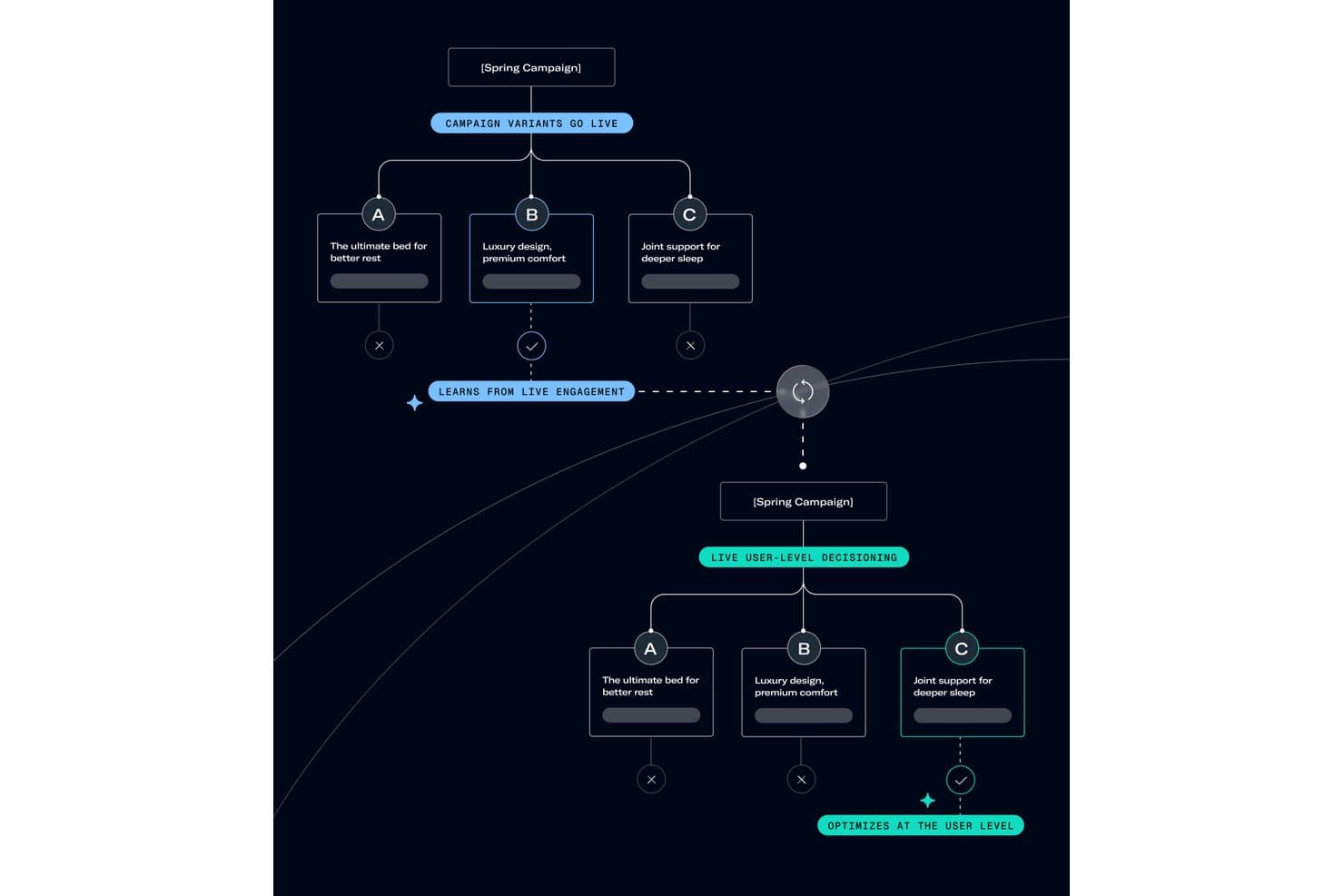
Airship optimizes campaign variants per user using live AI decisioning. My Evaluation Score
- Beacon/BLE Support
- Minimal
- Geofencing Capabilities
- Strong
- Push Notification Engine
- Excels
- Campaign Management Console
- Excels
- Proximity Analytics & Reporting
- Adequate
- Audience Segmentation & Targeting
- Excels
Airship is a mobile engagement platform that combines push notifications, in-app messaging, SMS, mobile wallet pass management, and AI-driven journey orchestration with location-based triggers via geofencing and beacon integrations.
Who Is Airship Best For?
Airship is a strong fit for enterprise retail and hospitality brands that already use a location intelligence partner and need a mature omnichannel layer to orchestrate proximity-triggered messaging across push, SMS, and mobile wallet.
Why I Picked Airship
Airship earns its spot on my shortlist because its native Apple Wallet and Google Wallet pass management is genuinely unmatched for proximity-triggered omnichannel campaigns. I love that a retail brand can push a loyalty coupon update the moment a shopper enters a geofenced zone, all coordinated through Journeys AI across push, SMS, and wallet in one flow. The location-triggered wallet pass feature, where passes update live based on customer proximity, is something I haven't seen executed this cleanly elsewhere.
Airship Key Features
- Journeys AI orchestration: An AI-powered builder that auto-generates cross-channel campaign journeys and selects optimal messaging channels based on each customer's real-time engagement history.
- Zero-party data capture: Built-in in-app surveys, preference centers, and opt-in flows that collect self-declared customer preferences and feed them directly into segmentation and targeting logic.
- Real-Time Data Streaming (RTDS): Streams every user-level engagement event to external data warehouses like Snowflake, Google BigQuery, and Amazon S3 in real time rather than nightly batches.
- No-code Scenes builder: A visual editor that lets marketers build multi-screen, interactive in-app and web experiences with branching logic, without writing any code.
Airship Integrations
Airship integrates with Gimbal, Radar, Bluedot, Foursquare, Woosmap, Segment, Salesforce Data Cloud, Snowflake, Google BigQuery, and Adobe Experience Platform. It also provides iOS and Android SDKs plus REST APIs for custom integrations.
Pros and Cons
Pros:
- Real-time behavioral and location-based segmentation
- AI-powered cross-channel campaign orchestration
- Native mobile wallet pass proximity triggers
Cons:
- No native indoor positioning or heatmaps
- Requires third-party tools for beacon support
Learn more about Airship: Best for omnichannel proximity engagement
- Free demo available
- Pricing upon request
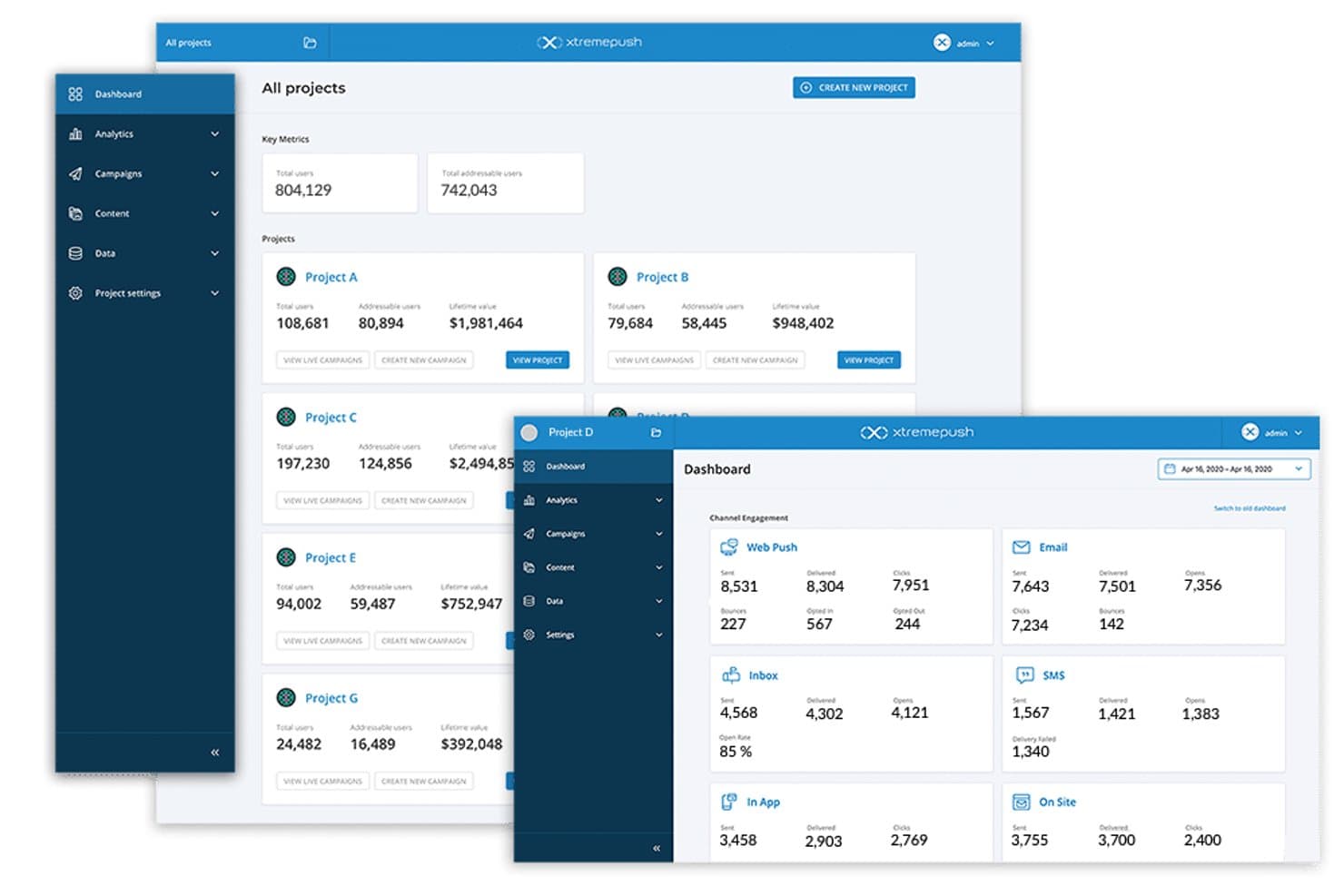
Xtremepush centralizes multi-project campaign metrics in one dashboard. My Evaluation Score
- Beacon/BLE Support
- Adequate
- Geofencing Capabilities
- Strong
- Push Notification Engine
- Excels
- Campaign Management Console
- Strong
- Proximity Analytics & Reporting
- Adequate
- Audience Segmentation & Targeting
- Excels
Xtremepush is a customer engagement platform that combines iBeacon support, geofencing, mobile push, in-app messaging, SMS, and email with a built-in CDP and AI-driven segmentation to power omnichannel proximity campaigns.
Who Is Xtremepush Best For?
Xtremepush suits enterprise marketing teams that need proximity triggers—geofencing, iBeacons—as one channel within a broader omnichannel CRM and CDP stack.
Why I Picked Xtremepush
I've included Xtremepush in my top picks because it's one of the few platforms that treats proximity triggers as a genuine entry point into a full omnichannel journey, not just a standalone notification blast. I like how geofence entry, exit, and dwell-time events can kick off multi-stage campaigns spanning mobile push, in-app, SMS, and email in one unified flow. Its built-in CDP and InfinityAI layer also let you combine location history with behavioural data to segment audiences, like retargeting shoppers who lingered in a specific zone with personalized digital ads later.
Xtremepush Key Features
- InfinityAI predictive segmentation: Uses AI to identify churn-risk users, VIP customers, and optimal send times based on real-time behavioural data.
- Built-in CDP: Unifies first-party data—location history, in-app actions, and CRM attributes—into a single customer profile updated in real time.
- XP consent management: Captures and stores timestamped, immutable consent records to keep proximity campaigns compliant with GDPR and other privacy regulations.
- Salesforce Marketing Cloud integration: Syncs Xtremepush campaigns and event data bi-directionally with SFMC Journey Builder for enterprise stack compatibility.
Xtremepush Integrations
Xtremepush has two documented native integrations: Salesforce Marketing Cloud and Segment by Twilio. Its iOS, Android, and website SDKs support proximity triggers, while REST APIs enable custom integrations.
Pros and Cons
Pros:
- Omnichannel journeys with proximity as campaign entry
- Entry, exit, and dwell triggers for campaigns
- Unlimited geofencing and iBeacon locations per project
Cons:
- No support for NFC or indoor positioning
- Proximity triggers require separate pricing and setup
Learn more about Xtremepush:
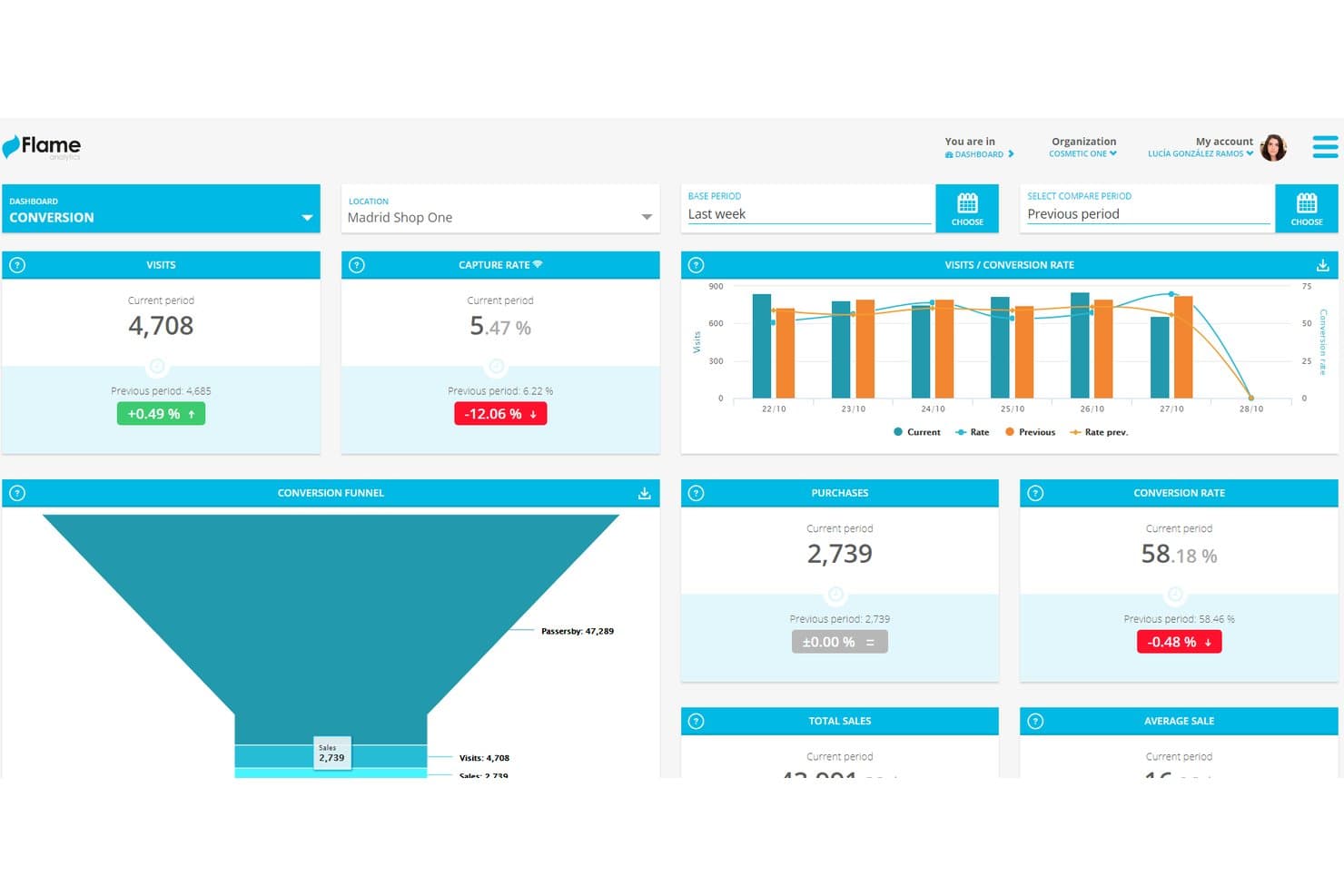
Flame Analytics tracks store visits, purchases, and conversion rates in real time. My Evaluation Score
- Beacon/BLE Support
- Strong
- Geofencing Capabilities
- Strong
- Push Notification Engine
- Strong
- Campaign Management Console
- Strong
- Proximity Analytics & Reporting
- Excels
- Audience Segmentation & Targeting
- Strong
Flame Analytics is a proximity marketing and physical space analytics platform that combines guest Wi-Fi marketing, BLE beacon support, geofencing, AI-powered video analytics, heatmaps, and multi-channel campaign automation.
Who Is Flame Analytics Best For?
Flame Analytics is a strong fit for retail marketers and venue operators who need deep in-store behavioural analytics alongside their proximity marketing campaigns.
Why I Picked Flame Analytics
I picked Flame Analytics as one of the best because its retail analytics depth is genuinely unmatched. Where most proximity platforms stop at basic foot traffic counts, Flame layers in AI-powered heatmaps, zone-level dwell time, and customer journey mapping pulled from existing CCTV infrastructure. I especially like how it cross-references that behavioural data with POS results, so you can see which floor zones actually convert, not just which ones attract attention.
Flame Analytics Key Features
- Guest Wi-Fi captive portal builder: Create and customize branded Wi-Fi login portals that capture GDPR-consented customer profiles, including demographics and contact details, at the moment of connection.
- Multi-channel campaign automation: Build behavioural trigger workflows that deliver personalized messages to segmented audiences via email, SMS, and in-portal channels based on visit patterns and zone activity.
- First-party audience segmentation: Segment customers by demographic data, visit frequency, dwell time, zones visited, and CRM-enriched attributes to target campaigns more precisely.
- POS conversion attribution: Cross-reference in-store behavioural data with point-of-sale results to measure which zones and campaigns drive actual purchases.
Flame Analytics Integrations
Flame Analytics integrates with Cisco, Aruba, Ruckus, Cambium, Ubiquiti, HubSpot, Salesforce, Mailchimp, Twilio, and AXIS People Counter. A REST API supports custom integrations with POS systems and data ecosystems.
Pros and Cons
Pros:
- Supports multi-channel behavioral campaign triggers
- Offers GDPR-compliant first-party data capture
- Excels at in-store heatmap and journey mapping
Cons:
- No free trial or transparent pricing
- Wi-Fi engagement prioritized over beacon push
Learn more about Flame Analytics: Best for sensor-fusion geofencing at scale
- Free demo available
- From $0.02/user/month
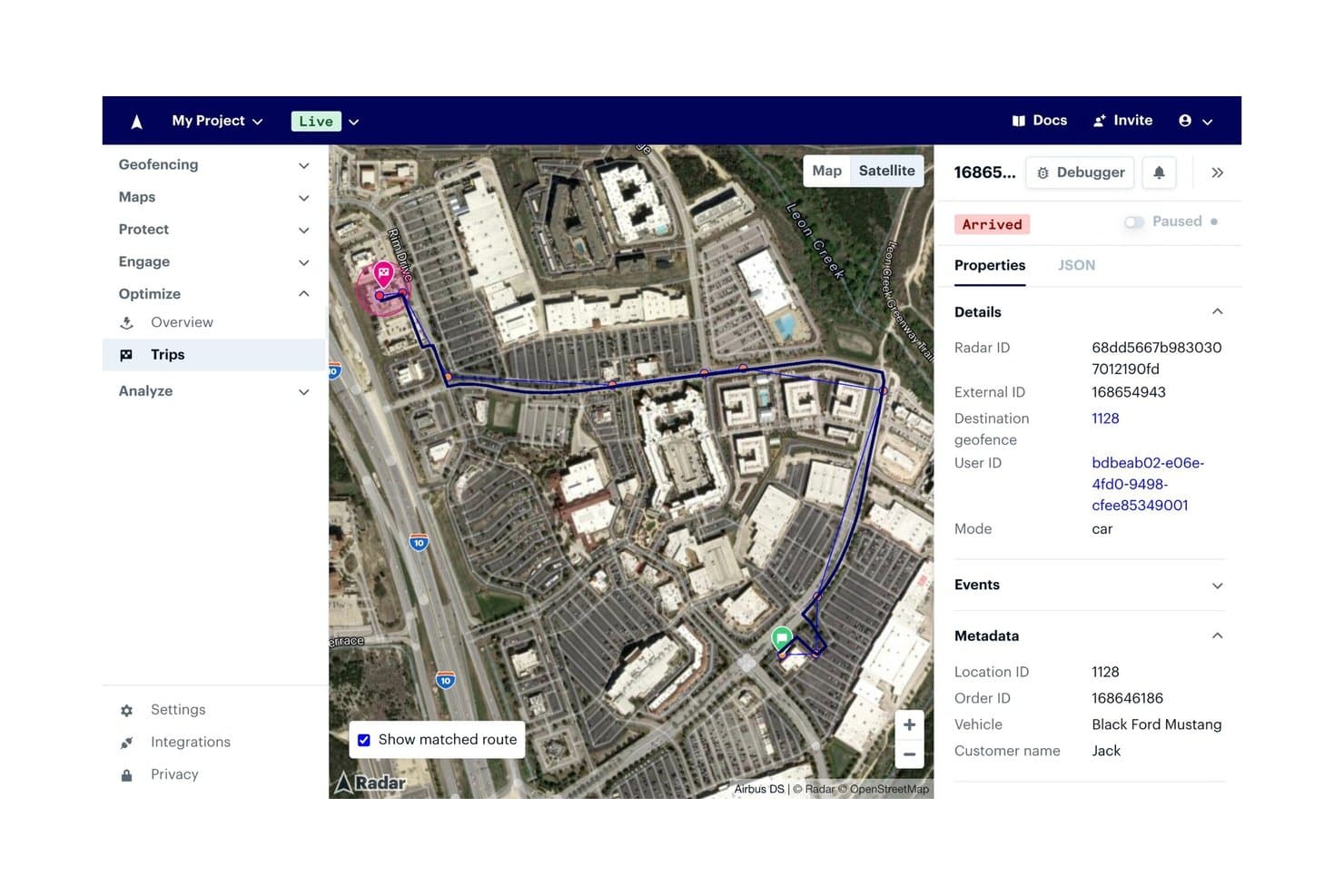
Radar tracks live delivery trips with route, status, and vehicle metadata. My Evaluation Score
- Beacon/BLE Support
- Strong
- Geofencing Capabilities
- Excels
- Push Notification Engine
- Strong
- Campaign Management Console
- Strong
- Proximity Analytics & Reporting
- Strong
- Audience Segmentation & Targeting
- Strong
Radar is a proximity marketing platform built around sensor-fusion geofencing, BLE beacon detection, location-based audience segmentation, and proximity-triggered push notifications.
Who Is Radar Best For?
Radar is a strong fit for enterprise mobile teams in retail, sports, and hospitality that need precise, large-scale geofencing baked into their existing app.
Why I Picked Radar
Radar earns its spot on my shortlist because its sensor-fusion geofencing operates at a level of accuracy and scale most platforms can't match. I'm particularly impressed by its ~5-meter precision, which combines GPS, Wi-Fi, Bluetooth, and cellular signals to place users inside specific store zones or venue sections, not just nearby. One customer ran 18,000 geofences simultaneously across PGA TOUR courses and saw a 71% lift in notification open rates using Radar Engage's proximity-triggered push messaging.
Radar Key Features
- Audience segmentation by visit history: Build audiences based on real-world behaviours—past visits to your locations, competitor visits, or dwell time—then sync them directly to platforms like Braze or Salesforce Marketing Cloud.
- BLE beacon detection: Detect user presence at the aisle, register, or parking-space level using iBeacon and Eddystone protocols, managed via dashboard, CSV, or API.
- Fraud detection: Identify GPS spoofing, VPN use, and device tampering to confirm users are physically present at a location before triggering rewards or access.
- A/B testing for remote SDK configuration: Run controlled experiments on location-triggered campaign logic without requiring an app update.
Radar Integrations
Radar supports 17+ documented integrations, including Braze, Airship, OneSignal, Iterable, Salesforce Marketing Cloud, Segment, Amplitude, and Mixpanel. Webhooks and REST APIs support custom connections and data workflows.
Pros and Cons
Pros:
- Built-in fraud detection protects in-store campaigns
- Supports unlimited polygon, circle, and isochrone zones
- Delivers meter-level accuracy for geofencing
Cons:
- No NFC or UWB proximity detection options
- Beacon support available only on enterprise plans
Learn more about Radar: Best for curbside pickup proximity triggers
- Free demo available
- Pricing upon request
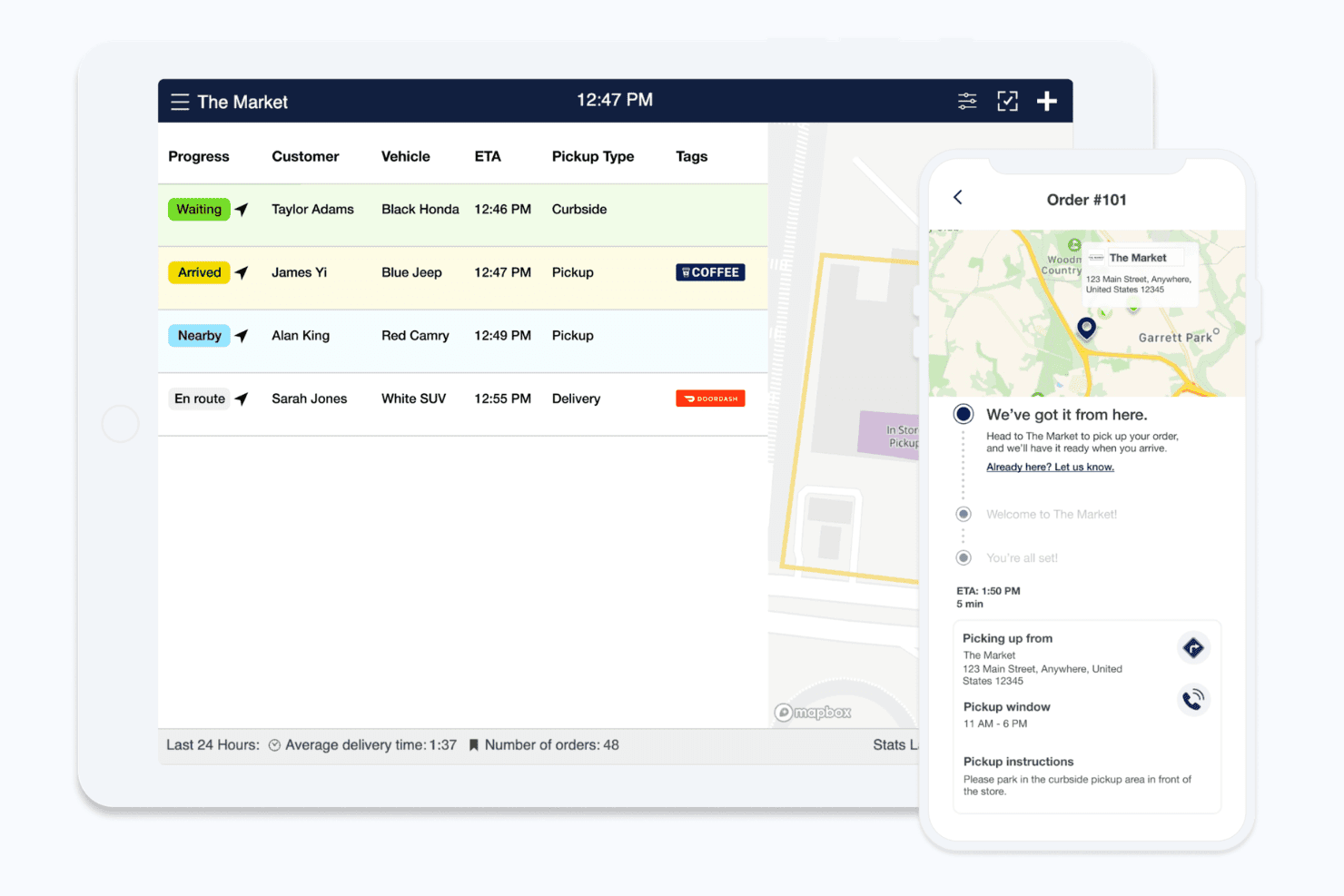
Flybuy tracks customer arrival status for curbside and pickup orders in real time. My Evaluation Score
- Beacon/BLE Support
- Strong
- Geofencing Capabilities
- Excels
- Push Notification Engine
- Excels
- Campaign Management Console
- Strong
- Proximity Analytics & Reporting
- Strong
- Audience Segmentation & Targeting
- Strong
Flybuy is a location-based proximity marketing platform built around curbside pickup and order-ahead workflows, using geofencing, BLE beacons, and a push notification engine to trigger real-time customer engagement tied to physical arrival events.
Who Is Flybuy Best For?
Flybuy is a strong fit for restaurant, grocery, and retail brands that rely on curbside pickup or order-ahead workflows to drive customer engagement.
Why I Picked Flybuy
I picked Flybuy as one of the best because no other platform connects curbside pickup operations directly to proximity-triggered marketing the way it does. I love how its polygonal geofencing fires promotions and loyalty reminders the moment a customer enters a 200-meter radius of a store, not after they've already left. Its Events Engine streams real-time signals like wait time and order status into platforms like Braze to trigger personalized follow-up messages automatically.
Flybuy Key Features
- Events Engine: Streams real-time pickup and location signals into platforms like Braze, mParticle, and Amplitude to trigger automated, personalized cross-channel marketing journeys.
- Virtual impulse aisle: Presents add-on product offers to customers during their pickup journey to surface incremental purchase opportunities.
- Store-specific notification templating: Lets brands customize proximity-triggered message content at the individual location level within the central merchant portal.
- Loyalty platform integrations: Connects natively with Paytronix, Punchh, and Thanx to send proximity-triggered loyalty reminders and reward redemption prompts.
Flybuy Integrations
Flybuy has 50+ documented integrations and partner connections, including Braze, Airship, Attentive, mParticle, Amplitude, Paytronix, Punchh, Thanx, Salesforce, and Google. It also offers iOS and Android SDKs, REST APIs, and webhooks for custom integrations.
Pros and Cons
Pros:
- Advanced proximity-triggered loyalty campaigns
- Polygonal geofencing with real-time event triggers
- AI-driven arrival detection for pickup engagement
Cons:
- Requires brand app and customer opt-in
- Features tightly focused on curbside workflows
Learn more about Flybuy: Best for omnichannel foot traffic attribution
- Free demo available
- Pricing upon request
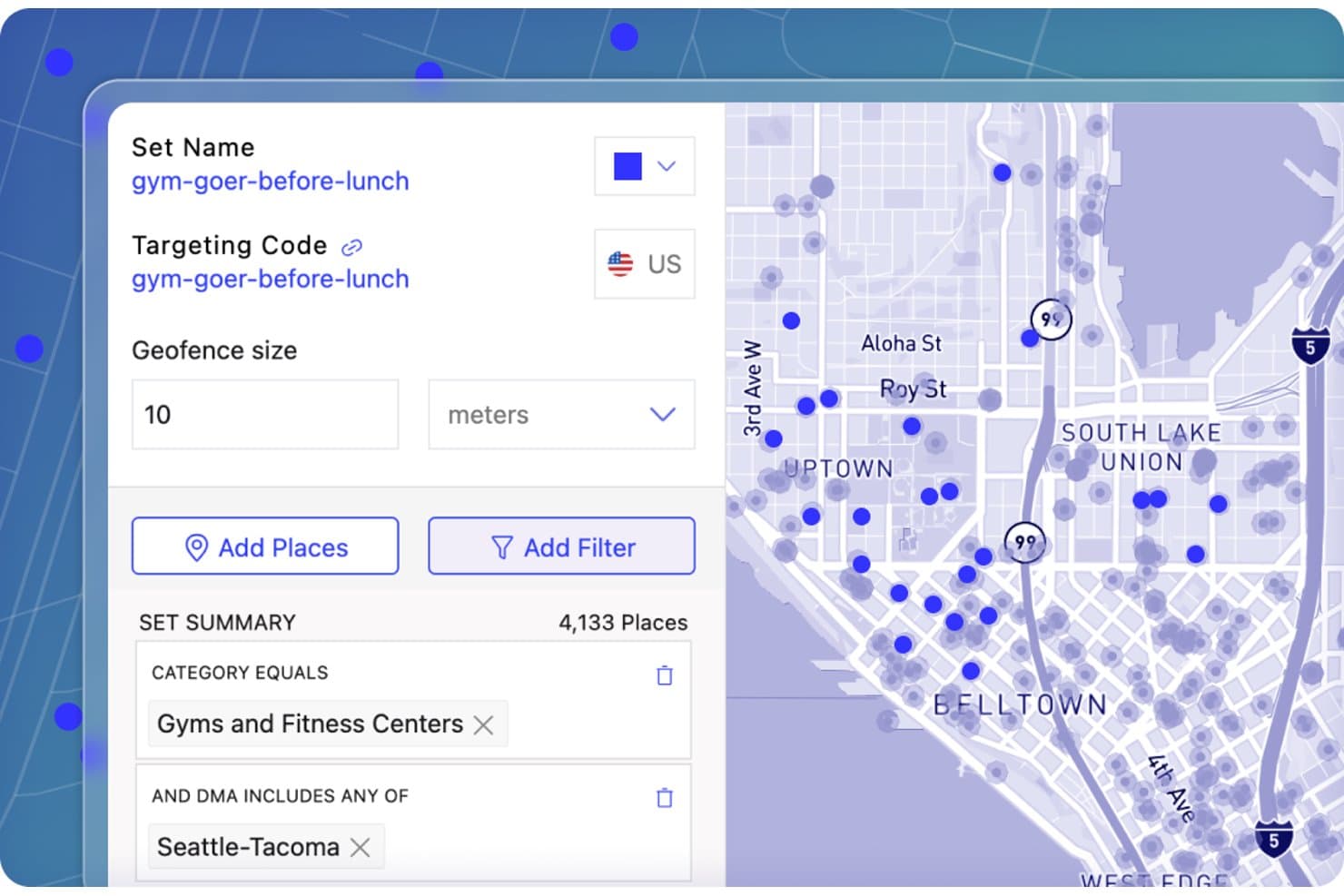
Foursquare lets users build geofenced audience sets around gyms nearby. My Evaluation Score
- Beacon/BLE Support
- Minimal
- Geofencing Capabilities
- Excels
- Push Notification Engine
- Minimal
- Campaign Management Console
- Adequate
- Proximity Analytics & Reporting
- Excels
- Audience Segmentation & Targeting
- Excels
Foursquare is a location data and proximity marketing platform that combines geofencing, behavioral audience segmentation, and omnichannel foot traffic attribution across programmatic, social, CTV, OOH, and audio channels.
Who Is Foursquare Best For?
Foursquare is a strong fit for retail and multi-location brand marketers who need to connect ad spend across programmatic, social, CTV, and OOH channels to real-world foot traffic and in-store sales.
Why I Picked Foursquare
Foursquare earns its spot on my shortlist because its Attribution product connects ad spend across programmatic, social, CTV, OOH, and audio channels to real in-store foot traffic and sales in one unified dashboard. I'm particularly impressed by its Snap-to-Place technology, which precisely detects visits inside complex venues like malls and airports, not just nearby proximity. The Sales Impact reporting goes further than visit counting, surfacing metrics like basket size and sales lift across 550+ media partners.
Foursquare Key Features
- Proximity Designer: A self-serve interface for building point-radius and custom polygon geofences, with filtering by DMA, metropolitan area, and urban density, plus a reach estimation tool before deployment.
- 5,000+ pre-built behavioral segments: An off-the-shelf segment library covering audiences like Holiday Shoppers, Fast Casual Diners, and Luxury Gift Buyers, available for activation across 550+ partner platforms within 1–3 business days.
- Multi-touch omnichannel attribution: A unified dashboard that connects ad impressions across digital display, social, CTV, linear TV, OOH, and audio channels to in-store visits and sales in one view.
- Sales Impact reporting: A reporting layer that surfaces 17+ retail metrics—including basket size, incremental transactions, and sales lift—by combining location visit data with purchase data.
Foursquare Integrations
Foursquare integrates with Braze, Salesforce Marketing Cloud, Airship, Segment, Iterable, Leanplum, LiveRamp, and mParticle. Its Movement SDK, REST APIs, webhooks, and Amazon S3 delivery support custom connections.
Pros and Cons
Pros:
- Massive library of behavioral audience segments
- Connects omnichannel ads to in-store sales
- Industry-leading geofencing and location accuracy
Cons:
- Lacks built-in push notification engine
- No native beacon or hardware management
Learn more about Foursquare: Best for hardware-free indoor geofencing
- Free demo available
- Pricing upon request
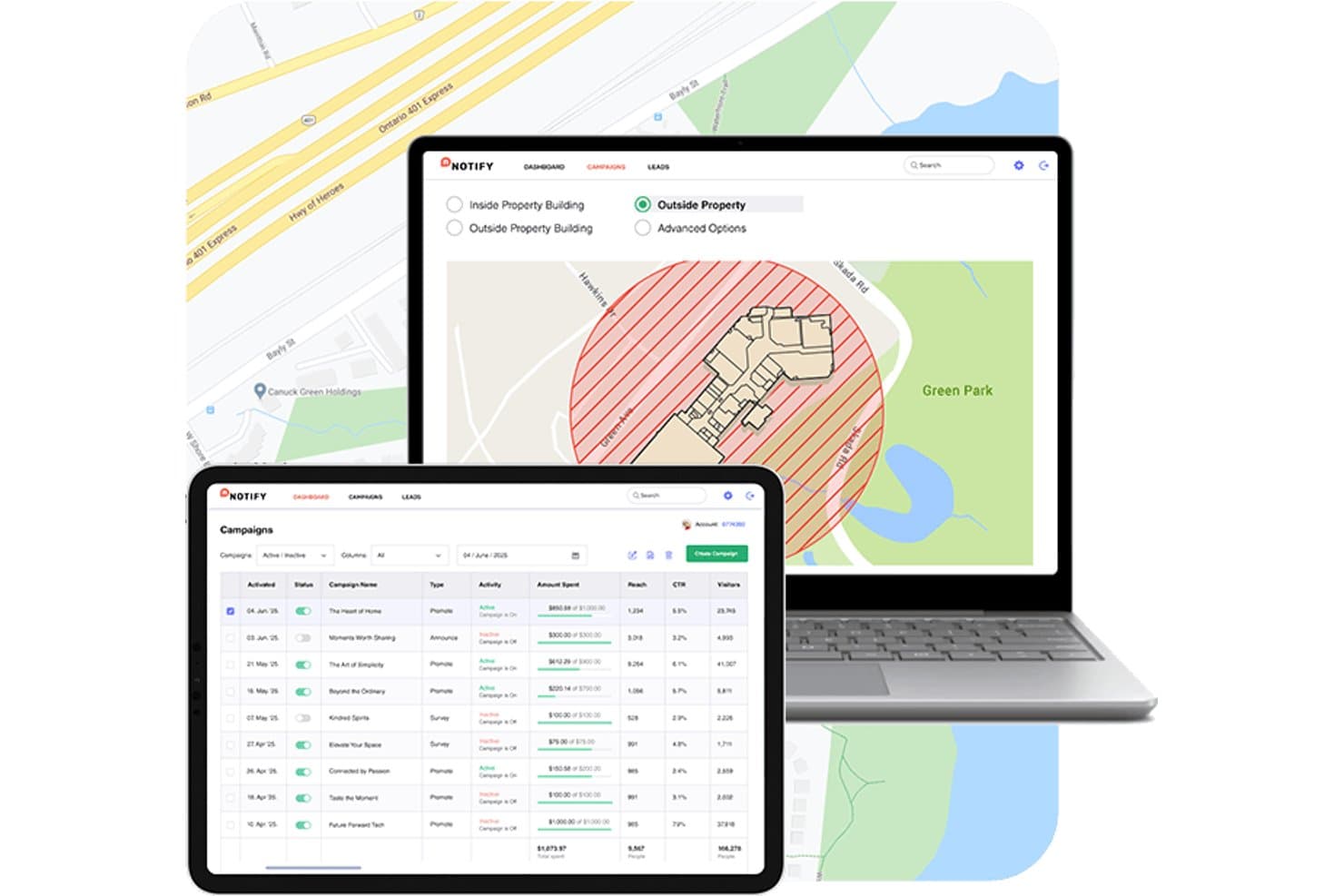
Mapsted lets users set proximity zones and manage campaigns on a map. My Evaluation Score
- Beacon/BLE Support
- Minimal
- Geofencing Capabilities
- Excels
- Push Notification Engine
- Adequate
- Campaign Management Console
- Adequate
- Proximity Analytics & Reporting
- Excels
- Audience Segmentation & Targeting
- Strong
Mapsted is a hardware-free indoor location and proximity marketing platform that uses device sensor fusion—combining IMU, magnetometer, Wi-Fi, and BLE data—to power geofencing, contextual push notifications, audience segmentation, and foot traffic analytics without beacons or external infrastructure.
Who Is Mapsted Best For?
Mapsted is a strong fit for marketing teams at large retail venues, malls, airports, and stadiums that want indoor geofencing without the cost and upkeep of beacon hardware.
Why I Picked Mapsted
Mapsted earns its spot on my shortlist because it's the only proximity marketing platform I've found that delivers 1–5 meter indoor geofencing without a single beacon, router, or external sensor. It does this through sensor fusion, pulling together your device's IMU, magnetometer, and passive BLE data to map location entirely on-device. I also like the geo-conquesting feature, which lets you draw geofences around competitor locations and fire targeted offers when shoppers enter those zones.
Mapsted Key Features
- Offline geofencing SDK: Triggers push notifications to opted-in users even when the venue app is closed or running in the background.
- Mapsted Flow heat maps: Generates real-time and historical foot traffic heat maps showing visitor density, congestion zones, and movement patterns across a venue.
- Contextual messaging personalization: Delivers in-app messages tailored to factors like time of day, weather conditions, device type, and individual shopping behaviour.
- Cross-platform mobile SDK: Supports iOS, Android, React Native, Flutter, and Ionic, so venues can embed Mapsted's positioning and marketing tools into any existing branded app.
Mapsted Integrations
Mapsted’s native marketing integrations are not clearly documented. It supports REST APIs, including an Analytics API, for custom integrations, while its mapping stack uses OpenStreetMap with support for Google Maps and Apple Maps.
Pros and Cons
Pros:
- Extensive real-time foot traffic analytics
- High-precision 1–5 meter location accuracy
- No hardware needed for indoor geofencing
Cons:
- No SMS or email campaign channels
- Requires branded app install for campaigns
Learn more about Mapsted: Best for WiFi-driven venue visit analytics
- Free demo available
- Pricing upon request
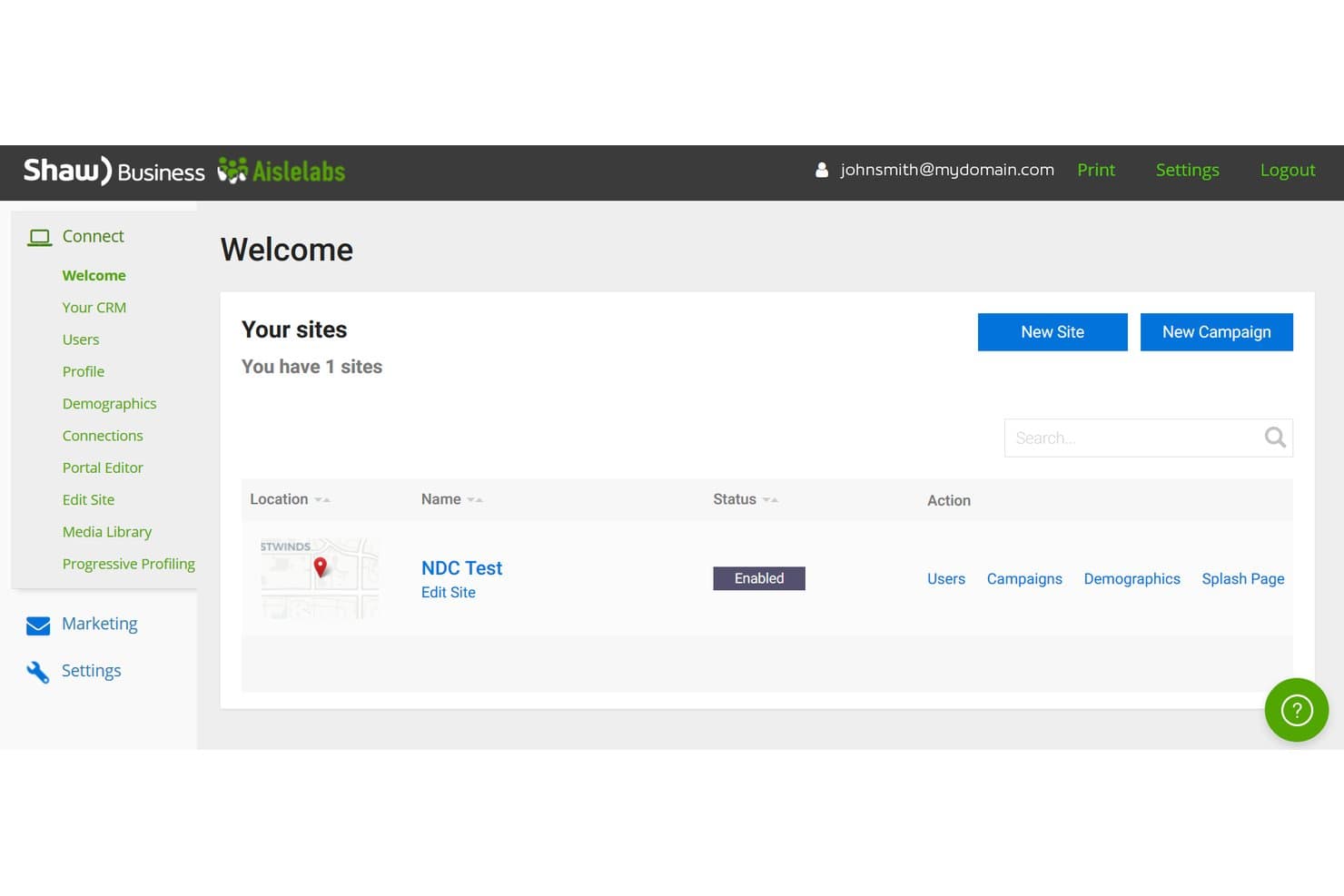
Aislelabs lets users manage multiple Wi-Fi sites from one dashboard. My Evaluation Score
- Beacon/BLE Support
- Limited
- Geofencing Capabilities
- Minimal
- Push Notification Engine
- Adequate
- Campaign Management Console
- Strong
- Proximity Analytics & Reporting
- Excels
- Audience Segmentation & Targeting
- Strong
Aislelabs is a venue intelligence platform that uses existing WiFi infrastructure to deliver foot traffic analytics, guest data capture via branded captive portals, and visit-triggered email and SMS marketing campaigns.
Who Is Aislelabs Best For?
Aislelabs is a strong fit for enterprise venue operators—shopping centers, airports, and mixed-use developments—that want to turn existing WiFi infrastructure into a guest analytics and marketing engine.
Why I Picked Aislelabs
Aislelabs earns its spot on my shortlist because it turns passive WiFi infrastructure into a venue analytics engine that most proximity marketing platforms simply can't replicate. I particularly like how Flow AI maps dwell time, visitor heatmaps, and zone-level journey paths across an entire venue portfolio without requiring a single new hardware install. What really sets it apart is visit-based campaign attribution: when a win-back email actually drives someone back through the door, Aislelabs confirms it.
Aislelabs Key Features
- Captive portal builder: A branded guest WiFi login page that captures opted-in visitor contact data with customizable logos, colours, and multiple authentication methods.
- Visit-triggered campaign automation: Email and SMS campaigns that fire automatically based on real visit behaviour, with configurable thresholds for new, frequent, and lapsed visitors.
- A/B testing for portal and campaigns: Split testing at both the captive portal and campaign level, using in-venue return visits as the conversion metric.
- Multi-location portfolio dashboard: A centralized console that surfaces foot traffic, dwell time, and campaign performance across an entire venue portfolio in one view.
Aislelabs Integrations
Aislelabs supports 14 WiFi hardware integrations, including Cisco, HPE Aruba, Ruckus, Fortinet, Extreme Networks, Ubiquiti UniFi, Juniper Mist, Cambium Networks, and Mailchimp. It also connects with Axper and offers a REST API for custom integrations and BI exports.
Pros and Cons
Pros:
- Delivers compliance with major privacy regulations
- Triggers email and SMS by real visits
- Pinpoints in-venue foot traffic and dwell zones
Cons:
- Proximity detection relies on captive WiFi login
- No mobile push or GPS geofencing
Learn more about Aislelabs:
Other Proximity Marketing Software
Here are some additional proximity marketing software options that didn’t make it onto my shortlist but are still worth checking out.
- 11InfillionBest for geofencing and beacon campaigns
- 12InMarketBest for shopper intelligence and visit attribution
- 13MoEngageBest for AI-driven mobile engagement triggers
- 14GroundtruthBest for GPS-driven location tracking
- 15NavigineBest for venue-level proximity triggers and mapping
- 16OneSignalBest for app messaging with proximity via integrations
- 17Bloom IntelligenceBest for WiFi-based restaurant guest retention
- 18Blue BiteBest for OOH-linked mobile ad geofencing
- 19PointrBest for app-free venue mapping
How I Evaluate Proximity Marketing Software
I look at proximity marketing tools on two levels: the core capabilities—beacon support and geofencing—that qualify a platform, and the differentiators that separate one vendor from another.
Core Functionality (Table Stakes For This List)
When I'm selecting tools for my list, I rank each one on a scale from 0 (does not offer the functionality) to 5 (excels in this area) for each core functionality listed below. Then, I calculate the tool's total score into a percentage. Each tool needs to achieve a minimum total score of 65% to be considered for inclusion.
- Beacon & BLE Hardware Support: I check whether the platform supports multiple beacon protocols like iBeacon and Eddystone, and whether it offers an SDK for embedding proximity detection into branded apps.
- Geofencing Capabilities: Whether it's a retail chain drawing zones around storefronts or an event marketer targeting a venue entrance, I look for flexible geofence shapes with entry, exit, and dwell triggers.
- Push Notification Delivery: I evaluate how the platform delivers proximity-triggered messages—specifically, whether it supports push, SMS, and in-app channels with personalization tokens.
- Audience Segmentation: Targeting a first-time visitor differently from a repeat shopper matters, so I look for segmentation by visit history, location behavior, and demographic attributes.
- Location Analytics & Reporting: Dwell-time tracking, footfall counts, and campaign engagement dashboards are what I evaluate here—especially whether the tool can tie a beacon interaction back to a conversion.
- Campaign Management Tools: I look for a centralized console where you can build, schedule, and A/B test campaigns across multiple locations without duplicating work for each site.
Once I have a list of tools that meet this criteria, I consider what sets each platform apart.
Differentiating Factors (What Sets Vendors Apart)
Here's how I compare and contrast different vendors:
Standout Features
O2O attribution is a big one—I look for platforms that connect online ad impressions to actual store visits and purchases, giving retail teams clear proof of campaign ROI. Privacy consent management also matters, especially for brands collecting location data at scale. Built-in opt-in flows and preference centers save your team from stitching together separate compliance tools. Contextual personalization takes things further by adapting messages based on weather, time of day, or past purchases rather than location alone.
Beyond Features
Integrations carry a lot of weight here. I check whether a platform connects to your CRM, CDP, and POS so that beacon-triggered interactions feed directly into customer profiles and purchase data. Hardware and deployment model is another factor—some vendors sell proprietary beacons while others are hardware-agnostic, and that choice affects how easily you can scale from a pilot store to hundreds of locations. I also evaluate implementation support, since beacon placement planning and SDK integration into your existing app often require hands-on guidance to get right.
How To Choose Proximity Marketing Software
It’s easy to get bogged down in long feature lists and complex pricing structures. Here's a checklist of factors to remember to help you stay focused as you work through your unique software selection process.
| Factor | What to Consider |
| Scalability | Ensure the software can grow with your business. Consider how well it handles an increasing number of users and locations. |
| Integrations | Check compatibility with your existing systems, such as CRM and analytics tools. Seamless data exchange is essential for efficient operations. |
| Customizability | Look for options to tailor the software to your specific marketing strategies. Custom dashboards and reports can enhance your team's effectiveness. |
| Ease of Use | Choose a user-friendly interface to reduce the learning curve for your team. Intuitive navigation boosts productivity. |
| Budget | Compare pricing plans to find one that fits your financial constraints. Consider any additional costs like setup fees or user licenses. |
| Security Safeguards | Verify the software's data protection measures. Ensure compliance with data regulations like GDPR to protect customer information. |
Trends In Proximity Marketing Software
In my research, I sourced countless product updates, press releases, and release logs from different proximity marketing software vendors. Here are some of the emerging trends I’m keeping an eye on.
- AI-driven insights: More vendors use AI to analyze customer behavior and predict future actions. This is helping businesses personalize marketing efforts and improve customer engagement.
- Privacy-first features: With growing concerns over data privacy, vendors are incorporating features that ensure compliance with regulations like GDPR. Users can trust that their data is handled responsibly, which is essential for maintaining customer trust.
- Augmented reality (AR) integration: Some tools are beginning to offer AR capabilities to enhance customer experiences. This trend allows businesses to engage customers more interactively through virtual store tours or product previews.
- IoT connectivity: The Internet of Things is becoming a part of proximity marketing, allowing devices to communicate and provide a more integrated user experience. This connectivity can lead to more innovative marketing strategies and better data collection.
- Location-based gamification: Vendors incorporate gamified elements into their software to boost engagement. This approach encourages customer interaction through challenges and rewards based on their location, making marketing efforts more engaging and fun.
What Is Proximity Marketing Software?
Proximity marketing software allows businesses to engage with customers by delivering targeted content based on their physical location. It is used by marketing professionals, retailers, and event organizers to enhance customer engagement and drive sales.
Its features include location-based notifications, analytics, and geofencing to help deliver personalized experiences and measure customer interactions. This conversational marketing platform provides value by improving customer engagement and increasing the effectiveness of marketing strategies.
Features Of Proximity Marketing Software
When selecting proximity marketing software, look for the following key features.
- Location-based notifications: Send targeted and follow-up messages to customers when they are near a specific location, enhancing engagement and relevance.
- Real-time analytics: Provide insights into customer behavior and campaign performance, allowing for data-driven decision-making.
- Geo-fencing: Create virtual boundaries to trigger actions or notifications when customers enter or exit designated areas.
- Segmentation: Categorize customers into groups for more personalized marketing efforts based on behavior and preferences.
- Privacy compliance tools: Ensure data collection and usage comply with regulations like GDPR to build customer trust.
- Augmented reality integration: Engage customers with interactive experiences like virtual tours or product previews using AR technology.
- IoT connectivity: Connect with IoT devices for more integrated and more innovative marketing strategies.
- Data enrichment: Enhance existing datasets with additional insights to improve sales team targeting and personalization efforts.
- Customer journey mapping: Visualize the journey to understand better and optimize touchpoints and interactions.
- AI-powered insights: Leverage artificial intelligence to analyze data patterns and optimize marketing strategies for better customer engagement.
- SMS campaigns: Send personalized messages via SMS to engage customers directly and drive real-time conversations.
- Website visitor tracking: Monitor visitors’ behavior to tailor proximity marketing efforts and boost lead generation.
- Conversational AI integration: Utilize AI-powered chatbots to interact with customers across messaging apps and platforms.
- Drift compatibility: Integrate with Drift to enable conversational marketing tools for seamless customer engagement.
- Lead generation support: Use real-time data and messaging to effectively identify and engage potential customers.
- Qualified leads prioritization: Identify and prioritize high-quality leads to efficiently focus marketing and sales efforts.
- WhatsApp integration: Reach customers directly on WhatsApp for personalized messaging and real-time interactions.
- Landing page customization: Link proximity marketing campaigns to optimized landing pages to improve conversion rates.
- Marketing automation: Automate repetitive tasks to streamline workflows and allow marketing teams to focus on strategic initiatives.
- Messaging apps support: Engage customers on popular messaging platforms like Facebook Messenger, enhancing outreach and accessibility.
- Real-time conversations: Enable instant, personalized communication to improve customer relationship management.
- Sales process optimization: Align proximity marketing efforts with the sales funnel to ensure seamless customer transitions.
- Sales reps enablement: Provide sales reps with actionable insights from proximity marketing campaigns to improve customer interactions.
- Workflow integration: Streamline operations by connecting proximity marketing tools with existing workflows and systems.
- AI-powered chatbots: Leverage chatbots for automated and intuitive customer interactions, improving efficiency and engagement.
- Conversational marketing tools: Offer tools to streamline the customer experience and enhance lead generation efforts.
- Email marketing integration: Combine proximity marketing efforts with email campaigns to reach customers across multiple channels.
- Facebook Messenger compatibility: Engage customers on Facebook Messenger for targeted communication and improved accessibility.
- Messaging platform integration: Connect with various messaging platforms to broaden outreach and engage customers where they prefer.
- Natural language processing: Utilize NLP for better understanding and responding to customer inquiries, improving engagement.
- No-code solutions: Enable businesses to create and customize proximity marketing campaigns without technical expertise.
- Sales funnel alignment: Ensure proximity marketing aligns with the sales funnel to guide customers from awareness to conversion.
Benefits Of Proximity Marketing Software
Implementing proximity marketing software provides several benefits for your team and your business. Here are a few you can look forward to:
- Enhanced customer engagement: Deliver personalized messages directly to customers based on location, making interactions more relevant and timely.
- Improved marketing effectiveness: Use real-time analytics to track campaign performance and make adjustments that boost overall effectiveness.
- Increased sales opportunities: Leverage geo-fencing with targeted promotions and offers to attract nearby customers, driving more foot traffic to your business.
- Better customer insights: Gain a deeper understanding of customer behavior and preferences through data enrichment and segmentation features.
- Efficient resource allocation: Optimize marketing spend and resources by targeting specific customer segments and reducing wasted efforts.
- Compliance and trust: Build customer trust by ensuring data privacy and compliance with regulations through integrated privacy tools.
- Innovative customer experiences: Engage customers in new ways with augmented reality and IoT connectivity, creating memorable interactions.
Costs & Pricing Of Proximity Marketing Software
Selecting proximity marketing software requires understanding the various pricing models and plans available. Costs vary based on features, team size, add-ons, and more. The table below summarizes standard plans, average prices, and typical features of proximity marketing software solutions.
Plan Comparison Table for Proximity Marketing Software
| Plan Type | Average Price | Common Features |
| Free Plan | $0 | Basic notifications, limited analytics, and simple geofencing. |
| Personal Plan | $5-$25/user/month | Enhanced notifications, customer segmentation, and basic privacy tools. |
| Business Plan | $50-$100/user/month | Advanced analytics, comprehensive geofencing, data enrichment, and integration capabilities. |
| Enterprise Plan | $150-$300/user/month | Full customization, dedicated support, advanced privacy compliance, and IoT connectivity. |
Proximity Marketing Software FAQs
Here are some answers to common questions about proximity marketing software.
How does proximity marketing software work?
Proximity marketing sends targeted messages to potential customers based on their current location. It connects with nearby devices using Bluetooth beacons, WiFi, and geofencing. This allows you to deliver personalized content, increasing engagement and conversion rates.
What is beacon technology for proximity marketing software?
Beacon technology involves small Bluetooth® sensors placed indoors to pinpoint the exact location of visitors or objects. These beacons help you implement indoor navigation and track customer movements. They’re useful for enhancing customer experiences and providing real-time data.
How can proximity marketing software benefit retail businesses?
Retail businesses benefit from proximity marketing by attracting more foot traffic and increasing sales. By sending personalized offers to nearby customers, you can enhance the shopping experience and encourage purchases. This targeted approach helps build customer loyalty and boosts revenue.
What challenges do businesses face with proximity marketing software?
Businesses may face challenges like data privacy concerns and the need for accurate location data. Ensuring compliance with privacy regulations is important to maintaining customer trust. Additionally, integrating proximity marketing with existing systems requires careful planning and execution.
How do you measure the success of proximity marketing software campaigns?
Success is measured through customer engagement rates, conversion rates, and sales lift. Analyzing data from real-time analytics helps you understand customer behavior and the effectiveness of your campaigns. This information allows your team to refine strategies and optimize results.
What is the difference between proximity software and local marketing software?
Proximity software uses technologies like Bluetooth or geofencing to engage users based on their physical location in real time (e.g., in-store notifications). On the other hand, local marketing software helps businesses manage marketing efforts tailored to specific geographic areas, often including listings, reviews, and localized campaigns. The key difference: proximity is about real-time, hyperlocal engagement, while local marketing focuses on strategic regional presence.