

monday.com is a popular marketing management software known for its ability to organize and track work projects efficiently. However, some users might seek an alternative to monday.com if they require more customization options or face budget constraints.
Using my experience with marketing software, I tested and compared several of the top monday.com alternatives available. From there, I compiled my results into detailed reviews to help you find the best software for your unique needs.
What Is monday.com?
monday.com is a marketing management software that helps teams organize and track their work projects. It's generally used by marketing, project management, and operations professionals who need to manage tasks and collaborate with their teams.
Customizable boards, automation, and integration capabilities help organize tasks, improve team collaboration, and keep everyone on the same page. Overall, monday.com provides a straightforward way to streamline your team's workflow.
Why Trust Our Software Recommendations
6,700+
Reviews
20
Industry experts
16+
Evaluation factors
14
Years
Our team has been testing and reviewing software since 2012. As marketing leaders ourselves, we know how difficult—and important—it is to choose the right software.
For this guide, we evaluated tools using hands-on testing and independent research, scoring tools using our selection criteria.
Our reviews reflect our human editorial judgment, not a sales pitch.
Expert reviewers:
 Gui DrusinaCreative Director
- Shriya GhateSenior Marketing Lead
 Amanda JacquesMarketing Ops Leader

monday.com Alternatives Comparison Table
This comparison table summarizes pricing details for my top monday.com alternative selections:
| Tool | Best For | Trial Info | Price | ||
|---|---|---|---|---|---|
| 1 | Best for enterprise marketing creative ops | Free demo available | Pricing upon request | Website | |
| 2 | Best for task automation features | Free plan available | From $4/user/month (billed annually) | Website | |
| 3 | Best for customizable workflows | 14-day free trial | From $10/user/month (billed annually) | Website | |
| 4 | Best for visual task management | 14-day free trial | From $5/user/month (billed annually) | Website | |
| 5 | Best for client work management | 14-day free trial | From $9.99/user/month (billed annually) | Website | |
| 6 | Best for all-in-one team workspaces | Free plan available | From $10/user/month (billed annually) | Website | |
| 7 | Best for custom app building | Free plan + free demo + 14-day trial available | From $20/user/month | Website | |
| 8 | Best for customizable project workflows | Free plan available | From $7/user/month (billed annually) | Website | |
| 9 | Best for spreadsheet workflows | 30-day free trial | From $9/user/month (billed annually) | Website | |
| 10 | Best for team project coordination | Free plan available | From $10.99/user/month (billed annually) | Website |


Best monday.com Alternatives Reviews
Below are my detailed summaries of the best monday.com alternatives that made it onto my shortlist. My reviews offer a thorough look at each tool’s key features, pros and cons, integrations, and ideal use cases to help you find the best one.
 Best for enterprise marketing creative ops
- Free demo available
- Pricing upon request
Visit WebsiteCustomer Rating:4.6/5This rating combines scores from multiple user review sites to reflect overall customer sentiment about the product.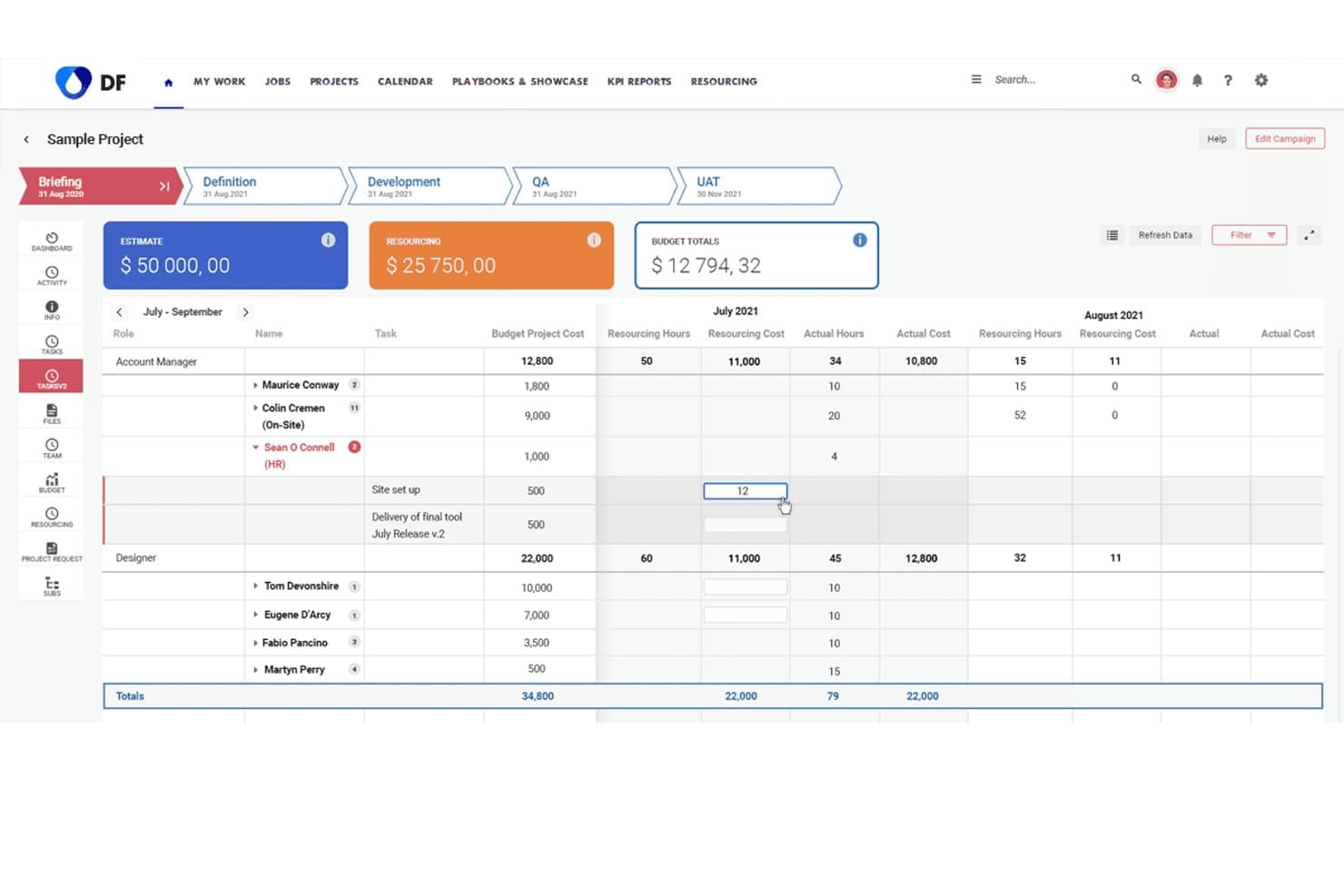
Screendragon lets users track resourcing costs and hours across project phases. Screendragon offers workflow automation and resource management designed for large marketing organizations and creative teams who need enterprise-level control, customizable processes, and visibility across complex campaigns and projects.
Who Is Screendragon Best For?
Screendragon is a solid choice for large marketing teams managing complex creative projects across multiple departments or regions.
Why Screendragon Is a Good Best monday.com Alternatives
I picked Screendragon as a top choice because it handles enterprise marketing creative ops with advanced workflow automation and resource management. My team gets precise control over complex processes and campaign visibility. I use its customizable workflows to coordinate projects across multiple departments and regions.
Screendragon Key Features
- Digital asset management: Organize, store, and share creative files from one centralized library.
- Budget tracking: Monitor campaign spend and allocate budgets by project, client, or region in real time.
- Time tracking: Log hours directly within the platform and generate automated timesheets for resource analysis.
- Approval workflows: Route projects and assets for multi-stage review and approval with custom routing rules.
Screendragon Integrations
Native integrations are not clearly documented. Screendragon supports integrations via API for custom connections.
Pros and Cons
Pros:
- Built-in campaign budget and time tracking
- Offers customizable approval and routing processes
- Handles complex creative workflows across departments
Cons:
- Documentation for integrations is limited
- Interface can feel overwhelming for new users
Learn more about Screendragon: Best for task automation features
- Free plan available
- From $4/user/month (billed annually)
Visit WebsiteCustomer Rating:4.3/5This rating combines scores from multiple user review sites to reflect overall customer sentiment about the product.
Zoho Projects displays tasks in a Kanban-style board, helping you track progress and manage workflows across complex projects. For teams seeking a monday.com alternatives solution that balances functionality with user privacy, Zoho Projects presents a compelling option. It's designed to appeal to a wide range of industries, from IT to construction, by offering task management and collaborative tools without monetizing user data. Zoho Projects tackles challenges such as task automation and integration with other tools, ensuring your team can focus on what truly matters, getting projects done efficiently.
Why I Picked Zoho Projects
I picked Zoho Projects as a strong monday.com alternatives solution due to its user-friendly interface and customizable templates that cater to diverse project management needs. You can leverage its task automation feature, which allows for streamlined workflows through a simple drag-and-drop interface, saving you time on repetitive tasks. Additionally, Zoho Projects offers Zia intelligence, an AI-driven tool that provides insights to enhance decision-making. These features make it a great fit for teams looking to optimize their project management processes.
Zoho Projects Key Features
In addition to its automation and AI capabilities, Zoho Projects offers several other features that enhance its appeal.
- Task Management: Provides tools like Gantt charts, task dependencies, and recurring tasks to keep your projects on track.
- Time Tracking: Allows you to monitor time spent on tasks and projects, ensuring accurate billing and productivity assessment.
- Issue Tracking: Helps your team identify, report, and resolve project-related issues efficiently.
- Team Collaboration: Includes in-app chat, forums, and document management for seamless communication and collaboration.
Zoho Projects Integrations
Integrations include Google Calendar, Microsoft Office 365, Slack, Dropbox, GitHub, Zapier, Zoho CRM, Zoho Books, Zoho Invoice, and Zoho Analytics.
Pros and Cons
Pros:
- Competitive pricing with rich features
- Strong automation and workflow tools
- Robust task and dependency management
Cons:
- Limited dashboard customization options
- Interface feels complex initially
Learn more about Zoho Projects: Best for customizable workflows
- 14-day free trial
- From $10/user/month (billed annually)
Visit WebsiteCustomer Rating:4.3/5This rating combines scores from multiple user review sites to reflect overall customer sentiment about the product.
Wrike provides an overview of tasks, timelines, and dependencies, essential for effective project planning. Wrike is a project management tool designed for teams and businesses looking to enhance collaboration and productivity. It offers features for task management, time tracking, and workload management, facilitating efficient project workflows.
Why Wrike is a good monday.com alternative: Wrike's customizable workflows allow you to tailor project stages to fit your team's specific processes. This flexibility ensures that your projects align with your unique operational needs, enhancing efficiency. Additionally, Wrike's real-time collaboration features, such as live editing and commenting, keep your team connected and informed, reducing the need for lengthy email threads.
Standout features & integrations:
Features include task prioritization, custom dashboards, request forms, approvals, file sharing, document versioning, calendar view, Kanban boards, workload management, and advanced reporting on project performance, resource allocation, and timelines.
Integrations include Adobe Creative Suite, Photoshop, Illustrator, InDesign, Facebook, Twitter, LinkedIn, Marketo, HubSpot, Salesforce, Microsoft Teams, and Slack.
Pros and Cons
Pros:
- Advanced reporting features
- Time tracking to monitor resource allocation
- Customizable workflows for tailored processes
Cons:
- Occasional performance issues with large projects
- Learning curve for new users
 Best for visual task management
- 14-day free trial
- From $5/user/month (billed annually)
Visit WebsiteCustomer Rating:4.5/5This rating combines scores from multiple user review sites to reflect overall customer sentiment about the product.
Trello offers visual boards for tracking tasks across workflows. Trello gives teams a visual approach to managing projects using customizable boards, lists, and cards. I think marketers, operations teams, and creatives who want a flexible, drag-and-drop system for tracking work across stages will find Trello especially useful.
Who Is Trello Best For?
Project coordinators and small teams who need a visual, flexible system to organize workflows and keep tasks moving.
Why Trello Is a Good monday.com Alternative
I picked Trello because its Kanban board experience is genuinely the clearest in the market—moving a card from "In Progress" to "Done" feels immediate and satisfying in a way that heavier tools don't replicate. I like how Power-Ups let my team add functionality like calendar views, time tracking, or voting directly on the board without switching to a separate tool. Trello's built-in no-code automation also lets me set trigger-based rules—like automatically assigning a due date or notifying a teammate when a card moves to a specific list—without writing a single line of code. For teams that don't need complex reporting and just want tasks moving through a clear visual pipeline, Trello is hard to beat.
Trello Key Features
- Board templates: Launch new projects using pre-built templates for sprints, content calendars, and event planning.
- Multiple project views: Switch between board, timeline, table, calendar, and map views depending on how your team tracks work.
- Card checklists and attachments: Break tasks into subtasks and attach files, links, or images directly to any card.
- Team workspaces: Organize multiple boards under a shared workspace to keep related projects grouped and accessible.
Trello Integrations
Trello offers native integrations with Google Drive, Slack, Jira, Dropbox, GitHub, Microsoft Teams, Evernote, Salesforce, and more. It connects with Zapier and offers an API for custom integrations.
Pros and Cons
Pros:
- Power-Ups expand core functionality as needed
- Moving tasks between stages is fast and intuitive
- Kanban boards allow easy visual project management
Cons:
- Limited reporting and analytics for project performance
- No native time tracking in boards
Learn more about Trello: Best for client work management
- 14-day free trial
- From $9.99/user/month (billed annually)
Visit WebsiteCustomer Rating:4.4/5This rating combines scores from multiple user review sites to reflect overall customer sentiment about the product.
Teamwork.com provides time tracking and billing for client-focused project management. Teamwork.com is a project management software for teams managing client work and collaboration. It’s mainly used by agencies and businesses that must keep track of client projects and improve team communication.
Why Teamwork.com is a good monday.com alternative: Teamwork.com offers features tailored for managing client-based projects, setting it apart from monday.com’s broad project management focus. Its time tracking and billing features help ensure you accurately capture billable hours. The project templates make it easy to standardize processes across different client projects. The task management tools also help you organize and prioritize work effectively, enhancing productivity for client-focused teams.
Standout features & integrations:
Features include time tracking, billing, and project templates. Time tracking ensures you accurately capture billable hours, essential for client work. Billing features streamline invoicing, making financial management more manageable for your team. Project templates help standardize processes, saving you time when managing similar projects.
Integrations include Slack, HubSpot, Google Drive, Dropbox, QuickBooks, Zapier, Microsoft Teams, Xero, Harvest, and OneDrive.
Pros and Cons
Pros:
- Customizable project templates
- Detailed time tracking
- Effective client management
Cons:
- Complex setup process
- Can be overwhelming
Learn more about Teamwork.com: Best for all-in-one team workspaces
- Free plan available
- From $10/user/month (billed annually)
Visit WebsiteCustomer Rating:4.6/5This rating combines scores from multiple user review sites to reflect overall customer sentiment about the product.
Notion offers shared workspaces for docs, policies, and team knowledge. Notion gives teams a flexible workspace where you can manage projects, docs, and wikis all in one place. I think fast-moving startups and creative teams will appreciate how it adapts to shifting processes and unconventional workflows.
Who Is Notion Best For?
Project managers and cross-functional teams who need a flexible, customizable workspace to organize projects, documentation, and knowledge in one hub.
Why Notion Is a Good monday.com Alternative
What drew me to Notion is how it blurs the line between project management and documentation—your project brief, task board, and meeting notes all live in the same connected space. I like that you can build entirely custom database views, switching between table, board, calendar, and gallery layouts depending on how your team thinks. In practice, that means I can set up a content calendar that links directly to the briefs, drafts, and approval notes for each piece without leaving the tool. For teams tired of bouncing between a project tool and a separate wiki, Notion handles both without compromise.
Notion Key Features
- AI writing assistant: Generate, summarize, and edit content directly within your pages and documents.
- Templates: Start projects quickly using pre-built templates for roadmaps, sprint planning, and meeting notes.
- Task assignments and due dates: Assign tasks to team members and set deadlines directly within any database.
- Permissions and page sharing: Control access at the page or workspace level to share specific content with guests or external collaborators.
Notion Integrations
Notion offers native integrations with Slack, GitHub, Google Drive, Figma, Asana, Trello, Jira, Zoom, Dropbox, and Box. It also connects with Zapier and provides an API for custom integrations.
Pros and Cons
Pros:
- Customizable template gallery for project workflows
- Embedded AI for notes and document creation
- Flexible content databases with linked views
Cons:
- No advanced automation for recurring tasks
- Databases can slow down at large scale
Learn more about Notion: Best for custom app building
- Free plan + free demo + 14-day trial available
- From $20/user/month
Visit WebsiteCustomer Rating:4.6/5This rating combines scores from multiple user review sites to reflect overall customer sentiment about the product.
Airtable's custom apps, grid view, and Kanban make it ideal for flexible project management. Airtable is a flexible database and collaboration tool that allows users to create custom applications to manage data and workflows. It's used by teams across various industries who need a versatile platform to organize information and collaborate.
Why Airtable is a good monday.com alternative: Airtable offers custom app building capabilities, which set it apart from monday.com's project management focus. Its grid view allows you to organize data similarly to a spreadsheet, making it intuitive for those familiar with Excel. The form view lets you collect information quickly, and its Kanban board aids in visualizing workflows. These features suit teams needing customizable solutions to manage diverse projects.
Standout features & integrations:
Features include grid view, form view, and Kanban board. Grid view lets you organize information like a spreadsheet, making it familiar and easy to use. Form view helps you collect and manage data efficiently.
Integrations include Slack, Google Calendar, Dropbox, Trello, Asana, Jira, Mailchimp, GitHub, Zendesk, and Salesforce.
Pros and Cons
Pros:
- Visual workflow tools
- Flexible data management
- Customizable applications
Cons:
- Basic reporting features
- May need customization
Learn more about Airtable: Best for customizable project workflows
- Free plan available
- From $7/user/month (billed annually)
Visit WebsiteCustomer Rating:4.7/5This rating combines scores from multiple user review sites to reflect overall customer sentiment about the product.
ClickUp offers customizable workflows with visual process mapping. ClickUp gives teams total control over how they manage tasks, projects, and goals, making it a go-to choice for fast-moving organizations and creative agencies. I think you’ll appreciate its flexibility if you need to bring all your workflows, docs, and project plans into one customizable hub.
Who Is ClickUp Best For?
ClickUp is a great fit for cross-functional teams at startups and growing businesses that need to coordinate complex projects in one place.
Why ClickUp Is a Good Monday.com Alternative
I picked ClickUp because of how far it goes with workspace customization—you can build out entirely different structures for different teams without any overlap or confusion. I like that it supports multiple project views, including Gantt charts, Kanban boards, list views, and timelines, so each team member can work in whichever format suits them. My team also uses ClickUp's custom task statuses and fields to mirror our exact workflows, which monday.com's more rigid structure doesn't always allow. In practice, that means we're not bending our process to fit the tool.
ClickUp Key Features
- ClickUp Brain: An AI assistant built directly into your workspace that answers questions about tasks, surfaces blockers, and pulls insights from docs and past projects.
- Whiteboards: A built-in visual collaboration tool for brainstorming, mind mapping, and connecting ideas directly to tasks.
- Dashboards: Customizable reporting views that pull live data from tasks and projects, so you can track progress without chasing status updates.
- Time tracking: Native time logging on tasks that lets team members record hours worked directly inside their projects.
ClickUp Integrations
ClickUp offers over 50 native integrations, including Slack, Google Drive, GitHub, Zoom, OneDrive, Dropbox, GitLab, Microsoft Teams, Outlook, and more. It also connects with Zapier and provides an API for custom integrations.
Pros and Cons
Pros:
- Advanced native whiteboard and mind mapping
- Multiple automation options within tasks
- Highly customizable work hierarchies and views
Cons:
- Occasional lag with large workspaces
- Notification system can be overwhelming
Learn more about ClickUp: Best for spreadsheet workflows
- 30-day free trial
- From $9/user/month (billed annually)
Visit WebsiteCustomer Rating:4.5/5This rating combines scores from multiple user review sites to reflect overall customer sentiment about the product.
Smartsheet lets teams manage workflows in a spreadsheet layout. Smartsheet brings a familiar spreadsheet-inspired interface to project and work management, making it easy for teams used to Excel or Google Sheets to transition. Mid-size businesses and enterprises rely on it to organize complex projects, automate collaborative workflows, and meet compliance needs at scale.
Who Is Smartsheet Best For?
Project managers and operations leaders at mid-size and large organizations in regulated industries benefit most from Smartsheet’s workflow and compliance controls.
Why Smartsheet Is a Good monday.com Alternative
I picked Smartsheet because its grid-based interface mirrors the logic of a spreadsheet, which makes adoption far easier for teams already working in Excel or Google Sheets. I like how you can start with familiar rows and columns and layer in task dependencies, automated alerts, and approval workflows without rebuilding how your team thinks about data. My team uses Smartsheet's cell linking and cross-sheet formulas to connect data across multiple project sheets in real time—something monday.com doesn't replicate as naturally. In practice, that means reporting across projects stays accurate without manual data entry.
Smartsheet Key Features
- Portfolio management: Track and report on multiple projects in one view, with tools to monitor budgets, resources, and risks across your entire portfolio.
- Resource management: Assign and balance team workloads across projects, with visibility into availability and capacity to avoid overbooking.
- Dynamic View: Share filtered, permission-controlled views of sheets with external stakeholders without exposing your full data.
- Document generation: Automatically generate customized PDFs directly from sheet data to reduce manual document prep.
Smartsheet Integrations
Smartsheet offers native integrations with Google Workspace, Microsoft Teams, Slack, Salesforce, Jira, DocuSign, Box, Dropbox, and more. It also provides an API for custom integrations.
Pros and Cons
Pros:
- Audit tracking for regulatory compliance management
- Extensive workflow automation and approval capabilities
- Spreadsheet-style interface for easy project setup
Cons:
- Custom dashboards have limited visualization flexibility
- Complex permission settings require careful configuration
 10Best for team project coordination
Asana
- Free plan available
- From $10.99/user/month (billed annually)
Visit WebsiteCustomer Rating:4.4/5This rating combines scores from multiple user review sites to reflect overall customer sentiment about the product.
Asana helps teams organize projects, track tasks, and collaborate efficiently in one workspace. Asana is a project and task management platform well-suited to cross-functional teams who need detailed workflow automation, goal tracking, and project timelines all in a single workspace.
Who Is Asana Best For?
Asana is a strong fit for mid-sized to enterprise teams that manage multiple projects across departments and need clear ownership and accountability structures.
Why Asana Is a Good Monday.com Alternative
Asana is one of my top picks because I love how it covers work, projects, and tasks in one place without locking everyone into a single view. I can switch between list, board, timeline, and calendar views per project, which gives different team members the flexibility monday.com often restricts behind higher tiers. I also appreciate the Goals feature, which lets me tie individual tasks directly to company-level objectives and track progress in real time.
Asana Key Features
- Workflow automation: Build rule-based automations that trigger actions like task assignments, status updates, and due date changes without manual input.
- Portfolio management: Group related projects into portfolios to monitor status, priority, and progress across multiple workstreams from a single view.
- Workload management: View each team member's assigned tasks and capacity in real time to spot bottlenecks and rebalance work.
- Custom fields: Add project-specific data fields to tasks, such as priority, budget, or region, to capture the details your team actually needs to track.
Asana Integrations
Asana offers 300+ integrations through its app directory, including native integrations with Slack, Google Drive, Microsoft Teams, Salesforce, Jira, HubSpot, GitHub, Zoom, Figma, and Tableau. It also connects with Zapier and provides an API for custom integrations.
Pros and Cons
Pros:
- Task dependencies with timeline visualization
- Built-in goal and milestone tracking
- Multiple project views on all plans
Cons:
- Reporting limited to premium tiers
- No native time tracking feature
Other monday.com Alternatives
Here are some additional monday.com alternatives that didn’t make it onto my shortlist but are still worth checking out.
- 11Bonsai Agency SoftwareBest for agencies
- 12ConfluenceBest for remote collaboration
- 13JiraBest for Agile software teams
- 14Resource GuruBest for resource scheduling
- 15ProductiveBest for agency resource planning
- 16ScoroBest for professional services
- 17Hub Planner by MilientBest for resource management
- 18SlackBest for team communication and collaboration
- 19Salesforce CRMBest for customer relationship management
- 20HiveBest for team collaboration tools
How I Evaluate monday.com Alternatives
I look at monday.com alternatives on two levels: the baseline for managing campaigns and creative reviews, and the differentiators that make a platform genuinely suited to marketing teams.
Core Functionality (Table Stakes For This List)
When I'm selecting tools for my list, I rank each one on a scale from 0 (does not offer the functionality) to 5 (excels in this area) for each core functionality listed below. Then, I calculate the tool's total score into a percentage. Each tool needs to achieve a minimum total score of 65% to be considered for inclusion.
- Visual Project Views: I check whether a tool offers Kanban, Gantt, calendar, and table views so marketing teams can switch between a campaign timeline and a daily task board without leaving the platform.
- Customizable Workflows: The ability to build custom statuses, fields, and no-code automations matters here—like auto-assigning a designer when a brief moves to "Ready for Creative."
- Creative Collaboration & Proofing: I evaluate how teams can annotate assets, leave feedback in context, and route approvals—especially for review cycles on ad creatives or landing page designs.
- Task & Campaign Management: Every tool should support task dependencies, subtasks, and milestones so a product launch checklist can map deliverables from copy drafts through final deployment.
- Marketing Stack Integrations: I look for native connections to tools marketing teams already use daily, like HubSpot, Slack, Google Workspace, Figma, and social or ad platforms.
- Reporting & Dashboards: Custom dashboards that track campaign progress, team workload, and deadlines across multiple projects give marketing leaders the visibility they need without pulling data manually.
Once I have a list of tools that meet this criteria, I consider what sets each platform apart.
Differentiating Factors (What Sets Vendors Apart)
Here's how I compare and contrast different vendors:
Standout Features
AI-powered features are a growing differentiator—I look for tools that help draft campaign briefs or summarize project updates rather than just offering generic AI chat. Resource and capacity planning also matter when a team juggles multiple launches at once, since workload views help managers spot overloaded teammates before deadlines slip. I also evaluate guest and client access, which is key for agencies or teams that loop in freelancers and stakeholders for creative reviews without paying for full seats.
Beyond Features
Pricing structure is one of the first things I evaluate, especially how guest and viewer seats are handled—marketing teams that collaborate with agencies or executives can see costs balloon fast. I also consider scalability, since a three-person content team and a 50-person marketing org with multiple brands need very different permission models and workspace hierarchies. Time-to-value matters too. I look for platforms with marketing-specific templates and onboarding resources that help teams migrate from monday.com and start running campaigns in days, not months.
Why Look for a monday.com Alternative?
While monday.com is a good choice of marketing management software, there are several reasons why some users seek out alternative solutions. You might be looking for a monday.com alternative because of the following.
- You need more customization options
- Your budget is limited for software tools
- You prefer a more straightforward user interface
- Your team requires more integrations
- You're looking for better customer support
If any of these sound like you, you’ve come to the right place. My list contains several marketing management software options better suited for teams facing these challenges with monday.com and looking for alternative solutions.
monday.com Alternative Key Features
When exploring alternatives to Monday.com, it's essential to focus on key features that meet your project's specific needs while removing duplicates and unnecessary elements. Here are the refined features to look for:
- User-Friendly Interface and Ease of Use: An intuitive, easy-to-navigate platform that minimizes the learning curve, allowing your team to adopt the tool quickly.
- Task Lists and Subtasks: Organize work efficiently by creating task lists and breaking down tasks into manageable subtasks.
- Task Assignments and Dependencies: Assign tasks to team members and set task dependencies to streamline workflows and meet project deadlines effectively.
- Custom Fields: Customize your projects with custom fields to capture all the specific information your team needs.
- Due Dates and Milestones: Set due dates for tasks and track milestones to keep your project on schedule.
- Notifications: Get real-time notifications about task updates, deadlines, and team communications.
- Approvals Workflow: Implement an approvals process to maintain quality control and ensure accountability within your projects.
- File Sharing: Share files seamlessly within the platform to facilitate collaboration and keep all project resources in one place.
- Track Projects and Tasks: Monitor the progress of projects and individual tasks to identify bottlenecks and ensure everything stays on track.
- Mobile App (iOS and Android): Access your projects on the go with a mobile app available for iOS and Android devices.
- Unlimited User Support: Support for unlimited users, allowing your team to grow without additional costs per user.
- Dashboards: Get a real-time overview of your projects with customizable dashboards that visualize key data points and help you make informed decisions.
- Automations: Save time on repetitive tasks with no-code automations that keep your workflows efficient by automating routine processes.
- Collaborative Docs: Co-author and share documents with your team using collaborative docs with chat features for accessible communication.
- Time Tracking: Time tracking features make it easy to track work hours, helping you manage productivity and allocate resources effectively.
- Resource Management and Workload View: Manage team resources by assigning tasks and monitoring workloads to ensure a balanced distribution of work; visualize resource allocation with workload views.
- Integrations: Connect with other tools and platforms to create a centralized workspace, reducing context switching and increasing productivity.
- Forms: Collect feedback effortlessly with customizable forms that automatically populate your tables, streamlining information gathering and data entry.
By focusing on these essential features and eliminating duplicates, you can effectively compare Monday.com alternatives and select a project management tool that aligns with your team's workflow and enhances productivity.
What’s Next?
Ready to grow?
Subscribe to The CMO newsletter to stay on top of trends and get the latest tips, resources, and guides from our community of seasoned marketing leaders straight to your inbox.