

Managing a marketing team effectively involves juggling multiple projects, deadlines, and resources. You need a software tool that can handle these challenges, but Asana doesn’t seem to be the right fit. Whether it’s due to the pricing, overwhelming features, or the high learning curve for new team members, you might be on the lookout for alternatives.
In this listicle, I'll explore top Asana alternatives that could better match your team’s workflow. I’ve independently tested and reviewed each option to provide an unbiased perspective on what each has to offer. From collaboration tools to task management, you’ll find options that can help your project management experience.
What Is Asana?
Asana is a project management software designed to help teams organize, track, and manage their work. It's widely used by professionals in marketing, design, and product development who need to keep tasks and projects on schedule. Task assignments, deadlines, and project timelines help with managing workloads and improving team collaboration. Overall, Asana provides an efficient way to keep your team organized and focused on their goals.
Asana Alternatives Comparison Table
This comparison table summarizes pricing details for my top Asana alternative selections:
| Tool | Best For | Trial Info | Price | ||
|---|---|---|---|---|---|
| 1 | Best for managing complex project workflows | Free plan available; 14-day free trial | From $10/user/month (billed annually) | Website | |
| 2 | Best for enterprise creative and campaign ops | Free demo available | Pricing upon request | Website | |
| 3 | Best for automation-heavy project workflows | Free plan available; 15-day free trial | From $5/user/month | Website | |
| 4 | Best for detailed project tracking and timelines | 30-day free trial | From $10/user/month (billed annually) | Website | |
| 5 | Best for building custom apps without code | Free plan available; 14-day free trial | From $20/user/month (billed annually) | Website | |
| 6 | Best for visual task management | 14-day free trial | From $5/user/month (billed annually) | Website | |
| 7 | Best for pre-built reports | 2-week free trial; free demo available | From $8/user/month (billed annually) | Website | |
| 8 | Best for real-time collaboration | 14-day free trial + free demo available | From $45/month (billed annually) | Website | |
| 9 | Best for client-focused project management | 14-day free trial + free demo available | From $9.99/user/month (billed annually) | Website | |
| 10 | Best for centralized team communication | 30-day free trial + free demo available | From $25/month | Website |


Why Trust Our Software Recommendations
6,700+
Reviews
20
Industry experts
16+
Evaluation factors
14
Years
Our team has been testing and reviewing software since 2012. As marketing leaders ourselves, we know how difficult—and important—it is to choose the right software.
For this guide, we evaluated tools using hands-on testing and independent research, scoring tools using our selection criteria.
Our reviews reflect our human editorial judgment, not a sales pitch.
Expert reviewers:
 Gui DrusinaCreative Director
- Shriya GhateSenior Marketing Lead
 Amanda JacquesMarketing Ops Leader

Best Asana Alternatives Reviews
Below are my detailed summaries of the best Asana alternatives that made it onto my shortlist. My reviews offer a detailed look at the key features, pros & cons, integrations, and ideal use cases of each tool to help you find the best one for you.
 Best for managing complex project workflows
- Free plan available; 14-day free trial
- From $10/user/month (billed annually)
Visit WebsiteCustomer Rating:4.3/5
Visual workload breakdown of the project team in Wrike, showing individual task allocations and capacity percentages across the week. Wrike is a project management tool built for teams managing complex projects across multiple departments. It’s ideal for organizations that need advanced work views, task automation, and robust reporting to stay on top of large-scale initiatives.
Why Wrike is a Good Asana Alternative:
I picked Wrike because it offers more flexibility for teams working on complex, cross-functional projects. While Asana is well-known for its simplicity, Wrike stands out with advanced tools like built-in Gantt charts, customizable request forms, and real-time dashboards. These help you visualize timelines, manage workloads, and automate task handoffs more effectively. Wrike also gives you more control over data and reporting, making it a stronger choice if your team requires visibility across multiple projects or departments.
Standout Features & Integrations:
Features include AI-powered task automation to minimize manual work, centralized request forms to standardize project intake, and real-time dashboards that provide actionable insights across your portfolio. Wrike’s work views—such as Kanban boards and Gantt charts—make it easy to track timelines, dependencies, and workloads.
Integrations include 400+ pre-built native connections, including Microsoft, Google, Dropbox, Salesforce, and Marketo.
Pros and Cons
Pros:
- Individuals and teams can track workloads
- Easily visualize workflow performance
- In-app chat to reduce switch cost for collaboration
Cons:
- Limited to 10 workflows per space
- Not suitable for small organizations
 Best for enterprise creative and campaign ops
- Free demo available
- Pricing upon request
Visit WebsiteCustomer Rating:4.6/5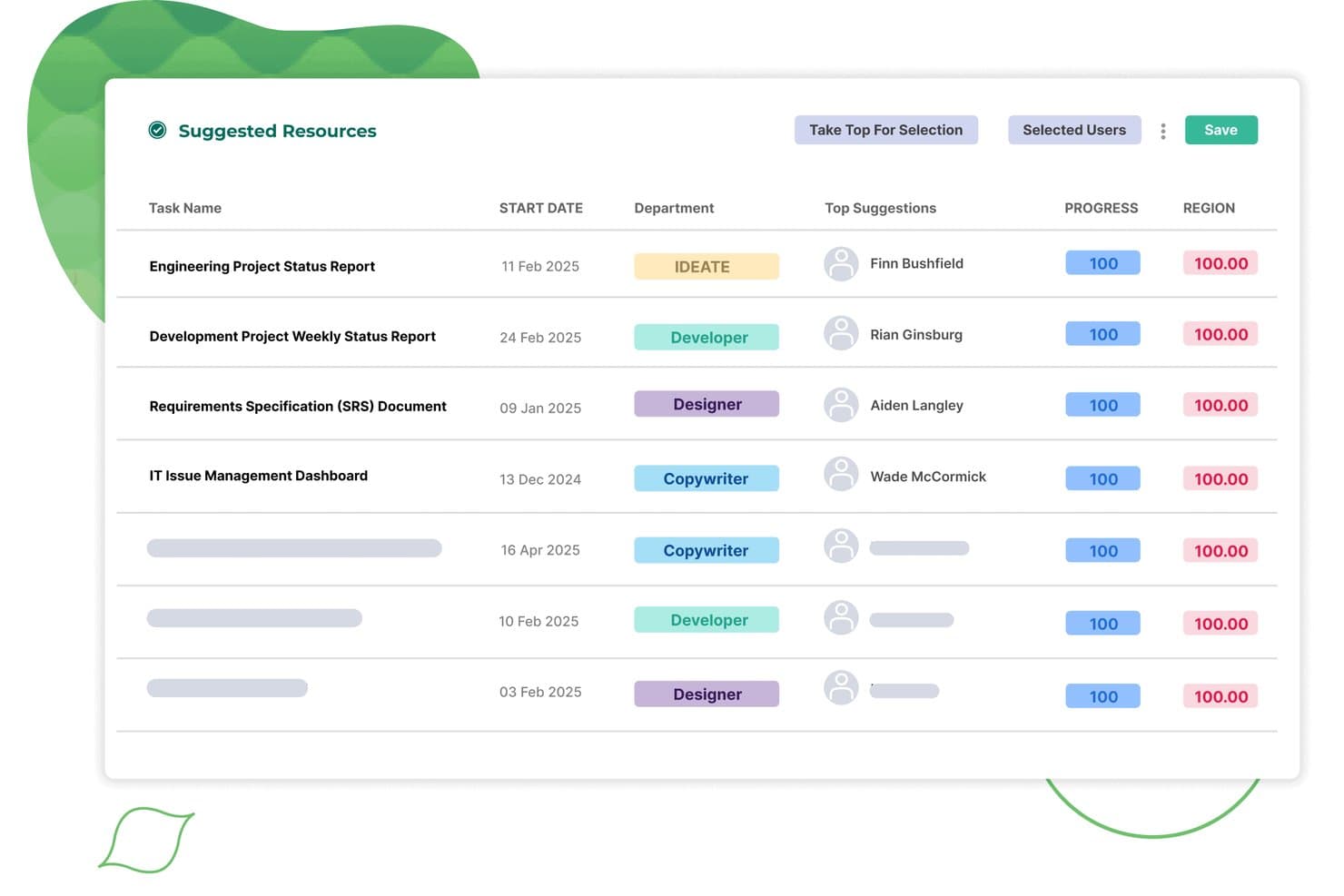
Screendragon auto-assigns suggested resources to tasks by department and match score. Screendragon is a workflow management platform built for marketing, agency, and enterprise teams that need to handle complex creative campaigns, approvals, and compliance across departments and geographies.
Who Is Screendragon Best For?
Screendragon suits enterprise marketing and agency teams managing complex creative campaigns across multiple departments or locations.
Why Screendragon Is a Good Asana Alternative
I picked Screendragon because it gives my team a central hub for campaign management, approvals, and compliance across departments. I rely on its customizable workflows to coordinate creative assets at scale, and the role-based permissions help keep sensitive marketing materials secure and audit-ready.
Screendragon Key Features
- Digital asset management: Store, organize, and access creative files and assets directly within project workflows.
- Resource planning tools: Allocate team members and track workload to avoid conflicts and bottlenecks.
- Budget tracking: Monitor project budgets in real time and manage cost approvals.
- Integrated time tracking: Log hours against specific tasks and projects for more accurate reporting.
Screendragon Integrations
Native integrations are not clearly documented. Screendragon supports integrations via its API for custom setups.
Pros and Cons
Pros:
- Built-in resource planning for cross-team scheduling
- Role-based permissions support marketing compliance needs
- Handles multi-department campaign approvals at scale
Cons:
- Custom workflows often require dedicated admin training
- Interface can feel overwhelming for new users
Learn more about Screendragon: Best for automation-heavy project workflows
- Free plan available; 15-day free trial
- From $5/user/month
Visit WebsiteCustomer Rating:4.3/5
Zoho Projects Kanban board shows task statuses, automation options, and issue tracking, helping teams manage complex projects with detailed workflows. For teams seeking a flexible yet comprehensive solution to manage projects, Zoho Projects offers a compelling alternative to Asana. Designed for diverse industries ranging from construction to IT, Zoho Projects caters to professionals such as marketers and freelancers who need to streamline their work processes. It addresses the challenges of task management, time tracking, and team collaboration, all while ensuring user privacy and providing robust integration capabilities.
Why I Picked Zoho Projects
I picked Zoho Projects as a strong Asana alternative because of its emphasis on automation and customization. The platform allows you to automate routine tasks using a drag-and-drop interface, saving your team valuable time. Additionally, the extensive project customization options enable you to tailor workflows to your specific needs, enhancing productivity. These features, coupled with its robust issue tracking system, make Zoho Projects an attractive option for teams looking to optimize their project management processes.
Zoho Projects Key Features
In addition to its automation and customization capabilities, Zoho Projects offers several other features that enhance its value as an Asana alternative.
- Task Management: Allows you to create, assign, and track tasks with ease, ensuring that your projects stay on schedule.
- Time Tracking: Enables you to monitor the time spent on tasks, which is crucial for billing and productivity analysis.
- Gantt Charts: Provides visual timelines for better project planning and tracking, helping you understand project progress at a glance.
- Mobile Access: Offers a mobile app that lets you manage projects on-the-go, ensuring that you can stay connected no matter where you are.
Zoho Projects Integrations
Integrations include Google Drive, Microsoft Office 365, Slack, Dropbox, GitHub, Bitbucket, and Zoho CRM. Additionally, it offers an API for custom integrations.
Pros and Cons
Pros:
- Affordable pricing for growing teams
- Built-in time and issue tracking
- Advanced task automation and workflows
Cons:
- Fewer native integrations than Asana
- Steeper learning curve initially
Learn more about Zoho Projects: Best for detailed project tracking and timelines
- 30-day free trial
- From $10/user/month (billed annually)
Visit WebsiteCustomer Rating:4.7/5
Microsoft Project manages detailed timelines and dependencies effectively. Microsoft Project is a project management tool designed for businesses that need to plan, track, and execute complex projects. It’s ideal for teams looking for structured workflows and detailed task organization.
Why Microsoft Project is a Good Asana Alternative:
Microsoft Project provides advanced tools for tracking progress, managing dependencies, and visualizing timelines through Gantt charts. Your team can assign tasks, allocate resources, and track workloads all within one platform. It includes detailed scheduling options to help you manage deadlines effectively. With its focus on timelines and tracking, Microsoft Project is well-suited for handling intricate project requirements.
Standout Features & Integrations:
Features include resource management tools that help you assign and balance workloads across your team. Built-in reporting functions provide insights into project progress and performance. Time tracking capabilities allow your team to log hours directly within the project plan.
Integrations include Microsoft Teams, Power BI, SharePoint, Dynamics 365, Excel, Outlook, OneDrive, Planner, Azure DevOps, and Skype.
Pros and Cons
Pros:
- Integration with Microsoft 365 suite
- Advanced scheduling with task dependencies
- Extensive resource management capabilities
Cons:
- Less intuitive for small, simple projects
- Limited Agile project management support
Learn more about Microsoft Project: Best for building custom apps without code
- Free plan available; 14-day free trial
- From $20/user/month (billed annually)
Visit WebsiteCustomer Rating:4.6/5
Airtable enables you to create custom workflows with no-code tools and visuals. Airtable is a versatile platform that combines the simplicity of spreadsheets with the functionality of a database. It’s ideal for teams who need to organize data, manage projects, or create tailored workflows.
Why Airtable is a Good Asana Alternative:
Airtable lets you create custom apps tailored to your team’s specific needs without requiring coding expertise. Its drag-and-drop interface makes it easy to design workflows, automate repetitive tasks, and visualize data in various formats like grids, calendars, and Kanban boards. You can adapt the platform to fit your unique projects and processes. With Airtable, you’re not limited by rigid structures, giving your team the flexibility to work in ways that suit them best.
Standout Features & Integrations:
Features include workflow automations that handle repetitive tasks to save you time, interface designer to create custom interfaces for your workflows, and various views like calendar and gallery to visualize your data in ways that make sense for your team.
Integrations include Slack, Google Drive, Salesforce, Jira, Zendesk, Box, Gmail, Miro, Typeform, and Dropbox.
Pros and Cons
Pros:
- Regular updates with new features
- Strong community support and resources
- Low-code environment accessible to non-developers
Cons:
- Advanced features may require technical knowledge
- Can be overwhelming for new users
Learn more about Airtable: Best for visual task management
- 14-day free trial
- From $5/user/month (billed annually)
Visit WebsiteCustomer Rating:4.5/5
Trello provides a simple, visual Kanban-style approach to managing tasks. Trello is a task and project management tool designed for teams and individuals who prefer a visually organized workflow. It helps users manage tasks, track progress, and collaborate using a board-based interface.
Why Trello is a Good Asana Alternative:
Trello uses customizable boards, lists, and cards to make task management visually intuitive and easy to navigate. Your team can create workflows, assign tasks, and set deadlines all within the same interface. Its drag-and-drop functionality lets you adjust plans quickly as priorities change.
Standout Features & Integrations:
Features include a user-friendly interface that makes it easy to create and manage tasks, customizable boards and cards to fit your team's workflow, and real-time collaboration to keep everyone on the same page.
Integrations include Slack, Jira, Miro, Evernote, Salesforce, Google Drive, Dropbox, Microsoft Teams, Confluence, and GitHub.
Pros and Cons
Pros:
- Supports real-time collaboration
- Highly customizable to fit workflows
- Easy to set up and use
Cons:
- Can become cluttered with large projects
- Limited reporting and analytics features
Learn more about Trello: Best for pre-built reports
- 2-week free trial; free demo available
- From $8/user/month (billed annually)
Visit WebsiteCustomer Rating:4.7/5
Workzone’s project timeline view shows how multiple client projects and tasks are scheduled over time, giving teams clear visibility into workloads, deadlines, and progress across accounts. For teams seeking a project management solution that caters to diverse industry needs while addressing the challenges of disorganized communication and missed deadlines, Workzone offers a compelling alternative to Asana. Its features are tailored to enhance collaboration and provide clarity across multiple projects, making it particularly appealing to marketing, IT, and operations teams. With tools for project visibility, collaboration, and document proofing, Workzone helps streamline workflows and improve efficiency, providing a structured environment for teams to thrive.
Why I Picked Workzone
I picked Workzone as a strong Asana alternative because of its tailored solutions for diverse industries and robust project tracking capabilities. Workzone's customizable templates and pre-built reports provide structure and clarity for teams handling multiple time-sensitive projects. The platform's document proofing feature enhances collaboration by allowing teams to review and approve files seamlessly. These functionalities address the common challenges of disorganized communication and inconsistent processes, making Workzone a reliable choice for teams striving for efficiency.
Workzone Key Features
In addition to its project tracking and document proofing capabilities, Workzone offers several other features that enhance its appeal as an Asana alternative:
- Task Dependencies: Allows your team to set task relationships, ensuring that projects progress in a logical order.
- Time Tracking: Enables you to monitor the time spent on tasks, helping manage resources and project timelines effectively.
- Project Templates: Provides over 1,000 templates to quickly launch new projects and maintain consistency across tasks.
- Custom Branding: Lets your team customize the interface with your company's logo and colours, fostering a cohesive brand experience.
Workzone Integrations
Integrations include Slack, Microsoft Teams, Google Drive, Salesforce, Box, Dropbox, Everhour, Freshbooks, GitHub, Harvest, Hubspot, JIRA, Microsoft Office 365, OneDrive, Quickbooks Online, Toggl, Yammer, and Zoho Books. Users can also create custom integrations using Workzone's REST API or connect to over 1,000 apps through Zapier.
Pros and Cons
Pros:
- Unlimited training and live support
- Built-in document proofing approvals
- Strong real-time project visibility
Cons:
- Pricing less suitable small teams
- Limited advanced budgeting features
Learn more about Workzone: Best for real-time collaboration
- 14-day free trial + free demo available
- From $45/month (billed annually)
Visit WebsiteCustomer Rating:4.5/5
ProofHub blends project management and collaboration for smoother workflows. ProofHub is a project management and team collaboration tool designed for businesses that need a central platform to plan, manage, and execute projects. It caters to teams looking for effective ways to collaborate, track progress, and stay organized.
Why ProofHub is a Good Asana Alternative:
ProofHub combines project management with real-time collaboration tools like discussions, chat, and file sharing. Your team can create tasks, set deadlines, and track progress without needing multiple tools. It also includes proofing features, so your team can review and approve files directly in the platform. With ProofHub, you’ll keep everyone on the same page and minimize delays caused by miscommunication.
Standout Features & Integrations:
Features include project templates that help your team set up workflows quickly and consistently. Time tracking tools let you measure productivity and ensure tasks stay on schedule. You can also use custom roles to control access and manage permissions effectively.
Integrations include Google Drive, Dropbox, Box, OneDrive, QuickBooks, FreshBooks, Google Calendar, iCal, Slack, and Microsoft Teams.
Pros and Cons
Pros:
- Offers built-in time tracking tools
- Great for team communication and feedback
- Easy to customize workflows for projects
Cons:
- Onboarding may require additional training
- Lacks advanced analytics and reporting
Learn more about ProofHub: Best for client-focused project management
- 14-day free trial + free demo available
- From $9.99/user/month (billed annually)
Visit WebsiteCustomer Rating:4.5/5
Teamwork is perfect for client work with billing, planning, and permissions tools. Teamwork is a project management platform designed to help businesses manage client projects, communicate effectively, and deliver results on time. It’s built for teams that need to handle multiple projects while keeping client relationships at the forefront.
Why Teamwork is a Good Asana Alternative:
Teamwork combines project management tools with features tailored for client collaboration, like client access to specific projects and billing tools. You can track billable hours, set project budgets, and manage invoices directly in the platform. The platform also offers resource management features to allocate team members efficiently based on workloads. With Teamwork, you’ll keep projects organized and ensure transparency with clients.
Standout Features & Integrations:
Features include task templates that help you set up recurring projects quickly. The workload planner gives you a clear view of your team's capacity, helping prevent burnout. Also, the project portfolio feature allows you to oversee multiple projects and their statuses at a glance.
Integrations include Google Drive, Dropbox, OneDrive, Box.com, Harvest, HubSpot, Xero, QuickBooks Online, Microsoft Teams, and Slack.
Pros and Cons
Pros:
- Customizable project templates
- Advanced resource management
- Detailed time tracking and billing
Cons:
- Occasional performance issues with large projects
- May have a learning curve for new users
Learn more about Teamwork: 10Best for centralized team communication
Basecamp
- 30-day free trial + free demo available
- From $25/month
Visit WebsiteCustomer Rating:4.2/5
Basecamp simplifies team communication with tools like message boards and schedules. Basecamp is a project management and team collaboration tool designed for businesses that need a straightforward way to organize work and communicate efficiently. It helps teams manage tasks, share files, and stay aligned through a centralized workspace.
Why Basecamp is a Good Asana Alternative:
Basecamp simplifies team communication with features like message boards for discussions and real-time group chat for quick updates. You can use to-do lists to assign and track tasks and a schedule to plan deadlines and milestones. The platform organizes all your projects, tasks, and conversations in one place, reducing scattered communication. Your team can quickly find what they need without hunting through emails or other tools.
Standout Features & Integrations:
Features include automatic check-ins that prompt your team to share updates regularly, a centralized schedule to keep track of important dates, and docs & files storage to organize all your project materials in one place.
Integrations include Slack, Trello, Asana, GitHub, Jira, Microsoft Outlook, Google Calendar, Dropbox, Zapier, and Evernote.
Pros and Cons
Pros:
- Accessible across multiple devices
- Reliable performance with minimal downtime
- Simple setup and onboarding process
Cons:
- Not ideal for complex project requirements
- Lacks native time-tracking features
Other Asana Alternatives
Here are some additional Asana alternatives that didn’t make it onto my shortlist, but are still worth checking out:
- 11Aha!Best for linking strategy with execution
- 12ConfluenceBest for knowledge sharing and collaboration
- 13Bitrix24Best for CRM and project management integration
- 14ClickUpBest for AI-enhanced productivity
- 15SmartsheetBest for complex project visualization
- 16CeloxisBest for tracking project financials
- 17Salesforce CRMBest for salesforce integration
- 18HiveBest for team collaboration
- 19JiraBest for software development teams
- 20monday.comBest for visual project layouts
How I Evaluate Asana Alternatives
For marketing teams managing campaign deadlines, creative approvals, and intake queues, I split my evaluation into core requirements every tool must meet and the differentiators that separate them.
Core Functionality (Table Stakes For This List)
When I'm selecting tools for my list, I rank each one on a scale from 0 (does not offer the functionality) to 5 (excels in this area) for each core functionality listed below. Then, I calculate the tool's total score into a percentage. Each tool needs to achieve a minimum total score of 65% to be considered for inclusion.
- Campaign Project Management: I check whether a tool supports task dependencies, milestones, and multi-project tracking so marketing teams can map out a full product launch from brief to delivery.
- Multiple Project Views: The ability to toggle between list, board, calendar, and Gantt views matters because content teams and campaign managers tend to work in very different visual modes.
- Creative Collaboration & Proofing: I evaluate how each tool handles file annotation, version history, and approval workflows for reviewing assets like ad creatives or landing page designs.
- Workflow Automation: Marketing teams run repetitive processes like routing briefs or updating campaign statuses, so I look for rule-based automation that handles triggers, conditions, and actions.
- Intake & Request Forms: A good alternative should let teams build customizable request forms that convert submissions into routed tasks, replacing messy email and Slack-based intake.
- Reporting & Dashboards: I look for cross-project dashboards that let marketing ops managers track campaign progress, team workload, and deadlines in one place without manual updates.
Once I have a list of tools that meet this criteria, I consider what sets each platform apart.
Differentiating Factors (What Sets Vendors Apart)
Here's how I compare and contrast different vendors:
Standout Features
Resource and capacity planning is a big differentiator when your team juggles multiple campaigns at once. I look for workload views that show who's overloaded before deadlines slip. AI features are also worth evaluating, especially tools that can draft project summaries or flag at-risk tasks automatically. Guest access matters for marketing teams that regularly loop in freelancers and agency partners who need to review creative work without requiring a full paid seat.
Beyond Features
Marketing tech stack integrations are one of the first things I check. A tool that syncs with HubSpot, Salesforce, or Adobe Creative Cloud keeps campaign data connected without manual exports. Pricing structure also matters, particularly how vendors handle guest and reviewer seats for agencies or freelancers. I evaluate onboarding speed, too. Teams migrating from Asana need marketing-specific templates and import tools to get running fast rather than rebuilding every workflow from scratch.
Why Look for an Asana Alternative?
While Asana is a good choice of project management software, there are a number of reasons why some users seek out alternative solutions. A few examples include:
- You're looking for more affordable pricing options
- Your team’s needs are simpler and find Asana overwhelming
- You want software with better offline capabilities
- Your team requires more customization options
- You need a tool with better time-tracking features
- Your company operates in a region with limited Asana support
If any of these sound like you, you’ve come to the right place. My list contains several project management software options that are better suited for teams facing these challenges with Asana and looking for alternative solutions.
Asana Key Features
Here are some of the key features of Asana, to help you contrast and compare what alternative solutions offer:
- Task management: Create, assign, and prioritize tasks to keep your team streamlines, focused, and on track.
- Project views: Whether your team uses Gantt-style timelines to visualize project schedules and dependencies or custom-colored calendar views, Asana has various visual project setups.
- Workflow automation: Automate approvals, automatically tag assignees, and create custom rules and automation features to save time and reduce errors.
- Team collaboration: Share files, comment on tasks, and stay updated with real-time communication.
- Portfolio management: Monitor multiple projects in one place to ensure everything aligns with your goals.
- Custom fields: Add specific data points to tasks to better track unique requirements.
- Reporting and insights: Generate reports to see progress and identify potential bottlenecks.
- Goal setting: Set team or company goals and connect them to projects for better alignment.
- Integrations: Connect with other tools and add-ons like Slack or Google Drive to enhance your workflows.
- Mobile app: Manage tasks and projects on the go with Asana’s user-friendly mobile app.