
14 Free Membership Management Software for 2026

Free Membership Management Software Shortlist
Here’s my shortlist of the best free membership management software:


Free membership management software lets your team organize, track, and engage members without upfront costs—using platforms that offer a free plan or trial. These tools help organizations improve member retention, manage new members, and support activities like in-person event check-in, payments, and communication in one place. If you’re searching for a user-friendly way to manage memberships, automate renewals, accept credit card payments, and centralize communication without stretching your budget, you’re in the right place. Many platforms also offer plugins and integrations to extend functionality, though some may come with a learning curve as your needs grow. This guide compares leading free membership management tools, so you can quickly evaluate which options fit your organization’s needs and growth plans. Get a clear look at features, limitations, and what to expect from each free offering before you commit.
Why Trust Our Software Reviews
Best Free Membership Management Software Summary
While all of the membership management software in my list have free offerings, they also have paid plans should you wish to upgrade. Here are the base costs for each of the tools that made it onto my shortlist:
| Tool | Best For | Trial Info | Price | ||
|---|---|---|---|---|---|
| 1 | Best for CRM functionalities | Free-forever plan available | Free download available | Website | |
| 2 | Best for unlimited contacts | Free plan available | From $49/month | Website | |
| 3 | Best for integration options | 30-day free trial available | From $26.10/month (billed annually) | Website | |
| 4 | Best for nonprofit online stores | Free-forever plan available | Free to use | Website | |
| 5 | Best for donor management | Free demo available | From $99/month (billed annually) | Website | |
| 6 | Best for small organizations | 60-day free trial available | From $53.55/month (billed annually) | Website | |
| 7 | Best for church groups | Free plan available | Pricing upon request | Website | |
| 8 | Best for open-source customization | Free demo available | Pricing upon request | Website | |
| 9 | Best for ERP integration | 30-day free trial available | Pricing upon request | Website | |
| 10 | Best for community groups | Free-forever plan available | Free to use | Website |
-

Eloqua
Visit WebsiteThis is an aggregated rating for this tool including ratings from Crozdesk users and ratings from other sites.4.3 -
Optimizely
Visit WebsiteThis is an aggregated rating for this tool including ratings from Crozdesk users and ratings from other sites.4.2 -
Uberflip
Visit WebsiteThis is an aggregated rating for this tool including ratings from Crozdesk users and ratings from other sites.4.3




Best Free Membership Management Software Reviews
Below are my detailed summaries of the best free membership management software that made it onto my shortlist. My reviews offer a detailed look at the key features, pros & cons, integrations, and ideal use cases of each tool to help you find the best one for you. While some of these tools offer a completely free version, others offer a free trial period. I’ve added a note about what’s free in each of my reviews.
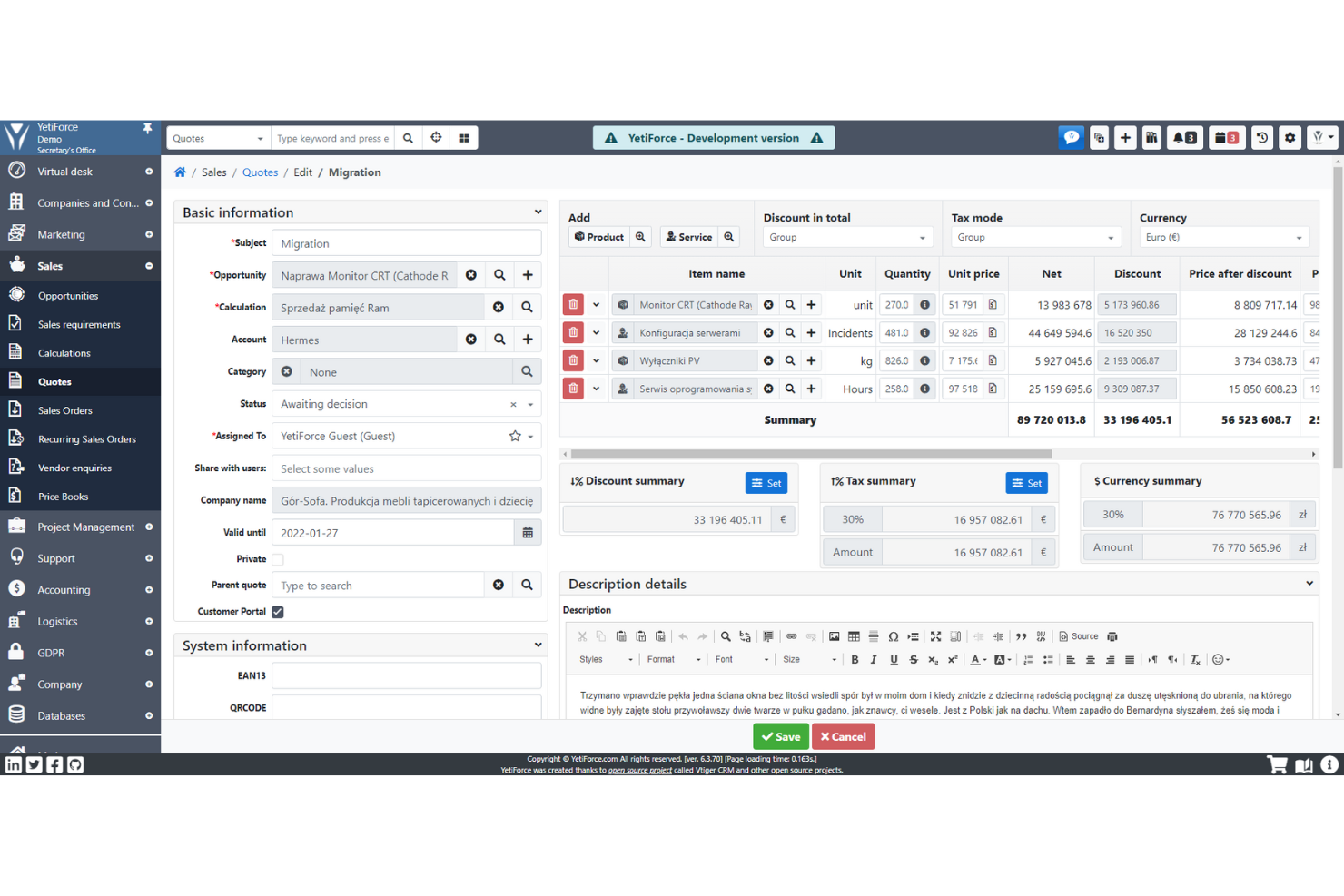
If you’re looking for a highly customizable, open-source platform to manage memberships, YetiForce is worth a look. It’s designed for organizations that want to tailor workflows, fields, and modules to fit complex or unique membership structures. YetiForce can help teams that need advanced automation, granular access controls, and detailed member tracking all in one place.
Why I Picked YetiForce
What drew me to YetiForce for free membership management is its advanced customization capabilities as an open-source CRM. You can adapt modules, fields, and workflows to match the exact needs of your membership structure, which is especially useful for organizations with complex or evolving requirements. I like that you can set up detailed access controls and automate processes for onboarding, renewals, and communications. This level of flexibility makes YetiForce a strong fit for teams that want to build a membership management system tailored to their unique processes.
YetiForce Key Features
Some other features in YetiForce that may interest organizations looking for free membership management software include:
- Calendar and Scheduling: Manage events, meetings, and member appointments directly within the platform.
- Email Integration: Send and track emails to members using built-in email tools.
- Document Management: Store, organize, and share files related to members and activities.
- Member Portal: Provide members with a self-service portal for profile updates and communication.
YetiForce Integrations
Native integrations are not currently listed.
What's Free?
YetiForce offers a free-forever, open-source version with no user or feature limits. You can download and use all modules at no cost, but hosting and maintenance are your responsibility.
Pros and Cons
Pros:
- Built-in member portal for self-service
- Highly configurable member data fields
- Open-source with no licensing fees required
Cons:
- Requires manual server setup and maintenance
- Documentation can be inconsistent or outdated

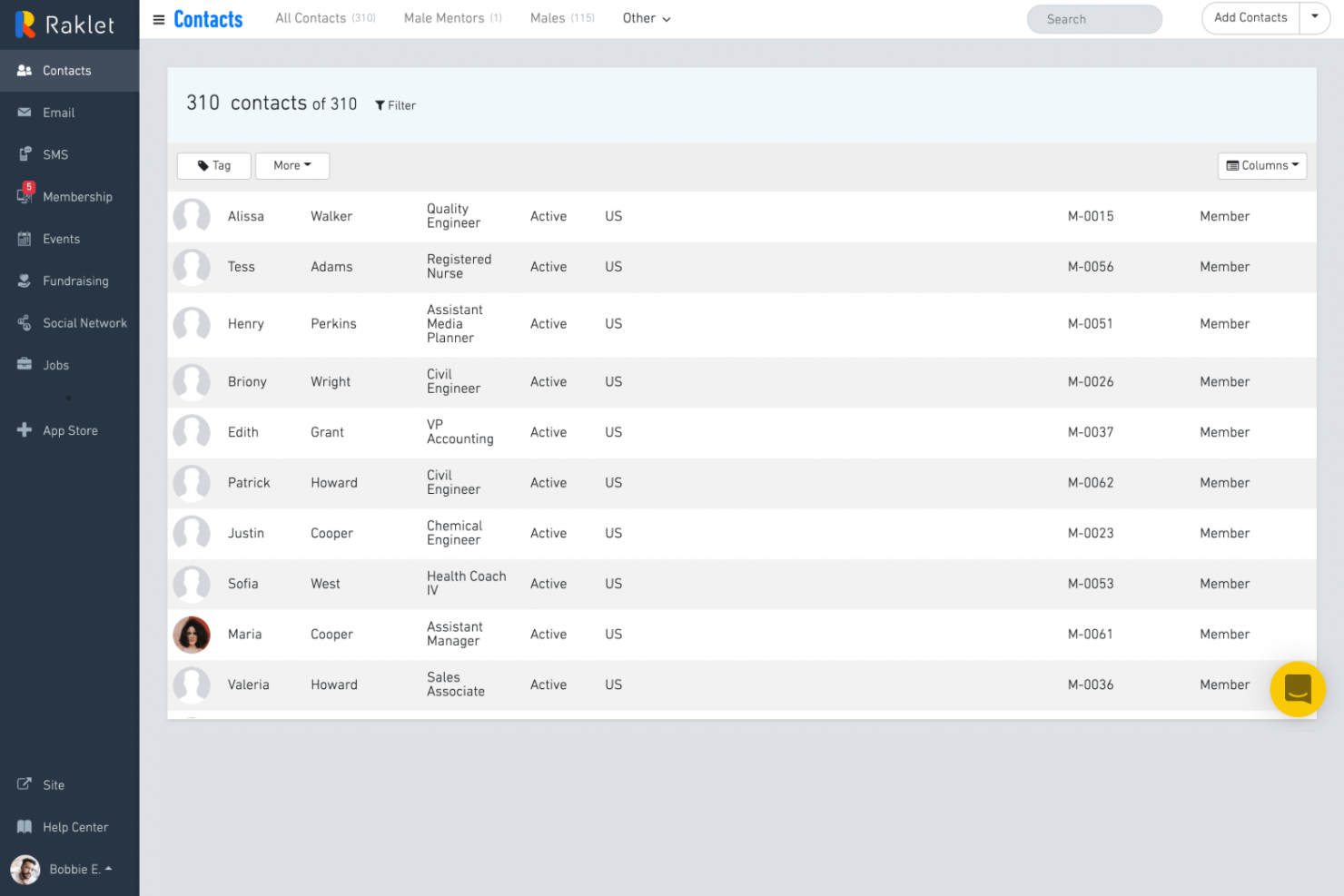
If you want a membership management platform that you can tailor to your organization’s needs, Raklet is worth considering. It’s designed for associations, clubs, and nonprofits that want to customize member experiences and build community engagement. Raklet helps you manage memberships, events, and communications in one place, with flexible options for branding and member interaction.
Why I Picked Raklet
What stands out to me about Raklet is how much you can customize the platform to fit your group’s unique needs. Its USP—customizable membership and community management—means you can tailor member profiles, membership tiers, and even the look and feel of your portal. I like that you can create custom forms and automate workflows, which helps organizations manage everything from applications to renewals in a way that matches their processes. For anyone looking for free membership management software that adapts to their organization, Raklet’s flexibility is a strong advantage.
Raklet Key Features
Some other features in Raklet that may interest organizations looking for free membership management software include:
- Event Management: Create, promote, and manage events with online registration and ticketing.
- Email and SMS Campaigns: Send targeted email and SMS messages directly to your members from the platform.
- Digital Membership Cards: Issue digital membership cards that members can access and use from their mobile devices.
- Donation and Fundraising Tools: Collect donations and manage fundraising campaigns with built-in payment processing.
Raklet Integrations
Integrations include HubSpot, QuickBooks, Zoom, WordPress, Squarespace, Wix, Stripe, Double the Donation, Discourse, and Auth0.
What's Free?
Raklet offers a free-forever plan with up to 50 contacts and 250 emails per month. Some features and integrations are only available on paid plans.
Pros and Cons
Pros:
- Donation and fundraising tools included
- Built-in event ticketing and RSVP tracking
- Digital membership cards for mobile access
Cons:
- No built-in learning management system
- Free plan limits contacts and emails

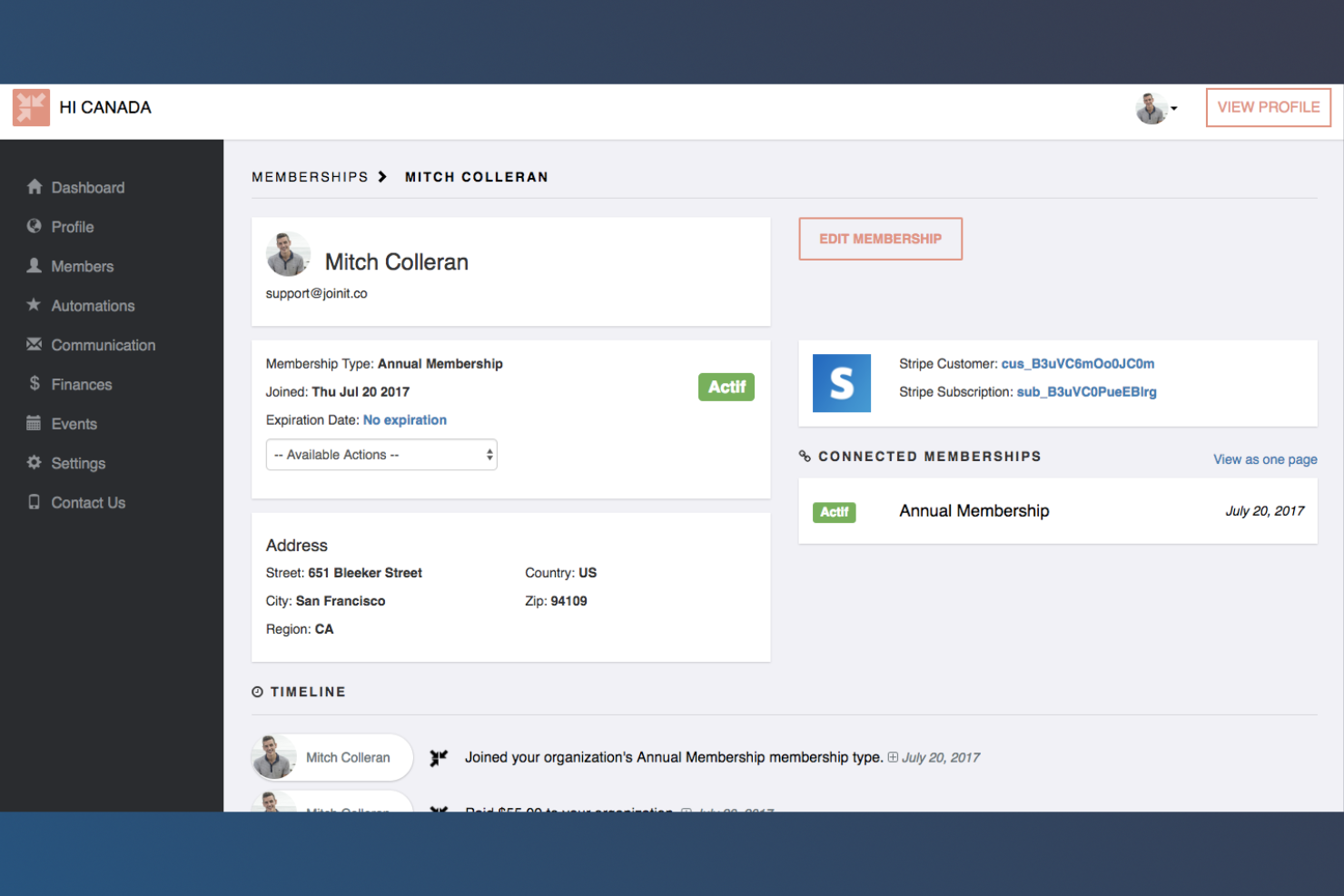
If you want a membership management tool that keeps things simple, Join It is worth a look. It’s designed for small organizations, clubs, and associations that need an intuitive way to track members and automate renewals. Join It helps you manage memberships without extra complexity, making it easier to stay organized as your group grows.
Why I Picked Join It
What draws me to Join It is how it focuses on simple, intuitive membership management without unnecessary extras. Its USP—straightforward member tracking—means you can easily view, update, and organize member records from a single dashboard. I also appreciate the automated renewal and payment features, which help small organizations avoid manual follow-up and reduce administrative work. For anyone looking for a no-fuss way to manage memberships, Join It’s clear, focused approach is a strong fit.
Join It Key Features
Some other features in Join It that may interest organizations looking for free membership management software include:
- Custom Membership Types: Set up multiple membership levels with unique pricing and renewal rules.
- Event Management: Create and manage events with integrated registration and payment collection.
- Member Self-Service Portal: Allow members to update their own profiles and manage their memberships online.
- Automated Email Notifications: Send automatic emails for renewals, confirmations, and reminders.
Join It Integrations
Integrations include Stripe, Ghost, Squarespace, Wix, Zoho CRM, Zapier, WordPress, Slack, Salesforce, QuickBooks, Mailchimp, and more.
What's Free?
Join It offers a 30-day free trial with access to all features. After the trial, you must upgrade to a paid plan to continue using the platform.
Pros and Cons
Pros:
- Event registration and ticketing included
- Member self-service portal for profile updates
- Automated renewal and payment processing
Cons:
- Limited reporting and analytics options
- No built-in mobile app for members

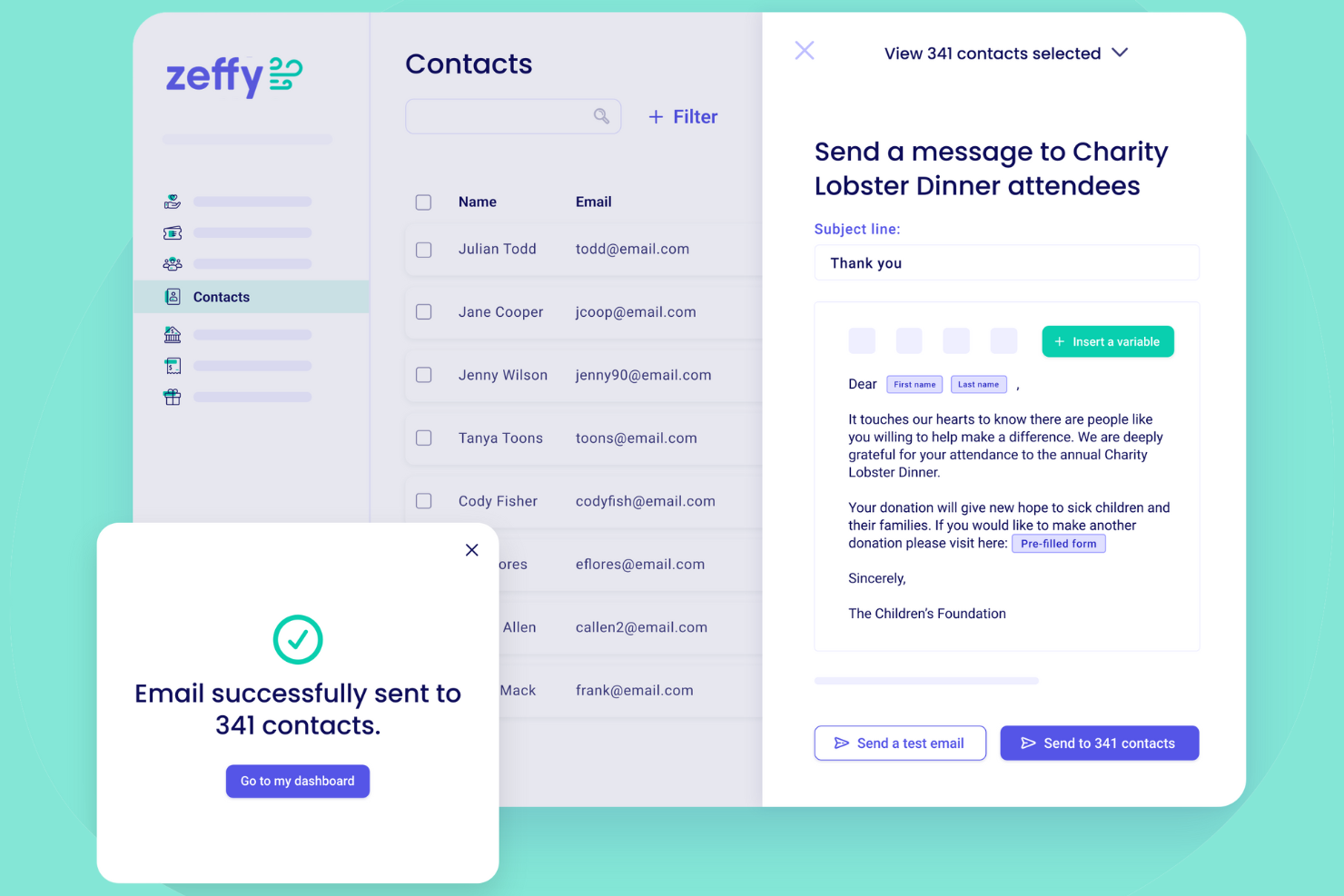
Zeffy is designed for nonprofits that want to manage member-based organizations and process payments without transaction fees. The platform appeals to teams looking to simplify online membership management while maximizing fundraising on a tight budget. As a built-in payment processor, Zeffy’s zero-fee payment model helps nonprofits keep more of their donations, dues, and membership payments.
Why I Picked Zeffy
I chose Zeffy because its zero-fee payment processing model directly addresses a major concern for nonprofits managing memberships on a limited budget. Zeffy lets organizations collect membership dues and donations without losing a percentage to transaction fees, which is rare among free membership management platforms. I also like that Zeffy includes built-in tools for online fundraising and event ticketing, so nonprofits can handle multiple aspects of member engagement in one place. This focus on maximizing funds for mission-driven organizations makes Zeffy stand out in the free membership management software space.
Zeffy Key Features
Some other features in Zeffy help organizations manage members and fundraising more efficiently:
- Customizable Membership Forms: Create and tailor membership application forms to collect the information your organization needs.
- Automated Renewal Reminders: Set up automatic email reminders for upcoming membership renewals to reduce manual follow-up.
- Donation Tracking Dashboard: Monitor and analyze donation activity with a real-time dashboard for better financial oversight.
- Event Registration Management: Organize and track event sign-ups, including attendee lists and ticketing, within the same platform.
Zeffy Integrations
Native integrations are not currently listed.
What's Free?
Zeffy offers a free-forever plan with no transaction fees for nonprofits. All core features, including unlimited members, fundraising, and event management, are available without user or usage limits, but the platform is only available to registered nonprofits.
Pros and Cons
Pros:
- Built-in event ticketing and registration tools
- Automated renewal and donation receipts
- No transaction fees on donations or dues
Cons:
- Branding customization is restricted
- Limited reporting and analytics options
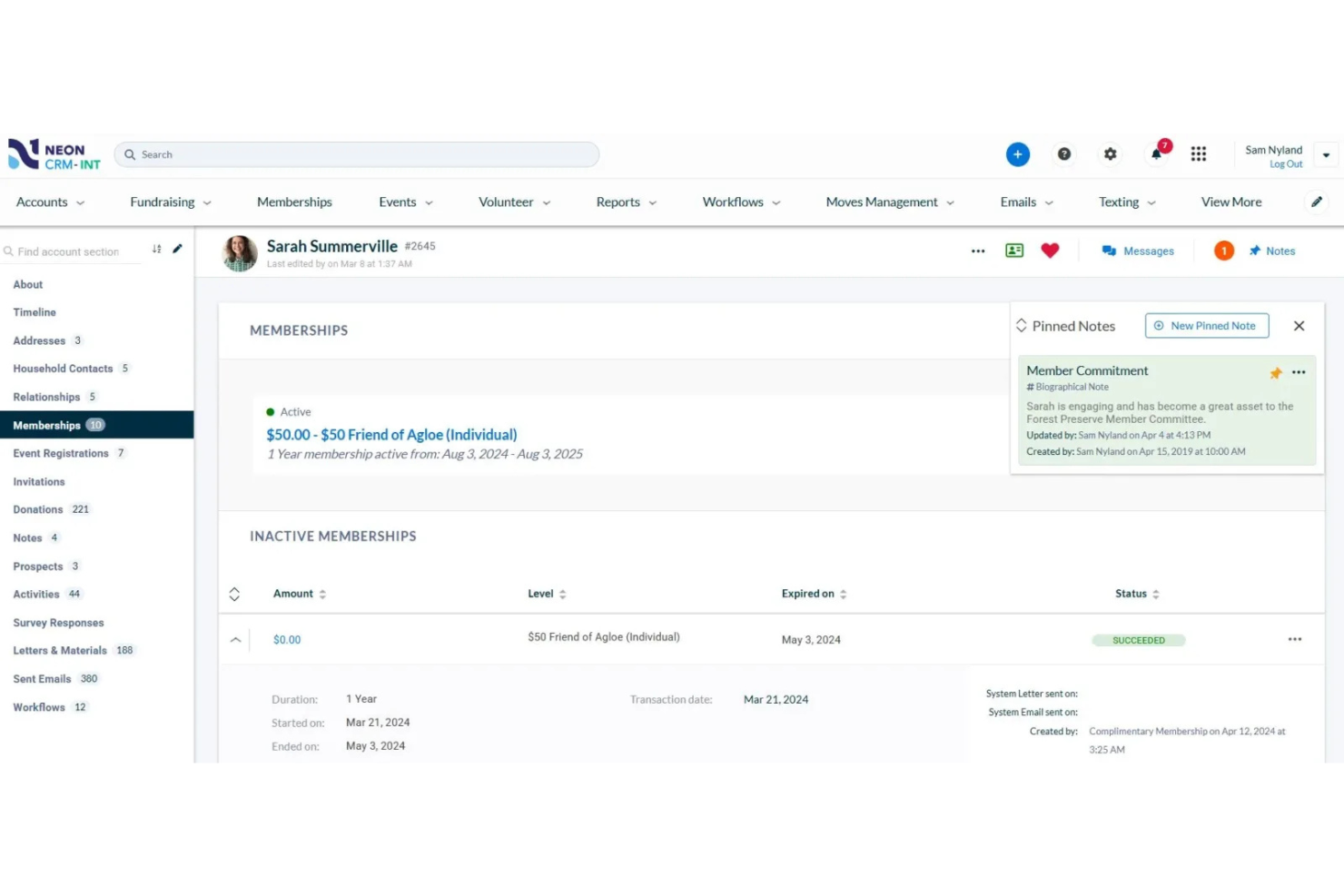
If you’re looking for a membership management platform built for nonprofits, Neon CRM is designed with your needs in mind. It brings together donor management, event registration, and communication tools in one place. Nonprofit teams can use Neon CRM to centralize member data and automate key processes that often slow down fundraising and engagement efforts.
Why I Picked Neon CRM
What stands out to me about Neon CRM is how it brings together all the core tools nonprofits need in one platform. Its all-in-one CRM approach means you can manage memberships, donations, and events without switching between different systems. I like that Neon CRM includes built-in communication tools, so you can send targeted emails and track engagement directly from the same dashboard. For organizations that want to centralize member and donor management, Neon CRM’s unified system is a strong fit.
Neon CRM Key Features
Some other features in Neon CRM that may interest organizations looking for free membership management software include:
- Customizable Membership Forms: Build and tailor membership application and renewal forms to fit your organization’s requirements.
- Automated Recurring Payments: Set up and manage automatic membership renewals and recurring billing for members.
- Volunteer Management Tools: Track volunteer hours, manage sign-ups, and organize volunteer opportunities within the platform.
- Reporting and Analytics Dashboard: Access real-time data and generate reports on membership trends, donations, and engagement.
Neon CRM Integrations
Integrations include Zapier, Nuclavis, Chariot, TaxJar, Eventbrite, QuickBooks, Constant Contact, Mailchimp, and more.
What's Free?
All plans require a paid subscription, but there is a free demo available.
Pros and Cons
Pros:
- Event registration and ticketing built in
- Volunteer management features included
- Built-in donor and fundraising management tools
Cons:
- Reporting features require manual setup
- Interface can feel dated to some users

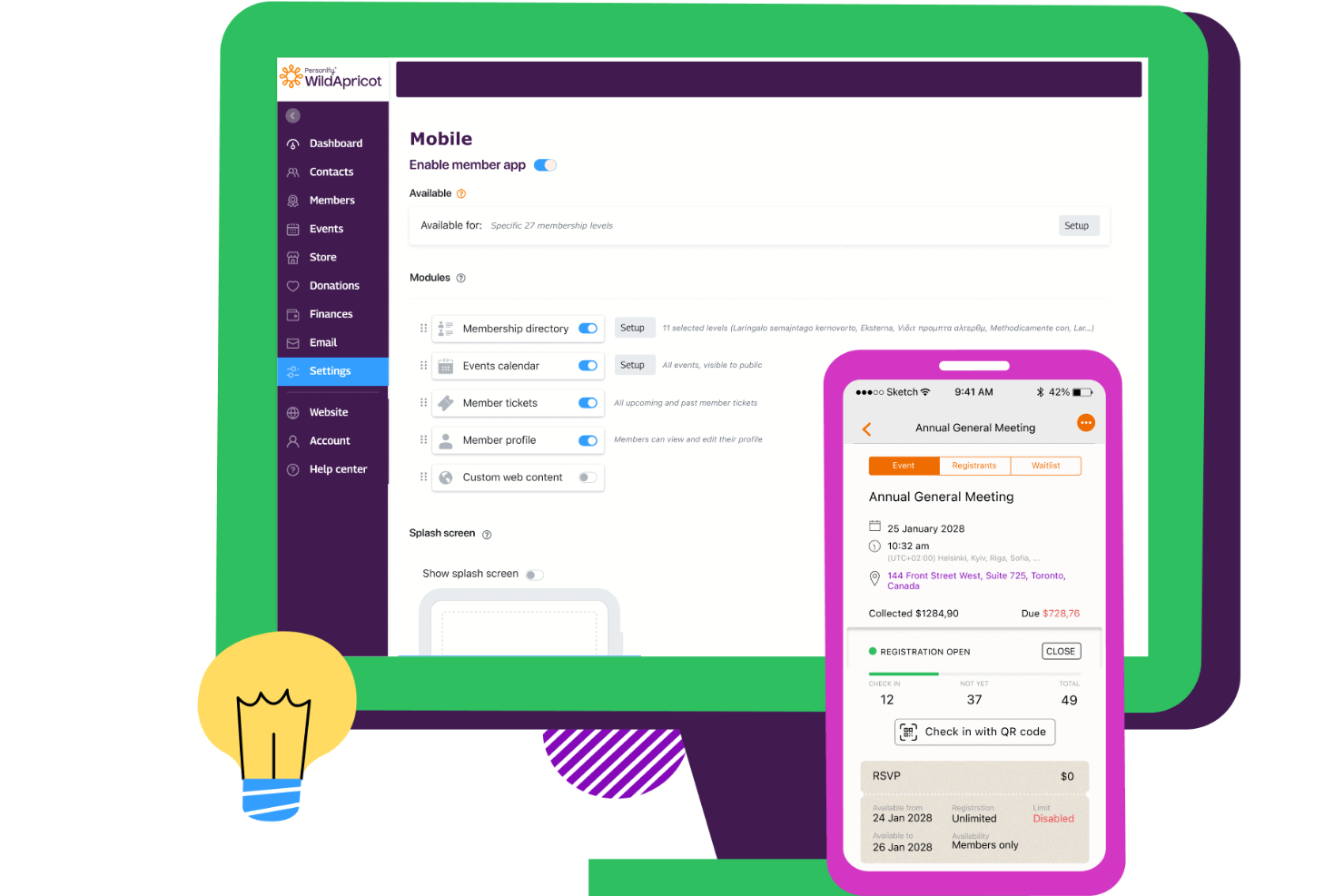
WildApricot is a membership management platform designed for associations, nonprofits, and clubs that want to sell products or event tickets alongside memberships. It stands out by offering a built-in online store, letting you manage member dues and merchandise sales in one place. The platform also supports data import and export through CSV and Excel files, making it easier to manage member records and migrate data. This makes it a strong choice if you need to handle both membership and e-commerce tasks from a single dashboard.
Why I Picked WildApricot
What drew me to WildApricot is its built-in online store, which is rare among free membership management software options. This feature lets you sell merchandise, event tickets, or digital products directly to your members without needing a separate e-commerce platform. I also like that you can manage inventory and track sales within the same dashboard you use for member records and renewals. For organizations that want to combine membership management with product sales, WildApricot offers a practical, all-in-one solution.
WildApricot Key Features
Some other features in WildApricot help organizations manage members and events more efficiently:
- Automated Membership Renewals: Set up recurring billing and automated renewal reminders for members.
- Event Registration Management: Create events, manage attendee lists, and accept online registrations.
- Customizable Member Database: Build and organize a searchable database with custom fields for your members.
- Website Builder: Design and maintain a branded website with drag-and-drop tools and member-only content areas.
WildApricot Integrations
Integrations include WordPress, Personify Payments, QuickBooks, Google Calendar, Outlook Calendar, Make, Zapier, Access, FileMaker, and webhooks.
What's Free?
WildApricot offers a free-forever plan for up to 50 contacts with access to core membership, website, and event features. Some advanced features and higher contact limits require a paid plan.
Pros and Cons
Pros:
- Mobile app for member and admin access
- Event registration with online payment support
- Built-in online store for merchandise sales
Cons:
- No built-in SMS or text messaging
- Free plan limited to 50 contacts
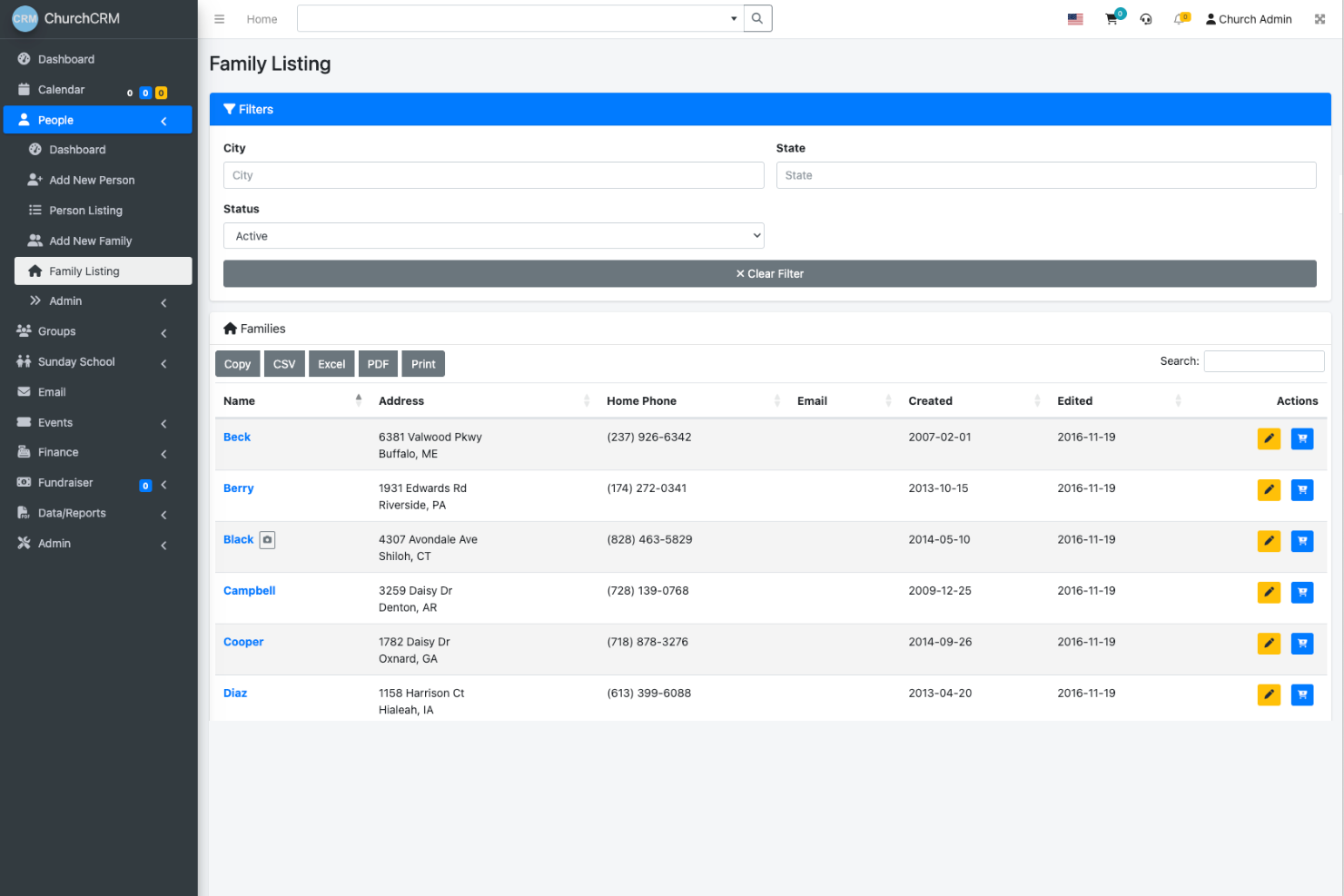
If you’re looking for a free, open-source membership management solution built specifically for churches, ChurchCRM is worth a look. It’s designed for faith-based organizations that need to track members, manage donations, and organize events without paying for a commercial platform. ChurchCRM helps church administrators centralize records and streamline day-to-day operations in a way that’s tailored to congregational needs.
Why I Picked ChurchCRM
What drew me to ChurchCRM is its open-source approach, which gives churches full control over their membership data and customization options. Since it’s built specifically for faith-based organizations, ChurchCRM includes features like family and individual member tracking, donation recording, and event management that are tailored to church workflows. I appreciate that you can manage everything from attendance to volunteer assignments in one place, without licensing fees or vendor lock-in. For churches that want a free, purpose-built solution with flexibility to adapt to their unique needs, ChurchCRM stands out.
ChurchCRM Key Features
Some other features in ChurchCRM that may interest organizations looking for free membership management software include:
- User Role Permissions: Assign different access levels to staff, volunteers, and members for data security and privacy.
- Integrated Calendar: Schedule and manage church events, meetings, and activities within a shared calendar.
- Email and SMS Communication: Send group emails and text messages directly from the platform to keep members informed.
- Self-Service Member Portal: Allow members to update their own contact information and view their giving history online.
ChurchCRM Integrations
Native integrations are not currently listed.
What's Free?
ChurchCRM is completely free and open-source with no user limits or feature restrictions. You can download, install, and use all features without any cost, but you’ll need to handle your own hosting and technical setup.
Pros and Cons
Pros:
- Offers member self-service portal features
- Includes built-in donation and pledge tracking
- 100% free and open-source platform
Cons:
- Requires self-hosting and technical setup
- No official customer support or onboarding

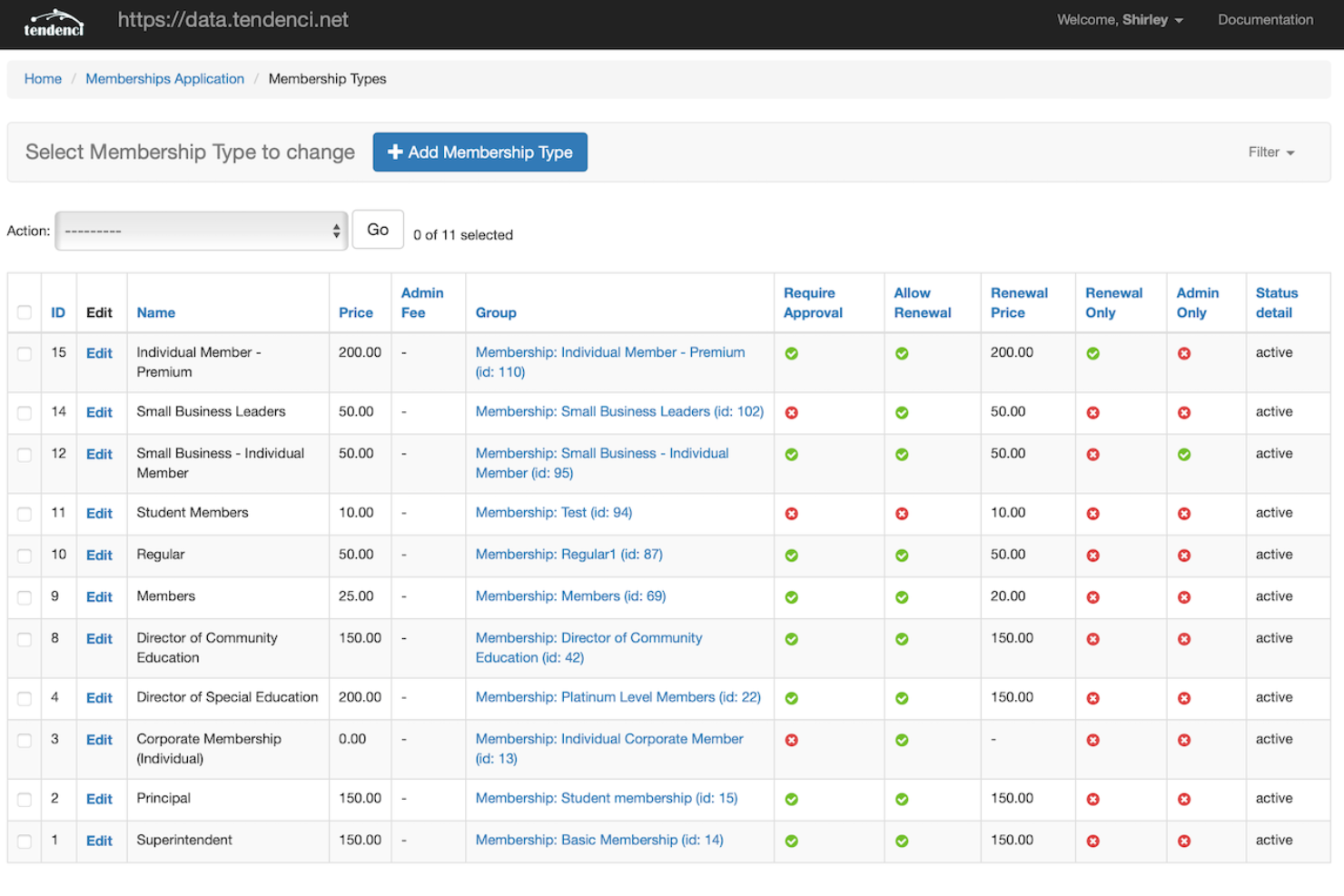
If you want full control over your membership management system, Tendenci is worth considering. This open source platform appeals to associations, nonprofits, and organizations that need custom features or want to host their own data. Tendenci helps teams manage memberships, events, and content while offering flexibility that’s hard to find in most free solutions.
Why I Picked Tendenci
What sets Tendenci apart for me is its open source approach, which gives organizations complete control over their membership management system. This is especially valuable if you want to customize features, host your own data, or adapt the platform to unique workflows. I like that Tendenci includes built-in modules for managing memberships, events, and content, all of which can be tailored to fit specific needs. For anyone searching for free membership management software with maximum flexibility and ownership, Tendenci’s open source model is a strong fit.
Tendenci Key Features
Some other features in Tendenci that may interest organizations managing memberships for free include:
- Online Payments: Accept and process payments for memberships, events, and donations directly through the platform.
- Customizable Member Directories: Create searchable, public or private directories for your members.
- Content Management System (CMS): Build and manage website pages, news, and resources without needing a separate CMS.
- Reporting and Analytics: Access built-in reports on membership activity, event attendance, and financial transactions.
Tendenci Integrations
Native integrations are not currently listed.
What's Free?
Tendenci offers a free, open-source version that you can self-host with no user or admin limits. You’ll need your own server and technical resources, and native integrations are not included.
Pros and Cons
Pros:
- No per-user fees for unlimited admins
- Supports custom member directory layouts
- Self-hosting option for data privacy needs
Cons:
- No built-in mobile app for members
- Documentation can be difficult to navigate
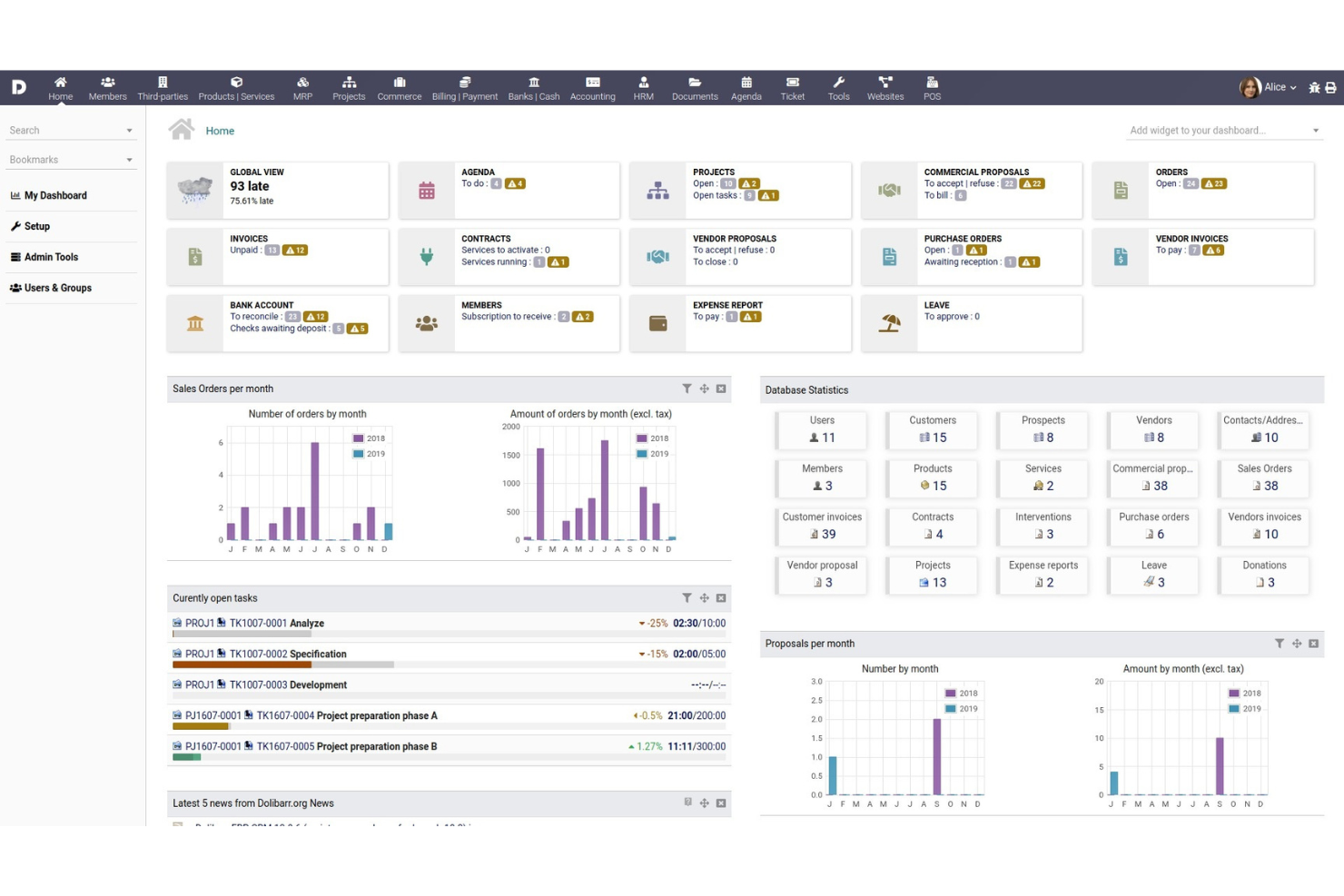
If you’re looking for a flexible, open-source platform that covers more than just membership management, Dolibarr is worth considering. It’s designed for small businesses and organizations that want to manage memberships alongside accounting, CRM, and other business functions in one place. Dolibarr stands out for teams that need customizable modules to fit unique workflows and want to avoid vendor lock-in.
Why I Picked Dolibarr
What makes Dolibarr a strong option for free membership management is its open-source ERP and CRM foundation, which gives you flexibility to manage memberships alongside other business processes. I picked Dolibarr because you can activate only the modules you need, such as membership, contacts, invoicing, and reporting, so it adapts to your organization’s workflow. The membership module lets you track member status, renewals, and payments, while the CRM features help you manage communications and relationships. For organizations that want a single, customizable platform to handle both membership and broader business needs, Dolibarr offers a unique approach.
Dolibarr Key Features
Some other features in Dolibarr that may interest organizations looking for free membership management software include:
- Event Management: Organize, schedule, and track events with attendee registration and follow-up tools.
- Document Management: Store, share, and manage files related to members and activities within the platform.
- Multi-user Access Control: Set granular permissions for different user roles to protect sensitive member data.
- Email Campaigns: Create and send targeted email communications to members directly from the system.
Dolibarr Integrations
Native integrations are not currently listed.
What's Free?
Dolibarr is free and open-source software with no user limits or feature restrictions. You can download, install, and use all modules at no cost, but you are responsible for your own hosting and maintenance.
Pros and Cons
Pros:
- Offers built-in event and document management
- Includes invoicing and payment tracking tools
- Open-source with no licensing fees required
Cons:
- Requires server maintenance
- Interface can feel dated

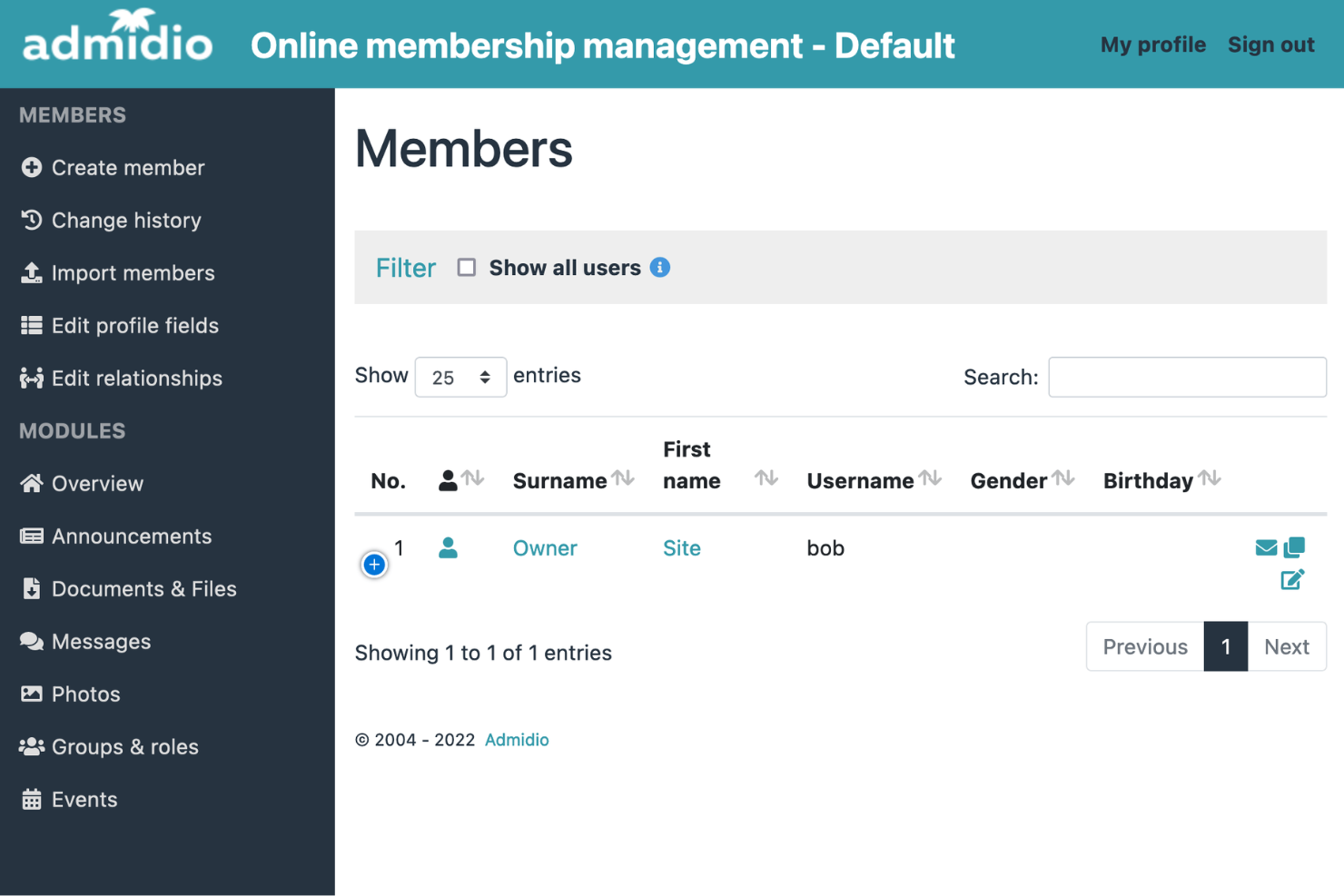
Admidio is an open-source membership management platform designed for clubs, associations, and volunteer groups that want full control over their data and workflows. It appeals to organizations looking for a customizable, self-hosted solution without ongoing subscription costs or processing fees. Admidio helps teams manage member lists, events, communication, and email marketing in one centralized system, while also allowing data to be exported or managed through spreadsheets when needed.
Why I Picked Admidio
What sets Admidio apart is its open-source approach to membership management for clubs and associations. I picked Admidio because it gives organizations the flexibility to self-host and customize the platform to fit their unique membership structures and workflows. Features like granular user permissions and customizable member fields let teams adapt the system to their specific needs. This level of control is especially valuable for groups that want to manage sensitive member data on their own servers without relying on a third-party provider.
Admidio Key Features
Some other features in Admidio help organizations manage members and activities more efficiently:
- Event Management: Organize, schedule, and track events with built-in RSVP and attendance tracking tools.
- Document Management: Store and share files, forms, and documents securely within the platform.
- Email and Newsletter Module: Send group emails and newsletters directly to members from the system.
- Role-Based Access Control: Assign different access levels to users based on their roles within the organization.
Admidio Integrations
Native integrations are not currently listed.
What's Free?
Admidio is free and open-source software with no user or feature limits. You can download, install, and use all core features without time restrictions, but you must self-host and manage your own server.
Pros and Cons
Pros:
- Supports multilingual user interfaces
- Customizable member fields and roles
- Self-hosted for complete data control
Cons:
- No native platform integrations
- No built-in payment processing
Other Free Membership Management Software
Here are some additional free membership management software options that didn’t make it onto my shortlist, but are still worth checking out:
- Yapla
For event management
- memberplanet
For team communication
- Paid Memberships Pro
For WordPress integration
- Ultimate Member
For user profile customization


Related Reviews
Free Membership Management Software Selection Criteria
When selecting the best free membership management software to include in this list, I considered common buyer needs and pain points like managing member data securely and automating renewals or communications. I also used the following framework to keep my evaluation structured and fair:
Core Functionality (25% of total score)
To be considered for inclusion in this list, each solution had to fulfill these common use cases:
- Store and manage member profiles
- Track membership status and renewals
- Handle member communications
- Manage events and registrations
- Provide reporting and analytics
Additional Standout Features (25% of total score)
To help further narrow down the competition, I also looked for unique features, such as:
- Customizable member portals
- Advanced workflow automation
- Built-in payment processing
- Role-based access controls
- Integration with third-party tools
Usability (10% of total score)
To get a sense of the usability of each system, I considered the following:
- Simple and intuitive navigation
- Clean and modern interface design
- Logical menu structure
- Minimal clicks to complete tasks
- Accessibility for all user types
Onboarding (10% of total score)
To evaluate the onboarding experience for each platform, I considered the following:
- Availability of step-by-step setup guides
- Access to training videos or webinars
- Pre-built templates for common workflows
- Interactive product tours or walkthroughs
- Responsive onboarding support or chatbots
Customer Support (10% of total score)
To assess each software provider’s customer support services, I considered the following:
- Multiple support channels available
- Fast response times to inquiries
- Helpful and knowledgeable support staff
- Access to community forums or knowledge base
- Availability of support for free users
Value For Money (10% of total score)
To evaluate the value for money of each platform, I considered the following:
- No hidden fees or surprise charges
- Generous free plan feature set
- Fair upgrade pricing for paid tiers
- Transparent pricing information
- Value compared to similar free tools
Customer Reviews (10% of total score)
To get a sense of overall customer satisfaction, I considered the following when reading customer reviews:
- Positive feedback on core features
- Reports of reliable performance
- Comments on ease of use
- Experiences with customer support
- Suggestions for improvement or missing features
How to Choose Free Membership Management Software
It’s easy to get bogged down in long feature lists and complex pricing structures. To help you stay focused as you work through your unique software selection process, here’s a checklist of factors to keep in mind:
| Factor | What to Consider |
| Scalability | Will the software handle your member growth over time? Check for user or data limits on free plans. |
| Integrations | Does it connect natively to your website, email, or payment tools? Avoid manual workarounds. |
| Customizability | Can you adapt fields, workflows, and member types to fit your organization’s structure? |
| Ease of use | Will your team and members find the interface straightforward? Test with non-technical users. |
| Implementation and onboarding | How much time and expertise will setup require? Look for clear guides or migration support. |
| Cost | Are there hidden costs for support, add-ons, or upgrades? Review the full pricing breakdown. |
| Security safeguards | Does the tool offer encryption, access controls, and data privacy settings suitable for your needs? |
| Support availability | What support channels are available to free users, and how quickly can you expect a response? |
What Is Free Membership Management Software?
Free membership management software is a digital tool that helps organizations organize, track, and communicate with their members at no cost. These platforms typically include features for managing member profiles, processing renewals, sending communications, and tracking event participation. Free plans are designed to support small teams or organizations with basic membership needs, though they may have limitations on advanced features, integrations, or support compared to paid versions.
Features
Let’s go over the features commonly found in membership management software, and which ones are usually included in free vs. paid plans.
Typically Free Membership Management Software Features
- Member database: Store and organize member contact details, status, and history in a searchable, centralized database.
- Basic event management: Create events, manage RSVPs, and track attendance for meetings or gatherings.
- Email communication tools: Send newsletters, updates, or reminders to members using built-in email features.
- Membership renewals: Track renewal dates and automate basic renewal reminders to help maintain active memberships.
- Self-service member portal: Allow members to log in, update their profiles, and view their membership status.
- Simple reporting: Generate basic reports on membership numbers, event participation, or communication activity.
- Role-based access: Assign different permission levels to staff or volunteers for managing member data.
- Document storage: Upload and share files or resources with members through a secure online repository.
Typically Paid Membership Management Software Features
- Advanced automation: Set up complex workflows for onboarding, renewals, and communications based on member actions or status.
- Customizable forms and fields: Design custom registration forms and add unique data fields tailored to your organization’s needs.
- Integrated payment processing: Accept online payments for dues, donations, or event tickets directly within the platform.
- CRM integration: Sync member data with customer relationship management tools for deeper engagement and analytics.
- Mobile app access: Provide members and admins with a dedicated mobile app for on-the-go management and communication.
- Advanced analytics and dashboards: Access detailed insights, trend analysis, and visual dashboards for strategic decision-making.
- API access: Connect the platform to other software or build custom integrations using developer APIs.
- Priority support: Receive faster response times, onboarding assistance, and dedicated account management from the vendor.
- Custom branding: Apply your organization’s logo, colors, and branding to the member portal and communications.
- Multi-chapter or multi-location management: Manage multiple branches, chapters, or locations from a single account with centralized oversight.
Benefits
Implementing free membership management software provides several benefits for your team and your business. Here are a few you can look forward to:
- No upfront costs: Access core membership management features without paying for licenses or subscriptions.
- Centralized member data: Keep all member profiles, contact details, and activity history organized in one secure location.
- Automated renewals and reminders: Use built-in tools to reduce manual work and help maintain active memberships.
- Improved communication: Send group emails, updates, and event invitations directly from the platform to keep members engaged.
- Self-service for members: Allow members to update their own information and check their status through a secure portal.
- Scalable for small organizations: Start with basic features and grow your membership base without immediate financial investment.
- Accessible reporting: Generate simple reports to track membership trends, event participation, and communication effectiveness.
Costs & Pricing
I realize you came to this article looking for the best membership management software options that are available for free. However, since free plans only offer limited features, there's a good chance you'll need to scale your plan up in the future.
The table below summarizes common plans, their average prices, and typical features included in membership management software:
Plan Comparison Table for Membership Management Software
| Plan Type | Average Price | Common Features |
|---|---|---|
| Free Plan | $0 | Basic member database, simple event management, email communication, limited reporting, and self-service portal. |
| Personal Plan | $5-$15/user/month | All free features, customizable fields, basic payment processing, and limited integrations. |
| Business Plan | $20-$40/user/month | Advanced automation, CRM integration, advanced analytics, custom branding, and priority support. |
| Enterprise Plan | $50-$100/user/month | Multi-location management, API access, advanced security, dedicated account management, and compliance tools. |
Free Membership Management Software FAQs
Here are some answers to common questions about free membership management software:
Are there any limits on the number of members I can manage with free membership management software?
Yes, most free plans set limits on the number of members, records, or admins you can manage. Always check the plan details to ensure the limits fit your organization’s current and future needs.
Can I accept payments or process renewals with free membership management software?
Some free plans include basic payment processing or renewal reminders, but advanced payment features often require a paid upgrade. Review the payment options and transaction fees before relying on a free plan for dues or event fees.
How secure is free membership management software?
Security varies by provider. Look for tools that offer encryption, access controls, and regular updates, even on free plans. Always review the vendor’s privacy policy and security documentation before storing sensitive member data.
Can I migrate my data if I outgrow the free plan?
Yes, most platforms allow you to export your data or upgrade to a paid plan as your needs grow. Check for data export options and any restrictions before committing to a free solution.
What kind of support is available for free users?
Support for free users is usually limited to online documentation, community forums, or email. Live chat and phone support are typically reserved for paid plans. Review the available support channels to ensure you’ll have help if you need it.
What’s Next:
If you're in the process of researching free membership management software, connect with a SoftwareSelect advisor for free recommendations.
You fill out a form and have a quick chat where they get into the specifics of your needs. Then you'll get a shortlist of software to review. They'll even support you through the entire buying process, including price negotiations.