
17 Best Forum Software Picked for 2026

Forum Software Shortlist
Here’s my shortlist of forum software:


Forum software lets you create, organize, and manage online discussion communities for your business, brand, or audience. If you’re searching for the best forum software, you’re likely looking to build a space where users can connect, share knowledge, and engage in meaningful conversations.
Choosing the right platform matters—features like moderation tools, customization, integrations, and scalability can make or break your community’s success. In this guide, you’ll find a clear comparison of top forum software for 2026, so you can confidently select the right fit for your goals and audience.
Why Trust Our Software Reviews
We’ve been testing and reviewing marketing software since 2022. As marketing experts ourselves, we know how critical and difficult it is to make the right decision when selecting software.
We invest in deep research to help our audience make better software purchasing decisions. We’ve tested more than 2,000 tools for different marketing use cases and written over 1,000 comprehensive software reviews. Learn how we stay transparent & our software review methodology.
Best Forum Software Summary
This comparison chart summarizes pricing details for my top forum software selections to help you find the best one for your budget and business needs.
| Tool | Best For | Trial Info | Price | ||
|---|---|---|---|---|---|
| 1 | Best for open-source extensibility | Free demo available | Free to use | Website | |
| 2 | Best for modern engagement features | Free trial + free demo available | From $20/month | Website | |
| 3 | Best for customizable community layouts | Free to use | Free to use | Website | |
| 4 | Best for lightweight, fast deployments | Free forever | Free forever | Website | |
| 5 | Best for customizable engagement widgets | Free demo available | From 399/month (billed annually) | Website | |
| 6 | Best for large-scale user management | Free demo available | From $18.75/month (billed annually) | Website | |
| 7 | Best for multilingual support | Free forever | Free forever | Website | |
| 8 | Best for built-in moderation tools | Free demo available | From $54/month (billed annually) | Website | |
| 9 | Best for real-time interactive discussions | Free trial + free demo available | From $20/month | Website | |
| 10 | Best for enterprise integrations | Free demo available | Pricing upon request | Website |
-

Eloqua
Visit WebsiteThis is an aggregated rating for this tool including ratings from Crozdesk users and ratings from other sites.4.4 -
Optimizely
Visit WebsiteThis is an aggregated rating for this tool including ratings from Crozdesk users and ratings from other sites.4.2 -
Uberflip
Visit WebsiteThis is an aggregated rating for this tool including ratings from Crozdesk users and ratings from other sites.4.3





Forum Software Reviews
Below are my detailed summaries of the forum software that made it onto my shortlist. My reviews offer a detailed look at the features, best use cases, and integrations of each platform to help you find the best one for you.
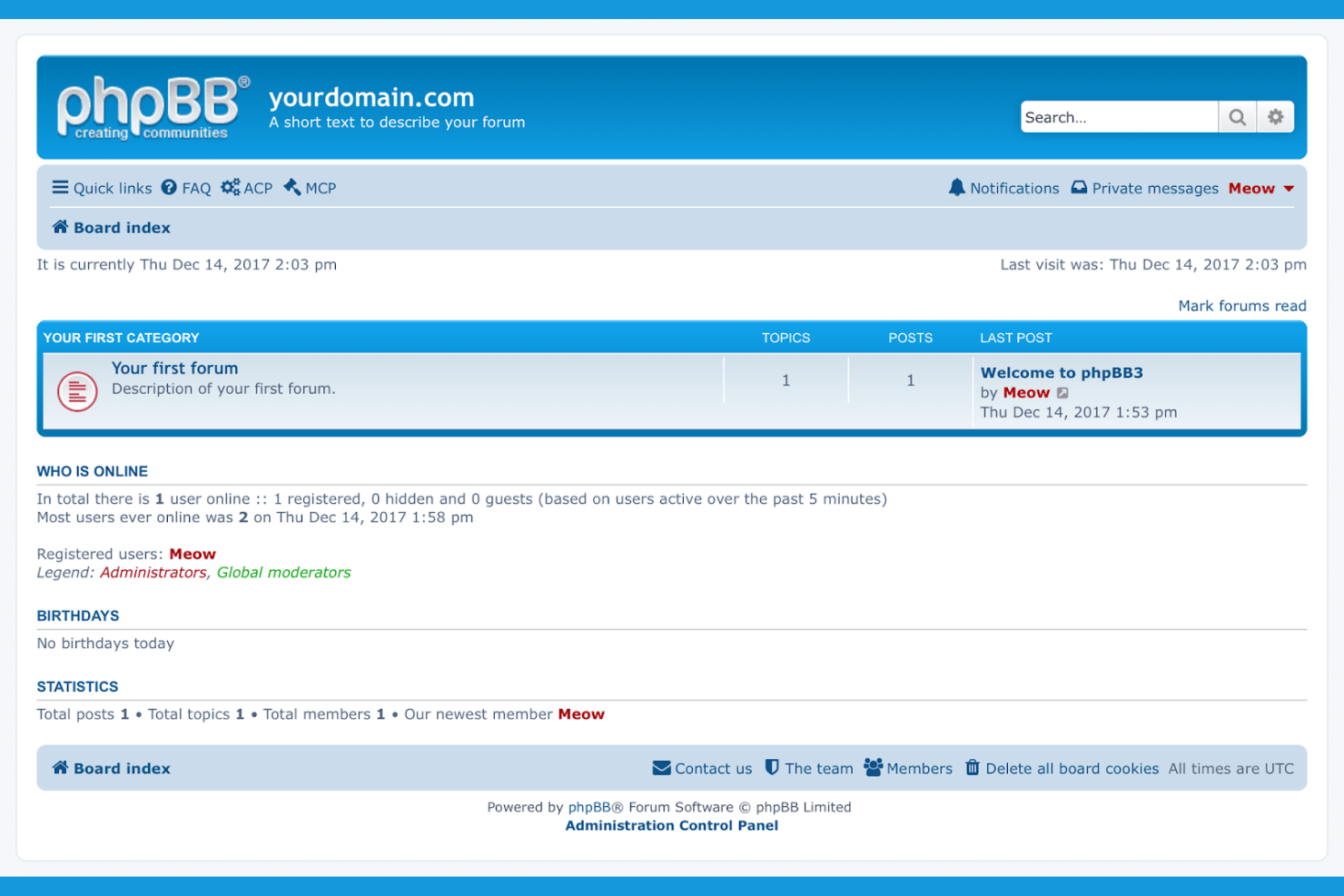
If you’re looking for a forum platform you can fully customize, phpBB stands out with its open-source framework and extensive library of user-built extensions. It’s a strong fit for technical teams, hobbyist communities, or organizations that want to tailor every aspect of their forum’s functionality and appearance. With phpBB, you get full control over your forum’s codebase and the flexibility to adapt it to unique workflows or branding needs.
Why I Picked phpBB
Open-source extensibility is where phpBB really shines for forum software. I picked phpBB because it gives you direct access to the source code, so you can modify or extend the platform to fit your exact needs. The extensive library of community-built extensions lets you add features like advanced moderation, custom authentication, or unique post formatting. For anyone who wants to build a highly customized forum experience, phpBB’s open architecture and active developer community make it a strong choice.
phpBB Key Features
Some other features in phpBB help support forum management and user engagement:
- Granular permission controls: Set detailed user and group permissions for forums and topics.
- Private messaging system: Allow members to communicate directly within the platform.
- Multi-language support: Offer your forum in dozens of languages with downloadable language packs.
- Anti-spam tools: Use built-in CAPTCHA and user verification options to reduce spam registrations.
phpBB Integrations
Integrations are available via an API.
Pros and Cons
Pros:
- No licensing fees for commercial use
- Supports multiple database backends natively
- Large library of user-built extensions
Cons:
- No built-in integrations with third-party tools
- Manual updates required for new features

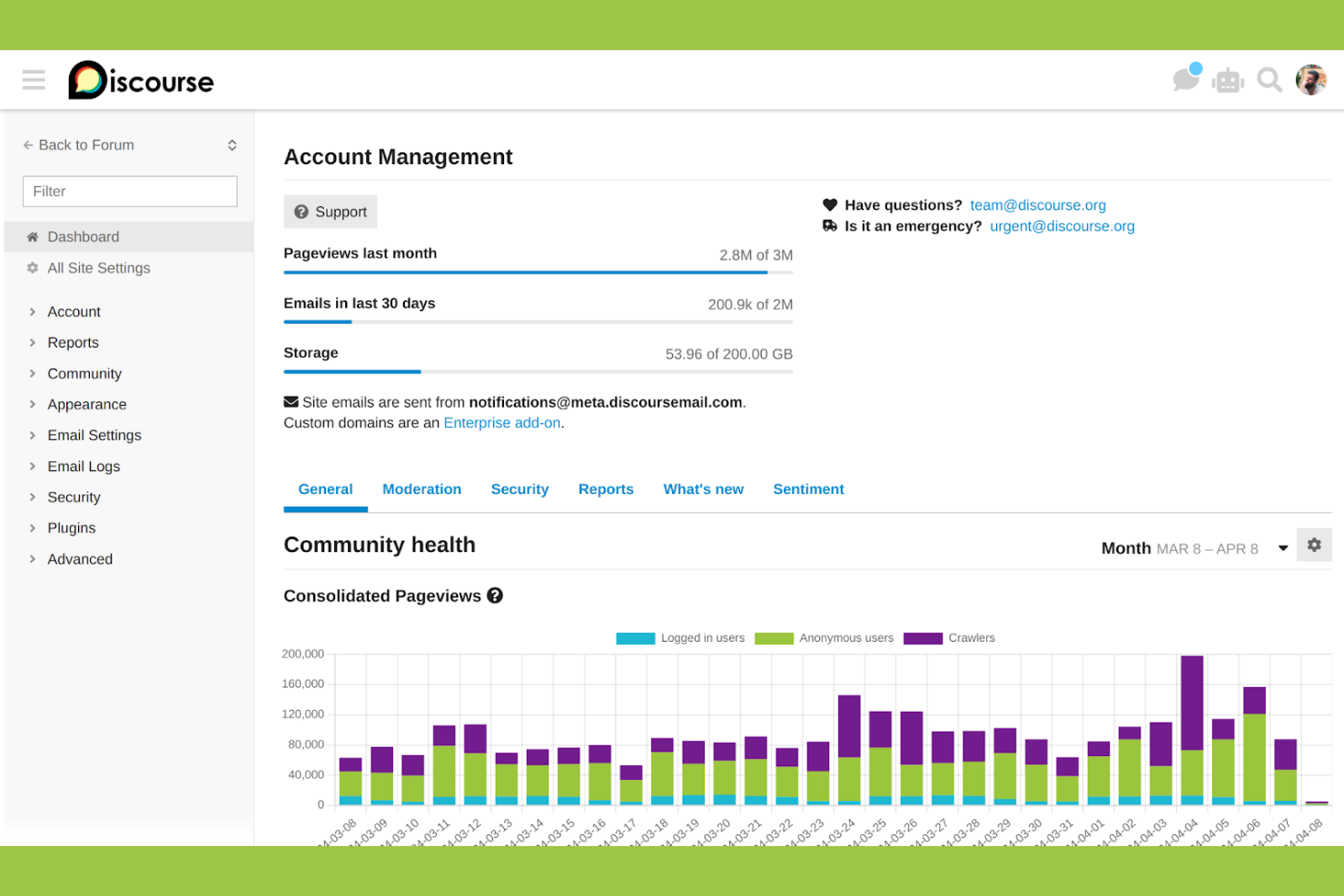
Discourse brings a fresh approach to online communities with features designed for real-time engagement and conversation. It’s a strong choice for teams, brands, or organizations that want to foster active discussions and keep members coming back. With tools like dynamic notifications and social media login, Discourse helps you build a modern, interactive forum experience.
Why I Picked Discourse
Modern engagement features set Discourse apart from many traditional forum platforms. I picked Discourse because it offers real-time notifications, interactive badges, and built-in social login, all of which help drive ongoing participation. The platform’s trust-level system encourages positive contributions and rewards active members, making it easier to nurture a healthy community. These features make Discourse a strong fit for anyone looking to create a lively, interactive forum where members feel motivated to return and contribute.
Discourse Key Features
I also found several other features in Discourse that support community management and customization:
- Advanced moderation tools: Assign roles, flag posts, and manage user behavior with granular controls.
- Customizable categories and tags: Organize discussions using nested categories and flexible tagging options.
- Automatic daily backups: Schedule and store backups to protect your forum data.
- Responsive mobile interface: Access and participate in discussions from any device without needing a separate app.
Discourse Integrations
Integrations include Slack, Discord, GitHub, WordPress, Zendesk, Patreon, Memberful, Google Analytics, Matomo, and more.
Pros and Cons
Pros:
- Automatic daily backups for data protection
- Built-in support for social logins
- Real-time notifications for active discussions
Cons:
- Complex migration from legacy forums
- Requires hosting knowledge for self-installation

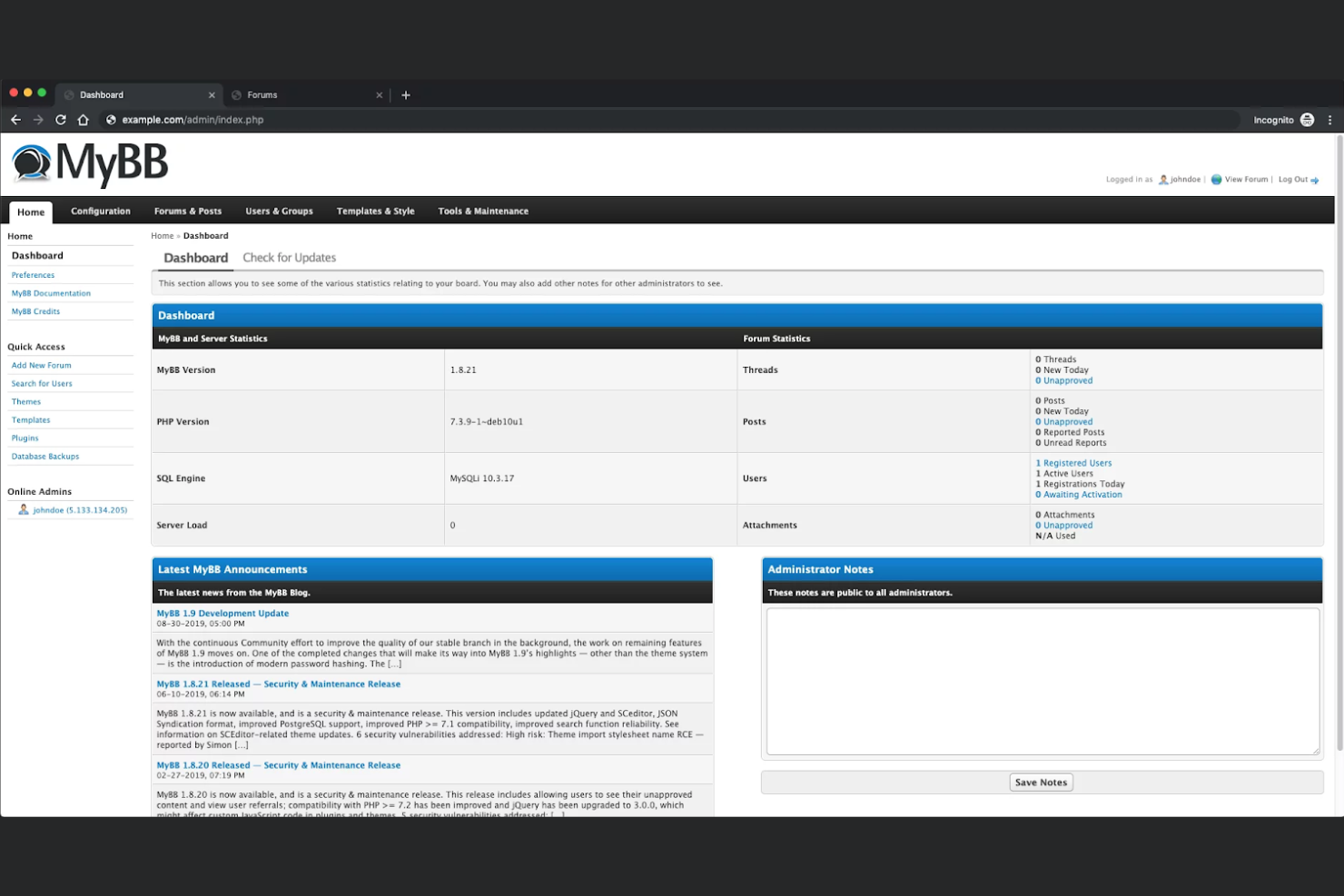
If you want full control over your community’s look and feel, MyBB gives you a flexible, open-source forum software. It’s a strong fit for organizations or moderators who want to customize layouts, themes, and user experiences without heavy coding. MyBB helps you create a branded space that stands out from standard, template-driven forums.
Why I Picked MyBB
Customizable community layouts are a top priority for many forum builders, which is why I picked MyBB for this list. The platform offers a flexible theme system that lets you adjust templates, colors, and styles to match your brand or community identity. You can also use its built-in template editor to fine-tune the structure of forum pages without needing advanced coding skills. MyBB’s plugin system adds another layer of customization, letting you extend functionality and tailor the user experience even further.
MyBB Key Features
Some other features in MyBB that stand out for forum management include:
- User group permissions: Set detailed access controls for different user groups to manage visibility and participation across your forum.
- Private messaging system: Allow members to communicate directly and securely within the platform.
- Post moderation queue: Review and approve posts before they appear publicly to maintain quality and safety.
- Built-in spam protection: Use automated tools to detect and block spam content from reaching your community.
MyBB Integrations
Integrations are available via an open API.
Pros and Cons
Pros:
- Flexible template and theme editor
- Active community support and documentation
- Open source with no licensing fees
Cons:
- No official mobile app available
- Limited selection of modern themes
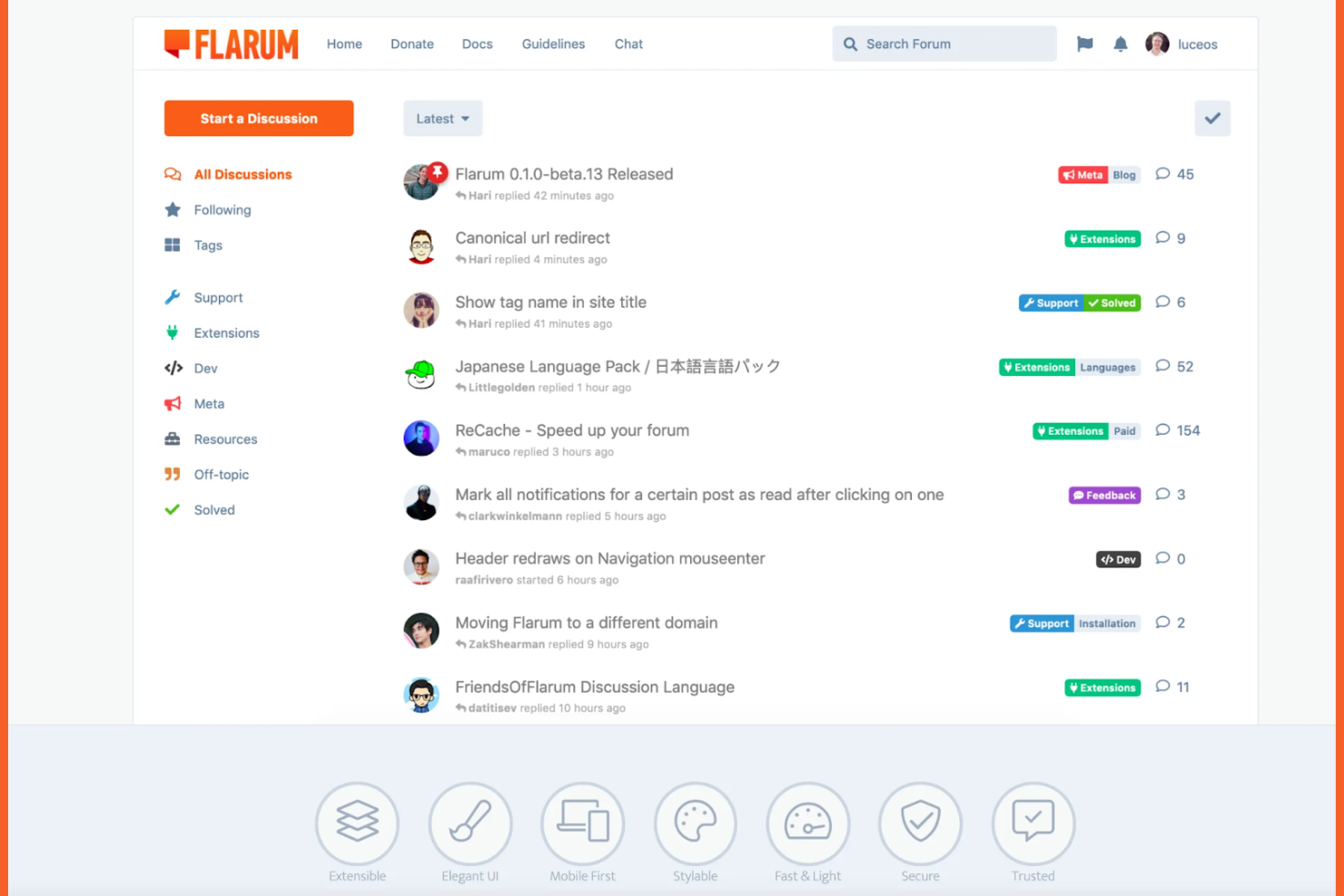
Flarum is a lightweight, open-source forum platform built for teams and communities that want a fast, modern discussion space without heavy server requirements. It’s a strong fit for startups, hobbyist groups, and organizations looking for quick deployment and easy customization. Flarum’s minimal core and extension system let you launch a forum that stays fast even as your community grows.
Why I Picked Flarum
When speed and simplicity are top priorities, Flarum stands out for its lightweight architecture and quick setup process. I picked Flarum because its minimal core keeps server load low, making it ideal for fast deployments and resource-limited environments. The extension system lets you add only the features you need, so your forum stays lean and responsive. For teams that want to launch a modern discussion space without unnecessary overhead, Flarum offers a focused, efficient solution.
Flarum Key Features
I also found several features in Flarum that help support community management and user engagement:
- Tag-based organization: Structure discussions using tags instead of traditional categories for flexible content sorting.
- Mobile-first user interface: The forum layout adapts smoothly to smartphones and tablets for on-the-go participation.
- Real-time notifications: Users receive instant alerts for replies, mentions, and activity within threads.
- Extensive extension library: Access a wide range of community-built add-ons to expand forum capabilities.
Flarum Integrations
Integrations include Mailgun, Google Analytics, Akismet, Pusher, Elasticsearch, Sentry, Matomo, and more.
Pros and Cons
Pros:
- Real-time notifications for user engagement
- Tag-based structure replaces traditional categories
- Loads quickly even on shared hosting
Cons:
- Limited moderation features
- No built-in analytics or reporting tools

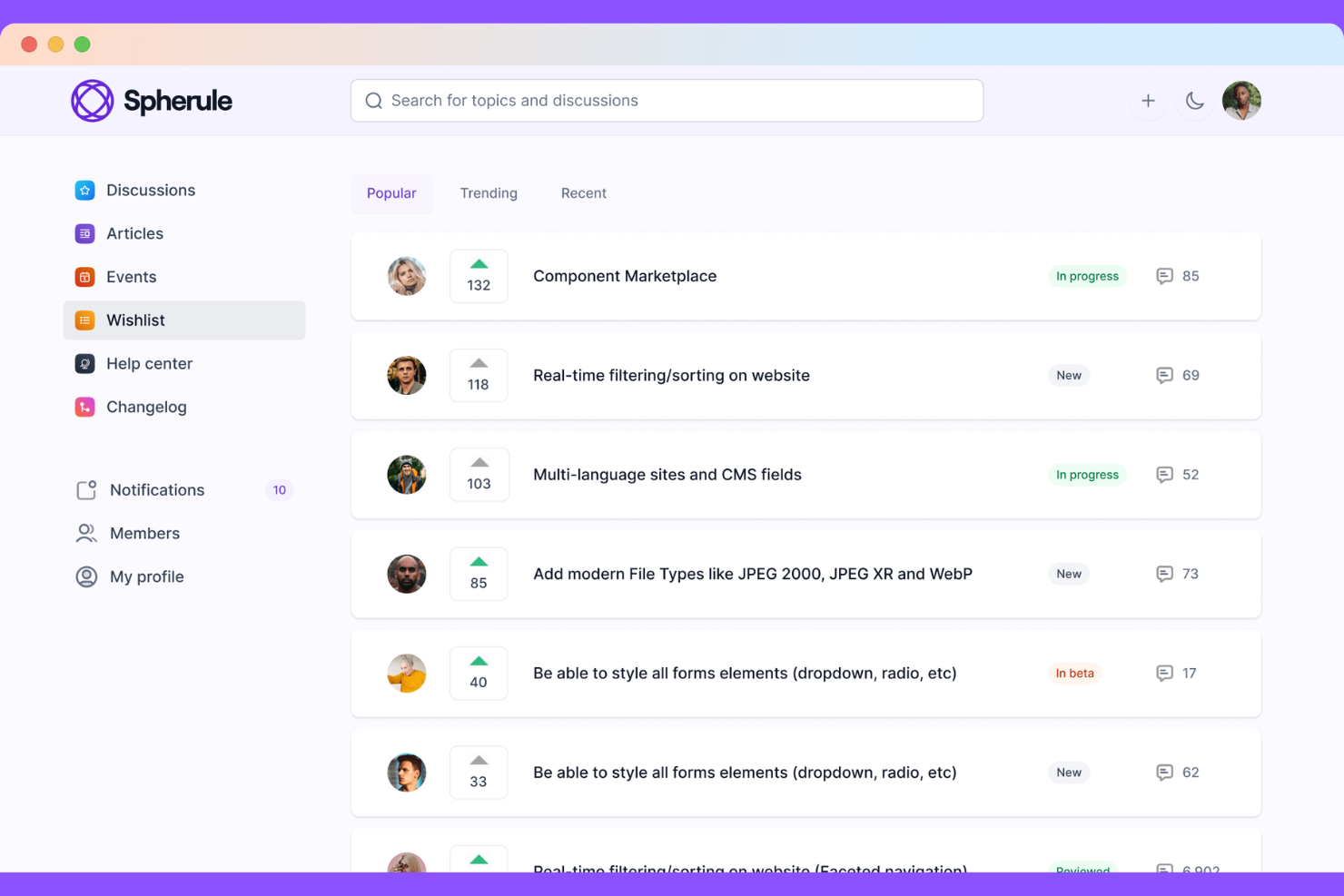
Bettermode is a modular community platform designed for companies that want to build branded customer hubs. It serves as an all-in-one space for customer success, support, and product feedback through a flexible, no-code interface.
Why I Picked Bettermode
I chose Bettermode for this list because of its ability to embed community elements directly into existing products or websites. While many forum tools feel like separate destinations, Bettermode uses a "Block" system that allows you to drag and drop specific engagement widgets—like Q&A sections or product roadmaps—wherever your users already are. This makes it the best choice for teams that want to bridge the gap between their main application and their community discussions.
Bettermode Key Features
Some other features that make Bettermode a strong option for forum software include:
- Modular Design Studio: Arrange pre-built "Blocks" to create custom layouts for different community areas without writing any code.
- Interactive Ideation: Enable members to submit product ideas, upvote feature requests, and track progress via a transparent roadmap.
- In-App Embeds: Use specialized widgets to display community discussions or help articles directly inside your web application.
- Gamification Engine: Automate member recognition with custom badges, reputation points, and leaderboards to drive consistent participation.
Bettermode Integrations
Integrations include Slack, HubSpot, Salesforce, Zendesk, Intercom, Mailchimp, Google Analytics, Hotjar, Zapier, and more.
Pros and Cons
Pros:
- Native customer service integrations
- Provides white-labeling and branding
- Highly flexible block-based customization
Cons:
- No dedicated native mobile app
- Significant pricing jump for scaling

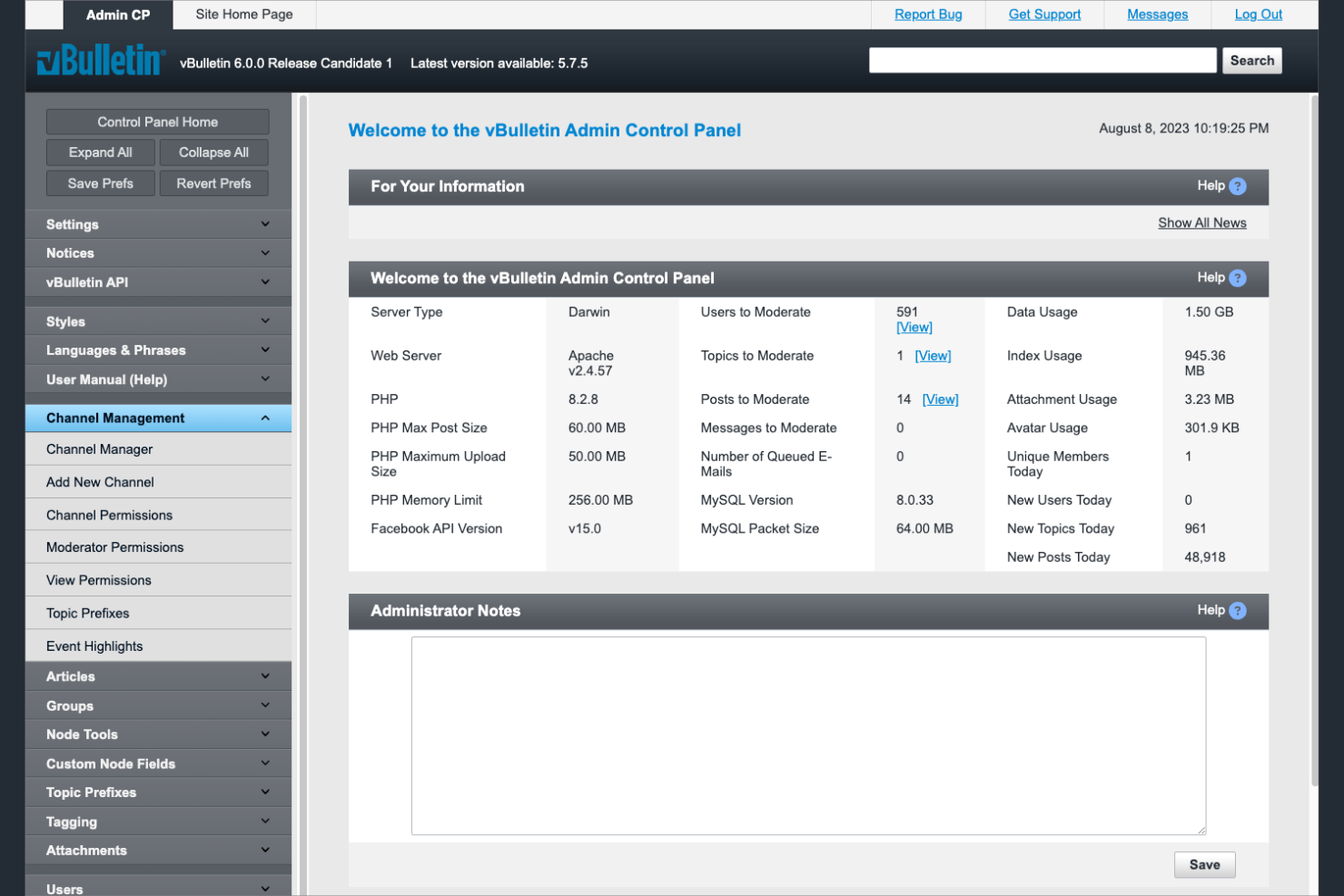
If you need to manage a high volume of users and complex permissions, vBulletin is built for scale. This platform is a strong fit for enterprise organizations, large online communities, or membership-based businesses that require advanced user management and moderation controls. vBulletin helps admins handle thousands of users, segment groups, and enforce detailed access policies across large forums.
Why I Picked vBulletin
When handling large communities with complex user hierarchies, vBulletin stands out for its advanced user management capabilities. I picked vBulletin because it lets admins create detailed user groups, assign granular permissions, and automate moderation workflows at scale. The platform’s bulk user management tools make it possible to efficiently manage thousands of members and enforce community rules. If your forum needs to support a high volume of users with layered access and moderation, vBulletin is purpose-built for that challenge.
vBulletin Key Features
Some other features in vBulletin help support content management and community engagement:
- Built-in CMS: Create and manage articles, blogs, and custom pages directly within the forum.
- Spam prevention tools: Use automated filters and moderation queues to reduce unwanted content.
- Responsive design: Forums display correctly on desktops, tablets, and smartphones.
- SEO optimization settings: Adjust meta tags, URLs, and sitemaps to improve search visibility.
vBulletin Integrations
Integrations include LDAP and Shopify.
Pros and Cons
Pros:
- SEO tools improve forum search rankings
- Built-in CMS handles articles and blogs
- Bulk user management for large communities
Cons:
- No built-in real-time chat or notifications
- Upgrades may require manual technical work

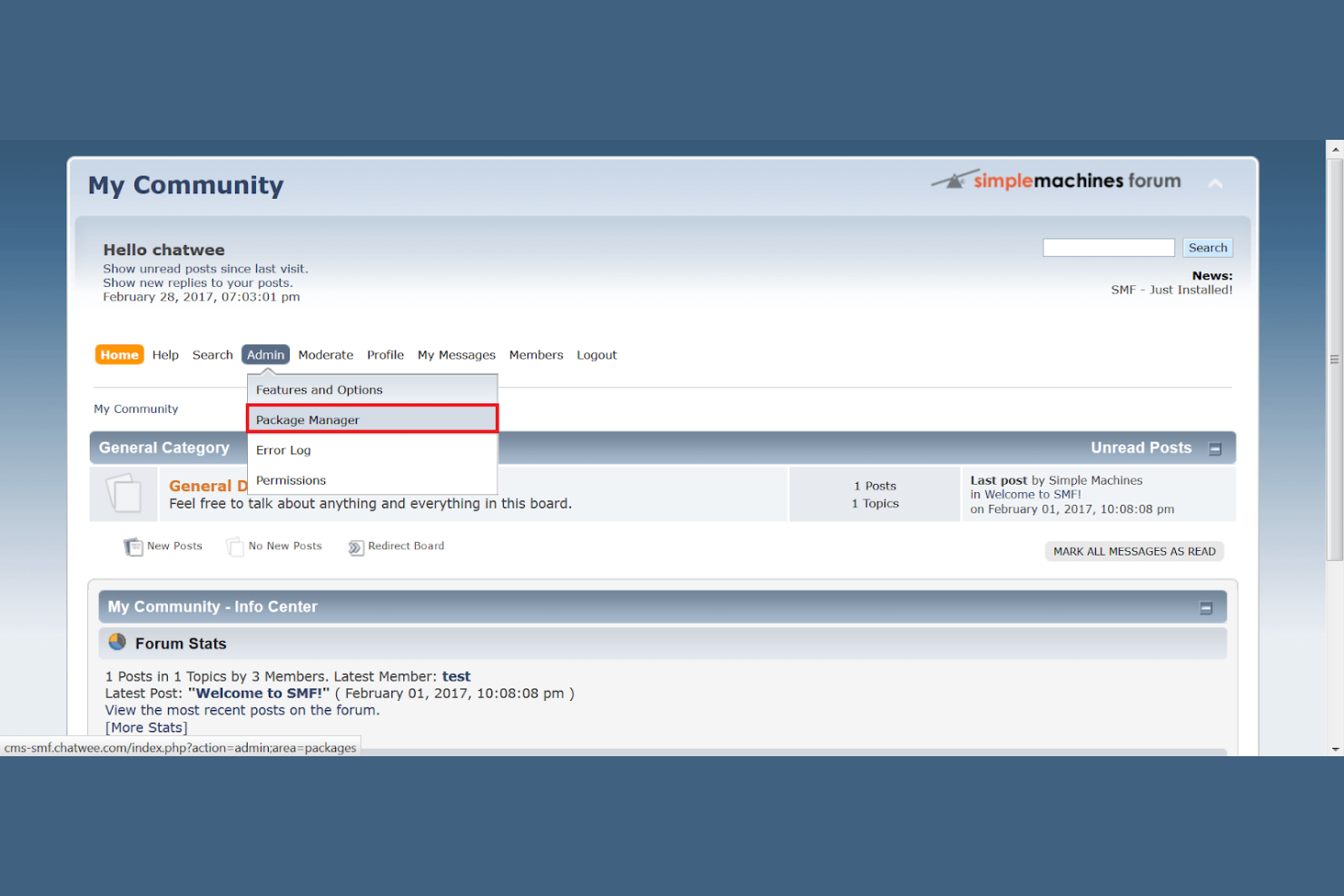
Simple Machines Forum is designed for organizations and communities that need reliable multilingual support in their online discussions. It’s especially useful for global teams, international nonprofits, or any group managing conversations across multiple languages. With its extensive language packs and translation tools, Simple Machines Forum helps you build inclusive spaces where users can participate in their preferred language.
Why I Picked Simple Machines Forum
For teams and communities that need to support users in multiple languages, Simple Machines Forum offers one of the most extensive multilingual setups available in forum software. I picked Simple Machines Forum because it provides a wide range of language packs and built-in translation management, making it easy to localize your forum for different audiences. The platform also allows users to switch languages on the fly, so everyone can participate in their preferred language without barriers. This focus on multilingual capabilities makes it a strong choice for international organizations or any group with a diverse user base.
Simple Machines Forum Key Features
In addition to its multilingual support, Simple Machines Forum offers several other useful features for forum management:
- Customizable Themes: Users can personalize the look and feel of their forums with a variety of themes and templates.
- Advanced Permission System: Allows detailed control over user roles and access levels within the forum.
- Built-in Search Functionality: Provides efficient searching capabilities to help users find relevant posts quickly.
- Plugin Support: Enables the addition of extra functionalities through a wide range of plugins and extensions.
Simple Machines Forum Integrations
Integrations include XOOPS, Mambo, Joomla, iGaming, and e107.
Pros and Cons
Pros:
- Has a lightweight design for faster page loads
- Integrates well with popular CMS platforms
- Supports 30+ languages for global communities
Cons:
- Lacks advanced gamification features
- Outdated default themes
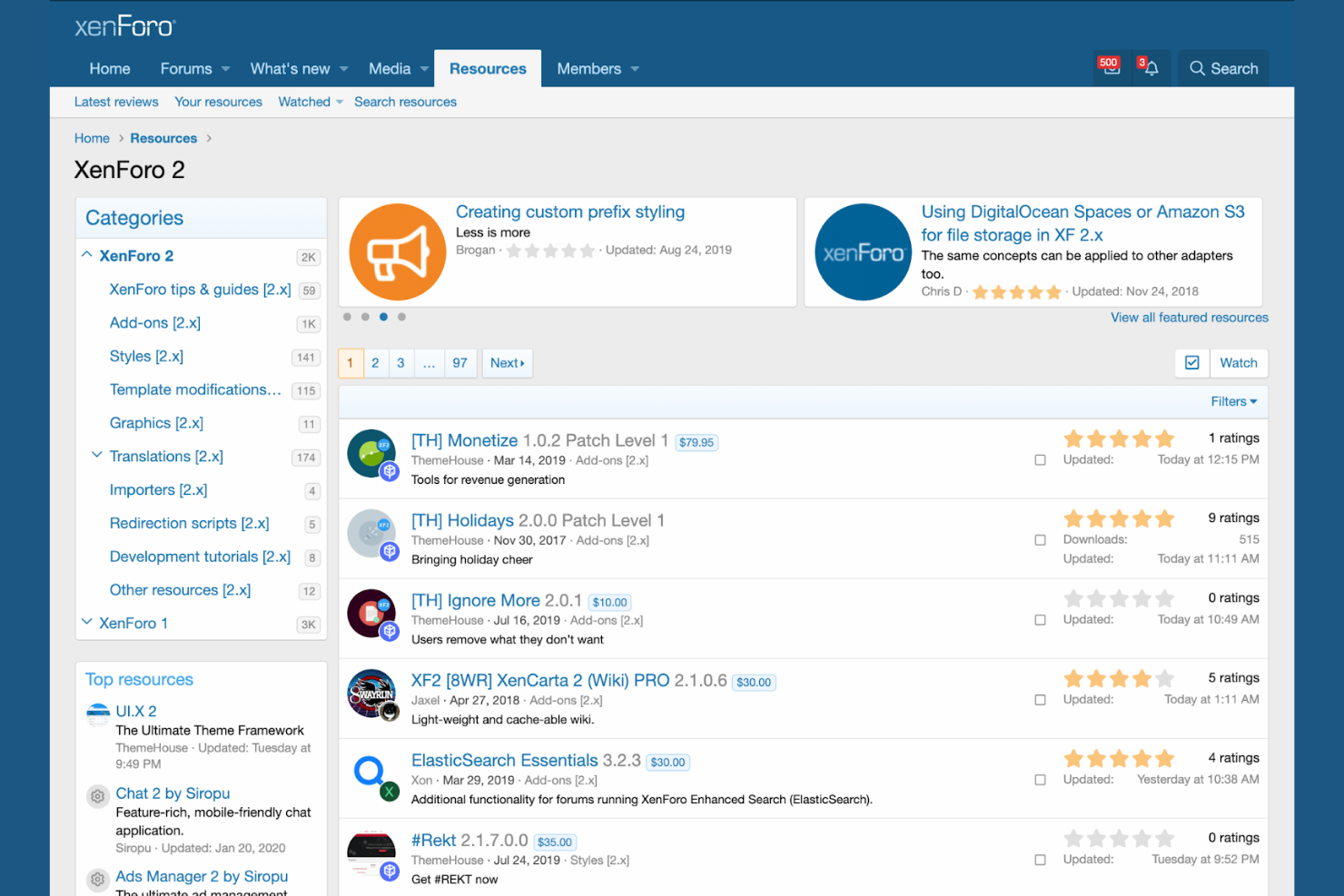
XenForo is designed for teams and organizations that need advanced moderation and community management features built right in. It’s a strong choice for businesses, online forums, or membership groups that want to keep discussions organized and safe without relying on third-party tools. With XenForo, you can automate moderation workflows and empower moderators to manage content efficiently at scale.
Why I Picked XenForo
When moderation is a top priority, XenForo stands out for its built-in tools that help keep forums safe and organized. I picked XenForo because it offers features like automated content moderation, user reporting, and detailed moderator logs, all accessible without extra plugins. The platform’s warning system lets moderators flag and manage problematic users directly from the interface. For teams that need to maintain high-quality discussions and enforce community guidelines, XenForo’s moderation suite is a strong fit.
XenForo Key Features
Some other features in XenForo help support community engagement and forum management:
- Resource manager: Share files, documents, and downloads directly with your community.
- Custom user fields: Collect and display additional user information on profiles and registration forms.
- Responsive design: Ensure forums are accessible and easy to use on mobile devices.
- Built-in search engine: Let users quickly find topics, posts, and resources across the forum.
XenForo Integrations
Integrations include Google Analytics, Discord, Slack, PayPal, Stripe, Amazon Web Services, and more.
Pros and Cons
Pros:
- Built-in spam controls
- Warning system manages user behavior
- Automates content review and moderation
Cons:
- Add-ons often require separate purchases
- Requires paid license for core functionality


NodeBB brings real-time chat and interactive features to online communities that want fast-paced, dynamic discussions. It’s a strong fit for tech companies, gaming communities, or any group that values instant notifications and live conversations. NodeBB helps teams and communities keep engagement high with features like live topic updates and integrated chat.
Why I Picked NodeBB
For teams and communities that want conversations to feel as immediate as chat, NodeBB delivers real-time interactive discussions that set it apart from traditional community software. I picked NodeBB because it supports live topic updates, so users see new posts and replies instantly without refreshing the page. The built-in chat system lets members message each other directly, making it easy to keep conversations flowing. If your group values fast-paced engagement and wants a forum that feels lively and current, NodeBB is a strong choice.
NodeBB Key Features
Some other forum features in NodeBB help support customization and community management:
- Plugin system: Extend forum functionality with a wide range of community-built plugins.
- Granular user permissions: Control access and moderation rights for different user groups.
- Mobile-responsive design: Forums automatically adjust for smartphones and tablets.
- Built-in analytics dashboard: Track user activity and forum engagement from within the admin panel.
NodeBB Integrations
Integrations include GitHub, Slack, Discord, WordPress, Mastodon, LinkedIn, and more.
Pros and Cons
Pros:
- Markdown support enables rich post formatting
- Mobile-first design adapts to all screen sizes
- A wide variety of plugins available
Cons:
- Limited built-in moderation automation tools
- Plugin compatibility issues after major updates

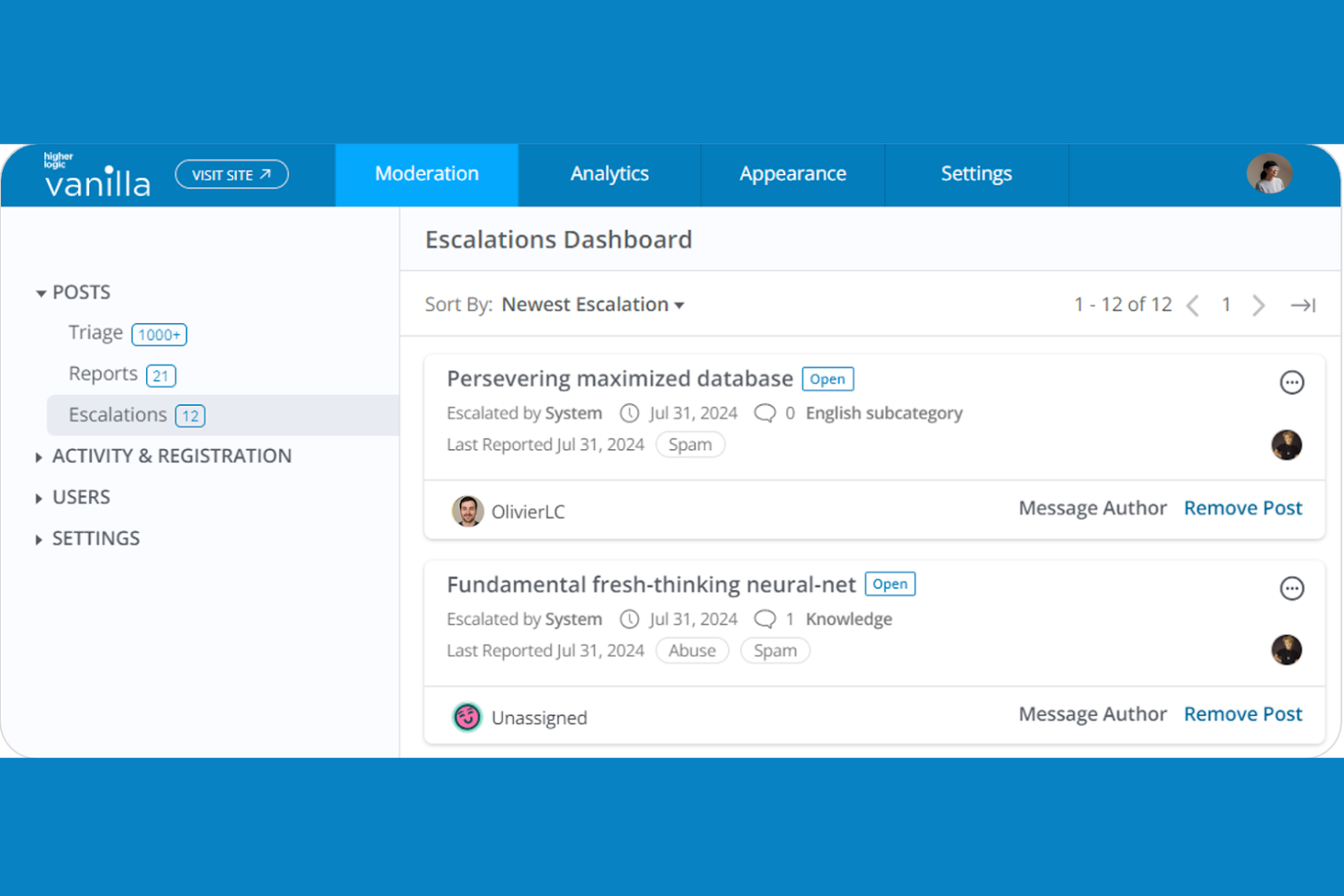
If your organization needs a forum platform that connects with a wide range of enterprise systems, Higher Logic Vanilla is designed for deep integrations. This solution is a strong fit for large businesses and associations that want to unify community engagement with CRM, marketing automation, and analytics tools. Higher Logic Vanilla forum helps teams centralize member data and automate workflows across multiple platforms.
Why I Picked Higher Logic Vanilla
For organizations that need their forum to work easily with other enterprise platforms, Higher Logic Vanilla offers a strong integration framework. I picked Higher Logic Vanilla because it supports direct connections with major CRM, marketing automation, and analytics systems, making it easier to sync community data across your tech stack. The platform’s single sign-on (SSO) capabilities and API access help teams centralize user authentication and automate data flows. If your business relies on connecting community engagement with broader enterprise processes, this tool is purpose-built for that environment.
Higher Logic Vanilla Key Features
Some other features in Higher Logic Vanilla help support community engagement and content management:
- Gamification tools: Reward members with badges, points, and leaderboards to encourage participation.
- Knowledge base management: Organize and publish help articles and FAQs within the community.
- Event management: Schedule, promote, and manage virtual or in-person events directly from the platform.
- Advanced moderation controls: Set up automated workflows and permissions for content review and user management.
Higher Logic Vanilla Integrations
Integrations include Salesforce, HubSpot, Jira, Zendesk, Freshdesk, Google Analytics, Mailchimp, WordPress, ServiceNow, and more.
Pros and Cons
Pros:
- Event management tools for community activities
- Gamification features boost member engagement
- Integrates natively with major enterprise platforms
Cons:
- Occasional delays in customer support response
- Reporting dashboards can feel limited
Other Forum Software
Here are some additional forum software options that didn’t make it onto my shortlist, but are still worth checking out:
- Hivebrite
For discussion forum module
- Disco
For cohort-based learning communities
- Mighty Networks
For combining courses with member discussions
- Breezio
For advanced content discovery tools
- Heartbeat
For managing events and live sessions
- Circle
For building private branded communities
- Tradewing
For association-focused networking tools


Forum Software Selection Criteria
When selecting the best forum software to include in this list, I considered common buyer needs and pain points like managing user engagement and moderating discussions at scale. I also used the following framework to keep my evaluation structured and fair:
Core Functionality (25% of total score)
To be considered for inclusion in this list, each solution had to fulfill these common use cases:
- Create and organize discussion threads
- Manage user accounts and permissions
- Moderate posts and user activity
- Search and filter forum content
- Customize forum categories and topics
Additional Standout Features (25% of total score)
To help further narrow down the competition, I also looked for unique features, such as:
- Built-in gamification tools
- Advanced spam prevention
- Real-time notifications and messaging
- Deep analytics and reporting
- Integration with external authentication providers
Usability (10% of total score)
To get a sense of the usability of each system, I considered the following:
- Clean and user-friendly interface
- Logical navigation structure
- Responsive design for mobile devices
- Accessibility for all users
- Minimal steps to complete common tasks
Onboarding (10% of total score)
To evaluate the onboarding experience for each platform, I considered the following:
- Availability of step-by-step setup guides
- Access to training videos and tutorials
- Pre-built templates for quick launch
- Interactive product tours or walkthroughs
- Support for data import and migration
Customer Support (10% of total score)
To assess each software provider’s customer support services, I considered the following:
- Multiple support channels available
- Fast response times to inquiries
- Access to active user communities
- Knowledge base or help center
- Availability of onboarding assistance
Value For Money (10% of total score)
To evaluate the value for money of each platform, I considered the following:
- Transparent and flexible pricing plans
- Features included at each price tier
- Free trial or free plan availability
- No hidden fees or surprise charges
- Discounts for annual or volume commitments
Customer Reviews (10% of total score)
To get a sense of overall customer satisfaction, I considered the following when reading customer reviews:
- Consistent positive feedback on reliability
- Praise for customer support quality
- Reports of ease of setup and use
- Comments on feature completeness
- Noted issues or limitations mentioned by users
How to Choose Forum Software
It’s easy to get bogged down in long feature lists and complex pricing structures. To help you stay focused as you work through your unique software selection process, here’s a checklist of factors to keep in mind:
| Factor | What to Consider |
|---|---|
| Scalability | Will the platform handle your expected growth in users and posts? Check for user, post, or storage limits and ask about performance at scale. |
| Integrations | Does the software connect with your existing tools (CRM, analytics, authentication)? Confirm native integrations and any extra costs or technical requirements. |
| Customizability | Can you adapt the look, feel, and structure to match your brand and workflows? Consider theme options, permissions, and extensibility. |
| Ease of use | Will admins and users find the interface intuitive? Test navigation, posting, and moderation tasks with real users before committing. |
| Implementation and onboarding | How long will setup and migration take? Ask about data import tools, training resources, and support during rollout. |
| Cost | Are pricing tiers clear and predictable as you grow? Watch for hidden fees, add-on costs, or user-based pricing that could impact your budget. |
| Security safeguards | Does the platform offer strong user privacy, data protection, and moderation controls? Review authentication, encryption, and audit options. |
| Support availability | What support channels are offered and during what hours? Consider if you need live chat, phone, or only email, and check for active user communities. |
What Is Forum Software?
Forum software is a digital platform that enables users to create, organize, and participate in online discussions through structured message boards. It provides tools for managing user accounts, moderating conversations, and categorizing topics. Teams use forum software to facilitate knowledge sharing, gather feedback, and build communities around shared interests or business goals. Most solutions offer features for user permissions, content moderation, and search to keep discussions organized and accessible.
Features of Forum Software
When selecting forum software, keep an eye out for the following key features:
- Threaded discussions: Organize conversations into topics and replies, making it easy for users to follow and contribute to specific discussions.
- User roles and permissions: Assign different access levels to admins, moderators, and members to control who can post, edit, or manage content.
- Content moderation tools: Enable moderators to review, approve, edit, or remove posts to maintain a safe and relevant environment.
- Search functionality: Allow users to quickly find topics, posts, or users by keyword or filter, improving navigation and knowledge discovery.
- Private messaging: Let users communicate directly and privately within the platform, supporting collaboration and relationship-building.
- Category and subforum organization: Structure discussions into categories and subforums to keep content organized and easy to browse.
- Post formatting options: Support rich text, images, links, and attachments so users can share information in various formats.
- Notification system: Alert users to new replies, mentions, or messages, helping them stay engaged and informed.
- User profiles: Give each member a customizable profile with activity history, badges, or contact information to foster community identity.
- Analytics and reporting: Provide insights into user activity, popular topics, and engagement trends to help admins monitor and improve the forum.
Common Forum Software AI Features
Beyond the standard forum software features listed above, many of these solutions are incorporating AI with features like:
- Automated content moderation: AI scans posts for spam, offensive language, or policy violations, flagging or removing problematic content before it reaches the community.
- Smart topic suggestions: AI analyzes user input and recommends relevant discussion topics or threads, helping users find the right place to post or engage.
- Sentiment analysis: AI evaluates the tone of posts and comments, alerting moderators to potential conflicts or negative trends within discussions.
- Personalized content recommendations: AI curates and surfaces threads or replies tailored to each user’s interests and past activity, increasing engagement and time spent on the forum.
- Automated summarization: AI generates concise summaries of long threads or discussions, making it easier for users to catch up on key points without reading every post.
Benefits of Forum Software
Implementing forum software provides several benefits for your team and your business. Here are a few you can look forward to:
- Centralized knowledge sharing: Forums organize discussions and resources in one place, making it easy for users to find answers and share expertise.
- Scalable community engagement: Built-in user management and moderation tools help you grow and maintain active, well-governed communities as your audience expands.
- Improved collaboration: Threaded discussions, private messaging, and user profiles support ongoing conversations and relationship-building among team members or customers.
- Efficient content moderation: Moderation features and, in some cases, AI-powered tools help keep discussions safe, relevant, and on-topic with less manual effort.
- Customizable branding and structure: Flexible templates, permissions, and category organization let you tailor the forum to your brand and workflow needs.
- Actionable insights: Analytics and reporting features provide data on user activity, popular topics, and engagement trends to inform your strategy.
- Enhanced user experience: Search, notifications, and personalized recommendations make it easier for users to participate and stay informed.
Costs and Pricing of Forum Software
Selecting forum software requires an understanding of the various pricing models and plans available. Costs vary based on features, team size, add-ons, and more. The table below summarizes common plans, their average prices, and typical features included in forum software solutions:
Plan Comparison Table for Forum Software
| Plan Type | Average Price | Common Features |
|---|---|---|
| Free Plan | $0 | Basic discussion boards, limited user roles, simple moderation tools, and community support. |
| Personal Plan | $5-$25/user/month | Custom branding, private messaging, enhanced moderation, analytics, and basic integrations. |
| Business Plan | $30-$80/user/month | Advanced permissions, priority support, API access, advanced analytics, and integration with other business tools. |
| Enterprise Plan | $100-$250/user/month | Custom SLAs, dedicated account management, advanced security, compliance features, and unlimited scalability. |
Forum Software FAQs
Here are some answers to common questions about forum software:
How do I migrate an existing community to new forum software?
Start by exporting your current forum data, including users, posts, and categories. Most modern platforms offer import tools or migration guides. Test the migration in a staging environment first to catch issues before going live. Communicate changes to your community and provide support during the transition.
Can forum software integrate with my CRM or marketing tools?
Yes, many forum software solutions offer integrations with popular CRM, email marketing, and analytics platforms. Check for native integrations or available APIs. Consider whether you need real-time data sync, single sign-on, or automated workflows between your forum and other business systems.
What security features should I look for in forum software?
Look for features like user authentication, role-based permissions, data encryption, and audit logs. Some platforms also offer advanced moderation tools and compliance options. Make sure the software meets your organization’s privacy and data protection requirements.
How can I encourage engagement in my forum?
Set up clear categories, welcome new members, and highlight popular discussions. Use notification systems, badges, or gamification to reward participation. Regularly post updates and respond to questions to keep the community active and inviting.
Is it possible to customize the look and feel of my forum?
Yes, most forum software allows you to customize branding, colors, and layout. Some offer theme editors or CSS access for deeper changes. Check if the platform supports custom domains and integrations with your website for a consistent user experience.