

Content distribution platforms help you get the right content in front of the right audience across channels like social, email, native ads, and press. If you need more reach, better engagement, or a faster way to manage multi-channel distribution, you’re in the right place. I’ll walk you through the top tools to help you expand your content’s impact, including the best picks for different team sizes and campaign styles.
Why Trust Our Software Recommendations
6,700+
Reviews
20
Industry experts
16+
Evaluation factors
14
Years
Our team has been testing and reviewing software since 2012. As marketing leaders ourselves, we know how difficult—and important—it is to choose the right software.
For this guide, we evaluated tools using hands-on testing and independent research, scoring tools using our selection criteria.
Our reviews reflect our human editorial judgment, not a sales pitch.
Expert reviewers:
 Gui DrusinaCreative Director
- Shriya GhateSenior Marketing Lead
 Amanda JacquesMarketing Ops Leader

Comparison Table: Content Distribution Platforms
This comparison table summarizes pricing details for my top content distribution platforms.
| Tool | Best For | Trial Info | Price | ||
|---|---|---|---|---|---|
| 1 | Best for analytics-rich social media workflows | 30-day free trial | From $79/user/month (billed annually) | Website | |
| 2 | Best for reaching regional ad audiences | Not available | Pricing upon request | Website | |
| 3 | Best for CRM-driven distribution | 14-day free trial | From $20/month | Website | |
| 4 | Best for broad media network distribution | Free demo available | Pricing upon request | Website | |
| 5 | Best for cost-effective press releases | Not available | From $920/month | Website | |
| 6 | Best for multi-channel publishing | Free plan available | From $22/month (billed annually) | Website | |
| 7 | Best for scheduling simple social posts | Free plan available | From $5/month per channel (billed annually) | Website | |
| 8 | Best for enterprise social teams | 14-day free trial | From $99/month (billed annually) | Website | |
| 9 | Best for placements on premium publisher sites | Not available | Pricing upon request | Website | |
| 10 | Best for native ad reach for global audiences | Free demo available | Pricing upon request | Website |


Content Distribution Platforms Reviews
Below are my detailed summaries of the best content distribution platforms that made it onto my shortlist. My reviews offer a detailed look at the features, best use cases, and integrations of each platform to help you find the best one for you.
 Best for analytics-rich social media workflows
- 30-day free trial
- From $79/user/month (billed annually)
Visit WebsiteCustomer Rating:4.3/5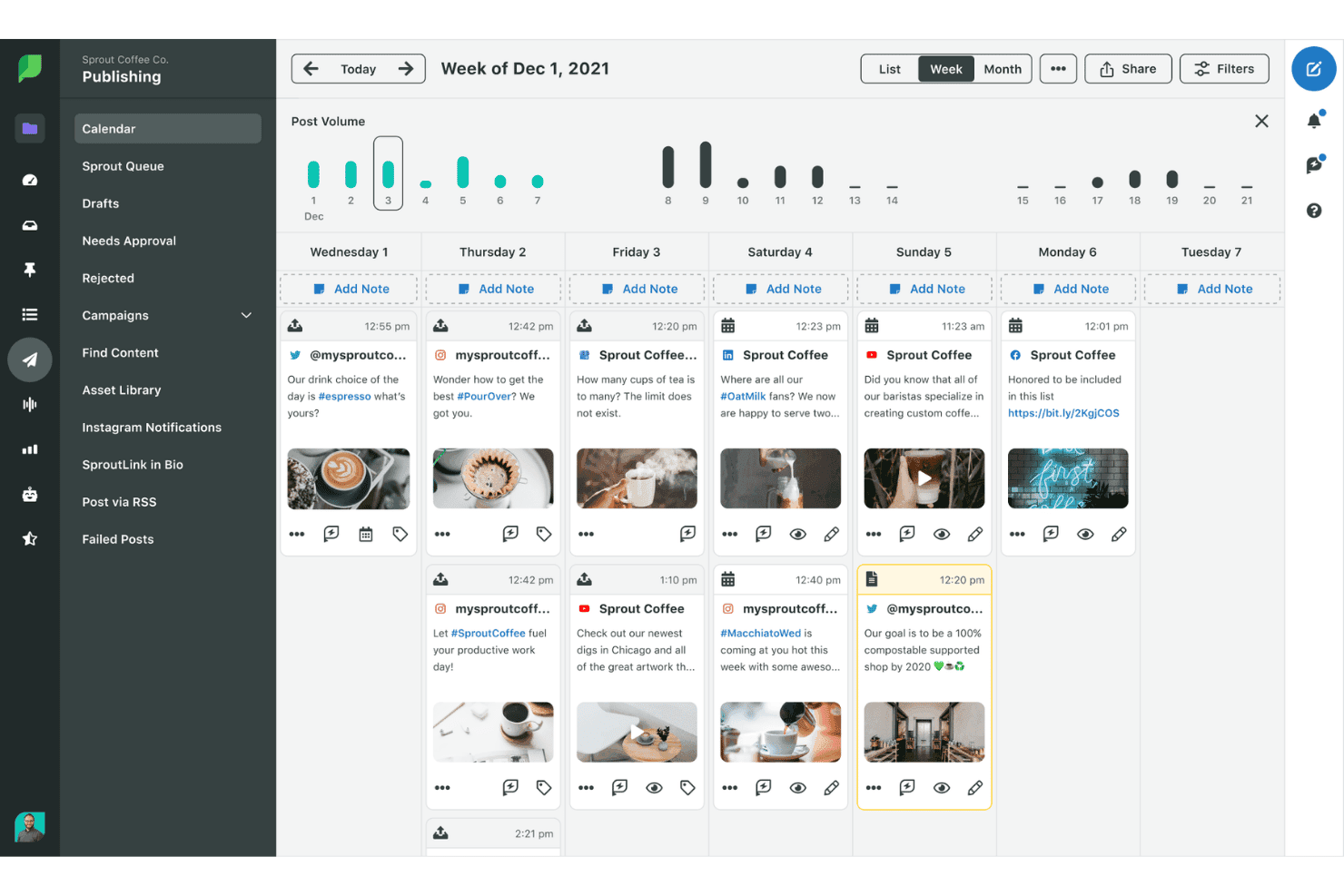
Sprout Social lets users schedule and view posts on a weekly publishing calendar. Sprout Social is a social media management platform that centralizes content scheduling, multi-profile publishing, audience engagement, and performance analytics across major social networks.
Who Is Sprout Social Best For?
Sprout Social is a strong fit for mid-sized to enterprise marketing teams managing social content and engagement across multiple brand profiles and networks.
Why I Picked Sprout Social
Sprout Social earns its spot on my shortlist because of the depth of its cross-network analytics. I particularly like the Premium Analytics add-on, which gives my team competitor benchmarking, custom dashboards, and scheduled report delivery, all tied to actual social performance data across every connected profile. The ViralPost® send time optimization also means my team isn't guessing when to publish; it pulls from real engagement patterns specific to each account.
Sprout Social Key Features
- Smart Inbox: Consolidates messages, comments, and mentions across all connected social profiles into one unified feed.
- Bulk publishing tool: Allows scheduling and uploading up to 350 messages across different channels with a single CSV file.
- Digital asset and content library: Centralizes storage and organization of multimedia files for use in social posts and campaigns.
- Approval workflow management: Enables team-based content review and publishing permissions to manage collaboration securely.
Sprout Social Integrations
Sprout Social offers native integrations with Facebook, Instagram, X (Twitter), LinkedIn, Pinterest, TikTok, YouTube, Google Drive, Canva, Dropbox, Adobe Experience Manager, and Bynder. An API is available for custom integrations.
Pros and Cons
Pros:
- Bulk scheduling across multiple social profiles
- Competitor benchmarking included in analytics dashboards
- ViralPost optimizes content timing automatically
Cons:
- No native paid amplification network
- Limited reach beyond owned social channels
Learn more about Sprout Social:
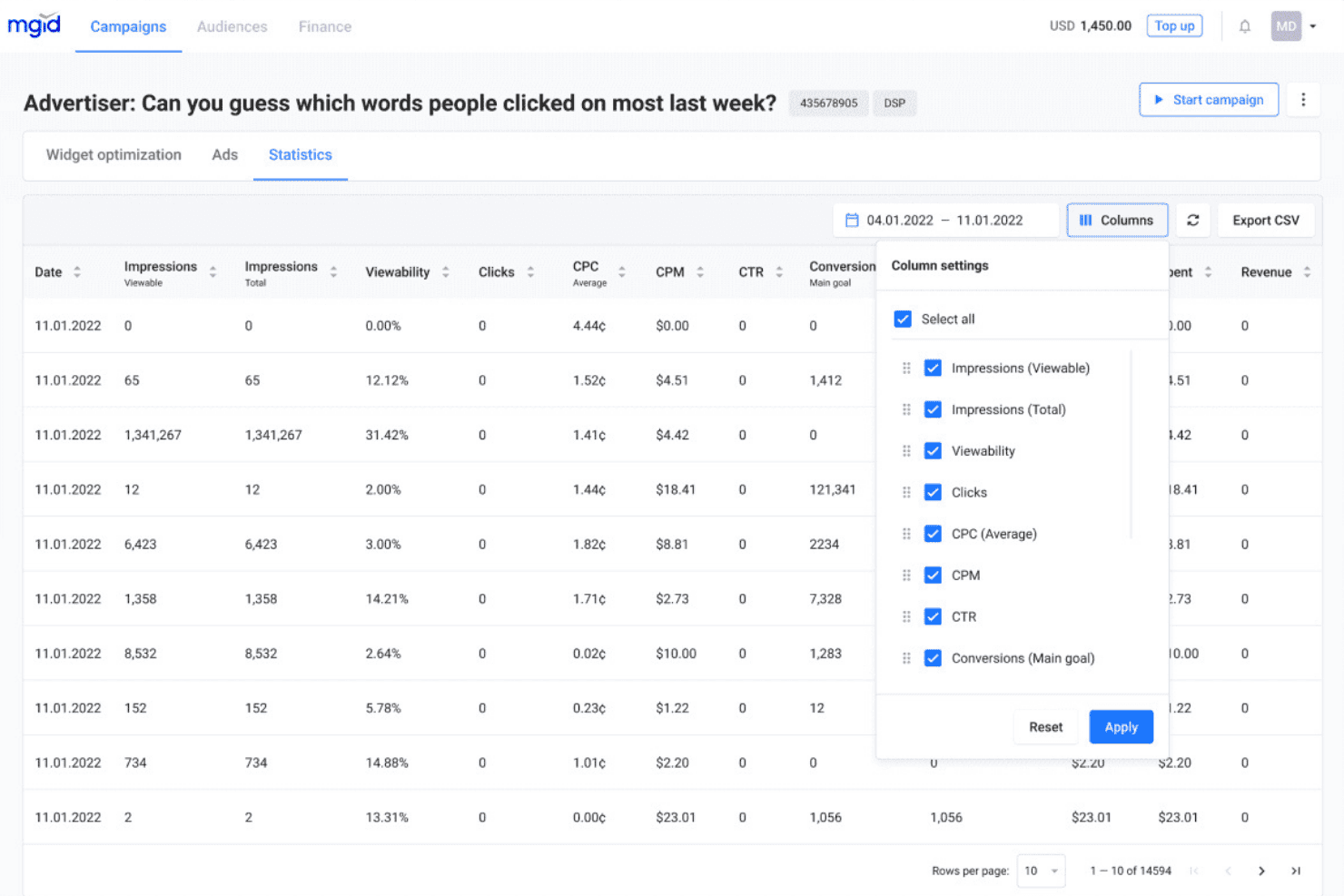
MGID lets users customize campaign statistics columns and metrics. MGID is a native advertising network that distributes branded content across a publisher network of 32,000+ sites through native widgets, in-content placements, and video ad formats with AI-driven audience targeting and performance analytics.
Who Is MGID Best For?
MGID is a strong fit for digital marketers and performance teams targeting non-English or regional audiences across multiple countries through paid native content.
Why I Picked MGID
I picked MGID as one of the best because its geographic targeting goes well beyond basic GEO selection, letting you layer in OS, browser, and sub-ID parameters to zero in on specific regional audience segments. Its AI-based matching algorithm then connects your content to users across 70+ supported languages on 32,000+ publisher sites. I particularly like its retargeting arsenal for re-engaging regional audiences who've already shown interest in your content.
MGID Key Features
- Native widget formats: Choose from in-content, under-article, sidebar, and mobile ad placements for distributing branded content.
- Publisher network access: Launch campaigns on a network of 32,000+ approved publisher sites for broad external distribution.
- Performance analytics dashboard: Monitor impressions, clicks, and conversions in real time from a centralized advertiser interface.
- Brand safety controls: Set placement and quality filters, plus use in-house fraud prevention and global blocklist management.
MGID Integrations
Native integrations are not clearly documented. An API is available for custom integrations.
Pros and Cons
Pros:
- Built-in fraud prevention and brand safety controls
- Granular sub-ID and OS-level targeting available
- Strong reach across non-English regional publisher networks
Cons:
- Minimal organic or non-paid distribution options
- Reporting dashboard lacks deep attribution modeling
Learn more about MGID :
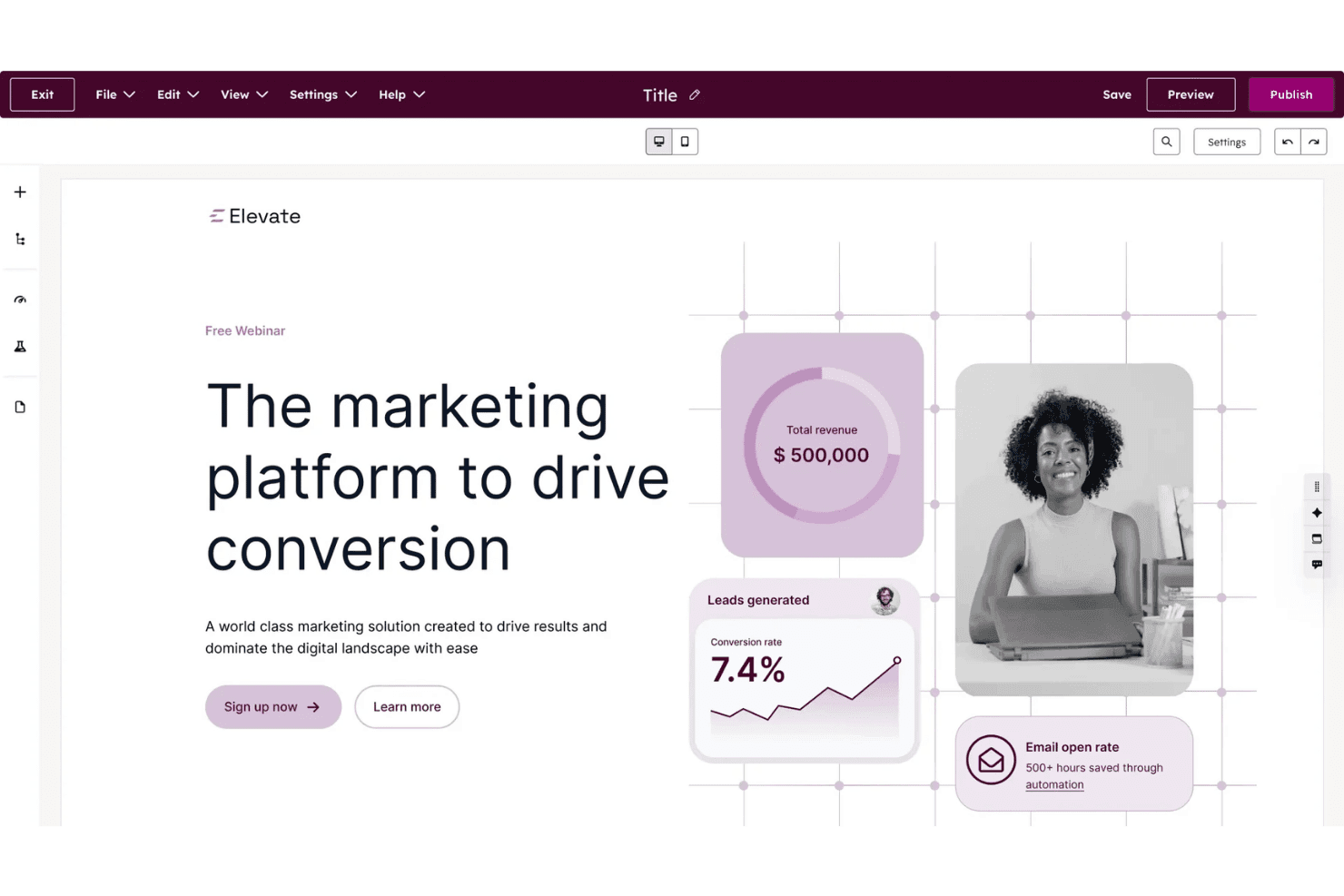
HubSpot Content Hub lets users build and publish landing pages visually. HubSpot Content Hub is a CRM-native content marketing platform that combines website and blog publishing, AI-powered content creation, content scheduling, asset management, and built-in performance analytics across owned channels.
Who Is HubSpot Content Hub Best For?
It's a strong fit for mid-market marketing teams already invested in the HubSpot ecosystem who manage content, contacts, and campaign analytics from a single platform.
Why I Picked HubSpot Content Hub
HubSpot Content Hub earns its spot on my shortlist because it's the only CMS I've used that serves content directly from CRM data. Smart Content rules let my team swap out CTAs, text, and entire page sections based on a contact's lifecycle stage or list membership, without building separate pages. On top of that, contact-create attribution ties every piece of distributed content back to pipeline, which I can see in a reporting dashboard alongside the CRM record.
HubSpot Content Hub Key Features
- Content remix with AI: Instantly repurpose a single piece of content into multiple formats like blog posts, social media updates, or landing pages.
- Memberships and gated content: Enable private content delivery by assigning access groups and member-only blog sections.
- Multisite management: Publish and manage up to 10 root domains from a unified interface.
- Adaptive content testing: Run A/B and adaptive tests with up to five variations to identify top-performing page versions.
HubSpot Content Hub Integrations
HubSpot Content Hub offers native integrations with Salesforce, Google Analytics, Facebook, LinkedIn, Google Ads, Shopify, and WordPress. It connects with Zapier and provides an API for custom integrations.
Pros and Cons
Pros:
- Attribution reporting ties content directly to pipeline
- Smart content adapts to visitor lifecycle stage
- CRM-native contact segmentation for content targeting
Cons:
- Full feature access requires higher-tier plan subscriptions
- Limited native syndication to external publisher networks
Learn more about HubSpot Content Hub: Best for broad media network distribution
- Free demo available
- Pricing upon request
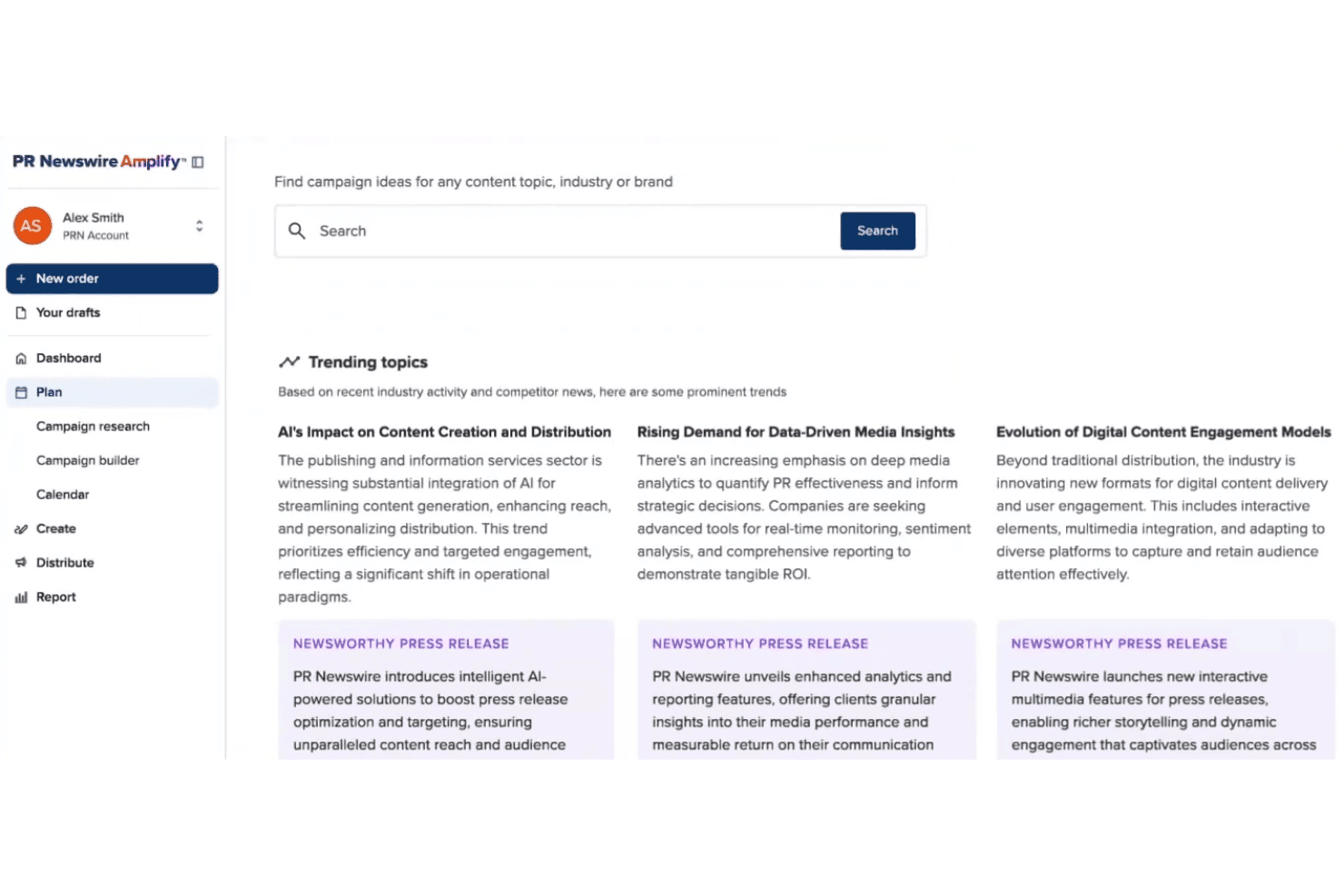
PR Newswire Amplify surfaces trending topics and press release ideas. PR Newswire is a press release distribution and multichannel content amplification platform that pushes branded content across a global network of newsrooms, media outlets, journalist databases, news portals, and financial platforms.
Who Is PR Newswire Best For?
PR and communications teams at mid-size to enterprise organizations that need broad, credible press release distribution across global media networks will get the most out of it.
Why I Picked PR Newswire
PR Newswire earns its spot on my shortlist because no other platform comes close to matching the sheer scale of its distribution network. I'm talking about simultaneous pickup across 4,500 U.S. websites, nearly 3,000 newsrooms including The New York Times and ABC News, and 550+ news portals like LexisNexis and Moody's in a single release. The Multichannel Amplification feature then repurposes that one release into blog posts, social content, and media pitches automatically.
PR Newswire Key Features
- Amplify AI content generation: Create blog posts, media pitches, video snippets, and social content from a single press release using AI-powered tools.
- Campaign performance analytics: Track content reach and engagement across distribution channels with built-in, multi-channel reporting dashboards.
- Industry and geography targeting: Distribute releases to segmented audiences based on industry verticals or specific geographic locations worldwide.
- Editorial review and support: Access 24/7 editorial assistance from experienced editors to ensure message clarity and compliance.
PR Newswire Integrations
Native integrations are not clearly documented. An API is available for custom integrations.
Pros and Cons
Pros:
- Syndication includes major financial and legal databases
- Repurposes one release into multiple content formats
- Unmatched reach across global newsroom networks
Cons:
- Analytics lack deep engagement and conversion data
- Limited audience targeting controls for paid distribution
Learn more about PR Newswire:
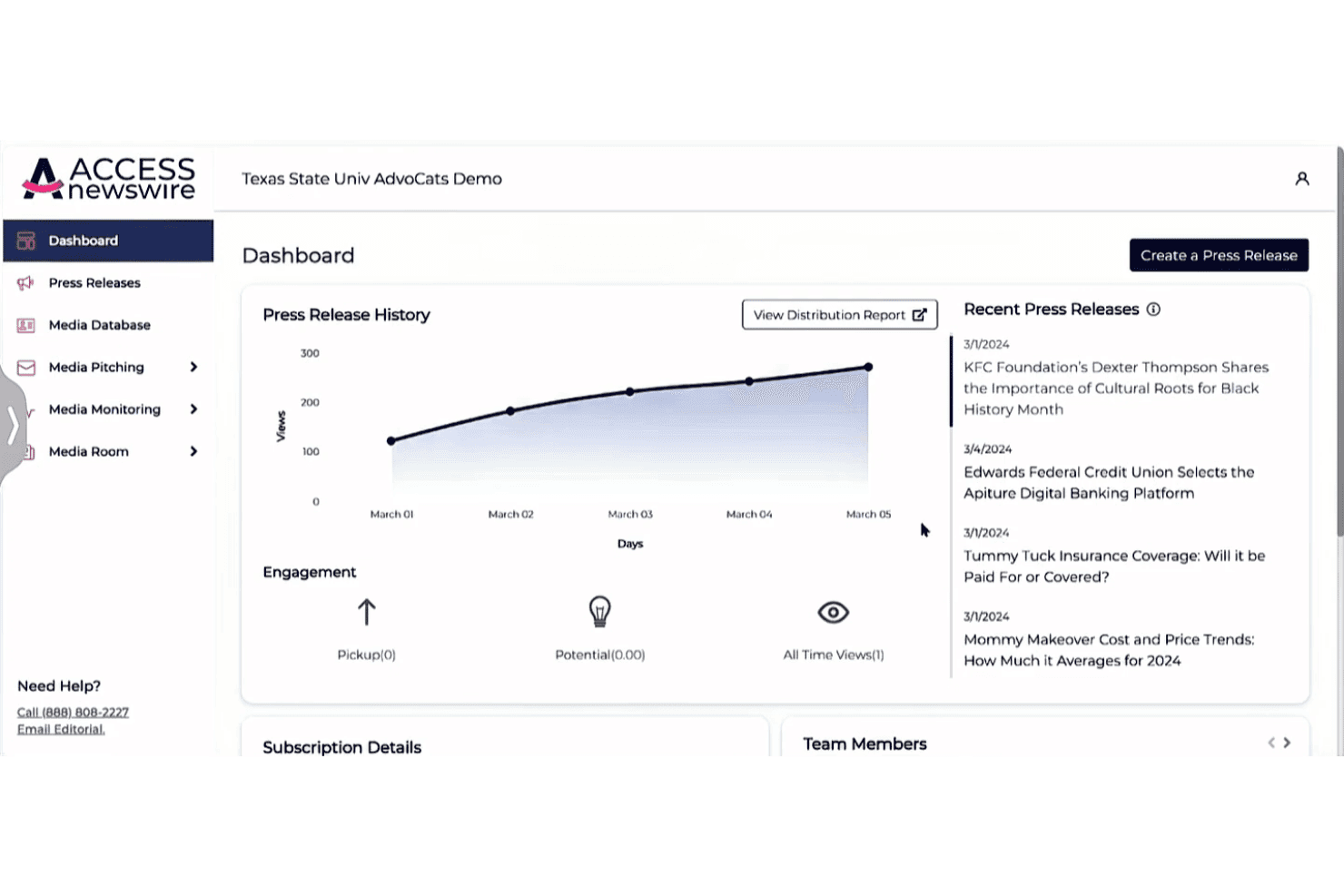
ACCESS Newswire lets users track press release views and engagement over time. ACCESS Newswire is a PR platform that combines press release distribution across 500+ media outlets, media database access, journalist pitching, and AI-powered performance analytics in a single interface.
Who Is ACCESS Newswire Best For?
ACCESS Newswire suits PR and communications teams at small to mid-sized businesses that need reliable press release distribution without enterprise-level pricing.
Why I Picked ACCESS Newswire
I picked ACCESS Newswire as one of the best because it publishes flat, transparent pricing that competitors typically hide behind a sales call. Pay-per-release starts at $475 and includes distribution to AP News, Yahoo Finance, and Bloomberg Terminal with no word-count or multimedia add-on fees. I also like ACCESS Verified, which flags formatting and clarity issues before submission, and the LLM Citation Score, which tracks how retrievable a release is across ChatGPT and Perplexity.
ACCESS Newswire Key Features
- Media database access: Search and segment a regularly updated database of journalists and outlets by beat, location, or industry.
- Media pitching tools: Send personalized pitches to curated journalist lists using AI-guided templates.
- Social monitoring dashboard: Track brand mentions and trending topics across platforms like X, Threads, Facebook, Instagram, and Bluesky.
- Brand sentiment monitoring: Analyze and organize media and social coverage by sentiment to visualize trends and reputational shifts.
ACCESS Newswire Integrations
Native integrations are not clearly documented. An API is available for custom integrations.
Pros and Cons
Pros:
- LLM Citation Score tracks AI search visibility
- ACCESS Verified flags release errors pre-submission
- Wide reach across premium financial news outlets
Cons:
- Limited audience targeting beyond press release syndication
- No native advertising or sponsored content placements
Learn more about ACCESS Newswire: Best for multi-channel publishing
- Free plan available
- From $22/month (billed annually)
Visit WebsiteCustomer Rating:4.7/5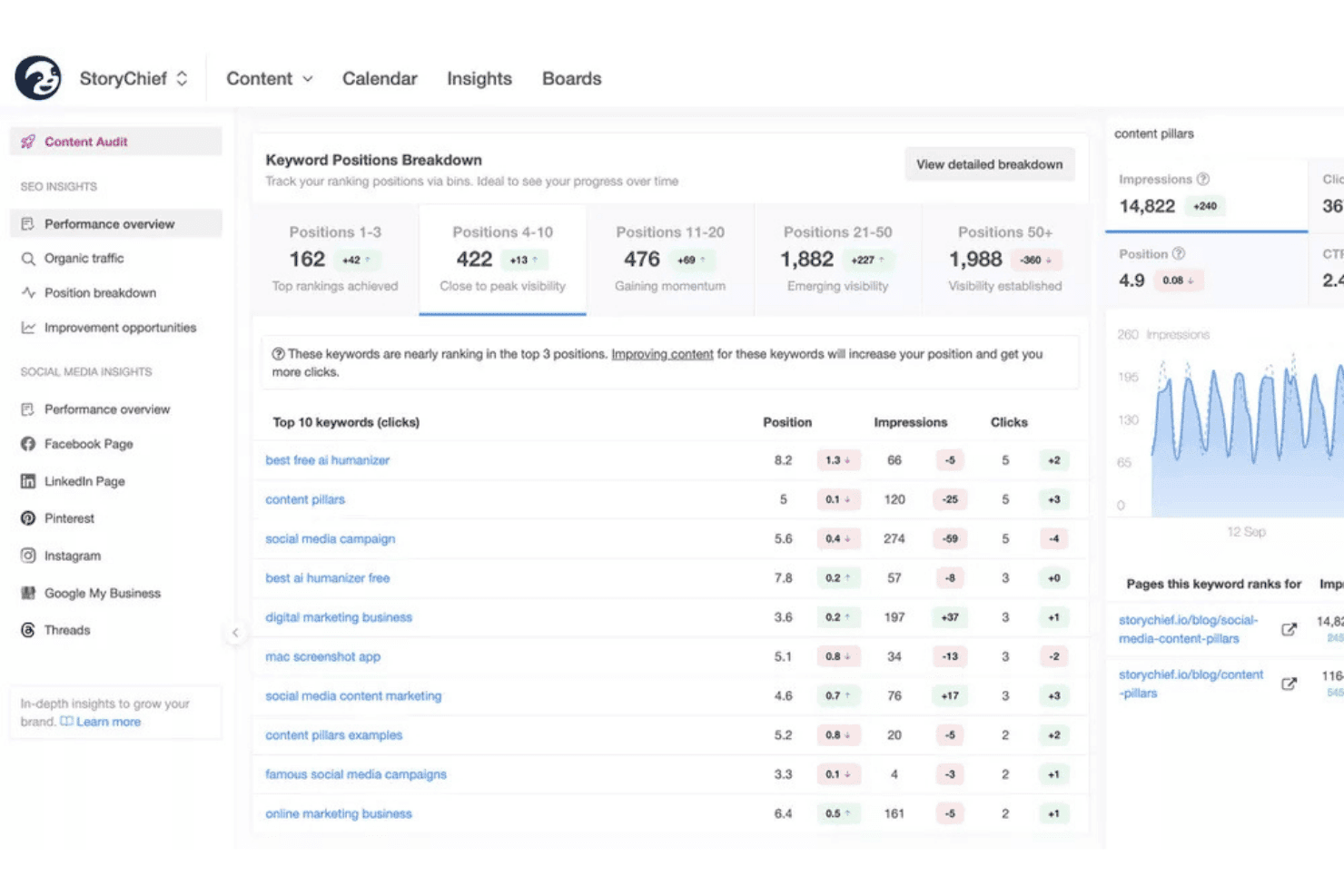
StoryChief tracks keyword rankings and SEO performance in one dashboard. StoryChief is a multi-channel content publishing platform that lets you create, schedule, and distribute content to websites, social networks, syndication hubs, and email channels from a single interface.
Who Is StoryChief Best For?
StoryChief is a strong fit for marketing agencies and in-house content teams managing publishing workflows across multiple channels or clients.
Why I Picked StoryChief
StoryChief earns its spot on my shortlist because of how it handles the "one piece, many destinations" workflow. Once a piece is approved, I can push it as a blog post, LinkedIn thread, newsletter, and carousel without rebuilding it from scratch. Per-channel tailoring lets me override copy, UTMs, and scheduling per destination, so every channel gets the right version. The two-way channel connection means I can update or unpublish across all channels without ever leaving StoryChief.
StoryChief Key Features
- Closed-loop analytics: Track engagement and performance across all distribution channels in one dashboard.
- Employee advocacy broadcasts: Package content into shareable posts for employees to distribute via email, Slack, or Teams.
- Two-way channel connections: Update or unpublish content on any integrated network directly from StoryChief.
- Content calendar: View, plan, and organize scheduled posts and campaigns for all channels in a single timeline.
StoryChief Integrations
StoryChief offers 450+ native integrations, including WordPress, Webflow, Shopify, HubSpot, LinkedIn, Facebook, Instagram, X, Pinterest, Medium, Mailchimp, and Zapier. An API is available for custom integrations.
Pros and Cons
Pros:
- Built-in employee advocacy broadcasting included
- Per-channel copy overrides on every publish
- Pushes content to 450+ channels natively
Cons:
- No paid native ad network support
- Analytics depth trails dedicated distribution platforms
Learn more about StoryChief: Best for scheduling simple social posts
- Free plan available
- From $5/month per channel (billed annually)
Visit WebsiteCustomer Rating:4.4/5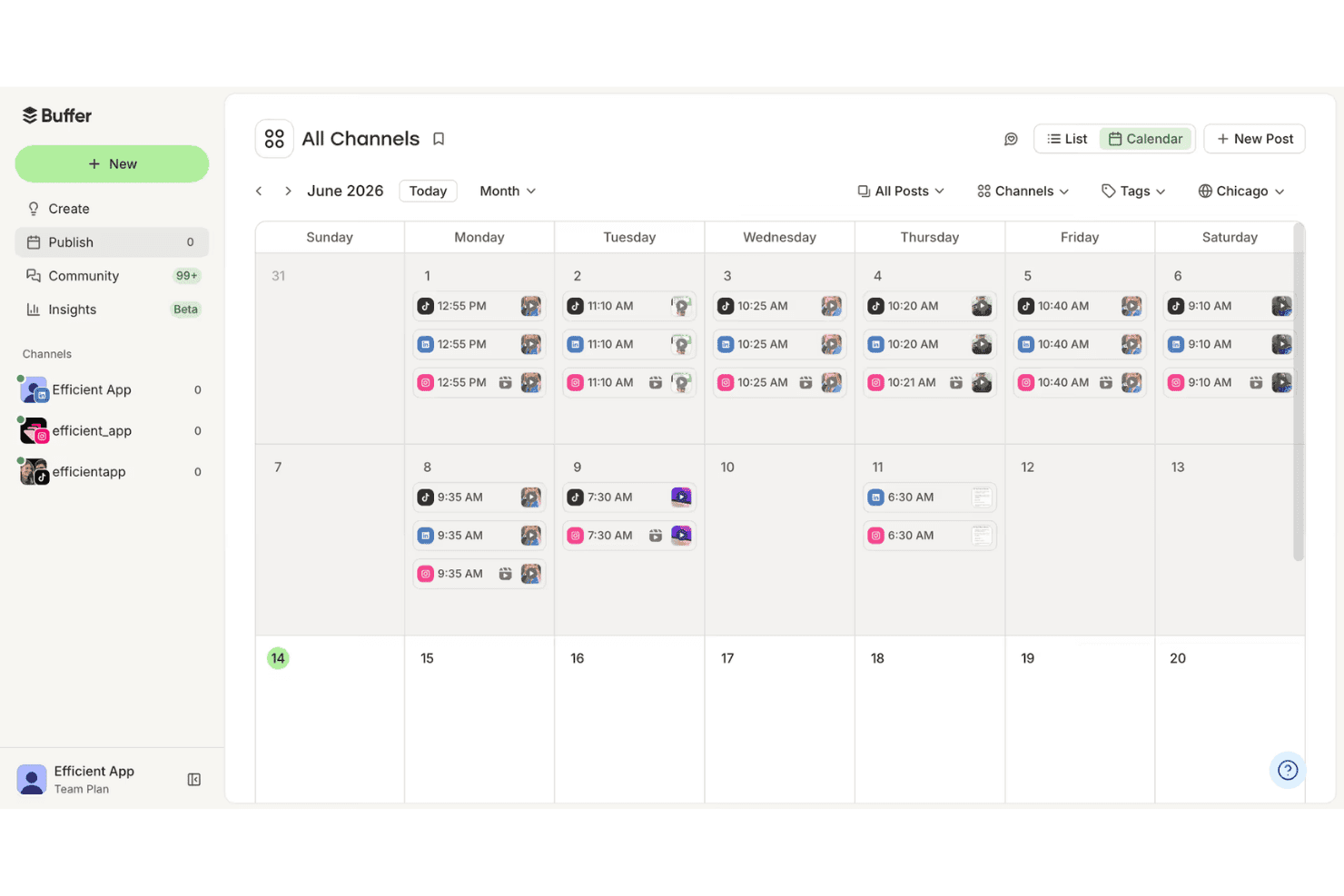
Buffer's calendar view lets users schedule posts across all channels. Buffer is a social media scheduling and publishing platform that lets you plan, queue, and publish organic content across multiple social channels from one centralized dashboard.
Who Is Buffer Best For?
Buffer is a natural fit for small marketing teams and solo creators who manage a handful of social accounts without needing enterprise-level complexity.
Why I Picked Buffer
I picked Buffer as one of the best because its queue-based scheduling system is one of the cleanest I've used across any scheduling tool. My team uses it to line up posts across up to 11 social channels at once, including newer platforms like Bluesky and Threads, without rebuilding content from scratch for each one. Channel groups let me publish to multiple accounts in a single action, and first-comment scheduling keeps captions clean while automatically dropping hashtags into the first comment.
Buffer Key Features
- Engagement inbox: Manage and reply to comments and messages from multiple social channels within a unified dashboard.
- AI Assistant: Generate post ideas, rewrite content, and tailor posts for different platforms directly within the scheduling workflow.
- Link shortening and tracking: Automatically shorten URLs and track link performance within posts across social networks.
- Content calendar: Visualize all scheduled posts for every connected channel in a drag-and-drop calendar view.
Buffer Integrations
Buffer offers native integrations with Canva, Google Drive, Dropbox, OneDrive, and Unsplash. An API is available for custom integrations.
Pros and Cons
Pros:
- First comment scheduling keeps caption formatting clean
- Supports newer platforms like Threads and Bluesky
- Queue-based scheduling across 11+ social channels
Cons:
- Analytics don't track conversions or content attribution
- No native advertising or paid amplification tools
 Best for enterprise social teams
- 14-day free trial
- From $99/month (billed annually)
Visit WebsiteCustomer Rating:4.1/5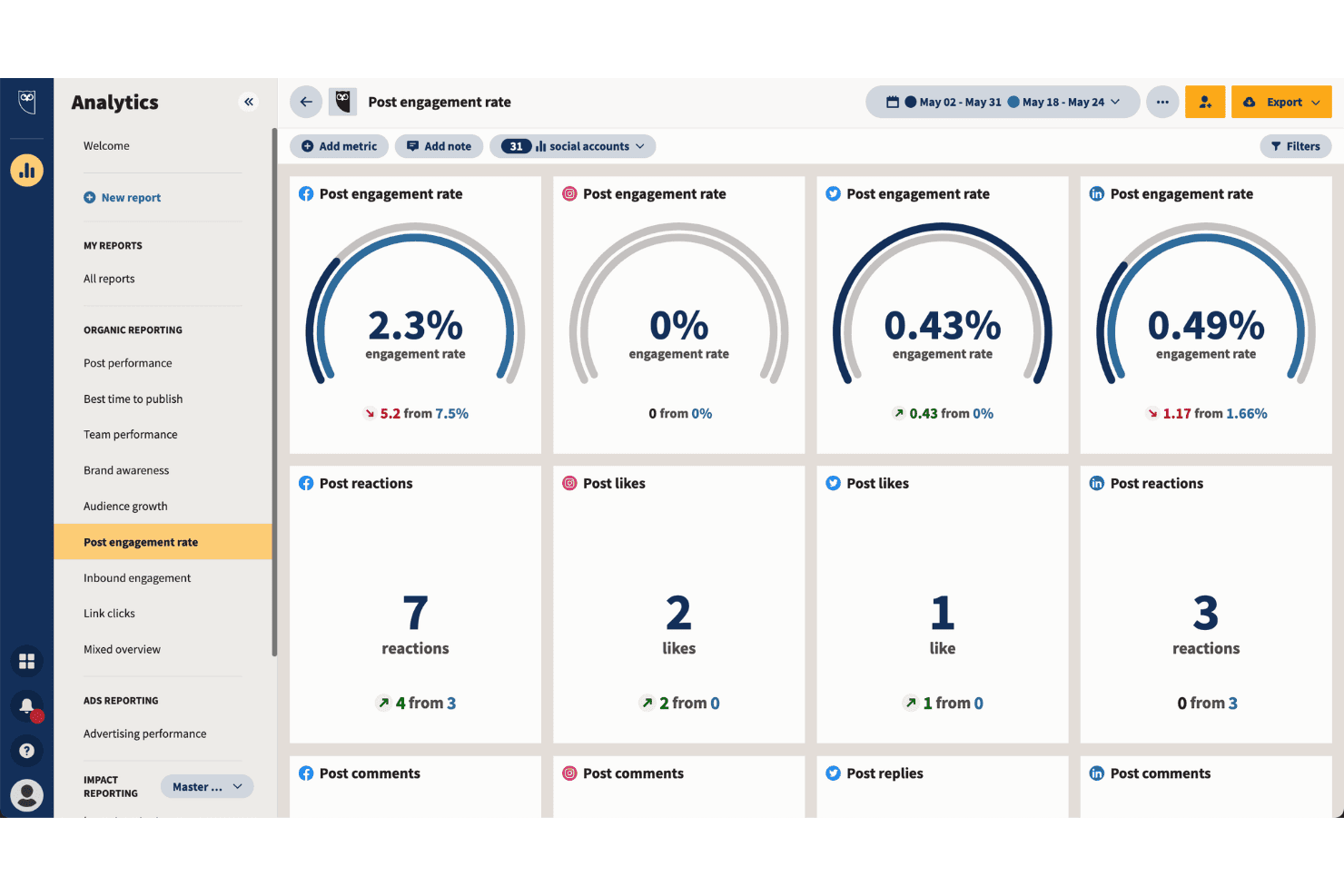
Hootsuite tracks post engagement rates across all social platforms. Hootsuite is a social media management platform that centralizes content scheduling, cross-channel publishing, employee advocacy, paid social advertising, and performance analytics across 10+ social networks from a single dashboard.
Who Is Hootsuite Best For?
Hootsuite is a strong fit for mid-market and enterprise marketing teams that need governance, multi-brand publishing controls, and approval workflows at scale.
Why I Picked Hootsuite
Hootsuite earns its spot on my shortlist because of how well it handles content distribution at enterprise scale. I particularly like Parliament, Hootsuite's employee advocacy module, which lets my team push pre-approved branded content through employees' personal social networks to expand organic reach without additional ad spend. The approval workflow layer on the Advanced plan also means I can enforce brand governance across multiple teams and markets before anything goes live.
Hootsuite Key Features
- Unified content calendar: Plan, schedule, and view posts across multiple social channels in a single drag-and-drop calendar interface.
- AI-powered content assistant: Generate captions, hashtags, and image suggestions with built-in AI tools to optimize social posts.
- Advanced analytics dashboard: Track performance metrics for each channel, including engagement, clicks, impressions, and conversions.
- Social listening integration: Monitor brand mentions, competitor activity, and industry trends across 30+ social networks and over 150 million online sources.
Hootsuite Integrations
Hootsuite offers over 150 native integrations, including Google Drive, Dropbox, Trello, Canva, Bynder, Acquia DAM, Salesforce, Adobe Express, HubSpot, Slack, and Mailchimp, and provides an API for custom integrations.
Pros and Cons
Pros:
- Granular per-post analytics and channel benchmarking
- Built-in Amplify module for employee advocacy
- Bulk scheduling across 10+ social networks
Cons:
- Limited content syndication beyond social channels
- No publisher network or native ad placements
 Best for placements on premium publisher sites
- Not available
- Pricing upon request
Visit WebsiteCustomer Rating:4.1/5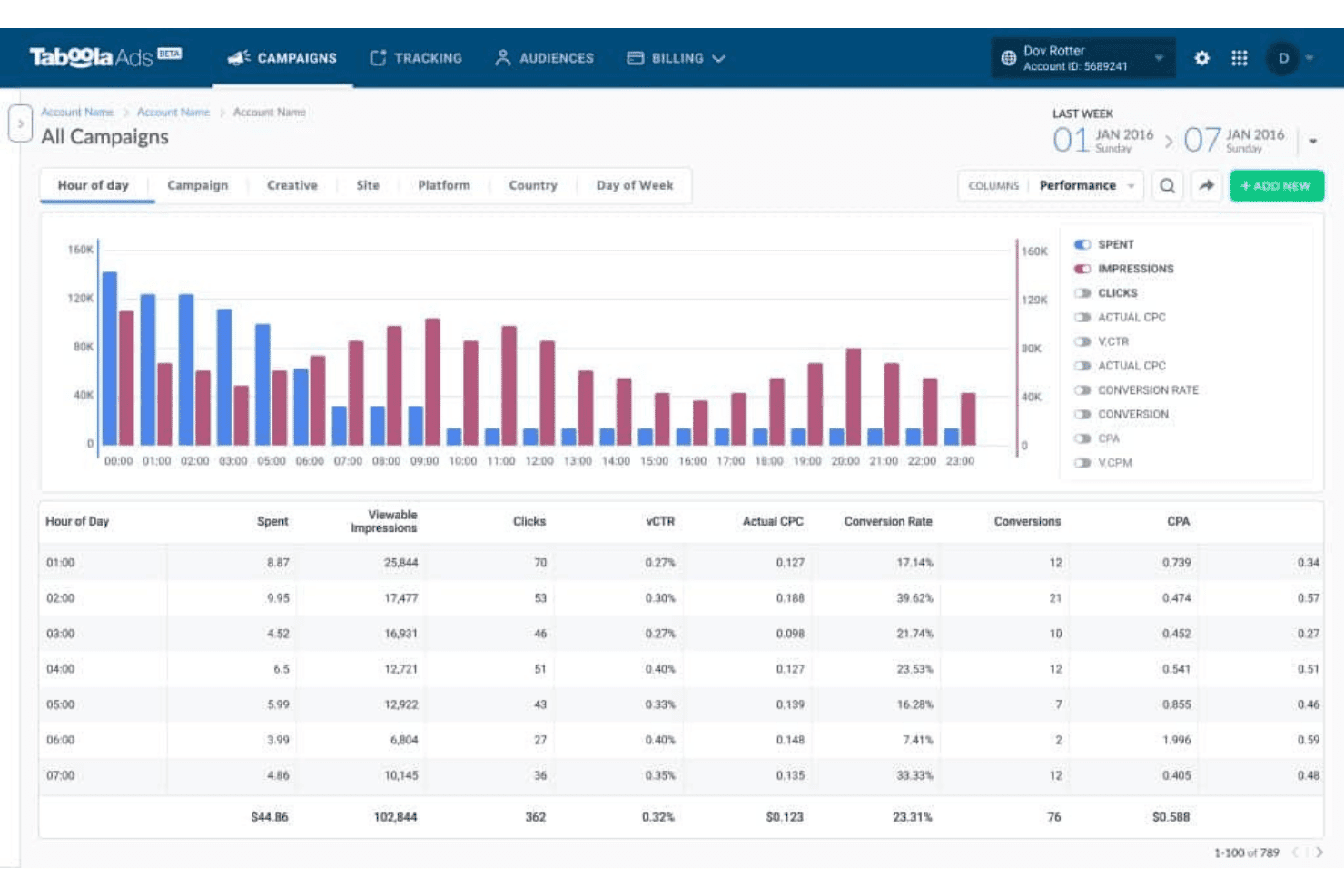
Taboola lets users analyze ad performance by hour of day. Taboola is a paid content distribution and native advertising platform that places sponsored content across a network of premium open-web publishers using AI-driven audience targeting and performance optimization.
Who Is Taboola Best For?
Taboola is a strong fit for performance-focused digital marketing teams at brands and agencies running paid content amplification campaigns across the open web.
Why I Picked Taboola
Taboola earns its spot as one of the best on my shortlist because no other platform gives you native placements across the caliber of publishers it does. Taboola Select puts your sponsored content on sites like Yahoo, Apple News, NBC, and Disney, which represent the top 15% of its publisher network. I also like how Matchmaking AI, trained on 17+ years of reader behavior data, determines which audiences are most likely to engage based on what they're actively reading.
Taboola Key Features
- Real-time analytics dashboard: View impressions, clicks, engagement, and conversions for every campaign across all publisher placements.
- GenAI AdMaker suite: Generate and adapt creative assets using AI-driven tools for headlines and image variations.
- Multi-format ad support: Run native, social display, vertical video, and CTV ad formats from a single advertising interface.
- Brand safety controls: Apply pre-bid site blocking and publisher filtering to control where your content is shown.
Taboola Integrations
Native integrations are not clearly documented. An API is available for custom integrations.
Pros and Cons
Pros:
- Supports native, video, and CTV formats in one campaign
- Matchmaking AI targets readers by active content consumption
- Massive premium publisher network for content placements
Cons:
- Traffic quality varies across lower-tier publisher placements
- Minimum spend commitments limit access for smaller budgets
Learn more about Taboola: 10Best for native ad reach for global audiences
Outbrain
- Free demo available
- Pricing upon request
Visit WebsiteCustomer Rating:3.5/5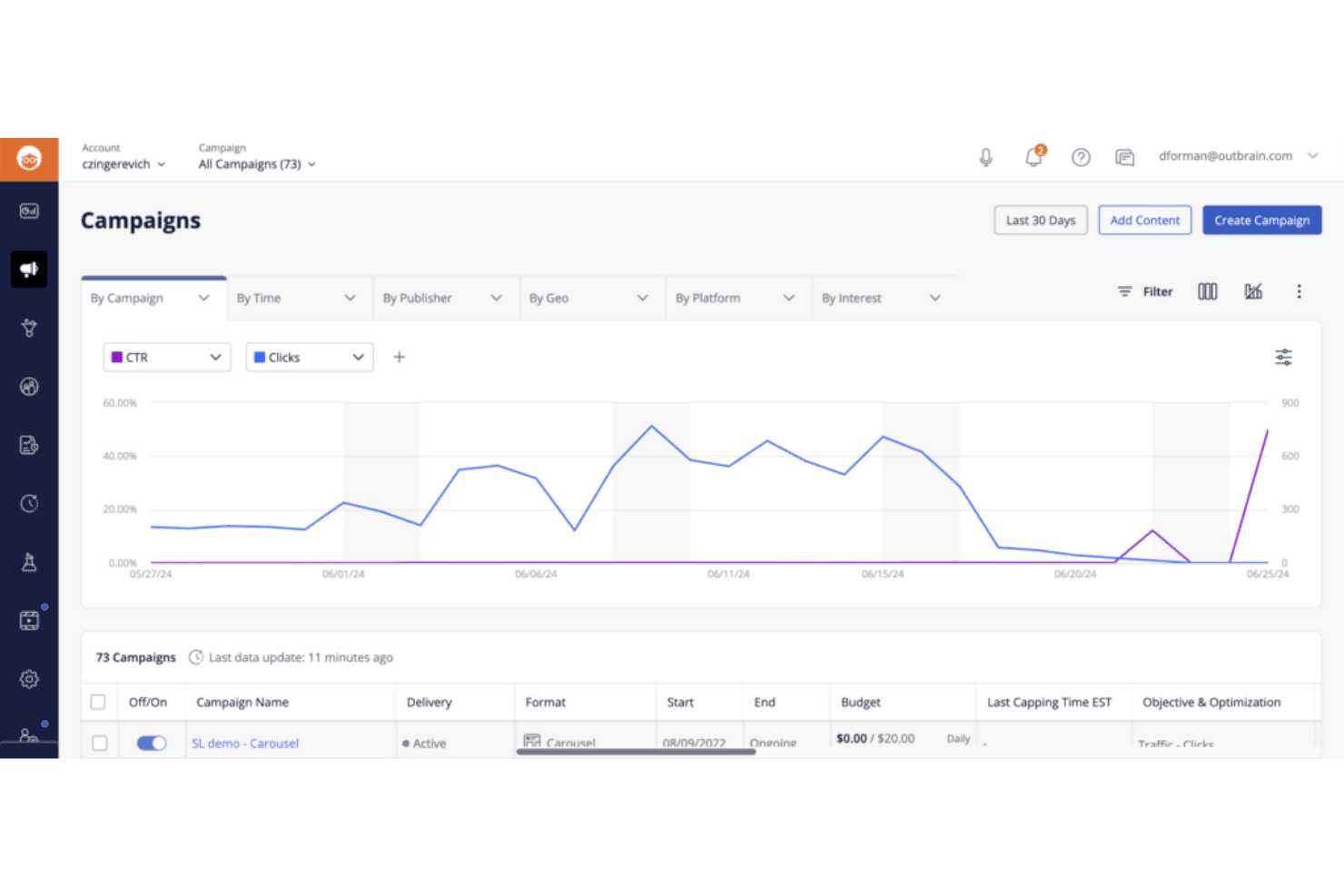
Outbrain lets users monitor campaign CTR and clicks over time. Outbrain is a native advertising and content discovery platform that distributes paid content across a network of premium publishers using interest-based targeting, CPC bidding, and performance optimization tools.
Who Is Outbrain Best For?
Performance-focused digital marketing teams at mid-size to enterprise brands in finance, insurance, and health verticals who need scaled paid content distribution across premium publishers.
Why I Picked Outbrain
Outbrain earns its spot as one of the best on my shortlist because of the sheer scale of its publisher network, spanning sites like CNN, MSN, and The Washington Post across global markets. I particularly like its Interest Graph targeting, which pairs content recommendations with behavioral and contextual signals to reach readers mid-scroll on relevant articles. The lookalike and retargeting tools inside Amplify let my team refine who sees our content without leaving the platform.
Outbrain Key Features
- Publisher allowlists and blocklists: Control where your content appears using detailed publisher inclusion or exclusion lists.
- Campaign pacing controls: Set daily or monthly spend caps with options for accelerated or standard pacing.
- Programmatic buying: Activate Outbrain placements directly through integrated DSPs like The Trade Desk and DV360.
- Advanced conversion tracking: Monitor post-click activity with customizable conversion events for reporting and optimization.
Outbrain Integrations
Outbrain offers native integrations with The Trade Desk, DV360, Google Analytics, Adobe Analytics, and LiveRamp. An API is available for custom integrations.
Pros and Cons
Pros:
- Strong conversion tracking for performance campaigns
- Granular interest-based targeting across global markets
- Massive premium publisher network for content reach
Cons:
- Minimum spend requirements restrict smaller budgets
- Limited organic or non-paid distribution options
Learn more about Outbrain:
Other Content Distribution Platforms
Here are some additional content distribution platforms options that didn’t make it onto my shortlist, but are still worth checking out:
- 11Mailchimp Best for email-based content distribution
- 12KlaviyoBest for unified SMS and email distribution
- 13CoScheduleBest for centralizing content publishing schedules
- 14StackAdaptBest for programmatic native advertising
- 15RevContentBest for high-engagement web native ads
- 16TeadsBest for video-based brand storytelling
- 17PrezlyBest for newsroom-driven story distribution
Related Reviews
How I Evaluate Content Distribution Platforms
I split my evaluation into baseline requirements—like multi-channel reach and targeting—and differentiators like publisher network quality and analytics depth.
Core Functionality (Table Stakes For This List)
When I'm selecting tools for my list, I rank each one on a scale from 0 (does not offer the functionality) to 5 (excels in this area) for each core functionality listed below. I then calculate the tool's total score into a percentage, using 65% as a benchmark to help assess its overall fit for the list.
- Multi-Channel Distribution: I check whether a platform can push content to social networks, native ad networks, publisher sites, and syndication partners from one hub.
- Content Scheduling & Publishing: Queuing posts across channels with calendar views and bulk scheduling matters, especially when coordinating a campaign launch across time zones.
- Audience Targeting: I evaluate whether the platform supports demographic, geographic, interest-based, and contextual targeting to reach the right readers per campaign.
- Performance Analytics: Dashboards that track impressions, clicks, engagement, and conversions per channel help me assess whether a tool supports real ROI reporting.
- Native Ad or Sponsored Content Support: I look for paid amplification formats like recommendation widgets or sponsored placements across major publisher networks.
- Content Asset Management: A centralized library for organizing, tagging, and reusing assets saves time when your team repurposes one piece across multiple formats and channels.
Once I have a list of tools that meet the criteria, I consider what sets each platform apart.
Differentiating Factors (What Sets Vendors Apart)
Here's how I compare and contrast different vendors:
Standout Features
AI-powered audience targeting is a big differentiator. I look for platforms that use machine learning to surface the best-fit segments based on past content performance, not just static demographics. Real-time analytics matter just as much, especially when you need to shift budget mid-campaign based on which channels are actually converting. I also evaluate content personalization engines that serve dynamic variants by visitor behavior or lifecycle stage, which can meaningfully lift engagement across distributed content.
Beyond Features
Integration ecosystem matters a lot here. I check whether a platform connects to your CMS, CRM, and analytics stack so distributed content feeds back into your existing reporting. Pricing models vary widely too—some platforms charge a flat subscription while others run on a CPC or minimum-spend basis, so I evaluate how transparent each vendor is about platform fees versus media costs. Use case alignment is another key factor. A tool built for paid amplification on publisher networks serves a very different need than one designed for organic multi-channel publishing.
How to Choose a Content Distribution Platforms
How do you narrow down your options to a content distribution platform that fits your channels, targeting, and reporting needs without unnecessary complexity or spend?
| If your priority is… | Look for… |
| Multi-channel campaign execution | Pre-built integrations with all target destinations |
| Granular audience targeting | Customizable demographic and interest settings |
| Paid content promotion | Direct access to premium publisher networks |
| Syndication & content repurposing | Bulk asset management and scheduling tools |
| Unified campaign analytics | Cross-channel dashboard with engagement/conversion data |
How to Vet Your Shortlist
- Request an integrations summary: Ask for a current, channel-level integrations list—make sure every planned destination is officially supported.
- Run a segment test: During trial or demo, set up a sample campaign using advanced targeting filters and verify if it reflects your market parameters.
- Confirm analytics compatibility: Ask for a recent dashboard export or walkthrough showing multi-channel engagement and conversion reporting.
- Ask for pricing clarity: Get a written breakdown showing what is included as platform fees versus media spends and minimum commitments.
- Tradeoff—automation vs. publisher reach: Decide if deeper workflow automation or broader access to publisher networks matters more for your campaigns.
What Are Content Distribution Platforms?
Content distribution platforms are specialized systems that let you publish, manage, and promote branded content across multiple external channels from a unified interface. These platforms support multi-channel publishing, audience targeting, scheduling, and performance analytics, making them a central hub for amplifying blog posts, articles, press releases, and sponsored content to reach broader audiences and boost measurable engagement.
Features of Content Distribution Platforms
When selecting content distribution platforms, keep an eye out for the following key features:
- Multi-channel publishing: Publish content to multiple external channels—like social media, publisher networks, and syndication partners—from a single dashboard.
- Content scheduling: Set specific dates and times for content releases, helping you coordinate campaigns and maintain a consistent presence across channels.
- Audience targeting: Reach relevant audiences based on demographics, geography, or interests by configuring targeted distribution parameters for each campaign.
- Performance analytics: Track impressions, clicks, engagement, and conversions with detailed dashboards to measure the impact of each distributed asset.
- Content asset management: Organize, tag, and store content assets in a centralized library, so your team can easily repurpose materials for new campaigns.
- Bulk uploading and distribution: Upload multiple assets at once and assign them to various channels or campaigns to speed up content operations.
- Collaboration tools: Facilitate team communication, content approvals, and task tracking so multiple contributors can efficiently manage campaigns together.
- Reporting export options: Export performance data in multiple formats for sharing or further analysis in your preferred analytics tools.
- User access controls: Set permissions by role, ensuring the right team members can publish, edit, or review distributed content as needed.
Common Content Distribution Platforms AI Features
Beyond the standard content distribution platforms features listed above, many of these solutions are incorporating AI with features like:
- AI-powered audience segmentation: Automatically analyzes historical engagement data to identify and group audience segments most likely to interact with your content.
- Predictive content performance: Uses machine learning to forecast which assets will perform best on specific channels or with certain audiences before you publish.
- Automated content recommendations: Suggests optimal distribution channels, timing, and formats for each piece of content based on real-time data and past campaign outcomes.
- Dynamic personalization: Delivers tailored content variants to individual users by analyzing behavior, preferences, and lifecycle stage in real time.
- Smart budget allocation: Continuously reallocates paid promotion spend across channels and campaigns to maximize reach and conversions based on live performance signals.
Benefits of Content Distribution Platforms
Implementing content distribution platforms provides several benefits for your team and your business. Here are a few you can look forward to:
- Expanded audience reach: Publish and amplify content across multiple external channels to engage wider audiences than owned channels can reach alone.
- Improved targeting efficiency: Use targeting and segmentation features to deliver content to specific demographics, geographies, or interest groups most likely to engage.
- Centralized campaign management: Manage assets, scheduling, and performance analytics from one dashboard, saving time and reducing manual effort.
- Data-driven decision making: Access unified performance reporting that lets you optimize campaigns based on real engagement, conversion, and ROI data.
- Cross-team collaboration: Enable teams to collaborate on publishing, approve content, and share assets within the same secure environment.
- Streamlined paid promotion: Access publisher and native ad networks through a single platform, making it easier to execute and measure sponsored campaigns.
- Consistent brand storytelling: Maintain messaging and visual consistency across channels by organizing and reusing approved assets and templates.
Costs and Pricing
Selecting content distribution platforms requires an understanding of the various pricing models and plans available. Costs vary based on features, team size, add-ons, and more. The table below summarizes common plans, their average prices, and typical features included in content distribution platforms solutions:
Plan Comparison Table for Content Distribution Platforms
| Plan Type | Average Price | Common Features |
|---|---|---|
| Plan TypeFree Plan | Average Price$0 | Common FeaturesBasic multi-channel publishing, limited asset library, standard analytics, and single-user access. |
| Plan TypePersonal Plan | Average Price$25–$75/user/month | Common FeaturesMulti-channel publishing, content scheduling, expanded analytics, limited targeting, and small team collaboration. |
| Plan TypeBusiness Plan | Average Price$100–$350/user/month | Common FeaturesAdvanced targeting, bulk upload, robust performance dashboards, workflow approvals, and integrations with third-party tools. |
| Plan TypeEnterprise Plan | Average Price$400–$2,000+/month | Common FeaturesCustom integrations, premium publisher access, advanced security, team management, and priority support. |
Content Distribution Platforms FAQs
Here are some answers to common questions about content distribution platforms:
How do content distribution platforms differ from social media management tools?
Content distribution platforms focus on publishing and promoting content across both social channels and external publisher networks, while social media tools center on scheduling and community engagement within social networks only.
Can I use content distribution platforms for both paid and organic content?
Yes, most platforms support organic posts and paid content amplification, including sponsored placements across premium publisher networks and native advertising options.
What integrations should I expect from a content distribution platform?
Look for integrations with your CMS, CRM, and analytics stack so you can sync content, measure downstream conversions, and segment audiences using data from multiple sources.
Do content distribution platforms offer performance analytics?
Yes, unified dashboards typically track impressions, clicks, conversions, and engagement metrics across all supported channels, allowing you to compare channel effectiveness.
How do these platforms handle content approvals and compliance?
Many platforms include role-based access controls, customizable approval workflows, and content moderation tools so you can enforce brand, legal, or industry guidelines before content goes live.