

The best digital signage software helps marketing teams deliver real-time updates, boost internal engagement, showcase dynamic data dashboards, and control content across locations with a few clicks. Whether you’re managing office communications, broadcasting KPI boards in sales pods, or running branded content in customer-facing spaces, the right platform turns screens into a strategic communication channel.
Unfortunately, the digital signage software market is bloated with options, and many tools are either overpriced, overly complex, or stuck in 2010-era UX patterns. If you’ve ever wrestled with clunky content uploads, sluggish refresh rates, or hardware compatibility headaches, you know exactly what I’m talking about.
To cut through the noise, I spent 200+ hours testing and comparing the top digital signage platforms. I evaluated the tools for usability, content management flexibility, integration options, and total cost of ownership. Over the past decade, I’ve helped dozens of teams optimize their internal communications and display strategies, and I’ve benchmarked software performance against real-world use cases.
Below, you’ll find a detailed list of the best digital signage software for 2025, so you can skip the trial-and-error phase and find the platform that actually fits your needs.
Why Trust Our Software Recommendations
6,700+
Reviews
20
Industry experts
16+
Evaluation factors
14
Years
Our team has been testing and reviewing software since 2012. As marketing leaders ourselves, we know how difficult—and important—it is to choose the right software.
For this guide, we evaluated tools using hands-on testing and independent research, scoring tools using our selection criteria.
Our reviews reflect our human editorial judgment, not a sales pitch.
Expert reviewers:
 Gui DrusinaCreative Director
- Shriya GhateSenior Marketing Lead
 Amanda JacquesMarketing Ops Leader

Best Digital Signage Software Summary
| Tool | Best For | Trial Info | Price | ||
|---|---|---|---|---|---|
| 1 | Best for on-premise or cloud screen deployment | 14-day free trial | From $13.50/screen/month (billed annually) | Website | |
| 2 | Best for internal communications | Free plan available | From $8/screen/month (billed annually) | Website | |
| 3 | Best for budget-friendly multi-screen display | 7-day free trial available | From $5/screen/month | Website | |
| 4 | Best for small businesses | 30-day free trial + free demo available | From $14/screen/month (billed annually) | Website | |
| 5 | Best for advanced scheduling | Free trial + free demo available | From $8/device/month (billed annually) | Website | |
| 6 | Best for schools and education | Free trial + free demo available | From $11/display/month | Website | |
| 7 | Best for easy digital signage deployment | 14-day free trial + free demo available | From $10/screen/month | Website | |
| 8 | Best for remote team use | 14-day free trial | From $20/screen/month (billed annually) | Website | |
| 9 | Best for workplace digital signage | Free plan + free demo available | Pricing upon request | Website | |
| 10 | Best for Raspberry Pi signage | Free plan available | From $1.67/player/month | Website |


Best Digital Signage Software Reviews
Below are my detailed summaries of the best digital signage software that made it onto my shortlist. My reviews offer a detailed look at the key features, pros & cons, integrations, and ideal use cases of each tool to help you find the best one for you.
 Best for on-premise or cloud screen deployment
- 14-day free trial
- From $13.50/screen/month (billed annually)
Visit WebsiteCustomer Rating:4.9/5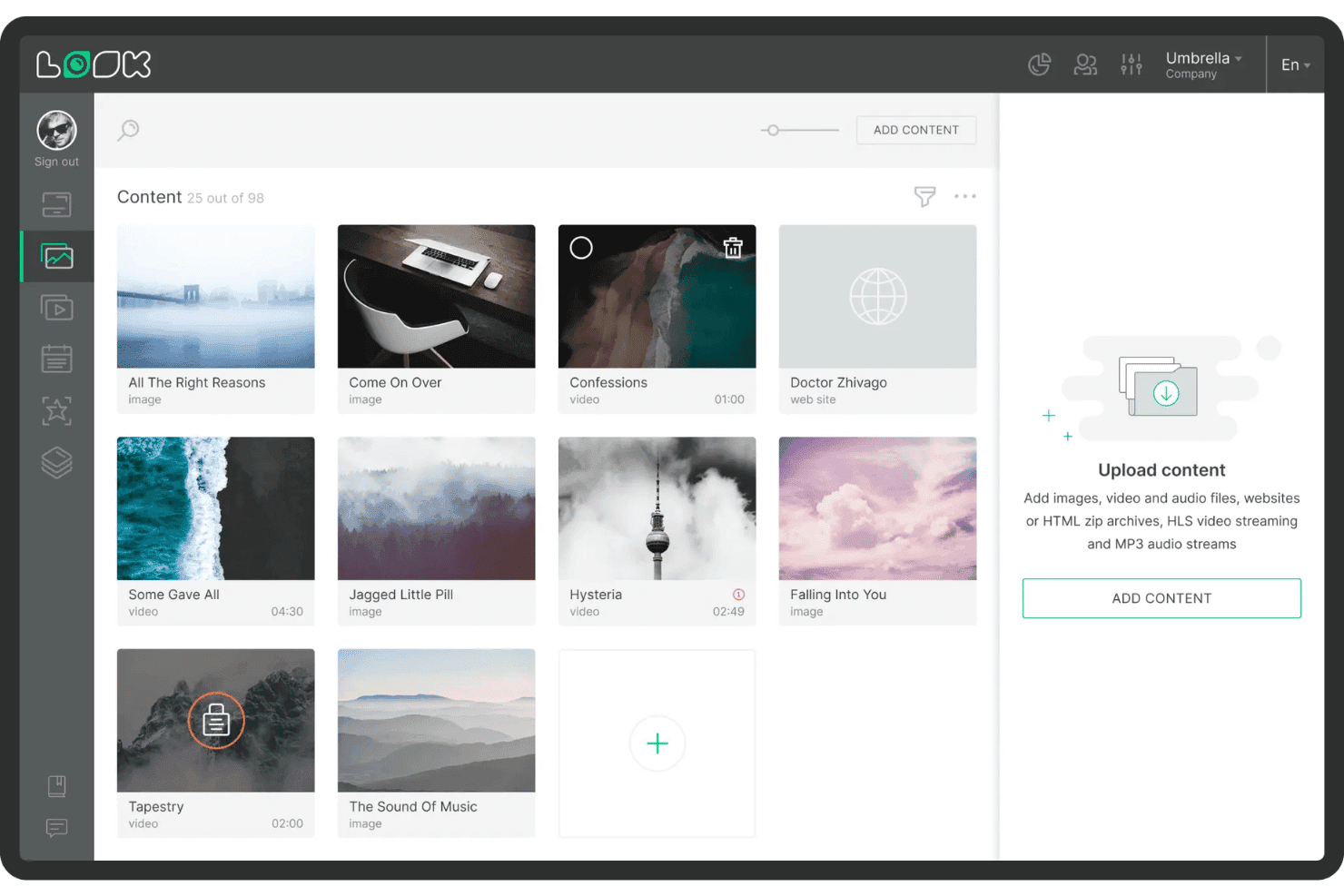
Look Digital Signage lets users organize and upload media content easily. Look Digital Signage is a digital signage platform that combines cloud and on-premise content management, multi-zone screen layouts, playlist scheduling, dynamic data integrations, and an AI-powered content editor across a wide range of devices and operating systems.
Who Is Look Digital Signage Best For?
Look Digital Signage is a strong fit for organizations that need the flexibility to choose between cloud and on-premise deployment without sacrificing content management capabilities.
Why I Picked Look Digital Signage
Look Digital Signage earns its spot on my shortlist because it's one of the few platforms that gives you a genuine choice between cloud and on-premise deployment without cutting features. I particularly like that the on-premise option comes as a one-time lifetime license, which is a real differentiator for security-sensitive environments where cloud hosting isn't an option. The AI Wizard for generating headlines and images directly inside the CMS, combined with daypart scheduling and offline content caching, makes it a strong fit for distributed screen networks that need to stay live no matter what.
Look Digital Signage Key Features
- Multi-zone layout editor: Design screens that display multiple content types simultaneously, such as a promo video, news ticker, and weather widget, in separate zones on a single display.
- Role-based user permissions: Assign Administrator, Moderator, or Guest roles to control who can edit, approve, or view content across your screen network.
- AI Wizard: Generate headlines, images, and layouts using built-in generative AI directly inside the CMS editor without switching to an external design tool.
- Proof-of-play reporting: Access playback logs with timestamps, device health dashboards, and exportable reports to verify what content ran, when, and on which screens.
Look Digital Signage Integrations
Integrations include Google Reviews, Google Slides, YouTube, Instagram, Facebook, X, Power BI, RSS feeds, Weather, and ESPN.
Pros and Cons
Pros:
- Handles large, multi-location deployments smoothly
- Built-in AI wizard for content creation
- Offers on-premise and cloud deployment options
Cons:
- Limited animated and industry-specific template library
- Lacks advanced audience measurement analytics
Learn more about Look Digital Signage: Best for internal communications
- Free plan available
- From $8/screen/month (billed annually)
Visit WebsiteCustomer Rating:4.8/5
Yodeck's main dashboard provides an overview of active screens, their locations, and recent activities. Yodeck is a cloud-based digital signage software that lets you design, schedule, and manage content across multiple screens from any location.
Why I picked Yodeck: Yodeck's ability to schedule content effectively is a key reason to consider it for your digital signage needs. You can plan out your content weeks or even months in advance, ensuring your screens always show the right message when you need it. This is especially handy for aligning your digital displays with marketing campaigns, seasonal promotions, specific events, or even internal communications. Another standout feature is Yodeck's support for various media formats. It allows you to display images, videos, PDFs, and even live web pages, providing flexibility in the type of content you can showcase.
Standout features & integrations:
Features include remote display management, playlist management, layout and design customization, multimedia support, content scheduling, support for Raspberry Pi, free stock images and videos, live streaming capabilities, weather and news tickers, data dashboards, interactive kiosk mode, and role-based user permissions.
Integrations include Canva, Tableau, Zoom, Outlook Calendar, Google Calendar, Microsoft Planner, Asana, Google Analytics, Trello, Xero, Power Bi, and Facebook User Feed.
Pros and Cons
Pros:
- Remote management of multiple screens
- Compatible with Raspberry Pi
- Flexible content scheduling
Cons:
- Initial setup can be confusing for some users
- Advanced scheduling unavailable on basic plan
Learn more about Yodeck: Best for budget-friendly multi-screen display
- 7-day free trial available
- From $5/screen/month
Visit WebsiteCustomer Rating:5/5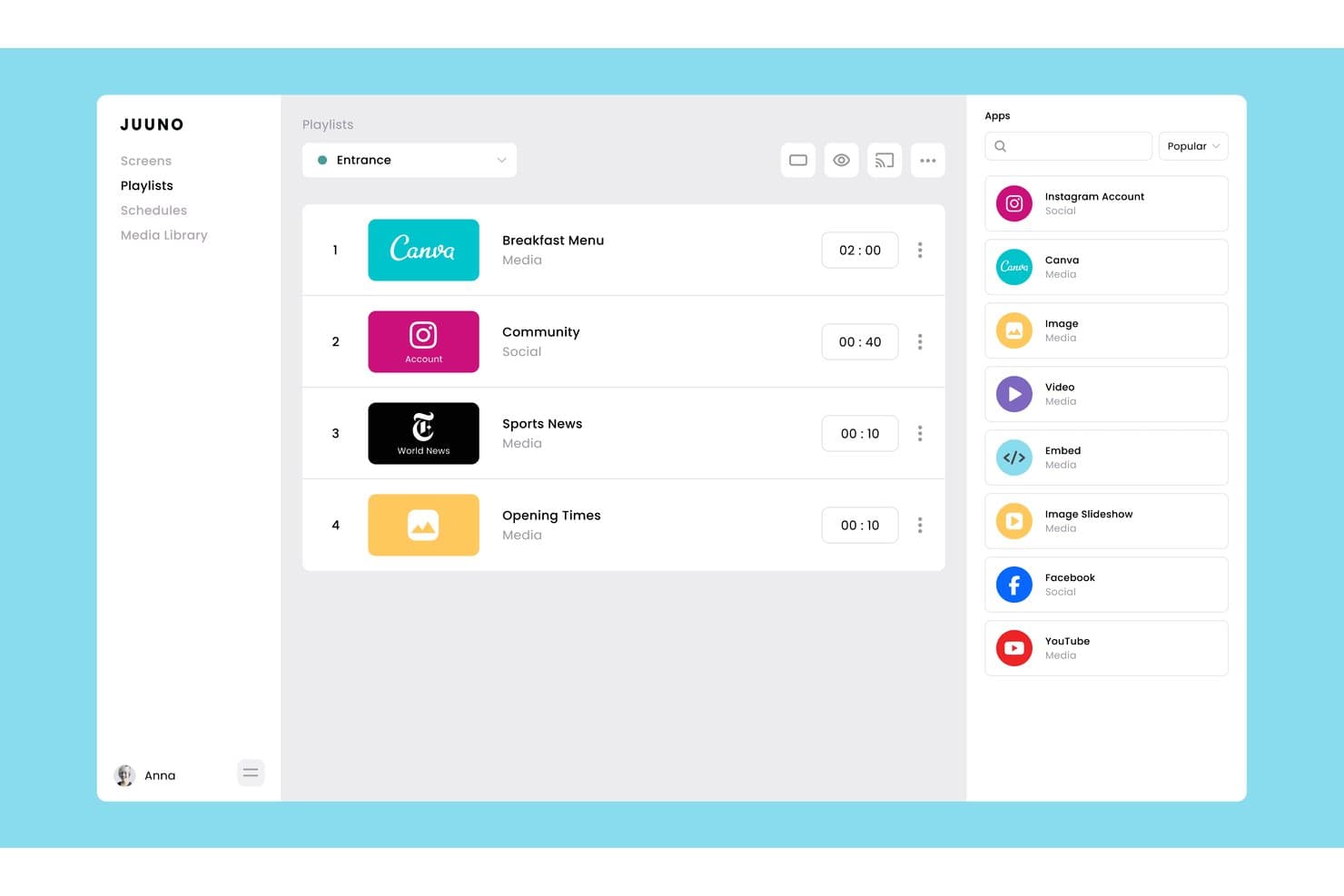
Juuno lets users build and manage playlists with mixed media apps. Juuno is a cloud-based digital signage platform that lets you manage and schedule content across unlimited screens using a browser, Fire Stick, Chromecast, Raspberry Pi, or Android device, with tools for multi-zone layouts, playlist scheduling, and 30+ live content integrations.
Who Is Juuno Best For?
Juuno is a great fit for small to mid-sized businesses and multi-location teams that need affordable, no-fuss digital signage without investing in proprietary hardware.
Why I Picked Juuno
Juuno earns its spot as one of the best on my shortlist because it lets you run content across unlimited screens for as little as $5 per screen per month, without locking you into proprietary hardware. I love that Sequences let head-office teams push immutable brand campaigns to every location while still allowing venues to layer in local content. A 4-digit pairing code gets any Fire Stick, Chromecast, or Raspberry Pi live in minutes, no IT team required.
Juuno Key Features
- Fallback playlist: Automatically plays a designated backup playlist whenever no scheduled content is active on a screen.
- Screen zones: Divides any display into multiple independent zones, each running its own content and playlist simultaneously.
- Proof of Play reporting: Confirms content delivery across screens for compliance and auditing, available on the Growth plan.
- Global Assets library: Stores brand assets in a central library accessible across all workspaces, preventing local teams from removing or replacing them.
Juuno Integrations
Juuno offers 30+ built-in content integrations, including Canva, Instagram, Facebook, X, YouTube, Google Reviews, Google Drive, Microsoft Office, Looker, and Grafana. Its API is coming soon, while Enterprise customers can request custom POS, CMS, HRIS, and internal API integrations.
Pros and Cons
Pros:
- Runs on widely available consumer devices
- Multi-location brand control with global assets
- Simple no-IT setup for screen deployment
Cons:
- No native drag-and-drop content editor
- No audience analytics or campaign reporting
Learn more about Juuno: Best for small businesses
- 30-day free trial + free demo available
- From $14/screen/month (billed annually)
Visit WebsiteCustomer Rating:4.9/5
NoviSign provides easy content control for small businesses. NoviSign is a cloud-based platform designed to help teams create, manage, and display content across multiple screens. The platform supports a variety of media formats and offers drag-and-drop functionality for quick content creation.
Why I picked NoviSign: NoviSign is particularly well-suited for small businesses that need a straightforward yet versatile solution. It offers an intuitive interface that lets you create professional content without technical expertise. You can also schedule content in advance and manage it from anywhere, which is helpful for teams with limited IT resources. Additionally, the software’s offline functionality ensures your displays work even without an internet connection, adding extra reliability for smaller operations.
Standout features & integrations:
Features include drag-and-drop content creation, real-time monitoring of displays, and offline functionality for continuous operation. You can also schedule content ahead of time to ensure your displays are always up to date. Plus, your team can create and display various media formats, including images, videos, and widgets.
Integrations include Chrome OS, Android, Windows, Samsung Tizen, LG WebOS, Facebook, Instagram, Twitter, YouTube, and Google Drive.
Pros and Cons
Pros:
- Reliable offline functionality
- Flexible media format options
- Easy to scale content
Cons:
- Requires stable internet for updates
- Limited customization options
Learn more about NoviSign: Best for advanced scheduling
- Free trial + free demo available
- From $8/device/month (billed annually)
Visit WebsiteCustomer Rating:4.9/5
TelemetryTV enables advanced content scheduling across multiple locations. TelemetryTV is a cloud-based platform designed to help organizations manage and display content on multiple screens. It’s used by teams that need to control digital signage remotely, ensuring the right content is delivered at the right time.
Why I picked TelemetryTV: TelemetryTV’s advanced scheduling features allow your team to plan digital signage content well in advance with precision. You can create playlists and set them to play on specific days or at specific times, which is great for keeping smart TV displays fresh and up to date. The platform also supports dynamic content updates, ensuring that changes are instantly reflected across all screens. For teams managing multiple locations, its centralized control makes it easy to keep everything coordinated without being on-site.
Standout features & integrations:
Features include advanced scheduling options that let your team plan and automate content delivery across multiple screens. You can manage content remotely and make real-time updates when needed. The platform also supports various media types, such as images, videos, and live feeds, to ensure diverse content is easily displayed.
Integrations include Google Drive, Microsoft OneDrive, Dropbox, YouTube, Twitter, Facebook, Instagram, Canva, Slack, and Vimeo.
Pros and Cons
Pros:
- Advanced scheduling for precise timing
- Easy to update content remotely
- Supports large-scale deployments
Cons:
- Some features feel overly complex
- Requires consistent internet connection
Learn more about TelemetryTV: Best for schools and education
- Free trial + free demo available
- From $11/display/month
Visit WebsiteCustomer Rating:4.8/5
Rise Vision offers education-focused templates for schools. Rise Vision is a cloud-based platform that helps users create, schedule, and display content on digital screens. It’s primarily used by organizations that need to deliver timely messages to large groups of people.
Why I picked Rise Vision: Rise Vision is tailored for educational settings, offering templates specifically designed for schools. The software’s scheduling feature ensures content is delivered at the right time, making it a reliable option for keeping students and staff informed. Additionally, with remote management capabilities, you can control multiple displays across different locations without being on-site.
Standout features & integrations:
Features include a large collection of pre-designed templates, automatic content scheduling, and the ability to manage displays remotely from any location. You can also send emergency alerts directly to your screens for fast communication.
Integrations include Google Drive, Microsoft OneDrive, Adobe, Dropbox, Twitter, YouTube, Facebook, Instagram, Canva, and Slack.
Pros and Cons
Pros:
- Accessible from multiple locations
- Customizable content scheduling options
- Simple setup for large networks
Cons:
- Mainly geared towards education sector
- Limited custom template design
Learn more about Rise Vision: Best for easy digital signage deployment
- 14-day free trial + free demo available
- From $10/screen/month
Visit WebsiteCustomer Rating:4.8/5
OptiSigns offers centralized screen management and content deployment. OptiSigns is a cloud-based digital signage platform that lets you manage, schedule, and display content across screens and devices from a single interface, with 140+ app integrations and support for a wide range of hardware.
Who Is OptiSigns Best For?
OptiSigns is a good fit for small to mid-sized businesses in retail, hospitality, and food service that need an affordable way to manage screens across multiple locations.
Why I Picked OptiSigns
I picked OptiSigns as one of the best because it genuinely delivers on the promise of working with any screen. The OptiSync feature is what sets it apart for me: it maps live data directly to on-screen templates, so a restaurant can auto-update a menu based on inventory or a retail team can push real-time pricing without rebuilding slides. I also like the Split Screen app, which lets you run multiple content zones simultaneously on a single display. That's the kind of flexibility most teams need but rarely find without paying enterprise-tier prices.
OptiSigns Key Features
- Content scheduling: Set content to display at specific times of day, on set days, or for special events without manual intervention.
- Offline playback: Download content directly to devices so screens keep running even when internet connectivity drops.
- Multi-user permissions: Add team members with defined roles and approval workflows to control who can edit and publish content.
- Analytics and reporting: View, export, and share real-time playback data to track what content is running across your screens.
OptiSigns Integrations
OptiSigns offers 140+ integrations through its app library, including Canva, YouTube, Instagram, Facebook, Google Slides, Google Sheets, Google Calendar, Power BI, Tableau, and Microsoft PowerPoint. An API is also available for custom integrations.
Pros and Cons
Pros:
- Content stays organized across many locations
- Supports interactive touch screen and kiosks
- Runs natively on smart TVs without players
Cons:
- Content library gets cluttered at scale
- Template design customization lacks depth
Learn more about OptiSigns: Best for remote team use
- 14-day free trial
- From $20/screen/month (billed annually)
Visit WebsiteCustomer Rating:4.5/5
ScreenCloud allows remote teams to manage multiple displays centrally. ScreenCloud is a cloud-based platform that helps organizations manage and display content across multiple screens. It’s designed to be accessible from anywhere, making it easy for teams to control their digital signage remotely.
Why I picked ScreenCloud: ScreenCloud is ideal for remote teams needing centralized control over multiple displays. The software offers a simple interface that allows you to update content from any device with an internet connection. You can also manage and schedule content remotely, ensuring your screens display relevant information even when your team is off-site. Additionally, it provides easy-to-use content creation tools, making it possible to build displays without needing advanced design skills.
Standout features & integrations:
Features include cloud-based management, allowing your team to control screens from anywhere. You can schedule content to play at specific times, ensuring your displays are always relevant. The platform supports a wide range of media formats, including videos, images, and web content, making it flexible for various content needs.
Integrations include Google Drive, Dropbox, Instagram, YouTube, Slack, Microsoft Teams, Twitter, Canva, Facebook, and Trello.
Pros and Cons
Pros:
- Flexible screen layout options
- Supports various media formats
- Easy remote content management
Cons:
- Limited custom design options
- Initial setup can be complex
Learn more about ScreenCloud: Best for workplace digital signage
- Free plan + free demo available
- Pricing upon request

Appspace offers centralized workplace signage and content management. Appspace is a workplace digital signage platform that connects screen content management with employee communications, intranet publishing, and space management tools across a single system.
Who Is Appspace Best For?
Appspace is a strong fit for enterprise internal communications teams that need to manage employee messaging across screens, mobile, and desktop from one place.
Why I Picked Appspace
I picked Appspace as one of the best because it's the only digital signage platform I've seen that genuinely connects screen content to a full employee communications layer. My team can publish a single piece of content to lobby screens, the intranet, and the employee mobile app at once, which is a level of reach most signage tools simply don't offer. I also like the geographic hierarchy in the content management system, which lets admins lock content publishing to specific locations, campuses, or buildings.
Appspace Key Features
- Templated content cards: Choose from pre-built templates that pull live data from tools like YouTube, Salesforce, Zoom, and Instagram directly into your signage layouts.
- IPTV broadcasting: Stream live TV to displays across meeting rooms, lobbies, and team areas through integrations with providers like Vbrick and Haivision.
- Premium content library: Subscribe to a curated library of ready-made content tailored to specific workspace types, so screens stay filled without manual updates.
- Touchscreen kiosk support: Turn displays into interactive kiosks for wayfinding, visitor check-in, and space reservation without separate hardware or software.
Appspace Integrations
Appspace offers native integrations across the Microsoft ecosystem (including Microsoft 365 and Microsoft Teams), as well as Slack, Google Workspace, Cisco Webex, and more. It also provides APIs for pulling data from intranets, wikis, and other custom sources.
Pros and Cons
Pros:
- Publishes once to signage, Slack, and Teams
- Displays auto-resize content to fit any screen
- Playlist folders speed multi-screen content deployment
Cons:
- License model caps admin users, not endpoints
- Signage screens occasionally fall out of sync
Learn more about Appspace:

piSignage offers centralized management for digital signage players. piSignage is a digital signage platform built around Raspberry Pi, Chromebox, and Linux players, offering cloud-based and on-premise server options for managing playlists, schedules, and screen groups.
Who Is piSignage Best For?
piSignage is a strong fit for IT teams and technically inclined operators who want to build cost-effective signage networks on Raspberry Pi or Linux hardware.
Why I Picked piSignage
I've included piSignage in my top picks because it's one of the only digital signage platforms built specifically for Raspberry Pi, Chromebox, and Linux players, which means you're not locked into proprietary hardware. I like that piSignage runs a self-hosted server option alongside its cloud product, giving technically minded teams full control over their infrastructure. The offline playback model is also notable: content files download directly to the player, so a screen in a low-connectivity location keeps running without interruption.
piSignage Key Features
- Playlist management: Build and organize playlists by combining images, videos, web pages, and streaming URLs into a single display sequence.
- Screen grouping: Assign multiple players to groups and push playlist updates to all screens in a group at once.
- Layout zones: Divide a screen into multiple regions to display different content types simultaneously, such as a video alongside a ticker feed.
- Asset scheduling: Set start and end dates for individual assets within a playlist so content rotates in and out automatically.
piSignage Integrations
piSignage supports content from Google Slides, Google Sheets, YouTube, Canva, Instagram, Twitter/X, Facebook, and Power BI, and it can pull live updates through Media RSS feeds. A REST API is available for custom integrations, with Swagger-based documentation.
Pros and Cons
Pros:
- Supports multiple display locations
- Flexible cloud or on-premise setup
- Works well with low-cost hardware
Cons:
- Requires stable internet for cloud control
- Limited customization for advanced users
Learn more about piSignage:
Other Digital Signage Software
Here are some additional digital signage software options that didn’t make it onto my shortlist, but are still worth checking out:
- 11ScreenlyBest for Raspberry Pi compatibility
- 12XiboBest for open-source needs
- 13LookBest for global network support
- 14AbleSignBest for easy content updates
- 15NetVisualBest for retail displays
- 16ScalefusionBest for screen-based digital signage
- 17StaffbaseBest for employee communications signage
- 18BuzzblenderBest for AI-powered content curation
- 19SkykitBest for remote team management
- 20Display NOWBest for simple screen control
- 21KorbytBest for interactive signage management
- 22BroadsignBest for large-scale digital networks
- 23ConcertoBest for open-source digital signage
How I Evaluate Digital Signage Software
I split my evaluation into two layers: the baseline features every platform needs—like remote CMS and multi-device support—and the differentiators that make one tool the right fit for your team.
Core Functionality (Table Stakes For This List)
When I'm selecting tools for my list, I rank each one on a scale from 0 (does not offer the functionality) to 5 (excels in this area) for each core functionality listed below. Then, I calculate the tool's total score into a percentage. Each tool needs to achieve a minimum total score of 65% to be considered for inclusion.
- Remote Content Management: I evaluate whether the CMS lets you push updated promotions or menu changes to screens across dozens of locations without touching each device individually.
- Content Scheduling & Playlists: The platform should let you build playlists with dayparting and recurrence rules, like running lunch specials at noon and switching to happy hour promos by 4 PM.
- Multi-Screen & Device Support: I check which operating systems and media players each tool supports, from BrightSign and Samsung Tizen to Android sticks and Chrome OS devices.
- Template & Media Design Tools: Marketing teams need a built-in editor where they can drop in brand assets and create polished layouts without exporting from a separate design tool every time.
- Dynamic Content Integration: I look for the ability to pull in live data like social feeds, weather-triggered promotions, or inventory-linked product highlights directly onto the display.
- Screen Monitoring & Analytics: Each platform should provide device health checks and proof-of-play logs so you can confirm that a campaign actually ran on every screen it was supposed to.
Once I have a list of tools that meet this criteria, I consider what sets each platform apart.
Differentiating Factors (What Sets Vendors Apart)
Here's how I compare and contrast different vendors:
Standout Features
I look for audience measurement capabilities that go beyond proof-of-play, like anonymous viewer counting or dwell time tracking, so you can tie in-store signage to actual campaign performance. AI-powered content creation is another differentiator worth evaluating—some platforms let you generate on-brand visuals and copy within the editor, which speeds up production for teams managing frequent promotions. For brands with flagship or experiential locations, multi-zone and video wall support matters too, since coordinating content across synchronized displays requires layout tools most basic platforms lack.
Beyond Features
How a platform fits into your existing marketing tech stack matters. I check for native integrations with tools like Canva, DAM platforms, and social channels so your team isn't manually exporting and re-uploading assets. Hardware flexibility is another factor I weigh—some vendors lock you into proprietary players, while others let you run content on consumer-grade Android sticks or existing smart displays. For teams managing screens across multiple regions, I also evaluate how well a platform handles location-level permissions, letting corporate control brand guidelines while local marketers customize their own content.
How to Choose Digital Signage Software
It’s easy to get bogged down in long feature lists and complex pricing structures. To help you stay focused as you work through your unique software selection process, here’s a checklist of factors to keep in mind:
| Factor | What to Consider |
| Scalability | Will it grow with your company’s needs? |
| Integrations | Does it connect with your existing tools? |
| Customizability | Can you tailor it to fit your branding and content? |
| Ease of Use | How quickly can your team learn to use it? |
| Budget | Does it fit within your company’s financial plan? |
| Security Safeguards | Does it meet your data protection requirements? |
| Content Management | How simple is it to manage and update content? |
| Support | Is reliable customer support available when you need it? |
Use this checklist to keep your software selection process organized and focused.
Trends In Digital Signage Software
In my research, I sourced countless product updates, press releases, and release logs from different digital signage software vendors. Here are some of the emerging trends I’m keeping an eye on:
- AI-Driven Content Optimization: Vendors are starting to use AI to analyze viewer behavior and automatically adjust content for better engagement. This helps businesses display more relevant ads and messages based on real-time data.
- Real-Time Data Integration: More platforms are offering the ability to display live data, such as stock prices, news updates, or social media feeds. This keeps content fresh and engaging, particularly for retail or corporate environments.
- Interactive Touchscreen Support: Touchscreen displays are becoming more popular, allowing users to interact directly with the content. Retailers and event venues are using this to create more engaging customer experiences.
- Advanced Analytics: Vendors are including detailed performance analytics, helping users track which content is performing best. This feature is especially useful for businesses looking to measure the impact of their digital signage campaigns.
- Eco-Friendly Hardware: Some platforms are emphasizing energy-efficient hardware solutions, reducing power consumption while maintaining high-quality displays. This trend is appealing to companies focusing on sustainability initiatives.
What Is Digital Signage Software?
Digital signage software is a platform that is used to create, manage, and display content on digital screens across various locations. It works as a central control system for scheduling, remote management, and real-time content updates. Overall, these tools simplify managing multiple screens and ensure the right content reaches the right audience at the right time. They are commonly used by marketers, retail managers, and corporate teams to share information, promote products, or engage audiences.
Features of Digital Signage Software
When selecting digital signage software, keep an eye out for the following key features:
- Content Scheduling: Lets you plan and automate when content appears on your displays to ensure timely messaging.
- Remote Management: Allows you to control and update screens from any location, saving time and resources.
- Multi-Screen Support: Enables you to manage multiple displays from a single dashboard, ideal for businesses with multiple locations.
- Real-Time Updates: Lets you instantly update content across all displays, which is useful for time-sensitive messaging.
- Customizable Layouts: Provides flexibility in designing how your content is displayed, allowing for brand consistency.
- Analytics and Reporting: Tracks the performance of your content, helping you understand what works best for your audience.
- Touchscreen Compatibility: Supports interactive displays, creating more engaging customer experiences.
- Offline Playback: Ensures content continues to display even without an internet connection, maintaining uninterrupted service.
- Content Library: Stores media player assets in one place, making it easy to reuse and organize content for future campaigns.
Benefits of Digital Signage Software
Implementing digital signage software provides several benefits for your team and your business. Here are a few you can look forward to:
- Increased Engagement: Displays dynamic content that grabs attention and keeps viewers engaged.
- Real-Time Communication: Lets you update messages instantly, keeping your content relevant and timely.
- Cost-Effective Marketing: Reduces the need for printed materials, saving money on recurring promotional costs.
- Centralized Management: Enables you to control multiple displays from one place, simplifying operations across locations.
- Enhanced Brand Consistency: Ensures your messaging and visuals remain consistent across all screens.
- Better Customer Experience: Interactive touchscreens and engaging content create a more immersive experience for users.
- Improved Data-Driven Decisions: Provides analytics on content performance, helping you optimize future campaigns.
Costs & Pricing of Digital Signage Software
Selecting digital signage software requires an understanding of the various pricing models and plans available. Costs vary based on features, team size, add-ons, and more. The table below summarizes common plans, their average prices, and typical features included in digital signage software solutions:
Plan Comparison Table for Digital Signage Software
| Plan Type | Average Price | Common Features |
| Free Plan | $0 | Limited screen management, basic templates, limited scheduling, and cloud storage. |
| Personal Plan | $5-$25/user/month | Single screen support, content scheduling, cloud storage, and basic templates. |
| Business Plan | $30-$75/user/month | Multi-screen support, advanced templates, remote management, and real-time updates. |
| Enterprise Plan | $100-$250/user/month | Unlimited screens, advanced analytics, custom branding, and dedicated support. |
A breakdown of digital signage software plan types and their costs and features.
Digital Signage Software FAQs
Here are some answers to common questions about digital signage software:
How secure is digital signage software?
Digital signage software often includes built-in security measures, like encrypted communication and password-protected access to ensure your content remains secure. It’s important to verify that the software complies with your company’s data security protocols. You can also add additional layers of protection by restricting access to certain users.
How customizable are the templates?
Most platforms let you change templates to match your brand’s style—like logos, colors, and fonts. Some offer easy drag-and-drop editors, while others let you upload your own layouts for complete control. This helps keep your messaging and look consistent across all your screens.
What integrations should I look for in digital signage software?
Look for software that connects with tools you already use—like content management systems, analytics, social media, and internal communication platforms. Good integrations save your team time and make it easier to manage and update your content from one place.
What should I know about rolling out digital signage in many offices or countries?
Make sure the tool can handle different locations and time zones, and supports multiple languages if needed. Check that you can manage all screens from one dashboard and that there’s support for remote troubleshooting. Planning content approval processes also helps when teams are spread out.
How do I track the ROI of my digital signage software?
You can track ROI by looking at built-in analytics like screen views, engagement rates, and content performance. Some platforms let you tie campaigns to specific business outcomes, or integrate with sales and marketing reports to see what’s driving results.
What kind of analytics does digital signage software provide?
Digital signage software typically includes analytics on content performance, viewer engagement, and playback duration. You can use this data to track which content resonates best with your audience and make informed decisions for future campaigns. Some platforms also integrate with third-party analytics tools.
Can I update screens remotely, and are there any limits?
Yes, most digital signage software lets you update screens from anywhere with an internet connection. Some lower-tier plans may set limits on the number of devices or scheduling options, so double-check the features before you choose a provider.
What’s Next?
If you're in the process of researching digital signage softwares, connect with a SoftwareSelect advisor for free recommendations.
You fill out a form and have a quick chat where they get into the specifics of your needs. Then you'll get a shortlist of software to review. They'll even support you through the entire buying process, including price negotiations.