

The best cold email marketing software helps you automate outreach, personalize at scale, and track replies so you can generate qualified leads without hours of manual effort.
If you're stuck using tools that limit segmentation, lack deliverability controls, or require tedious workarounds to sync with your CRM, you're not alone. Many platforms claim automation but fall short on usability and integration, wasting time you can’t afford to lose.
I’ve spent 10+ years in marketing and logged over 300 hours testing 20+ cold email tools hands-on. This guide breaks down the best options for marketers who need to scale outbound, without sacrificing precision or brand reputation.
Why Trust Our Software Recommendations
6,700+
Reviews
20
Industry experts
16+
Evaluation factors
14
Years
Our team has been testing and reviewing software since 2012. As marketing leaders ourselves, we know how difficult—and important—it is to choose the right software.
For this guide, we evaluated tools using hands-on testing and independent research, scoring tools using our selection criteria.
Our reviews reflect our human editorial judgment, not a sales pitch.
Expert reviewers:
 Gui DrusinaCreative Director
- Shriya GhateSenior Marketing Lead
 Amanda JacquesMarketing Ops Leader

Cold Email Marketing Software Comparison Table
Use this comparison table to review pricing details for my top cold email marketing software selections.
| Tool | Best For | Trial Info | Price | ||
|---|---|---|---|---|---|
| 1 | Best for outbound prospecting and sequencing in one | Free plan + 14-day free trial + free demo available | From $49/user/month (billed annually) | Website | |
| 2 | Best for rapid setup | Free trial available | From $37.6/month | Website | |
| 3 | Best for list management | 14-day free trial + free demo available | From $12/month | Website | |
| 4 | Best for multilingual campaigns | Free plan available | From $9/month | Website | |
| 5 | Best for sales team collaboration | Free demo available | Pricing upon request | Website | |
| 6 | Best for Gmail integration | Free trial available | From $18/user/month | Website | |
| 7 | Best for integration capabilities | 14-day free trial + free plan + free demo available | From $20/user/month | Website | |
| 8 | Best for LinkedIn outreach | Free consultation available | Pricing upon request | Website | |
| 9 | Best for automated follow-ups | Free demo available | Pricing upon request | Website | |
| 10 | Best for high deliverability rates | 14-day free trial | From $19/month | Website |


Best Cold Email Marketing Software Review
Below are my detailed summaries of the best cold email marketing software that made it onto my shortlist. My reviews offer a detailed look at the key features, pros & cons, integrations, and ideal use cases of each tool to help you find the best one for you.
 Best for outbound prospecting and sequencing in one
- Free plan + 14-day free trial + free demo available
- From $49/user/month (billed annually)
Visit WebsiteCustomer Rating:4.5/5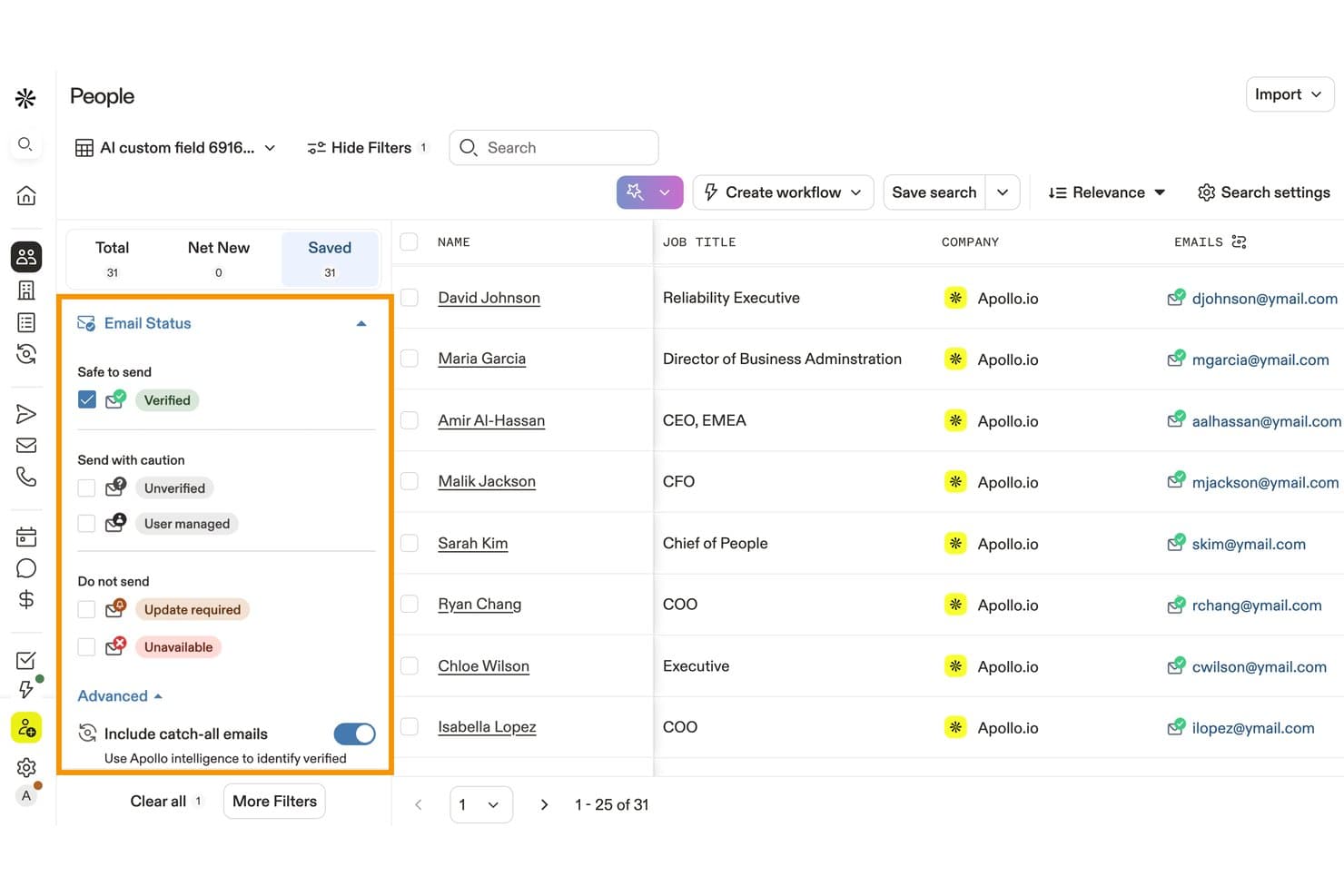
Apollo.io lets users filter contacts by verified email status for safer outreach. Apollo.io is a B2B sales intelligence and cold email platform that combines a 275M+ contact database with multi-step sequencing, AI-powered personalization, multi-channel outreach, and built-in deliverability tools.
Who Is Apollo.io Best For?
Apollo.io is a strong fit for sales development teams that want to prospect, enrich, and sequence outreach from a single platform without stitching together multiple tools.
Why I Picked Apollo.io
Apollo.io earns its spot on my shortlist because it's the only cold email tool where prospecting and sequencing genuinely live in the same place. I love that I can filter Apollo's 275M+ contact database by technographics or Bombora intent signals, then enroll matching contacts into a multi-step sequence without ever leaving the platform. Its AI reply classification automatically sorts incoming responses into categories like "Willing to Meet" or "Out of Office," so my team spends time on hot leads, not inbox triage.
Apollo.io Key Features
- Waterfall enrichment: Apollo checks its internal database first, then queries external sources to fill gaps in contact emails and phone numbers automatically.
- Multi-channel sequence steps: Sequences natively combine email, LinkedIn tasks, phone calls, and manual tasks within a single workflow.
- A/B testing: You can create multiple subject line and body copy variants within a sequence step to identify the best-performing message.
- Bombora intent data: Apollo surfaces contacts showing active buying signals based on third-party intent data, filterable directly within the contact database.
Apollo.io Integrations
Apollo.io offers 50+ marketplace integrations, including native bidirectional connections with Salesforce and HubSpot, plus Clay, Bouncer, Pipedrive, Zoho CRM, and Zapier. Organization plans include API access for custom integrations.
Pros and Cons
Pros:
- Waterfall enrichment reduces bounce rates
- Multi-channel sequencing with AI reply handling
- Largest built-in B2B contact database
Cons:
- No unified master inbox for replies
- Email warmup relies on third-party service
Learn more about Apollo.io:

Instantly lets startups launch and scale cold outreach quickly and easily. Instantly is a cold email marketing software tailored for startups and small businesses that want to launch prospecting campaigns quickly. It simplifies outreach so teams can scale cold emails without complex setup or steep learning curves.
Why I picked Instantly: Its rapid deployment makes it perfect for teams needing to start outreach fast. Pre-configured cold email templates help you launch campaigns in minutes, while automated follow-ups keep leads engaged without manual effort. Engagement tracking gives you clear insights into opens, clicks, and replies, so you can fine-tune your cold email strategy for better results.
Standout features & integrations:
Features include automated follow-ups that keep your leads engaged without extra effort. You can use pre-configured templates to quickly create and launch campaigns. The platform also provides detailed engagement metrics to help you analyze and improve your outreach.
Integrations include Salesforce, HubSpot, Pipedrive, Zoho CRM, Slack, Google Sheets, Zapier, Microsoft Dynamics 365, Mailchimp, and ActiveCampaign.
Pros and Cons
Pros:
- Suitable for small teams
- Automated follow-up sequences
- Quick deployment and setup
Cons:
- Limited scalability for large teams
- Basic reporting features
Learn more about Instantly: Best for list management
- 14-day free trial + free demo available
- From $12/month
Visit WebsiteCustomer Rating:4.2/5
Constant Contact helps small businesses run effective outreach campaigns easily. Constant Contact is a cold email marketing software built for small businesses that want to run effective outreach campaigns. It helps you create, send, and track cold emails with ease, making it simple to connect with new prospects and grow your customer base.
Why I picked Constant Contact: Its user-friendly design makes launching cold email campaigns straightforward. You can personalize cold email templates to reach different prospect groups and set up automated sequences for consistent follow-ups. Detailed reporting tools give you insight into open rates, clicks, and responses, helping you refine your cold outreach strategy over time.
Standout features & integrations:
Features include a drag-and-drop editor that simplifies email creation. You can use A/B testing to optimize your email performance. The platform also offers list segmentation to target specific audience groups effectively.
Integrations include Shopify, WordPress, Salesforce, QuickBooks, Eventbrite, Facebook, Instagram, Google Analytics, WooCommerce, and Zapier.
Pros and Cons
Pros:
- Strong list segmentation
- Detailed reporting tools
- Comprehensive RSVP tracking
Cons:
- Limited automation features
- Limited advanced customization
Learn more about Constant Contact:

Brevo supports sales teams with personalized outreach campaigns. Brevo is a cold email marketing software designed for businesses that need reliable outreach tools to connect with new prospects. It primarily serves sales and marketing teams who rely on personalized cold email campaigns to drive lead generation.
Why I picked Brevo: It excels at managing cold outreach at scale, making it ideal for sales teams targeting large prospect lists. You can automate follow-up sequences to maintain consistent contact without manual effort. Its segmentation tools help ensure your cold emails are relevant, improving open and response rates.
Standout features & integrations:
Features include customizable email templates that let you design campaigns in various languages. The automation feature allows you to schedule and manage multilingual campaigns effortlessly. Language-specific analytics help you track performance across diverse demographics.
Integrations include Google Analytics, Shopify, WordPress, Salesforce, Magento, WooCommerce, PrestaShop, HubSpot, Zapier, and Drupal.
Pros and Cons
Pros:
- Detailed analytics
- Strong automation features
- Supports multiple languages
Cons:
- Some integrations require technical setup
- Basic reporting tools
Learn more about Brevo:

Salesoft streamlines prospecting with efficient outreach and team collaboration. Salesoft is a cold email marketing software built for sales teams that want to improve prospecting efficiency and outreach coordination. It helps streamline cold email campaigns while supporting collaboration across the sales process.
Why I picked Salesoft: Its collaboration-focused design makes it ideal for teams managing large-scale cold email campaigns together. You can coordinate outreach sequences, ensuring prospects aren’t over-contacted or missed. Workflow tools simplify campaign tracking, while real-time analytics highlight engagement rates and team performance so you can refine your cold outreach strategy.
Standout features & integrations:
Features include call tracking, which lets you monitor and analyze phone interactions with prospects. Email tracking helps you gauge the effectiveness of your email outreach. Sales cadences guide your team through structured outreach sequences, ensuring consistent communication.
Integrations include Salesforce, HubSpot, Microsoft Dynamics 365, LinkedIn Sales Navigator, Marketo, Gmail, Outlook, Slack, Google Calendar, and Zoom.
Pros and Cons
Pros:
- Structured sales cadences
- Effective workflow management
- Strong team collaboration tools
Cons:
- High resource demand
- Requires onboarding for full utilization
Learn more about Salesoft:

GMass lets small teams run cold outreach campaigns directly inside Gmail. GMass is a cold email marketing software that works directly inside Gmail, making it a strong choice for individuals and small teams who want to run cold outreach campaigns without leaving their inbox. It turns Gmail into a powerful tool for prospecting and lead generation.
Why I picked GMass: Its Gmail integration makes cold emailing seamless for small teams and individuals. You can manage outreach directly from your inbox without switching platforms. This simplicity makes it a practical choice for running and scaling cold email campaigns.
Standout features & integrations:
Features include mail merge capabilities that allow you to personalize emails using data from Google Sheets. You can track opens and clicks to measure engagement. The platform also supports automatic follow-ups to keep your audience engaged.
Integrations include Google Sheets, Google Workspace, Slack, Zapier, Salesforce, HubSpot, Mailchimp, Pipedrive, Zoho CRM, and Microsoft Dynamics 365.
Pros and Cons
Pros:
- Automatic follow-up capabilities
- Effective tracking features
- Direct Gmail integration
Cons:
- May need manual adjustments for large lists
- Limited to Gmail users
Learn more about GMass: Best for integration capabilities
- 14-day free trial + free plan + free demo available
- From $20/user/month

Unify enhances sales outreach with data-driven insights and lead management. Unify is a cold email marketing software built for growth and sales teams that want to enhance outreach with data-driven insights. It integrates seamlessly with your existing tools, giving you a unified view of leads and making cold outreach smarter and more targeted.
Why I picked Unify: Its integration-first approach helps streamline prospecting and engagement across marketing and sales. Intent signals surface high-quality leads, while automated workflows (“Plays”) save time on repetitive tasks. AI-powered personalization ensures each cold email resonates with prospects, increasing the chances of replies and conversions.
Standout features & integrations:
Features include sequences that facilitate multi-channel outreach, enabling you to engage leads through various platforms. Analytics offer comprehensive reporting to track performance and optimize strategies. The platform's AI agents conduct extensive lead research, providing personalized messaging.
Integrations include Salesforce, HubSpot, Pipedrive, Zoho CRM, Slack, Google Sheets, Zapier, Microsoft Dynamics 365, ActiveCampaign, and Mailchimp.
Pros and Cons
Pros:
- Effective lead identification
- Personalized outreach capabilities
- Comprehensive automation and AI insights
Cons:
- Limited pricing transparency
- Dependence on data accuracy
Learn more about Unify:

Cleverly combines LinkedIn outreach with targeted cold email prospecting. Cleverly is a cold email marketing software that extends its strengths in LinkedIn outreach to email-based prospecting. It’s designed for businesses and professionals who want to combine social selling with targeted cold email campaigns.
Why I picked Cleverly: Its focus on outreach automation makes it a strong fit for scaling cold campaigns. You can automate personalized email sequences just as you would LinkedIn messages, ensuring consistent follow-ups with prospects. Built-in analytics let you measure engagement and refine your messaging, so your outreach gets better over time.
Standout features & integrations:
Features include personalized messaging to tailor interactions with your contacts. Automated follow-ups allow you to engage with leads consistently. Analytics provide insights into the effectiveness of your LinkedIn campaigns.
Integrations include HubSpot, Salesforce, Pipedrive, Zoho CRM, Slack, Google Sheets, Zapier, Microsoft Dynamics 365, Mailchimp, and ActiveCampaign.
Pros and Cons
Pros:
- Consistent follow-up features
- Personalized message capabilities
- Effective LinkedIn automation
Cons:
- Limited customization options
- Requires LinkedIn profile management
Learn more about Cleverly:

Super Send enables scalable outreach to generate leads and book meetings. Super Send is a cold email marketing software built for sales and marketing teams that want to run scalable outreach campaigns. While it supports multiple channels, its cold email features make it especially useful for generating leads and booking meetings.
Why I picked Super Send: Automated follow-ups make it easy to maintain consistent prospect contact, increasing reply rates. You can create multi-step cold email sequences that feel natural and personalized, with dynamic fields that tailor each message. Its campaign analytics show how prospects respond, so you can refine subject lines, timing, and messaging for better cold outreach results.
Standout features & integrations:
Features include multi-channel sequences that automate outreach across email, LinkedIn, and Twitter. Campaign analytics help you monitor and optimize your sequences. Personalized messaging lets you tailor your communication using dynamic fields.
Integrations include Salesforce, HubSpot, Pipedrive, Zoho CRM, Slack, Google Sheets, Zapier, Microsoft Dynamics 365, ActiveCampaign, and Mailchimp.
Pros and Cons
Pros:
- Centralized inbox for replies
- Personalized messaging options
- Effective automated follow-ups
Cons:
- Requires technical setup for some features
- Limited customization options
Learn more about Super Send:

MailRush focuses on scalable outreach with strong email deliverability. MailRush is a cold email marketing software designed for businesses that need reliable outreach to reach new prospects at scale. Its core strength lies in maximizing deliverability, ensuring that cold emails land in inboxes instead of spam folders.
Why I picked MailRush: It stands out for its deliverability-first approach, making it a strong choice for cold outreach campaigns. Features like dedicated IPs protect and build your sender reputation, while built-in email warm-up tools gradually ramp up sending volumes. You also get detailed performance metrics, allowing you to track deliverability, opens, and replies to refine your outreach strategy.
Standout features & integrations:
Features include advanced email tracking, allowing you to monitor open and click rates. The automated follow-up feature ensures no lead gets missed. Customizable templates help you create tailored messages for different audiences.
Integrations include Salesforce, HubSpot, Pipedrive, Zoho CRM, Mailchimp, ActiveCampaign, Slack, Google Sheets, Zapier, and Microsoft Dynamics 365.
Pros and Cons
Pros:
- Effective email warm-up
- Comprehensive email metrics
- Dedicated IP addresses
Cons:
- Basic reporting features
- Steep learning curve
Learn more about MailRush:
Other Cold Email Marketing Software
Here are some additional cold email marketing software options that didn’t make it onto my shortlist, but are still worth checking out:
- 11FlodeskBest for design-focused emails
- 12Mailchimp Best for small businesses
- 13ActiveCampaignBest for customer experience automation
- 14MailerLiteBest for simple email automation
- 15BloomreachBest for ecommerce targeting
- 16Levitate.aiBest for personalized relationship building
How I Evaluate Cold Email Marketing Software
I evaluate these tools in two layers: core must-haves like inbox warm-up and sequence automation, and differentiators like AI reply handling and CRM sync that separate strong tools from the rest.
Core Functionality (Table Stakes For This List)
When I'm selecting tools for my list, I rank each one on a scale from 0 (does not offer the functionality) to 5 (excels in this area) for each core functionality listed below. Then, I calculate the tool's total score into a percentage. Each tool needs to achieve a minimum total score of 65% to be considered for inclusion.
- Automated Email Sequences: I look for multi-step sequences that pause or branch based on recipient behavior, like stopping follow-ups the moment a prospect replies or shifting to a different message track after a link click.
- Personalization at Scale: Each tool should let you go beyond basic merge tags. I check for spintax, conditional content blocks, or AI-generated lines that make a 500-person campaign read like individual emails.
- Deliverability & Warm-Up Tools: Warm-up networks, sending throttles, and authentication guidance all factor in here. A tool that helps you ramp a fresh domain from zero to full volume without landing in spam earns high marks.
- Multi-Inbox Sending: I evaluate whether the platform supports connecting and rotating across multiple sending accounts and domains. Tools like Smartlead and Instantly built their reputations around this capability.
- List Management & Verification: Prospect uploads, segmentation, and bounce prevention matter. I look for built-in or natively integrated email verification so you can clean lists before a single message goes out.
- Campaign Analytics & A/B Testing: Tracking opens, clicks, replies, and bounces at the sequence level is table stakes. I also check for native A/B testing on subject lines or message variants to see which version drives more replies.
Once I have a list of tools that meet this criteria, I consider what sets each platform apart.
Differentiating Factors (What Sets Vendors Apart)
Here's how I compare and contrast different vendors:
Standout Features
A unified inbox is a major differentiator when you're running campaigns across dozens of sending accounts. Without one, reps waste time toggling between mailboxes to find hot replies. I also look for AI reply classification—tools that auto-tag responses as interested, out-of-office, or unsubscribe save hours of manual sorting each week. A built-in lead database is another factor I weigh. Platforms like Apollo.io and Instantly bundle prospecting data into the tool, so you can build a list and launch a sequence without switching apps.
Beyond Features
Pricing structure matters a lot in this space. Some tools charge per user, others per inbox or per contact—and that gap widens fast when you're managing 20+ inboxes for an agency. I also evaluate CRM integrations closely. A two-way sync with HubSpot or Salesforce that pushes reply data back into your pipeline prevents leads from slipping through the cracks. Compliance tooling rounds out my evaluation. Built-in unsubscribe handling, suppression lists, and custom tracking domains all protect your sender reputation long-term.
How to Choose Cold Email Marketing Software
It’s easy to get bogged down in long feature lists and complex pricing structures. To help you stay focused as you work through your unique software selection process, here’s a checklist of factors to keep in mind:
| Factor | What to Consider |
|---|---|
| FactorScalability | What to ConsiderWill the software grow with your business? Check if it supports increasing email volumes without extra costs or performance issues. |
| FactorIntegrations | What to ConsiderDoes it connect with your existing tools? Ensure it integrates with your CRM, analytics, and other marketing platforms to streamline your workflow. |
| FactorCustomizability | What to ConsiderCan you tailor it to fit your needs? Look for flexible templates, workflows, and settings that you can adjust to match your processes and branding. |
| FactorEase of use | What to ConsiderIs it user-friendly for your team? Test the interface and navigation. A steep learning curve can slow down adoption and reduce productivity. |
| FactorImplementation and onboarding | What to ConsiderHow quickly can you get started? Consider the time and resources needed for setup. Check if there's support like tutorials or onboarding sessions to help your team. |
| FactorCost | What to ConsiderIs it within your budget? Compare pricing plans and what each includes. Watch for hidden fees and consider the total cost of ownership over time. |
| FactorSecurity safeguards | What to ConsiderAre your data and emails secure? Look for encryption, access controls, and compliance with data protection regulations to protect sensitive information. |
| FactorSupport availability | What to ConsiderCan you get help when needed? Check the provider's support channels and hours. 24/7 support can be a lifesaver if issues arise outside regular business hours. |
What Is Cold Email Marketing Software?
Cold email marketing software helps businesses reach out to potential customers who haven’t engaged with them before, at scale. Marketing professionals, sales teams, and business development reps typically use these tools to generate leads and nurture relationships. Automation, personalization, and analytics capabilities support efficient outreach and engagement. Overall, these tools enable users to expand their reach and connect with new prospects effectively.
Features of Cold Email Marketing Software
When selecting cold email marketing software, keep an eye out for the following key features:
- Automation: Streamlines the process of sending emails and follow-ups, saving time and ensuring consistent communication with prospects.
- Personalization: Allows you to tailor emails to individual recipients, increasing engagement and improving response rates.
- Analytics: Provides insights into email performance, helping you track open rates, click-throughs, and overall campaign effectiveness.
- Integration capabilities: Connects with other tools like CRMs and analytics platforms, ensuring a smooth workflow across your marketing stack.
- Email tracking: Monitors when emails are opened and links are clicked, providing valuable data for refining your outreach strategy.
- Template library: Offers pre-designed email templates that can be customized to match your brand, making campaign creation quicker and easier.
- List management: Helps organize and segment contact lists, allowing for more targeted and effective email campaigns.
- A/B testing: Enables testing of different email versions to determine which performs better, optimizing your messaging strategy.
- Security safeguards: Ensures that your data and emails are protected with encryption and access controls, maintaining privacy and compliance.
Benefits of Cold Email Marketing Software
Implementing cold email marketing software provides several benefits for your team and your business. Here are a few you can look forward to:
- Increased efficiency: Automation reduces manual tasks, allowing your team to focus on more strategic activities.
- Better targeting: List management and segmentation enable you to send personalized messages to the right audience, improving engagement.
- Improved insights: Analytics offer detailed performance data, helping you refine your strategies and achieve better results.
- Enhanced personalization: Personalization features ensure your emails resonate with recipients, leading to higher response rates.
- Cost-effective outreach: Cold email marketing software provides a budget-friendly way to reach a large audience without significant advertising spend.
- Scalability: The ability to handle increasing email volumes means your outreach can grow alongside your business.
- Data security: Security safeguards protect your sensitive information, ensuring compliance and maintaining trust with your audience.
Costs and Pricing of Cold Email Marketing Software
Selecting cold email marketing software requires an understanding of the various pricing models and plans available. Costs vary based on features, team size, add-ons, and more. The table below summarizes common plans, their average prices, and typical features included in cold email marketing software solutions:
Plan Comparison Table for Cold Email Marketing Software
| Plan Type | Average Price | Common Features |
|---|---|---|
| Plan TypeFree Plan | Average Price$0 | Common FeaturesBasic email sending, limited templates, and basic analytics. |
| Plan TypePersonal Plan | Average Price$5-$25/user/month | Common FeaturesEmail automation, personalization options, and basic support. |
| Plan TypeBusiness Plan | Average Price$30-$75/user/month | Common FeaturesAdvanced analytics, A/B testing, integration capabilities, and enhanced support. |
| Plan TypeEnterprise Plan | Average Price$100+/user/month | Common FeaturesCustom solutions, dedicated account management, priority support, and full integration support. |
Related Reviews
Cold Email Marketing Software FAQs
Here are some answers to common questions about cold email marketing software:
How do I ensure compliance with email regulations?
To comply with regulations like the CAN-SPAM Act, make sure your emails include an unsubscribe link and accurate sender information. Use software that automates compliance by adding these details to every email. Check if your provider offers tools to manage and verify your email lists for better compliance.
What are the benefits of using dedicated domains and IPs?
Dedicated domains and IPs help maintain your sender reputation by isolating your email activities from others. This setup can improve deliverability rates and open rates. If your campaigns face issues, rotating domains and IPs may resolve them without affecting your main domain.
How can I improve my email open rates?
Improving open rates involves a combination of personalization, subject line optimization, and timing. Use data from your software’s analytics to identify what works best for your audience. A/B testing different email elements can also provide insights into what drives engagement.
What should I look for in list management tools?
Effective list management tools should offer segmentation, automatic cleaning, and the ability to import and export contacts easily. These features help you target specific audience segments and maintain an up-to-date, engaged list. Consider how easily you can integrate these tools with your existing CRM systems.
Why is email warm-up important before starting campaigns?
Email warm-up gradually increases your sending volume to build a positive sender reputation. This process helps prevent your emails from being flagged as spam. Begin by sending small batches to engaged contacts, then slowly increase the volume as your reputation improves.
How do analytics help in cold email marketing?
Analytics provide insights into how your emails perform, showing metrics like open rates, click-through rates, and conversions. Understanding these metrics helps you refine your strategies and improve future campaigns. Look for software that offers detailed reporting to track these key performance indicators.