

Está a gerir uma dúzia de prioridades: preparar potenciais clientes, incentivar inscrições, manter os clientes envolvidos — e, de alguma forma, tudo tem de parecer pessoal. Já passei pelo mesmo. Com mais de uma década de experiência como profissional de marketing digital, testei inúmeras ferramentas de software de marketing gota a gota para descobrir o que realmente gera resultados. Utilizando o nosso método de análise comprovado, concentrei-me em plataformas completas que executam discretamente campanhas de marketing gota a gota de elevado desempenho, para que possa concentrar-se na estratégia, não no envio de e-mails. Eis o que merece o seu tempo e o que não merece.
Why Trust Our Software Recommendations
6,700+
Reviews
20
Industry experts
16+
Evaluation factors
14
Years
Our team has been testing and reviewing software since 2012. As marketing leaders ourselves, we know how difficult—and important—it is to choose the right software.
For this guide, we evaluated tools using hands-on testing and independent research, scoring tools using our selection criteria.
Our reviews reflect our human editorial judgment, not a sales pitch.
Expert reviewers:
 Gui DrusinaCreative Director
- Shriya GhateSenior Marketing Lead
 Amanda JacquesMarketing Ops Leader

Tabela de comparação: software de marketing gota a gota
Esta tabela de comparação resume os detalhes de preços das minhas principais escolhas de software de marketing gota a gota.
| Tool | Best For | Trial Info | Price | ||
|---|---|---|---|---|---|
| 1 | Best for outbound B2B drip sequences | Free plan + 14-day free trial + free demo available | From $49/user/month (billed annually) | Website | |
| 2 | Best for user-friendly design | Free plan + 14-day free trial available | From $12/month | Website | |
| 3 | Best for data-driven campaigns | Free plan + free demo available | From $25/month | Website | |
| 4 | Best for email automation | Free plan available | From $149/month (billed annually) | Website | |
| 5 | Best for CRM integration | 14-day free trial available | Pricing upon request | Website | |
| 6 | Best for small businesses | 14-day free trial available | From $33/month (billed annually) | Website | |
| 7 | Best for ecommerce marketing | 14-day free trial + free demo available | From $39/month | Website | |
| 8 | Best for transactional emails | Free plan available | From $9/month | Website | |
| 9 | Best for agency solutions | 14-day free trial | From $97/month | Website | |
| 10 | Best for mobile engagement | 14-day free trial + free demo available | Pricing upon request | Website |


Análise do melhor software de marketing gota a gota
Seguem-se os meus resumos detalhados do melhor software de marketing gota a gota que integrou a minha seleção. As minhas análises apresentam uma visão detalhada das principais funcionalidades, vantagens & desvantagens, integrações e casos de utilização ideais de cada ferramenta, para o ajudar a encontrar a melhor opção para si.
 Best for outbound B2B drip sequences
- Free plan + 14-day free trial + free demo available
- From $49/user/month (billed annually)
Visit WebsiteCustomer Rating:4.5/5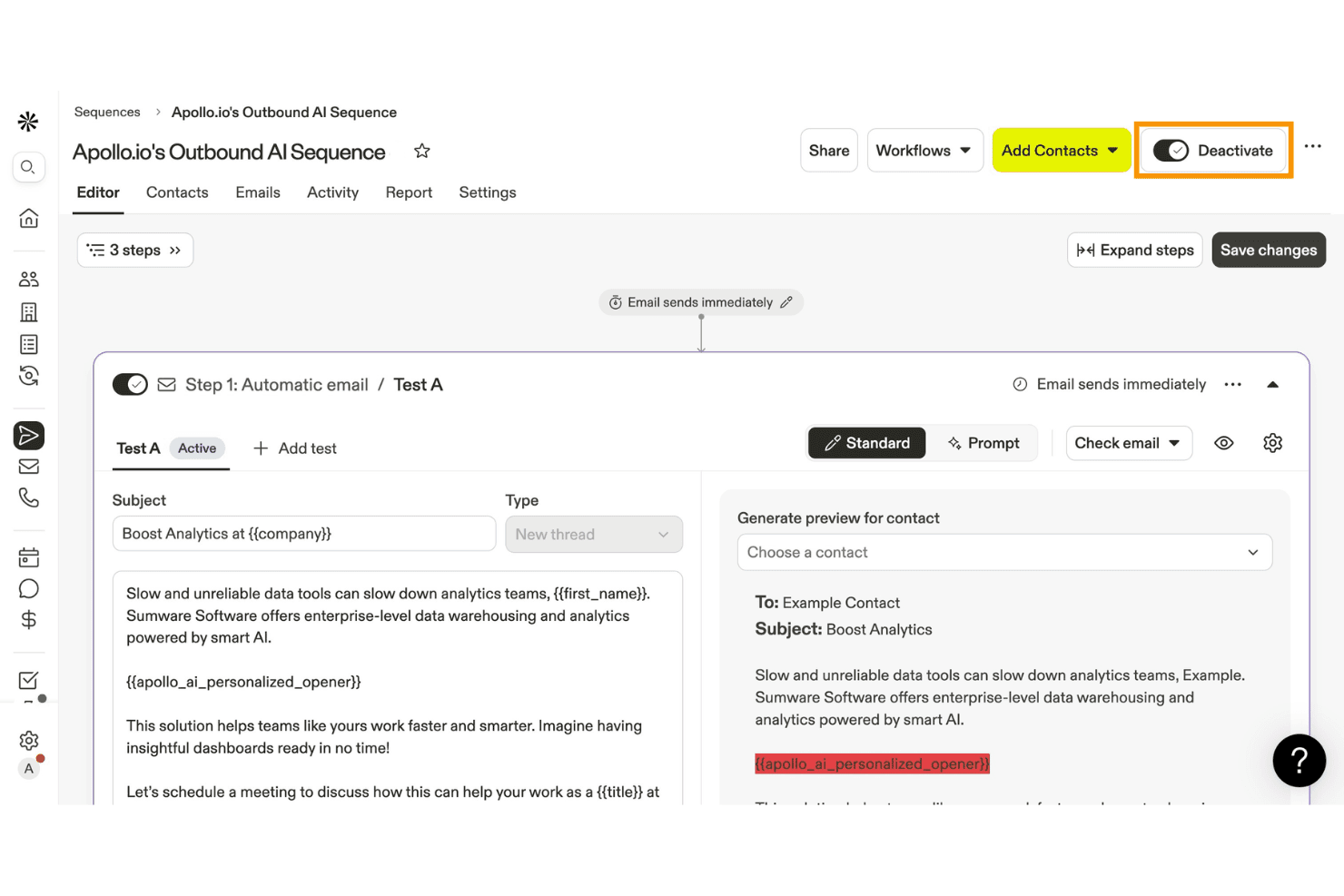
Apollo.io lets users build and activate AI-powered outbound email sequences. Apollo.io is a B2B sales engagement platform that combines a 275M+ contact database with multichannel outreach sequences, AI-assisted email personalization, workflow automation, and built-in deliverability tools.
Who Is Apollo.io Best For?
Apollo.io is a strong fit for B2B sales and growth teams that run outbound prospecting campaigns and need email sequencing, contact data, and CRM sync in one place.
Why I Picked Apollo.io
Apollo.io earns its spot on my shortlist because its Sequences feature is purpose-built for outbound B2B drip, combining multichannel steps (email, phone, and LinkedIn) in a single automated workflow. I particularly like the built-in A/B testing for subject lines and email body copy, which lets you optimize messaging without a separate tool. The AI Assistant also drafts personalized outreach using 240M+ contact data points, so sequences feel tailored rather than templated.
Apollo.io Key Features
- Built-in email deliverability suite: Apollo includes domain warm-up, SPF/DKIM/DMARC setup, deliverability scoring, and inbox placement monitoring to protect sender reputation.
- Visual workflow engine: A drag-and-drop canvas with multi-branch conditional logic lets you build and manage automated outreach workflows across teams.
- Bombora intent data integration: Available on Professional plans and above, this surfaces high-intent accounts so you can prioritize contacts showing active buying signals.
- Sequence A/B testing: Test subject lines and email body copy directly within sequences and use step-level performance data to refine your outreach.
Apollo.io Integrations
Apollo.io offers native integrations with Salesforce, HubSpot, Pipedrive, Microsoft Dynamics 365, Zoho CRM, Gmail, Outlook, Slack, and Google Calendar. It also supports Zapier and Make, while API and webhook access is available on the Organization plan.
Pros and Cons
Pros:
- Built-in deliverability suite with domain warm-up
- AI assistant drafts personalized sales drips
- Multichannel sequences include email, LinkedIn, calls
Cons:
- Lacks e-commerce and opt-in drip features
- Email bounce rates often exceed 15 percent
Learn more about Apollo.io: Best for user-friendly design
- Free plan + 14-day free trial available
- From $12/month
Visit WebsiteCustomer Rating:4.7/5
MailerLite helps SMBs design emails, automate workflows, and grow easily MailerLite is an email automation software designed for small to medium-sized businesses looking to create engaging email campaigns. It offers tools for designing emails, automating workflows, and creating landing pages, focusing on ease of use and accessibility.
Why I picked MailerLite: MailerLite's user-friendly design makes it accessible for teams without technical expertise. The drag-and-drop email editor allows you to create beautiful emails effortlessly. Automation features help you set up workflows to engage your audience consistently. Additionally, landing page creation tools further enhance your marketing strategy by capturing leads effectively.
Standout features & integrations:
Features include a drag-and-drop editor that simplifies email creation, allowing you to focus on content rather than technical details. The platform also offers automation tools that help you set up sequences, ensuring timely communication with your audience. Performance analytics provide insights into campaign success, helping you make informed decisions.
Integrations include Shopify, WordPress, Stripe, WooCommerce, Zapier, Squarespace, Facebook, Slack, Mailchimp, and Google Analytics.
Pros and Cons
Pros:
- Effective automation tools
- Strong customer support
- Intuitive drag-and-drop editor
Cons:
- Limited reporting options
- Limited advanced features
 Best for data-driven campaigns
- Free plan + free demo available
- From $25/month
Visit WebsiteCustomer Rating:4.6/5
Klaviyo helps ecommerce brands send data-driven email and SMS campaigns Klaviyo is a marketing automation platform designed for ecommerce businesses looking to leverage data for personalized customer engagement. It enables users to create targeted email and SMS campaigns based on customer behavior and preferences.
Why I picked Klaviyo: Klaviyo excels in creating data-driven campaigns, making it a top choice for businesses that want to harness customer insights. Features like advanced segmentation for your email list and predictive analytics help you tailor your messages effectively. You can automate personalized email and SMS flows, ensuring timely and relevant communication. Klaviyo's robust reporting tools offer deep insights into campaign performance, helping you refine your email marketing strategy.
Standout features & integrations:
Features include predictive analytics that help forecast customer behavior and improve targeting. The platform provides A/B testing to optimize campaign elements for better engagement. Real-time tracking and reporting give you instant insights into campaign effectiveness.
Integrations include Shopify, WooCommerce, Magento, BigCommerce, Facebook, Instagram, Stripe, PayPal, Salesforce, and Zapier.
Pros and Cons
Pros:
- Real-time tracking and reporting
- Predictive analytics capabilities
- In-depth customer insights
Cons:
- Requires technical understanding
- Can be overwhelming initially
 Best for email automation
- Free plan available
- From $149/month (billed annually)
Visit WebsiteCustomer Rating:4.6/5
Mailmodo boosts engagement with interactive, automated email campaigns Mailmodo is an interactive email marketing platform aimed at businesses looking to boost engagement and conversion rates through email drip campaigns. It primarily serves marketing teams focused on creating interactive and automated email campaigns.
Why I picked Mailmodo: This tool excels in email automation, offering features like interactive AMP emails and AI-driven capabilities that simplify campaign management. You can use the drag-and-drop email editor to design interactive emails without technical skills. The platform's automated email journeys help in maintaining consistent communication with your audience. Additionally, its smart segmentation feature ensures your messages reach the right audience effectively.
Standout features & integrations:
Features include a drag-and-drop email editor, which makes designing emails intuitive. Interactive AMP emails allow recipients to engage directly within their inbox, boosting interaction rates. Automated email journeys help you maintain consistent communication with your target audience.
Integrations include HubSpot, Salesforce, Shopify, Google Analytics, Zapier, Slack, WordPress, Mailchimp, Pabbly, and Webhooks.
Pros and Cons
Pros:
- Smart segmentation
- AI-driven capabilities
- Interactive email designs
Cons:
- Integration setup complexity
- Learning curve for beginners
Learn more about Mailmodo: Best for CRM integration
- 14-day free trial available
- Pricing upon request
Visit WebsiteCustomer Rating:4.4/5
ActiveCampaign boosts customer relationships with email and CRM automation ActiveCampaign is a marketing automation platform that caters to businesses seeking to enhance customer relationships through email marketing and CRM integration. It helps users automate email campaigns and manage customer data effectively.
Why I picked ActiveCampaign: ActiveCampaign excels in CRM integration, providing tools that help you manage customer interactions and data seamlessly. The platform's automation features allow you to create personalized email journeys for your audience. You can use its CRM capabilities to track customer behavior and improve engagement. In my experience, the flexibility of ActiveCampaign's automation tools makes it a valuable asset for businesses looking to optimize their marketing efforts.
Standout features & integrations:
Features include a drag-and-drop email builder that simplifies campaign creation, letting you focus on crafting compelling messages. The platform offers advanced segmentation to target specific customer groups based on their behavior and preferences. Real-time analytics provide insights into campaign performance, helping you make data-driven decisions.
Integrations include Shopify, Salesforce, WordPress, Zendesk, Facebook, Zapier, WooCommerce, Slack, Microsoft Dynamics, and Google Analytics.
Pros and Cons
Pros:
- Advanced customer segmentation
- Flexible automation workflows
- Strong CRM integration
Cons:
- Limited customer support hours
- Steep learning curve
Learn more about ActiveCampaign: 6Best for small businesses
Kit
- 14-day free trial available
- From $33/month (billed annually)
Visit WebsiteCustomer Rating:4.5/5
Kit helps creators automate email campaigns and grow online sales Kit is an email marketing platform designed to help you manage your audience through automated campaigns and personalized content. It offers tools for building landing pages, organizing subscribers, and selling digital products. The platform suits creators and entrepreneurs who want to grow their online presence.
Why I picked Kit: Kit keeps things simple, which is great if you’re not super technical. You can build automated email sequences based on how your subscribers interact with your content. It also lets you create forms and landing pages to help you grow your list. If you're selling digital products or subscriptions, you can do that directly from your account. All of this makes it a solid choice for small teams or solo creators.
Standout features & integrations:
Features include landing page and form builders with editable templates, tools for selling digital products and subscriptions, and analytics to see how your emails perform. You can also use tags to organize your audience and send more relevant messages. These features help you keep your marketing focused and manageable.
Integrations include Podia, Teachable, Squarespace, Zapier, Patreon, Mighty Networks, Leadpages, and Instapage.
Pros and Cons
Pros:
- Easy landing page creation
- Tag system helps organize contacts
- Visual automation builder is beginner-friendly
Cons:
- Not ideal for complex workflows
- Reporting tools are pretty limited
Learn more about Kit: 7Best for ecommerce marketing
Drip
- 14-day free trial + free demo available
- From $39/month
Visit WebsiteCustomer Rating:4.4/5
Drip powers ecommerce with personalized emails and automated workflows Drip is a marketing automation platform tailored for ecommerce businesses seeking to enhance customer engagement and boost sales. It provides tools for personalized email marketing, customer segmentation, and automated workflows.
Why I picked Drip: Drip offers tailored solutions specifically for ecommerce marketing, allowing you to create personalized experiences for your customers. Features like customer segmentation and behavior tracking help you target the right person at the right time with relevant messages. Automated workflows save you time by handling repetitive tasks, ensuring consistent communication. Drip's analytics give you insights into your campaigns, helping you optimize your strategy based on real data.
Standout features & integrations:
Features include advanced segmentation that allows you to target specific customer groups based on behavior and preferences. The platform offers customizable workflows to automate repetitive tasks and enhance efficiency. Detailed analytics provide insights into campaign performance, helping you refine your marketing strategies.
Integrations include Shopify, WooCommerce, Magento, BigCommerce, Facebook, Instagram, Stripe, PayPal, Zapier, and Google Analytics.
Pros and Cons
Pros:
- Customizable automation workflows
- Advanced customer segmentation
- Tailored for ecommerce businesses
Cons:
- Limited template variety
- Steeper learning curve
Learn more about Drip:

Brevo ensures timely customer communication with reliable transactional emails Brevo is a marketing platform designed for businesses needing reliable transactional email services. It serves companies that require efficient email delivery for notifications, confirmations, and alerts, ensuring timely communication with customers.
Why I picked Brevo: Brevo excels in delivering transactional emails, making it ideal for businesses that rely on dependable email communication. The platform offers high deliverability rates, ensuring your emails reach their destination promptly. You can set up automated workflows to handle repetitive tasks, saving your team time. In my experience, Brevo's user-friendly interface simplifies managing email campaigns, even for those with limited technical skills.
Standout features & integrations:
Features include advanced automation tools that help streamline your email processes. Brevo offers detailed analytics, providing insights into email performance and engagement. The platform also supports SMS marketing, allowing you to reach your audience through multiple channels.
Integrations include Shopify, WooCommerce, Magento, PrestaShop, WordPress, Zapier, Salesforce, Microsoft Dynamics, Pipedrive, and Google Analytics.
Pros and Cons
Pros:
- Supports multiple communication channels
- Effective transactional email management
- High email deliverability rates
Cons:
- Occasional setup challenges
- Limited template customization
Learn more about Brevo:

HighLevel helps agencies automate marketing and manage client interactions HighLevel is a comprehensive platform designed for marketing agencies looking to manage client interactions and automate marketing efforts. It provides tools for CRM, email marketing, and SMS automation, catering to the unique needs of agencies.
Why I picked HighLevel: HighLevel offers a tailored solution for agencies, enabling you to manage multiple client accounts efficiently. The platform's CRM features help you track client interactions and maintain strong relationships. Its automation capabilities streamline email and SMS campaigns, saving you time and effort. HighLevel's white-label options allow you to brand the platform as your own, adding value to your service offering.
Standout features & integrations:
Features include a fully customizable dashboard that lets you organize client data and tasks efficiently. The platform offers appointment scheduling tools to manage bookings seamlessly. HighLevel also provides pipeline management features to track sales processes and improve conversion rates.
Integrations include Stripe, QuickBooks, Google My Business, Facebook, Instagram, Shopify, WordPress, Zapier, Twilio, and Mailchimp.
Pros and Cons
Pros:
- Scalable for agency growth
- Comprehensive CRM features
- White-label capabilities
Cons:
- Learning curve for new users
- Limited support hours
Learn more about GoHighLevel:

Braze powers personalized messaging to boost mobile and digital engagement Braze is a customer engagement platform focused on delivering personalized messaging across mobile and other digital channels. It caters to businesses looking to enhance their mobile marketing strategies and improve user engagement.
Why I picked Braze: Braze excels in mobile engagement, offering tools that help you connect with customers through personalized in-app messages and push notifications. The platform's real-time data capabilities allow you to adjust campaigns on the fly. You can create targeted customer journeys that ensure relevant communication at every touchpoint. In my experience, Braze's intuitive interface makes it easy for teams to implement and manage complex marketing strategies effectively.
Standout features & integrations:
Features include advanced segmentation to target users based on behavior and preferences, ensuring your messages reach the right audience. Braze offers real-time analytics, providing insights into campaign performance and customer interactions. The platform also supports multichannel messaging, allowing you to engage customers via email, SMS, and in-app notifications.
Integrations include Salesforce, Segment, Amplitude, Adjust, AppsFlyer, Mixpanel, mParticle, Branch, Google Ads, and Facebook.
Pros and Cons
Pros:
- Multichannel messaging support
- Real-time data processing
- Strong mobile engagement capabilities
Cons:
- Limited support availability
- Occasional data sync issues
Learn more about Braze :
Outro software de marketing gota a gota
Eis algumas opções adicionais de software de marketing gota a gota que não integraram a minha seleção, mas que vale a pena conhecer:
- 11ChetuBest for custom integrations
- 12OmnisendBest for omnichannel marketing
- 13FlodeskBest for creative professionals
- 14FreshmarketerBest for conversion rate optimization
- 15BenchmarkONEBest for small business marketing
How I Evaluate Drip Marketing Software
I think about drip tools in two layers: the baseline every option must hit—automated sequences, behavioral triggers, segmentation—and the differentiators that separate the best from the rest.
Core Functionality (Table Stakes For This List)
When I'm selecting tools for my list, I rank each one on a scale from 0 (does not offer the functionality) to 5 (excels in this area) for each core functionality listed below. Then, I calculate the tool's total score into a percentage. Each tool needs to achieve a minimum total score of 65% to be considered for inclusion.
- Automated Drip Sequences: I evaluate whether a tool can handle multi-step sequences with customizable delays—like spacing a five-email onboarding series across two weeks with different wait times between steps.
- Trigger-Based Workflows: Each tool should let you kick off or advance a drip based on real user actions, such as a signup, a product page visit, or a cart abandonment event.
- Contact Segmentation: I look at how granularly you can slice your audience before enrolling them in a drip—filtering by engagement history, purchase behavior, or lifecycle stage, for example.
- Visual Campaign Builder: A drag-and-drop canvas for mapping drip logic matters here. I check whether you can add conditional branches, like splitting a path based on whether a subscriber clicked a link.
- Personalization & Dynamic Content: Beyond basic merge tags, I evaluate whether the tool supports conditional content blocks—showing different offers to different segments within the same drip email.
- Drip Performance Analytics: Reporting should break down metrics at each step of a sequence, so you can pinpoint exactly where subscribers drop off or convert and adjust your timing or messaging.
Once I have a list of tools that meet the criteria, I consider what sets each platform apart.
Differentiating Factors (What Sets Vendors Apart)
Here's how I compare and contrast different vendors:
Standout Features
Multi-channel drip capabilities matter a lot here. A tool that can weave SMS or push notifications into an email sequence—like sending an SMS reminder after an unopened re-engagement email—gives you more touchpoints without building separate campaigns. I also evaluate lead scoring integration, since it lets you auto-route a prospect to sales once their drip engagement hits a threshold. Deliverability tools round things out; built-in spam testing and domain authentication help protect sender reputation as your volume scales.
Beyond Features
CRM and tech stack integrations are a big deal. I check whether a tool connects natively with your CRM and ecommerce platform so drip triggers can fire from real sales or purchase events, not just form fills. Pricing structure matters too, especially how costs scale as your contact list grows. A plan that works at 5,000 contacts can become prohibitive at 50,000 if the model penalizes growth. I also look at compliance tooling like consent tracking and preference centers, since running drips across regions means handling GDPR, CAN-SPAM, and CASL.
Como escolher software de marketing gota a gota
É fácil ficar atolado em listas extensas de funcionalidades e estruturas de preços complexas. Para o ajudar a manter o foco enquanto percorre o seu processo único de seleção de software, eis uma lista de verificação dos fatores a ter em conta:
| Fator | O que considerar |
| Escalabilidade | Certifique-se de que o software consegue crescer com a sua empresa. Procure soluções capazes de lidar com volumes de e-mails superiores e funcionalidades adicionais à medida que as suas necessidades evoluem. |
| Integrações | Verifique se o software se integra com as ferramentas que já utiliza, como sistemas CRM, plataformas de comércio eletrónico e ferramentas de análise, para simplificar o seu fluxo de trabalho. |
| Personalização | Avalie a possibilidade de personalizar modelos de e-mail, regras de automatização e interfaces de utilizador para se adaptarem aos requisitos únicos da sua marca. |
| Facilidade de utilização | Escolha uma interface intuitiva que a sua equipa consiga utilizar facilmente, minimizando o tempo de formação e maximizando a produtividade desde o primeiro dia. |
| Orçamento | Considere o custo total, incluindo a configuração, as taxas mensais e quaisquer encargos adicionais, para garantir que se enquadra no seu plano financeiro. |
| Medidas de segurança | Procure funcionalidades como encriptação de dados, autenticação de utilizadores e conformidade com regulamentos como o RGPD, para proteger as informações dos seus clientes. |
| Suporte | Avalie a disponibilidade e a qualidade do apoio ao cliente, incluindo chat em direto, apoio telefónico e uma base de conhecimentos abrangente. |
| Análise | Certifique-se de que a plataforma disponibiliza análises detalhadas para acompanhar o desempenho dos e-mails, as taxas de abertura e as conversões, de modo a fundamentar as suas estratégias de marketing. |
O que é software de marketing gota a gota?
O software de marketing gota a gota é uma ferramenta que automatiza o envio de e-mails direcionados para nutrir potenciais clientes e manter relações com os clientes ao longo do tempo.
Os profissionais de marketing, as equipas de vendas e os proprietários de empresas utilizam geralmente estas ferramentas para aumentar o envolvimento e impulsionar as conversões. As funcionalidades de automatização, segmentação e análise ajudam a gerir campanhas de forma eficaz, a personalizar mensagens e a acompanhar o desempenho. De um modo geral, estas ferramentas proporcionam valor ao pouparem tempo e melhorarem as estratégias de comunicação.
Funcionalidades do software de marketing gota a gota
Ao selecionar software de marketing gota a gota, esteja atento às seguintes funcionalidades principais:
- Automação: Automatiza o envio de e-mails com base no comportamento dos utilizadores para manter o envolvimento sem intervenção manual.
- Segmentação: Permite categorizar o seu público em grupos específicos para obter mensagens mais personalizadas.
- Análise: Fornece informações sobre o desempenho das campanhas, ajudando-o a acompanhar eficazmente as taxas de abertura e as conversões.
- Modelos personalizáveis: Disponibiliza modelos de e-mail pré-concebidos que podem ser adaptados ao estilo único da sua marca.
- Capacidades de integração: Liga-se a ferramentas existentes, como sistemas CRM e plataformas de comércio eletrónico, para proporcionar um fluxo de trabalho coeso.
- Suporte multicanal: Permite a comunicação através de vários canais, como e-mail, SMS e redes sociais.
- Personalização: Ajuda a adaptar as mensagens a destinatários individuais, tornando as comunicações mais relevantes e eficazes.
- Interface intuitiva: Garante uma utilização simples, para que a sua equipa possa navegar rapidamente no software e utilizá-lo com facilidade.
- Funcionalidades de segurança: Protege os dados dos clientes através de encriptação e do cumprimento de regulamentos como o RGPD.
- Acompanhamento em tempo real: Monitoriza o progresso das campanhas e as interações dos utilizadores à medida que ocorrem, permitindo efetuar ajustes atempados.
Benefícios do software de marketing automatizado por etapas
A implementação de software de marketing automatizado por etapas proporciona vários benefícios à sua equipa e à sua empresa. Eis alguns dos que pode esperar:
- Maior envolvimento: Ao automatizar mensagens personalizadas, mantém o seu público interessado e ligado sem um esforço manual constante.
- Poupança de tempo: As funcionalidades de automação tratam das tarefas repetitivas, libertando a sua equipa para se concentrar em atividades mais estratégicas.
- Melhor segmentação: A segmentação permite enviar conteúdos relevantes para grupos específicos do público, aumentando as probabilidades de conversão.
- Decisões baseadas em dados: A análise fornece informações sobre o que funciona e o que não funciona, ajudando-o a aperfeiçoar as suas estratégias de marketing.
- Comunicação consistente: Os fluxos de trabalho automatizados garantem que as suas mensagens chegam ao público no momento certo, mantendo um fluxo constante de comunicação.
- Personalização melhorada: As funcionalidades de personalização permitem adaptar as mensagens a destinatários individuais, tornando as interações mais relevantes.
- Maior eficiência: As capacidades de integração simplificam os seus processos ao ligarem-se a ferramentas existentes, reduzindo a necessidade de introdução manual de dados.
Custos e preços do software de marketing automatizado por etapas
A seleção de software de marketing automatizado por etapas exige uma compreensão dos vários modelos de preços e planos disponíveis. Os custos variam consoante as funcionalidades, o tamanho da equipa, os complementos e outros fatores. A tabela abaixo resume os planos comuns, os respetivos preços médios e as funcionalidades normalmente incluídas nas soluções de software de marketing automatizado por etapas:
Tabela de comparação de planos para software de marketing automatizado por etapas
| Tipo de plano | Preço médio | Funcionalidades comuns |
| Plano gratuito | $0 | Automação básica de e-mails, modelos limitados e análise básica. |
| Plano pessoal | $10-$30/ utilizador/mês | Modelos avançados, segmentação básica, agendamento de e-mails e acesso ao suporte. |
| Plano empresarial | $30-$60/ utilizador/mês | Fluxos de trabalho de automação completos, segmentação avançada, integrações e análise. |
| Plano empresarial avançado | $60-$150/ utilizador/mês | Funcionalidades personalizáveis, suporte dedicado, relatórios avançados e acesso à API. |
Perguntas frequentes sobre software de marketing gota a gota
Aqui estão algumas respostas a perguntas comuns sobre software de marketing gota a gota:
Qual é a eficácia das campanhas gota a gota?
As campanhas gota a gota são eficazes porque são altamente direcionadas e personalizadas. Ao enviar mensagens com base em ações específicas dos utilizadores, conseguem normalmente taxas de rejeição mais baixas e um maior envolvimento. Quando alcança o seu público no momento certo com conteúdo relevante, aumenta a probabilidade de conversão.
Quanto custa o marketing por email gota a gota?
Os custos do marketing por email gota a gota variam, mas normalmente situam-se entre $39 e $699 por mês, dependendo do número de subscritores e das funcionalidades incluídas. É importante avaliar as suas necessidades e comparar os planos para encontrar a opção mais adequada ao seu orçamento e objetivos.
Que setores beneficiam mais do marketing gota a gota?
Setores como o comércio eletrónico, o SaaS e o imobiliário beneficiam significativamente do marketing gota a gota. Estes setores dependem de uma comunicação consistente para nutrir leads, converter potenciais clientes e reter clientes, tornando as campanhas gota a gota numa solução ideal para manter o envolvimento.
O marketing gota a gota pode melhorar a retenção de clientes?
O marketing gota a gota pode melhorar a retenção de clientes ao manter um contacto regular com o seu público. Ao fornecer conteúdo e lembretes personalizados, mantém a sua marca presente, incentiva a repetição de compras e constrói relações duradouras com os seus clientes.
Que tipos de emails devo enviar durante o ciclo de vida do cliente?
Comece com um email de boas-vindas para apresentar a sua marca e orientar os novos utilizadores até à sua primeira experiência bem-sucedida. Se alguém consultar os seus produtos ou serviços, mas não comprar, um email sobre o carrinho abandonado pode incentivá-lo a regressar através de um lembrete ou incentivo. Mais tarde, um acompanhamento enviado no momento certo (após uma demonstração, um período de teste ou uma compra) ajuda a manter o impulso, responder a objeções e aprofundar a relação. Automatizar estas mensagens com software de marketing gota a gota garante que chegam no momento perfeito sem aumentar a sua lista de tarefas.
Avaliações de software de marketing relacionadas
Procura software que aumente as taxas de cliques, reduza o número de cancelamentos de subscrições e gere realmente leads? Aqui está uma seleção escolhida para começar: