

O software de gestão de campanhas de marketing é um recurso valioso para qualquer empresa. Com o software adequado, as equipas podem melhorar a eficiência e a colaboração nas campanhas. No entanto, encontrar o software de gestão de campanhas de marketing certo pode ser um desafio, especialmente com tantas opções disponíveis.
Com base na minha experiência com software de marketing, testei e comparei várias das principais soluções de software de gestão de campanhas de marketing disponíveis. Depois, compilei os meus resultados em análises detalhadas para o ajudar a encontrar o melhor software para as suas necessidades.
Why Trust Our Software Recommendations
6,700+
Reviews
20
Industry experts
16+
Evaluation factors
14
Years
Our team has been testing and reviewing software since 2012. As marketing leaders ourselves, we know how difficult—and important—it is to choose the right software.
For this guide, we evaluated tools using hands-on testing and independent research, scoring tools using our selection criteria.
Our reviews reflect our human editorial judgment, not a sales pitch.
Expert reviewers:
 Gui DrusinaCreative Director
- Shriya GhateSenior Marketing Lead
 Amanda JacquesMarketing Ops Leader

Tabela comparativa: software de gestão de campanhas de marketing
Esta tabela comparativa resume os detalhes de preços das minhas principais escolhas de software de gestão de campanhas de marketing.
| Tool | Best For | Trial Info | Price | ||
|---|---|---|---|---|---|
| 1 | Best with advanced call tracking analytics | Free demo available | Pricing upon request | Website | |
| 2 | Best for behavioral-based messaging | Free plan + 14-day trial + demo available | From $100/month | Website | |
| 3 | Best for flexible project management | Free plan + free demo available | From $20/user/month (billed annually) | Website | |
| 4 | Best for team collaboration features | Free plan + trial + demo available | From $10.99/user/month (billed annually) | Website | |
| 5 | Best for centralized marketing data | Free demo available | Pricing upon request | Website | |
| 6 | Best for email marketing automation | 14-day free trial available | Pricing upon request | Website | |
| 7 | Best for cross-channel campaign management | Free demo available | Pricing upon request | Website | |
| 8 | Best for customizable email designs | Free plan + 30-day free trial available | Pricing upon request | Website | |
| 9 | Best for small business email tools | 14-day free trial + free demo available | From $12/month | Website | |
| 10 | Best for enterprise solutions | 30-day free trial | From $25/user/month | Website |


Análises do melhor software de gestão de campanhas de marketing
Abaixo encontrará os meus resumos detalhados do melhor software de gestão de campanhas de marketing incluído na minha seleção. As minhas análises apresentam uma visão detalhada das principais funcionalidades, vantagens e desvantagens, integrações e casos de utilização ideais de cada ferramenta, para o ajudar a encontrar a melhor opção.
 Best with advanced call tracking analytics
- Free demo available
- Pricing upon request
Visit WebsiteCustomer Rating:5/5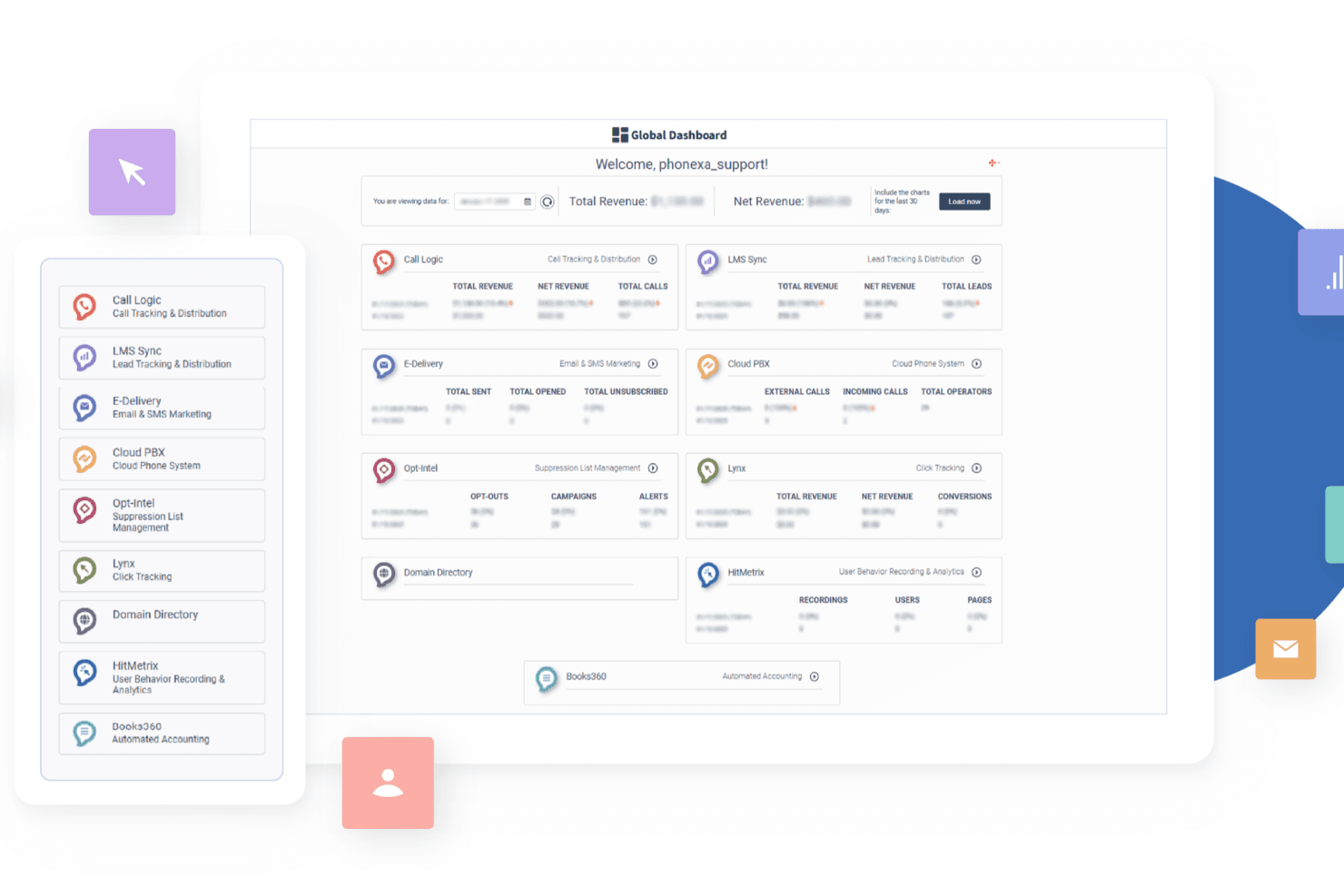
Phonexa’s global dashboard centralizes call tracking, lead distribution, email and SMS marketing, analytics, and revenue reporting so you can manage and optimize campaigns from a single interface. Phonexa is a lead and call tracking, analytics, and distribution platform that brings together email marketing, SMS marketing, accounting, and reporting into one ecosystem for managing traffic and lead flows.
Who Is Phonexa Best For?
Phonexa is a good fit for large-scale marketing teams at lead generation agencies and businesses that rely on inbound calls and multi-channel campaigns.
Why I Picked Phonexa
I picked Phonexa as one of the best because its advanced call tracking analytics let me see exactly which campaigns drive inbound calls and conversions. I use dynamic number insertion and multi-touch attribution to connect calls to specific marketing sources. The reporting dashboard gives my team granular insights into call behavior and campaign ROI.
Phonexa Key Features
- Lead management system: Centralizes, scores, and routes leads from multiple sources in one dashboard.
- Email and SMS marketing: Lets you create, schedule, and track email and SMS campaigns within the platform.
- Built-in fraud prevention: Detects and blocks suspicious leads and traffic using customizable rules.
- API and webhook support: Connects Phonexa with your CRM, analytics, and other marketing tools for data sync.
Phonexa Integrations
Phonexa offers 100+ native integrations across popular marketing technology platforms, including native integrations with HubSpot and Salesforce. An API is available for custom integrations.
Pros and Cons
Pros:
- Reusable templates support recurring call campaigns
- Drop-off reporting pinpoints IVR caller exits
- Call-source attribution clarifies inbound campaign ROI
Cons:
- Complex setup can slow campaign configuration
- No budget tracking or cross-channel campaign calendar
Learn more about Phonexa: Best for behavioral-based messaging
- Free plan + 14-day trial + demo available
- From $100/month
Visit WebsiteCustomer Rating:4.2/5
Customer.io offers a campaigns dashboard where users can monitor personalized email campaigns with metrics like delivered, opened, clicked, and converted rates. Customer.io is a customer engagement platform that combines multi-channel campaign orchestration, automated journey building, and transactional messaging into a single data-driven system.
Who Is Customer.io Best For?
Customer.io is a strong fit for product-led SaaS teams and growth marketers who need granular control over how and when messages reach users based on in-app behavior and event data.
Why I Picked Customer.io
I picked Customer.io as one of the best for behavioral-based messaging because of how deeply behavior is wired into its segmentation engine. You can build audience segments using unlimited behavioral conditions—pages viewed, in-app actions, event history—and those segments update in real time. I also love that you can trigger campaigns directly off those segments, so a user who hits a specific action in your product can enter a journey instantly, without any manual intervention.
Customer.io Key Features
- Visual workflow builder: Design multi-step campaign journeys using a drag-and-drop canvas with branching logic and time delays.
- A/B and multivariate testing: Run split tests on messages or journey paths directly within a campaign to compare performance.
- Multi-channel messaging: Send campaigns across email, SMS, push notifications, in-app messages, and WhatsApp from one platform.
- Conversion goal tracking: Set campaign-level conversion goals and track whether recipients complete a target action after receiving a message.
Customer.io Integrations
Customer.io offers a large integration directory spanning data-in and data-out connections, including Salesforce, HubSpot, Segment, Snowflake, Amplitude, Mixpanel, Slack, Twilio, Google Analytics 4, and Google Ads. It also connects with Zapier and provides REST APIs, webhooks, and SDKs for custom integrations.
Pros and Cons
Pros:
- Deep segmentation using custom user attributes
- Event-driven triggers based on product activity
- Multichannel workflows across email, SMS, and push
Cons:
- Workflow sections can't be saved and reused
- No native landing page or form builder
Learn more about Customer.io: Best for flexible project management
- Free plan + free demo available
- From $20/user/month (billed annually)
Visit WebsiteCustomer Rating:4.6/5
Airtable is a customizable project management tool for various business functions. Airtable is a flexible project management tool designed for teams needing a customizable workflow. It supports a range of business functions, from organizing marketing campaigns to managing product development tasks.
Why I picked Airtable: Its flexibility in project management is ideal for teams with diverse needs. You can customize workflows with ease, adapting to various project requirements. Features like grid view, kanban boards, and calendar view allow your team to visualize projects in different formats. Airtable's versatility makes it suitable for marketing teams that require tailored solutions.
Standout features & integrations:
Features include a grid view for data organization, kanban boards for task management, and a calendar view to track project timelines. Your team can switch between views to find the layout that works best for them. Airtable also offers forms to collect data seamlessly within your projects.
Integrations include Slack, Google Workspace, Dropbox, Zapier, Salesforce, Asana, Trello, Jira, Mailchimp, and GitHub.
Pros and Cons
Pros:
- Quick data entry forms
- Flexible view options
- Highly customizable workflows
Cons:
- Lengthy initial setup
- Limited advanced features
Learn more about Airtable: Best for team collaboration features
- Free plan + trial + demo available
- From $10.99/user/month (billed annually)
Visit WebsiteCustomer Rating:4.4/5
Asana enhances team collaboration with task management and project tracking. Asana is a project management tool designed for teams looking to enhance collaboration. It supports task management, project tracking, and team communication, and supports a variety of visual planning options and workflow automations.
Why I picked Asana: It's designed to improve team collaboration, making it easy for your team to stay on track. Features like task assignments and deadlines help keep everyone accountable. The timeline view allows you to map out project plans visually. Asana's focus on collaboration tools makes it a great choice for various marketing channels working together on simultaneous project tasks or for approval workflow processes.
Standout features & integrations:
Features include task assignments, project timelines, and deadline tracking. Your team can see what needs to be done and when, reducing the chance of missed tasks. Asana also provides a calendar view to help you manage your team's schedule effectively.
Integrations include Slack, Microsoft Teams, Google Workspace, Dropbox, Jira, Salesforce, Trello, Zoom, GitHub, and Adobe Creative Cloud.
Pros and Cons
Pros:
- Effective deadline tracking
- Clear task assignments
- Visual project timelines
Cons:
- Limited advanced reporting
- Can be complex initially
 Best for centralized marketing data
- Free demo available
- Pricing upon request
Visit WebsiteCustomer Rating:4.5/5
Adverity centralizes marketing campaign data for cross-channel analysis and reporting. For marketing teams that need a centralized view of campaign data, Adverity provides a practical solution for managing and analyzing performance across channels. By consolidating data from hundreds of marketing platforms, it supports agencies and enterprise teams that rely on consistent, reliable campaign reporting. This centralized data approach helps teams evaluate campaign results, identify gaps, and make informed adjustments based on complete and accurate insights.
Why I Picked Adverity
I picked Adverity because it excels in centralizing and automating marketing data, which is crucial for effective campaign management. The platform's extensive data connectors and transformation capabilities allow your team to harmonize data from various sources, ensuring consistency across campaigns. Additionally, Adverity's AI-driven insights provide actionable intelligence, enabling you to make data-driven decisions that enhance your marketing outcomes.
Adverity Key Features
In addition to centralized marketing data, Adverity offers:
- Data Collection and Monitoring: This feature automates the gathering of marketing data from diverse sources, allowing your team to focus on analysis rather than data entry.
- Enterprise-Grade Security: Adverity complies with standards like ISO 27001 and GDPR, providing peace of mind that your data is secure.
- Cross-Channel Reporting: Enables teams to compare performance across platforms like search, social, and display in a single view.
- Custom Dashboards and Reports: Allows users to build tailored reports that match specific campaign goals and stakeholder needs.
Adverity Integrations
Integrations include Google Campaign Manager, Meta, TikTok, HubSpot, Salesforce, Snowflake, Amazon Redshift, Microsoft Azure, Tableau, and Looker Studio.
Pros and Cons
Pros:
- Reduces manual reporting by automating data collection and normalization
- Scales well for agencies and enterprise marketing teams managing complex campaigns
- Supports both ETL and ELT workflows for flexible data management
Cons:
- Not ideal for smaller businesses seeking simpler BI solutions
- More focused on data management and analytics than campaign execution
Learn more about Adverity: Best for email marketing automation
- 14-day free trial available
- Pricing upon request
Visit WebsiteCustomer Rating:4.4/5
ActiveCampaign automates email workflows and tracks customer interactions. ActiveCampaign is a marketing automation tool aimed at businesses focusing on email marketing. It helps manage email campaigns, automate workflows, and track customer interactions effectively.
Why I picked ActiveCampaign: It's tailored for email marketing automation, providing features that simplify campaign management. The automation builder allows your team to create complex workflows easily. With its segmentation options, you can target specific audiences for personalized campaigns. The reporting tools give you insights into campaign performance, helping refine strategies for better results.
Standout features & integrations:
Features include an automation builder that lets you craft detailed workflows. Segmentation options help target specific audience segments with tailored messages. Reporting tools provide insights into campaign performance, aiding in strategy adjustments.
Integrations include Shopify, Salesforce, WordPress, Facebook, Zapier, Slack, Adobe Commerce, PayPal, Wix, and Stripe.
Pros and Cons
Pros:
- Insightful reporting tools
- Strong segmentation options
- Advanced automation features
Cons:
- Limited template designs
- Initial setup complexity
Learn more about ActiveCampaign: Best for cross-channel campaign management
- Free demo available
- Pricing upon request
Visit WebsiteCustomer Rating:4.4/5
Iterable helps businesses create, execute, and analyze multi-channel strategies. Iterable is a marketing automation platform designed for businesses aiming to manage campaigns across multiple channels. It empowers teams to create, execute, and analyze marketing strategies effectively.
Why I picked Iterable: It excels in cross-channel campaign management, allowing your team to engage customers across email, SMS, and social media. The workflow automation feature streamlines campaign execution. With its audience segmentation, you can target specific customer groups with precision. Iterable's analytics provide insights that help refine your marketing strategies.
Standout features & integrations:
Features include workflow automation that simplifies campaign execution, allowing you to manage campaigns across different channels efficiently. Audience segmentation lets you target specific customer groups with tailored messages. Analytics provide insights into campaign performance, aiding in strategy refinement.
Integrations include Salesforce, Slack, Shopify, Marketo, Facebook, Google Analytics, Segment, Twilio, SendGrid, and Zendesk.
Pros and Cons
Pros:
- Scalable for growing businesses
- Flexible workflow automation
- Detailed analytics reports
Cons:
- Requires technical expertise
- High initial cost
Learn more about Iterable Nova Agent: Best for customizable email designs
- Free plan + 30-day free trial available
- Pricing upon request
Visit WebsiteCustomer Rating:4.2/5
Campaign Monitor helps businesses create, send, and optimize email campaigns. Campaign Monitor is an email marketing platform designed for businesses that need customizable email solutions. It aids in creating, sending, and optimizing email campaigns to engage audiences effectively.
Why I picked Campaign Monitor: Its focus on customizable email designs allows your team to create visually appealing campaigns. The drag-and-drop editor simplifies the design process, making it easy to tailor emails to your brand. With customizable templates, you can ensure every email aligns with your marketing goals. Campaign Monitor's emphasis on design flexibility sets it apart from other options.
Standout features & integrations:
Features include a drag-and-drop editor that makes email design straightforward. Customizable templates let you align emails with your brand. Advanced analytics provide insights into campaign performance, helping you refine your strategies.
Integrations include Shopify, Salesforce, WordPress, WooCommerce, Facebook, Google Analytics, Adobe Commerce, Zapier, Stripe, and Eventbrite.
Pros and Cons
Pros:
- Intuitive email editor
- Flexible design options
- Highly customizable templates
Cons:
- Less suitable for complex workflows
- Limited automation features
Learn more about Campaign Monitor: Best for small business email tools
- 14-day free trial + free demo available
- From $12/month
Visit WebsiteCustomer Rating:4.2/5
Constant Contact helps small businesses create, automate, and track emails. Constant Contact is an email marketing platform designed for small businesses that need easy-to-use tools for managing email campaigns. It facilitates the creation, automation, and tracking of email communications to help engage with customers effectively.
Why I picked Constant Contact: It's particularly suited for small business email tools, providing features that simplify the marketing process. The drag-and-drop editor allows your team to design emails quickly. With automation tools, you can set up welcome emails and drip campaigns effortlessly. Constant Contact's tracking features offer insights into email performance, helping refine your marketing efforts.
Standout features & integrations:
Features include a drag-and-drop editor for easy email design. Automation tools help you set up welcome emails and drip campaigns. Tracking features provide insights into how your emails perform, enabling you to make data-driven decisions.
Integrations include Shopify, WooCommerce, QuickBooks, WordPress, Eventbrite, Salesforce, Zapier, Google Analytics, Facebook, and Instagram.
Pros and Cons
Pros:
- Provides performance insights
- Effective automation options
- Easy email design tools
Cons:
- Not ideal for large campaigns
- Limited advanced features
Learn more about Constant Contact:

Salesforce is a CRM platform for sales, customer service, and automation. Salesforce is a CRM platform designed for large enterprises to manage customer relationships and marketing campaigns. It facilitates sales tracking, customer service, and marketing automation, providing a holistic approach to business management.
Why I picked Salesforce: It's tailored for enterprise solutions, offering a wide array of features that cater to large organizations. The customizable dashboards allow your team to track key metrics efficiently. With advanced CRM functionalities, you can manage customer interactions at scale. Salesforce's detailed reporting tools provide deep insights into business performance, aligning with enterprise needs.
Standout features & integrations:
Features include customizable dashboards that let you track metrics important to your business. Advanced CRM functionalities help manage customer interactions and sales at scale. Robust reporting tools provide insights into business performance, aiding strategic decision-making.
Integrations include Slack, Microsoft Teams, Google Workspace, Mailchimp, QuickBooks, Dropbox, Docusign, Zapier, LinkedIn, and HubSpot.
Pros and Cons
Pros:
- Supports complex workflows
- Scalable for large organizations
- Extensive customization options
Cons:
- Limited for small businesses
- Requires technical expertise
Learn more about Salesforce :
Outro software de gestão de campanhas de marketing
Eis algumas opções adicionais de software de gestão de campanhas de marketing que não foram incluídas na minha seleção, mas que vale a pena conhecer:
- 11MailchimpBest beginner-friendly interface
- 12WhatConvertsBest for lead tracking analytics
- 13SmartsheetBest for scalable project tracking
- 14PipedriveBest for sales-focused campaigns
- 15BrazeBest for mobile engagement
- 16SAS Customer Intelligence 360Best for data-driven marketing
- 17Zoho CampaignsBest for small business outreach
- 18Zoho Marketing PlusBest for unified marketing efforts
- 19BrevoBest for transactional email services
- 20monday.comBest for team project management
- 21CamphouseBest for media planning
How I Evaluate Marketing Campaign Management Software
I evaluate tools in two layers: the baseline a tool must hit—multi-channel execution, automation, analytics—and the differentiators, like AI personalization and CRM depth, that set the best tools apart.
Core Functionality (Table Stakes For This List)
When I'm selecting tools for my list, I rank each one on a scale from 0 (does not offer the functionality) to 5 (excels in this area) for each core functionality listed below. Then, I calculate the tool's total score into a percentage. Each tool needs to achieve a minimum total score of 75% to be considered for inclusion.
- Multi-Channel Campaign Orchestration: I look at how many channels a tool natively supports and whether you can coordinate a product launch across email, social, paid, and SMS from one workspace.
- Campaign Workflow & Planning: Each tool gets evaluated on its ability to map out campaign stages, assign tasks, and route approvals—like getting creative sign-off before a webinar goes live.
- Audience Segmentation & Targeting: I check whether you can build dynamic segments based on behavior, demographics, or engagement history and apply them directly to campaign sends.
- Campaign Performance Analytics: Reporting should tie results back to specific campaigns, channels, and assets so you can compare, say, a nurture sequence's conversion rate against a paid retargeting effort.
- Marketing Automation & Triggers: The tool should let you build multi-step workflows triggered by audience actions—like enrolling a lead into a drip sequence after a form submission or webinar attendance.
- Asset & Content Management: I evaluate whether the platform provides a centralized library for templates, images, and copy blocks that teams can pull from when assembling campaign deliverables.
Once I have a list of tools that meet the criteria, I consider what sets each platform apart.
Differentiating Factors (What Sets Vendors Apart)
Here's how I compare and contrast different vendors:
Standout Features
I pay close attention to built-in A/B and multivariate testing because it lets you experiment with subject lines, creative, or audience splits without leaving the platform. Predictive optimization takes this further—tools that recommend send times or channel allocation based on historical data save real time during high-volume periods like seasonal campaigns. I also evaluate budget and spend tracking, especially whether you can tie actual spend back to campaign-level ROI instead of pulling numbers from spreadsheets.
Beyond Features
Integration depth matters—I check whether a tool connects natively to your CRM and ad platforms so campaign data flows into pipeline reporting without manual exports. Scalability is another factor I weigh, particularly whether the platform supports role-based permissions and multi-brand structures for teams running campaigns across regions or business units. Compliance capabilities like built-in consent management and audit logs also come into play, especially for teams sending campaigns subject to GDPR or CCPA requirements.
Como escolher um software de gestão de campanhas de marketing
É fácil perder-se em listas extensas de funcionalidades e estruturas de preços complexas. Para o ajudar a manter-se focado enquanto trabalha no seu processo específico de seleção de software, eis uma lista de verificação com os fatores a ter em conta:
| Fator | O que considerar |
| Escalabilidade | O software acompanhará o crescimento da sua equipa e das suas campanhas? |
| Integrações | Estabelece ligação com as suas ferramentas e plataformas existentes? |
| Personalização | Pode adaptá-lo às necessidades específicas da sua equipa? |
| Facilidade de utilização | A interface é intuitiva para a sua equipa utilizar? |
| Orçamento | O software enquadra-se nas suas restrições financeiras? |
| Medidas de segurança | Existem medidas de segurança robustas para proteger os seus dados? |
| Suporte | Que nível de apoio ao cliente está disponível para a sua equipa? |
| Análise de dados | Fornece informações úteis para medir eficazmente o sucesso das campanhas? |
Utilize esta lista de verificação para manter o seu processo de seleção de software organizado e focado.
Tendências no software de gestão de campanhas de marketing
Durante a minha pesquisa, recolhi inúmeras atualizações de produtos, comunicados de imprensa e registos de lançamentos de diferentes fornecedores de software de gestão de campanhas de marketing. Eis algumas das tendências emergentes que estou a acompanhar:
- Personalização com recurso a IA: A IA está a ser utilizada para criar mensagens de marketing personalizadas. Ao analisar os dados dos clientes, a IA pode sugerir o melhor conteúdo e o momento ideal para as campanhas.
- Otimização para pesquisa por voz e visual: À medida que as pesquisas por voz e visuais se tornam mais comuns, a otimização das campanhas para estes meios está a tornar-se crucial. Esta tendência ajuda os utilizadores a alcançar públicos através de altifalantes inteligentes e ferramentas de pesquisa visual.
- Experiências de realidade aumentada (AR): A AR está a ser integrada nas campanhas para aumentar o envolvimento dos utilizadores. Permite aos clientes interagir virtualmente com os produtos, proporcionando uma experiência única.
- Mensagens sobre sustentabilidade e ética: Os consumidores estão cada vez mais interessados em práticas sustentáveis e éticas. As ferramentas estão a disponibilizar funcionalidades para destacar o compromisso de uma marca com estes valores, apelando aos consumidores conscientes. Esta tendência é significativa para as empresas que se concentram na responsabilidade empresarial.
- Análises e informações avançadas: As ferramentas estão a disponibilizar análises mais detalhadas para ajudar os profissionais de marketing a compreender o desempenho das campanhas. Estas informações são cruciais para tomar decisões baseadas em dados e melhorar as estratégias.
O que é o software de gestão de campanhas de marketing?
O software de gestão de campanhas de marketing é uma ferramenta que ajuda as empresas a planear, executar e analisar campanhas de marketing em vários canais. Os profissionais de marketing, incluindo profissionais de marketing digital e gestores de campanhas, utilizam normalmente estas ferramentas para melhorar as suas estratégias e acompanhar o desempenho. Funcionalidades como a automatização, as análises e a personalização ajudam a direcionar os públicos, medir o sucesso e otimizar os esforços. De um modo geral, estas ferramentas permitem às empresas gerir campanhas de forma mais eficiente e obter melhores resultados.
Funcionalidades do software de gestão de campanhas de marketing
Ao selecionar um software de gestão de campanhas de marketing, procure as seguintes funcionalidades principais:
- Ferramentas de automatização: Automatize tarefas de marketing repetitivas e demoradas para poupar tempo e melhorar a eficiência. Atualmente, as ferramentas de automatização permitem às equipas agendar publicações, lançar campanhas nas redes sociais, realizar testes A/B e executar outras funções de marketing de conteúdos.
- Análises e informações: Disponibilizam dados detalhados sobre o desempenho das campanhas para ajudar a aperfeiçoar as estratégias de planeamento das campanhas e medir o sucesso.
- Segmentação do público: Permite direcionar mensagens personalizadas para grupos específicos de clientes e segmentos demográficos, melhorando, por exemplo, o envolvimento nas campanhas publicitárias.
- Capacidades multicanal: Permitem gerir campanhas em várias plataformas, como o correio eletrónico, SMS e redes sociais, para alcançar um público mais vasto.
- Opções de personalização: Permitem personalizar mensagens e conteúdos para melhorar a experiência dos clientes e aumentar as taxas de conversão.
- Editor de arrastar e largar: Simplifica o processo de criação de conteúdos de design, permitindo aos utilizadores criar campanhas intuitivas e visualmente apelativas.
- Ferramentas de relatórios: Geram relatórios que fornecem informações sobre os esforços de marketing e a jornada do cliente, além de apoiarem decisões baseadas em dados.
- Capacidades de integração: Permitem estabelecer ligação com outras ferramentas e plataformas para melhorar a funcionalidade e o fluxo de trabalho.
- Análises em tempo real: Permitem receber notificações e obter feedback imediato sobre as métricas de desempenho das campanhas, possibilitando ajustes e otimizações rápidos.
- Painéis personalizáveis: Fornecem uma visualização personalizada das principais métricas e dados, ajudando os utilizadores a concentrarem-se no que é mais importante.
Vantagens do software de gestão de campanhas de marketing
A implementação de um software de gestão de campanhas de marketing proporciona várias vantagens à sua equipa e à sua empresa. Eis algumas das que pode esperar:
- Maior eficiência: As ferramentas de automatização tratam das tarefas repetitivas, libertando tempo para que a sua equipa se concentre na estratégia.
- Melhor direcionamento: A segmentação do público permite adaptar as mensagens a grupos específicos, melhorando o envolvimento e a conversão.
- Melhor tomada de decisões: As análises e informações fornecem dados para aperfeiçoar as estratégias e ajudar os membros da equipa e as partes interessadas a tomar decisões informadas.
- Marca consistente: As capacidades multicanal garantem que a sua mensagem se mantém uniforme em diferentes plataformas.
- Personalização melhorada: As opções de personalização ajudam a criar experiências adaptadas aos clientes, aumentando a sua satisfação.
- Ajustes em tempo real: As análises em tempo real permitem efetuar alterações rápidas às campanhas, otimizando o desempenho no momento.
- Relatórios simplificados: As ferramentas de relatórios fornecem informações claras sobre os resultados de marketing, apoiando um planeamento baseado em dados.
Custos e preços do software de gestão de campanhas de marketing
Selecionar as ferramentas certas de gestão de campanhas de marketing exige compreender os vários modelos de preços e planos disponíveis. Os custos variam consoante as funcionalidades, o tamanho da equipa, os complementos, entre outros fatores. A tabela abaixo resume os planos mais comuns, os seus preços médios e as funcionalidades habitualmente incluídas nas soluções de software de gestão de campanhas de marketing:
Tabela de comparação de planos para software de gestão de campanhas de marketing
| Tipo de plano | Preço médio | Funcionalidades comuns |
| Plano gratuito | $0 | Ferramentas básicas de email, automatização limitada e análises fundamentais. |
| Plano pessoal | $5-$25/utilizador/mês | Modelos avançados, segmentação básica e análises melhoradas. |
| Plano empresarial | $30-$75/utilizador/mês | Gestão entre canais, relatórios detalhados e funcionalidades avançadas de automatização. |
| Plano empresarial de grande dimensão | $100+/utilizador/mês | Integrações personalizadas, suporte abrangente e amplas opções de personalização. |
Utilize estes valores de referência de preços como base no seu RFP de software de gestão de campanhas. Esclarecer antecipadamente as expectativas orçamentais dará aos fornecedores uma indicação clara sobre o seu orçamento e as suas expectativas.
Perguntas frequentes sobre software de gestão de campanhas de marketing
Eis algumas respostas a perguntas comuns sobre software de gestão de campanhas de marketing:
Como pode o software de gestão de campanhas de marketing melhorar o ROI?
O software de gestão de campanhas de marketing ajuda a acompanhar e otimizar as suas campanhas, conduzindo a um melhor ROI. Com análises detalhadas, pode ver o que está a funcionar e efetuar ajustes informados. Ao automatizar tarefas, poupa tempo e reduz os erros. O software também permite uma segmentação precisa, garantindo que a sua mensagem chega ao público certo.
O software de gestão de campanhas de marketing pode integrar-se com sistemas CRM?
Sim, a maioria dos softwares de gestão de campanhas de marketing pode integrar-se com sistemas CRM. Esta integração permite uma melhor partilha de dados e processos mais simplificados. Pode acompanhar as interações com os clientes em diferentes plataformas e obter uma visão mais unificada dos seus esforços de marketing. Certifique-se de que verifica se o software é compatível com o seu CRM específico.
Como funciona a automatização no software de gestão de campanhas de marketing?
A automatização nestas ferramentas ajuda a gerir tarefas repetitivas, como o envio de emails e a publicação nas redes sociais. Pode configurar fluxos de trabalho que desencadeiam ações com base no comportamento dos clientes ou em regras predefinidas. Isto não só poupa tempo, como também garante a consistência das suas campanhas. A automatização permite que a sua equipa se concentre na estratégia, em vez de tarefas manuais.
É possível medir o sucesso de uma campanha de marketing com estas ferramentas?
Sim, pode medir o sucesso das suas campanhas utilizando as funcionalidades integradas de análise e elaboração de relatórios. Estas ferramentas acompanham indicadores-chave de desempenho (KPIs), como taxas de abertura, taxas de cliques e taxas de conversão. Ao analisar estes dados, pode compreender o que é eficaz e o que precisa de ser melhorado. Esta informação ajuda a aperfeiçoar futuras estratégias de marketing.
Que nível de apoio ao cliente posso esperar destes fornecedores de software?
O nível de apoio ao cliente varia consoante o fornecedor, mas a maioria disponibiliza vários canais de apoio. Procure fornecedores que ofereçam apoio 24 horas por dia, 7 dias por semana, chat em direto e uma base de conhecimento abrangente. Alguns podem também disponibilizar assistência durante a integração e recursos de formação. Avaliar as opiniões dos clientes pode dar-lhe uma ideia da qualidade do apoio que pode esperar.