

Gli strumenti di automazione del marketing dei contenuti sono piattaforme software che aiutano il tuo team a pianificare, creare, distribuire e analizzare i contenuti con meno lavoro manuale. Se stai cercando modi per gestire un volume crescente di contenuti, coordinare campagne su più canali o stare al passo con le aspettative in continua evoluzione del pubblico, questi strumenti possono fare una differenza misurabile.
In questo elenco troverai opzioni affidabili per automatizzare le attività ripetitive, migliorare la collaborazione e ottenere informazioni più chiare, così potrai concentrarti sulla strategia e sui risultati, non solo sull'esecuzione. Usa questa guida per confrontare le funzionalità e trovare la soluzione più adatta ai tuoi obiettivi di marketing nel 2026.
Perché fidarsi dei nostri consigli sui software
6,700+
Reviews
20
Industry experts
16+
Evaluation factors
14
Years
Il nostro team testa e recensisce software dal 2012. In quanto leader del marketing noi stessi, sappiamo quanto sia difficile — e importante — scegliere il software giusto.
Per questa guida, abbiamo valutato gli strumenti attraverso test pratici e ricerche indipendenti, assegnando un punteggio agli strumenti in base ai nostri criteri di selezione.
Le nostre recensioni riflettono il nostro giudizio editoriale umano, non un discorso di vendita.
Revisori esperti:
 Gui DrusinaDirettore creativo
- Shriya GhateSenior Marketing Lead
 Amanda JacquesResponsabile Marketing Ops

Tabella comparativa degli strumenti di automazione del marketing dei contenuti
Questa tabella comparativa riassume i dettagli sui prezzi dei miei principali strumenti di automazione del marketing dei contenuti selezionati.
| Tool | Best For | Trial Info | Price | ||
|---|---|---|---|---|---|
| 1 | Ideale per la promozione dei dipendenti su LinkedIn su larga scala | Demo gratuita disponibile | A partire da £5/utente/mese (fatturazione annuale) | Website | |
| 2 | Ideale per un'assistenza rapida al copywriting | Prova gratuita di 7 giorni disponibile | Da $79/mese (fatturati annualmente) | Website | |
| 3 | Ideale per la creazione di contenuti con intelligenza artificiale | Prova gratuita di 7 giorni + demo gratuita disponibile | Da $59/postazione/mese (fatturato annualmente) | Website | |
| 4 | Ideale per campagne integrate guidate dalla SEO | Piano gratuito + prova gratuita di 7 giorni + demo gratuita | Da $117.33/mese (fatturato annualmente) | Website | |
| 5 | Ideale per programmare post sui social media | Piano gratuito + prova gratuita disponibile | A partire da $5/mese (fatturazione annuale) | Website | |
| 6 | Ideale per il coinvolgimento del pubblico su più canali | Prova gratuita di 30 giorni + demo gratuita disponibile | A partire da $75/mese | Website | |
| 7 | Ideale per la pianificazione editoriale collaborativa | Piano gratuito + demo gratuita disponibile | A partire da $19/utente/mese (fatturato annualmente) | Website | |
| 8 | Ideale per automatizzare flussi di lavoro tra più piattaforme | Piano gratuito disponibile | Da $19.99/mese (fatturazione annuale) | Website | |
| 9 | Ideale per la generazione automatica di articoli per blog | Non disponibile | Da $9/mese | Website | |
| 10 | Ideale per l'automazione del marketing open-source | Prova gratuita di 14 giorni + demo gratuita disponibile | Da €247,50/mese (fatturazione annuale) | Website |


Recensioni degli strumenti di automazione del marketing dei contenuti
Di seguito trovi le mie analisi dettagliate degli strumenti di automazione del marketing dei contenuti inclusi nel mio elenco. Le mie recensioni offrono una panoramica approfondita delle funzionalità, dei migliori casi d’uso e delle integrazioni di ciascuna piattaforma, per aiutarti a trovare quella più adatta a te.
 Ideale per la promozione dei dipendenti su LinkedIn su larga scala
- Demo gratuita disponibile
- A partire da £5/utente/mese (fatturazione annuale)
Visit WebsiteCustomer Rating:5/5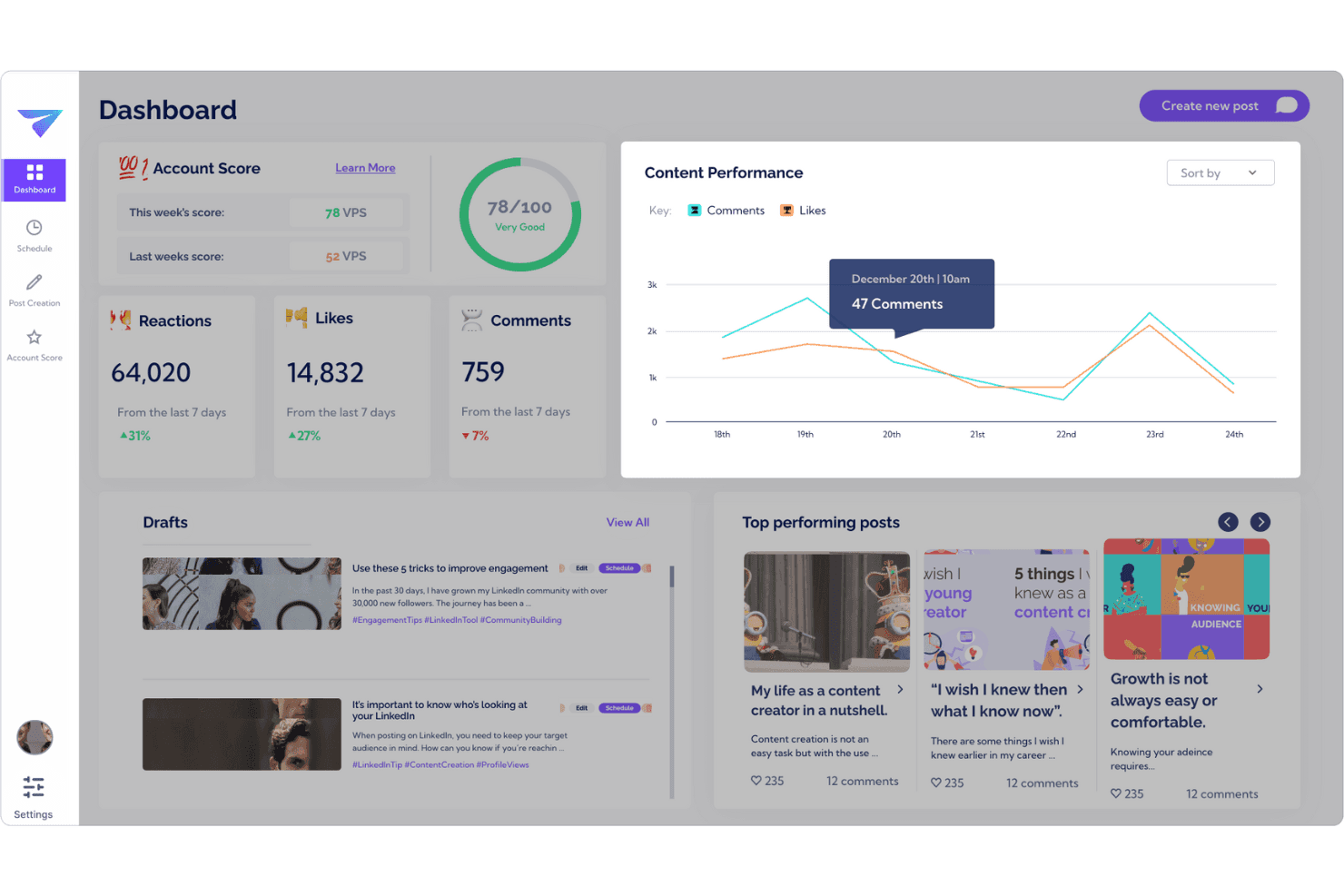
Monitora il coinvolgimento su LinkedIn e le prestazioni della promozione dei dipendenti in un unico pannello di controllo. Vulse è una piattaforma di promozione dei dipendenti esclusiva per LinkedIn che combina la generazione di contenuti basata sull'intelligenza artificiale con l'adattamento al tono di voce, la programmazione delle pubblicazioni, l'analisi della squadra e la gestione della comunità sui profili personali e sulle pagine aziendali.
Per chi è più adatto Vulse?
Vulse è una soluzione particolarmente adatta alle squadre di marketing B2B che gestiscono programmi di promozione dei dipendenti incentrati su LinkedIn e hanno bisogno di creare contenuti autentici su più profili personali senza perdere la coerenza del marchio.
Perché ho scelto Vulse
Ho scelto Vulse come una delle migliori soluzioni perché il suo adattamento al tono di voce è davvero diverso da qualsiasi altra cosa abbia visto per la promozione dei dipendenti su LinkedIn su larga scala. L'intelligenza artificiale apprende il ritmo di pubblicazione e il vocabolario di ciascun dipendente, così quando la mia squadra diffonde un singolo messaggio del marchio, ogni bozza arriva nella coda di ciascuna persona già scritta con il suo stile. Se a questo si aggiungono le analisi native dell'API di LinkedIn e un punteggio dell'account che monitora lo stato del programma per l'intera squadra, si ottiene una visibilità reale su ciò che funziona davvero.
Funzionalità principali di Vulse
- Calendario per la programmazione dei contenuti: Un calendario con funzionalità di trascinamento consente di creare in blocco e programmare le pubblicazioni di LinkedIn per la pubblicazione automatica su tutta la squadra.
- Classifiche della squadra: Classifica i membri della squadra in base alle pubblicazioni, alle impressioni e al coinvolgimento, permettendo di individuare chi è attivo e chi ha bisogno di un piccolo stimolo.
- Flusso per la gestione della comunità: Riunisce menzioni, tag e commenti di LinkedIn in un unico flusso, così la squadra può interagire da qualsiasi profilo collegato senza condividere le credenziali.
- Riepilogo degli articoli: Converte i contenuti più lunghi in pubblicazioni pronte per LinkedIn direttamente all'interno della piattaforma.
Integrazioni di Vulse
Le integrazioni native non sono documentate chiaramente. Tuttavia, Vulse si connette tramite l'API ufficiale per la gestione delle comunità di LinkedIn.
Pros and Cons
Pros:
- Adattamento del tono di voce tramite intelligenza artificiale per ogni utente
- API nativa di LinkedIn per analisi in tempo reale
- Flussi di approvazione e calendario dei contenuti della squadra
Cons:
- Solo LinkedIn, senza pubblicazione multicanale
- Mancano funzionalità complete di attribuzione del marketing lungo l'intero funnel
Learn more about Vulse: Ideale per un'assistenza rapida al copywriting
- Prova gratuita di 7 giorni disponibile
- Da $79/mese (fatturati annualmente)
Visit WebsiteCustomer Rating:4.8/5
Writesonic produce rapidamente testi di marketing per annunci, blog e landing page. Writesonic offre strumenti di copywriting alimentati dall'IA progettati per marketer e team di contenuti che hanno bisogno di generare grandi volumi di testi rapidamente. È particolarmente utile per agenzie, marchi ecommerce e social media manager che vogliono automatizzare post del blog, testi pubblicitari e descrizioni di prodotti. Con Writesonic, puoi creare bozze, titoli e persino articoli lunghi in pochi minuti, aiutandoti a rispettare calendari editoriali impegnativi.
Perché ho scelto Writesonic
Quando devi generare testi di marketing su larga scala, Writesonic si distingue per la sua assistenza rapida alla scrittura. Ho scelto Writesonic perché i suoi modelli IA ti permettono di produrre post per blog, testi per landing page e titoli pubblicitari in pochi clic. Le funzionalità di riformulazione ed espansione dei contenuti ti aiutano ad adattare rapidamente il messaggio per diversi canali o target. Per i content marketer che devono restare al passo con campagne dinamiche, le capacità di automazione di Writesonic semplificano il riempimento della pipeline di contenuti senza rallentamenti.
Caratteristiche principali di Writesonic
Oltre alle sue rapide capacità di copywriting, ho trovato utili queste funzionalità per l'automazione del content marketing:
- Generazione di contenuti in blocco: Crea più contenuti contemporaneamente caricando un elenco di argomenti o parole chiave.
- Personalizzazione del tono di voce: Regola lo stile di scrittura dell'IA per adattarlo alle linee guida e al tono del tuo marchio.
- Controllo antiplagio: Scansiona i contenuti generati per garantire l'originalità prima della pubblicazione.
- Generatore di immagini AI: Produci immagini pertinenti da abbinare ai tuoi contenuti scritti direttamente dalla piattaforma.
Integrazioni di Writesonic
Le integrazioni includono WordPress, Zapier, Webflow, Google Docs, Google Sheets, Surfer, Shopify, Wix, Notion e un'API è disponibile per integrazioni personalizzate.
Pros and Cons
Pros:
- Generazione di articoli in blocco su più argomenti
- Generatore di immagini AI per esigenze di contenuti visivi
- Supporto multilingue per campagne di contenuti globali
Cons:
- Nessuna gestione del flusso di lavoro per la collaborazione di team
- Nessuna integrazione nativa con strumenti di analisi
Learn more about Writesonic: Ideale per la creazione di contenuti con intelligenza artificiale
- Prova gratuita di 7 giorni + demo gratuita disponibile
- Da $59/postazione/mese (fatturato annualmente)
Visit WebsiteCustomer Rating:4.7/5
Jasper crea testi di marketing assistiti da AI per blog, annunci e post sui social. Jasper utilizza l'intelligenza artificiale per aiutare i team di marketing a creare contenuti su larga scala, diventando una soluzione ideale per le aziende che necessitano di grandi volumi di testi coerenti con il proprio marchio. La piattaforma è pensata per content marketer e agenzie che desiderano automatizzare la creazione di post per blog, testi pubblicitari e contenuti social con controlli personalizzabili sulla voce del brand. Jasper si distingue per la sua capacità di generare bozze, riutilizzare risorse e supportare campagne multicanale con suggerimenti guidati dall’AI.
Perché ho scelto Jasper
Jasper spicca nell'automazione del content marketing perché porta la generazione avanzata di contenuti AI direttamente nel tuo flusso di lavoro. Ho scelto Jasper per la sua capacità di produrre articoli lunghi, testi pubblicitari e post social coerenti con il tono e lo stile del tuo brand. I controlli sulla voce del marchio e i modelli di campagna della piattaforma aiutano a mantenere coerenza tra i diversi canali, velocizzando la produzione dei contenuti. Per i team che devono aumentare la creazione di contenuti di alta qualità, l’approccio alimentato dall’AI di Jasper è una scelta vincente.
Funzionalità principali di Jasper
Altre funzionalità rendono Jasper un'opzione flessibile per l'automazione del content marketing:
- Generatore di arte AI: Crea immagini e grafica originali da abbinare ai tuoi contenuti scritti.
- Gestione del flusso di lavoro dei contenuti: Assegna compiti, imposta scadenze e monitora i progressi all’interno di progetti collaborativi di contenuto.
- Verifica del plagio: Analizza i contenuti generati per garantire l’originalità ed evitare problemi di duplicazione dei testi.
- Supporto multilingue: Genera e traduci contenuti in oltre 30 lingue per campagne globali.
Integrazioni di Jasper
Le integrazioni disponibili includono Slack, Google BigQuery, Webflow, Microsoft Word, Google Sheets, Google Docs, Google Chrome, Zapier, Make e Pabbly Connect.
Pros and Cons
Pros:
- Genera contenuti in oltre 30 lingue
- Offre un sistema di rilevamento del plagio integrato
- Supporta la personalizzazione della voce del marchio su larga scala
Cons:
- Occasionali errori fattuali nei contenuti generati
- Richiede revisione manuale per la conformità
Learn more about Jasper: Ideale per campagne integrate guidate dalla SEO
- Piano gratuito + prova gratuita di 7 giorni + demo gratuita
- Da $117.33/mese (fatturato annualmente)
Visit WebsiteCustomer Rating:4.5/5
Semrush potenzia la SEO con ricerca delle parole chiave, analisi dei competitor e monitoraggio delle performance. Se desideri unificare le tue strategie di content marketing e SEO, Semrush riunisce tutto in un’unica piattaforma. Il tool è particolarmente utile per i team di marketing che vogliono pianificare, ottimizzare e misurare le prestazioni dei contenuti con dati SEO in tempo reale. Semrush ti aiuta a identificare parole chiave ad alto impatto, monitorare i posizionamenti e gestire campagne che collegano direttamente la ricerca organica alla tua strategia di contenuto.
Perché ho scelto Semrush
Ciò che distingue Semrush nell’automazione del content marketing è la capacità di collegare gli insight SEO direttamente alla pianificazione e all’esecuzione delle campagne. Ho scelto Semrush perché consente di fare ricerca sulle parole chiave, analizzare i contenuti ed esaminare i posizionamenti tutto in un unico posto, rendendo più facile allineare i contenuti alla domanda di ricerca. Il kit di strumenti per il content marketing della piattaforma aiuta a generare idee per argomenti, ottimizzare gli articoli e monitorare le performance dei contenuti nella ricerca organica. Questo approccio integrato è particolarmente prezioso per i team che vogliono assicurarsi che ogni contenuto sia allineato agli obiettivi SEO più ampi.
Funzionalità principali di Semrush
Altre funzionalità rendono Semrush una scelta versatile per i team di content marketing:
- SEO Writing Assistant: Ricevi raccomandazioni in tempo reale su leggibilità, tono e utilizzo delle parole chiave mentre scrivi i tuoi contenuti.
- Strumento di audit dei contenuti: Analizza i contenuti esistenti del tuo sito per individuare lacune, pagine obsolete o nuove opportunità di ottimizzazione.
- Monitoraggio del brand: Tieni traccia delle menzioni del tuo brand o dei competitor sul web e sui social media.
- Monitoraggio dei post: Monitora le prestazioni dei singoli articoli pubblicati su siti esterni, incluse visite da referral e posizionamento delle parole chiave.
Integrazioni di Semrush
Le integrazioni includono WordPress, Google Analytics, Google Search Console, Trello, HubSpot, Google Looker Studio e altri.
Pros and Cons
Pros:
- Monitora il posizionamento delle parole chiave insieme alle statistiche dei contenuti
- Suggerisce argomenti in base ai trend di ricerca
- Analizza i contenuti esistenti per miglioramenti SEO
Cons:
- Limiti sulle parole chiave tracciate per piano
- Nessuna pubblicazione diretta sulla maggior parte delle piattaforme CMS
 Ideale per programmare post sui social media
- Piano gratuito + prova gratuita disponibile
- A partire da $5/mese (fatturazione annuale)
Visit WebsiteCustomer Rating:4.4/5
Buffer programma e pubblica post sui social su più piattaforme. Buffer offre ai team di marketing e ai creatori individuali un modo per pianificare e programmare i post sui social media su più piattaforme da un'unica dashboard. È particolarmente utile per chi desidera mantenere una programmazione costante delle pubblicazioni senza sforzi manuali. Con Buffer, puoi mettere in coda i contenuti, visualizzare in anteprima i post e analizzare il coinvolgimento per mantenere i tuoi canali social attivi e organizzati.
Perché ho scelto Buffer
Buffer è progettato appositamente per team e singoli che hanno bisogno di programmare post sui social media in modo efficiente su più canali. Ho scelto Buffer perché la sua programmazione basata su coda permette di pianificare i contenuti in anticipo e mantenere una cadenza costante di pubblicazione senza postare manualmente. La funzione di anteprima dei post della piattaforma aiuta a vedere esattamente come apparirà il contenuto su ogni rete prima della pubblicazione. Per i content marketer orientati all'automazione e alla coerenza, gli strumenti di programmazione di Buffer mantengono le campagne organizzate e puntuali.
Funzionalità principali di Buffer
Altre funzioni rendono Buffer utile per l'automazione del content marketing:
- Integrazione con accorciatore di link: Accorcia automaticamente gli URL nei tuoi post per link più ordinati e una tracciabilità più semplice.
- Strumenti di collaborazione per il team: Invita i membri del team a contribuire, rivedere e approvare i post prima della pubblicazione.
- Gestore di hashtag: Salva e riutilizza gruppi di hashtag per velocizzare la creazione dei post.
- Dashboard di analisi: Monitora le prestazioni dei post e le metriche di coinvolgimento su tutti gli account social collegati.
Integrazioni di Buffer
Le integrazioni includono Dropbox, Google Drive, OneDrive, Instagram, X (Twitter), Facebook, LinkedIn, Pinterest, Shopify e Google Foto.
Pros and Cons
Pros:
- Gestore di hashtag integrato per i modelli di post
- Dashboard di analisi per monitorare il coinvolgimento dei post
- Flusso di lavoro di approvazione in team per la revisione dei contenuti
Cons:
- Nessuna funzione di riciclo automatico dei contenuti
- Nessuno strumento integrato per l'ideazione dei contenuti
 Ideale per il coinvolgimento del pubblico su più canali
- Prova gratuita di 30 giorni + demo gratuita disponibile
- A partire da $75/mese
Visit WebsiteCustomer Rating:4.5/5
Dashboard di CleverTap che mostra KPI di acquisto, raggiungibilità degli utenti e tendenze. CleverTap offre ai marketer una segmentazione avanzata del pubblico e un coinvolgimento multicanale per orchestrare campagne su mobile, web, email e altro ancora. È un’opzione ideale per brand consumer, aziende app-first e team di crescita che desiderano personalizzare i messaggi su larga scala. Con CleverTap, puoi automatizzare la consegna di contenuti mirati sulla base del comportamento utente in tempo reale, aiutandoti così a migliorare la fidelizzazione e le conversioni in ogni punto di contatto.
Perché ho scelto CleverTap
Ciò che distingue CleverTap per l’automazione del content marketing è la sua capacità di unificare il coinvolgimento del pubblico su più canali da un’unica piattaforma. Ho scelto CleverTap perché consente di automatizzare messaggi personalizzati tramite notifiche push, messaggi in-app, SMS, email e web, tutti attivati dal comportamento in tempo reale degli utenti. I suoi strumenti di segmentazione avanzata permettono di indirizzare gli utenti in base alla fase del ciclo di vita, alle azioni o alle preferenze, garantendo che le campagne siano sempre pertinenti e tempestive. Per i marketer che vogliono orchestrare esperienze coerenti e multicanale, le funzionalità di automazione di CleverTap permettono di raggiungere il pubblico ovunque esso sia.
Funzionalità principali di CleverTap
Altre funzionalità che rendono CleverTap prezioso per l’automazione del content marketing includono:
- Motore di A/B testing: Esegui esperimenti su messaggi e campagne per individuare ciò che coinvolge meglio il tuo pubblico.
- Costruttore di percorsi: Progetta e automatizza customer journey multi-step con workflow drag-and-drop.
- Dashboard analitica in tempo reale: Monitora le prestazioni delle campagne e le metriche di engagement man mano che si verificano.
- Messaggistica ricca di media: Invia immagini, video e contenuti interattivi tramite i canali supportati per aumentare il coinvolgimento.
Integrazioni CleverTap
Le integrazioni includono Adjust, Branch, Amplitude, mParticle, Tealium, Twilio Segment, Airbridge, RevenueCat, Exotel e Vonage.
Pros and Cons
Pros:
- Segmentazione in tempo reale per il targeting del pubblico
- Costruttore di percorsi automatizza flussi di campagne complessi
- A/B testing integrato per l’ottimizzazione delle campagne
Cons:
- Supporto limitato alla personalizzazione dei contenuti
- Richiede configurazione tecnica per il tracciamento eventi
Learn more about CleverTap: Ideale per la pianificazione editoriale collaborativa
- Piano gratuito + demo gratuita disponibile
- A partire da $19/utente/mese (fatturato annualmente)
Visit WebsiteCustomer Rating:4.4/5
CoSchedule organizza il lavoro di marketing con un calendario condiviso dei contenuti e flussi di lavoro. Se il tuo team ha bisogno di un unico posto dove pianificare, organizzare ed eseguire il lavoro sui contenuti, CoSchedule è lo strumento adatto. Team di marketing, agenzie e content manager lo utilizzano per coordinare i calendari editoriali, assegnare attività e mantenere tutti allineati sulle scadenze. Il suo approccio collaborativo aiuta a ridurre le scadenze mancate e garantisce una produzione dei contenuti senza intoppi.
Perché ho scelto CoSchedule
CoSchedule si distingue per i team che devono gestire la produzione di contenuti in modo collaborativo dall'inizio alla fine. Ho scelto CoSchedule perché il calendario editoriale condiviso permette a tutti di vedere cosa è in arrivo e chi è responsabile di ogni attività. Le funzioni di assegnazione delle attività e i flussi di lavoro della piattaforma aiutano a mantenere scrittori, editor e designer sempre aggiornati durante tutto il processo di creazione dei contenuti. Per i team di content marketing che gestiscono più progetti e collaboratori, CoSchedule offre struttura e visibilità in ogni fase della pianificazione e pubblicazione.
Funzionalità principali di CoSchedule
Ho trovato anche diverse altre funzionalità che supportano i team di content marketing:
- Integrazione Headline Studio: Analizza e ottimizza i titoli direttamente nel tuo flusso di lavoro.
- Pubblicazione sui social media: Pianifica e pubblica post su più canali social dalla stessa piattaforma.
- Organizzazione degli asset: Archivia, tagga e gestisci risorse digitali per un facile accesso durante la creazione dei contenuti.
- Dashboard di analisi: Monitora le performance dei contenuti e la produttività del team con strumenti di reportistica integrati.
Integrazioni di CoSchedule
Le integrazioni includono WordPress, Google Drive, Dropbox, Canva, HubSpot, Mailchimp, Slack, Trello, Asana e Google Analytics.
Pros and Cons
Pros:
- Calendario condiviso per la visibilità dei contenuti tra i team
- Analizzatore di titoli integrato per l'ottimizzazione dei contenuti
- Pianificazione dei social media integrata con il calendario editoriale
Cons:
- Nessuna automazione email marketing integrata
- La libreria degli asset non dispone di ricerca avanzata
Learn more about CoSchedule: Ideale per automatizzare flussi di lavoro tra più piattaforme
- Piano gratuito disponibile
- Da $19.99/mese (fatturazione annuale)

Zapier automatizza flussi di lavoro senza codice su oltre 8.000 app. Zapier collega il tuo stack di content marketing automatizzando i flussi di lavoro tra app che non si integrano nativamente. È una soluzione ideale per i team di marketing che gestiscono più piattaforme e desiderano ridurre l'inserimento manuale dei dati o le attività di pubblicazione ripetitive. Se hai bisogno di attivare azioni tra strumenti come CMS, piattaforma email e analisi, Zapier ti aiuta a mantenere tutto sincronizzato senza lo sviluppo di soluzioni personalizzate.
Perché ho scelto Zapier
Per i team di content marketing che hanno la necessità di connettere strumenti presenti su diverse piattaforme, Zapier si distingue per le sue capacità di automazione dei flussi di lavoro. Ho scelto Zapier perché ti consente di impostare trigger automatici—come la pubblicazione di un post del blog che viene immediatamente condiviso sui social media o aggiorna un foglio di calcolo—senza scrivere codice. I suoi flussi di lavoro multi-step aiutano a coordinare la distribuzione dei contenuti, la raccolta di lead e la reportistica su tutto il tuo stack. Questo lo rende particolarmente utile per i marketer che vogliono eliminare le attività ripetitive e mantenere le campagne operative senza intoppi su tutti i canali.
Funzionalità chiave di Zapier
Altre caratteristiche rendono Zapier particolarmente utile per i team di content marketing:
- Logica condizionale (Percorsi): Configura flussi di lavoro che si diramano in base a trigger o dati specifici, così puoi automatizzare processi più complessi.
- Schedule by Zapier: Automatizza attività che si eseguono ad orari o intervalli prestabiliti, come inviare report settimanali sui contenuti o pubblicare post a cadenza programmata.
- Supporto ai webhooks: Collegati ad app non supportate nativamente da Zapier utilizzando webhooks personalizzati per automazioni avanzate.
- Storico attività e tracciamento errori: Consulta log dettagliati di ogni attività automatizzata e identifica o risolvi velocemente eventuali problemi nei flussi di lavoro.
Integrazioni di Zapier
Le integrazioni includono Google Sheets, Gmail, Slack, Google Calendar, Google Drive, Notion, HubSpot, Mailchimp e molte altre.
Pros and Cons
Pros:
- Automatizza attività ripetitive di pubblicazione dei contenuti
- Connette centinaia di strumenti per marketing e contenuti
- Non sono richieste competenze di coding per configurare i flussi di lavoro
Cons:
- Opzioni limitate di formattazione per i trasferimenti di contenuti
- Saltuari ritardi nell’esecuzione dei trigger
Learn more about Zapier: Ideale per la generazione automatica di articoli per blog
- Non disponibile
- Da $9/mese

ContentBot genera rapidamente idee per contenuti AI, bozze di blog e copy per marketing. ContentBot si concentra sull'automazione della creazione di articoli di blog lunghi per marketer e team di contenuti che devono pubblicare frequentemente. La piattaforma è pensata per agenzie, startup e professionisti SEO che desiderano generare idee per argomenti, scalette e bozze complete con un input manuale minimo. Il punto di forza unico di ContentBot è la sua capacità di produrre interi articoli a partire da un solo prompt, aiutando i team a soddisfare calendari editoriali impegnativi.
Perché ho scelto ContentBot
Quando ho bisogno di automatizzare la generazione di articoli per il blog, ContentBot si distingue per la capacità di trasformare un singolo prompt in un articolo completo. I flussi di lavoro automatizzati per la creazione di articoli permettono di generare scalette, introduzioni e bozze senza dover passare da uno strumento all'altro. Apprezzo come ContentBot supporti la generazione di idee per argomenti e la programmazione dei contenuti, aiutando i team a mantenere sempre attiva la pipeline di pubblicazione. Per i marketer che vogliono scalare la produzione di articoli, queste funzionalità rendono ContentBot una scelta vincente.
Funzionalità principali di ContentBot
Altre caratteristiche rendono ContentBot una scelta versatile per l'automazione del content marketing:
- Riscrittura di contenuti con l'IA: Riscrivi i contenuti esistenti per migliorarne la chiarezza o adattarli a diversi toni di voce.
- Generatore automatico di email: Crea campagne email di marketing e newsletter a partire da prompt o modelli.
- Strumenti di ottimizzazione SEO: Suggerisce parole chiave e ottimizza le bozze per migliorare la visibilità sui motori di ricerca.
- Flussi di lavoro per l'automazione dei contenuti: Imposta attività ricorrenti sui contenuti e automatizza la programmazione delle pubblicazioni.
Integrazioni di ContentBot
Le integrazioni includono WordPress ed un'estensione per Chrome.
Pros and Cons
Pros:
- Genera post di blog completi a partire da prompt
- Offre strumenti di riscrittura dei contenuti tramite IA
- Supporta la creazione automatica di email e newsletter
Cons:
- Frasi ripetitive occasionali negli articoli lunghi
- Serve il controllo manuale dei fatti per l'accuratezza
Learn more about ContentBot: 10Ideale per l'automazione del marketing open-source
Mautic
- Prova gratuita di 14 giorni + demo gratuita disponibile
- Da €247,50/mese (fatturazione annuale)

Mautic offre email marketing open-source, nurturing dei lead e analisi delle campagne. Se cerchi un approccio flessibile e open-source all'automazione del marketing, Mautic ti offre il pieno controllo sulle tue campagne e sui dati dei clienti. Questa piattaforma è particolarmente adatta a team di marketing con risorse tecniche, agenzie o organizzazioni con rigorose esigenze di privacy dei dati. Mautic si distingue permettendoti di personalizzare e ospitare autonomamente i tuoi flussi di lavoro di automazione, rendendo più semplice adattare le campagne alle esigenze specifiche della tua azienda.
Perché ho scelto Mautic
La flessibilità open-source è ciò che rende Mautic unico nell'ambito dell'automazione del content marketing. Ho scelto Mautic perché consente di personalizzare completamente i flussi di automazione e la logica delle campagne in base alle esigenze specifiche della tua organizzazione. La piattaforma supporta segmentazioni avanzate e contenuti dinamici, per offrire esperienze altamente personalizzate ai clienti su diversi canali. Per i team che desiderano ospitare autonomamente e controllare i dati di marketing, Mautic offre un livello di trasparenza e adattabilità difficile da eguagliare.
Funzionalità principali di Mautic
Altre caratteristiche rendono Mautic una soluzione versatile per l'automazione del content marketing:
- Generatore Visivo di Campagne: Progetta campagne multistep utilizzando un'interfaccia drag-and-drop.
- Creatore di Landing Page: Crea e personalizza landing page direttamente dalla piattaforma.
- Strumenti per Test A/B: Effettua test divisi su email e landing page per ottimizzare le prestazioni.
- Messaggistica Multi-Canale: Invia messaggi tramite email, SMS, social e canali web.
Integrazioni di Mautic
Le integrazioni includono Salesforce, HubSpot, SugarCRM, Zoho CRM, Outlook, Gmail, Twilio, Mailjet, Amazon SES e Slack. È disponibile un'API per integrazioni personalizzate.
Pros and Cons
Pros:
- Completamente open-source con opzioni di self-hosting
- Segmentazione flessibile per la consegna di contenuti mirati
- Community globale attiva per supporto e plugin
Cons:
- Richiede configurazione tecnica e gestione del server
- Analisi integrate limitate per la reportistica delle campagne
Learn more about Mautic:
Altri strumenti di automazione del marketing dei contenuti
Ecco alcune opzioni aggiuntive di strumenti di automazione del marketing dei contenuti che non sono state incluse nel mio elenco, ma che vale comunque la pena valutare:
- 11Customer.ioIdeale per l'automazione della messaggistica personalizzata
- 12BuzzSumoIdeale per la distribuzione di contenuti su più piattaforme
- 13SocialBeeIdeale per approfondimenti sulle prestazioni dei contenuti
- 14CelumIdeale per gestire i flussi di lavoro delle risorse digitali
Come valuto gli strumenti di automazione del content marketing
Valuto gli strumenti su due livelli: le funzionalità di base—come la pubblicazione automatica e i flussi di lavoro di approvazione—e i fattori differenzianti, come la generazione di contenuti con l'IA o la DAM, che rendono uno strumento più adatto rispetto a un altro.
Funzionalità core (requisiti minimi per questa lista)
Quando seleziono gli strumenti per la mia lista, attribuisco a ciascuno un punteggio da 0 (non offre la funzionalità) a 5 (eccelle in quest'area) per ogni funzionalità core riportata qui sotto. Poi calcolo il punteggio totale dello strumento in percentuale. Ogni strumento deve raggiungere un punteggio totale minimo del 75% per essere preso in considerazione.
- Automazione del flusso di lavoro dei contenuti: Cerco strumenti che automatizzano i flussi di lavoro di produzione in più fasi, come l'inoltro di una bozza di blog attraverso editing, revisione legale e approvazione finale senza passaggi manuali.
- Pubblicazione multicanale: Ogni strumento dovrebbe supportare la programmazione e la distribuzione automatica su blog, email, social e web, con formattazioni specifiche per canale incluse.
- Calendario e pianificazione dei contenuti: Valuto quanto bene il calendario supporti la pianificazione a livello di campagna, la programmazione tramite drag-and-drop e il collegamento degli asset, in modo che i team possano mappare un intero trimestre di output in un'unica visuale.
- Personalizzazione e targeting del pubblico: Lo strumento dovrebbe permettere di offrire esperienze di contenuto personalizzate usando segmentazioni comportamentali o basate su regole, come mostrare call to action differenti ai visitatori di ritorno rispetto ai nuovi.
- Analytics sulle performance: Verifico se la piattaforma traccia metriche specifiche per i contenuti lungo tutto il funnel, dall'engagement iniziale fino all'attribuzione delle conversioni, e non solo semplici visualizzazioni di pagina.
- Integrazioni e connettività con il CMS: Qui contano i connettori nativi con CMS, CRM e piattaforme di marketing automation già in uso, oltre all’accesso API aperto per personalizzazioni.
Una volta che ho una lista di strumenti che rispettano i criteri, considero cosa distingue ciascuna piattaforma.
Fattori differenzianti (cosa distingue i fornitori)
Ecco come confronto i diversi fornitori:
Funzionalità distintive
La generazione di contenuti con l’IA è un importante fattore di differenziazione. Cerco strumenti che aiutino a redigere brief, suggerire titoli o creare varianti di testo, così il team spende meno tempo sulle prime bozze. Sono rilevanti anche gli strumenti SEO integrati, poiché le piattaforme con ricerca di parole chiave e scoring dei contenuti consentono di ottimizzare prima della pubblicazione. Valuto anche l'automazione per il riutilizzo dei contenuti, ad esempio trasformare una guida lunga in snippet per i social e testi per le newsletter senza dover ricreare ogni asset da zero.
Oltre le funzionalità
Verifico se una piattaforma si adatta alla crescita del team—un marketer solista ha esigenze diverse rispetto a un team di 30 persone che gestisce più brand in varie regioni. Valuto anche le capacità di compliance e governance; i controlli di accesso basati sui ruoli e le fasi di approvazione sono fondamentali quando i contenuti coinvolgono settori regolamentati come finanza o sanità. La trasparenza dei prezzi è un altro aspetto che considero, compreso se il fornitore offre trial gratuite o una chiara suddivisione dei tier, così si possono prevedere i costi man mano che cresce il volume dei contenuti.
Come scegliere gli strumenti di automazione del marketing dei contenuti
È facile perdersi in lunghi elenchi di funzionalità e strutture tariffarie complesse. Per aiutarti a rimanere concentrato mentre affronti il tuo particolare processo di selezione del software, ecco un elenco di fattori da tenere a mente:
| Fattore | Cosa considerare |
|---|---|
| FattoreScalabilità | Cosa considerareLo strumento supporterà il volume dei tuoi contenuti e la crescita del pubblico nel tempo? Verifica eventuali limiti relativi a utenti, canali o campagne. |
| FattoreIntegrazioni | Cosa considerareLo strumento si connette nativamente al tuo CRM, agli strumenti di analisi e alle piattaforme di pubblicazione? Le lacune in questo ambito possono creare lavoro manuale. |
| FattorePersonalizzazione | Cosa considerarePuoi adattare flussi di lavoro, modelli e report alle esigenze del tuo team? I sistemi rigidi possono rallentarti. |
| FattoreFacilità d'uso | Cosa considerareCon quale rapidità il tuo team può imparare a usare e adottare lo strumento? Cerca una navigazione chiara e requisiti minimi di formazione. |
| FattoreImplementazione e avvio | Cosa considerareQuali risorse e quanto tempo servono per iniziare a lavorare? Informati sul supporto alla migrazione, sulla formazione e sui servizi di configurazione. |
| FattoreCosto | Cosa considerareI livelli di prezzo sono trasparenti e prevedibili man mano che cresci? Fai attenzione a costi nascosti, componenti aggiuntivi o aggiornamenti obbligatori. |
| FattoreMisure di sicurezza | Cosa considerareLo strumento offre la crittografia dei dati, autorizzazioni per gli utenti e conformità a standard come il GDPR? Proteggere i dati è essenziale. |
| FattoreDisponibilità dell'assistenza | Cosa considerareQuali canali di assistenza sono disponibili e in quali orari? Valuta se avrai bisogno di chat dal vivo, supporto telefonico o rappresentanti dedicati. |
Cosa sono gli strumenti di automazione del marketing dei contenuti?
Gli strumenti di automazione del marketing dei contenuti sono piattaforme software che aiutano i team di marketing a pianificare, creare, programmare, distribuire e analizzare automaticamente i contenuti su più canali. Questi strumenti centralizzano la gestione delle campagne, gestiscono le attività ripetitive e consentono di inviare messaggi mirati in base al comportamento del pubblico. Automatizzando i flussi di lavoro e la reportistica, liberano tempo da dedicare alla strategia e al lavoro creativo, garantendo al contempo una distribuzione dei contenuti coerente e basata sui dati.
Caratteristiche degli strumenti di automazione del marketing dei contenuti
Quando scegli un software di automazione del marketing dei contenuti, presta attenzione alle seguenti caratteristiche chiave:
- Calendario dei contenuti: uno strumento visivo di programmazione che consente di pianificare, organizzare e monitorare i contenuti sui vari canali, aiutando i team a coordinare campagne e scadenze.
- Pubblicazione multicanale: la possibilità di distribuire contenuti su più piattaforme, come e-mail, blog e social network, da un unico pannello di controllo, riducendo le pubblicazioni manuali.
- Segmentazione del pubblico: strumenti per raggruppare i contatti in base a dati demografici, comportamento o coinvolgimento, così da indirizzare i contenuti alle persone giuste al momento giusto.
- Automazione dei flussi di lavoro: regole e attivatori personalizzabili che automatizzano attività ripetitive come approvazioni, notifiche e instradamento dei contenuti, migliorando efficienza e coerenza.
- Analisi delle prestazioni: pannelli di controllo e report che monitorano metriche come portata, coinvolgimento e conversioni, offrendo informazioni utili su quali contenuti funzionano.
- Motore di personalizzazione: funzionalità che consentono di adattare contenuti e messaggi a diversi segmenti di pubblico, aumentando rilevanza e coinvolgimento.
- Strumenti di collaborazione: spazi di lavoro condivisi, commenti e assegnazione di attività che aiutano i team a collaborare alla creazione e alla revisione dei contenuti.
- Gestione delle risorse: archiviazione e organizzazione centralizzate di immagini, documenti e altri contenuti multimediali, che facilitano la ricerca e il riutilizzo delle risorse approvate.
- Monitoraggio delle campagne: strumenti per controllare l'avanzamento e i risultati delle campagne di contenuti, aiutando a misurare il ROI e a ottimizzare le attività future.
Vantaggi degli strumenti di automazione del marketing dei contenuti
L'implementazione di strumenti di automazione del marketing dei contenuti offre diversi vantaggi al tuo team e alla tua azienda. Ecco alcuni dei benefici che puoi aspettarti:
- Distribuzione coerente dei contenuti: la programmazione e la pubblicazione automatizzate assicurano che i contenuti raggiungano il pubblico in tempo su tutti i canali. L'utilizzo di una piattaforma di marketing centralizzata consente sia alle piccole imprese sia alle grandi aziende di raggiungere i propri iscritti in modo più efficace senza sovraccaricarsi.
- Targetizzazione migliorata: le funzionalità di segmentazione del pubblico e personalizzazione aiutano a fornire messaggi pertinenti alle persone giuste.
- Maggiore efficienza del team: l'automazione dei flussi di lavoro e gli strumenti di collaborazione riducono le attività manuali e gestiscono la produzione dei contenuti.
- Migliori informazioni sulle prestazioni: gli strumenti integrati di analisi e monitoraggio delle campagne forniscono dati chiari su ciò che funziona e sugli aspetti da migliorare.
- Gestione centralizzata delle risorse: archiviare e organizzare le risorse dei contenuti in un unico luogo facilita la ricerca, il riutilizzo e il mantenimento della coerenza del marchio.
- Gestione scalabile delle campagne: la pubblicazione multicanale e le funzionalità di automazione consentono di gestire più campagne senza aumentare il carico di lavoro.
- Inserimento e adozione più rapidi: interfacce intuitive e risorse per l'inserimento aiutano i team a iniziare rapidamente a utilizzare i nuovi processi.
Costi e prezzi degli strumenti di automazione del marketing dei contenuti
La scelta degli strumenti di automazione del marketing dei contenuti richiede la comprensione dei vari modelli e piani tariffari disponibili. I costi variano in base alle funzionalità, alle dimensioni del team, agli extra e ad altri fattori. La tabella seguente riassume i piani più comuni, i relativi prezzi medi e le funzionalità tipicamente incluse nelle soluzioni di strumenti di automazione del marketing dei contenuti:
Tabella di confronto dei piani degli strumenti di automazione del marketing dei contenuti
| Tipo di piano | Prezzo medio | Funzionalità comuni |
|---|---|---|
| Tipo di pianoPiano gratuito | Prezzo medio$0 | Funzionalità comuniCalendario dei contenuti di base, canali di pubblicazione limitati, analisi semplici e archiviazione di base delle risorse. |
| Tipo di pianoPiano personale | Prezzo medio$10-$30/utente/mese | Funzionalità comuniProgrammazione dei contenuti, pubblicazione multicanale, segmentazione del pubblico e strumenti di reportistica standard. |
| Tipo di pianoPiano aziendale | Prezzo medio$40-$100/utente/mese | Funzionalità comuniAutomazione avanzata dei flussi di lavoro, strumenti di collaborazione, analisi avanzate, gestione delle risorse e integrazioni. |
| Tipo di pianoPiano aziendale avanzato | Prezzo medio$150-$500+/utente/mese | Funzionalità comuniFlussi di lavoro personalizzati, assistenza dedicata, sicurezza avanzata, accesso API e servizi di conformità e inserimento. |
Domande frequenti sugli strumenti di automazione del marketing dei contenuti
Ecco alcune risposte alle domande comuni sugli strumenti di automazione del marketing dei contenuti:
In che modo gli strumenti di automazione del marketing dei contenuti supportano le campagne multicanale?
Gli strumenti di automazione del marketing dei contenuti supportano le tue attività di marketing digitale consentendoti di programmare, pubblicare e monitorare i contenuti su più canali da un’unica dashboard. Questo aiuta il tuo team a mantenere messaggi e tempistiche coerenti, riducendo al contempo il lavoro manuale e il rischio di errori.
Questi strumenti possono integrarsi con il mio CRM o con le piattaforme di analisi esistenti?
Sì, la maggior parte degli strumenti di automazione del marketing dei contenuti offre integrazioni con piattaforme CRM e di analisi diffuse, come Adobe Experience Cloud. Verifica sempre la disponibilità di integrazioni native o di API, per garantire un flusso di dati fluido ed evitare trasferimenti manuali. Rafforzare la relazione con i clienti diventa molto più semplice quando i tuoi dati non sono isolati in silos, consentendoti di coltivare i lead con interazioni personalizzate basate sul loro comportamento.
Cosa devo considerare quando passo a un nuovo strumento di automazione del marketing dei contenuti?
Pianifica la migrazione dei dati, la formazione del team e gli adeguamenti dei flussi di lavoro. Cerca strumenti che offrano supporto per l’onboarding, opzioni per importare le risorse esistenti e risorse come tutorial o assistenza dal vivo per facilitare la transizione. Se gestisci un’agenzia di marketing con più clienti, cerca strumenti di IA che possano aiutarti a generare idee o ottimizzare gli oggetti delle email per portare i tassi di apertura a un livello superiore.
Questi strumenti presentano problemi di sicurezza o conformità?
Sì, dovresti esaminare le misure di sicurezza adottate da ciascuno strumento, come la crittografia dei dati e le autorizzazioni degli utenti. Se gestisci dati sensibili o operi in settori regolamentati, verifica la conformità a standard come il GDPR o SOC 2. Inoltre, se collabori con un influencer esterno, assicurati che lo strumento consenta una collaborazione sicura con accesso limitato.
Come misuro il ROI degli strumenti di automazione del marketing dei contenuti?
Monitora metriche come tassi di conversione, coinvolgimento e risultati delle campagne utilizzando le funzioni di analisi dello strumento. Confronta questi risultati con i processi manuali precedenti per valutare i miglioramenti in termini di efficienza e risultati.