

Gli strumenti per l’automazione dei social media sono piattaforme che consentono di programmare i post, gestire i contenuti e monitorare il coinvolgimento su più canali social da un unico posto. Se stai cercando modi per risparmiare tempo, ridurre il lavoro manuale e mantenere attivo il tuo marchio online, lo strumento giusto per l’automazione del marketing può fare una differenza misurabile sia per le squadre aziendali sia per le piccole imprese. Questo elenco ti aiuterà a confrontare le principali opzioni per il 2026, così potrai trovare una soluzione tutto-in-uno adatta ai flussi di lavoro della tua squadra, alla tua strategia di marketing sui social media e alle tue esigenze di reportistica.
Perché fidarsi dei nostri consigli sui software
6,700+
Reviews
20
Industry experts
16+
Evaluation factors
14
Years
Il nostro team testa e recensisce software dal 2012. In quanto leader del marketing noi stessi, sappiamo quanto sia difficile — e importante — scegliere il software giusto.
Per questa guida, abbiamo valutato gli strumenti attraverso test pratici e ricerche indipendenti, assegnando un punteggio agli strumenti in base ai nostri criteri di selezione.
Le nostre recensioni riflettono il nostro giudizio editoriale umano, non un discorso di vendita.
Revisori esperti:
 Gui DrusinaDirettore creativo
- Shriya GhateSenior Marketing Lead
 Amanda JacquesResponsabile Marketing Ops

Tabella comparativa degli strumenti per l’automazione dei social media
Questa tabella comparativa riassume i dettagli dei prezzi delle mie migliori selezioni di strumenti per l’automazione dei social media:
| Tool | Best For | Trial Info | Price | ||
|---|---|---|---|---|---|
| 1 | Ideale per i team di advocacy dei dipendenti su LinkedIn | Demo gratuita disponibile | A partire da £5/utente/mese (con fatturazione annuale) | Website | |
| 2 | Ideale per autorizzazioni avanzate del team | Prova gratuita di 14 giorni + demo gratuita disponibile | Da $69/utente/mese (fatturato annualmente) | Website | |
| 3 | Ideale per gestire più marchi da una sola dashboard | Prova gratuita disponibile | Da $24/utente/mese (fatturazione annuale) | Website | |
| 4 | Ideale per l'automazione di flussi di lavoro personalizzati | Piano gratuito + demo gratuita disponibile | Da $9/mese (fatturato annualmente) | Website | |
| 5 | Ideale per l'integrazione del social listening | Prova gratuita + piano gratuito disponibili | Da $79/utente/mese (fatturato annualmente) | Website | |
| 6 | Ideale per flussi di lavoro di approvazione dei clienti | Prova gratuita di 14 giorni disponibile | Da $29/mese | Website | |
| 7 | Ideale per la pianificazione collaborativa dei post | Piano gratuito + prova gratuita disponibile | A partire da $5/mese (fatturazione annuale) | Website | |
| 8 | Ideale per la scoperta e la cura dei contenuti | Prova gratuita di 7 giorni disponibile | Da $19/mese (fatturazione annuale) | Website | |
| 9 | Ideale per il caricamento massivo di contenuti | Prova gratuita di 14 giorni + demo gratuita | Da $25,50/mese (fatturato annualmente) | Website | |
| 10 | Ideale per la gestione della casella di posta unificata | Prova gratuita di 30 giorni + demo gratuita | Da $199/utente/mese (fatturazione annuale) | Website |


Recensioni degli strumenti per l’automazione dei social media
Di seguito trovi le mie sintesi dettagliate degli strumenti per l’automazione dei social media inclusi nel mio elenco ristretto. Le mie recensioni offrono uno sguardo dettagliato sulle funzionalità, sui casi d’uso migliori e sulle integrazioni di ciascuna piattaforma, per aiutarti a trovare quella più adatta a te.
 Ideale per i team di advocacy dei dipendenti su LinkedIn
- Demo gratuita disponibile
- A partire da £5/utente/mese (con fatturazione annuale)
Visit WebsiteCustomer Rating:5/5This rating combines scores from multiple user review sites to reflect overall customer sentiment about the product.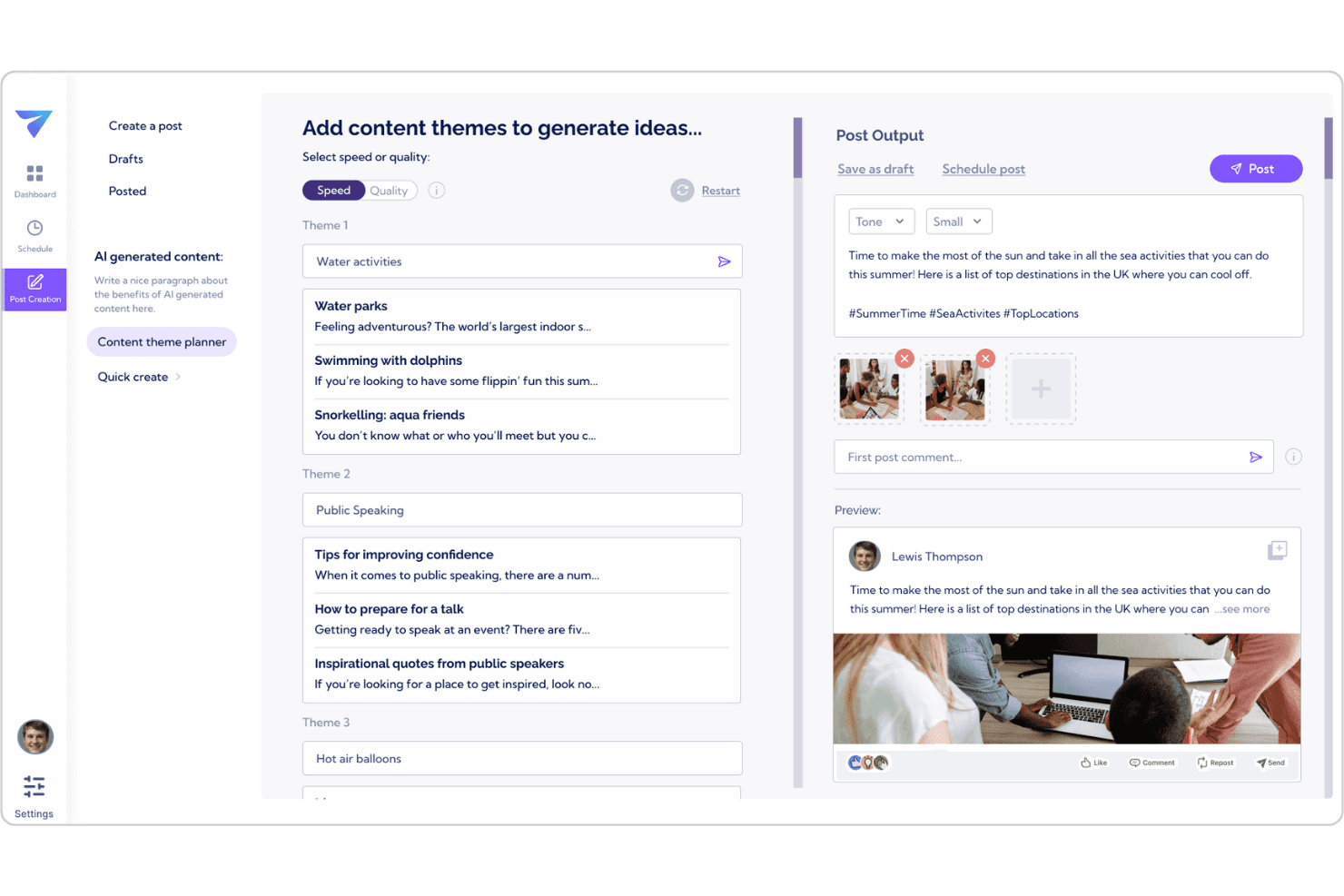
Vulse genera idee e bozze di post per LinkedIn utilizzando strumenti di contenuto basati sull'IA. Vulse è una piattaforma di advocacy dei dipendenti esclusiva per LinkedIn che combina la programmazione dei post basata sull'IA, la generazione di contenuti con tono di voce personalizzato, le classifiche del team e la reportistica automatizzata sulle prestazioni.
Per chi è più adatto Vulse?
Vulse è particolarmente adatto ai team di marketing B2B che gestiscono programmi di advocacy dei dipendenti su LinkedIn, dove la priorità è pubblicare contenuti personali coerenti e in linea con il marchio attraverso un team distribuito.
Perché ho scelto Vulse
Vulse si è guadagnato un posto nella mia selezione ristretta per la sua capacità di gestire efficacemente l'advocacy dei dipendenti su LinkedIn su larga scala. Apprezzo in particolare la funzione di adattamento al tono di voce: quando un amministratore invia al team un post approvato dal marchio, Vulse lo riscrive nello stile individuale di ciascun membro prima che finisca nelle bozze. Se si aggiungono i report settimanali automatizzati sulle prestazioni e le classifiche del team che rendono la partecipazione simile a un gioco, si ottiene un sistema che mantiene attivi i programmi di advocacy senza bisogno di continui solleciti.
Funzionalità principali di Vulse
- Calendario dei contenuti con trascinamento: Programma e riordina i post di LinkedIn sui profili personali e sulle pagine aziendali utilizzando un calendario visivo con indicatori di stato codificati a colori.
- Report settimanali automatizzati sulle prestazioni: Vulse invia report pronti per la posta in arrivo, con riepiloghi in linguaggio semplice e raccomandazioni personalizzate, così non devi raccogliere manualmente i dati.
- Punteggio proprietario dell'account: Un unico indicatore dello stato di salute che monitora nel tempo la costanza delle pubblicazioni, la qualità del coinvolgimento e la crescita del pubblico sulla tua presenza su LinkedIn.
- Posta in arrivo unificata di LinkedIn: Aggrega in un unico flusso le menzioni delle pagine aziendali, i commenti e i tag, consentendo ai membri del team di rispondere da qualsiasi account collegato senza condividere le credenziali.
Integrazioni di Vulse
Le integrazioni native non sono documentate in modo chiaro. Tuttavia, Vulse si connette tramite l'API ufficiale di gestione delle comunità di LinkedIn.
Pros and Cons
Pros:
- L'IA riscrive i post nello stile dei membri del team
- Analisi e reportistica native di LinkedIn incluse
- Le classifiche del team incoraggiano la partecipazione alle pubblicazioni
Cons:
- Nessun supporto per piattaforme diverse da LinkedIn
- Nessuna automazione per le risposte nella posta in arrivo o i messaggi diretti
Learn more about Vulse: Ideale per autorizzazioni avanzate del team
- Prova gratuita di 14 giorni + demo gratuita disponibile
- Da $69/utente/mese (fatturato annualmente)
Visit WebsiteCustomer Rating:4.8/5This rating combines scores from multiple user review sites to reflect overall customer sentiment about the product.
Statusbrew gestisce pubblicazione, coinvolgimento e analisi sui social. Statusbrew è pensato per le organizzazioni che necessitano di un controllo dettagliato sui flussi di lavoro social media e sull'accesso degli utenti. I team marketing in settori regolamentati o grandi aziende possono utilizzare le sue avanzate autorizzazioni di squadra per gestire chi può creare, approvare e pubblicare contenuti su più brand e account social. Questo livello di controllo aiuta a ridurre i rischi e garantisce che solo le persone autorizzate possano accedere alle azioni di pubblicazione sensibili.
Perché ho scelto Statusbrew
Per i team che necessitano di un controllo rigoroso su chi può accedere e gestire gli account social, Statusbrew si distingue grazie alle sue avanzate autorizzazioni di squadra. Puoi assegnare ruoli personalizzati, impostare flussi di approvazione dettagliati e limitare i diritti di pubblicazione a utenti o gruppi specifici. Apprezzo il modo in cui questa configurazione aiuta le organizzazioni a mantenere supervisione e responsabilità, soprattutto quando sono coinvolti più brand o regioni. Queste caratteristiche rendono Statusbrew una scelta solida per le aziende in cui sicurezza e conformità sono priorità assolute nell'automazione dei social media.
Funzionalità principali di Statusbrew
Oltre ai suoi controlli avanzati sulle autorizzazioni, Statusbrew offre diverse altre funzionalità per la gestione dei social media su larga scala:
- Social Inbox unificata: Gestisci messaggi, commenti e menzioni da più piattaforme in un unico luogo.
- Pubblicazione automatica: Pianifica e metti in coda i post su diversi canali social con tempistiche personalizzabili.
- Analisi delle prestazioni: Accedi a report dettagliati su engagement, copertura e crescita dell’audience per ogni account collegato.
- Gestione dei commenti degli annunci: Monitora e rispondi ai commenti delle campagne social a pagamento direttamente dalla dashboard.
Integrazioni Statusbrew
Le integrazioni includono TikTok, Reddit, Pinterest e Meta Threads.
Pros and Cons
Pros:
- Flussi di approvazione multi-step solidi
- Analisi del sentiment con IA e smistamento automatico
- Report personalizzati white-label per i clienti
Cons:
- L'app mobile non ha tutta la potenza della versione desktop
- Nessuna generazione di contenuti con IA integrata
Learn more about Statusbrew: Ideale per gestire più marchi da una sola dashboard
- Prova gratuita disponibile
- Da $24/utente/mese (fatturazione annuale)
Visit WebsiteCustomer Rating:4.8/5This rating combines scores from multiple user review sites to reflect overall customer sentiment about the product.
SocialBee automatizza la programmazione dei social, la cura dei contenuti e le analisi. Se gestisci più marchi o clienti, SocialBee ti offre una dashboard unica per organizzare tutti i tuoi account social. Agenzie e team di marketing possono utilizzare la sua struttura a workspace per mantenere separati contenuti, programmazione e analisi per ogni brand. Questa configurazione aiuta a ridurre la confusione e facilita la collaborazione senza rischiare di mescolare post o dati.
Perché ho scelto SocialBee
SocialBee si distingue per i team che devono gestire più marchi o clienti senza confondere contenuti o analisi. L'ho scelto perché la sua dashboard permette di creare workspace separati per ogni brand, così puoi mantenere organizzati post, programmazioni e report. Lo strumento offre anche accesso basato sui ruoli, il che significa che puoi assegnare i membri del team a specifici brand e controllare chi vede cosa. Questa struttura è particolarmente utile per agenzie o team marketing che gestiscono vari clienti contemporaneamente.
Funzionalità principali di SocialBee
Altre funzionalità di SocialBee aiutano i team ad automatizzare e ottimizzare la gestione dei social:
- Programmazione basata sulle categorie: Organizza i post in categorie di contenuto e crea programmazioni uniche per ciascuna, in modo da bilanciare diversi tipi di contenuto sui tuoi canali.
- Riciclaggio dei contenuti: Rimetti automaticamente in coda e ripropone i post evergreen per mantenere attivi i feed senza ripianificare manualmente.
- Variazioni dei post: Crea più versioni di un singolo post per evitare ripetizioni e mantenere fresco il messaggio su tutte le piattaforme.
- URL shortener integrato: Accorcia i link direttamente dalla piattaforma e traccia i clic per ogni post.
Integrazioni SocialBee
Le integrazioni includono Pinterest, TikTok, YouTube e Threads.
Pros and Cons
Pros:
- Editor separati per ogni piattaforma
- Crediti AI illimitati per la creazione di post
- Ingresso conveniente per piccole agenzie
Cons:
- Esperienza con l’app mobile poco soddisfacente
- Funzionalità di ascolto social limitate
Learn more about SocialBee: 4Ideale per l'automazione di flussi di lavoro personalizzati
Make
- Piano gratuito + demo gratuita disponibile
- Da $9/mese (fatturato annualmente)
Visit WebsiteCustomer Rating:4.7/5This rating combines scores from multiple user review sites to reflect overall customer sentiment about the product.
Make automatizza i flussi di lavoro collegando app e riducendo le attività manuali. Se hai bisogno di creare flussi di lavoro sui social media altamente personalizzati, Make offre una piattaforma di automazione flessibile che va ben oltre la semplice programmazione dei post. È particolarmente adatta a team di marketing, agenzie e utenti tecnici che desiderano collegare più app e automatizzare processi complessi a più fasi. Grazie al suo generatore visuale di flussi di lavoro, Make ti permette di progettare automazioni che rispondono esattamente alle esigenze delle tue campagne e dei tuoi report.
Perché ho scelto Make
A differenza della maggior parte degli strumenti di automazione dei social media che si concentrano sulla semplice pianificazione, Make ti consente di progettare flussi di lavoro personalizzati su misura per le tue necessità. Puoi costruire automazioni multi-step che collegano i canali social con CRM, piattaforme di analytics e altre app aziendali. Apprezzo come il generatore visuale di flussi permetta di mappare processi complessi, come l'attivazione di post in base a variazioni di dati o l'automatizzazione dei report tra diversi canali. Questo livello di personalizzazione rende Make una scelta valida per i team che necessitano di molto più della semplice pubblicazione programmata dei post.
Funzionalità principali di Make
Altre funzionalità di Make aiutano i team ad automatizzare e gestire le proprie operazioni sui social media:
- Libreria di template predefiniti: Accedi a un'ampia gamma di modelli di automazione pronti per i compiti social più comuni.
- Strumenti di gestione errori: Imposta notifiche di errore personalizzate e azioni di fallback per mantenere i flussi operativi senza intoppi.
- Modulo di pianificazione: Pianifica le automazioni per l'esecuzione a orari o intervalli specifici per garantire la coerenza delle campagne.
- Cronologia delle versioni: Tieni traccia dei cambiamenti e ripristina versioni precedenti dei flussi di lavoro quando necessario.
Integrazioni di Make
Le integrazioni includono Chat ON Desk, Disqus, dlvr.it ed Engage AI.
Pros and Cons
Pros:
- Conveniente per scenari multi-step
- Agenti AI integrati per la creazione di contenuti
- Log di esecuzione dettagliati per il debug
Cons:
- Limiti API per la pubblicazione su X e LinkedIn
- Nessuna anteprima o pianificatore di post integrato
Learn more about Make: Ideale per l'integrazione del social listening
- Prova gratuita + piano gratuito disponibili
- Da $79/utente/mese (fatturato annualmente)
Visit WebsiteCustomer Rating:4.5/5This rating combines scores from multiple user review sites to reflect overall customer sentiment about the product.
Agorapulse centralizza messaggi social e interazioni in un'unica inbox. Agorapulse offre ai team di marketing un modo per monitorare, gestire e rispondere alle conversazioni sui social da un'unica piattaforma. Se hai bisogno di monitorare le menzioni del brand, le parole chiave e l'attività dei concorrenti su più canali, la sua integrazione per il social listening è particolarmente efficace. Agenzie e brand che vogliono anticipare le tendenze e le problematiche legate alla reputazione troveranno questi strumenti di monitoraggio particolarmente utili.
Perché ho scelto Agorapulse
Ciò che distingue Agorapulse per me è l'approfondita integrazione del social listening. Puoi impostare ricerche personalizzate per monitorare menzioni del brand, argomenti di settore e attività dei concorrenti su più piattaforme. Apprezzo come la casella di posta unificata raccolga tutte queste conversazioni, facilitando il monitoraggio e la risposta in tempo reale. Per i team che devono tenere d'occhio la reputazione e le tendenze, questi strumenti di listening rendono Agorapulse una scelta solida tra gli strumenti di automazione dei social media.
Caratteristiche principali di Agorapulse
Altre funzionalità che rendono Agorapulse prezioso per l'automazione dei social media includono:
- Coda di pubblicazione: Organizza e programma i post in anticipo per più canali.
- Strumenti di collaborazione per il team: Assegna messaggi, condividi note e gestisci i ruoli degli utenti all'interno del tuo team.
- Dashboard di reportistica: Accedi a report visivi su engagement, copertura e performance dei contenuti.
- Social CRM: Monitora le interazioni degli utenti e mantieni profili di contatto dettagliati del tuo pubblico.
Integrazioni Agorapulse
Le integrazioni includono YouTube, Threads, Canva e Bitly.
Pros and Cons
Pros:
- Eccellente ROI e reportistica analitica
- Social listening integrato per parole chiave
- Calendari condivisi per approvazioni dei clienti
Cons:
- Curva di apprendimento elevata per report avanzati
- Le funzionalità AI sono basilari rispetto ai concorrenti
Learn more about Agorapulse: Ideale per flussi di lavoro di approvazione dei clienti
- Prova gratuita di 14 giorni disponibile
- Da $29/mese
Visit WebsiteCustomer Rating:4.5/5This rating combines scores from multiple user review sites to reflect overall customer sentiment about the product.
Sendible semplifica la programmazione, il monitoraggio e la reportistica dei social. Sendible è pensato per agenzie e team che necessitano di un processo strutturato di approvazione dei contenuti dai clienti per i social media. I professionisti del marketing che gestiscono più brand possono utilizzare i flussi di lavoro di approvazione integrati per tenere i clienti sempre aggiornati e garantire che ogni post rispetti gli standard del brand. Questa configurazione aiuta a ridurre gli scambi continui e consente ai contenuti di passare senza intoppi dalla bozza alla pubblicazione.
Perché ho scelto Sendible
Per i team che devono coinvolgere i clienti nel processo di creazione dei contenuti, Sendible si distingue grazie ai suoi flussi di lavoro dedicati all'approvazione dei clienti. Ho scelto Sendible perché consente di impostare catene di approvazione in più fasi, in modo che i clienti possano revisionare, commentare e approvare i post prima che vengano pubblicati. La piattaforma offre inoltre chiari audit trail e aggiornamenti di stato per ogni contenuto, aiutando agenzie e clienti a rimanere allineati. Se il tuo workflow dipende dall’approvazione del cliente, queste funzionalità rendono Sendible un’ottima scelta per l’automazione dei social media.
Funzionalità principali di Sendible
Altre funzionalità che rendono Sendible utile per l’automazione dei social media includono:
- Calendario dei contenuti: Visualizza, organizza e gestisci tutti i post programmati in un’unica interfaccia calendario.
- Programmazione in blocco: Carica e programma più post contemporaneamente tramite file CSV.
- Social Listening: Monitora parole chiave, hashtag e menzioni del brand su tutte le piattaforme supportate.
- Editor immagini: Modifica e migliora le immagini direttamente sulla piattaforma prima della pubblicazione.
Integrazioni di Sendible
Le integrazioni includono Instagram, LinkedIn, Threads, TikTok.
Pros and Cons
Pros:
- Posta in arrivo centralizzata per tutti i commenti
- Integrazione fluida con Canva e Pexels
- Programmazione ottimale per il coinvolgimento
Cons:
- Prezzo elevato per i piccoli creator solitari
- È necessario riconnettere frequentemente gli account
Learn more about Sendible: Ideale per la pianificazione collaborativa dei post
- Piano gratuito + prova gratuita disponibile
- A partire da $5/mese (fatturazione annuale)
Visit WebsiteCustomer Rating:4.4/5This rating combines scores from multiple user review sites to reflect overall customer sentiment about the product.
Buffer semplifica la gestione e la pubblicazione dei social media su più piattaforme. Buffer è progettato per i team che hanno bisogno di collaborare nella pianificazione e nell'approvazione dei contenuti sui social media. I responsabili marketing e i creatori di contenuti possono utilizzare il calendario condiviso dei social media e i flussi di lavoro delle bozze per coordinare i post prima della pubblicazione. Questo approccio aiuta a ridurre le incomprensioni e mantiene tutti allineati sui tempi delle campagne.
Perché ho scelto Buffer
Buffer rende semplice per i team lavorare insieme sui contenuti social prima che vengano pubblicati. Ho scelto Buffer perché i suoi strumenti collaborativi per la pianificazione dei post permettono a più utenti di creare bozze, revisionare e approvare i contenuti in un calendario condiviso. Il flusso di approvazione consente ai responsabili marketing di supervisionare i contenuti e individuare problemi prima che i post vengano pubblicati. Questa configurazione è particolarmente utile per le aziende che devono coordinare la comunicazione tra diversi membri del team o reparti.
Caratteristiche principali di Buffer
Altre funzionalità di Buffer aiutano i team ad automatizzare e analizzare la loro presenza sui social media:
- Pubblicazione multi-canale: Pianifica e pubblica post su piattaforme come Instagram, Facebook, LinkedIn e X da un'unica dashboard.
- Gestione hashtag: Salva e inserisci gruppi di hashtag nei post per mantenere i contenuti organizzati e coerenti.
- Dashboard delle analisi: Monitora coinvolgimento, portata e metriche di performance per ciascun account collegato.
- Accorciamento e monitoraggio dei link: Accorcia gli URL e monitora i dati dei clic direttamente dalla piattaforma.
Integrazioni di Buffer
Le integrazioni includono Mastodon, Pinterest, Threads e TikTok.
Pros and Cons
Pros:
- Primo a supportare Bluesky e Threads
- Generazione AI illimitata in tutti i piani
- Interfaccia più pulita e intuitiva
Cons:
- Le analisi non offrono un monitoraggio approfondito della concorrenza
- Nessuna inbox unificata per TikTok o YouTube
 Ideale per la scoperta e la cura dei contenuti
- Prova gratuita di 7 giorni disponibile
- Da $19/mese (fatturazione annuale)
Visit WebsiteCustomer Rating:4.6/5This rating combines scores from multiple user review sites to reflect overall customer sentiment about the product.
ContentStudio aiuta a scoprire, pianificare e pubblicare contenuti su diverse piattaforme. ContentStudio si distingue per team e agenzie che necessitano di scoprire, curare e condividere contenuti di tendenza su più canali. Il suo motore di scoperta dei contenuti aiuta i marketer a trovare articoli, video e post social pertinenti, su misura per il proprio pubblico. Se desideri mantenere i tuoi feed sempre aggiornati e coinvolgenti senza dover cercare manualmente, gli strumenti di automazione e cura dei contenuti di ContentStudio sono pensati proprio per questo flusso di lavoro.
Perché ho scelto ContentStudio
Per i marketer che devono mantenere i propri canali social pieni di contenuti rilevanti e aggiornati, le capacità di scoperta e cura offerte da ContentStudio sono difficili da eguagliare. Il motore di scoperta dei contenuti della piattaforma raccoglie articoli, video e post social di tendenza da tutto il web, permettendo di trovare rapidamente materiali adatti al proprio pubblico. Mi piace come sia possibile impostare regole di automazione per curare e condividere questi contenuti direttamente nei feed, riducendo lo sforzo manuale. Se il tuo flusso di lavoro si basa sull’individuazione e la condivisione di contenuti di terze parti di alta qualità, ContentStudio risponde perfettamente a questa esigenza.
Funzionalità principali di ContentStudio
Altre funzionalità che rendono ContentStudio utile per l’automazione dei social media includono:
- Compositore Visivo di Post: Crea e modifica post con un editor di immagini integrato e strumenti di formattazione dei contenuti.
- Flusso di Approvazione: Imposta processi di approvazione del contenuto a più livelli per team e clienti.
- Cruscotto Analitico: Monitora l’engagement, la portata e le metriche di performance su tutti i canali collegati.
- Suggerimenti Hashtag: Ricevi suggerimenti di hashtag in tempo reale in base ai contenuti e alla piattaforma del tuo post.
Integrazioni di ContentStudio
Le integrazioni includono WordPress, Medium, Webflow e Shopify.
Pros and Cons
Pros:
- Posta in arrivo unificata per tutti i messaggi social
- Assistente AI utile per didascalie rapide
- Pubblicazione diretta su oltre 11 piattaforme
Cons:
- Ogni tanto si verificano problemi con i caricamenti da mobile
- Prezzo più alto rispetto agli strumenti di base
Learn more about ContentStudio: Ideale per il caricamento massivo di contenuti
- Prova gratuita di 14 giorni + demo gratuita
- Da $25,50/mese (fatturato annualmente)
Visit WebsiteCustomer Rating:4.4/5This rating combines scores from multiple user review sites to reflect overall customer sentiment about the product.
SocialPilot automatizza la programmazione social, l'analisi e la cura dei contenuti. SocialPilot è progettato per agenzie e team che devono gestire grandi volumi di contenuti social su più account. La funzione di caricamento massivo dei contenuti aiuta i social media manager a risparmiare tempo programmando centinaia di post contemporaneamente. Questo lo rende particolarmente adatto a imprese che gestiscono campagne frequenti o lavorano con molti clienti.
Perché ho scelto SocialPilot
Per i team che devono programmare grandi quantità di contenuti, il caricamento massivo di SocialPilot si distingue. Puoi caricare centinaia di post contemporaneamente utilizzando un file CSV, il che è particolarmente utile per agenzie che gestiscono più clienti o campagne. Mi piace anche che lo strumento permetta di visualizzare e modificare in blocco i post prima di programmarli. Questo focus sulla programmazione ad alto volume rende SocialPilot una scelta pratica per chi desidera automatizzare le attività di pubblicazione ripetitive su larga scala.
Caratteristiche principali di SocialPilot
Altre funzionalità di SocialPilot aiutano i team a gestire e ottimizzare la propria presenza sui social media:
- Dashboard di Gestione Clienti: Organizza diversi account clienti e gestisci le autorizzazioni da un'unica interfaccia.
- Calendario dei Contenuti: Visualizza i post programmati su tutte le piattaforme in una vista calendario drag-and-drop.
- Analisi Social Media: Monitora l'engagement, la crescita del pubblico e le prestazioni dei post con strumenti di analisi integrati.
- Strumenti di Collaborazione per il Team: Assegna ruoli, revisiona i post e approva i contenuti all'interno del tuo team.
Integrazioni SocialPilot
Le integrazioni includono LinkedIn, TikTok, Pinterest e YouTube.
Pros and Cons
Pros:
- Assistente AI per didascalie e hashtag
- Gestire molti account ha un costo contenuto
- Flussi di approvazione semplici per grandi team
Cons:
- La casella social è assente nei piani base
- Le analisi sono limitate alle pagine aziendali
Learn more about SocialPilot: Ideale per la gestione della casella di posta unificata
- Prova gratuita di 30 giorni + demo gratuita
- Da $199/utente/mese (fatturazione annuale)
Visit WebsiteCustomer Rating:4.3/5This rating combines scores from multiple user review sites to reflect overall customer sentiment about the product.
Sprout Social offre pianificazione, monitoring e analisi social guidati dai dati. Sprout Social riunisce tutte le tue conversazioni social in un'unica casella di posta unificata, rendendo più semplice per i team di marketing e assistenza clienti restare organizzati. Agenzie e brand che gestiscono grandi volumi di messaggi possono usare i suoi strumenti collaborativi per assegnare, etichettare e rispondere ai messaggi senza perdere un colpo. Questo approccio aiuta i team a ridurre i tempi di risposta e a mantenere una voce di brand coerente su ogni canale.
Perché ho scelto Sprout Social
Ciò che distingue Sprout Social per me è la sua casella di posta unificata, che riunisce tutti i tuoi messaggi social, commenti e menzioni in un'unica dashboard. Questa funzionalità è particolarmente preziosa per i team che gestiscono più account o piattaforme, in quanto aiuta a prevenire messaggi persi e risposte duplicate. Mi piace che si possa assegnare le conversazioni a specifici membri del team e tracciare lo stato dei messaggi, favorendo responsabilità e una collaborazione efficiente. Per le organizzazioni che danno priorità a una comunicazione rapida, organizzata e coerente, gli strumenti di gestione della posta di Sprout Social sono una scelta eccellente.
Funzionalità principali di Sprout Social
Altre funzionalità che rendono Sprout Social una soluzione vincente per l'automazione dei social media sono:
- Calendario di pubblicazione automatizzato: Pianifica, programma e gestisci i post su più piattaforme da una singola vista calendario.
- Strumenti di social listening: Monitora parole chiave, hashtag e menzioni del brand per seguire le tendenze e la percezione del pubblico.
- Report analitici approfonditi: Genera report personalizzabili su engagement, copertura e performance dei contenuti.
- Libreria di asset: Archivia, organizza e riutilizza immagini, video e template di post per un branding coerente.
Integrazioni di Sprout Social
Le integrazioni includono Pinterest, Reddit, Threads, TikTok.
Pros and Cons
Pros:
- Smart Inbox unificata per tutti i messaggi
- Analisi visive e report di alto livello
- Orari di invio ottimali con IA per aumentare l'engagement
Cons:
- Molte funzioni principali solo nei piani più alti
- Nessuna versione gratuita per piccoli creator
Learn more about Sprout Social:
Altri strumenti per l’automazione dei social media
Ecco alcune opzioni aggiuntive di strumenti per l’automazione dei social media che non sono entrate nel mio elenco ristretto, ma che vale comunque la pena prendere in considerazione:
- 11GumloopIdeale per la generazione di contenuti tramite IA
- 12Brand24Ideale per il monitoraggio del marchio in tempo reale
- 13HootsuiteIdeale per reportistica analitica multipiattaforma
- 14Zoho SocialIdeale per programmare i post in base all'attività del pubblico
Come valuto gli strumenti di automazione dei social media
Valuto gli strumenti di automazione dei social media su due livelli: gli elementi indispensabili di base e i fattori distintivi, come la pianificazione tramite intelligenza artificiale e i flussi di approvazione per più clienti, che distinguono le scelte più valide da quelle meno efficaci.
Funzionalità fondamentali (requisiti essenziali per questo elenco)
Quando seleziono gli strumenti per il mio elenco, assegno a ciascuno un punteggio su una scala da 0 (non offre la funzionalità) a 5 (eccelle in quest'area) per ogni funzionalità fondamentale elencata di seguito. Poi converto il punteggio totale dello strumento in una percentuale. Ogni strumento deve raggiungere un punteggio totale minimo del 75% per essere preso in considerazione.
- Pianificazione dei post su più piattaforme: verifico quanti social network uno strumento supporta in modo nativo, poiché spesso i team devono pubblicare la stessa campagna su Instagram, LinkedIn, TikTok e X da un unico strumento di composizione.
- Gestione del calendario dei contenuti: cerco un calendario visivo con funzionalità di trascinamento che permetta di filtrare per canale o per tag della campagna: è il modo in cui la maggior parte dei team social pianifica concretamente la propria settimana.
- Caricamento in blocco & automazione delle code: valuto se sia possibile caricare tramite CSV i post di un intero mese e inserirli in code ricorrenti basate su orari, invece di pianificarli manualmente uno alla volta.
- Coinvolgimento automatizzato & casella di posta: strumenti come Sprout Social e Hootsuite offrono caselle di posta unificate, quindi valuto come ogni piattaforma gestisce le risposte automatiche, le regole di moderazione dei commenti e l'instradamento dei messaggi diretti.
- Analisi & report automatizzati: considero se lo strumento sia in grado di generare report pianificati con metriche trasversali ai diversi canali: il team e gli stakeholder non dovrebbero dover estrarre individualmente i dati da ciascun social network.
- Gestione di più account & collaborazione del team: per le agenzie e i team che gestiscono più marchi, valuto come ogni strumento gestisce gli spazi di lavoro, le autorizzazioni basate sui ruoli e i flussi di approvazione dei contenuti tra gli account dei clienti.
Una volta ottenuto un elenco di strumenti che soddisfano questi criteri, considero ciò che distingue ogni piattaforma dalle altre.
Fattori distintivi (ciò che differenzia i fornitori)
Ecco come confronto i diversi fornitori:
Funzionalità di spicco
L'intelligenza clinica ambientale è un importante fattore distintivo. Gli strumenti che acquisiscono passivamente le conversazioni tra pazienti e medici e generano note SOAP strutturate evitano ai medici di dover dedicare tempo alla documentazione dopo l'orario di lavoro. Valuto anche i vocabolari specifici per specialità, poiché un dermatologo e un cardiologo hanno bisogno di terminologie molto diverse già disponibili. La dettatura mobile con passaggio al computer è importante per gli operatori che lavorano in più sedi e hanno bisogno che le note si sincronizzino nuovamente con il sistema EHR senza doverle reinserire manualmente.
Oltre le funzionalità
Valuto attentamente l'accuratezza con diversi accenti e in presenza di rumore di fondo, soprattutto negli studi con più professionisti, dove i medici parlano lingue madri diverse. Verifico anche il livello di integrazione con i sistemi EHR: le connessioni certificate attraverso marketplace come Epic App Orchard o Oracle Cerner sono più affidabili rispetto a soluzioni alternative basate su API generiche. Anche la struttura dei prezzi è importante. Valuto se i fornitori offrano abbonamenti per singolo professionista, in grado di adattarsi da uno studio individuale a un sistema sanitario con più sedi senza imporre un contratto aziendale completo.
Come scegliere gli strumenti per l’automazione dei social media
È facile perdersi in lunghi elenchi di funzionalità e strutture tariffarie complesse. Per aiutarti a rimanere concentrato mentre affronti il tuo processo di selezione del software, ecco una lista di controllo dei fattori da tenere presenti:
| Fattore | Cosa considerare |
|---|---|
| FattoreScalabilità | Cosa considerareLo strumento supporterà la crescita del numero di canali, utenti o marchi senza costi o interruzioni significativi? |
| FattoreIntegrazioni | Cosa considerareSi collega nativamente al tuo CRM, agli strumenti di analisi o di gestione dei contenuti, oppure dovrai ricorrere a soluzioni alternative? |
| FattorePersonalizzazione | Cosa considerarePuoi adattare i flussi di lavoro, i pannelli di controllo e le notifiche ai processi della tua squadra? |
| FattoreFacilità d’uso | Cosa considerareLa tua squadra lo adotterà rapidamente o la formazione e il supporto saranno una necessità costante? |
| FattoreImplementazione e avvio | Cosa considerareQuanto tempo servirà per rendere operativo lo strumento e di quali risorse o supporto avrai bisogno? |
| FattoreCosto | Cosa considerareEsistono costi nascosti, limiti al numero di utenti o prezzi basati sui volumi che potrebbero incidere sul tuo budget? |
| FattoreMisure di sicurezza | Cosa considerareLo strumento offre accesso basato sui ruoli, crittografia dei dati e conformità alle esigenze del tuo settore? |
| FattoreDisponibilità del supporto | Cosa considerarePuoi contattare il supporto quando ne hai bisogno e sono previsti SLA o referenti dedicati per i problemi urgenti? |
Cosa sono gli strumenti per l’automazione dei social media?
Gli strumenti per l’automazione dei social media sono piattaforme software che aiutano a programmare, pubblicare e gestire i contenuti su più canali social da un unico posto. Questi strumenti automatizzano attività ripetitive come la pubblicazione, il monitoraggio del coinvolgimento e il tracciamento delle analisi. Centralizzando i flussi di lavoro, semplificano il compito delle squadre di marketing nel mantenere una presenza coerente, rispondere alle interazioni del pubblico e misurare le prestazioni delle campagne senza interventi manuali su ogni piattaforma.
Funzionalità degli strumenti per l’automazione dei social media
Quando selezioni strumenti di automazione dei social media, presta attenzione alle seguenti funzionalità chiave:
- Programmazione dei post: programma i contenuti in anticipo per pubblicarli automaticamente su più piattaforme di social media negli orari ottimali.
- Gestione di più account: gestisci diversi profili o brand sui social media da un'unica bacheca, semplificando il coordinamento delle campagne.
- Calendario dei contenuti: visualizza e organizza i post futuri in una vista calendario, aiutando i team a pianificare e allineare le strategie dei contenuti.
- Monitoraggio del coinvolgimento: monitora e rispondi a commenti, messaggi e menzioni direttamente dallo strumento, così non perderai mai interazioni importanti.
- Analisi e report: accedi a metriche dettagliate sulle prestazioni dei post, sulla crescita del pubblico e sul coinvolgimento per orientare le campagne future.
- Collaborazione del team: assegna ruoli, imposta autorizzazioni e coordina le attività tra i membri del team per semplificare i flussi di lavoro di creazione e approvazione dei contenuti.
- Libreria dei contenuti: archivia, organizza e riutilizza immagini, video e modelli di post per mantenere un branding coerente e pubblicare più rapidamente.
- Monitoraggio di hashtag e parole chiave: monitora hashtag o parole chiave specifici per restare aggiornato sulle conversazioni e sulle tendenze pertinenti del tuo settore.
- Flussi di lavoro di approvazione: configura processi di revisione e approvazione per assicurarti che i contenuti rispettino le linee guida del brand prima della pubblicazione.
Vantaggi degli strumenti di automazione dei social media
L'implementazione di strumenti di automazione dei social media offre diversi vantaggi al tuo team e alla tua azienda. Ecco alcuni dei vantaggi che puoi aspettarti:
- Pubblicazione costante: la programmazione automatizzata garantisce che i contenuti vengano pubblicati negli orari giusti, anche al di fuori dell'orario lavorativo.
- Gestione centralizzata: gestisci più account, brand e campagne da un'unica bacheca, riducendo il lavoro manuale e la confusione.
- Tempi di risposta più rapidi: il monitoraggio del coinvolgimento e le caselle di posta unificate aiutano il tuo team a rispondere rapidamente a commenti e messaggi.
- Decisioni basate sui dati: le funzionalità integrate di analisi e report forniscono informazioni utili per perfezionare la tua strategia sui social media.
- Collaborazione migliorata: i ruoli del team, i flussi di lavoro di approvazione e le librerie di contenuti condivise facilitano il coordinamento e la revisione dei contenuti.
- Presenza del brand più forte: i calendari dei contenuti e le librerie di risorse aiutano a mantenere una voce e un'identità visiva coerenti su tutti i canali.
- Flussi di lavoro scalabili: con la crescita della tua azienda, gli strumenti di automazione semplificano la gestione di un volume maggiore di pubblicazioni e di campagne più complesse.
Costi e prezzi degli strumenti di automazione dei social media
La scelta degli strumenti di automazione dei social media richiede la comprensione dei diversi modelli e piani tariffari disponibili. I costi variano in base alle funzionalità, alle dimensioni del team, agli extra e ad altri fattori. La tabella seguente riassume i piani più comuni, i relativi prezzi medi e le funzionalità tipicamente incluse nelle soluzioni di strumenti di automazione dei social media:
Tabella comparativa dei piani per gli strumenti di automazione dei social media
| Tipo di piano | Prezzo medio | Funzionalità comuni |
|---|---|---|
| Tipo di pianoPiano gratuito | Prezzo medio$0 | Funzionalità comuniProgrammazione di base dei post, account limitati, analisi di base e supporto della community. |
| Tipo di pianoPiano personale | Prezzo medio$6-$29/mese | Funzionalità comuniGestione di più account, calendario dei contenuti, monitoraggio del coinvolgimento e report di base. |
| Tipo di pianoPiano aziendale | Prezzo medio$30-$99/mese | Funzionalità comuniCollaborazione del team, analisi avanzate, flussi di lavoro di approvazione e supporto prioritario. |
| Tipo di pianoPiano per grandi aziende | Prezzo medio$179-$399/mese | Funzionalità comuniIntegrazioni personalizzate, account manager dedicato, sicurezza avanzata e onboarding e formazione personalizzati. |
Domande frequenti sugli strumenti di automazione dei social media
Ecco alcune risposte alle domande frequenti sugli strumenti di automazione dei social media:
Gli strumenti di automazione dei social media possono pubblicare su tutte le principali piattaforme?
Sì, la maggior parte degli strumenti di automazione dei social media supporta la pubblicazione sulle principali piattaforme, come Facebook, X (Twitter), LinkedIn e Instagram. Tuttavia, alcuni strumenti potrebbero offrire funzionalità limitate o una pubblicazione ritardata per determinati social network, quindi verifica sempre la compatibilità con le piattaforme prima di scegliere una soluzione.
In che modo gli strumenti di automazione dei social media gestiscono le autorizzazioni degli utenti e i ruoli del team?
La maggior parte degli strumenti consente di assegnare ruoli e autorizzazioni per controllare chi può creare, modificare, approvare o pubblicare contenuti. Ciò aiuta a prevenire pubblicazioni accidentali e supporta flussi di approvazione chiari, soprattutto per i team più grandi che gestiscono diversi marchi o canali.
Esiste il rischio di essere penalizzati dai social network per l'utilizzo di strumenti di automazione?
Sì, se gli strumenti di automazione violano le politiche delle piattaforme, ad esempio con attività di spam, messaggi di massa o l’utilizzo di API non autorizzate, gli account possono essere limitati o sospesi. Scegli strumenti affidabili che rispettino i termini di servizio di ciascun social network ed evita tattiche di automazione aggressive.
Quali tipi di analisi forniscono gli strumenti di automazione dei social media?
La maggior parte degli strumenti offre analisi sulle prestazioni dei post, sulla crescita del pubblico, sui tassi di coinvolgimento e sui momenti migliori per pubblicare. Alcuni forniscono anche confronti con la concorrenza e analisi del sentiment, aiutandoti a perfezionare la strategia sulla base di dati reali.
Posso migrare i contenuti e i dati esistenti in un nuovo strumento di automazione dei social media?
Sì, molti strumenti offrono funzionalità di importazione o supporto alla migrazione per calendari editoriali, librerie multimediali e dati degli account esistenti. Verifica la disponibilità di opzioni di importazione CSV, l’integrazione con l’archiviazione cloud o l’assistenza durante la configurazione per rendere più semplice la transizione.