

Las mejores alternativas a Smartsheet ofrecen a tu equipo de operaciones de marketing un software flexible de gestión de proyectos, colaboración en tiempo real e integraciones que se adaptan a vuestro flujo de trabajo. Si buscas las mejores alternativas, probablemente necesites una solución de gestión de proyectos que pueda hacer un seguimiento de los proyectos, admitir tableros kanban y gestionar proyectos complejos con facilidad. Muchas herramientas ofrecen funciones avanzadas, complementos e integraciones dentro de un ecosistema más amplio, al tiempo que se centran en una experiencia fácil de usar, con una interfaz de usuario intuitiva y una curva de aprendizaje reducida. Algunas también proporcionan una versión gratuita y opciones adaptadas a los equipos de servicios profesionales. Utiliza esta lista para comparar funciones y encontrar la opción adecuada para tus necesidades de operaciones de marketing en 2026.
¿Qué es Smartsheet?
Smartsheet es una plataforma de gestión de proyectos y colaboración basada en la nube, diseñada para ayudar a los equipos a planificar, realizar un seguimiento y automatizar el trabajo. Combina una interfaz flexible con automatización de flujos de trabajo, uso compartido de archivos y actualizaciones en tiempo real. Los equipos de marketing la utilizan para gestionar campañas y elaborar informes, aunque algunos buscan alternativas para mejorar la facilidad de uso, ampliar las funciones o adaptarse mejor a sus herramientas actuales.
Tabla comparativa de alternativas a Smartsheet
Esta tabla comparativa resume los detalles de precios de mi selección de las mejores alternativas a Smartsheet:
| Tool | Best For | Trial Info | Price | ||
|---|---|---|---|---|---|
| 1 | Ideal para operaciones creativas y aprobaciones de campañas | Demostración gratuita disponible | Precio bajo solicitud | Website | |
| 2 | Ideal para proyectos flexibles con estilo de base de datos | Plan gratuito + demostración gratuita disponible | Desde $20/usuario/mes (facturado anualmente) | Website | |
| 3 | Ideal para bases de datos de equipos de código abierto | Prueba gratuita + plan gratuito disponible | Desde $10/usuario/mes (facturado anualmente) | Website | |
| 4 | Ideal para el seguimiento centralizado de proyectos del equipo | Prueba gratuita de 14 días + demostración gratuita disponible | Desde $8/usuario/mes (facturado anualmente) | Website | |
| 5 | Ideal para la gestión de proyectos centrada en clientes | Prueba gratuita de 14 días | Desde $9.99/usuario/mes (facturado anualmente) | Website | |
| 6 | Ideal para la planificación de proyectos empresariales | Demostración gratuita disponible | Precio bajo solicitud | Website | |
| 7 | Ideal para la colaboración sencilla en equipo | Prueba gratuita de 30 días + demo gratuita disponible | Desde $15/usuario/mes | Website | |
| 8 | Ideal para la gestión del trabajo todo en uno | Plan gratuito disponible | Desde $7/usuario/mes (facturado anualmente) | Website | |
| 9 | Ideal para gestionar tareas y cronogramas | Plan gratuito disponible | Desde $10.99/usuario/mes (facturado anualmente) | Website | |
| 10 | Ideal para la programación de proyectos basada en diagramas de Gantt | Prueba gratuita de 14 días | Desde $7/usuario/mes (facturado anualmente) | Website |


Por qué confiar en nuestras recomendaciones de software
6,700+
Reviews
20
Industry experts
16+
Evaluation factors
14
Years
Nuestro equipo lleva probando y evaluando software desde 2012. Como líderes de marketing, sabemos lo difícil —y lo importante— que es elegir el software adecuado.
Para esta guía, evaluamos las herramientas mediante pruebas prácticas e investigación independiente, puntuando las herramientas según nuestros criterios de selección.
Nuestras reseñas reflejan nuestro criterio editorial humano, no un discurso de ventas.
Revisores expertos:
 Gui DrusinaDirector creativo
- Shriya GhateSenior Marketing Lead
 Amanda JacquesLíder de Marketing Ops

Opiniones sobre alternativas a Smartsheet
A continuación encontrarás mis resúmenes detallados de las mejores alternativas a Smartsheet que llegaron a mi lista de preseleccionadas. Mis análisis ofrecen una visión detallada de las funciones, integraciones y mejores casos de uso de cada plataforma para ayudarte a encontrar la más adecuada para ti.
 Ideal para operaciones creativas y aprobaciones de campañas
- Demostración gratuita disponible
- Precio bajo solicitud
Visit WebsiteCustomer Rating:4.6/5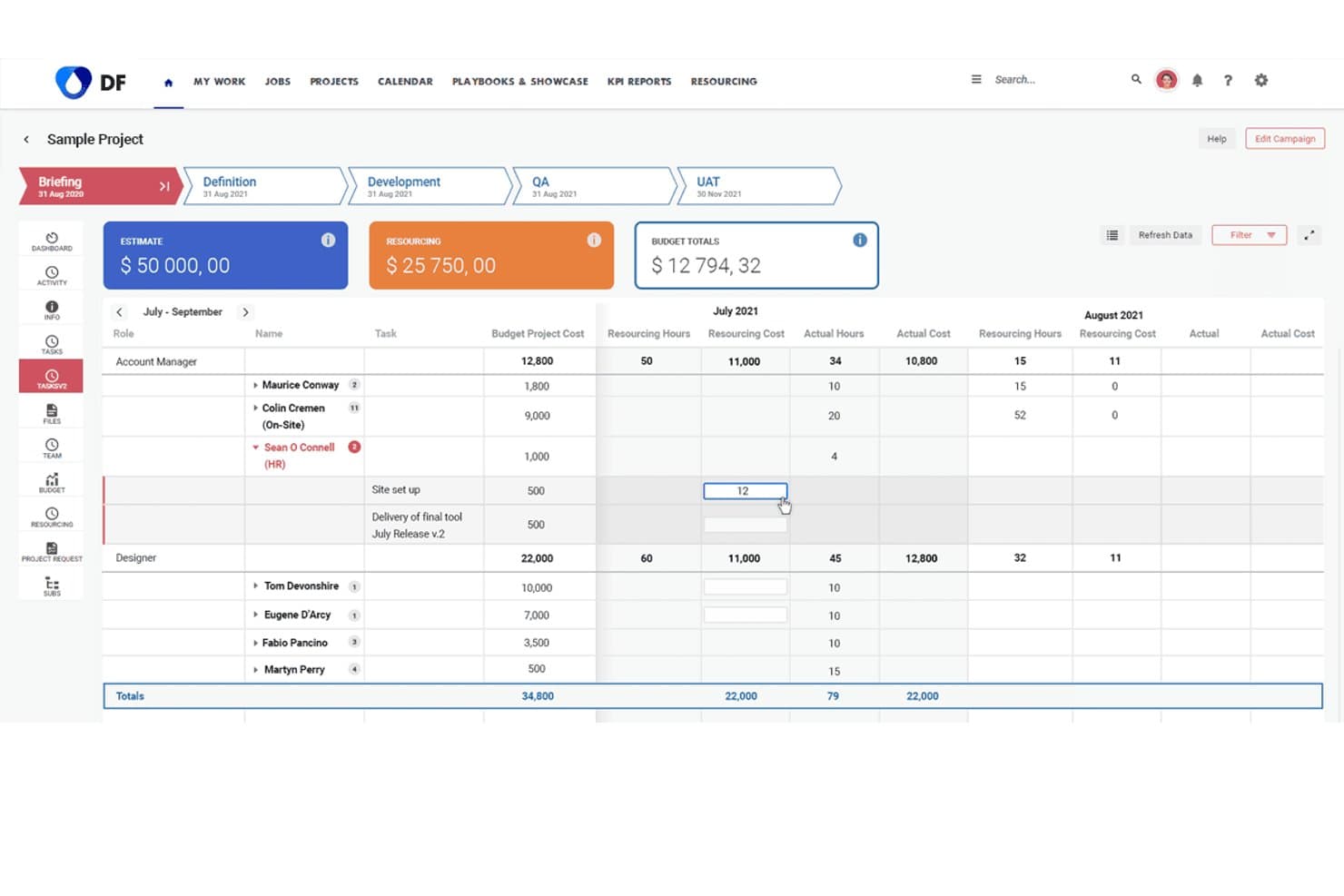
Screendragon realiza un seguimiento de los costes y las horas de asignación de recursos en los distintos roles del proyecto. Screendragon ayuda a los equipos de marketing y creativos a optimizar la gestión de flujos de trabajo, centralizar las aprobaciones y mejorar la visibilidad de las campañas, lo que lo convierte en una opción ideal para agencias y equipos internos que gestionan proyectos complejos.
¿Para quién es más adecuado Screendragon?
Screendragon es adecuado para agencias y equipos internos de marketing que gestionan flujos de trabajo creativos complejos y aprobaciones de campañas de gran volumen.
Por qué Screendragon es una buena alternativa a Smartsheet
Elegí Screendragon como una de las mejores opciones porque destaca en operaciones creativas y aprobaciones de campañas de una manera que se adapta a las agencias y a los equipos de marketing con mucha actividad. Utilizo su creador visual de flujos de trabajo para centralizar los comentarios, acelerar las aprobaciones creativas y realizar un seguimiento de las etapas de las campañas en varios departamentos. Esto se traduce en lanzamientos más rápidos y menos cuellos de botella al gestionar proyectos creativos complejos.
Funciones principales de Screendragon
- Seguimiento del presupuesto: Realiza un seguimiento de los presupuestos de los proyectos y controla los costes en la misma plataforma que utilizas para gestionar tus flujos de trabajo.
- Gestión de recursos: Asigna miembros del equipo a los proyectos según su disponibilidad y sus conjuntos de habilidades.
- Control de versiones: Gestiona las versiones de los archivos creativos con cargas que incluyen marcas de tiempo y registros de auditoría claros.
- Informes personalizados: Crea informes adaptados para supervisar el estado de los proyectos, la carga de trabajo y las métricas de productividad.
Integraciones de Screendragon
Las integraciones nativas no están documentadas claramente. Screendragon ofrece una API para integraciones personalizadas.
Pros and Cons
Pros:
- Centraliza las aprobaciones creativas y los comentarios sobre las campañas
- Incluye control de versiones integrado para los recursos
- Ofrece informes personalizados para las métricas de proyectos creativos
Cons:
- Las integraciones nativas son limitadas y no están documentadas
- Puede resultar complejo para una gestión de tareas sencilla
Learn more about Screendragon: Ideal para proyectos flexibles con estilo de base de datos
- Plan gratuito + demostración gratuita disponible
- Desde $20/usuario/mes (facturado anualmente)
Visit WebsiteCustomer Rating:4.6/5
Airtable ofrece una cronología de Gantt con agrupación de tareas y dependencias. Airtable es una plataforma de bases de datos sin código que permite a los equipos de marketing diseñar flujos de trabajo personalizados, gestionar recursos de campañas y automatizar tareas repetitivas. Si necesitas un sistema flexible para organizar proyectos y datos más allá de las hojas de cálculo, vale la pena echar un vistazo a Airtable.
¿Para quién es más adecuado Airtable?
Equipos de marketing de empresas medianas que quieren automatizar y personalizar la gestión de campañas.
Por qué Airtable es una buena alternativa a Smartsheet
Elegí Airtable porque su generador de automatizaciones permite a mi equipo activar flujos de trabajo de varios pasos —como enviar un informe completado al revisor adecuado o actualizar el estado de una campaña en varias tablas vinculadas— sin escribir una sola línea de código. También uso las funciones de IA para generar informes creativos y obtener información de los datos de las campañas directamente dentro de la plataforma. En la práctica, esto significa que mi equipo dedica menos tiempo a las transferencias manuales y más tiempo al trabajo real de las campañas. Para los equipos de marketing que gestionan varios canales o regiones, los registros vinculados de Airtable mantienen todo conectado en un solo lugar.
Funciones principales de Airtable
- Diseñador de interfaces: Crea paneles y vistas de aplicaciones personalizados mediante arrastrar y soltar directamente a partir de tus datos existentes de Airtable.
- Múltiples vistas: Alterna entre vistas de cuadrícula, calendario, Kanban y galería para visualizar los mismos datos de distintas formas.
- Sincronización de datos: Extrae datos en tiempo real de fuentes externas a Airtable para que los registros se mantengan actualizados en todos los flujos de trabajo conectados.
- Controles de gobernanza y seguridad: Gestiona permisos, autenticación y acceso a los datos a escala desde un panel de administración centralizado.
Integraciones de Airtable
Entre las integraciones se incluyen Google Drive, Box, Dropbox, Salesforce, Slack, Jira, Tableau, WordPress, ChatGPT y más.
Pros and Cons
Pros:
- Filas ilimitadas en los planes de pago
- API REST integrada para la automatización de flujos de trabajo
- Diseñador de interfaces para paneles personalizados
Cons:
- Los permisos son menos detallados que en Smartsheet
- La aplicación móvil carece de algunas funciones de escritorio
Learn more about Airtable: Ideal para bases de datos de equipos de código abierto
- Prueba gratuita + plan gratuito disponible
- Desde $10/usuario/mes (facturado anualmente)
Visit WebsiteCustomer Rating:4.7/5
Baserow ofrece un rastreador en formato de hoja de cálculo con filtros, ordenación y herramientas de colaboración. Si quieres una base de datos sin código que tu equipo de marketing pueda personalizar por completo, Baserow ofrece bloques de construcción flexibles para el seguimiento de campañas, la gestión de recursos y la generación de informes. Es una opción ideal para equipos que necesitan diseñar sus propios flujos de trabajo sin el apoyo de desarrolladores.
¿Para quién es más adecuado Baserow?
Equipos de marketing de startups y agencias que quieren crear bases de datos de campañas personalizadas sin programar.
Por qué Baserow es una buena alternativa a Smartsheet
Elegí Baserow porque su estructura de base de datos de código abierto permite a mi equipo crear exactamente las tablas, vistas y campos que necesitamos, sin tener que esperar a un desarrollador. Utilizo los tipos de campo personalizados, como archivos adjuntos, URL y fórmulas, para realizar un seguimiento de los recursos de las campañas y los datos de rendimiento en un solo lugar. Las vistas de galería y Kanban me permiten cambiar la forma en que consulto los mismos datos, dependiendo de si estoy revisando recursos creativos o gestionando las etapas del contenido. En la práctica, esto significa que mi equipo no está obligado a utilizar un formato de hoja de cálculo rígido, como puede ocurrir con Smartsheet.
Funciones principales de Baserow
- Comentarios en filas: Añade comentarios en hilos directamente en registros individuales para mantener los comentarios vinculados a datos específicos.
- Permisos basados en roles: Controla quién puede ver, editar o gestionar cada base de datos mediante configuraciones de acceso a nivel de usuario.
- Arquitectura basada en API: Cada base de datos de Baserow genera automáticamente una API REST para conectarse con herramientas externas.
- Colaboración en tiempo real: Varios miembros del equipo pueden editar y actualizar la misma base de datos simultáneamente sin conflictos.
Integraciones de Baserow
Las integraciones incluyen n8n, Zapier, Make, GitHub Issues, GitLab Issues, Jira Issues, Google Cloud Storage, Posthog y muchas más.
Pros and Cons
Pros:
- Plataforma de código abierto con opción de alojamiento propio
- Filas ilimitadas en todos los planes de pago
- Tipos de campo personalizados para datos de marketing
Cons:
- No incluye una vista de Gantt ni de línea de tiempo
- No incluye funciones integradas de generación de informes ni paneles
Learn more about Baserow: Ideal para el seguimiento centralizado de proyectos del equipo
- Prueba gratuita de 14 días + demostración gratuita disponible
- Desde $8/usuario/mes (facturado anualmente)
Visit WebsiteCustomer Rating:4.7/5
Lista de proyectos de Workzone con seguimiento del progreso, tareas y asignaciones del equipo. Workzone es una plataforma de gestión de proyectos diseñada para equipos de marketing que necesitan gestionar campañas complejas con múltiples partes interesadas. Si quieres un seguimiento detallado de las tareas, visibilidad entre proyectos y permisos de usuario granulares, vale la pena considerar Workzone.
¿Para quién es más adecuado Workzone?
Equipos de marketing medianos que gestionan varios proyectos y necesitan un control estricto sobre el acceso de los usuarios.
Por qué Workzone es una buena alternativa a Smartsheet
Elegí Workzone porque sus controles de permisos me permiten decidir exactamente qué puede ver y hacer cada parte interesada, hasta el nivel de cada proyecto o tarea. Esto es importante cuando gestiono campañas con agencias externas o clientes que no deberían tener acceso a todos los proyectos de mi espacio de trabajo. También utilizo su panel entre proyectos para hacer un seguimiento del progreso de varias campañas a la vez, sin tener que alternar entre vistas independientes. Para los equipos de marketing que gestionan varios proyectos simultáneos con colaboradores internos y externos, Workzone mantiene el acceso ordenado y la visibilidad clara.
Características principales de Workzone
- Vista de diagrama de Gantt: Visualiza las dependencias de las tareas y los plazos de los proyectos en un diagrama interactivo de arrastrar y soltar.
- Revisión de imágenes y vídeos: Añade anotaciones a recursos creativos —imágenes, documentos y vídeos— directamente en la plataforma para recibir comentarios y obtener aprobaciones.
- Plantillas de proyectos prediseñadas: Inicia campañas repetibles con más de 1.000 plantillas de sectores y departamentos con un solo clic.
- Seguimiento del tiempo: Registra las horas reales de las tareas y compáralas con las horas presupuestadas en todos los proyectos.
Integraciones de Workzone
Las integraciones incluyen Box, Dropbox, Everhour, Google Drive, HubSpot, Jira, Microsoft Teams, OneDrive, Slack y más.
Pros and Cons
Pros:
- Revisión creativa integrada para recursos de marketing
- Los formularios de solicitud de proyectos estandarizan la recepción de campañas
- Plantillas prediseñadas para flujos de trabajo de marketing
Cons:
- Opciones limitadas de informes personalizados
- Sin gestión de recursos integrada
Learn more about Workzone: Ideal para la gestión de proyectos centrada en clientes
- Prueba gratuita de 14 días
- Desde $9.99/usuario/mes (facturado anualmente)
Visit WebsiteCustomer Rating:4.4/5
Teamwork ofrece una hoja de horas semanal con seguimiento de tareas y registros diarios. Si necesitas una plataforma de gestión de proyectos que combine la colaboración con clientes, el seguimiento del tiempo y la facturación, vale la pena considerar Teamwork.com. Las agencias y los equipos de marketing utilizan esta herramienta para gestionar proyectos de clientes, registrar las horas facturables y mantener todas las comunicaciones en un solo lugar.
¿Para quién es Teamwork.com más adecuado?
Agencias y equipos de marketing orientados al cliente que gestionan proyectos facturables.
Por qué Teamwork.com es una buena alternativa a Smartsheet
Elegí Teamwork.com porque gestiona todo el ciclo de vida de los proyectos de clientes en un solo lugar: desde la gestión de tareas hasta el seguimiento del tiempo y la facturación. Utilizo el registro de tiempo integrado para llevar un control de las horas facturables asociadas a tareas y proyectos específicos, y después incorporo esos datos directamente a las facturas de los clientes sin cambiar de herramienta. También valoro el portal para clientes, que me permite darles visibilidad sobre el progreso del proyecto y compartir entregables sin exponer el espacio de trabajo interno de mi equipo. Para los equipos de marketing de agencias que gestionan varias cuentas de clientes, es difícil encontrar en otro lugar esa separación entre las vistas internas y las orientadas al cliente.
Características principales de Teamwork.com
- Vista de diagrama de Gantt: Visualiza las dependencias entre tareas y los cronogramas de los proyectos mediante una interfaz de arrastrar y soltar.
- Gestión de la carga de trabajo: Consulta la capacidad del equipo en todos los proyectos y reasigna tareas para equilibrar el trabajo.
- Plantillas de proyectos: Crea estructuras de proyectos reutilizables para tipos de campañas recurrentes o la incorporación de nuevos clientes.
- Seguimiento del presupuesto: Establece presupuestos para los proyectos, supervisa el gasto en tiempo real y recibe alertas cuando los proyectos exceden el presupuesto.
Integraciones de Teamwork.com
Las integraciones incluyen Slack, Microsoft Office, Harvest, HubSpot, Xero, BugHerd, ChatGPT, Skyvia, Stripe y más.
Pros and Cons
Pros:
- Plantillas de proyectos para flujos de trabajo de marketing reutilizables
- Paneles de cartera para obtener visibilidad de varios proyectos
- Herramientas de revisión creativa para recursos de marketing
Cons:
- No ofrece una cuadrícula estilo hoja de cálculo para editar datos
- No incluye previsión de recursos
Learn more about Teamwork.com: Ideal para la planificación de proyectos empresariales
- Demostración gratuita disponible
- Precio bajo solicitud
Visit WebsiteCustomer Rating:4.3/5
Panel de campañas de Adobe Workfront con registros, filtros y un asistente de IA. Adobe Workfront es una plataforma de gestión de proyectos diseñada para grandes equipos de marketing y agencias que necesitan gestionar flujos de trabajo y aprobaciones complejos. Creo que te resultará especialmente útil si tu equipo gestiona campañas de gran volumen y necesita una colaboración avanzada entre departamentos.
¿Para quién es más adecuado Adobe Workfront?
Equipos de marketing empresariales que gestionan campañas complejas y multicanal entre distintos departamentos.
Por qué Adobe Workfront es una buena alternativa a Smartsheet
Elegí Adobe Workfront porque se conecta directamente con Adobe Creative Cloud, lo que significa que mi equipo puede enviar recursos desde Photoshop o InDesign directamente a un flujo de trabajo de revisión y aprobación sin cambiar de plataforma. Valoro que el sistema estructurado de recepción de solicitudes permita a las partes interesadas enviar informes de campaña mediante formularios personalizados, que luego se dirigen automáticamente al equipo adecuado. En la práctica, esto significa menos correos electrónicos y ninguna solicitud perdida. Para los equipos empresariales que gestionan una producción creativa de gran volumen, es difícil igualar ese nivel de control del flujo de trabajo.
Características principales de Adobe Workfront
- Módulo de planificación de Workfront: Gestiona los cronogramas de las campañas y los registros de ejecución en un espacio de planificación específico con vistas de calendario y cronograma.
- Gestión de recursos: Consulta la capacidad del equipo, asigna trabajo entre las distintas personas y equilibra las cargas de trabajo mediante herramientas de programación basadas en habilidades.
- Generación de informes mediante IA: Convierte automáticamente documentos fuente, como archivos de PowerPoint o Word, en informes de proyecto estructurados y prácticos.
- Paneles de informes: Crea paneles personalizados con widgets de informes que extraen datos actualizados de los proyectos para ofrecer visibilidad en tiempo real del progreso de las campañas.
Integraciones de Adobe Workfront
Las integraciones incluyen Adobe Creative Cloud, Adobe Experience Manager, Frame.io, Adobe Express, GenStudio y una API para integraciones personalizadas.
Pros and Cons
Pros:
- Integración profunda con las herramientas de Adobe Creative Cloud
- Flujos de trabajo de aprobación automatizados para recursos creativos
- Formularios de solicitud personalizables para la recepción de campañas
Cons:
- Proceso de configuración complejo para nuevos usuarios
- Requiere licencias independientes para algunas integraciones de Adobe
Learn more about Adobe Workfront: Ideal para la colaboración sencilla en equipo
- Prueba gratuita de 30 días + demo gratuita disponible
- Desde $15/usuario/mes
Visit WebsiteCustomer Rating:4.2/5
Vista del calendario de Basecamp con configuración de eventos, calendario y notificaciones del equipo. Basecamp es una plataforma de gestión de proyectos que reúne tareas, mensajes, archivos y calendarios en un solo lugar. Los equipos de marketing que buscan un centro sencillo y centralizado para la comunicación y colaboración en proyectos suelen recurrir a Basecamp para mantener a todos alineados.
¿Para quién es ideal Basecamp?
Equipos de marketing pequeños y medianos que buscan un espacio de trabajo unificado para proyectos y comunicación.
Por qué Basecamp es una buena alternativa a Smartsheet
Elegí Basecamp porque reemplaza la combinación dispersa de correos electrónicos, hojas de cálculo y conversaciones de chat que ralentizan a los equipos de marketing. Cada proyecto tiene su propio espacio con un panel de mensajes, listas de tareas pendientes, un calendario compartido y almacenamiento de archivos, todo en un solo lugar. Me gusta especialmente la función de chat Campfire, que mantiene las conversaciones del proyecto contextualizadas y separadas de las conversaciones generales del equipo. Para los equipos de marketing que no necesitan cuadrículas de datos complejas, pero sí un espacio claro y organizado para cada campaña, Basecamp ofrece justo eso sin una carga innecesaria.
Características principales de Basecamp
- Tabla de tarjetas: Organiza tareas y flujos de trabajo en un tablero de estilo kanban dentro de cualquier proyecto.
- Gráficos de colinas: Sigue visualmente el progreso de las listas de tareas pendientes, mostrando qué aspectos aún se están definiendo y cuáles están en ejecución.
- Puertas: Vincula herramientas externas como Google Docs, Figma o Dropbox directamente dentro de un proyecto de Basecamp.
- Menú ¡Hola!: Reúne todas las notificaciones de cada proyecto en una única bandeja de entrada consolidada.
Integraciones de Basecamp
Las integraciones incluyen Slack, Google Hangouts, Jira, Trello, Asana, GitHub, Dropbox, Harvest, Everhour y más.
Pros and Cons
Pros:
- Paneles de mensajes integrados para debates sobre proyectos
- Los gráficos de colinas visualizan el progreso del proyecto de forma única
- La tabla de tarjetas ofrece una gestión de tareas de estilo kanban
Cons:
- No ofrece vistas de datos en formato de hoja de cálculo o cuadrícula
- Automatización limitada para tareas recurrentes
 Ideal para la gestión del trabajo todo en uno
- Plan gratuito disponible
- Desde $7/usuario/mes (facturado anualmente)

Panel de tareas de ClickUp con prioridades, responsables y jerarquía de proyectos. ClickUp es una plataforma flexible de gestión de proyectos que ayuda a los equipos de marketing a centralizar tareas, documentos y la planificación de campañas en un solo lugar. Creo que te resultará especialmente útil si tu equipo gestiona varios flujos de trabajo y necesita un control detallado sobre la organización de los proyectos.
¿Para quién es más adecuado ClickUp?
Equipos de marketing de empresas en rápido crecimiento que necesitan espacios de trabajo personalizables y un control detallado de los flujos de trabajo.
Por qué ClickUp es una buena alternativa a Smartsheet
Elegí ClickUp porque sus vistas personalizadas —Lista, Tablero, Gantt y Calendario— permiten a mi equipo cambiar de formato según el tipo de trabajo que gestionamos. Me gusta que ClickUp Docs esté integrado directamente en el espacio de trabajo, de modo que mi equipo puede vincular informes, planes de campaña y procedimientos operativos estándar a las tareas sin tener que cambiar de herramienta. En la práctica, esto significa que podemos crear jerarquías de tareas anidadas que reflejan cómo se dividen realmente nuestros proyectos de marketing: por campaña, canal y entregable. Para los equipos que consideran que Smartsheet es demasiado rígido, la flexibilidad de ClickUp en cuanto a vistas y estructura supone una ventaja real.
Funciones principales de ClickUp
- Campos personalizados: Añade menús desplegables, selectores de fecha o campos de texto a cualquier tarea para registrar datos específicos de la campaña.
- Automatizaciones: Configura reglas basadas en activadores para mover tareas, asignar responsables o actualizar estados sin intervención manual.
- Objetivos: Realiza un seguimiento del progreso hacia los OKR de marketing vinculando tareas y hitos directamente con objetivos medibles.
- Seguimiento del tiempo: Registra las horas directamente en las tareas para supervisar cómo se distribuye el tiempo entre campañas y proyectos.
Integraciones de ClickUp
Las integraciones incluyen Slack, GitHub, HubSpot, Google Drive, Outlook, Figma, Zoom, Microsoft Teams, Dropbox y más.
Pros and Cons
Pros:
- Paneles personalizados para el seguimiento de campañas y proyectos
- Herramientas de gestión de recursos para equilibrar las cargas de trabajo del equipo
- Etiquetado cruzado de tareas para una visibilidad entre equipos
Cons:
- Retrasos ocasionales con grandes conjuntos de datos de proyectos
- Los tipos de elementos personalizados solo están disponibles en los niveles superiores
Learn more about ClickUp : Ideal para gestionar tareas y cronogramas
- Plan gratuito disponible
- Desde $10.99/usuario/mes (facturado anualmente)

Vista de lista de tareas de Asana con fechas límite, proyectos y seguimiento de colaboradores. Asana es una plataforma de gestión de proyectos diseñada para equipos que necesitan coordinar campañas de marketing complejas y realizar un seguimiento de los entregables en múltiples canales. Si quieres visualizar los flujos de trabajo, asignar tareas y automatizar aprobaciones en un solo lugar, Asana es una buena opción.
¿Para quién es más adecuada Asana?
Equipos de marketing de empresas en crecimiento que necesitan coordinar proyectos y automatizar flujos de trabajo entre varios departamentos.
Por qué Asana es una buena alternativa a Smartsheet
Elegí Asana porque su automatización de flujos de trabajo permite a mi equipo crear activadores basados en reglas, como asignar automáticamente una tarea cuando se aprueba el resumen de una campaña o notificar a las partes interesadas cuando cambia una fecha límite. También utilizo su vista de cronograma para planificar las dependencias de las campañas y detectar conflictos de programación antes de que se conviertan en problemas. En la práctica, esto significa que mi equipo dedica menos tiempo a perseguir actualizaciones de estado y más tiempo a ejecutar las tareas. Para los equipos de marketing que gestionan varios proyectos en distintas regiones o canales, Asana mantiene a todos alineados sin necesidad de comprobaciones constantes.
Características principales de Asana
- Campos personalizados: Añade etiquetas de datos personalizadas a las tareas, como la etapa de la campaña o el presupuesto, y ordénalas, fíltralas y genera informes sobre ellas en todos los proyectos.
- Portafolios: Supervisa varios proyectos desde un único panel para hacer un seguimiento del progreso y detectar obstáculos en las campañas.
- Paneles de informes: Crea gráficos en tiempo real que visualizan el estado de las tareas, la carga de trabajo y la salud de los proyectos de todo tu equipo.
- Formularios: Crea formularios de solicitud estandarizados que se incorporan directamente a los proyectos de Asana, para que cada solicitud llegue con el contexto adecuado.
Integraciones de Asana
Las integraciones incluyen Slack, Google Drive, Microsoft Teams, Salesforce, Jira, Dropbox, Zoom, HubSpot, Zendesk y más.
Pros and Cons
Pros:
- Vista de cronograma para planificar visualmente campañas
- Automatización de tareas con activadores de reglas personalizados
- Paneles de portafolios para supervisar varios proyectos
Cons:
- No ofrece edición nativa en una cuadrícula con estilo de hoja de cálculo
- Las funciones de diagrama de Gantt requieren planes de pago
Learn more about Asana: 10Ideal para la programación de proyectos basada en diagramas de Gantt
GanttPRO
- Prueba gratuita de 14 días
- Desde $7/usuario/mes (facturado anualmente)
Visit WebsiteCustomer Rating:4.8/5
GanttPRO ofrece un diagrama de Gantt con seguimiento de tareas y asignaciones de equipo. GanttPRO es una plataforma de gestión de proyectos basada en diagramas de Gantt interactivos, lo que la convierte en una opción muy adecuada para equipos de marketing que necesitan planificación visual y control de los plazos. Si gestionas campañas con muchas dependencias o fechas límite cambiantes, apreciarás lo fácil que es organizar, ajustar y compartir los cronogramas de los proyectos.
¿Para quién es más adecuada GanttPRO?
Responsables de proyectos de marketing de pequeñas y medianas empresas que necesitan cronogramas visuales claros y dependencias entre tareas.
Por qué GanttPRO es una buena alternativa a Smartsheet
Elegí GanttPRO porque su interfaz de diagramas de Gantt hace que la planificación de campañas sea realmente visual, algo que no ofrece el diseño de cuadrícula de Smartsheet. Utilizo la línea de tiempo de arrastrar y soltar para cambiar al instante las fechas límite de las tareas dependientes; cuando se retrasa una entrega de contenido, todas las tareas posteriores se ajustan automáticamente. También valoro la función de seguimiento de la línea base, que permite a mi equipo comparar el plan original del proyecto con el progreso real, para que podamos detectar dónde se están desviando las campañas antes de que se salgan de control. En la práctica, esto se traduce en menos lanzamientos retrasados y una responsabilidad más clara dentro del equipo.
Funciones clave de GanttPRO
- Resaltado de la ruta crítica: Identifica automáticamente las tareas que afectan directamente a la fecha de finalización del proyecto.
- Vista de tablero: Alterna entre las vistas de diagrama de Gantt y de tablero estilo Kanban para gestionar las tareas en el formato que mejor se adapte a tu flujo de trabajo.
- Gestión de la carga de trabajo: Consulta y redistribuye la carga de tareas de los miembros del equipo entre distintos proyectos para evitar una asignación excesiva o insuficiente.
- Registros de tiempo: Registra y controla el tiempo real dedicado a tareas e hitos, con opciones para añadir comentarios y exportar informes.
Integraciones de GanttPRO
Las integraciones incluyen Slack, Google Drive, Jira Cloud, OneDrive, Microsoft Project, Microsoft Teams y Microsoft Excel, además de una API abierta para integraciones personalizadas.
Pros and Cons
Pros:
- La edición de diagramas de Gantt es rápida e interactiva
- Las dependencias entre tareas se actualizan automáticamente con los cambios
- La vista de tablero admite flujos de trabajo de marketing ágiles
Cons:
- No incluye formularios integrados para solicitudes de incorporación
- No ofrece integraciones nativas con CRM ni correo electrónico
Learn more about GanttPRO:
Otras alternativas a Smartsheet
Estas son algunas alternativas adicionales a Smartsheet que no llegaron a mi lista de preseleccionadas, pero que aun así merece la pena conocer:
- 11monday AI WorkspaceIdeal para el seguimiento visual de proyectos
- 12WrikeIdeal para flujos de trabajo y paneles personalizables
- 13PlanviewIdeal para la gestión de carteras y la planificación estratégica
- 14ProofHubIdeal para la colaboración centralizada del equipo
- 15TrelloIdeal para la organización de tareas en kanban
- 16ActiveCollabIdeal para proyectos con seguimiento del tiempo y facturación
- 17GoodDayIdeal para la automatización y el seguimiento de flujos de trabajo
- 18SmartSuiteIdeal para la gestión de trabajo personalizable
- 19CodaIdeal para documentos con funciones de base de datos
- 20NotionIdeal para documentos flexibles y gestión de proyectos
Cómo evalúo las alternativas a Smartsheet
Analizo estas herramientas en dos niveles: la funcionalidad principal—líneas de tiempo de campañas, dependencias de tareas, aprobaciones—que todos los candidatos deben ofrecer, y los diferenciadores que hacen que una sea mejor para equipos de marketing.
Funcionalidad principal (Requisitos básicos para esta lista)
Cuando selecciono herramientas para mi lista, califico cada una en una escala de 0 (no ofrece la funcionalidad) a 5 (destaca en este aspecto) para cada funcionalidad principal indicada abajo. Luego, calculo el puntaje total de la herramienta como un porcentaje. Cada herramienta debe lograr un puntaje mínimo total del 65% para ser considerada en la selección.
- Vistas de proyecto flexibles: Reviso si la herramienta ofrece vistas de cuadrícula, Kanban, Gantt y calendario para que los equipos de marketing puedan alternar entre una línea de tiempo de campaña y un tablero de estilo sprint.
- Gestión de tareas y flujos de trabajo: Cada herramienta necesita asignación de tareas sólida, dependencias, subtareas y seguimiento de estado para respaldar campañas de varios pasos, desde el brief hasta el lanzamiento.
- Colaboración y revisión: Busco comentarios en tiempo real, menciones @, intercambio de archivos y, de ser posible, anotaciones o flujos de aprobación para revisar activos creativos antes de que salgan en vivo.
- Automatizaciones y plantillas: Aquí importan las plantillas reutilizables de campañas y automatizaciones basadas en reglas, como asignar automáticamente a un diseñador cuando una tarea pasa a "Listo para diseño."
- Informes y paneles: Los responsables de marketing necesitan mostrar el progreso a las partes interesadas, por lo que evalúo si cada herramienta ofrece paneles personalizables, vistas de carga de trabajo e informes exportables.
- Ecosistema de integraciones: La herramienta debe conectarse con el stack martech que tu equipo ya utiliza—CRMs como Salesforce o HubSpot, herramientas creativas, Slack o Teams y plataformas de almacenamiento de archivos.
Una vez tengo una lista de herramientas que cumplen estos criterios, considero qué distingue a cada plataforma.
Factores diferenciadores (Lo que distingue a los proveedores)
Así es como comparo y contrasto los diferentes proveedores:
Funciones destacadas
La planificación de recursos y capacidades es clave; me interesa ver vistas de carga de trabajo que muestren qué diseñadores o redactores están saturados antes de asignar otro brief de campaña. Los formularios de solicitud también marcan la diferencia cuando tu equipo recibe pedidos de ventas o producto; las mejores herramientas canalizan esos briefs al flujo de trabajo adecuado de forma automática. También evalúo si una plataforma ofrece funciones de IA como resúmenes de estado generados automáticamente, que ahorran tiempo al informar a la dirección.
Más allá de las funciones
La compatibilidad con el stack martech es fundamental. Verifico si una herramienta se conecta de forma nativa con el CRM, las plataformas publicitarias y las apps creativas que tu equipo ya utiliza, porque una configuración repleta de soluciones parche genera baja adopción rápidamente. La transparencia en precios es otro factor que considero; reviso cómo escalan los costos al agregar usuarios o cambiar de nivel, especialmente para equipos en crecimiento que comienzan siendo pequeños. También evalúo el tiempo hasta obtener valor revisando las plantillas de marketing y los recursos de onboarding disponibles, que ayudan a que los equipos sean productivos en días y no en meses.
¿Por qué buscar una alternativa a Smartsheet?
Aunque Smartsheet es una buena opción de software para operaciones de marketing, hay varios motivos por los que algunos usuarios buscan soluciones alternativas. Es posible que estés buscando una alternativa a Smartsheet porque…
- Necesitas herramientas de chat o mensajería integradas
- Quieres más opciones visuales para realizar el seguimiento de proyectos
- Necesitas integraciones más profundas con herramientas de marketing
- Prefieres una interfaz más sencilla y menos parecida a una hoja de cálculo
- Necesitas funciones de automatización más flexibles
- Quieres una mejor compatibilidad con los flujos de trabajo creativos
Si alguna de estas situaciones te resulta familiar, has llegado al lugar adecuado. Mi lista contiene varias opciones de software para operaciones de marketing que se adaptan mejor a los equipos que se enfrentan a estos desafíos con Smartsheet y buscan soluciones alternativas.
Funciones principales de Smartsheet
Estas son algunas de las funciones principales de Smartsheet, que te ayudarán a contrastar y comparar lo que ofrecen las soluciones alternativas:
- Vista de cuadrícula: Organiza, edita y gestiona los datos de los proyectos en un diseño familiar tipo hoja de cálculo compatible con la ordenación, el filtrado y la edición en línea.
- Diagramas de Gantt: Visualiza los cronogramas, las dependencias y los hitos de los proyectos con vistas interactivas de diagramas de Gantt para mejorar la programación y la planificación.
- Flujos de trabajo automatizados: Configura reglas para automatizar tareas repetitivas, notificaciones y aprobaciones, reduciendo el trabajo manual y manteniendo los proyectos al día.
- Paneles: Crea paneles personalizables para mostrar métricas de proyectos, gráficos e indicadores clave de rendimiento en tiempo real, y obtener información y generar informes rápidamente.
- Gestión de recursos: Asigna, realiza un seguimiento y equilibra las cargas de trabajo del equipo en distintos proyectos para evitar cuellos de botella y optimizar la productividad.
- Formularios: Crea formularios personalizados para recopilar datos estructurados de las partes interesadas o los clientes directamente en las hojas de tus proyectos.
- Herramientas de colaboración: Comenta en las filas, etiqueta a tus compañeros de equipo y adjunta archivos directamente en las hojas para mantener toda la comunicación del proyecto en contexto.
- Vista de calendario: Consulta las tareas y las fechas límite en formato de calendario, lo que facilita la gestión de los horarios y la detección de conflictos.
- Vinculación de celdas: Conecta datos entre hojas para mantener la coherencia y crear informes dinámicos entre proyectos.
- Biblioteca de integraciones: Conecta Smartsheet con herramientas como Microsoft Teams, Slack, Google Workspace y Salesforce para optimizar los flujos de trabajo y el intercambio de datos.