

Lead generation tools can help ease these burdens by automating tasks and identifying potential customers.
In my experience, the right tools can transform your lead generation strategy, making your team more efficient. I've tested and reviewed numerous solutions to bring you an unbiased, well-researched list of top picks.
In this article, I'll guide you through the best options available, highlighting their unique features and benefits. Whether you're looking to boost sales or enhance your marketing efforts, you'll find a tool that fits your needs.
Why Trust Our Software Recommendations
6,700+
Reviews
20
Industry experts
16+
Evaluation factors
14
Years
Our team has been testing and reviewing software since 2012. As marketing leaders ourselves, we know how difficult—and important—it is to choose the right software.
For this guide, we evaluated tools using hands-on testing and independent research, scoring tools using our selection criteria.
Our reviews reflect our human editorial judgment, not a sales pitch.
Expert reviewers:
 Gui DrusinaCreative Director
- Shriya GhateSenior Marketing Lead
 Amanda JacquesMarketing Ops Leader

Lead Generation Tools Comparison Table
This comparison table summarizes pricing details for my top lead generation tools selections:
| Tool | Best For | Trial Info | Price | ||
|---|---|---|---|---|---|
| 1 | Best for meeting scheduling and lead routing | Free plan + 14-day free trial + free demo available | From $49/user/month (billed annually) | Website | |
| 2 | Best for intent signal tracking | Free trial available | From $99/month | Website | |
| 3 | Best for managing cold email campaigns | Free trial available | From $37.6/month | Website | |
| 4 | Best for simple webinar lead capture | 14-day free trial + free demo available | From $45/host/month (billed annually) | Website | |
| 5 | Best for accurate B2B contact data | 7-day free trial + free demo available | From $74/month (billed annually) | Website | |
| 6 | Best for high-accuracy, phone-verified B2B data | Free demo available | Pricing upon request | Website | |
| 7 | Best for all-in-one sales and CRM | Free 14-day trial + free demo available | From $59/user/month (billed annually) | Website | |
| 8 | Best for finding professional email addresses | Free plan available | From $49/month | Website | |
| 9 | Best for creating high-converting landing pages | 7-day free trial available | From $23/month (billed annually) | Website | |
| 10 | Best for identifying website visitors | 14-day free trial + free plan available | From $99/month (billed annually) | Website |


Best Lead Generation Tool Reviews
Below are my detailed summaries of the best lead generation tools that made it onto my shortlist. My reviews offer a detailed look at the key features, pros & cons, integrations, and ideal use cases of each tool to help you find the best one for you.
 Best for meeting scheduling and lead routing
- Free plan + 14-day free trial + free demo available
- From $49/user/month (billed annually)
Visit WebsiteCustomer Rating:4.5/5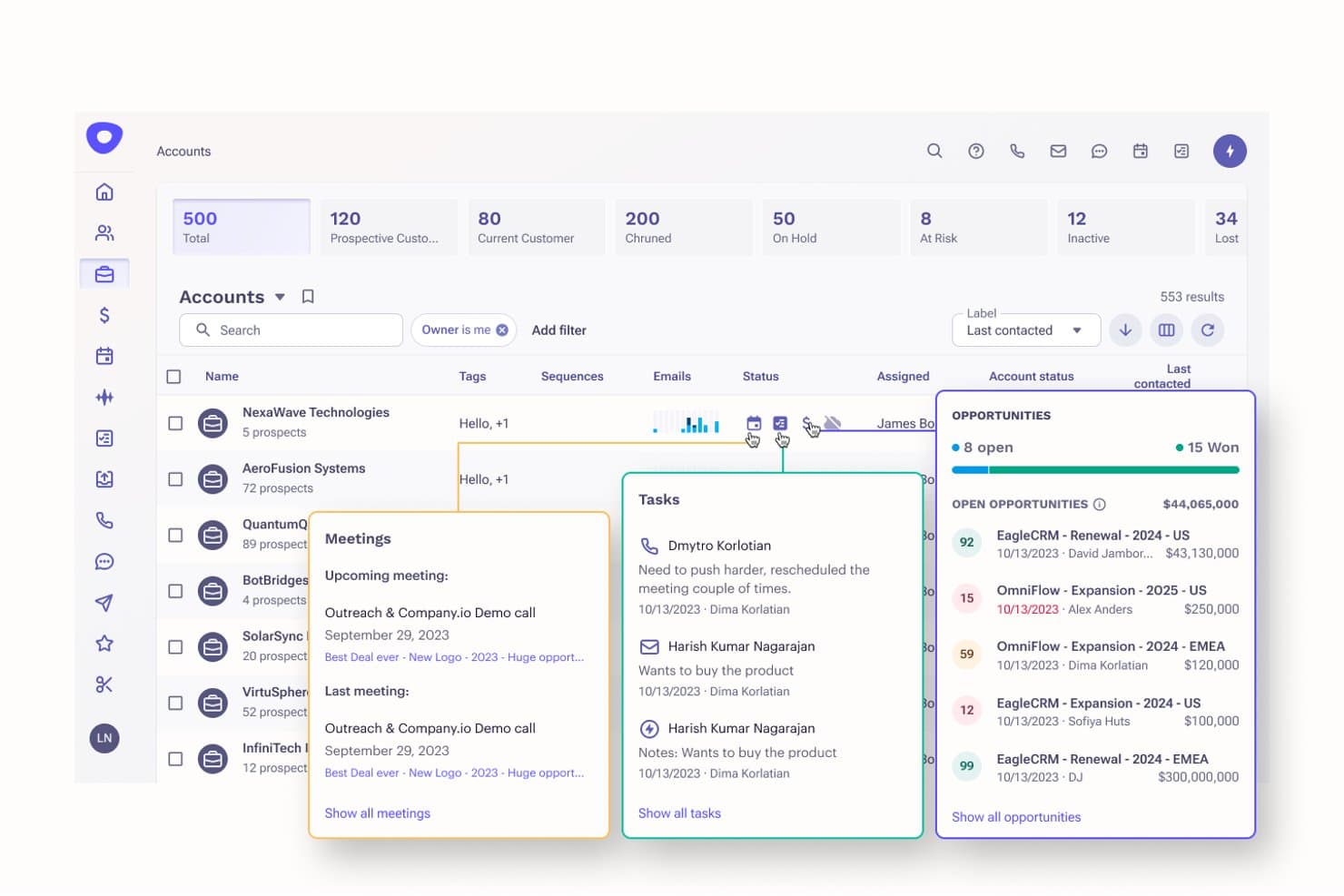
Apollo.io offers an AI-powered accounts dashboard with lead tracking, opportunity management, meeting scheduling, and task assignment for simplified lead generation. Apollo.io is an AI-powered B2B lead generation platform that combines a 275M+ contact database, sales engagement sequences, website visitor identification, inbound lead routing, and meeting scheduling in one place.
Who Is Apollo.io Best For?
Apollo.io suits B2B sales and marketing teams at SMBs and mid-market companies that want to consolidate prospecting, outreach, and lead routing into a single platform.
Why I Picked Apollo.io
Apollo.io earns its spot on my shortlist because of how tightly its meeting scheduler and lead router connect to the rest of the platform. When a prospect fills out a form, Apollo enriches the record in real time, scores it, and routes it to the right rep, all before the buyer has closed the tab. I also love that the Meetings Scheduler is native, so booked calls tie directly to the prospect's contact record and sequence history without any third-party sync.
Apollo.io Key Features
- B2B contact database: Access a verified database with over 275 million contacts and advanced filtering options.
- AI-powered lead scoring: Prioritize leads using predictive models that analyze firmographic and behavioral data.
- Website visitor identification: Identify anonymous website visitors and match them to companies or contacts.
- Sales engagement sequences: Launch multi-channel outreach campaigns with automated email and call steps.
Apollo.io Integrations
Apollo.io offers native integrations with Salesforce, HubSpot, Outreach, Airtable, Amplitude, Asana, and Gmail, and provides an API for custom integrations.
Pros and Cons
Pros:
- Real-time visitor identification reveals anonymous site traffic
- Sequences cover email, phone, and LinkedIn outreach
- Massive verified B2B contact database included
Cons:
- Credit limits restrict large-scale data exports
- Contact data less reliable for EMEA regions
Learn more about Apollo.io:

Findymail's Intellimatch helps users discover companies using natural language search. Findymail helps sales teams and lead generation agencies find verified B2B emails, phone numbers, and company data without relying on separate enrichment tools. It’s especially useful for outbound teams that need cleaner prospect lists, CRM hygiene, AI-assisted lead discovery, and intent signals to prioritize the right contacts.
Who Is Findymail Best For?
Findymail is a good fit for B2B sales and marketing teams that rely on LinkedIn and Sales Navigator for prospecting and need accurate, verified contact data at scale.
Why I Picked Findymail
I picked Findymail because it helps sales teams build cleaner prospect lists while maintaining accurate contact data. Its platform combines verified email discovery, AI-powered lead matching, and intent signals that help teams identify and prioritize potential buyers. I particularly like its Intellimatch feature, which lets users describe their ideal customer profile in plain language and receive matching companies and contacts based on that criteria. The platform also supports bulk email discovery and verification, helping teams scale prospecting efforts without manually validating contact information. For outbound sales teams and lead generation agencies, this combination of lead discovery, verification, and enrichment helps streamline prospecting workflows.
Findymail Key Features
Some other features in Findymail support outbound prospecting and lead discovery workflows:
- Intellimatch AI lead finder: Describe your ideal customer in plain English, and Findymail returns matching companies and contacts based on your criteria.
- Real-time intent signals: Monitor buying signals such as job changes, new hires, and topic engagement to identify prospects who may be ready for outreach.
- Email finder: Find verified business email addresses from names, company domains, social profiles, or bulk uploaded lists.
- Phone finder: Find mobile and direct-dial phone numbers for non-EU prospects to support outbound sales outreach.
Findymail Integrations
Integrations include HubSpot, Salesforce, Pipedrive, Zoho, Close, Copper, Instantly, Smartlead, Lemlist, and Woodpecker.
Pros and Cons
Pros:
- Finds and verifies emails within a single workflow
- Monitors intent signals such as job changes and new hires
- Supports AI lead matching from plain-language ICP descriptions
Cons:
- Phone number coverage is limited for EU contacts
- Lacks native sales engagement and campaign sequencing tools
Learn more about Findymail: Best for managing cold email campaigns
- Free trial available
- From $37.6/month
Visit WebsiteCustomer Rating:4.8/5
Instantly.ai helps teams run scaled cold outreach while managing contacts and replies. Instantly.ai is a platform that helps you find contacts, send outreach emails, and manage replies in one place. It’s built for teams that want to handle prospecting and cold outreach without using multiple tools. The platform focuses on helping you send emails at scale while keeping your deliverability steady.
Why I picked Instantly.ai: You get tools that help your team handle cold outreach from start to finish without extra steps. Instantly.ai lets you connect many email accounts, rotate sending, and warm them up so you can send more messages safely. You can build sequences, personalize messages, and track replies in one dashboard. There’s also lead data and enrichment that help you find contacts before writing your campaign. These features support your workflow if you’re running ongoing cold email campaigns.
Standout features & integrations:
Features include an email warmup system that helps your accounts stay healthy when you send often. You get lead enrichment tools that help you fill in missing info or expand your lists. The platform also offers AI-assisted writing to help you shape your outreach messages faster.
Integrations include HubSpot, Salesforce, Zapier, Make.com, Clay, Slack, API, Webhooks, Pipedrive, and Close
Pros and Cons
Pros:
- Lets you track replies across inboxes
- Helpful for building large prospect lists
- Easy scaling with many sending accounts
Cons:
- High sending volume needs monitoring
- Some leads may need manual checking
Learn more about Instantly: Best for simple webinar lead capture
- 14-day free trial + free demo available
- From $45/host/month (billed annually)
Visit WebsiteCustomer Rating:4.7/5
Demio helps teams host live or automated webinars with engagement tools. Demio is a webinar platform that helps you run live and automated sessions. It’s designed for teams that want an easy way to host events and share content. The platform focuses on giving you tools to present, engage, and collect attendee details in one place.
Why I picked Demio: You get simple tools that help you collect attendee info without adding extra steps for your team. Demio lets you create registration pages, capture sign-ups, and keep all your leads in one dashboard. You can use its live chat, polls, and handouts to keep people engaged while you present. It also gives you automated events, so you can keep collecting leads even when you’re not hosting live. These features make it easy for you to use webinars as part of your lead capture process.
Standout features & integrations:
Features include event analytics that show you how people interact during your sessions. You also get session replays you can share so your team can keep collecting sign-ups after the event. Demio gives you branding controls that help you match the look of your sessions to your company’s visual style.
Integrations include HubSpot, ActiveCampaign, Marketo, Mailchimp, ConvertKit, Drip, Keap, Ontraport, AWeber, and GetResponse
Pros and Cons
Pros:
- Lets you reuse past sessions
- Good for repeated event workflows
- Simple setup for your team
Cons:
- Branding options can feel narrow
- Limited control over event layouts
Learn more about Demio: Best for accurate B2B contact data
- 7-day free trial + free demo available
- From $74/month (billed annually)
Visit WebsiteCustomer Rating:4.7/5
Best for accurate B2B contact data UpLead is a B2B contact data provider designed for sales and marketing professionals. It helps users with lead generation, data enrichment, and email verification to optimize customer acquisition strategies.
Why I picked UpLead: It offers a 95% data accuracy guarantee, validating data with AI and a human QA system, ensuring you get reliable contact information. The Prospector tool aids in discovering high-quality leads, while the email verification feature reduces bounce rates. UpLead's data enrichment services provide detailed insights into potential customers, enhancing your outreach efforts. These features make it ideal for teams needing precise and actionable data.
Standout features & integrations:
Features include real-time data access via API, which allows you to integrate UpLead's data into your existing systems easily. The mobile direct dials feature provides direct contact numbers, improving your reach. Additionally, intent data helps identify potential buyers who are more likely to convert.
Integrations include Intercom, Asana, Slack, Zendesk, Salesforce, Dropbox, HubSpot, Pipedrive, Zoho CRM, Outreach, Mailchimp, ActiveCampaign, Copper, Freshsales, Insightly and many more through its custom API.
Pros and Cons
Pros:
- Easy-to-use API
- Extensive B2B database
- High data accuracy guarantee
Cons:
- Pricing increases with credit usage
- Limited support for smaller businesses
Learn more about UpLead: Best for high-accuracy, phone-verified B2B data
- Free demo available
- Pricing upon request
Visit WebsiteCustomer Rating:4.6/5
Cognism delivers accurate B2B contact data and intent insights for sales teams. Cognism is a B2B sales intelligence platform designed for sales teams and marketers seeking high-quality lead generation. It provides accurate contact data and intent insights, helping businesses identify and engage potential customers effectively.
Why I picked Cognism: It offers high-accuracy, phone-verified B2B sales intelligence data that enhances lead generation efforts. The platform provides reliable contact information, enabling you to connect with decision-makers efficiently. With its intent insights, you can prioritize leads more effectively. Cognism's focus on data-driven solutions makes it an invaluable tool for competitive lead generation strategies.
Standout features & integrations:
Features include advanced data enrichment capabilities that improve the quality of your lead lists. The platform offers real-time intent data to help you identify prospects ready to engage. Cognism's compliance features ensure you adhere to data protection regulations while prospecting.
Integrations include Salesforce, HubSpot, Pipedrive, Zoho CRM, LinkedIn Sales Navigator, Marketo, Outreach, Salesloft, Google Sheets, and Microsoft Dynamics.
Pros and Cons
Pros:
- Fast, dedicated chat support
- Effective intent insights
- High-accuracy contact data
Cons:
- Higher cost for advanced features
- Requires setup for full benefits
Learn more about Cognism: Best for all-in-one sales and CRM
- Free 14-day trial + free demo available
- From $59/user/month (billed annually)
Visit WebsiteCustomer Rating:4.8/5
ConvergeHub unifies sales, marketing, support, and billing in one platform. ConvergeHub is a cloud-based platform that brings sales, marketing, support, and billing into one system. It’s built for teams that want a single place to manage contacts, track deals, and handle customer activity. The platform focuses on helping you run your full customer lifecycle without switching tools.
Why I picked ConvergeHub: You get sales, marketing, and service tools in one hub, which helps your team handle work without jumping between systems. ConvergeHub gives you built-in lead management, deal tracking, and marketing automation so you can guide prospects from first contact to follow-up. You can use its customer service tools to manage tickets and keep conversations organized. The platform also includes billing features that help your team handle quotes and invoices in the same space. This all-in-one setup keeps your workflow simple and connected.
Standout features & integrations:
Features include workflow automation that lets you set actions for repetitive tasks. You can use its document management tools to store files and organize important customer info. The platform also includes role-based permissions that help you control what your team can access.
Integrations include QuickBooks, RingCentral, Twilio, Zapier, Google Workspace, Office 365, WordPress, Docusign, Authorize.Net, and PbSMS.
Pros and Cons
Pros:
- Helps you switch less between tools
- Good for running long sales cycles
- Flexible workflows your team can adapt
Cons:
- Reports can feel limited early on
- Automation setup takes time to master
Learn more about ConvergeHub: Best for finding professional email addresses
- Free plan available
- From $49/month
Visit WebsiteCustomer Rating:4.5/5
Hunter helps B2B teams find professional emails and manage outreach campaigns. Hunter is an email outreach platform primarily used by B2B companies to enhance email marketing and lead generation. It helps businesses find professional email addresses and manage outreach campaigns effectively.
Why I picked Hunter: It excels in finding professional email addresses using its email finder and verifying them to ensure deliverability. The domain search feature allows you to uncover contacts within specific companies. Hunter's campaign management tools let you create and track outreach campaigns with ease. The AI writing assistant helps you craft personalized emails, making it ideal for teams focused on effective email communication.
Standout features & integrations:
Features include an email verifier that ensures your emails reach their intended recipients by reducing bounce rates. The domain search tool lets you find contacts within specific companies, enhancing targeted outreach. Additionally, the AI writing assistant helps you generate effective cold emails.
Integrations include Salesforce, HubSpot, Pipedrive, Zoho CRM, Zapier, Google Sheets, Mailchimp, Copper, Insightly, and Slack.
Pros and Cons
Pros:
- Easy campaign management
- Effective email verification
- Accurate email finder tool
Cons:
- May need additional tools for full campaigns
- Limited free plan features
Learn more about Hunter: Best for creating high-converting landing pages
- 7-day free trial available
- From $23/month (billed annually)
Visit WebsiteCustomer Rating:4.4/5
Leadpages lets businesses build landing pages to capture and convert leads. Leadpages is a lead generation platform tailored for marketers and small businesses, focusing on building landing pages and converting web traffic into leads. It offers customizable templates and an intuitive drag-and-drop builder to facilitate the lead capture process.
Why I picked Leadpages: The platform excels at providing user-friendly tools for creating high-converting landing pages. Its Leadmeter technology offers real-time optimization guidance, helping you maximize your conversion rates. The integration with Google Ads and social media channels like Facebook and Instagram boosts your traffic generation efforts. Additionally, the customizable forms and pop-ups make capturing leads efficient and straightforward.
Standout features & integrations:
Features include high-converting content creation with real-time optimization guidance to improve landing page performance. The platform supports customizable forms and pop-ups for effective lead capture. Traffic generation is enhanced through integration with Google Ads and social media platforms.
Integrations include HubSpot, Salesforce, Mailchimp, Google Analytics, Facebook, Instagram, LinkedIn Sales Navigator, Calendly, Acuity, and Typeform.
Pros and Cons
Pros:
- Supports multiple lead magnets
- Real-time optimization guidance
- Easy-to-use drag-and-drop builder
Cons:
- May require additional tools for full functionality
- Limited design flexibility in templates
Learn more about Leadpages: Best for identifying website visitors
- 14-day free trial + free plan available
- From $99/month (billed annually)
Visit WebsiteCustomer Rating:4.3/5
Leadfeeder helps teams identify and qualify companies visiting their site. Leadfeeder is a B2B lead generation tool that helps businesses identify companies visiting their websites and convert them into leads. It's a popular lead qualification process tool amongst sales and marketing teams.
Why I picked Leadfeeder: This tool stands out for its ability to identify companies visiting your website, providing detailed information about their behavior. It offers custom segmentation to qualify leads according to your specific needs. Of note is its automatic visitor scoring feature, which helps you prioritize high-quality leads. With its global database, you can connect with decision-makers directly, making it a top choice for businesses targeting specific companies.
Standout features & integrations:
Features include an advanced website visitor tracking system that provides real-time data on user behavior. It also offers custom lead segmentation, allowing you to filter and prioritize leads effectively. Additionally, Leadfeeder's automatic visitor scoring helps you focus on the most promising leads.
Integrations include HubSpot, Salesforce, Pipedrive, Slack, Google Analytics, Mailchimp, Zoho CRM, Microsoft Dynamics, WebCRM, and ActiveCampaign.
Pros and Cons
Pros:
- Seamless CRM integration
- Customizable lead scoring
- Detailed visitor insights
Cons:
- Pricing tiers can be expensive
- Limited free version features
Learn more about Leadfeeder:
Other Lead Generation Tools
Here are some additional lead generation tools options that didn’t make it onto my shortlist, but are still worth checking out:
- 11OverloopBest for easy outbound outreach
- 12Seamless.AIBest for real-time B2B leads
- 13KasprBest for quick access to B2B contact data
- 14EmarketnowBest for human verification
- 15UnbounceBest for landing page creation
- 16IntercomBest for customer messaging
- 17BrevoBest for transactional emails
- 18SaleshandyBest for email tracking
- 19OutreachBest for sales engagement
- 20Lead ForensicsBest for website visitor tracking
- 21WooriseBest for online contests
- 22DripifyBest for LinkedIn lead generation
- 23PipedriveBest for small sales teams
- 24MailchimpBest for email marketing beginners
- 25OptinMonsterBest for conversion rate optimization
Related Reviews
How I Evaluate Lead Generation Tools
I look at lead gen tools through two lenses: baseline requirements like contact enrichment, form capture, and CRM sync, and differentiators like intent data that separate good picks from great ones.
Core Functionality (Table Stakes For This List)
When I'm selecting tools for my list, I rank each one on a scale from 0 (does not offer the functionality) to 5 (excels in this area) for each core functionality listed below. Then, I calculate the tool's total score into a percentage. Each tool needs to achieve a minimum total score of 75% to be considered for inclusion.
- Lead Capture Methods: I evaluate the range of capture tools available, from embedded forms and landing pages to pop-ups and chatbots, and whether they support conditional logic or A/B testing.
- Contact Data & Enrichment: Each tool's database depth matters here, including whether it appends verified emails, phone numbers, and firmographics when you upload a partial list or target a new ICP.
- Lead Segmentation & Scoring: I check whether you can build scoring models based on behavioral and demographic inputs, like weighting webinar attendance higher than a blog visit.
- CRM & Marketing Stack Integrations: A tool should sync with major CRMs like Salesforce and HubSpot, and I look at whether field mapping and bidirectional data flow are supported natively.
- Visitor Identification & Tracking: I look at whether the tool can identify anonymous traffic at the company or contact level and surface engagement signals, such as repeat visits to pricing pages.
- Outreach & Nurture Automation: Multi-channel sequencing across email, LinkedIn, and SMS is what I evaluate here, along with trigger-based branching and reply detection within cadences.
Once I have a list of tools that meet this criteria, I consider what sets each platform apart.
Differentiating Factors (What Sets Vendors Apart)
Here's how I compare and contrast different vendors:
Standout Features
Intent data is a big differentiator—I look for tools that surface third-party buying signals so your team can focus on accounts already researching your category. AI-driven lead prioritization adds another layer, automatically ranking prospects by conversion likelihood instead of relying on static scoring rules. I also evaluate whether a platform offers multi-touch attribution, which ties captured leads back to the campaigns and channels that sourced them. That visibility is what helps demand gen teams prove pipeline impact to leadership.
Beyond Features
Data quality matters more than database size. I check how frequently a vendor verifies contact records, because a list full of bounced emails wastes outreach budget and hurts sender reputation. Compliance is equally important—I evaluate whether a platform has built-in consent management and suppression lists to keep your campaigns aligned with GDPR and CCPA requirements. Pricing structure also shapes long-term fit. Credit-based models can spike costs fast when your team scales outreach, so I compare how each vendor meters usage against realistic lead volumes.
How to Choose Lead Generation Tool
It’s easy to get bogged down in long feature lists and complex pricing structures. To help you stay focused as you work through your unique software selection process, here’s a checklist of factors to keep in mind:
| Factor | What to Consider |
|---|---|
| FactorScalability | What to ConsiderCan the tool grow with your business? Look for solutions that handle increased data and user load without performance issues. Consider future needs. |
| FactorIntegrations | What to ConsiderDoes it connect with your existing systems? Check for compatibility with your CRM, email, and other marketing tools to avoid data silos. |
| FactorCustomizability | What to ConsiderCan you tailor the tool to fit your workflows and sales funnel? Ensure it offers flexibility in dashboards, reports, and user settings to match your team's processes. |
| FactorEase of use | What to ConsiderIs the interface intuitive? A tool should be easy to navigate for all team members, minimizing training time and maximizing productivity. |
| FactorImplementation and onboarding | What to ConsiderHow quickly can you get up and running? Evaluate the setup time, available training resources, and support during the transition phase. |
| FactorCost | What to ConsiderDoes the price fit your budget? Compare the cost against the features offered. Look for hidden fees or long-term contract requirements. |
| FactorSecurity safeguards | What to ConsiderAre your data protected? Ensure the tool complies with industry standards for data encryption and privacy, especially if handling sensitive information. |
What Are Lead Generation Tools?
Lead generation tools are software products designed to help businesses identify and capture potential customers' interest and sales leads at various stages of the sales process. Marketing and sales professionals typically use these tools to improve lead quality and increase conversion rates. Features like lead scoring, automated outreach, and analytics help with targeting the right prospects and optimizing campaigns. Overall, these tools enhance the efficiency of acquiring and nurturing leads.
Features of Lead Generation Tools
When selecting lead generation software, keep an eye out for the following key features:
- Lead scoring: Automatically ranks leads based on their likelihood to convert, helping you prioritize follow-ups.
- Automation tools: Send pre-scheduled emails or messages to engage prospects without manual effort.
- Analytics dashboard: Provides insights into lead behavior and campaign performance, aiding in data-driven decisions.
- CRM integration: Syncs with your existing CRM system to ensure seamless data flow and centralize lead management.
- Customizable forms: Allows you to tailor lead capture forms to fit your specific data collection needs.
- Real-time alerts: Notifies you immediately of new leads or significant lead activities, enabling timely responses.
- Data enrichment: Enhances lead profiles with additional information, improving your understanding of prospects.
- Multi-channel engagement: Supports communication across various platforms like email, social media, and SMS.
- GDPR compliance: Ensures that your lead generation processes adhere to data protection regulations.
- Intent insights: Identifies prospects showing buying intent, allowing you to focus on high-potential leads.
Benefits of Lead Generation Tools
Implementing lead generation tools provides several benefits for your team and your business. Here are a few you can look forward to:
- Improved lead quality: Lead scoring helps prioritize high-potential prospects, leading to more effective sales efforts.
- Increased efficiency: Automated outreach reduces manual tasks, allowing your team to focus on closing deals.
- Better insights: Analytics dashboards offer valuable data on lead behavior and campaign success, supporting informed decisions.
- Enhanced engagement: Multi-channel communication enables reaching prospects through their preferred platforms, boosting interaction.
- Compliance assurance: GDPR compliance features ensure your lead management adheres to data protection laws, reducing legal risks.
- Faster response times: Real-time alerts keep you updated on lead activities, allowing for prompt follow-up actions.
- Deeper prospect understanding: Data enrichment provides additional insights into leads, helping tailor your approach.
Costs & Pricing of Lead Generation Tools
Selecting lead generation tools requires an understanding of the various pricing models and plans available. Costs vary based on features, team size, add-ons, and more. The table below summarizes common plans, their average prices, and typical features included in lead generation tools solutions:
Plan Comparison Table for Lead Generation Tools
| Plan Type | Average Price | Common Features |
|---|---|---|
| Plan TypeFree Plan | Average Price$0 | Common FeaturesBasic lead capture, limited contacts, and essential reporting. |
| Plan TypePersonal Plan | Average Price$10-$30/user/month | Common FeaturesEmail support, advanced lead scoring, and basic analytics. |
| Plan TypeBusiness Plan | Average Price$50-$100/user/month | Common FeaturesMulti-channel engagement, CRM integrations, and detailed analytics. |
| Plan TypeEnterprise Plan | Average Price$150-$300/user/month | Common FeaturesCustomizable dashboards, dedicated account manager, and advanced security features. |
Lead Generation Tools FAQs
Here are some answers to common questions about lead generation tools:
How can I increase the number of qualified leads with these tools?
Focus on refining your targeting criteria. Use filters and segmentation features to reach your ideal audience and personalize outreach. Regularly update your messaging and optimize landing pages to match what high-value prospects expect. Review campaign data to spot patterns and adjust your approach for better results.
How often should I refresh my lead lists to maintain quality?
Refresh your lead lists at least every quarter. Outdated information leads to wasted effort and can hurt your sender reputation. Remove unresponsive or bounced contacts, and update details based on recent engagement data so your team spends time on leads most likely to convert.
Can these tools help segment and prioritize leads for my sales team?
Yes, most lead generation tools offer segmentation and lead scoring features. These help you organize leads by attributes like industry, company size, or engagement. Prioritize leads by assigning scores based on how closely they match your ideal customer profile or their level of interest.
How can I minimize duplicate leads in my database?
Set up automatic duplicate detection within your lead generation tool. Regularly audit your database for repeated entries and use unified fields so new data matches existing records accurately. Train your team to watch for potential duplicates during manual data entry.
What are the best practices for following up with inbound leads quickly?
Respond to new leads within minutes, not hours. Set up automated responses confirming their inquiry, then assign leads to your sales team based on fit and urgency. Track response times and experiment with phone, email, and SMS outreach to see what earns the best engagement.