

Managing your business's reputation can be a challenge, especially with the constant chatter online. As a marketing manager, you know how quickly a single review can impact your brand. That's where reputation management software comes in, helping you keep tabs on what's being said and allowing you to respond effectively.
In my experience, having the right tools can make all the difference. I’ve tested and reviewed these solutions to bring you an unbiased look at the best options out there.
In this article, you'll find a detailed analysis of top reputation management software, focusing on features that matter most to your team.
Why Trust Our Software Recommendations
6,700+
Reviews
20
Industry experts
16+
Evaluation factors
14
Years
Our team has been testing and reviewing software since 2012. As marketing leaders ourselves, we know how difficult—and important—it is to choose the right software.
For this guide, we evaluated tools using hands-on testing and independent research, scoring tools using our selection criteria.
Our reviews reflect our human editorial judgment, not a sales pitch.
Expert reviewers:
 Gui DrusinaCreative Director
- Shriya GhateSenior Marketing Lead
 Amanda JacquesMarketing Ops Leader

Reputation Management Software for Small Business Comparison Table
This comparison table summarizes pricing details for my top reputation management software for small business selections:
| Tool | Best For | Trial Info | Price | ||
|---|---|---|---|---|---|
| 1 | Best for quick-launch review generation | Free trial + free demo available | From $63/location/month (billed monthly) | Website | |
| 2 | Best with usage-based pricing flexibility | Free trial available | From $10/location/month | Website | |
| 3 | Best for review management automation | Free 14-day trial available | From $45/location/month | Website | |
| 4 | Best for personalized reputation strategies | Not available | Pricing upon request | Website | |
| 5 | Best for AI-powered review insights | Free demo available | Pricing upon request | Website | |
| 6 | Best for local SEO | 14-day free trial + free demo | From $31/month (billed annually) | Website | |
| 7 | Best for customer feedback analysis | Free demo available | Pricing upon request | Website | |
| 8 | Best for real-time alerts | 14 day free trial + free demo available | From $599 | Website | |
| 9 | Best for global media insights | Free demo available | From $10,000/year (billed annually) | Website | |
| 10 | Best for integrated CRM features | Free plan available | From $8.33/month (billed annually) | Website |


Best Reputation Management Software for Small Business Review
Below are my detailed summaries of the best reputation management software for small business that made it onto my shortlist. My reviews offer a detailed look at the key features, pros & cons, integrations, and ideal use cases of each tool to help you find the best one for you.
 Best for quick-launch review generation
- Free trial + free demo available
- From $63/location/month (billed monthly)
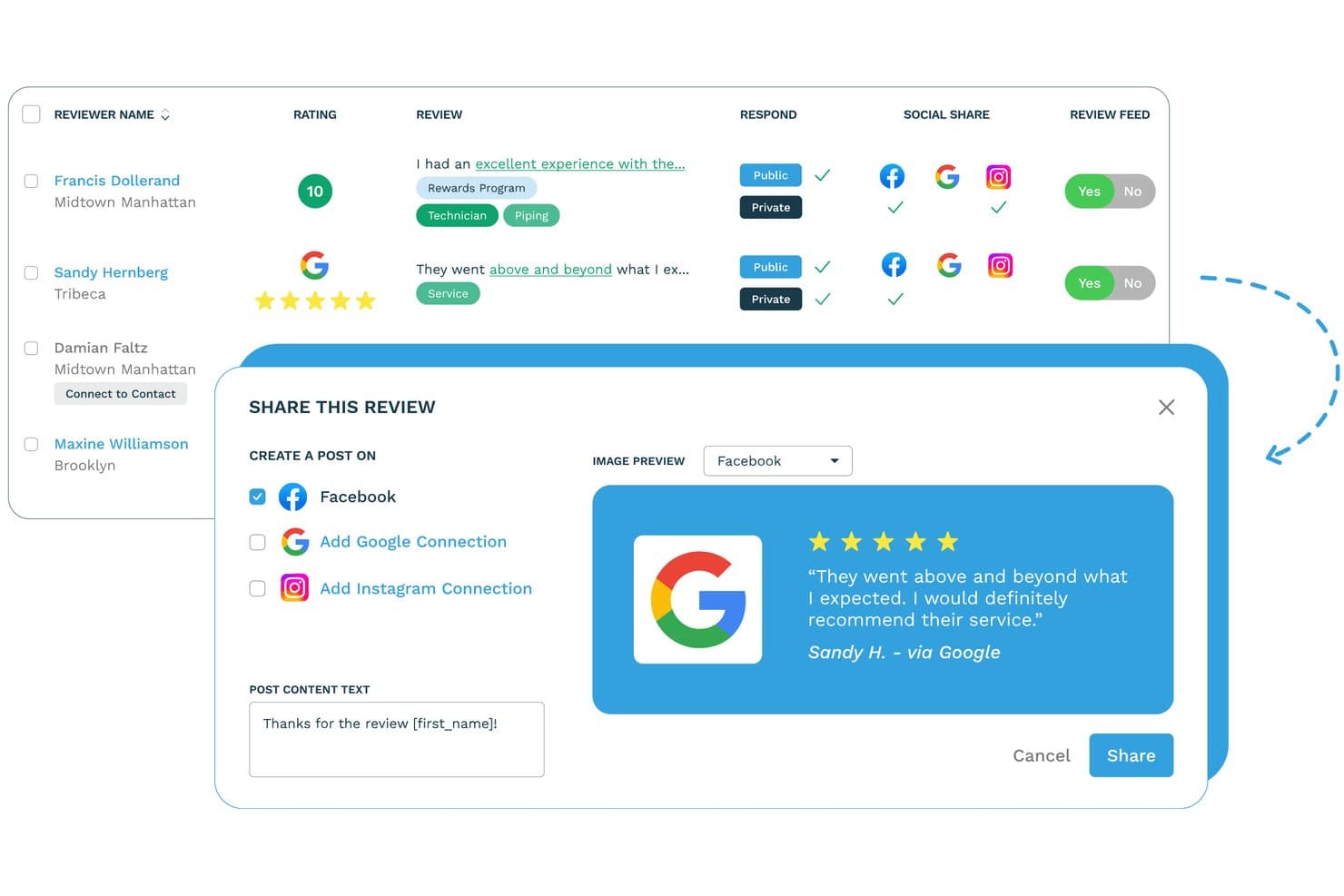
ReputationStacker lets users share customer reviews directly to social media. ReputationStacker is a reputation management platform for small businesses that automates review requests and customer feedback collection via email and SMS, monitors reviews across 100+ platforms, and centralizes response management in a single dashboard.
Who Is ReputationStacker Best For?
ReputationStacker is a strong fit for small business owners and multi-location operators who want to generate more reviews fast without a complicated setup.
Why I Picked ReputationStacker
ReputationStacker earns its spot on my shortlist because it makes launching and automating review generation remarkably straightforward, while still giving businesses flexibility over how their campaigns are structured and managed. I also like that the automated email and SMS follow-up sequences run without any manual input after setup, which is how users consistently triple their review volume within three months. For healthcare SMBs specifically, the HIPAA-compliant Professional plan removes a compliance barrier that most review tools simply ignore.
ReputationStacker Key Features
- AI review response assistant: Generates on-brand, context-aware reply drafts for incoming reviews, which you can auto-publish or approve before posting.
- Multi-location rollup reporting: Aggregates performance data across all your locations into a single view, with location-level drill-down for granular comparison.
- Review widgets: Embeds verified reviews and star ratings directly on your website to display social proof to site visitors.
- Custom sentiment categories: Lets you define your own feedback categories and keywords so sentiment analysis maps to what actually matters to your business.
ReputationStacker Integrations
ReputationStacker has integrations with Google Business Profile and Facebook, plus Zapier and an API for custom connections.
Pros and Cons
Pros:
- Customizable review campaigns and customer feedback workflows
- Custom sentiment analysis with user-defined categories
- Smart routing intercepts negative reviews internally
- Automated review requests and follow-ups
Cons:
- Direct replies limited to Google and Facebook
- No local business listing management
Learn more about ReputationStacker: Best with usage-based pricing flexibility
- Free trial available
- From $10/location/month

RightResponse AI provides a centralized dashboard to track reviews, sentiment, and response performance with AI insights. RightResponse AI is a reputation management platform for small businesses that uses AI to generate personalized review responses, monitor reviews across platforms, and provide competitor insights.
Who Is RightResponse AI Best For?
Small business owners and marketing teams who need to manage and respond to online reviews across multiple platforms.
Why I Picked RightResponse AI
I picked RightResponse AI as one of the best because its usage-based pricing flexibility lets my team scale review management without committing to a fixed monthly quota. I like that I can pay only for the number of review replies we actually need, which is ideal for small businesses with fluctuating review volumes. The platform also tracks usage in real time, so I always know exactly what we’re spending.
RightResponse AI Key Features
- AI-powered review response generator: Automatically drafts tailored replies to customer reviews using AI.
- Competitor map ranking insights: Shows how your business ranks against local competitors on Google Maps.
- Multi-location management: Lets you manage reviews and responses for multiple business locations from one dashboard.
- Review analytics dashboard: Tracks review volume, sentiment, and response rates across all connected platforms.
RightResponse AI Integrations
Native integrations are not currently listed. The tool supports integrations via API.
Pros and Cons
Pros:
- Bulk response tools for high-volume review handling
- Sentiment analysis highlights customer feedback trends
- Multi-location review management in one dashboard
Cons:
- API access required for most integrations
- Lacks built-in social media monitoring features
Learn more about RightResponse AI: Best for review management automation
- Free 14-day trial available
- From $45/location/month
Visit WebsiteCustomer Rating:4.9/5
Reviewflowz displays a customer review alongside an AI-generated response draft within its review management interface. Reviewflowz is a review management platform designed for small businesses that want to stay on top of customer feedback across multiple review sites.
Why I picked Reviewflowz: I picked Reviewflowz because its review management automation brings reviews directly into your team’s workflow, letting you read and reply from Slack without opening another dashboard. It also supports review collection after NPS and CSAT surveys, making it easier to capture timely feedback. The AI assistant, Lenny, highlights trends across your reviews and competitors, helping you spot insights you might otherwise miss.
Standout features & integrations:
Features include customizable review widgets to showcase your best feedback, sentiment analytics that break down customer tone over time, and smart links that trigger review requests after surveys. You can also route review replies by team member and use AI assistance to help draft responses while keeping control over tone and message.
Integrations include Google My Business, Yelp, TripAdvisor, Trustpilot, Slack, MS Teams, Zendesk, Intercom, Google Sheets, ChatGPT, Claude, and Zapier.
Pros and Cons
Pros:
- Aggregates reviews from multiple platforms into one place
- Helps businesses respond to feedback promptly, improving customer trust
- Allows businesses to showcase testimonials on their websites
Cons:
- Some users desire more flexibility in widget design
- AI Chat Assistant (Lenny) is limited to higher plans
Learn more about ReviewFlowz: Best for personalized reputation strategies
- Not available
- Pricing upon request
Visit WebsiteCustomer Rating:5/5
Erase.com dashboard showing high-rated Google reviews with quick removal success stories from clients. Erase.com is an online reputation management service designed to help small businesses remove harmful content, manage reviews, and promote positive narratives. It works with industries ranging from healthcare to hospitality, tailoring its approach to each client’s unique needs.
Why I Picked Erase.com: I picked Erase.com for its emphasis on personalized strategies that address the specific challenges faced by small businesses. Instead of using a one-size-fits-all approach, the service analyzes your industry and reputation landscape to build a plan that may include content removal, review management, and targeted content creation. This helps you control the narrative by reducing the visibility of negative material while boosting the reach of positive stories. I also like that Erase.com takes a proactive stance—creating and publishing high-quality content to improve search rankings before problems arise.
Standout Features & Integrations:
Features include tiered service packages for different budgets and needs, dedicated one-on-one support from specialists, and privacy protection that removes sensitive personal or business data from public databases.
Integrations cover platforms like Google, BBB, Glassdoor, TrustPilot, RateMDs, Vitals, WebMD, Healthgrades, Avvo, Expedia, Booking.com, Indeed, Tripadvisor, Airbnb, Ripoff Report, Open Table, Amazon, and YellowPages.
Pros and Cons
Pros:
- Flexible service packages with no charge if removal is unsuccessful
- Effective in removing certain types of unwanted online content
- Responsive account managers with regular check-ins
Cons:
- No clear information about pricing
- Results may vary depending on the type and source of content
Learn more about Erase.com: Best for AI-powered review insights
- Free demo available
- Pricing upon request
Visit WebsiteCustomer Rating:4.8/5
Birdeye offers a range of alerts, including for reviews that were left with no response, for better reputation monitoring and management. Birdeye is an enterprise-grade reputation and customer experience platform designed for multi-location and growing businesses that want to actively improve their online presence at scale. It supports organizations focused on managing reviews, boosting local search visibility across hundreds or thousands of locations, and engaging customers through multiple digital channels.
Why I picked Birdeye: I chose Birdeye for its comprehensive, AI-driven approach to reputation management built to support enterprise and large multi-location use cases. The platform combines review monitoring across 200+ platforms with automated review requests, making it easier for teams to gather and respond to customer feedback efficiently at scale.
Birdeye also leverages AI agents to help automate responses, surface insights, and reduce the manual workload typically associated with reputation and customer experience management. Its survey tools enable businesses to collect structured customer insights, while AI-powered sentiment analysis helps identify satisfaction trends and emerging issues over time.
Standout features & integrations:
Features include AI-powered review management to monitor and request reviews across multiple platforms, sentiment and competitor analysis to track brand perception and market positioning, and local listings optimization to enhance visibility in search results.
Integrations include over 3,000 options across accounting, CRM, marketing, healthcare, and industry-specific tools, like QuickBooks, Salesforce, HubSpot, Mailchimp, Shopify, Xero, AppFolio, AthenaHealth, Cerner, MINDBODY, Clio Manage, and Timely.
Pros and Cons
Pros:
- Error alerts enhance proactive client management
- Bulk social publishing features
- Unified dashboard simplifies multi-client monitoring
Cons:
- AI features might have a learning curve for new users
- Limited customization in some features
Learn more about Birdeye: Best for local SEO
- 14-day free trial + free demo
- From $31/month (billed annually)
Visit WebsiteCustomer Rating:4.7/5
BrightLocal boosts local SEO and manages online reputation for businesses. BrightLocal is a reputation management software tailored for small businesses that aim to enhance their local search visibility. Its primary users are local business owners who want to manage their online reputation and improve local SEO rankings.
Why I picked BrightLocal: It excels in local SEO, offering features like citation tracking and local search audit reports. These tools help your team understand and improve your business's visibility in local search results. BrightLocal also offers review monitoring, allowing you to keep track of customer feedback. Its focus on local SEO makes it a valuable tool for businesses that rely on local customers.
Standout features & integrations:
Features include citation tracking to manage and update business listings across platforms, local search audit reports to assess your visibility in local search results, and review monitoring to stay on top of customer feedback. These tools help you maintain accurate online information and improve local search performance. They also support timely engagement with customer reviews to enhance your brand reputation.
Integrations include Google My Business, Facebook, Yelp, Trustpilot, TripAdvisor, Twitter, LinkedIn, Instagram, Bing, and Yellow Pages.
Pros and Cons
Pros:
- Easy review monitoring
- Focused on local business needs
- Comprehensive search audit reports
- Detailed citation tracking
- Effective local SEO tools
Cons:
- Limited customization options
- Initial setup complexity
- May need additional training
- Requires regular updates
- Limited advanced features
Learn more about BrightLocal: Best for customer feedback analysis
- Free demo available
- Pricing upon request
Visit WebsiteCustomer Rating:4.7/5
ReviewTrackers monitors reviews to boost satisfaction and track feedback. ReviewTrackers is a reputation management software aimed at businesses that need to monitor and respond to customer reviews. Its main users include companies that want to improve customer satisfaction and analyze feedback trends.
Why I picked ReviewTrackers: It specializes in customer feedback analysis, providing tools to collect, analyze, and act on customer reviews. The software's analytics feature helps your team understand customer sentiments and identify areas for improvement. With customizable reports, you can track performance over time. The feedback request feature ensures you gather insights directly from your customers, which is essential for maintaining a positive reputation.
Standout features & integrations:
Features include customizable reports, feedback request capabilities, and sentiment analysis. The customizable reports allow you to tailor insights to your business needs. Feedback request capabilities help you actively gather customer opinions, while sentiment analysis provides a deeper understanding of customer feelings.
Integrations include Google My Business, Facebook, TripAdvisor, Bing, Yahoo, Yellow Pages, Avvo, Healthgrades, Vitals, and Zocdoc.
Pros and Cons
Pros:
- Supports multiple review platforms
- Insights into customer trends
- Effective feedback collection
- Customizable reporting options
- Detailed sentiment analysis
Cons:
- May need technical assistance
- Learning curve for new users
- Limited offline support
- Requires regular monitoring
- Initial setup complexity
Learn more about ReviewTrackers: Best for real-time alerts
- 14 day free trial + free demo available
- From $599
Visit WebsiteCustomer Rating:4.5/5
Mention monitors real-time brand mentions for small businesses and marketers. Mention is a reputation management tool tailored for businesses that need to monitor their online presence in real-time. Its main users are small businesses and marketers who want to stay informed about brand mentions and customer feedback.
Why I picked Mention: It offers real-time alerts that keep your team updated on brand discussions as they happen. This feature is crucial for businesses that need to respond quickly to customer feedback or emerging issues. Mention also provides analytics to help you understand trends and measure the impact of your brand's online presence. The tool's user-friendly interface makes it accessible for teams of all sizes.
Standout features & integrations:
Features include media monitoring to track brand mentions across various platforms, sentiment analysis to understand public perception, and data export capabilities for easy sharing of insights. These tools help you stay informed about your brand’s presence and reputation. They also support efficient collaboration across your team.
Integrations include Slack, Zapier, Buffer, Hootsuite, Google Analytics, HubSpot, Salesforce, Microsoft Teams, Twitter, and Facebook.
Pros and Cons
Pros:
- Insightful sentiment analysis
- Accessible for small teams
- Easy data export options
- Comprehensive media monitoring
- Real-time alert system
Cons:
- Limited offline capabilities
- May need additional training
- Requires constant monitoring
- Steeper learning curve for new users
- Limited customization options
Learn more about Mention: Best for global media insights
- Free demo available
- From $10,000/year (billed annually)
Visit WebsiteCustomer Rating:4.1/5
Meltwater monitors global media to manage brand presence effectively. Meltwater is a reputation management tool geared towards businesses that need comprehensive media monitoring and analysis. Its primary users are companies looking to manage their brand presence across global media outlets.
Why I picked Meltwater: It excels in providing global media insights, offering features like media monitoring and analytics dashboards. These tools help your team understand how your brand is perceived worldwide. Meltwater's real-time alerts ensure you're always aware of what's being said about your brand. The platform's analytics allow you to track trends and measure the impact of your media strategy.
Standout features & integrations:
Features include comprehensive media monitoring to track brand mentions across platforms, analytics dashboards to reveal media trends and performance, and real-time alerts to keep you informed of important mentions. These tools ensure your team stays up to date with your brand's media presence. They support timely responses and data-driven strategy adjustments.
Integrations include Salesforce, HubSpot, Google Analytics, Marketo, Slack, Microsoft Teams, Facebook, Twitter, Instagram, and LinkedIn.
Pros and Cons
Pros:
- Detailed media trend insights
- Suitable for large-scale operations
- Real-time alert system
- Effective analytics dashboards
- Comprehensive global media coverage
Cons:
- Initial setup complexity
- Limited customization options
- May need technical support
- Requires regular monitoring
- High learning curve
 Best for integrated CRM features
- Free plan available
- From $8.33/month (billed annually)

Zoho Publish manages reviews and analyzes sentiment for businesses. Zoho Publish is a reputation management software tailored for businesses aiming to manage their online presence. Its main user base includes over 4,000 businesses globally, focusing on review management and sentiment analysis.
Why I picked Zoho Publish: It offers integrated CRM features, making it unique for businesses wanting a unified approach to customer relationship management. Features like automated responses and Google Business Profile management are designed to enhance your team's efficiency. The ability to categorize reviews and gain insights into performance further supports its CRM integration, providing a holistic view of your customer interactions.
Standout features & integrations:
Features include review automation, sentiment analysis, and scheduled reports. The ability to automate responses saves your team time and ensures consistent communication. Scheduled reports help you keep track of your reputation over time, providing valuable insights.
Integrations include Zoho CRM, Zoho Desk, Zoho Mail, Zoho People, Zoho Projects, Zoho Creator, Zoho Analytics, Zoho Campaigns, Zoho Books, and Zoho Inventory.
Pros and Cons
Pros:
- Insights into performance metrics
- Efficient review categorization
- Detailed sentiment analysis
- Automated response capabilities
- Integrated CRM features
Cons:
- Limited customization options
- May need technical support
- Requires Zoho ecosystem familiarity
- Limited third-party integrations
- Learning curve for beginners
Learn more about Zoho Publish:
Other Reputation Management Software for Small Business
Here are some additional reputation management software for small business options that didn’t make it onto my shortlist, but are still worth checking out:
- 11Birdeye Best for review management
- 12GoHighLevelBest for small marketing agencies
- 13Marketing360Best for marketing integration
- 14ThryvBest for local business solutions
- 15AicarmaBest for tracking AI brand visibility
- 16Brand24Best for social media monitoring
- 17SurveySparrowBest for customizable surveys
- 18ReviewIncBest for multi-location businesses
- 19DoctibleBest for healthcare practices
- 20GatherUpBest for feedback requests
How I Evaluate Reputation Management Software
I split my evaluation into baseline criteria—like multi-platform review aggregation and response workflows—and differentiators that separate the tools worth using from the rest.
Core Functionality (Table Stakes For This List)
When I'm selecting tools for my list, I rank each one on a scale from 0 (does not offer the functionality) to 5 (excels in this area) for each core functionality listed below. Then, I calculate the tool's total score into a percentage. Each tool needs to achieve a minimum total score of 75% to be considered for inclusion.
- Review Monitoring & Aggregation: I check how many review sources a tool pulls from and whether it syncs in real time—covering Google, Yelp, Facebook, and industry-specific sites matters for full visibility.
- Review Response Management: The ability to reply directly from one dashboard is key, so I evaluate whether a tool offers templates, team assignment workflows, and AI-assisted drafts.
- Review Generation Campaigns: I look for multi-channel outreach options like email, SMS, and QR code-based requests that let you trigger review asks after a customer interaction.
- Brand & Social Mention Monitoring: Beyond review sites, I evaluate whether a platform tracks brand mentions across social channels, news outlets, blogs, and forums to catch conversations early.
- Sentiment Analysis & Reporting: Good reporting goes past star ratings, so I look for AI-driven sentiment tagging, trend analysis, and dashboards that help you spot patterns over time.
- Multi-Location & Listing Management: For teams managing more than a handful of locations, I evaluate whether the tool supports bulk listing updates, directory sync, and role-based access across profiles.
Once I have a list of tools that meet this criteria, I consider what sets each platform apart.
Differentiating Factors (What Sets Vendors Apart)
Here's how I compare and contrast different vendors:
Standout Features
Competitor benchmarking is something I pay close attention to—knowing how your star ratings and review volume compare against rivals gives real strategic value when reporting to leadership. I also evaluate local SEO tools like Google Business Profile optimization and local rank tracking, since reputation and search visibility are tightly linked. Customer feedback surveys are another differentiator; tools with built-in NPS or CSAT surveys let you catch dissatisfied customers before they leave a public review.
Beyond Features
Integrations matter a lot here—I check whether a platform connects with CRM and helpdesk tools like Salesforce or Zendesk, since review request triggers often depend on post-transaction data flowing between systems. Industry specialization is another factor I weigh, particularly whether a vendor covers niche review sites relevant to verticals like healthcare or hospitality. For teams managing dozens or hundreds of locations, I also evaluate scalability, including white-label options for agencies and hierarchical reporting for franchise structures.
How to Choose Reputation Management Software for Small Business
It’s easy to get bogged down in long feature lists and complex pricing structures. To help you stay focused as you work through your unique software selection process, here’s a checklist of factors to keep in mind:
| Factor | What to Consider |
| Scalability | Ensure the software can grow with your business. Look for solutions that can handle increased data and user numbers as your team expands. |
| Integrations | Check if the software integrates with tools your team already uses, like CRM systems, social media platforms, and email marketing tools. |
| Customizability | Look for software that lets you tailor dashboards and reports to fit your specific business needs, allowing your team to focus on what's important. |
| Ease of Use | Choose a solution with a user-friendly interface that requires minimal training, so your team can get up and running quickly without a steep learning curve. |
| Budget | Consider your budget constraints and look for software that offers transparent pricing. Ensure the features you need are included in the plan you choose. |
| Security Safeguards | Make sure the software has strong security measures to protect your data. Look for features like data encryption and compliance with industry standards. |
| Support | Evaluate the level of customer support available, such as 24/7 chat or phone support, to ensure your team can get help when needed. |
| Analytics | Opt for software that provides detailed analytics to help your team understand customer sentiment and track reputation over time. |
Trends in Reputation Management Software for Small Business
In my research, I sourced countless product updates, press releases, and release logs from different reputation management software for small business vendors. Here are some of the emerging trends I’m keeping an eye on:
- AI-Driven Insights: Many tools now use AI to analyze customer feedback and predict trends. This helps businesses understand customer sentiments quickly. For example, some vendors offer AI-powered dashboards that highlight key insights and suggest actions.
- Sentiment Analysis: Advanced sentiment analysis tools are becoming more common. They help businesses gauge public opinion about their brand in real-time. This allows teams to respond faster to negative feedback and capitalize on positive trends.
- Voice of Customer (VoC) Programs: More software is incorporating VoC features, allowing businesses to capture and analyze customer opinions across various channels. This helps improve products and services based on direct customer input.
- Reputation Scorecarding: Vendors are introducing reputation scorecards that give businesses a quick overview of their online reputation. These scorecards often include metrics like review ratings and social media mentions, helping teams track performance.
- Localized Reporting: There's a growing trend towards localized reporting, which helps businesses understand their reputation in specific geographic areas. This is particularly useful for businesses with multiple locations, as it allows them to tailor their strategies to local markets.
What Is Reputation Management Software for Small Business?
Reputation management software for small business is a tool that helps businesses monitor and influence their online presence. These tools are generally used by marketing professionals and business owners who want to manage customer feedback and improve their brand image. Features like review monitoring, sentiment analysis, and feedback collection help with understanding customer opinions and responding to them effectively. Overall, these tools provide businesses with the insights needed to maintain a positive reputation and foster customer trust.
Features of Reputation Management Software for Small Business
When selecting reputation management software for small business, keep an eye out for the following key features:
- Review monitoring: Tracks online reviews across multiple platforms, helping you stay informed about customer feedback.
- Sentiment analysis: Analyzes customer sentiments to provide insights into public opinion about your brand.
- Feedback collection: Gathers customer opinions through surveys or direct feedback, aiding in product and service improvement.
- Social media management: Manages and schedules posts across social media platforms, ensuring a consistent online presence.
- Automated review requests: Sends automated requests for reviews, increasing the likelihood of receiving customer feedback.
- Analytics dashboards: Offers visual insights into reputation metrics, helping you track performance over time.
- Reputation scorecards: Provides a quick overview of your online reputation with key metrics and trends.
- Localized reporting: Offers insights into your brand's reputation in specific geographic areas, useful for businesses with multiple locations.
- Voice of Customer (VoC) programs: Captures and analyzes customer opinions from various channels to improve customer satisfaction.
Benefits of Reputation Management Software for Small Business
Implementing reputation management software for small business provides several benefits for your team and your business. Here are a few you can look forward to:
- Improved brand image: By monitoring reviews and responding quickly, you can maintain a positive brand image and foster customer trust.
- Enhanced customer insights: Sentiment analysis and feedback collection offer valuable insights into customer opinions, helping you make informed decisions.
- Increased customer engagement: Automated review requests and social media management keep your brand engaged with customers and encourage more feedback.
- Better decision-making: Analytics dashboards and reputation scorecards provide clear data, aiding in strategic planning and decision-making.
- Localized strategy optimization: Localized reporting helps tailor your strategies to specific geographic areas, improving local market performance.
- Proactive reputation management: Real-time alerts and VoC programs allow you to proactively manage your reputation and address issues before they escalate.
Costs and Pricing of Reputation Management Software for Small Business
Selecting reputation management software for small business requires an understanding of the various pricing models and plans available. Costs vary based on features, team size, add-ons, and more. The table below summarizes common plans, their average prices, and typical features included in reputation management software for small business solutions:
Plan Comparison Table for Reputation Management Software for Small Business
| Plan Type | Average Price | Common Features |
| Free Plan | $0 | Basic review monitoring, limited feedback collection, and simple analytics. |
| Personal Plan | $5-$25/ user/month | Review monitoring, sentiment analysis, feedback collection, and basic social media management. |
| Business Plan | $30-$75/ user/month | Advanced analytics, automated review requests, social media management, and localized reporting. |
| Enterprise Plan | $100-$200/user/month | Customizable dashboards, comprehensive analytics, multi-location management, and dedicated support. |
Reputation Management Software for Small Business FAQs
Here are some answers to common questions about reputation management software for small business:
How do you track reputation?
Tracking your reputation involves using tools that monitor brand mentions and customer feedback across various platforms. Social media listening tools and review monitoring are key components. They help you stay informed about public opinions and allow you to respond promptly to any issues that arise.
Can reputation management software help with negative reviews?
Yes, these tools often provide features that help you address negative reviews effectively. They allow you to monitor reviews in real-time and respond quickly. Some software even offers templates for responses, helping you maintain a positive image and resolve customer concerns efficiently.
Is it possible to automate review requests?
Many reputation management tools include features that automate review requests. This means you can set up the software to send requests to customers after a transaction or interaction. Automation ensures consistency in gathering feedback and can significantly increase the number of reviews you receive.
How can reputation management software improve my business?
By using these tools, you can gain insights into customer opinions and address issues proactively. This helps improve customer satisfaction and loyalty. Additionally, maintaining a positive online reputation can attract new customers and enhance your brand’s credibility in the market.
Why is online reputation management important for small businesses?
Online reputation management helps small businesses shape how they’re perceived by potential customers across review sites and search engines. By monitoring and responding to new reviews and encouraging positive reviews, businesses can protect their business reputation and improve their search rankings.
Tools like online reputation management software, online brand monitoring services, brand intelligence software, and online reputation management tools streamline these efforts, making it easier to handle review responses and build a consistent, trustworthy online presence.
How can small businesses improve customer experience to build trust?
To build trust, small businesses must focus on delivering a great customer experience that encourages testimonials, referrals, and even promoter behavior—where happy customers actively promote the business.
Positive interactions often lead to positive reviews, which influence potential customers deciding where to spend their money. Actively managing these touchpoints can significantly boost your reputation and drive word-of-mouth growth.
How does digital marketing help manage a small business’s online reputation?
Digital marketing is key to increasing visibility and improving search engine performance. Small businesses can use strategies like SEO to climb search rankings, ensuring that their star rating and positive reviews are more prominently displayed.
Incorporating tools like widgets and automated workflows can help streamline content updates and feedback collection, all contributing to a more favorable online presence.
How can SMS and notifications help with small business reputation management?
SMS and notifications are powerful tools for engaging customers quickly and directly. Small businesses can use text messaging to request feedback, remind customers to leave positive reviews, or respond to concerns in real time. These communication channels help maintain a positive customer experience and support proactive online reputation management.
What are white-label options, and how do they support reputation management for small business resellers or agencies?
White-label reputation management platforms let agencies offer services like widgets and review response tools under their own brand. This allows small business resellers to help clients manage reviews, track customer sentiment, and improve business reputation without building software from scratch. It’s a scalable way to support multiple small business clients while maintaining brand consistency.